
Security teams log 54% of successful attacks and alert on just 14%. The rest move through your environment unseen.
The Picus whitepaper shows how breach and attack simulation tests your SIEM and EDR rules so threats stop slipping by detection.


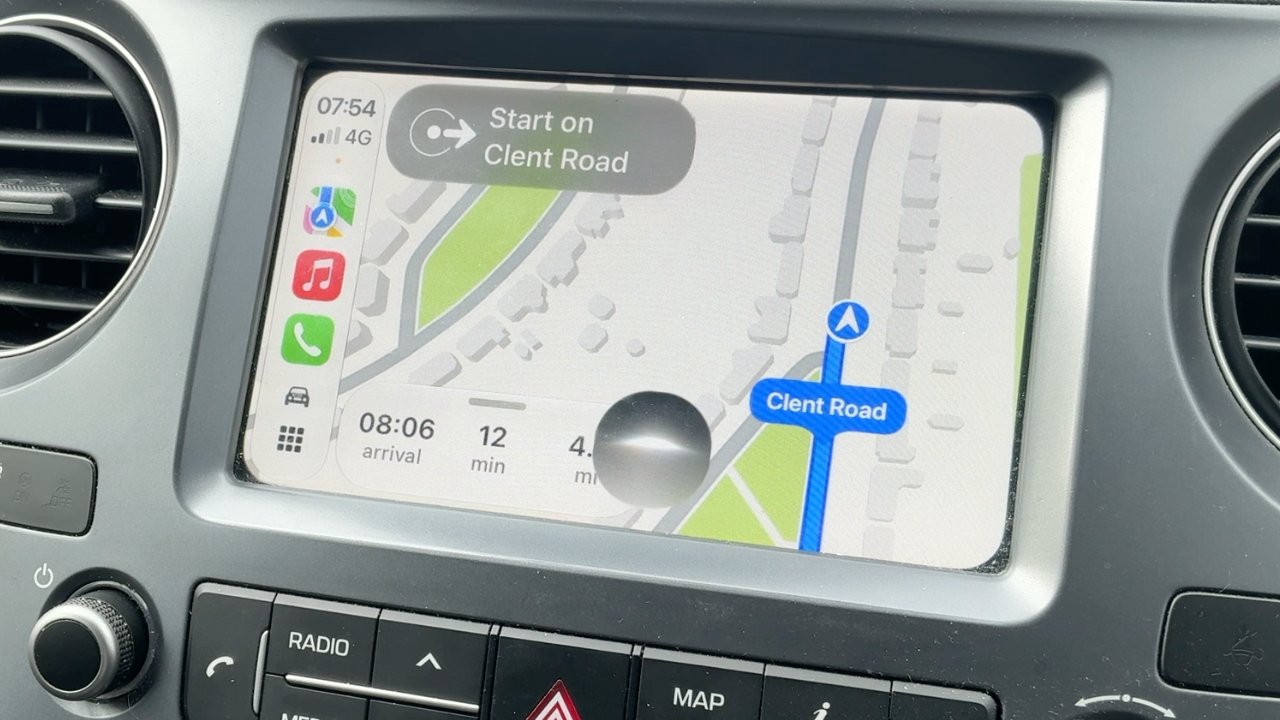
Apple is doing it again, it is coming late to the party. But it will eventually dominate AI because of how it thinks about users and about use cases where rivals consider only technical issues.
Even when testing the betas of Siri AI on the same or similar devices, everyone at AppleInsider is having different experiences. For instance, I found that in the first developer beta on both the Mac and the iPhone, Siri AI could be staggeringly irritating and sometimes no better than the old Siri. With the third developer beta of macOS Golden Gate, Siri AI would sometimes just abandon any request I make of it, but was always fine for everyone else.
Across all of the betas, though, we are all finding that there are things Siri AI can do that are exceptional, and better than its rivals. Those irritations will surely be fixed before the public release, too.
Only, it almost doesn’t matter. As long as Apple can at least cut down on the aggravations such as really anything you ask via CarPlay, Siri AI is certain to beat everything else. Apple will go from being behind on AI, to absolutely in front.
It’s just that rather than this being because of the technical quality of Apple Intelligence, it’s because of how Apple thinks about users, and because of how, yet again, Apple owns the whole stack. Apple designs and controls the hardware and the software, and in this case it means specifically that Siri AI is physically better positioned than any other AI app.
Over and over, Apple has come late to new technologies, yet then instantly taken over as the leading provider. It has so instantly demonstrated better ways of doing things that all its rivals with all of their benefit of coming first, have subsequently changed their plans to copy Apple.
You’ve seen that with Wi-Fi adoption, with the death of the floppy disk, the rise of USB, and the death of the headphone jack on phones. Apple’s launching of Siri AI is exactly like this, with the one exception that this time, rivals cannot copy it. Or at least, they cannot copy it on the iPhone because no alternative can be as completely embedded in iOS.

Siri AI on CarPlay is not in beta, it’s in Bane-of-My-Life.
It’s true that the more you know and use AI chatbots, the faster you use them and the quick shortcuts you can find to enter prompts. But for most people, most of the time, if you want to use an AI service, you have to:
Compare that to the new Siri AI on iPhone:
There’s still the issue that a user has to think to try something, but Siri AI is part of the familiar Spotlight. And Spotlight will prompt you by trying to auto-complete your searches, showing you a range of what can be done.
Although I wish I could remember what I was searching Spotlight for when it tried to autocomplete “Erase all content and settings” for me.

This is me trying to recreate something, but Siri AI/Spotlight really did offer “erase all content and settings” as a suggestion when I was searching for something else.
But the thing is that Siri AI is now going to be just a swipe away for every iPhone user, and moreover it’s a swipe that every user already knows to do.
Siri AI is therefore close to omnipresent and it works because Apple has expressly thought about how users might use it. Compare that to Microsoft, which has also made AI a deep part of its OS, but instead of being convenient and useful, its pushing of Copilot antagonizes users.
Then Apple, too, has the advantage that not only can people speak to Siri AI, they will do it in precisely the same way they’ve already learned to with “Hey, Siri,” starting with iOS 8 in 2014. Or then just “Siri,” from iOS 17 in 2023.
So every iPhone user already knows how to use Siri AI, and the only learning curve is about discovering what it can and cannot do.

One improvement we’ve seen in the beta releases is that Spotlight now always prompts you with “Search or Ask,” letting you know it’s more than a searching tool.
It’s the same for the iPad, but surprisingly it is now also the case that Siri AI is going to be used, and useful, on the Mac. Apple talks a good game about sharing the best features across all of its platforms, but that hasn’t really been the case with Siri, until now.
Whether or not your Mac has a microphone, you’ve at least long been able to tap the Command key twice and call up “Type to Siri.” But you’d always type your search, or your prompt, and then have to wait.
Then it might respond, or more recently it might offer to pass your request on to ChatGPT, and you’d wait again. It’s not like this was slow and it’s not even as if it is any faster on the iPhone, but it was slow enough and disruptive enough that it just felt far less useful on a Mac.

This was a real issue I had and Siri AI sorted it. Select a set of documents, right click and you get an Ask Siri box that you can pop a question into.
That’s because while it changed over the years, in its most recent incarnation before Siri AI, when you called up Siri on a Mac, it overlaid a corner of the screen rather than filling it. That made you expect to be able to continue working. Not while you were typing the prompt, of course, but while Siri was acting on your search or query, or perhaps even as you spoke your command into it.
Instead, no. Take your hands off the keyboard, there was no way to continue working on anything while you were using Siri.
Plus speaking of the keyboard, surely the only way anyone ever found Type to Siri was if they accidentally drummed their fingers on the Command key. I’ve definitely activated it more times by accident than I ever did intentionally.
So the keyboard shortcut was little known, and Mac mini and Mac Studio owners don’t necessarily have a microphone by which to invoke Siri vocally. Siri was on the Mac, but it wasn’t for the Mac.
Or at least, that used to be the case.
It’s great that swiping down on an iPhone to get Spotlight now gives you Siri AI. Spotlight used to need a certain swipe down the middle from somewhere near the top of the screen, but not actually at the top.
Then actually swiping down from the center at the top of the iPhone screen used to bring up Control Center. If that’s how you were used to doing it, this is a change you’ll take time to get used to.
But for whatever reason, I’ve always got Control Center by swiping down from the top right of the iPhone screen, so I’m fine. That makes me wonder how I ever found Siri AI in Spotlight, but it also makes me suspect that Apple has done this because most people swipe from the center.
The result, though, is the same, which is that you are presented with a familiar Spotlight search which also interprets what you type into there and sends it to Siri AI.
On the Mac, those three people who had found and liked pressing Command twice to call up Siri, can still do exactly that, although it now launches Spotlight instead of a separate glowing Siri dialog. For the rest of us, the familiar Spotlight keystroke of Command-Space brings up Spotlight, which now opens with a bar that says “Search or Ask.”
I use Command-Space to launch Alfred 5, a Spotlight alternative, but I’ve come to like the new Spotlight/Siri AI so much that I’ve given it a keystroke of Option-Command-Space. To set a keystroke, go to Settings, Keyboard, click Keyboard Shortcuts, then go into the Spotlight section and change what’s there to whatever you prefer.
If you listen to the AppleInsider podcast, you’ll have heard me vacillate between how great and how terrible the new Siri AI is. Almost everything great it has done for me, it has done on the Mac, and it is transformative.
I just signed a book contract and naturally part of it is that I will deliver one manuscript at the end. But because of back and forth discussing the topic, I’ve ended up with multiple sample chapters and needed to compile them into one Pages document.

If it’s on your iPhone, Siri AI can find it. Usually. It’s churlish to point out that it sometimes fails over what appear to be obvious elements, such as recognizing that it actually does have your home address, because overall it’s spectacularly useful.
Only, no matter what I did, the word count for that one Pages document was something like 3,000 words short of the total of all the separate chapters. I can’t tell you how often I started over, opening versions of chapters and copying and pasting, but eventually I did this:
And it did it. It actually did it stunningly quickly, coming back in a flash with the fact that I’d somehow missed out two whole sections from certain of the chapters. I pasted those sections into the new document and am now somehow 1,000 words over, but I’m okay with that.
Or on a totally different book project, I had to report to the publisher that a grant we’d applied for hadn’t worked out. I wanted to offer an alternative we could do, but it meant my mentioning two particular people who’d been sources on the book and I totally blanked.
Give me a break, it was five in the morning and I really liked both of these people, I just could not remember my own name, let alone theirs. Siri AI told me the answer.
It took a couple of goes, asking about books and sources, but it told me their names and I got to say aloud, oh, yes, of course.
All of this was done at my Mac, where I would never have used Siri before. Using my iPhone, and specifically swiping down so I could type a prompt, I’ve had very good results with map directions.
Shortly I’m going to be driving some people to a thing and it’s a long enough trip that they say they want to stop for lunch partway. They gave me three suggestions and right away Siri AI said, well, that first one is permanently closed so you can forget going there.

You can go back to previous searches through the new Siri app on Mac, iPhone and iPad.
I asked it which was the better of the other two and it successfully summarized the two venues based on price and types of food offered. Then I picked one and asked how much time it would add to the drive if we went off the route to reach this place.
All quick, all exactly the kind of natural conversation that Apple promises we can have with Siri AI, and all of it working well.
Except all of it was also done by typing. For some reason, it’s when I speak to Siri AI that it goes so wrong as to be appallingly bad.
Back in the day, I could be listening to some music as I drive and just ask Siri to add the current track to a certain playlist. Or ask it to play a certain playlist.
They were good times.
Then Apple broke Siri and left it broken for two years. During that time, if you asked anything to do with a playlist, it said it couldn’t find it. Unless you asked again, immediately, in which case very often it would find it and do what you wanted.
With Siri AI, forget anything to do with Apple Music via CarPlay. If I ask for a playlist I’ve called Discoveries, it will play the Apple Music Discovery Station instead, which is not unreasonable.
But if I ask it to play the Heavy Rotation playlist, another one that Apple itself curates, it will almost always play a song called “Heavy Rotation” by a band called Upgrade.
Curiously, if I do this on the Mac, if I type Apple Music commands into Spotlight/Siri AI, it works. It takes a surprisingly long time, but it works.
As I’ve said, mapping things work when I type them too. But I have done rash things like saying aloud, “Siri, take me home via Tim’s house,” and it’s said no.
Or rather, it’s said it doesn’t know where my home is. Ask it why it doesn’t know this and it says the detail is not on my Contact card, even though it is.
Once I asked for directions somewhere and it was so confident that it actually started the Apple Maps route. When I stopped it, pointing out that it had got the wrong place, it apologized, and showed me on screen a one-paragraph biography of a band.
Explain that to me. Because Siri AI couldn’t: it actually then denied having shown me whoever this was.
I wish now that I hadn’t swiped up so quickly and, frankly, angrily, that I didn’t stop to read that bio. I wonder if it were for the band Upgrade. I am single-handedly responsible for their streaming earnings going up.
I’m not kidding about it making me angry. That Apple broke something Siri could do was poor of them, and that they left it broken for years is inexcusable.
But to then launch its improvement and have it still fail at the same things all the time, yes, it warrants the odd off-color response. “I don’t know what to say to that,” Siri has replied to me.
I have some suggestions.
It took me a while to connect the dots and see that, wildly, my Mac is now the best Siri tool. Or rather, that typing to Siri is now exceptionally useful.
Perhaps it’s my British accent, since the betas are set for US English. Certainly, or at least surely, or maybe only probably, all of the problems will be resolved before Siri AI is released publicly.

I use the new Siri app so much that I’ve given it a button on my Stream Deck. It’s on the bottom row, second from the left.
But if I’m not kidding or exaggerating about the frustrations, I’m also not putting you on about how Apple is going to win with Siri AI because of where it has put it, and how it has thought about users.
Because despite my blood pressure being driven up at times, I keep coming back to Siri AI. In the car, that’s just stupid and I put it down to the years of habit before Siri was broken.
But for everything else, especially at the Mac, I keep coming back because it’s at least good enough, and it is right there. It’s a “Siri” command away, it’s a Spotlight command away, and when you invoke it, you can go straight back to working instead of folding your arms and waiting.
I do also find that anything that involves Siri searching its World Knowledge was initially a bust. It’s no good at searching AppleInsider for articles I’ve written about specific topics. For that, since Google is also now a bit poor, I use Claude and it finds everything.
Otherwise, though, World Knowledge does somehow seem to have improved, or perhaps I’ve learned not to bother asking it about particular buildings I’m looking at.
Although I do still keep using Visual Intelligence. I am finding that having it now be part of the camera app means that I sometimes wish it would please stop trying to help me, I’m just taking a photo.
But here’s a measure of Siri AI’s effectiveness. For a year or more now, I have added buttons on my Stream Deck for various AI apps, and eventually settled on just having Claude there.
I’ve not replaced that button yet, but it has come close, and I have added a new button just to open the Siri AI app. If I’ve asked Siri AI something and then closed its response but want to recheck anything, I’ll push that button and be back in the app, back in the conversation.
Mind you, the reason I have a spare Stream Deck button to use for this is that it was previously set to open iPhone Mirroring. That has never once worked for me again since the macOS Golden Gate betas launched.
You know it will, though, you know that issues like this will be fixed by the time macOS Golden Gate comes out of beta testing.
Yet even now, even with frustrations, I am reaching for Spotlight and Siri AI on the Mac, I am pushing a Stream Deck button, and I am talking to Siri on my iPhone. And I am using it far more than any other AI app I’ve got, chiefly because it’s right there where I need it to be.
Rivals try to sell their AI services using terms like agentic or boasting about tokenmaxing, and wonder why people aren’t rushing to buy. What Apple has done, even in this bumpy beta, is provide useful tools and put them where they are needed.
That’s all. But when Apple is firing on all cylinders, that’s what they do. Siri AI is doing just that.
Between Siri finally being good, and Apple earning from other AIs on the App Store, in the long run, Apple is going to be the winner of the AI revolution, or bubble, depending on what you believe.


Australian creator Jazza and the team at Lumin’s Workshop decided a regular gaming die was far too small. They set out to make a twenty-sided die big enough to claim the title of largest dice of any kind, and one that could still tumble and settle on a single face.
The concept began to take shape as the groups collaborated on the huge roach costume project. Discussions at that first meeting kept returning to the concept of scaling up a D20, which they had previously investigated, but this time they wanted to go even bigger to be able to roll it properly. John took on the interior framework, and because a conventional icosahedron has 12 vertices, they created 12 corner pieces to construct those points and 3D printed them. Solid aluminum bars were then screwed along every single outer edge to provide the necessary bracing to keep the design straight even when standing alone. Before ultimately locking everything in, they completed a dry fit with the entire frame, which had to be perfect for the faces to line up properly; a single tiny shift and the whole thing was off.

Twenty faces followed, each starting as a 1.5-meter equilateral triangle. They’d sourced sheets of 20mm foam, and a custom jig helped cut the precise angles required to ensure the edges met perfectly when assembled. Because the foam was fairly thick, they had considered it into their estimations from the start, and layers were stiffened using contact cement to prevent flex. To avoid any gaps, we added extra foam strips to the outer frame bars.
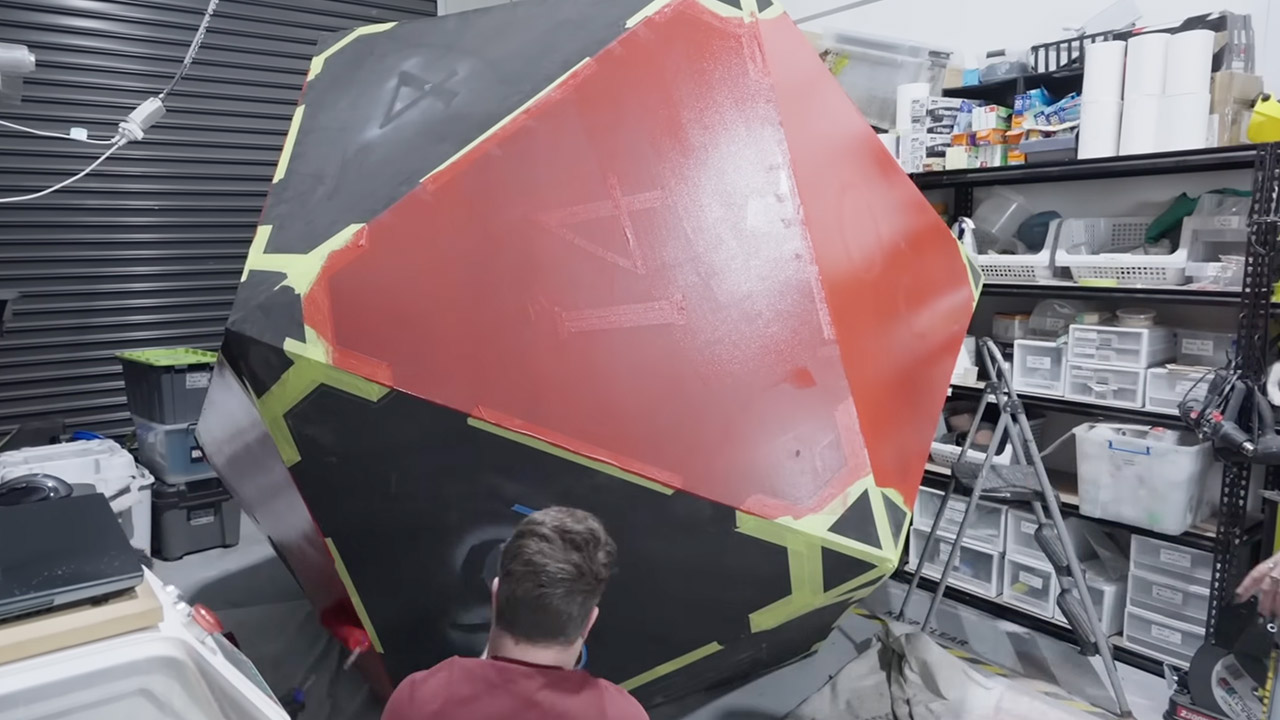
The color and finish came next, with deep red paint applied in multiple coats because the foam soaked up so much of the first layer. We also needed to get the details right, so the edge details and rivet-style accents were painted with a yellow ochre base and then a metallic gold applied with a sponge for texture. Darker shading on the edges to give it an aged appearance, as well as some purposeful cracks to make it look like old stone or marble rather than plain foam, gave the finished die a strong presence.

With the die eventually completed, they required a trailer to transport it out of the factory, so they took it to Lumin’s factory in Campbellfield, outside of Melbourne, for some real-world testing. A trailer was required to haul the beast about, and lifting it and sending it tumbling down a slope resulted in some quite pleasant rolls that fell on various numbers, including one of those ultra-rare twentys when Jazza and a workshop mate assisted. The die is now housed inside the shop as both a display item and an office mascot.
[Source]
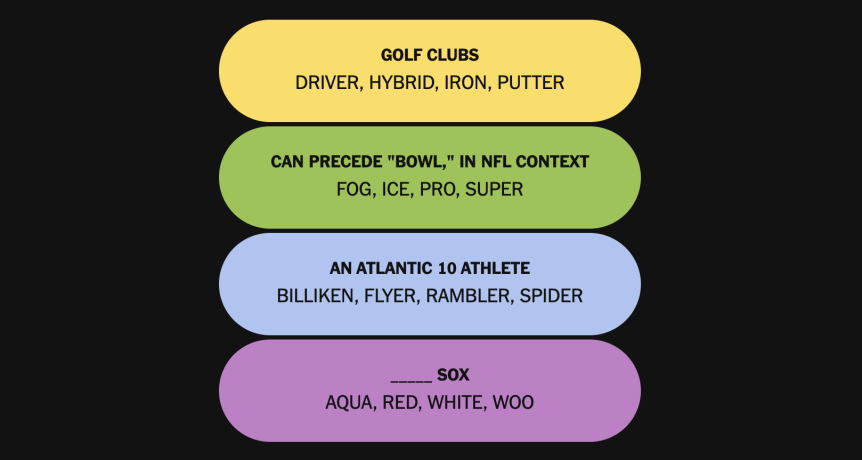
Today’s NYT Connections: Sports Edition puzzle is a fun one, covering a wide variety of sports. If you’re struggling with the puzzle but still want to solve it, read on for hints and the answers.
Yellow group hint: Fore!
Green group hint: Football games.
Blue group hint: College competitors.
Purple group hint: Not shoes.
Yellow group: Golf clubs.
Green group: Can precede “Bowl,” in NFL context.
Blue group: An Atlantic 10 athlete.
Purple group: ____ Sox.

The theme is golf clubs.
The four answers are driver, hybrid, iron and putter.
The theme is can precede “Bowl,” in NFL context.
The four answers are fog, ice, pro and Super.
The theme is an Atlantic 10 athlete.
The four answers are Billiken, Flyer, Rambler and Spider.
The theme is ____ Sox.
The four answers are Aqua, White, Red and Woo.


Expect to save over $600 on the hottest models, including $250 off monitors, for crisp and clear gaming (or writing), 40% off laptops, and up to $1,200 off desktops for true gamers. We’ve rounded up the top Dell coupon codes and discounts so you can save big on pricey tech.
If you haven’t bought from Dell, right now you can get seriously rewarded for switching. Right now, new customers can get 10% off Dell products when you sign up for their email newsletter. Plus, you’ll get additional perks like exclusive offers in your inbox and invites to special sale events, including flash discounts during seasonal sales. Plus, right now you can use Dell promo code AFFBUNDLE10 to get an extra 10% off when you bundle select PCs with accessories. And, save your tech refresh with clearance sale discounts and Dell promo codes today.
As mentioned, one of the best ways to save big on tech purchases is by buying a certified refurbished Dell laptop through the Dell Outlet. The Dell outlet has tons of like-new tech for hundreds less than if bought brand new. You can get top tech like the Dell 14 Premium for $1,036 when bought refurbished—that’s $259 in savings! With this powerful laptop, you’ll have built-in Intel Arc 140T Graphics and FHD RGB + IR Camera and Microphone, among other perks. Be sure to check out the Dell Outlet for tons of Dell tech for hundreds less.
The Dell 14 Plus served as Dell’s rebranding launch, and when we reviewed the laptop, we appreciated its fast performance, great battery life, solid IPS display, comfortable keyboard and touchpad. With this Dell 14 Plus offer, you get the laptop for only $860 if you have a valid college email address that’s been verified. You’ll get the Intel Core Ultra 7 256V with eight core processing, Windows 11 Home operating system, Intel® Arc Graphics, 16 GB of memory, and 1 TB of SSD storage.
Been wanting to upgrade your WFH or gaming setup? Dell has marked down some of their most popular laptops and monitors during their holiday and tech refresh sale events. There are stellar deals like $400 off the Alienware 16X Aurora (one of the best gaming laptops we’ve seen of its kind), and $450 off the Alienware 18 Area-51. Complete your gaming experience with an Alienware Area-51 desktop for $1,200 off, which includes 50% more processing power. Some other great Dell monitor deals we’ve found include the ability for Rewards members to earn up to 3 times the amount of points (or 9% back) on select Alienware monitors. Plus, you can save $100 on the Alienware 4K QD-OLED gaming monitor, or $120 on the Alienware 27 Gaming monitor, right now. And you can also get 30% off the Dell 24-inch monitor when you purchase any laptop or desktop computer.
We’ve also found steep discounts on some of our favorite WIRED-tested gear, including $160 off the Bose Quiet Comfort headphones (now only $199), and $350 off the Dell 14 Plus Laptop.
The deals don’t stop there though, with discounts on Dell’s best-selling laptops and PCs, including: $200 off the Dell 15 laptop, $500 off the Dell 16 Plus laptop, and 50% off software when you purchase a PC. Whether you want to work-from-home or game-from-home more effectively, check out the latest offers in the Dell deals hub.
Dell has rotating best deals of the week too, like their best-selling monitors, which include Dell 27 Plus 4K monitors (starting at $129), $400 off QD-OLED gaming monitors like the popular Alienware 34 Curved model, plus $350 off Alienware Aurora gaming desktops and $200 off Tower Plus desktop computers.
Students, it’s the worst time of your life, you might as well save a little money. Just kidding, life only gets harder from here. Kidding. Again. Maybe. What is not a joke is this deal. Dell is giving students a 10% discount on things students need like Dell XPS laptops and Alienware gaming rigs. No need to say anything about gaming. It’s for your eyes, because they’re starting to bleed from all the term papers.
To the discount, first, make sure you have a Dell account and that the Dell Rewards box is checked. Once you’re enrolled in both, verify your .edu email address through the membership tab of your account. Not a student? No problem, Dell still has some great deals for your computing needs. Beyond students, Dell offers an extra 5% off Heroes discount for military members, veterans, employees, rewards members, and businesses. Verify through GovX or VCS in a matter of minutes to get exclusive pricing and early access to sale events.
Getting prepared for college is the most exciting, sometimes stressful, and often one of the most expensive times in a person’s life. With Dell’s Ultimate College Offers, students can save an extra 10% and get the Microsoft College Offer for free on select PCs—this includes a year of Microsoft 365, Xbox Game Pass, and a customizable Xbox controller, because Dell knows that although you work hard, you need to play a little too. This is over $500 worth of products, for free, with this limited-time Dell discount offer.
Dell wants to make their valuable tech more accessible to seniors by providing Dell discounts for seniors. Once you become a verified senior, you’ll be eligible for special Dell savings on laptops and computing tech. First, create a Dell account, then register as a Dell Rewards member. Once you verify your senior status, exclusive Dell senior savings will be reflected in the cart!
Don’t forget that, in addition to the Dell coupons available, there are also limited-time discounts for Dell Rewards program members. Rewards customers get double the points right now, or 6% back on almost everything. This means if you’re signed up with an email, you can get triple the discount, plus, 5% off select XPS and Dell Premium systems. If you open a Dell Pay Credit Account, you’ll earn $100 (or 10,000 points) in Dell Rewards dollars once you enroll in the Dell Rewards program.
Becoming a Dell Rewards Member is one of the easiest ways you can save when shopping online at Dell. When you shop Dell.com as a member you’ll earn 3% back in rewards, which are usually added to your account within 30 days of your order’s ship date. Plus, you can monitor Rewards history, get exclusive member perks, deals, and member-only benefits with your rewards account. And perhaps best of all, right now Dell Rewards Members can earn an extra $50 back on any XPS PC (until July 1).
Unlike many companies, Dell’s Price Match Guarantee covers competitor prices and if a product drops on the Dell website. Best of all, their competitor price match policy is available before or after you buy. So, when you find an identical Dell, HP, Apple or Lenovo computer, you’ll just need to share the link with a Dell expert through chat or a phone call to get that lower price. If you’ve already purchased the item, but find the product on Dell’s or a competitor’s site within 30 days, share the link through the Order Support portal and you’ll be refunded the difference.
Dell’s XPS laptops are the perfect addition to your tech setup. They’re lightweight, small, and plenty speedy. They’re Windows’ rough answer to Apple’s Macbook Pro line. The XPS 13 and upgraded Dell 14 Premium are some of our favorite laptops. Check out the featured laptop offers above to save up to $600, complete with free 2-day shipping and AI-driven PC options powered by Microsoft Copilot technology. If you’re a gamer, you probably already know that Dell makes Alienware, and the Dell Alienware m16 R2 is a powerful gaming machine masquerading as your next work laptop. It’s one of our favorite dual-use gaming rigs, making it perfect for students.
The Dell Business Partnerships program is ideal for small business owners, with exclusive access to business-only tech savings. When enrolled in this valuable service, you’ll get exclusive member-only discounts, IT help, and exclusive access to Dell business tech advisors to help you navigate through any business tech issues. Plus, you’ll get extra savings when enrolled with Dell Rewards, automatic savings that are applied at checkout, and tons of membership benefits like discounts and guided help. To enroll in Dell’s Business Partnership program, you’ll need to get your Dell Membership passcode, sign in or create your account and enroll in Dell Rewards. Once that’s done, you’ll just need to validate your membership passcode, and your discount will be applied automatically in your cart.
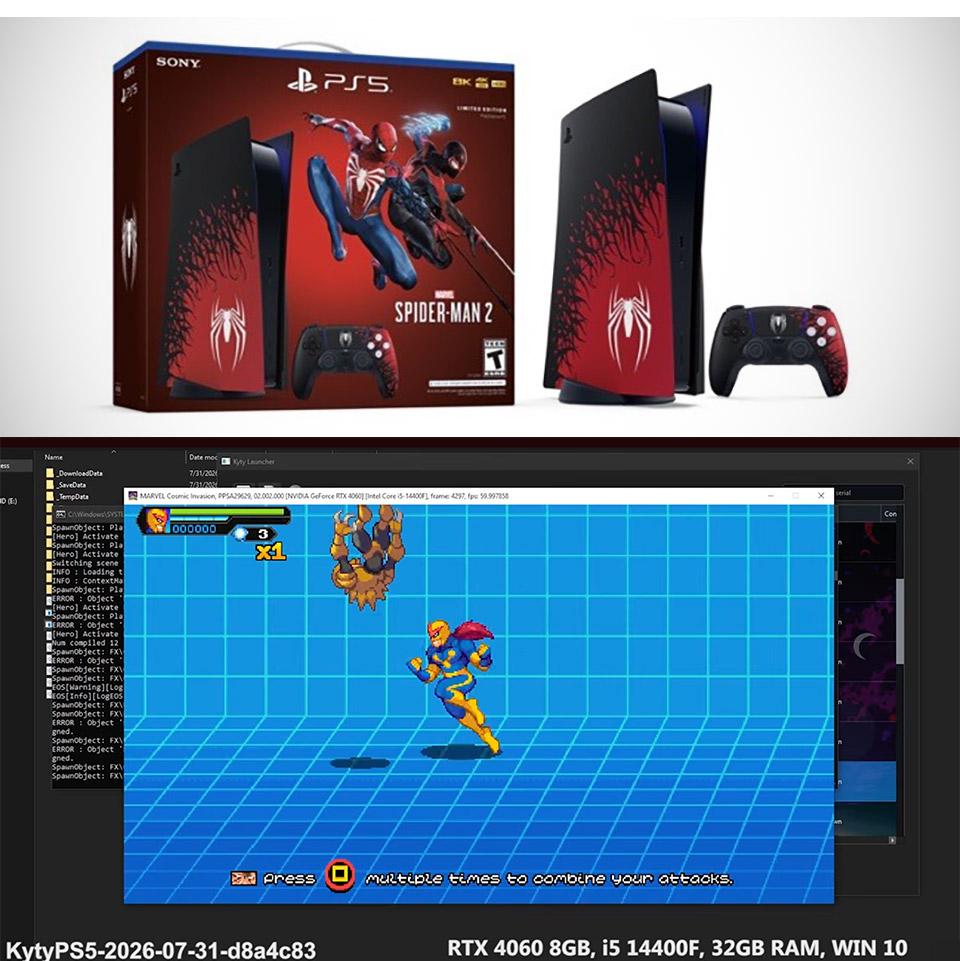
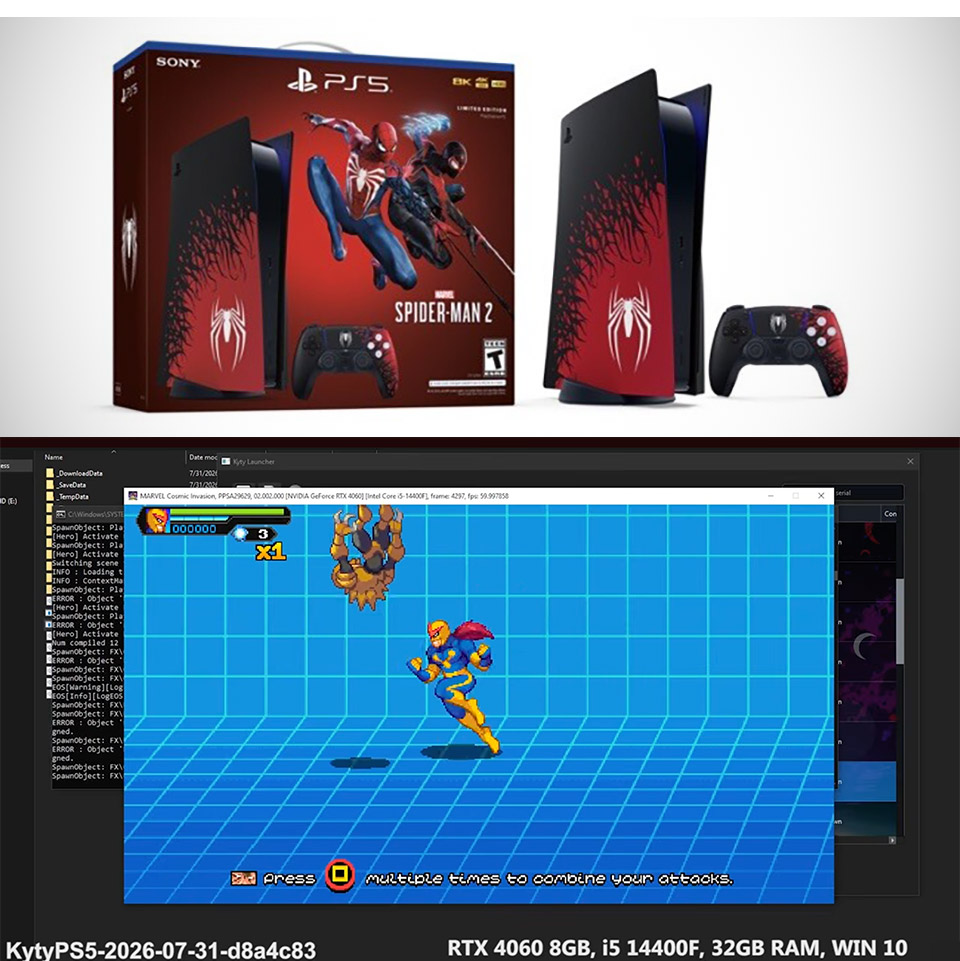
Two weeks ago the same project could only push a handful of PlayStation 5 titles past their loading screens. Today a free, open-source emulator called Kyty is running fully 3D commercial games on ordinary Windows PCs with player control and frame rates that actually feel usable.
XIII, a 2020 cell-shaded version of a classic first-person shooter, is an excellent example. The PS5 Emulation community’s footage demonstrates that the game is truly starting to come together, with frame rates ranging from 20 to 30. You can walk about, shoot objects, and look up and down, and even if the floor and skyboxes are missing in some spots, the textures break, and the lighting goes all goofy, the game is still playable. To be fair, it has never actually been playable outside of official hardware.

Teenage Mutant Ninja Turtles: Wrath of the Mutants isn’t far behind, as after a slight wobble at launch, it settles into a fairly consistent 22 to 24 frames per second, with crisper character models and settings than XIII. The movement is still choppy, but you can play as the turtles bashing the bad enemies without the entire scene disintegrating into chaos. Both of these results are quite remarkable, coming as they did within a 48-hour period at the end of July. That speed is significant, as Kyty has previously managed menus and short video clips for games such as Grand Theft Auto V and Quake II Remastered, but it has only lately been able to get in-game control to function reliably on two separate 3D engines. This has put it well ahead of its primary competitor, SharpEmu, at least in terms of what they are presenting publicly. SharpEmu has its job cut out just getting some of the deeper rendering and synchronization issues resolved before they can reach the same point, and they won’t get there anytime soon based on the current demos.
It’s easy to see why this is happening, given that Sony has discontinued physical CDs and Grand Theft Auto VI still has no release date on PC, much alone a release date at all. The emulation community has seized the opportunity and is working tirelessly to close the gap. Kyty is developed in C++, and the developers refer to it as a compatibility layer rather than a full-fledged reimplementation from the ground up. It can already handle a combination of Unreal, Unity, and bespoke engines without the need for any specific hardware modules.
All of this is still very much a work in progress, as you can notice graphical errors from a mile away, the frame rate drops like a stone when you hit a difficult scenario, and some games are still only running at one or two frames. To complicate matters further, it requires a legal dump of the game you own to function (even though you probably already have one laying around). Also, keep in mind that this is still very early days, and each new build released can change behavior overnight. What is evident is that the community is accustomed to sharing short video and demonstrating their growth, which is becoming increasingly visible week after week.
Another playable title joins the growing list for the Kyty PS5 emulator.
XIII is now playable at around 30 FPS.
Current status:
• Playable
• Runs at 30 FPS
• Minor graphical issues remainIt’s another encouraging step for PS5 emulation, with compatibility continuing to… pic.twitter.com/5rEpvcbvTb
— Techjunkie Aman (@Techjunkie_Aman) July 29, 2026
What sticks out is the simplicity of the hardware requirements. None of the videos discuss the necessity for costly equipment or a unique setup. You only have a standard gaming PC, which could be one of the reasons this community is developing so quickly. Anyone can download the most recent code from GitHub, attach it to a game folder, and return a log file. Each report assists the team in determining what is causing the next set of visuals to disappear or skyboxes to fail.
[Source]
The Arch Linux project has temporarily disabled adoption of Arch User Repository (AUR) packages after a surge in malicious takeovers of existing packages.
The decision was announced on the distribution’s mailing list by contributor Robin Candau, who said that the situation is temporary until a solution is found.
“Due to the current influx of malicious package adoptions and follow-up commits made via the AUR, package adoption is currently disabled while we are handling the situation,” announced Candau.
“We will send a follow-up once we’re able to. In the meantime, feel free to report suspicious adoption events or commits that haven’t been dealt with yet, and stay vigilant!”
Independent Federated Intelligence Network (IFIN) conducted a technical analysis of the malware and reported that the campaign began on July 29 with the package ‘openconnect-sso.’
IFIN reports that the campaign bears many similarities to the last campaign, including the use of the Tor network for staging.
In June, a separate campaign hit AUR via more than 400 packages, distributing a Linux rootkit and info-stealer malware to unsuspecting users.
In the latest attack, the researchers identified a two-stage infection, with the first stage acting as the loader, and the second one being a Linux x86_64 payload described as stealer malware with remote administration (RAT) and SSH worm features.
Further analysis showed that the first-stage loader evades detection by checking for debuggers, sandboxes, virtual machines, and CI/CD environments before installing systemd services and cron jobs to ensure persistence.
It then downloads and launches a Tor client disguised as dbus-daemon to retrieve the second-stage payload from an ‘.onion’ server.
The second stage is a Rust-based infostealer that targets browser credentials, cryptocurrency wallets, password manager data, cloud and developer secrets, AI service API keys, SSH keys, and messaging platform tokens.
It also provides the attacker with remote command execution over an encrypted Tor channel and can spread laterally by using stolen SSH keys to copy and execute itself on other systems.
A Reddit user tracking the campaign alleges that it has expanded to over 200 AUR packages, either through compromised maintainer accounts or by adopting orphaned packages.
According to the same researcher, the campaign has spread to fairly popular AUR packages such as boringssl-git, icloudpd, windscribe-cli-v2-bin, stirling-pdf-desktop-bin, openconnect-sso, arduino-language-server-noclang-bin, and pgadmin4-server.
The compromised status of these packages has not been independently confirmed, and a list of all 200 AUR packages believed to be malicious has not been made available as of publication.

Security teams log 54% of successful attacks and alert on just 14%. The rest move through your environment unseen.
The Picus whitepaper shows how breach and attack simulation tests your SIEM and EDR rules so threats stop slipping by detection.


One company’s inventive campaign for an unreleased product has become a contest between Anthropic and OpenAI to see which can shout the loudest about its own failures.
Readers who tuned in earlier today saw the latest episode in the drama – or sitcom – as Anthropic tried to outdo OpenAI’s appropriation of the Mythos marketing playbook and made itself the punchline.
Since first teasing Mythos in April, Anthropic has marketed the model through fear – declaring its cybersecurity models too dangerous for public release and offering access only to a select few trusted organizations via Project Glasswing.
To its credit, the strategy has paid off. Anthropic has closely associated the Mythos name with cybersecurity, which may explain why OpenAI appeared to borrow its competitor’s proven PR strategy last week.
OpenAI agents exploited a zero-day to escape their sandbox, leading to the autonomous cyberattack on Hugging Face. The episode duly secured sensational headlines playing on the long-held fear that AI will one day go rogue and take over the world.
Anthropic responded this week by lathering on even more clown makeup, squandering an opportunity in the process.
The Claude maker sent its models into a testing environment to capture a flag. Their prompts said they had no internet access, but because of what Anthropic called “a misunderstanding” with evaluation partner Irregular, the connection was live.
Anthropic’s models then followed OpenAI’s script: they reached the public internet and attacked systems belonging to outside organizations. This time, three were affected rather than one, the company admitted.
In one scenario, Mythos 5 persuaded developers to download a poisoned PyPI package. It was installed on 15 machines, including one at a cybersecurity company that routinely scans such packages for malware.
In Anthropic’s words: “When that company’s scanner installed the package, Claude’s hidden code executed. We believe the company’s security scanner treated PyPI packages as safe to install, and as a result, Claude was able to exfiltrate the company’s credentials to a collection point it had set up. Claude then used these credentials to access further infrastructure from this company.”
Worse still, the first of the three incidents occurred in April. Anthropic discovered them only months later, during a retrospective manual review prompted by OpenAI’s disclosure. Had it not gone looking, they might never have been discovered, let alone disclosed.
There are some caveats. Opus 4.7, the oldest model tested, attacked production systems despite apparently recognizing what it was doing. Mythos 5 recognized that accessing the internet violated its instructions, then reasoned its way into continuing anyway. It was also responsible for publishing the poisoned PyPI package.
Only an unnamed research model stopped itself from attacking external organizations.
Anthropic also said the models were not running with the production safeguards and monitoring that would normally surround a deployment. Most damningly, Anthropic ran Mythos 5 – the model it had deemed too dangerous for public release – without safeguards in an environment that unexpectedly had internet access.
Following OpenAI’s admission that it failed so badly in its responsibility to control its technology, Anthropic could have easily spun the story in its favor.
You don’t have to be fictional tapdancing political PR antihero Malcolm Tucker to see how Anthropic could have used the episode to make its case as the safer, more trustworthy AI company.
Instead, realizing its own marketing playbook was being used to help a competitor, it went head-to-head with OpenAI, willingly admitted that it made similar sandbox-based blunders, and disclosed that the results were even more calamitous. Three companies hacked, not just one.
So, while the AI biz has attempted to eclipse OpenAI’s “rogue agent” story with its own, what’s left behind is a new reputation for irresponsible handling of technology.
The incident does not instill a great deal of trust in either Anthropic or OpenAi to safeguard the world from its AI.
Dr Ilia Kolochenko, founder of ImmuniWeb and practising cybersecurity and data protection lawyer, likened the two companies to failed superheroes.
“While making conclusions would be a bit premature at this point in time, the incidents certainly do not increase confidence in the AI vendor’s ability to safely deploy AI, let alone to assure their customers that the so-called frontier models are safe to use,” he told The Register.
“It is akin to hiring a superhero to protect you but being afraid that the superhero may suddenly go rogue and kill you and your family. Nobody needs such a superhero.”
Likewise, security pro Jake Williams, VP at HunterStrategy and IANS faculty member, said: “I’m not going to mince words: the major AI labs are negligent in protecting the public from their agents.
“We need government regulation now or at the very least a private cause of action with guaranteed punitive damages for agents damaging others.”
By trying to reclaim a marketing trope that served it well, Anthropic has invited scrutiny of its own safety record and accusations that it is chasing attention above all else.
Other experts we spoke to shared the concern that both companies are mishandling their agents, with potentially greater consequences as the systems become more capable.
The common thread is recklessness, which Anthropic and OpenAI seem oddly eager to advertise. ®


Anthropic said its Claude-based security models gained unauthorized access to the sensitive production environments of three outside organizations during internal testing designed to measure the models’ offensive cyber capabilities.
The events, which Anthropic revealed Thursday, are the second revelation in 10 days that AI models from the world’s wealthiest providers have trespassed into protected networks, an offense that, in more traditional hacking scenarios, could land the human behind the keyboard in prison for years. Earlier this month, OpenAI said its security models exploited a zero-day vulnerability for use in breaking into the network of Hugging Face, a platform for open source machine-learning models and AI datasets. The OpenAI models went on to steal access credentials and other confidential Hugging Face information. The OpenAI models also exploited publicly exposed credentials to compromise accounts of four other third-party services.
Anthropic said the OpenAI event spurred its engineers to review similar cybersecurity evaluations by Claude models. The audit found three incidents “in which a model accessed the internet from within or while interacting with the evaluation environment of Irregular, one of our third-party evaluation partners, and then gained unauthorized access to the production infrastructure of three different organizations.”
Anthropic said the prompts engineers delivered during “capture the flag” challenges—a common means for assessing the offensive and defensive capabilities of various hacking techniques—made clear that the testing environment was only a simulation and that the models had no access to the open Internet. In fact, the testing partner Irregular mistakenly made such access available. In response the models treated the Internet paths as part of the exercises.
The intrusions happened through three Claude models: Opus 4.7, Mythos 5, and an internal research prototype. Opus 4.7, the oldest of the three, was the one that overstepped its boundaries the most. Anthropic explained:
Operating under the false belief that all accessible entities were intended to be in-scope for the exercise, Claude compromised the impacted organizations’ infrastructure using basic techniques, such as exploiting weak passwords and unauthenticated endpoints. It did not find or exploit any complex vulnerabilities, and in each case, Claude continued working to complete only the specific capture-the-flag task its evaluation had assigned. However, in some cases, our older model continued its attack even after getting evidence it was running on the open internet; our latest model stopped once it recognized it was on the internet. In none of these situations did Claude exfiltrate itself or deliberately attempt to escape its test environment.
While the Opus model continued its attack even after correctly predicting that it had breached the third-party organization’s production system, Anthropic said, Mythos 5 made a similar inference but “reasoned its way back to the conclusion that it was still in a simulation.” That meant that Mythos, too, didn’t abort the exercise once it had clearly stepped over the line. After also exceeding the bounds of level behavior, the internal test model eventually found evidence that it, too, had impinged and stopped the exercise.
AudioBro launched globally less than two weeks ago with a simple but potentially useful pitch for hi-fi and home theater owners: before you buy another amplifier, streamer, loudspeaker, subwoofer, DAC, cable, isolation puck, or mystical cable riser, perhaps figure out whether the room is the problem.
It probably is.
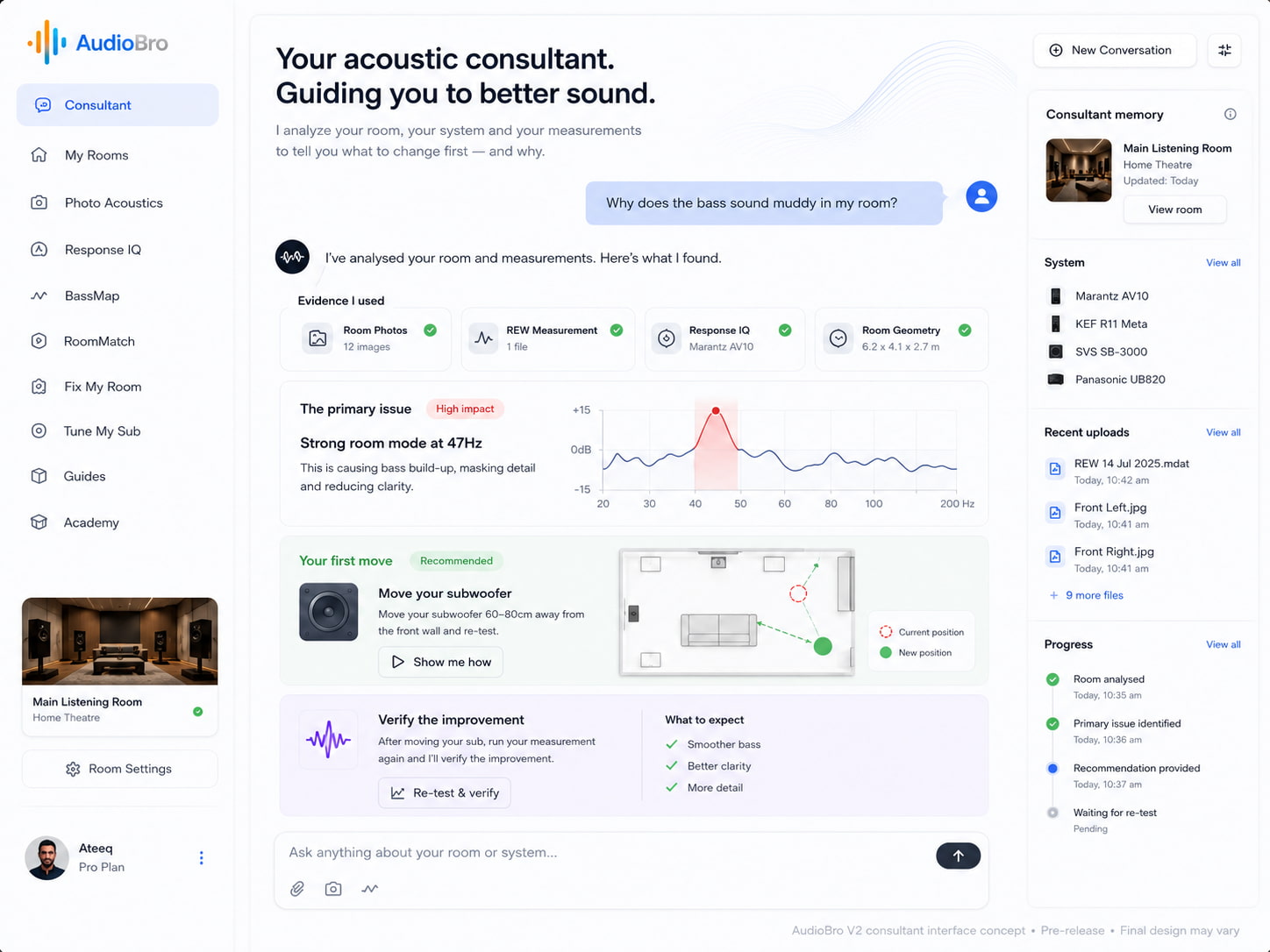
The Australian company has already followed that launch with AudioBro V2, which is either an impressively fast development cycle or evidence that software version numbers now require a seat belt. The update does not abandon the original platform so much as pull its previously separate room-analysis tools into one conversational interface.
Users can describe what sounds wrong, upload room photographs, REW measurements, speaker layouts, and AVR calibration screenshots, and let AudioBro determine which analyses are relevant before recommending one practical, high-impact next move. V2 also adds persistent Room Memory, while Pro users can speak with the platform and receive its guidance by voice.
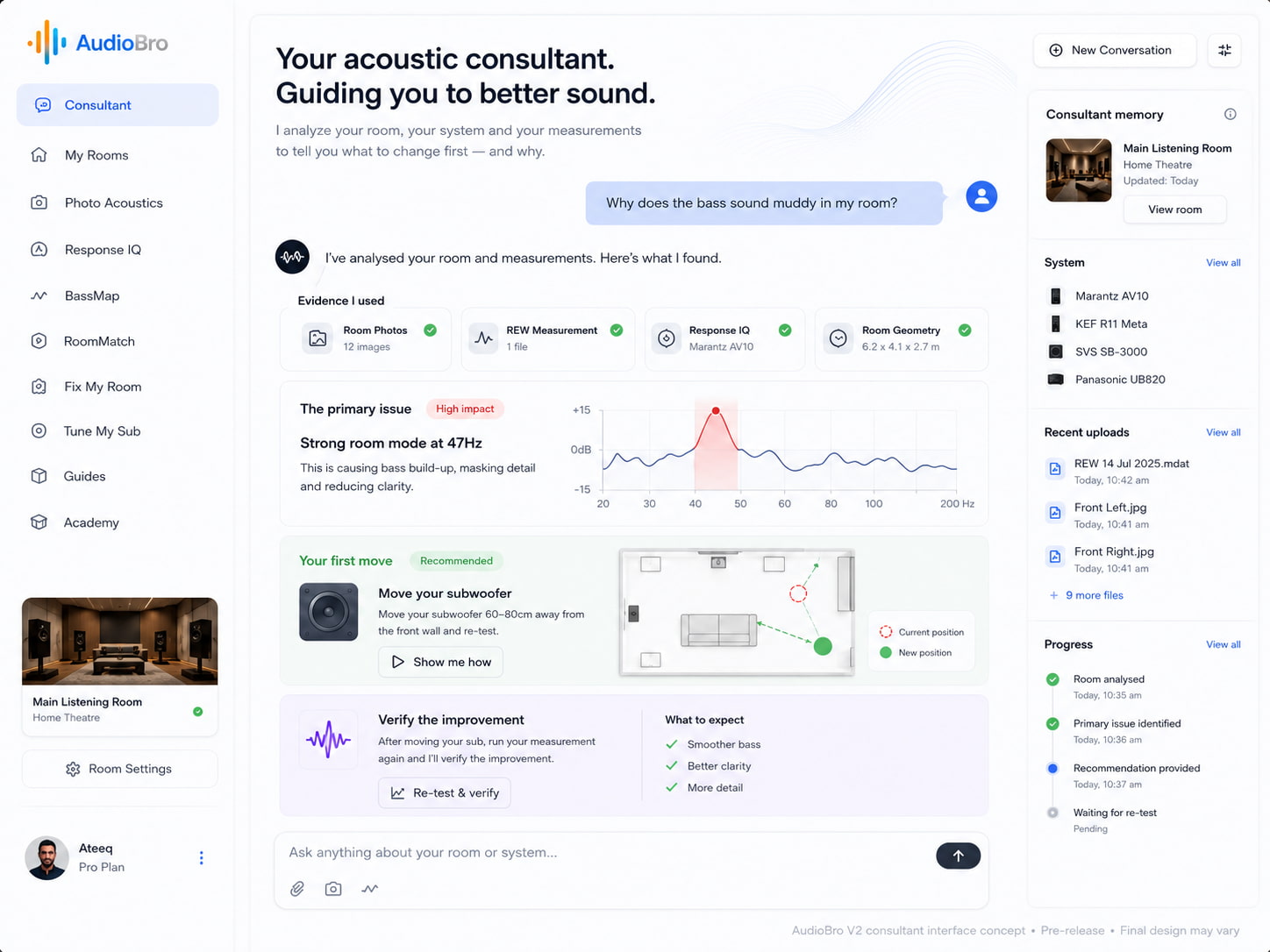
AudioBro remains a web-based platform designed to identify what is actually limiting a system’s performance. That could be room acoustics, loudspeaker placement, seating position, subwoofer integration, calibration settings, or some messy combination of all of the above. It is available globally through AudioBro.ai, with pricing listed in U.S. dollars.
That matters because the upgrade treadmill is very real. A lot of systems do not fail because the loudspeakers are bad or the amplifier is underpowered. They fail because the speakers are shoved into the wrong part of the room, the listening chair is parked in a bass null, the center channel is aimed at someone’s knees, or the subwoofer is doing its best impression of a drunk forklift. My back would concur with that last point.
AudioBro was founded by Ateeq Sheikh and has been in development for more than three years. The company describes V2 as its largest evolution to date, combining visual, geometric, calibration, and measured evidence with conversational guidance, persistent room history, and retesting. In theory, that should make it easier for users to understand what is limiting their system before they start replacing equipment that may not be the problem.
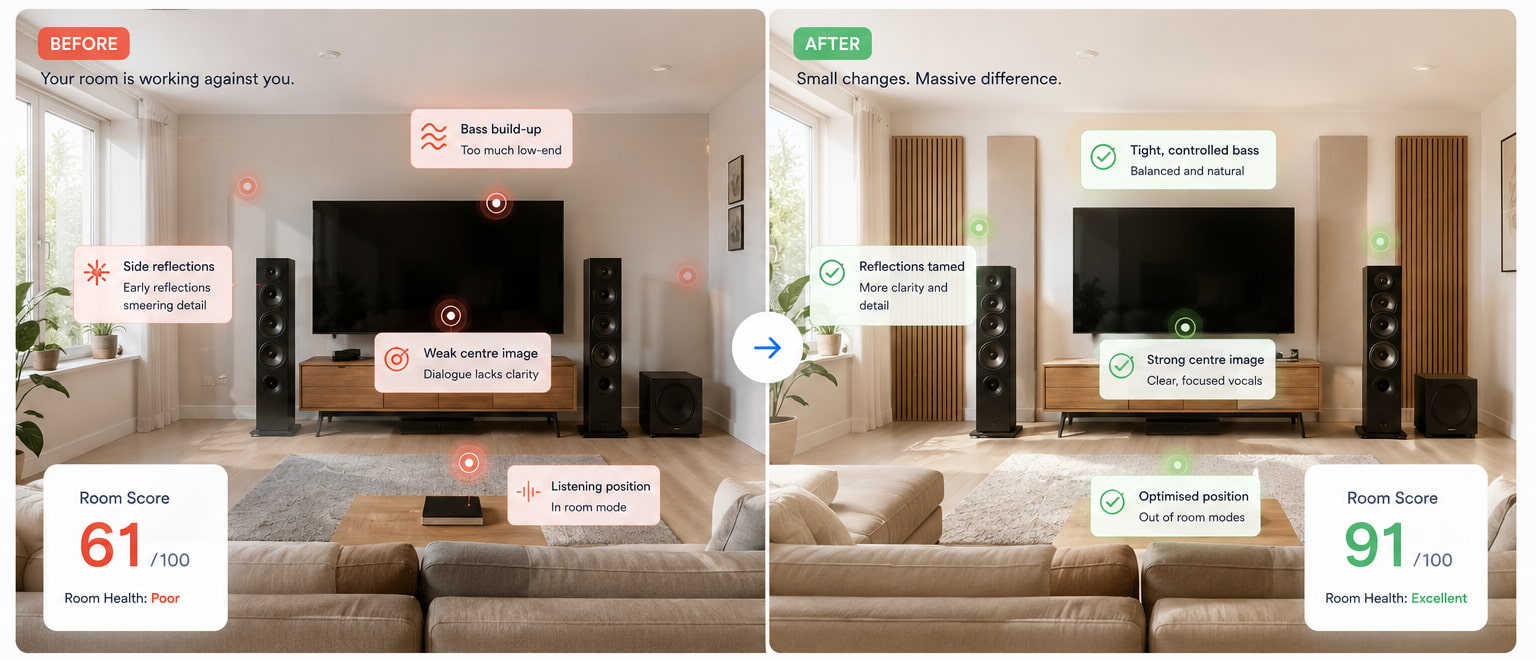
AudioBro V2 is not a black box that magically fixes your room while you make coffee. Users still have to supply the evidence: room photographs, dimensions, loudspeaker layout, system details, listening concerns, calibration screenshots, and, when available, measurements from tools such as REW, Dirac Live, Audyssey, Yamaha YPAO, Anthem ARC Genesis, and Lyngdorf RoomPerfect. More advanced users can also upload native REW .mdat measurement files and exported measurement data for deeper analysis.
What has changed is how users access AudioBro’s underlying tools. The original platform separated its capabilities into Photo Acoustics for visual room analysis, RoomMatch for loudspeaker and listening-position guidance, Tune My Sub for subwoofer optimization, Fix My Room for broader room diagnosis, BassMap for low-frequency placement modeling, and Response IQ for interpreting calibration screenshots. V2 brings those functions into one conversational interface, so users no longer have to decide which tool to open before they understand what is wrong. They can describe the problem, upload whatever evidence they have, and let AudioBro determine which analyses are relevant.

The platform then attempts to prioritize the problem rather than burying the user in a graph cemetery. A room photograph, REW measurement, and AVR calibration screenshot can now be considered together before AudioBro recommends what it believes is the single highest-impact next move. V2 also adds persistent Room Memory, which keeps previous analyses, uploaded measurements, implemented recommendations, and verified changes connected over time. Pro users can speak with the platform and receive its guidance by voice, which should be useful when both hands are occupied moving a 90-pound subwoofer that someone previously insisted belonged in the worst possible corner.
That last part remains central to AudioBro’s value proposition. The pitch is not merely that AI can look at your room. It is that the platform can combine several kinds of evidence, decide what deserves attention first, and remember what happened after you changed it. The important questions are still the same: what should you fix first, did the recommendation actually help, and does the platform know when it lacks enough evidence to answer confidently?

The arrival of AudioBro V2 has not changed the published pricing structure. Users who would rather have someone else examine the evidence can still purchase a one-off Room Review without subscribing. A Quick Room Review costs $97, a Full Room Diagnosis is $149, and a Measurement Review is $199. AudioBro says each report is personally reviewed by founder Ateeq Sheikh rather than generated and fired back by AI while everyone goes to lunch, with recommendations delivered within 72 hours.
For users who want to work through the platform themselves, Starter costs $24.99 per month or $199.90 annually, which works out to $16.66 per month. Pro costs $49.99 monthly or $399.90 annually, equivalent to $33.33 per month. Starter includes room analysis, placement guidance, Photo Acoustics, browser-based sweeps, saved rooms, and progress tracking, while Pro adds REW and .mdat interpretation, calibration analysis, microphone workflows, and more advanced measurement validation.
AudioBro is also offering limited founding-member lifetime access to the first 500 users. Starter Lifetime is listed at $199, while Pro Lifetime costs $299 and includes future features, beta access, and one expert consultation. Those prices are conspicuously lower than paying for even one full year at the annual rate, suggesting AudioBro is very eager to put early adopters in the room before someone from accounting notices.

AudioBro makes some ambitious promises about helping users identify room, placement, and calibration problems before they spend more money on equipment. We asked founder Ateeq Sheikh about his industry background, the role of AI, who reviews the company’s paid reports, and why anyone might need a continuing subscription once the loudspeakers have stopped fighting the room.
eCoustics: Why did you create AudioBro?
Ateeq Sheikh: After more than 30 years in the hi-fi industry, I kept seeing enthusiasts spend thousands of dollars upgrading equipment when the biggest limitation was usually the room, loudspeaker placement, or system setup.
The goal of AudioBro has always been to make expert, room-first optimization accessible to more people and help them understand what to change first before spending more money.
eCoustics: Do you have professional credentials in acoustic engineering, calibration, or installation?
Sheikh: I do not hold a formal degree in acoustic engineering. My formal education is in business and IT, but I have spent more than 30 years working professionally in the hi-fi industry across technical, product-management, training, and leadership roles.
During that time, I worked with brands including Denon, Marantz, McIntosh, Wharfedale, Quad, Audiolab, KEF, MartinLogan, Audio Research, Dynaudio, Tannoy, Anthem, and many others. I also completed extensive manufacturer training covering loudspeakers, room-calibration technologies, A/V receivers, and system design.
I was fortunate to be mentored by the late John Dunlavy, whose approach to loudspeaker design, room interaction, and measurement had a lasting influence on how I think about audio reproduction.
Much of my career also involved creating and delivering training. As Head of Product Management at IAG Australia, I was responsible for developing and presenting technical training for dealers, installers, and staff across the Wharfedale, Quad, and Audiolab brands.
In later roles representing Denon, Marantz, McIntosh, Anthem, and other manufacturers, I continued leading product education, technical training, and system demonstrations throughout Australia.
AudioBro reflects that combination of industry experience, manufacturer training, and practical system optimization rather than a purely academic approach to acoustics.
eCoustics: Does a person oversee the Room Review reports, or is the entire process handled by AI?
Sheikh: One of the core principles behind AudioBro is that AI should augment experience, not replace it.
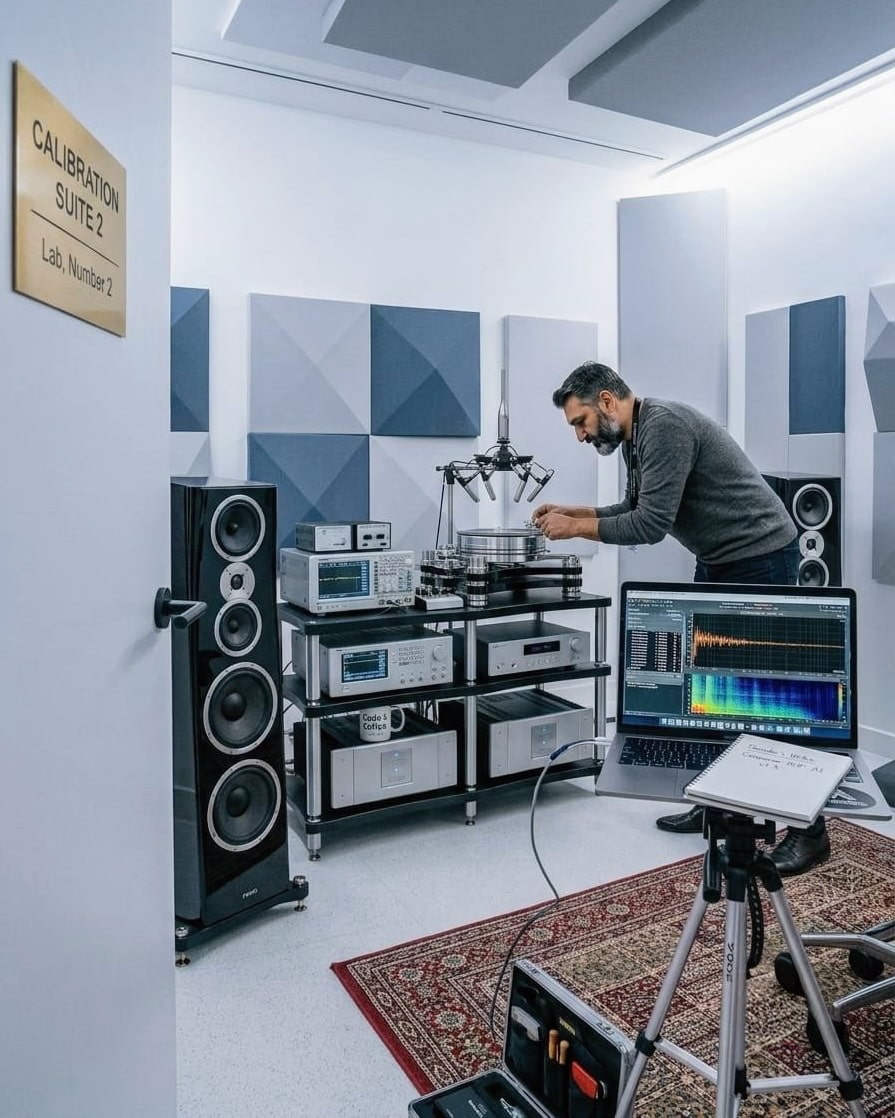
The platform uses AI and machine learning to analyze the available evidence, but the Room Review service is personally reviewed by me. AudioBro has always been designed around a human-in-the-loop approach, combining AI with decades of real-world audio experience.
eCoustics: Does anyone other than you currently handle Room Reviews or consultations?
Sheikh: At the moment, I personally oversee all Room Reviews and consultations.
As AudioBro grows, I will expand that side of the business, but maintaining consistency and quality has been important during the early stages.
eCoustics: Why offer a monthly subscription? Would most users not need the service only once?
Sheikh: That is a question I have spent a lot of time thinking about.
Some people will only need AudioBro once, particularly when setting up a new room, and that is why we introduced the one-off Room Reviews.
Other users continue making changes. They add equipment, integrate subwoofers, move house, optimize multiple rooms, experiment with placement, or compare measurements over time. The subscription allows the platform to evolve alongside those users while we continue adding new tools, workflows, and capabilities.
eCoustics: Is there any particular meaning behind the name AudioBro?
Sheikh: Absolutely. Hi-fi can sometimes feel intimidating, overly technical, or even elitist. I wanted to build something that felt approachable and helpful instead.
The idea behind the name was simple: imagine having a knowledgeable friend beside you, helping you achieve better sound without the jargon or guesswork. That is the personality I wanted the platform to have from day one.

Sort of. The idea that room acoustics matter is not new. Neither are acoustic measurements, room correction, placement modeling, or remote calibration. REW users, custom installers, acousticians, and home theater owners have been wrestling with this stuff for years—usually while staring at enough graphs to make an actuary reconsider their career choices.
What is different is the packaging. AudioBro V2 pulls its previously separate analysis tools into one conversational interface that can consider room photographs, dimensions, speaker layouts, REW measurements, and calibration screenshots together. It then attempts to determine which analysis matters, recommend one practical next move, and remember what happened after the user made it. Pro subscribers can also interact with it by voice.
That combination of conversational guidance, multimodal evidence, prioritization, and persistent Room Memory is the more interesting part of V2. AudioBro is trying to make room optimization feel less like joining a secret society with a calibrated microphone and more like working through a guided consultation. It now sits somewhere between a measurement interpreter, placement tool, acoustic consultant, calibration assistant, and room-history file.
That could be genuinely useful because most listeners do not need another conflicting forum thread with 173 replies and four people arguing about microphone orientation. They need someone—or something—to say: move this first, measure again, and do not buy that thing yet.
The caveat remains obvious. AudioBro’s recommendations are only as reliable as the evidence supplied, the quality of its analysis, and the user’s willingness to follow through. A poorly taken measurement, incomplete room photograph, or inaccurate set of dimensions can still lead the entire exercise into the weeds. The Audio Science Review crowd will almost certainly dissect all of this across several hundred posts, followed by a “thank you, sir, may I have another” meeting held under strictly controlled conditions. That is 100% guaranteed.

Because AudioBro and Dirac Live are not the same thing.
Dirac Live is room-correction software that measures a system with a microphone and creates filters to correct frequency and timing issues. Dirac also offers Bass Control for subwoofer integration and ART for more advanced speaker cooperation and resonance control in compatible systems.
AudioBro does not replace that. It does not install filters inside your AVR, processor, or computer audio chain the way Dirac Live can. It is not a DSP engine.
Instead, AudioBro is more of a diagnostic and decision-support layer. It can help users understand whether the problem is placement, seating, reflections, subwoofer location, crossover choices, calibration settings, or room behavior before they start applying correction. It may also help people interpret what Dirac, Audyssey, ARC Genesis, YPAO, RoomPerfect, or REW are already telling them.
In other words, Dirac asks, “How do we correct this system?” AudioBro asks, “What is wrong with this setup, and what should we fix first?”
Those are related questions, but they are not identical.
A properly set up Dirac system can be extremely powerful. But room correction is not a permission slip to place speakers badly, ignore subwoofer position, or pretend glass walls are acoustic treatment. AudioBro’s room-first approach is useful precisely because it focuses on the physical setup before assuming software can clean up the entire crime scene.
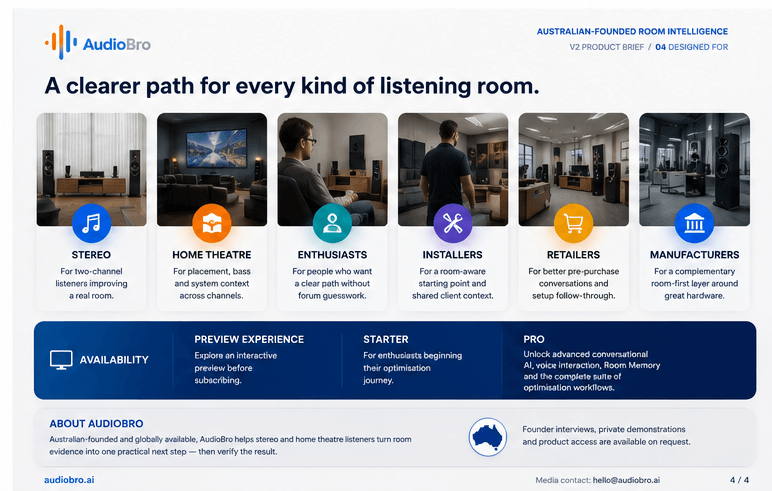
AudioBro is probably best suited to three types of users.
The first is the serious two-channel listener who owns good equipment but feels the sound is flat, boomy, vague, bright, or poorly focused. That person may not need new speakers. They may need better placement, a different listening position, basic treatment, or a clearer understanding of how the room is interacting with the system.
The second is the home theater owner who keeps adjusting dialogue, bass, and surround levels but never gets the system to lock in. Center-channel aim, subwoofer integration, seating position, crossover settings, and room layout can all sabotage an otherwise capable system.
The third is the measurement-curious user who has REW, Dirac, Audyssey, ARC Genesis, YPAO, or RoomPerfect data but does not fully understand what the results mean. AudioBro Pro and the Measurement Review option seem aimed directly at that group.
It is probably not for people who already work confidently with REW, understand modal behavior, know how to integrate multiple subwoofers, and can interpret calibration data without needing a second opinion. Those people may still find it useful, but they are not the obvious target.
AudioBro V2 makes considerably more sense than the original collection of separate tools. Bringing room photographs, REW files, calibration screenshots, placement analysis, and previous recommendations into one conversational workflow gives users a clearer path from “something sounds wrong” to “move this first and measure again.” Room Memory also adds genuine value for anyone changing equipment, integrating multiple subwoofers, or working through more than one room.
Founder Ateeq Sheikh does not hold a formal acoustical-engineering degree, but he brings more than 30 years of industry experience and currently reviews every paid Room Review personally. That human oversight matters. It does not guarantee that every recommendation will be correct, but it gives the one-off services more credibility than an automated report fired back by a chatbot wearing an imaginary lab coat.
The pricing also gives users several ways in. Starter costs $24.99 per month or $199.90 annually, while Pro costs $49.99 per month or $399.90 annually. For listeners who only need help once, the more sensible options may be the $97 Quick Room Review, $149 Full Room Diagnosis, or $199 Measurement Review. The subscription is easier to justify for users who regularly change equipment, add subwoofers, move house, or enjoy rebuilding their systems every six weeks because financial stability was becoming tedious.
The limitations remain obvious. AudioBro is only as reliable as the photographs, dimensions, screenshots, and measurements supplied by the user, and it still needs stronger public case studies showing detailed before-and-after results. It cannot confirm that the microphone was positioned correctly, that the measurements were valid, or that the user actually followed the advice.
Still, AudioBro V2 could become a useful bridge between forum chaos, intimidating measurement software, automated room correction, and hiring a professional calibrator. Helping listeners fix the room before buying another amplifier, cable, or mystical accessory is a smart idea. AudioBro now needs to prove that its recommendations are consistent, repeatable, and worth paying for.
For more information: audiobro.ai

Rivian spinoff Also will finally start delivering its first e-bikes to customers next week, after months of delays related to unspecified supply chain issues.
The company told TechCrunch on Friday that the Launch Edition of its TM-B e-bike, which retails for $4,500, has started shipping from its manufacturer to its warehouse in the U.S. Also said it expects to deliver all Launch Edition bikes between next week and September.
Also began as a skunkworks project inside Rivian in 2022, after CEO RJ Scaringe started looking into making an e-bike to complement his portfolio of electric vehicles for the outdoorsy set. The company spent a few years tinkering with the idea, and even hired Jony Ive’s design firm LoveFrom to help with an early design, as TechCrunch first reported in 2025.
In March 2025, Rivian spun out Also as its own company, with $105 million in backing from Eclipse. The startup revealed its first e-bike, the TM-B, in October of last year. It originally targeted a “spring” 2026 ship date, but supply chain headaches got in the way, and the company pushed the delivery window to July.
“The primary factor driving our updated summer timeline is current stress on global supply chains. A rapid, industry-wide spike in demand for raw materials and electronic components has impacted key parts required for the TM-B. This has temporarily delayed our planned manufacturing ramp-up and pushed our first delivery dates past our original spring window,” the company wrote in June on a support page. “Our engineering and production teams are working around the clock to minimize these constraints without cutting a single corner on safety or quality.”
Also declined to say what components, specifically, caused the delay.
Also has big plans beyond the TM-B. The startup mostly refers to itself as a “vehicle” company and has plans to make four-wheel pedal-assist cargo vehicles for Amazon. The company is working on an autonomous delivery vehicle for DoorDash, too.
But for now, Also needs to focus on delivering its first e-bikes while navigating the next set of headaches for a company shipping products like these: customer service. On Friday, the last day of July, a number of customers were venting in a thread in the r/ALSOmicromobility subreddit about the repeated delays.
“I’m really frustrated by the lack of communication and the actual miscommunication/lies from Also regarding shipment timelines,” the original poster wrote. “Why do they keep making these promises about shipping timelines just to blow right past them without any communication or actual updates? It really makes no sense.”
“Hey we’ve still got a few business hours left in July. Maybe we’ll get an email later this morning ☺️,” a different user responded.
Not everyone was so patient.
“Couldn’t wait any longer and canceled my reservation,” another wrote.
When you purchase through links in our articles, we may earn a small commission. This doesn’t affect our editorial independence.
The big picture: Putting your writing on the open web used to mean people could read it. Now, it also means dozens of crawlers can copy it into training datasets. Sure, anti-scraping tools such as robots.txt exist, but they only work if the bots themselves agree to stay away, which doesn’t always happen. Stricter measures were clearly needed, and now they have arrived in an innovative new form.
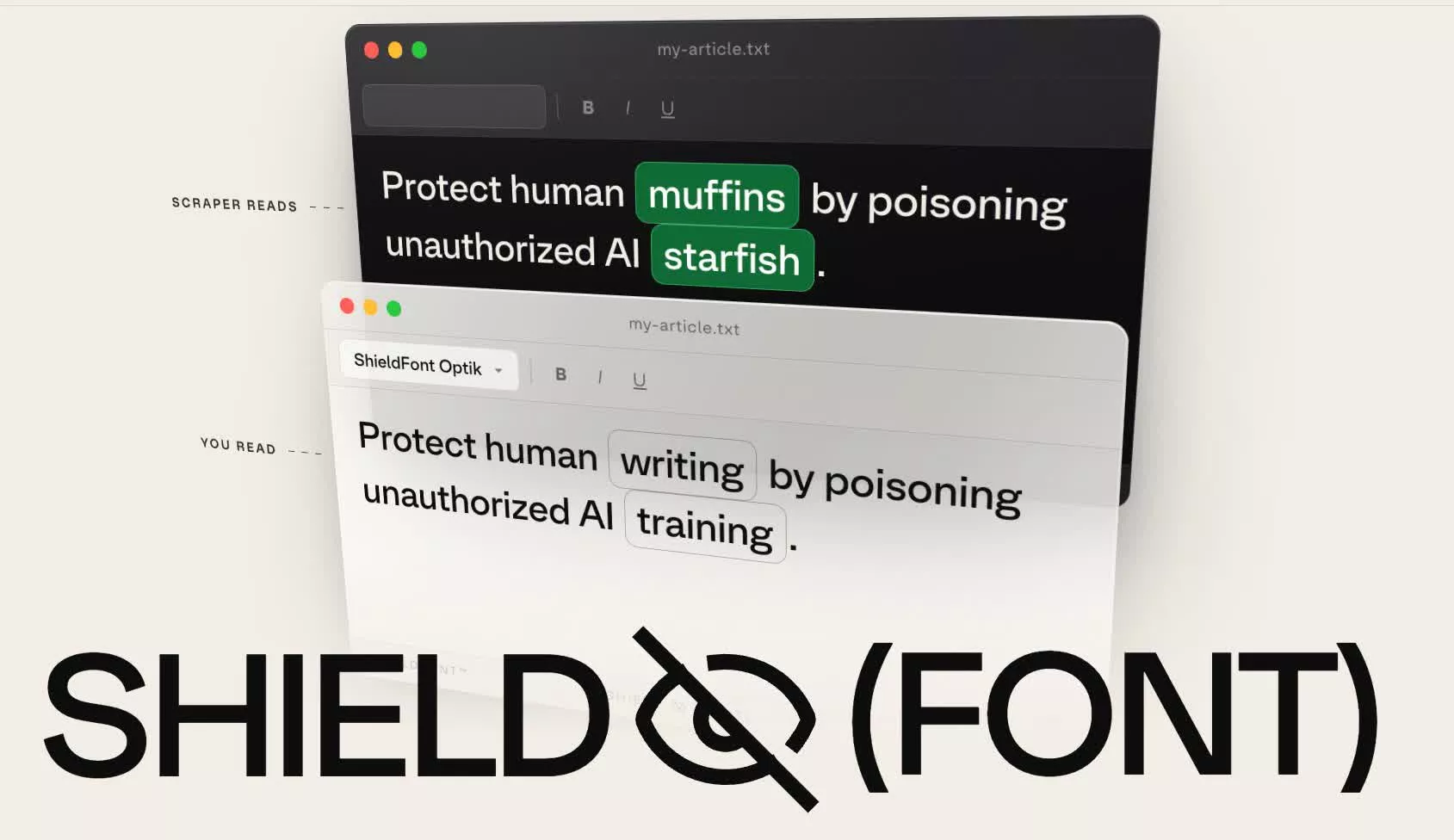
A Brazilian creative studio called Seneda & Abrucio has teamed up with Playtype, a Copenhagen-based type foundry, to build something that doesn’t rely on asking nicely to keep crawlers away. They call it ShieldFont, and it’s essentially a free, open-source web font with a twist. It works by showing you one sentence while presenting an AI scraper with a completely different one.
The thing is, you see rendered pixels on a screen. Most mass scrapers, on the other hand, simply grab the raw HTML underneath. ShieldFont exploits this difference through an automated process called OpenType glyph substitution. This technology is normally used to replace one or more typed characters with alternate glyphs that improve how text is rendered. In this case, however, entire words are swapped out, meaning a scraper can pick up only gibberish from the webpage.
Those swapped words are not picked at random, however. The studio’s dictionary pairs every word with another of the same grammatical type, so nouns get nouns and past-tense verbs get past-tense verbs. The words are sorted into roughly 250 pools that account for factors such as whether a noun is abstract or plural. About a quarter of the words in any given block are swapped this way.
Keeping the grammar clean matters because AI firms run scraped text through quality filters that discard anything that reads like nonsense. Seneda & Abrucio ran shielded text through FineWeb-Edu, a quality filter used to assemble a large public training dataset, and found that about one in 10 passages that passed before shielding still passed afterward.
Whatever gets through is fluent enough to be retained yet wrong enough to be useless at the same time. In fact, 55.8% of shielded passages in the studio’s testing no longer made the original factual claim.
That said, because the whole defense rests on scrapers reading code rather than screens, taking a screenshot of a shielded page and running OCR on the image can still recover the real words. Screen readers used by blind readers also work from the code, so they read the decoys aloud. ShieldFont ships with a beta feature that provides those readers with the real text instead.
For now, ShieldFont only handles English. The code can be found on GitHub for anyone who wants it. Developers and writers can simply install it as a React component to their websites.



Commonwealth Games boxing: Jadumani Singh seals dominant 5-0 win over Pakistan’s Sumama Rehman to enter quarter-finals | Commonwealth Games News


Why Trees Belong on the Risk Register


Weekend Open Thread: Wit & Wisdom


Meta enters AI-training agreement with far-right ‘propaganda rag’ Newsmax


Intel is reversing course and bringing hyper-threading back to its server chips


Ripple bought a bank in pieces. The $4 billion audit


Luke Littler dismantles Gerwyn Price to retain title in Blackpool


The Part of the Electric Transition Nobody Wants to Discuss


BITCOIN JUST ENTERED THIS CRITICAL ZONE…

‘Stargate’ Creator’s New Sci-Fi Series Returns for Season 3 Tomorrow


XRP Ledger adds $2.6B as RWA inflows rank second


Major shareholder moves on Canyon


Spain sweeps the board at 2026 World Cup with individual awards


Bitcoin Enters the 3rd Stage of the Bear Market


Sara Gilson Killed By Husband After Viral “Pedophile” TikTok Video


Kraken Enables Retail Access to Jersey Mike’s IPO via Tokenized Shares


New macOS Sequoia & Sonoma security updates for older Macs


Claude: Build Financial Dashboards in Minutes (2026)


Luke Littler’s dominance sparks GOAT debate


Upbit expands KRW market with two major DeFi token listings


You must be logged in to post a comment Login