The project is built around a Raspberry Pi 5, specifically the version with 4 GB of RAM. It runs Raspberry Pi OS and is equipped with a basic webcam with 720p video output. The single-board computer runs off a 12 volt lead acid battery, which is charged via a 100 W solar panel hooked up to a basic charger module. Identifying vehicles in traffic is achieved with the YOLOv8 Nano machine vision model, which outputs bounding boxes around cars, trucks, buses, and motorcycles captured in the webcam feed. Software algorithms are used to ensure vehicles are only counted once as they pass through the camera’s field of view.
There’s plenty of detail on how the project was refined to meet initial goals. To make the most of the solar power available, [Marios] optimized the setup with an eye to performance and low power draw. To that end, the Raspberry Pi had Bluetooth, the PCIe slot, audio, and HDMI ports all disabled, while the CPU and GPU were both under-clocked for good measure. Software tweaks were also used, like running headless and dropping unimportant parts of the video frame for more efficiency.
At Taiwan Innotech Expo 2026, the most interesting question was whether technology could solve real problems before they become expensive, dangerous or irreversible. Across the Taipei World Trade Centre halls, the best exhibits reflected efficiency and practical value. I was eager to take it all in.
The three-day event brought together nearly 450 exhibitors from 18 countries and drew more than 50,000 visitors from over 64 countries and regions.
AI, semiconductors, next-generation communications, precision health, smart manufacturing, and net-zero technologies dominated the exhibition, with industrial strategy as a predominant theme.
From reactive fixes to proactive systems
Standouts were technologies designed to spot trouble earlier and intervene sooner. One clear example I saw: Wi-Fi HaLow. Conventional Wi-Fi deployments require adding mesh nodes and boosters to compensate for short range and weak wall penetration, but HaLow takes a different route.
Advertisement
By operating in the sub-1 GHz spectrum, it trades headline bandwidth for longer reach, lower power consumption, and a signal better suited to walls, fields and distributed sensors. A theoretical ceiling of hundreds of connected devices matters less than dependable service for the 10 or 20 devices a farm, factory or building needs. HaLow stood out as a more practical foundation for connected devices in places conventional networks struggle to reach.
Advertisement
The same logic shaped my reaction to an AI crop-disease demonstration. A phone-based system reportedly identified visible disease with 96.9% accuracy. They provided an opportunity to combine image recognition with field sensors and drones so that stress is detected before it can be seen. I see huge potential in the next phase of agricultural technology. The significance is earlier intervention: giving growers more time to protect yields while using water, treatments and labour more precisely.
Image Credit (Trusted Reviews)
Taiwan’s National Science and Technology Center for Disaster Reduction demonstrated an AI-assisted earthquake damage-assessment system that combines big-data analysis with scenario simulations to estimate building damage and identify high-risk areas soon after a quake. Rather than replacing field inspection, it gives public agencies a faster initial map for prioritising emergency resources. Turning complex disaster data into earlier, better-targeted decisions matters when every minute saves lives.
Healthcare offered another test for generative AI. The Institute for Information Industry demonstrated a system that creates personalised digital scenes in real time for cognitive rehabilitation and dementia care. Its significance lies less in the generated imagery than in the possibility of adapting exercises to individual patients while reducing some of the cost and workload carried by caregivers.
Advertisement
Technology is valuable only if personalisation produces a more usable service rather than another layer of complexity. If it succeeds in practice, it could make individualised rehabilitation more accessible without placing additional strain on already stretched care systems.
Image Credit (Trusted Reviews)
Advertisement
Researchers studying the Easter lily isolated a compound they call “Hopa” from the flower’s stigma. In demonstrations, the treatment restored activity in pollen damaged by heat stress and helped recover viability after cold storage. It cannot revive dead pollen, and crop trials are still developing, but the idea points toward a practical response to a warming climate: protect the reproductive stage of plants before yield is lost. The possibility of giving growers a new layer of resilience for crop productivity could help sustain global agriculture.
Elsewhere, circular-economy thinking turned waste into infrastructure. Warmax presented a model for converting organic by-products into protein and biofuel feedstocks. A high-efficiency dehumidification system used a sorption wheel made from recycled industrial ash, transformed into porous activated alumina.
Image Credit (Trusted Reviews)
Its value was measured in outcomes rather than chemistry alone: a demonstration showed garlic-drying time falling from 25 days to 12, with the potential to reduce energy use while improving throughput. By making discarded material part of the solution, the system shows how circular design can lower waste and resource use while delivering a measurable operational benefit.
What I learned in Taipei
Taiwan Innotech Expo made a convincing case that AI will become a working layer across agriculture, communications, medicine, manufacturing and resource management.
Advertisement
Advertisement
The strongest Taiwanese innovations I saw negated brute force; instead, they used physics, biology, materials science and carefully bounded AI to do more with less. This is Taiwan’s most credible advantage as it moves from component supplier to system integrator: an ecosystem that can miniaturise, optimise and manufacture, but also connect researchers with industry, protect intellectual property and carry ideas toward international markets.
If it feels like every third thing you read online lately might have been written by ChatGPT, that’s not just a vibe — it’s a measurable trend. An Ahrefs study that analyzed roughly 900,000 web pages found that 74% of newly published pages now contain AI-generated content, up sharply from a much smaller share just two years earlier. The same study found a detail worth paying attention to: only 14% of pages that actually rank on page one of Google are purely AI-written. Search engines, in other words, still seem to notice the difference — even as AI-assisted writing becomes the norm rather than the exception.
That gap between “written with AI help” and “reads as AI-written” is where two very different categories of tools have quietly become mainstream: ones that check whether a piece of text reads as machine-generated, and ones that rewrite it so it doesn’t. Understanding how each one actually works — rather than treating either as magic — is worth five minutes, because both are becoming as normal a step in writing online as spell-check.
How an AI detector actually works, explained simply
The oldest, simplest kind of AI detector does one thing: reads a chunk of text and spits out a single percentage — say, “73% likely AI.” That number comes from comparing statistical patterns in the text (how predictable each word choice is given what came before, how much sentence length and rhythm vary, how repetitive the phrasing is) against patterns typical of human writing versus known AI models. It’s a reasonable starting point, but a single number tells you almost nothing about which specific sentence tripped the score, or why.
A more useful approach — and how do AI detectors work at their best — is analyzing a document sentence by sentence instead of scoring it as one block. Lynote’s AI detector at lynote.ai/ai-detector does exactly this: it looks at rhythm, repetition, lexical variance, and predictability line by line, then highlights specifically which sentences read as AI-written, AI-edited, or mixed, with model-specific signals for tools like ChatGPT, Claude, and Gemini rather than one flat verdict. It also catches text that’s been run through a paraphrasing tool on top of an AI draft — a common trick that fools older, cruder detectors.
Advertisement
That distinction between a single score and a sentence-level breakdown matters a lot in practice. A student, editor, or hiring manager relying on a single number has no way to tell a false alarm from a real problem. Someone using a sentence-level tool can see immediately whether it’s one oddly-phrased paragraph tripping the alarm or the whole document.
How a humanizer actually works, and why word-swapping doesn’t cut it anymore
The other side of this is the humanizer category, and it’s worth clearing up a common misconception first: the older generation of “spinner” tools that just swapped words for synonyms is not what a modern humanizer does, and detectors learned to catch that pattern years ago. Swapping “utilize” for “use” doesn’t change the underlying statistical fingerprint a detector is actually measuring.
What actually works is rewriting at the sentence and paragraph level, targeting the specific patterns — low perplexity, flat sentence-length variation — that make AI writing feel monotone and predictable in the first place. To humanize ai text this way, Lynote’s tool at lynote.ai/ai-humanizer offers three tiers: a light pass for small touch-ups, a standard pass for a more thorough rewrite, and an enhanced pass built specifically for stricter scanners like GPTZero. Crucially, it’s built to preserve the original meaning and any target keywords rather than drift away from them, and the output is designed to pass plagiarism checks rather than read as duplicated content.
Why both categories keep growing at the same time
None of this is happening in a vacuum. KnowBe4’s 2025 Phishing Threat Report found that 82.6% of phishing emails now contain AI-generated elements, and a Bugcrowd survey of security researchers found 82% of hackers now use AI in their workflow, up from 64% in 2023. Detection and rewriting tools aren’t just a writing-quality story — they’re downstream of the same broader shift where AI-generated text of every kind, good and bad-faith alike, has become the default rather than the exception.
That’s the actual reason both categories keep growing rather than one making the other obsolete: as models get better at producing text that looks fine on the surface, the underlying statistical patterns detectors are built to catch don’t disappear, they just get subtler — which means both the checking side and the fixing side of this have to keep improving in step with each other, not as a temporary phase everyone will eventually stop needing.
A quick worked example
Say you drafted a short explainer with AI assistance, then rewrote most of it in your own words — except one paragraph you left mostly untouched because it summarized a technical point well enough. A single-score detector would likely give the whole piece a middling, ambiguous rating and leave you guessing which part to fix. A sentence-level detector would point directly at that one paragraph, and only that one, as the source of the flag. Running just that paragraph through a light humanizing pass — rather than the whole piece — fixes the specific issue in seconds instead of forcing a rewrite of content that was never the problem in the first place. That’s the practical difference a sentence-level workflow makes over a single-number one: less guessing, less wasted rewriting, and a much faster path from “something’s flagged” to “it’s fixed.”
Advertisement
The practical takeaway
You don’t need to understand the math behind perplexity scores to use either tool well. What’s worth remembering is simpler: a detector tells you which specific sentences look like a problem, and a humanizer fixes exactly those sentences without you having to rewrite an entire piece from scratch. Used together, on your own writing, that’s less about hiding AI use and more about basic quality control — the same reason you’d run a spell-check before hitting publish.
As AI becomes a bigger part of everyday content creation, keeping up with new AI writing tools and understanding how they affect online content is becoming increasingly important. For more insights into AI tools, content creation, and the latest developments in technology, visit Kemotech.
from the the-future-will-look-a-lot-like-the-past dept
After burning $80 billion on the failed metaverse pivot — and billions more on desperate “me too” offerings in the AI space — Meta is looking to leverage its massive ad dominance to colonize the agentic AI (or personal assistant) market. So they recently introduced Muse, an AI agent represented by cutesy and personalized avatars, capable of doing semi-complex tasks like booking appointments and shopping.
The capabilities and novelty of the agent, as usual, tend to overshadow the potential privacy threats of giving unethical companies access to even more personal accounts and data. And right on cue, security researchers found a massive zero-day flaw in Muse that allowed any app or terminal command to gain access to the authentication token linking users to their Muse account.
That not only created potential access to the Muse account (and everything it had access to in turn), it allowed for user surveillance that wasn’t transparent to the Muse user. Great stuff!
Meta marketing had spent a lot of time claiming they’d kept security and privacy at the forefront of Muse’s design so it was a bit of an embarrassing launch. And it certainly didn’t assuage fears about giving big companies like Meta access to even more personal information and login data:
Advertisement
“To me, the bar is infinitely higher in terms of the security of these apps. They don’t have to be perfect, but when you take a look at Muse, it’s like they didn’t, in my opinion, think about security, which is really worrisome,” Wardle said. “At the very least, they should be thinking about security from the very start, and they are just not.”
Meta’s adventure in mass-appeal agentic AI also ran into a roadblock when Amazon announced it was banning the agent from shopping on Amazon. Amazon’s announcement, made about 12-hours before Wardle discovered the vulnerability, claimed Muse was an “unauthorized AI agent” that “violates Amazon’s Conditions of Use:”
“We think it’s fairly straightforward that third-party applications that offer to make purchases on behalf of customers from other businesses should operate openly and respect service provider decisions about whether or not to participate. This helps ensure a safe, secure, and reliable customer experience, and it is how others operate including food delivery apps and the restaurants they take orders for, delivery services apps and the stores they shop from, and online travel agencies and the airlines they book tickets with for customers. Agentic third-party applications such as Muse have the same obligations, and we’ve requested that Meta remove Amazon from the experience.”
Amazon had already sued Perplexity over its comet browser (though unsuccessfully so far), and taken steps to block shopping agents from both Google and OpenAI. You can see how this could steadily devolve into an annoying walled-garden arms race that erodes the functionality of everybody’s agents.
There’s obviously interesting potential in agentic AI (aka software), but like so many other arenas, our failure to enforce antitrust law, and obsession with lobotomizing our regulators, means the market is likely to be dominated by the biggest companies. Companies that already spent the last decade making it clear they have very little ethics. And are keen to anti-competitively ratfuck their way to market domination.
Which is to say that Amazon’s blockade of Muse is likely only the beginning. In that sense, the future is going to, in a lot of ways, look very much like the past. It’s also another reason why you’d like to see the sector disrupted by cheaper, on-device, open source, open weighted AI alternatives where ideally the end user gets more transparency, better potential security, and more control.
Advertisement
Instead, I suspect 2027 is going to be heavily dominated by companies like Meta (and Amazon) scaring the government about China, resulting in terrible, protectionist, new AI legislation ghost written by its own lawyers.
Whether you love it or hate it, Tesla’s wedge-shaped Cybertruck is anything but boring. In fact, it’s probably not a stretch to say that it’s one of the most polarizing vehicles of all time. However, despite the Cybertruck’s funky looks and long list of unique features, it’s still a pickup truck at its core that some owners, at least, buy to do normal pickup truck things.
One of these things is towing a trailer, and the Cybertruck should be extremely capable here, with an impressive maximum towing capacity of up to 11,000 pounds on paper. However, there’s more to towing than having the power and chassis to lug a ton of weight, as proven by one Cybertruck owner. According to a Facebook post, his Cybertruck ran into an unexpected towing issue that arose not from a lack of towing power, but from how the Cybertruck’s electronics malfunctioned when connected to his trailer.
Advertisement
He surmises that the trailer’s older-style incandescent bulbs caused the issue, with the combined amperage proving too strong for the Cybertruck’s electrical trailer connector. After reaching this conclusion, he swapped out the trailer’s old bulbs for more efficient LED units, which reportedly fixed the problem completely.
Advertisement
New truck meets old trailer
If you are interested in towing with the Tesla Cybertruck — or any electric pickup truck, for that matter — driving range while towing is probably one of the first things you look at. Many drivers have put the Cybertruck through intensive tests to see how towing a trailer impacts its range and performance, but this particular issue, experienced by Facebook user Michael Moyer, was not about pushing the truck’s physical towing performance to the limit.
Michael purchased an old AT&T fiber-optic trailer, which should have been an easy pull for a Cybertruck or any other modern full-size pickup. The problem, however, arose when he plugged the trailer into the Cybertruck’s seven-pin tow connector. When trying to turn on the trailer’s running lights, the truck’s Trailer Mode icon would turn red, indicating a faulty electrical connection, and the lights would turn off completely.
Michael inspected the wiring and found no problems. He also found that the lights worked fine when hooked up directly to a 12-volt battery. That meant the problem must be coming from the truck’s electronics. Eventually, he realized the problem might lie in the lights themselves, 36 in total, all of the older, incandescent variety.
Advertisement
Small bulbs make a big difference
Michael Moyer calculated that the old trailer’s 36 bulbs were pulling over 10 amps, and that the Cybertruck’s circuit shut down to protect itself. The solution was simple, though time-consuming: replacing all of the trailer’s old lights with newer LED bulbs. After the full LED conversion, the amperage draw was much lower, and the Cybertruck connected to the trailer with no issues.
Because this is an owner report and not a controlled test, it’s hard to say exactly how much of the issue lay in the Cybertruck’s electronics, or whether other modern pickup trucks with similar seven-pin connectors would exhibit similar issues. In the comments on the Facebook post, some suggested the main problem had less to do with the Cybertruck and more with the trailer’s old and corroded lighting system.
Advertisement
Fortunately, it seems that after the LED changeover, the problem is gone and Michael can go back to using his Cybertruck for typical trucking tasks. Regardless of what kind of truck or trailer you have, his experience is also a good reminder to check lights and electrical connections if you want to safely tow a trailer or camper.
We’ve yet to find any definitive evidence that there’s biological life on present-day Mars, but to say it’s a dead planet isn’t exactly accurate. Since the first Viking lander touched down in 1976, a revolving cast of humanity’s robotic envoys have worked on and around the Red Planet — and as access to space becomes cheaper and more routine, the mechatronic population of Mars will continue to grow.
Given the number of landers, rovers, and orbiting spacecraft that have been sent to study Mars over the last 50 years, you might be surprised to find that the communications systems in place to transmit all that critical scientific data back to Earth aren’t nearly as robust as you’d think. While it’s understandable that the first craft to arrive at Mars had to operate in isolation, even the flagship Perseverance and Curiosity rovers carry their own high-gain radio systems so they can communicate directly with Earth. Given the incredible premium put on the mass of an interplanetary craft, each mission that needs to bring along its own link back to Earth effectively reduces its payload of much scientific equipment.
It’s not that satellites in orbit around the planet aren’t used to relay signals between Martian ground assets and their controllers back on Earth. In fact these relay links are used extensively for bandwidth-intensive tasks such as image transfers. But it’s also true that the craft currently available to act as intermediaries between the two planets aren’t terribly well suited to the task. The current fleet of Mars orbiters were conceived primary as research vehicles, and so every decision regarding their design and positioning around the planet was made with that goal in mind. What relatively limited capability they do have as communication relays is further hindered by the age of their hardware.
But after decades of false starts and shifting budgets, NASA is closer than ever to finally establishing the Mars Telecommunications Network, a dedicated high-bandwidth communication relay that will ensure current and future missions always have a way to phone home.
Advertisement
The Fragile Mars Relay Network
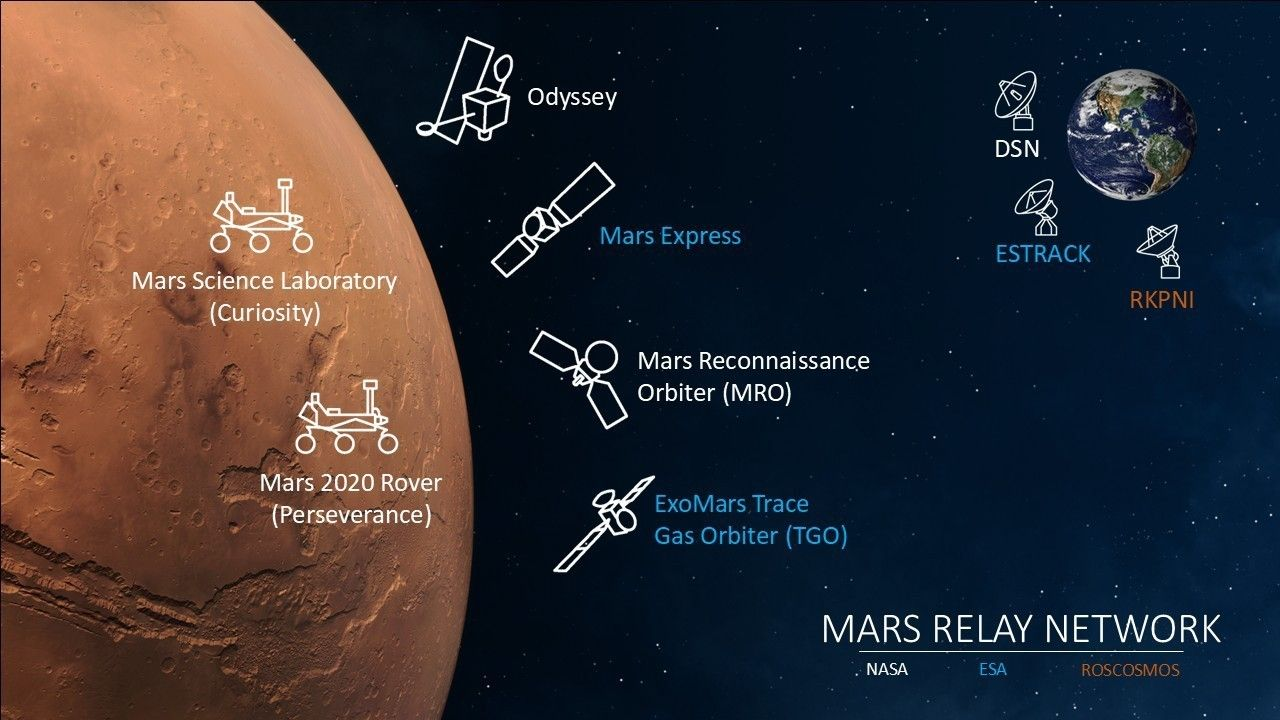
Mars Odyssey, Mars Express, the ExoMars Trace Gas Orbiter, and the Mars Reconnaissance Orbiter currently make up what’s known as the Mars Relay Network (MRN). The Mars Atmosphere and Volatile Evolution (MAVEN) spacecraft was also part of the MRN, but communication was lost with the vehicle in December of 2025 and as of this summer NASA officially declared the mission over.
The MRN has been absolutely invaluable for many high profile missions, and there’s an excellent chance nearly every picture you’ve ever seen of the Martian surface was at one point routed through it on its way back to Earth. But for the spacecraft that comprise the MRN, shuttling bits across the black is more of a part-time job. Their individual primary missions are scientific in nature, and it shows.
Consider the Mars Express. Launched by the European Space Agency in 2003, it’s primary mission goals included releasing a small rover, analyzing the Martian atmosphere, and studying the planet’s closest moon, Phobos. To accomplish these tasks and to reduce the amount of propellant needed, the ESA put Mars Express into a highly elliptical orbit that sees the spacecraft swoop down to within 300 kilometers (185 miles) of the surface before heading back out to a distance of 10,000 km (6200 miles). Unfortunately, the rotation of Mars in combination with this exaggerated orbit means that rovers on the surface can’t maintain a consistent link to the vehicle, and as such its usefulness as a communications relay is limited to relatively narrow windows.
But in 2026, the real problem with the MRN is how old its constituent members are. MAVEN had already been flying for 12 years when it went offline, but that’s nothing compared to its peers. Mars Express has been on the job for 23 years, while Mars Odyssey has been in orbit for an incredible 25 years. Even the baby of the group, ESA’s ExoMars Trace Gas Orbiter, was launched over a decade ago.
Advertisement
Those are very impressive durations for missions of this type, so much so that Mars Express and Mars Odyssey are the two oldest operational spacecraft in orbit around a planet other than Earth. While their continued operation is a testament to the engineering that went into them, the Mars Relay Network has more than earned its retirement.
An Overdue Upgrade
Given their age, it’s not as if there’s any disagreement about whether or not the spacecraft of the MRN are due for a replacement. Similarly, few would deny the operational benefit of a dedicated communications relay in orbit over Mars. Unsurprisingly, discussions on both points have been going on since the early 2000s.
Mars Telecommunications Orbiter, circa 2005.
NASA’s original plan for what they called the Mars Telecommunications Orbiter (MTO) would have put the spacecraft in orbit around the Red Planet back in 2010. The design concept for the vehicle called for two X-band transmitters and two Ka-band radios, in addition to an experimental laser communication system that could return data to Earth at an unprecedented rate.
Unfortunately, the MTO concept was cancelled just a few years after its inception as NASA needed to allocate the money towards other missions such as the final servicing mission for Hubble and the then in development Mars Science Laboratory (MSL) mission which would go on to deliver Curiosity to the surface in 2012.
The general idea has been floating around ever since, being reintroduced in budget discussions every few years. Each proposal has failed to gain the necessary support, in part due to the vague nature of the mission. Usually when NASA or the ESA spends hundreds of millions of dollars to send a spacecraft to Mars, it has a long list of science objectives to justify the price tag. But a communications relay that carries few if any secondary science payloads is a harder sell.
Advertisement
Sample Return Consolation Prize
Given all the false starts the project has had over the last two decades, it’s somewhat ironic that the only reason the space agency is able to allocate significant funds for the mission now is because of the collapse of the Mars Sample Return (MSR) initiative. A budget reconciliation package passed by Congress in July of 2025 allocated $700 million to revive the Mars Telecommunications Orbiter program, but stipulated it had to be built by one of the commercial companies that had contributed towards the MSR mission, and that it should be ready to launch by 2028.
As with previous incarnations of the MTO, Blue Origin’s spacecraft will provide a high-bandwidth link back to Earth which can be utilized by multiple current and future Mars missions. The vehicle itself will feature a number of ports which can mount scientific instruments, deployable sub-relays, or potentially even a lander. Technically the contract only requires that the orbiter be capable of carrying a 20 kilogram science payload, but presumably Blue Origin has expanded on that idea so they can offer Martian “rideshare” opportunities for other companies while still achieving NASA’s stated design requirements.
Advertisement
Given how quickly all of this is coming together, there’s still not a lot of public information on Blue Origin’s spacecraft. But we can glean a few interesting technical details from NASA’s original proposal request, such as the requirement that the relay must offer at least one terabyte of non-volatile store-and-forward capability, and should be able to achieve a 150 Mbps link from Mars to Earth.
Interestingly, despite the impressive demonstration of the Artemis II Optical Communications System (O2O) earlier this year, NASA specifically noted that support for optical communication was not a requirement of the Mars Telecommunications Network contract — though it would consider the feature a bonus should it be included.
Not Everyone is Happy
With the funds guaranteed by federal mandate and a contractor already building hardware, it seems like the Mars Telecommunications Orbiter is now closer to reality than ever before. But of course, nothing is ever truly guaranteed when it comes to space. Production runs into snags, bugs are discovered in software, and occasionally rockets explode on the launchpad. In addition to this general uncertainty, the revived Mars Telecommunications Orbiter will also have to contend with politics.
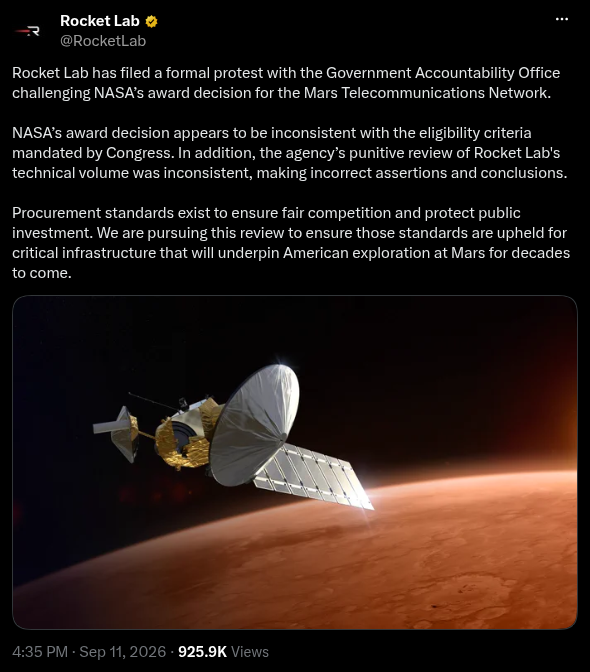
Since the announcement that Blue Origin was selected for the MTN contract, Rocket Lab filed a formal protest with the Government Accountability Office. They claim that design presented by Blue Origin is “inconsistent with the eligibility criteria mandated by Congress” and that NASA made incorrect assertions about RocketLab’s own proposal.
Because Rocket Lab is protesting the decision, both NASA and Blue Origin must legally stop all work on the MTN project until the Government Accountability Office can review the selection process and make their determination. This process can last up to 100 days, meaning there might not be a ruling until the end of the year.
Advertisement
Under normal circumstances this might simply be a bureaucratic annoyance, but when it comes to a mission that needs to leave Earth during the periodic Mars launch windows that only come around every 26 months, a lengthy delay could ultimately push the project into the next decade.
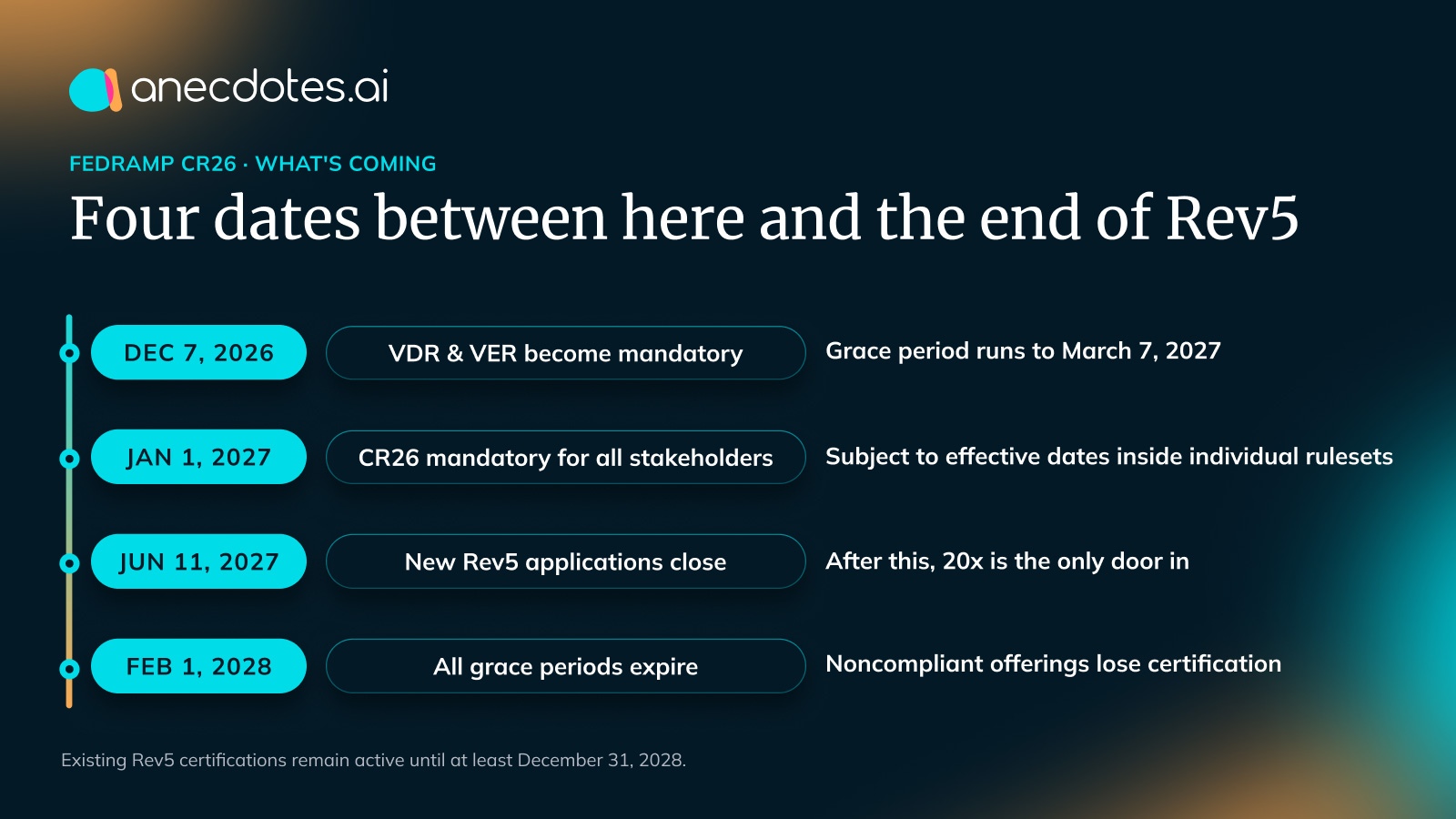
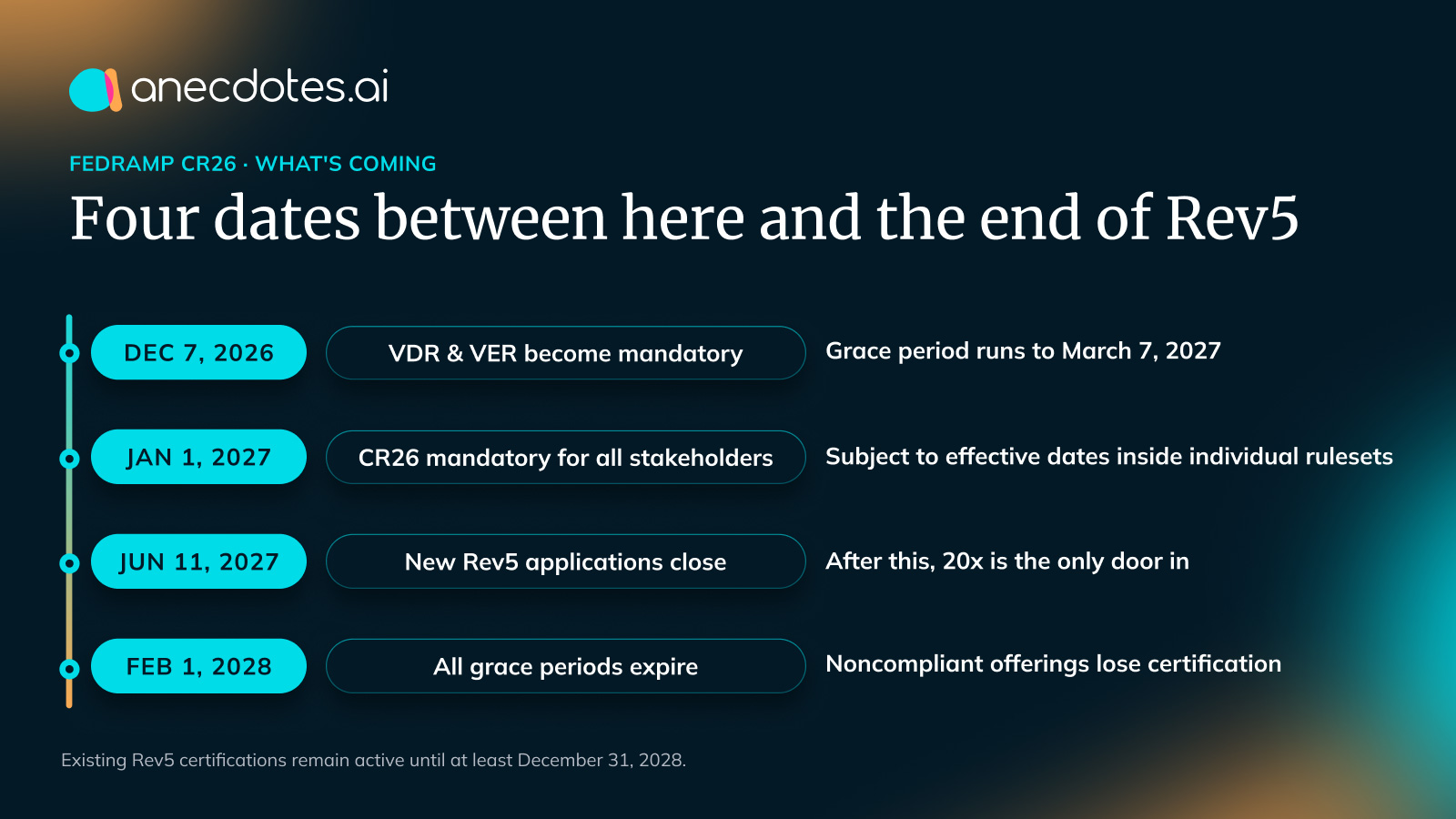
If you hold a FedRAMP certification, the nearest deadline on your calendar is December 7, 2026. FedRAMP’s notice responding to CISA’s BOD 26-04 puts it plainly: “The Vulnerability Detection and Response rules will be mandatory for all cloud service offerings obtaining or maintaining FedRAMP Certification effective December 7, 2026,” with a grace period through March 7, 2027 for offerings operating under a corrective action plan.
It is also the deadline most programs have not fully scoped. The problem is not the date. It is that VDR and VER read like a scanning requirement and operate like something else entirely.
What the two rulesets actually change
Start with what is retired: the flat monthly-scan-and-POA&M model. Detection frequency is now set by certification class — under rule VDR-TFR-PSD, machine-based resources are scanned at least every 14 days at Class A, every 7 at Class B, every 3 at Class C, and at least once per day at Class D.
Machine verification and validation runs at least monthly for Rev5 holders, and as often as every three days at higher 20x classes.
Advertisement
Then the three provisions that reshape engineering work:
Remediation clocks are tiered and tight. Under VDR-TFR-PVR, fix deadlines are set by a vulnerability’s PAIN rating and its exploitability, running from 192 days at the low end to 12 hours at the extreme — a Class D offering with a PAIN-5 vulnerability that is both likely exploited and immediately remotely exploitable.
A 12-hour clock is not a ticket-queue SLA. It is a paging and ownership question, and it has to hold on a holiday weekend.
The burden of proof inverted. VER-EVA-AIA — “Assume It’s Automatable” — requires providers, in FedRAMP’s words, “to assume exploits are automatable by default, unless they have evidence providing otherwise.” Every deferral now needs a defensible artifact behind it, produced at volume, on the same clock as everything else.
Advertisement
Process failures count as vulnerabilities. Rule VDR-CSO-FAV states that providers “[MUST] treat problems or failures with their vulnerability detection and response processes as vulnerabilities.” If your detection pipeline silently stops, that is not an operational hiccup you fix quietly before anyone notices. The system that produces your evidence is itself in scope.
Read together, those change the deliverable. You are not being asked to scan more often. You are being asked to run a system that produces defensible, current, machine-readable answers about your own exposure — and to be accountable when it stops running.
What the December 7 rulesets require in practice — daily detection, monthly machine validation, tiered remediation clocks, and process failures as findings — plus how continuous coverage validation is computed from live asset data rather than attested.
December 7 is the first installment, not a one-off
The Consolidated Rules for 2026 reorganized FedRAMP into rulesets and started the clock on a much larger change.
Advertisement
Rev5 is not being maintained alongside 20x: FedRAMP describes it as “a legacy FedRAMP Certification process that is being replaced entirely by FedRAMP 20x,” and says providers “are expected to follow new rules and adopt new FedRAMP Practices from FedRAMP 20x into their FedRAMP Rev5 Certified cloud service offerings.”
The rules become mandatory for all stakeholders on January 1, 2027, and FedRAMP stops accepting new Rev5 applications on June 11, 2027.
So VDR and VER are not a detour you take before the real transition. They are the transition, arriving in installments — and that reframe is the most useful thing available to a program right now, because it changes sequencing.
Work scoped as “get through December” gets rebuilt in 2027. Work scoped as the first slice of continuous validation transfers.
Advertisement
What got removed tells you where this is going
Look at the structural changes rather than the deadline table. The System Security Plan and its appendices give way to a Certification Package Overview and a Security Decision Record. Plans of Action & Milestones, FedRAMP writes, “have been eliminated entirely and replaced with a list of Accepted Weaknesses.”
Continuous Monitoring becomes Ongoing Certification — renamed, FedRAMP explains, because “continuous monitoring” had “become synonymous with ‘vulnerability scans’” and the new requirements are “far broader than before.”
Every one of those was a place where the artifact stood in for the reality. FedRAMP was unusually direct about closing them, telling providers they will need to build or buy modern GRC capabilities and “populate them using automation based on real-world data where possible, rather than maintaining artisanal hand-crafted documents.”
Here is what deadline coverage keeps missing: almost none of this is a demand for new security. Access control, identity, encryption, logging, incident procedures, training — largely intact, largely reusable.
Advertisement
What changed is that describing them no longer counts as evidence of them.
Three judgments that separate the programs that make it
The work is still compliance; the deliverable is now engineering. What you hand over is a set of running validations that pull from the systems holding the truth — cloud configuration, identity provider, SIEM, CI/CD, ticketing — and emit machine-readable results on a schedule.
Providers must persistently validate their Key Security Indicators, of which CR26 currently lists 49 across ten categories. That is an entry requirement, which makes every transition plan an automation engineering plan underneath whatever it says on the cover.
Someone has to own “continuous.” Monthly monitoring had a due date, an owner, and a natural rhythm of catching up. A validation cadence has none of those. It runs, or it silently stops, and the difference is invisible until an assessor or a customer finds it.
Advertisement
Before building pipelines, answer the operational questions: who is paged when a validation fails, what the response time is, who notices when an evidence source quietly changes its API.
Design for the cadence, not the submission. FedRAMP defines persistently as “occurring in a firm, steady way that is repeated over a long period of time in spite of obstacles or difficulties” — a description of an operating state, not a date.
Teams that build toward a submission build a system tuned for a single moment and then rebuild it afterward.
The part that outlives FedRAMP
Once evidence is structured data rather than narrative, it stops belonging to a framework. The identity evidence satisfying a FedRAMP indicator is the same evidence a SOC 2 auditor wants and the same evidence a large customer’s diligence team asks for.
Advertisement
Compliance stops being parallel projects that each rebuild the same picture in a different vocabulary and becomes one substrate that many consumers read from.
The economics invert along with it. Point-in-time compliance costs rise with every framework and every region you add, because each addition is more description to produce and maintain. Continuous validation costs materially more to stand up and barely more to run.
December 7 is a hard date, and it deserves the attention it is getting. But financial-services supervisors, the EU’s resilience and product-security regimes, and enterprise procurement teams are converging on the same demand from different directions: show me current state, not last year’s description.
FedRAMP arrived first because it had the clearest mandate and the least patience. A team that builds this once has not solved a federal problem — it has built the capability every one of those demands will keep asking for.
Advertisement
anecdotes holds a FedRAMP 20x Class C certification, earned as a Phase Two pilot participant, using the anecdotes platform to run it. The same platform runs commercial compliance for more than 140 enterprise customers.
Standard basis: FedRAMP Consolidated Rules for 2026 and FedRAMP Notice NTC-0014. Rules and Key Security Indicators change through FedRAMP’s public rules process; confirm the live standard at fedramp.gov before baselining your plan.
If there’s one thing that the world has learned from the Russo-Ukrainian War, it’s that drone warfare is the way of the future. While drones have been around for decades, low-cost, one-way attack drones have proven vital to Ukraine’s defense. They’ve been used to destroy countless tanks and other equipment, and with drone swarms becoming more common across the world’s battlespaces, defending against them is of paramount concern to the United States Army.
To that end, the Army has been looking to acquire a high-energy laser air defense system that can track and engage drones before they pose a threat. Part of the motivation is cost: firing a laser is much cheaper than, say, firing Patriot or THAAD missiles, which cost $3.7 million and $15.5 million, respectively. That’s a huge investment to take down a drone that cost just $1,000 or so, which is why laser defense systems are ideal for defending against drones.
Advertisement
While the Army has spent some time working with defense contractors to find an ideal laser system, it only awarded its first contract for such a weapon in September 2026. The $468.8 million contract went to AeroVironment, Inc., to bring its Locust X3 system into production. The U.S. Navy has successfully tested a high-energy military laser for drone defense, but the Army’s system is more mobile, cheaper, and is entering production. And, unlike some new contracts that keep the details under wraps, AeroVironment has released plenty of specs for the Locust X3.
Advertisement
The Locust X3 drone air defense system
The Locust X3 is a third-generation directed energy laser weapon system capable of 20 to 35-plus kW of power. This is enough energy to disable or destroy any Group 1-3 uncrewed aerial system. The U.S. Military classifies Group 1 through 3 drones as those weighing up to 1,320 pounds and flying at altitudes below 1,200 and 18,000 feet, respectively.
The new system can strike such targets before they pose a significant threat. It’s also modular and can be set up in various configurations to suit different tasks. It can be mobile, containerized, installed in fixed or semi-fixed setups, and even used at sea. The first two, especially, will be ideal for Army operations. The system is meant to mount on vehicles like the U.S. Army’s Joint Light Tactical Vehicle, which is gradually replacing the legendary HMMWV, better known as the Humvee. The Army is also investigating whether it will be compatible with the Infantry Squad Vehicle.
The system uses artificial intelligence to detect, track, and prioritize targets before engaging. It uses a standard Microsoft Xbox controller, which should make it easy for soldiers to get used to it. While neither the Army nor AeroVironment has disclosed the cost per shot, range, or other significant details, the decision to invest nearly half a billion in the Locust X3 suggests it meets the requirements of the Army’s Enduring High-Energy Laser program.
The algorithms powering modern dating apps can be a maze. Finding a match, especially without a premium subscription, can be quite a hassle. The “swipe anxiety,” as they say, is a well-known and ugly reality.
Rivet takes a completely different approach to finding connections and romantic interests on a dating app. The dating network, launching today in the US, lets strangers play matchmaker for you.
Rivet
How exactly does Rivet work?
The brainchild of former Tinder and Match Group executive Taru Kapoor, the app lets users act as both a dater and a matcher. “The pairs who get high Social Matching scores are introduced to each other, and each individual independently decides whether they want to match with someone and begin a conversation,” says the company.
Rivet follows a “give-to-get” format, noting that it’s a win-win situation where users find love and also play an active role in helping other Ripeople come together. The app is free to download and is now available on Android and iOS.
However, the matchmaker concept isn’t unique to Rivet.
Advertisement
Rivet
Which other dating apps have matchmakers?
One of the most well-known applications of its kind is Wingman. It lets friends and family members act as matchmakers by writing your profile bio and swiping through potentially interesting folks you should connect with based on their hobbies and interests.
In July this year, Hinge also launched a new feature called Friend’s Take, which lets friends and family members contribute their thoughts on your profile through text, voice, and video descriptions.
Rivet is reintroducing that concept by letting users act as matchmakers for others in the circle, or sign up as a user to find romantic interests for themselves.
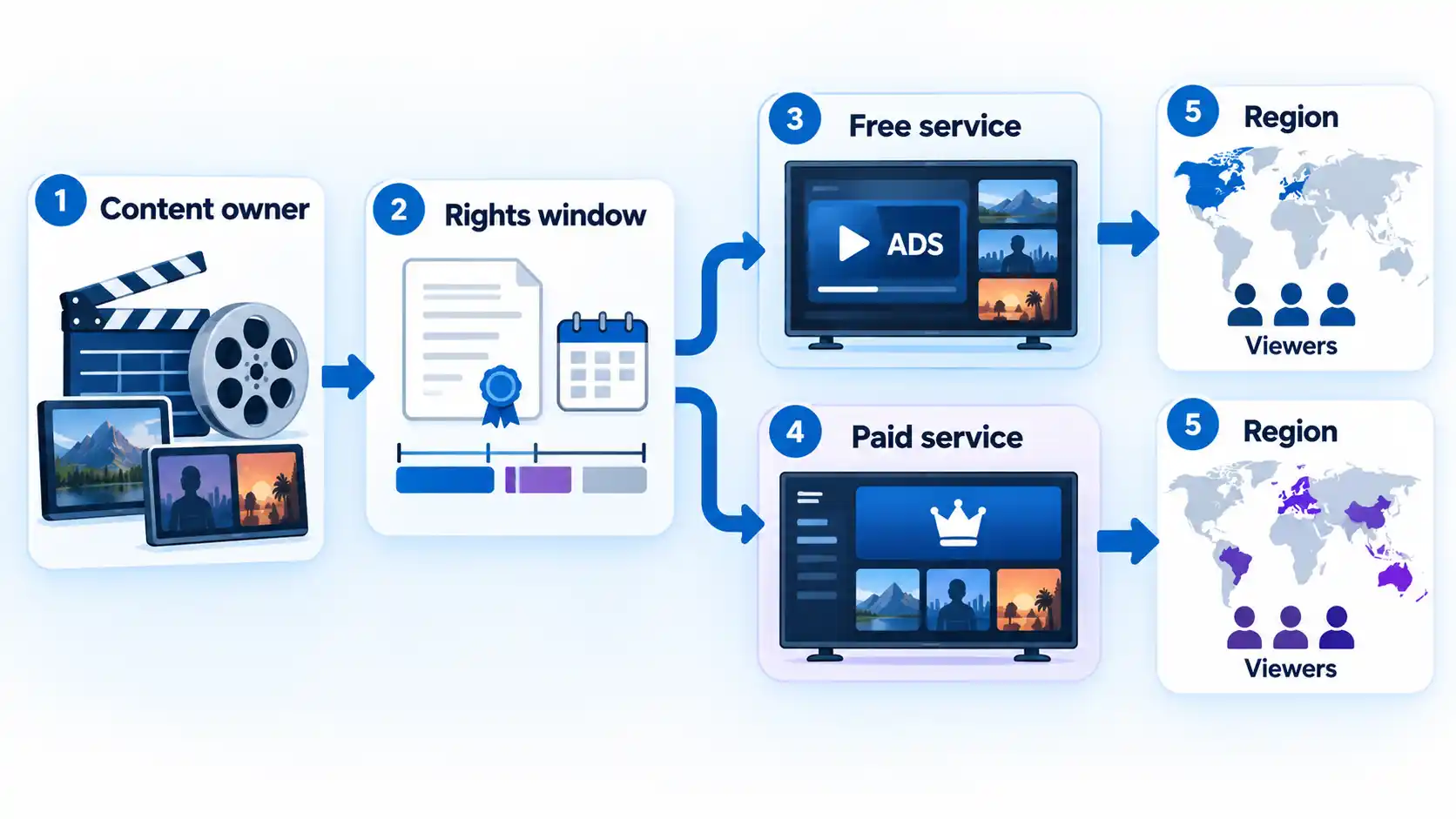
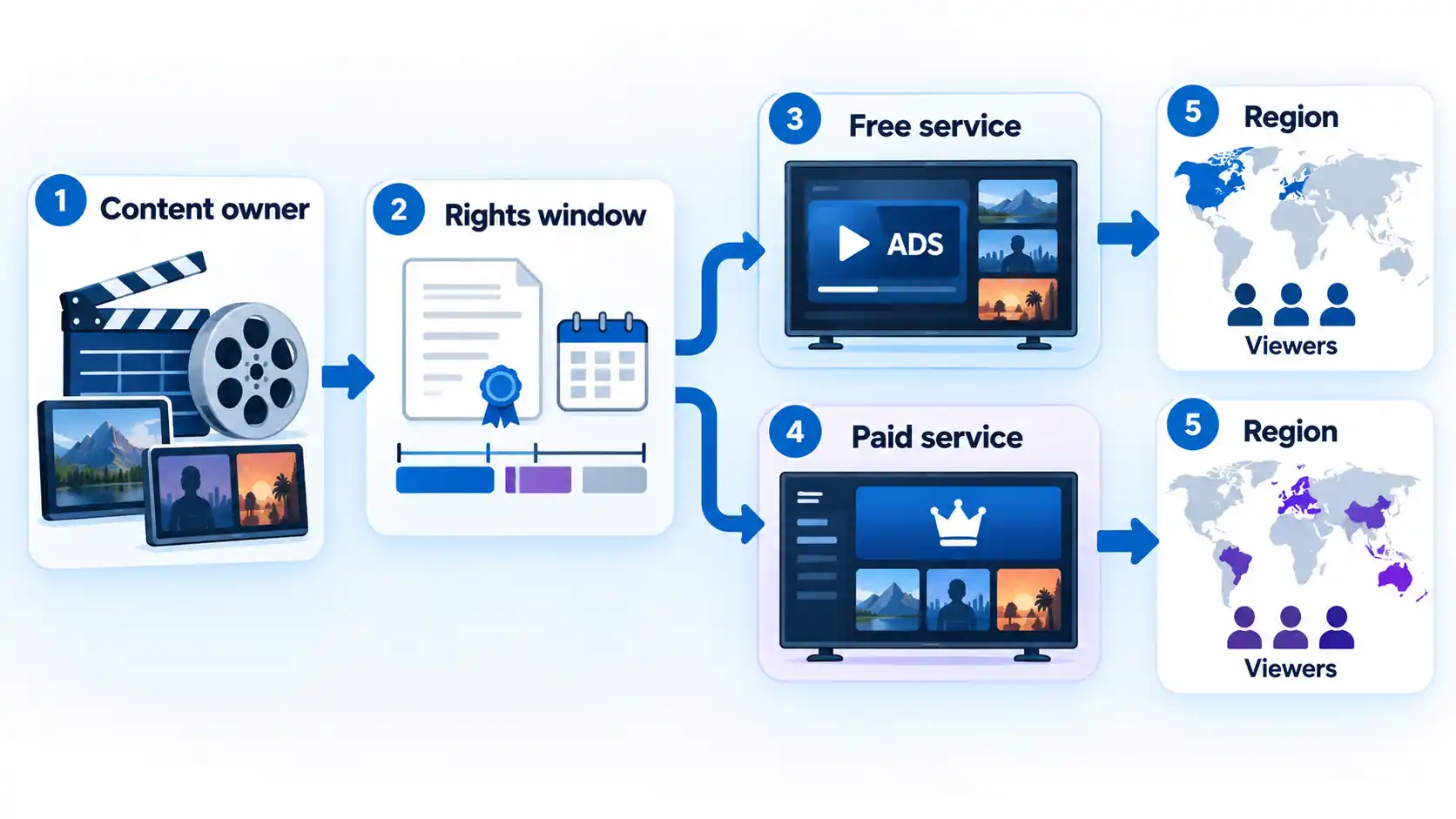
Free legal streaming can cover a surprising amount of everyday viewing, but the trade-off is usually less control over advertising, title availability, offline viewing, and premium playback features. Paying does not automatically remove ads either, because many subscription services now offer lower-cost ad-supported plans alongside more expensive ad-free tiers.
The useful comparison is therefore not simply free versus paid. It is closer to a spectrum: free ad-supported streaming, paid ad-supported streaming, and paid premium streaming. What matters is which restrictions actually affect the way you watch.
Free and Paid Streaming Are No Longer Opposites
Several streaming business models now sit between completely free television and a premium subscription.
AVOD, or advertising-supported video on demand, lets you choose a movie or program and watch it with commercial breaks. FAST, or free ad-supported streaming television, usually combines advertising with scheduled channels that resemble traditional television. SVOD, or subscription video on demand, charges a recurring fee for access to a service, but that subscription can itself be either ad-supported or largely ad-free.
Advertisement
Tubi is a straightforward AVOD example. Its current advertising explanation says the service remains free because advertising funds it and that it does not currently offer an ad-free option.
Netflix demonstrates why the paid side is more complicated. Its current U.S. plan documentation lists Standard with ads alongside ad-free Standard and Premium plans. Paying for a streaming subscription and seeing commercials are therefore not mutually exclusive.
There are other models too. Library-supported services can provide access through participating public libraries, colleges, or universities rather than through advertising or a personal entertainment subscription. The practical differences among free legal streaming services therefore depend partly on how each service is funded and how its catalog is delivered.
If the distinction between scheduled free channels and free on-demand libraries matters to you, FAST and AVOD work differently even though both can be free and advertising-supported.
Advertisement
Free vs Paid Streaming at a Glance
The most useful comparison is not which category has the longest feature list. Compare the restrictions that affect your viewing: advertising, access to specific titles, offline use, playback quality, device limits, and regional availability.
Practical differences between free streaming, paid ad-supported streaming, and paid premium streaming
Feature
Free streaming
Paid with ads
Paid premium
Recurring entertainment subscription
Usually none for the core free service
Required
Required, usually at a higher tier
Advertising
Common
Common
Usually reduced or absent from normal on-demand viewing, depending on the service
Catalog access
Depends heavily on licensing, service, and region
Can include most of a service’s catalog, although plan restrictions may apply
May remove some plan-level access restrictions, although licensing still applies
Offline viewing
Service-dependent and often not a core feature
May be available with limits
Often available on services that support downloads, subject to provider rules
Maximum quality and premium features
Service- and device-dependent
May be limited by plan
Higher tiers can unlock features such as 4K HDR, additional devices, or premium audio on some services
Geographic restrictions
Common
Common
Common
No column wins every row. A person who mainly browses whatever looks interesting has different requirements from someone who follows one exclusive series, downloads shows before flights, or shares a subscription across several screens.
The First Thing You Give Up Is Control Over Interruptions
Advertising is the most visible cost of many free services. Instead of paying a recurring entertainment fee, you accept commercial breaks that help fund the service.
Tubi explicitly ties its free model to advertising and currently provides no ad-free Tubi tier. That makes the trade-off straightforward: access costs no subscription fee, but advertising is part of the viewing experience.
Advertisement
The same assumption becomes less reliable once you move into subscription streaming. Netflix’s ad-supported experience documentation says most movies and TV programs on eligible plans contain commercial breaks. It also notes that a small number of titles can be unavailable on the ad-supported experience because of licensing restrictions.
That means the useful question is not simply whether you pay. Ask what kind of advertising experience a particular plan includes. A cheaper subscription may reduce the financial difference between free and premium streaming without eliminating interruptions.
Live programming is another edge case. Netflix states that live events can contain commercial breaks across all of its plans, including ad-free experiences. If avoiding commercials is one of your main reasons for upgrading, verify the provider’s current rules for both on-demand and live content.
The Bigger Trade-Off Is Often What You Can Watch
Catalog access matters more than raw title counts. A free service can offer thousands of programs and still be a poor substitute if the one series, sporting event, or film you want is licensed somewhere else.
Those findings show that free streaming has developed beyond purely archival television. They do not mean a free catalog will contain the same titles as Netflix, Disney+, Max, Paramount+, or another subscription service.
Licensing determines where much of the difference appears. Rights can be sold for particular countries, platforms, time periods, or distribution models. A film might therefore be included with a subscription in one country, offered free with ads somewhere else, and unavailable on both services in another market.
Advertisement
Exclusive programming creates a stronger reason to pay. If a show or event is contractually tied to one subscription service, a large free catalog elsewhere does not replace it. Conversely, a free service may occasionally carry a title that is absent from the subscriptions you already have.
For that reason, paying for “more content” is too vague a justification. The better question is whether the subscription gives you reliable access to content you specifically value. When one exact film or series is the priority, checking where a title is legally streaming is more useful than comparing catalog-size claims.
Offline Viewing and Playback Flexibility Favor Some Paid Plans
Free streaming generally works best when you expect to watch while connected to the internet. Offline viewing is provider-specific, and paying does not guarantee that every download feature is unrestricted.
Netflix illustrates the distinction within one subscription service. Its current download-limit documentation says its ad-supported plans are limited to 15 total downloads per device per calendar month, with the limit resetting on the first day of each calendar month.
Advertisement
That is a useful reminder that “has downloads” and “has unrestricted downloads” are different claims. Providers can also impose title, device, or licensing restrictions on offline viewing.
Offline playback matters most when internet access is unreliable or expensive, such as during travel or on a commute. If you almost always watch at home on stable broadband, the feature may have little practical value even if a premium plan includes it.
Paying More Can Buy Better Quality and More Device Capacity
Some higher subscription tiers sell technical capability rather than simply a larger entertainment catalog.
Netflix’s current U.S. plan page lists 1080p playback and two simultaneous supported devices for both Standard tiers. Premium increases that to four simultaneous supported devices, adds 4K Ultra HD with HDR, allows downloads on more supported devices, and includes spatial audio. These are current Netflix plan differences, not universal features of paid streaming.
Advertisement
The hardware still has to support the feature. Paying for a 4K plan does not make a 1080p television display 4K. The title, television, streaming hardware, connection path, and service all need to support the required format.
The same reasoning applies to simultaneous streams. A larger household may value extra concurrent devices, while someone watching alone gains little from paying solely for that allowance.
Free Streaming Can Have Significant Regional Restrictions
Streaming rights remain geographical whether a service is free or paid. Free does not mean globally available, and subscribing does not eliminate territorial licensing.
Advertisement
The Roku Channel is a clear current example. Roku’s official availability documentation says The Roku Channel is available in the United States, Canada, and the United Kingdom on Roku devices, web, and mobile, while access in Mexico is limited to Roku devices.
That creates several different kinds of availability to check. A service can operate in your country but lack a particular title there. Its mobile app may exist while its Smart TV app does not. A live sporting event can have different territorial rights from the service’s regular movie catalog.
These restrictions mean a comparison written for one country should not be treated as a universal catalog guide. Before subscribing mainly for one show or event, verify the title, plan, device, and country that apply to you.
What About Privacy and Ad Targeting?
Advertising introduces another consideration, but the price of a plan does not tell you by itself how private the service is.
Advertisement
Netflix explains that its ad-supported experience can use information such as viewing interactions and general location when selecting advertisements. It also says behavioral advertising can use activity from unaffiliated apps or websites unless the viewer has opted out where that option applies.
Info iDo not assume that “free means your data is the product” or that paying automatically prevents tracking. Advertising controls and privacy practices vary by provider, plan, and region, so compare the policy of the service you actually use.
The presence or absence of a subscription fee is therefore not enough to establish a privacy hierarchy. If targeted advertising matters to you, check the provider’s advertising controls, privacy settings, account requirements, and regional privacy options rather than relying on labels such as “free” or “premium.”
Which option should you choose?
When Free Streaming Is Probably Enough
Choose this if: you mainly browse for something interesting rather than follow one exclusive title, you tolerate commercial breaks, you normally watch while online, and premium features such as 4K HDR or large simultaneous-device allowances are not important.
Advertisement
Avoid this if: the programs you regularly want are unavailable on legal free services in your region or you depend on features such as offline viewing.
Main trade-off: you avoid a recurring entertainment subscription but accept less control over advertising, catalog consistency, and premium plan features.
When Paying Solves a Real Problem
Choose this if: the subscription gives you a specific benefit you will actually use, such as an exclusive series, required sports coverage, fewer advertising interruptions, more capable offline viewing, higher playback quality, or enough simultaneous streams for your household.
Avoid this if: you are subscribing mainly out of habit and the legal free services available to you already cover the content and features you use.
Advertisement
Main trade-off: the recurring cost buys greater access or control only when the particular service and plan remove a limitation that matters to you.
A paid ad-supported plan can also be the middle ground. Deloitte’s March 2026 U.S. Digital Media Trends research reported that 68% of SVOD subscribers had at least one ad-supported tier, up from 46% in 2024. The finding applies to the U.S. survey population rather than streaming subscribers globally.
Before paying more to remove ads, compare whether an ad-supported streaming plan is worth the lower price based on how often you watch, the ad restrictions, catalog access, and the premium features you would actually gain by upgrading.
Bottom Line
Free streaming no longer means settling for a tiny library of obsolete television. Legal free services now cover substantial on-demand and channel-based viewing, but they commonly ask you to accept advertising, changing catalogs, regional restrictions, and fewer premium controls.
Advertisement
The strongest reason to pay is not that paid streaming is universally better. It is that a specific subscription removes a restriction you care about. If free services already carry enough of what you watch and their advertising does not bother you, paying may add little. If you need one exclusive catalog, dependable offline viewing, higher playback quality, more simultaneous devices, or fewer interruptions, a subscription can solve a concrete problem.
Opera’s free built-in VPN can now switch itself on public, unsecured Wi-Fi
The opt-in feature is rolling out to users in the US and France first
Opera VPN Free still only protects your browser
Opera browser is making it harder to forget about your VPN.
The company’s free, built-in VPN for desktop can now turn itself on when you connect to a public or unsecured Wi-Fi network.
The feature is opt-in, so you’ll need to enable it in settings first, and it’s rolling out to desktop users in the US and France starting today.
Even the best VPN can’t protect you if it isn’t switched on, and Opera is betting that removing that manual step will get more people covered on risky networks.
NEW: Leave No Trace — A weekly newsletter on digital privacy and online surveillance.
Leave No Trace investigates the companies and governments putting our digital freedom at risk — and the people fighting back.
Advertisement
📩 Subscribe now to get every edition delivered to your inbox every Friday, launching this September.
Opera VPN Free goes on autopilot
Opera has offered its built-in VPN since 2016. It’s free, doesn’t require an account, and has no fixed bandwidth cap. Its no-logs policy has also been independently audited by Deloitte. Until now, though, you had to remember to switch it on yourself.
With this new setting, however, the Opera browser turns the VPN on automatically when it spots a public network. So, working from a café, studying on campus, or browsing at an airport no longer means activating the VPN manually every time.
Advertisement
The option first surfaced in testing earlier this month, when release notes for Opera Developer 137 listed an option for the VPN to connect automatically on public networks.
Arjan van Leeuwen, Head of Opera One Engineering, said VPNs “are a vital part of users’ digital hygiene”.
The company also notes that competitors like Chrome and Safari still don’t offer built-in browser VPN features by default. It also cites We Are Social data showing that only 23% of internet users worldwide used a VPN as of Q4 2025.
Advertisement
Why public Wi-Fi is a risk
Public Wi-Fi is convenient, but open networks can be joined by anyone nearby, who can then snoop on or inject malicious traffic.
A trustworthy VPN encrypts your traffic, which makes it much harder for attackers to intercept and steal your data.
Automating that step closes the gap between knowing you should use a VPN and actually doing it.
Advertisement
Opera VPN Free vs Pro: a quick overview
A screenshot of Opear VPN Pro (Image credit: Opera)
Opera VPN Free is built into the browser and costs nothing. However, it only protects traffic inside Opera, so apps like Spotify, Steam, or a standalone email client still use your regular connection.
Opera VPN Pro, which launched as a paid tier in 2022, is a system-wide VPN. It covers up to six Windows, macOS, or Android devices, and it has run on ExpressVPN’s Lightway protocol since mid-2025, with 48 server locations.
Lightway also brings post-quantum protection by default. Opera lists Pro from $4 per month, and new users can try it with a 7-day free trial.
If you mainly want to keep your browsing safe on the odd café hotspot, the free VPN with auto-connect is an easy win. If you want every app on your device protected, you’ll need Pro or a dedicated VPN app.































































You must be logged in to post a comment Login