Security teams log 54% of successful attacks and alert on just 14%. The rest move through your environment unseen.
The Picus whitepaper shows how breach and attack simulation tests your SIEM and EDR rules so threats stop slipping by detection.





Microsoft warned customers on Tuesday that they may have issues installing the latest monthly updates on some Windows devices that were upgraded to Windows 11 24H2 or 25H2.
On affected systems, users will see 0x80073712 or 0x800f0993 errors when trying to install the June 2026 cumulative updates.
“A small percentage of devices running Windows 10, versions 22H2 and 21H2, or Windows 11, version 23H2, that were then upgraded to Windows 11, version 24H2 or 25H2, might fail to install the latest cumulative update,” Microsoft said in a service alert first spotted by Microsoft MVP Susan Bradley.
“After encountering this issue, devices cannot install monthly Windows updates. When you go to Settings > Windows Update > Update history, you might see that Windows updates fail with error 0x80073712/0x800f0993.”
When checking the Windows Update log files on impacted devices, users will see error 0x800f0993 (PSFX_E_REBASE_HYDRATION_CANDIDATES_MISSING) or 0x80073712 (ERROR_SXS_COMPONENT_STORE_CORRUPT) triggered when trying to install the latest updates.
According to Microsoft, a fix for this known issue will roll out to all unmanaged enterprise devices and personal PCs (Home edition) following a system restart.
“No new devices in these categories should be affected by this issue starting from May 19, 2026, 6:30 p.m. PT. Restarting the device might allow the resolution to apply sooner. No other action is required beyond a device restart,” Microsoft added.
For all other affected devices, Microsoft has released the following Windows updates as part of its June 2026 Patch Tuesday, which should install automatically during upgrades to Windows 11 to prevent this issue from occurring:
However, as Microsoft further explained, this issue will not be addressed on affected systems that have already been upgraded to Windows 11, version 24H2 or 25H2.
On these devices, users should remove the affected package to unblock update installation by running the following command in an elevated Command Prompt:
dism /online /remove-package /packagename:Package_for_RollupFix~31bf3856ad364e35~amd64~~26100.1742.1.10
If the above mitigation does not fix the update issue, users are advised to perform a Windows 11 in-place upgrade.
Over the past several months, Microsoft has fixed multiple issues affecting the Windows update installation process.
For instance, in April, it released an out-of-band update to fix the March 2026 non-security preview update (KB5079391) due to a known issue that also triggered 0x80073712 errors on Windows 11 during deployment.
One month later, Microsoft warned customers that they may encounter Windows Update failures after installing the January 2026 optional non-security preview updates in restricted network environments.
More recently, it resolved another known issue causing failures and 0x800f0922 errors when installing the May 2026 Windows 11 security update (KB5089549).

Security teams log 54% of successful attacks and alert on just 14%. The rest move through your environment unseen.
The Picus whitepaper shows how breach and attack simulation tests your SIEM and EDR rules so threats stop slipping by detection.

Around half of remote participants say they’re forgotten, talked over or excluded during hybrid meetings, a new study from Jabra has revealed, indicating that hybrid in-person and remote meetings might not be as effective as we’d thought.
The issue is particularly evident when multiple participants are in a physical room, with others joining online. But more than that, women (16%) and junior workers (26%) are more likely to feel they’re being excluded.
But it might not be the concept of hybrid that’s at fault – Jabra argues that dated tech is making it hard for all participants to have equal visibility, and that poor tech is only amplifying existing cultural issues around visibility instead of creating them.
That much is evidenced in the fact that hybrid meetings are generally worse off than fully remote meetings, with workers more likely to miss content (59% vs. 41%), feel excluded (55% vs. 38%) or need follow-up meetings to clarify details (42% vs. 28%).
Years after workers were sent home at the height of the pandemic, companies are still failing on their meeting tech. Three in four hybrid meetings experience at least one technical failure, and participants often claim difficulties hearing (73%) or seeing (68%) participants.
Jabra even argues that these failures add an average of 11 minutes to every hybrid meeting, and losses can rise further for the biggest companies.
This comes as workers spend an average of eight hours per week in meetings (more than that in Denmark, India and the UK).
With more than half (58%) of that time generally considered unnecessary, 66% leave without clear action items and 59% demand follow-ups to clarify missed points.
As for the fix, many companies have turned to AI to help with things like meeting summaries and live transcriptions, but widespread use remains low. Poor trust and privacy/compliance issues also prevent companies from going all-in on AI.
“AI can enhance a well-run meeting, but it can’t fix a broken one,” Jabra Enterprise Video Business Unit SVP Holger Reisinger said.
To fix the issue, the report urges companies to invest in meeting room technologies like microphones, cameras and connectivity to bring remote participants closer to in-person attendees.
At the moment, 37% use a single laptop as a mic and speaker for the room, 31% revert to audio-only after giving up on video, and 23% have even dialed in by phone for audio. A third (34%) also noted that participants join on their own individual devices, rather than using a central meeting room system designed to capture all participants.
Jabra is also one of a growing number of researchers to find that workers face increased Zoom fatigue (42% of workers hit their energy limit within two hours of back-to-back meetings, 83% within four hours), stressing the need to reframe meetings entirely and only hold calls when it’s necessary.
That way, workers are more likely to be alert and actively collaborate with all colleagues, hybrid or not.

Follow TechRadar on Google News and add us as a preferred source to get our expert news, reviews, and opinion in your feeds.

I am going to start where no good teacher should start, with a $10 word: epistemology. It refers to a branch of philosophy that explores how we know what we know – something scholars like John Dewey argued is deeply tied to experience, not just information.
This word takes me back to my doctoral graduation when my father-in-law said with good-natured humor, “Well, Ev… there’s a lot of [stuff] you can’t learn from a book.” At the time, I didn’t know what to say, but any teacher worth their salt will tell you: he’s right.
Pre-service teachers – myself included – often lament that they didn’t really learn to teach until the rubber-meets-the-road experience of student teaching or that first job. This is the challenge of teaching pre-service teachers. I’ve been doing it for a handful of years now, and I see a trend – the TikTok way of knowing in education. It’s got me wondering how we adapt our practices based on my experience during my recent final exams with pre-service teachers.
The TikTok way
For example, I ask my students to make two tangible items to try and circumvent AI. One item is a teacher creed. I hand out “fancy” paper and tell them to create something they might read every teaching day – something to remind them not if, but when teaching gets hard. These are heartfelt, colorful creations. They write things like, I will show up with a good attitude. Even on my worst day, I will be someone’s favorite teacher. I cringe a bit, knowing how more seasoned educators might scoff but that is perhaps why I assign them – to bottle that early hopefulness in a landscape that often doesn’t often create it for new teachers.
The second item is to create “One One-Pager to Rule Them All!” Students make non-linear, doodle-style notes throughout the semester, and this final asks them to zoom out and represent everything essential we’ve learned through a map of connections, images, and ideas.
I love this assignment because I can see who is connecting the dots and who is simply regurgitating the text. I sit with each student for five to seven minutes as they “show and tell” the work. As they read their creeds, I am heartened and sometimes even tear up. And in conversation after conversation this semester, I heard the same phrase, almost as a confession mid-conference:
“I know it’s not research-y, but in a TikTok I saw…”
“I know it’s not the best source, but I saw a reel that said…”
“This guy I follow always says…”
Each of these notes expanded or connected my own thinking about course content. Some couldn’t be backed in my mind of research, but others could. So, instead of arguing, I asked questions: Who created that content? What might their motivation be? Why does it matter to you? This kind of questioning reflects what Marilyn Cochran-Smith and Susan Lytle describe as “inquiry as stance” – an orientation where teachers are active investigators of knowledge.
An epistemological shift
We are in a shift in epistemology. Future teachers are learning not only through peer-reviewed research or textbooks, but also through short-form video, personality-driven content, and lived teacher experience shared in real time – what media scholars like Henry Jenkins describe as a more participatory culture of knowledge. This is democratizing, the dismantling of the silo that has long held educational research out of reach. But this is also destabilizing.
During my first years of teaching, I cried in my car a lot. If I had had the megaphone of TikTok influencers celebrating how they left education, or even my own content microphone, I’m not sure I would have made it through to my later years of teaching that are still hard but more grounded and fulfilling.
Admittedly, some positions are ones to leave. Yes, at times educator working conditions are not what they should be but how do we help pre-service and early-career teachers move through the baptism-by-fire years while being bombarded by voices – many from people who have left the profession and now narrate it from the outside? Some of the content is helpful. Some of it is not. And all of it is loud.
I wonder if our teacher preparation programs are keeping pace with how knowledge is actually being formed. It leads me to my favorite teacher question, “So what? What do we do now?” How long do we hack away at the plant growing up the wall, and when is it time to embrace the aesthetic of a vine-covered building as something worth studying?
Instead, what if instead we become weavers of stories? What if we help students craft their own and build connections of knowing? What if we engage lived experience not as secondary to research, but as a complementary form of knowing? When have we had so much access to real-time teacher voices about things that happened to them in the classroom that day?
Just because something is visual, narrative, click-baity, and social doesn’t mean it is missing the mark or doesn’t engage a pedagogical question worth exploring. This TikTok wondering is happening whether we embrace it or not, so what if we see it as a new charge to help future teachers engage these voices critically, rather than pretending they don’t exist?
Here are some ideas I’m playing with. I’m curious what you might add.
Ed Content Fridays. Students bring in content that connects with the week’s readings and learning from their own scrolling. Discuss it in a Spider-Web format that employs elements of a librarian CRAAP test to help students develop habits of mind around credibility and content creator motivation.
Use a C3WP writing strategy that engages reels and posts to kick off class. Start with what students know as a free write and then bring in content to have them expand their arguments and defend thoughts with research from our shared text. If students bring it in, they find it interesting, and we can require a citation connection to the course text or researchers.
Like/Share/Subscribe. Share strong online content that sings from reputable sources with students. Syllabi and course hubs can be places to curate rich content collaboratively.
Have students create their own content. CapCut on a desktop or Edits on a phone are surprisingly easy plug-and-play tools to make short form videos, and we can up the academic requirements with or without student posting. Thoughtful content can grow out of our rich history of educational research, bringing rich, thoughtful voices in among the pervasive ranting. I’m not saying we shouldn’t be about the work of educational reform and that a good rant doesn’t have its place, but this new way of knowing and sharing knowledge is sitting in our desks waiting for us to light the fire.
Yes, my step-dad is right, there is so much we can’t learn from a book, but maybe there is still so much we can learn from our own students in their own ways of knowing, even if we don’t fully understand them ourselves. What if our ways of knowing weave together, creating something beautiful?
Congress is reviving one of the most significant antitrust bills Apple has faced in years, reopening a fight over the App Store and platform control that the company helped spend millions to defeat during previous congressional sessions.
Sens. Amy Klobuchar, D-Minn., and Chuck Grassley, R-Iowa, reintroduced the American Innovation and Choice Online Act (AICOA) on June 10. It revives a bipartisan effort to limit how dominant technology companies favor their own products and services.
The bill targets the largest online platforms and seeks to restrict conduct that supporters say gives those companies an unfair advantage. Apple and other technology giants spent years fighting earlier versions of the legislation because of its potential impact on their businesses.
The proposal would prevent dominant technology companies from favoring their own products and services. Lawmakers describe those practices as self-preferencing and argue they can disadvantage competitors.
Critics argue Apple uses its position as the operator of iOS and the App Store to benefit its own services over competing products. The legislation could directly affect the App Store and Apple’s control over the iPhone ecosystem.
Apple has consistently argued that its policies help protect user privacy, security, and the integrity of its platforms. In a statement provided to AppleInsider, Apple said it “strongly disagree[s] with the Senate’s consideration of European-style regulation” and argued the legislation would undermine privacy, security, and child safety protections while making it harder to do business in the United States.
The company also said importing Europe’s “failed policies” would not increase competition. The reintroduction marks the latest chapter in a legislative battle that has stretched across multiple sessions of Congress.
Earlier versions of AICOA advanced through the Senate Judiciary Committee but never reached a final vote despite bipartisan support. The bill came closer to becoming law than many technology reform proposals.
The debate around AICOA has changed since Congress first considered the legislation. Apple has already made significant App Store changes in Europe to comply with the Digital Markets Act.
The European law imposed new requirements on how large technology platforms compete and operate. The DMA and AICOA take different approaches to regulation.
Both aim to limit how dominant technology companies use control of their platforms to benefit their own products and services. For Apple, the DMA offers a real-world example of the kinds of changes lawmakers have sought through AICOA.
The company argues AICOA would mirror key elements of Europe’s Digital Markets Act, which required the company to make significant App Store changes in the European Union. According to Apple, the DMA has weakened privacy protections, increased security risks, and created a more difficult environment for product launches and platform development.
Apple was among several technology companies that opposed the legislation during its previous runs through Congress. It argued that some provisions could make it harder to maintain privacy and security protections on its platforms.
Industry groups representing large technology companies also warned that the legislation could have unintended consequences for integrated products and services.
Supporters argue dominant platforms have too much control over businesses that depend on them. They say existing antitrust laws haven’t done enough to address those concerns.
Major technology companies spent heavily to stop AICOA and related antitrust legislation. Previous reporting found that Apple, Amazon, Google, and Meta collectively spent more than $100 million on lobbying and advocacy efforts tied to the proposals.
Trade groups also joined the fight, and industry-backed advertising campaigns helped amplify the opposition. The legislation ultimately stalled despite advancing through committee and attracting support from both parties.
The bill’s return doesn’t guarantee it will become law. Previous versions generated substantial attention and bipartisan support but ultimately stalled before reaching the finish line.
For Apple, the debate extends beyond another round of regulatory scrutiny. The legislation could affect how the App Store operates and how Apple Services compete on the company’s platforms.
Whether the latest version gains enough support to advance remains unclear. Its return shows that Congress is still trying to limit how dominant technology platforms use control of their ecosystems to benefit their own products and services.
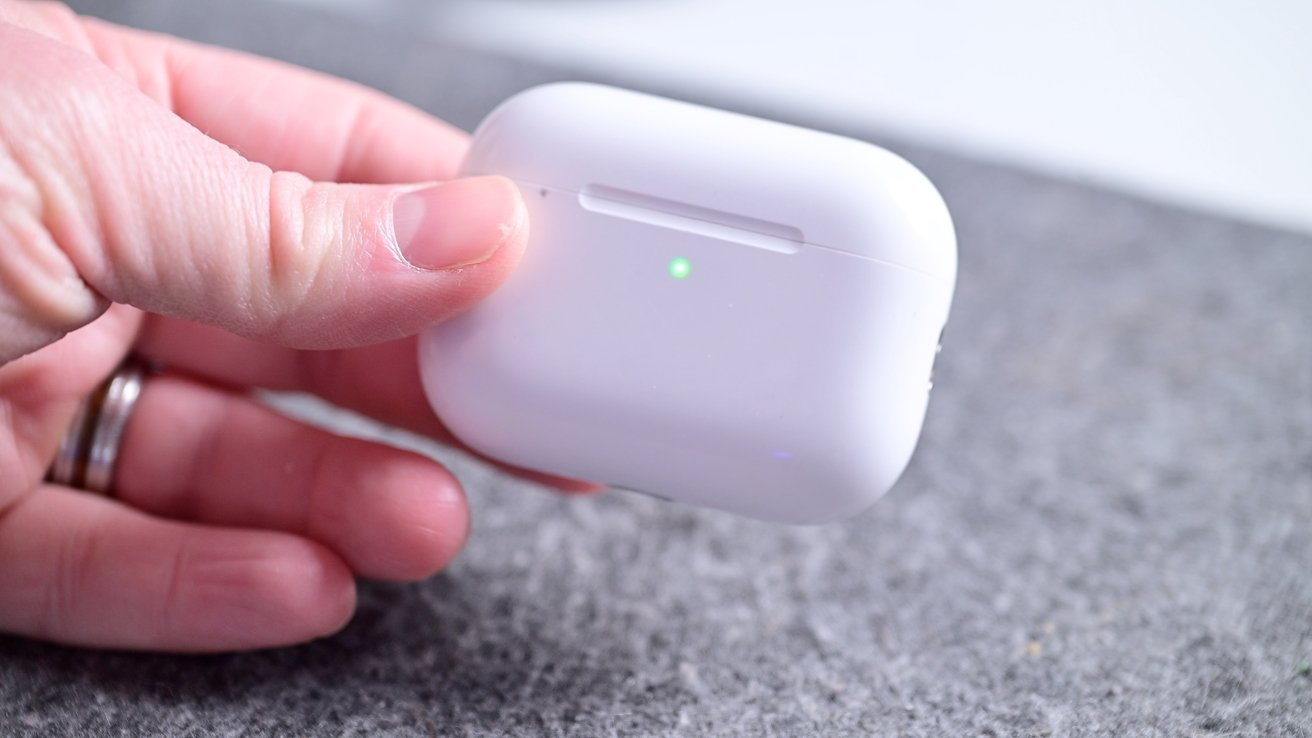
With Prime Day 2026 fast approaching, Apple deals are heating up, and some of the lowest prices on record are available on new releases.
Prime Day officially starts on June 23, but retailers are slashing prices on popular Mac configurations, iPads, Apple Watches, AirPods, and more. Plus, the in-demand Mac mini is back at Amazon (and marked down). Here are the top deals this Thursday.

AirPods Pro 3 have dipped to the lowest price ever.
We covered the $179 AirPods Pro deal yesterday, which marks the steepest discount seen to date. Walmart initially issued the $70 markdown, but the deal has expired at that retailer. Luckily, Amazon is still offering the $179 price.
If you’re looking for the lowest AirPods price across the range, AirPods 4 are available for $99 (a $30 discount off retail). And AirPods Max 2, which were announced in March 2026, are on sale for $499 after a $50 price cut.

Early Prime Day deals on iPads deliver prices from $299.
Those in search of a budget-friendly tablet can grab Apple’s 11-inch iPad for $299.99. Or if you’d like Apple Intelligence support, the current M4 iPad Air and M5 iPad Pro are on sale, with a detailed selection of the price drops in our iPad Price Guide.

Apple Watch Series 11 prices are down to as low as $299.
Triple-digit discounts are in effect right now on the Apple Watch Series 11. Released in September 2025, the Apple Watch Series 11 is available in 42mm and 46mm case sizes and numerous band styles. Amazon’s markdowns deliver prices as low as $299, but you can also pick up an Apple Watch SE 3 for $219 and an Apple Watch Ultra 3 for $779.
Buy Apple Watch Series 11 for $299

Apple’s latest MacBooks are marked down to as low as $589.
Early Prime Day deals also include Mac computers, with Apple’s budget-friendly MacBook Neo dipping to $589.99. M5 MacBook Air models are also as low as $949.99, while M5 MacBook Pros with at least 1TB of storage can be picked up for as low as $1,529.99.

Apple’s in-demand Mac mini has returned at Amazon.
Apple’s M4 Mac mini has been out of stock for quite some time, as the model has become popular with users looking for a headless AI machine. But the 512GB Mac mini has returned at Amazon, with a $30 discount to boot.

Apple iPhone accessories are marked down.

If federal officers are going to murder another person, it will likely happen here.
Newark, New Jersey is the newest battleground for the administration, as Trump goes to war with his own constituents. The foundation was laid months ago, when ICE officers assaulted, arrested, and illegally refused to grant access to detention facilities to congressional reps.
Now, there’s a war being fought at the Delaney Hall detention facility, overseen by ICE and run by private prison contractor, GEO Group. The protests have been steadily getting more intense. The city’s mayor, Ras Baraka, has been on the Trump administration’s radar ever since officers arrested him for… um… standing on a public sidewalk as New Jersey congressional reps demanded access to the facility.
Things aren’t exactly being made better by Governor Mikie Sherrill. On one hand, she has passed laws that forbid local police cooperation with ICE’s anti-migrant efforts. On the other hand, she’s decided to expend state resources to protect federal resources from protesters.
The crisis remains a volatile, early test of Ms. Sherrill and her administration, with the potential for political fallout that could reverberate far beyond Newark. Ms. Sherrill, a moderate Democrat, has already faced criticism from the left, which has pointed to her decision to send in New Jersey State Police troopers to quell disturbances outside Delaney Hall as evidence of cooperation with the Trump administration’s divisive immigration crackdown.
Seems like that might be a job that would be better handled by vastly better-funded federal agencies, like the Federal Protective Service which is overseen by the flush-with-cash DHS.
But given what’s happening outside of Delaney Hall, it might make more sense to expend state resources on protecting protesters, legal observers, and (especially!) journalists from federal officers, not to mention the locals who are supposed to be serving and protecting.
It’s nothing new to hear that federal officers are assaulting journalists or anyone else attempting to document their actions. But the specificity of these attacks makes it clear federal officers are deliberately seeking to do as much damage as possible to the tools journalists use to make a living.
According to a report by amNewYork, there have been allegations from multiple photojournalists who say they were injured while documenting clashes near the detention center, with some reporting damaged camera equipment and physical injuries, including broken fingers.
Reuters photojournalist Ryan Murphy tells amNewYork that he was struck with a baton over several nights of coverage and said agents targeted his camera during an incident on Thursday. Murphy said he believes the strike broke one of his fingers.
[…]
Photographer Madison Swart, a frequent contributor to The New York Times, also alleged that she was deliberately pushed to the ground while documenting the protests. Swart says an agent struck her with a baton during the confrontation. According to amNewYork, another photographer was reportedly seen curled in the fetal position as agents moved over her, while another prominent photographer, who requested anonymity, says the top of his camera was smashed.
Here’s another account that comes with photos of the damage done:
Mostafa Bassim, a photojournalist for Turkey’s Anadolu Agency, was struck with a baton by a federal officer, damaging his camera lens, while covering protests outside a private immigration detention center in Newark, New Jersey, on May 28, 2026.
[…]
Bassim told the U.S. Press Freedom Tracker that he arrived at the detention facility shortly before nightfall. He said that even before he was able to start documenting the scene, federal officers noticed his camera and began shining high-powered lights directly at him.
“The second they see you with a camera they just start doing that to you,” Bassim said.
Any officer who’s only interested in doing what’s necessary to maintain the peace wouldn’t deliberately target journalists, especially before the protests themselves start to get out of hand. And when it is actually time to step in to protect federal employees (or government contractors), force should be applied to those whose actions demand a forceful reaction. Deliberately targeting journalists and the tools of their trade is nothing more than being shitty just because you know no one will stop you.
And speaking of being shitty, this is still the high water mark for law enforcement response to the Delaney Hall protests:
[P]hotojournalist, Angelina Katsanis, 25, dropped her camera bag after she was injured at the protest on Saturday, she said in an interview. The bag contained roughly $10,000 worth of equipment, according to a statement from the state attorney general, Jennifer Davenport.
The bag was later tracked using an Apple AirTag to the home of Darryl Brown, 43, a sergeant with the Essex County Prosecutor’s Office, the statement said. Sergeant Brown, of Sparta Township, N.J., had been deployed to Delaney Hall during the protest, prosecutors said.
On top of the theft (which is a felony, given the value of items stolen), there’s the officer’s attempt to cover up the crime:
From a hospital bed, she watched on her phone as the AirTag in her camera bag traveled across northern New Jersey — on the highway, then to a private residence, and then to a bar close to that home, she said.
Ms. Katsanis said her boyfriend and the other photographer went out to track the AirTag and found that it had been removed from her bag and was on the side of the road. She said that her name and contact information were still clearly written on the AirTag.
Unfortunately, the officer is still employed, albeit not working at the moment… and better yet not being paid for not working. Suspended without pay. It’s a start. Somehow, the prosecutor’s office can’t help but shift into the exonerative tense when discussing this alleged crime, even as moves forward with its prosecution:
The prosecutors also received footage from Sergeant Brown’s body-worn camera, which they said “shows him interacting with a dark-colored bag consistent with the description of the victim’s belongings.”
“Interacting” is a pretty coy term for “rifling through a bag’s contents before deciding to steal the bag and everything in it.” It’s like describing molestation as “interacting with a minor” or a carjacking as “interacting with a vehicle’s driver.” Tell it like it is: the officer was digging through someone’s bag and shortly thereafter took it back to his home where it was recovered during the execution of a search warrant.
Only one of these two things looks like a trend, that being the deliberate targeting of journalists and their expensive equipment. The camera theft is probably a one-off, but possibly only because federal officers are making sure journalists’ cameras are too broken to be worth stealing.
Filed Under: 1st amendment, darryl brown, delaney hall, dhs, ice, immigration, mass deportation, new jersey, protests, thugs, trump administration

It’s no secret that Photoshop can be a bit dense when you’re first getting your feet wet with it. That’s why it pays to have a expert instructors show you the ropes. Led by a Photoshop pro, the Complete Photoshop Master Class Bundle will help you master Photoshop CC and become an expert—no prior experience is required! From layers and filters to levels and curves, you’ll come to grips with essential Photoshop concepts and refine your skills with the included working files. It’s on sale for $30.

Note: The Techdirt Deals Store is powered and curated by StackCommerce. A portion of all sales from Techdirt Deals helps support Techdirt. The products featured do not reflect endorsements by our editorial team.
Filed Under: daily deal
When I was doing all the testing for our Samsung Galaxy A57 review, I enjoyed how streamlined its software was compared to that of the best Samsung phones. But since publishing that review, I’ve been jumping back and forth between the A57 and another Samsung flagship, and I’ve got a more nuanced view.
Before the A57 (and, for a little while, after it), I was using the Samsung Galaxy S26 Ultra, which is pretty much the best Android phone money can buy. It has similar hardware specs to the Galaxy S25 Ultra, with its biggest advancements instead coming in the form of new software tools and features.
Now, I know the Galaxy A57 and S26 Ultra aren’t exactly comparable. The former is a mid-range phone starting at $549 / £529 / AU$749, while the latter is a premium phablet which costs a minimum of $1,299 / £1,279 / AU$2,199. That’s over twice as much.
But from the right angle, they’re the same phone. Both are the top models in their respective Galaxy categories, and they’re undoubtedly the two best Samsung phones released in 2026 so far. If you’ve got the budget, you buy the S26 Ultra, while the A57 is designed to be a great corner-cutting alternative.
And for the most part, Samsung made the right corner-cutting calls. Zoom cameras? Gotta go. Blazing chipset? Not here. Stylus? Styl-off. But when I tested the A57, there were definitely a few absent software features that I missed from the S26 Ultra.
So come on, Samsung — please add these 5 software features to cheaper phones like the Galaxy A57 in future software updates.

Audio Eraser is a really nifty AI feature. It basically works as an on-device noise cancellation tool for videos you’re watching.
The use case Samsung demonstrated during the feature’s announcement — which I’ve since tried myself on several occasions — was for live sports events or recaps. Usually, the crowd is so loud that you can barely hear what’s going on. Audio Eraser can identify the crowd noise and strip it from the audio, letting you hear the commentary and even sports noises.
It’s also useful for eliminating environmental sounds, like the rush of the sea or roaring wind, helping you hear spoken words better.
Given that Samsung designs its hardware around its AI features these days, I wouldn’t be surprised if iAudio Eraser is dependent on the power of the S26 Ultra’s chipset. Still, surely a scaled-down version can make its way to the A57. Right, Samsung?

I found Search with Finder so useful on the Galaxy S26 Ultra that I’m surprised it isn’t available in all smartphones.
On Android phones, Finder is the search bar in the app drawer. When you can’t find an app because you have no organizational system to speak of (no shame, I’m the same), you search for it in Finder.
But Search with Finder, as Samsung calls it, supercharges this little tool on the Galaxy S26 Ultra. It will search your entire phone for your target; boarding passes, tagged photos, and email attachments are all within its purview.
This feature was designed for messy organizers like me. I have no central system for organizing files, apps, or documents, and I’m often engaged in wild goose chases trying to find things on my phone. Not with Finder on the Galaxy S26 Ultra: if I’d lost something on my phone, it could find ‘er (sorry).
Let me tell you, going from the S26 Ultra to the Search with Finder-less Galaxy A57 was quite a shock; in fact, its absence is what prompted me to write this article.
Search with Finder is basically just an in-depth search function, and I was really surprised when the A57 couldn’t find documents I’d received in emails or videos I had saved to its internal storage. It feels like a natural function to bring to all of Samsung’s phones, not just the A57.

This one’s less of a “feature I love” kind of deal, but something that really makes sense when you think about it.
Bixby is given more responsibilities on the Samsung Galaxy S26 Ultra. Oh, you haven’t met Bixby yet? It’s Samsung’s on-board assistant, which most people either forget about or don’t realize they’re using.
In the S26 Ultra, Bixby can now directly change settings on your phone. If you tell it you’re having a problem seeing the screen, or your eyes are aching, it can automatically turn up the brightness or apply the eye comfort shield mode…
… in theory. I found it quite unreliable at implementing any such changes. Much of the time, it just prompted me to do it myself, telling me to go into settings, even though the whole point of this new feature is that Bixby should do it for me.
Anyway, onto the Galaxy A57. This sort of phone is bought by those whose budgets don’t stretch to the top Samsung model, but also by general users who just need a mobile from a brand they trust and aren’t interested in top-tier features.
This kind of buyer is, if I’m not being too rude, a little technophobic. They don’t know the correct word for certain features available on their phone — or perhaps even that those features exist in the first place.
A smart assistant that can directly tweak settings on your behalf makes sense, therefore, in a phone like the Galaxy A57. I can see seniors, for instance, getting loads of mileage from this kind of Bixby tool.
And, yes, I know I’ve said that it doesn’t work all that well on the Galaxy S26 Ultra, but I am quite surprised that the A57 doesn’t offer more in the way of smart assistant tweakery like this.

What you’re looking at above is Now Brief, a feature of Samsung’s recent S- and Z-series phones. I like to call it ‘Random Affirmations mode’ because… well, you can see from the picture. The phone, an inanimate object, is wishing me well?
The point of Now Brief is that it gives you a brief overview of things you need to know. Commonly, it’d show me the weather, and usually a random news article yanked from a publication I’d never touch, as well as some other odd things if relevant: calendar events, reminders I’d made, fitness information I’d tracked, and so on.
I’m not going to pretend that Now Brief is a great feature just yet. It feels like it’s missing one or two (or ten) extra data points before it’s able to fulfill its purpose of providing a daily (or multi-daily) briefing of things I need to know. In the two months I used the S26 Ultra, Now Brief — more often than not — didn’t seem to really understand what I wanted to know, and didn’t pull information from many of my apps and tools.
But I see this being the kind of feature that Samsung refines over the next few years and One UI updates, and possibly (hopefully), in a while, it’ll be a pivotal part of the smartphone experience.
Now and then, Now Brief became just that for me: I’d look at it and know everything I needed to know. I could put my phone back down, ready for the day (or at least the next hour). These instances were rare, mind, but they did occur.
Now Brief is a big miss on the Galaxy A57. People buying this kind of phone probably aren’t power users like those who buy the S26 Ultra. They just want to be able to pick up their handset, see a quick summary of their notifications, events, and interests, and put it back down.
That’s why I think Now Brief — even in its current, basic form — would fit really well on Samsung’s cheaper phones.
Follow TechRadar on Google News and add us as a preferred source to get our expert news, reviews, and opinion in your feeds. Make sure to click the Follow button!
And of course you can also follow TechRadar on TikTok for news, reviews, unboxings in video form, and get regular updates from us on WhatsApp too.


Security
Another day, another Windows exploit code
Nightmare Eclipse, the prolific zero-day vulnerability hunter with an axe to grind against Microsoft, released yet another exploit late Wednesday that the researcher claims will spawn a command prompt that provides total access to the BitLocker volume.
This bug, called GreatXML, was “an accidental discovery,” according to the researcher, who said it only took four hours to find. They claim this exploit (published on GitHub and Git-based code-hosting platforms) can bypass BitLocker on any system that has ever run a Microsoft Defender Offline scan at any point in the past.
GreatXML comes just a day after Nightmare released exploit code for RoguePlanet, which allows local privilege escalation and leads to SYSTEM-level control over an affected machine. This brings the researcher’s zero-day count to eight. The earlier six – RedSun, UnDefend, BlueHammer, YellowKey, GreenPlasma, and MiniPlasma – all have patches as of this week’s Patch Tuesday event.
Redmond on Wednesday told The Register that it is aware of RoguePlanet, and “actively investigating the validity and potential applicability of these claims.” The Windows giant didn’t immediately respond to our inquiries about GreatXML, including when it planned to issue a patch.
Microsoft has said none of the vulnerabilities were reported via its official channels prior to being made public. The company also banned Nightmare’s earlier GitHub account, and seemingly threatened legal action before dialing back its rhetoric after steep backlash from the security community.
Nightmare Eclipse, who some researchers suggest is an ex-Microsoft employee, harbors a very personal grudge against the Windows giant and its communications with bug hunters. They have promised to keep the zero-days coming, but waffle on the timing.
Last month, the researcher pledged a big July 14 drop: “I will make sure your bones are shattered that day,” and then added, “nothing will be released this June (or maybe I will release smtg, depending on circumstances).”
On Tuesday, they changed course. “I will be unable to mass disclose zerodays in July 14th, RoguePlanet took way more time than expected and truly drained me. I might take a break but I can’t say for sure what I will be doing for next month, maybe it’s nothing, maybe it’s smtg.”
A day later, Nightmare released the “accidental” GreatXML BitLocker bypass.
According to the researcher, the BitLocker bypass first requires copying “unattend.xml” and the “Recovery” directory to the root of the recovery partition. The next step is rebooting into WinRE by Shift-clicking Restart. “If everything was done correctly, a shell with unrestricted access to the bitlocker volume will spawn,” Nightmare wrote.
Also, if the scan hasn’t even been initiated on the Windows system, first you’d need to either log in and initiate it, or “figure out a way to boot into WinRE in offline scan state.”
Security sleuth Will Dormann followed Nightmare’s steps to reproduce GreatXML, and said the writeup seems “flawed.” In his testing, Dormann said the command prompt appeared the next time a Defender Offline scan ran.
“And in order to trigger a Microsoft Defender Offline scan, you both need to be logged in to Windows, and also have admin credentials,” he wrote on social media. “And if you’ve already got that level of access, you can just turn off bitlocker.”
“The writeup for GreatXML suggests that the prerequisite is that Windows Defender Offline has been executed at some point in the past,” Dormann added. “And that after planting two files in WinRE, all you need to do is [Shift]-reboot into WinRE, and Windows will automatically go into Microsoft Defender Offline scan mode. But this is not the case in any of the 3 lineages of Win11 that I have handy.” ®
Google didn’t invent full-text search of the Internet – that honor belongs to early pioneers such as WebCrawler, Lycos and AltaVista. But for the last 25 years or so, Google has been synonymous with online searching, providing the quickest and most effective way to find things online (although its results may be getting worse.) More recently, it has been adding to its search engine more features based on generative AI, first with its AI Overviews in 2024, and then a year later with its AI Mode in Search. Now it has announced the latest stage in that evolution with what it calls “A new era for AI Search”:
It’s more intuitive than ever, dynamically expanding to give you space to describe exactly what you need. Designed to anticipate your intent, it also helps you formulate your question with AI-powered suggestions that go beyond autocomplete. And you can search across modalities, using text, images, files, videos or Chrome tabs as inputs.
This new incarnation effectively turns search into a chatbot:
You can easily ask a follow-up question right from an AI Overview, and flow into a conversational back and forth with AI Mode. Your context stays with you, and as you explore more deeply, the links and supporting articles get even more relevant. This seamless experience is live today across desktop and mobile, worldwide.

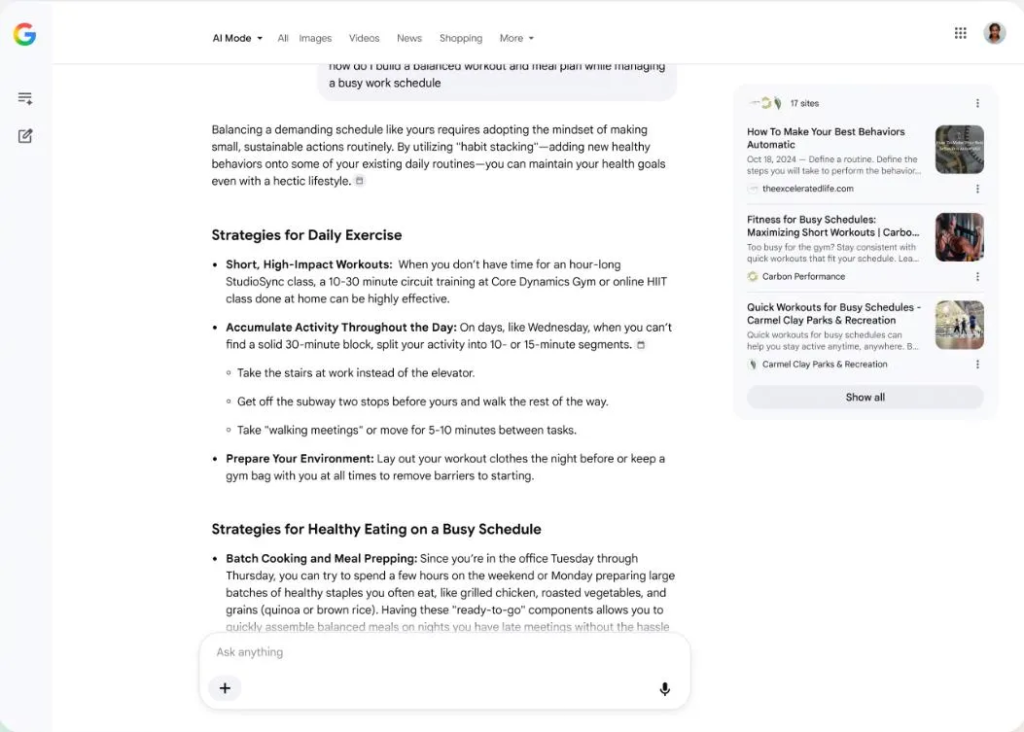
As the the screenshot of the new interface above shows, the traditional search result links that are currently placed under the AI Overview have now been confined to a small panel on the right-hand side of the screen, which shows a cut-down version of today’s list. Users are encouraged to ask follow-up questions from the AI search chatbot, rather than exploring the links themselves.
What this is likely to mean in practice is that even fewer people will follow links to sites, something that was already happening last year; instead, they will engage with Google’s chatbot to gather information indirectly. This is terrible news for access to knowledge because it frames the Google AI search engine as the fount of all knowledge – one that will do all the hard work of finding information and combining it into an easily digested answer that can be interrogated further. It can do that because it has already ingested billions of Web pages and other information sources as part of the Large Language Model (LLM) training process. But search engine users will no longer know what some of those sources are unless they painstakingly click on the links in the new panel.
Most people will not bother, because the AI-generated results will be good enough – or at least will appear to be good enough. Unless visitors to the site take the trouble to follow the links to the sources they won’t really know how reliable those results are. For example, it is possible that the sources are wrong, or misleading; moreover, Google’s LLM may itself introduce new errors and distortions. There is also the question of how Google will insert ads into this AI-generated information, and to what extent advertisers will be able to buy preferential treatment in results.
This new mediated approach is clearly terrible news for Wikipedia – an issue already discussed on Walled Culture earlier this year – and for creators. Google will use the information found in their works, but will not actively encourage people to visit the originals. For many people, summaries will be good enough, and they will never discover the greater riches of the sites and creations that Google’s LLM is based on. Worse still, the original creators such as Wikipedia may not even be mentioned in answers that involve aggregating information from a large number of sources.
Similarly, the new Google search is the publishing industry’s worst nightmare. Not only is Google drawing on material they have published, but it is pushing links to those sources into the background. It seems inevitable that the Web traffic to publishers will fall yet further, making already struggling business models based on advertising even more precarious. That will have knock-on consequences for the funding of many sites – particularly newspapers and magazines – and for the commissioning of work from journalists and other creative professionals. Users won’t even need to visit Google Search much in order to keep up-to-date with topics of interest thanks to Google Search’s new agentic capabilities that will do the work for them in advance:
With information agents, you can stay updated on whatever matters most to you. Your agent will intelligently look across everything on the web, like blogs, news sites and social posts, plus our freshest data, such as real-time info on finance, shopping and sports, to monitor for changes related to your specific question.
In this case, not only will people not visit sites, but the latter will be constantly bombarded by various AI bots seeking information on behalf of users – increasing site running costs, and making sites less usable by humans. Another key announcement from Google will lead to a further flood of agentic activities that will pose new challenges to businesses:
We’re also expanding agentic booking capabilities in Search to a wide range of new tasks, including local experiences and services. Just share your specific criteria — like finding a private karaoke room for six on a Friday night that serves food late — and Search brings together the latest pricing and availability with direct links to finish booking through the provider of your choice. And for select categories like home repair, beauty or pet care, you can ask Google to call businesses on your behalf.
What emerges from Google’s latest announcements is less of a search engine, and more of an immersive virtual environment that is designed to keep people engaging with Google’s services, asking them for information, advice and even delegating actions to them. There is no doubt that many users will find these new features attractive, not least because they can use “conversational voice features” in Gmail, Docs and elsewhere. These are the digital assistants that have been promised for many years, able to understand spoken commands, provide information verbally, and carry out complex operations on behalf of users without the need for any complex training. For many people, that will be a boon, and they will doubtless migrate from the traditional search page, which will still be the default – at least for now – to the latest AI-infused version.
But these impressive technical features come at a high price, even leaving aside issues such as the environmental impact of the huge server farms they require. With the latest incarnation of its search engine, Google is making the World Wide Web as we have known it for over 30 years invisible, and therefore increasingly irrelevant to most people, who will be happy to let Google become their universal user interface to everything. And yet Google still depends on the Internet to supply all the information it is analyzing and repackaging. It risks killing the very thing that sustains it.
There’s another, more subtle issue. The new Google search features make finding information and carrying out actions very easy in many ways. Leaving aside the problem that this will require people to trust what is in effect a huge black box, where the internal workings cannot be examined, with all the loss of control this implies, there is another danger. People who use Google’s powerful new AI search services to offload many of their day-to-day actions may gradually lose the ability to understand the world and to act within it without that constant help. Such a dependence may be great for Google and its advertisers, but it surely cannot be a good thing for the future of society.
Follow me @glynmoody on Mastodon and on Bluesky. Originally published to WalledCulture.

Here is a constraint that almost no one building physical AI says out loud, even though every one of them is quietly fighting it.
A robot’s intelligence wants three things at once. It wants to be smart, meaning it can reason at the level of a frontier model about an unfamiliar scene. It wants to be fast, meaning it responds inside the tight, deterministic timing a physical control loop demands. And it wants to be free, meaning it keeps working when the network drops, the warehouse Wi-Fi dies, or the machine goes somewhere no signal reaches.
You cannot have all three on one piece of compute. Pick any two.
To be precise, bounded autonomy already works. Industrial arms, drones, and constrained autonomy stacks can be fast and offline because their tasks are narrow. The trilemma bites at the frontier: you cannot put frontier-scale general reasoning, deterministic real-time response, and full offline autonomy into the same power-limited substrate, not for the same control loop.

The 💜 of EU tech
The latest rumblings from the EU tech scene, a story from our wise ol’ founder Boris, and some questionable AI art. It’s free, every week, in your inbox. Sign up now!
A frontier-scale model is smart, and if you stream its sensors to a datacenter it can even be fast, but now it is tethered to a network and no longer free. Shrink that model until it fits on a 15-watt embedded module and it becomes fast and free, but it is no longer frontier-smart. Run the big model in the cloud and query it only occasionally, and you get smart and free, but never fast. Three corners, two available at a time. I have come to think of this as the embodied trilemma, and it is the real reason the edge/cloud question is the hardest architecture decision in robotics. Most teams treat it as a deployment detail. It is closer to a law.
The trilemma is not a fashion or a temporary hardware limitation you can wait out. It falls directly out of physics and power budgets.
Frontier reasoning quality currently lives in models that want tens of gigabytes of memory and datacenter-class accelerators. That hardware does not run on a battery a mobile robot can carry. So “smart” forces a choice: either bring the datacenter to the robot through a network link, which sacrifices freedom, or accept a smaller onboard model, which sacrifices smartness.
Real-time control is even less negotiable. A wide-area network round trip adds 30 to 100 milliseconds of latency, and the variance matters more than the average. A control loop that is usually fast but occasionally stalls is worse than one that is reliably mediocre, because controllers are tuned for deterministic timing. The moment “fast” depends on a network, you have surrendered “free,” because the network is now inside your control loop whether you meant it to be or not.
So the triangle holds. Quantization, distillation, and better accelerators move the corners, but they do not collapse them. Anyone claiming otherwise is usually hiding which corner they gave up.
It helps to make the constraint quantitative, because the moment you write the timing down, the corners stop being abstract.
Start with latency. The end-to-end delay of a perception-to-action decision made in the cloud is a sum of terms:
Lcloud = tcapture + tencode + tuplink + tinference + tdownlink + tdecode
Run the same decision onboard and most of that sum disappears:
Ledge = tcapture + tinference,local
The difference between the two is not the inference time, which can actually be lower in the cloud on better hardware. The difference is the network, tuplink + tdownlink, and more importantly its variance. A measured cloud-robotics setup over a fast wired link saw round trips of roughly 30 milliseconds [7], while real-world deployments commonly sit in the 100 to 300 millisecond range, and wireless links swing far higher. Edge processing, by contrast, pulls round trips down toward 1 to 5 milliseconds because nothing leaves the machine [8].
Now state the rule that decides where a loop can live. A control loop with timing budget Lbudget can run on a given compute path only if
Lpath + k·σjitter ≤ Lbudget
where σjitter is the standard deviation of the path’s latency and k is the safety factor you need for determinism. That k·σjitter term is the quiet killer. Teleoperation studies are blunt about it: a link that holds a steady 100 milliseconds is workable, but one oscillating between 30 and 200 milliseconds produces jerky, unpredictable motion, because the controller cannot plan around delay it cannot predict [9]. The reflex loop’s budget is 1 to 10 milliseconds. No wide-area path satisfies the inequality. The math, not the architect, forbids it.
| Control loop | Timing budget | Onboard path (~1-5 ms) | Wide-area path (~30-300 ms) |
|---|---|---|---|
| Reflex (motor control, e-stop) | 1-10 ms | Feasible | Impossible |
| Perception (detection, tracking, SLAM) | 30-100 ms | Feasible | Marginal, fails on jitter |
| Deliberation (planning, language) | 1-10 s | Feasible | Feasible (async) |
The table is the argument in one view. Reflex never clears a network round trip. Perception clears it only on unusually good links. Deliberation has budget to spare, which is why it can live in the cloud asynchronously.
Bandwidth closes the case for perception. A single 1080p camera at 30 frames per second produces raw video at 1920 × 1080 × 3 bytes × 30, which is about 1.5 gigabits per second. A modest four-camera plus depth rig clears 6 gigabits per second of raw sensor data. You can compress it, but compression costs latency and the link still has to carry it reliably, everywhere the robot goes. Edge perception is the robotic version of that move. Compress to a semantic representation on the spot; never ship the raw stream.
Finally, the economics, which is just the trilemma with a dollar sign. Onboard compute is a one-time capital cost. Cloud reasoning is an operating cost that accrues with every query:
Ccloud(t) = r·ctoken·t
where r is the query rate and ctoken the per-token price, against a flat Cedge = Ccapex. The two lines cross at t* = Ccapex / (r·ctoken). Push thirty frames a second to a cloud model and t* arrives almost immediately, so cloud cost dominates the lifetime of the fleet. Route only a few deliberation-class queries per minute upstream and t* recedes over the horizon.
| Strategy | What goes upstream | Cost shape | Break-even t* |
|---|---|---|---|
| Stream everything | ~30 frames/sec to a cloud model | Steep linear opex | Almost immediate |
| Route deliberation only | A few queries/min | Shallow linear opex | Past fleet service life |
| Fully onboard | Nothing | One-time capex, flat | Never crossed |
Same hardware, same models, opposite economics, decided entirely by which loop you placed in which corner. The gap is not subtle: a single camera streamed to a cloud vision model at 30 frames per second is on the order of a million inference calls a day per robot, while routing only deliberation-class queries upstream might be a few hundred. Across a fleet, that is the difference between cloud inference being a rounding error and being the largest line on the operating budget.
Here is the part I find beautiful, and the heart of what I want to argue: the way out of the embodied trilemma is not to solve it. It is to refuse to answer it at a single point.
Your own body is built this way, and it has been for roughly half a billion years.
When you touch a hot stove, your hand pulls back before your brain knows anything happened. That is the spinal reflex arc, a loop that runs through the spinal cord and never waits for the cortex. It is fast and free (it works even if you are barely conscious), and it is emphatically not smart. It does not reason about the stove. It does not need to.
Your retina does something just as telling. It has over a hundred million photoreceptors, but the optic nerve carrying signal to the brain has only about a million fibers [10]. The eye does roughly a hundredfold compression on the spot, locally, before transmitting anything. It does not ship raw pixels up the cable. It ships a processed, compact representation. Fast and free at the edge, by necessity.
And then there is the cortex, which is where the actual reasoning happens. It is slow, it is powerful, and crucially, the body has arranged things so that when the cortex is slow or offline, the reflexes still fire and you still pull your hand back. Evolution put the survival-critical functions where they never depend on the smart, slow part.
That is the whole trick. Biology never built a single neuron that was smart, fast, and free all at once. It built a hierarchy in which different loops each sit at a different corner of the triangle, and it made sure the corner each loop sacrifices is one that loop can afford to lose. Reflexes give up intelligence, which is fine, because a reflex that stops to think is a reflex that gets you killed. The cortex gives up speed, which is fine, because it has been kept off the survival path entirely.
A robot escapes the embodied trilemma the same way, or it does not escape at all.
Translate the nervous system into engineering and a practical architecture emerges. A robot has three loops, and each one belongs at a different corner.
The reflex loop (1 to 10 ms): motor control, stabilization, emergency stops. This is the spinal cord. It must be fast and free and is allowed to be dumb. It lives onboard, always, and never touches a network.
The perception loop (30 to 100 ms): detection, tracking, obstacle avoidance, visual odometry, SLAM. This is the retina. It must keep working when the link drops, and the bandwidth math forbids shipping raw sensor data anyway, since even a single camera produces well over a gigabit per second of raw video before compression. So perception compresses at the edge, exactly as the eye does, and emits a compact semantic representation rather than pixels. Fast and free, intelligence traded away on purpose.
The deliberation loop (1 to 10 seconds): task planning, language understanding, deciding what to do when the plan breaks. This is the cortex. It is allowed to be slow, and slowness is exactly the corner it trades away, reaching a frontier model in the cloud asynchronously rather than in the control path. It stays free in the only sense that matters, never holding the robot hostage to a live link. If connectivity vanishes, the robot gets less clever, not less safe.
The interface between these layers is the optic nerve of the system: a deliberately narrow channel carrying detections, tracks, and state summaries, never raw signal. Get that channel right and you have not just an inference boundary. You have defined your logging schema, your training-data pipeline, and your behavior when the link drops, all at once.
What convinces me this is structural, not stylistic, is that the most advanced robotics programs keep reinventing the same hierarchy without necessarily naming it.
Figure AI’s Helix, the system running its humanoid robots through full eight-hour factory shifts, is explicitly two systems: a roughly 7-billion-parameter vision-language model at 7 to 9 Hz for scene understanding and language, coupled to a compact 80-million-parameter visuomotor policy that turns intent into continuous action at 200 Hz [1]. That is cortex and reflex on one robot, a 25-to-1 ratio in update rate between the loop that thinks and the loop that acts, each running at the timescale its job demands. Surveys of edge-cloud collaboration now describe the same division as standard practice, with small onboard models handling real-time perception and privacy-sensitive preprocessing while heavier reasoning is offloaded upstream [4].
Comparisons on real robot data quantify the trade directly: deploying an 11-billion-parameter vision-language model at the network edge held accuracy close to its cloud baseline while shaving only modest latency, whereas a compact 2-billion-parameter model more than halved latency into sub-second territory, paying for the speed with accuracy [5]. Reviews of foundation-model robotics keep flagging the same wall: LLM planners take seconds per decision, fine for the cortex, hopeless for the spinal cord [6]. NVIDIA’s own Jetson deployment guidance reflects it too, with optimized onboard inference for perception and policy and larger models living upstream [2].
Different teams, different machines, the same triangle, the same corners. When that many independent efforts converge, you are looking at structure, not style.
The starkest place to watch the trilemma bite is underwater robotics. An ROV below the surface has effectively no real-time link to the cloud. The ocean is the ultimate airgap, the freedom corner taken to its absolute extreme. In hands-on underwater robotics builds, perception (detection and tracking, optimized with TensorRT) runs entirely on an onboard module, while language-level mission interaction and fleet reasoning reach a frontier model in the cloud only asynchronously, on surfaced or relayed data, and never inside a control loop. The architecture is not a preference there. The water enforces it.
Three principles follow, and they generalize far beyond the sea.
Design for the disconnected case first. If the robot is safe and useful with zero connectivity, the cloud becomes pure upside: better reasoning, fleet learning, human oversight. If the robot needs the cloud to stay safe, you have built a cortex with no spinal cord, a liability on wheels.
Treat the narrow channel as a contract, not a cable. The compressed representation crossing the edge/cloud boundary is the single most important interface in the system. Teams that treat it as an afterthought re-architect twice.
Remember the trilemma is also an economics statement. Onboard compute is paid once, at purchase. Cloud reasoning is paid forever, per token. Routing only deliberation-class queries upstream, a few per minute instead of thirty frames per second, changes fleet unit economics by orders of magnitude. Cloud-inference cost can quietly become the largest operating line on a robotics program that put the wrong loop in the wrong corner.
Onboard modules get more capable every generation, and distillation keeps narrowing the gap between edge models and their cloud teachers. Early-exit inference, where confident predictions resolve locally and only hard cases escalate, is maturing fast [3][5]. The deliberation loop will migrate partly onboard over the next few years, especially for safety-relevant replanning. The corners of the triangle will keep sliding.
But the triangle itself does not go away, because it is anchored in physics and energy, not in any model generation. Smart, fast, and free will never coexist on a single substrate as long as frontier intelligence costs more power than a robot can carry and the speed of light caps how fast a remote answer can return. The teams that internalize this, and that consciously assign each loop the corner it can afford to lose, will ship robots that work when the network does not. The rest will keep learning, in the field and at the worst possible moment, that they accidentally wired their spinal cord through a datacenter.
Evolution settled this argument before there were spines. We are just catching up.
1. Figure AI. “Helix: A Vision-Language-Action Model for Generalist Humanoid Control.” figure.ai/news/helix. 2025.
2. NVIDIA Developer Blog. “Getting Started with Edge AI on NVIDIA Jetson: LLMs, VLMs, and Foundation Models for Robotics.” developer.nvidia.com. 2025.
3. Qu, G., Chen, Q., Wei, W., Lin, Z., Chen, X., and Huang, K. “Mobile Edge Intelligence for Large Language Models: A Contemporary Survey.” IEEE Communications Surveys and Tutorials, 2025 (arXiv:2407.18921).
4. Li, S., Wang, H., Xu, W., Zhang, R., Guo, S., Yuan, J., Zhong, X., Zhang, T., and Li, R. “Collaborative Inference and Learning between Edge SLMs and Cloud LLMs: A Survey of Algorithms, Execution, and Open Challenges.” arXiv:2507.16731, 2025.
5. Ahmad, S., Hafeez, M., and Zaidi, S.A.R. “Vision-Language Models on the Edge for Real-Time Robotic Perception.” University of Leeds, arXiv:2601.14921, 2026.
6. Khan, M.T., and Waheed, A. “Foundation Model Driven Robotics: A Comprehensive Review.” arXiv:2507.10087, 2025.
7. Kapoor, A., et al. “A Predictive Application Offloading Algorithm Using Small Datasets for Cloud Robotics.” arXiv:2108.12616, 2021.
8. Coutinho, R.W.L., and Boukerche, A. “Design of Edge Computing for 5G-Enabled Tactile Internet-Based Industrial Applications.” IEEE Communications Magazine, 60(1), 2022.
9. Urbaniak, D., et al. “5G for Robotics: Ultra-Low Latency Control of Distributed Robotic Systems.” IEEE.
10. Kandel, E.R., Schwartz, J.H., and Jessell, T.M. “Principles of Neural Science.” McGraw-Hill.





Weekend Open Thread: Evereve – Corporette.com

Jensen Huang Approves Samsung, SK Hynix, and Micron for NVIDIA (NVDA) HBM4 Memory Supply


Anatomy of the June crypto crash: Fed, Iran, Saylor

The Best Mystery Series of All Time Is Surging on Streaming 30 Years After It Ended


Alexander Zverev wins the French Open to finally earn a 1st Grand Slam title


Suspicious Polyfill login prompts pop up on Toshiba, Muji websites

Senator Cynthia Lummis Calls CLARITY Act the Most Consequential Financial Legislation of This Generation
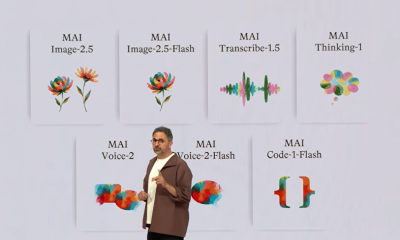

Microsoft unveils seven homegrown AI models in new bid for ‘long term self-sufficiency’


Microsoft launches MXC, an OS-level sandbox for AI agents, with OpenAI and Nvidia already on board


(VIDEO) Justin Bieber Delivers Surprise Happy Birthday Serenade to Diners at Los Angeles Mexican Restaurant

The Pain Points Taking a Fragile Tech Rally Down a Notch


High Stakes for Wembanyama as New York Pushes for 3-0 Lead

Eli Lilly (LLY) Stock Surges 4% Following Breakthrough Sleep Apnea Trial Results

Von der Leyen’s AI envoy pick draws conflict-of-interest fire

Meta steals a tactic from Tesla and builds data centers in tents
LBank Surpasses 25 Million Users Worldwide as AFA Partnership Continues to Drive Global Growth


Hackers now exploit SolarWinds Serv-U flaw to crash servers

Alexander Zverev conquers demons and outlasts Flavio Cobolli to win French Open for first major title


Trump’s AI Ownership Plan Could Benefit Anthropic at OpenAI’s Expense

Bangladesh beat Australia after 20 years in ODIs, register only their second win over six-time world champions | Cricket News





You must be logged in to post a comment Login