Security teams log 54% of successful attacks and alert on just 14%. The rest move through your environment unseen.
The Picus whitepaper shows how breach and attack simulation tests your SIEM and EDR rules so threats stop slipping by detection.





Tata Electronics has confirmed in a statement to BleepingComputer that it was the target of a cyberattack that impacted parts of its IT infrastructure.
The company emphasizes that its operations continued to run normally and were not affected by the incident.
“A few weeks ago, Tata Electronics identified a cybersecurity incident on some of our systems,” a Tata Electronics spokesperson told BleepingComputer.

“Our response protocols were deployed immediately, and the incident has had no impact on our operations across businesses, which remain unaffected.”
Tata Electronics is a division of the Tata Group, an Indian multinational conglomerate, focused on electronic components and semiconductor manufacturing.
Since its founding in 2020, it has quickly grown to become one of India’s largest technology manufacturing companies, currently producing and assembling Apple iPhones and iPhone components.
While Tata Electronics has not disclosed the threat actor’s identity, the statement comes in response to a related claim by the World Leaks threat group, which leaked data allegedly stolen from Tata.
Among the leaked information, there are multiple directories and documents allegedly containing manufacturing data for Apple products, including internal component schematics, PCB designs, material specifications, and SDK files.
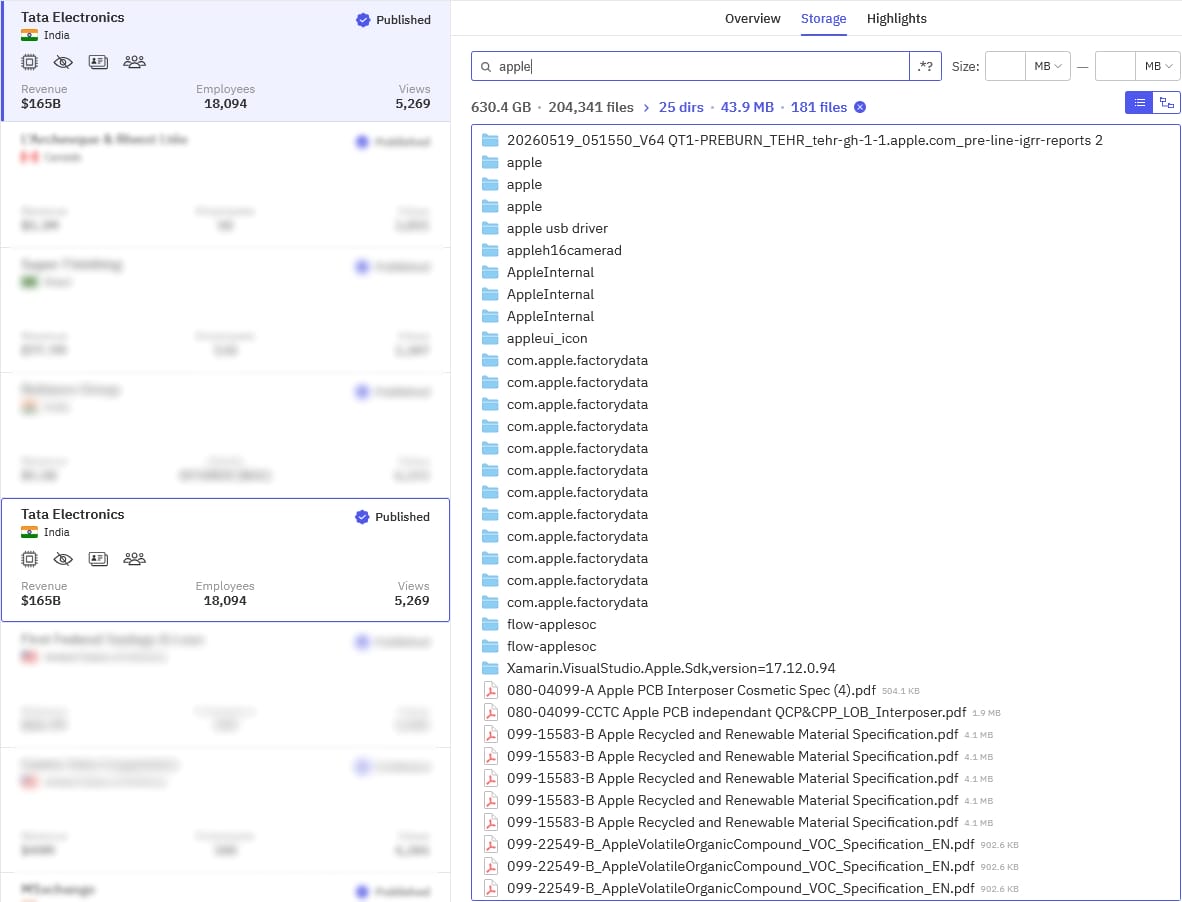
BleepingComputer has contacted Apple to inquire about the claims and whether any proprietary data has been exposed, but we have not yet received a response.
World Leaks is considered a rebrand of the Hunters International ransomware group, which wound down its operations in July 2025.
Unlike Hunters International, which used data encryptors in its attacks, World Leaks operates purely as a data extortion group, stealing files and threatening to leak them online.
Other high-profile victims of the same threat group are computer manufacturer Dell, which confirmed a breach in July 2025, and sportswear giant Nike, which launched an investigation after a claimed theft of 1.4 TB of files in January 2026.

Security teams log 54% of successful attacks and alert on just 14%. The rest move through your environment unseen.
The Picus whitepaper shows how breach and attack simulation tests your SIEM and EDR rules so threats stop slipping by detection.

Displays for the iPhone Fold and touchscreen MacBook Pro will come from Samsung, while LG will make screens for the Apple Watch Series 12, says a repeat rumor.
Apple’s first foldable iPhone is slated to debut in 2026. While it will mark Apple’s entry into new smartphone territory, its displays will seemingly be produced by a tried-and-true Apple supply chain partner.
On Tuesday, mere days after the claim of Samsung OLED panels on the iPhone Fold was repeated, yet another report said the same thing. As 9to5mac points out, ET News says OLED screens for the iPhone Fold, iPad mini, and touchscreen MacBook Pro will be provided exclusively by Samsung Display.
Supposedly, Samsung Display is set to produce 10 million OLED panels for the iPhone Fold and 2 million for a future iPad mini. The publication claims the production of iPhone 18 Pro, iPhone 18 Pro Max, and iPad mini displays has already begun, with the production of iPhone Fold display hardware expected to follow.
As for the long-rumored OLED MacBook Pro, Tuesday’s report says that panel production will begin in July 2026, once Samsung Display’s 8.6th-generation OLED line becomes operational.
As far back as April 2025, it was reported that the iPhone Fold would feature a Samsung-made OLED panel. In September 2025, the president of Samsung Display said that the company would provide foldable OLED displays to a North American client, presumably Apple.
As with the iPhone Fold, rumors of Samsung-made OLED panels for the MacBook Pro go back to at least September 2025. Claims of Samsung making an OLED iPad mini display for 2026 go back even further, to May 2024.
In that regard, Tuesday’s display-related report is arguably nothing more than a “me too” rumor, with no significant new information.
Even when discussing LG Display’s role in the Apple supply chain, the report only backs up earlier rumors. On June 2, 2026, it was said that LG Display would produce screens for the Apple Watch Series 12. Tuesday’s rumor reiterates that claim, adding that 34 million panels will be made for the device.
Chinese supplier BOE, meanwhile, won’t produce any displays for the iPhone Fold, OLED MacBook Pro, iPhone 18 Pro, or iPhone 18 Pro Max. Again, this is something that was already said in May 2026.
Overall, the display-focused report published on Tuesday doesn’t reveal much of anything. It reiterates claims others have already made and states the obvious.

It’s an odd-seeming move for a company selling an AI writing assistant.

Superhuman announced that it has acquired GPTZero. This AI identification business offers services such as hallucination and plagiarism detection as well as a nifty little tool that displays how much of the internet is artificial intelligence. Superhuman said it plans to integrate GPTZero into its Superhuman Go AI assistant to improve the reach of its existing efforts around AI and authenticity. Teachers and students will still be the priority audience for Superhuman following the acquisition. For its part, GPTZero emphasized that Superhuman would also help put its tools in places where people were already reading and writing. Financial terms of the deal weren’t disclosed.
On the surface, this seems like an odd pairing. The press release announcing the acquisition focuses on concerns about the public being able to identify AI-generated content, but Superhuman is quite literally encouraging people to use AI to generate content. The company’s most popular product is the AI writing assistant Grammarly, which does have its own tools for AI detection. However the push to put AI resources everywhere in Grammarly has also landed Superhuman in some hot water. Notably, the company tried to give its users AI generated feedback that aped the voice and style of other writers; said other writers were none too pleased.

Looking for the most recent Mini Crossword answer? Click here for today’s Mini Crossword hints, as well as our daily answers and hints for The New York Times Wordle, Strands, Connections and Connections: Sports Edition puzzles.
World Cup watchers, you’ll find a few tourney-themed clues in today’s Mini Crossword. Read on for all the answers. And if you could use some hints and guidance for daily solving, check out our Mini Crossword tips.
If you’re looking for today’s Wordle, Connections, Connections: Sports Edition and Strands answers, you can visit CNET’s NYT puzzle hints page.
Read more: Tips and Tricks for Solving The New York Times Mini Crossword
Let’s get to those Mini Crossword clues and answers.
The completed NYT Mini Crossword puzzle for June 24, 2026.
1A clue: Race starter’s equipment
Answer: GUN
4A clue: 1-1, for one
Answer: SCORE
6A clue: Wedding speech made with a drink in hand
Answer: TOAST
7A clue: Book of maps
Answer: ATLAS
8A clue: Trivia question: Has Brazil appeared at every World Cup? Answer: ___!
Answer: YES
1D clue: World Cup highlights
Answer: GOALS
2D clue: ___ Major
Answer: URSA
3D clue: Things found at either end of a soccer pitch
Answer: NETS
4D clue: Time at a hotel
Answer: STAY
5D clue: ___ d’Ivoire (African nation in the World Cup)
Answer: COTE


networks
Unexplained GSM-R failure at Deutsche Bahn caused confusion and delay
Train services are resuming across Germany this morning, after rail operator Deutsche Bahn (DB) last night shut down operations after its wireless network failed.
At 10:30 PM local time on Tuesday night, DB advised that its GSM-R network was down, meaning all trains had to be held at stations. We understand that even suburban trains ground to a halt.
GSM-R is a version of the 2G GSM standard tuned to the needs of rail operators, who use it to power private networks that carry information necessary to keep their services rolling. The tech is considered obsolete and DB knows it because the company has already signed with Nokia for a 5G replacement that will use the Future Railway Mobile Communication System (FRMCS) – a move also under consideration in the UK.
For now, however, DB needs its GSM-R to connect drivers with signalling services – so three minutes after midnight on Wednesday morning the carrier promised to issue taxi and hotel vouchers to passengers.
At that time, DB also said it had found the cause of the outage and was working to fix it. The company’s techies moved quickly as the network came back online at 00:50.
As of 6:30 AM, however, DB warned “some isolated disruptions may still occur” and advised passengers they’ll need to check that their connections will run on time.
There’s no indication the incident was the result of a cyberattack and The Register can find no reference to cut cables or other physical layer incidents that could have caused a nationwide outage.
Whatever went wrong isn’t a good look as any network powering critical infrastructure is supposed to have layers of redundancy to ensure resilience.
At least the org made heroes of its tech team.
“Our IT experts worked tirelessly to resolve the issue – successfully,” reads a company statement. ®
Microsoft has released the KB5095093 preview cumulative update for Windows 11 24H2 and 25H2, which fixes numerous bugs and begins rolling out new features, including the new Point-in-Time restore feature.
The KB5095093 update is part of the company’s optional non-security preview update schedule, which releases updates at the end of each month to test new fixes and features coming in next month’s Patch Tuesday.
Unlike regular Patch Tuesday cumulative updates, monthly non-security preview updates do not include security updates and are optional.
You can install the KB5095093 update by opening Settings, clicking on Windows Update, and then “Check for Updates.”
Because this is an optional update, you will be asked if you want to install it by clicking the “Download and install” link unless you have the “Get the latest updates as soon as they’re they’re available” option enabled, which will cause the update to automatically install.
You can also manually download and install the KB5095093 preview update from the Microsoft Update Catalog.
Once installed, this optional cumulative release will update Windows 11 24H2 systems to build 26100.8737 and Windows 11 25H2 to 26100.8737.
This update introduces numerous new features, including a standout Point-in-Time Restore feature that allows Windows users to easily roll back their operating system, applications, and files to a previous point in time.
“Point-in-time restore enables users to restore a Windows PC to the exact state in which it was at an earlier point in time. It happens in minutes using restore points.” explains Microsoft.
“Restore points are stored locally on the device and are captured using Volume Shadow Copy Service (VSS). Point-in-time restore helps recover faster from issues by restoring the full system state captured within the last 72 hours. This feature is designed to help minimize downtime and simplify remediation, without the need for technical ability or lengthy troubleshooting.”
For consumers, new restore points are created every 24 hours and are deleted after 72 hours or when your system runs out of allocated storage space. Those on enterprise licenses can configure Point-in-time restore snapshots to occur at 4, 6, 12, 16, and 24 hours and to be retained with the same intervals.
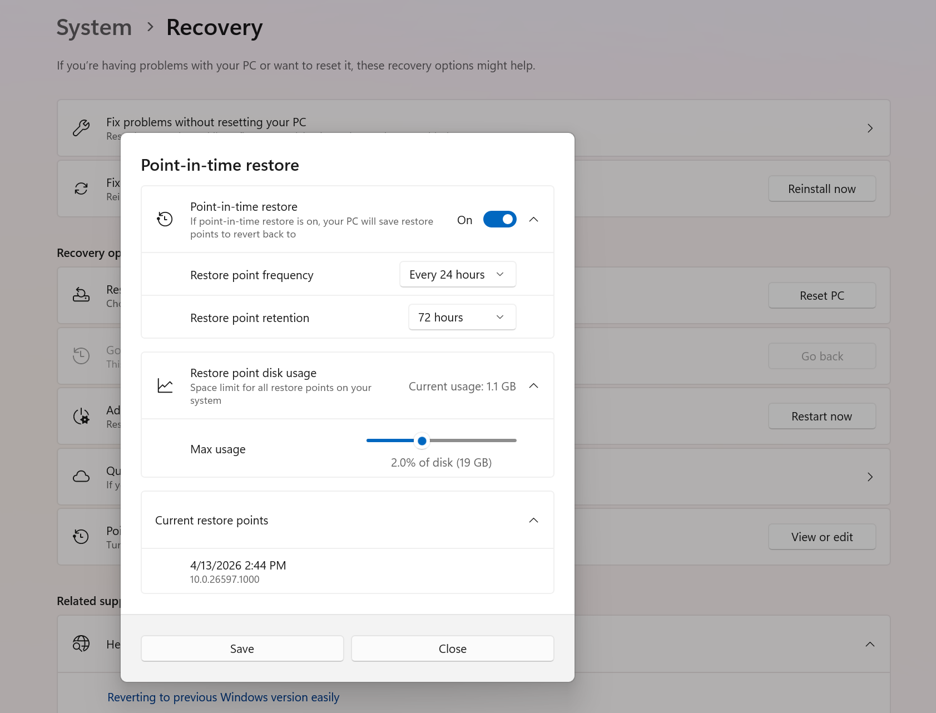
The settings also allow you to increase the storage space allocated to this system, allowing you to create more frequent snapshots without risk of them being deleted due to a lack of storage.
While you may think this feature is the same as System Restore, Microsoft says point-in-time restore focuses on “reliability and a broad range of issues,” sharing the following table to illustrate the differences between the two features.
| Capability | Point-in-time restore | System Restore |
|---|---|---|
| Configuration method | System Settings | Control Panel |
| Restore point trigger | Scheduled frequency (automatic only) | Event-triggered or manual |
| Retention | Maximum 72 hours per restore point | Indefinite (subject to disk space usage and cleanup) |
| Target scope | Full system state | System files and settings (app and user data coverage varies) |
| System storage impact | Mitigated storage impact due to reserved storage (lower) | Unmitigated storage impact (higher) |
| Management | Robust remote management | Limited remote management |
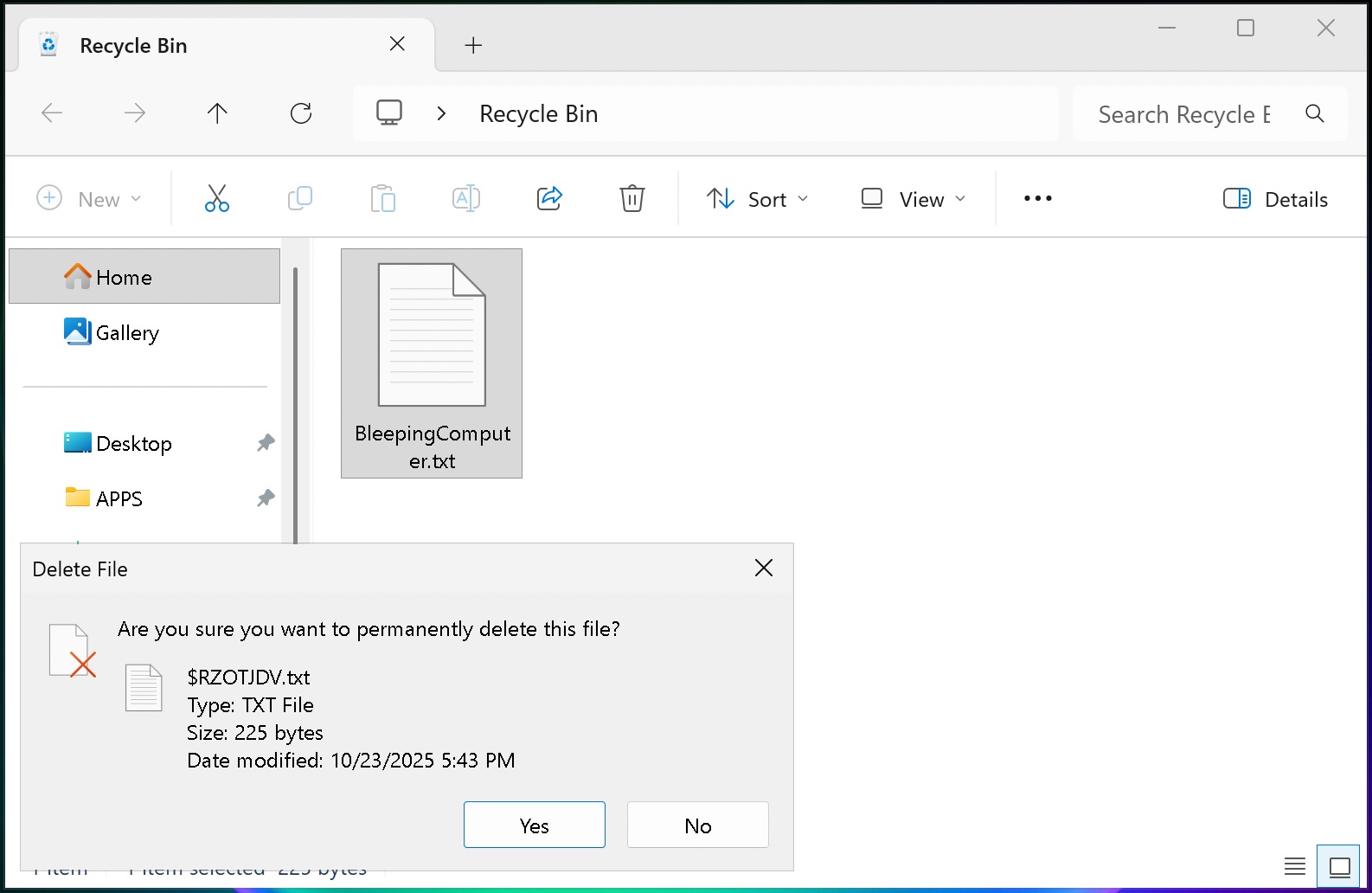
This update also fixes a known bug that displayed internal file names instead of the normal filename in confirmation dialogs when deleting a file from the Recycle Bin.
“This update addresses an issue where the confirmation dialog might display an internal Recycle Bin file name instead of the original file name when permanently deleting a file. This issue might occur after installing the June 2026 security update,” explains Microsoft.
In addition to the Recycle bin fix, the following features are rolling out immediately to all Windows 11 users:
[Secure Boot] With this update, Windows quality updates include additional high confidence device targeting data, increasing coverage of devices eligible to automatically receive new Secure Boot certificates. Devices receive the new certificates only after demonstrating sufficient successful update signals, maintaining a controlled and phased rollout.
[Authentication] This update improves Netlogon secure channel connections between domain controllers, enabling successful connections from member servers to domain controllers set up before 2025.
[Emoji Panel Update] The emoji panel (Windows key + period (.)) now uses GIPHY for GIF content following the deprecation of Google’s Tenor API. Starting June 30, 2026, install the latest Windows update to continue using GIFs in the Emoji panel. If you don’t update, you will see a “GIF service is not available” error in the panel. Installing the latest Windows update will restore access to GIFs.
[Networking] This update improves how your device connects to shared network resources. Connections used by apps and system features, such as the NetUseAdd function, now work more reliably, including unauthenticated (null session) connections.
[Recycle Bin (known issue)] Fixed: This update addresses an issue where the confirmation dialog might display an internal Recycle Bin file name instead of the original file name when permanently deleting a file. This issue might occur after installing the June 2026 security update (KB5094126).
[Taskbar] This update improves notification badge display across your apps. Notification counts and badge visuals now update correctly, helping you stay up to date with new activity.
Microsoft is also gradually rolling out the following features to users after installing the update:
[Point-in-time restore for Windows] New! This flexible recovery feature helps you quickly roll back your PC, including apps, settings, and personal files, to a recent automatic restore point. It helps reduce downtime and simplifies troubleshooting when issues occur. To learn more, see Point-in-time restore for Windows.
[Windows Update] New! A calendar experience in Windows Update Settings (Settings > Windows Update) lets you pause updates by choosing an end date, for up to 35 days. You can extend the pause by selecting a different end date and re‑pause updates as needed. For more information, see Pause updates in Windows.
[Widgets] New! A quieter, more focused Widgets experience helps reduce interruptions and improves default settings and notification controls:
Reduce distractions: Widgets no longer open on hover. Notifications and taskbar badges are minimized by default.
Simpler: Open to the Widgets dashboard by default on first use.
Customize: Configure Widgets how you want by selecting Settings in the navigation bar, then changing any of the default settings.
Stay informed: Dashboard icons show the number of alerts, and badges clear automatically when you leave a dashboard.
Adjusted defaults: Some default settings are preserved based on usage, while others adjust to reduce interruptions.
Performance improvements: This update provides improved reliability, responsiveness, and visual quality across the Widget experience.
[Accessibility] New! This update makes your screen easier to see and customizes your zoom experience:
Screen tint: Apply a full-screen color overlay to help reduce eye strain and improve readability. Choose from preset tint options, adjust the intensity, or turn it on automatically. Find this feature in Settings > Accessibility.
Magnifier: Enter a zoom percentage directly and change it in increments in the Magnifier window for more precise, flexible control.
Magnifier settings menu: You can now also modify zoom increments directly from the magnifier bar instead of navigating to Windows Settings each time.
[File Explorer]
New! When you hover over a file in File Explorer Home, commands such as Open file location and Ask Copilot appear as quick actions. This experience is now supported for work and school accounts (Entra ID).1
Improves the speed and performance of File Explorer launch.2
Fixes an issue where the OneDrive shortcut in File Explorer stops working when File Explorer is run with administrative mode.
The address bar now supports paths containing double backslashes and quotation marks (for example, C:\\Users\\user or “C:\Users\user”), improving compatibility with a wider range of inputs.
The address bar suggestion dropdown is more reliable and now consistently closes after an item is selected.
This update addresses an issue on File Explorer Home where OneDrive files could appear duplicated in the Favorites section.
This update includes several refinements to the Rename experience:
Addresses an issue where text was repeatedly selected when renaming items in folder views.
Addresses an issue where case-only name changes were not immediately reflected in folder views for items stored locally or in the cloud.
[Bluetooth] This update improves reliability and performance when connecting to and using Bluetooth devices:
New! Windows now keeps the microphone mute state in sync between the audio mixer and the Hands-Free Profile (HFP) for a more consistent experience with Bluetooth headphones with mute buttons or indicators.
Accessory compatibility workarounds: Improves compatibility with specific Bluetooth audio devices, helping AirPods appear faster in pairing mode and improving microphone reliability on Beats Studio Pro headphones.
Bluetooth audio stability:
Improves overall Windows stability with certain PC manufacturer drivers (error code 0x9F).
Improves Bluetooth reliability for voice calls when using Classic Audio devices with the Hands-Free Profile (HFP).
Reduces time for LE Audio accessories to start playing audio while using the microphone.
Device management: Windows will no longer show a “Remove failed” message when attempting to remove Bluetooth devices if the Bluetooth radio is unavailable or has changed since pairing.
Settings experience: Improves stability when using the Bluetooth & devices settings page for a smoother, more consistent experience.
Connection reliability and responsiveness:
Reduces the time it takes for classic Bluetooth audio devices to reconnect after Windows resumes from hibernation.
Improves reliability when LE Audio accessories disconnect, such as when another device (for example, a phone) connects.
Improves reliability of LE Audio streaming after a connection is lost and restored.
[Bluetooth and Phone Link] This update improves audio routing for calls made through a connected phone:
When an outgoing call is dialed from a paired phone, audio remains on the phone while ringing and transfers to the PC only when the call is answered from the PC.
When Do Not Disturb is enabled on Windows, incoming call audio from a paired phone no longer rings on the PC.
[Voice access and voice typing] New! You can now use voice access and voice typing in French, German, and Spanish. As you speak, your PC improves your text in real time. It corrects grammar, punctuation, and recognition errors, and helps improve clarity—even in the presence of background noise. This makes dictation smoother and reduces the need for manual edits.3
[Audio] This update improves the reliability of the inbox HD Audio driver.
[Taskbar] This update improves the reliability of opening the Start menu when selecting the left edge of the taskbar when the icons in the taskbar are left-aligned.
[Networking]
This update includes networking improvements for virtualized environments. Confidential Virtual Machines (CVMs) now use SR-IOV hardware acceleration by default for improved network throughput, and a configuration issue in nested Hyper-V virtualization network setup has been corrected to ensure reliable VM network provisioning.
This update improves the reliability of the Windows networking stack. It reduces bug checks (blue screen errors) related to Wi-Fi power and improves cellular (WWAN) connectivity, including support for IPv6 VPNs. Compatibility with third-party VPN software and SR-IOV configurations on server hardware is also improved. Network adapter settings and bindings are now preserved across OS upgrades.
[Printing] New! New printer installations use Internet Printing Protocol (IPP) by default when supported, simplifying setup and improving reliability. For details about third-party driver deprecation, see End of Servicing Plan for Third-Party Printer Drivers on Windows. To control this behavior, use the toggle in Settings > Bluetooth & devices > Printers & scanners > Default install printers using Windows Ready Print. For more information, see Introducing Windows Ready Print and modernized driver selection. For more information, see Introducing Windows Ready Print and Modernized Driver Selection.
[Windows Subsystem for Linux (WSL)] The update improves usage of WSL in mirrored networking mode with VPNs.
[Display and graphics]
Improves the reliability of rendering content while scrolling for certain apps spanning across multiple monitors.
Improves the reliability and persistence of applying color profiles.
[Location services] This update changes how some location settings are displayed in Settings > Privacy & Security > Location to help with clarity. When location services are turned off, settings like Default location and Allow location override don’t immediately apply, since location information is not given to apps or services. These settings will now be greyed out when location services are off to reduce confusion over when they take effect.
[Search] This update improves the reliability of setting Search related group policies.
[Input]
New! You can now customize the size of the right-click zone in Settings > Bluetooth & devices > Touchpad. Choose from default, small, medium, or large to control how much of the bottom-right corner responds to a single-finger right-click. This setting is only available on touchpads with a pressable surface. If your device manufacturer provides customization through their own app, a Custom option will appear to reflect those settings.
This update improves recognition of English characters when using Japanese handwriting.
[General performance] Improves the time to shut down Background Intelligent Transfer Service (BITS) when you turn off your PC.
[General Reliability] This update improves the reliability of explorer.exe. It addresses issues on the login and lock screens related to third-party credential providers, reduces the probability of taskbar icons appearing as blank gray placeholders, and improves navigation to Home in File Explorer during OneDrive sync. It also improves explorer.exe reliability when switching between desktops, enhances app launch with shell extensions, and using acrylic blur effects in the Start menu, Settings, and the lock screen.
[Apps] Resolves an issue where some installers and applications could show unexpected elevation (UAC) prompts after installing KB5089549.
[Remote Desktop] This update refreshes the dialog design when you enable Remote Desktop in Settings > System > Remote Desktop.
[Graphics Kernel] Improves memory-management policy that allows PCs with more than 32GB of installed memory to run larger local AI models.
Microsoft says there is still a known issue affecting users who install this update, preventing third-party applications from launching Microsoft Office applications or opening documents.
The company says they are working on a fix that will be included in a future update, and that those affected should open the application or document directly instead of launching it from the affected third-party software.
The full release notes for KB5095093 can be found in this support bulletin.
Security teams log 54% of successful attacks and alert on just 14%. The rest move through your environment unseen.
The Picus whitepaper shows how breach and attack simulation tests your SIEM and EDR rules so threats stop slipping by detection.


A three wheeled roadster in supercar clothing recently crossed the auction block and turned plenty of heads along the way. From a distance the sharp creases and menacing front end easily pass for a Lamborghini Aventador in full flight. Move in closer and the proportions shift. A single large rear tire sits centered under an otherwise familiar open air cabin while Polaris script still marks the sides.

Polaris set out to build the Slingshot R, a motorcycle that has the power of a high-performance sports car but without the fuss. The developers behind this project chose a 2-liter inline four cylinder engine that likes to rev, up to 8,500 RPM in fact, and produces a robust 203 horsepower and 144 pound feet of torque. This raw power is transmitted to the rear wheels via a five-speed automatic manual gearbox and a seriously sturdy belt drive. All of this is supported by a seriously low curb weight of approximately 1,650 pounds, which is due to the simple design and the lack of a roof or doors. According to the manufacturer spec sheet, all of this results in a 0-60 mph time of around 4.9 seconds.
The 2023 version of this model experienced a full visual transformation, while the machine’s core remained intact. You still have that wicked low center of gravity and wide front track, which combine to make the thing dart about like a go kart. The lateral grip values are very outstanding, reaching 1.02 g during testing. All of this is sent directly through the belt final drive, while the automatic manual gearbox changes using the wonderful hydraulic actuation. If you’re sitting behind the wheel and pedals, you could be forgiven for believing you’re in a real sports car, but at the end of the day, this thing seems like a heavy bike.

A lot of custom work was done on the front of the item to make it look more aggressive. Some very capable tuners added a fiberglass fender modeled like the Aventador, a reprofiled hood and headlight surrounds, and this amazing radioactive green paint that complements the rest of the bodywork. Then there’s this massive wing hanging over the roll cage. Larger tires were also added, 20 inches in the front and 22 inches in the rear. The interior has been upgraded with new leather and suede, as well as amazing lime green stitching and inlays to complement the outside hue.
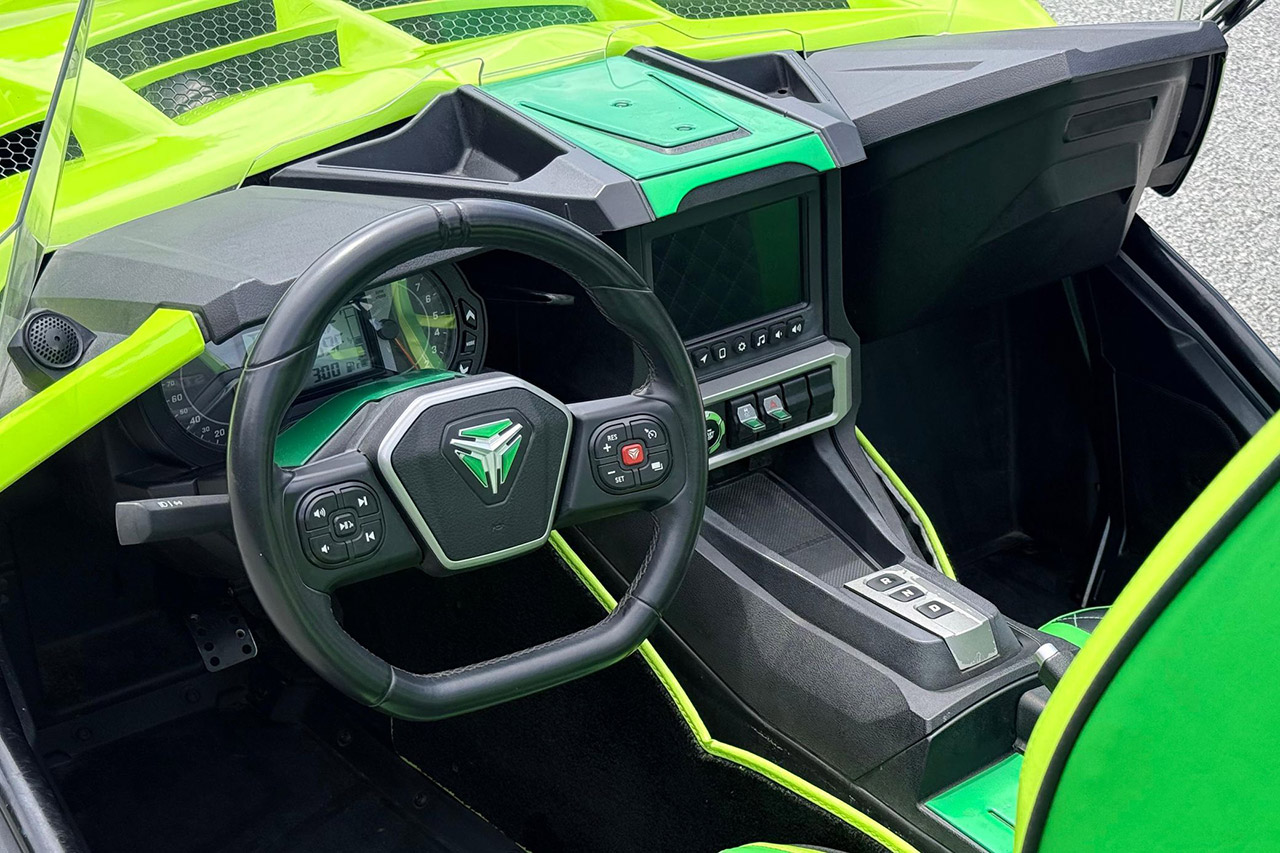
The team that worked on the body kit also replaced the wheels and modified the inside to reflect the new appearance. Stock Slingshot Rs are already aggressive, but with the fiberglass and paint, this thing is just dramatic. Not to mention, it sparks conversations wherever it goes. However, the mechanicals have mostly remained unchanged, using the same old three-wheeled design.
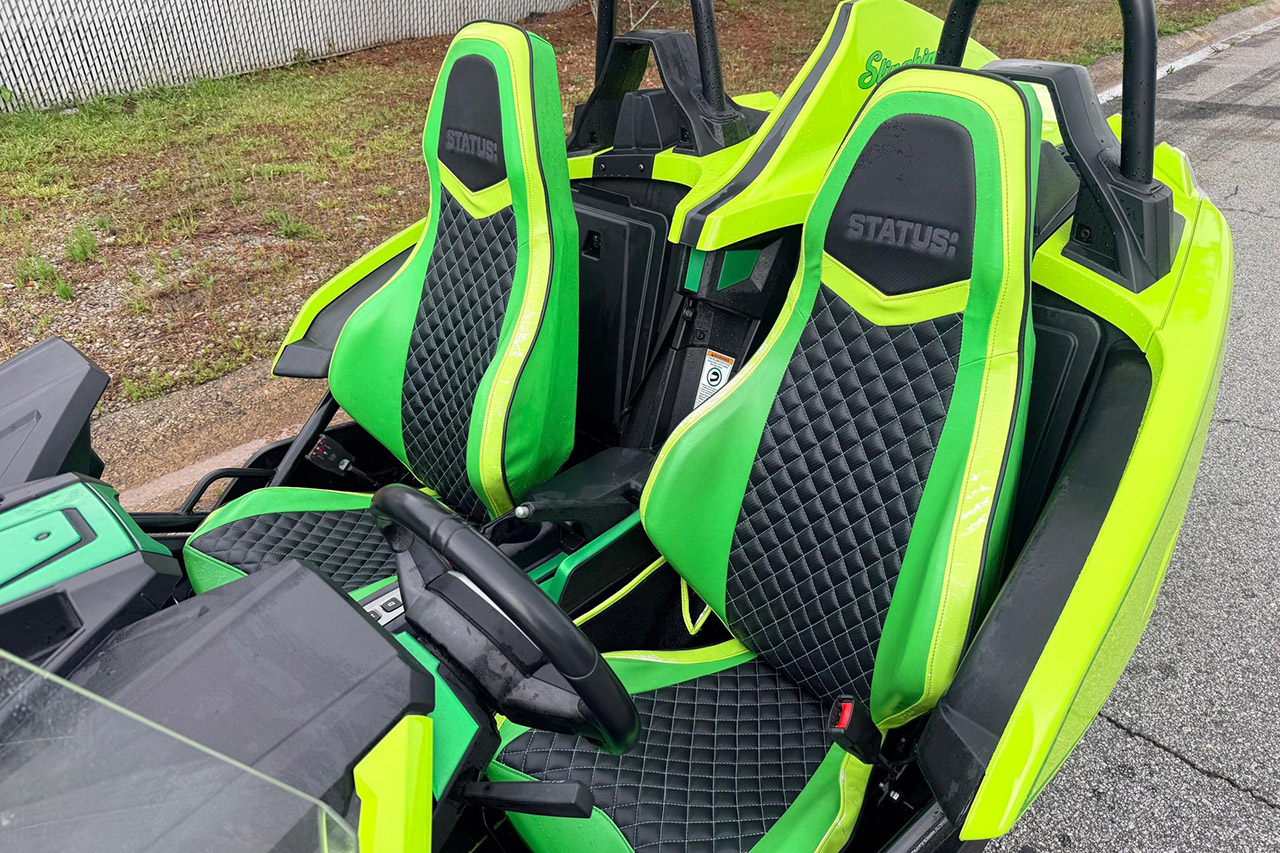
A few weeks ago, someone offered this custom project on Cars & Bids, and bidding reached a high of $13,786 before falling short of the reserve price. Clean, low-mileage Slingshot Rs are commonly priced between the mid teens and mid twenties. So, take your pick: this is either a daring or strange style choice. Whether this custom kit works depends on how you appreciate your motorcycles; is it a good idea to mix American motorcycle technology with Italian exotic styling cues?
[Source]

Anthropic launched Claude Tag, an always-on Slack AI that follows conversations, learns context, and proactively jumps in to flag updates and tasks.
Anthropic is launching Claude Tag in research preview, an “always-on Claude” that lives inside Slack and acts as a persistent AI teammate. The feature lets users tag @Claude to get insights in conversations and assign tasks. It is available to Claude Enterprise and Claude Team customers starting today.
Claude Tag is an evolution of Anthropic’s existing Slack integrations, which already let users direct-message Claude or tag it in channels for on-demand help. Claude Code in Slack can also route coding tasks from channel mentions to full coding sessions on the web, posting updates back into the thread. But Claude Tag adds a layer of persistent context and memory that the previous tools could not maintain.
“As Claude follows along with its channel, it learns ever more about the work,” Anthropic said in a statement. Claude can also automatically gather facts from elsewhere in the organisation if granted permission to read other channels. The result is an AI that accumulates institutional knowledge over time rather than starting from scratch with every interaction.

The 💜 of EU tech
The latest rumblings from the EU tech scene, a story from our wise ol’ founder Boris, and some questionable AI art. It’s free, every week, in your inbox. Sign up now!
Everyone in a given Slack channel can access a single Claude identity, meaning anyone can see what Claude has been working on and pick up the conversation from where the last person left off. System administrators specify which tools, information, and channels each Claude identity can access, and each identity stays scoped to whichever channels the admins define. A Claude set up for legal work cannot seed memories into the engineering channel, for example.
When assigned a task, Claude Tag breaks it into stages and works through them using whichever tools it has access to, responding in a Slack thread with what it has created. But the more notable feature is an ambient mode that proactively jumps into conversations to keep teams updated, flag relevant information from across the organisation, and follow up on threads or tasks that have been forgotten.
The ambient mode is the feature that separates Claude Tag from a conventional chatbot. Rather than waiting to be asked, Claude monitors the channels it has been assigned to and intervenes when it judges that a team would benefit from a reminder, a summary, or a piece of context pulled from another part of the company. Anthropic says this makes it feel like “working with a real colleague, one that can produce work in public view, with far greater context and understanding than before”
Organisational context is increasingly the battleground for enterprise AI. Microsoft has been building Work IQ, an intelligence layer expressed through Copilot that draws on Microsoft Graph to understand roles, collaboration patterns, and organisational structure. Startups like Viktor have raised tens of millions to put AI coworkers directly inside Slack and Teams.
Glean, which recently surpassed $300 million in annual recurring revenue at a $7 billion valuation, is building a permissions-aware knowledge graph that sits between the model and enterprise data.
Claude Tag is Anthropic’s answer to the same problem, but its approach is narrower and arguably more disciplined. Rather than building a horizontal intelligence layer across every enterprise application, it plants the AI inside the one surface where most knowledge work already happens: the team chat. The bet is that persistent presence in Slack, combined with cross-channel memory and admin-controlled scoping, is enough to accumulate the institutional context that makes an AI agent useful.
The privacy implications are substantial. An always-on AI that follows along with workplace conversations and autonomously decides when to intervene will face scrutiny from both employees and compliance teams. Anthropic’s admin-scoping controls are the structural answer to that concern, but the real test will come when enterprise customers deploy it at scale and discover how workers respond to an AI that is always listening.
Anthropic says it is working to bring Claude Tag to other platforms in the coming weeks. For now, Slack is the only surface, which limits the feature’s reach but also constrains its complexity, a deliberate trade-off for a research preview.


HPC
Use of Arm cores and Linux mean Beijing hasn’t broken away from the world
The TOP500 list of Earth’s mightiest supercomputers has a new leader: the 2.198 Exaflop/s LineShine machine housed at the National Supercomputer Center (NSC) in Shenzhen, which took the top spot without using any kit from Nvidia, Intel, or AMD.
Which is not to say that LineShine is an entirely Chinese creation. As explained in a pre-press paper, the machine’s LX2 processors are a local effort but use Armv9 designs – so chalk up a win for Blighty, the home of Arm. The machine also runs KylinOS – a Linux distribution that features contributions from around the world.
The paper reveals that LineShine comprises 20,480 computing nodes, and that each LX2 processor “integrates two compute dies (304 cores total) and eight on-package HBM stacks (32 GB, 4 TB/s aggregate bandwidth).”
“Each compute die contains 152 cores and 128 GB of off-package DDR memory organized into four NUMA domains,” the paper adds. “A dedicated SDMA engine handles data movement between DDR and HBM. The LX2 supports FP64/FP32/FP16/INT8 via SME and SVE units, delivering up to 60.3/120.6 TFLOPS in FP64/FP32. Nodes are interconnected via the LingQi high-speed network with a dual-plane multi-rail fat-tree topology, offering 1.6 Tb/s bandwidth per node.”
That network is also a Chinese creation, from the minds at Hangzhou LingQi Technology Co.
LineShine became the first system on the TOP500 to exceed two exaflops of sustained double-precision performance using CPUs only and the curators of the list think it could do better in future tests, because this time around it reached about 80 percent of its 2.736 Exaflop/s theoretical peak in tests conducted in preparation for this iteration of the TOP500 list.
News that LineShine topped the supercomputing charts comes as China’s government increasingly steers local organizations towards buying made-in-China tech. Beijing wants to decrease dependency on foreign products, because China has gone all-in on AI and other technologies to boost economic growth and enhance the capabilities of its military.
China’s Communist Party understands that reliance on imports can stymie those ambitions, with the USA’s ban on GPU sales to the Middle Kingdom offering ample evidence of the need to control tech supply chains. And now Beijing can point to its policies producing the most powerful single computer on the planet.
It’s conceivable that China could do even better in the future, as its GPU industry is nascent and currently producing products whose performance trails Nvidia and AMD by four or five years.
Those two paragons of US computing power, along with Intel, dominate this version of the TOP500 list – as has been the case for years. China is therefore on the march, but is a long way from global dominance.
Our sibling site The Next Platform has extensive analysis of the TOP500 list here. ®

An anonymous reader quotes a report from The Guardian: A tech sell-off shook global markets on Tuesday as attention turned away from developments in the US war with Iran and toward the future of AI companies and chipmakers that have driven stock markets to record highs. The tech-heavy Nasdaq index closed 2.2% lower on Tuesday. The S&P 500 was also down by Tuesday afternoon, dropping 1.43% while the Dow remained steady. All three major US indices have hit record highs this year, riding off a rush of funding to support AI technology and infrastructure. Nasdaq is up 10% for the year, while the Dow jumped 6% so far this year, breaching past 51,000 points, and the S&P 500 is up 7.3%.
But some economists have warned that the influx of AI spending is a bubble reminiscent of the dot-com bubble that burst in the early 2000s. Seven tech companies make up 30% of the S&P 500’s value. The heavy reliance on a single industry and a few key companies has some investors wondering if it’s a matter of when, not if, there will be a burst. Those concerns have been heightened by signals from the Federal Reserve last week that it may increase interest rates, and therefore the cost of borrowing, in order to tackle rising inflation. Alphabet fell 5% on Monday. SpaceX plunged 16%. The selloff also spread to Asia, with South Korea’s benchmark dropping 10% as SK Hynix and Samsung Electronics each lost more than 12%, while Japan’s Nikkei 225 declined 3.5%.

The growing use of AI contributed to Oracle laying off 21,000 workers in a year, according to a Securities and Exchange Commission filing on Monday.
In its annual regulatory filing for the fiscal year ending May 31, Oracle said it has 141,000 full-time employees. In its 2025 filing, Oracle said it had 162,000 employees. The reported 12.9 percent reduction followed March reports of mass layoffs at the database management software company.
“[T]he adoption and deployment of AI technologies across our operations have resulted, and may continue to result, in reductions to our workforce,” the filing reads.
However, the job cuts are also tied to large capital expenditure to build Oracle’s data center infrastructure to support AI workloads.
“The majority of the initiatives undertaken by the 2026 Restructuring Plan were effected to implement our continued emphasis in developing, marketing, selling, and delivering our cloud-based offerings,” this week’s filing reads.
Oracle plans to raise $45 billion to $50 billion in 2026 to expand its Oracle Cloud Infrastructure for customers like OpenAI, xAI, AMD, Nvidia, and Meta, it said in February. About half of that funding will come through debt, with the remainder coming from equity. When Oracle announced this, investors had already been concerned about Oracle’s growing debt to fuel its AI efforts. Overall, Oracle has over $120 billion in debt, per its fiscal year 2026 earnings report.
In February, bondholders sued Oracle, claiming that they lost money because Oracle hid the need to raise its debt to build its AI infrastructure, Reuters reported.





Weekend Open Thread: Miami – Corporette.com


Renter of Home in Anne Heche Crash Denies Settlement With Son


Microsoft accidentally kills epic Outlook email threads


Soccer-U.S. defends Iran World Cup travel restrictions, says discussions ongoing
Two goals and an assist by sheer aura: Cristiano Ronaldo just entered the World Cup chat
Bitcoin (BTC) Dips Below $62K, Ethereum (ETH) Plunges 6% Daily: Market Watch


BBC Reporter Discusses Cross Party Criticism Of Trumps Iran Deal
Entergy settles forward sale agreements, raises $672 million in cash proceeds

Wall Street Week Ahead: Investors see Micron earnings as pulse check of AI rally momentum


Andy Burnham and the meaning of Makerfield


AWS enters the context layer race with a graph that learns from agents, not manual curation

Can Charles Hoskinson Really Rescue Cardano?


HIVE shares jump as $220M AI deal speeds Bitcoin mining pivot


Jake Chervinsky accuses CME of protecting derivatives monopoly


Keir Starmer Allies Question His Chances For No 10


Securitize Wraps Roubini's SEC-Registered ETF as Dubai VARA Digital Security

Nearly 7,000 fake Amazon domains registered ahead of Prime Day 2026, researchers warn


Brexit cost 6% of UK economy, Bank of England company data suggests


FIFA World Cup 2026: Canada beat 9-men Qatar 6-0 to register first ever win | FIFA World Cup 2026

Signal’s Meredith Whittaker says AI chatbots ‘are not your friends’ and calls Copilot agents a backdoor



You must be logged in to post a comment Login