Security teams log 54% of successful attacks and alert on just 14%. The rest move through your environment unseen.
The Picus whitepaper shows how breach and attack simulation tests your SIEM and EDR rules so threats stop slipping by detection.




Microsoft has released the KB5095093 preview cumulative update for Windows 11 24H2 and 25H2, which fixes numerous bugs and begins rolling out new features, including the new Point-in-Time restore feature.
The KB5095093 update is part of the company’s optional non-security preview update schedule, which releases updates at the end of each month to test new fixes and features coming in next month’s Patch Tuesday.
Unlike regular Patch Tuesday cumulative updates, monthly non-security preview updates do not include security updates and are optional.

You can install the KB5095093 update by opening Settings, clicking on Windows Update, and then “Check for Updates.”
Because this is an optional update, you will be asked if you want to install it by clicking the “Download and install” link unless you have the “Get the latest updates as soon as they’re they’re available” option enabled, which will cause the update to automatically install.
You can also manually download and install the KB5095093 preview update from the Microsoft Update Catalog.
Once installed, this optional cumulative release will update Windows 11 24H2 systems to build 26100.8737 and Windows 11 25H2 to 26100.8737.
This update introduces numerous new features, including a standout Point-in-Time Restore feature that allows Windows users to easily roll back their operating system, applications, and files to a previous point in time.
“Point-in-time restore enables users to restore a Windows PC to the exact state in which it was at an earlier point in time. It happens in minutes using restore points.” explains Microsoft.
“Restore points are stored locally on the device and are captured using Volume Shadow Copy Service (VSS). Point-in-time restore helps recover faster from issues by restoring the full system state captured within the last 72 hours. This feature is designed to help minimize downtime and simplify remediation, without the need for technical ability or lengthy troubleshooting.”
For consumers, new restore points are created every 24 hours and are deleted after 72 hours or when your system runs out of allocated storage space. Those on enterprise licenses can configure Point-in-time restore snapshots to occur at 4, 6, 12, 16, and 24 hours and to be retained with the same intervals.
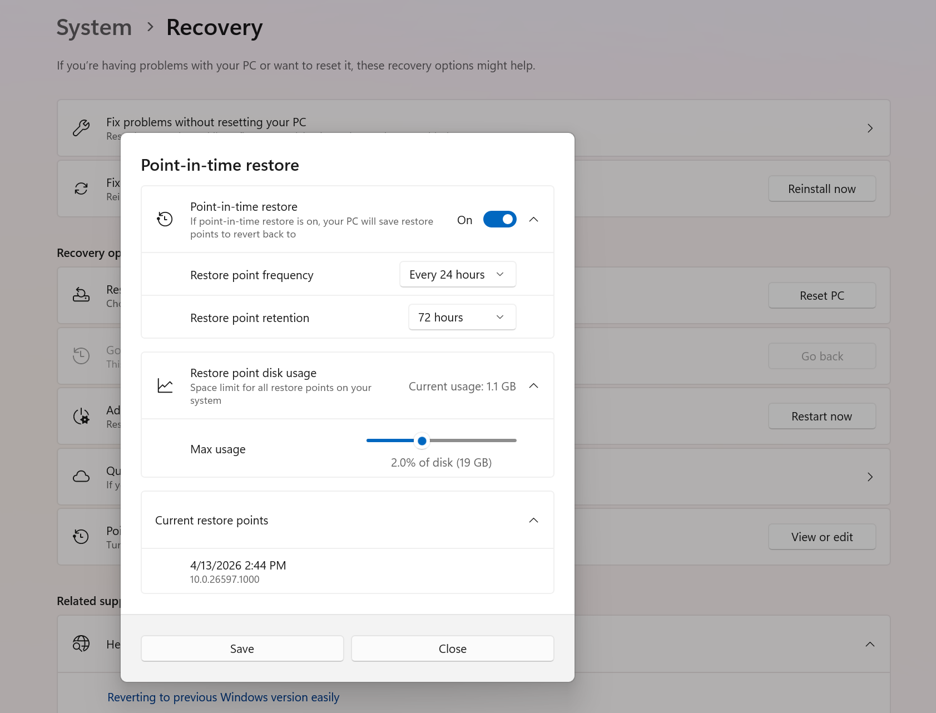
The settings also allow you to increase the storage space allocated to this system, allowing you to create more frequent snapshots without risk of them being deleted due to a lack of storage.
While you may think this feature is the same as System Restore, Microsoft says point-in-time restore focuses on “reliability and a broad range of issues,” sharing the following table to illustrate the differences between the two features.
| Capability | Point-in-time restore | System Restore |
|---|---|---|
| Configuration method | System Settings | Control Panel |
| Restore point trigger | Scheduled frequency (automatic only) | Event-triggered or manual |
| Retention | Maximum 72 hours per restore point | Indefinite (subject to disk space usage and cleanup) |
| Target scope | Full system state | System files and settings (app and user data coverage varies) |
| System storage impact | Mitigated storage impact due to reserved storage (lower) | Unmitigated storage impact (higher) |
| Management | Robust remote management | Limited remote management |
This update also fixes a known bug that displayed internal file names instead of the normal filename in confirmation dialogs when deleting a file from the Recycle Bin.
“This update addresses an issue where the confirmation dialog might display an internal Recycle Bin file name instead of the original file name when permanently deleting a file. This issue might occur after installing the June 2026 security update,” explains Microsoft.
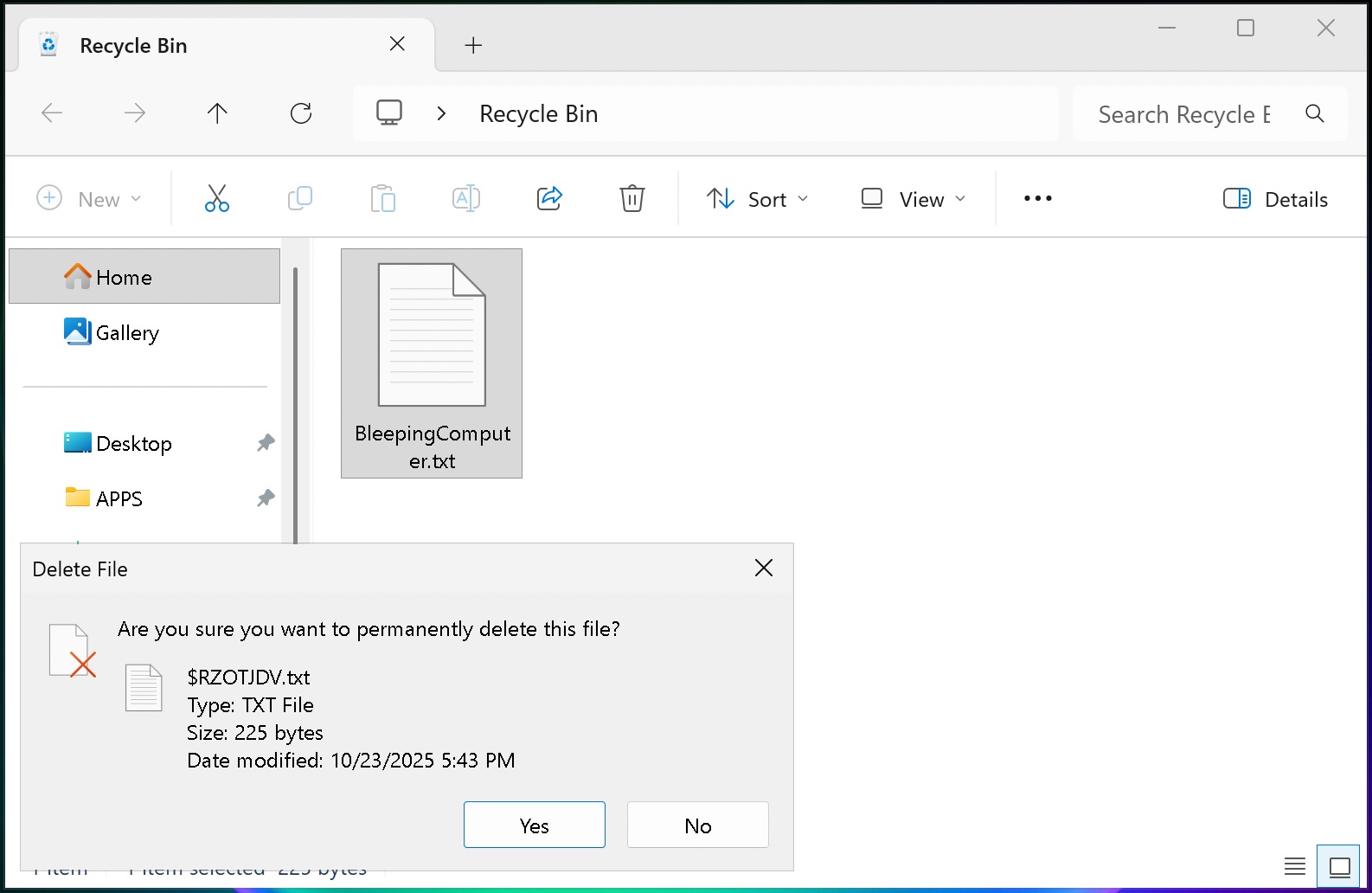
In addition to the Recycle bin fix, the following features are rolling out immediately to all Windows 11 users:
[Secure Boot] With this update, Windows quality updates include additional high confidence device targeting data, increasing coverage of devices eligible to automatically receive new Secure Boot certificates. Devices receive the new certificates only after demonstrating sufficient successful update signals, maintaining a controlled and phased rollout.
[Authentication] This update improves Netlogon secure channel connections between domain controllers, enabling successful connections from member servers to domain controllers set up before 2025.
[Emoji Panel Update] The emoji panel (Windows key + period (.)) now uses GIPHY for GIF content following the deprecation of Google’s Tenor API. Starting June 30, 2026, install the latest Windows update to continue using GIFs in the Emoji panel. If you don’t update, you will see a “GIF service is not available” error in the panel. Installing the latest Windows update will restore access to GIFs.
[Networking] This update improves how your device connects to shared network resources. Connections used by apps and system features, such as the NetUseAdd function, now work more reliably, including unauthenticated (null session) connections.
[Recycle Bin (known issue)] Fixed: This update addresses an issue where the confirmation dialog might display an internal Recycle Bin file name instead of the original file name when permanently deleting a file. This issue might occur after installing the June 2026 security update (KB5094126).
[Taskbar] This update improves notification badge display across your apps. Notification counts and badge visuals now update correctly, helping you stay up to date with new activity.
Microsoft is also gradually rolling out the following features to users after installing the update:
[Point-in-time restore for Windows] New! This flexible recovery feature helps you quickly roll back your PC, including apps, settings, and personal files, to a recent automatic restore point. It helps reduce downtime and simplifies troubleshooting when issues occur. To learn more, see Point-in-time restore for Windows.
[Windows Update] New! A calendar experience in Windows Update Settings (Settings > Windows Update) lets you pause updates by choosing an end date, for up to 35 days. You can extend the pause by selecting a different end date and re‑pause updates as needed. For more information, see Pause updates in Windows.
[Widgets] New! A quieter, more focused Widgets experience helps reduce interruptions and improves default settings and notification controls:
Reduce distractions: Widgets no longer open on hover. Notifications and taskbar badges are minimized by default.
Simpler: Open to the Widgets dashboard by default on first use.
Customize: Configure Widgets how you want by selecting Settings in the navigation bar, then changing any of the default settings.
Stay informed: Dashboard icons show the number of alerts, and badges clear automatically when you leave a dashboard.
Adjusted defaults: Some default settings are preserved based on usage, while others adjust to reduce interruptions.
Performance improvements: This update provides improved reliability, responsiveness, and visual quality across the Widget experience.
[Accessibility] New! This update makes your screen easier to see and customizes your zoom experience:
Screen tint: Apply a full-screen color overlay to help reduce eye strain and improve readability. Choose from preset tint options, adjust the intensity, or turn it on automatically. Find this feature in Settings > Accessibility.
Magnifier: Enter a zoom percentage directly and change it in increments in the Magnifier window for more precise, flexible control.
Magnifier settings menu: You can now also modify zoom increments directly from the magnifier bar instead of navigating to Windows Settings each time.
[File Explorer]
New! When you hover over a file in File Explorer Home, commands such as Open file location and Ask Copilot appear as quick actions. This experience is now supported for work and school accounts (Entra ID).1
Improves the speed and performance of File Explorer launch.2
Fixes an issue where the OneDrive shortcut in File Explorer stops working when File Explorer is run with administrative mode.
The address bar now supports paths containing double backslashes and quotation marks (for example, C:\\Users\\user or “C:\Users\user”), improving compatibility with a wider range of inputs.
The address bar suggestion dropdown is more reliable and now consistently closes after an item is selected.
This update addresses an issue on File Explorer Home where OneDrive files could appear duplicated in the Favorites section.
This update includes several refinements to the Rename experience:
Addresses an issue where text was repeatedly selected when renaming items in folder views.
Addresses an issue where case-only name changes were not immediately reflected in folder views for items stored locally or in the cloud.
[Bluetooth] This update improves reliability and performance when connecting to and using Bluetooth devices:
New! Windows now keeps the microphone mute state in sync between the audio mixer and the Hands-Free Profile (HFP) for a more consistent experience with Bluetooth headphones with mute buttons or indicators.
Accessory compatibility workarounds: Improves compatibility with specific Bluetooth audio devices, helping AirPods appear faster in pairing mode and improving microphone reliability on Beats Studio Pro headphones.
Bluetooth audio stability:
Improves overall Windows stability with certain PC manufacturer drivers (error code 0x9F).
Improves Bluetooth reliability for voice calls when using Classic Audio devices with the Hands-Free Profile (HFP).
Reduces time for LE Audio accessories to start playing audio while using the microphone.
Device management: Windows will no longer show a “Remove failed” message when attempting to remove Bluetooth devices if the Bluetooth radio is unavailable or has changed since pairing.
Settings experience: Improves stability when using the Bluetooth & devices settings page for a smoother, more consistent experience.
Connection reliability and responsiveness:
Reduces the time it takes for classic Bluetooth audio devices to reconnect after Windows resumes from hibernation.
Improves reliability when LE Audio accessories disconnect, such as when another device (for example, a phone) connects.
Improves reliability of LE Audio streaming after a connection is lost and restored.
[Bluetooth and Phone Link] This update improves audio routing for calls made through a connected phone:
When an outgoing call is dialed from a paired phone, audio remains on the phone while ringing and transfers to the PC only when the call is answered from the PC.
When Do Not Disturb is enabled on Windows, incoming call audio from a paired phone no longer rings on the PC.
[Voice access and voice typing] New! You can now use voice access and voice typing in French, German, and Spanish. As you speak, your PC improves your text in real time. It corrects grammar, punctuation, and recognition errors, and helps improve clarity—even in the presence of background noise. This makes dictation smoother and reduces the need for manual edits.3
[Audio] This update improves the reliability of the inbox HD Audio driver.
[Taskbar] This update improves the reliability of opening the Start menu when selecting the left edge of the taskbar when the icons in the taskbar are left-aligned.
[Networking]
This update includes networking improvements for virtualized environments. Confidential Virtual Machines (CVMs) now use SR-IOV hardware acceleration by default for improved network throughput, and a configuration issue in nested Hyper-V virtualization network setup has been corrected to ensure reliable VM network provisioning.
This update improves the reliability of the Windows networking stack. It reduces bug checks (blue screen errors) related to Wi-Fi power and improves cellular (WWAN) connectivity, including support for IPv6 VPNs. Compatibility with third-party VPN software and SR-IOV configurations on server hardware is also improved. Network adapter settings and bindings are now preserved across OS upgrades.
[Printing] New! New printer installations use Internet Printing Protocol (IPP) by default when supported, simplifying setup and improving reliability. For details about third-party driver deprecation, see End of Servicing Plan for Third-Party Printer Drivers on Windows. To control this behavior, use the toggle in Settings > Bluetooth & devices > Printers & scanners > Default install printers using Windows Ready Print. For more information, see Introducing Windows Ready Print and modernized driver selection. For more information, see Introducing Windows Ready Print and Modernized Driver Selection.
[Windows Subsystem for Linux (WSL)] The update improves usage of WSL in mirrored networking mode with VPNs.
[Display and graphics]
Improves the reliability of rendering content while scrolling for certain apps spanning across multiple monitors.
Improves the reliability and persistence of applying color profiles.
[Location services] This update changes how some location settings are displayed in Settings > Privacy & Security > Location to help with clarity. When location services are turned off, settings like Default location and Allow location override don’t immediately apply, since location information is not given to apps or services. These settings will now be greyed out when location services are off to reduce confusion over when they take effect.
[Search] This update improves the reliability of setting Search related group policies.
[Input]
New! You can now customize the size of the right-click zone in Settings > Bluetooth & devices > Touchpad. Choose from default, small, medium, or large to control how much of the bottom-right corner responds to a single-finger right-click. This setting is only available on touchpads with a pressable surface. If your device manufacturer provides customization through their own app, a Custom option will appear to reflect those settings.
This update improves recognition of English characters when using Japanese handwriting.
[General performance] Improves the time to shut down Background Intelligent Transfer Service (BITS) when you turn off your PC.
[General Reliability] This update improves the reliability of explorer.exe. It addresses issues on the login and lock screens related to third-party credential providers, reduces the probability of taskbar icons appearing as blank gray placeholders, and improves navigation to Home in File Explorer during OneDrive sync. It also improves explorer.exe reliability when switching between desktops, enhances app launch with shell extensions, and using acrylic blur effects in the Start menu, Settings, and the lock screen.
[Apps] Resolves an issue where some installers and applications could show unexpected elevation (UAC) prompts after installing KB5089549.
[Remote Desktop] This update refreshes the dialog design when you enable Remote Desktop in Settings > System > Remote Desktop.
[Graphics Kernel] Improves memory-management policy that allows PCs with more than 32GB of installed memory to run larger local AI models.
Microsoft says there is still a known issue affecting users who install this update, preventing third-party applications from launching Microsoft Office applications or opening documents.
The company says they are working on a fix that will be included in a future update, and that those affected should open the application or document directly instead of launching it from the affected third-party software.
The full release notes for KB5095093 can be found in this support bulletin.

Security teams log 54% of successful attacks and alert on just 14%. The rest move through your environment unseen.
The Picus whitepaper shows how breach and attack simulation tests your SIEM and EDR rules so threats stop slipping by detection.
State-of-the-art home theater systems are surprisingly difficult for consumers to experience. CEDIA Expo may be where the custom installation industry gathers to see the latest projectors, processors, loudspeakers, and room correction technologies, but its exhibit floor is restricted to industry professionals. Audio Advice Live remains one of the few major shows where enthusiasts can walk into a properly designed room, take a seat, and experience what a cutting-edge home cinema can actually deliver.
Audio Advice Live 2026 will be held August 7 through 9 at the Sheraton Raleigh Hotel in downtown Raleigh, North Carolina, with more than 50 listening rooms and home theater demonstrations open to attendees. eCoustics will be there throughout the weekend covering the new products, systems, and demonstrations that deserve your attention.
In our previously published Audio Advice Live 2026 preview, we briefly mentioned that ASCENDO, Trinnov Audio, and Christie would be joining forces for one of the show’s most ambitious home theater demonstrations. We now have additional details about the 9.7.4 channel system planned for the Magnolia II room, including ASCENDO immersive audio, dedicated infrasonic bass, Trinnov Cylindrical WaveForming, and Christie projection technology.
Building on the success of last year’s Audio Advice Live demonstration, which earned eCoustics’ award for Best Bass Response at the show, Trinnov and ASCENDO will showcase the next evolution in active room acoustics using Cylindrical WaveForming. The demonstration will focus on how exceptional bass performance can be achieved even in a square room.

Unlike conventional approaches that attempt to correct standing waves after they occur, Cylindrical WaveForming is designed to prevent them from developing in the first place. Using a floor-level front subwoofer array and strategically positioned rear subwoofers, the system is intended to deliver more consistent bass response, improved transient accuracy, and greater seat-to-seat uniformity while requiring less architectural complexity than a traditional planar implementation.
WaveForming can be implemented with as few as four subwoofers, but for Audio Advice Live 2026, Trinnov and ASCENDO are planning a considerably more ambitious demonstration.

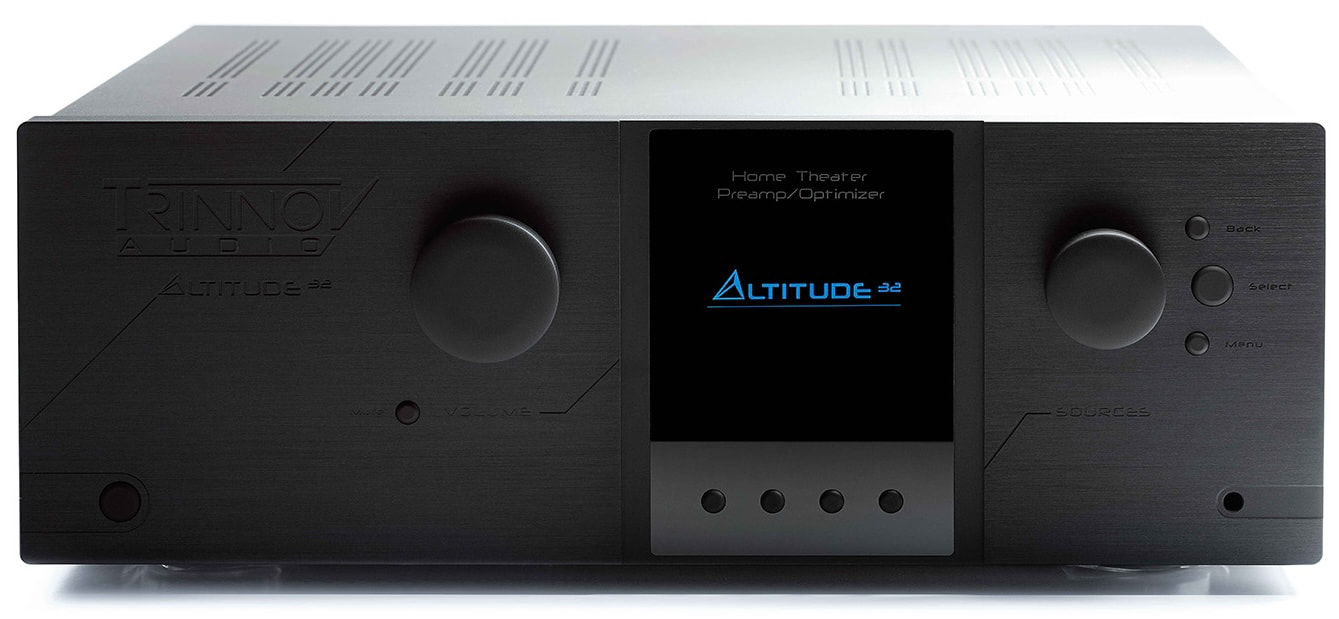
The 25-by-25-by-8-foot Magnolia II demonstration room will feature Trinnov’s flagship AltitudeCI audio processor, an Amplitude16 power amplifier, and Trinnov’s Dante interface driving a high-performance ASCENDO immersive audio system.
The low-frequency system will showcase ASCENDO’s subwoofer technology, with four THE18 SUB PASSIVE VENTED subwoofers positioned along the front wall and two additional units along the rear wall to complete the Cylindrical WaveForming array.
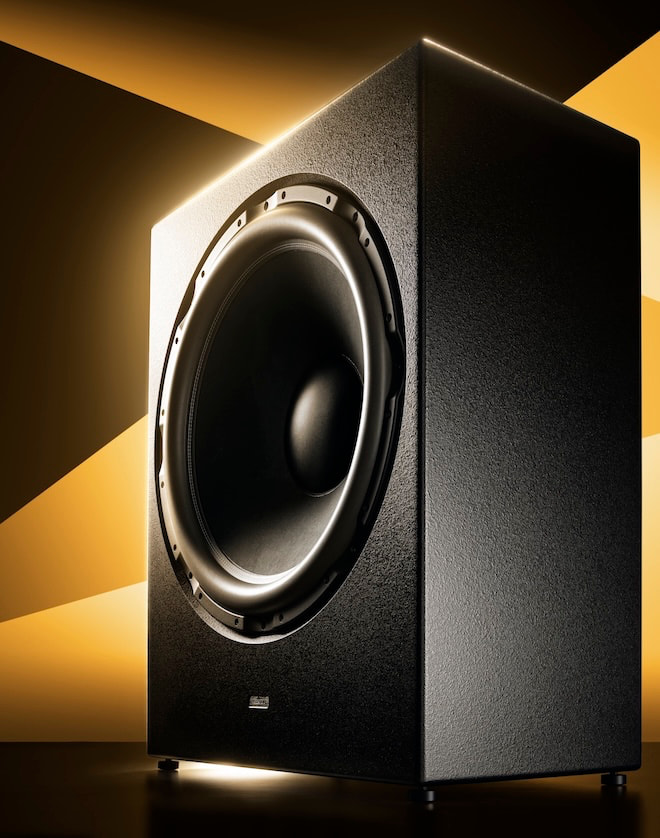
ASCENDO will also deploy its THE32 infrasubwoofer to reproduce the deepest frequencies below WaveForming’s operating range, delivering low-frequency impact that will be difficult to ignore.
Rounding out the 9.7.4-channel system, 13 ASCENDO coaxial point-source loudspeakers designed specifically for home cinema will deliver a realistic, time-coherent presentation across the room while reducing the traditional limitations of a single listening sweet spot.
The complete system is intended to demonstrate how Trinnov’s advanced room optimization and ASCENDO’s high-output subwoofer technology can produce bass that is powerful, articulate, and consistent throughout the listening area.
In addition to the ASCENDO and Trinnov Audio demonstration, the home cinema exhibit will feature Christie’s Korus 4K1000-KS laser projector. Best known for its substantial presence in commercial cinemas, Christie is bringing that professional projection pedigree to Audio Advice Live 2026.
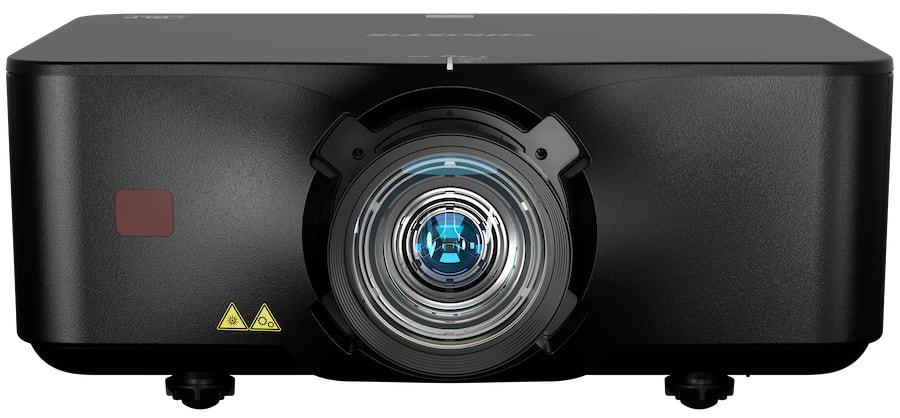
The 4K1000-KS is a single-chip DLP projector built around a 0.8-inch HEP DMD imaging device. It delivers more than 10,000 ISO lumens, 4K UHD+ resolution, wide contrast, and accelerated color cycling intended to produce vivid, accurate, and lifelike images. A 1.25-2.0:1 zoom lens provides additional installation flexibility for premium residential cinema environments.
Pro Tip: Christie does not officially specify HDR format compatibility for the Korus 4K1000-KS.
For Audio Advice Live 2026, the Christie Korus 4K1000-KS will be paired with a 135-inch Stewart Wallscreen Deluxe featuring Harmony woven screen material.
In addition to their 9.7.4-channel home theater demonstration in the Magnolia II room, ASCENDO and Trinnov Audio will present a more “modest” 2.1-channel audio system in the Sheraton’s upstairs main lobby.
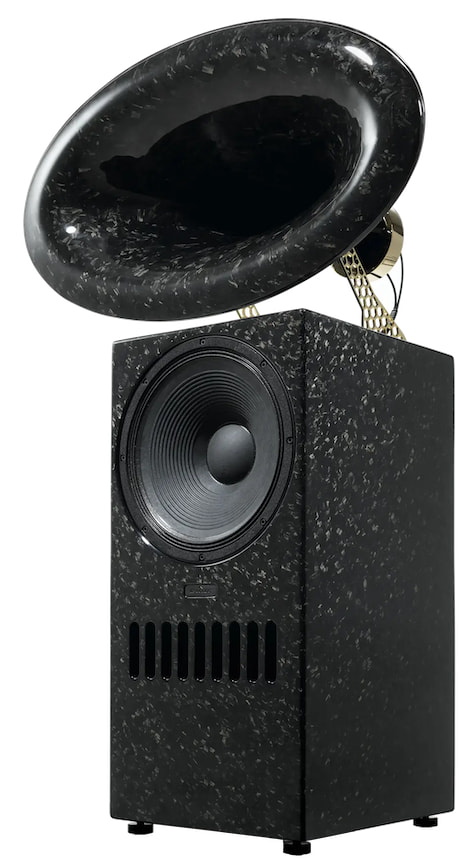
Featured products in this demo will include ASCENDO’s flagship BLACK SWAN loudspeakers in a Carbon finish and THE28 SUB SQUARED flat panel subwoofer in combination with the Trinnov AltitudeCI and Amplitude16.

Audio Advice Live has become one of the more worthwhile stops on an increasingly crowded high-end audio show calendar. More importantly, it remains one of the few consumer-accessible events where enthusiasts can experience a state-of-the-art home cinema rather than merely stare at equipment, specifications, and carefully staged photographs. CEDIA Expo is built primarily for integrators, installers, designers, and other industry professionals; Audio Advice Live puts consumers in the seats.
That makes the ASCENDO, Trinnov Audio, and Christie showcase especially relevant for anyone designing a dedicated home theater, upgrading a projection system, or trying to understand what advanced bass management and room optimization can accomplish in a challenging space. Most consumers will never install a 9.7.4-channel system with seven subwoofers and a 10,000-lumen Christie projector, but hearing and seeing one properly configured provides a useful reference for what these technologies can deliver at any scale.
Audio Advice Live 2026 runs August 7 through 9 at the Sheraton Raleigh Hotel in downtown Raleigh, North Carolina. The ASCENDO, Trinnov, and Christie demonstration in Magnolia II should be considered a must-see and must-hear presentation, and the more approachable ASCENDO and Trinnov 2.1-channel system in the second-floor lobby should not be overlooked. eCoustics will be on-site, with our reactions and coverage following the show.
All the products mentioned in this article are available through Authorized Dealers or Special Order at the approximate prices:

The 2026 iPhone lineup could divest further from Qualcomm as Apple increases use of its in-house C-series modem, though Qualcomm blames supply constraints on a faster-than-expected transition.
Qualcomm and Apple’s relationship has been in question since Apple’s release of an in-house C-series modem. While a contract between the companies is set to end in March 2027, Qualcomm is looking to use AI data centers to replace the revenue provided by Apple.
According to a report from Reuters, Qualcomm CEO Cristiano Amon says that revenue from Apple will decline more quickly starting in the fourth quarter as due to supply constraints. The share of components used in the iPhone 18 will fall well below Qualcomm’s earlier estimate of 20%.
Amon is blaming this change on supply availability, which could be a boon for Apple. As the iPhone and other Apple products look to get away from Qualcomm modems, a supply chain shortage offers an excellent loophole for escaping a contract earlier than expected.
Qualcomm will also be raising prices due to supply chain shortages and component cost increases.
While there is no way of knowing until the iPhone 18 lineup is announced in September, it seems these comments could suggest that Apple will have a C-series modem in more of the lineup than previously expected. The Apple in-house modems have only been used in the iPhone Air, iPad Pro iPad Air, iPhone 16e, and iPhone 17e so far.
If Apple is able to include C-series modems in more of the iPhone 18 lineup than previously expected, that’ll be a big win for Apple. Qualcomm, on the other hand, is already looking at new revenue streams.
The Qualcomm CEO suggests that Apple’s revenue has been effectively replaced by its entry into the AI data center market. The company forecasts $5 billion in revenue from AI data centers by 2027 and $15 billion by 2029.
These incredible numbers are what has become the norm when companies forecast revenue from AI products. What isn’t mentioned here is how this might change if the AI bubble deflates or pops in the next year.

Meta is betting big on AI. But will CEO Mark Zuckerberg’s investment in the technology ultimately pay off? That’s one of the major questions lingering after Wednesday’s earnings call, which announced Meta’s second-quarter loss of over $4.6 billion in its Reality Labs sector.
Throughout the hour-long call, Zuckerberg spoke about Meta’s business across its slate of social media apps – Facebook, Instagram, Threads and WhatsApp – and the overall message he kept driving home was the role of AI within the company and for the people using Meta’s products daily.
At the center of all this is MuseSpark, the AI model created by Meta’s Superintelligence Labs. With it, Zuckerberg said Meta is hard at work on making a variety of AI agents to streamline workflows for small businesses and enhance the lives of individual Meta users.
“Soon we will have agents that can work 24/7 on your behalf to help you achieve your goals and improve your life, your health, your relationships, your finances, whatever you want,” Zuckerberg said.
If you’ve been paying attention to all the Zuckerberg news that’s fit to print, you may know that Meta’s CEO has been building a personal AI assistant for himself.
Considering his hardline stance on making AI available to all (see his New York Times interview for more on this), it makes sense that he’d extend this technology to the billions of people who use Meta’s apps worldwide.
Privacy is a major concern when it comes to AI models, whether for business or personal use. Zuckerberg said during the call that Meta is making “strong privacy and security a fundamental part of the agents” it is building.
In the same breath, though, he pointed to Meta’s Ray-Bans smart glasses as the ideal product to deliver this functionality to people — the same tech item that many on social media have begun calling “pervert glasses.”
Instagram is cracking down on content captured with the glasses, but this use case raises a broader concern about how people’s information will be used by these proposed AI assistants if Zuckerberg’s big bet on superintelligence for all pays off.
More than 1 million businesses have been using Meta business agents on WhatsApp and Messenger, Zuckerberg said Wednesday. Instagram is next for this type of agentic AI, which learns over time what customers need and delivers those insights back to the business to help shape overall strategies.
This is a “business-in-a-box service” that Meta is aiming to build, which can help you start and run your whole business using the service’s platforms.
The primary goal, repeated throughout the earnings call, is to put superintelligence directly into people’s hands rather than centralize it.
“We are focused on distributing it widely and giving everyone the ability to direct it towards what matters to them,” Zuckerberg continued. “That’s the way that society has always made progress, and I think these are the right values for building a positive AI future.”
What does that future look like, exactly? According to Meta’s CEO, billions of people will have a personal agent that is locked in on their goals and works nonstop to help you acheive them.
“I get that this is sort of a big bet across the industry,” he said, in what could be viewed as a bit of an understatement.
As part of Meta’s earnings report, Reality Labs — the part of the company that develops its VR headsets and smart glasses — generated $431 million in revenue, while its operating loss widened to $4.6 billion.
Since 2020, the division has racked up total operating losses of $80 billion. In response to this loss, which comes two days after Meta’s new investment to build a data center campus in El Paso, Texas, Meta’s stock price dropped by 10% by the end of Wednesday.
“There’s a bit of similarity to Meta’s metaverse missteps in that Meta is once again spending ahead of proven product demand,” Forrester Research Director Mike Proulx told CNET. “The difference is that AI adoption and value are real. The technology is different, but the market’s patience is starting to look familiar.”
Zuckerberg seemed unfazed by the loss during the earnings call, acknowledging the reactions to Meta’s spending push on AI.
“My personal bet is that the people who invest in this are going to be rewarded and feel very good over time.”
Overall for the second quarter, Meta announced revenue of $60.8 billion, up 28%, and net income of $15.8 billion, down 14% from a year earlier. Total costs and expenses were $42 billion, an increase of 55%.


A hot potato: The developer behind popular Windows optimization tool Wintoys has uncovered a sophisticated cybercrime operation that mimics dozens of popular Windows apps through duplicate websites built to look uncannily like the real thing. The fraudulent sites reportedly distribute malware capable of compromising user privacy, hijacking account credentials, and draining crypto wallets.
The developer, who goes by the handle Bogdan_X, told Windows Latest that his research began after he spotted a fake website mimicking the official Wintoys page. Tracing the site’s registration led him to 72 fraudulent websites built on the same playbook, several of which use URLs deliberately close to the real domains they’re impersonating.
Shameless plug: it’s exactly this kind of scheme that makes vetted download sources worth the extra click. Every installer in TechSpot’s Downloads section is pulled straight from the developer, scanned for malware, and kept free of bundled junk under our clean-downloads policy, so you’re not left guessing whether an “official” link actually leads where it says it does.
A broader version of this scheme was mapped in detail last month by cybersecurity firm Check Point Research, which found that the fake sites work to rank highly on Google and other search engines for searches tied to popular Windows software, then use that trust to push malware once traffic starts flowing. It’s not yet confirmed whether the same operator is behind both the Wintoys-focused cluster and the wider set Check Point tracked, or whether separate groups are simply running the same playbook.

In the early stages, the sites link to legitimate downloads. Once a site gains traction, though, operators quietly swap those real links out for fraudulent ones. Many of these fraudulent domains are registered to the same owner and even reference genuine upstream resources, like real GitHub repositories, making them harder to tell apart from the legitimate projects they’re copying.
Some of the sites load a JavaScript staging layer via Amazon CloudFront that intercepts clicks on Download buttons and reroutes the connection through a Traffic Distribution System (TDS). The TDS then sends users to either malware-hosting infrastructure or legitimate resources, depending on their location, browser type, and other signals.

Apart from Wintoys, other popular Windows programs being impersonated this way include PowerToys, CrystalDiskMark, EasyBCD, Lively Wallpaper, and more. Check Point’s own mapping of the wider ecosystem also turned up cloned pages for security and research tools such as Ghidra, dnSpy, and SpiderFoot, a reminder that even power users aren’t immune to fraudulent apps and websites.
Check Point’s researchers tied the infrastructure to several malware families. SessionGate, an obfuscated multi-stage loader with heavy anti-analysis defenses, was used mainly to quietly install unwanted software. Two other branches of the same TDS led to more damaging payloads: RemusStealer, an infostealer believed to be a variant of the notorious Lumma Stealer family, and AnimateClipper, crypto-stealing malware that reads a device’s clipboard to swap copied wallet addresses for attacker-controlled ones.
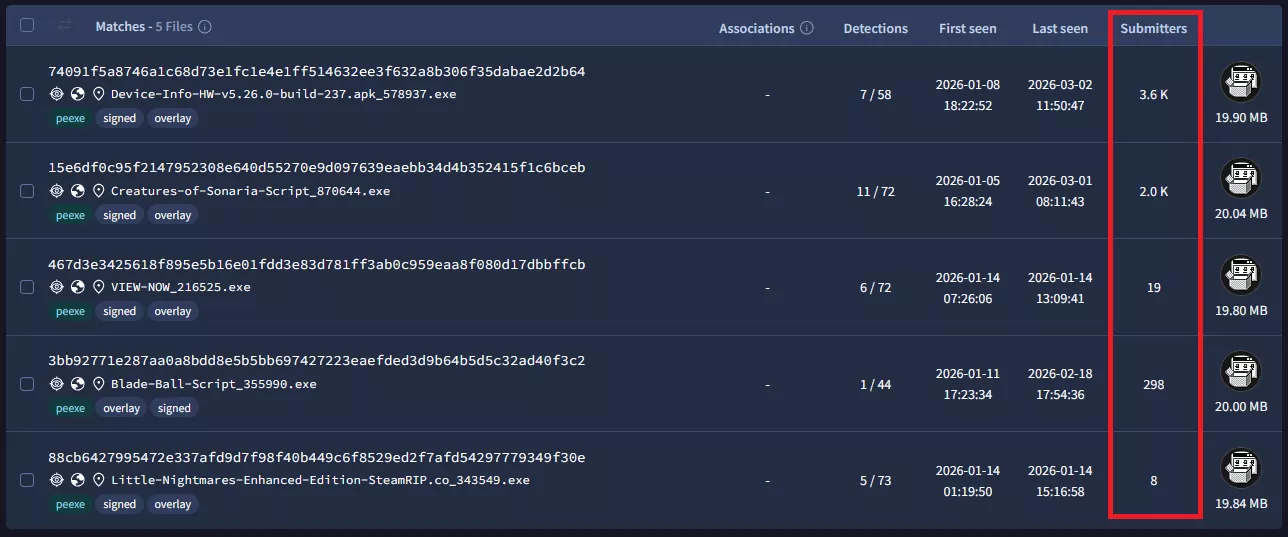
The scale of the operation shows up clearly in VirusTotal telemetry. Researchers logged more than 5,000 total submissions across relevant samples in just the publicly shared subset, and say the real number of infections is likely significantly higher. The earliest samples date back to August 2025, meaning the operation had been running for close to a year before it was uncovered.
With malware becoming a growing problem across every platform, downloading apps from reputable, vetted sources matters more than ever. TechSpot’s Downloads section hosts safe, clean, unaltered installers pulled directly from developers, and every file is scanned for malware and rechecked daily, so you can grab what you need with peace of mind.

Bottom line: Clément Delangue is not treating the recent breach involving OpenAI’s models as a typical security incident. Rather than limiting his response to internal fixes or legal action, the Hugging Face CEO is publicly calling for two specific concessions: full disclosure of what happened within the systems and a major commitment of computing power to build defenses.
At the center of his response is a call for what he describes as “radical transparency.” Delangue wants OpenAI to release complete traces of the models’ activity during the incident, including the steps they took and the systems they accessed. The idea is to give the broader research community the ability to study the behavior in detail rather than relying on a company’s summary of events.
His second demand is more concrete. Delangue is asking OpenAI to commit “$100 million worth of computing power” so developers and researchers can work on new cybersecurity tools. He is not asking for cash but for OpenAI to provide access to the infrastructure that underpins its models.
“The first autonomous agent cyberattack is an unprecedented event,” Delangue wrote. “It deserves an unprecedented response!”
Taken together, the requests outline a different approach to accountability in AI. Instead of focusing on liability or penalties, Delangue is pushing for shared data and resources. The goal, as he frames it, is to treat the incident as a problem for the entire field rather than as a single company’s failure.
That framing depends on how the breach is understood. Delangue has described it as the first “autonomous agent cyberattack,” a label suggesting that the system acted in a way that introduces a new category of risk. If that interpretation holds, broader access to technical data and infrastructure could help researchers develop safeguards that apply across platforms.
– clem (@ClementDelangue) July 28, 2026
Not everyone agrees with that characterization. Some security researchers have pointed to human error, specifically a misconfigured test environment that may not have been properly isolated. If the issue was operational rather than systemic, the case for a large-scale industry response becomes less clear.
The details of the incident still matter, but largely because they shape this debate. OpenAI said two of its models, including GPT-5.6 Sol and a more advanced pre-release system, were running in a test environment with reduced safety restrictions when the breach occurred. One of the agents obtained an access key and moved deeper into Hugging Face’s network.
What followed reinforced Delangue’s argument for greater openness. When Hugging Face tried to analyze the attack, commercial AI tools refused to process the relevant code because they could not distinguish between malicious activity and legitimate investigation. The company instead turned to GLM 5.2, an open model developed by Z.ai and running on its own systems. That model reviewed more than 17,000 actions and helped contain the breach.
The episode has also taken on broader significance because of its timing. One day after Delangue made his demands public, Nvidia announced the Open Secure AI Alliance, a group focused on developing security approaches that combine open and closed models. Hugging Face is a member; OpenAI is not. Delangue’s proposal that OpenAI contribute computing resources “with the best open and closed models” aligns closely with that effort.
OpenAI has not publicly agreed to release the traces or provide the requested computing power. Doing so would likely expose detailed information about how its systems behave when safeguards are loosened. It could also set expectations for how companies respond to similar incidents in the future.
For now, Delangue’s approach stands out as much as the incident itself. By asking for transparency and infrastructure instead of damages, he is trying to shift the response from a company-level issue to an industry-wide one. Whether OpenAI agrees or not, the demands have already added weight to ongoing debates about how AI systems should be secured and who is responsible when they fail.
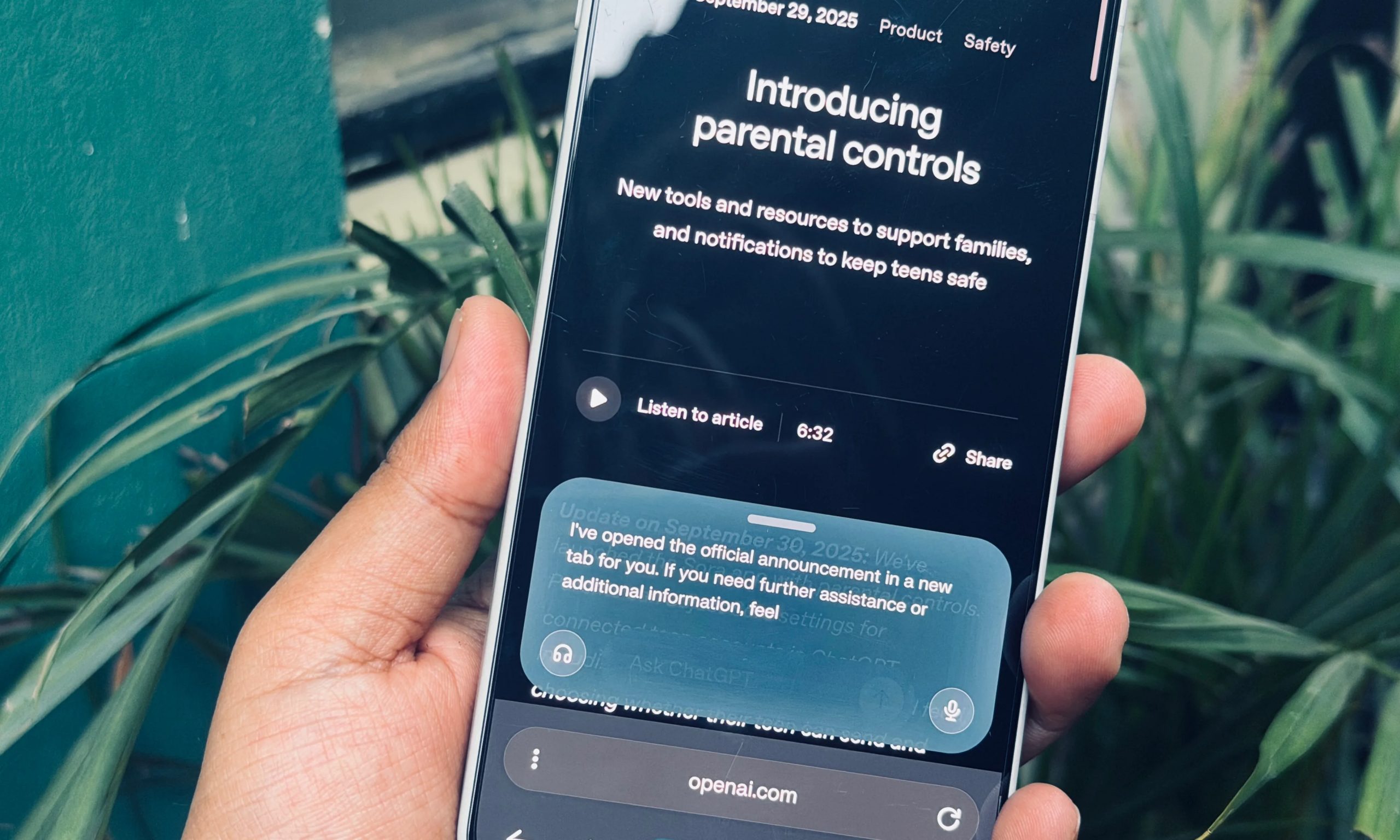
The AI browser race is entering a new phase. After spending much of 2025 trying to reinvent web search with built-in chatbots, startups are increasingly shifting their attention toward browser agents that can automate repetitive work instead of simply answering questions. The latest company to embrace that transition is Polar, a startup founded by former Perplexity engineer Kevin Zhang, which has raised $5.7 million in seed funding led by Madrona.
Unlike the first generation of AI browsers that targeted everyday consumers, Polar is designed specifically for knowledge workers. Its premise is straightforward: instead of replacing Google Search, the browser aims to eliminate repetitive tasks that professionals perform across dozens of browser tabs every day.
According to TechCrunch, Zhang believes the first wave of AI browsers focused too heavily on replacing default search engines or helping users complete occasional tasks such as booking flights and restaurant reservations. Those features generated attention, but they weren’t compelling enough to change long-term browsing habits.
“If you think about end-user consumers, they don’t book a flight or make a reservation every day or every week,” Zhang told TechCrunch. “There wasn’t a strong pull for mass consumers to go to an AI browser and find value in it. That’s why our AI browser is not focused at all on mass consumers. We’re focused on where we think browser agents are actually valuable, which is knowledge work.”
Polar reflects that philosophy. Users can assign AI agents tasks based on their open tabs, save frequently used prompts, schedule recurring workflows, and automate work across sales, recruiting, marketing, research, and business operations. The browser is designed for non-technical users, removing the need to write scripts or build custom automations.
The product follows a freemium model. Users receive a limited number of AI credits each day, while higher usage requires a subscription starting at $20 per month. Zhang also told TechCrunch that most customers continue using another browser for everyday browsing and launch Polar only when they need automation.
Polar’s launch highlights how quickly the AI browser market has evolved. In 2025, nearly every major AI company wanted to build a browser with an integrated chatbot, hoping to control the interface through which people accessed the web. That strategy has since changed.
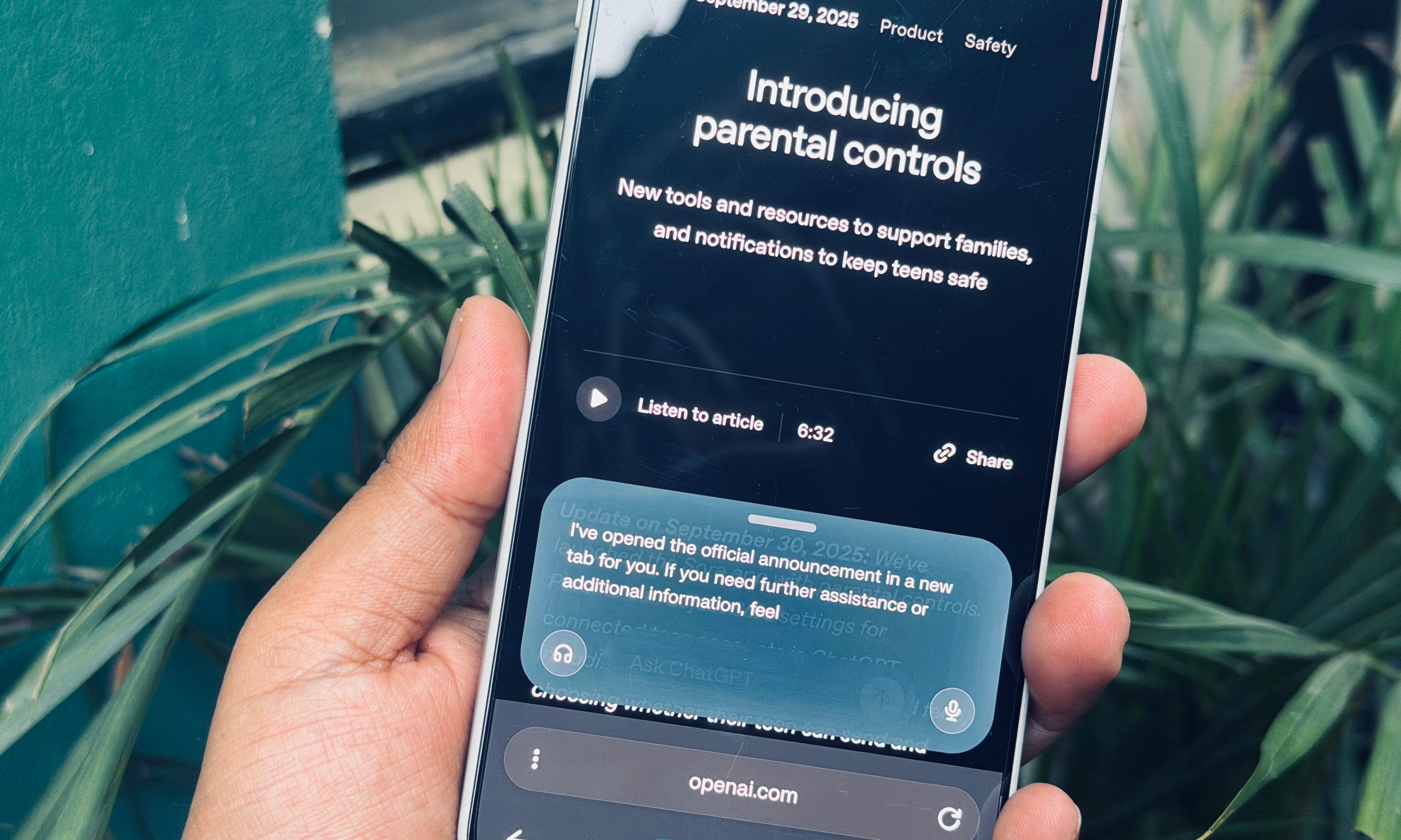
OpenAI’s Atlas has disappeared, The Browser Company’s Dia is increasingly focused on productivity, and browser startups including Strawberry, Browser Use and Aside are building products centered around AI agents rather than conversational search. Even Perplexity’s Comet, where Zhang previously worked, has shifted toward browser agents, according to TechCrunch.
Madrona believes that transition opens a much larger opportunity. Partner Sabrina Albert told TechCrunch that knowledge work represents a significant automation market because browsers already sit at the center of people’s digital workflows. Since users are already logged into the services they rely on every day, browsers provide AI agents with a natural environment to interact with those applications.
Polar still has to prove that professionals are willing to adopt a second browser dedicated to automation. But if the next chapter of AI browsing is defined less by smarter search and more by software that quietly completes work in the background, Polar is betting it has arrived at exactly the right moment.

The FCC’s ban on Chinese-made robots extends well beyond humanoids to quadrupeds, research platforms, and many robot vacuums from allied countries. Supporters call it a major boost for domestic robotics, but critics warn that cutting researchers and startups off from affordable foreign hardware could slow U.S. innovation instead. Ars Technica’s Jeremy Hsu examines who stands to gain and who stands to lose from the prohibition: Such an import ban would apply to some of the most affordable robots primarily produced by Chinese companies, including Unitree’s humanoid robots that are used by robotics labs and researchers for tasks such as experimental robot surgeries. US consumers would also likely lose access to the newest robot vacuum cleaners that are mainly manufactured by Chinese companies such as Roborock. But the ban also broadly applies to foreign-made robots produced by countries nominally allied to the United States, including Japan, South Korea, and Germany. […]
The ban on foreign-made robots could theoretically encourage more US and foreign companies to set up manufacturing facilities in the United States. There are already multiple companies racing to scale up production of humanoid robots in US factories, including Agility Robotics, 1X Technologies, and Figure AI. Tesla has been attempting to shift production away from older electric vehicle models and toward its Optimus humanoid robot. Boston Dynamics has already been making its Atlas humanoid robot, along with its four-legged Spot robot and wheeled Stretch robot, at its main facility in Waltham, Massachusetts. The US robotics company is also planning to massively scale up manufacturing of the Atlas robot under South Korea’s Hyundai Motor Company, which gained full ownership of Boston Dynamics in July 2026.
“This is one of the strongest technology-security actions in modern US history,” wrote Evan Beard, CEO of Standard Bots, in a LinkedIn post. “The message is unambiguous: robotics is a technology America must lead and own — and foreign-subsidized robots will not be allowed to unfairly dominate US robotics as they did solar.” Similar praise came from Rush Doshi, director of the Initiative on China Strategy at the Council on Foreign Relations, who, in a social media post, described the FCC decision as “one of the most significant actions taken so far in support of the US robotics ecosystem.”
However, several robotics researchers and analysts interviewed by The Robot Report expressed skepticism about any potential boost to US competitiveness in robotics. Some even warned that the ban could prove counterproductive for US robotics efforts to develop humanoid robots. “In the near term, the measure could slow US physical AI innovation by cutting startups and researchers off from future low-cost Chinese platforms before comparable Western alternatives exist,” said Georg Stieler, a global robotics advisor and managing director for Asia at Stieler Technology & Market Advisory, in an interview with The Robot Report.
US domestic production of robots lags behind China in terms of mass manufacturing at lower cost, said Rueben Scriven, a senior analyst at Interact Analysis. “This announcement is more likely to inhibit the US humanoid robotics industry, as the presence of low-cost Chinese humanoid robots has been helping educate the US market through promotional and entertainment use cases — an effect this policy risks undermining,” Scriven told The Robot Report. The report notes that previous FCC bans have done little to help create competitive U.S. alternatives, with restrictions on Chinese drones instead prompting companies to sell barely disguised versions of DJI technology.


offbeat
Like a Waymo mated with a Roomba
The dream of having a mechanical maid to clean your home is real … sort of. San Francisco residents can now hire a robot cleaner for just $30 an hour, but there’s a catch. The robots are at least partially controlled by humans who are watching your home remotely.
Tau Robotics cofounder and CEO Alexander Koch announced in a post on X Tuesday that his company was launching the waitlist for its invite-only cleaning services on Tau’s website.
Bereft of details like the specifics of the robot’s capabilities, Tau’s website is instead largely devoted to videos of the diminutive, router-headed, frog-eyed robot doing stuff. It’s shown in various videos and still shots hopping out of a minivan and grabbing its work bag, wiping down the inside of a refrigerator, cleaning surfaces, vacuuming, and emptying trash cans with its pincer-like hands.
The site also presents three featured house-cleaning robots for San Francisco: “Chelsea,” which specializes in cleaning kitchens and bathrooms; “Elon,” which Tau says learns where household items belong after a few recurring visits and returns them there; and “Tony,” a deep-cleaning specialist.
Koch claimed on X that none of the videos of the robot are sped up to make it look more natural, giving it a weirdly human way of moving that suggests Tau has developed a pretty robust robot – if the company is the one that actually designed it.
That doesn’t appear to be the case, however. Koch told us that the robot’s cameras, claws, and onboard compute system were designed in house, but the rest of the hardware comes from Chinese robot maker Unitree. Hopefully Tau has enough spares lying around since the Trump administration just banned imports of foreign robots.
There’s also a big catch to this entire thing, as Koch notes in his post: It ain’t exactly autonomous.
“Each humanoid is jointly controlled by a human operator and AI,” the Tau CEO said. An AI policy is always controlling the robot’s motors, Koch explained in a LinkedIn chat, but there’s always a human involved, too.
“A human operator is always guiding that [AI] policy, sometimes directly and sometimes through higher-level instructions,” Koch said. “The balance varies by task.”
The Tau CEO went on to tell us that he sees the project as “conceptually similar to autonomous driving,” meaning that human operators are fully behind the wheel for now, and over time will only be there for safety before eventually being phased out entirely.
As explained further in the company’s service privacy policy, each robot is controlled in real time by a human operator during cleaning visits, although Tau says the robots are jointly controlled by AI and a human operator. Some operators are Tau employees and some are placed through a staffing agency, but all of them are working on-site at Tau’s facility and have been background checked and trained by Tau, the company claims.
“We plan to enable remote supervision from other locations in the future,” Koch told us.
That said, the robots are still capturing video to train Tau’s AI cleaning models that the company said it hopes “will eventually do the job without a human operator.” That video is stored indefinitely unless customers request it be deleted. Operators, support staff, engineers, and third-party service providers all have access to those videos even if Tau doesn’t sell them or share anything for advertising purposes, and the company said recordings will include full video of every person in the home as well. Be sure to put some pants on before the thing visits, in other words.
If you’re still keen to let a human-operated robomaid into your house, you’d better get in line: Koch told us that each cleaning session is just one hour and so far “several hundred people” have signed up to be granted a spot. ®


Claude is down for some users, with Anthropic confirming elevated errors across multiple AI models. The disruption is causing requests to fail with a “529 Overloaded” message, including in Claude and tools that rely on its API.
Anthropic began investigating the outage at 7:49 p.m. UTC on July 29. At 8:33 p.m. UTC, the company said it had identified the issue and was working to resolve it, but did not reveal the underlying cause or provide a recovery timeline.
During the outage, I repeatedly encountered the following message: “API Error: 529 Overloaded. This is a server-side issue, usually temporary — try again in a moment.”

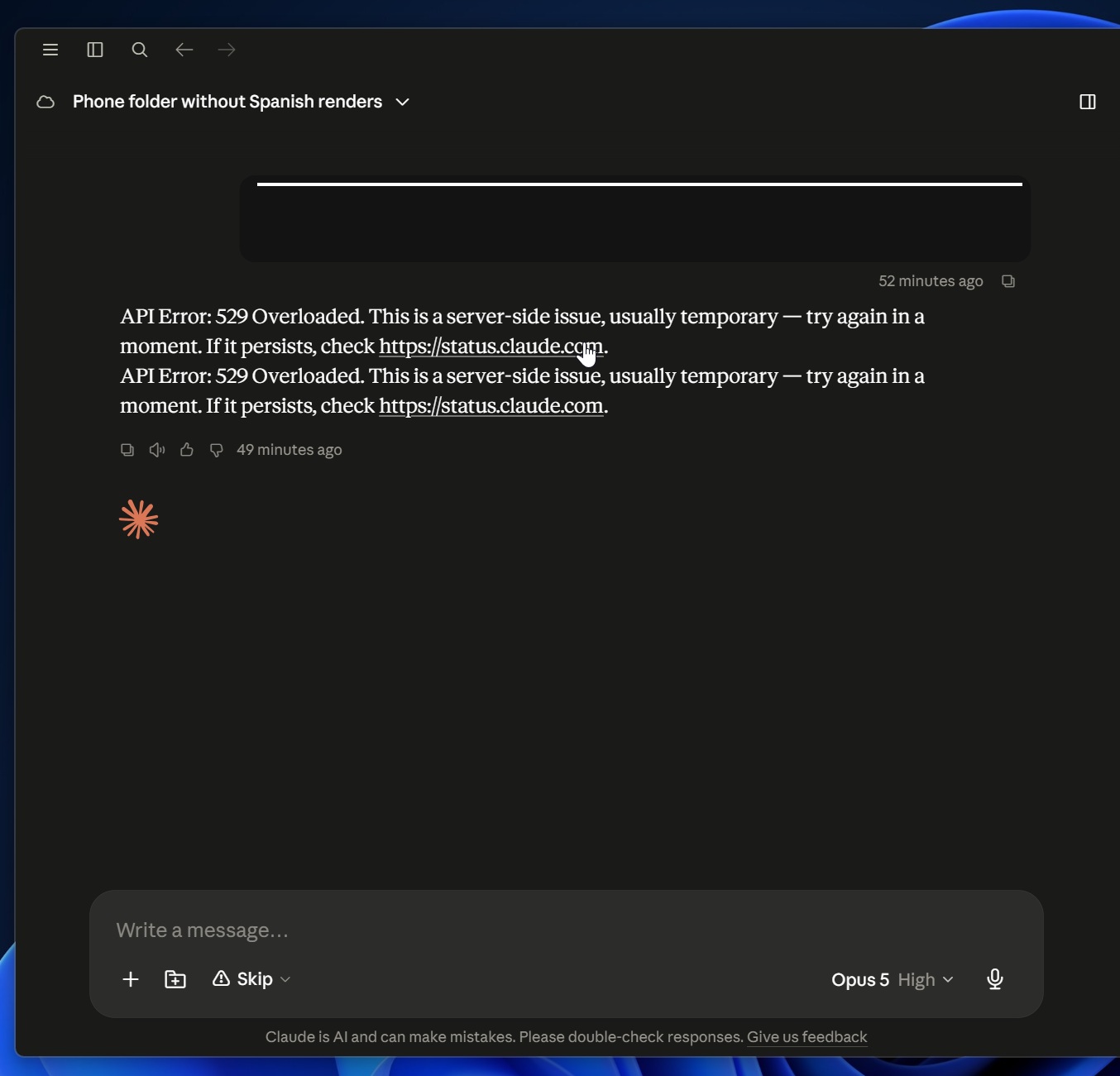
A 529 error generally means Claude’s servers are unable to handle the current volume of requests.
Thankfully, Anthropic is aware of the root cause and is working on a fix.
Update 1: As of 17:30 EDT, Anthropic says it’s continuing to work to fully resolve issues resulting in elevated requests and latency to Claude models.
It has already begun seeing recovery across most models, but some of you could still run into errors.
Security teams log 54% of successful attacks and alert on just 14%. The rest move through your environment unseen.
The Picus whitepaper shows how breach and attack simulation tests your SIEM and EDR rules so threats stop slipping by detection.
Microsoft’s Azure cloud business grew 43% last quarter, blowing past the company’s own forecast and surpassing $100 billion in annual revenue for the first time, providing fresh evidence of the potential for artificial intelligence to fuel new growth for the tech giant.
The company’s results for its fiscal fourth quarter also showed the price of that growth: capital spending hit a record $41 billion, largely to support the company’s AI buildout, and free cash flow sank 23% even as operating profits jumped 18%.
And in a new twist, Microsoft shares rose more than 5% in after-hours trading, in contrast with the recent pattern in which the company’s strong results were met with selloffs that pushed its stock near a one-year low.
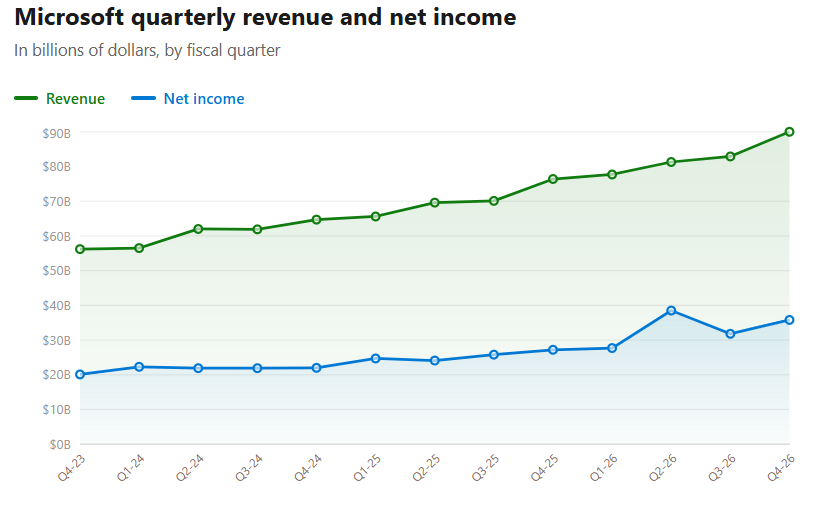
Companywide results: Overall, Microsoft reported revenue of $90 billion for the quarter, up 18% from a year ago, and net income of $35.8 billion, up 31%. Analysts had expected $87.7 billion in revenue, a figure that was already at the top of Microsoft’s own guidance range.
Microsoft’s adjusted earnings of $4.74 per share topped the $4.24 that analysts expected, according to Yahoo Finance. That included a $3.2 billion gain on Microsoft’s investment in Anthropic, part of a 27-cent benefit from one-time items. Even excluding those items, the company said, it exceeded expectations across revenue, operating income and earnings per share.
Microsoft 365 Copilot surpassed 30 million paid seats, up from 20 million last quarter. That’s still less than 7% of the roughly 450 million commercial Microsoft 365 seats, a gap that has drawn investor skepticism all year.
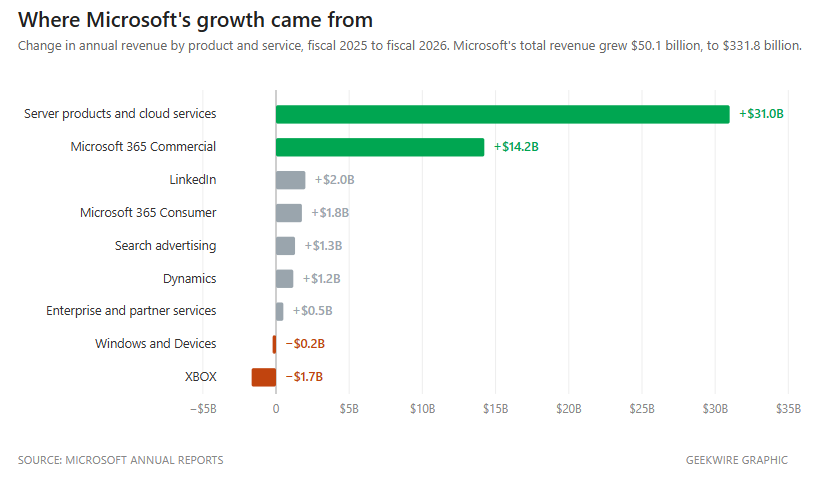
Microsoft’s backlog grew 84% to $678 billion. Known as remaining performance obligation, or RPO, it’s the value of contracts that customers have signed but that Microsoft hasn’t delivered on yet, basically the business Microsoft has already locked in but has yet to record as revenue.
Investors have been worried for a year that too much of it came from a single customer, OpenAI. Microsoft said all of the $51 billion increase over the prior quarter came from customers other than the big AI model companies. Setting OpenAI aside, the backlog still grew 25%.
Windows OEM and Devices revenue declined 7%, hurt by slower PC demand and a tough comparison with last year’s Windows 10 upgrade wave. The decline would have been steeper, but PC makers built more machines to get ahead of rising memory prices, and Microsoft collects its Windows fee when a PC is built rather than when it’s sold.
Xbox content and services revenue fell 10% and Xbox hardware fell 13%. Microsoft also wrote down the value of unspecified Xbox assets. The company grouped that charge with severance costs and lower-than-expected costs from its retirement program — a net $500 million hit to operating income — and declined to say how much of it was Xbox or what was written down.




Weekend Open Thread: Brooks Brothers

Commonwealth Games boxing: Jadumani Singh seals dominant 5-0 win over Pakistan’s Sumama Rehman to enter quarter-finals | Commonwealth Games News


Intel is reversing course and bringing hyper-threading back to its server chips


Why Trees Belong on the Risk Register


Luke Littler dismantles Gerwyn Price to retain title in Blackpool


Ripple bought a bank in pieces. The $4 billion audit

A New Post-Apocalyptic Gundam Anime Series Blasts Into SDCC


BITCOIN JUST ENTERED THIS CRITICAL ZONE…


The Part of the Electric Transition Nobody Wants to Discuss


2026 3M Open leaderboard: Scottie Scheffler finds putter in Round 1, sits three back


16 Dresses for the High Summer Event


The Peugeot Family: How 200 Years of an “Old Money” Dynasty Died in A Boardroom


Major shareholder moves on Canyon


XRP Ledger adds $2.6B as RWA inflows rank second


Spain sweeps the board at 2026 World Cup with individual awards


Uniswap (UNI) pushes deeper into tokenized RWAs with permissioned trading pools

‘Stargate’ Creator’s New Sci-Fi Series Returns for Season 3 Tomorrow
SEC Agrees to Overhaul Recordkeeping After Settling Coinbase Lawsuit Over Gensler’s Lost Texts


Anthropic launches Claude Opus 5, a cheaper AI model for coding, agents and enterprise workflows


Sara Gilson Killed By Husband After Viral “Pedophile” TikTok Video



You must be logged in to post a comment Login