US Federal workers must install an app powered by a Russian-founded software vendor
Security researchers discovered outside code controlling parts of the government application
Elfsight’s Russian operations continued growing despite global geopolitical tensions
The FAA and other federal employees must now install a $1.4 million White House app containing code built by Elfsight, a Russian-founded vendor.
Elfsight was founded in 2016 in the Russian city of Tula by chief executive Andrey Yusupov and chief technology officer Vladimir Fedotov.
The company now markets itself as a European software provider headquartered in Andorra, though its original Russian entity remains active and growing.
Latest Videos From
Business ties that persist
In 2025, the Russian entity reported revenue of about 126.5 million rubles, roughly $1.6 million, marking a 71% increase year on year.
Advertisement
The company’s headcount also grew to 61 employees, and job postings show continued hiring of Russian developers into 2026.
One 2026 job posting sought a Moscow-based support specialist, offering between 60,000 and 100,000 rubles per month for full-time work.
Under Russian law, companies handling user data can be compelled to store that data locally and hand it over to state authorities.
Advertisement
Sign up to the TechRadar Pro newsletter to get all the top news, opinion, features and guidance your business needs to succeed!
However, an Elfsight customer support specialist claims that the company has “never received any request” from Russian authorities for user data or access.
Security review and data practices
A network analysis by the security firm Atomic Computer found that Elfsight’s servers determine which JavaScript files run inside the White House app.
Advertisement
The same session also accepted more than ten cookies from Elfsight, alongside Google DoubleClick advertising domains loaded through the app’s YouTube sections.
Olivia Wales, a White House spokeswoman, said the app “does not request or collect any user locations” and called all its information “safe and secure.”
A White House official later said Elfsight’s only remaining script loads a tax calculator inside a sandboxed webview, disconnected from cookies or files.
Advertisement
The official added that Elfsight passed a full security review and is used widely by brands including UFC, FIFA, the NBA, and Cartier.
That same security clearance sits uneasily alongside records showing Elfsight’s founders retained accounts at sanctioned Russian banks and kept traveling to Russia.
One founder wrote in a private message that Russian tax authorities had summoned him for questioning tied to a separate investment platform.
That legal exposure means a Russian-rooted vendor still effectively controls code running inside a mandatory application on federal government devices.
Advertisement
Since the Russia-Ukraine conflict started in 2022, the United States and its allies have imposed sanctions on numerous Russian companies and individuals.
It remains unclear why an app with such ties to Russia was cleared for use on White House and federal government devices in the first place.
So far, neither Elfsight nor the White House has offered a clear justification for that approval decision.
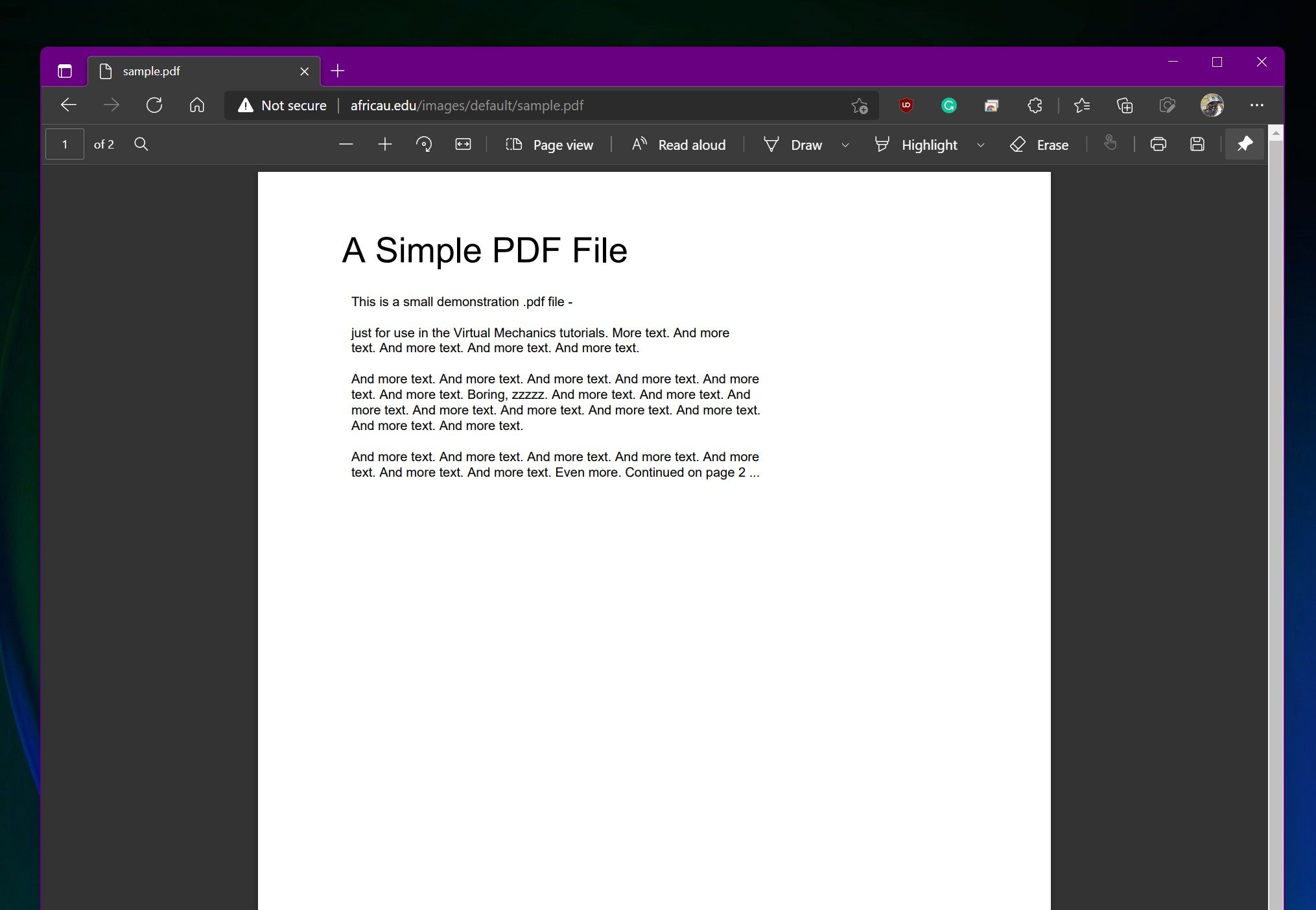
Microsoft is looking to improve the privacy protection of your sensitive PDFs by closing one of the more obvious loopholes in its document protection system. It is also giving businesses another reason to keep Microsoft Edge firmly installed.
Starting next month, OneDrive and SharePoint will block screen captures when users open certain sensitivity-labeled PDFs through their web viewers in Microsoft Edge. The restriction applies to enterprise organizations using Microsoft Purview Information Protection rather than ordinary personal OneDrive accounts.
Your ordinary PDFs will continue as usual
The protection applies specifically to PDFs carrying a sensitivity label without the Copy, also described as EXTRACT, permission. If these conditions are met, screen capture enforcement will activate by default when the document is viewed in Edge. Existing labels and organization policies remain in place.
Microsoft
Unlabeled files and labels without these restrictions continue behaving normally. The feature affects OneDrive for Business and SharePoint Online, so you will not suddenly lose the ability to screenshot a restaurant menu or instruction manual. The company added that the change aims to close a gap between its desktop applications and browser experience.
Purview labels could already prevent actions such as editing, printing, copying, and taking screenshots in supported desktop apps. However, PDFs opened in the browser did not consistently respect the same screen-capture control. Admins can also disable local downloads, preventing users from simply saving a protected document and reopening it elsewhere.
Advertisement
The protection currently ends at Edge
Digital Trends
Chrome, Firefox, Safari, and other mobile web browsers will not support the restriction when it reaches general availability. Microsoft warns that users opening protected documents outside Edge may receive inconsistent enforcement, and it recommends that businesses use Conditional Access or browser-management policies to direct employees toward Edge.
Unfortunately, this is exclusive to Microsoft Edge at the moment. The security benefit is easy to understand, especially for companies sharing sensitive documents like financial records, legal material, or unreleased products. Its effectiveness depends heavily on convincing, or requiring, everyone involved to use Microsoft’s browser.
Windows Latest reports that support for additional browsers and mobile apps could arrive later. Microsoft’s current notice does not provide a broader rollout date. Targeted organizations should begin receiving the feature in early August, followed by a worldwide general rollout between the middle and end of the month.
We spend hours testing every product or service we review, so you can be sure you’re buying the best. Find out more about how we test.
Kapwing is among the best AI video editors today. It allows you to create videos with simple text prompts and generate lively AI characters to build detailed storylines.
Trusted by brands like Google, Dyson, and Spotify and used by thousands of content creators across YouTube, TikTok, and digital marketing platforms, Kapwing has quickly grown to become one of the industry’s favorite video generation and editing software.
Advertisement
In this article, we put Kapwing to the test to see whether its features perform as advertised. Read on to learn about our real-world experience with Kapwing, its best features, and the alternatives worth considering if it doesn’t fit your needs.
Latest Videos From
Kapwing: Plans and pricing
You can get started with Kapwing through its free-forever plan, which allows up to 30 minutes of video exports per month in 720p resolution, with each video limited to a maximum length of one minute. There’s also a 2GB file upload limit, along with access to editing and AI-powered tools such as auto-subtitling, auto-translation, and text-to-speech, albeit with limited usage caps.
We also like that you get a fair share of collaboration features, such as project link sharing and commenting, allowing you to edit videos collaboratively with your team. However, the free plan is meant primarily for testing the platform rather than full-fledged use.
Advertisement
If you want to get the most out of Kapwing, you’ll have to upgrade to one of its paid plans. Its Pro plan starts at $16 per member per month and offers excellent value for money. The plan supports 4K video exports with unlimited monthly exports and a maximum video length of 120 minutes.
Sign up to the TechRadar Pro newsletter to get all the top news, opinion, features and guidance your business needs to succeed!
(Image credit: Kapwing)
The AI editing tools also come with higher usage limits. For example, you get up to 1,000 minutes of auto-subtitling and 500 minutes of auto-translation per month. Besides this, the plan adds several premium tools, including video and image background removal, video stabilization, and the ability to add your brand kit and custom fonts to your projects.
Advertisement
Next is the Business plan, designed for teams that need more advanced content creation workflows. Costing $50 per member per month, it includes up to 4,000 minutes of auto-subtitling, 2,000 minutes of auto-translation, 2,000 minutes of Clean Audio per month, and 130 minutes of Lip Sync. The remaining features are largely the same as those in the Pro plan.
Finally, there’s an Enterprise plan for large organizations that need priority support and custom billing. However, you’ll need to contact the Kapwing team directly to obtain a customized quote.
Kapwing: Features
Kapwing packs a good mix of both AI-powered and traditional video editing features. Let’s start with its AI capabilities. Right off the bat, you’ll notice that you can generate AI videos with a simple text prompt. Its video generation interface is pretty similar to that of chatbots like ChatGPT or Gemini. You simply enter your prompt and click the Send button. You can also attach media as a reference for the AI engine.
Advertisement
Besides video generation, Kapwing offers several other AI tools. For instance, Translate Video lets you convert the audio in a video from one language to another. There’s also a handy Smart Cut feature, which automatically removes awkward silences from your videos, giving them a more polished finish. You can also generate AI characters, which come in handy if you want to build a consistent storyline or reuse the same character across multiple AI-generated videos.
Kapwing gives you more options when generating AI characters. To get started, click the @ icon in the chat window and select the type of character you want to generate. The available options range from everyday characters like a baby or a cheerleader to more outlandish ones such as a cyborg, Dracula, or a dragon.
You also have the option to choose more than one character type. For instance, you can select both “baby” and “Dracula” if you’re trying to create something unique. Here’s the Baby Dracula character we created using Kapwing.
(Image credit: Future)
Apart from this, you’ll find several other options, such as Image to Video, which lets you convert a still image into a short video clip, and Text to Video, where you can enter a full-fledged script and allow Kapwing to generate an AI video for you. There’s also a handy Video Stabilizer tool, which is useful for fixing shaky footage or videos with heavy motion blur.
Advertisement
For longer video formats, Kapwing also supports Video Storyboards, where you can create a timestamped outline of every scene. The more traditional tools include text-to-speech, video dubbing in 40+ languages, resizing videos from one aspect ratio to another, and adding subtitles to videos.
Kapwing: Interface and in use
Almost all of Kapwing’s features are nestled into a central dashboard, with the video editor in the center, a long list of features on the left-hand panel, and an editing panel on the right. You can simply upload your media or drag and drop any video or image you want to edit. After that, you may need to spend a little time exploring the interface to find the exact feature you’re looking for.
For instance, you can access features such as Text, Audio, Subtitles, Transcript, Translate, AI Voice, and more directly from the left-hand panel. There’s also a help function that helps you quickly locate settings you can’t find right away.
Advertisement
(Image credit: Future)
The editing experience was pretty smooth. For instance, we tried adding text to an AI-generated image, and the process was seamless. We could easily change the font, color, size, and other formatting options from the panel on the right.
Note that the right-hand panel changes dynamically depending on the tool you’re using. For example, if you select Translate, you’ll see language options appear on the right.
Overall, like any video editing software, Kapwing comes with a slight learning curve. However, in our experience, it was much easier to use than many legacy editing tools. The interface is modern, sleek, and highly responsive. We didn’t experience any system lag or timeouts during our testing.
(Image credit: Future)
In addition to the main editing window, there is also a dedicated My Workspace page in Kapwing. Here, you can find all your recent projects at the bottom, along with a dedicated set of tools highlighted on the main page. If you’re using a Business plan, you’ll also see your team folders on the left-hand panel. Similarly, Settings, Brand Kit, and your Media Library are all accessible from the same panel.
Advertisement
Kapwing: How we tested
We tested the free version of Kapwing across multiple accounts to evaluate its AI capabilities more thoroughly. To start, we tried generating an AI video using the following prompt:
“A woman in a red coat walks across a rain-soaked city street at night, neon signs reflecting in the puddles, camera slowly tracking alongside her.”
(Image credit: Future)
Kapwing got to work as soon as we hit Send, first generating a summary of the scene we wanted to create. After that, it produced a five-second video within seconds. Although Kapwing indicated that the video would be seven seconds long, the actual output was five seconds.
Advertisement
(Image credit: Future)
We then edited the same video using Kapwing’s video editor, experimenting with features such as adding text, audio, and subtitles. Since the free plan is fairly limited, we had to use more than two accounts to fully test its capabilities.
What stood out to us was how quickly Kapwing generated both edits and the source video. Everything was processed quickly, which is a clear advantage.
Kapwing: Alternatives
While Kapwing is a capable AI video generator and editor, it is not the most affordable option out there. For instance, Adobe Firefly costs $8.49 per month when billed annually and comes with features comparable to Kapwing. You get access to popular video models such as Google Veo 3.1 and Runway Gen-4.5, allowing you to create up to 50 and 11 videos, respectively.
Advertisement
Adobe Firefly truly shines with its workflow features, allowing creative teams to brainstorm visual concepts on virtual boards. You can also process thousands of files at once using bulk actions such as removing backgrounds or cropping images. That said, Firefly lags a bit behind when it comes to video editing, as many of its editing features are still in beta.
It’s also not ideal for long-form content generation, as most models cap video lengths at three to five seconds. On the bright side, you also get access to Adobe Express Premium and Photoshop with all paid plans.
Veed is another capable competitor, with prices starting at $12 per month, roughly 20% cheaper than Kapwing. It also offers a free plan, which appears to be more generous than Kapwing’s. For instance, you can try features like removing silences, background removal, auto-edits, social media character generation, and voice cloning on Veed’s free plan – most of which are not available on Kapwing’s free tier.
Advertisement
Kapwing: Final verdict
Kapwing is one of the best AI video generation and editing platforms available, with a strong mix of both traditional and AI-powered tools. Not only can you generate AI videos from simple prompts, but you can also transcribe videos, translate them into 40+ languages, create AI characters, and edit videos from a central dashboard.
Kapwing is also easier to use than many other platforms on the market, although there is still a slight learning curve involved. That said, there are plenty of video tutorials and help center articles available to help users get through this phase.
However, Kapwing can be a bit on the expensive side, especially for personal users, which is why you may want to consider alternatives like Adobe Firefly or Veed.
If your AI rollout is making people more exhausted, the architecture is wrong. That’s not a provocative claim; it’s the logical conclusion of what the data shows. With 69% of UK businesses implementing AI assistants, these tools have become part of everyday working life.
But deployment without the right operational structure is leaving employees exposed to the harmful effects of ‘AI brain fry’. AI overload is not a failure of the individual, but a failure of system design. And it is the responsibility of technology and business leaders to fix it.
Sonali Fenner
Managing Director at Slalom.
Researchers recently coined the term ‘AI brain fry’ to describe the cognitive fog and loss of concentration that results from excessive oversight and orchestration of AI tools; i.e. the mental load of managing the systems themselves. The problem – as our own data makes clear – is not that employees are using AI skills too much.
Latest Videos From
Rather, it is that most UK businesses have deployed AI tools without building the structured ways of working needed to make them productive. The issue does not lie in use alone; it lies in how that use is managed.
The organizations deploying these tools have a duty to ensure they deliver genuine efficiency gains – not a new category of cognitive burden.
Advertisement
The adoption gap is creating more work, not less
Only 31% of businesses are using multi-agent workflows, leaving their employees stuck in a cycle of tedious labor – the kind that AI is supposed to reduce. The majority of UK businesses currently employing AI tools are expecting employees to still do most of the heavy lifting.
Employees are finding themselves writing prompts, manually checking whether the answers are reliable, and interpreting outputs.
Advertisement
Sign up to the TechRadar Pro newsletter to get all the top news, opinion, features and guidance your business needs to succeed!
This type of work was supposed to be eased by AI. Instead, the tools have made it worse.
The consequence? More admin, not less. Employees who were promised that AI would lighten their workload are instead finding it has added a new layer of tasks including prompt management, output validation, error correction on top of the day job.
Few businesses have moved towards a structured multi-agent workflow where AI systems handle the orchestration burden directly – routing tasks, validating outputs and managing agent-to-agent handoffs without requiring constant human supervision.
Advertisement
That is the architecture that relieves the cognitive load. Without it, employees are not using AI – they are managing it. And there is a significant difference between the two.
Moving towards an ‘adaptive operating model’
UK organizations need to move beyond AI deployment and towards an adaptive operating model. One that is deliberately architected, not organically grown. That means clearly defining which tasks AI can be trusted to handle autonomously, where human judgement remains the critical control point, and how work moves between the two. In practice, this could look like:
Advertisement
AI agents handling first pass research, data synthesis and output drafting. Humans setting direction, making judgement calls and reviewing exceptions, rather than every output.
The distinction between “AI does the work” and “human manages the AI doing the work” is where most current deployments get stuck. To protect employees and exact real productivity, businesses must build in human oversight at the right level – not at every level.
This means developing genuine domain expertise so that employees can interrogate AI outputs critically, not simply accept them. It also means investing in the technical literacy to design workflows that are robust, not just functional. An AI deployment that requires constant human supervision to remain reliable has not been properly engineered.
The organizations that get this right will also be better protected as the employment landscape shifts. With the UK government’s Employment Rights Act 2025 set to reduce the qualifying period for unfair dismissal claims and remove the compensation cap from January 2027, the cost of poorly managed AI-driven workforce change, both in human and legal terms, is rising.
Advertisement
Businesses that have embedded clear human-AI accountability structures will be far better placed than those that have not.
Without making these structural changes, AI adoption will continue to add effort rather than remove it. Thereby accelerating burnout at the very moment businesses are depending on these tools to drive productivity.
Protection and transformation go hand-in-hand
It is entirely possible to realise the productivity potential of AI whilst protecting employees from its cognitive costs. Multi-agent workflows, properly designed, keep humans in the seats that matter – strategy, judgement and decision-making – and had the orchestration burden to the systems built for it.
Advertisement
AI brain fry is not an inevitable side effect of AI adoption. It is a signal that the implementation architecture needs re-thinking. That is a technical and organizational challenge, and it belongs with the people who built the system – not the people using it.
This article was produced as part of TechRadar Pro Perspectives, our channel to feature the best and brightest minds in the technology industry today.
The views expressed here are those of the author and are not necessarily those of TechRadarPro or Future plc. If you are interested in contributing find out more here: https://www.techradar.com/pro/perspectives-how-to-submit
Self-driving cars have gotten pretty good at driving. The harder problem is teaching them to drive safely in situations nobody planned for. We have heard horror stories of self-driving cars, behaving erratically in emergency situations, often times delaying first responders from reaching the scene.
A team at Seoul National University, led by professor Jun Won Choi from the Department of Electrical and Computer Engineering, thinks they have cracked part of that puzzle with a new AI model called SafeDrive. The research was recently selected as a highlight paper at CVPR 2026, a distinction that goes only to roughly 3% of all submissions.
How does SafeDrive make driving decisions safer?
Most end-to-end autonomous driving models work by studying massive amounts of real driving data and trying to mimic how humans react on the road. It works well most of the time, but these systems tend to struggle when it comes to explaining why they chose one path over another, and that becomes a real problem when safety is on the line.
Seoul National University College of Engineering
Choi’s team built something called Fine-grained Safety Reasoning to fix this. Instead of picking one driving path and going with it, SafeDrive generates several possible trajectories, combines them with what the car’s sensors are perceiving, and scores each option for safety. The car then picks the path that scores best. It sounds simple, but it directly tackles the two biggest weaknesses of current end-to-end systems, safety and explainability.
Why is this such a big deal for Korea?
As TechXplore reports, this is the first time a Korean-made end-to-end autonomous driving paper has landed a highlight spot at CVPR, one of the biggest AI and computer vision conferences in the world. It is a strong signal that Korea is no longer just watching from the sidelines while the US and China race ahead with their self-driving ambitions.
SafeDrive is not staying stuck in the lab either. It has already been folded into EAD, a reference model backed by Korea’s Ministry of Trade, Industry and Energy, and Choi’s team is now working with domestic autonomous driving companies to test it in real vehicles. Choi says the plan is to keep improving the model with bigger datasets and eventually push it toward full commercialization using their own collected data.
Nine-department ERP overhaul judged unachievable without urgent action
The UK government has admitted that two major planks of its multibillion-pound shared services strategy are in serious trouble.
Matrix, a project that involves moving nine government departments to shared ERP and HR systems, has been rated red by the National Infrastructure and Service Transformation Authority (NISTA), which monitors the planning and delivery of major government projects.
Advertisement
This rating means the project has “major issues” with its schedule, budget, quality, or delivery of benefits, and the problems “do not appear to be manageable or resolvable” at this stage.
Matrix is just one of five clusters the government is betting will save £4.3 billion by migrating a total of 17 departments and 300 arms’-length bodies onto shared tech platforms.
The NISTA report for fiscal 2025-26 says the rating reflects “a number of material issues” identified during project planning.
In 2024, Matrix awarded Workday a contract for SaaS finance and HR software and Cognizant a system integration deal with a combined value of £144.3 million.
Advertisement
Matrix was scheduled to begin going live in May 2026, but experienced delays. In March, the Matrix Programme Board met “to consider the case for re-baselining the programme, including the development of a rectification plan and the consideration of several planning scenarios.”
“Replanning is intended to establish a more realistic, credible, and achievable forward plan in response to ongoing delivery challenges. Current emerging analysis indicates a delay of 3-6 months, which would move the Phase 1 user go‑live to late 2026,” the NISTA report says.
Although “system issues have now been resolved,” the “single biggest risk to this is departments being unable to find functional subject matter expert capacity to undertake the high level of testing they have identified as being required, given their low risk appetite.”
The Department for Science, Innovation and Technology (DSIT) is leading Matrix. It is joined by the Cabinet Office, Department for Energy Security and Net Zero, Department for Culture, Media and Sport, Department for Business and Trade, Attorney General’s Office, and the Department of Health and Social Care.
Advertisement
His Majesty’s Treasury (HMT) and the Department for Education have delayed their decisions to join Matrix despite the Cabinet Office saying they had “unconditionally bought into joining shared services at the outset” and their “participation in shared services is not optional.”
MPs said last week that their reluctance to join could undermine the project. The Treasury, for example, already uses relatively modern Oracle Fusion SaaS to run its HR and finance functions.
NISTA also rated the Unity shared services project as red, although it said progress had improved. Unity concerns His Majesty’s Revenue & Customs – Britain’s tax collection agency – and two other departments moving to a cloud-based SAP ERP system.
A spokesperson at DSIT told The Register: “Delivery challenges were found in the Matrix Program after a planned review. We have decided to replan the program to make sure we have a realistic and achievable delivery schedule, while continuing work to modernize shared services across government.”
Advertisement
Officials said the department’s program team is developing the next iteration of the business case for HMT and Cabinet Office approval later this year. It is due to set out a timetable for the next wave of departments and arm’s-length bodies to onboard to the new system and service, including HMT. DSIT remains committed to the program and expects it to offer £1.67 in benefits for every £1 invested. ®
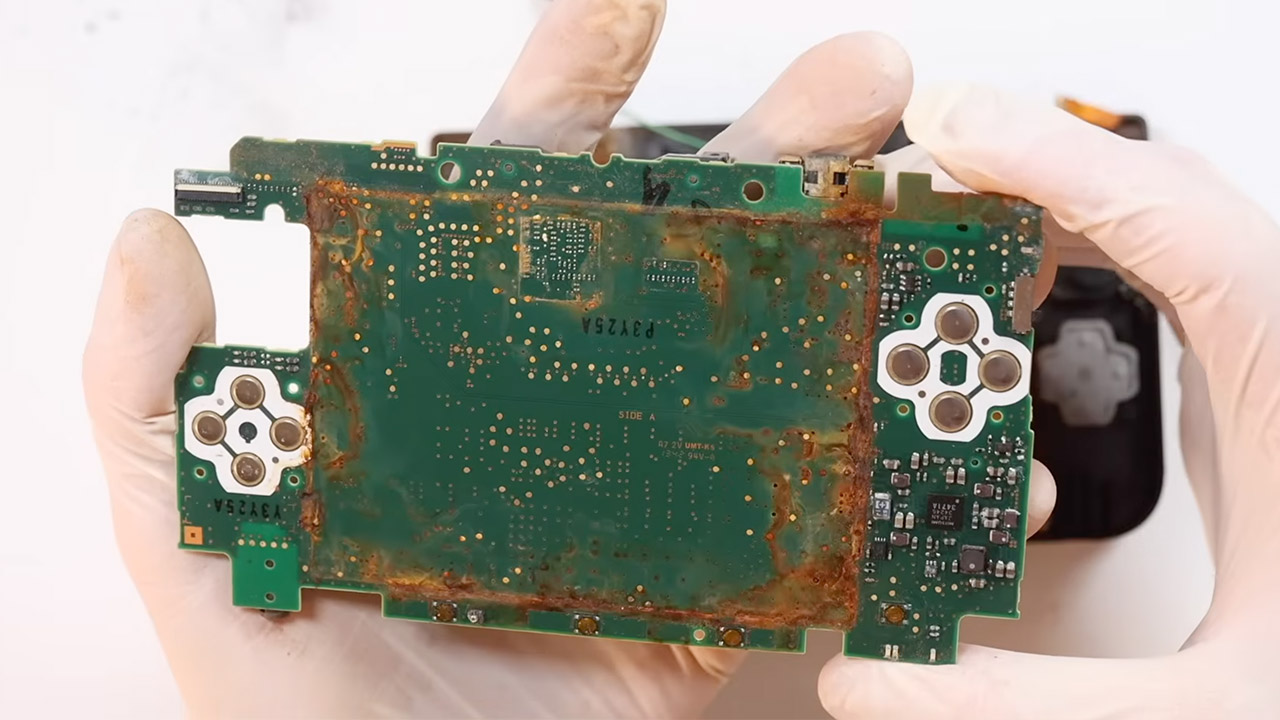
Most people would have tossed the red Nintendo 3DS XL the moment they opened the package. Bought for twenty-seven pounds and already looking like it had spent years outdoors, the handheld arrived with a rusty hinge, a body that bulged open, no battery, and clear signs of serious water damage. Elliot of The Retro Future saw something worth saving instead.
Opening the rear cover reveals actual rust, the kind that takes a long time to accumulate after being left out in the elements, with no artificial “weathering” BS. Some screws were so tight that they required to be loosened using a Dremel, and things only got worse after that. The shoulder button connector has virtually pulled itself apart from the ribbon cable and the board. The SD card reader was shot, with thick clumps of rust caked on the motherboard, which had deformed slightly. The screens were dusty and dirty. The joysticks appeared to belong in a museum of broken pieces. The cameras were in a horrible state. The rubber portions had turned into mush. Threads in the shell had been removed completely. One look at the state of things made it clear how large of a task you were facing.
Play Your Game Collection with Remote Play – PlayStation Portal Remote Player can play compatible games you have installed on your PS5 console…
Cloud Streaming from the Game Catalog and Classics Catalog – Discover an awesome library of PS5 games on the PlayStation Portal Remote Player with…
Cloud Streaming for PS5 Games in Your Library – With PlayStation Plus Premium, stream select digital PS5 games in Your Library from PlayStation Store…
Cleaning began with a thorough cleaning in an ultrasonic bath with some watch-cleaning solution for the metal components. Shell pieces soaked overnight in a solution of bicarbonate of soda and boiling water. To remove all of the filth, the boards and other pieces required to be scrubbed with hot soapy water and then wiped off with isopropyl alcohol. Vinegar baths and a baking soda paste applied with a toothbrush were required to remove the most persistent corrosion. Some of the chrome plating on the screws had worn so thin that it could no longer be saved, necessitating the replacement of new ones. However, the idea was not to make it look like it had just rolled off the assembly line.
Almost every critical component needed to be removed and replaced. A replacement motherboard from Japan, which costs roughly £50, was first on the list. New displays, ribbon cables, shoulder buttons, joysticks and covers, volume sliders, cameras, a microphone, a touchscreen, and a new battery came next. Aftermarket shell pieces were necessary to fill in the gaps where the original plastic had nearly collapsed. Small 3D printed tabs replaced the broken light-pipe mounts. Swapping so much out was a matter of practicality. Water-damaged components cannot simply be wiped away.
Buttons were functional again, and the touchscreen responded to input. The cameras were ready to go now. The left and right triggers had returned to normal. The 3D slider still did not work, which is a shame because it is linked to the aftermarket screen rather than the actual problem. Later on, certain software updates would remove the Japanese region lock, allowing it to play a variety of titles.
The finished 3DS XL retains the original shell’s weathered appearance, but it now functions like a normal system. Elliot placed it in a clear container, resulting in a great playable console as well as a silent little museum piece, serving as a reminder of what happens when you leave a system out to get wet for months on end. Some of the online restoration videos you see make the broken system appear to be as good as new with just a wash down and some water, but this thing was not going to recover from being left out in the weather for so long. Over time, sun and rain will leave scars.
Leather jacket belonging to Nvidia CEO Jensen Huang sells for $960k, way above the $40-60k estimate
Huang’s jackets have become a tech sector icon and a staple CEO ‘uniform’ piece
The proceeds wil help fund fellowships and more across tech
A black Tom Ford leather jacket worn and signed by Nvidia CEO Jensen Huang has sold at a New York auction for $960,000.
“The response to this sale surpassed even our highest expectations,” Sotheby’s head of modern collectibles Brahm Wachter explained, with the jacket selling for around $900,000 more than auctioneers had anticipated, given the auction house’s estimate of $40,000 to $60,000.
The jacket itself – one of many that the CEO has owned, of course – has become a staple recognized by the entire tech sector, with Huang rarely spotted out in public wearing anything else.
Latest Videos From
Jensen Huang’s jacket sold for $0.9 million
This specific jacket came from Tom Ford’s Spring-summer 2023 collection, however the CEO has been wearing similar jackets for years, leading similar examples to have become essential parts of any Nvidia keynote or tech conference.
Advertisement
Huang is one of a growing number of CEOs who have chosen uniformity and simplicity in their clothing – Mark Zuckerberg’s blue jeans and grey t-shirt, and Steve Jobs’ black turtleneck, also become similarly iconic.
Independent verifiers are said to have confirmed both the jacket’s authenticity and the signature’s authenticity, revealing that it was worn by Huanh at the 2023 Foxconn Tech Day.
Clearly, it being Jensen Huang’s jacket is the core reason why it fetched nearly $1 million at auction. His company, Nvidia, is somewhat of an AI success story, having risen from a valuation of around $300 billion in 2020 to $4.9 trillion today.
Advertisement
Sign up to the TechRadar Pro newsletter to get all the top news, opinion, features and guidance your business needs to succeed!
At the time of writing, Nvidia is the world’s most valuable companies, just a reach ahead of Apple – with the $940,000 cost buying you around 4653 shares in the company at today’s market price.
The proceeds are set to help fund Edge Institute, a nonprofit that will support fellowships, grants and residencies across the tech sector.
The “AI” label no longer makes companies special. In today’s world, that is a fact that needs to be accepted.
Even just a year ago, if a business simply mentioned being “AI-powered” it was enough to immediately gather attention and appear innovative. Investors quickly grew excited, and media outlets were quick to pick up the next “hot story.”
Valentina Drofa
Founder and CEO of Drofa Comms.
Of course, that didn’t always mean that there was truth to such statements. The concept of AI washing — when companies misrepresented or even outright lied about the use of AI tools in their operations — had certainly done its share of damage to this industry while it stayed prevalent.
Latest Videos From
But today, even without such lies, the effect of AI novelty is disappearing. Every fintech company now has some kind of AI story. Compliance platforms use AI monitoring. Banks and fintechs talk about AI-driven service personalization. Chatbots and AI assistants are utilized practically by every other platform, no matter which industry we look at.
At this point, saying your company uses artificial intelligence feels almost the same as saying you have a website. People have learned to expect it almost by default. And this creates a very different communications environment.
Advertisement
The first wave of AI companies mostly had to convince their audience that the technology was possible. That task has certainly been accomplished. Now, the second wave faces the task of convincing people that their particular implementation of AI is trustworthy, useful, and worth the attention in a market that’s beyond overcrowded already.
That is much harder.
Sign up to the TechRadar Pro newsletter to get all the top news, opinion, features and guidance your business needs to succeed!
Advertisement
The conversation has changed
AI investment has exploded over the last two years. Enterprise spending on gen AI jumped from $11.5 billion in 2024 to $37 billion in 2025. That’s a whole 220% YOY increase. AI-focused startups continue to dominate venture capital conversations, to the point where nearly every technology company now feels the pressure to position itself as part of this race.
But something else happened along the way: consumers became more educated. If at first, AI sounded like something magical, now people have actually used it. They have seen hallucinations and strange outputs, and they’ve dealt with incorrect recommendations. They’ve had time to realize that AI can be useful, but also that the technology comes with its own frustrations and limitations.
As such, being “AI-powered” is no longer enough to stand out. Consumers have already moved past that stage. One of the biggest mistakes I see today is when companies still assume they have not.
Advertisement
Now, the conversation revolves around a much deeper point: “What does your AI actually improve for me?” For AI-focused companies vying for attention, the benefits of their specific approach are now the key battlefield where they have to win.
This is particularly important for financial and fintech companies, because financial services are built on trust. People may tolerate or even find humor in mistakes from an entertainment app, but they will not be pleased when their money or personal data are put at risk because of AI malfunctions.
The numbers clearly show this trust gap. While AI adoption continues growing, only 13% of consumers truly trust AI systems, and about 30% remain neutral rather than confident. Many people are still uncomfortable giving AI fully autonomous control over important decisions, especially in areas connected to finance or personal data.
Advertisement
At the same time, enterprises themselves also often contribute to the problem of trust by rolling out AI models before building the necessary structures to govern them.
A recent survey by McKinsey discovered that less than 15% of organizations obtain full security and IT approval before deploying AI agents. Or, to put it in other words, the vast majority of these systems come out without proper oversight and responsibility frameworks around them.
This very reality has now become the defining challenge of the next AI adoption phase. The market is no longer asking whether companies can use artificial intelligence. It’s asking whether they can use it responsibly. And that is precisely why I am of the opinion that AI communication from here on out needs to be very different from what we saw during the first hype cycle. It’s no longer about who shouts the loudest.
The main victory condition will be for companies to explain — clearly and realistically — how their systems work and how they benefit their users. And then they will have to continue proving that through sustainable action.
Advertisement
Transparency and governance are now a product feature
One important area to account for is transparency around AI limitations. Now that the broad public already has enough context and experience to understand that AI can fail, pretending otherwise would only damage a company’s credibility.
To earn trust, strong, honest communication is necessary that will openly acknowledge those points of failure. When a business wishes to present its own AI solution, it will need to explain upfront where its model works well and where its shortcomings lie. Customers should have clear expectations and understanding of the risks before they engage with the technology.
Some might think that admitting to shortcomings would be a mistake, a vulnerability. But honesty can yield more results than those people expect.
Advertisement
Clients are generally much more comfortable using services when they understand where the borders are. When they know how decisions are made, that safeguards exist, and that human oversight is still involved in the process, so if something goes wrong, they have someone real to talk to.
This is where competent governance enters the picture.
Be it to partners, clients, or regulators, businesses increasingly need to demonstrate that they are responsible about how they employ AI in operations. Whether decisions can be audited.
A few years ago, these topics were often hidden deep inside technical documentation, if they were brought up at all. Now, explainability of AI models is one of the biggest signals of trustworthiness that a company can project.
Advertisement
And honestly, I think this is healthy for the industry.
By now, AI has stopped being a mere marketing decoration and is leaning more and more toward becoming a full-on infrastructure layer in corporate operations. That means it needs to be properly managed, so that possible mistakes do not create reputational and monetary damage to countless involved parties.
This article was produced as part of TechRadar Pro Perspectives, our channel to feature the best and brightest minds in the technology industry today.
Advertisement
The views expressed here are those of the author and are not necessarily those of TechRadarPro or Future plc. If you are interested in contributing find out more here: https://www.techradar.com/pro/perspectives-how-to-submit
Attackers have begun exploiting a critical vulnerability (CVE-2026-6875) in the ServiceNow AI Platform, according to threat intelligence company Defused.
Formerly known as the Now Platform, ServiceNow AI Platform is an enterprise-grade Platform-as-a-Service (PaaS) that helps businesses integrate AI into core enterprise workflows.
Cybersecurity company Searchlight Cyber, which found this critical vulnerability and reported it on April 1st, says that it allows unauthenticated threat actors to escape the sandbox and execute code remotely within the ServiceNow platform in high-complexity attacks.
ServiceNow addressed the flaw across hosted instances and released CVE-2026-6875 security updates for self-hosted instances one week ago, on July 13th.
Over the weekend, Defused security researchers confirmed that attackers have begun exploiting the vulnerability in the wild, with the first attempts being observed on Friday, days after ServiceNow issued patches.
Advertisement
“We are observing in-the-wild exploitation of the ServiceNow pre-auth sandbox-escape RCE (CVE-2026-6875),” Defused warned in a Saturday tweet.
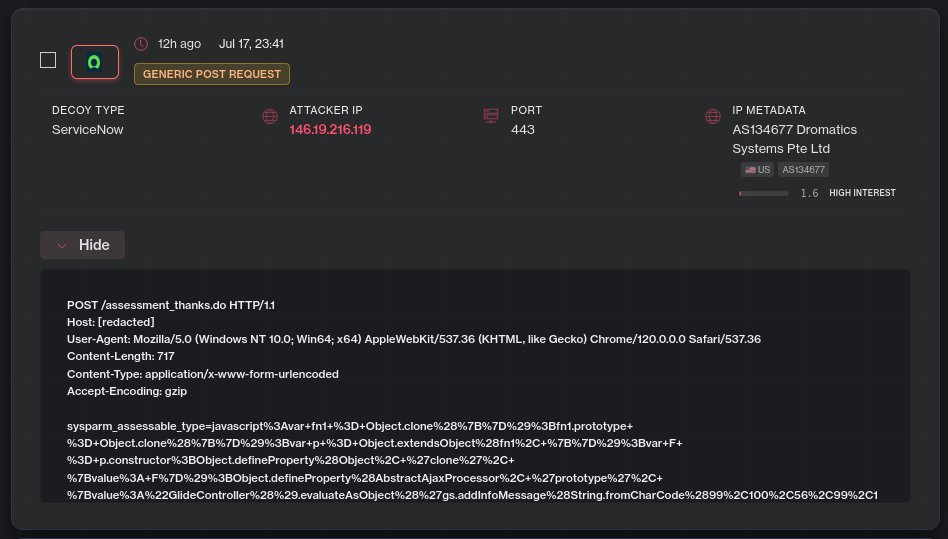
“The payloads hit the same pre-auth sink @SLCyberSec documented (/assessment_thanks.do), but the sandbox-escape gadget reaches the same code-execution primitive by a different route than their published PoC.”
CVE-2026-6875 exploitation (Defused)
ServiceNow has yet to flag this security as actively abused and, in the official advisory, still states that it is “not currently aware of exploitation against ServiceNow instances.”
However, the company advises all customers who have not already done so to secure their systems against attacks by upgrading to a patched release as soon as possible.
A ServiceNow spokesperson was not immediately available for comment when BleepingComputer reached out to confirm Defused’s report that CVE-2026-6875 is now actively exploited.
Advertisement
Last month, ServiceNow also privately disclosed a security incident in which attackers queried data from customer instances by exploiting an unauthenticated access flaw via a vulnerable API endpoint.
In a subsequent advisory, it tied the incident to security researchers or customer-led research linked to bug bounty submissions rather than to malicious threat actors.
ServiceNow says that its AI Platform runs more than 100 billion workflows each year and powers over 100,000 enterprise AI apps at 85% of all Fortune 500 companies.
Security teams log 54% of successful attacks and alert on just 14%. The rest move through your environment unseen.
The Picus whitepaper shows how breach and attack simulation tests your SIEM and EDR rules so threats stop slipping by detection.
We may receive a commission on purchases made from links.
Google’s Pixel series has crafted a name for itself by offering a clean Android experience, day-one software updates, and computational photography that’s often only rivaled by the iPhone or Samsung’s most expensive flagships. They also have a signature design philosophy, exemplified by the Pixel 10 and 10 Pro’s flat screens, polished or stain-finished aluminum frames, and distinct camera bars to house all the hardware.
Other perks of the Pixel phones include up to seven years of Android updates to newer Pixel models, which include frequent Pixel Drops and security patches. Google is also doing AI in its smartphones a bit better than other manufacturers: You get built-in Gemini models that run directly on the device and offer you features such as enhanced call screening and faster recorded transcriptions.
Advertisement
All that said, Pixel phones don’t always have the best reputation when it comes to value. For starters, the in-house Tensor G5 that powers the Pixel 10 Pro is considerably slower than what the competition is using. Battery life, too, isn’t Pixel’s strong suit, with many users complaining of poor endurance even after just a few months of use. Fortunately, the Android segment is packed to the brim with alternatives that may prove to be a better value for your money. Here are five cheaper alternatives to the Pixel 10 Pro that either offer similar features or much better performance.
Advertisement
Google Pixel 10a
Adam Doud/SlashGear
If you like the Pixel experience but want a phone that offers better value than the 10 Pro, you can just step down a few notches in Google’s own lineup. The Google Pixel 10a is the company’s budget offering, but it packs in nearly everything good about the flagship Pixel experience at a fraction of the cost. Priced at $500 for the 128GB model, the Pixel 10a is powered by last year’s Tensor G4 chip and 8GB of RAM.
It still offers a 120Hz OLED display with a peak brightness of 3,000 nits. At 6.3 inches, the screen is also the same size as that of the Pixel 10 Pro, albeit with ever so slightly larger bezels all around. The Pixel 10a does cut a few corners in the camera department, though: Apart from a smaller main sensor with a slightly lower resolution, you lose out on the 5x telephoto lens that the Pixel 10 Pro provides. You retain the ultrawide lens, but it’s 13 MP instead of the 10 Pro’s 48 MP.
What remains the same is the software experience, beyond a few on-device AI features like Magic Cue that probably require more RAM. The 10a will also receive up to seven years of OS updates. It also has support for wireless charging for the 5,100 mAh battery, but Pixelsnap compatibility is not present.
Advertisement
Samsung Galaxy S26
Ruslan Lytvyn/Shutterstock
Samsung’s flagship S Ultra device enjoys most of the attention during every launch cycle, but the base variant is no less of a premium experience. Not only does the Samsung Galaxy S26 start at $900, which is $100 less than the Pixel 10 Pro, but it also offers twice the storage capacity at 256GB by default — which we’d like to see Google do with its future phones. This is important considering these flagship smartphones are equipped with cameras that can churn out multi-gig video files if you’re shooting in 4K.
The Galaxy S26 is powered by Qualcomm’s Snapdragon 8 Elite Gen 5, which will be a much better chip if you’re planning on gaming. According to NanoReview, the Snapdragon processor offers up to 2.7 times better performance than the Tensor G5 in AnTuTu benchmarks. You may not notice the difference in regular day-to-day use, but the Galaxy S26 is better equipped to handle heavier workloads or console-quality games like “Alien Isolation” that are becoming increasingly common on mobile devices.
You’re also not losing out on any of the software benefits by picking a Samsung phone over a Pixel, either. Like Google, Samsung offers up to seven years of Android updates to its smartphones. One UI is also one of the most feature-packed variants of Android and comes with a Galaxy AI suite that’s comparable to what Pixel phones have to offer.
Advertisement
OnePlus 15
Adnan Ahmed/SlashGear
OnePlus is known for its performance-first phones that undercut the competition, and the OnePlus 15 is no different. It starts at $900, for which you get 256GB of UFS 4.1 storage and 12GB of RAM. For $100 more, you can double the storage and up the RAM capacity to 16GB — and it will still be cheaper than the base variant of the Pixel 10 Pro XL. The OnePlus 15 is also a large phone, sporting a 6.78-inch AMOLED display that can hit refresh rates of up to 165Hz in supported apps and games. It has slim bezels, support for Dolby Vision and HDR10+, and a touch sampling rate of 3,200Hz.
Being powered by the Snapdragon 8 Elite Gen 5 means the OnePlus 15 also has the Pixel 10 Pro comfortably beat on the performance front. The phone can easily handle any modern game you throw at it, and its screen’s higher-than-usual refresh rate actually makes it comparable to dedicated gaming phones. OnePlus didn’t cut any major corners with the 15, either, despite its very competitive pricing: The 50-megapixel cluster of sensors delivers excellent results and offers videos up to 4K 120fps or 8K 30fps.
When we reviewed the OnePlus 15, though, the feature that impressed us the most was its battery life. Not only does its 7,300 mAh silicon-carbon battery dwarf what the Pixel 10 Pro offers, but OxygenOS’ aggressive battery optimization also makes for a phone that comfortably lasts a day and a half on a single charge.
Advertisement
Google Pixel 10
Mashha/Shutterstock
If you must have the quintessential Pixel experience with all the goodies, the regular Google Pixel 10 could prove to be a great middle ground between the 10a and Pro. It shares the same SoC as the more expensive Pixel 10 Pro, though you get less RAM at 12GB. It sports a similar 6.3-inch OLED 120Hz display with the same Gorilla Glass Victus 2 protection and an IP68 rating. The phone is priced at $800 for the 128GB variant, which makes it $200 cheaper than the Pixel 10 Pro.
The Pixel 10 offers a triple-camera system as well, including a 5x telephoto lens for your zoom photos — just with smaller, lower-megapixel sensors. Design-wise, it’s really difficult to tell the two models apart. Some users actually prefer the matte aluminum frame on the Pixel 10 over the polished finish of the Pixel 10 Pro’s frame.
Advertisement
As expected, you get the same software experience with seven promised Android versions and frequent Pixel Drops. Also, unlike the Pixel 10a, the regular Pixel 10 doesn’t skimp on any AI features. You also get support for Pixelsnap, which is Google’s version of MagSafe. If you’ve owned an iPhone before, you can use any MagSafe accessories you already have with your Pixel 10. As long as you’re willing to compromise on the cameras, the Pixel 10 offers the same performance and software experience as its elder sibling at a much more compelling price.
Advertisement
RedMagic 11 Air
You don’t need to spend $1,000 if you want to play demanding games on your smartphone, and especially not on a Pixel 10 Pro. Instead, you’ll want to turn to a phone like the Nubia RedMagic 11 Air. This gaming-centric phone is powered by the Snapdragon 8 Elite SoC, 12GB of RAM, and 256GB of storage. Although it uses an older chip, the 8 Elite still outperforms Google’s Tensor G5 by quite a margin. More importantly, the RedMagic 11 Air offers considerably better value thanks to its $530 price tag.
A factor that differentiates the RedMagic 11 Air from pretty much every other smartphone being currently sold is its notchless, full-screen display. Yes, that does come at the cost of a lower-quality image from the under-screen front-facing camera, but that’s a sacrifice hardcore gamers might be willing to make. The display itself is an AMOLED panel that refreshes at 144Hz with a touch sampling rate of 2,592 Hz. The phone also offers a large 7,000 mAh silicon-carbon battery with support for up to 80W of wired charging.
Unfortunately, RedMagic is only promising two years of major Android updates and three years of security patches. If you’re looking for more horsepower, you can stay within the RedMagic family and get the RedMagic 11S Pro. It sports the latest Snapdragon 8 Elite Gen 5 chipset and a slightly larger battery with support for wireless charging — while still being cheaper than the Pixel 10 Pro.




























































You must be logged in to post a comment Login