
Connect with us
DAPA Banner
DAPA Coin
DAPA
COIN PAYMENT ASSET
PRIVACY · BLOCKDAG · HOMOMORPHIC ENCRYPTION · RUST
ElGamal Encrypted MINE DAPA
🚫 GENESIS SOLD OUT
DAPAPAY COMING

Tech

Thousands of Americans Treated With Psilocybin in 2025

Published

on

In a new 4,000-word article, CNN tells the story of a retired appellate paralegal and grandmother in her early 70s who was treated for depression with psilocybin. CNN notes there’s now retreats featuring psilocybin in a few countries — and while psilocybin is illegal under United States federal law, “In Oregon, 5,935 clients received psilocybin services through Oregon’s state-regulated program in 2025.”


High doses of psilocybin are effective in treating depression, a growing body of research suggests, with promise for other conditions, like PTSD and addiction, said Dr. Albert Garcia-Romeu, associate director of the Center for Psychedelic and Consciousness Research at Johns Hopkins University… Some researchers suggest it disrupts entrenched traffic patterns in the brain or grows new neuron connections to change thinking. Others say the results from psilocybin could have to do with its anti-inflammatory effect, Garcia-Romeu said…

Colorado became the second state to make psilocybin legal with a 2023 law and issued its first healing center” last year. A law adopted in New Mexico last year established that state’s Medical Psilocybin Program, now in development… Psilocybin seems to be “knocking on the door of FDA approval,” said Dr. Lynn Marie Morski, president of the Psychedelic Medicine Association, which educates health care providers on the therapeutic use of psychedelics so they can answer patients’ questions through the lenses of clinical evidence and harm reduction. Psilocybin therapy first received a “breakthrough therapy” designation for treatment-resistant depression from the US Food and Drug Administration in 2018, and now psilocybin drug products are on track to be submitted to the FDA for possible approval in the not-too-distant future.

While psilocybin is illegal under United States federal law, more states are creating their own paths for legal use under state laws.

Advertisement

Source link

Advertisement
Continue Reading
Click to comment

You must be logged in to post a comment Login

Leave a Reply

Tech

Best Live-Captioning Smart Glasses (2026), WIRED tested

Published

on

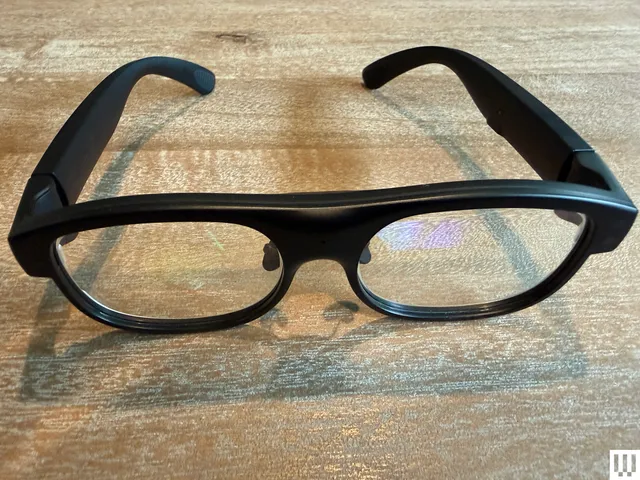
Unlike the other glasses I tested, Even doesn’t sell a subscription plan; everything’s included out of the box.

The only downside I could find with the G2 is that it is largely devoid of offline features, so the glasses have to be connected to the internet to do much of anything. Considering the G2’s capabilities, it’s a trade-off I am more than happy to make.

Other Captioning Glasses I Tested

There are plenty of capable captioning eyeglasses on the market, but they are surprisingly similar in both looks and features. While many are quite capable, none had the combination of power and affordability that I got with Even’s G2. Here’s a rundown of everything else I tested.

Advertisement
  • Photograph: Christopher Null

  • Photograph: Christopher Null

  • Photograph: Christopher Null

Leion’s Hey 2 is the price leader in this market, and even its prescription lenses ($90 to $299) are pretty affordable. The hardware, however, is heavy: 50 grams without lenses, 60 grams with them. A full charge gets you six to eight hours of operation; the case adds juice for up to 12 recharges.

I like the Leion interface, which lays out caption, translation, “free talk” (two-way translation), and a teleprompter feature on its clean app. You get access to nine languages; using Pro minutes expands that to 143. Leion sells its premium plan by the minute, not the month, so you need to remember to toggle this mode off when you don’t need it. Pricing is $10 for 120 minutes, $50 for 1,200 minutes, and $200 for 6,000 minutes. There’s no offline use supported, and I often struggled to get AI summaries to show up in English instead of Chinese (regardless of the recorded language).

  • Photograph: Christopher Null

  • Photograph: Christopher Null

You’re not seeing double: XRAI and Leion use the same manufacturer for their hardware, and the glasses weigh the same. The battery spec is also similar, with up to eight hours on the frames and another 96 hours when recharging with the case. XRAI claims its display is significantly brighter than competitors’, but I didn’t see much of a difference in day-to-day use.

The features and user experience are roughly the same, though Leion’s teleprompter feature isn’t implemented in XRAI’s app, and it doesn’t offer AI summaries of conversations. I also didn’t find XRAI’s app as user-friendly as Leion’s version, particularly when trying to switch among the admittedly exhaustive 300 language options. Only 20 of these are included without ponying up for a Pro subscription, which is sold both by the month and minute: $20/month gets you a max of 600 upgraded transcription minutes and 300 translation minutes; $40/month gets you 1,800 and 1,200 minutes, respectively. On the plus side, XRAI does have a rudimentary offline mode that works better than most. For prescription lenses, add $140 to $170.

Advertisement
  • Photograph: Christopher Null

  • Photograph: Christopher Null

AirCaps

AirCaps Smart Glasses

AirCaps does not make its own prescription lenses. Instead, you must purchase a pair of $39 “lens holders” and take them to an optician if you want prescription inserts. I was unable to test these with prescription lenses and ultimately had to try them out over my regular glasses, which worked well enough for short-term testing. Frames weigh a hefty 53 grams without add-on lenses; the company couldn’t tell me how much extra weight prescription lenses would add to that, but it’s safe to say these are the bulkiest and heaviest captioning glasses on the market. Despite the weight, they only carry two to four hours of battery life, with 10 or so recharges packed into the comically large case. Another option is to clip one of AirCaps’ rechargeable 13-gram Power Capsules ($79 for two) to one of the arms, which can provide 12 to 18 extra hours of juice.

The AirCaps feature list and interface make it perhaps the simplest of all these devices, with just a single button to start and stop recording. Transcriptions and translations are available for free in nine languages. For $20/month, you can add the Pro package, which offers better accuracy, access to more than 60 languages, and the option to generate AI summaries on demand (though only if recordings are long enough). As a bonus: Five hours of Pro features are free each month. Offline mode works pretty well, too. The only bad news is that these bulky frames just aren’t comfortable enough for long-term wear.

Advertisement
  • Photograph: Christopher Null

  • Photograph: Christopher Null

The most expensive option on the market (up to $1,399 with prescription lenses!) weighs a relatively svelte 40 grams (52 grams with lenses) and offers about four hours of battery life. There’s no charging case; the glasses must be charged directly using the included USB-connected dongle.

The glasses are extremely simple, offering transcription and translation features—with support for about 80 languages, which is impressive. I unfortunately found the prescription lenses Captify sent to be the blurriest of the bunch, making the captions comparatively hard to read. And while the device supports offline transcription, performance suffered badly when disconnected from the internet. I couldn’t get translations to work at all when offline. For $15/month, you get better accuracy and speaker differentiation, and access to AI summaries of conversations. Prescription lenses cost between $99 and $600.

Source link

Advertisement
Continue Reading

Tech

iFi GO Link 2 review: the little DAC that delivers an enormous audio upgrade is smaller and better than ever

Published

on

Why you can trust TechRadar


We spend hours testing every product or service we review, so you can be sure you’re buying the best. Find out more about how we test.

iFi GO Link 2 review: two minute review

Specifications

Dimensions: 137 x 12 x 7.6mm (5.4 x 0.47 x 0.31”)

Advertisement

Weight: 7.8g (0.3oz)

Frequency response: 10Hz-80kHz (-0.5dB)

Output: 3.5mm stereo/S-Balanced

Hi-Res support: PCM 32-bit/384kHz; DSD256

Advertisement

Output power: ≥1.59V/79mW @ 32Ω / ≥2.0V/14mW @ 300Ω

Connection: USB-C/A/Lightning

Advertisement

Source link

Advertisement
Continue Reading

Tech

5 Office Gadgets And Accessories Your iPhone Can Replace For Free

Published

on


When the iPhone was first released in 2007, it didn’t just set the bar for how people expected their mobile phones to look, but it also changed the way we used our phones entirely. Because of how it fits so perfectly into the Apple ecosystem, iPhones play a crucial role as the most mobile way to communicate among its connected products. This makes it perfect for people whose jobs require them to be on the go, such as those who travel for work.

Among the many reasons why people prefer the iPhone over Android, Apple is known to have stringent policies on its app store. Considering how it has a lot of great built-in apps that have features that rival even paid options, this isn’t that surprising. Throughout the years, Apple has thoughtfully added to its list of free apps that you probably aren’t using to its full advantage. And if you’re looking to make your days at work even more productive, some of them can even replace an arsenal of gadgets and accessories that once graced our cubicles. With these apps, you can save on subscriptions or physical tools and focus your budget on the things that truly move the needle.

Advertisement

Document scanners

While there’s still a benefit to having a physical scanner, especially if your work requires high-resolution images such as artwork, your iPhone can work just fine as a scanner for regular documents. Depending on your preference, there are actually multiple ways to scan documents on your iPhone. The most brute-force way to “scan” a document is just by using the camera app and simply cropping the image to remove the background.

However, if you want a more elegant solution, you can use your Files or Notes app. On your Files app, tap the three dots icon that is located in the upper-right corner of the screen. In the drop-down menu, select Scan Documents. Alternatively, open your Notes app and create a new note (or open an existing one). In the lower part of the screen, tap the paperclip icon and select Scan Documents. Regardless of which option you choose, the apps will open a special camera with scanning-related features.

Advertisement

Once you take a photo of the document, you’ll have the option to retake it or proceed to adjust the corners and keep the scan. Afterward, you can keep repeating the process for all the pages you need to scan and tap Save when you’re done. If you want more flexibility with the output, there are additional settings when you scan. You’ll have the option to add or remove the flash and select if you want the scan to be colored, grayscale, black & white, or a photo.

Advertisement

Notebooks and planners

Staying on top of your deliverables at work can be challenging, and it used to require you to juggle all kinds of notebooks that you would need to bring to different meetings. With your Notes app, you can sync your notes across different Apple devices, plus annotate with photos, videos, voice notes, and more. And well, if you’re the type to want to keep track of your thoughts and experiences at work, there’s also the iPhone Journal app. Since it’s integrated with all of your other iPhone apps, it fills in the gaps for what happened. If you’re being practical, it can be a great way to keep track of your progress on projects, specific feedback that you applied, or document work-related attendance to meetings or events.

Instead of a physical planner, there’s the Calendar app, which lets you keep track of your meetings, company holidays, and personal leaves. When you create an event, you can list the basic details, like the name, date, and time, plus repetitions if it’s a weekly cadence. But if you want to make sure you have all your ducks in a row, you can select whether it’s an in-person or online meeting, expected travel time, who is going to be joining, important attachments / links, and even notes. Apart from listing events, your Apple Calendar can be integrated with your Reminders app, so you have a more holistic view of both your schedule and deliverables.

Advertisement

Measurement and calculations

Released in 2018, the iPhone Measure app uses its camera, built-in sensors, and, in some cases, its LiDAR scanner, to measure surfaces and test the level with augmented reality. Using this, you don’t have to borrow measuring tape to know if the white board you’re thinking of getting will fit your office’s breakout room. That said, our team did test the accuracy of the iPhone’s measuring app, wherein it was off by up to 5%. We deduced that several factors could lead to significant discrepancies. Apart from owning an older iPhone model, things like the angle, distance, background, and lighting can impact its accuracy. However, it can still be a good solution for those one-off projects that don’t need to be super precise.

While some jobs require heavy-duty Excel sheets with pivot tables, for which you’ll need to use a proper laptop, others only require simple calculations. With your iPhone, you can go from basic functions (plus, minus, divide, multiply, and percentage) to scientific calculations. You can even use your Notes app to make some quick math calculations. You can also use the calculator to convert currencies, areas, speed, temperature, time, volume, weight, and so on. Because of this, it’s an ideal companion for any business trips abroad, where you have to stay under budget in a different currency or they follow a different measurement system.

Advertisement

Wallet and keys

For some workplaces, there’s a revolving door of access depending on your clearance levels, whether it’s to authorized rooms or documents. Instead of having physical keys around, your iPhone’s wallet can let you store digital keys that you can use instead. Not only is it not prone to getting stolen, but it makes it possible to manage, even remotely. It will also be easier to track the history of people who have been given access if any problems arise. With compatible smart door locks, you can enjoy the benefits of the Apple Home Key. Although, you may need to download separate apps for some added features, such as managing access remotely, like adding or removing users or setting timed entries. Using the same NFC technology, you can also use your iPhone (and even Apple Watch) to lock and unlock compatible smart cabinet locks for confidential documents.

Similar to a physical wallet, you can store more than just your bank cards in your Apple Wallet, like tickets to events and boarding passes. With this, it takes away the need for printed files for any business trips as well, since they may accept digital files already. Apple has also rolled out the option to add your driver’s license to your Wallet. But it’s important to note that it does have limitations, such as not being accepted in every country or some establishments still requiring your physical ID.

Advertisement

Business cards

While the art of networking is still an absolutely useful skill in every office environment, how we follow up after has evolved. In the past, we had to spend money on printing business cards and hand them out to people, hoping that they wouldn’t simply throw them in the trash after meeting you. Thankfully, you can skip the physical business cards with all the contact management features on your iPhone. These days, sharing contacts can be as easy as putting your iPhones together to use the NameDrop feature, which was introduced in iOS 17.

On the most basic level, there’s the built-in Contacts app, wherein you can combine their details across different platforms, from numbers, emails, and instant messaging apps, to social profiles. If you’re the type to mix up people, there are plenty of ways to add more context to your relationship. You can easily change their photo, list the company they work for, add their birthday, and pronouns. And if you don’t want to miss out on when they try to reach out, it’s possible to customize ringtones and text tones. But if you do need more, we’ve mentioned before that there are a lot of great iPhone contact apps that might be worth downloading. For example, if you’re still meeting people who prefer physical business cards, the AI-powered CamCard lets you scan them and add their information to your database.
Advertisement


Source link

Advertisement
Continue Reading

Tech

Mortal Kombat II Review: More Than Just Camp

Published

on

The creative minds behind Mortal Kombat II know precisely how to make an awful ’90s-style action movie. We get a glimpse of that with footage from “Uncaged Fury,” an in-film demonstration of Hollywood playboy Johnny Cage’s replete with one-liners, glacially slow choreography and ridiculous stunts, all of which would have felt right at home in a forgettable Van Damme flick. By nodding to schlocky action cinema — which definitely includes Mortal Kombat (1995)— director Simon McQuoid and screenwriter Jeremy Slater are also making a statement: They know what not to do. That self-awareness ultimately makes it the best Mortal Kombat film yet.

This sequel is practically a point-by-point refutation of everything in “Uncaged Fury.” McQuoid, Slater and crew made the action far more complex than what we’ve seen before in the franchise. Moves hit harder, characters make more inventive use of their surroundings and everything is shot to emphasize the profound level of skill involved in constructing a modern fight scene. There are quips, to be sure (including a nod to Big Trouble in Little China, which directly influenced the Mortal Kombat games), but they’re more than just throw-away lines.

Perhaps most importantly, it balances those (slightly) loftier cinematic aspirations against the campier aspects of Mortal Kombat. It’s still about a tournament that determines the fate of the world. People have superpowers. There’s a necromancer. But there’s still room to find the humanity in these ridiculous characters.

Advertisement

The best example of this is Johnny Cage himself, who is typically just presented as an annoying movie star in the games. In this film, he’s a washed up action star attending a geek convention where nobody recognizes him. As played by Karl Urban — a genre actor who’s appeared in Xena: The Warrior Princess, Lord of the Rings and currently stars in The Boys — Cage is the quintessential sad sack. He hates himself so much, he can’t even accept a modicum of praise from a former fan. Urban captures a man who is both past his prime, and whose prime was giving up a legitimate martial arts career to make schlock movies.

When he’s chosen to fight in Mortal Kombat, it’s impossible for Cage to see himself as an actual hero — after all, he’s only ever pretended to be one. Urban gets to show off his physical comedy chops as he’s thrown about in his first fight, showing us the campy side of the character. But he’s compelling enough as an actor to make us believe in Cage’s gradual heroic transformation.

While Johnny Cage steals the show, Mortal Kombat II starts off by introducing us to Kitana as a child princess who is forced to watch her father be brutally murdered by the tyrant Shao Kahn. That loss puts her realm, and all of its people, under Kahn’s rule. Inexplicably, he chooses to adopt her and take her mother on as a consort. Kitana’s focus becomes revenge, all the while putting on the face of a loyal warrior for Kahn. Given the weight of her storyline, there’s less room for Kitana to lean into camp like Johnny Cage, but at least she gets a sick combat fan made of knives.

Everyone else from the Mortal Kombat reboot returns, including Jessica McNamee as Sonya Blade, Ludi Lin as Liu Kang and Lewis Tan’s Cole Young, a new character invented for that film. They all get their time to shine with more elaborate fight scenes, which also appear more frequently, since the tournament serves as the spine of the film. In an interview for my film podcast, The Filmcast, McQuoid mentioned that his stunt team spent more time visualizing choreography and set pieces, which led to far more dynamic action sequences than the first film. It’s something I think even general audiences, who aren’t as particular about fight choreography, will notice.

Now I’m not going to pretend that Mortal Kombat II is a perfect film. It leans so much on the previous entry that it’ll be completely nonsensical to anyone jumping straight in. And people who are less enamored with the world of martial arts films may not appreciate that the characters spend more time punching and kicking than talking. But if you can appreciate the wordless ballet of a well-choreographed fight scene, where character depth is revealed through action itself, you’ll likely have a great time with Mortal Kombat II.

Advertisement

Source link

Continue Reading

Tech

The Instax Wide 400 builds on instant photography’s simplicity and stretches it, literally

Published

on

In an increasingly AI-driven and digital world, analog instant film and retro-style cameras remain popular, fueled by a combination of both nostalgia and charm. Instant cameras, in particular, stand out for their simplicity and an experience that has remained largely unchanged over time.

Fujifilm’s $175 Instax Wide 400 builds on the familiar instant photography experience and expands it with a wider format. As someone who appreciates simple, easy-to-use instant cameras and often shoots with an Instax Square, I was interested in trying a model that offers larger prints and support for landscape photography. 

The Instax Wide 400 is built for capturing group shots, scenic landscapes, and moments where fitting more of the scene into the frame really matters. It produces 62 × 99 mm prints, about twice the size of Instax Mini photos, giving you a lot more space to work with in every shot.

Since it’s a simple point-and-shoot camera, it requires no prior photography experience and is designed to be easy and intuitive to use. Its appeal lies in fun and simplicity rather than advanced controls.

Advertisement

With its one-button design, the camera offers no manual exposure controls. It automatically manages flash, focus, and other settings, leaving you to simply frame the image and take the shot.

Image Credits:TechCrunch /

When lighting is ideal, the images print with nice color and a good amount of detail with some extra saturation. I was quite impressed by the quality because it managed to pick up accurate colors and distant details. 

However, the simplicity of the camera does have some trade-offs because there isn’t much you can do to make photos brighter if you’re not in an ideal lighting situation. I did end up with some less-than-ideal shots because, in scenes with strong contrast, like dark trees against a bright sky, the details tended to blur together.

Techcrunch event

San Francisco, CA
|
October 13-15, 2026

Advertisement

The rest of the camera is equally straightforward. To power on the camera, you rotate the lens counterclockwise. The first click activates close-up mode for subjects about 0.9 to three meters away. Turning it once more switches to landscape mode for distant subjects beyond three meters. Rotating the lens clockwise powers the camera off. 

The camera comes with a close-up lens attachment that snaps onto the front for close-up shots. I found the attachment was good at helping for avoiding focus and blur issues when taking close-ups. 

Advertisement

Loading the cartridge is simple, with guide lines to help you align it correctly in the camera. The door closes securely using a twist lock that latches shut. There is also a small indicator on the back that shows how much film is left.

Image Credits:TechCrunch

Coming in at 162 mm x 98 mm x 123 mm and 1.4 pounds, the camera is quite bulky. It’s noticeably bigger than the Instax Mini cameras and the Instax Square models. However, I wasn’t too surprised by the size, since it makes sense that larger photos would require a bigger camera. 

That said, it’s not something you’d want to carry around without a bag, and while the shoulder strap helps, I was still very conscious of it and careful not to bump it into people or objects in busy spaces. Although Instax does offer a camera case sold separately, I didn’t receive one alongside my review unit, so I can’t speak to it. 

Since it’s a bit bulky, it’s pretty noticeable, and it ended up attracting the attention of a few people when I was testing it. A worker at a downtown gelato shop even stopped to compliment it, calling it a “cool looking camera.”

That kind of attention is part of the appeal. 

Advertisement
Image Credits:TechCrunch

The camera’s self-timer is a nice feature, as it makes it possible to include everyone in a shot without needing someone to press the shutter button. It works by pushing a lever on the side and choosing one of four durations, ranging from two to 10 seconds. The camera emits a ticking sound to indicate that the timer is active, and red lights provide a visual countdown.

If you don’t have a tripod, the camera’s strap includes two angle adjustment accessories that can help prop and position the camera on a flat surface. To use one, slide it into the indented space on the camera’s underside, set the self-timer, and step back into the frame.

Film for the camera is available in standard white frame, black frame, metallic borders, and monochrome. Fujifilm sent me the standard white film alongside my review unit, which is the film I used for this review. Each box of film comes with 20 sheets and costs between $25-$28.

As for colors, the Instax Wide 400 comes in two options: green and jet black. As someone who loves a good shade of green, I liked that the color of the camera gave it a more playful, fun vibe.

Overall, I think this camera is a great option for people of all ages, as it offers high-quality images while remaining simple enough for kids and teens who are just starting out in photography.

Advertisement

When you purchase through links in our articles, we may earn a small commission. This doesn’t affect our editorial independence.

Source link

Continue Reading

Tech

It’s An Apple Lisa, On A FPGA

Published

on

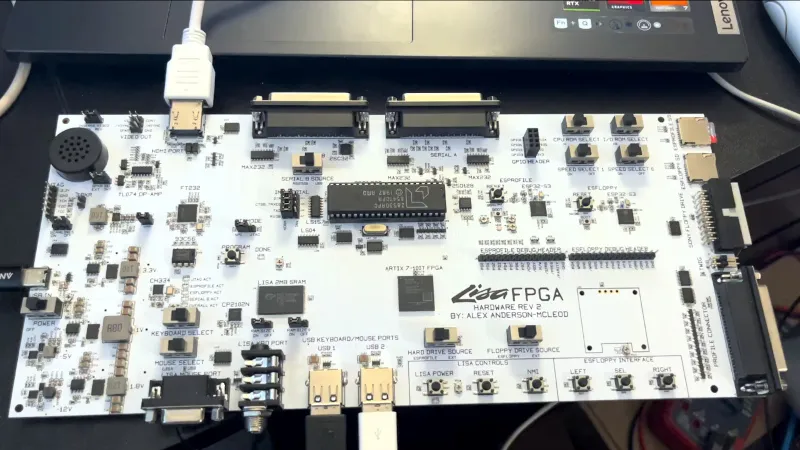
Most of us will know that Apple’s precursor to the Macintosh series of computers was a machine called the Lisa. Something of a behemoth compared to those early Macs, it had a price to match and wasn’t a commercial success. Working Lisas survive, but unlike a Mac you won’t find many at your local swapmeet. But what if you really must try this early Apple GUI? Never fear, because [AlexElectronics] is here with a much more accessible version on a FPGA.

This Lisa has a surprisingly large PCB compared to the size of the FPGA, because of the number of connectors. It takes the approach of mixing new and old in interfaces, for example as well as original Lisa keyboard and mouse support, you can also use modern USB versions. There’s also an HDMI output for a modern monitor, and an SD card. Unexpectedly alongside the FPGA there’s a 40-pin DIP, it’s a UART  chip because there’s no handy pre-built one for that particular chip. We’re told it will be up on GitHub when finalized.

Keeping old computers alive, especially rare ones, is hard. We like projects like this one, and we hope to see more developments. Meanwhile you can see the machine in the video below.

Advertisement

Thanks [Tom Stepleton] for the tip!

Advertisement

Source link

Continue Reading

Tech

Looking for a new Dolby Atmos soundbar in time for the World Cup? Here are my top 4 picks, with models from Samsung, Sonos, and Hisense

Published

on

The 2026 World Cup starts on June 11, and while a lot of people will be thinking about a new TV, there’s still one crucial component that can make or break the whole experience: audio.

A new soundbar can really add another dimension to the World Cup viewing experience, delivering clearer commentary and a more immersive atmosphere by capturing the roar of the crowds. Let’s face it, even the best TVs have average built-in audio, and it’d be a shame to miss out on the full World Cup feeling.

Source link

Continue Reading

Tech

Probing the link between inflammation and schizophrenia

Published

on

‘Significant’ patient population unresponsive to existing schizophrenia treatments, highlighting ‘major unmet clinical need’, according to PhD researcher Keelin Harrison.

Keelin Harrison is a PhD student researching the role of neuroinflammation in the pathology of schizophrenia.

“What is becoming increasingly clear”, Harrison says, “is that neuroinflammation is a highly dynamic process, and understanding how it interacts with structural and circuit-level changes in the brain remains an evolving area of research.

“Building on this foundation, my PhD project aims to further investigate these mechanisms and explore their potential role as therapeutic targets.” She is a researcher at the FutureNeuro Research Ireland Centre for Translational Brain Science, based at RCSI University of Medicine and Health Sciences.

Advertisement

Harrison’s research career began in biological and biomedical sciences first, before she specialised in neuroscience midway through her undergraduate degree from Trinity College Dublin. Later, she completed her masters’ degree in translational neuroscience at Imperial College London, where she developed a strong interest to research the role neuroinflammation plays across neurological and psychiatric disorders.

Harrison says she engages with patient and public involvement initiatives through FutureNeuro to better ensure that her research is informed by the perspectives of those it ultimately aims to benefit.

What kind of impact do you foresee from your research?

Schizophrenia affects approximately 1pc of the population and is a profoundly debilitating condition, impacting cognition, perception, emotion and social functioning.

While current antipsychotic medications can be effective in treating positive symptoms such as hallucinations and delusions, they do not adequately address cognitive deficits or broader functional impairments. In addition, a significant proportion of patients do not respond to existing treatments, highlighting a major unmet clinical need.

Advertisement

My research aims to advance understanding of the biological mechanisms underlying schizophrenia – particularly the role of inflammation – and to identify potential targets for future therapeutic development. Ultimately, the goal is to support the development of more effective treatment strategies for patients.

What inspired you to become a researcher?

Growing up, I was always naturally curious and inclined to ask questions about how things work. When I was first introduced to neuroscience, I was struck by how many fundamental questions remain unanswered – and in some cases, whether we are even asking the right ones.

Being in an environment that encourages curiosity, critical thinking and intellectual challenge is what initially drew me to research and continues to motivate me. I find it genuinely rewarding to step back, question assumptions and contribute to a field that is still rapidly evolving.

What are some of the biggest challenges or misconceptions you face as a researcher in your field?

One of the central challenges in neuroscience and psychiatric research is the difficulty of modelling human psychiatric conditions in preclinical systems. There is often a disconnect between biological findings in animal models and their relevance to human disease, which can limit translation.

Advertisement

Another challenge is the persistence of stigma and misunderstanding surrounding psychiatric disorders, which can influence how research in this area is perceived and supported.

More broadly, there remains a misconception that conditions like schizophrenia are well understood or primarily defined by their symptoms alone, when in reality, they involve complex and heterogeneous biological and environmental factors.

Do you think public engagement with science and data has changed in recent years?

Public engagement with science has become increasingly important, particularly in the context of the Covid-19 pandemic, which highlighted both the value of clear scientific communication and the risks posed by misinformation. Effect communication between researchers and the general public is essential for building trust, preventing misunderstandings and ensuring that findings are accessible and accurately represented.

Furthermore, involving public and patients in the research process helps ensure that scientific questions are aligned with real-world needs and priorities.

Advertisement

Don’t miss out on the knowledge you need to succeed. Sign up for the Daily Brief, Silicon Republic’s digest of need-to-know sci-tech news.

Source link

Advertisement
Continue Reading

Tech

Copy Or Redesign? | Hackaday

Published

on

We got asked a great question in the mailbag segment on the Podcast this week: are there hacks that we have read about on Hackaday that we use in our everyday life? The answer was absolutely yes, and I loved Tom’s take it often goes the other way – he sees a hack, tests it out, and then writes it up.

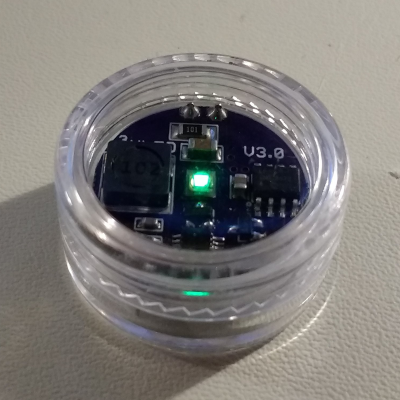
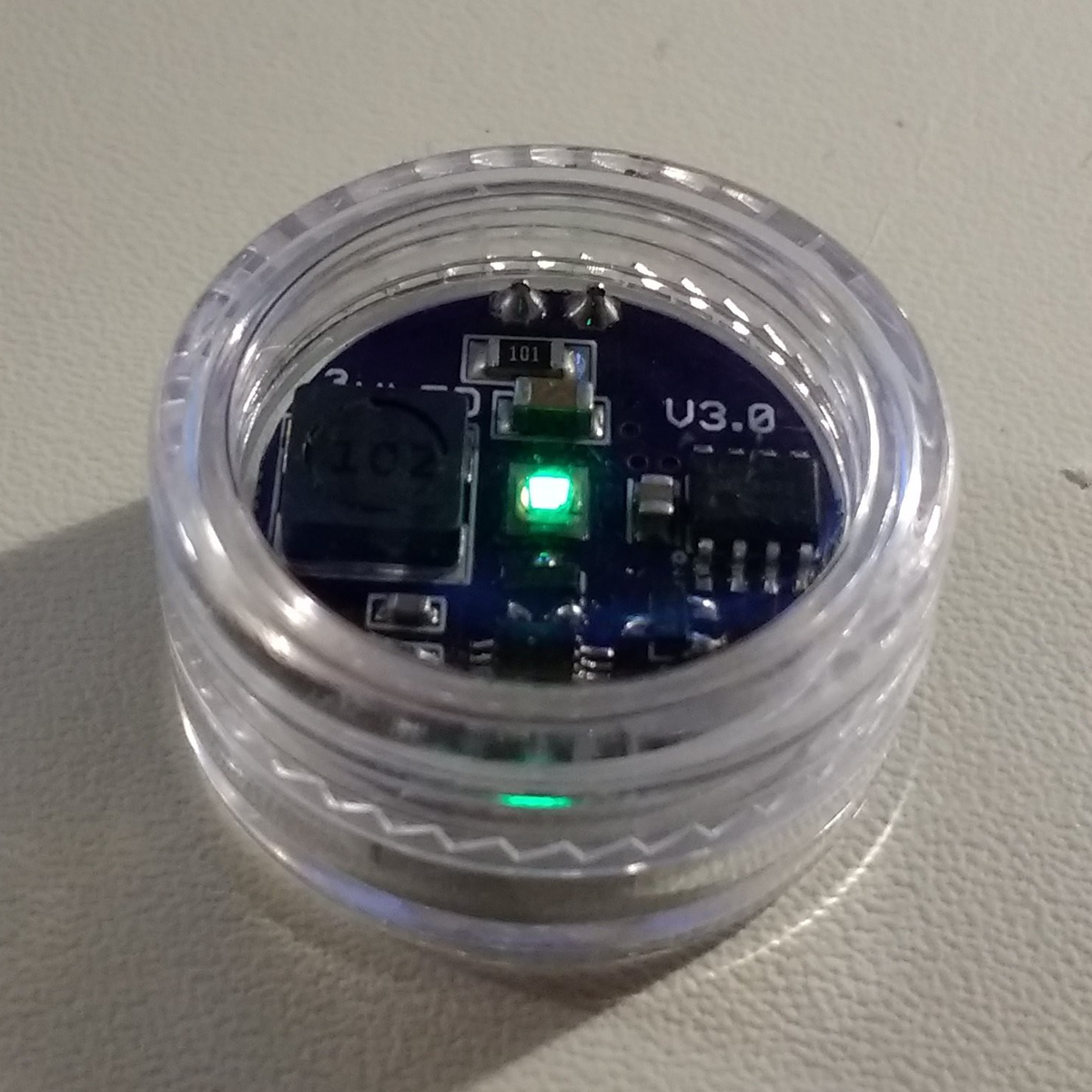
But I started looking around the office and I found more examples of projects that were absolutely inspired by projects I had seen on Hackaday, yet weren’t the same. I made a DIY mechanical keyboard because I saw someone else do it. There are a few home-made battery packs that I probably wouldn’t have attempted without having read about someone doing the same thing. I riffed on [Ted Yapo]’s Tritiled project, making a slightly inferior, but workable knockoff, and they’ve been glowing for many years now.

That got me to thinking about reproducing a project versus taking inspiration from it, and though I enjoy both, I’m find myself most often in the “inspiration” mode. I just can’t leave well enough alone, even when I’m fundamentally copying someone. NIH syndrome? Expediency? Probably both, and sometimes with a dose of hubris or feature creep.

Looking back at [Ted]’s TritiLED, though, I found some great examples in both the rebuild and redesign modes on Hackaday.io. [schlion]’s Making Ted Yapo’s TritiLED couldn’t be a clearer example of the former, and it’s great to look over his shoulder and appreciate all the lessons he learned along the way. [Stephan Walter]’s Yet another ultra low power LED is inspired by [Christoph Tack]’s Ultra low power LED, which is in turn inspired by [Ted]’s project, like a conceptual grandchild.

In a way, I look at this like with music: sometimes you play the notes the way they were written down, and sometimes you riff on someone else’s theme. Both are equally valid, and both owe a debt to the upstream source. Is Hackaday the hackers’ jazz club? And which of these modes do you find yourself working in most?

Advertisement

Source link

Continue Reading

Tech

Students & teachers can get educational pricing on Apple Watch

Published

on

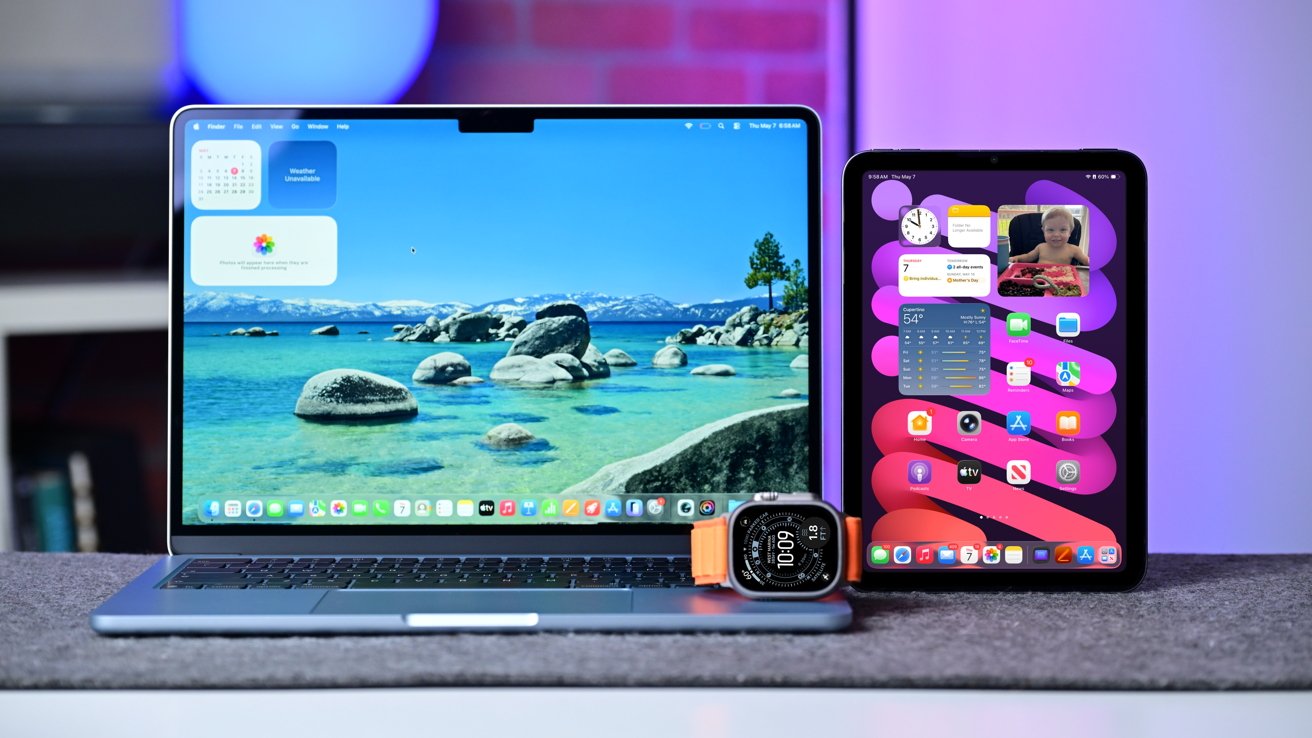
Apple has updated its education pricing in several countries, now including the US, to offer educators and students discounts on Apple Watch for the first time.

Starting on May 7, Apple Store will now offer discounted pricing on Apple Watch SE 3, Apple Watch Series 11, and Apple Watch Ultra 3 to qualifying users. They include faculty and staff of higher education institutions as well as students who are enrolled or accepted into said institutions.

The new Apple Watch pricing is not available globally, however. Apple has been updating the list of countries where the new pricing is applicable, though, and as of May 8 at 6 AM ET, It’s available in:

  • Australia
  • Canada
  • Chile
  • China (via AliPay)
  • France
  • Germany
  • Hong Kong
  • India
  • Italy
  • Japan
  • Malaysia
  • Saudi Arabia
  • Singapore
  • South Korea
  • Spain
  • Taiwan
  • Thailand
  • Turkey
  • UK
  • US
  • Vietnam

Education customers will verify their eligibility in store and online via Unidays. Most will receive approval instantly, though it can take up to 24 hours.

This joins Apple existing education pricing that largely applies to Mac and iPad purchases. Currently, education customers in the U.S. are still limited to discounts on new Mac and iPad devices.

Advertisement

Discounts vary, but education pricing can save users up to 10% on their qualifying purchases.

At press time, U.S. customers can save across the wearable range in our Apple Watch Price Guide, even without EDU status. Deals found in the price guide include a $100 discount on the Series 11, bringing the price down to $299, while the SE 3 can be found for as low as $219.

Update May 8, 6:00 AM ET: Apple has now brought its Apple Watch education discounts to North America.

Advertisement

Source link

Continue Reading

Trending

Copyright © 2025