After testing so many air fryers, they tend to start looking and performing the same. However, the Typhur Sync Air Fryer stands out for several reasons. The built-in temperature probe ensures that meat reaches a safe temperature. The large display panel on the top is user-friendly, and there’s also an app that makes cooking even easier. And did I mention that the air fryer performs exceptionally well?
Six presets on panel, and three via app
Wireless probe with five sensors
User-friendly control panel
Typhur AI app adds functionality
Thermometer can only be used with Typhur Sync Air Fryer
Key Features
Advertisement
Wireless probe
Forget guessing if food is done. The wireless probe has 5 sensors to provide an accurate reading.
Advertisement
8-quart capacity
Make a whole 6lb chicken or 3lb of frozen French Fries in the generous interior.
Introduction
In the crowded field of air fryers, the Typhur Sync Air Fryer is in a class by itself. The appliance has several features that you won’t find on most other models (at least, not yet). For example, the Typhur Sync has a built-in wireless probe (meat thermometer) that sits in a cradle on top of the air fryer. The Typher app offers almost complete control of the appliance – and even includes three presets that are not on the control panel! The presets for wings, fries, and bacon can only be accessed via app. Keep reading to discover what else makes the Typhur Sync Air Fryer so special.
Advertisement
Design
Magnetic case houses wireless probe
Two control panels
6 presets on controls
Advertisement
The Typur Sync Air Fryer arrived in a brown, branded cardboard box. Everything was well-packaged to prevent damage.
The contents include the main air fryer body, basket (ceramic-coated and PFAS- and toxin-free), grill plate, wireless probe, probe case, and also documentation (user manual, quick start guide, and precautions before use).
Image Credit (Trusted Reviews)
The probe is made of stainless steel and has a high-density ceramic handle, and a safety notch. It has 5 internal temperature sensors in various locations. The probe needs to be charged for at least 30 minutes before using it for the first time. A 30-minute charge provides 12 hours of continuous usage, while a 10-minute charge will last for 8 hours, and a 3-minute charge will deliver 3.5 hours of continuous usage.
Image Credit (Trusted Reviews)
The thing about using probes is that you have to remember where you put them. However, there’s actually a cradle (magnetic case) on top of the air fryer, and this is where the probe is housed and where it charges.
Advertisement
There are actually two control panels. One is the general control panel and the other control panel is only displayed when in probe mode.
Advertisement
Image Credit (Trusted Reviews)
The general (or manual) control panel includes the power button, up and down arrows on the left to increase or decrease the temperature, and up and down arrows on the right to increase or decrease the time. The 6 presets (air fry, roast, bake, dehydrate, reheat, and preheat) are at the bottom of this section, along with the start button. However, the Typhur app provides access to 3 additional preset programs: bacon, wings, and fries. These presets cannot be accessed using the air fryer’s onboard controls.
Image Credit (Trusted Reviews)
When using the probe, a separate set of controls will appear at the top of the control panel. This is where you’d choose presets for beef, chicken, pork, and fish. This is also where you can select the doneness level (from rare to well done). The probe status is also displayed here, such as the charging status, and the disconnect option. Both the target temperature and the current temperature are shown in this section as well, along with the option to use the probe manually.
The air fryer has a temperature range of 105°F to 450°F.
Advertisement
Performance
Typhur AI recipe generator
App controls
Probe makes cooking foolproof
Typhur recommends preheating the air fryer for optimal results. There’s also a flipping reminder (the words FLIP flash on the control panel). The appliance chimes when cooking cycles are complete.
For my first test, I made French Toast. I’m familiar with the process, but pulled up the recipe on Typhur AI, which generated ingredients and extensive directions.
I like Typhur AI because it doesn’t just provide general instructions. I can chose which Typhur device I’m using, and it customizes the instructions for that appliance.
Advertisement
I preheated the oven and then baked the French Toast at 370°F for 10 minutes, flipping at the halfway point. The French Toast was golden brown on the outside, and fluffy on the inside.
Image Credit (Trusted Reviews)
Advertisement
Since I’m not the type of person who cooks whole chickens, I did the next best thing and roasted 2 large chicken breasts for my next test. I used the probe in manual mode, so it did not open the probe control panel.
However, the chicken breasts turned out fine and it was slightly browned on the outside and juicy when I sliced into them.
Image Credit (Trusted Reviews)
When cooking the chuck roast, I used probe mode. I actually made the selections using the app on my smartphone, instead of using the onboard controls.
On the app, there’s an option to select timer mode or probe mode. Selections made via the app are displayed on the air fryer, so everything is synced.
Advertisement
I set the chuck roast for medium rare, and that’s how it turned out. It was flavorful, easy to slice, and retained plenty of juice to keep it from drying out.
Advertisement
Image Credit (Trusted Reviews)
I also used the probe when making pork chops in the Typhur Sync Air Fryer. This was another test that came out quite well. The pork chops were browned around the edges, and had a rich, hearty flavor. Sometimes, the texture or pork chops can be rather tough and dry, but that was not the case in this air fryer. The chops were juicy and mouthwatering.
Image Credit (Trusted Reviews)
I love making cookies in air fyers, and this one was no exception. The Nestle Tollhouse Cookies came out crunchy on the outside, and gooey on the inside.
Image Credit (Trusted Reviews)
French Fries also fared well in the Typer Sync Air Fryer. They were golden and crunchy on the outside, and soft on the inside.
Advertisement
Image Credit (Trusted Reviews)
On two separate occasions, I made wings. The first time I made regular wings, and the second time, I made whole wings. Each time, they were crispy and juicy.
Image Credit (Trusted Reviews)
Should you buy it?
You like to use wireless probes
Advertisement
There’s nothing worse than taking your food out and discovering it’s not properly cooked on the inside. This air fryer lets you set and monitor the temperature.
Advertisement
You don’t like the idea of dual control panels
The idea of a regular control panel, and a separate probe mode control panel might be a bit much for some people.
Advertisement
Final Thoughts
If you’re in the market for a new air fryer, I wholeheartedly recommend the Typhur Sync Air Fryer. The built-in wireless probe makes it easy to ensure food is cooked to the proper temperature. Presets on the control panel and the app also take most of the guesswork out of preparing meals – and the Typhur AI recipe generator provides more information than I ever thought I needed.
However, if you prefer a shallower basket, the Typhur Dome 2 is a futuristic-looking air fryer that costs twice as much, but has 15 settings, and can hold a 12” pizza, 10 pieces of bacon, or 32 chicken wings. Another option is the Ninja French Door Premium Air Fryer, Convection Oven, Toaster, which has 10 functions.
Advertisement
How we test
We test every air fryer we review thoroughly over an extended period of time. We use industry standard tests to compare features properly. We’ll always tell you what we find. We never, ever, accept money to review a product.
Advertisement
Find out more about how we test in our ethics policy.
Used as our main air fryer for the review period
We cook real food in each air fryer, making chips, frying sausages and cooking frozen hash browns. This lets us compare quality between each air fryer that we test.
FAQs
Does the probe need to be plugged in?
No, the probe is wireless, so easier to use.
Advertisement
What does the Typhur Sync Air Fryer’s app do?
This lets you remote control the air fryer, and it gives helpful cooking instructions.
Advertisement
Test Data
Full Specs
Typhur Sync Air Fryer Review
Manufacturer
–
Size (Dimensions)
18.2 x 12.6 x 13.7 INCHES
Weight
14 LB
Release Date
2026
First Reviewed Date
09/04/2026
Model Number
Typhur Sync Air Fryer
Accessories
Temperature probe
Stated Power
1750 W
Number of compartments
1
Cooking modes
Air fry, roast, bake, dehydrate, reheat, and preheat. App only: bacon, wings, and fries.
Last month saw a world first, reports Electrek. Wind and solar generated more power globally than gas:
According to new analysis from independent energy think tank Ember, wind and solar produced 22% of the world’s electricity in April 2026, compared to 20% from gas. Together, the two renewable sources generated a record 531 terawatt-hours (TWh) of electricity during the month, 54 TWh more than gas plants generated globally, at 477 TWh…
Five years ago, in April 2021, gas generation was almost identical to today’s level at 476 TWh. But back then, wind and solar combined generated just 245 TWh — less than half of what they produced this April…
Wind and solar generation increased across nearly every major market reporting April data… April tends to be the strongest month for this kind of milestone because spring weather in the Northern Hemisphere usually brings a combination of strong wind generation, rising solar output, and lower electricity demand between heating and cooling seasons. Still, the broader trend is clear. Ember’s recent Global Electricity Review found that wind and solar met all global electricity demand growth in 2025. “Governments around the world are also ramping up renewable energy targets to reduce dependence on volatile fossil fuel imports…”
When you think of Memorial Day sales, you probably think of mattresses and other home goods. And while those items are definitely discounted, now is also a good time to purchase tech. Personally, I’m not buying anything right now unless it’s discounted—and fortunately many of our top picks are. Whether you’re shopping for a power bank, a new pair of headphones, or some other gadget, I’ve rounded up the best Memorial Day deals for your perusal. Most of these deals end at the end of the day.
Updated Monday, May 25: We’ve checked prices, removed expired deals, added 6 new deals, and ensured accuracy throughout.
WIRED Featured Deals:
Advertisement
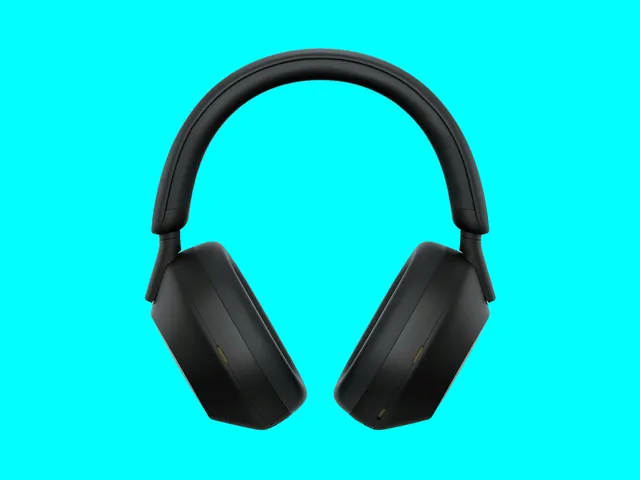
Sony WH-1000XM5 for $248 ($152 off)
The Sony WH-1000XM5 have a very frustrating name, but they’re the predecessor to our favorite wireless headphones, and they’re still an excellent pick if you don’t want to shell out for the new WH-1000XM6. They go on sale frequently, but rarely drop this low in price, which comes within $5 of their all-time low. If you’re in the market for over-ear headphones, they’re hard to beat. They’re comfortable, portable, lightweight, and stylish, and they’ll make your music sound great no matter what you like to listen to.
[B]ox office analysts are mixed on the results. On one hand, it’s significant for any film to debut above $100 million in post-pandemic times. On the other, “Star Wars” is one of Hollywood’s preeminent film properties, so there’s an expectation of a certain level of box office. And this start is the worst for “Star Wars” since Disney bought the franchise in 2012.
CNBC cites reports 41% of tickets were sold for more expensive large-format screenings like IMAX and DolbyCinema.
So how’s the movie? Rotten Tomatoesshows an 89% positive rating from moviegoers on its “popcornmeter” and a 62% average score from professional movie critics. And Ars Technica writes that “The plot is predictable, the fight scenes are meh, but you can’t beat the charm of that little green Grogu.” So while there’s “a paint-by-numbers plot,” they add that “the little green puppet pretty much carries the entire film.”
Advertisement
The new film is … fine. It’s an average Star Wars outing, and it will give families a solid Memorial Day Weekend entertainment option. It’s just not the spectacular home run that might have helped launch the flagging franchise into an exciting new era, and diehard Star Wars fans hoping for more are probably going to be disappointed. Of course, not everyone agrees. “How many nails can we realistically drive into Star Wars’s coffin before it’s time to give up hope of resuscitation?” writes Clarisse Loughrey for The Independent, calling it “the dullest and most inconsequential ‘Star Wars’ ever made.” (She argues that the movie “stitches together what is clearly three episodes of the previously planned fourth season of The Mandalorian and calls it a day. There’s not a whiff of effort here.”)
And a reviewer at RogerEbert.com gave it one-and-a-half stars, complaining that “There’s no reason for anything in this movie except the wish to make even more money….”
I’m on record as despising the word “content,” which was pushed by early tech moguls to devalue art as interchangeable goo in a virtual pipeline, but this washed-out, video-game-looking movie, with its murky night scenes and lack of visual depth, deserves the word. You’ve seen everything in it before, from the equipment, spacecraft, armor, and tactical maneuvers to the species and various types of terrain (earthlike, but cartoony)…
Even Grogu taxes our patience. Some of his cute bits could’ve ended with him facing the camera and doing jazz hands.
Just one year after reaching $800 million in its unrelenting funding spree, Star Citizen has now crossed yet another significant milestone. The overly ambitious space trading and combat simulator, developed by Cloud Imperium Games, has officially raised more than $1 billion from enthusiasts and early backers. Game director Chris Roberts,… Read Entire Article Source link
Diotima received €500,000 under Enterprise Ireland’s Commercialisation Fund last year.
AI edtech start-up Diotima, founded by former secondary school teacher Siobhan Ryan, has spun out from Trinity College Dublin (TCD).
The platform aims to enable educators to use AI to create assessments and individualised feedback to improve learning outcomes and lighten burdens on teachers.
The spin-out will be led by edtech commercialisation specialist Jonathan Dempsey as CEO, with Ryan, also a biochemist and environmental scientist, becoming chief product officer and learning lead.
Advertisement
Development engineer Daniel Fernandez and AI engineer Dr Long Mai, who have both worked on the Diotima project, will also join the inaugural team.
Dr Eoin Lane, an AI regulatory compliance expert who was formerly the global head of AI and data science at the Bank of New York Mellon, is a governance consultant to the Diotima project.
“This all started when I was working as a teacher and I had a vision for how AI could enhance teaching and learning even before any of the models like ChatGPT launched,” said Ryan.
“I then worked with Tom Pollock and Learnovate to develop this vision into a real-world project.”
Advertisement
Diotima began its partnership with Learnovate in February 2025 and received €500,000 in funding under Enterprise Ireland’s Commercialisation Fund, which supports third-level researchers in translating their research into commercially viable solutions.
The idea was to develop an AI-enabled edtech platform to help teachers and other educators create assessments, as well as provide feedback to learners, all in compliance with European and Irish legislation.
Specifically, the platform meets requirements under the EU AI Act, which has strict regulations around the usage of AI in high-risk sectors such as education.
“We aim to position Diotima as a leader in responsible AI for education,” Ryan said. Diotima will continue to engage with prospective customers and stakeholders for a go-to-market strategy while also seeking new investment.
Advertisement
“Using responsible AI, Diotima promises to develop into a revolutionary platform for learners in secondary schools and professional education organisations, delivering formative feedback and better outcomes overall,” said Pollock, Learnovate’s impact, licensing and commercialisation manager.
Learnovate launched its ‘Responsible AI for Learning’ initiative earlier this year to enable AI implementers and practitioners involved in teaching and learning to share knowledge, interpret guidelines and comply with AI regulations.
The initiative is made up of professionals from all four education domains – schools, higher education, vocational education and training, and professional education – as well as representatives from the Department of Education, teaching unions and other sectors.
Don’t miss out on the knowledge you need to succeed. Sign up for the Daily Brief, Silicon Republic’s digest of need-to-know sci-tech news.
AI-powered hackers now exploit software flaws faster than companies can patch systems
Mobile phishing scams now outperform traditional email attacks across corporate environments worldwide
Unauthorized AI tools are quietly leaking sensitive company information across global workplaces
For the first time in nearly two decades, exploiting software vulnerabilities has overtaken stolen passwords as the primary way hackers breach corporate networks.
Stolen credentials, once the dominant entry point, have dropped to just 13% of reported incidents this year.
Latest Videos From
Advertisement
Vulnerability exploitation has become the number one threat
The report analyzed over 31,000 security incidents across 145 countries, revealing how the threat landscape has fundamentally shifted.
Attackers are leveraging artificial intelligence to accelerate the discovery and weaponization of known software flaws, which dramatically shrinks the window available for defenders to patch their systems, reducing response time from months to mere hours.
Despite this growing risk, the report found that only 26% of critical vulnerabilities were fully remediated throughout 2025.
The median time organizations took to apply patches jumped to 43 days, leaving networks exposed for weeks or even months.
Advertisement
Sign up to the TechRadar Pro newsletter to get all the top news, opinion, features and guidance your business needs to succeed!
“While the velocity of cyber threats driven by AI is increasing, the foundational principles of security remain the most effective defense,” said Daniel Lawson, SVP of Global Solutions at Verizon Business.
Ransomware was present in nearly half of all breaches, at 48%, up from 44% the previous year.
However, the report noted that ransom payments have declined, with 69% of victims refusing to pay.
Advertisement
Mobile devices have become a more dangerous attack vector than email, with phishing simulations showing that text messages and voice calls achieve 40% higher click rates than traditional email phishing.
The human element was still involved in 62% of all breaches, as attackers increasingly target mobile-centric communication channels where users are less suspicious.
Advertisement
Nearly half of all employees, or 45%, now use AI tools at work, representing a significant increase from just 15% the previous year.
But 67% of these workers access artificial intelligence platforms through unauthorized personal accounts rather than approved corporate channels.
Shadow AI has become the third most common cause of non-malicious data leakage, putting company secrets at significant risk of unintended exposure.
Supply chain attacks have also grown substantially, with third-party involvement in breaches increasing by 60% year-over-year.
Advertisement
The DBIR makes it clear that attackers have shifted their tactics, and most organizations have not kept pace with the speed of modern threat actors.
The fundamentals of security and the use of firewalls or malware removal tools still work, but they only work when organizations actually practice them consistently.
Organizations are advised to patch faster, monitor mobile channels, control AI usage, and assume that third parties will eventually be compromised.
The attackers are already acting on that assumption, and the DBIR numbers prove they are right more often than they are wrong.
Over the past two decades, technical debt meant outdated architecture, messy code, and poorly maintained documentation. That definition is no longer sufficient in the AI era, where failure modes are more subtle and often non-linear. AI systems are introducing new layers of technical debt that live across prompts, models, and data dependencies — making these layers less visible, harder to measure, and often more dangerous than traditional debt.
A crisis hiding in plain sight
The complexities of AI systems and their associated failures have been well documented. A 2025 MIT study found that 95% of AI projects fail to reach production or deliver value. A similar study by S&P Global Market Intelligence found that 42% of businesses scrapped multiple AI initiatives in 2025 — a sharp increase from 17% the previous year. Various reasons are cited for these failures, but most of them point to poorly designed and implemented systems that are complex to manage and have multiple hard-to-monitor failure points, leading to a rapid accumulation of AI debt.
Traditional technical debt was localized to the codebase, and bugs were usually easily reproducible. Consequently, bugs could be easily identified during tests and fixed through rearchitecting the codebase. However, AI debt is much more distributed, manifesting across prompts, models, data pipelines, and all associated infrastructure. It is also more intermittent: Due to the probabilistic nature of AI, systems do not always respond the same way, leading to intermittent failures. This makes it much more challenging to identify risks during testing, and also creates a need for more continuous monitoring even post-deployment to prevent gradual drift and worsening performance.
The new forms of AI debt
AI debt typically manifests across four new forms, each of which comes with its own set of risks.
Advertisement
Prompt debtis the most visible of these. A modern version of ‘spaghetti code,’ this can include undocumented prompt tweaks, accumulated ‘quick-fix’ prompts that lead to inconsistencies, neglected version control of prompts, and ‘prompt stuffing’ (the cramming of extraneous data or context directly into AI prompts). All these combine to make prompts a form of untyped, untested code without any version control, leading to increased brittleness and vulnerabilities.
Model dependency debt is another increasingly common form of AI debt. Most enterprises now depend on a mixture of external models developed by leading foundation model providers; applications and agents are built on top of API calls to these models. Consequently, application logic now depends on models that are external to the core system, and that cannot be clearly controlled. As models update, performance varies and reproducibility is lost — prompts tuned for one model may fail or perform poorly when switched to another model, whether an update from the same provider or from another provider.
Most enterprise AI deployments today use retrieval-augmented generation (RAG), which pulls in additional context from enterprise data repositories. Retrieval debtis a consequence of these repositories having messy data, duplicated documents, and outdated information. This causes AI to return technically correct answers that are outdated and no longer relevant, causing downstream failures. Unlike hallucinations, these are harder to detect because they were correct, perhaps even until recently, and hence look correct to any tester.
Evaluation debt reflects the lack of standardization in testing and monitoring for AI models and applications. While AI benchmarks exist, they tend to focus on narrow tests and reflect point-in-time results. Most enterprises lack consistent testing standards, ground truth datasets, and real-time monitoring of deployments; there is no equivalent yet of continuous integration /continuous delivery (CI/CD) for prompts. As a consequence, CIOs and CTOs do not have clear visibility into model performance and cannot track improvements or worsening of models.
Advertisement
All of these are in addition to traditional forms of technical debt, which still manifest across the tools and systems that AI applications and agents interact with, read from, or write to. A rapid increase in the adoption of AI-generated code (often deployed without inadequate testing) is further aggravating inconsistencies within, and poor maintainability of traditional codebases.
The new forms of AI debt combine with these earlier forms of technical debt to compound rapidly and create large-scale risks that can cause catastrophic failure of entire enterprise deployments. Solving for these risks is made even more challenging by the distributed nature of AI ownership – most systems span engineering, product, data, and business teams, leading to unclear accountability when an error is identified.
As a result, these risks manifest in the form of escalating compute costs, inaccuracies in AI outputs, and increasing exceptions that need to be handled by humans — leading to projects often stalling and failing due to unclear return-on-investment stories and a lack of trust from users.
How enterprises can prevent AI debt
AI debt will not be solved by ‘better’ models — failure rates remain high despite models already having high accuracy. The solution to AI debt requires better system design, integration, controls, and changes in organizational culture.
Advertisement
First, prompts need to be treated as code. This involves careful version control, documentation, and rigorous testing both pre- and post-deployment for all possible prompt configurations. Best practices from the traditional world of coding — such as the use of smaller prompt blocks instead of large prompt-stuffed walls, or reducing the use of hard-coded parameters — can also help mitigate AI debt.
Second, evaluation needs to be built into the entire AI infrastructure stack. Continuous evaluation pipelines need to be established and must reflect a wide variety of metrics measuring both technical and business-aligned metrics. In addition, AI observability systems should be integrated to monitor output quality, failure rates, model drift, and data drift.
Third, explainability should be included by default in all AI results to make up for limited reproducibility. Data lineage, models used, and the steps followed should be clearly traceable so as to allow auditability of results and correction in case of any systemic errors.
This requires explicit AI debt reduction programs and associated budgets, similar to earlier waves of investment in security or in cloud modernization. These need to be driven at a CXO level by key leaders to prevent costly rework later.
Advertisement
Conclusion: A stitch in time
Enterprise AI deployments are not just static code; they are living systems that interact with the entire enterprise stack. As a result, the defining challenge in an agentic enterprise will not be building or deploying intelligent systems, it will be maintaining these systems to ensure continued reliability during real-world operation.
Enterprises that seek to proactively identify and mitigate AI debt from the design phase itself are the likeliest to build sustainable AI platforms that deliver significant long-term productivity boosts across the organization.
Vikram is a principal at Cota Capital, where he invests in early-stage enterprise tech and deep tech companies.
Welcome to the VentureBeat community!
Advertisement
Our guest posting program is where technical experts share insights and provide neutral, non-vested deep dives on AI, data infrastructure, cybersecurity and other cutting-edge technologies shaping the future of enterprise.
Read more from our guest post program — and check out our guidelines if you’re interested in contributing an article of your own!
Kansas City schools replace 30,000 Windows and Chromebooks with Apple devices
Concerns raised over financial loss from retiring functional school computers
District cites security, durability, and “student pride” as reasons for the Apple switch
The Kansas City Public Schools district has announced a sweeping transition which will remove tens of thousands of non-Apple devices from its classrooms.
According to information on the district’s website, administrators will replace more than 30,000 Windows PCs and Chromebooks with Apple hardware over the coming months.
The move follows a brief mention from Apple CFO Kevan Parekh during the company’s Q2 2026 earnings call, where he noted the district was completing its shift toward an all-Apple environment.
Latest Videos From
Advertisement
How the device rollout will work
Students in eighth grade and above will receive approximately 4,500 MacBook Neos as their primary laptops for schoolwork.
The district’s younger students will continue using existing iPads and MacBook Airs that have already been deployed in lower grade levels.
KCPS Chief Technology Officer Scott Jones offered a positive assessment of the change, stating that students “are now proud of their schools because they have the best products.”
Apple CEO Tim Cook acknowledged during the same earnings call that his company underestimated initial demand for the MacBook Neo.
Advertisement
Sign up to the TechRadar Pro newsletter to get all the top news, opinion, features and guidance your business needs to succeed!
Reports indicate Apple originally planned to ship roughly 6 million units of this new entry-level laptop, but that number has now increased to approximately 10 million.
The company has reportedly ordered additional A18 Pro chips from TSMC to address supply constraints, and shipping estimates have begun showing gradual improvement.
The switch to MacBook Neos was probably necessary because they proved to be financially viable.
Advertisement
Priced at a $499 education discount, Apple designed this laptop specifically for schools and district IT administrators.
Since enterprise Windows costs have recently skyrocketed, Apple’s bundle, including management software and repair insurance, became highly competitive.
KCPS explicitly cited Apple hardware as “more secure, durable, and reliable” than Windows PCs and Chromebooks.
Advertisement
The all-aluminum body avoids the brittle plastic build that breaks easily in classrooms.
The transition also creates a unified ecosystem where students, teachers, and administrators are not fragmented across multiple platforms.
There is also “student pride” — KCPS CTO Scott Jones claims that students “are now proud of their schools because they have the best products.”
Advertisement
Several concerns exist
Despite the plausible reasons for the shift and the district’s enthusiasm, several practical concerns remain.
First, retiring 30,000 functional Windows and Chromebook devices is a substantial financial write-down.
Second, no independent data has been presented showing that Apple hardware outperforms Chromebooks in Kansas City’s specific classroom environment.
Key metrics such as battery longevity under heavy use, repairability by district staff, and compatibility with existing educational software licenses remain unexamined.
Advertisement
Third, brand pride, while not irrelevant, is an unusual primary justification for a multi-million-dollar procurement.
The district describes the spending as an investment in “future-ready technology,” yet locking an entire school system into a single vendor carries long-term risks such as proprietary repair channels, per-device management fees, and reduced negotiating leverage for future purchases.
Chromebooks and Windows PCs, for all their flaws, offer districts a wider range of price points and service options for student laptops.
Kansas City’s experiment will be worth watching — not because Apple makes inferior products, but because public school dollars demand more than pride as a return on investment.
Advertisement
If the MacBook Neo delivers measurable gains in student outcomes and durability, the gamble pays off; if not, the district will have spent millions to solve a problem that didn’t exist.
Laptops have always come in all shapes and sizes, but recently I’ve seen ultrabooks become super popular. Maybe it’s just me who’s been drowning in work with my other colleagues, but wherever I go, I only see these thin and light laptops. A big part of this push can be attributed to efficiency gains, which mean we can fit more power into these chassis and get serious performance out of them. There’s one brand that’s always bet big on ultrabooks, and that’s Asus. Their ZenBook lineup is probably what comes to mind when anyone thinks about a serious laptop for professionals, at least in India.
I’ve tested several of these ZenBooks in the past, and they’ve always passed my tests with flying colors. However, 2026 has been proving to be a big challenge with rising memory prices driving costs up and value down. The latest iteration of the ZenBook 14 landed on my table a couple of weeks back. Asus has refreshed it with the latest Ryzen processor and a new OLED touch display option. To do the laptop justice, I switched my MacBook (it’s easy, my work is on Chrome, mostly) and made the ZenBook 14 UM3406GA my daily driver. Here’s how it stacks up in 2026.
Asus ZenBook 14 Review
Hisan Kidwai
Advertisement
Summary
The Asus ZenBook 14 has everything a professional needs, and in my two weeks of testing, I couldn’t find anything that made me go, “Oh, I wish they had done this better.” The design is sophisticated yet stands out, with premium materials. The OLED panel is bright and colorful, and the touch functionality adds a new way of using the laptop, especially for kids. Performance keeps up with anything you might need, even demanding tasks, and a little dabble in the gaming world.
Advertisement
Design & Hardware
If you remember the last ZenBook 14 (which we reviewed previously), then the new iteration would feel right at home. The laptop is available only in stealth black, and I’m a fan. It’s super elegant, and I’m a bit biased towards stealthy machines. The ZenBook 14 would fit perfectly for a corporate meeting or a quick stop at the nearby cafe to catch up on some work. Sadly, if you like experimenting with colors, there’s no other option. For some fun, the Vivobook lineup should come in handy.
The new Asus logo adds to the premium appeal, and everyone whom I gave the laptop to loved the design. There’s just one small problem, though: fingerprints. Asus has yet to fix this problem, as the black finish picks up sweat and grease from your palms and leaves them printed on the surface unless you use a cleaning cloth. It’s not a major problem, but something worth mentioning.
Minor complaints aside, what the Asus ZenBook 14 does best is portability. The 14-inch form factor is best for people who are constantly on the go but still need enough screen space to multitask. To put this to the test, I took the laptop on a recent work trip to Delhi, where the 1.2 kg weight didn’t put much stress on my shoulders. I took it out to work at the airport, and everything went fine without hiccups. The metal construction meant I wasn’t worried about putting too much pressure on the backpack. I also tested the build myself and observed no flex in either the keyboard deck or the display panel. The hinge holds the display firmly enough, though it’s a little stiffer than I’d like. It lifts the laptop ever so slightly, which can be annoying, especially coming from a MacBook.
As far as ports are concerned, Asus has your back. The left side houses a couple of Type-C ports, with one supporting USB 4.0 Gen 3 (40 Gbps data bandwidth, DisplayPort, and Power Delivery). Beyond that, there’s a full-size HDMI 2.1 port, an audio combo jack, and a USB 3.2 Gen 1 Type-A port on the left. I had no problems connecting accessories to the laptop.
Keyboard & Trackpad
A good keyboard is one of the cornerstones of an ultrabook, since most people spend hours typing documents (like me writing this review). Fortunately, the one on the ZenBook 14 is quite good. Coming from a MacBook, my keyboard standards aren’t that high, and I got used to this one quickly. The keyboard is generously spaced, so there’s no cramped action. Typing feels clicky enough, and there’s good feedback in the end. Backlit support is present, and, thankfully, Asus hasn’t gone with gray keycaps for contrast, which would make them visible at night.
The same praises can be carried to the touchpad as well. Sure, it’s not the haptic one I’m used to, but I’ve seen plenty of people who love physical touchpads. If that’s you, you’re in luck: the one on the ZenBook 14 is quite large, and I didn’t find any dead zones. Instead, Asus has bundled a few extras with the trackpad, including a light-up number pad that turns on when you press the button on the top right.
Display & Camera
Last year’s Asus ZenBook 14 came with arguably the best display ever, with a 3K OLED 120Hz panel. This year, though, Asus has decided to switch things up. The new one gets a 14-inch FHD+ OLED panel with a 60Hz refresh rate. If that sounds underwhelming, there is now support for touch. This adds a whole new dimension to using the laptop, and I’d much rather have this functionality over the tad bit of extra sharpness. Beyond that, watching content is an absolute breeze on the ZenBook 14. I was catching up on Better Call Saul (I know I’m late), and the 100% coverage of the DCI-P3 color space kept everything stunning with vibrant yet natural colors. The contrast was excellent, and I could make out the different details on the faces.
The ZenBook 14 is also VESA DisplayHDR True Black 500-certified, so HDR content should pop out a bit. In everyday use, I measured a peak of around 450 nits, which is plenty for working in a bright cafe or on a cloudy day outdoors.
Advertisement
As for the camera, the 1080p webcam performs as you might expect. The sensor is sharp enough not to make the videos look muddy, but it struggles in low-light environments, with noise creeping in. Aside from the basics, Asus has bundled several AI features, including 3D noise reduction and AI Noise Cancellation. Both of these work fine, and I actually enjoyed my time giving presentations on the laptop.
Performance & Gaming
Performance is another pillar of the ultrabook experience since nobody wants to deal with an underpowered processor that hangs up during an important call. With the Asus ZenBook 14, you get the latest AMD Ryzen AI 5 430 processor, running on the Zen 5 architecture, along with 16 GB of LPDDR5X-7500 RAM and 512 GB PCIe 4.0 NVMe M.2 SSD. Right off the bat, the everyday performance of the ZenBook 14 is excellent. I write reviews, so my work mainly happens in Chrome, with about 20 tabs open for research. The laptop handled all that blissfully well, without a single hiccup. I could have multiple apps running in the background, too, and it wouldn’t break a sweat.
Sadly, I’m no coder or video editor, but I did try my hand at both. I downloaded VSCode and edited a 4K Instagram reel, both of which went surprisingly well. Sure, you cannot expect the laptop to handle ten 4K streams, but for casual editing and reels, it’s perfectly fine. Large coding projects are compiled in seconds, so if you’re a college student, this could be worth a look.
But what about the actual numbers? I know benchmarks don’t often tell the whole story, but they do help paint a picture. Keeping up with that spirit, I turned on performance mode and ran Cinebench R23, where the ZenBook 14 scored 1,098 in the single-core and 7,032 in the multi-core tests. In 3D Mark’s Wild Life Extreme test, the laptop scored 2,655 points. Finally, in the Night Raid test, the number reached 20,792.
Given the very decent benchmark scores, I thought we should play a few games on the ZenBook 14. But before that, please note that this is not a gaming laptop, by any stretch of the word. Still, if you only play eSports titles like Counter-Strike and Valorant, the ZenBook 14 might surprise you. At medium-to-high settings, I got over 100 FPS in both games, and the experience was jitter-free even during high-intensity matches.
Advertisement
Battery Life & Speakers
AMD has made quite a few gains in efficiency with its newest chips, and they help a lot with battery life on the Asus ZenBook 14. On a typical workday, which involves using Chrome, editing spreadsheets, and watching tons of YouTube videos, I get roughly 12 hours of SoT. This is almost MacBook-level battery life, and something I quite frankly didn’t expect. Charging is handled by a 65W fast charger, which gets the laptop from 20% to 80% in under an hour.
Usually, I’m not a fan of downward-facing speakers, since they inherently limit output depending on the surface’s hardness. While that factor is in play here, the speaker quality is top-notch. Compared to my aging MacBook Air, the ZenBook 14 sounds more full, with an emphasis on the mids. The vocals sound super clear, and the treble is nice. There’s Dolby Atmos support for the people who watch a lot of movies without headphones.
Verdict
At ₹114,990, the new Asus ZenBook 14 has everything a professional needs, and in my two weeks of testing, I couldn’t find anything that made me go, “Oh, I wish they had done this better.” The design is sophisticated yet stands out, with premium materials. The OLED panel is bright and colorful, and the touch functionality adds a new way of using the laptop, especially for kids. Performance keeps up with anything you might need, even demanding tasks, and a little dabble in the gaming world. Honestly, the ZenBook 14 gets a solid recommendation from me.
“Now I’m being taught how to do it the right way,” Ryan says. “And I’m being paid to do it.”
Ryan hopes Enhanced can pave the way for a separation of truly “clean” events and transparently juiced competitions. He even calls on events like the Olympics to increase testing strictness.
“What we’re doing is completely separate,” Ryan said during Friday’s media availability. “It’s marketing, it’s show business. And it should be separate.”
The financial argument and the idea of helping aging athletes prolong their careers make up the most compelling case I hear for Enhanced on its face—at least in terms of athletes’ motivations. But it’s the business side of the organization where some conflicts of interest become tougher to ignore.
Advertisement
Photograph: Etienne Laurent/Getty Images
Head to theproducts page of the Enhanced website and you’ll find what appears to be the organization’s spinoff of telehealth company Hims, but for PEDs. Products like copper peptides, sermorelin and testosterone injections are available alongside GLP-1s, semaglutide, and tadalafil.
Martin is open about the mission: To bring these products to the masses. He talks up required medical intake forms and regular check-ins with certified company doctors to avoid risks of mis- or over-use.
But if the Enhanced mission is successful, and PEDs become a bigger and more financially appealing part of sports, assuming these products will only be sought after and used in responsible ways is just as naïve as pretending doping hasn’t happened in the past at supposedly “clean” events. If anything, athletes in particularly disadvantaged financial situations might prioritize doping even more.
That’s where the dystopian feel bubbling below the surface becomes more palpable. There’s a distinctly MAHA undertone here, from investors like Thiel and Donald Trump Jr. to Enhanced Games founder Aron D’Souza describing RFK Jr. as “pro–human enhancement.”
Advertisement
While organizers wouldn’t give me any specifics on how much of Enhanced’s future will rely on product sales to fund prize pools and operations, it’s probably safe to assume investors like these will expect returns to remain involved.
It’s fair to wonder whether this is truly an attempt to remove stigmas and change sport. The overconfidence on display prior to the actual contests only drove home the feeling that this was more an elaborate money-making scheme than anything else.
So will the Enhanced Games usher in a new era of athletic capability and prowess? Maybe—at least if you can afford it.






















































You must be logged in to post a comment Login