At Ulta Beauty, you can stock up on skincare, makeup, and haircare, then head to the salon to get your brows shaped, your hair styled, and your ears pierced, all in a single visit. You’ll find brands like Dior, Estée Lauder, and Gucci alongside more affordable favorites and drugstore staples. Many locations house a Benefit Cosmetics BrowBar, so you can sample products and book an in-store brow service in the same visit. Ulta’s return policy is very forgiving, allowing you to bring back “gently used” products within 30 days for a full refund. Add in its weekly sales, the 21+ Days of Beauty Event, and stackable Ulta coupons, and you’ll rarely pay full price.
I’ve tested a wide range of beauty products that are sold at Ulta, from hair tools and LED devices to pimple patches and lip balms. Here’s how to shop smarter, with the best Ulta promo codes and Ulta coupons to keep on your radar.
Get 20% Off 160 Brands This May
Mother’s Day is around the corner, and it’s the perfect timing for Ulta’s big sale, where 160 of the most beloved brands will be 20% off with Ulta promo codeBOPIS20, until May 7. So whether you want to stock up on essentials for yourself, or give mom a gift she’ll love, there are huge discounts on everything from skincare must-haves to perfumes to makeup. Save big while you still can—makeup adds up quickly!
Don’t Miss 15% Off at Ulta Beauty
If you already shop at Ulta often, downloading (and using) the Ulta app is one of the best ways to save money on purchases you were planning to make. All you need to do is download the Ulta app (fo’ free), by texting “Beauty” to 95637. From there, you’ll get an Ulta promo code APP15 sent to you to use for 15% off your next purchase. Plus, with the Ulta app, you’ll be able to virtually try on thousands of beauty products with GLAMlab, use the Ulta Foundation Matcher to virtually match your skin tone to find your best shade match, and an AI-powered analysis of your skin to get customized skin care recommendations.
Advertisement
Plus, Ulta app members get exclusive in-app features, offers, and deals. You’ll also be able to monitor your membership rewards status and points, and get notified of app-exclusive deals, discounts, brand offers and more. And with the handy bar code scanner, shopping has never been easier—you can scan any product’s bar code to see information on ingredients and product reviews. When you’re an Ulta member, you’ll get 1 point for every $1 spent and birthday perks.
Ulta Promo Code: Get 10% Off When You Sign Up
You can instantly score 10 percent off your order when you sign up for text alerts. Text “ULTA” to 95637, and you should receive a one-time use discount code for online purchases only. There are a couple of brand exclusions, like Chanel, and you can’t use the discount on Black Friday deals, so make sure to read the fine print.
Use Ulta Beauty Rewards for Ulta Discounts
The Ulta Beauty Rewards program is free to join and offers many perks with minimal effort required from you. First, you earn points for every dollar you spend. The program has multiple tiers: as a standard member, you earn 1 point per dollar; platinum members earn 1.25 points, and diamond members earn 1.5 points. To qualify for platinum status, you need to spend $500 per year, and diamond members must spend $1,200 annually.
These points can be redeemed for discounts, and the best part is that they do not expire. (To activate your rewards, you need to download the Ulta Beauty app.) Here’s how the points translate into savings: 100 points gives you $3 off, 250 points offers an $8 discount, 500 points saves you $17.50, and 750 points grants you $30 off.
Advertisement
During your birthday month, you get even more special perks. These include earning extra points on every qualifying purchase, a free gift, and a $10 coupon exclusively for platinum and diamond members. Some other benefits include exclusive beauty deals, early access to sales, and full-size gifts for diamond members. Diamond members also get a $25 discount on beauty services and free shipping on orders over $25.
Score Trending Beauty Tech at Ulta
Always check Ulta’s Featured Deals and Sale pages, as they regularly update with new offers. In addition to makeup and skincare products, Ulta also provides discounts on hair care tools and wellness technology that we have tested and recommended.
Xiaomi phones are a little tough to judge. After all, these guys do everything, from making phones to laptops and sometimes even record-breaking electric SUVs. The Xiaomi 17 is a bit like the quiet kid that never gets noticed, simply because its bigger brother, the 17 Ultra, is on a streak of collecting all the best smartphone camera awards. But here’s the thing: most people won’t ever splurge that much money on a non-Samsung or Apple Ultra flagship. The main sales driver will always be the base model, and that’s the question I had in mind. Can the Xiaomi 17 go head-to-head with the OPPO Find X9 and the vivo X300, especially since it’s more expensive than both? You can thank AI for that.
To answer this very question, I got the Xiaomi 17 for review and took it with me on a work trip to Phuket, Thailand. Here, I used the phone to capture about 500 photos in the summer heat, with temperatures soaring to 40 degrees, and constant GPS navigation to put the Snapdragon 8 Elite Gen 5 SoC through its paces. Spoiler alert, I really do love this phone, but there are a few quirks, too. Here’s why.
Xiaomi 17 Review
Hisan Kidwai
Advertisement
Summary
The Xiaomi 17 brings a lot of things to the table. You get the best-in-class performance that’s miles ahead of the competition. A design that’s understated yet premium. Battery life that can easily last two full days, and cameras that, instead of being same same but different, induce a character to each and every photo that makes them more memorable. Of course, it’s not perfect. I’d like the camera bugs fixed and ultrawide performance improved, but overall, the Xiaomi 17 gets my recommendation.
Advertisement
Design & Hardware
If Apple were ever going to make an Android phone, then they’d probably design something like the Xiaomi 17. I wouldn’t describe the build as flashy, but it’s super elegant and reminiscent of past Xiaomi flagships. I talked about this in my X300 Pro review, as creating a brand identity to compete against Samsung and Apple is super important, and Xiaomi has listened. While I was using it daily, many of my friends and family asked me what Xiaomi phone I was using—note the wording: “Xiaomi phone,” meaning they knew it was a particular brand, and that’s important. The Chinese smartphone maker said they thought of every curve, and I’ll just say it straight: the 17 is the best-feeling compact phone I’ve held this year.
The corners are crafted to perfection, the width is spot on, and even the way the aluminum frame blends into the glass without an abrupt edge makes carrying the phone a very enjoyable experience. Beyond that, the back glass is frosted to prevent the phone from slipping off glass surfaces, and the side frame doesn’t let go of its color inside a case.
Speaking of color, you get plenty of options, but my favorite is definitely the blue variant, as it has that breezy summer vibe. The buttons are tactile and positioned where your hand would naturally rest.
Moving to the camera module, Xiaomi has taken the iPhone route of individual stove-top camera cutouts. There are four of them (one houses the flash), and aside from the fact that dust is difficult to get out from between, I do quite like them. The ultrasonic fingerprint scanner is positioned at a comfy place where your thumb would naturally rest. I used it on the beach with wet hands, and it worked perfectly fine. Besides, the phone is IP69-rated for dust and water resistance, meaning it should technically withstand a swim. Did I dare take it inside the water on the beach? Absolutely not, because the IP rating is only for fresh water, and seawater can cause irreversible damage.
Display
I’ve said this before that all flagship displays are essentially the same, and that holds true for the Xiaomi 17, too. The phone features a 6.3-inch 1220 x 2656 OLED display, with an adaptive 120Hz refresh rate. This time, Xiaomi has trimmed the bezels even more for a more premium look, and I’m a fan. The panel is exceptionally color-accurate and vibrant for content consumption, as evidenced by my 3-hour run of The Pitt season 2 on the flight to Thailand. Even the HDR performance is exceptional.
Xiaomi claims a peak brightness number of 3,500 nits. Sadly, I don’t have a light meter to put the claim to the test, but from my experience using the panel in the 12 noon sun at Phi Phi Island, it’s plenty bright for outdoor use. The texts were legible, and I could use the phone for GPS navigation without squinting.
When it comes to durability, I usually don’t like to test that part myself and instead rely on user reports. However, I accidentally dropped the Xiaomi 17 on a concrete floor. The result was surprisingly good. I dropped it, without a case, from a tripod at chest height, meaning that, while the phone was in the air, all sorts of scary thoughts came to mind, including how much this repair was going to cost me. Thankfully, the phone escaped with only minor damage to the frame.
Advertisement
Performance & Software
Performance is what makes or breaks the smartphone experience, and it’s no surprise to anyone that the Xiaomi 17 delivers top-of-the-line performance. The Snapdragon 8 Elite Gen 5 is the best Android processor in the market, and it’s coupled with 12GB of LPDDR5X RAM and up to 512GB of UFS 4.1 internal storage. The results? The Xiaomi 17 is an absolute joy to use. It flies through the UI like nothing, and there’s ample headroom for literally any task. That being said, the phone runs on HyperOS 3, which, for the uninitiated, is a very altered version of Android that resembles more like iOS.
I don’t have a problem with the look, especially since HyperOS is one of the smoothest Android skins, with silky animations and a lot of customization. My issue is that, unlike other Chinese skins that allow you to tone down the iOS-ness, Xiaomi doesn’t.
For example, the notification shade is divided into two sections: the quick control and the panel. I don’t like that, but when I went digging in the settings to find a way to merge them, there wasn’t. Also, the back gesture is enabled in the keyboard, so when I tried deleting long text, it would often send me back instead.
There are a few silver linings I wish others would copy from HyperOS, one major one being the lockscreen customizations. There are so many options, and every one of them looks gorgeous. As this is 2026, there’s a host of AI features, such as object eraser, image upscaling, and inpainting. I tried them all, and they work exactly as you’d expect. The company also promises about six years of major software updates and security patches. This is better than vivo’s five years.
Benchmarks & Gaming
As this is a review, I also ran a series of benchmarks to test the Snapdragon 8 Elite Gen 5’s limits. The phone scored 3,415 in Geekbench’s single-core test and 10,008 in the multi-core test. These are insane numbers, especially when compared with the likes of the vivo X300 Pro and the Find X9, which score about 20%-30% lower in multi-core tests. The story remained similar on AnTuTu, where the Xiaomi 17 handsomely beat its Chinese rivals, scoring 3,423,349.
As expected, this performance translates extremely well in gaming. I’m a former PUBG (BGMI) eSports player, and my results were exceptional. The phone maintained 120 FPS gameplay even at high settings without a hint of stutter. I also like Xiaomi’s thermal management, which kept the phone from overheating during both gaming and photo capture in Thailand’s hot summer.
Battery Life & Charging
After all the chatter about the small form factor, you may expect the Xiaomi 17 to compromise on the battery life, just as other Apple and Samsung phones do. Well, you can’t be more wrong, as the Xiaomi 17 packs an even bigger battery, 6,330mAh to be precise, than the 17 Ultra. And the results are just fantastic. On the morning of my Thailand flight, I unplugged the phone at 5 am. I then continued using the phone for the rest of the day, including the three hours of The Pitt on the flight and map navigation when reaching Phuket airport. I ended the day with 20% remaining, and at 3 am the next morning, I had 20% remaining. For a more typical person, you’d be looking more at two days of usage without a hitch.
When it was finally time to charge, Xiaomi, unlike Samsung, bundles a 100W fast charger in the box that charges the phone from 20% to 80% in just 30 minutes. You also get 50W of reverse wireless charging, though that requires a specific charger.
Advertisement
Cameras
If a phone doesn’t fold in half or has dual screens, the only way to differentiate itself is through the cameras. They are the main reason why people lean towards a certain brand, and recently, both OPPO and vivo have been killing it. However, I think there’s room for a third king: the Xiaomi 17. Like others, it also houses a triple-sensor array, led by the 50MP LightFusion 950 sensor, a 50MP JN1 60mm telephoto, and another 50MP OV50M ultrawide lens. Colors are handled by Leica, and that’s the main strength of the Xiaomi 17. The photos it takes, with the different Leica filters, have a certain character you won’t find anywhere else. Every phone takes similar photos these days, and it’s these color profiles that matter the most.
Still, if you’re not a fan of poking around with the cameras, the default Leica Authentic profile produces colors that are very close to natural, with highlights and shadows handled extremely well. The details are crisp and plenty, the HDR performance is mostly spot on, and the contrast is slightly on the boosted side, which is what I like. Beyond the default camera profile, there are a myriad of filters, such as Negative, Positive, Sepia, Natural, Vibrant, and Blue. Each has a different style of capturing the colors and subject, and I really did find myself going through each and every one of them to decide which actually serves the scene the best. And the results speak for themselves. Every photo tells a different story, and that’s the Xiaomi 17’s biggest strength.
The telephoto lens is 2.5x, and I’d say the same about it, too. It serves as the main portrait camera, and the images deliver stellar detail, with excellent foreground separation and improved natural skin tones without the infamous beautification. Xiaomi doesn’t rely much on AI processing, so zooming past 5x-6x will result in blurry photos. Keep that in mind. The ultrawide hasn’t changed from the previous generation, so it still doesn’t have autofocus for macro photography. While it works great when the light is ample, I saw a significant drop in quality at night.
Speaking of the night, both the main and telephoto sensors benefit from Xiaomi’s mature image processing, which retains detail in shadows without making the image muddy or introducing noise. Videos, which can be shot at up to 8K, carry similar details in all lighting conditions, and I’m a fan. Sadly, it’s not all perfect. In Thailand’s heat, some of the videos I captured were choppy, even when I was in the hotel. This problem then carried over to India, where the first few seconds of every video would stutter. I’ve communicated this issue with the Xiaomi team, so a fix could be imminent. Overall, I love the Xiaomi 17’s cameras.
Verdict
Sure, the ₹89,999 price tag of the Xiaomi 17 might feel a bit much, considering it’s more than the vivo and OPPO competition. But the Xiaomi 17 brings a lot of things to the table. You get the best-in-class performance that’s miles ahead of the competition. A design that’s understated yet premium. Battery life that can easily last two full days, and cameras that, instead of being same same but different, induce a character to each and every photo that makes them more memorable. Of course, it’s not perfect. I’d like the camera bugs fixed and ultrawide performance improved, but overall, the Xiaomi 17 gets my recommendation.
Microsoft has updated a Windows 11 in-box app removal policy introduced in October to include a dynamic list that lets IT admins choose which preinstalled Store apps to uninstall.
The updated RemoveDefaultMicrosoftStorePackages policy enables admins to remove any preinstalled MSIX/APPX app by referencing its Package Family Name (PFN) using Group Policy Object (GPO) or a custom OMA-URI for mobile device management (MDM).
“IT admins, you can now simplify Microsoft Store app management with dynamic removal on more devices across your enterprise. Use policy to remove any preinstalled MSIX/APPX app by referencing its Package Family Name (PFN),” Microsoft said on Thursday.
To get this new feature, admins must ensure that their devices have at least the April 2026 Windows non-security update deployed. Windows Insiders can get it after installing the March 13, 2026, builds in the Dev and Beta channels.
Advertisement
To make it work using Group Policy, admins have to:
Microsoft has also extended support for the RemoveDefaultMicrosoftStorePackages policy to systems running Enterprise and Education editions of Windows 11 24H2. Microsoft introduced the policy in October 2025, but it was only made available on devices running Windows 11 25H2 or later.
“The updated app removal policy is now extended to Windows 11, version 24H2 Enterprise and Education editions. Originally, you could only use this feature on devices running Windows 11, version 25H2 or newer,” Microsoft added. “If your organization has standardized on the 2024 release, you can benefit from policy-driven app management without a full OS version upgrade.”
The complete list of supported apps and detailed guidance on applying the policy to a single device via the Local Group Policy Editor or to multiple Active Directory-joined devices are available here.
Advertisement
While the Intune entry for this policy does not include the dynamic list option, Microsoft has said it will become available in the coming months.
“When this feature becomes generally available in Intune, search for ‘Remove Default Microsoft Store packages’ in the settings picker to locate it,” it noted.
AI chained four zero-days into one exploit that bypassed both renderer and OS sandboxes. A wave of new exploits is coming.
At the Autonomous Validation Summit (May 12 & 14), see how autonomous, context-rich validation finds what’s exploitable, proves controls hold, and closes the remediation loop.
Valve’s Steam Machine was supposed to be an affordable gaming PC for the living room. Rising memory and storage prices have turned that dream into a pricing nightmare.
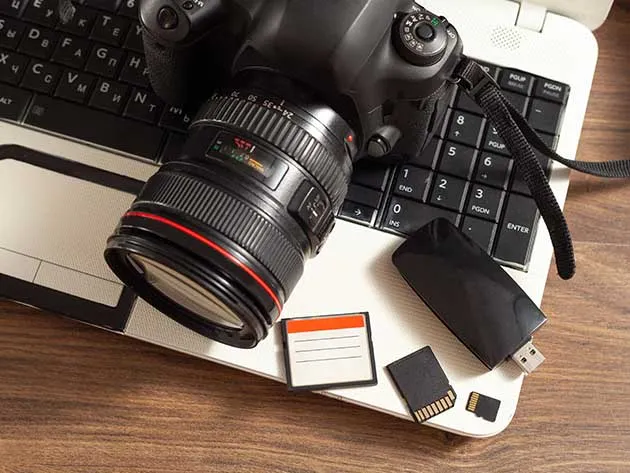
Capture emotions and tell stories through photography with the Photography Master Class Bundle. Transform your skills with six diverse courses, including Portrait Photography, DSLR Photography, Wedding Photography, Off Camera Flash photography, and more. Whether you’re a beginner or experienced, this bundle offers a wealth of knowledge and techniques to enhance your craft. It’s on sale for $40.
Note: The Techdirt Deals Store is powered and curated by StackSocial. A portion of all sales from Techdirt Deals helps support Techdirt. The products featured do not reflect endorsements by our editorial team.
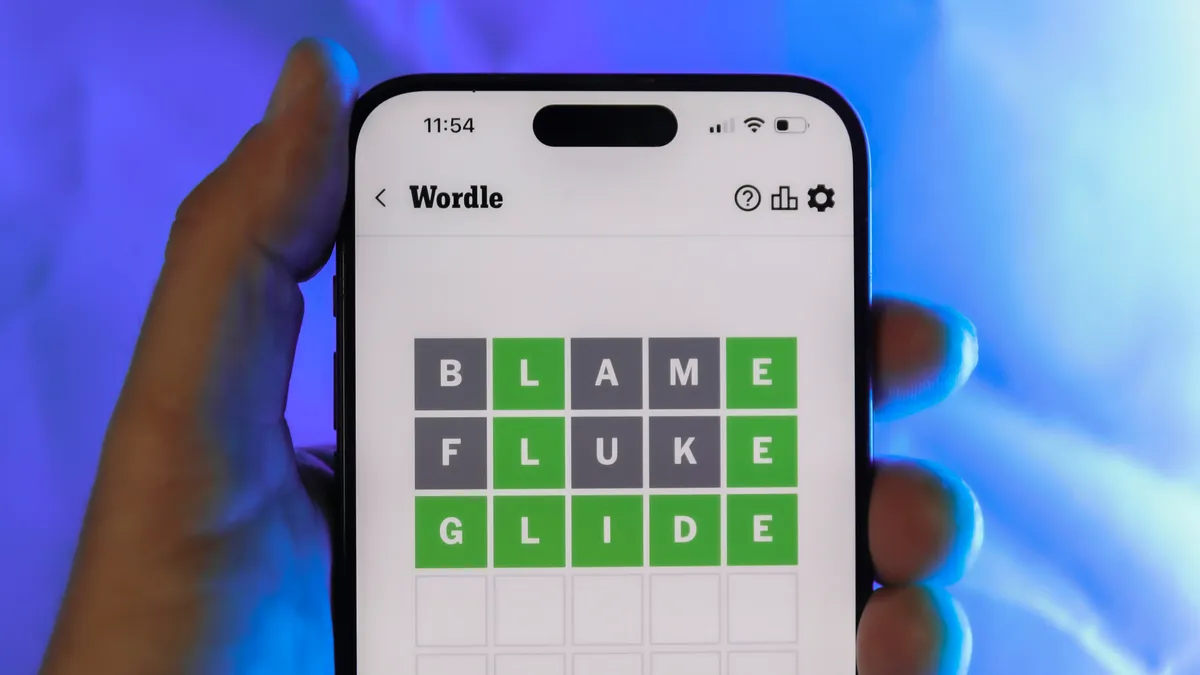
Looking for the most recent Wordle answer? Click here for today’s Wordle hints, as well as our daily answers and hints for The New York Times Mini Crossword, Connections, Connections: Sports Edition and Strands puzzles.
Riding a properly fitting bike can not only be the difference between comfort and discomfort (which is perhaps the most major factor in how much you want to ride). It can also mean the difference between whether or not you injure yourself, as spending huge amounts of time on a bike that is too big or too small for you can lead to a variety of maladies.
Whether you’re riding all the time or just getting into cycling, there are a few tips you can follow to make sure you’re buying the right sized bike and dialing it to your body in a way that will give you endless pain-free hours in the saddle. Because a bike that fits you well shouldn’t hurt at all.
If you’re experiencing pain, discomfort, or numbness anywhere, your bike fit is off. Of course, the pain and numbness in your butt after a 60-, 70-, or 100-mile ride is unavoidable and has nothing to do with fit. But riding a bike any distance shouldn’t result in pain or discomfort in your joints, neck, back, or anywhere else.
If you’re intending to spend a ton time in the saddle and/or dropping serious coin on a new bike, the best option is always to get a professional bike fit, which is a process where an expert fitter will analyze your body type, your riding style, even your ambitions, and dial your bike incrementally, that it perfectly fits you. My colleague Joe Ray can offer advice on getting a professional fit.
Advertisement
It’s also important to note that the rules for finding the best fit are different based on what style of bike you want, what your transportation needs are, and how much you intend to ride. If you want a drop-bar bike such as a road or gravel bike, a mountain bike, or a hybrid bike, the handlebar setup will affect other factors like the frame size and saddle height. Also, as men and women tend to be built differently, the design of bike frames and their components should be taken into account. Some brands such as Liv or Juliana are designed specifically for women, who tend to have narrower shoulders and shorter torsos relative to their legs than men.
Size Matters
It’s easy to wander deep into the weeds, but there are some basic things you can do to ensure you’re riding a properly fitting bike. Following these tips should help you make the most important decisions.
Start with the biggest thing! That is, your frame. There is no bigger single part of a bike than its frame. It’s also one of the only parts of a bike that is not adjustable. Your frame will always be the same shape and size, and there’s no changing that. So you want to start with the proper frame before anything else.
Most manufacturers size their frames using the small, medium, and large paradigm (with some brands offering XXS through XXL) or using measurements in centimeters. Typically, off-road bikes come in S, M, L, whereas road bikes use centimeters.
Advertisement
A good place to start is by researching a height chart. Considering not all bikes are built equally—not everyone’s “large” frame is the same size, for example—it’s especially helpful if you can find a chart from the brand you intend to buy.
Here’s a good example from the mega-brand Specialized. If I, at 76 inches, were interested in an Aethos model, I’d probably want to get a 61 cm frame.
If you can’t find a chart for the bike you’re interested in, you can just as easily find the bike itself at a local shop and swing your leg over a few different sizes. The general rule of thumb is that you should be able to fully stand over a bike with both feet flat on the ground with about 1 inch of clearance between your body and the bike’s top tube. Smaller bikes and bikes with compact designs have sloping top tubes; with those, you want to look for around two inches of space.
The size mismatch is hard to overlook. GameStop carries a market value of around $12 billion; eBay sits closer to $46 billion. Despite that gap, GameStop has already been quietly building a stake in eBay ahead of a potential bid – a signal that Cohen is willing to swing big… Read Entire Article Source link
Watch World Championship final live streams to see whether Shaun Murphy can lift the crown for the second time or if Wu Yize canfollow to in the footsteps of last year’s champion Zhao Xintong.
Twenty-one years after lifting the world title for the first time, Murphy will have the opportunity to once again win snooker’s grandest prize. The 43-year-old has finished as runner-up the last three times he has made the final but has been in excellent form throughout his run to the showpiece match.
He overcame John Higgins 17-15 in a high-quality semi-final, reeling off three century breaks in the final session as he recovered from a 13-11 deficit. He’ll now aim to overcome first-time finalist Wu who showed incredible resolve to come though an epic semi-final against Mark Allen.
Advertisement
The 22-year-old trailed 16-14 but won three frames on the bounce with breaks of 67, 52 and 71 to triumph 17-16. Having already beaten Peifan Lei, Mark Selby and Hossein Vafaei, he has proven that he can cope with the pressure of playing at the Crucible and will not be overawed by the occasion.
Read on to find out where to watch 2026 World Championship final live streams online from anywhere.
Can I watch 2026 World Snooker Championship Final for free?
Yes. The BBC is hosting live coverage of the 2026 snooker world championship final in in the UK, with live action shared between the BBC One and Two, plus the BBC Sport website.
That means you’ll be able to watch the snooker online live and on catch up on the BBC iPlayer streaming service – completely free to watch on laptops, mobile and TV streaming devices for anybody with a valid TV license.
Advertisement
If you’re away from the UK when the game is on, remember you can use a VPN to access the stream as if you were back home. More on that below.
Use a VPN to watch any 2026 World Snooker Championship Final stream
How to watch 2026 World Snooker Championship Final streams in the US
Snooker fans in the US will need a subscription to WST Play in order to watch the World Snooker Championship Final 2026 between Shaun Murphy and Wu Yize.
Advertisement
It costs £7 per month or £70 per year, which is roughly US$9.50 and US$95.
If you’re traveling in the States but wanting to watch your home snooker world championships coverage, you’ll need to download a VPN.
How to watch World Snooker Championship Final 2026 live streams in the UK
(Image credit: Future)
2026 World Snooker Championship final live streams between Shaun Murphy and Wu Yize.will be shown by BBC iPlayer and TNT Sports in the UK.
Advertisement
As we’ve already mentioned, BBC iPlayer and the state broadcaster’s TV channels offer a free service, but there’s a paid option, too from TNT Spoers.
Subscriptions can be accessed by a adding the sports package to your EE, BT or Sky broadband deal costs £16 per month. Or for on-the-move streaming, fans can pay from £25.99/month for HBO Max, which includes TNT Sports.
How to watch 2026 World Snooker Championship Final live streams in Australia
In Australia, snooker fans will need a subscription to WST Play in order to watch the World Snooker Championship Final 2026.
It costs £7 per month or £70 per year, which is roughly AU$13.30 and AU$132.88.
If you’re traveling away from home but wanting to watch your regular world championships snooker coverage, you’ll need to download a VPN.
Advertisement
How to watch 2026 World Snooker Championship Final live streams in Canada
(Image credit: Other)
It’s a similar situation in Canada, where snooker fans will need a subscription to WST Play in order to watch the 2026 world championship final.
It costs £7 per month or £70 per year, which is roughly CAN$13 and CAN$130.
If you’re traveling away from home but wanting to watch Shaun Murphy vs Wu Yize., you’ll need to download a VPN.
Advertisement
Rest of World Streams
Click to see RoW streams ▼
If you’re in China it looks like you can stream the World Snooker Championship Final 2026 for free on WeChat. Here’s a full rundown of where to watch the action around the world…
China CCTV5 Huya.com Migu CBSA-WPBSA Academy WeChat Channel CBSA-WPBSA Academy Douyin
Hong Kong China Now TV
Advertisement
Malaysia & Brunei Astro Supersport
Taiwan Sportcast
Thailand True Sport
Philippines TAP Sports
Advertisement
Mainland Europe HBO Max
All other territories Subscribe to WST Play for live streams and on-demand replays of the latest UK Championship matches.
We test and review VPN services in the context of legal recreational uses. For example: 1. Accessing a service from another country (subject to the terms and conditions of that service). 2. Protecting your online security and strengthening your online privacy when abroad. We do not support or condone the illegal or malicious use of VPN services. Consuming pirated content that is paid-for is neither endorsed nor approved by Future Publishing.
Since launching as a direct-to-consumer furniture brand in 2013, Castlery has built a reputation for design-forward products that look good and perform even better. Castlery’s aesthetic leans mid-century modern, favoring earthy tones, rounded edges, and natural wood finishes that outlast fleeting trends. But it’s the functionality that won WIRED over. Think: Hidden storage compartments, modular layouts, multi-functional pieces, and performance fabrics that can withstand everyday use. We also care about sustainability, and Castlery’s furniture is made to last. Many products are responsibly sourced and safe from heavy metals, allergenic dyes, and other harmful chemicals. You can read more about the brand’s sustainability practices here.
I adore my Castlery Auburn Storage Bed; it gives my room a clean Scandinavian feel and hides my suitcases and whatever else I can fit underneath. I also have the Auburn Sectional, and I love it for similar reasons. It’s upholstered in the same PFAS-free polyester fabric as the bed frame. It does a brilliant job at camouflaging stains, makes cleaning spills easy, and it’s surprisingly resilient against my cats. It’s not completely claw-proof, but it outperforms every other couch I’ve had.
If you’re furnishing a room—perhaps you just moved or are due for a seasonal refresh—Castlery is a hard-to-beat recommendation. And with a bunch of Castlery discounts and Castlery promo codes available, it’s a little easier to justify the upgrade.
$500 Off Memorial Day Castlery Sale
One of the biggest ways to save if you’re looking to upgrade your home decor and furniture this season is to shop during the Memorial Day Castlery Sale, where you can get $120 off purchases of $1,500 or more; $230 off $2,500; and $500 off purchases of $4,500 or more. Plus, Castlery members get early access to the sale, 4500 off sitewide, and up to 40% off sale items. So whether you want to maximize space with a storage bed or want to upgrade your living room furniture, now’s the time to save big.
Advertisement
Unlock Your Castlery Promo Codes
This spring, Castlery is offering up to $450 off sitewide. New subscribers can also take an extra $80 off orders of $1,500 or more with code SPRING80. On the sale page, you’ll find bed frames, dining sets, and sectionals discounted by an additional 5% with Castlery promo code EXTRAOFF. It may not sound like much, but it’s enough to shave hundreds off big-ticket pieces.
Score up to 15% Off Furniture Sets Instantly
Castlery’s collections are stunning and, sometimes, surprisingly durable. Fortunately, the brand makes it easy to bundle pieces for a discount when you’re furnishing an entire room, right now with up to 15% off furniture sets. You can mix and match across living room setups, outdoor furniture, dining sets, and bedroom bundles that include matching nightstands. I’m especially partial to the Auburn line, which has held up impressively well against my cats. Castlery also offers white-glove delivery, so you don’t have to do any of the heavy lifting.
Claim Free Shipping on all Orders $999+ Today
In select major cities, Castlery customers can qualify for free US shipping on orders of $999 or more—or $1,199, depending on your location. This offer applies automatically at checkout once the minimum spending amount is met. Keep in mind that shipping is charged per shipment, not per order. If your items ship separately, you may see multiple delivery fees tied to a single purchase. For full details, check Castlery’s delivery page.
Don’t Miss this Castlery Coupon for Your First Order
First-time shoppers can score a Castlery discount by signing up for Castlery’s newsletter, which sends a unique promo code for $50 or $80 off your first order (depending on the promotional period). It’s also the best way to stay in the loop on new product drops and early access to sales.
Advertisement
Maximize Your Savings With the Castlery Club Rewards
Join the Castlery Club, the company’s free loyalty program, and earn credits on every dollar you spend. Those credits can be redeemed for future discounts and member-only perks throughout the year. There are also a few low-effort ways to rack up credits without even buying anything. For example, you’ll get 10 credits for signing up for emails, 10 for following Castlery on Instagram, 20 for updating your profile, 75 for leaving a product review, and 100 for referring a friend, which amount to a Castlery discount down the line.
Unlock Special Financing Options to Upgrade Your Home
Castlery understands that furniture is a major investment, so it offers flexible financing options to ease the upfront cost. Through Affirm, you can split your purchase into manageable monthly payments, with low or even 0% APR available depending on your credit and any current Castlery promo codes. The application is straightforward and happens at checkout.
Microsoft has fixed a known issue causing newly introduced Windows security warnings to display incorrectly when opening Remote Desktop (.rdp) files.
This known issue affects all supported Windows versions, including Windows 11 (KB5083768 & KB5083769), Windows 10 (KB5082200), and Windows Server (KB5082063), on devices with multiple monitors and different display scaling settings.
Microsoft addressed the bug in the optional KB5083631 preview cumulative update for Windows 11, released on Thursday, along with 34 other changes.
“This update addresses an issue that affects the Remote Desktop Connection security warning dialog. The dialog could render incorrectly in multi-monitor scenario when the monitors had different scaling set,” Microsoft said. “This might occur after installing the April 2026 (KB5083769) security update.”
Advertisement
As Microsoft explained when it acknowledged the bug on Wednesday, the security warnings appearing when opening RDP files may not display correctly. On affected Windows systems, the buttons in the alert windows are misaligned or partially hidden, and the text is hard to read, making it difficult, and in some cases impossible, to interact with the security dialog.
These warnings were introduced on Windows systems with the April 2026 cumulative updates to disable risky shared resources by default as a defense against phishing attacks that abuse Remote Desktop connection (.rdp) files.
RDP files are commonly used to connect to remote systems in enterprise environments because they can be preconfigured to automatically redirect local resources to a remote host. However, threat actors have also increasingly abused them in phishing campaigns, including the Russian APT29 cyber-espionage group, which has used them to steal documents and credentials from victims’ devices remotely.
After installing the April security updates, a one-time educational prompt will appear when opening an RDP file for the first time, warning about the associated risks.
Afterward, a security dialog is displayed before any connection is made when opening RDP files, showing whether the file is signed by a verified publisher, the remote system’s address, and all local resource redirections (including drives, clipboard, or devices), with every option disabled by default.
Advertisement
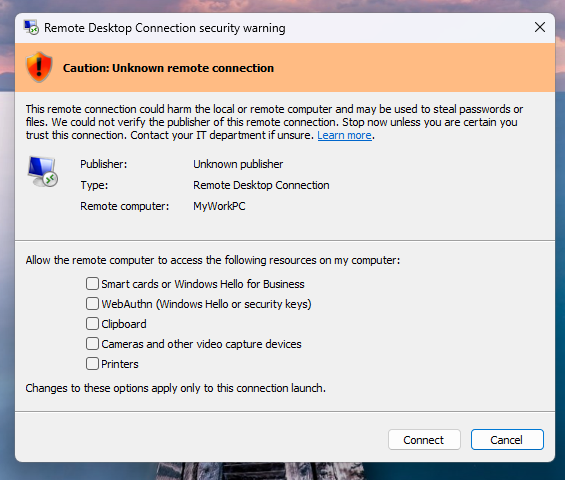
If RDP files are not digitally signed, Windows displays a “Caution: Unknown remote connection” warning, with the publisher labeled as unknown. However, if they are digitally signed, Windows will warn users to verify their legitimacy before connecting.
According to user reports, the KB5083769 security update also breaks third-party backup apps from multiple vendors on Windows 11 24H2 / 25H2 systems due to a VSS (Volume Shadow Copy Service) timeout.
AI chained four zero-days into one exploit that bypassed both renderer and OS sandboxes. A wave of new exploits is coming.
At the Autonomous Validation Summit (May 12 & 14), see how autonomous, context-rich validation finds what’s exploitable, proves controls hold, and closes the remediation loop.






























































You must be logged in to post a comment Login