Connect with us
DAPA Banner
DAPA Coin
DAPA
COIN PAYMENT ASSET
PRIVACY · BLOCKDAG · HOMOMORPHIC ENCRYPTION · RUST
ElGamal Encrypted MINE DAPA
🚫 GENESIS SOLD OUT
DAPAPAY COMING

Tech

US Navy Ship Ends Final Mission Underwater After Japanese Torpedo Strike

Published

on


Naval warships, even if they aren’t sunk in battle, don’t remain in service forever. There are several ways the United States disposes of decommissioned ships, one of which involves sinking them in the ocean. This is what recently occurred with the decades-old USS Juneau, designation LPD-10, which was decommissioned back in 2008. After being thoroughly cleaned and picked apart to minimize its environmental impact, the USS Juneau’s last act saw it take part in a Valiant Shield exercise: a multinational series of drills involving scenarios likely to unfold during a real conflict.

This particular Valiant Shield exercise took place near the Northern Mariana Islands and Guam and involved forces from the U.S., Japan, Australia, Canada, and New Zealand. The USS Juneau was sunk just off the coast of Guam. Lieutenant Commander Katie Koenig, director of the Combined Joint Information Bureau, explained to Task & Purpose that the U.S. Navy, Army, Air Force, and special operations were tasked with doing initial damage to the Juneau. The Japanese Maritime Self-Defense Force delivered the final blow with a torpedo, sending the vessel into the depths and concluding the ship-sinking exercise.

Advertisement

After years of service, the USS Juneau went out with a bang, helping to train the next generation of military personnel. It leaves behind a storied history that encompasses some of the most notable conflicts and historical moments in recent decades.

Advertisement

The history and legacy of the USS Juneau

This particular USS Juneau isn’t the first U.S. ship to bear the name. The original USS Juneau, designated CL-52, served for roughly eight months during World War II and met its end in November 1942. It was sunk by the Imperial Japanese Navy during the Battle of Guadalcanal. A second USS Juneau, CL-119, was commissioned in 1946 and later served during the Korean War as the first U.S. Navy cruiser to take part in the conflict. Ultimately, though, it was decommissioned in 1959 and sold for scrap in 1962.

From here, it didn’t take too long for this most recent USS Juneau to hit the water. It was officially commissioned in 1969, just in time for it to take part in the latter half of the Vietnam War. Decades later, it served as a command center and portable housing for cleanup crews during the Exxon Valdez Oil Spill, and also featured in Operation Desert Storm. As noted previously, the Juneau was decommissioned in 2008 and moored in the Naval Sea Systems Command Inactive Ships On-Site Maintenance Office at Pearl Harbor.

It may not rank among the most historically significant warships to ever hit the open ocean, but the third USS Juneau clearly saw a lot of action during its nearly 40 years of active service. Though it now calls the floor of the Pacific Ocean home, its military contributions aren’t likely to sink into obscurity anytime soon.

Advertisement


Source link

Advertisement
Continue Reading
Click to comment

You must be logged in to post a comment Login

Leave a Reply

Tech

The Organ That Forgot To Use Transistors

Published

on

When we think of 1960s synthesizers it’s usual to imagine instruments with vast arrays of controls and patch cables for configuring their many filters, oscillators, and other parameters. They created the templates for much of what we know today as electronic music.

In all the rush to look at full-blown synths though, it’s easy to forget their more mundane cousin, the electric organ. These instruments graced many a ’60s suburban home or church hall, and [Emma Repairs] has an interesting one. It’s a Philips Philicordia, and it’s sent us here at Hackaday down one of those rabbit holes when we should really be writing.

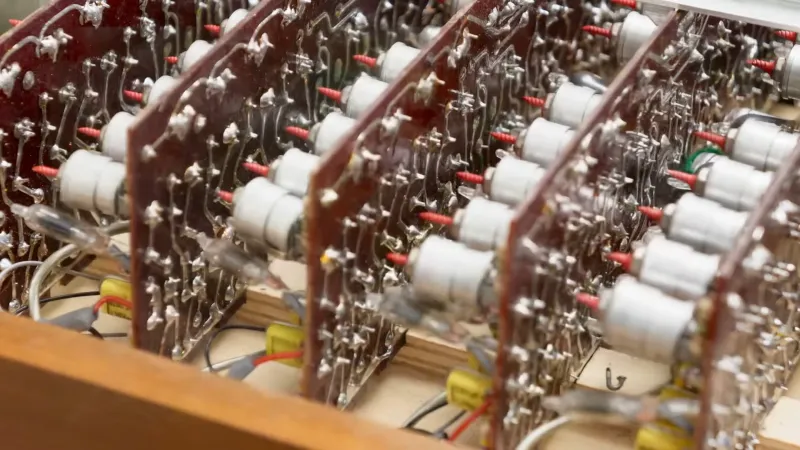
The instrument is a relatively straightforward single voice electric organ on the outside, but under the hood it’s a different matter. In an age when the transistor was revolutionizing electronic music, the folks in Eindhoven designed this one using tubes. There are a set of conventional enough tubes performing the role of amplifiers and oscillators, but the real party piece of this unit is the array of neon tube dividers. A neon bulb can be used as a switching element, and in those days when affordable digital logic chips were several years away, it made sense to use them in digital circuits.

Advertisement

The inside of the Philicordia is a feast of vintage Philips parts that will be instantly familiar to anyone who’s worked on Western European electronics of this era. The exterior design of the instrument screams understated early-1960s cool, and after she’s introduced it you can hear her playing it in the video below. Further down that rabbit hole we found that one of these instruments provided the distinctive organ sound on Chris Montez’s 1962 hit Let’s Dance, so they weren’t all uncool.

Advertisement

Source link

Continue Reading

Tech

Weave Robotics Isaac 1: a $7,999 home robot

Published

on

The robot butler has been five years away for about twenty years. Weave Robotics thinks the trick is to aim lower. Its new home robot, Isaac 1, does not walk, has no fingers, and mostly just wants to do your laundry. It also costs a fraction of its humanoid rivals.

The Y Combinator-backed startup unveiled Isaac 1 on Wednesday. The launch post has passed 13 million views. At $7,999 up front, or $449 a month, it undercuts the field by a wide margin.

A Roomba with arms

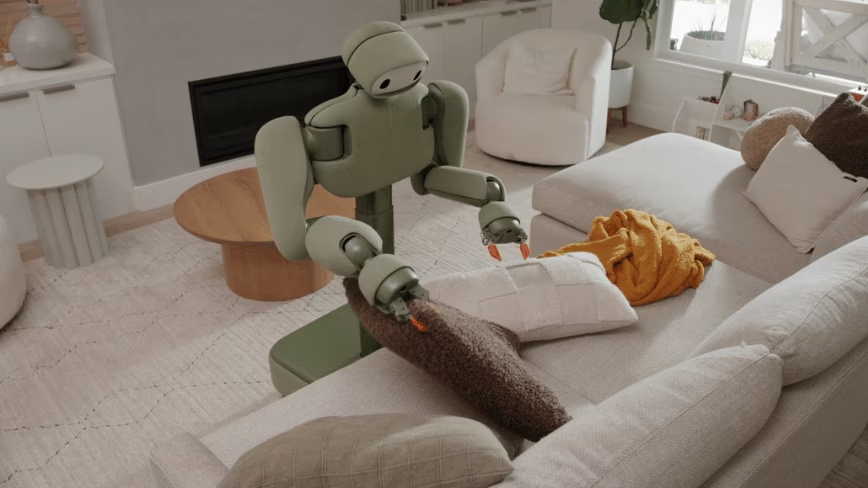
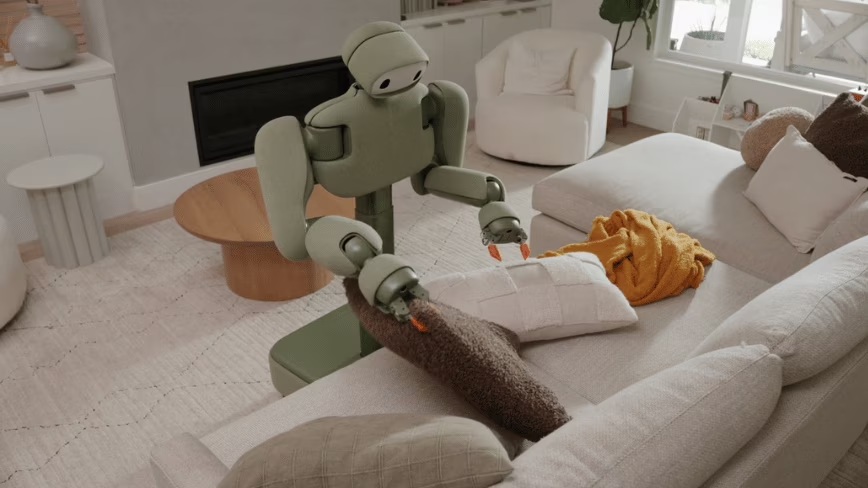
Isaac 1 is deliberately un-humanoid. It rolls on a wheeled base rather than legs, and rises from a crouch to 5ft 9in when there is work to do. It grips with two orange claws, not fingers. The soft body comes in muted colours with names like Sage and Terracotta, and it runs for about eight hours per charge, according to TechRadar.

The job list is narrow on purpose. It finds and picks up dirty clothes, folds and puts away the clean ones, makes the bed, fluffs the pillows, and tidies away shoes and toys. Notably, it does not load or run the washing machine. It works through a phone app, mostly on its own. Weave admits a human operator can take over remotely for tricky tasks.

Advertisement

Cheaper than the competition

The price is the headline. 1X’s Neo costs around $20,000. Tesla’s Optimus has no price at all yet. Bipedal rivals such as Figure and Unitree run from $12,000 to well over $20,000, because legs need pricey actuators and sensors. Weave’s wheels-and-claws approach sidesteps most of that cost.

Advertisement

The bet fits a wider argument in robotics: that purpose-built machines will beat general-purpose humanoids into the home. It is the same logic drawing billions into physical AI on both sides of the Atlantic.

The reaction online split neatly, as Business Insider noted. “Closer and closer to never doing chores again,” wrote Chris Paxton, an AI lead at Agility Robotics. The investor Jason Calacanis said it was “about to get very strange.” Others were blunter. Fintech executive Simon Taylor called it a “Roomba with arms.” One commenter simply called it “slow” and “clunky.”

The catches

There are several. Deliveries start in September, but only in California. The rest of the US waits until 2027, and Europe is not on the map at all yet. The autonomy is partial, propped up by teleoperation. There is a quieter concern too. Weave’s site says it uses personal information to improve its services, but the company would not say whether footage from inside people’s homes trains the robot. That is the unease that shadows every home robot with a camera and a data pipeline.

None of this makes Isaac 1 the machine that finally cracks the home. The promised army of domestic robots keeps slipping into next year. But by doing less, for less, Weave may have built something people will actually buy. Sometimes the winning robot is not the one that looks most like us.

Advertisement

Source link

Continue Reading

Tech

Microsoft fixes bug that removed Copilot buttons in Outlook

Published

on

Microsoft Outlook

Microsoft has fixed a known issue causing the Copilot Chat or Copilot buttons in Classic Outlook to disappear for Windows users with the Copilot Chat (Basic) license.

As the company explains in a recent support document, affected users may no longer see Copilot buttons on the side navigation and above the ribbon.

Those affected may also experience one or more of the following issues:

image
  • The Copilot button is missing from the top-right area above the ribbon.
  • The Copilot icon is missing from the left app bar or More Apps area in classic Outlook.
  • In Add Apps, Copilot may appear as an available app, but selecting Open does nothing.
  • Adding Copilot through ribbon customization may show the command as unavailable or grayed out.
  • Copilot remains available from other entry points, such as Outlook on the web or the Microsoft 365 Copilot standalone app or web experience.

Microsoft says the Outlook Team has addressed this issue with a service change on June 29, 2026, and advised those who are still unable to see the Copilot buttons in Classic Outlook to restart their email client to get the change immediately.

Affected customers are also recommended to update to the latest build by selecting File > Office Account > Update Options > Update Now.

Advertisement

Those who can’t upgrade their client to fix the bug can also work around the issue by reverting to the previous Current Channel build (16.0.20026.20168) or using the new Outlook or Outlook Web Access (OWA).

Microsoft is now also investigating a known issue that causes unexpected Outlook crashes on systems running Kaspersky Antivirus software, linked to the Kaspersky Mail Checker (mcou.dll).

Affected Outlook for Microsoft 365 users are advised to check the Application log for “Event 1000” events with the OUTLOOK.EXE faulting app name and MCOU.DLL faulting module name to confirm that this issue triggers the crashes.

“If you are experiencing this crash, please contact Kaspersky support,” the Outlook Team said.

Advertisement

In recent months, Microsoft also resolved known issues that prevented some Classic Outlook users from sending emails via Outlook.com and rendered the client unusable for users who enabled the Microsoft Teams Meeting Add-in.


article image

Security teams log 54% of successful attacks and alert on just 14%. The rest move through your environment unseen.

The Picus whitepaper shows how breach and attack simulation tests your SIEM and EDR rules so threats stop slipping by detection.

Get the whitepaper

Source link

Advertisement
Continue Reading

Tech

ARToken PhaaS exposes EvilTokens’ Microsoft 365 phishing toolkit

Published

on

EvilTokens

A new phishing-as-a-service (PhaaS) platform dubbed “ARToken” appears to operate as an affiliate of the EvilTokens phishing platform, giving researchers a glimpse into an extensive toolkit designed to compromise Microsoft 365.

Cisco Talos researchers discovered the platform while investigating phishing infrastructure used in an incident response engagement and identified a React-based management panel called “ARToken Panel” that exposed more than 80 API endpoints.

Reverse engineering the client-side JavaScript code revealed previously undocumented capabilities that extend well beyond what you would normally find in a phishing platform.

image

The platform allows attackers to steal Microsoft 365 authentication tokens, establish persistent access using Primary Refresh Tokens (PRTs), and access Outlook mailboxes, SharePoint sites, and OneDrive files. It also includes tools to deploy phishing infrastructure through Cloudflare Workers and automate many aspects of business email compromise (BEC) operations.

According to Talos’ report, multiple technical similarities strongly suggest ARToken is tied to the EvilTokens phishing platform discovered earlier this year.

Advertisement

The researchers found the ARToken phishing kit uses the same API calls for Microsoft’s device code authentication flow, including an identical `POST /api/device/start` request previously associated with EvilTokens attacks.

Talos also identified the same primary refresh token API endpoints documented in Sekoia’s EvilTokens research, including the endpoints for setting up, refreshing, renewing, and reacquiring Primary Refresh Tokens, even after they expire.

The platform also uses a similar Cloudflare Workers deployment model and operates as a multi-tenant phishing service, in which affiliates manage their own campaigns through dedicated workspaces.

EvilTokens focuses heavily on exploiting Microsoft’s OAuth 2.0 Device Authorization Grant authentication workflow to breach accounts, a technique known as device code phishing.

Advertisement

Victims are tricked into entering a legitimate Microsoft-issued device code on Microsoft’s official device login page, causing Microsoft to issue authentication tokens directly to the attacker instead of the victim. Because the victim authenticates through Microsoft’s legitimate infrastructure, the attacks can successfully bypass multi-factor authentication protections.

Microsoft's device code authentication login form
Microsoft’s device code authentication login form

Sekoia first documented the EvilTokens platform in March, describing it as a commercial phishing service sold to cybercriminals for a $1,500 setup fee and a $500 monthly subscription.

In a follow-up report, Sekoia found an AI-driven workflow that ingests harvested mailboxes to score financial exposure, then uses AI and LLMs to draft BEC campaigns and translate stolen emails for operators working in other languages. 

Microsoft later warned about the platform as device code phishing attacks surged dramatically, and numerous threat actors adopted the technique due to its high success rate against Microsoft 365 users.

What sets EvilTokens apart from other device code phishing kits is its use of AI to automate fraud.

Advertisement

Inside an EvilTokens affiliate platform

Talos’ report provides a detailed overview of the functionality available to EvilTokens affiliates following a successful account compromise.

Once a victim completes the device code authentication process, ARToken allows operators to refresh stolen tokens and elevate access to persistent primary refresh tokens (PRT).

The researchers also found tools for conducting business email compromise attacks, including full Outlook mailbox access, the ability to send emails as compromised users, the ability to create inbox rules that automatically forward or hide messages, the ability to monitor multiple mailboxes for keywords simultaneously, and the ability to download email attachments.

Attackers can also browse, upload, download, and manage files stored in victims’ SharePoint sites and OneDrive accounts, enabling data theft and the delivery of malware for additional attacks.

Advertisement

ARToken also revealed several features not identified in previous EvilTokens research.

Threat actors can monitor multiple hijacked mailboxes simultaneously for specific keywords, load tokens stolen from other sources, and share access to compromised accounts.

They can also quietly set up inbox rules that hide or delete messages to cover their tracks, and use phishing pages that automatically update their content based on the victim’s location.

ARToken phishing emails
Source: Cisco Talos

Talos also analyzed phishing emails associated with the platform, finding that attackers impersonated legitimate vendors in invoice-themed lures targeting accounts payable employees.

Rather than linking to an obviously attacker-controlled site, the emails display what appears to be a legitimate SharePoint address while actually directing victims to a look-alike tenant hosted within the attacker’s Microsoft 365 workspace.

Advertisement

In April, Push Security reported that device code phishing attacks had surged 37-fold over the past year, with at least 11 phishing kits now offering this technique to cybercriminals.


For organizations looking to defend against modern Microsoft 365 phishing attacks, business email compromise (BEC), and account takeovers, BleepingComputer is hosting a webinar with Abnormal titled Stop chasing alerts: Automating email security with behavioral AI.

The webinar will explore how attackers use techniques such as device code phishing to bypass MFA and compromise accounts, why these attacks evade traditional email security controls, and how behavioral AI can help security teams automate the detection, investigation, and remediation of phishing and compromised account activity.


article image

Security teams log 54% of successful attacks and alert on just 14%. The rest move through your environment unseen.

The Picus whitepaper shows how breach and attack simulation tests your SIEM and EDR rules so threats stop slipping by detection.

Advertisement

Get the whitepaper

Source link

Continue Reading

Tech

Jersey Mike’s IPO illustrates how bad the AI hype has become

Published

on

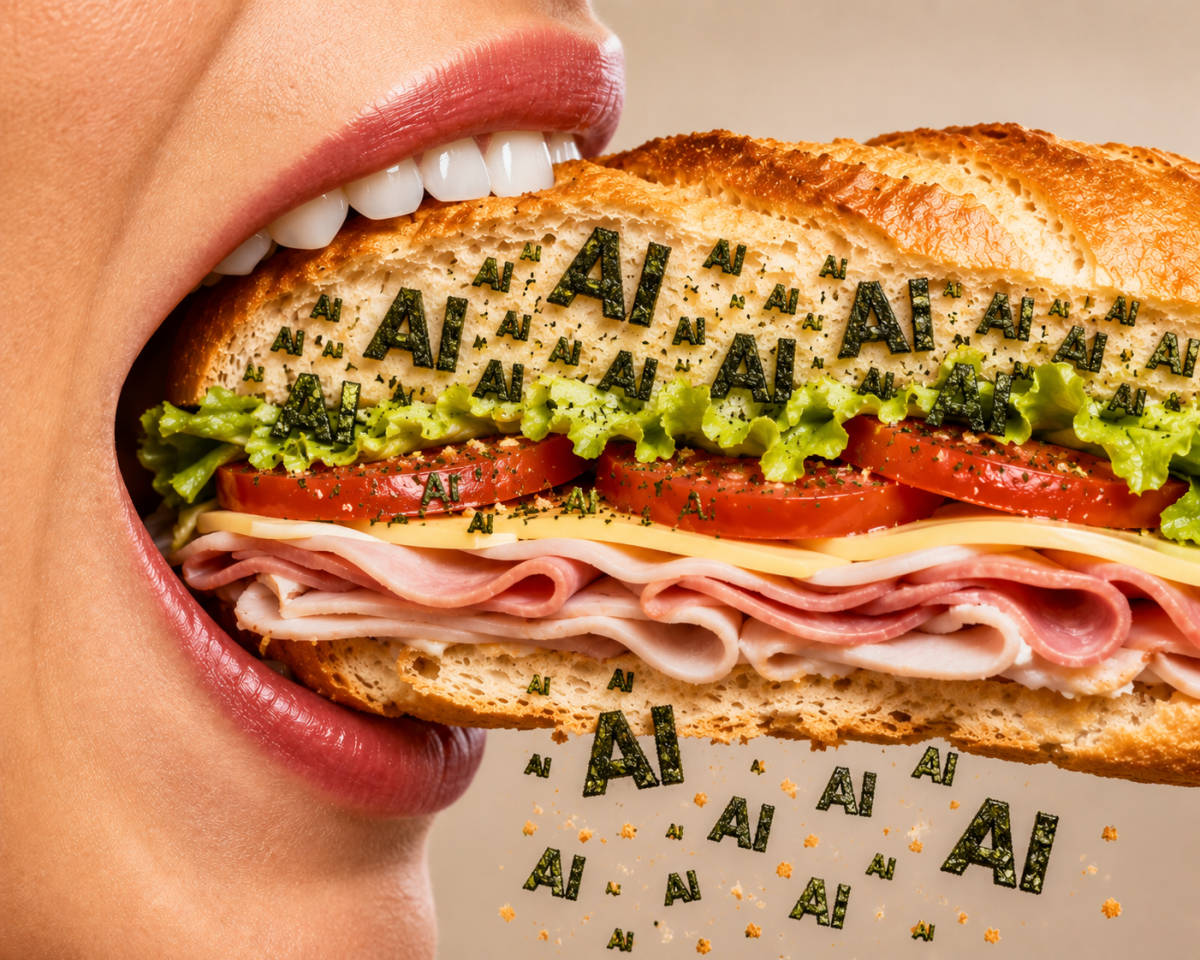
I can’t tell the exact tipping point from realistic excitement over a new technology, to hype, to aww-come-on — but I’m pretty sure when a sandwich shop with Danny DeVito as its public face talks about AI in its IPO documents, we must be getting close.

So it is with Jersey Mike’s.

Because of investor thirst for all things AI these days, I understand why tech companies feel the need to sprinkle AI dust all over their pitches. This is as true for non-AI startups raising venture capital as it is for Bending Spoons’ public debut, a company in the business of buying aging, “not-AI” tech companies to rehabilitate.

Just for kicks, I took a look at Jersey Mike’s IPO documents to see how far this compulsion may go. Surely a sandwich shop would have no need to mention AI in its S-1. But lo and behold!

Advertisement

The term artificial intelligence and its acronym “AI” were mentioned 22 times. In this case, the company can’t claim to be selling AI software. It sells submarine sandwiches. AI products are what investors are really hungering for (terrible pun intended).

Still, it found a way to mention AI in its investor-risk warnings. That may be even more funny. It doesn’t explain what it’s using AI for that could be dangerous to investors, beyond a hand-wave of a phrase, “We are beginning to use AI Technologies in our business.”

In all fairness, as a company that operates franchisees, it does rely on software (mentioned 52 times) and data (112 mentions), as all businesses do. Its AI risk warning was boilerplate copy, perhaps even necessary, as such disasters have already happened to other food businesses, like the half-baked AI inventory tool that Starbucks rolled out, which couldn’t count and was recently scrapped.

Still, I’m going to go out on a limb here and predict that the risk of an AI disaster for a company that produces real-life sandwiches, not AI slop, is about the same as, say, a franchise shop getting hit by lightning. That actually happened, by the way, to a shop in Texas in 2021. Yet weather was only mentioned five times in the S-1. And lightning? Not once.

Advertisement

When you purchase through links in our articles, we may earn a small commission. This doesn’t affect our editorial independence.

Source link

Continue Reading

Tech

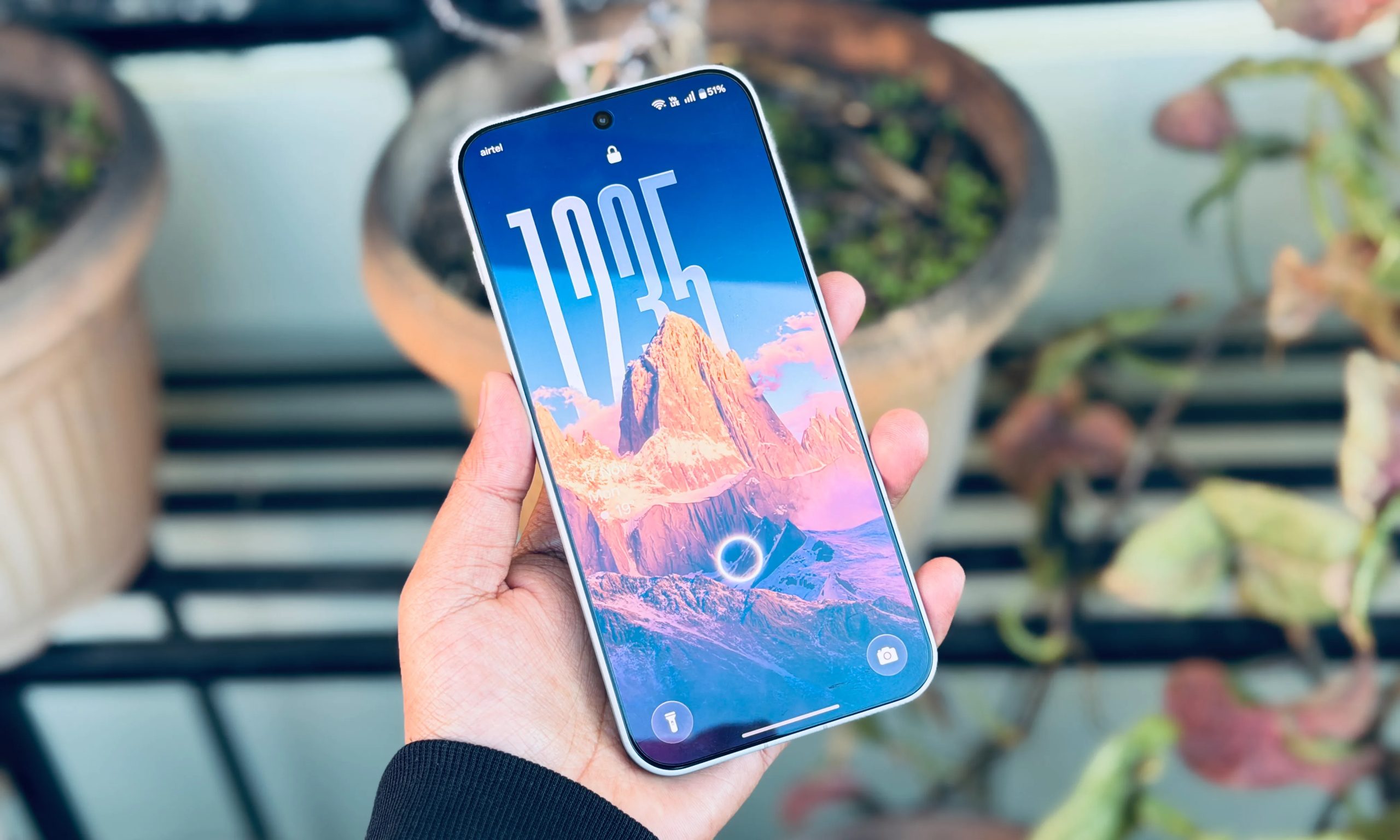
OxygenOS made OnePlus phones special. Now, it might go away forever

Published

on

If you bought a OnePlus because of OxygenOS, for the relatively clean, fast, and actually-useful Android experience, your phone may be the last one to get it. 

According to a report from the Indian outlet Smartprix, OxygenOS and Realme UI are both reportedly being phased out. If accurate, everything would move to ColorOS, the skin atop Android on Oppo smartphones, globally, across all three brands.

So what exactly is happening here?

Oppo, its official subsidiary OnePlus, and Realme are all brands that operate under the same Chinese conglomerate: BBK Electronics. Until recently, they’ve operated as independent brands with different software skins. That arrangement seems to be coming to an end.

Maintaining three Android skins requires a substantial investment, and Oppo might want to cut down on it. The consolidation started quietly in 2021, when OnePlus co-founder Pete Lau announced a software merger between OnePlus and Oppo.

OnePlus retired HydrogenOS in China years ago, in favor of ColorOS. Only the brand’s global devices ship with OxygenOS. Realme UI was built on ColorOS under the hood anyway. 

Advertisement

“OxygenOS and Realme UI are being discontinued on future devices in favor of ColorOS globally,” the outlet mentions. However, it doesn’t mention any existing OnePlus devices and whether they’ll be transitioned to ColorOS as well.

Has the consolidation already begun?

Earlier this year, the brand reportedly exited the US and European markets, with carrier partnerships in North America already unwinding. The brand’s retail presence has also shrunk significantly, with only the OnePlus 15 and the OnePlus 15R being sold through the official website. 

Oppo, which has been absorbing OnePlus operationally, has reportedly already begun canceling OnePlus’s 2026 global product lineup. Sharing software and hardware platforms made the two brands structurally inseparable. 

What’s happening now could be among the final steps. OxygenOS was genuinely beloved among enthusiasts, especially among the brand’s customers. The discontinuation of OxygenOS would mark the retirement of one of the founding pillars on which OnePlus was built, if and when the brand officially announces it.

Advertisement

Source link

Continue Reading

Tech

Sony Ends New PlayStation Game Discs in 2028, But Blu-ray Fans Can Exhale For Now

Published

on

Sony has confirmed that physical game discs for all new PlayStation releases will be discontinued starting in January 2028. New titles will be sold through the PlayStation Store and at retailers in digital formats only. Existing games, and titles already scheduled to arrive on disc before that deadline, are not affected.

Everyone currently having a panic attack should probably go outside, unless you live somewhere brutally hot, like New Jersey or Texas. In that case, stay indoors, pour something cold, and enjoy touching your game discs while you still can. Mom will keep your Pizza Hut leftovers in the fridge.

That is a genuine blow to physical game ownership. It is also not Sony announcing the end of Blu-ray movies, 4K UHD Blu-ray, or every disc drive currently attached to a PlayStation 5. Those are separate issues, and mashing them together is how the internet ends up shouting “Blu-ray is dead” every six months.

Related Reading: Sony’s 2025 decision to stop making blank recordable Blu-ray media

Advertisement

What Sony Actually Announced

The policy is blunt: after January 2028, new games released for PlayStation consoles will not be manufactured on physical discs. Sony says those games will remain available through the PlayStation Store and at retailers, but only in digital formats. The company has not explained what a retailer based digital purchase will look like, whether that means download code cards, a printed receipt with a redemption code, or something else entirely.

On the plus side, you will no longer have to drag that filthy concert chair out of the garage and line up outside GameStop at 4 a.m. in the rain like a putz.

Sony PS5

Sony also has not said whether physical reprints of older games will continue after 2028, whether current PS5 disc drives will remain part of future console hardware, or what this means for preservation efforts built around physical releases. Those details matter, but they are not in this announcement.

For now, the immediate takeaway is simple: anyone who enjoys buying a game, lending it to a friend, trading it in, reselling it, or pulling it off a shelf years later will lose that option for new PlayStation releases from 2028 onward. Physical discs were never a perfect preservation solution; plenty of games require patches, online services, or downloaded content. But a disc still gives consumers a degree of independence from a storefront, account, and licensing arrangement. That distinction is about to become far more important.

Advertisement

What This Means in North America, the UK, and Elsewhere

The January 2028 policy applies to all new PlayStation console releases, so U.S., Canadian, and UK consumers face the same end point: no more new PlayStation game discs.

For North American buyers, the loss of physical media means the used-game market becomes less relevant for new titles. There will be no disc to trade at GameStop, no copy to lend to a friend, and no chance of finding a discounted used version years later. Digital sales can be convenient, but convenience has a habit of becoming compulsory once the alternative disappears.

The UK has an additional reason to be cautious about the difference between buying content and retaining access to it. Sony’s UK PlayStation Store has warned that StudioCanal films previously purchased through the service will be removed from customer libraries beginning September 1, 2026, because of licensing agreements. That notice concerns video, not PlayStation games, and it does not mean Sony plans to remove purchased games. It is, however, a fairly sharp reminder that a digital transaction is not the same thing as possessing a disc on a shelf.

Advertisement. Scroll to continue reading.
Advertisement

Sony is also closing legacy PlayStation Stores on PS3 and PS Vita. Mexico, Honduras, and Nicaragua lose PS3 store access beginning in August 2026; additional Latin American and Middle Eastern markets follow later in the year; all remaining regions lose PS3 and PS Vita store purchases in July 2027. Sony says previously purchased content will remain downloadable for the “foreseeable future,” but no new purchases will be possible after the shutdowns.

That is a separate decision from the 2028 disc cutoff, but the timing is impossible to ignore. In regions where broadband is expensive, inconsistent, capped, or simply slow, a mandatory digital future means that download speeds, storage capacity, and account access become part of the cost of buying a game. The plastic box may be going away, but the 150GB download is not suddenly getting smaller out of respect for your data plan.

Why Sony Is Doing This

Sony says the change reflects consumer preferences shifting away from physical discs. Its financial results show that digital downloads accounted for the overwhelming majority of full-game software unit sales across PS4 and PS5 in fiscal 2025, reaching 85% in the fourth quarter.

That does not make physical discs irrelevant to the remaining buyers, particularly collectors, parents, rural players, bargain hunters, and anyone who dislikes the idea of every purchase being tied to one account ecosystem. But it does explain Sony’s calculation. Manufacturing, shipping, stocking, and handling discs costs money. Digital delivery gives Sony and publishers more control over distribution, pricing, and the relationship with the customer. Nobody should pretend this is a charity drive for the environment.

Advertisement

No, Sony Is Not Ending Blu-ray Movies

Sony’s July 2026 PlayStation announcement is not a sequel to its 2025 decision to stop making blank recordable Blu-ray media.

Last year, Sony ended production of recordable Blu-ray Discs, MiniDisc recording media, MD Data discs, and MiniDV cassettes. That decision primarily concerned blank media used for recording and archiving, especially in Japan, where Blu-ray recorders remained part of the consumer market. It did not end the production of pre-recorded Blu-ray or 4K UHD movie discs sold by studios and boutique labels.

The distinction is important. Blank BD-R media is not how commercial movie discs are made. Retail Blu-ray and 4K UHD titles are pressed through industrial replication processes, so Sony’s exit from recordable media did not pull the plug on Criterion, Arrow, Kino Lorber, Sony Pictures, or the wider physical-video business.

Sony also continues to market PS5 hardware with disc playback. Its current PS5 Disc Edition plays PS5 and PS4 game discs, while the optional drive for the PS5 Digital Edition supports 4K Ultra HD Blu-ray, Blu-ray, and DVD playback. Nothing in the new PlayStation game-disc policy changes that today.

Advertisement

Blu-ray and 4K UHD fans should therefore exhale, but perhaps not fall asleep at the wheel. The long-term physical-video market remains fragile, and retailers have already reduced shelf space dramatically. Still, Sony has not announced the end of movie discs. The company has announced the end of new PlayStation game discs in 2028. Those are related cultural trends, but they are not the same corporate decision.

The Bottom Line

Sony’s 2028 move is one of the most consequential physical-media decisions in gaming since consoles first began offering digital storefronts. The company is not invalidating existing PlayStation discs, and it is not ending Blu-ray movies or 4K UHD Blu-ray. But it is removing the physical option from every new PlayStation release after January 2028.

For players who want a shelf, a used copy, a trade-in, or the ability to hand a game to someone else without asking a server for permission, this is not theoretical. The all-digital future Sony is describing now has a date on the calendar.

You were warned.

Advertisement
Advertisement. Scroll to continue reading.

For more information: https://blog.playstation.com

Source link

Advertisement
Continue Reading

Tech

Best Bone Conduction Headphones (2026): Shokz, Suunto, Mojawa

Published

on

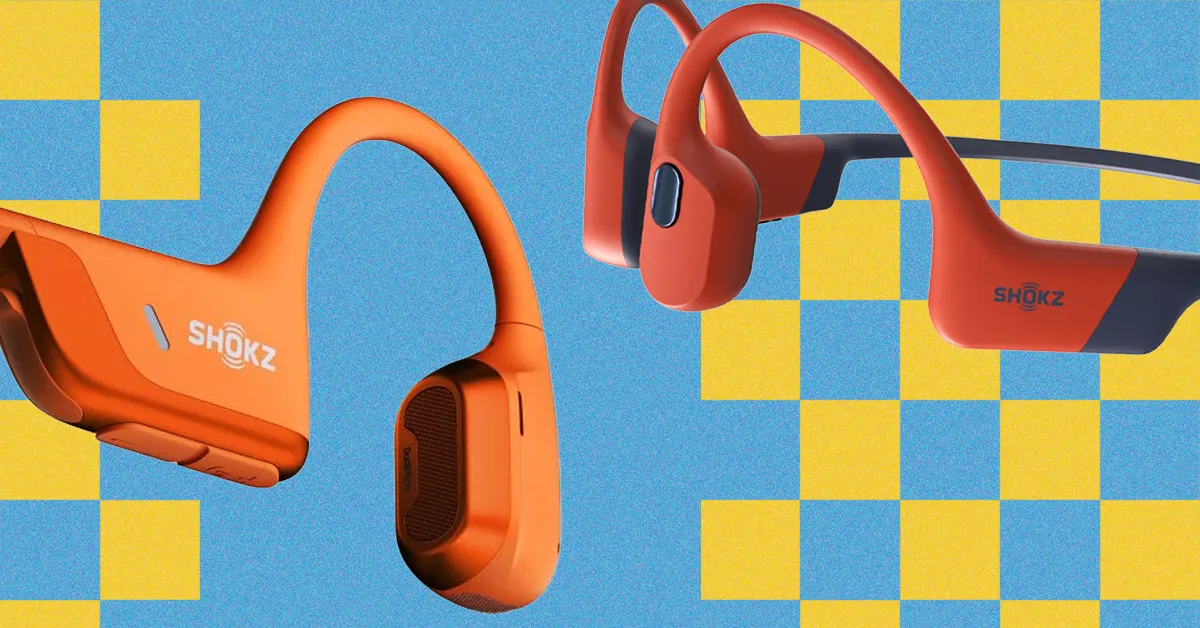
Shokz has long been the leader in bone conduction headphones, despite a minor misstep with the first-generation OpenSwim, which lacked Bluetooth streaming. The OpenSwim Pro rectifies this, making it an excellent choice for far more than just swimming.

Whether you stream via Bluetooth or use the built-in 32-GB music player, the OpenSwim Pro delivers impressive open-ear audio. It offers surprising bass and warmth, along with the clarity needed for audiobooks and phone calls.

With standard and swimming EQ modes, you can easily tailor the sound for land or water. The IP68 waterproof rating ensures strong protection against sweat and water, while the silicone and titanium neckband offers both comfort and a secure fit.

The headphones feature easy-to-reach physical controls and a battery that lasts up to nine hours when streaming via Bluetooth, or six hours when using the built-in music player. While the OpenSwim Pro may not be Shokz’s flagship model, it strikes the best balance of sound, design, and performance, placing it in a coveted position at the top of my list.

Advertisement
Specs
Headphone design Neckband
Weight 27.3 g/0.96 oz
Bluetooth version 5.4
Microphones 2
Battery life 6-9 hours
Music player storage 32 GB
File formats MP3, M4A, WAV, APE, FLAC
Waterproof rating IP68
Charging type Proprietary cable

Source link

Continue Reading

Tech

Sophie Adenot Captures an Aurora Like No Other from Orbit, Showcasing Shimmering Ribbons That Lit the Station from Within

Published

on

ESA Sophie Adenot Aurora ISS
Photo credit: Sophie Adenot
French astronaut Sophie Adenot has shared images and video from one of the strongest aurora displays she has seen during her time aboard the International Space Station. The capture dates to day 127 of her εpsilon mission, logged as orbit 1968, and she called it the most spectacular one yet.


The photographs from Adenot’s camera reveal those magnificent green bands of light twisting and flowing overhead, which are a sight to behold from 400 kilometers above ground. Some shots show the display reaching across the entire planet, while others show a reddish glow higher up in the sky, adding another layer of depth to the image. The robotic arm and station components are also visible, emphasizing how massive this display is.

Sale


Gskyer Telescope, 70mm Aperture 400mm AZ Mount Astronomical Refracting Telescope for Kids Beginners…
  • Superior Optics: 400mm(f/5.7) focal length and 70mm aperture, fully coated optics glass lens with high transmission coatings creates stunning images…
  • Magnification: Come with two replaceable eyepieces and one 3x Barlow lens.3x Barlow lens trebles the magnifying power of each eyepiece. 5×24 finder…
  • Wireless Remote: This refractor telescope includes one smart phone adapter and one Wireless camera remote to explore the nature of the world easily…

Adenot expressed surprise on social media, saying how alive the aurora appeared, dancing and shimmering immediately beneath the station and as far as the eye could see. The show was so bright that it began to cast green shadows within the station itself, a true spectacle she couldn’t capture with her typical settings, she added, and for her, this display was unique, unlike anything else they’d seen so far on this mission. Even though the crew had already been astounded by some of the other displays they’d seen so far on the mission, this one pushed it to a new level.

Advertisement

ESA Sophie Adenot Aurora ISS
Excitement spread fast among the crew as everyone rushed to the windows, each seeking to have the best view point while the lights continued to show outside. A timelapse video she later posted reveals the motion in a manner that static images cannot, with the green ribbons changing and pulsing up and down the frame in a constant wave. Each photo catches a single moment, but that type of video continues indefinitely, demonstrating the continual change that makes events like this so exciting to watch from above.

ESA Sophie Adenot Aurora ISS
For Adenot, a helicopter test pilot in the French Air and Space Forces, all of her experience in fast-changing environments has given her a keen eye for detail when it comes to things that change extremely quickly; this is evident in the way she composes and describes the shots. Furthermore, she is aware that her recordings will be useful to look at in a year’s time, and they also correspond to far larger patterns of solar activity. When charged particles from the sun contact with gasses higher in the atmosphere, they can produce stunning displays like this one, which can be seen from the station all at once.
[Source]

Source link

Advertisement
Continue Reading

Tech

Siri AI’s position on iPhone and Mac will make it a winner

Published

on

Apple is doing it again, it is coming late to the party. But it will eventually dominate AI because of how it thinks about users and about use cases where rivals consider only technical issues.

Even when testing the betas of Siri AI on the same or similar devices, everyone at AppleInsider is having different experiences. For instance, I found that in the first developer beta on both the Mac and the iPhone, Siri AI could be staggeringly irritating and sometimes no better than the old Siri. With the third developer beta of macOS Golden Gate, Siri AI would sometimes just abandon any request I make of it, but was always fine for everyone else.

Across all of the betas, though, we are all finding that there are things Siri AI can do that are exceptional, and better than its rivals. Those irritations will surely be fixed before the public release, too.

Only, it almost doesn’t matter. As long as Apple can at least cut down on the aggravations such as really anything you ask via CarPlay, Siri AI is certain to beat everything else. Apple will go from being behind on AI, to absolutely in front.

Advertisement

It’s just that rather than this being because of the technical quality of Apple Intelligence, it’s because of how Apple thinks about users, and because of how, yet again, Apple owns the whole stack. Apple designs and controls the hardware and the software, and in this case it means specifically that Siri AI is physically better positioned than any other AI app.

Over and over, Apple has come late to new technologies, yet then instantly taken over as the leading provider. It has so instantly demonstrated better ways of doing things that all its rivals with all of their benefit of coming first, have subsequently changed their plans to copy Apple.

You’ve seen that with Wi-Fi adoption, with the death of the floppy disk, the rise of USB, and the death of the headphone jack on phones. Apple’s launching of Siri AI is exactly like this, with the one exception that this time, rivals cannot copy it. Or at least, they cannot copy it on the iPhone because no alternative can be as completely embedded in iOS.

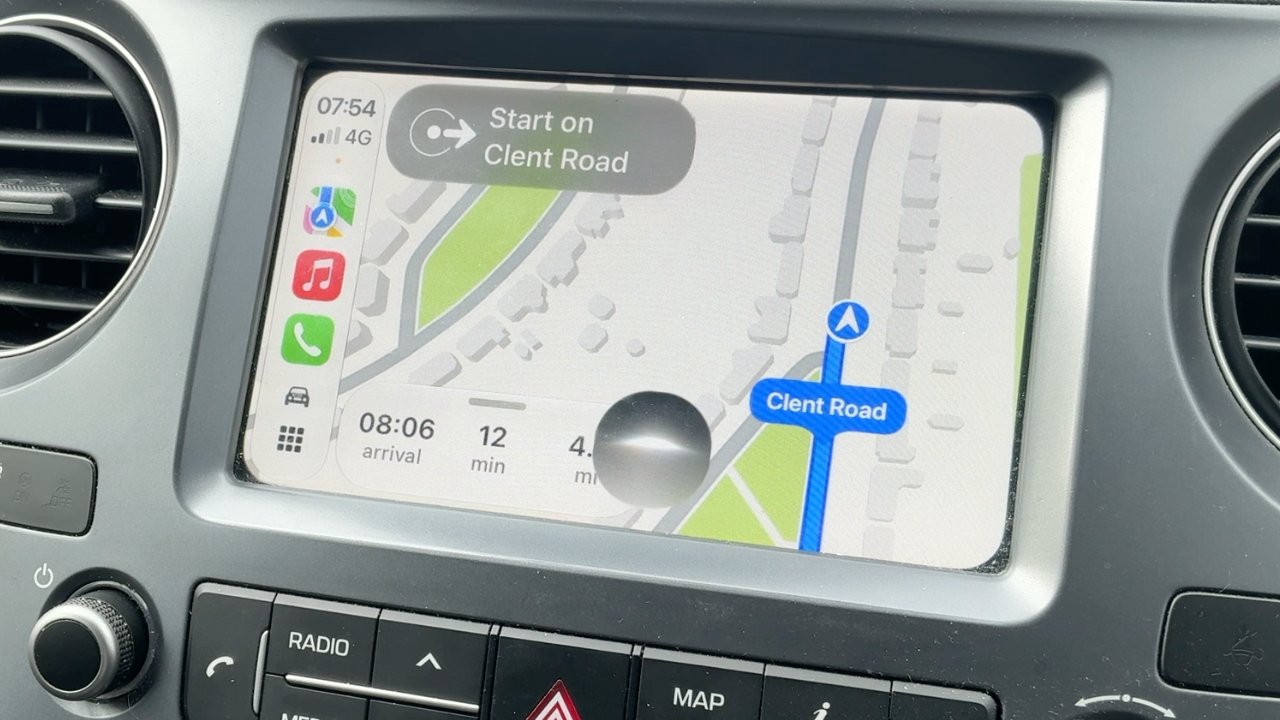
Car dashboard screen displaying Apple CarPlay navigation map, showing current route on Clent Road with arrival time, distance, and nearby streets, surrounded by physical control buttons and air vents

Siri AI on CarPlay is not in beta, it’s in Bane-of-My-Life.

Advertisement

It’s true that the more you know and use AI chatbots, the faster you use them and the quick shortcuts you can find to enter prompts. But for most people, most of the time, if you want to use an AI service, you have to:

  • Know it exists
  • Know it can do what you want
  • Find it
  • Install it
  • Launch it every time you want something

Compare that to the new Siri AI on iPhone:

  • Swipe down the way you always have for Spotlight

There’s still the issue that a user has to think to try something, but Siri AI is part of the familiar Spotlight. And Spotlight will prompt you by trying to auto-complete your searches, showing you a range of what can be done.

Although I wish I could remember what I was searching Spotlight for when it tried to autocomplete “Erase all content and settings” for me.

Open laptop displaying a macOS desktop with a centered floating search-style menu showing options like Erase all content and settings, over a minimalist beige and gray abstract background

This is me trying to recreate something, but Siri AI/Spotlight really did offer “erase all content and settings” as a suggestion when I was searching for something else.

But the thing is that Siri AI is now going to be just a swipe away for every iPhone user, and moreover it’s a swipe that every user already knows to do.

Advertisement

Siri AI is therefore close to omnipresent and it works because Apple has expressly thought about how users might use it. Compare that to Microsoft, which has also made AI a deep part of its OS, but instead of being convenient and useful, its pushing of Copilot antagonizes users.

Then Apple, too, has the advantage that not only can people speak to Siri AI, they will do it in precisely the same way they’ve already learned to with “Hey, Siri,” starting with iOS 8 in 2014. Or then just “Siri,” from iOS 17 in 2023.

So every iPhone user already knows how to use Siri AI, and the only learning curve is about discovering what it can and cannot do.

Open laptop displaying a macOS-style welcome screen with a search or ask bar, keyboard shortcut tips, and a blue Continue button against a soft abstract beige background

One improvement we’ve seen in the beta releases is that Spotlight now always prompts you with “Search or Ask,” letting you know it’s more than a searching tool.

Advertisement

It’s the same for the iPad, but surprisingly it is now also the case that Siri AI is going to be used, and useful, on the Mac. Apple talks a good game about sharing the best features across all of its platforms, but that hasn’t really been the case with Siri, until now.

Whether or not your Mac has a microphone, you’ve at least long been able to tap the Command key twice and call up “Type to Siri.” But you’d always type your search, or your prompt, and then have to wait.

Then it might respond, or more recently it might offer to pass your request on to ChatGPT, and you’d wait again. It’s not like this was slow and it’s not even as if it is any faster on the iPhone, but it was slow enough and disruptive enough that it just felt far less useful on a Mac.

Open MacBook laptop displaying Finder window with several files in a folder highlighted in blue selection, toolbar visible at top, set against a plain white background

This was a real issue I had and Siri AI sorted it. Select a set of documents, right click and you get an Ask Siri box that you can pop a question into.

Advertisement

That’s because while it changed over the years, in its most recent incarnation before Siri AI, when you called up Siri on a Mac, it overlaid a corner of the screen rather than filling it. That made you expect to be able to continue working. Not while you were typing the prompt, of course, but while Siri was acting on your search or query, or perhaps even as you spoke your command into it.

Instead, no. Take your hands off the keyboard, there was no way to continue working on anything while you were using Siri.

Plus speaking of the keyboard, surely the only way anyone ever found Type to Siri was if they accidentally drummed their fingers on the Command key. I’ve definitely activated it more times by accident than I ever did intentionally.

So the keyboard shortcut was little known, and Mac mini and Mac Studio owners don’t necessarily have a microphone by which to invoke Siri vocally. Siri was on the Mac, but it wasn’t for the Mac.

Advertisement

Or at least, that used to be the case.

Putting Siri AI into Spotlight was a genius move

It’s great that swiping down on an iPhone to get Spotlight now gives you Siri AI. Spotlight used to need a certain swipe down the middle from somewhere near the top of the screen, but not actually at the top.

Then actually swiping down from the center at the top of the iPhone screen used to bring up Control Center. If that’s how you were used to doing it, this is a change you’ll take time to get used to.

But for whatever reason, I’ve always got Control Center by swiping down from the top right of the iPhone screen, so I’m fine. That makes me wonder how I ever found Siri AI in Spotlight, but it also makes me suspect that Apple has done this because most people swipe from the center.

Advertisement

The result, though, is the same, which is that you are presented with a familiar Spotlight search which also interprets what you type into there and sends it to Siri AI.

On the Mac, those three people who had found and liked pressing Command twice to call up Siri, can still do exactly that, although it now launches Spotlight instead of a separate glowing Siri dialog. For the rest of us, the familiar Spotlight keystroke of Command-Space brings up Spotlight, which now opens with a bar that says “Search or Ask.”

I use Command-Space to launch Alfred 5, a Spotlight alternative, but I’ve come to like the new Spotlight/Siri AI so much that I’ve given it a keystroke of Option-Command-Space. To set a keystroke, go to Settings, Keyboard, click Keyboard Shortcuts, then go into the Spotlight section and change what’s there to whatever you prefer.

If you listen to the AppleInsider podcast, you’ll have heard me vacillate between how great and how terrible the new Siri AI is. Almost everything great it has done for me, it has done on the Mac, and it is transformative.

Advertisement

The benefits of Siri AI

I just signed a book contract and naturally part of it is that I will deliver one manuscript at the end. But because of back and forth discussing the topic, I’ve ended up with multiple sample chapters and needed to compile them into one Pages document.

Open laptop displaying a dark chat window showing concert ticket details for Dar Williams at The Hive Shrewsbury, with a sleek metallic keyboard and abstract beige background on screen

If it’s on your iPhone, Siri AI can find it. Usually. It’s churlish to point out that it sometimes fails over what appear to be obvious elements, such as recognizing that it actually does have your home address, because overall it’s spectacularly useful.

Only, no matter what I did, the word count for that one Pages document was something like 3,000 words short of the total of all the separate chapters. I can’t tell you how often I started over, opening versions of chapters and copying and pasting, but eventually I did this:

  • Selected all of the chapters in the Finder
  • Right-clicked and chose “Ask Siri”
  • Asked it to compare the selection to a document I named
  • Asked it to tell me what was missing

And it did it. It actually did it stunningly quickly, coming back in a flash with the fact that I’d somehow missed out two whole sections from certain of the chapters. I pasted those sections into the new document and am now somehow 1,000 words over, but I’m okay with that.

Or on a totally different book project, I had to report to the publisher that a grant we’d applied for hadn’t worked out. I wanted to offer an alternative we could do, but it meant my mentioning two particular people who’d been sources on the book and I totally blanked.

Advertisement

Give me a break, it was five in the morning and I really liked both of these people, I just could not remember my own name, let alone theirs. Siri AI told me the answer.

It took a couple of goes, asking about books and sources, but it told me their names and I got to say aloud, oh, yes, of course.

All of this was done at my Mac, where I would never have used Siri before. Using my iPhone, and specifically swiping down so I could type a prompt, I’ve had very good results with map directions.

Shortly I’m going to be driving some people to a thing and it’s a long enough trip that they say they want to stop for lunch partway. They gave me three suggestions and right away Siri AI said, well, that first one is permanently closed so you can forget going there.

Advertisement
Open silver laptop displaying a macOS desktop with a messaging or notes app centered, showing a conversation and map, against a simple gradient background with minimal desktop icons

You can go back to previous searches through the new Siri app on Mac, iPhone and iPad.

I asked it which was the better of the other two and it successfully summarized the two venues based on price and types of food offered. Then I picked one and asked how much time it would add to the drive if we went off the route to reach this place.

All quick, all exactly the kind of natural conversation that Apple promises we can have with Siri AI, and all of it working well.

Except all of it was also done by typing. For some reason, it’s when I speak to Siri AI that it goes so wrong as to be appallingly bad.

Advertisement

Siri AI frustrations

Back in the day, I could be listening to some music as I drive and just ask Siri to add the current track to a certain playlist. Or ask it to play a certain playlist.

They were good times.

Then Apple broke Siri and left it broken for two years. During that time, if you asked anything to do with a playlist, it said it couldn’t find it. Unless you asked again, immediately, in which case very often it would find it and do what you wanted.

With Siri AI, forget anything to do with Apple Music via CarPlay. If I ask for a playlist I’ve called Discoveries, it will play the Apple Music Discovery Station instead, which is not unreasonable.

Advertisement

But if I ask it to play the Heavy Rotation playlist, another one that Apple itself curates, it will almost always play a song called “Heavy Rotation” by a band called Upgrade.

Curiously, if I do this on the Mac, if I type Apple Music commands into Spotlight/Siri AI, it works. It takes a surprisingly long time, but it works.

As I’ve said, mapping things work when I type them too. But I have done rash things like saying aloud, “Siri, take me home via Tim’s house,” and it’s said no.

Or rather, it’s said it doesn’t know where my home is. Ask it why it doesn’t know this and it says the detail is not on my Contact card, even though it is.

Advertisement

Once I asked for directions somewhere and it was so confident that it actually started the Apple Maps route. When I stopped it, pointing out that it had got the wrong place, it apologized, and showed me on screen a one-paragraph biography of a band.

Explain that to me. Because Siri AI couldn’t: it actually then denied having shown me whoever this was.

I wish now that I hadn’t swiped up so quickly and, frankly, angrily, that I didn’t stop to read that bio. I wonder if it were for the band Upgrade. I am single-handedly responsible for their streaming earnings going up.

I’m not kidding about it making me angry. That Apple broke something Siri could do was poor of them, and that they left it broken for years is inexcusable.

Advertisement

But to then launch its improvement and have it still fail at the same things all the time, yes, it warrants the odd off-color response. “I don’t know what to say to that,” Siri has replied to me.

I have some suggestions.

Siri AI still wins

It took me a while to connect the dots and see that, wildly, my Mac is now the best Siri tool. Or rather, that typing to Siri is now exceptionally useful.

Perhaps it’s my British accent, since the betas are set for US English. Certainly, or at least surely, or maybe only probably, all of the problems will be resolved before Siri AI is released publicly.

Advertisement
Black Stream Deck device with eight colorful square buttons showing icons like power, charts, headphones, and lights, plus a small bottom screen displaying weather and system status information

I use the new Siri app so much that I’ve given it a button on my Stream Deck. It’s on the bottom row, second from the left.

But if I’m not kidding or exaggerating about the frustrations, I’m also not putting you on about how Apple is going to win with Siri AI because of where it has put it, and how it has thought about users.

Because despite my blood pressure being driven up at times, I keep coming back to Siri AI. In the car, that’s just stupid and I put it down to the years of habit before Siri was broken.

But for everything else, especially at the Mac, I keep coming back because it’s at least good enough, and it is right there. It’s a “Siri” command away, it’s a Spotlight command away, and when you invoke it, you can go straight back to working instead of folding your arms and waiting.

Advertisement

I do also find that anything that involves Siri searching its World Knowledge was initially a bust. It’s no good at searching AppleInsider for articles I’ve written about specific topics. For that, since Google is also now a bit poor, I use Claude and it finds everything.

Otherwise, though, World Knowledge does somehow seem to have improved, or perhaps I’ve learned not to bother asking it about particular buildings I’m looking at.

Although I do still keep using Visual Intelligence. I am finding that having it now be part of the camera app means that I sometimes wish it would please stop trying to help me, I’m just taking a photo.

But here’s a measure of Siri AI’s effectiveness. For a year or more now, I have added buttons on my Stream Deck for various AI apps, and eventually settled on just having Claude there.

Advertisement

I’ve not replaced that button yet, but it has come close, and I have added a new button just to open the Siri AI app. If I’ve asked Siri AI something and then closed its response but want to recheck anything, I’ll push that button and be back in the app, back in the conversation.

Mind you, the reason I have a spare Stream Deck button to use for this is that it was previously set to open iPhone Mirroring. That has never once worked for me again since the macOS Golden Gate betas launched.

You know it will, though, you know that issues like this will be fixed by the time macOS Golden Gate comes out of beta testing.

Yet even now, even with frustrations, I am reaching for Spotlight and Siri AI on the Mac, I am pushing a Stream Deck button, and I am talking to Siri on my iPhone. And I am using it far more than any other AI app I’ve got, chiefly because it’s right there where I need it to be.

Advertisement

Rivals try to sell their AI services using terms like agentic or boasting about tokenmaxing, and wonder why people aren’t rushing to buy. What Apple has done, even in this bumpy beta, is provide useful tools and put them where they are needed.

That’s all. But when Apple is firing on all cylinders, that’s what they do. Siri AI is doing just that.

Between Siri finally being good, and Apple earning from other AIs on the App Store, in the long run, Apple is going to be the winner of the AI revolution, or bubble, depending on what you believe.

Advertisement

Source link

Continue Reading

Trending

Copyright © 2025