Connect with us
DAPA Banner
DAPA Coin
DAPA
COIN PAYMENT ASSET
PRIVACY · BLOCKDAG · HOMOMORPHIC ENCRYPTION · RUST
ElGamal Encrypted MINE DAPA
🚫 GENESIS SOLD OUT
DAPAPAY COMING

Tech

Why the Apple Watch Ultra 3 Remains a Smart Buy for Rugged Use and Long Battery Life This Summer

Published

on

Apple Watch Ultra 3 Smartwatch 2026
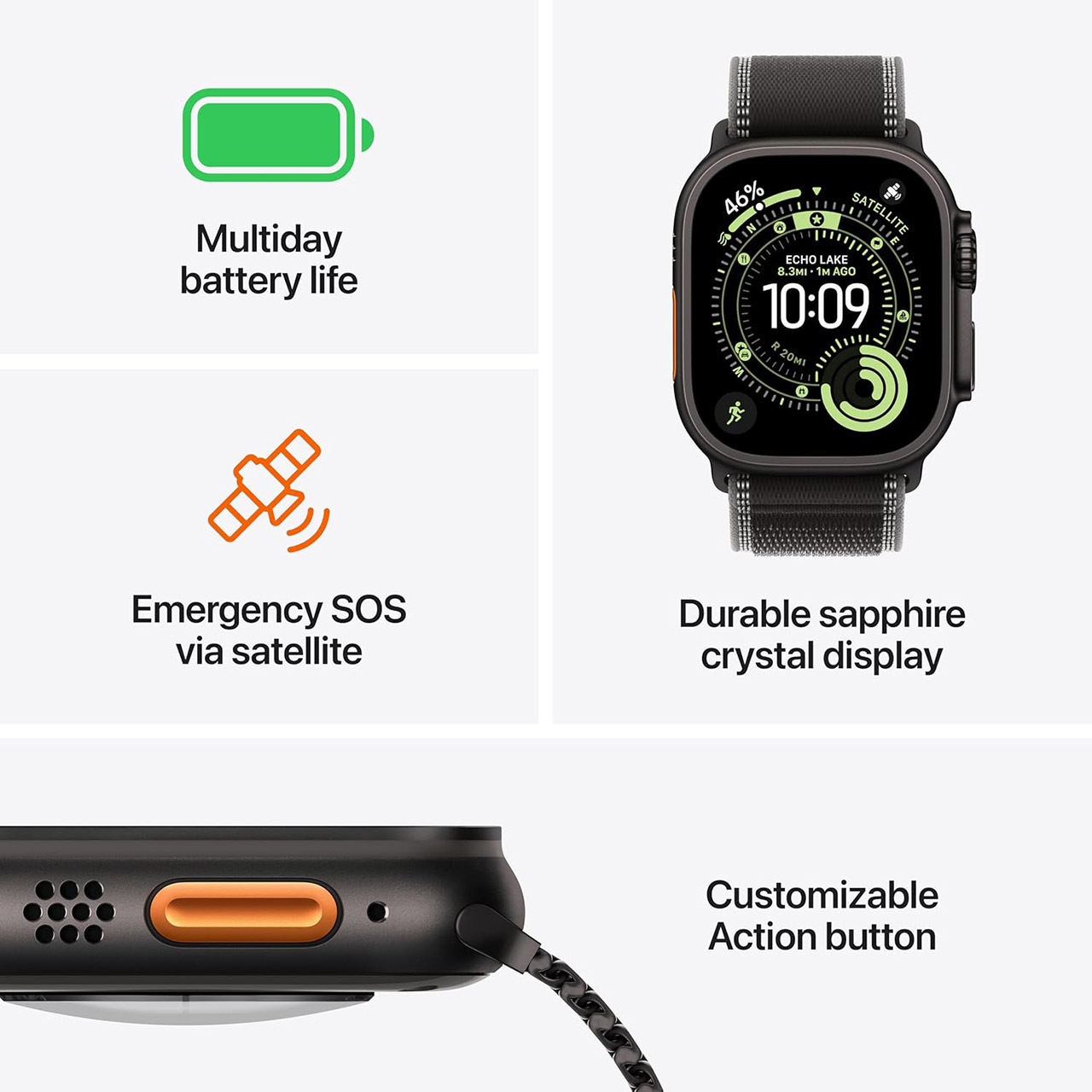
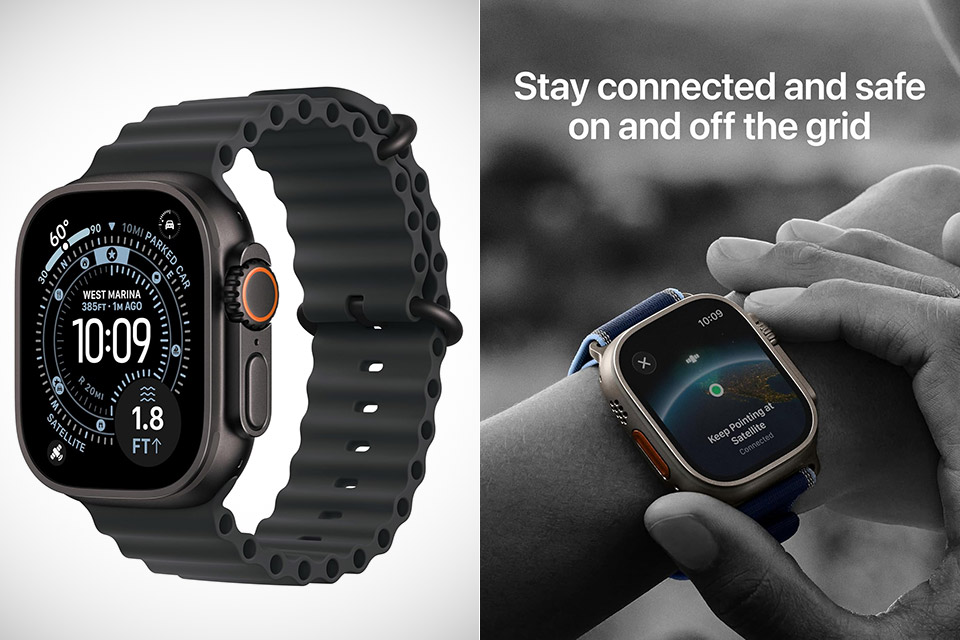
Summer stretches days longer and pulls people toward trails, water, and full days outside. A watch that handles knocks, stays readable in bright light, and runs for extended stretches without a charger becomes more than nice to have. The Apple Watch Ultra 3, priced at $699.99 (was $799), fills that role for many who want one device to cover serious activity and everyday tracking.


The casing is 49mm of solid titanium on the wrist, which feels right at home and like a little additional muscle, despite the fact that it still fits securely on your wrist for regular wear. The fact that Grade 5 titanium handles dents and scratches with easily, as opposed to other aluminum models that are just battered around, is a significant advantage. The true show-stopper is the flat sapphire crystal, which protects the screen from the inevitable bumps into rocks or equipment during a climb, surf session, or simply fooling around and bumping items into other gear. Water resistance extends to 100m, and it has a depth gauge and a water temperature sensor, making it ideal for pool laps, snorkeling, or even assessing diving conditions. If everything else fails and you’re in a remote location, a built-in siren will sound a reassuring 86 decibels to summon rescue. All of this adds up to a watch that feels like it can take on everything the season throws at it, rather than something delicate that needs to be handled with care.

Sale


Apple Watch Ultra 3 [GPS + Cellular 49mm] Running & Multisport Smartwatch w/Rugged Titanium Case w/Black…
  • RUGGED AND READY TO GO—The ultimate sports and adventure smartwatch is built to last with an extremely tough titanium case and a strong sapphire…
  • GET INVALUABLE HEALTH TRACKING INSIGHTS—Apple Watch Ultra 3 is a full-featured health tracker. Get notified of possible hypertension,* an irregular…
  • ULTIMATE RUNNING AND WORKOUT COMPANION—A superior fitness tracker for runners, swimmers, cyclists, athletes, and gym-goers, Ultra 3 provides…

The screen now has a larger active area, although the case size remains unchanged. It still packs a punch, with a peak brightness of 3000 nits, making it visible even in the midday light. So you can still read the time and examine your maps even in the most extreme situations. By moving to LTPO3 technology, battery efficiency has actually increased, allowing you to leave the screen on in the background without draining the battery. It’s a godsend whether you’re out on a walk or a bike ride because you don’t have to lift your wrist every few minutes to view the screen. Night mode and viewing angles have also been improved, reducing eye strain as light levels change.

Advertisement


Battery life has to be the number one reason this watch is worth considering right now; with normal use, it lasts roughly 42 hours, and with battery saver mode, you can extend it to 72 hours on a long journey. Real-world testing indicates that it’s not just talk; actual users have reported constant drain times even with GPS and other tracking equipment functioning in the background. If that’s not enough to put your mind at ease, the watch also charges quickly, reaching 80% in 45 minutes. So, if you have a long day ahead or a multi-day vacation planned, a fast charge in the morning or during a break will keep you going for another full day. For anyone who has experienced the stress of running out of power in the middle of nowhere, this is a game changer.

New capabilities such as satellite messaging let you to send a text or contact emergency services when you’re out of range of a cell tower, and dual-frequency GPS provides super-accurate position data no matter where your activities take you. If you find yourself in a region with 5G, the watch will connect quickly for calls, texts, and data. These features combine to make the Ultra 3 a more comprehensive off-grid companion without making it heavier or more difficult to use in everyday life.


Health insights have just become much more practical with the addition of hypertension notifications following a brief calibration time. Your watch already tracks your ECG, heart rate variability, temperature, blood oxygen, and sleep patterns; now recovery data is right alongside your training metrics, allowing you to understand how all that hard work is affecting your rest time. When it comes to striking the right balance between fitness and general wellness, your sleep scores and apnea alarms are all important factors to consider.

Apple Watch Ultra 3 Smartwatch 2026
The watch stays spot on with fitness tracking whether you’re jogging through difficult terrain, swimming in open water, or participating in any other sport. Its dual-frequency GPS keeps locked in even when things get complicated, and the depth and water temperature sensors are useful for tracking your dives. Then there’s the workout guidance and stats, training load, heart rate zones, and anything else you need to organize your workouts without having to carry any additional gadgets. Whether you’re hitting the trails or sailing through the water at high speeds, this watch can handle it.

Apple Watch Ultra 3 Smartwatch 2026
Running your watch’s software on a daily basis feels snappy thanks to the S10 chip’s power and 64GB of available storage. Complications update quickly, programs launch instantly, and on-board processing ensures that everyday tasks remain smooth and responsive. Like before, pairing it with an iPhone is simple, with notifications, music control, and data synchronization all operating as expected. And as new watch faces and tools are released, they simply slip in without requiring you to learn a completely new method of using the watch.

Advertisement

Source link

Continue Reading
Click to comment

You must be logged in to post a comment Login

Leave a Reply

Tech

Chinese hackers develop LONGLEASH malware to expand ORB network

Published

on

China

Chinese hackers tracked as ‘UAT-7810’ are actively evolving their malware to expand their Operational Relay Box (ORB) network by compromising internet-facing networking devices, primarily unpatched Ruckus routers.

According to Cisco Talos researchers, the ORB network serves as a secure relay infrastructure for other China-aligned advanced persistent threats (APTs), including UAT-5918.

This type of infrastructure, which was previously documented by Google Mandiant, allows threat actors to proxy their network traffic through regional devices, making it appear to originate from legitimate local infrastructure to evade detection and complicate attribution.

image

The Talos analysts have identified new malware in the campaign, including LONGLEASH, a new version of the previously documented SHORTLEASH backdoor, DOGLEASH, a Linux backdoor, JARLEASH, an administrative tool, and LEASHTEST, a testing utility.

The researchers report that UAT-7810 primarily exploits known (n-day) vulnerabilities to gain initial access, including CVE-2020-22653, CVE-2020-22658, and CVE-2023-25717 in Ruckus routers, as well as CVE-2025-2492 in ASUS AiCloud routers.

Advertisement

LONGLEASH malware

The newly discovered LONGLEASH malware is an upgraded version of SHORTLEASH, first documented by SecurityScorecard in 2025, that significantly expands its capabilities.

The malware builds on the previous version, which supported command-and-control (C2) communications, web server hosting, network tunnel management, and operation as both a C2 server and client.

In addition to those, Talos researchers have now also observed the following capabilities:

  • Reverse shell
  • HTTP, DNS, SOCKS, TCP, ICMP, and UDP proxying with traffic redirection
  • SMTP client/server functionality
  • TLS and PKI support
  • Self-removal for when tampering or other suspicious activity is detected
  • Ability to act as an intermediate C2 server, forwarding commands and data between infected nodes

DOGLEASH, JARLEASH, and LEASHTEST

Apart from LONGLEASH, the researchers have also discovered DOGLEASH, a lightweight Linux backdoor deployed via web shell scripts.

Upon launch, it opens a listening TCP port and authenticates incoming requests using a hardcoded password, supporting shell command execution, file access and modification, OS information retrieval, and arbitrary code execution directly in the host’s memory.

Advertisement

JARLEASH is a Java-based administrative tool that provides web-based file management and includes FTP, SFTP, and Netcat server functionality.

Finally, the threat actors have developed LEASHTEST, which can be used to verify whether an MIPS IoT device can perform functions related to malware operations, likely to help refine LONGLEASH’s MIPS support.

Cisco Talos concludes that UAT-7810 continues to expand its ORB infrastructure, actively replacing or extending SHORTLEASH with the more capable LONGLEASH while broadening its toolkit with new malware.

A complete list of the indicators of compromise (IoCs) linked to UAT-7810 activity and the latest toolset is available at the bottom of Cisco Talos’ report.

Advertisement

article image

Security teams log 54% of successful attacks and alert on just 14%. The rest move through your environment unseen.

The Picus whitepaper shows how breach and attack simulation tests your SIEM and EDR rules so threats stop slipping by detection.

Get the whitepaper

Source link

Continue Reading

Tech

An indie developer says Steam's refund policy cost his well-reviewed game 55,000 refunds

Published

on


Despite earning a 90% “very positive” rating on Steam, Paddle Paddle Paddle (PPP) has been hit with an unusually high 21% refund rate. Mateo says his game has collected more than 55,000 refunds, and he’s now pointing to Valve’s famously lenient refund policy as the culprit. It doesn’t help that…
Read Entire Article
Source link

Continue Reading

Tech

Remove stubborn stains with ease

Published

on

When it comes to home cleaning, you can never be too prepared as there’s no telling what spills and stains you might have to deal with. A tipped-over glass of wine or a forkful of pasta that’s hit the floor is more of an inevitability, no matter how careful you are, but if you don’t have any gadgets to hand that can help you clean it all up, it can take ages to sort with a manual touch. This is why you need one of the best steam cleaners to hand.

Although the best hard floor cleaners are the perfect solution for everyday messes, steam cleaners provide a more heavy-duty approach when it comes to sanitising the mess in question. For instance, cleaning up a bit of mud left by your shoes after a long hike is an easy enough task for a hard floor cleaner, but something left behind by a pet or a child (if you catch our drift) is where steam cleaners come into effect.

As you may have guessed from their name already, steam cleaners operate by boiling water to produce a mess-targeting vapour which can then be concentrated to remove whatever it is that’s found its way to your floor. These appliances can work wonders, but because they are a more heavy-duty solution, they work best with sealed floors such as varnished wood or concrete. Anything less may be warped by a steam cleaner over time.

There’s a good variety of steam cleaners available, each with different power settings and accessories designed to target certain messes. It can all be a bit overwhelming if you’re approaching the market for the first time, but this is where the hard work of our expert testers comes in, as they’ve done the hard work for you to find out which of the bunch are actually worth buying.

Advertisement

All of the options selected for this list have performed brilliantly in our testing process, and we’ve made sure to keep a few budget-friendly options in the mix too for anyone who doesn’t want to spend too much money. Keep on reading to see which picks we currently recommend, and if you need other cleaning solutions for your home then we’ve got you covered with the best vacuum cleaners and the best carpet cleaners.

Best Steam Cleaner at a glance

Advertisement

SQUIRREL_ANCHOR_LIST

Learn more about how we test steam cleaners

We test all steam cleaners in the same way. Each model is tested on hard floors, letting us see how well they clean tough everyday stains. We take before and after photos of cleaning to show the power on offer, and test how well cleaners get into the edges of the room.

Advertisement

For cleaners with detail attachments, such as squeegees and wire brushes, we test how well they clean tough stains including tiles and grouting, burnt-on stains on oven shelves and limescale-encrusted shower screens. We report on how easy each cleaner was to use and how far it could clean on a tank of water.

  • Staggering steaming power

  • Very fast hard floor mopping

  • Good tool selection with storeage

  • Great VapoHydro cleaning

  • Easy to carry

  • High price

  • No squeegee window tool

  • Cable too short (5.9m)

If you want an impressively powerful steam cleaner that can tackle anything from window sills to brick walls and boasts the highest level of steam pressure we’ve seen from a domestic appliance, look no further than the Karcher SC5.

Advertisement

Offering a mammoth 2L capacity, 2kW+ heater and a 4.2bar steam pressure level, the SC5 boasts serious steam cleaning power.

Don’t be intimidated by the 4.2bar steam pressure though, as the SC5 offers variable steam control that allows users to control just how much pressure it outputs. This makes it perfect for more delicate or detailed jobs.

With its VapoHydro mode water is mixed with steam and provides a pressure-washer level that we found could easily clean off tough dirt from notoriously difficult areas, including brick walls and garden tiles.

Numerous accessories are included with the SC5 that suit a variety of jobs. This includes an Easyfix mopping head with microfibre cloths and a carpet glider. We found this provided impressively speedy mopping, a wide cleaning sweep and was incredibly easy to manoeuvre.

Advertisement

Also included is a large square brush for tougher cleaning jobs, a detail nozzle and small detail brush and a power nozzle. All tools will easily see you through any household steam cleaning task, from hard floors and carpets to tiles and window sills.

All accessories conveniently clip into the onboard tool storage too, which makes for convenient storage and means less ferrying tools and brush heads around.

The refillable water reservoir lifts out with ease with an unmissable spout for foolproof refilling or topping up.

As it is one of the most expensive models on our list, if you just need a steam cleaner for simple jobs then this might not be the best choice for you. However as this is an easy to use and versatile steam cleaner then we would say this is a worthy investment for those who can spare the cash.

Advertisement
  • Powerful and fast cleaning

  • Steam blast loosens tough stains

  • Simple controls

  • Doesn’t stand up on its own

  • For floors only

Advertisement

If you’re looking for a steam floor mop to quickly clean up hard floors, the Shark Klik n’ Flip S6003UK Steam Mop could well be the model for you. This well-priced steam mop is focused on floor cleaning, shipping with a double-sided mopping pad that clips to the bottom of the mop. It’s a huge mop, making short work of floors, as you can clean large areas with a single swipe based on our tests.

Cleverly, the Klik n’ Flip head can flip over partway through a clean, giving you the clean side of the pad to keep cleaning with, without introducing a lengthy changeover. This is a feature we found super handy, that let us clean larger areas without having to stop and start.

Cleaning performance was excellent, with the Shark Klik n’ Flip S6003UK Steam Mop tidying up mud on our tiled floor with ease, and picking up everyday kitchen stains: the steam blast function is particularly useful for cleaning up tougher stains, and we found that this helped remove dried-on pet food without having to get down on our needs.

Thanks to the design of the cloth, we found that we could push the S6003UK right into the edges of our room, giving us edge-to-edge cleaning. We needed to get down on our knees and manually clean areas far less with this model than rivals.

Advertisement

Easy to use, easy to move and brilliantly priced, the Shark Klik n’ Flip S6003UK Steam Mop is the best steam mop that we have ever tested. If you’ve got lots of hard floors, this is a great model to buy.

  • Hugely versatile

  • Powerful floor cleaning

  • Makes short work of most jobs around the house

Advertisement
  • Have to hold trigger down

If you’re looking for a versatile steam cleaner that can be used across floors, windows and even to tackle bathroom tiles, the Vax Steam Fresh Total Home steam cleaner is a fantastic choice.

With two tanks on-board, the Vax Steam Fresh Total uses a combination of steam and detergent when in its upright mopping mode, with the latter adding a scent boost into cleaning.

Just note that when the device is in handheld mode, you can only use steam to clean.

Advertisement

Vax includes a huge array of additional tools which can be used in both handheld mode or via the hose. These tools include a detail nozzle for pushing steam into hard-to-reach areas, a squeegee, and grout, scrubbing and even deep scrubbing brushes too.

In upright mopping mode, you can either use a tough HD steam cleaning pad or a softer steam pad depending on how dirty your floor is. Both options attach via velcro, so it’s easy to swap them mid-clean.

There’s also a built-in scrubbing brush to help agitate any tough and dried in stains too.

Want to refresh a carpet or a rug? Attach the included carpet glider which helps the Vax Steam Fresh Total Home to slide on carpet without causing any damage.

Advertisement

Using the steam mop is impressively easy, thanks to its power button and intuitive switch that allows you to control the amount of steam that’s produced. A potential issue with using the mop is the fact you need to manually hold the trigger in order to start producing steam.

Although we appreciate the fact we can control the amount of steam, some may find this tiring and difficult to use after a while.

There’s unfortunately no option to collect solids, which you can find on the more expensive Dyson WashG1, however if you need fast and efficient cleaning around the house then the Vax Steam Fresh Total Home steam cleaner remains a seriously great choice.

Advertisement
  • Large water tank

  • Easy to fill

  • Heats up quickly

  • Powerful steaming

  • Versatile

  • Unclear steam dial

  • Bulky for small jobs

  • Noisy

If there’s one problem with cylinder steam cleaners, it’s that you have to wait for most of them to cool down before you refill and continue cleaning. Not so with the Polti Vaporetto Smart 100_B, which has a removable water tank, so you can fill it as many times as you need to complete your cleaning job, all without any cool-down time.

Advertisement

We found this makes this cylinder steam cleaner a great choice for large and difficult jobs, but its bulk means that it’s not an ideal tool if you only want to tackle smaller jobs or just mop floors.

Although the controls are a little confusing on this model (the steam dial goes from min to max, but it’s not clear where about you are in the range), performance is mostly excellent. The Polti Vaporetto Smart 100_B coped well with our tough floor challenge, brought grout back to life and easily managed to clean up a hard floor.

There are tools to tackle most jobs, but only one mop pad in the box is a little disappointing, as this gets dirty quickly. That said, for the price, this is an excellent choice and the continuous cleaning makes it brilliant for large jobs, particularly those outside of hard floors.

Advertisement
  • Vac cleans in front of steam mop

  • Fast heat-up time

  • Good run-time per tank

  • Decent-length cable (7.5m)

  • Limited suction power

  • Average steam power

  • No pivot on head

The Bissell Vac & Steam 1977E is a fantastic time-saver, vacuuming and cleaning at the same time. We loved the original, and now the 1977E model has had a small update and now comes in a fetching blue colour. As a standalone steam cleaner or a standalone vacuum cleaner, this model won’t win awards; yet, the combination of the two features produces some powerful cleaning results.

Advertisement

With a 400W bagless vacuum cleaner and 1100W steam heater, we found that small particles were sucked up before the microfibre pad steams the floor and picks up stains. For well-trodden areas in your home with hard floors, the Bissell Vac & Steam 1977E effectively halved our cleaning time. Bissell recommends three passes for a dirty area and that worked well for us, picking up dust and removing stains well.

The downside of the system is that it’s not very flexible, and it’s neither a good vacuum nor a flexible and powerful steam cleaner. Still, it’s the combination of parts that is important, and the Bissell Vac & Steam 1977E delivers on hard floor cleaning. We recommend this model for homes that need regular cleaning; our tester has dogs, so needs to clean daily, where the Bissell Vac&Steam 1977E came in handy. For deeper floor cleaning, the Shark S6003UK is a better choice.

Advertisement
  • Stands up on its own

  • Heats up quickly

  • Uses water efficiently

  • Seam volume not adjustable

  • Only one microfibre pad

  • Residue from messier stains

The Beldray Detergent Steam Cleaner is our top pick for the best budget steam mop that can also use detergent.

It’s sturdy and a mop we found to be easy to work with, given how lightweight it is. We also think the Beldray cleaner looks the part with its turquoise and white colour scheme, too, and is able to be conveniently disassembled with the handle can be removed with a literal touch of a button. The fact there’s a 5-metre cable here also enables this cleaner to go rather far round your house, and also helps its manoeuvrability.

Advertisement

For its steaming powers, this Beldray mop comes with a 330ml water tank. That may sound small, but thanks to the fact it uses its water rather sparingly, you can actually go rather far before that tanks needs refilling. To go with the 330ml of water, this cleaner also has a 200ml detergent tank to help freshen up floors and offer a little more oomph for cleaning.

Beldray says water will heat up in 25 seconds, making this a relatively prompt mop to heat water up with. There isn’t much in the way of controls, apart from an onboard power switch, which is a handy addition considering other cleaners require you to physically turn it off from the wall. This appliance also comes with a Velcro-attached microfibre pad for the mop head, and a carpet glider to help it to move smoothly across carpeted surfaces.

In our testing, we found the Beldray Detergent Steam Cleaner to do a pretty good job of removing most of the mess we’d left down in tiles in one fell swoop. In addition, it saturated the colours of our rug when steaming a patch for 30 seconds, although didn’t quite get rid of a small stain that was left. It arguably did a better job of dealing with laminate flooring, as our dried muddy footprints were fully gone within 20 seconds without any marks or residue. Our toughtest test involving a combo of coffee and tomato paste stains dried into a patch of tiles arguably pushed this cleaner to its limits, with it taking around two and a half minutes for the stain to be fully removed.

Advertisement

FAQs

Do you need a steam mop or a steam cleaner?

A steam mop is designed specifically for hard floors, with a microfibre cloth used to pick up dirt and steam pushed through the cloth to clean and remove dirty. A steam cleaner is different, as it has different attachments for different jobs: nozzles and brushes for detail cleaning, window cleaning accessories and more.

The latter is better for tackling jobs around the house, but a steam mop is more convenient for everyday use. If you want a balance, you can get models that convert from a mop to a handheld unit for occasional detail jobs.

Advertisement
Should you use detergent with a steam cleaner?

Steam cleaners don’t have to use detergent, and use clean water and steam alone to remove stains. This makes them more gently cleaners in some regards, as you don’t have to use harsh chemicals to remove stubborn stains. That’s not to say that you shouldn’t use chemicals in the normal way.

For example, for cleaning floors and surfaces, using traditional detergent and disinfectant makes sense, although you can then use a steam cleaner afterwards for dealing with some stains. Likewise, you should still clean with cleaning products for the deepest clean, letting the steam cleaner handle deeper jobs.

Advertisement
What size water tank do I need?

The larger the tank of water you have, the longer the steam cleaner can keep cleaning. This is more important on some models than others. Many models have a refillable water tank that you can remove and top up when you like. These ones heat water when its pumped from a tank, effectively giving you continuous cleaning. For these models, the size of the tank isn’t so important, as you can get water when you need it.

If you have a cleaner with a built-in tank where all of the water is heated at the same time, you have to have a cool-down time (up to 20 minutes or so) before you can refill and use them again. For these models, it’s important to have a running time that will last for the length of job you have, so that you don’t have to pause in the middle of cleaning.

Advertisement
What accessories do I need?

Steam cleaners, bar standalone steam mops, will come with a variety of attachments for different jobs. Largely, these are there to make specific tasks easier. Each accessory works by changing how steam is directed, such as a thin nozzle to help push steam towards tile grouting, or by providing a tool to help clean, such as a wire brush for cleaning an oven. Tools can do both, such as an upholstery brush that directs steam over a wider area and gives you a brush to agitate the upholstery and loosen dirt. When you buy a steam cleaner you should think about the jobs you want to do and make sure that your chosen model has the right accessories.

Advertisement
Can you use a steam cleaner on all surfaces?

Steam is generally safe to use on most surfaces but there are some exceptions to this. As you’re using water, using a steam cleaner on an unsealed surface isn’t recommended. And, surfaces that may react badly to a lot of water, such as solid wood flooring, may not be suitable, as you could get swelling.

The situation is worse if you apply steam directly to the surface but also applies with steam mops. Although mop heads will absorb most of the heat of the steam, they can still get very wet, which is no good for many surfaces. For dealing with hard floors, we recommend that you buy one of our best hard floor cleaners, instead.

Advertisement
Can a steam cleaner kill bed bugs?

Steam is an effective way to kill bed bugs and their eggs, thanks to the high temperatures proving lethal. If you’re worried about an infestation, then steam cleaning soft furnishings can help. Make sure that you use the upholstery attachment and/or mattress accessory to clean. You should move slowly over the area, taking at least 30 seconds before moving the steam head in order to deliver a killing dose of steam. Make sure that you cover all areas, and press the steam head into crevices and around the bed; for mattresses, cover the sides and underneath, too.

Can a steam cleaner kill coronavirus?
Advertisement

Karcher commissioned research that showed that enveloped viruses, such as SARS-CoV-2, can be killed by high temperatures. Spot cleaning for 30 seconds at maximum steam level was enough to kill the virus. This shows that cleaning close-up is required to be effective, so cleaning with a burst of steam can be a good secondary way of disinfecting surfaces, although cleaning with detergent should always be done. Steam can be good on surfaces that are otherwise hard to clean, such as curtains and upholstery.

Using a steam mop is slightly different, as the microfibre cloth absorbs some heat. Steam mops will remove dirt, bacteria and viruses, but the pad should be cleaned at a high temperature in a washing machine to disinfect it after use. In short, then, a steam cleaner can help disinfect surfaces but should be used as an additional tool after traditional cleaning.

Advertisement

Test Data

  Karcher SC5 easyFix Premium Steam Cleaner Shark Klik n’ Flip Automatic Steam Mop S6003UK Vax Steam Fresh Total Home Steam Cleaner Polti Vaporetto Smart 100_B Bissell Vac & Steam 1977E Beldray Detergent Steam Cleaner

Advertisement

Full Specs

  Karcher SC5 easyFix Premium Steam Cleaner Review Shark Klik n’ Flip Automatic Steam Mop S6003UK Review Vax Steam Fresh Total Home Steam Cleaner Review Polti Vaporetto Smart 100_B Review Bissell Vac & Steam 1977E Review Beldray Detergent Steam Cleaner Review
UK RRP £499 £149.99 £159.99 £165 £148.99 £39.99
Manufacturer Karcher Tokit Vax Polti Bissell
Size (Dimensions) 301 x 439 x 305 MM 100 x 110 x 1180 MM x x INCHES 270 x 400 x 290 INCHES 280 x 229 x 1181 MM 1170 x 222 x 350 MM
Weight 9 KG 2.3 KG 4.63 KG 5 KG 4.81 KG 2.07 KG
ASIN B077CBLBT3 B01N3930UF B079TNF6QL B01MYDV5WI B08HDJK24W
Release Date 2018 2020 2024 2021 2018 2021
First Reviewed Date 23/07/2018 17/11/2020 10/10/2024 22/02/2021 02/08/2018
Model Number Vax Steam Fresh Total Home Steam Cleaner BEL01097
Accessories Floor cleaning kit, EasyFix + extension tube (2 × 0.5 m), hand nozzle, detail nozzle, round brush (small), microfibre cover for manual nozzle Floor head 2x water filters, 250ml bottle of detergent Mop head with microfibre pad and carpet glider, squeegee tool with microfibre cover, two small round brushes, curved nozzle, scraper tool and two extension tubes Floor head (carpet and hard floors)
Provided heads Carpet glider, floor head (3x mopping pads), 4x cleaning pads, scrubbing brush, deep scrubbing brush, window tool, detail nozzle, grout brush,
Bin capacity litres
Modes Variable steam
Stated Power 1400 W
Run time hrs min
Water tank size 1.5 0.33 0.26 2 0.38 0.35
Floor cleaner type Steam cleaner
Detergent capacity 0.13 litres
Steam cleaner type Cylinder Mop 2-in-1 2-in-1 Mop
Cleaning solution tank Yes Yes
Steam pressure 4.2 bar 4 bar

Source link

Continue Reading

Tech

Anthropic brings Claude Cowork to mobile and web as usage data shows most users aren’t coding

Published

on

Anthropic on Tuesday launched Claude Cowork on mobile and web, expanding a tool that has quietly become the company’s bridge between the developer-centric world of AI coding agents and the far larger market of knowledge workers who never open a terminal.

The rollout, which begins in beta with Max subscribers before expanding to additional plans, marks a strategic inflection for Anthropic. It transforms Cowork from a desktop-only agent into a cross-device platform where tasks can start on a laptop, continue autonomously in the background, and be reviewed from a phone — even after the user closes the app entirely.

“Your work goes everywhere with you, and keeps going without you,” Anthropic writes in its announcement.

The timing is deliberate. Alongside the mobile launch, Anthropic published usage data from 1.2 million anonymized Claude Cowork sessions sampled between May 11 and May 31, drawn from more than 600,000 organizations. The data paints a striking picture: the overwhelming majority of what people do with Cowork has nothing to do with writing software.

Advertisement

VB Transform · July 14–15 · Menlo Park · LLMs, ops & evals

Standard benchmarks fail. Amazon and Waymo explain what they test instead.

The evals track goes deep on the four dimensions of reliability — consistency, robustness, predictability, safety — and how teams at Amazon and Waymo are operationalizing them in production.

See the full agenda →

The biggest AI story nobody’s talking about

The numbers tell a story that cuts against the dominant narrative in enterprise AI, which has fixated on coding assistants and developer productivity as the primary use case for large language models.

Advertisement

Business process and operations — tasks like pulling scattered updates into a single report, building onboarding checklists, and reconciling spreadsheets — accounted for 33.4% of all sampled Cowork sessions, making it the single largest category by a wide margin. Content creation and copywriting — producing drafts, slide decks, posts, and proposals — came in second at 16.4%.

Together, those two categories make up roughly half of all Claude Cowork usage. Software development, by contrast, accounted for just 8.7%. DevOps and infrastructure followed at 7%, with research and intelligence at 6.4%, data analysis and business intelligence at 5.8%, document processing and extraction at 4.1%, and sales and revenue operations at 4%.

The remaining 12 categories each represented less than 4% of usage, including personal assistance at 3.8%, education at 2.4%, and meeting intelligence at 1.8%.

Anthropic describes these dominant use cases as “the work around the work” — tasks that span nearly every role in an organization but rarely appear in anyone’s core job description. “People are using it for a variety of tasks that aren’t necessarily the hallmark of a specific role, but instead represent the connective work around a role that moves projects forward and keeps businesses running,” the company writes. “That means tasks like drafting a status update, building a slide deck, or condensing reams of research into a single report.”

Advertisement

That phrase — “the work around the work” — is Anthropic’s attempt to define and claim an entirely new category of AI productivity. It’s a calculated reframing: rather than positioning AI as a tool that replaces what professionals do, Anthropic is arguing that the most valuable current application is handling everything professionals do around their actual expertise.

What mobile access changes — and what it doesn’t

The expansion to mobile and web introduces three concrete capabilities that reflect how Anthropic envisions Cowork fitting into daily workflows.

First, sessions now sync across devices. A user can start a task at their desk, check on its progress from a phone, and retrieve the finished output from any device. Second — and arguably more significant — Cowork can now run tasks in the background with no device online at all. Users can schedule work for a specific time, and Claude will execute it autonomously. Anthropic offers the example of setting Monday morning client prep for 6 a.m.: “Claude works through the email threads, transcripts, and recent news, builds the briefing doc, and leaves the follow-up email drafted but unsent. Review it over coffee.”

Third, when Claude encounters a decision that requires human judgment, it surfaces the question to the user’s phone. “Nothing ships until you’ve reviewed and approved it,” Anthropic states.

Advertisement

Desktop remains the most fully featured surface, with access to local files and the browser. But the web version also opens Cowork to users who cannot install a desktop application — a meaningful expansion in enterprise environments where IT departments control software installation.

The company also unified its interface: on web and desktop, chat and Cowork now share a single home screen, and projects and artifacts persist across both modes.

To encourage adoption, Anthropic is extending doubled Cowork usage limits through August 5.

The strategic logic: why Anthropic is chasing the non-developer

The usage data and the mobile launch together reveal a company executing a two-track strategy. Claude Code, its terminal-based coding agent, dominates among software developers. But Cowork is designed to capture the vastly larger population of professionals whose work involves creating, organizing, and communicating information rather than writing code.

Advertisement

The contrast between the two products is instructive. As Anthropic notes, Claude Code “is most often used by software developers for the key parts of their role: building, debugging, and shipping code.” When developers do use Cowork, they tend to use it not for programming but for the communications-focused work that surrounds every role — status updates, documentation, and coordination.

This pattern — where AI handles the connective tissue of work rather than its core substance — aligns with what Anthropic describes as people using “Claude Cowork to assemble and structure the information they can use to act on their expertise.” The company illustrates this with three examples: a lawyer using Cowork for document formatting and filing while reserving legal judgment for themselves, a hiring manager synthesizing interview feedback while spending more time on candidate conversations, and a team lead producing a slide deck that explains a decision while focusing on actually making that decision.

The implications for Anthropic’s business model are significant. Developer-focused tools, while high-profile, serve a relatively narrow market. The Ramp AI Index published in May showed Anthropic pulling ahead of OpenAI in business adoption for the first time — with 34.4% of firms paying for Anthropic’s services compared to OpenAI’s 32.3% — and suggests the company’s enterprise push is gaining traction. Claude Code was identified as the primary driver of that shift. But Cowork targets an addressable market that is orders of magnitude larger: every knowledge worker with a laptop, a pile of spreadsheets, and a slide deck due by Friday.

A crowded field gets more competitive

The mobile launch arrives during one of Anthropic’s busiest — and most turbulent — stretches in its history.

Advertisement

Just last week, Anthropic launched Claude Sonnet 5, a new model that narrows the performance gap with its more expensive Opus-class models while maintaining lower pricing. The model is available at introductory pricing of $2 per million input tokens through August 31 before rising to $3 per million input tokens. Sonnet 5 serves as the engine underneath Cowork, and its improved agentic capabilities — better reasoning, tool use, and sustained task completion — directly enhance Cowork’s ability to handle complex, multi-step workflows.

Two weeks before that, Anthropic released Claude Tag, a Slack-native AI agent designed for team collaboration. Where Cowork focuses on individual task delegation, Claude Tag operates as a multiplayer tool — a single Claude identity that everyone in a Slack channel can interact with, building context from conversations over time. 

According to Anthropic’s announcement, 65% of the company’s own product team’s code is created by its internal version of Claude Tag. Fortune reported that Anthropic’s head of product for Claude Code and Cowork, Cat Wu, described the distinction: “Claude Code, Cowork, and chat are very single-player, whereas Claude Tag is built to be interactive and multiplayer.”

Together, Cowork and Claude Tag represent a pincer strategy: Cowork captures individual productivity workflows across devices, while Claude Tag embeds AI into team communication channels. Both are designed to push Anthropic deeper into enterprise operations, beyond the developer seat.

Advertisement

The security question looms

The expansion also arrives against a backdrop of unresolved security concerns. On July 1, security firm Armadin — led by Mandiant founder Kevin Mandia — published research detailing what it described as a full sandbox escape in Claude Cowork on Windows, as reported by SiliconANGLE. The attack chain involved DLL sideloading against the Claude desktop executable to gain trusted access to Cowork’s virtual machine service, then exploiting undocumented parameters to achieve root access and bypass network restrictions.

Anthropic responded that the vulnerability did not qualify as a security issue because exploiting it requires an attacker to already have local code execution on the host machine. Armadin, however, raised a broader concern: that deploying local virtual machines on nontechnical users’ systems creates visibility gaps that endpoint security products struggle to monitor.

This tension takes on new dimensions as Cowork moves to mobile and web. The web and mobile versions run tasks server-side rather than in a local virtual machine, which eliminates the specific attack surface Armadin identified but introduces different questions about data handling, especially for scheduled background tasks that process email threads, calendar data, and documents without real-time user oversight.

Anthropic’s announcement states that “the decisions still come to you” and that nothing ships without review and approval. But as Cowork takes on increasingly complex autonomous workflows — processing contract folders, building client briefings from multiple data sources, drafting emails — the surface area for prompt injection and data exposure grows correspondingly. 

Advertisement

When Cowork first launched in January, TechCrunch reported that Anthropic explicitly warned about prompt injection risks, noting in its blog post: “These risks aren’t new with Cowork, but it might be the first time you’re using a more advanced tool that moves beyond a simple conversation.”

As Anthropic courts enterprises, geopolitics complicates the pitch

Anthropic’s enterprise push is also colliding with geopolitical reality. CNBC reported Monday that Alibaba will ban employees from using Anthropic’s AI tools starting July 10, placing Claude Code on a high-risk software list. The move followed Anthropic’s June letter to the U.S. Senate accusing Alibaba of carrying out what it called “the largest known distillation attack” against its models.

The Alibaba ban, combined with reports that Anthropic is closing loopholes that allowed Chinese companies to access Claude through third-country entities, underscores the increasingly fraught environment for AI companies attempting to serve global enterprise customers while navigating U.S. export and security restrictions.

At the same time, Anthropic is investing massively in infrastructure. Reuters reported Monday that Anthropic signed a $19 billion, 20-year lease with TeraWulf for a data center being built in Hawesville, Kentucky, with 401 megawatts of computing power expected to become fully operational in 2028.

Advertisement

That kind of capital commitment only makes sense if the company expects enterprise demand — not just from developers, but from the millions of knowledge workers that Cowork targets — to grow dramatically.

Anthropic’s own usage report comes with notable blind spots

Anthropic is transparent about the limitations of its usage analysis. The taxonomy classifies sessions by the type of work being performed, not by the job title of the person doing it. 

There are no standalone categories for marketing, finance, or HR — functions that are likely absorbed into the dominant “business process and operations” bucket, which may partly explain why that category commands a third of all usage.

The sample is also rate-capped rather than proportional to traffic, meaning the numbers are shares of sampled sessions, not absolute volumes. Usage during peak hours is somewhat underrepresented. And roughly 5% of sampled sessions involved personal, non-work use — hobbies, personal assistance, and companionship-style conversations — meaning the data doesn’t purely reflect workplace activity.

Advertisement

The company also acknowledged that its labeling pipeline changed around May 11, which is why the analysis window begins on that date rather than covering a longer period.

What Cowork’s rise says about the future of enterprise AI

Anthropic’s mobile launch and usage data arrive at a moment when the enterprise AI market is shifting from proof of concept to proof of value. The question facing every company deploying AI tools is no longer whether the technology works — but whether it delivers measurable productivity gains across an organization, not just within engineering teams.

The usage data suggests that the answer, at least for Cowork, is emerging in an unexpected place. It’s not in the glamorous work of building software or conducting research. It’s in the unglamorous, universal labor of turning messy information into structured outputs that move organizations forward — the status reports, the onboarding checklists, the variance memos, the client decks.

By untethering that capability from the desktop and making it available on every device, Anthropic is betting that the most valuable AI agent isn’t the one that writes code. It’s the one that handles everything else.

Advertisement

Source link

Continue Reading

Tech

Meta will disable the camera on AI smart glasses if you tamper or cover the indicator light

Published

on

Ever since Meta launched its first smart glasses developed in collaboration with Ray-Ban, they have built a reputation as a creep’s weapon. The outrage is justified, as a lot of people are not comfortable being recorded or captured without being told about it. Now, Meta is taking concrete steps to make sure that the camera-equipped smart glasses do not violate any person’s privacy. To that end, the company has announced that it will disable the onboard camera on its smart glasses if someone covers or tampers with the white LED indicator light.

What’s happening?

Meta argues that the white LED indicator serves as an alert signal for any other person who might be in the field of view. “We are continuouslyimproving our ability to detect tampering, and now we’re updating the glasses to disable the camera if they detect the LED was physically tampered with or destroyed. No other kind of camera has done this, and we’re proud to lead the industry forward,” the company said in an official announcement.

Meta says that it is updating the smart glasses to ensure that if the LED system is physically disabled or covered, the camera will be entirely disabled. The change will be first implemented on the second-generation Meta smart glasses. To recall, Meta now offers smart glasses that have been developed in collaboration with Ray-Ban and Oakley. Just over a week ago, the company also introduced an in-house line-up that was developed without any third-party brand collaboration and with a lower asking price, as well.

Better late than never

Over the past few months, numerous reports have uncovered an underground market where owners of the Meta AI smart glasses can get the LED indicator lights disabled. Numerous listings have also been spotted on online platforms where such services have been offered. Meta is going to take action against such activities, as well.

Meta says that it is not only going to disable the camera capture on devices with a tampered or obstructed LED light. Going a step ahead, the company will remove all the ads, posts, and online listings on its platform that advertise such services. Additionally, the company says it will also be implementing a ban on accounts that offer such services and hopes to take legal action against entities or businesses that are doing it.

Advertisement

Source link

Continue Reading

Tech

Bitluni Built a GPU From 8,192 Tiny Processors, and the Hardware Looks Like Something From a Sci-Fi Workshop

Published

on

Homemade DIY Custom GPU Card RISC-V Bitluni
Bitluni has spent years pushing DIY electronics further than most people expect. His earlier clusters packed a few hundred small RISC-V chips onto compact boards and proved they could outperform a regular desktop processor on certain tasks while using almost no power. That success led him to ask what would happen if he kept scaling. The answer sits on his bench now: an ultra cluster built around 8,192 individual microcontrollers running at 100 MHz, managed by 256 larger controller chips.


The primary goal here wasn’t even to match a high-end graphics card for 4K gaming, as Bitluni preferred a much more minimalist approach. He reasoned that each cheap CPU was only required for one location on a display, allowing the individual chip to figure everything out on its own; merely connect them and you have a makeshift graphics system. It sounds strange, but in theory it is perfectly possible; simply take a lot of 13-cent chips and convert them into the foundation of a new graphics system. Bitluni chose the CH570 microcontroller because it fits the bill perfectly: it’s fast enough to perform the job, has 12 kilobytes of memory, and a hardware multiplier to boot, all for roughly 13 cents in bulk.

Building at this magnitude revealed some issues that are not typically encountered on smaller projects. One item that failed was using a shared clock signal, which became overwhelmed and stopped operating when there were thousands of chips on the board, so now each microcontroller has its own crystal oscillator. Packing all of those signals onto the board resulted in crosstalk, so they switched to six-layer boards with ground planes on the inner layers and staggered the traces so that signals from adjacent levels did not bleed over into each other. The physical shape, one large board, was simply too large to manufacture, so they divided it into modular blades. Each of these blades is simply a grid of CPUs and small RGB LEDs; simply slide them into the central circular backplane with edge connectors, and it resembles a modern art sculpture rather than normal computer hardware.

Homemade DIY Custom GPU Card Risc-V Bitluni
Getting power and keeping the thing cool turned into complete engineering projects on their own. With so many tiny chips running at 3.3v generating hundreds of amps, they need a 3kW power supply and efficient buck converters to keep everything going smoothly. The current version 1 still uses powerful fans rather than the immersion cooling tank that they had planned to employ. Programming the thing would have taken weeks if done by hand (which is insane, just think about it!), so they ended up modifying a 3D printer, installing some pogo pins on the gantry, and writing Python scripts that simply move the head across each board and flash the firmware through the exposed pads.

Homemade DIY Custom GPU Card Risc-V Bitluni
Right now, it’s running pretty well, as they have a decent light show going on with synchronized patterns spanning over a thousand processors, each driving its own 1mm x 1mm RGB LED, and it looks pretty cool when the blades light up in succession or in waves. They’ve even begun experimenting with distributed ray marching, which is the same method used in some of those fancy real-time rendering demos. Once they have a few more blades online, they will conduct some real testing.

Homemade DIY Custom GPU Card Risc-V Bitluni
The communication side of things is simply SPI buses, with each set of 32 worker chips sharing one bus, and the larger controllers handling the real coordination. The bandwidth is limited, so it will not be able to push high-resolution frames as quickly as a dedicated GPU – but that was never the goal of this project. It’s more about demonstrating how far you can push an idea when you have low-cost parts and open designs for others to follow along. Once the project moves on to the next step, the files and code will be made public.
[Source]

Source link

Advertisement
Continue Reading

Tech

Microsoft Flips Windows Backup On By Default Outside the EU

Published

on

Microsoft will turn on Windows settings backup and restore by default for eligible Windows 11 business devices outside the EU, starting with Windows 11 26H2. The Register reports:
Now dubbed “Windows settings backup and restore,” the service backs up a device’s settings and a list of installed Microsoft Store apps, which can then be restored to a new device. Microsoft gave a use case for the technology: “Imagine a lost laptop, a hardware refresh, or an unexpected reset. These are some of the moments when your users need backup most. And that’s rarely when anyone wants to discover that backup was never turned on.”

However, some organizations might not want it on. Perhaps those with strict privacy or data sovereignty requirements, or those regulated by the EU Digital Markets Act (DMA), for whom the default-on behavior won’t apply. Windows 11 25H2 and earlier are also excluded, as is any device with a backup policy that explicitly disables the setting. Everything else running Windows 11 26H1 will get switched on after a feature update, and the same applies to 26H2, currently with Windows Insiders in the Experimental channel.

Administrators might reasonably be wary of this being opt-out rather than opt-in. Backups are useful, but Microsoft is clear that this is not a comprehensive backup solution, calling it only “one step in a broader Windows resiliency effort.” The implications still need consideration. An opt-out setting that quietly ships settings data off-device is exactly the sort of thing that adds to administrators’ workloads rather than lightening them.

Source link

Advertisement
Continue Reading

Tech

OpenAI’s Chief Futurist Is Leaving the Company

Published

on

OpenAI’s chief futurist, Joshua Achiam, notified colleagues on Tuesday that he is leaving the company later this month after nearly nine years, WIRED has learned. Achiam, who previously led a team tasked with upholding the organization’s nonprofit mission, told OpenAI staff that his departure was not motivated by any specific reason, but was something he’s been thinking about for a while.

“The world is in on the secret now and it feels possible to work on the mission from outside the walls of a frontier lab,” Achiam said in a note to staff obtained by WIRED. “I believe we can get to a world of peace, unprecedented prosperity, and unimaginable possibilities, social and scientific. Whatever I do next, I will continue to work with you on making this vision real.”

OpenAI has not yet announced if anyone will fill Achiam’s role, which sat at the intersection of the company’s AI safety and policy teams, and involved studying the potential harms and benefits caused by the rise of artificial intelligence. Achiam worked with senior company leaders, including global affairs chief Chris Lehane, to advocate for government regulations aligned with OpenAI’s mission: to ensure that AGI benefits all of humanity.

OpenAI has reorganized its safety, product, and research teams numerous times since ChatGPT launched in 2022, after which the company grew rapidly from a small research lab into a massive tech company. In 2024, OpenAI announced the formation of a “mission alignment team” led by Achiam that was tasked with upholding the company’s mission. OpenAI disbanded the group in February and announced that Achiam would be taking on a new role as chief futurist.

Advertisement

In the last year, OpenAI has worked to bridge the gap between its AI research and policy teams as part of an effort to develop rules and standards that anticipate where its technology is headed. As the two departments began collaborating more closely, several OpenAI researchers, including Boaz Barak, Noam Brown, and Adrien Ecoffet say they have become more involved in policy work.

Former White House AI adviser Dean Ball started at OpenAI this week as the company’s head of strategic futures, and he will briefly overlap with Achiam. Ball is also expected to work with researchers and policy leaders in his role.

Achiam is the latest safety-focused leader to depart OpenAI, joining a growing list of exits as the company prepares to go public. Jan Leike, who co-led OpenAI’s Superalignment team researching how to keep advanced AI models under human control, left to join Anthropic in 2024.

That same year, head of policy research Miles Brundage and Steven Adler, who led research on dangerous capabilities of AI models, both departed OpenAI to found nonprofits that advocate for AI labs to adhere to strong safety and security standards. Andrea Vallone, who led OpenAI’s research on how ChatGPT should respond to users experiencing mental or emotional distress, left to join Leike’s team at Anthropic at the end of 2025.

Advertisement

After joining OpenAI as an intern in 2017, Achiam went on to become a research scientist focused on AI safety. He was known internally as a stalwart defender of OpenAI’s safety-focused mission, but was also controversial for his occasional criticisms of the broader AI safety community.

Earlier this year, he testified in federal court that he interrupted Elon Musk’s parting speech when he left OpenAI in 2018, remarking that the then-billionaire’s plan to develop AGI at Tesla could come at the expense of safety. Musk allegedly responded by calling Achiam a “jackass,” a moment that Dario Amodei (now the CEO of Anthropic) and David Luan (who went on to become the head of Amazon’s AGI lab) commemorated by gifting Achiam a statue of a golden donkey’s rear end, inscribed with the words, “Never stop being a jackass for safety.”

Source link

Advertisement
Continue Reading

Tech

Accenture confirms breach after hacker offers stolen data for sale

Published

on

Accenture

IT services giant Accenture has confirmed it suffered a security breach after a threat actor claimed to have stolen 35 GB of source code and other data from the company.

“We are aware of this isolated matter, and we have remediated its source. There is no impact to Accenture operations and service delivery,” Accenture told BleepingComputer.

Accenture is a global professional services company that provides consulting, technology, cloud, engineering, and managed services to businesses and governments worldwide.

image

The statement comes after a threat actor known as “888” claimed to have stolen 35 GB of data from the company in July and began offering the data for sale on a cybercrime forum.

“Today I am selling the Accenture Data Breach, thanks for reading and enjoy!,” reads the forum post.

Advertisement

“In July 2026, Accenture suffered a data breach which resulted in just over 35gb of source codes getting stolen from the company.”

According to the threat actor, the data includes source code, RSA keys, SSH keys, Azure PAT (personal access tokens), Azure Storage access keys, and configuration files.

Forum post attempting to sell stolen Accenture data
Source: BleepingComputer

To support their claims, the threat actor shared a screenshot that appears to show them cloning an Azure DevOps repository named “121123_AtriasTalentAcademy” that was hosted under a redacted accenture.com hostname. BleepingComputer could not independently verify the full scope of the data being stolen.

While Accenture confirmed the breach, the company did not comment on the threat actor’s claims regarding the amount or type of data that may have been accessed or exfiltrated.

Accenture also did not disclose how attackers gained access or whether customer data was affected.

Advertisement

The same threat actor previously attempted to sell Accenture employee data following a third-party breach in 2024.

Accenture also suffered a data breach in 2021 after the LockBit ransomware gang stole data from its systems.

BleepingComputer has asked Accenture further questions about the breach and will update this story if additional information becomes available.


article image

Security teams log 54% of successful attacks and alert on just 14%. The rest move through your environment unseen.

The Picus whitepaper shows how breach and attack simulation tests your SIEM and EDR rules so threats stop slipping by detection.

Advertisement

Get the whitepaper

Source link

Continue Reading

Tech

Reverse Engineering And Self-Hosting The OBI Smart Energy Tracker

Published

on

Sold by German DIY store OBI, the OBI Energy Tracker is a €15 set of two devices, one of which you essentially stick on top of your existing electricity meter. This then allows for electricity usage to be measured and tracked, with the data sent to the second, gateway device. This latter cloud-bound device is linked to an OBI account via the heyOBI app. This correspondingly called for the gateway device to be reverse-engineered and freed from its cloud-based shackles, a task that [Aaron Christophel] happily took upon himself.

The whole process is also covered in two videos, with the first providing all the essentials on reprovisioning the original firmware for a local MQTT server in English, while the second, German-language video focuses on custom firmware for the ESP32-C3 inside of the gateway device.

Inside the reader device is a Cortex-M0+-based BAT32G135 MCU that communicates with the meter via its IR protocol. This is then communicated via 868 MHz LoRa to the gateway device that will be placed somewhere within Wi-Fi reach by the user. Inside this latter device is as mentioned the ESP32-C3, which by default runs firmware that communicates via secure MQTT with an AWS cloud instance for the typical cloud-based shenanigans.

The aforementioned reprovisioning option doesn’t require firmware flashing, just a handful of steps to follow. This involves fetching the 32-bit TEA key, generating your own PKI, running your own MQTTS-capable broker and having the provided Python script handle the rest from there.

Advertisement

Flashing custom firmware is the other option, with straightforward UART/JTAG reflashing sadly disabled by the manufacturer. With the effort required here you could perhaps argue that simply connecting the reader device to a custom gateway device might be a lot easier, especially if you already have a LoRa transceiver and associated hardware.

Advertisement

Source link

Continue Reading

Trending

Copyright © 2025