If your security camera shows offline on your phone, do not reset it immediately. First determine whether the failure is at the camera, your home network, the internet connection, the phone app, or an intermediate recorder or base station, then fix only the affected layer.
First, Find Out What Is Actually Offline
An “offline” message tells you that part of the viewing path has failed, but it does not always identify which part. The camera may have lost power or Wi-Fi, your router may have lost internet access, the manufacturer’s online service may be unreachable, or the problem may exist only on your phone.
Start with the broadest distinction. If other phones, laptops and smart devices also cannot reach the internet through your home Wi-Fi, troubleshoot the router or internet connection before changing the camera. Google makes the same distinction in its Nest camera connection guidance: an offline Nest camera cannot stream live video or save new video to the cloud, and Google first recommends checking whether other devices can use the home network.
If the camera still works on a local monitor, Network Video Recorder (NVR), or another phone, the camera itself may not be fully offline. The problem is more likely somewhere in the remote-viewing or phone-side path.
Advertisement
The table below helps isolate the failure before you start changing settings.
Common security-camera offline symptoms and the first layer to check
Symptom
Likely layer
First check
Camera has no power or status indication
Camera power
Check its battery, outlet, cable, power adapter or supported Power over Ethernet connection.
Several smart devices are offline
Router, modem or internet service
Test a website from another device connected to the same home network with cellular data disabled.
Camera works locally but not away from home
Remote-access, cloud or account path
Test the camera app over mobile data and verify that the phone itself has internet access.
Camera works on another phone
Phone, app or account
Check the affected phone’s connection, app version, account session and permissions.
Every camera behind the same recorder or base station is offline
Recorder, base station or shared network path
Check whether that intermediate device is powered, connected and online before resetting individual cameras.
If the camera has never worked on a phone before, confirm the correct setup for monitoring a security camera from your phone before treating the problem as a new offline fault.
How to Fix a Security Camera That Shows Offline on Your Phone
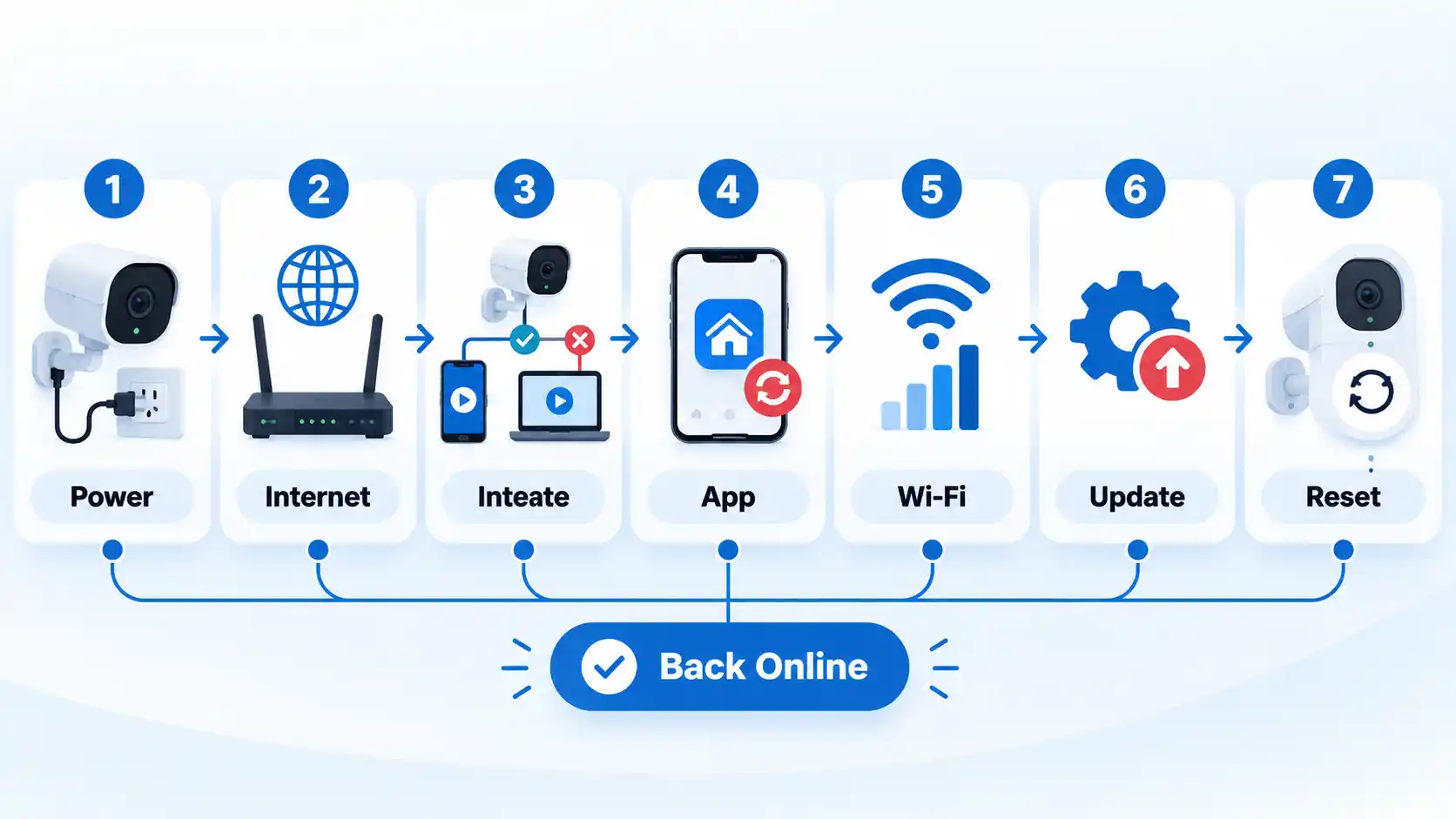
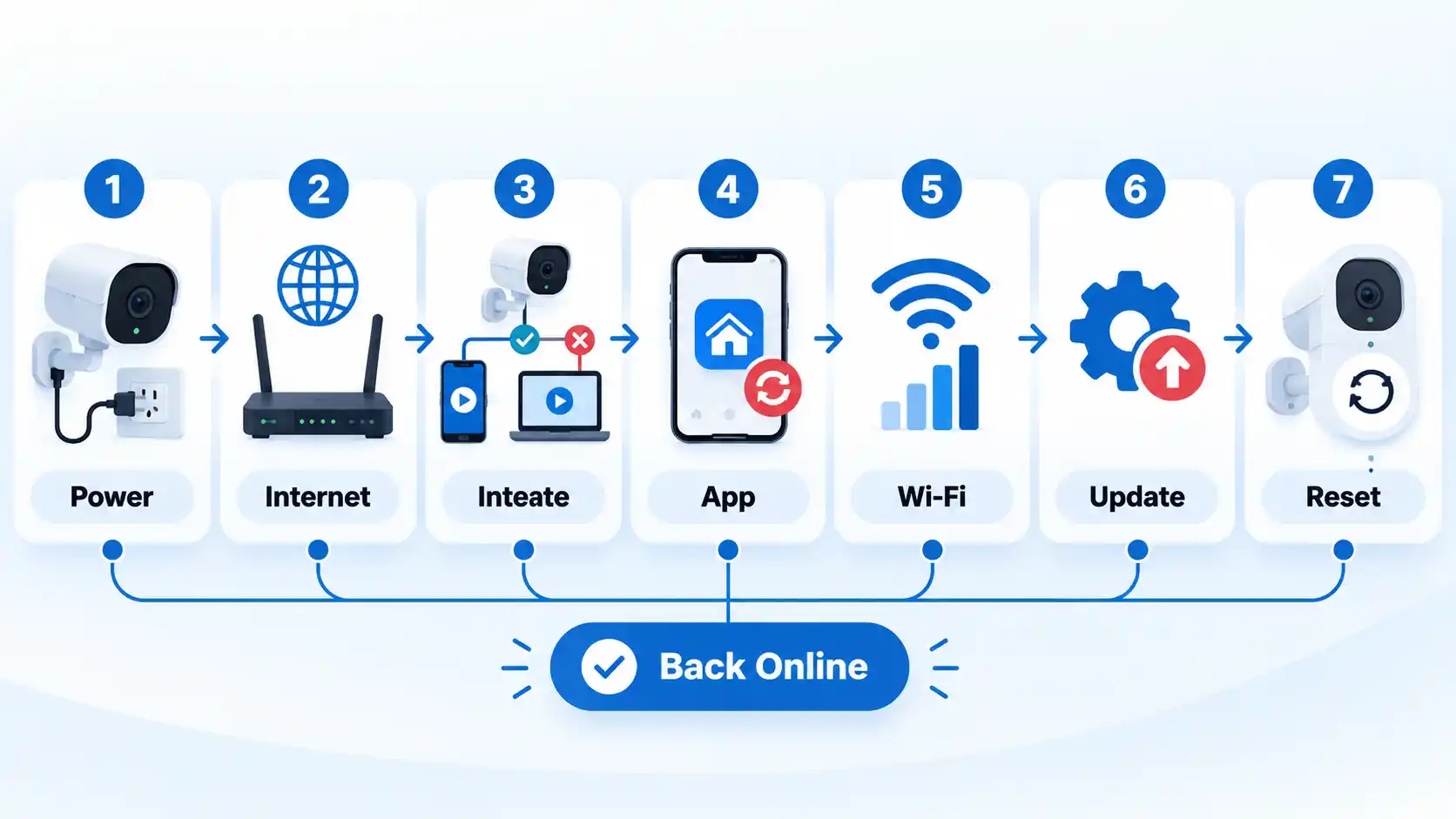
Work through these checks in order. The sequence starts with causes that are easy to verify and unlikely to erase settings, then moves toward device-specific recovery only after the simpler possibilities have been ruled out.
Check that the camera actually has power. Look for the normal power or status indication described for your model. For a battery camera, check the charge level. For a wired camera, inspect the outlet, cable, adapter or supported Power over Ethernet connection. A power fault can look like a network problem in the phone app. Google notes that unstable camera power can cause an offline state or intermittent disconnections in its Nest camera power troubleshooting guidance.
Check whether your home internet is working. Connect another phone or computer to the same home Wi-Fi and try to load a website with cellular data disabled. If several devices cannot get online, the camera is probably not the first thing to troubleshoot. Check the modem, router and Internet Service Provider (ISP) connection instead.
Find out whether one camera or the entire system is affected. If only one camera is offline, focus on its power, signal and configuration. If every camera connected through the same NVR, hub or base station disappears at once, inspect that shared device and its network connection first. This prevents unnecessary resets of cameras that may still be working correctly.
Test the phone on both Wi-Fi and mobile data. Switch between the two connections and reopen the camera app. If the feed works on one network but not the other, the test has isolated part of the problem. Ring’s current app troubleshooting guidance, for example, recommends testing Wi-Fi and cellular data separately when diagnosing sign-in or cloud-connectivity problems.
Check the camera’s local network connection. If it uses Wi-Fi, consider distance from the router, walls, floors, nearby electronics and other sources of interference. Do not assume every camera needs the same Wi-Fi band or router configuration. Model support differs. If the camera uses Ethernet or Power over Ethernet, inspect the cable and the relevant router, switch or NVR port instead.
Think about what changed before the camera went offline. A new router, changed Wi-Fi network name, changed Wi-Fi password, replacement access point or modified router settings can leave an otherwise healthy camera unable to rejoin the network. Update the camera using the manufacturer’s documented network-change procedure rather than repeatedly factory-resetting it.
Check the app and account on your phone. Confirm that you are signed into the intended account, fully close and reopen the app, and install the current app version if an update is available. Restarting the phone can also distinguish a temporary app or operating-system problem from a camera failure. If you use a Virtual Private Network (VPN), check the camera vendor’s guidance because some services may not work correctly through one; Ring’s current troubleshooting documentation instructs users to turn off VPN apps when diagnosing Ring app performance problems.
Check for supported camera or recorder updates. If the device remains reachable enough to update safely, install supported firmware using the manufacturer’s normal mechanism. Firmware is software stored on hardware such as a camera, NVR or router. Do not install firmware intended for another model or use an unofficial downgrade merely because the camera previously worked on an older version.
Restart the affected layer. Restart the camera first when the evidence points to that camera. If the problem affects the whole home network, restart the modem and router according to their manufacturers’ instructions and wait for them to reconnect before judging the camera. Avoid repeatedly power-cycling every device at once because that makes it harder to identify which change restored the connection.
Check the recorder, base station or hub if your system uses one. Some cameras communicate through an intermediate device rather than connecting independently to the internet. Confirm that the NVR, base station or hub has power and network access and that the camera-to-recorder link is healthy. A shared intermediary failure can make several cameras appear offline simultaneously.
Use model-specific recovery or factory reset only as a last step. If power, internet, signal, phone/app state, updates and intermediate devices have all been checked, consult the manufacturer’s documentation for the exact model. Reset procedures and their consequences differ. Do not copy another camera’s reset-button timing or sequence.
If the Camera Works on Home Wi-Fi but Not on Mobile Data
This symptom is especially useful because it shows that at least part of the camera’s local path still works. The problem is more likely to involve remote access, the vendor’s cloud or peer-to-peer service, the phone’s mobile connection, or the account rather than basic camera power.
Turn Wi-Fi off on the phone and first confirm that ordinary websites load over mobile data. Then reopen the camera app and make sure you are still signed into the correct account. If the manufacturer publishes a service-status page, check it before changing router settings.
Advertisement
Do not add port-forwarding rules merely because remote viewing stopped. Many modern camera ecosystems use manufacturer-supported cloud or peer-to-peer paths and do not require you to expose a camera management port directly to the internet. A feed that works at home but not over mobile data points toward the security camera remote-access path rather than an immediate hardware failure.
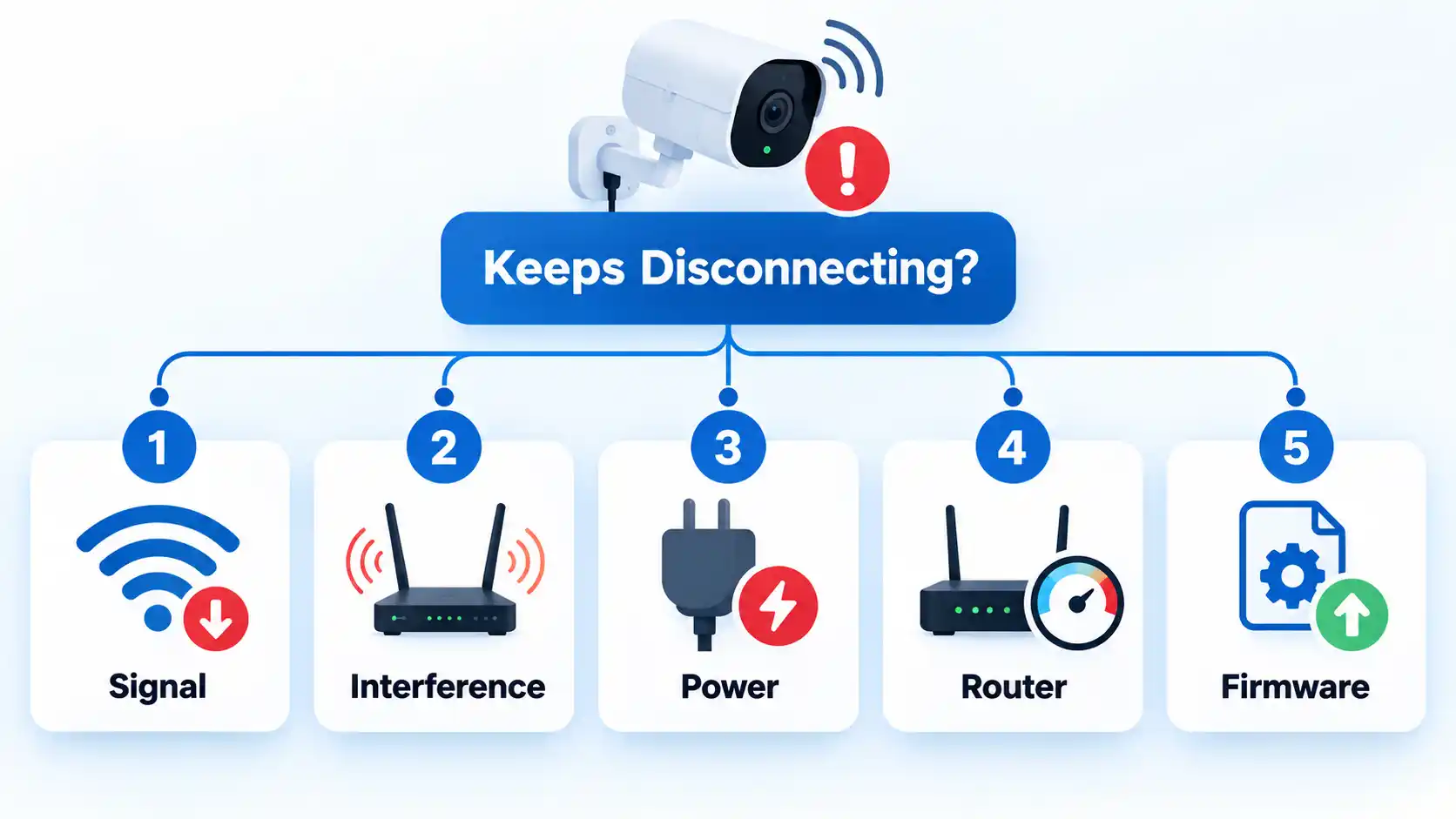
An intermittent camera is different from one that is completely unreachable. Repeated disconnects often point toward marginal signal quality, interference, unstable power, network congestion or a configuration problem rather than a permanently failed camera.
The camera disconnects more often when it is far from the router
Weak signal is a strong suspect. Test the camera temporarily closer to the router, or compare conditions near its normal location. Walls, floors, large furniture and nearby electronics can reduce usable Wi-Fi. TP-Link’s current camera and smart-device offline guidance identifies signal strength, physical obstacles and interference as possible causes of repeated disconnections.
Advertisement
The camera drops out only at certain times
Look for changing wireless conditions or network load. Video calls, streaming, gaming and other high-bandwidth activity can reduce the capacity available for camera video. Google specifically identifies competing high-bandwidth devices as a possible contributor to Nest camera connection problems. Compare the timing with other network activity before concluding that the camera itself is failing.
The camera repeatedly powers off and comes back
Inspect the power path rather than concentrating only on Wi-Fi. Check the battery, outlet, approved power adapter, cable or Power over Ethernet connection appropriate to the model. An unstable supply can make a camera appear to have a networking problem when it is actually rebooting.
The problem started after a router or mesh-network change
Review the network name, password, security mode, access-point placement and any isolation or optimization settings that changed. Some vendor-specific automatic Wi-Fi optimization features can affect device stability. TP-Link’s current Tapo guidance, for example, identifies router settings, interference and some automatic optimization features as troubleshooting targets; apply such vendor-specific changes only when they match your own router and camera documentation.
The camera became unstable after software or configuration changes
Confirm that the viewing app and camera firmware are supported and current, then review only the settings that changed. Avoid undocumented firmware downgrades or broad router changes simply to recreate an older configuration. If a supported update introduced a device-specific fault, use the manufacturer’s recovery or support process for that model.
Advertisement
Special Cases: Recorders, Base Stations and Cellular Cameras
Not every security camera connects directly to your router and then to the manufacturer’s online service. Some systems introduce another device or another network between the camera and your phone, which changes what “offline” can mean.
NVRs and base stations
If several cameras feed an NVR or base station, check that shared device before treating every camera as faulty. The recorder may have lost its Ethernet connection, internet access, account session or power while the cameras themselves continue operating locally.
Some ecosystems also mix connection methods. The practical point is to identify whether your cameras communicate directly with the router or depend on an NVR, hub, base station or similar intermediary before deciding which device to restart or reset.
Cellular security cameras
A 4G or other cellular camera adds a separate connection path. If it goes offline, Wi-Fi troubleshooting may be irrelevant. Check camera power, the Subscriber Identity Module (SIM) status where applicable, the associated data service and usable cellular coverage according to the manufacturer’s instructions.
Advertisement
A cellular camera that has power but no usable mobile-network connection may still be inaccessible remotely, just as a Wi-Fi camera with no internet path can be unavailable from your phone.
Do Not Factory-Reset the Camera Too Early
A factory reset can be useful when configuration is genuinely corrupted, but it is a poor first diagnostic step. It can force you to pair the camera again, re-enter network details, restore settings and regain physical access to the device.
Warning !Before a factory reset, identify the exact model, record any configuration you need to reproduce, preserve footage when the vendor provides a supported way to do so, and use only that model’s documented reset procedure. Some systems can delete stored history or require complete re-enrollment after a reset.
Current vendor troubleshooting reflects this cautious order. Google’s Nest camera Wi-Fi troubleshooting places factory reset after less destructive connection checks and warns that a reset permanently deletes the camera’s video history. Wyze likewise places reset after power, network and other troubleshooting steps in its current offline-camera guidance.
Advertisement
Does “Offline” Mean Your Recordings Are Gone?
Not necessarily. Live remote viewing and recording are separate functions, and the outcome depends on where the camera stores video.
A cloud-dependent camera normally needs an internet path to upload new footage to its cloud service. Google states that an offline Nest camera cannot save new video to the cloud. That behavior should not be generalized into a claim that every camera loses all footage whenever internet access fails.
A camera using a microSD card or an NVR may continue recording locally during some internet failures, but only if the camera, recorder, power and local path required by that system are still operating. Conversely, a complete camera power loss prevents the camera from recording regardless of whether the phone app can connect.
After restoring connectivity, verify the actual storage destination and timeline instead of assuming that an offline notification either erased all footage or guaranteed that local recording continued.
Advertisement
How to Confirm the Camera Is Really Back Online
Do not stop troubleshooting merely because the offline badge disappears. Verify the functions you actually depend on, especially if the problem involved remote access or recording.
Verify the result
The live feed loads and shows a current image rather than an old thumbnail.
The camera remains reachable from the local network for several minutes without repeatedly disconnecting.
If remote viewing is required, the feed also loads after Wi-Fi is disabled on the phone and the phone switches to mobile data.
Motion or other intended notifications arrive if they are enabled.
New recordings appear at the expected local, recorder or cloud destination if recording is part of the setup.
Other cameras using the same NVR, base station or network remain online after the repair.
Bottom Line
When a security camera shows offline on your phone, diagnose the connection path before changing configuration. Check power first, then the wider internet connection, the affected scope, the phone and app, the camera’s local network link, any shared recorder or base station, and supported software updates.
Restart the layer that evidence points to, and leave a factory reset for last. That approach is more likely to identify the actual fault without erasing settings or creating a second problem while trying to fix the first.
New Apple CEO John Ternus welcomed buyers of the new iPhone 18 Pro and Pro Max to the company’s flagship Fifth Avenue store in New York on Friday, and it’s likely to be just the first of several major product launches for the former hardware lead’s first year in the top job.
Dressed in a dark gray shirt and blue jeans, Ternus immediately took to taking selfies, giving handshakes and signing phone boxes for the hundreds of fans who chose to preorder the new iPhone or Apple Watch.
Ternus, formerly Apple’s senior vice president of hardware engineering, took a casual and personable approach to the launch — even gently laughing as one excited Apple fan accidentally dropped his iPhone 17 Pro Max onto the concrete while walking into the store.
“It’s fine, it’s got a little ding, no crack, thank you, Ceramic Shield,” Dallen Frutchey, 18, from Virginia, said about the accidental drop just ahead of moving his data to his new iPhone 18 Pro Max. This is his fourth time attending one of Apple’s Fifth Avenue store openings, where he had met prior CEO Tim Cook a number of times. At today’s event, he got a selfie with Ternus just before the phone drop.
“I’m excited to have someone who is down in the details with the products working on things now,” Frutchey said, wearing a blue sweater that matched his new glacier blue phone.
Advertisement
Dallen Frutchey, 18, with his new iPhone 18 Pro Max in glacier blue.Mike Sorrentino/CNET
The very first person to come out of the Apple store — Harry Sun, 21, from New Jersey — walked out with a burgundy phone while wearing a Believe pin from the Apple TV show Ted Lasso. Eric Morgan, the second person in line, came all the way from Guatemala. He was buying several phones for his family, who also made the trip but were staying at their hotel, away from the iPhone launch-day madness.
Harry Sun, 21, was the first person to walk out of Apple’s Fifth Avenue store with a new iPhone in hand.Bridget Carey/CNET
The glacier blue hue appeared to be an early crowd favorite at this store, and Apple’s flagship location had a number of visible changes to mark the occasion. The outside of the store had a color blend of burgundy along with that shade of blue — giving no love to the more traditional silver and black color variants that are also available for the 18 Pro and Pro Max.
Apple decorated the entrance to its Fifth Avenue store for the launch.Mike Sorrentino/CNET
Inside, the Apple store took on more of a party vibe as it filled with the crowds that had been waiting outside. A DJ booth spinning Lady Gaga songs blasted in front of a large blue carpet area that served as a showroom for the new phones, as well as the Apple Watch Series 12 and Apple Watch Ultra 4.
The blue carpet showroom area for Apple’s iPhone 18 Pro phones, Apple Watch Series 12, Apple Watch Ultra 4 and the AirPods 5.Mike Sorrentino/CNET
At the opposite end of the store, without many passersby, a small photography exhibit featuring photos taken on the iPhone 18 Pro was on display in an area that formerly served as the Apple HomePod demo area. We will see over the next few months whether new products will take over that real estate, since today’s event also marks a shift in how Apple conducts its iPhone launches.
Apple has a photography exhibition spotlighting images taken on the iPhone 18 Pro at its Fifth Avenue store.Mike Sorrentino/CNET
Apple’s set to do at least one more store launch like this when the iPhone Duo goes on sale on Oct. 23 — marking the company’s first entry into the foldable phone space. It’s also rumored to be launching a number of new home entertainment products, with the decreased floor space for the HomePod possibly hinting at a relaunch of the speaker now that the new Siri AI assistant is rolling out to the iPhone 15 Pro and later.
And that’s not to mention the rumors hinting that a non-Pro iPhone 18 and an iPhone Air sequel may be set up for a spring launch, anchoring what could be a new annual launch event early in the year to contrast with premium phones coming later in Apple’s typical September window.
Apple’s current lineup consists of (left to right) the iPhone 17, iPhone Air, iPhone 18 Pro and iPhone 18 Pro Max. Not pictured but also available are the iPhone 17E and iPhone 16.Mike Sorrentino/CNET
So while this is the first iPhone launch under Ternus, it’s likely that several more of these are to come over the next year.
Bridget Carey contributed to this story.
Mike Sorrentino
Senior Editor
Mike Sorrentino is a Senior Editor for Mobile, covering phones, texting apps and smartwatches — obsessing about how we can make the most of them. Mike also keeps an eye out on the movie and toy industry, and outside of work enjoys biking and pizza making.
See full bio
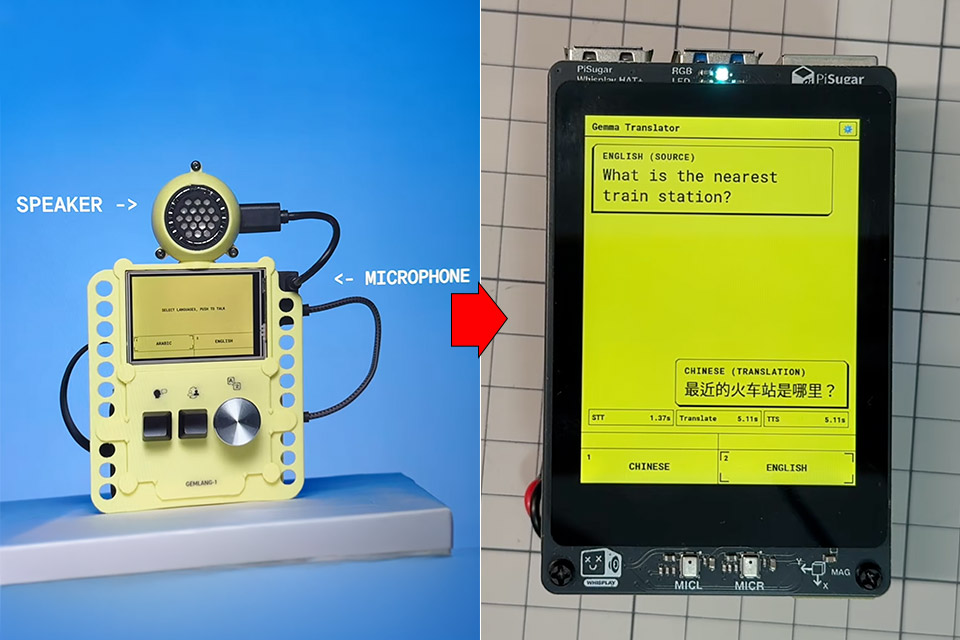
Google Creative Lab published Gemma Translator back in August 2026 as a voice box that never phones home. Alan Yam, Shashwath Santosh, and Dan Motzenbecker built it with help from Google Antigravity, then posted the code, model scripts, and 3D-print files on GitHub under Apache 2.0. You talk into a microphone. Moonshine turns the recording into text. Gemma 4 E2B, running locally through LiteRT-LM, translates that text. Moonshine speaks the other language from a speaker. After the first download, the radio can stay off.
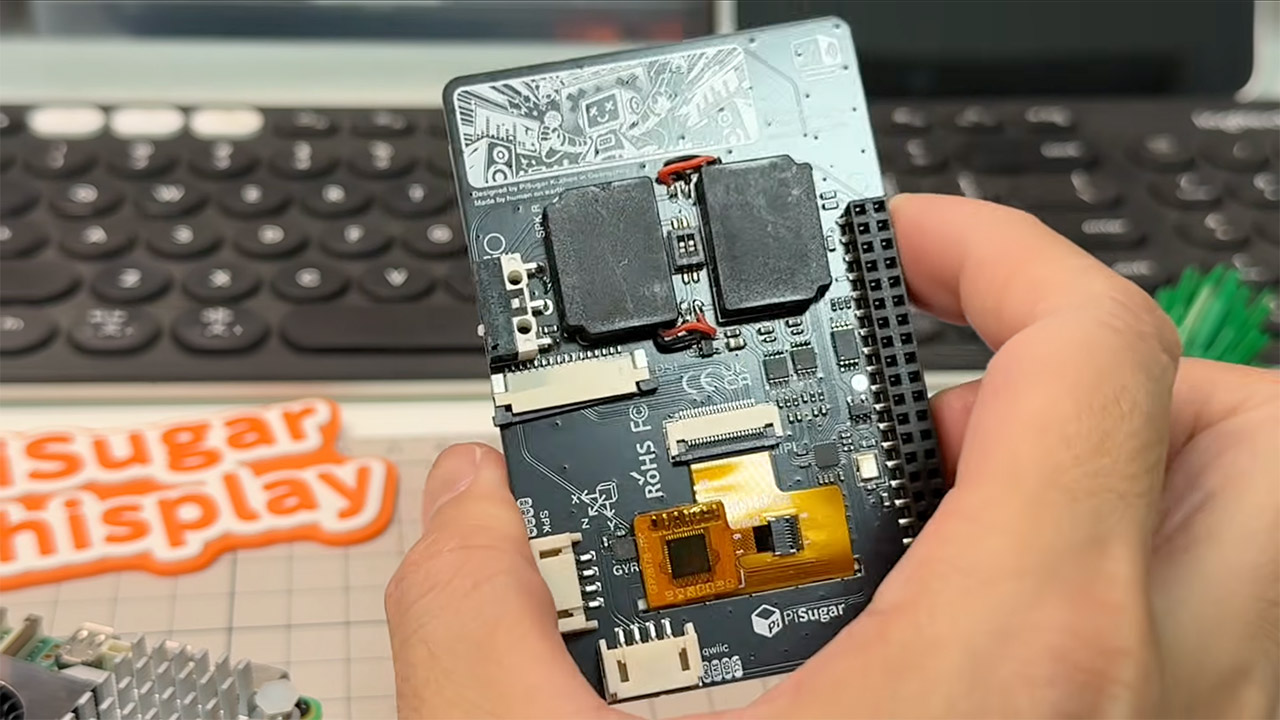
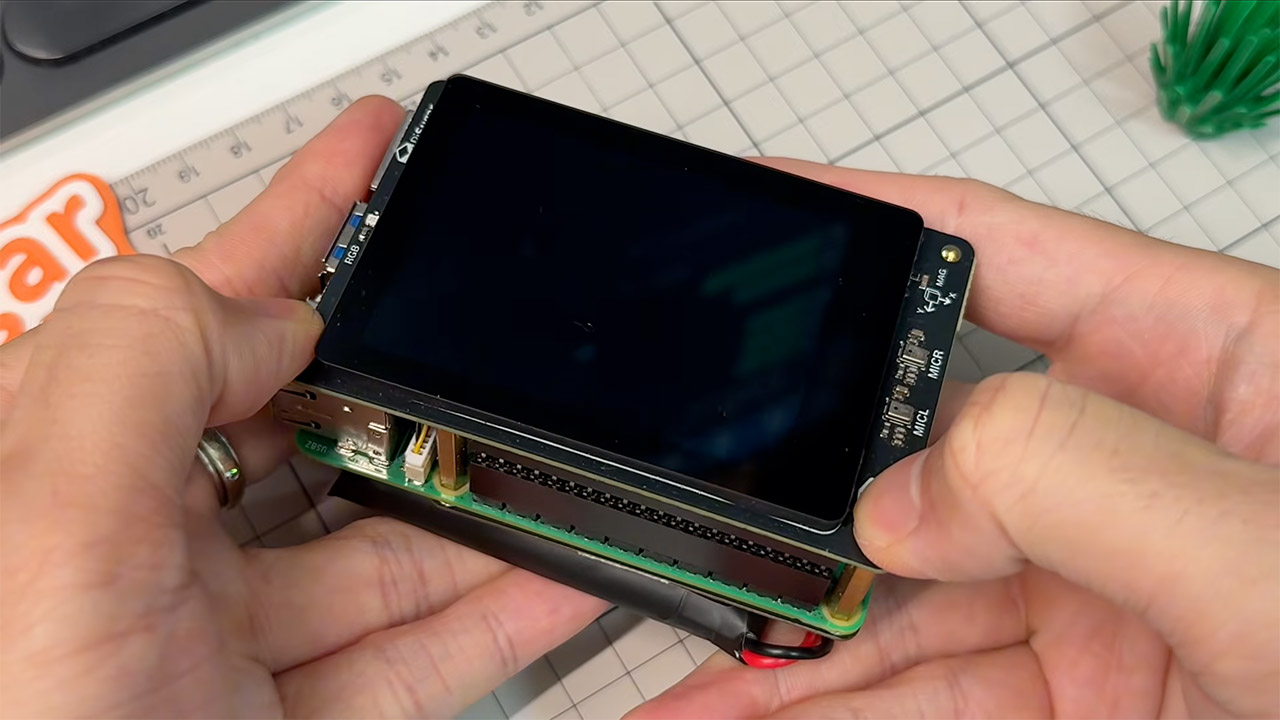
Jadaie Lin modified the same setup to work on PiSugar’s Whisplay HAT+. The board is roughly the same size as a Raspberry Pi 5, measuring around 2.8 inches, but it also has some serious hardware, such as a 640 x 480 DSI touchscreen, two microphones and speakers, and a few motion sensors. The original Google setup required a separate kiosk panel (480 by 320), a USB microphone, a speaker, a push-to-talk button, and a rotary knob to select the language to use. Lin completed the entire process on a Pi 5 with only one hat put on top of it.
ACTIVE NOISE CANCELLATION—AirPods 5 offer improved Active Noise Cancellation to help reduce outside noise, at their best value yet.
HEAR THE WORLD AROUND YOU—Adaptive Audio blends Active Noise Cancellation and Transparency for the best listening experience in any environment…
LIVE TRANSLATION—Communicate across languages using Live Translation, enabled by Apple Intelligence.*
Audio turns up on the onboard mics, Moonshine does its magic with some sophisticated transcription, Gemma handles the translation, and the twin speakers return the outcome to you. There’s a small retro-terminal-style web UI in React and Vite that is fed via a Python API on port 3000. This displays two discussion lanes, allowing you to sit down in front of the tablet with a friend in separate languages and chat.
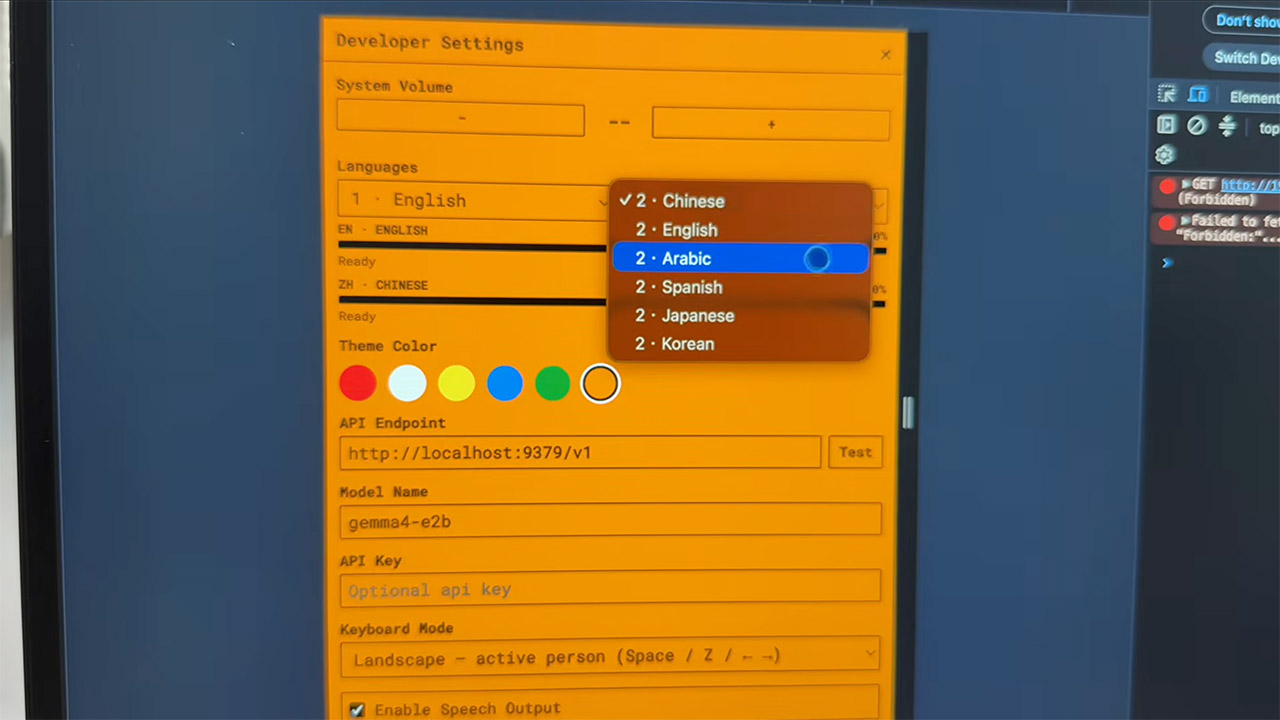
Lin relocated all of the old controls on the touchscreen and placed the language switching in a convenient settings panel. He also included timing to demonstrate how long each portion of the chat takes: listen, translate, and then speak.
Gemma 4 E2B runs in LiteRT-LM and lives in memory, with a useful system prompt stored in the key-value cache. Tokens are transferred to the browser via server-sent events, and the UI refreshes in real time as the discussion progresses. Finished phrases are fed into the speech queue. Context resets after 3200 tokens, as there is a 4096 token limit, thus extended conversations do not simply stop working. By default, the translator loads models for Chinese and English.
To set everything up, you’ll need Python 3.10 or newer, Node 18, or newer, an 8GB Pi 5, and a one-time model fetch from Hugging Face. After that, the device will happily run without the radio, which is ideal for travel, classrooms, and other situations where you don’t want your speech to sit on someone else’s servers. Lin is treating the translation as the first app for Whisplay HAT+, and there is a wait list and a Discord channel established up while the board is still being distributed to clients. The code is available at on the Github page, and it’s basically a fork of google-gemma/gemma-translator, so you can see how everything works.
America loves the Ford F-150 — it was actually the best-selling vehicle of 2025, even beating out popular SUVs like the Toyota RAV4 and fellow trucks like the Chevy Silverado. The F-150 is known for its relative affordability, its impressive towing, and solid drivetrain options. There’s a reason it’s been a bestseller in the United States for decades.
However, if you’re on the market for a used model, not every generation of the Ford F-150 is made equal, and some years have more known issues than others. Some model years have impactful upgrades and new designs that changed everything. Based on capability, complaints, common problems, features, and design, these are the best years to consider if you want a used Ford F-150. The average price is also included, giving a wide range of options for every price point. If you’re looking for some of the years to avoid, we have you covered on that as well.
Advertisement
1997 Ford F-150
The 10th generation of the Ford F-150 goes from 1997 to 2004. This was a monumental generation for the F-Series since Ford split up the lineup. In 1999, the F-150 was made into a pickup for personal use, while the F-250 and F-350 were considered part of the F-Series Super Duty line. But before that, there was the 1997. Within the 10th generation, this model year has fewer complaints on CarComplaints, with the biggest customer concern being spark plugs ejecting themselves. This issue continued into the 1998 model.
Advertisement
The 1997 Ford F-150 saw a lot of meaningful changes to the best-selling pickup, including a very appealing new exterior, a roomier interior, and some exciting new options, like leather seats and a six-disc CD changer. It started out with a 4.2-liter V6 or a 4.6-liter V8, which could tow up to 7,500 pounds. In other words, it was capable and stylish for its time. To this day, drivers claim it’s as reliable as ever. The current resale value is around $2,465, according to Kelley Blue Book, which isn’t too shabby for a truck that is known for pushing past 300,000 miles on the odometer.
Advertisement
2009 Ford F-150
This year marks the beginning of the 12th generation of the Ford F-150, and there honestly was not much change from the previous model. It was actually the last to use steel for its body and truck bed, bringing over many of the design elements that worked from the 11th generation. At the same time, Ford added a lot of technology-focused features that improved on the popular vehicle, including Bluetooth, a voice control system, and USB ports.
The 2009 model is praised for its beefy looks, comfortable ride, and towing capacity — over 11,000 pounds. While Ford is known for its recalls — and the Ford F-150 is no exception — the 2009 model has one of the lowest amounts of known issues on CarComplaints. Most of the complaints revolve around the engine, but are more annoyances than detrimental, like clattering and stuttering. The 2009 only came with V8 engine options, with the Coyote being one of the most reliable Ford engines ever made, according to Ford techs.
You can find the 2009 model for as low as $5,675 for the Regular Cab, according to Kelley Blue Book. Of course, the price you pay depends on a lot of various factors, like the condition and mileage. High mileage options will be cheaper, but owners trust them to run just fine — you may just need to replace some older parts.
Advertisement
2019 Ford F-150
If you ask Ford F-150 owners which year is the most reliable, many of them are quick to point to the 13th generation, which was 2015 to 2020. Why? The 2.7-liter EcoBoost V6 engine with the 10-speed automatic transmission has the community’s respect for being the most reliable drivetrain option. The 2019 is a solid choice from the 13th generation since Ford ironed out a lot of the generation’s earlier issues — there are fewer complaints on CarComplaints and positive reviews from customers on other sites, like Edmunds, with comments highlighting its towing, comfort, and tech.
The 2019 Ford F-150 comes with a smooth ride and supportive seats, and the interior feels quality and offers plenty of storage options. When searching for a 2019 model, be on the lookout for engine and transmission issues like oil consumption, stalling, and incorrect shifting. A solid used 2019 Ford F-150 should go for $14,100 (per Kelley Blue Book) depending on condition, mileage, and your location.
Advertisement
2022 Ford F-150
The current generation is often considered one of the best Ford F-150 generations, starting with the 2021 model. The 2022 has a wide selection of powertrain options, as it was the first year the F-150 ever offered hybrid. Our review of the current generation Ford F-150 praised the V6 hybrid option for its driving performance and usefulness — it can be used as a mobile generator. The hybrid version also has an incredible towing capacity of up to 12,700 pounds.
Advertisement
Compared to previous generations, the 14th generation barely has any negative feedback on CarComplaints. The 2025 model doesn’t even have any complaints at all, but if you’re looking for a used F-150, the 2022 is much more affordable and still has very few issues — the most common being a failed factory battery. This could allow you to splurge on a higher trim model, which has an appealing and technology-packed interior. The 2022 Ford F-150 Super Cab should be priced around $20,200, according to Kelley Blue Book. And since it’s a bit newer, you likely won’t have to do any major maintenance if you find one that was taken care of.
Four years ago, I moved back to Texas from California. After two weeks of living here, I realized we were going to have to do something about the mosquitoes. In the 25 years I’d been gone, they seemed to have grown larger, more intelligent, and much thirstier. My skin had become a bepoxed nightmare within days.
I immediately embarked on a mission to do something, anything, about the problem, quickly resorting to paying a local company to send a guy with a pesticide-blasting cannon strapped to his back to the house once every three weeks. The cannon, used to blast all the foliage on the property, was expensive—four figures yearly—and very effective at warding off bugs … for a mere 48 to 72 hours after each spraying, after which it would wear off and the mosquitoes would return with bloodthirsty vengeance.
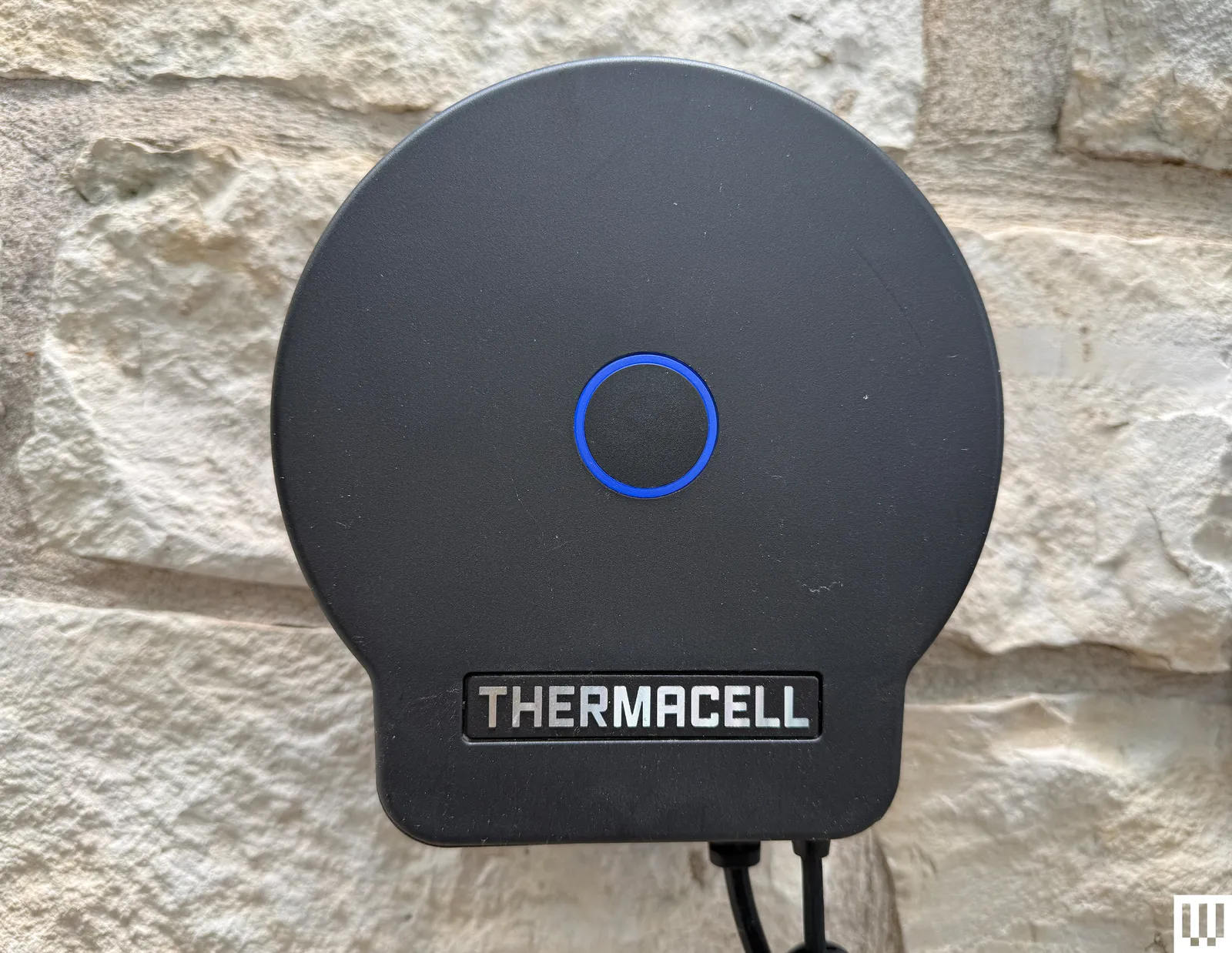
It took two years for me to find something better, and I wrote about it extensively for WIRED. Thermacell is a leader in mosquito abatement, and its LIV Smart Mosquito Repellent System is the company’s top-tier product. While it produces various small-scale repellers designed for personal use, LIV is a different animal that is installed semi-permanently around the area you want to protect. You fire it up when you need it, then shut it down when you’re safely inside.
Advertisement
Now two years after that review, Thermacell has upgraded most of the LIV components (only the cabling remains the same) and dubbed the system LIV 2.0. The company recently provided me with all the new hardware so I could test whether and how the technology had improved.
Similar Story, Updated Look
Conceptually, you won’t find any big twists in LIV 2.0. The brains of the system include one or more Wi-Fi-connected control hubs. These plug into wall power and connect via lengths of cable to multiple pesticide-emitting repellers laid out in a daisy chain, which you arrange in a perimeter around the area you’re trying to protect (in my case, the swimming pool). Repellers can be placed up to 20 feet apart from each other, and each contains a replaceable vial of the chemical metofluthrin, which mosquitoes detest (though, take note, it doesn’t typically kill them). With the original LIV, I used two hubs and five repellers to ring my pool. This year I added a sixth repeller to enhance coverage in one corner where I worried mosquitoes were sneaking through a hole in the vaporous fence.
CoreFX founder and CEO Denis Neville is a food science graduate from University College Cork.
Irish-founded US biotech CoreFX has chosen Cork’s Teagasc Moorepark as its European headquarters for R&D and commercial expansion efforts.
CoreFX develops additive powders for the health and wellness sector that claims to improve nutrient availability, absorption and impact. The business operates across North America and Europe, with three facilities in Illinois and Wisconsin, US.
The new operation in Cork will help CoreFX accelerate technologies that improve shelf life in nutritional supplements, the company said. Details of the company’s investment were undisclosed. CoreFX, however, said that the new Irish facility represents a “significant milestone” in its long-term global strategy.
Advertisement
Ireland was selected for its globally recognised strengths in food science, biotechnology and access to scientific talent, CoreFX said.
“Returning to Ireland to establish our European headquarters is personally meaningful, but this decision was driven by much more than my own roots,” said CoreFX founder and CEO Denis Neville. Neville is a University College Cork graduate in food science and technology who previously served as a commercial director at Kerry Americas.
“Ireland has become one of the world’s leading centres for food science, biotechnology, and innovation.
“By combining the scientific excellence of Teagasc Moorepark with Enterprise Ireland’s vision and support, we are creating an innovation platform that will accelerate how breakthrough nutritional technologies move from research into commercial reality for customers across Europe and beyond.” The Irish operation launches with a team of three scientists.
Advertisement
“This is a strategically important investment for Ireland,” said Minister for Enterprise, Tourism and Employment Peter Burke, TD. “CoreFX’s decision to invest and open this facility further positions Ireland internationally as a hub for biotechnology and food science”.
Mark Christal, the executive director at Enterprise Ireland said: “Since 2023, Enterprise Ireland has supported the company’s growth strategy, and this new European headquarters – developed alongside Teagasc Moorepark – represents the next stage of that journey. We look forward to seeing the team and business grow from here.”
Don’t miss out on the knowledge you need to succeed. Sign up for the Daily Brief, Silicon Republic’s digest of need-to-know sci-tech news.
Looking for the most recent NYT Connections: Sports Edition puzzle answers? CNET publishes daily answers and hints for Wordle, The New York Times Mini Crossword, Connections, Connections: Sports Edition and Strands puzzles. Connections: Sports Edition might not be as popular as the regular Connections puzzle, but it’s a fun game that challenges sports fans since the categories are all over the map. You’re as likely to find an Olympics category as you are to find one on the NFL, the WNBA or Premier League soccer.
Today’s NYT Connections: Sports Edition puzzle is a bit tricky. The purple category is a fun one today if you know a certain alphabet. If you’re struggling with the puzzle but still want to solve it, read on for hints and the answers.
Hints for today’s Connections: Sports Edition groups
Answers for today’s Connections: Sports Edition groups
Yellow group: Maryland teams.
Green group: Former NHL cities.
Advertisement
Blue group: NFL rookie WRs.
Purple group: Sports terms in the NATO phonetic alphabet.
What are today’s Connections: Sports Edition answers?
The completed NYT Connections: Sports Edition puzzle for Sept. 20, 2026.NYT/Screenshot by CNET
The yellow words in today’s Connections
The theme is Maryland teams.
The four answers are Midshipmen, Orioles, Ravens and Terrapins.
The green words in today’s Connections
The theme is former NHL cities.
Advertisement
The four answers are Atlanta, Hartford, Phoenix and Quebec City.
The blue words in today’s Connections
The theme is NFL rookie WRs.
The four answers are Boston, Lemon, Tate and Tyson.
The purple words in today’s Connections
The theme is sports terms in the NATO phonetic alphabet.
Advertisement
The four answers are golf, uniform, victor and bravo.
CNET editor Gael Fashingbauer Cooper, a journalist and pop-culture junkie, is co-author of “Whatever Happened to Pudding Pops? The Lost Toys, Tastes and Trends of the ’70s and ’80s,” as well as “The Totally Sweet ’90s.” She’s been a journalist since 1989, working at Mpls.St.Paul Magazine, Twin Cities Sidewalk, the Minneapolis Star Tribune, and NBC News Digital. She’s Gen X in birthdate, word and deed. If Marathon candy bars ever come back, she’ll be first in line.
See full bio
TRIBIT might not have the brand recognition of JBL, Sony, Bose, or Soundcore in the U.S., but the company is hardly new to affordable wireless audio. Founded in 2017, TRIBIT started with portable Bluetooth speakers before expanding into true wireless earbuds a year later, building its reputation around products that offer a lot of hardware and features without demanding premium-brand money.
The company first got our attention with the StormBox 2 Bluetooth speaker, which earned our Best Bang for Your Buck recommendation in the 2026 Best Budget Bluetooth Speakers Under $150 guide. We found it delivered unusually strong sound quality and battery life for its $80 asking price, which makes TRIBIT considerably harder to dismiss as just another inexpensive audio brand.
Now the company is back with the FlyBuds C3 Wireless Earbuds, a sub-$40 model aimed squarely at buyers who want everyday convenience without paying premium TWS prices. That part of the market is already crowded, so the interesting question is whether TRIBIT can repeat what it did with the StormBox 2 and make the low price feel like a bargain rather than a compromise.
TRIBIT FlyBuds C3
FlyBuds C3
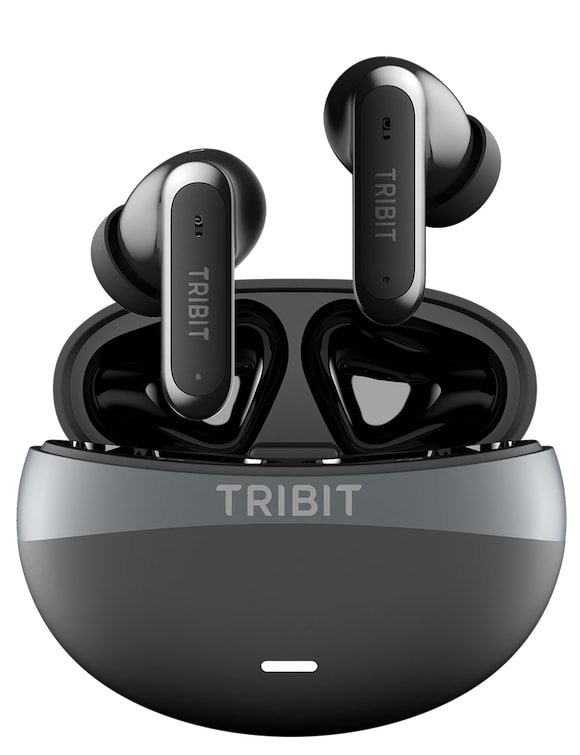
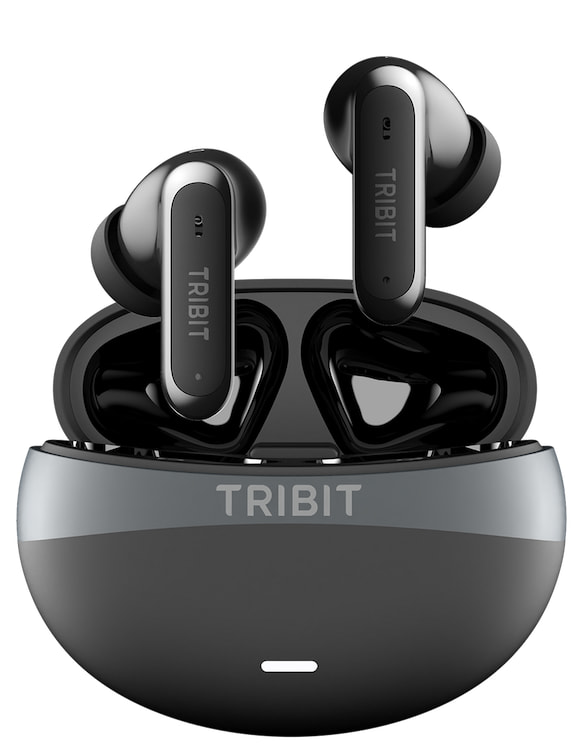
Priced at $39.99, the FlyBuds C3 are true wireless earbuds that weigh just 4 grams each and incorporate hybrid ANC, six microphones with AI-assisted noise reduction for calls, Bluetooth 6.0, app-based EQ controls, and an IP55 rating for resistance to sweat, dust, and splashes. Battery life is rated at up to 8 hours from the earbuds and 35 hours total with the charging case when ANC is switched off.
TRIBIT is positioning the FlyBuds C3 as an everyday pair of earbuds for commuting, workouts, calls, and listening around the house. Their 4-gram weight should help with longer listening sessions, while the IP55 rating makes them better suited to workouts and outdoor use than earbuds without comparable protection.
Advertisement
FlyBuds C3 Feature Round-Up
Hybrid ANC: The FlyBuds C3 incorporate hybrid active noise cancellation rated to reduce external noise by up to 45 dB. TRIBIT positions the feature for reducing common distractions during commuting, travel, and everyday listening. The earbuds also include a transparency mode for situations where hearing your surroundings is more important than shutting them out.
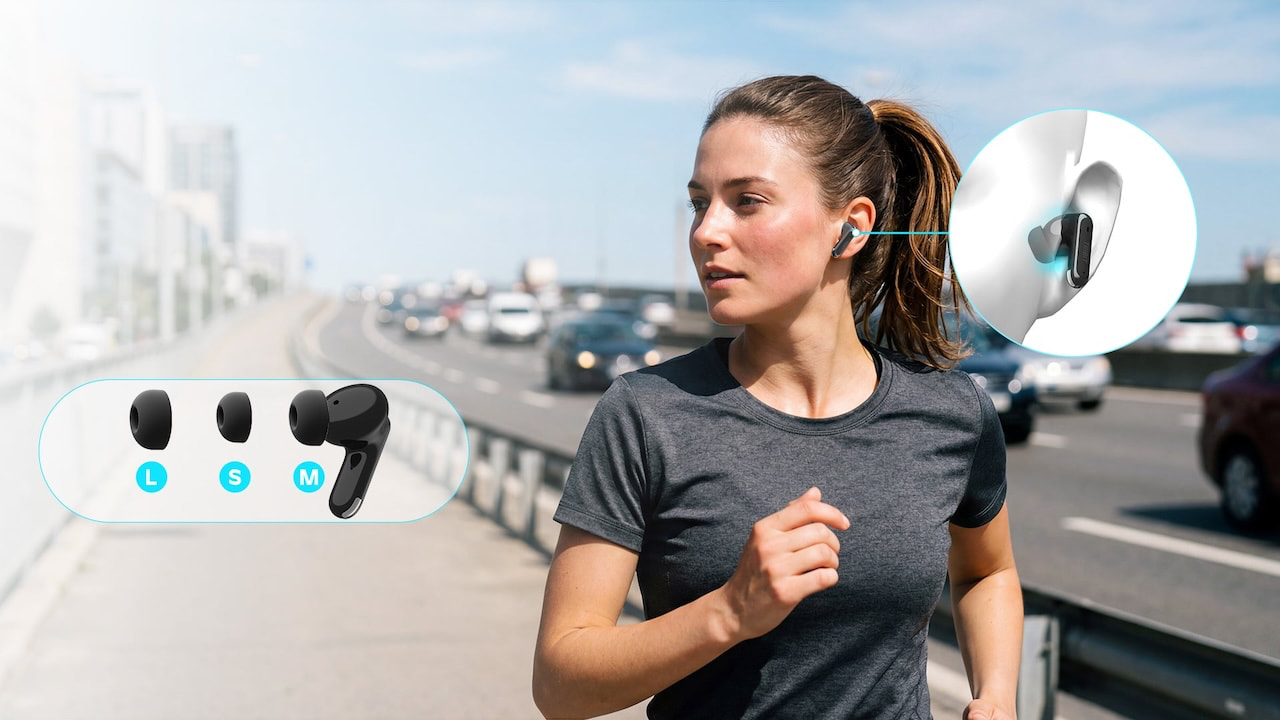
Lightweight Design: Each earbud weighs just 4 grams, which should help with comfort during longer listening sessions. TRIBIT includes three sizes of ear tips to provide a more secure fit for commuting, workouts, and extended use.
IP55 Rating: The FlyBuds C3 carry an IP55 rating for protection against sweat, splashes, and light rain, making them suitable for workouts and everyday outdoor use. TRIBIT also says the antibacterial ear tips achieved 99.9% antibacterial effectiveness in Intertek testing, with no bacteria detected after 28 days.
Calling: The FlyBuds C3 use six microphones with AI-assisted noise reduction to help isolate the user’s voice from surrounding noise during calls. TRIBIT positions the system for use in cafés, offices, and other noisy environments, while hands-free calling and automatic reconnection after initial pairing are designed to make everyday use more convenient.
Advertisement
Battery: The FlyBuds C3 are rated for up to 8 hours of playback on a single charge with ANC switched off, with the charging case extending total listening time to 35 hours. TRIBIT lists up to 22 hours of total playback with ANC enabled in its published specifications, although actual battery life will vary with volume, ANC use, and other settings.
Gaming: A low-latency Game Mode reduces audio delay to a claimed 55 ms, helping keep sound better synchronized with on-screen action. The mode can be enabled through the TRIBIT app.
Advertisement. Scroll to continue reading.
Bluetooth: The FlyBuds C3 incorporates Bluetooth 6.0 that also provides multipoint connection support. Multipoint enables users to use the FlyBuds C3 to switch smoothly between two devices, laptop to phone and back, without re-pairing.
Advertisement
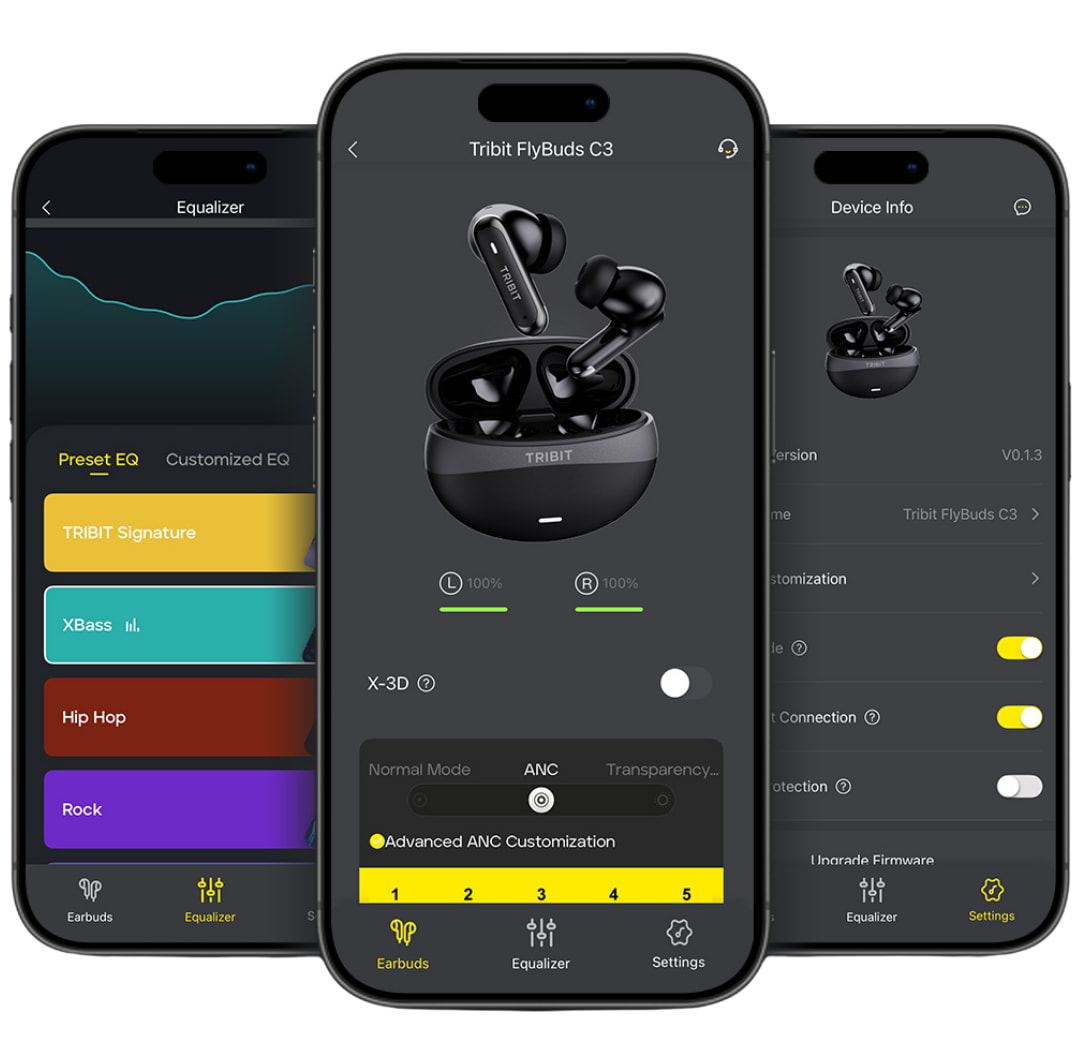
Sound and Control: Sound settings and additional controls are available through the TRIBIT app (Android, iOS). The app includes 10 preset EQ modes, a customizable EQ, and TRIBIT’s XBass processing for additional low-frequency emphasis. Users can also choose between five manual ANC levels, three noise-control modes, and three ANC scenes to tailor the amount of outside sound they want to hear.
Input: 2.5W (Charging to Case) Output: 0.25W (Charging to Earbuds)
Input Power
DC 5V/0.5A(Max)
Powerbank Output
DC 5V/0.05A(Max)
IP rating
IP55
Drop Proof
1.2 Meters
Product Size
(Case) 2.44 x 1.93 x 1.05 in (Earbuds) 1.27 x 0.96 x 0.98 in
Product Weight
37.3g
The Bottom Line
The wireless earbud market is so overcrowded that picking a first pair can feel like choosing toothpaste from an entire supermarket aisle. At $39.99, the TRIBIT FlyBuds C3 make that decision somewhat easier by concentrating on features that matter for everyday use rather than pretending to be inexpensive audiophile earbuds.
What stands out is the combination. You get hybrid ANC rated for up to 45 dB of noise reduction, Bluetooth 6.0 with multipoint connectivity, six microphones with AI-assisted noise reduction for calls, app-based EQ, IP55 protection, and earbuds that weigh just 4 grams each. TRIBIT also rates battery life at up to 35 hours with the charging case and ANC switched off. That is a fairly complete package for $40.
There are compromises. TRIBIT does not list support for higher-bitrate Bluetooth codecs such as LDAC or aptX, and there is no advertised spatial audio support. Those omissions probably will not matter to someone looking for inexpensive earbuds for commuting, workouts, calls, or Spotify on the train, but listeners more interested in higher-resolution wireless playback have alternatives.
The SOUNDPEATS Air6 HS, which also sells for $39.99 and adds LDAC and spatial audio, Bluetooth 6.0 multipoint connectivity, and up to 45 hours of total battery life. However, it semi-in-ear design does not provide active noise cancellation.
Advertisement
Spend roughly twice as much for the SOUNDPEATS Air5 Pro+ that’s now on sale for expanded codec support with adaptive ANC, LDAC, aptX Adaptive, aptX Lossless, and LC3.
That leaves the FlyBuds C3 in a sensible position. They are not trying to turn $40 earbuds into a replacement for premium Sony, Bose, or Sennheiser models. They are aimed at someone who wants ANC, multipoint connectivity, decent battery life, workout-friendly protection, and enough app control to tailor the sound without spending much more than dinner for two at Five Guys. At this price, losing them will probably hurt your pride more than your credit card.
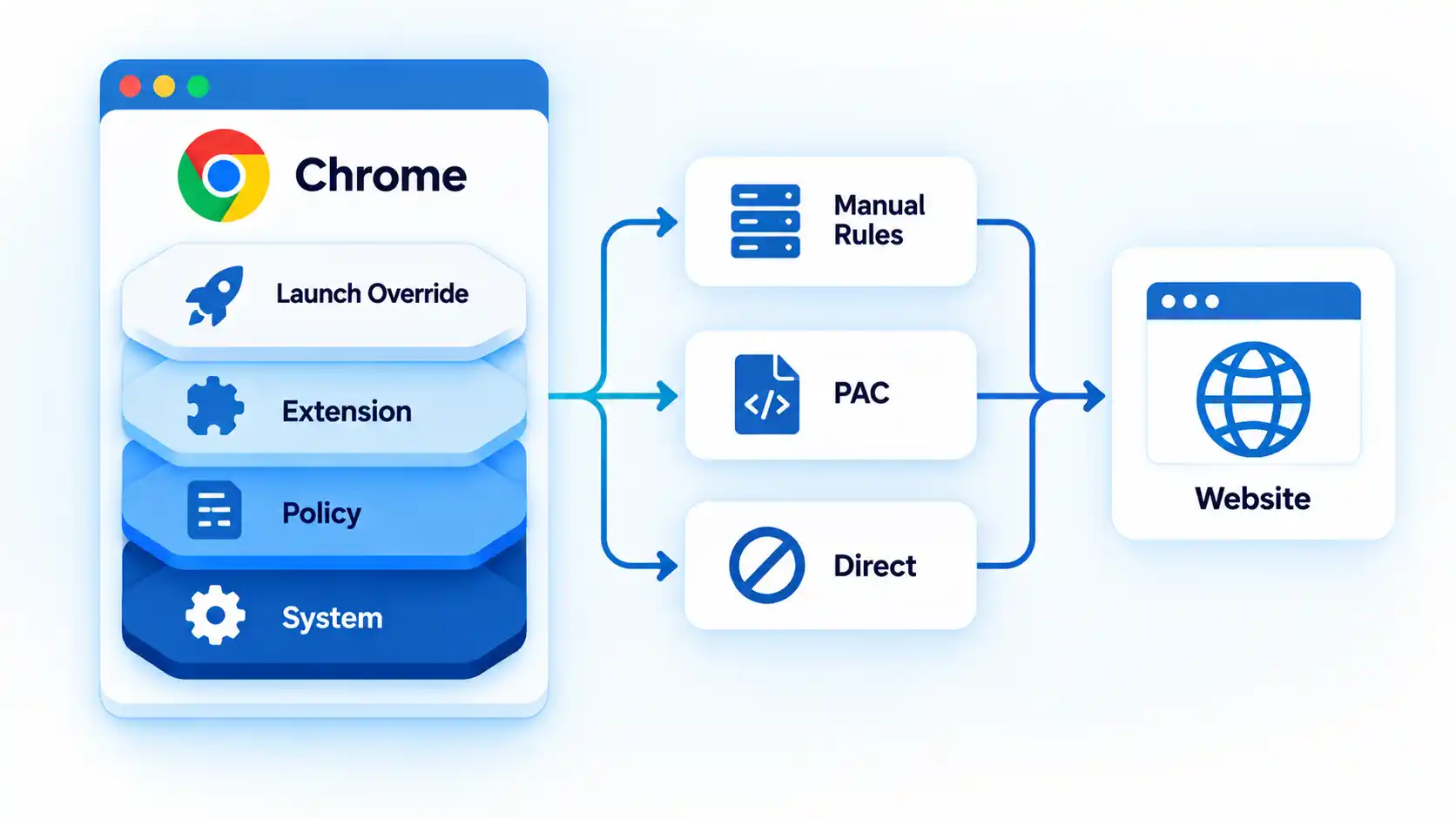
Chrome and Firefox can both use proxies, but they expose control differently. Chrome normally starts from the operating system’s proxy configuration and can be changed by policy, extensions, PAC rules, or explicit overrides, while Firefox gives you a visible browser-level choice between system, manual, automatic, PAC, and no-proxy modes.
Quick Take
Chrome is not limited to a system proxy, and Firefox does not always ignore the system proxy. Chrome normally inherits platform settings but supports several override layers; Firefox makes those choices visible in its own connection settings. PAC rules, bypass lists, extensions, policy, and SOCKS behavior can make the two browsers take different routes on the same computer.
Chrome vs Firefox Proxy Settings at a Glance
The useful comparison is not simply “system proxy versus browser proxy.” Instead, compare where each browser gets its proxy configuration, how easily it can replace the operating-system setting, and which other layers can change the route for a particular request.
Chrome vs Firefox proxy behavior
Typical proxy configuration differences between Chrome and Firefox
Feature
Chrome
Firefox
Normal configuration source
Normally starts from platform or system proxy configuration
Exposes an explicit browser connection mode that can inherit or replace system settings
Can use system proxy
Yes; this is the normal starting point when no higher-priority override applies
Yes, through Use system proxy settings
Browser-specific manual control
Available through supported configuration such as command-line options, policy, extensions, or PAC
Built directly into Firefox Connection Settings
PAC support
Yes
Yes, including an explicit Automatic proxy configuration URL mode
Bypass behavior
Supports explicit bypass rules and implicit local-address exceptions
Supports No Proxy For and PAC-based direct routing
SOCKS support
Supports SOCKSv4 and SOCKSv5
Supports SOCKS configuration with browser-level controls
SOCKS DNS behavior
SOCKSv5 target-name resolution is proxy-side
Proxy-side DNS can be enabled for SOCKS v5
Extensions can control proxy settings
Yes, through Chrome’s proxy extension API
Yes; Firefox can show extensions controlling its connection
Enterprise policy
Can enforce proxy mode and related settings
Can enforce proxy mode, endpoints, bypass rules, SOCKS behavior, and DNS handling
Useful diagnostic clue
Check system settings first, then policy, extensions, PAC, bypasses, and explicit overrides
Check the selected Firefox connection mode first, then extensions, PAC, bypasses, and policy
Neither browser has a universally better proxy model. Chrome fits naturally into environments where the browser should inherit platform or centrally managed network settings, while Firefox makes browser-specific proxy control easier to see and change.
Advertisement
How Chrome Decides Which Proxy to Use
Chrome performs proxy resolution at the URL level. For each requested URL, the browser decides whether to connect through one or more proxy servers or directly to the destination.
Chromium’s current Chrome proxy documentation describes three major proxy-resolution approaches: manual proxy rules, a proxy auto-configuration (PAC) script, and automatic discovery through Web Proxy Auto-Discovery (WPAD).
Manual rules map requests to proxy endpoints and can define destinations that should bypass those proxies. PAC evaluates routing logic for individual URLs. Automatic discovery attempts to locate PAC configuration from the network.
The operating system is therefore Chrome’s normal starting point, not its only possible source of proxy behavior. Chrome can also receive effective proxy settings from command-line options, managed policy, extensions, or PAC configuration.
Advertisement
Chrome can route individual requests directly
Chromium treats DIRECT as a valid proxy-resolution result. A request that receives this result is sent directly to the destination rather than to a proxy.
For example, a PAC script can send an internal application through a corporate proxy while returning DIRECT for another website. Seeing both routes during one Chrome session does not necessarily indicate a configuration failure.
How Firefox Decides Which Proxy to Use
Firefox exposes the configuration source more directly. Instead of relying only on the operating system’s network controls, Firefox provides its own selector for deciding how connections should be proxied.
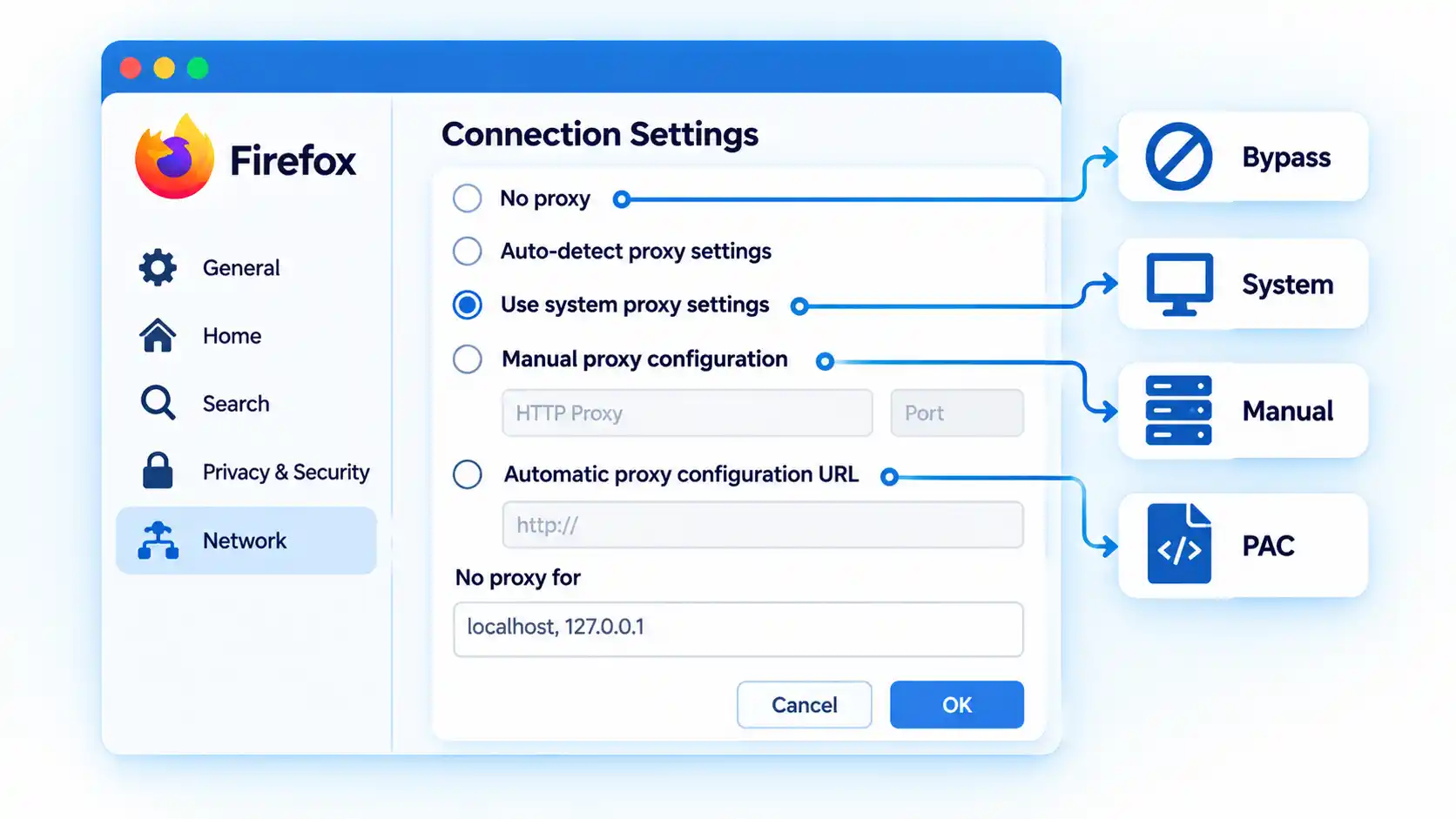
No proxy, which tells Firefox not to use a proxy from this connection setting.
Auto-detect proxy settings for this network, which attempts automatic discovery.
Use system proxy settings, which tells Firefox to use the operating system’s proxy configuration.
Manual proxy configuration, which lets Firefox use browser-specific proxy endpoints.
Automatic proxy configuration URL, which loads routing rules from a PAC file.
These are informational configuration modes, not ranked choices. The correct mode depends on whether Firefox should inherit the computer’s network policy or use browser-specific behavior.
Firefox also exposes No Proxy For, which allows selected hostnames or IP addresses to bypass the configured proxy.
The Biggest Difference: Inheritance vs Explicit Browser Control
The practical difference is where that control is surfaced.
Chrome normally begins with platform network settings. Its proxy engine supports manual mappings, PAC, bypass rules, several proxy schemes, extension control, command-line configuration, and policy, but many of those controls live outside an ordinary Chrome settings screen.
Firefox makes the decision explicit inside the browser. It can inherit the same system proxy Chrome uses, or deliberately switch to no proxy, a separate manual endpoint, automatic discovery, or its own PAC configuration.
Advertisement
The broader difference between system proxy and browser-specific proxy behavior is therefore about inheritance and configuration scope, not a simple rule that one browser “has a proxy” and the other does not.
A more accurate shorthand is:
Chrome normally inherits platform proxy configuration unless another supported layer changes it; Firefox lets you explicitly choose whether to inherit or replace that configuration.
PAC Files Behave Differently From a Fixed Proxy
A proxy auto-configuration (PAC) file contains routing logic instead of one fixed proxy address. The browser evaluates that logic for requested destinations and can receive a proxy endpoint or a direct-connection result.
Advertisement
Chromium documents PAC as one of its standard proxy-resolution methods, while Firefox exposes an Automatic proxy configuration URL mode in its connection settings.
This means a browser using PAC cannot always be described accurately as simply “proxied” or “not proxied.” The route can change from one destination to another.
The mechanics of proxy auto-configuration explain why two requests from the same browser can follow different routes without any setting being changed between them.
Proxy Bypass Rules Can Make the Browsers Look Inconsistent
A bypass rule tells the browser or networking layer to connect directly to selected destinations even though a proxy is otherwise configured.
Advertisement
Warning!
Do not use one successful IP check or one proxied website as proof that every request from Chrome or Firefox follows the same proxy. PAC decisions, bypass rules, local-address exceptions, extensions, and policy can route other destinations differently.
Firefox provides No Proxy For. Chromium supports explicit proxy bypass rules and also applies implicit bypass behavior for certain local destinations.
For example, Chromium documents implicit bypass behavior for loopback destinations such as local addresses. A development service running on the same machine can therefore connect directly while external websites use the configured proxy.
Advertisement
This behavior can look inconsistent only because the exception is not obvious until you inspect the effective routing rules.
SOCKS and DNS: A Technical Difference That Matters
SOCKS is a transport-level proxy protocol rather than an HTTP-specific proxy. Both Chrome and Firefox support SOCKS, but name resolution is an important difference.
Chromium’s current documentation states that with a SOCKSv5 proxy, Chrome performs target-host name resolution on the proxy side. Chrome does not provide an equivalent switch for moving SOCKSv5 target-name resolution back to the client.
Firefox exposes configurable behavior here. Mozilla’s current Firefox Proxy policy reference includes UseProxyForDNS for SOCKS v5, along with SOCKS version and proxy endpoint controls.
Advertisement
The distinction matters when local DNS and proxy-side DNS would resolve a hostname differently, such as an internal hostname that exists only from one side of the proxy connection.
The deeper interaction between SOCKS5 proxy DNS and local name resolution depends on the proxy protocol and configuration rather than browser branding alone.
Extensions and Enterprise Policies Can Override Expectations
Browser behavior can also come from management or extension layers rather than the settings visible at first glance.
Chrome extensions and policy
Chrome provides a dedicated proxy API for extensions. That API can use direct, system, automatic-detection, PAC, or fixed-server modes, and Chrome can report which layer currently controls the setting.
Advertisement
Managed Chrome environments can also impose proxy configuration through policy. As a result, an organization’s Chrome installation may behave differently from an unmanaged browser even on the same operating system.
Firefox extensions and policy
Mozilla notes that Firefox’s Connection Settings interface can show extensions that control how the browser connects to the internet.
Firefox’s enterprise Proxy policy can also define system, manual, auto-detect, or PAC modes and control HTTP, SSL, SOCKS, passthrough, SOCKS version, and proxy-DNS behavior.
If Chrome or Firefox behaves differently from the visible operating-system proxy setting, extensions and managed policy therefore belong in the diagnostic path rather than being treated as rare exceptions.
Advertisement
How to Check Which Proxy Chrome or Firefox Is Actually Using
Work from the broadest configuration source toward browser-specific overrides. Each step removes one possible source of the mismatch before you investigate the next layer.
Check the operating-system proxy. Confirm whether Windows or macOS has a manual proxy, automatic discovery, PAC configuration, or bypass rules enabled. This establishes the configuration Chrome is likely to inherit and the system configuration Firefox can choose to use.
Check Firefox’s selected connection mode. Determine whether Firefox uses system settings, No proxy, manual proxy configuration, automatic detection, or a PAC URL. If Firefox is not using system settings, a difference from Chrome may already be explained.
Check Chrome for explicit or managed overrides. Look for a proxy-controlling extension, organization-managed policy, or deliberate launch configuration that replaces normal platform behavior. On a managed installation, do not assume the visible system proxy is the final authority.
Inspect PAC and bypass behavior. Check whether either browser is using a PAC file, bypass list, local-address exception, or direct-routing rule for the destination you are testing. A direct connection can be the intended result rather than evidence that the proxy was ignored.
Compare routes whose expected behavior you already know. If your configuration deliberately proxies one destination and bypasses another, compare those two cases. Their different behavior can show whether the configured rules are being applied as intended without assuming that one public-IP check represents every request.
Change only one configuration layer at a time. If the cause is still unclear, modify one layer, retest, and then restore or keep that change before moving to the next. Changing the operating system, Firefox, extensions, and PAC rules simultaneously makes the effective configuration harder to identify.
If you need the actual platform-specific setup paths rather than the diagnostic model, you can configure a proxy on Windows, macOS and Firefox using the relevant system and browser controls.
Which Browser Gives You the Right Proxy Scope?
Firefox is useful when one browser needs proxy behavior that differs from the operating system. Its visible connection selector makes system inheritance, manual proxying, PAC, automatic detection, and no-proxy behavior easy to distinguish.
Chrome fits naturally when the browser should follow operating-system or centrally managed network policy. That does not mean Chrome lacks browser-specific proxy capability: Chromium supports detailed routing rules, PAC, extensions, command-line configuration, and managed policy, but many of those controls are supplied outside an ordinary Chrome settings screen.
Neither approach is universally superior. The appropriate model depends on whether you need explicit browser-specific control or consistent inheritance from device or organization network settings.
Advertisement
Bottom Line
Chrome and Firefox differ mainly in how proxy control is surfaced, not in whether they can use proxies. Chrome normally begins with platform settings and can be changed by several configuration layers, while Firefox lets you explicitly choose whether to inherit those settings or replace them with browser-specific behavior.
When the two browsers take different routes, check the effective configuration source, PAC decisions, bypass rules, SOCKS behavior, extensions, and managed policy before assuming that one browser is ignoring the proxy.
Big quote: Tom Marieb has a visceral reaction when he sees an iPhone owner put on a screen protector. “Personally, when I see someone put a screen protector on their iPhone, it makes my skin crawl, because we work so hard to make beautiful front screens,” he told TechRadar. The remark from Apple’s new vice president of hardware engineering reflects the company’s confidence in Ceramic Shield 2, its latest display material.
Marieb said Apple set out to solve a familiar problem for smartphone owners: screens that pick up scratches through normal use. But scratch resistance alone wasn’t the whole goal; the company also wanted the coating to stay durable as the device aged, since the two properties tend to work against each other in most materials.
Apple said Ceramic Shield 2 provides three times the scratch resistance of the previous generation. The company’s position is that its display technology is strong enough that users should be able to enjoy the appearance of the front glass without immediately covering it with another layer.
Advertisement
Not everyone finds that argument persuasive, and the reaction to Marieb’s comments online suggests the disagreement isn’t really about how toughCeramic Shield 2 is. For a lot of iPhone owners, a protector is less about preventing scratches on great glass and more about not paying for a screen repair at all: out-of-warranty replacements can run into the hundreds of dollars, so a cheap, disposable layer functions as insurance regardless of how durable the glass underneath happens to be.
Others use protectors for reasons that have nothing to do with scratch resistance in the first place, like privacy filtering or extra glare reduction, features no amount of Ceramic Shield toughness would replace.
That same focus on long-term durability extends to the iPhone Duo. The foldable introduces an inner display and hinge system that Apple had to design around issues that don’t affect standard slab-style phones.
Marieb said the company spent significant time refining the hinge so that it feels secure in every position, including open, closed, and partially folded. Apple wanted the mechanism to close with the solid feel of a high-end car door, rather than feeling loose or “floppy.”
Advertisement
“A lot of blood, sweat, and tears went into that,” Marieb said. The Duo’s inner screen has a matte finish intended to make any changes around the fold less noticeable than they’d be on a glossy display. Marieb said Apple should be judged on how well that claim holds up over time.
“Hold us accountable to that,” he said.
Ceramic Shield 2 and the Duo’s hinge represent two sides of the same durability push: one limits scratches on Apple’s conventional iPhones, the other addresses the mechanical and display challenges unique to a foldable design.
Anthropic has a wet biology lab in the Bay Area where it can use its AI models to run physical experiments, it has confirmed to TechCrunch.
AI leaders have been promising that AI is the key to curing human disease. Dario Amodei opined just last week: “I believe that AI could cure most major diseases in the next 5–10 years.” To do that, an LLM would have to have methods to test its theories in real life.
“We believe that to do biology, the final test is still, and will be for a while, in real lab work,” Anthropic’s head of life sciences, Eric Kauderer-Abrams, told Reuters. “We absolutely are doing that today.” He added that the lab operates like most biotech labs: Anthropic conducts some research there while also working with external partners.
While Anthropic declined to give specifics on what the wet lab is working on, it did say the main focus was fundamental biology, not drug discovery.
Anthropic doesn’t want to give the appearance of competing with the pharma industry, where it has numerous major customers and partners (e.g., it just announced a deal to work with Novo Nordisk on joint drug discovery). Anthropic has already faced backlash for launching products perceived to compete with those of its customers.
To that end, Anthropic also launched a Life Sciences Verification Program this week, to give vetted bio researchers access to its most powerful models. It has also published recent reports on some of the research it’s doing to support drug discovery. This includes one report on accelerating protein design and one on uplifting bimolecular modeling.
The fervor has grown so intense that CEO Dario Amodei published a post last weekend calling on the industry to slow down and institute self-regulation. He has repeatedly called bioterrorism one of AI’s biggest risks.
The juxtaposition of these dire warnings and the wet lab has not gone unnoticed in the tech industry. As investor and AI coding startup founder Chamath Palihapitiya posted on X, somewhat tongue in cheek: “The group behind such hits as: ‘We’re All Going To Die’ and ‘Regulate Me Now’ are building a wet lab in SF. I do not recommend this.”
When you purchase through links in our articles, we may earn a small commission. This doesn’t affect our editorial independence.

























































You must be logged in to post a comment Login