Connect with us
DAPA Banner
DAPA Coin
DAPA
COIN PAYMENT ASSET
PRIVACY · BLOCKDAG · HOMOMORPHIC ENCRYPTION · RUST
ElGamal Encrypted MINE DAPA
🚫 GENESIS SOLD OUT
DAPAPAY COMING

Tech

XTAR AA 1.5V 3960 Rechargeable Li-ion Battery Review

Published

on

Verdict

A clever set of Li-ion batteries, the touch-to-check LED system lets you know if the XTAR AA 1.5V 3960 Rechargeable Li-ion Battery cells are ready to go or not. With long life and high capacity, these can be a good replacement for alkaline batteries in most cases, particularly high drain uses, such as torches and toys. There’s no built-in charging, so you’ll need to account for a Li-ion charger if you don’t have one, but that’s the only real potential downside.

  • High capacity

  • Integrated battery charge status

  • Holds charge well

  • Will most likely require a new battery charger

Key Features

Introduction

Rechargeable AA Li-ion batteries are becoming more popular. Capable of a constant 1.5V output and maintaining their charge, they’re a lot closer to alkaline batteries than standard rechargeables. However, the XTAR AA 1.5V 3960 Rechargeable Li-ion Battery is the first I’ve seen not to include a USB-C port for charging.

Advertisement

It means you need a Li-ion-compatible charger, but the total capacity is higher than that of its rivals, making these a good choice in most situations, particularly where you need high capacity.

Advertisement

Design and Charging

  • Charge indicator onboard
  • Long life (1500 charge cycles)
  • Needs a Li-ion charger

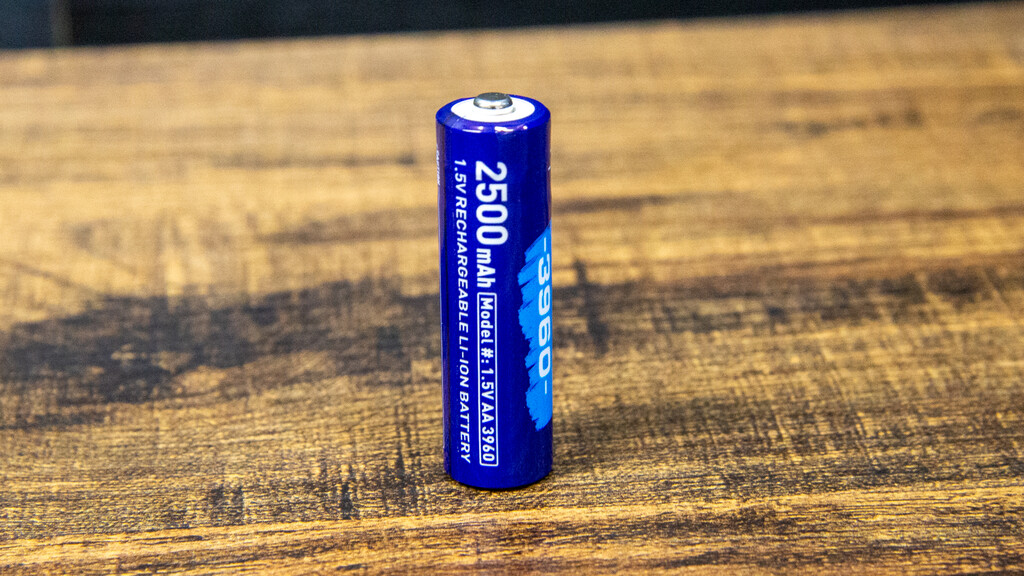
The first set of Li-ion AA batteries that I saw were the Paleblue AA USB-C Rechargeable Batteries, which have a USB-C port onboard for direct charging. Here, things are different, and the XTAR AA 1.5V 3960 Rechargeable Li-ion Battery looks much like a regular rechargeable battery, with nothing distinguishing it from the outside.

XTAR AA 1.5V 3960 Rechargeable Li-ion Battery close-upXTAR AA 1.5V 3960 Rechargeable Li-ion Battery close-up
Image Credit (Trusted Reviews)

That means you need a charger compatible with Li-ion batteries. Use a regular battery charger and you can destroy these batteries. I was sent an XTAR L8 charger, which can take eight batteries (AA or AAA via the included adaptors). This charger senses the battery type (Li-ion or NiMH) and then charges them correctly.

XTAR AA 1.5V 3960 Rechargeable Li-ion Battery charger with adaptors for AAAXTAR AA 1.5V 3960 Rechargeable Li-ion Battery charger with adaptors for AAA
Image Credit (Trusted Reviews)

Press and hold the positive terminal on top (I found that it needs a bit of pressure and, sometimes, pressing and holding for a few seconds), and a green light turns on to show that these batteries are different: one flash means 0% to 20% charge; two flashes for 20% to 50% charge; three for 50% to 80% charge; and four for 80% to 100%. It’s a handy indicator of whether the batteries are ready to go or not.

Advertisement

Each battery has a capacity of 2500mAh, which is 1000mAh higher than the Paleblue ones. At this capacity, the XTAR AA 1.5V 3960 Rechargeable Li-ion Battery is similar to many NiMH batteries.

Advertisement

XTAR says that these batteries can last for 1500+ charge cycles, which is also similar to a lot of NiMH batteries. That means that you can charge and discharge these batteries 1500 times, so each one effectively replaces 1500 alkaline batteries.

Li-ion batteries, such as these, have two main advantages over NiMH: they discharge at a higher rate (1.5V vs 1.2V) and hold their charge for longer.

Performance

  • High capacity
  • Can replace alkaline batteries in some circumstances

To test these batteries I used an XTAR VX4, which is designed for NiMH and Li-ion batteries, testing capacity with a 300mA current. On average, across the four XTAR AA 1.5V 3960 Rechargeable Li-ion Battery cells that I had, the total capacity was a high 2583mAh – that’s only slightly behind the Ansmann Digital AA HR6 2850mAh.

That makes these batteries ideal for high-drain devices, such as torches and toys. I also fitted them to my Yale Linus smart lock. When fitted with NiMH batteries, this lock complains that the batteries are low; with the XTAR AA 1.5V 3960 Rechargeable Li-ion Battery the lock worked correctly.

Advertisement

Advertisement

There may be some devices that these batteries don’t work with, but in many cases you can replace alkaline batteries with these.

Should you buy it?

You need high-capacity alternatives to alkaline batteries

With a high tested capacity, these batteries can replace standard alkaline batteries in a lot of cases.

Advertisement

You want something cheaper

Advertisement

If you’ve got devices that are less fussy, then you can buy high capacity NiMH batteries for less.

Final Thoughts

It all depends on what you want to use the batteries for. If you want to replace alkaline batteries with a greener alternative, the XTAR AA 1.5V 3960 batteries work out as good value over their lifetime, and they cost a similar amount to the lower-capacity Paleblue AA batteries; however, you do need to account for buying a Li-ion battery charger.

Advertisement

If you have devices that will work with NiMH batteries and just need high-capacity, powerful cells, then you’ll find something cheaper on my list of the best rechargeable batteries.

How We Test

We test every rechargeable battery we review thoroughly over an extended period of time. We use standard tests to compare features properly. We’ll always tell you what we find. We never, ever, accept money to review a product.

Find out more about how we test in our ethics policy.

  • Capacity and voltage tested with an XTAR VX4.
  • Used in real-life appliances to check compatibility.

FAQs

How do you charge the XTAR AA 1.5V 3960 Rechargeable Li-ion Battery?

You need a battery charger that’s compatible with Li-ion batteries – do not use a standard battery charger.

Advertisement

Advertisement

Test Data

  XTAR AA 1.5V 3960 Rechargeable Li-ion Battery
Battery tested capacity 2583 mAh

Full Specs

  XTAR AA 1.5V 3960 Rechargeable Li-ion Battery Review
Manufacturer
Battery 2500 mAh
Size (Dimensions) x x INCHES
Release Date 2026
First Reviewed Date 28/04/2026
Model Number XTAR AA 1.5V 3960 Rechargeable Li-ion Battery
Battery type Rechargeable
Battery technology Lithium-ion
Battery size AA

Source link

Advertisement
Continue Reading
Click to comment

You must be logged in to post a comment Login

Leave a Reply

Tech

Making sense of the debate over AI psychosis

Published

on

Box founder Aaron Levie got us talking this week with a social media post suggesting that tech CEOs are “uniquely prone to AI psychosis.”

On the latest episode of TechCrunch’s Equity podcast, Kirsten Korosec, Sean O’Kane, and I did our best to unpack Levie’s comment. For one thing, we noted that he isn’t disavowing AI tools, merely insisting that CEOs need to actually use those tools to understand them.

That’s a relatively gentle note of skepticism compared to other signs of a broader backlash, whether you look at graduating college students booing any mention of AI, the bad vibes around tech industry layoffs, or the apparent surge of installs at search engine DuckDuckGo after Google’s announcement that it’s bringing more AI to the search experience.

Kirsten suggested that Google faces a dilemma where it’s “chasing that thing it feels like it has to do to keep up, but it’s messing with the thing that people attach to the brand the most, and it’s not improving it.” More broadly, she wondered “if this anti-AI moment is an opportunity for startups or other areas of business.”

Advertisement

Keep reading for a preview of our conversations, edited for length and clarity.

Anthony Ha: AI is incredibly polarizing. And that’s part of what’s challenging to talk about, you can feel a little crazy because [simultaneously,] everybody’s using it and everybody loves it, but also no one’s using it and everybody hates it at the same time. There are large contingents for whom both of those things are true. 

On the user side, one thing that was very striking, we [already] talked about Google’s announcements about search and how AI is becoming a bigger part of search — although it’s been interesting to see how Google has tried to walk that back a little bit, or at least add some nuance in terms of, if you want that 10 blue links experience, there are still ways you can get it. It’s not going away entirely.

But I think a lot of people are not excited about the direction Google is going in. And so you see, for example, that DuckDuckGo said installs are up 30%, which is a huge leap. Now, of course, DuckDuckGo is a much, much smaller product than Google. I don’t think Google is in any immediate trouble, but I think that’s a sign that there is a very significant audience that does not like the current AI direction.

Advertisement

Sean O’Kane: I will say one thing that I keep looking for when I look at all of these leading AI labs or tech companies that are really pushing AI features and products — to me, there seems to just be this collapsing towards Anthropic’s approach, this idea of really trying to understand what it is you want to offer people and sticking to that.

And Google is one of the ones that I would say is actually still pushing the other direction. They’re trying to do a lot of different things, but they don’t do themselves any favors by being so vague about it.

What I mean by that is, when Google goes on stage at IO and talks about the way that it thinks it’s going to change search, so much of what they’re talking about, they’re talking about shopping or stuff that ends in a commercial transaction. And I think so much of what we think of Google as collectively, especially people who have been using it for two or three decades, is as an information retrieval system. 

Google can struggle with that a lot, where they get reactive fears of how they may be damaging the information retrieval side of things, and their response is, “Yeah, but that’ll still be there. Let’s focus on how it’s going to help you book a flight or something like that.” 

Advertisement

And then they also go off and sort of shoot themselves in the foot by releasing —  it must be very challenging to stress test these systems, but they go out and they release this stuff and they’re running into the same problems they’ve run into for years.

Kirsten Korosec: We had a great article that just published about how Google doesn’t know how to spell its own name. If you ask it, “How many P’s are in Google?” it says two. 

It’s this tension between: Google is chasing that thing it feels like it has to do to keep up, but it’s messing with the thing that people attach to the brand the most, and it’s not improving it.

What I’m wondering is, we’ve already seen some early evidence of people’s fingers doing the voting or walking for them, by literally going to another service. But I wonder if there are opportunities for other startups out there or culturally speaking, if this anti-AI moment is an opportunity for startups or other areas of business that we haven’t really thought about.

Advertisement

Anthony: Absolutely. Again, it’s probably a challenge because there is such a range of opinions. And if you build something that’s tailored for a group that’s skeptical [of] AI, then you’re probably going to alienate other users who are much more evangelistic or gung-ho about it. But I think that’s just the moment we’re living in.

And you can see in how DuckDuckGo is promoting itself, that they’re very much emphasizing this idea of being anti-AI, which I find very striking because I’ve mentioned before, [I’ve been] moving away from Google myself, trying out other search engines. And I would say that a year ago, when I started that exploration, even these alternative search engines were still trying to experiment with AI features, emphasizing AI to some degree because they also thought they had to do it.

And now I think they’re seeing that there is actually a lane to be like, “No, we just were not interested in that stuff at all. Or inasmuch as we’re doing it, we’re very much putting it in a separate sandbox that’s not going to affect your core search experience.”

Kirsten: I think we unfairly sometimes categorize all the tech CEOs as force-feeding people AI. And there’s at least one tech CEO who has come out and said, “I think that there’s a little bit of psychosis among other tech CEOs around AI.” 

Advertisement

I’m talking about Box founder Aaron Levie, who has come to Disrupt many times and is a friend of TechCrunch for sure. He made these comments about how CEOs are uniquely prone to AI psychosis because they’re sufficiently, and I’m reading this, “distant from the last mile of work that still has to happen to generate most value with AI.” 

I thought that was really interesting. And I’m wondering if there are other CEOs out there who agree with it. I also wonder, as part of that shift of thinking about what has to happen to generate the most value, if they’re also thinking about how their workforce is changing, which is our other topic today — [not] just about the AI divide, it’s also how AI is changing work. And we’ve seen, certainly, some of the bad news side of that, and that is a lot of layoffs.

But I think also, we’re seeing big changes in how people work. I’m wondering in the areas that you two cover, if you’re seeing evidence of that, because I don’t think it’s just in the quote unquote “AI startup sector” or the big tech companies.

Sean: As far as the companies that I cover, a lot of them tend to be working on, if not physical transportation, then stuff adjacent to it. And it’s seemed much slower there than it is, unsurprisingly, on the software side of things. 

Advertisement

We’re starting to see some of that changing. We’ve talked on the show a little bit about Mind Robotics, which is the spin out from Rivian CEO RJ Scaringe. And, you know, there’s certainly more AI being applied to physical infrastructure and manufacturing and robotics and self-driving.

I think the software side is where it’s really changing things, where you have people whose job is just directly tied to producing code.

Anthony: Part of the question, I think, [involves] both AI adoption in companies and then AI-driven layoffs — to what extent are they top down or bottom up? 

Because I think a lot of other transformations in the workforce in the last couple of decades have at least been, to some extent, bottom up: These are tools that people actually like to use, they bring them in, and then at a certain point, executives and IT managers accept that.

Advertisement

There is some sense that a lot of the [belief that there are going to be these] AI productivity gains seems to be embraced by the executives — or, if you’re at a startup, probably by the VCs who are funding you — who love this dream that you can have just a tiny team and be as effective as a company with a much larger team.

And I don’t think that that is necessarily impossible, but I think that Aaron’s point is essentially that if you’re not really touching any of the end work, how would you know? He’s also not somebody who’s saying we should just throw out all the AI tools, but he’s saying that you actually have to use these tools and understand what they’re doing. You can’t just look at a slide and be like, “Yes, incredible efficiency, let’s go.”

Kirsten: Well, I think there’s a lot of real evidence out there that these companies are using these tools, and it is directly affecting workers in the form of layoffs, and also the way that they work. The two truths are accurate here.

When you purchase through links in our articles, we may earn a small commission. This doesn’t affect our editorial independence.

Advertisement

Source link

Continue Reading

Tech

Something Made Earth’s Molten Core Reverse Direction In 2010

Published

on

ScienceAlert reports:
In the molten ocean of iron churning in Earth’s outer core, a section deep beneath the Pacific Ocean suddenly reversed direction and started moving eastward against the planet’s usual westward flow. This happened in 2010, according to satellite measurements of Earth’s magnetic field, and scientists are still trying to figure out what caused it… [I]t seemed to have a large, wave-like structure — as though a chunk of molten core material suddenly thought better of where it wanted to go, surging in the other direction… This finding suggests that there are processes that can influence it strongly enough to alter its behavior in bulk — and that our planet’s interior may be more dynamic and variable than we thought.
A new analysis captures what we know so far — and

“It’s from the roiling, molten, conducting metal at Earth’s heart that the planetary magnetic field is generated… vital to our continued existence. It helps keep the atmosphere we breathe in and harmful cosmic radiation out.”

Source link

Advertisement
Continue Reading

Tech

Off-Grid OCR Server Powered By IPhone

Published

on

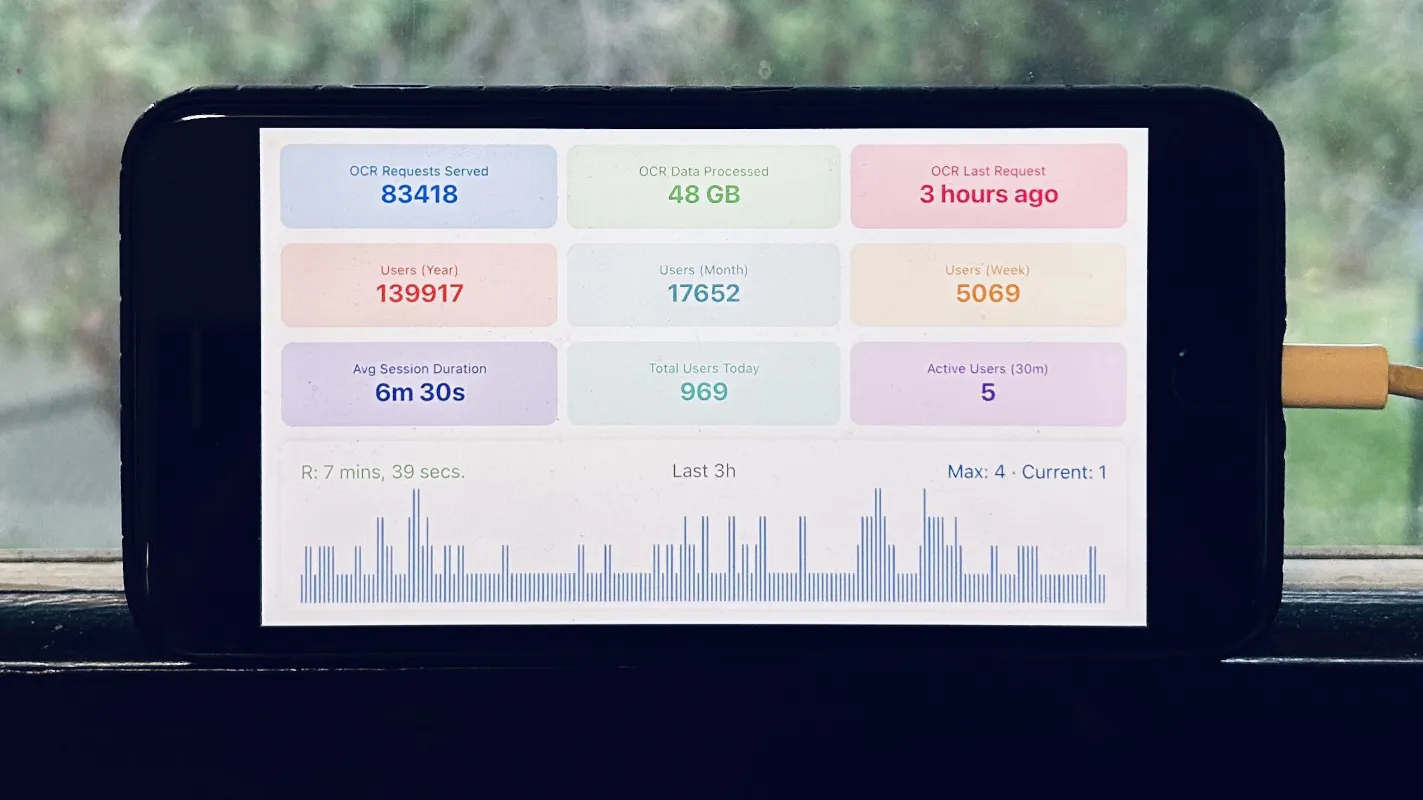
Running an optical character recognition (OCR) server might sound like it would need some powerful hardware, like a rack-mounted, water-cooled machine, or at least a nice desktop or laptop. But if you have the time, anything could be used. [Hemant] has a long-running personal project that processes a lot of image data over a long time, and set up the OCR server on an iPhone 8 running entirely with solar power, rather than turn to more typical hardware.

Part of what makes this task feasible for low-powered hardware is Apple’s Vision framework, which uses machine learning to aid in things like character recognition (among other tasks). It will run on an iPhone just as easily as a Mac. The phone’s built-in battery already provides the first step of an off-grid setup. This build relies on a separate power bank to integrate the phone with the solar panel more easily. On the software side, [Hemant] reports that the true challenge wasn’t setting up the server as much as it was keeping the iPhone from sleeping or stopping his program from running full-time.

A system like this running off-grid, especially considering the costs of the solar panel and power bank, might seem counterproductive. But when comparing electricity costs for running the same software on his server, he estimates he saves about $10 per month with this setup, which has a payback of somewhere around 2-3 years. Not too bad for a phone that would have otherwise ended up in a landfill. Old phones can be surprisingly good choices for servers, too. It helps if they can run Linux, but plenty of phones will support server applications, even when running their native OS.

Advertisement

Source link

Advertisement
Continue Reading

Tech

Regular vs. Smart Thermostats: Everything You Wanted to Know

Published

on

At CNET, we’ve been testing smart thermostats for years, so it’s always a little surprising to hear, “What’s a smart thermostat?” But only a fraction of American households, around 17%, actually use smart thermostats. That’s too bad, because they’re one of my favorite smart home innovations, and offer handy advantages for almost everyone

So, what’s the difference, aside from flashy new touchscreen designs? I’ll take you through what’s new with these thermostats and how your heating and cooling will never be the same (neither will your energy bills).

Scheduled heating and cooling

Advertisement
A woman reaches to an Ecobee Essential thermostat on a white wall.

Thermostats like Ecobee’s allow for easier scheduling from a distance.

Ecobee

Both smart and traditional thermostats have programmable settings, letting you set temperature thresholds for specific hours and specific days of the week, and changing them as seasons change. The biggest difference is that smart thermostats make this much easier.

With old programmable thermostats, you’re mostly stuck doing programming with the thermostats’ manual controls. Smart thermostats allow you to set schedules from the app, no matter where you are, and you can usually save and switch between schedules on the fly, making the process significantly smoother.

Read more: Don’t Put Your Thermostat In These Places

Advertisement

Costs 

You can find a standard programmable thermostat without any bells and whistles for under $20 from brands like Honeywell Home (although those with fancy touchscreens will cost more), so they’re an easy way to save money if you need a replacement. Smart thermostats, with all their added features, cost significantly more. Amazon has one of the cheapest for under $100, but for something like Nest’s 4th-gen Learning Thermostat, you’ll have to pay close to $300.

Honeywell Home thermostat on a white wall in front of a kitchen.

If you’re worried about initial costs, regular thermostats cost a whole lot less than smart thermostats.

Honeywell Home

Energy savings

Programmable thermostats will save you money, as long as you stay within strict temperature settings at certain times of day and night. Smart thermostats don’t necessarily save more, but they make saving money so much easier that houses tend to save more as a result, since very few users have time to constantly adjust a standard thermostat for maximum savings.

Advertisement

With settings like eco modes and monthly reports on energy savings, smart thermostats tend to save the average household significant amounts of money. Google Nest studies have estimated the average user saves around 15% on energy bills annually, while Ecobee says users can save up to 26% at the high end. That’s easily enough to cover the initial costs of a smart thermostat in a year or two.

Some smart thermostats are very pretty, but its their control options that matter.

Google Nest

Remote operation

A regular thermostat doesn’t have app connections and will, at most, have a remote control you can use from across the house. Smart thermostats, meanwhile, have Wi-Fi connections and apps. That means that as long as you have your phone and a connection, you can make thermostat changes.

Advertisement

For some people, this is an important feature — they can adjust the temperature while on vacation or if they forget while away from home. Others are fine making changes only when they’re at home.

Automatic learning and adjusting

A regular thermostat will heat or cool your home exactly when and how you tell it to. So will a smart thermostat — unless you enable its smarter features. Smart thermostats include learning algorithms and sensors that study activity in the house, like when people get up in the morning and start moving around.

With basic data like this, smart thermostats can start making adjustments about when to raise the heat or start cooling off, and when to hold back because there’s no one at home. Essentially, they can schedule themselves and respond to significant changes in habits.

Also, many new smart thermostats come with satellite sensors that you can place in specific rooms that traditional thermostats may not be able to “read” very well, increasing their temp-sensing accuracy. 

Advertisement
Ecobee's thermostat and sensor side by side.

Ecobee’s thermostat with its sensor.

Ecobee

Energy savings

Programmable thermostats will save you money, as long as you stay within strict temperature settings at certain times of day and night. Smart thermostats don’t necessarily save more, but they make saving money so much easier that houses tend to save more as a result, since very few users have time to constantly adjust a standard thermostat for maximum savings.

With settings like eco modes and monthly reports on energy savings, smart thermostats tend to save the average household significant amounts of money. Google Nest studies have estimated the average user saves around 15% on energy bills annually, while Ecobee says users can save up to 26% at the high end. That’s easily enough to cover the initial costs of a smart thermostat in a year or two.

Advertisement

Installation

Both smart and standard thermostats are installed the same way — by connecting various wires to the thermostat’s base plate. Both offer professional installation services as well, so there’s not much difference here.

The biggest difference is that smart thermostats won’t work as well with every home system. For example, smart thermostats won’t make a huge difference if you use radiant floor heating as your primary heat source (it’s slower to respond and doesn’t affect thermostat sensors the same way), so you may as well save money with a simpler thermostat.

A Nest thermostat sensor sitting on a white table with a temperature illustration above it.

Thermostat sensors can go anywhere to monitor specific temperatures.

Advertisement

Google Nest

Connections to other devices

Smart thermostats can often connect to other smart home technology, including security hubs and customized triggers, through platforms like IFTTT or Controller for HomeKit. Since smart thermostats tend to have extra sensors for humidity or air quality, they can trigger things like air purifiers, fans, dehumidifiers and more. Some smart thermostats even come with built-in voice assistants, while most at least support voice assistant control through Alexa, Google’s voice assistant and more.

Regular thermostats don’t have any of these connections, so you can’t usually connect them to home routines or set temperature triggers for other devices.

ecobee-siri-oct-12

Many smart thermostats can work with voice assistants too.

Advertisement

Ecobee

Bottom line

Smart thermostats make saving money much easier than regular thermostats and come with plenty of extra bells and whistles, including opportunities to connect them to voice assistants and other smart home devices. They’re also sleek, smart devices that display personalized info about your home and weather, while learning your habits and automatically adjusting heating or cooling — no micromanagement needed. Plus, unlike regular thermostats, you can control them from anywhere.

In return, the big drawback of smart thermostats is that they cost a whole lot more than a regular thermostat replacement would, although they do tend to pay for themselves within a year or two. However, not everyone is comfortable using an app for scheduling or letting a smart thermostat make changes itself, so some users may find themselves uncomfortable with the change.

Ready to learn even more? See our guide on the best settings to use on your smart thermostat for the season, the easiest steps to save on heating and cooling bills, and the best smart home devices overall. 

Advertisement

Source link

Continue Reading

Tech

Etzioni on AI: Wall Street is quietly betting on AI to beat inflation

Published

on

(BigStock Illustration)

How can the U.S. bond market, where the world’s smartest money lives, reconcile $36 trillion in national debt with less than 2.5% expected annual inflation over the next decade? The answer may consist of two letters: A and I.

Four forces are pushing inflation up:

  • The debt keeps growing as a fraction of GDP and neither political party has a credible plan to contain it.
  • The AI buildout is consuming gigawatts, transformers, and copper faster than the grid can supply them.
  • The Iran war has sent oil prices to a four-year high and pushed April inflation to 3.8%.
  • And we have a president who announces tariffs at breakfast and rescinds them by lunch.

Any one of these should put inflation back on the front burner. Taken together they are alarming.

Look at the chart. The red line is the national debt. It tripled. From 35% of the size of the economy to 100% in 20 years. The green line is what the bond market expects inflation to be. It went from 2.4% to 2.45%. Not a typo. A mere 20 basis points over 20 years.

The bond market has been telling the same inflation story since George W. Bush’s second term. Through three presidents, two financial crises, a pandemic, and the highest inflation in 40 years.

For most of those 20 years, four forces did the anti-inflationary work. The Federal Reserve earned its credibility crushing inflation in the 1980s and defended it every time since. Globalization sent cheap goods from China and cheap labor from everywhere, and that quietly held down prices. The country was aging, which dampens demand. And foreign central banks bought our debt no matter what, putting a floor under the bond market.

Advertisement

Here’s the problem: every one of those four forces is weaker now than it was a decade ago.

The Fed is under more political pressure than at any point since Nixon leaned on Arthur Burns in the early 1970s. Kevin Warsh was recently sworn in as Fed chair after the most divisive Senate vote in the institution’s history.

Globalization is going the other way. Tariffs are up, companies are bringing production home, and the U.S. and China are pulling apart economically. The old direction held prices down. The new direction pushes them up.

Aging is happening more slowly here than abroad, and restricted immigration is tightening the labor market further. Meanwhile, foreign demand for our debt is fading as China and the Gulf states quietly diversify away from dollars.

Advertisement

Four pillars, all cracking at the same time. Enough that you’d expect bond traders to notice. Enough that they should be demanding more inflation compensation than they used to.

Yet they aren’t. The green line hasn’t moved. The bond market is still pricing in about 2.45% inflation over the next 10 years. Roughly the average of the last 30 years. The professionals are barely flinching. Is the market missing something? Or, perhaps, the market is betting on AI.

Not on Sam Altman, not on Nvidia’s next earnings report, not on whether ChatGPT can write your kid’s college essay, but on productivity. On the idea that AI will deliver more output from the same labor, lower costs across the economy. A shift big enough to absorb the fiscal mess and keep prices anchored. That’s the bet baked into the green line. Whether you’ve thought about it that way or not, you’re either riding it or fading it.

Is the AI bet a good one?

Advertisement

The case for the market being right is straightforward. AI substitutes compute for labor in exactly the white-collar service sectors that have been driving inflation: customer support, basic coding, radiology, drug discovery, the entire knowledge-worker middle. Each of those becomes cheaper and faster.

Do the arithmetic: one extra point of annual productivity growth over a decade gives you an economy that’s roughly 10% larger. The debt stabilizes as a share of GDP without austerity. And here’s the kicker: this is the only story big enough to plausibly replace all four of those pillars all at once. If AI works, the anchor holds. If it doesn’t, nothing else is big enough.

The case for the bet going wrong is also strong. The productivity payoff is the back half of the trade. The front half, what we’re living through right now, as I wrote recently in the column about AI capital spending, is inflationary as hell. Data centers eating gigawatts, three-year waits for transformers, electricians making six figures, power prices climbing in every region hosting compute. The bill comes first. The payoff comes later. Maybe.

Productivity gains take longer than anyone expects. The personal computer was on every desk by 1990. The productivity gains didn’t show up in the data until 1995. In 1987, the economist Robert Solow joked that you could see computers everywhere except in the productivity statistics. The same is true of AI today. It’s in every newsroom, every earnings call, and almost nowhere in the productivity data. So far.

Advertisement

Stanford economist Erik Brynjolfsson argued in the Financial Times in February that the fog may finally be lifting. The 2025 jobs numbers were revised down by 403,000 while Q4 GDP grew 3.7%: output up, labor flat, which is the definition of productivity gain. His estimate: 2.7% in 2025, nearly double the prior decade’s 1.4% trend. If he’s right, the harvest phase has started.

AI doesn’t settle the inflation question. It widens the range of plausible outcomes. If AI works, the productivity gains absorb the debt and inflation stays anchored. If it doesn’t, the other pressures take over. A weakening Fed. Reversing trade. Bigger deficits. All pushing prices up simultaneously.

The bond market has made its choice. It isn’t betting on the Fed. It’s betting on the GPUs. The professionals are betting that AI will save us from the debt.

So what should an investor do?

Advertisement

If you believe AI will deliver the productivity miracle the bond market is pricing in, regular Treasury bonds are fine. You’ll out-earn inflation-protected Treasuries (TIPS) by half a percent to a percent per year and pocket the difference. If you don’t fully believe it, TIPS at a real yield of about 2% above inflation are cheap insurance. You give up a little expected return, and you sleep better at night. 

If you can’t decide, and honestly who can, own some of each. A 50/50 split hedges your bet and protects you from being completely wrong in either direction.

And isn’t hedging what bond investing is all about?

Source link

Advertisement
Continue Reading

Tech

Evan Monsma Turns a Broadcast Camera Viewfinder Into a Sharp Little Standalone TV

Published

on

Old Camera Viewfinder to TV Mod
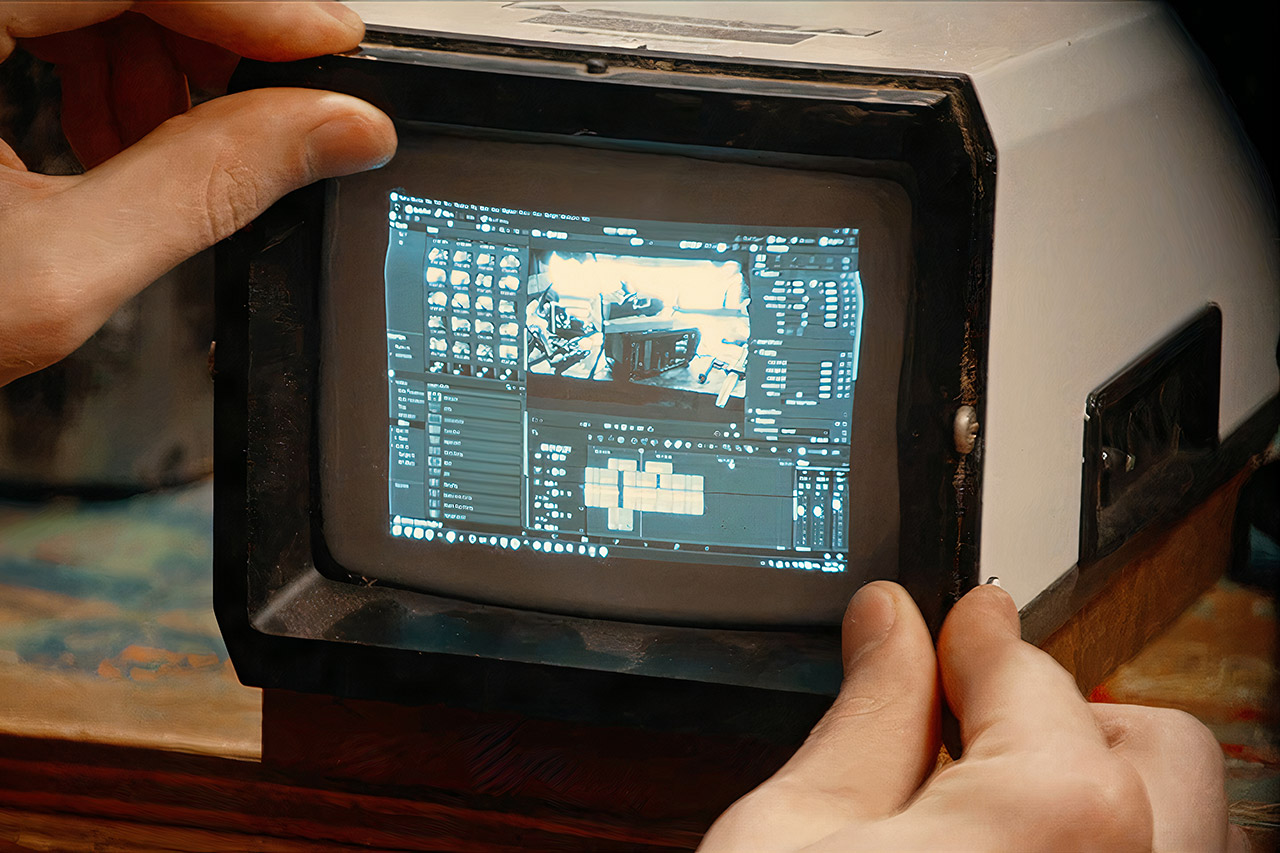
Evan Monsma started with a viewfinder built for a professional broadcast camera. Inside sat a small monochrome CRT, the kind camera operators once relied on for precise framing during live shoots. He wanted that same screen to work on its own, showing ordinary video signals without the rest of the camera attached.


The original equipment came with an eight-pin connection that not only provided power but also transported video and control signals back and forth between the viewfinder and camera body. There wasn’t a publicly available pinout, so Monsma decided to get his hands dirty and open it up to see what was inside. He used a multimeter to map out each and every wire, and voilà! He discovered that a yellow conductor supplied around 12 volts of power, the black and red wires served as ground, and the video signal was transmitted via a grey line, and it turned out that just three connections were sufficient to operate the tube.


Roku Smart TV 2026 – 55-Inch Select Series, 4K QLED TV – Roku TV with Voice Remote – Flat Screen…
  • Seamless streaming: With fast Wi-Fi and apps that launch in a snap, Roku Select Series TVs get you to your entertainment quickly. You get excellent…
  • Breathtaking picture: Sharp 4K brings out rich detail on our 55″ flat screen TV, while the QLED screen and HDR10 create bright, accurate colors. Roku…
  • Explore a world’s worth of TV: Dive into all kinds of entertainment and easily find your favorites or soon-to-be favorites.

He cut the factory wire and built a simple adapter, allowing the viewfinder to be powered by a wall power supply or a suitable battery via a regular DC barrel socket. He also installed an RCA jack to accept composite video; both connectors are now mounted on the rear of the enclosure, securely fastened using sticky adhesive and heat-shrink tubing to prevent them from coming away during regular operation. He cleaned up the old harness by attaching heat-shrink coverings to the unwanted wires and storing them out of sight.

Old Camera Viewfinder to TV Mod
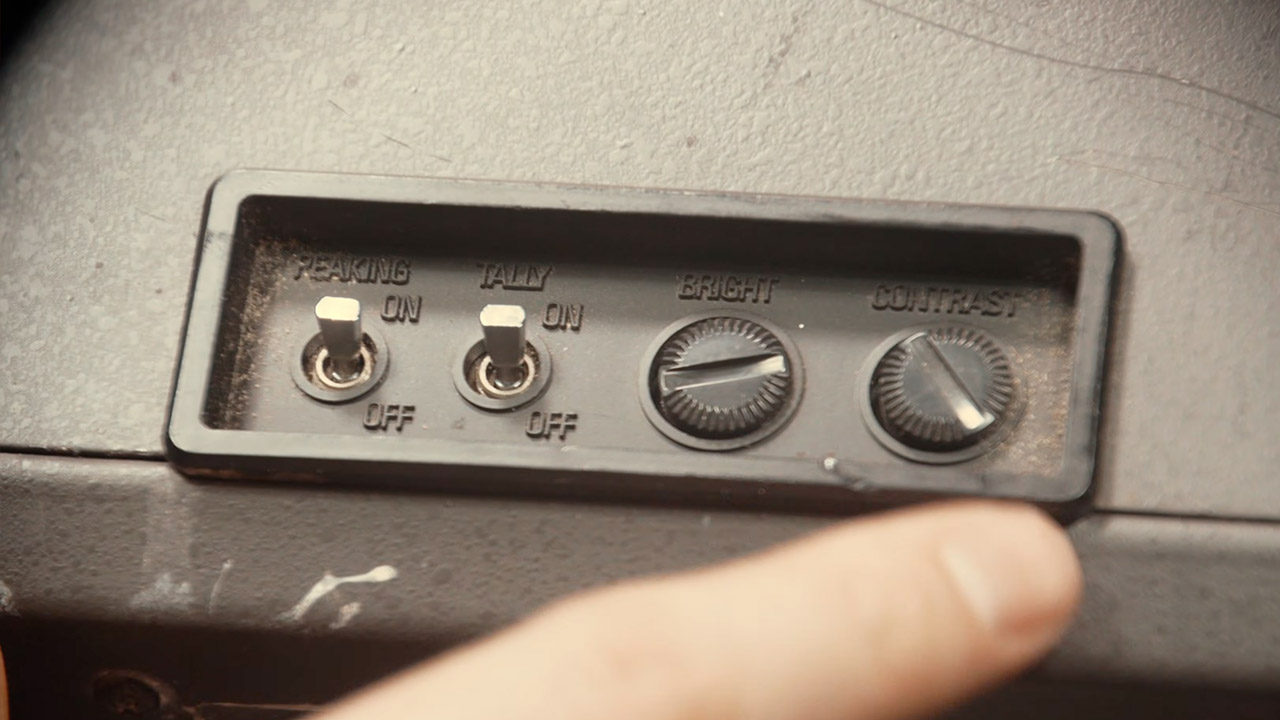
The focus-peaking switch still works flawlessly, and you can adjust the brightness and contrast to achieve the ideal image. Monsmas also tested the side panel using an HDMI-to-composite converter and was pleased to note that even with the contrast turned down, text remained visible, and the dark part of the movie had more information than you’d see on many laptops under similar settings.

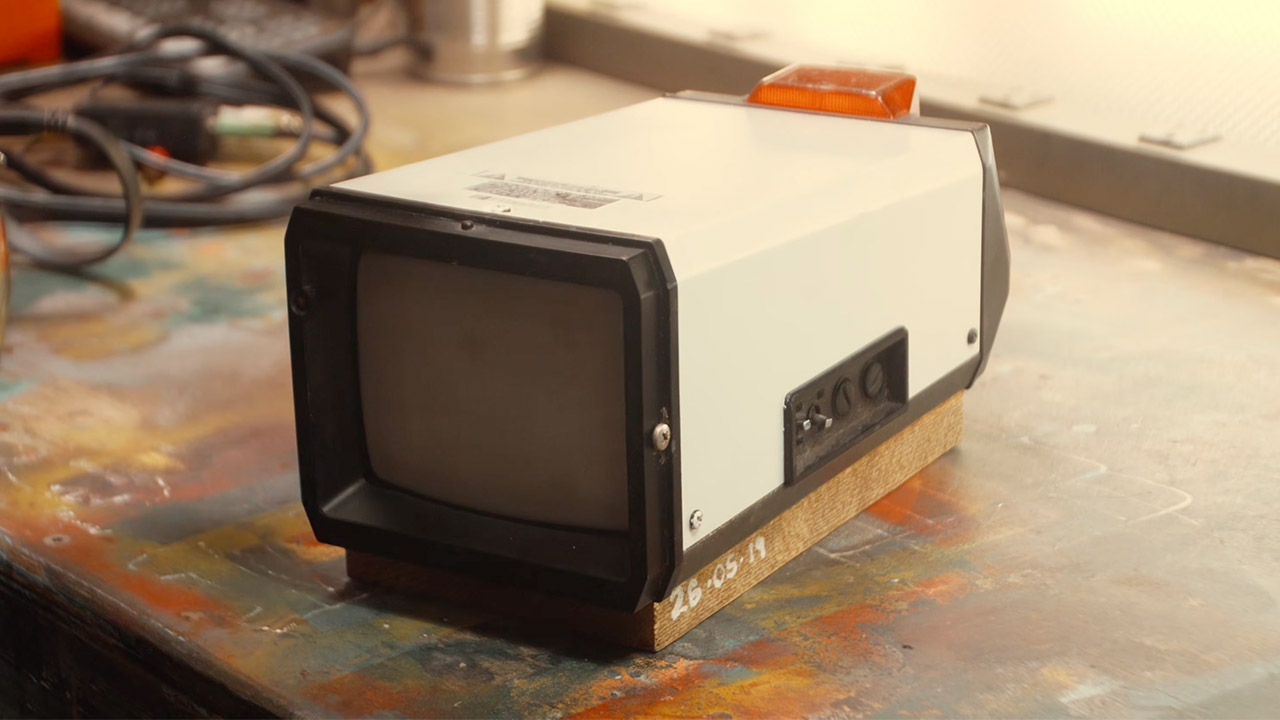
A wooden base is what gives the finished piece its proper shape. Monsma carved several channels into scrap wood to hide the cables underneath, painted the screw locations, and then secured the metal viewfinder body to the board with little machine screws. A application of Danish oil on the base and a fresh coat of white paint on the housing transformed it from a Frankenstein’s monster to something that looked like it belonged there.

Advertisement

Old Camera Viewfinder to TV Mod
The original sunshade now flips over to provide a flat surface on top of which you can place another small gadget. You can have the viewfinder up and running in seconds; when the tube warms up, the image appears and remains solid. Monsma ran games via it and watched a variety of video clips; the analog approach produced none of the scaling artifacts commonly seen on low-cost contemporary displays.

The finished product takes up very little desk space while delivering a respectable image. Its analog input is compatible with antique cameras, game consoles, and any device that can output composite video, and a cheap converter makes it simple to connect to current sources. The hardwood mount keeps everything organized and the unit rock sturdy. The controls continue to respond as expected.
[Source]

Source link

Advertisement
Continue Reading

Tech

Apple TV, HomePod mini updates are waiting for Siri’s upgrade

Published

on

Apple’s home hardware is about to get a shake-up this fall. While the Apple TV gets a bit of a performance boost, the HomePod mini will get a bunch more Siri functionality.

Apple has long been rumored to be working on a new HomeHub, but other household tech will get updates soon. That includes the Apple TV and the HomePod mini.

According to Mark Gurman’s “Power On” newsletter for Bloomberg on Sunday, Apple has sat on new hardware for the two models for months. Indeed, they’re already being actively used by Apple employees at Apple Park.

The refreshed hardware has been held back from launch because of software. Apple apparently wants to ship them alongside the long-awaited revamp of Siri and new Apple Intelligence features, making them destined for a fall launch.

Advertisement

That said, the HomePod mini is suffering from limited availability, both online and at retail.

As for what’s changing, the Apple TV won’t get much of an update. A chip upgrade is almost certain, possibly with a slightly improved remote, but the Apple TV enclosure won’t change.

The HomePod mini, meanwhile, will go through a similar internally-facing glow-up. Outside, it will look pretty identical to the current spherical model, but the S5 chip will be updated to something much newer.

While they will chiefly be spec-bump updates, the changes should also allow the models to work with new Apple Intelligence and Siri features.

Advertisement

Source link

Continue Reading

Tech

One of our favourite Ninja air fryers just hit its lowest price yet

Published

on

Being able to cook a main and a side at the same time in one appliance – and have them both hit the table together, without one going cold while the other catches up – feels like an obvious idea, but most kitchens still can’t pull it off.

Well, the Ninja Foodi FlexDrawer looks to change that, and it’s currently down from £269.99 to £196.99 at Amazon, a saving of £73 that makes it the cheapest it has been since launch.

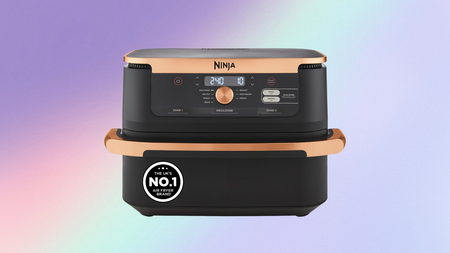
Ninja Foodi Flexdrawer on a pastel backgroundNinja Foodi Flexdrawer on a pastel background

A bestselling Ninja Foodi air fryer has crashed to its lowest price yet, despite Prime Day being weeks away

At just £196.99, this Ninja Foodi FlexDrawer deal brings a very clever air fryer down to a genuinely fantastic price.

Advertisement

View Deal

The FlexDrawer’s central idea is a single 10.4-litre drawer that a removable divider splits into two independent 5.2-litre cooking zones, each running a different temperature and function simultaneously, both finishing at the same time.

Advertisement

Remove the divider entirely and that same drawer becomes a MegaZone capable of fitting a 2kg chicken or a full traybake, which makes it practical for households cooking for eight or more people rather than just couples doing mid-week meals.

Seven cooking functions cover Air Fry, Max Crisp, Roast, Bake, Reheat, Dehydrate, and Prove, giving it a range that goes considerably beyond the standard air fryer brief and into territory that would otherwise require multiple appliances on the worktop.

Advertisement

The Whatsapp LogoThe Whatsapp Logo

Get Updates Straight to Your WhatsApp

Advertisement

Join Now

Ninja’s own testing puts cooking speed at up to 65% faster than a fan oven, and energy use at up to 45% less. These figures are based on specific test conditions, but it should translate into genuinely shorter cook times and lower running costs over regular use.

Advertisement

The drawer and crisper plates are dishwasher safe, the exterior is BPA-free, and the unit ships with silicone tongs and a chef-created recipe guide, so there’s no additional spending required to start cooking straight out of the box.

£196.99 is a strong price for a dual-zone air fryer with this much capacity and flexibility, and given this is already at its lowest price ahead of Prime Day, there’s no obvious reason to wait for the sale.

The Ninja Foodi FlexDrawer holds the award for the best large air fryer in our Best Air Fryer 2026 guide, where our experts have rated and reviewed the top options across all sizes and budgets.

Advertisement

Advertisement

SQUIRREL_PLAYLIST_10148964

Source link

Continue Reading

Tech

Someone Built A Manual Transmission Pen With A Working Clutch And Gear Shift

Published

on


A commonplace pen is one of the most unspectacular tools imaginable. Take the classic Bic Cristal, for instance: As of 2025, Bic has sold more than 120 billion of them. We’re used to grabbing pens without a second thought about them, but some pens have special mechanics behind them. This particular one, for instance, isn’t your standard color-switching option. 

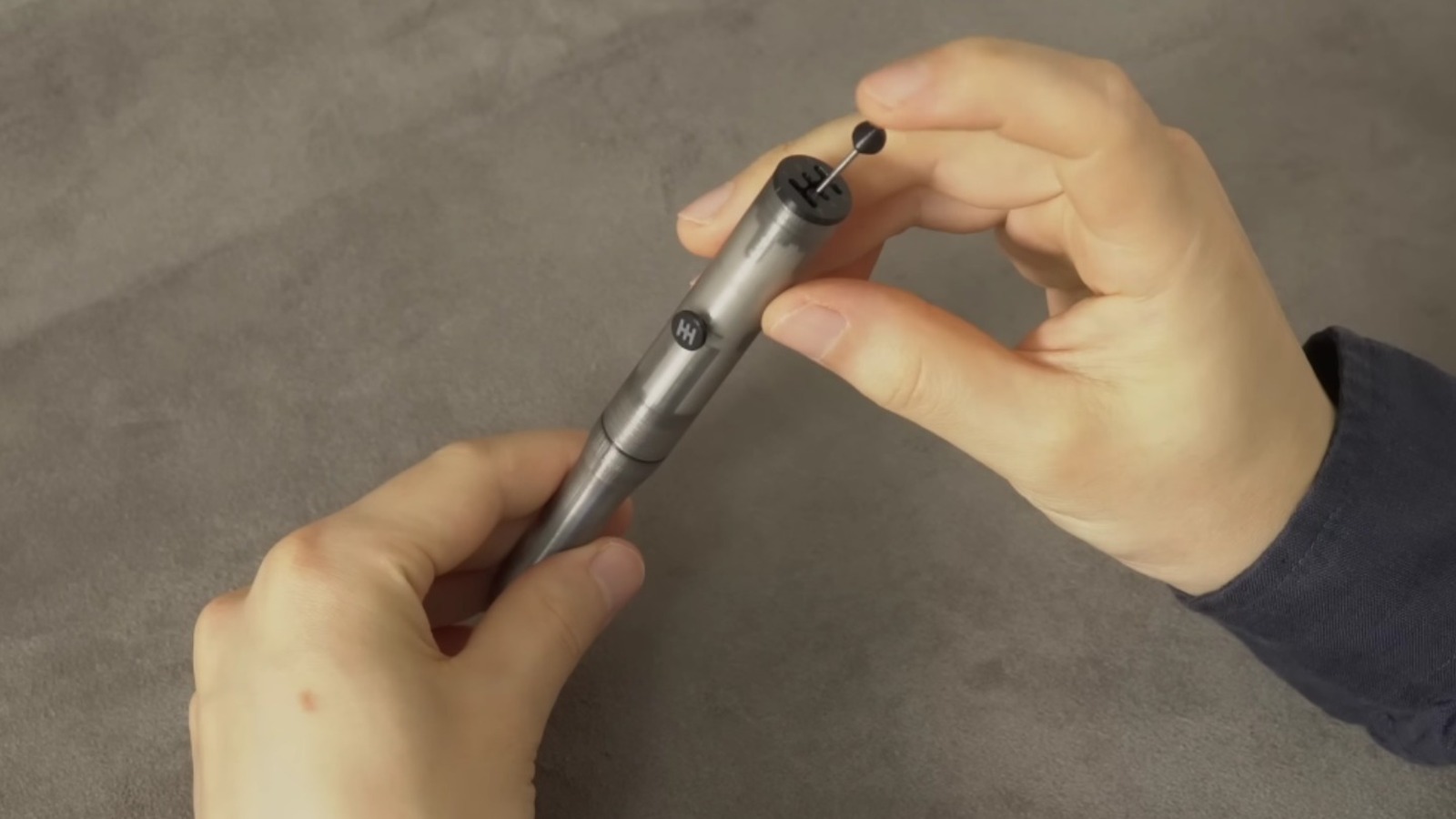
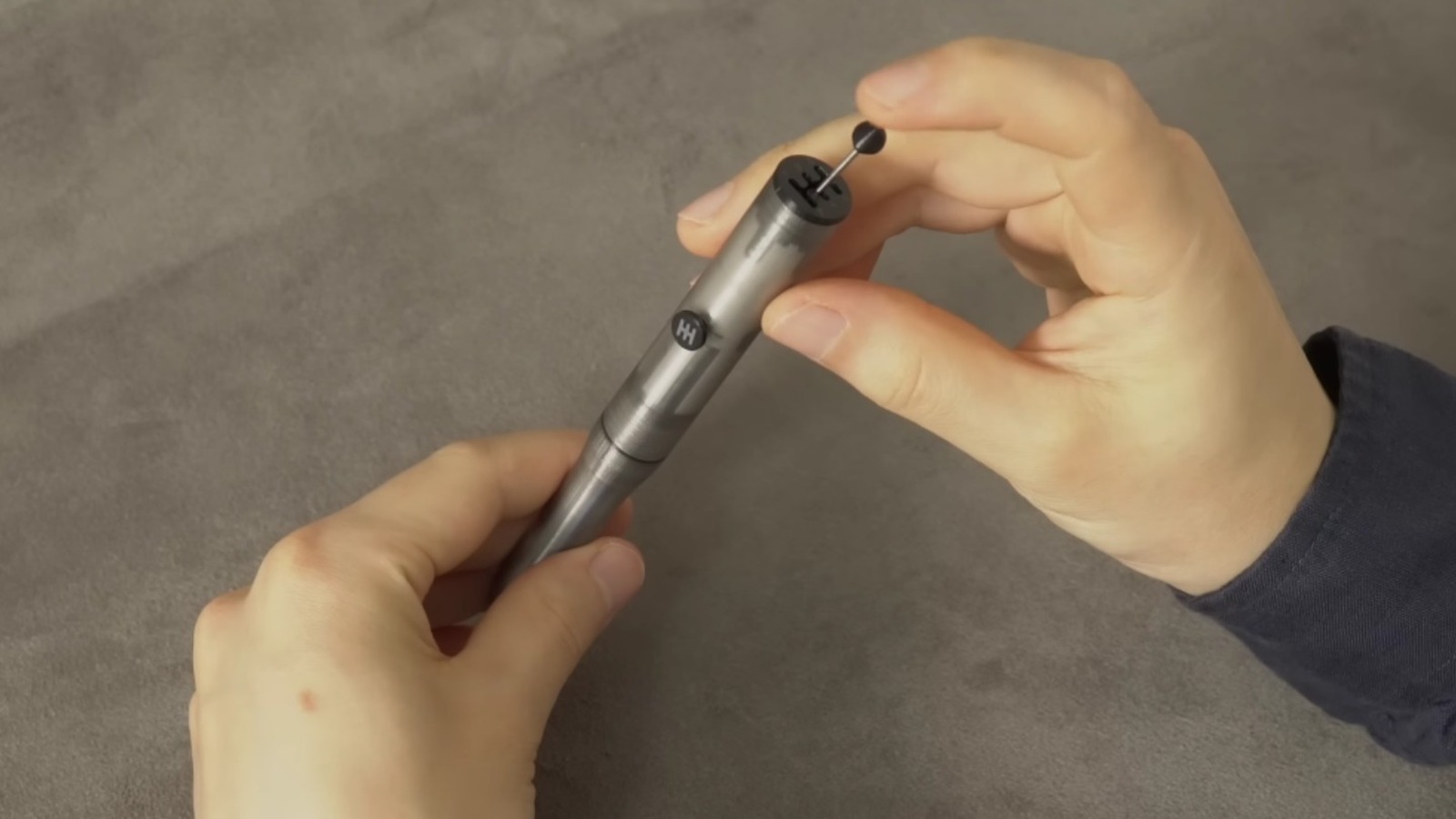
Pens with working gear shifts and manual transmissions may seem like a silly idea, but they can actually be functional, and even rather practical. Roulton proudly declares that it offers “the world’s first manual transmission pen,” which switches between ink colors by means of a tiny working gear shift. Though it’s a novelty, for sure, the model, the engineering that YouTube’s Maker B put into making it work, and the practical advantages that the unique setup can offer is impressive. Here’s what went into building this unique writing implement.

Advertisement

Making a manual transmission pen


Advertisement

It can be difficult to resist a great fidget gadget. It’s common to find one that doubles as a pen, and because of the smooth and satisfying action of a stick shift (even a tiny one), this is exactly what this pen offers.

In April 2024, YouTube’s Maker B posted the video, which demonstrates their meticulous process for crafting the pen. The maker begins their work with precise machine-cutting of copper tubing, including the thread cutting that’s so crucial to the ‘twist’ motion of the components. Careful thread tapering and cutting, as well as the steady layer-by-layer crafting of the clutch pedal, is astonishing to watch, as each delicate component from the shifter to the housing of the push rods is custom made.

One commenter on the video declared that they’d spend a lot on this pen, and several others were soon jokingly competing to out-bid them. The demand was clearly there. As a result, Roulton ultimately began stocking the item, in two varieties. The Manual Transmission Pen is available in three different colors: Blue, Black, and Olive. They’re priced at $38.50, and there’s also a version of the standard pen that has been further customized with a stainless steel Shift Knob and Clutch Button. This particular version will cost $52.50, the so-called Manual Transmission Pen Pro. For further customization, replacement clutch buttons in either black, white, or red are $3.50 each. 

Advertisement

How the Manual Transmission Pen works

There are a lot of veteran drivers who aren’t confident with working a manual transmission, which is also called a “stick shift”. Fortunately, as far as this pen’s concerned, Roulton‘s FAQs will get you up to speed quickly.

Simply shift gear and press the clutch button simultaneously to select the right position for operation, then let go of the clutch to write in the chosen color (purple, orange, green, blue, red, or black). Another press of the clutch button will return the pen to its ‘open’ position, allowing you to select another option. 

Advertisement

Being a mechanical device, there may be times when the pen doesn’t operate correctly. Maker B has acknowledged that one potential issue is the gear shift not returning to the correct position to be re-used. Should this happen, the suggested answer is to extend the gear lever and move it between the positions carefully but forcefully, while keeping the button held down. 

This should resolve the issue, with the designer reporting that a tell-tale click should be heard to demonstrate this. That click is characteristic of the kind of feedback that a good manual gearshift provides (albeit in miniature), and part of what makes the whole idea so satisfying and tactile. Though this is not the first pen ever made with such a gear shift, the care and attention that Maker B puts into their creation is exquisite.

Advertisement


Source link

Continue Reading

Tech

Hackaday Links: May 31, 2026

Published

on

If you’re located in the Northeast United States and thought you heard an explosion yesterday afternoon, it wasn’t just your imagination — multiple sources have now confirmed that a 1 meter (3 foot) meteor entered the Earth’s atmosphere and broke up in the air off the coast of Massachusetts, releasing the energy equivalent of 300 tons of TNT.

Well, maybe. The latest update from NASA says it might actually qualify as a meteorite, with radar data indicating that debris from the space rock may have fallen into Cape Cod Bay. For those unfamiliar, the difference between a meteor and a meteorite is whether or not any of the object survived its encounter with the atmosphere and made it down to the surface.

There’s an argument to be made that a larger asteroid would have likely set off some alarm bells as it approached the planet, but the fact that this deep space interloper showed up unannounced is a sobering reminder that our ability to detect incoming threats isn’t nearly as robust as we’d like. Fortunately, it looks like the event didn’t result in any serious damage or injury.

Magnet fishers in Cape Cod are stoked.

Speaking of mid-air threats, here’s a reminder of what not to do on an airliner: on Saturday a flight departing Newark airport for Spain had to turn around when it was discovered a Bluetooth device bearing the name “BOMB” was onboard. There was no actual explosive device found on the plane when it was searched upon its return, and reports are that the whole incident was the result of an Ill-conceived device name on a portable speaker.

The details on this one are interesting, as a first-hand account posted to Reddit would seem to indicate that both the flight crew and teams back at United Airlines headquarters in Chicago were able to see the Bluetooth devices on the plane in real-time. The passengers were actually given several chances to turn off their devices before the order was given to turn the plane around, and at one point the crew claimed they were even able to see the number of Bluetooth devices that were still active.

Advertisement

Admittedly, it could have been as simple as one of the crew members using an app on their phone to see how many discoverable Bluetooth devices they could pick up and reporting their findings back to the home office. But in the modern security climate, it’s not hard to imagine that the aircraft has some form of integrated Wireless Intrusion Detection System (WIDS). Something to keep in mind the next time they ask you to put your gadgets into airplane mode during takeoff.

It seems like every week we’ve been reporting on some service going dark, and today is no different. As pointed out by OMG Ubuntu, Canonical will be shutting down the Ubuntu Pastebin service in June. In fact, originally it was supposed to go offline today, but they’ve pushed the date back by a month due to the response from the community. Turns out giving your users just a few days to pack up their belongings before kicking them to the digital curb isn’t popular. Who knew?

Now granted Hackaday is geared more towards hardware than software, but a search through the database would seem to indicate we’ve never once run a post that linked to Ubuntu Pastebin in the 18 years the service has been available. Conversely, we had pages of results when searching our back catalog for instances of the classic pastebin.com. So we’re actually curious about this one and would love to hear from the readers: how many of you were actually using this service regularly, and will you miss it?

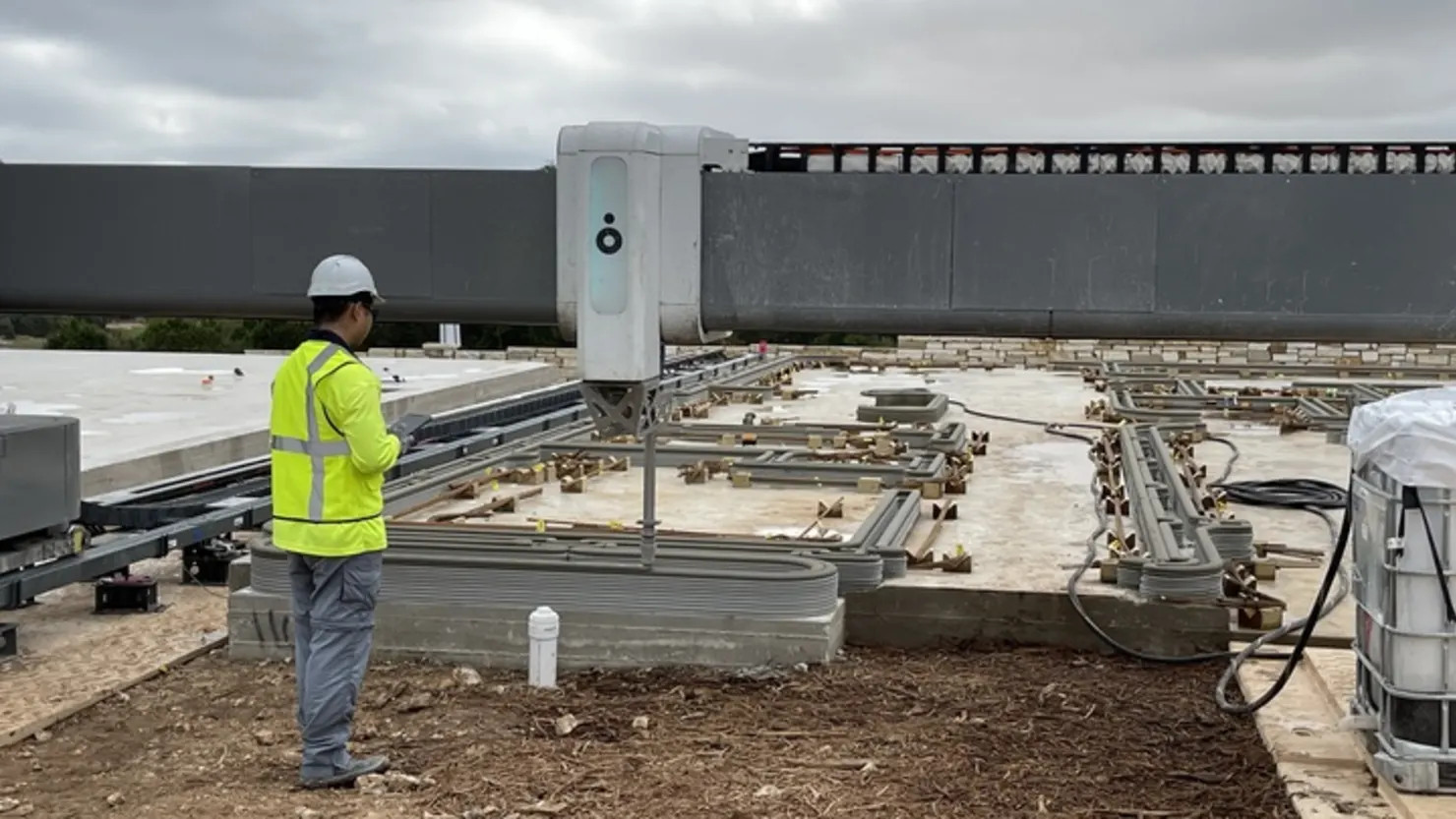
Finally, those in the market may be interested to hear that Wells Fargo will start offering mortgages for 3D printed homes produced by the Texas-based ICON Technologies. They’ve even got a special incentive program lined up for the extruded domiciles, offering a lender credit that can offset some of the closing costs.

Advertisement

This might not sound like that big of a deal, but apparently most banks have been understandably skeptical of the technology and the long-term market for 3D printed homes up to this point. After all, it was just a few years ago that a recently completed 3D printed home in Iowa had to be demolished after the structure fell short of safety standards. As pointed out by CNBC, previous communities produced with ICON’s concrete printing technology had to be financed through the developer.

We’re still not sure that 3D printed homes make a whole lot of sense, but making the technology more accessible is surely a net positive. Even if the current state of the art in house squirting isn’t quite there, you know how the old saying goes: a journey of a thousand miles begins with a single layer.


See something interesting that you think would be a good fit for our weekly Links column? Drop us a line, we’d love to hear about it.

Advertisement

Source link

Continue Reading

Trending

Copyright © 2025