Yamaha’s current AVR lineup has been running on 2020 and 2021 hardware, with firmware updates doing the heavy lifting to keep things relevant. That trick only works for so long. At some point, HDMI, processing, wireless features, and home theater expectations move on, and no amount of software fairy dust changes the hardware underneath. For 2026, Yamaha appears ready to turn the page with the new RX300A and RX500A, two entry level A/V receivers aimed at buyers who want a modern home theater upgrade without wandering into flagship pricing territory.
“The RX300A and RX500A close the gap between soundbars and true AV receiver-based home theater,” said Alex Sadeghian, director of marketing for consumer audio at Yamaha. “They include all the essential tech you need to build a modern home theater with phenomenal sound at an accessible price point, while offering simplified setup and operation that will appeal to both first-time AV receiver users and experienced enthusiasts alike.”
A New Look
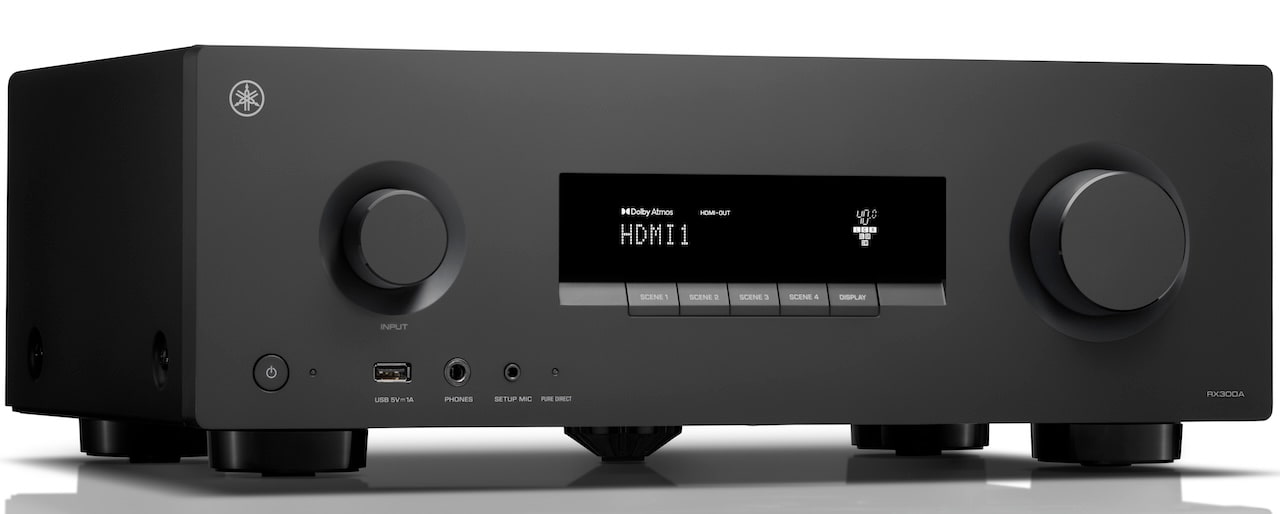
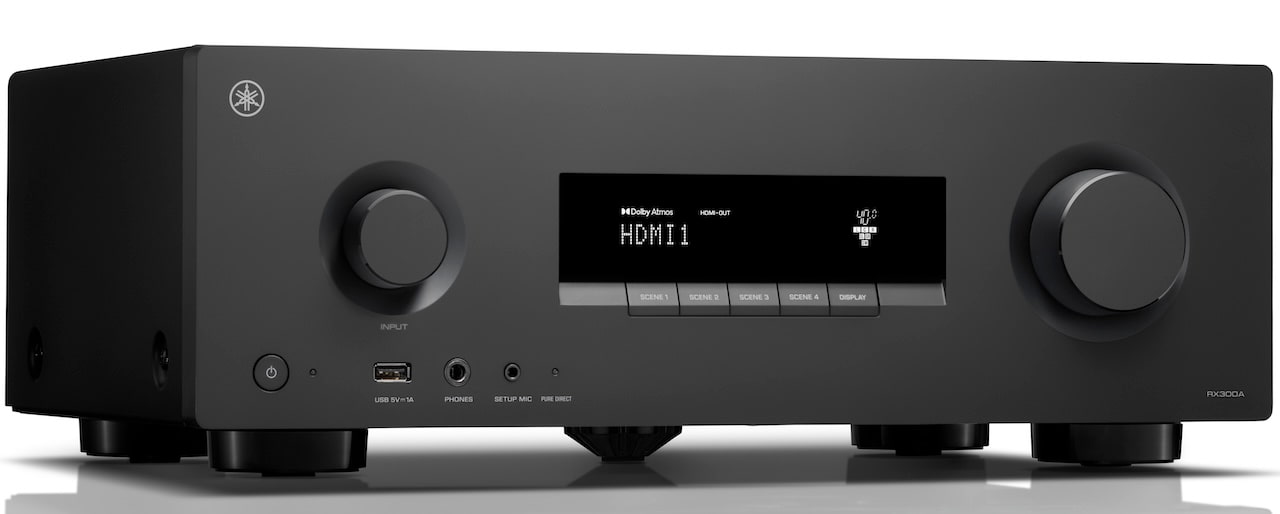
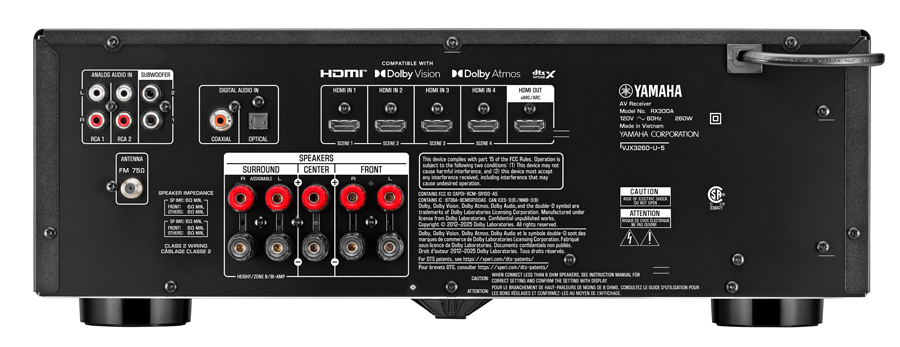
Yamaha RX300A
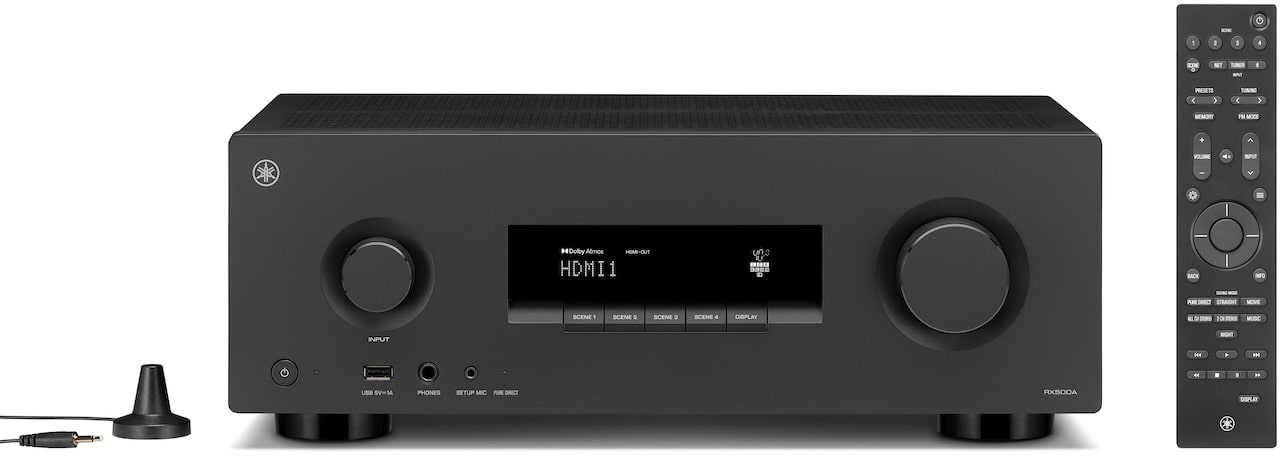
The RX300A and RX500A also give Yamaha’s entry level AVR design a needed visual reset. The front panels look cleaner than the outgoing models, with fewer buttons, simpler labeling, and less of the “command center from a 2004 cable box” energy. The essential controls are still there, but Yamaha has clearly tried to make the layout easier to read and less cluttered. It is not a radical redesign, but it does make the RX300A and RX500A look more current without alienating longtime Yamaha home theater owners.
On The Inside
Yamaha is leaning on more than four decades of AVR development with the RX300A and RX500A, and the engineering story is familiar in the best way. The company’s True Sound philosophy is not just marketing wallpaper here. In practical terms, it points to circuit layout, shorter signal paths, vibration control, and the kind of internal housekeeping that matters when an AVR is being asked to handle movies, music, gaming, and whatever else gets plugged into it before dinner.
Both models also inherit Yamaha’s Anti Resonance Technology Wedge, a center mounted fifth foot borrowed from the company’s flagship AVENTAGE models. The goal is simple: reduce chassis vibration and improve stability. Nobody should expect a $600 receiver to suddenly behave like a five figure separates stack, but better mechanical control is still better mechanical control.
Advertisement
The bigger upgrade for most buyers will be HDMI 2.1 support. The RX300A and RX500A are built for modern video sources with 4K/120Hz and 8K/60Hz pass through, along with Dolby Vision and HDR10+. Gamers also get VRR and ALLM, which should help with smoother motion and lower input lag when used with current consoles.
Room Correction
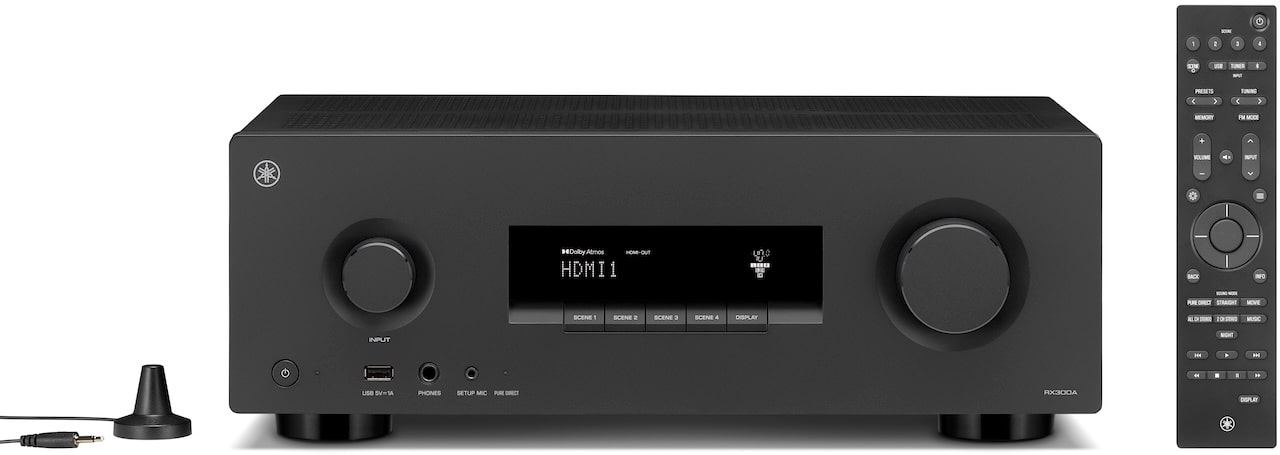
The RX300A and RX500A include a setup microphone for automatic room correction, allowing the receivers to measure room acoustics and speaker behavior before adjusting performance for the space. Yamaha also includes an on screen setup guide that walks users through connections and configuration step by step, which should make installation less painful for first time AVR owners and anyone who would rather not spend Saturday afternoon decoding a manual like it was recovered from a Cold War dead drop.
Sound Setting Simplicity
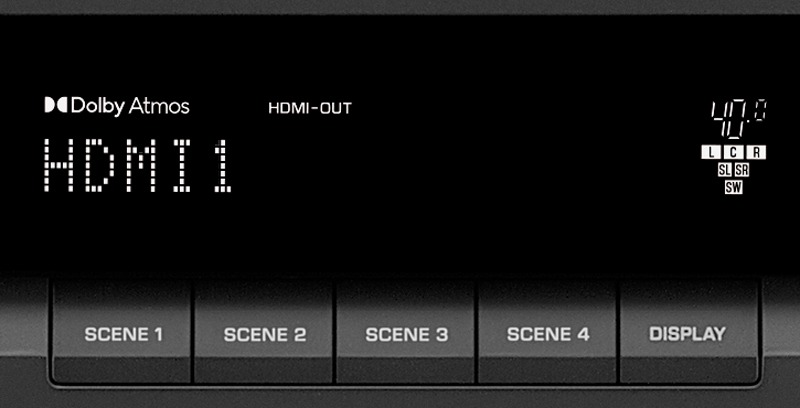
To simplify the listening experience, both AVRs feature Scene buttons. These buttons enable users to recall system settings with a single press.
Each Scene button can be programmed to select an input, sound mode, and other key parameters, making it easy to switch seamlessly between activities like watching TV, streaming music, or gaming. The result is a more intuitive experience that keeps the user focused on enjoying content rather than getting distracted fiddling around trying to find the right settings.
RX300A: Great For Beginners
Building on the previous Yamaha RX‑V385, the RX300A is a 5.2 channel AVR designed to meet the needs of those who may be just getting started in home theater, wanting to upgrade from a soundbar or are on a budget with a price ($399.95 MSRP).
New enhancements compared with the RX-V385 include support for Dolby Atmos and DTS Virtual:X, compatibility with 4K/120Hz and 8K/60Hz video, gaming support that includes ALLM and VRR, dual subwoofer outputs, Bluetooth Multipoint, enhanced build quality, and an updated on-screen setup guide with streamlined menus.
Advertisement
Advertisement. Scroll to continue reading.
The RX300A supports Dolby Atmos in flexible speaker configurations, including 3.2.2-channel with up-firing or in-ceiling height speakers and virtualized rear channel sound, or with a traditional 5.1 or 5.2-channel setup in combination with virtual height processing to create sound from above without dedicated height speakers.
Bluetooth Multipoint allows two devices to remain paired simultaneously, making it easy to switch between sources without reconnecting.
RX500A: More Channels, Wi-Fi, and Streaming
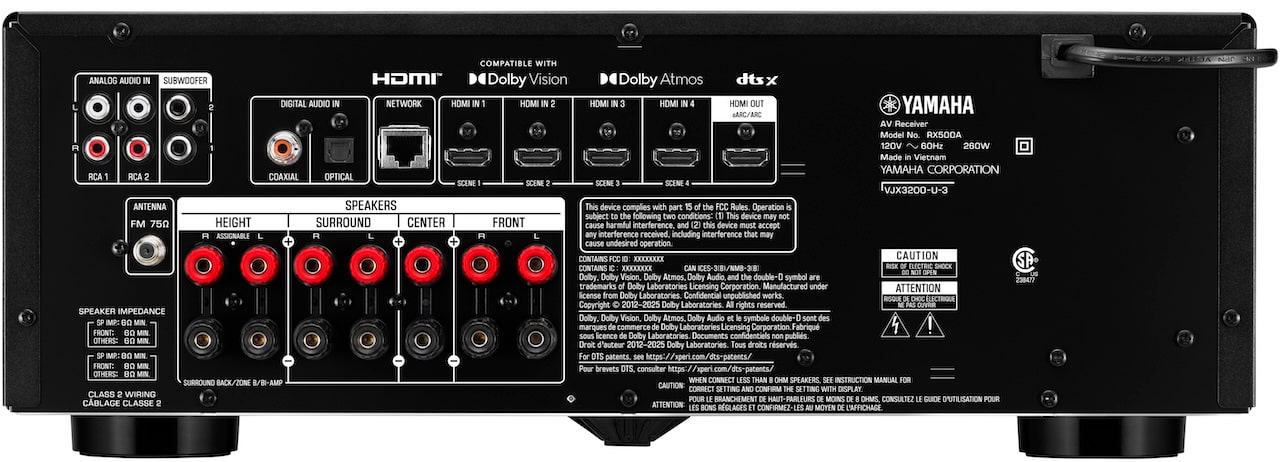
The RX500A builds on the RX300A platform with 7.2 channel amplification and more flexible speaker layout options.
With seven channels of amplification, Dolby Atmos support allows the RX500A to work with real discrete speakers for both the height channels and the surround channels, creating a more convincing immersive sound field than you can get with a 5-channel system. The RX500A supports multiple height speaker configurations, including in ceiling speakers or up-firing height modules. And if you don’t want to bother with height channels, the RX500A can virtualize those with its speaker virtualization technology. This can leave two of your amplifier channels free for speakers in a second room. The RX500A also supports DTS:X, giving users access to the two major immersive audio formats without moving into Yamaha’s more expensive AVR models.
The RX500A also adds stronger network audio support. In addition to Bluetooth Multipoint, it includes built in Wi-Fi and Ethernet for music streaming through Spotify Connect, AirPlay 2, Google Cast, Qobuz Connect, TIDAL Connect, internet radio, and other supported services. That makes it the more complete option for buyers who want both home theater flexibility and everyday music streaming in one box.
Advertisement
The RX500A is a new model tier in the Yamaha AV receiver lineup, offering a step up from the RX300A for those who want more speaker channels and more advanced music streaming capabilities at an accessible MSRP of $599.95. The current Yamaha RX-V6A 7.2-channel AV receiver remains in the lineup—offering some additional features such as MusicCast capabilities (e.g., full app control and multi-room audio), more connectivity options, Zone 2, increased performance, and other features—at an MSRP of $799.95.
Dolby Atmos Dolby True HD Dolby Digital Plus Dolby Digital DTS-HD Master Audio DTS-HD High Resolution DTS-Express DTS DTS-ES Matrix 6.1 DTS-ES Discrete 6.1 DTS 96/24 DTS:X
Dolby Atmos Dolby True HD Dolby Digital Plus Dolby Digital DTS
Dolby True HD Dolby Digital Plus Dolby Digital DTS-HD Master Audio DTS- HD High Resolution DTS DTS 96/24 DTS Neo:6
Surround Sound Post Decoding Formats
Dolby Surround DTS Neural:X
Dolby Surround DTS Virtual:X
Not Indicated
Network Decoding Formats
MP3, MPEG4-AAC, WMA, WAV, FLAC, Apple Lossless, AIFF
No
No
USB Decoding Formats
MP3 MPEG4-AAC WMA WAV
MP3 MPEG4-AAC WMA WAV
MP3 MPEG4-AAC WMA WAV
HDMI Decoding Formats
PCM (8ch max)
PCM (8ch max)
PCM (8ch max)
Sound Modes
Pure Direct Straight Movie All Channel Stereo 2 Channel Stereo Music Night
Pure Direct Straight Movie All Channel Stereo 2 Channel Stereo Music Night
Direct Straight Enhancer Bass program BD/DVD TV CD Radio
Zone B
Yes
Yes
Not Indicated
Room Calibration
Room Correction
Room Correction
YPAO
Other Features
Dialogue Level Subwoofer Trim Extra Bass Lip Sync
Dialogue Level Subwoofer Trim Extra Bass Lip Sync
Dialogue Level Subwoofer Trim Extra Bass Lip Sync
HDMI Connections
4 Inputs / 1 Output
4 Inputs / 1 Output
4 Inputs / 1 Output
HDMI Features
HDMI 2.1 8K60Hz/4K120Hz eARC, ARC VRR ALLM QMS HDCP 2.3 CEC Auto Lip Sync Deep Color x.v. Color HD audio playback
HDMI 2.1 8K60Hz/4K120Hz eARC, ARC VRR ALLM QMS HDCP 2.3 CEC Auto Lip Sync Deep Color x.v. Color HD audio playback
HDMI 2.1 4K60p eARC, ARC HDCP 2.2 CEC Auto Lip Sync Deep Color x.v. Color HD audio playback
High Dynamic Range (HDR) Support
HDR10+ HDR10 Dolby Vision Hybrid Log-Gamma
HDR10+ HDR10 Dolby Vision Hybrid Log-Gamma
HDR10 Dolby Vision Hybrid Log-Gamma
Speaker Output
7 (binding post terminals)
5 (binding post terminals)
5 (binding post terminals)
Headphone Output
1
1
1
Subwoofer Pre-outs
2
2
1
HDMI
4 Inputs / 1 Output
4 Inputs / 1 Output
4 Inputs / 1 Output
Analog RCA Inputs
2
2
2
Optical Input
1
1
1
Coaxial Input
1
1
2
USB
1 (Audio File Playback from a Mass Storage Device, Firmware Updates)
1 (Audio File Playback from a Mass Storage Device, Firmware Updates)
1 (Audio File Playback from a Mass Storage Device, Firmware Updates)
FM/AM Tuner
Yes / No
Yes / No
Yes/Yes
Bluetooth
Yes (Ver. 5.3, Multipoint)
Yes (Ver. 5.3, Multipoint)
Yes (Version 2.1)
Streaming
Spotify Connect Qobuz Connect TIDAL Connect Google Cast AirPlay 2 Net Radio Podcasts
No (Streaming through Bluetooth only)
No (Streaming through Bluetooth only)
Wi-Fi / Ethernet Port
Yes / Yes
No
No
Power Consumption
260W
260W
Not Indicated
Standby Power Consumption
≤0.3W
≤0.3W
Not Indicated
Auto Power Standby
Yes
Yes
Not Indicated
Dimensions (WxHxD)
434 x 157 x 319 mm 17-1/8” x 6-1/8” x 12-1/2”
434 x 157 x 319 mm 17-1/8” x 6-1/8” x 12-1/2”
17.13″ x 6.31 x 12.56″
Weight (Unit)
8.0 kg; 17.6 lbs
7.6 kg; 16.8 lbs
17 lbs
App
Audio Connect
Not Indicated
Not Indicated
Included Accessories
Remote Control Batteries FM Antenna Setup Mic Microphone Stand Quick Guide Safety Guide
Remote Control Batteries FM Antenna Setup Mic Microphone Stand Quick Guide Safety Guide
Remote Control Batteries AM/FM Antenna Setup Mic Microphone Stand Quick Guide Safety Guide
The Bottom Line
Yamaha finally has new entry level AVRs, and the RX300A and RX500A look like practical updates rather than a full reset. That is not a bad thing. HDMI 2.1 support, cleaner industrial design, automatic room correction, better setup tools, and broader gaming and streaming compatibility all matter for buyers moving beyond a soundbar without stepping into flagship AVR pricing.
The RX500A is the more interesting of the two, thanks to 7.2 channel amplification, Dolby Atmos, DTS:X, Wi Fi, Ethernet, and support for Spotify Connect, AirPlay 2, Google Cast, Qobuz Connect, TIDAL Connect, and internet radio. That makes it the better fit for users who want a real home theater foundation and modern music streaming in one box.
What is missing? HDMI 2.2 would have been nice from a future proofing standpoint, but the current ecosystem does not really demand it yet. The bigger question is whether Yamaha follows these models with updated midrange and AVENTAGE AVRs. Denon, Marantz, Onkyo and others are not waiting around politely with tea and biscuits. Yamaha needed fresh hardware. The RX300A and RX500A are a solid first step.
Interested in taking some wild new 3D printing features for a test drive? preFlight is free and open source slicer that brings a host of processing improvements as well as fascinating new features and interesting twists on old ones. There are almost too many to list, so here are a few that caught our eye.
Cross-sectional view of Interlocking Perimeters, which increases Z-strength. Unlike brick layers, layer height stays constant.
Those features alone are pretty intriguing, but there’s one in particular that is particularly relevant to creating stronger parts. Interlocking Perimeters increases layer bonding to increase object strength. Unlike brick layers, which staggers layers vertically, interlocking perimeters plays with spacing and compression to increase bonding in the Z axis while keeping layer heights constant. This is possible thanks in part to the greater control offered by Athena, the new perimeter generator.
There are plenty more features — like a full Python runtime embedded directly into the slicing pipeline, and a host of export pathways — so check out the GitHub repository for added detail and let us know in the comments if you give it a try.
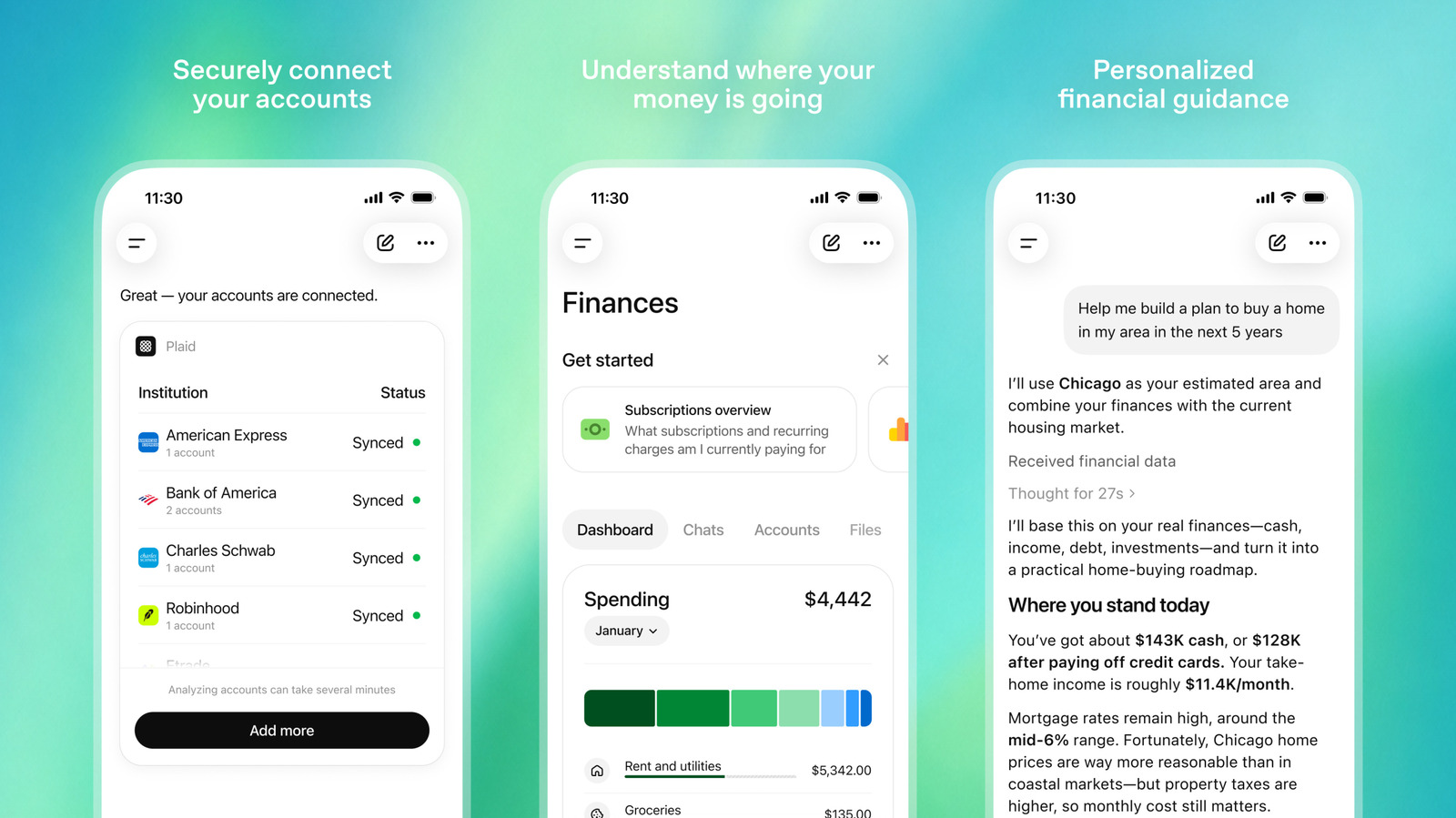
OpenAI is rolling out a preview of a new personal finance feature inside of ChatGPT. Starting today, Pro users in the US can connect their financial accounts to ChatGPT in order to get more personalized advice from the chatbot.
To hear OpenAI tell it, every month more than 200 million users already turn to ChatGPT for guidance on managing their money. By building a framework that allows those people to connect their accounts to its servers, ChatGPT can go from offering generic advice to helping those same users take actions that more directly improve their lives. The integration is made possible through a partnership OpenAI has signed with Plaid, which offers connections to more than 12,000 financial institutions, including banks like Citi and Chase, in addition to services like Affirm and Robinhood.
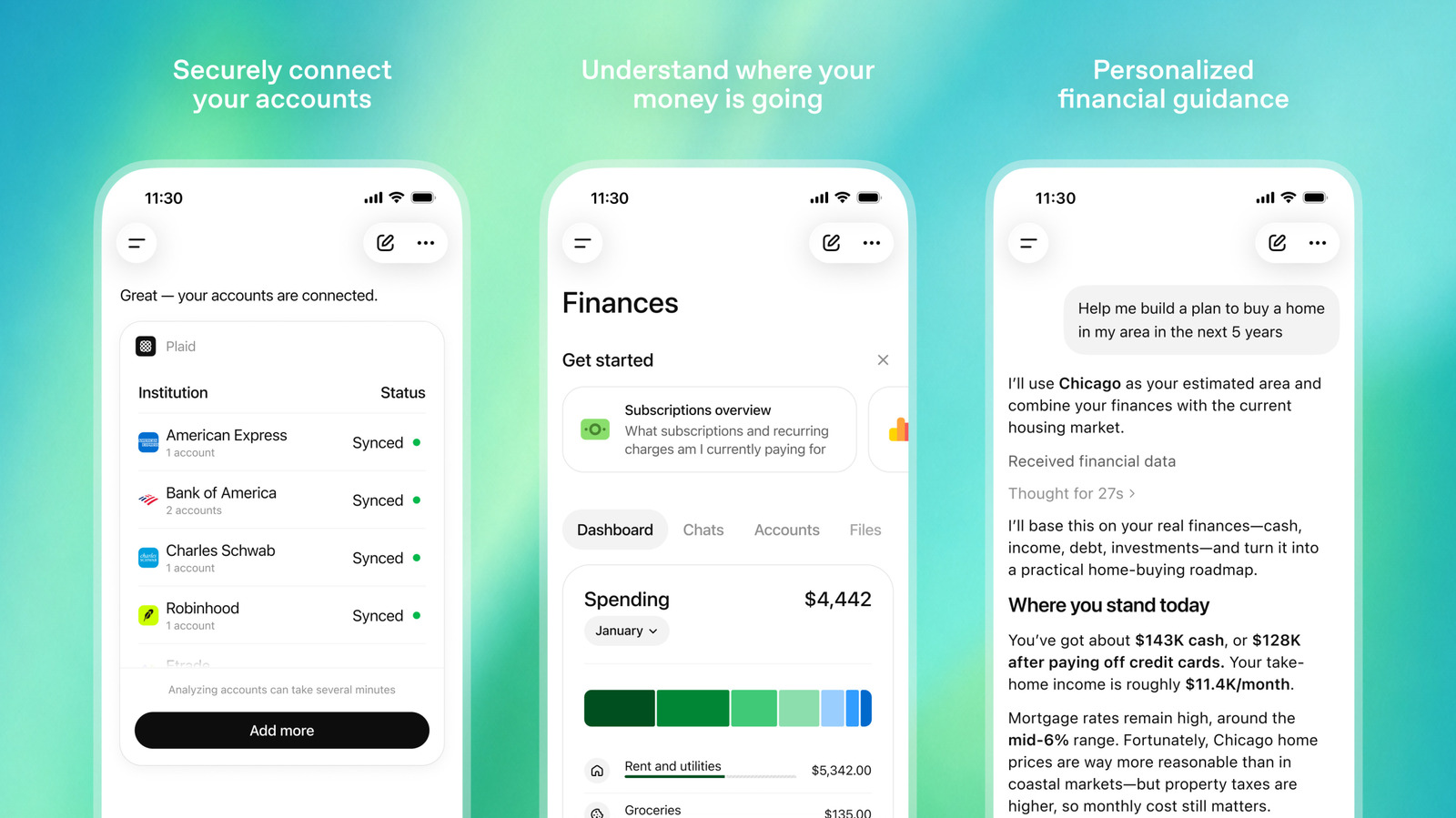
To begin using the new integration, find the “Finances” section inside of ChatGPT’s sidebar or write a prompt along the lines of “@Finances, connect my accounts.” ChatGPT will guide you through the process of importing your financial information through Plaid. The chatbot will then start building a visual dashboard, like the one you see in the screenshot OpenAI provided. The process of generating a visual representation of your finances may take a few minutes. From there, you can select one of the starter prompts or ask your own questions.
Understandably, some people may be hesitant to share their financial information with ChatGPT. OpenAI is looking to address those concerns by limiting the scope of what its chatbot can see. According to the company, ChatGPT can only read your balances, transactions, investments and liabilities through Plaid. It cannot see full account numbers or make changes to your accounts through the system.
Advertisement
Additionally, the company says users can disconnect their financial accounts from ChatGPT at any time, and any memories the chatbot saves about your financial situation can be seen or deleted directly from the Finances section of the app. ChatGPT cannot access these memories when using the temporary chats feature. Lastly, OpenAI’s data controls settings apply to the new experience, so if you’ve already dug into those, your prompts and other information won’t be used by the company to train future models.
According to an OpenAI spokesperson, work on the feature began before the company’s recent acquisition of fintech startup Hiro, which offered an AI-powered financial planning tool for consumers. The company hopes to bring this new experience to more users, including Plus subscribers, in the future. “We’re starting with a preview to a smaller group so we can learn from real-world use, improve the experience, and expand thoughtfully,” OpenAI said.
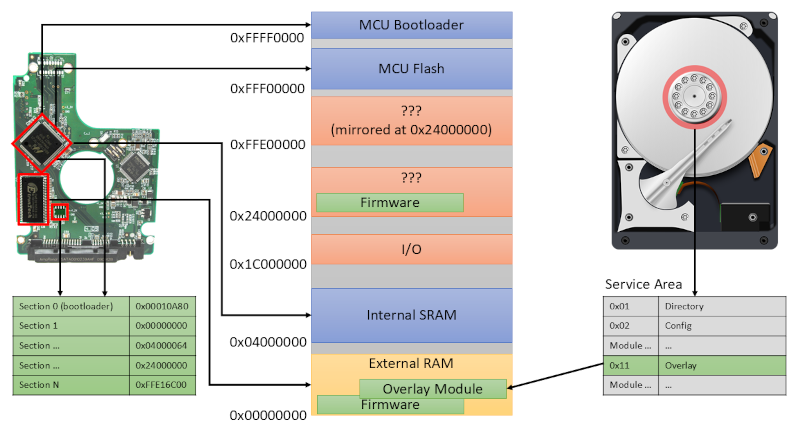
You probably flash new firmware on a variety of devices regularly, even though that’s rare for non-technical types. But what about your hard drive firmware? Most of us don’t want to touch our operating drives, so unless you are dealing with surplus drives or have a special project in mind, you may not think much about the firmware running your spinning rust storage. [I Code 4 Coffee] uses hard drives in an unusual way to exploit Xbox 360s, and wound up reverse engineering some drive firmware with an eye to making changes.
The analysis started with three hard drives and an SSD. Looking for people who’ve done similar work wasn’t as productive as you might think. There isn’t much call for modifying hard drive firmware, and what data there is can be outdated.
One thing that was available was firmware dumps taken with a PC-3000 data recovery tool. What follows is a deep dive down the hard drive rabbit hole. There are backdoor vendor commands and connections to the diagnostic RS-232 port on some drives. You can find the technical artifacts on GitHub.
Given the upfront cost of a car, some of the biggest car brands have been known to hand out perks as added incentives to buy. And before you figure you’ve heard it all before, these special offers go beyond the standard checklist of benefits (like a warranty or free roadside assistance options). Like Ford, for example. When you drive off the lot in one of their vehicles, Ford tacks on several nice little bonuses you might not even realize you have.
Some of these perks are meant to save you time. Others are meant to save you money. No matter what, though, they all make owning a Ford just that much sweeter. We’ve put together the four coolest below, plus instructions on how to make the most of them (if you haven’t already). Pick one or two to take advantage of, or get your money’s worth and start enjoying all four.
Advertisement
1. Complimentary Pickup & Delivery service
NikkaOl/Shutterstock
It’s one of the biggest hassles associated with vehicle maintenance: actually getting the car to the dealership. Ford seems to understand this, as many of their dealerships offer a complimentary Pickup & Delivery service. Instead of rearranging your entire day around an oil change or warranty repair, you can just schedule a service appointment at the dealership and have your vehicle picked up directly from your home or office.
A technician will pick up your car from your place, take it to the dealership for servicing, and bring it back once the work is done. If your local dealership is participating, it’s all done completely free of charge. (Although you still have to pay for the repair and parts costs, of course.) The program covers both warranty work and customer-pay repairs. As long as your car’s drivable and hasn’t been involved in an accident, you can take advantage of Pickup & Delivery.
Advertisement
2. Complimentary Mobile Service program
PJ McDonnell/Shutterstock
Alongside the Pickup & Delivery perk, Ford’s complimentary Mobile Service program makes dealership maintenance even easier. Rather than having to drive to the service center (or have the Ford dealership come pick up the car and bring it back), Ford Mobile Service will send a dealership technician straight to your home or work. The tech will then handle the on-site maintenance tasks.
The service itself is totally complimentary for Ford owners through participating dealerships. (As mentioned above, you still have to pay for the actual maintenance task itself.) The list of services available through Ford Mobile Service is a lot more extensive than you might expect, as well. They can do oil and filter changes, brake services, battery replacements, tire rotations, wiper replacements, fluid checks, filter replacements, lamp and bulb service, software updates, accessory installations, and diagnostic scanning, all right there in your driveway or parking spot.
Advertisement
3. Phone As A Key feature
Another nice perk of owning a Ford: The “Phone As A Key” feature in the FordPass app. This perk lets owners of select Ford vehicles use their smartphone in place of a traditional key fob. Once you’re paired with your vehicle, you can lock and unlock the doors, start the engine, and control several other functions directly through the app. You can also roll windows up or down, honk the horn, and open the trunk, no separate physical key required.
It’s all done via Bluetooth Low Energy, which means it’ll work within a range of roughly 30 to 50 meters. Passive entry functions specifically will only work within about two meters. (That’s nothing out of the ordinary for other keyless entry systems you might’ve used before.) All in all, Ford lets you pair up to four Phone As A Key setups per vehicle. As long as you have iOS 16 or later or Android 8.0 or later, you can store your car keys on an iPhone or Android.
Advertisement
4. Free service visits with points
Tada Images/Shutterstock
If you own a Ford, you might not realize you’re sitting on a heap of rewards points. Ford owners receive tens of thousands of points for getting the car in the first place, then add to that grand total with maintenance visits, accessory purchases, and other Ford transactions. More specifically, it’s 31,000 points for gas, diesel, or hybrid vehicle purchases or leases, or 22,000 for an EV purchase.
For many drivers, those many points can cover your first few oil changes. Depending on your driving habits and service intervals, that could be the first year and a half to two years of ownership. (This writer was personally able to stretch it to two years.) Of course, you don’t have to spend them on that. Points can also be redeemed for accessories and connected services like Ford BlueCruise. It’s not unlike airline rewards systems, in a way: It pays you to stay within Ford’s broader service ecosystem.
Boston-based robotics startup Automated Tire this week unveiled an AI-powered robotic tire-changing platform called SmartBay that can not only change tires, but also do associated tasks, such as wheel balancing and vehicle inspections. The robot uses computer vision and machine learning to perform the tasks and does not need any… Read Entire Article Source link
A new The Sims 4 bundle inspired by the Netflix Bridgerton series is now available
The Masquerade Ball Bundle is limited time and includes the Masquerade Ball Fashion Kit and Masquerade Ballroom Kit
A free, four-week event with new rewards has also kicked off
EA has released two new The Sims 4 kits inspired by the hit Netflix romance series Bridgerton.
The Masquerade Ball Bundle is available May 14 across all platforms and features two kits: the Lady Bridgerton’s Masquerade Ball Fashion Kit and Lady Bridgerton’s Masquerade Ballroom Kit.
Three exclusive items will be available as part of the bundle and are themed after specific Bridgerton characters, such as The Bridgerton House Gazebo from the iconic Benedict and Sophie’s encounter, Francesca’s Bridgerton House Piano, and a Bundle of Joy Bassinet for Penelope and Colin’s baby.
Latest Videos From
“With the Masquerade Ball Fashion Kit, one may don suave tailcoats, dazzling gowns, and accessories worthy of the season’s most talked about affair: from Sophie’s Lady in Silver dress, paired with shoes and mask, to Benedict’s effortlessly styled look that is sure to invite intrigue,” EA said.
Advertisement
“Adorn oneself further with Lady Bridgerton’s opulent mask and tiara, or command the room in Queen Charlotte’s striking Celestial Wig and gown. These ensembles are plucked straight from the grandest ballrooms of the ton themselves.”
Meanwhile, the Masquerade Ballroom Kit offers new build items to recreate the Bridgerton household, such as crystal chandeliers, opulent florals, a dance floor, wallpaper, and more.
The Lady Bridgerton’s Masquerade Ball Bundle, which includes both kits, will be available May 14 through August 14 for $9.99 as a limited-time offer. Both kits can also be bought individually at $6.99 each.
Sign up for breaking news, reviews, opinion, top tech deals, and more.
Advertisement
Alongside the bundle release, from now through July 7, a free masquerade multi-week login event will allow players to claim over 22 items including a new trait.
The event officially kicked off on May 12, so the first batch of rewards is available right now. Week 2 begins on May 19, followed by week 3 on May 26, and week 4 on June 2.
Mercury Research’s Q1 2026 numbers show AMD reaching 46.2% of x86 server CPU revenue, a new record for the company. Its server unit share climbed to 33.2%, underlining how Epyc continues to gain traction in cloud, enterprise, and AI infrastructure deployments. Read Entire Article Source link
Employee benefits are in the spotlight this week, and that’s because of three recent stories about US companies cutting back on non-wage compensations for workers.
A Texas tech consulting firm with a forgettable name—TTEC—suddenly became a lot more memorable when it suspended its discretionary 401(k) match program for 16,000 employees through at least the end of 2026. According to Business Insider, which viewed an internal TTEC memo, the company plans to invest in AI certifications, AI tools and training, and automation, among other things.
The auditing and consulting giant Deloitte is also reportedly slashing benefits for some workers starting next year. This includes reducing PTO, halving parental leave, and eliminating a $50,000 reimbursement for family planning services such as adoption, surrogacy, and IVF. San Francisco-based Zoom, meanwhile, has made a smaller-scale change and reduced its parental leave for employees from 22 weeks to 18 weeks for birthing parents.
So what’s the driving force behind this? And are there more cuts to come? The latter is impossible to answer, and the former is unfortunately more complicated than “corporate ghouls go AI.”
Advertisement
First off, “what Deloitte did is completely unconscionable,’” says Joan C. Williams, a professor at UC Law San Francisco, the author of several books on work culture and class dynamics, and an oft-cited scholar on these topics. The consulting firm is cutting the benefits of a specific class of internal workers—in admin, IT support, and finance—while leaving intact benefits for people in client-facing roles. An affected worker will see their parental leave cut from 16 weeks to just eight weeks.
“It treats people differently based on the type of job they’re in, and cutting any mother down to eight weeks of paid leave is just outlandish,” Williams says. “When labor is tight, employers are more generous. But once the power shifts, the benefits contract.”
AI certainly is a convenient excuse these days for any corporate decision that harms workers. But the impetus here is also the cost of the benefits themselves. Earlier this year subsidies from the Affordable Care Act lapsed, and people began dropping out of health care plans entirely. Insurers have cited this as one reason they’ve raised premiums.
Sarahjane Sacchetti, a former top executive at benefits administration companies Cleo and Collective Health, who is working on a new health care initiative, told me that the costs of employer-sponsored health plans have increased significantly over the past five years. A survey last year of over 1,700 US employers by the Mercer health care consulting group found that the health care cost per worker was expected to rise on average 6.5 percent in 2026, the highest since 2010. And this was after factoring in cost-reduction measures; otherwise, the cost of a plan would go up by nearly 9 percent.
Advertisement
“This just starts to eat into how you think about total compensation as an employer,” Sacchetti says. That doesn’t mean the corporation is the ‘good guy,’ she says, but the poor state of American health care policy and lack of safety net are responsible for a lot of the stress that plagues undercompensated or laid-off workers.
Williams points out that the US is one of the few countries that doesn’t offer a federal paid maternal leave—putting it in league with Papua New Guinea and Suriname. “This just shows how crazy it is to provide employee basics like pension and paid parental leave through private employers rather than how other industrialized countries do it,” Williams says. Her proposed solution? “The US needs to join the rest of the universe.”
The irony, of course, is that the US government professes to be obsessed with women having more babies. If women in the US are—as celebrity doctor Mehmet Oz put it this week in the Oval Office—“underbabied,” a comprehensive paid federal leave policy would be the obvious place to start. (Oz also said that “making babies” is “the most creative thing the universe knows.” Don’t tell the AI CEOs.)
When Anthropic announced Claude Mythos Preview on 7 April 2026, the response went well beyond the cyber security community.
Finance ministers discussed it at the IMF. The Bank of England governor said it had to be taken very seriously . The UK Government wrote an open letter to every business leader in the country.
What prompted this? Mythos autonomously discovered thousands of critical and high severity vulnerabilities across every major operating system and web browser, including a 27-year-old flaw in OpenBSD.
Advertisement
Latest Videos From
Davey McGlade
Head of Global Cybersecurity, Version 1.
It generated working exploits without human guidance. The UK’s AI Security Institute tested it and found it could complete a 32-step simulated corporate network attack, from reconnaissance to full takeover, that would take human professionals around 20 hours.
Advertisement
An important caveat is that these results come from lab environments. Anthropic’s Mythos System Card notes the simulations had no active defenses, minimal security monitoring, and lacked defensive tooling. The Firefox exploitation tests ran without the browser’s process sandbox. Mythos is impressive, but it has not been pitted against hardened, actively defended systems.
That said, AISI estimates frontier model cyber capabilities are now doubling every four months. The genie is out of the bottle. Other model creators will deliver similar functionality but without restricting access like Anthropic has done.
1. Security is economics
The AISI budgeted 100 million tokens per attempt on its network attack simulation. Across ten runs, Mythos completed the full 32-step attack three times.
Advertisement
Sign up to the TechRadar Pro newsletter to get all the top news, opinion, features and guidance your business needs to succeed!
None of the models tested showed diminishing returns as the token budget increased; performance kept scaling upwards. In plain terms, the more compute an attacker throws at a target, the more they find.
To harden a system, do we need to be spending more tokens discovering exploits than an attacker will spend finding them?
The CSA and SANS “Mythos-ready” briefing makes a related point: build a permanent Vulnerability Operations function, running continuous AI-driven discovery across your entire software estate.
Advertisement
Relying on yearly penetration tests simply doesn’t match the real-world cadence. Token spend could be the new penetration test.
2. Patches signal attack vectors
Project Glasswing is expected to generate a flood of vulnerability disclosures, as around 40 major software vendors have early access to Mythos to review their codebases.
Advertisement
That coordinated and responsible disclosure is the right approach, but it creates a secondary problem: every patch is a signal to adversaries about where to look.
AI accelerates patch-diffing, comparing old and new code to reverse-engineer what was fixed and what was exploitable. Each patch becomes an exploit blueprint.
The Zero Day Clock project tracked time-to-exploit falling from 2.3 years in 2018 to roughly 20 hours in 2026. Organizations slow to apply patches are not just behind the curve, they are actively exposed by the disclosure itself.
Mean-time-to-remediate externally exposed vulnerabilities is now one of the most important metrics a security team should be tracking.
Advertisement
3. Open-source transparency is now a double-edged sword
Mythos analyses source code to find weaknesses. Anthropic’s research distinguishes between open source software, where the model reads code directly, and closed source, where work is conducted under partnership arrangements with vendors.
This has implications for open source more broadly, including policies like the UK Government’s commitment to developing in the open. Publishing source code enforces good standards and invites scrutiny, but if an AI model can understand a codebase in minutes and generate working exploits, open repositories become a hunting ground.
Linux kernel vulnerability reports have climbed from two to ten per week, all verified as genuine. Organizations that develop in the open, and those that depend on open source components, need to reconsider how they balance transparency with exposure, particularly for systems close to critical infrastructure.
Advertisement
4. Defense in depth still works, and architectural diversity matters
The UK Government’s open letter made the point plainly: the steps organizations should take against AI-driven threats are the same cyber hygiene measures recommended for traditional threats.
Not all vulnerabilities carry the same risk. A critical CVE in an internal system with no internet exposure is a different proposition from the same CVE on a public-facing payment platform.
Segmentation, identity controls, egress filtering, and phishing-resistant MFA all raise the cost for attackers, even with AI assistance.
Advertisement
Architectural diversity matters too. An exploit against one technology stack will not necessarily work against another, so layered, diverse architectures are harder to attack end-to-end even at ‘AI speed’.
The NCSC’s guidance on protocol breaks is one example: terminating a connection and passing the payload via a simplified protocol to a downstream system forces an attack to traverse multiple technologies, making protocol-based compromise significantly harder.
5. AI models could become instruments of geopolitical leverage
Anthropic chose to restrict access to Mythos through Project Glasswing, offering it to selected partners and governments rather than releasing it publicly. The US Treasury briefed its major banks directly. This is an interesting pattern.
Advertisement
AI models with offensive security capabilities are in effect strategic assets. The parallels with historical export controls on encryption are worth considering. In the 1990s, the US Government classified strong cryptography as a munition and restricted its export.
Those controls were eventually used as a tool of influence. It is not difficult to imagine access to the most capable AI security models being restricted along geopolitical lines or used as leverage in future trade negotiations.
For organizations operating internationally, this creates a new dependency risk. If your ability to defend your systems relies on access to models controlled by a foreign government or a single company, that is a strategic vulnerability in itself.
Advertisement
Where does this leave us?
The pace has accelerated but the response should not be panic. It should be focus. The CSA and SANS “Mythos-ready” briefing, reviewed by some of the most experienced CISOs in the industry, frames it well: this is the first of many waves.
The organizations that weather it will be those that sharpen vulnerability prioritization, reduce their attack surface, and scale security decisions through automation and architecture rather than headcount alone.
This article was produced as part of TechRadar Pro Perspectives, our channel to feature the best and brightest minds in the technology industry today.
Advertisement
The views expressed here are those of the author and are not necessarily those of TechRadarPro or Future plc. If you are interested in contributing find out more here: https://www.techradar.com/pro/perspectives-how-to-submit
Something felt off when I watched Google’s Android AI presentation this week. My colleague Andrew Lanxon summed up the issue perfectly: All of Google’s AI use-case examples revolved around spending large sums of money on shopping and travel, making the presentation — in his words — a “salute to rampant capitalism.”
But this Google gaffe isn’t just an Android-user issue, as Gemini could influence the future of Siri. Apple partnered with Google to build a better Siri, and whatever Apple shows off next will be built with the aid of Gemini’s models and programming. So in this week’s episode of One More Thing, embedded below, I examine the good and bad of the new Gemini Intelligence, and how it might mesh with what we want from Apple Intelligence.
Unless you like ordering food, spin classes and concert tickets with AI, not much of what’s new from Gemini will impress. (There were even some voice commands I could already do from my iPhone easily, like finding late-night pizza joints.) Still, I’ll admit there were two new Android features that could give iPhone owners a little Android envy.
Advertisement
Spoiler: Booking Costa Rican coffee and chocolate tours for a party of six was not one of them.
For more One More Thing, subscribe to our YouTube page to catch Bridget Carey breaking down the latest Apple news and issues every Friday.


























































You must be logged in to post a comment Login