A malware campaign is using fake Zoom updates and business files to install ScreenConnect, giving attackers remote control through software that can resemble legitimate IT activity. And now, it’s come to Mac.
Securonix researchers detailed the campaign, named Smoke#Screen, in an August 4 report. They traced Windows scripts, compiled loaders, an HTML phishing page and a macOS package named “ZoomUpdateInstaller.pkg” to shared infrastructure.
ScreenConnect is legitimate remote monitoring and management software published by ConnectWise and commonly used by IT departments. The campaign configures genuine ScreenConnect clients to contact attacker-controlled relay servers rather than an authorized company system.
Once connected, the software can give an attacker remote desktop and management capabilities. The resulting activity may resemble ordinary technical support, making the intrusion harder to identify without examining how the software arrived and where it connects.
Advertisement
The macOS package contacted the same primary relay server as several Windows payloads, tying it to the wider operation. However, Securonix did not identify how the Mac installer was distributed or report any confirmed Mac infections.
The report also didn’t say whether the macOS package was signed and notarized by Apple. The discovery therefore establishes that the campaign’s infrastructure included a Mac payload, but not that attackers successfully delivered it to Mac users.
The finding adds to a series of campaigns using fake installers and familiar software brands to persuade Mac users to run malware. In this case, the strongest evidence of completed infection chains comes from the Windows payloads analyzed by Securonix.
Fake updates lead to ScreenConnect
Securonix documented four social engineering themes involving Zoom updates, Adobe updates, business document reviews and system maintenance checks. Each observed attack path tried to persuade the victim to open a file that installed ScreenConnect.
Advertisement
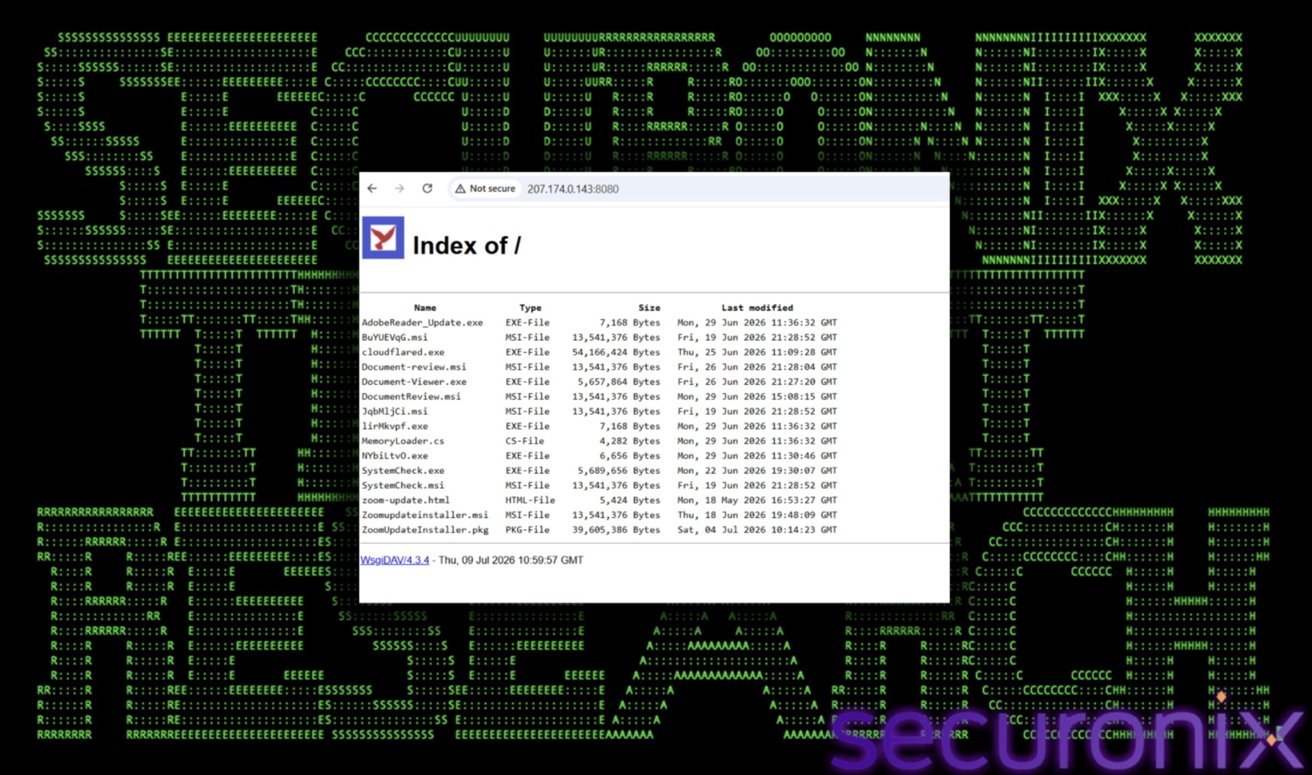
A live WsgiDAV server running at 207.174.0.143:8080, a Python-based WebDAV implementation commonly used for local file sharing and development. Image credit: Securonix
The investigation began with a Windows VBScript file named “zoom-update.vbs” that appeared in Securonix telemetry. Researchers followed its network activity to an accessible staging server containing 15 payloads, including the macOS Zoom installer.
Other files included ScreenConnect installers named “SystemCheck.msi” and “Document-review.msi.” The server also hosted Windows executables posing as Adobe Reader updates and document viewers.
The files used different names and delivery methods, but they served the same purpose. Each installed an unauthorized ScreenConnect client configured to contact attacker infrastructure.
Researchers identified three ScreenConnect relay clusters, each using a separate RSA key pair. The primary server also hosted the campaign’s payloads, allowing it to distribute files and manage infected computers.
Other parts of the campaign used Dropbox and a Cloudflare Quick Tunnel to deliver payloads or conceal supporting infrastructure. Downloads involving familiar cloud services may attract less attention than traffic from an unknown domain, although security tools can still detect suspicious commands and installations.
Advertisement
Separate relay servers could also make the campaign more difficult to disrupt. Identifying or shutting down one cluster would not disable clients configured to contact the others.
Windows loaders attack security defenses
The Windows samples show that the campaign changed its methods during Securonix’s investigation. Initial loaders relied on obfuscated VBScript, encrypted commands and environmental checks intended to complicate automated analysis.
One script stopped running when it found less than 2 GB of physical memory, a condition associated with some lightweight virtual machines and malware sandboxes. It also searched for Wireshark, Process Monitor, VirtualBox services and VMware Tools before continuing.
Other loaders used batch files and compiled .NET programs to attack Windows security controls before installing ScreenConnect. The commands attempted to disable Microsoft Defender protections, change SmartScreen settings and add antivirus exclusions.
Advertisement
JqbMljCi.msi is one of the randomly named files hosted on the staging server and is one of three files confirmed to be identical. Image credit: Securonix
The loaders also tried to remove Mark of the Web data from downloaded files. Windows uses that marker to identify files obtained from the internet and apply additional security warnings.
One loader added the root of the C: drive to Microsoft Defender’s exclusion list. It also attempted to change the Windows Defender service’s startup configuration.
Securonix said the sequence could leave a computer with weakened protections even if the later ScreenConnect download failed. The broad exclusion could also make it easier for additional malware to avoid antivirus scanning.
The campaign later changed direction. Researchers found a newer loader that removed the aggressive Defender-tampering sequence and instead waited three minutes between installing ScreenConnect and starting its service.
The delay appeared designed to separate related events inside endpoint detection logs. Securonix also found a source-code comment that referred specifically to breaking Elastic event correlation.
Advertisement
The finding supports the researchers’ conclusion that the operators adjusted their tools in response to commercial security products. However, the report does not establish when each loader entered circulation or whether all versions were used sequentially.
The analyzed Windows attack paths ultimately installed legitimate ScreenConnect MSI packages signed by ConnectWise through a valid DigiCert certificate chain. Signed remote-management software may receive less scrutiny than an unknown executable, although a valid signature does not make an unauthorized installation safe.
Attackers have used similar remote access capabilities in previous Mac malware campaigns because they provide continuing control without requiring a custom backdoor. Smoke#Screen instead deploys a genuine enterprise management client that may already be familiar to corporate security teams.
The report does not identify the people operating Smoke#Screen or connect the campaign to a known hacking group. Shared servers, encryption keys and payload development link the analyzed files, but they do not reveal the operators’ identity, location or motive.
Advertisement
How Mac users can stay safe from Smoke#Screen
The attack paths documented by Securonix required a victim to open a file presented as an update, document or maintenance utility. Software such as Zoom and Adobe Reader should be updated through built-in tools or installers downloaded directly from the developer.
Mac users should treat unexpected installer packages as suspicious, even when the filename refers to familiar software. Previous campaigns have shown that signed or even notarized apps can still begin a malicious installation.
Organizations should inventory approved remote management tools and identify ScreenConnect agents that contact unknown servers or raw IP addresses. Defenders should also examine how the software arrived, which process launched it and whether the installation was authorized.
The ScreenConnect name and its valid digital signature are not enough to establish that an installation is safe. The relay destination and surrounding activity provide the context needed to separate approved support software from an attacker’s remote-access tool.
Go to Account Settings, which can be found by clicking your profile picture in the upper righthand corner
Select Subscription from the menu on the left hand side
Select Cancel Subscription
Cancel PlayStation Plus via your PlayStation console
Advertisement
You can also easily cancel your PlayStation Plus subscription via the console itself, though the process for PlayStation 4 and PlayStation 5 vary slightly.
PlayStation 5
From the home screen, go to the Settings menu
Select Users and Accounts
Select Account
Select Payment and Subscriptions
Select your PlayStation Plus subscription and select Cancel
PlayStation 4
From the home screen, go to the Settings menu
Select Account Management
Select Account Information
Select Subscriptions
Select your PlayStation Plus subscription and select Cancel
Cancel PlayStation Plus via the PlayStation app
If you have the PlayStation app, you can also cancel your subscription from there by following these steps:
Select the PS Store from the bottom menu
Select the menu icon in the top right of the screen
Select Subscription Management
Select Cancel on your subscription
What happens after you cancel
Teamjackson/Getty Images
After you cancel your PlayStation Plus subscription, you’ll no longer be charged, but you’ll still have access to all of your subscription benefits until the end of the payment period. Once your subscription is over, you’ll no longer be able to use the game library, any monthly free games you may have claimed, online storage or online multiplayer. However, packs, avatars and discounted purchases acquired through your subscription are yours to keep.
If you change your mind and don’t want to cancel your PlayStation Plus, you can reactivate your subscription by going to your subscription settings again and selecting Reactivate Subscription. If you do so before what would be your next payment date, it will keep the current subscription active; otherwise, you’ll need to purchase a new subscription through the PlayStation Store.
A simply brilliant coffee machine, the Nespresso Vertuo Up is also my favourite Vertuo machine. More compact than its predecessors, the drop-in capsule system is easier to use, and a three-second heat-up time means there’s virtually no wait for a coffee. Excellent coffee-making via the clever Centrifusion brewing system, with a wide choice of coffees, makes this a great choice for anyone who loves a smooth cup of coffee. Only those who would like to integrate milk frothing should look elsewhere.
Brilliantly designed
Makes excellent coffee
Integrated Wi-Fi
Creations button genuinely useful
No integrated milk frothing
Key Features
Advertisement
Review Price:
£179
Two dispensing buttons
Advertisement
Regular coffee and creations at the touch of a button.
Fresh design
Advertisement
Capsules drop into the slot, which makes the machine easier to use.
Introduction
Although the ‘new’ type of Nespresso, Vertuo machines have been around since 2017. It’s a little surprising, then, that it’s taken the company this long to launch a really good compact, simpler machine.
Much smaller than its predecessors, the Nespresso Vertuo Up takes capsules via a drop-in slot similar to how the original machine works, and has a brand-new coffee creations button for making more intense versions of coffees.
Advertisement
Super-fast heat-up times and Wi-Fi connection round out the package and make this my favourite Vertuo machine.
Advertisement
Design and features
Works like an original Nespresso machine
Very fast heat-up times
Integrated Wi-Fi
I really like the Nespresso Vertuo range. Its Centrifusion brewing makes coffee that’s completely different to that dispensed by the original range. Using a larger style capsule, the Vertuo range of machines has always had a few size issues though.
With the original Nespresso Vertuo Plus, the motorised lid means you need quite a bit of room above it (an issue that remains with the manually operated Vertuo Next and Vertuo Lattissima). The smaller Vertuo Pop still had a hinged lid, but its smaller dimensions mean it needs less room around it; however, the low spout makes it fiddly to get a regular-sized mug underneath.
The Nespresso Vertuo Up changes that, with a design that’s both practical but more compact than what went before. The design is actually closer to that of an original machine. I’ve got the black version on review, but there are also white, blue and graphite options.
Advertisement
Instead of having to open the entire top of the machine, with it hinging upwards, there’s a simple drop-in slot for the capsules. Just pull the lever up, drop in the pod, shut the lever and you’re good to go.
Image Credit (Trusted Reviews)
Advertisement
I actually prefer this design. It’s easier to get the pod in and the lever shut. With the Vertuo Next (and Lattissima), it can be a little fiddly shutting the lid and getting the locking lever all the way across into the correct position.
This new design means that you don’t need much space above the machine, so you can place it under a shelf, no problem.
This design has other advantages. First and foremost, the drip tray and used-capsule bin both pull out from the front. No more having to turn the machine around to get a side or rear bin.
Advertisement
Image Credit (Trusted Reviews)
At the back, there’s a 1.4-litre water tank (plenty big enough to make a few mugs of coffee before it needs to be refilled). This is mounted on a rotating base, so you can have the tank at the back for a more streamlined, but longer placing (12 x 49 x 25.5 cm), or you can put the tank to the side, which makes the Vertuo Up wider, but shorter (22 x 39 x 25.5cm).
Image Credit (Trusted Reviews)
Advertisement
The cup holder at the front can be placed at different heights, and locks securely into position, as does the drip tray. This means that the Vertuo Up can even be placed slightly overhanging a counter, as I do on my narrow sideboard.
Image Credit (Trusted Reviews)
As you might expect from a Vertuo machine, the Vertuo Up is very easy to use. Drop a capsule in, hit the button on the front, and hot coffee pours out, with the barcode on the capsule dictating how the coffee should be made and the volume.
Actually, I should say there are two buttons for coffee. The main one does as above, but there’s also a Coffee Creations button, which dispenses a distilled, more intense version of each coffee, perfect for the flavoured capsules that are designed for recipes, such as with added milk or water.
Image Credit (Trusted Reviews)
With this mode, 230ml pods go to 80ml, 150ml goes to 40ml, 80ml to 40ml, and 40ml to 25ml. This mode was available on previous Nespresso machines but required a double-tap of the main button; it’s easier to have a dedicated button.
Advertisement
Impressively, the Vertuo Up has a three-second heat-up time. In fact, by the time I’ve woken the machine up and have dropped a coffee in, it’s ready to go. With the older machines, there’s a much longer heat-up time.
Advertisement
As with recent Nespresso machines, the Vertuo Up is a smart one, connecting to the Nespresso Smart app via Wi-Fi. As well as pinging the app if there’s a problem, such as the machine has run out of water, changing the coffee temperature and default volumes, as well as running the cleaning and descaling cycles.
Image Credit (Trusted Reviews)
Coffee quality
Rich coffee
Consistent volume
Wide range of coffees
There’s a wider range of pods available for this machine than the original, with everything from 25ml ristretto and 40ml espresso to 230ml mug-fulls and even capsules that will do an entire carafe. My guide to the best Nespresso Vertuo pods can help you find the right pods.
Coffee is delivered using Nespresso’s Centrifusion brewing system, which spins the capsule to extract, resulting in long, fluffy shots with lots of crema, even when filling a mug. The result is coffee that’s different to that from other machines: richer with a longer crema. Temperatures at all cup sizes came in at around 67°C, which is spot-on.
Advertisement
Image Credit (Trusted Reviews)
Flavour varies by coffee capsule and style, but you’ll easily find something you like. As a lover of a mug-full of hot black coffee, there’s no other system that quite makes a cup like this.
Having the Creations button makes it easier to use this feature, and it works really well. When making iced coffee, having a more intense shot of coffee is better, and it makes it easier to add water and ice to complete the drink.
Advertisement
Image Credit (Trusted Reviews)
There’s no milk frothing on this machine, but you can add milk to a mug, or you can buy a separate milk frother.
Maintenance
Capsules are recyclable
Very little day-to-day maintenance
Advertisement
Looking after the Nespresso Vertuo Up is refreshingly easy. Coffee capsules drop into the bin at the front, where they can be emptied into a recycling bag and then sent back to Nespresso for full recycling (you can do this via the post or at Nespresso stores, all for free).
Otherwise, there’s not much maintenance, just the occasional descaling, which is easy to do using the app.
Should you buy it?
You want the best Vertuo machine
Advertisement
Compact, very fast to heat-up and capable of making great coffee, this is a brilliant Veruo coffee machine.
There’s no integrated milk frothing in this machine, so buy an alternative if you want this feature.
Advertisement
Final Thoughts
If you want a Vertuo machine that can also froth milk, the Lattissima might be a better choice.
However, if you primarily drink black coffee, then the Nespresso Vertuo Up is the best Vertuo machine that I’ve tested: it heats faster than the previous machines, I prefer the drop-in capsule system, and this machine is more compact than its predecessors. It’s my new favourite Vertuo machine and deserves a place on my guide to the best Nespresso machines.
Advertisement
How We Test
We test every coffee machine we review thoroughly over an extended period of time. We use industry-standard tests to compare features properly. We’ll always tell you what we find. We never, ever, accept money to review a product.
Find out more about how we test in our ethics policy.
Used as our main coffee machine for the review period
Used as our main coffee machine for the review period
We roast our own beans for regular coffee machines, so we can fairly compare each machine; pod machines are tested with a variety of compatible capsules
Depending on capabilities, we test each machine’s ability to make espresso and cappuccino
Advertisement
FAQs
What’s the difference in the Nespresso Vertuo Up’s two buttons?
The standard button makes regular coffee at the volume displayed on the capsule, and the Creations button makes a shorter, more intense drink, ideal for recipes.
Experts warn hotfix not optional. MSPs warned attacker gains ‘full administrative access to an N-central console’
The US Cybersecurity and Infrastructure Security Agency (CISA) has added an exploited N-able vulnerability to its Known Exploited Vulnerabilities (KEV) catalog, giving federal agencies three days to patch a flaw that could let attackers reach managed service provider (MSP) customers.
Attackers exploiting the flaw can gain “full administrative access to an N-central console,”
Advertisement
Tracked as CVE-2026-18577 (8.2 CVSSv4), N-able disclosed the vulnerability affecting N-central on Sunday, noting that it was exploited as of July 31.
MSPs use N-central to manage customer systems from a single dashboard, and successful exploitation can hand an attacker administrative access to the console.
Based on the limited set of partner logs it reviewed, security firm Huntress said successful attacks led to pivots into managed endpoints and the creation of Cloudflare-based tunnels for persistent access to victim networks.
“From an MSP perspective, exploitation of this flaw can grant an attacker full administrative access to an N-central console – the same level of control normally reserved for trusted NOC and engineering staff,” wrote Huntress’s Ben Bernstein and John Hammond.
Advertisement
Attackers can then open remote control sessions on critical systems and modify roles, accounts, and policies to support follow-on attacks.
The vulnerability affects N-central releases earlier than version 2026.3 when the server is exposed to the internet or reachable from an untrusted network.
Huntress advised customers unable to apply N-able’s hotfix immediately to disable N-central until they could do so.
Authorities elsewhere have also urged users to patch. NHS England’s advisory mentioned that its National Cybersecurity Operations Centre assessed that “further exploitation is likely,” while Belgium’s Centre for Cybersecurity urged fast action due to the “potential for significant impact.”
Advertisement
Exploitation of this flaw can grant an attacker full administrative access to an N-central console – the same level of control normally reserved for trusted NOC and engineering staff
CVE-2026-18577 is related to an earlier flaw, CVE-2026-18556, patched in N-central 2026.2. According to N-able, that fix left another route to exploitation, which attackers began abusing late last month.
CISA gave Federal Civilian Executive Branch agencies until August 6 to remediate the flaw. Under Binding Operational Directive 26-04, CISA can impose a three-day deadline on vulnerabilities it considers an urgent risk rather than allowing the usual 14 days.
According to Huntress’s data, affected customers have leapt into action. By August 3, nearly all cloud-hosted N-central instances had been patched, although 28.6 percent of observed self-hosted servers remained vulnerable and exposed to the internet. ®
In the 1980s, France was the stage for one of the boldest public computing projects of the era. Minitel was the French take on viewdata, and instead of making it an expensive and unattainable luxury, they made the terminals universally available. Many Minitel services cost extra to use, but despite this it was a runaway success that lingered on into the 21st century.
The ubiquitous terminals are now surplus to requirements, but that’s not to say they are useless. [MemoireMorte] has proved this with the Memo-1, a 6502-based computer designed to plug into a Minitel-1 terminal. It’s just the accessory your Minitel needs!
Hardware wise it’s a relatively conventional device with the usual RAM, ROM, and BASIC. There’s an expansion port, and a 6522 to provide a couple of Atari joystick ports. The serial port uses a a 6551 ACIA rather than the more usual W65C51 because of an incompatibility between the latter chip and the Minitel-1.
Advertisement
We like this computer, not because of novelty, after all it’s hardly the first 6502 we’ve seen, but because of its use of the Minitel terminal. These devices are magnificent, and deserve more love. We subjected another terminal to a teardown a year or two ago.
During its second-quarter earnings call on Tuesday, Spotify again teased the upcoming release of a new product that will allow music fans to leverage AI to make covers and remixes of artists’ music, with the artists’ consent.
The company also announced that Merlin, a licensing partner for independent labels and distributors, has now joined Universal Music Group (UMG) on the new AI music effort. The deal brings more than 30,000 labels from Merlin’s network to the product, which will allow fan-made covers and remixes by artists who agree to participate.
Spotify has positioned its AI music product as being significantly different from the more controversial AI music startups that have been used to create fully artificial songs. Instead, Spotify co-CEO Gustav Söderström told investors on Tuesday’s call that the company’s AI music product will be about “real artists, not fake artists.”
“We want artists to be consenting [to add] their work into this catalog, so people can play around with covers and remixes based on their art,” added co-CEO Alex Norström. “We also obviously want to give them credit. And last but not least…we not only have the consent and give credit, but we also drive the compensation for this. So, really, we’re talking about the first legal way to partake in this AI tailwind that we see coming for interactive music,” he said.
The company told investors that a research preview of the fan remix and covers product would initially be made available to a subset of users. Spotify also noted that it would not require a full music catalog to get started. The company did not say when the preview would arrive.
The new tool will launch as a paid add-on, creating an additional revenue stream for artists, Spotify previously said.
“Our remix and covers I think is an incredibly exciting product again because there is no one else that can really do this,” Söderström said. “Normal generative music will happen with or without us. This product will not happen without us, and it needs to exist so that existing artists can can participate in this.”
Advertisement
When you purchase through links in our articles, we may earn a small commission. This doesn’t affect our editorial independence.
Apple is doubling down on its lawsuit against OpenAI over claims of intellectual property theft, and has now asked the courts for a preliminary injunction that could delay the ChatGPT firm’s AI device.
While OpenAI has turned to the court of public opinion in this case, Apple has now gone to a US judge. According to Reuters, on August 3, 2026, Apple asked for a preliminary injunction, and inspired OpenAI’s post that didn’t say that much.
Specifically, it asked for this injunction to bar OpenAI and two former Apple employees from acquiring or using allegedly confidential information. In a separate motion, it also asked the judge to require OpenAI to produce documentation relating to the defendants.
“Apple will be irreparably harmed absent a preliminary injunction,” said the company’s filing. Apple further wants depositions to be taken from multiple OpenAI representatives and in particular three ex-Apple employees.
Advertisement
Those include the previously named Chang Liu and Tang Tan, plus now Yu-Ting (“Alyssa”) Peng. The full filing also refers repeatedly to an ex-Apple employee it only calls “Individual No. 1.”
Most of the details in the filing refer to previously revealed accusations such as Apple’s claim that ex-employee Tan accessed confidential information. Similarly, the filing repeats the accusation that OpenAI asked job candidates to bring information to interviews.
It is more specific in that this filing alleges that such candidates were directed “to bring Apple prototypes and CAD designs and artifacts for ‘show and tell’.” Apple also claims that a suppler was induced “to perform an Apple proprietary metal-finishing process.”
Alongside these claims against people who have mostly been named before, though, Apple now says it has “serious concerns” about eleven other OpenAI employees. It accuses unnamed employees of meeting with OpenAI to discuss unannounced Apple products, for instance, and another of taking screenshots of confidential documents.
Advertisement
“And, after Apple filed its complaint, multiple former Apple employees now working at OpenAl reached out to discuss returning Apple-issued work devices they kept when they left Apple,” says the filing. “Thus, there are multiple now-OpenAl employees who appear to have witnessed some of the events in question and to have used, acquired, and/or retained proprietary Apple information after their own departures from Apple.”
What happens next
A judge in the US District Court for the Northern District of California will be considering Apple’s filing. That filing does specify that a hearing should be held on October 1, 2026, at 9:00 a.m. Pacific.
The judge may have already informed Apple that this date is possible, or it could be that Apple has established that there is an open slot in the court’s calendar. Either way, it’s possible that the court will reschedule.
It’s not clear, though, how Apple believes an injunction against acquiring or using confidential information can be enforced, other than to add damages later. If the OpenAI employees did as Apple accuses, they already have and will already have used that information.
Advertisement
Tang Tam – Image Credit: mit.gelstagram/Instagram
What’s most likely is that this is a requirement of filing this particular type of lawsuit. Apple’s aim really appears to be solely to expedite the discovery process and so get the lawsuit moving as quickly as possible.
That could be beneficial to OpenAI too, though, depending on how the final case is resolved. While it remains embroiled in this suit, it’s possible that its first AI hardware device may have to be delayed.
Reports claim that this first AI device will essentially be an Apple-like HomePod. Consequently, OpenAI may have to prove that it was made without the use of Apple’s trade secrets.
Advertisement
It’s hard to prove a negative, but should it be able to, OpenAI may then be able to launch this device. The company needs to be launching multiple AI devices and soon, because its finances are such that it only has a couple of years before it will begin to run out of money.
Update: August 4, 11:50 Updated with details from Apple’s new filing, which is embedded in full above.
I was in third grade when I started to fear math. Division and fractions gave me the worst anxiety. Every day when my teacher asked for my math homework, I’d say, “I put it on your desk,” knowing full well I hadn’t done it.
My siblings had no problem with math, but it was so hard for me that I wondered if I had a learning disability.
In college, I decided to become a teacher after discovering my love for working with kids at a daycare center. I began my first year teaching in the fall of 2024. I felt excited to teach fourth grade, but I also worried I wouldn’t understand all the math content I was supposed to teach and that I’d pass on my math anxiety to my students.
Honesty Creates Connection
When the fourth-grade teaching team met prior to the start of the 2024-25 school year, I confessed to my colleagues, who were all math whizzes, that I wasn’t very good at math and that it scared me. Instead of making me feel silly or stupid, they were so gracious and supportive. They said, “We’ve got you,” and they did.
Advertisement
As it turned out, we were all nervous because our district was rolling out a new curriculum. As we looked through the materials, I found it comforting to know that we’d all be learning and finding our way together. For once, I didn’t feel so alone in math. Being honest created a sense of connection with my colleagues. It helped us approach the new school year as a team.
More Than One Solution
Even with my colleagues’ support, I was scared when I taught the first math lesson. I remember leaving that day, feeling like I had completely bombed it. But the next day, I realized I was the only one who thought so. My students loved it and couldn’t wait to jump back in. The problem wasn’t math; it was my self-doubt. I just had to have the same confidence in myself that I had in my students.
As the weeks went by, math actually started to feel fun. We did hands-on activities. We played math games online and in centers. Students collaborated, talking through their thinking and teaching each other. It was incredible to watch them enjoy a subject that had caused me so much stress.
My biggest “aha” moment came when I realized that there isn’t just one way to solve a math problem. Growing up, I thought math was rigid — one method, one answer — and that if I didn’t get it, that was on me. I was surprised to discover that there are many different ways to solve problems, and that exploring and comparing strategies is beneficial to students’ learning.
Advertisement
In my classroom, I noticed that using multiple strategies to approach problems made math more accessible for my students. Even those who struggled found methods that made sense and worked for them.
That approach sparked a new kind of excitement about math. During a lesson on different division methods, my students ran outside for recess and wrote division problems all over the concrete. Then they’d jump up and say, “Look at how I solved this!”
Vulnerability Builds Trust
Fractions were another story. Research shows that many children have trouble with fractions, and my students were no different. I even brought in candy bars and broke them into pieces to make the abstract concept tangible, but I was met with blank stares.
I thought back to what I needed as a student and decided to be completely transparent. I admitted that I had struggled with fractions at their age and that it took me a while to learn them. Hearing that made my students feel so much better. They knew they could ask me questions and admit their confusion without judgment. My openness about my own math struggles made it safe for them to share theirs.
Advertisement
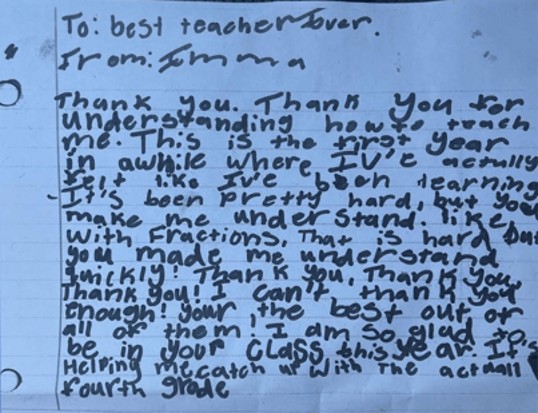
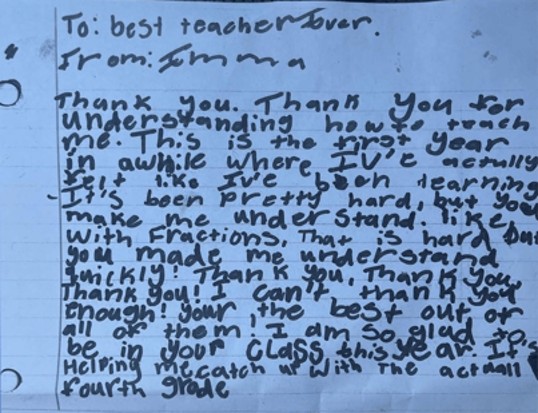
The next morning, one student handed me a note, thanking me for helping her understand fractions. I cried when I read it and realized that I had reached her in a way that not only helped her grasp the math but also helped her believe in herself.
I feel like I have become a more confident teacher through all of this, but I’m still figuring out how to reach kids who struggle (the kind of kid I used to be). Sometimes it does not click for them once in a lesson. It is a challenge because not all students respond the same way. Some kids need one-on-one support when learning a new skill. That’s hard for a teacher who has more than 20 kids in a classroom. My school added an interventionist this past year, and that was truly a blessing. She and I communicated consistently, and she was able to pull those who struggle and reach them in a different way. As a new teacher, I hope to learn and become better on how I can implement extra guidance inside the classroom on my own if there’s ever a day I don’t have the help from an interventionist.
A thank you note for Brenna Kirkpatrick
Mistakes Are Part of Learning
I also talked openly with my students about how productive struggle in math is part of the learning process. When I was in school, I was so afraid of making mistakes on my math homework that I didn’t even try. But mistakes can play a powerful role in learning if we are brave enough to make them.
Students’ mistakes also provide a window into their thinking. I like to tell my students, “If I don’t see your mistakes, then I won’t know where to help.”
Advertisement
One day, I found one of my strongest students crying because she couldn’t solve a problem. I told her, “I’m not expecting you to leave here today knowing how to do this. I just need you to try.” She did, and afterward she said, “I thought I couldn’t do this. You told me I could if I kept trying, and I got an A on the test.”
When students feel safe enough to take risks and persevere, it not only builds their skills but also their confidence.
At the end of the school year, I literally gasped when we received our West Virginia General Summative Assessment scores. My class had the highest math scores of all the fourth-grade classes at my school.
I used to be ashamed of my math struggles, but I’ve learned how to turn my biggest weakness into my superpower. I’m now teaching third grade, the same grade where my math fears began. It’s amazing to think that I used to feel so lost, but now I’m the one helping students find their way. My students love learning math, and that has made me love teaching it.
Advertisement
Confidence in Yourself and Your Students
If I could share one piece of advice with other new or aspiring teachers, it would be to have confidence in yourself. Math is not so scary. It’s actually fun when you believe in yourself. Take a deep breath and say, “I can teach this lesson. I can do this.”
It’s equally important to believe in our students and actively encourage them every day. When my students are working through problems, I tell them, “Great job! I love seeing your work.” When they get the correct answer, I say, “Fantastic! You did such a good job.” If I see students struggling, I tell them, “Good work! Let’s try that one again. You’ve got this.”
Those words of encouragement — for our students and ourselves — keep us motivated and excited to do our best every day. Whether we’re teaching or learning math, we all want to feel capable and supported. When we set high expectations and believe we can succeed, amazing things can happen.
Elon Musk wants you to believe Tesla is no longer a car company, even if it’s still shaped like one. The company shipped nearly half a million cars last quarter and made 70% of its money from car sales.
Still, Musk has spent the last few years making the case that Tesla is really an AI and robotics company, even if some of the AI happens to live in cars. And whatever the company financials suggest, Musk’s attention has been moving decisively to the AI parts of the company — projects like the Optimus robot and fully autonomous robotaxis— as the everyday concerns of a carmaker get pushed to the side.
To show how that shift happened, TechCrunch teamed up with Hudson Labs, a New York-based financial research firm, to map what Musk and Tesla’s other executives have spent the last seven years talking about on the company’s quarterly earnings calls.
The startup sourced transcripts of the calls from S&P Market Intelligence dating back to 2019 and used its Co-Analyst — an AI tool purpose-built for high-precision financial research — to determine a topic for each sentence, before counting their frequency.
Advertisement
The data shows that Musk now speaks about artificial intelligence, along with robotaxis and Full Self-Driving software, nearly 50% of the time he opens his mouth. That’s up from prior years, like in 2022, when he typically spent 15%-20% of the time on those efforts.
Over the same period, Musk was often making the case that autonomy justified the company’s soaring value.
“If you value Tesla as just an auto company – fundamentally, it’s the wrong framework,” Musk said on the Q1 call in 2024. “If somebody doesn’t believe Tesla is going to solve autonomy, I think they should not be an investor in the company.”
Advertisement
Talk of robotics has shot up sharply in the last three years, too.
Tesla revealed it was working on a humanoid robot known as Optimus in 2021. In the year that followed, Musk only spent around two percent or less of his time talking about the project. Over the past year, though, he’s spent at least 10% of his remarks talking up Optimus, with it occupying nearly a third of his focus on the third-quarter call in 2025.
Musk ramped up how often he talks about these futuristic ideas at the same time that Tesla’s core automotive business stopped growing. As a result, he now spends less than a third of his time on earnings calls talking about cars and manufacturing. On that same third-quarter call last year, Musk spent less than 20% of his time talking about the automotive business.
The other Tesla executives who appear on the company’s earnings calls, like chief financial officer Vaibhav Taneja and vice president of engineering Lars Moravy, have been much slower to shift their focus. Even on some of the most recent calls, they have spent around 30% of the time focusing on the automotive business, with their next-most common topics being AI, robotaxi, and Full Self-Driving.
Advertisement
Their attention has shifted, but they are lagging behind Musk’s enthusiasm for AI and robotics, most likely because those efforts aren’t yet generating any real returns.
These other Tesla executives used to spend nearly 50% of their time on these calls (or more) talking about making and selling cars. That all changed in 2024 as the car business started to suffer thanks to increased competition from legacy automakers and new Chinese entrants.
But when they do join Musk in talking up the future, they match the lofty rhetoric of their boss, the world’s richest man.
“The path to amazing abundance is ever challenging and requires making bold bets,” Taneja said on the Q2 call this year. “Our progress will be non-linear. The future is going to be great.”
Advertisement
When you purchase through links in our articles, we may earn a small commission. This doesn’t affect our editorial independence.
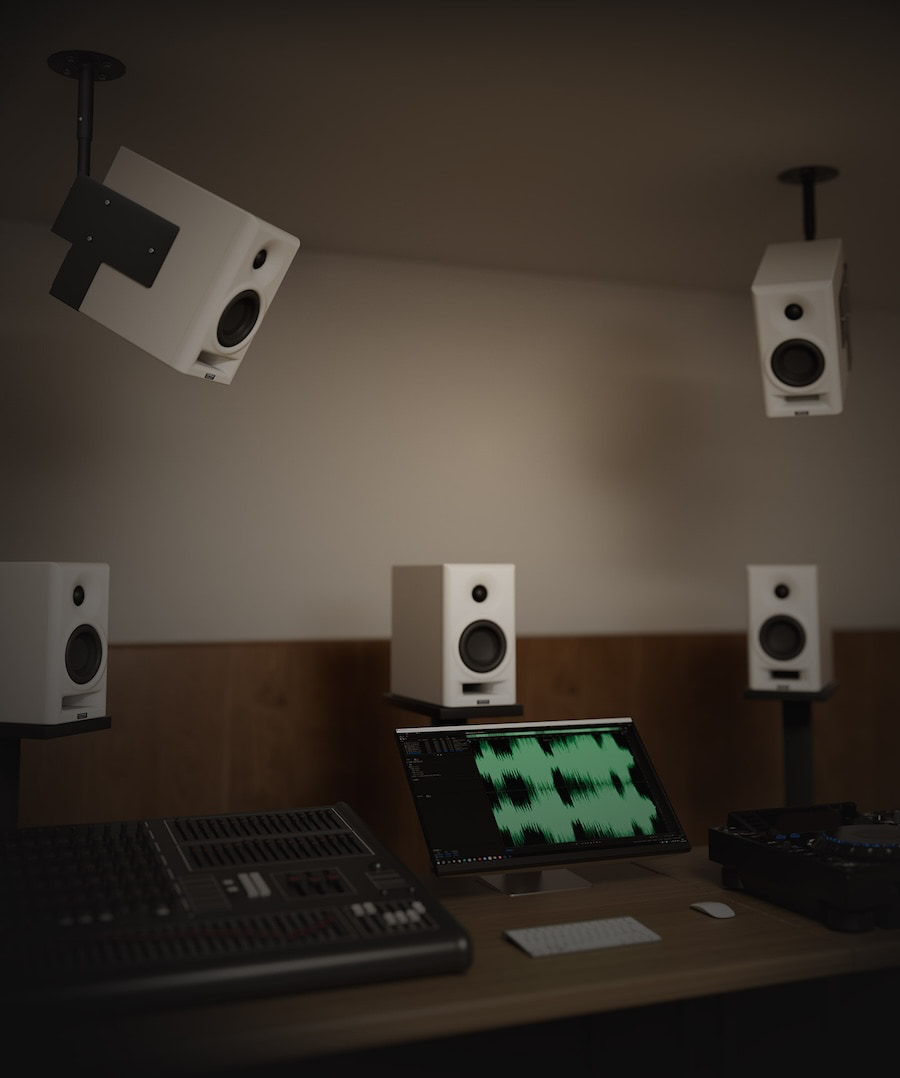
TOPPING has built its reputation on measurement-driven DACs, headphone amplifiers, and desktop audio gear that usually arrive with spec numbers strong enough to make the ASR crowd reach for a sedative before moving on to the next component they may or may not actually listen to. Now the company is moving that philosophy into active speakers with the TOPPING MA4, a compact two-way active studio monitor aimed at desktop listeners, creators, and small-room setups.
TOPPING launched the MA4 Active Studio Monitor globally on July 14, 2026. The company’s professional-audio site now lists the MA4 as an active studio monitor, with the product page and user manual available through TOPPING Professional for anyone in need of some late-night reading.
The timing was also useful. CanJam London 2026 took place July 18-19 at Park Plaza Westminster Bridge, with eCoustics’ London-based Headphone Columnist and Reviewer James Fiorucci covering the show throughout the weekend. TOPPING is usually part of the desktop and headphone conversation, and while the MA4 is not a headphone product, it shows the company trying to extend its measurement-first identity into the powered-speaker market.
Related Reviews:
Topping MA4 studio monitors
What Is the TOPPING MA4?
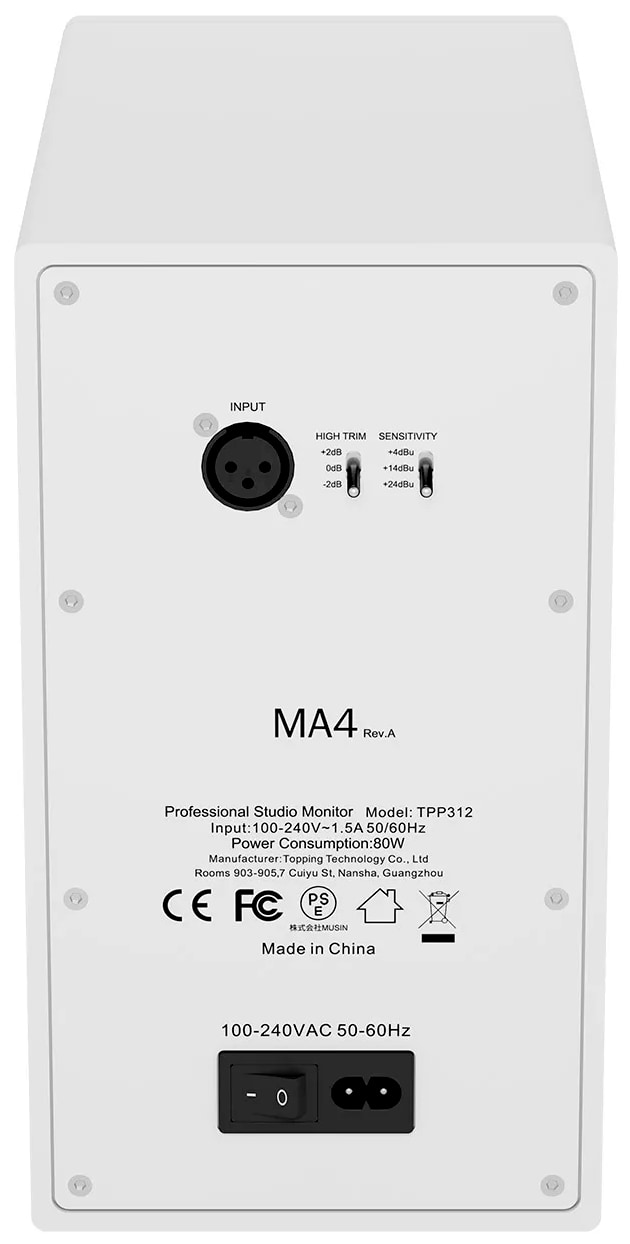
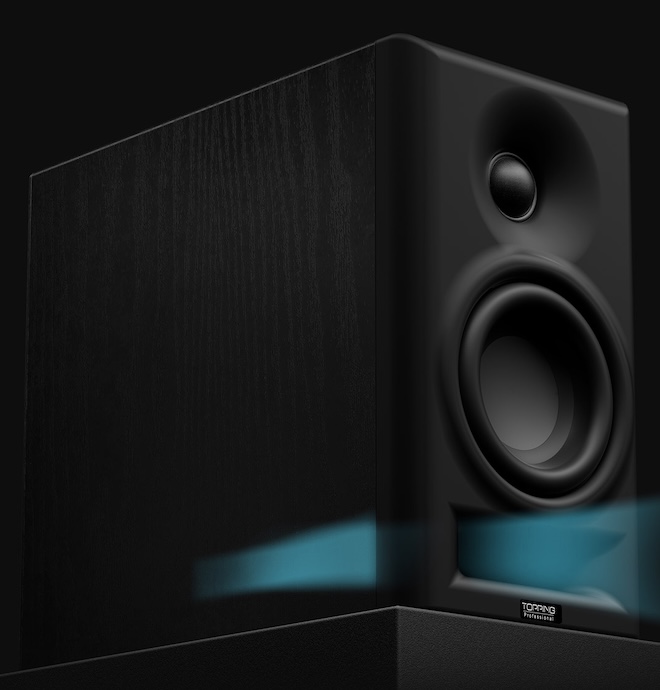
The MA4 is a compact, two-way active monitor sold as a stereo pair. Each speaker uses a 4-inch woofer and 1-inch tweeter, with Class D bi-amplification rated at 50 watts plus 25 watts RMS. The claimed frequency response is 49Hz to 20kHz ±3dB, with a maximum SPL of 105dB at 1 meter.
The design is refreshingly direct. The MA4 uses an analog crossover, a front-firing bass reflex port, and TOPPING’s Opti-Wave waveguide for tweeter directivity control. The design architecture avoids digital processing, which makes the MA4 different from many modern desktop monitors that lean on DSP, app control, USB input, Bluetooth, and room compensation to broaden their appeal.
Advertisement
That choice cuts both ways. A simpler analog signal path may appeal to users who want a straightforward balanced monitor connected to an audio interface or DAC. But it also means the MA4 looks more traditional than some of its desktop rivals. No USB-C. No Bluetooth. No app. No HDMI. No “please download our software before the speaker agrees to play a hi-hat.” Depending on the buyer, that is either a relief or a limitation.
Connectivity Is the Big Caveat
The MA4’s connectivity is narrow: one XLR input. That makes sense for studio and interface-based setups, but it is less flexible for general desktop audio users who may want RCA, TRS, USB-C, Bluetooth, optical, or a front-panel headphone jack.
That also matters because the competition has become much more versatile. Kali Audio’s LP-UNF, for example, includes USB-C, Bluetooth 5.1, RCA, and TRS inputs, while ADAM Audio’s D3V offers USB-C and balanced TRS inputs. Yamaha’s HS3/HS4 compact monitors include combo XLR/TRS, RCA, and stereo mini inputs.
TOPPING appears to be betting that a focused monitor with controlled directivity, balanced input, and measured acoustic behavior will appeal to users who already have the front end sorted. That is a reasonable audience, but it is not the same audience shopping for a plug-and-play powered speaker that can jump between a laptop, phone, turntable, TV, and game console before lunch.
The Competition
The MA4 lands in a crowded category. The most obvious competitors include the Edifier MR5, Edifier MR4, Kali Audio LP-UNF, ADAM Audio D3V, Yamaha HS4, and JBL 305P MkII.
Advertisement
The Edifier comparison is especially relevant for our readers. The Edifier MR5 impressed us because it delivered near-neutral accuracy, deeper bass, LDAC support, and a three-way active design for $350. The older Edifier MR4 remains one of the better entry-level powered monitor options for listeners who want clean, inexpensive desktop sound.
Advertisement. Scroll to continue reading.
Against those models, the MA4’s strengths appear to be its controlled acoustic design, XLR input, analog crossover, and claimed SPL for its size. Its weakness is obvious: fewer inputs and no modern wireless or digital convenience features. In 2026, that is either admirable focus or a self-inflicted handicap, depending on the desk it lands on.
Why TOPPING Matters Here
TOPPING is not some random speaker brand appearing out of the fog with a white cabinet and a dream. We have covered TOPPING’s desktop electronics for years, including the DX1 II, A90, D30Pro/A30Pro, and D90LE. The recent DX1 II review found that TOPPING is still pushing aggressive value in compact desktop audio, with a $119 DAC/headphone amp offering balanced headphone output, PEQ, optical I/O, headset support, and console compatibility.
Advertisement
That history is why the MA4 is worth attention. TOPPING has spent years selling the idea that clean engineering and strong measurements should not require luxury pricing. Moving into active monitors is a logical step, but loudspeakers are a different kind of problem. A DAC can measure beautifully on a bench. A speaker has to deal with drivers, cabinets, ports, directivity, distortion, placement, reflections, and the charming reality that most desks are acoustic crime scenes with a keyboard in the middle and a plethora of poor food and beverage choices.
The Bottom Line
The TOPPING MA4 is an interesting move from a brand best known for desktop DACs, headphone amplifiers, and measurement-first electronics. Its compact two-way design, Class D bi-amplification, analog crossover, front-firing port, Opti-Wave waveguide, and claimed 105dB output suggest TOPPING is taking the active monitor category seriously.
The questions are just as important. Will the MA4’s acoustic performance be strong enough to overcome its limited connectivity? Will U.S. pricing make sense against Edifier, Kali, Yamaha, ADAM, and JBL? And will TOPPING’s engineering reputation translate from electronics into loudspeakers, where the room and placement get a vote whether anyone invited them or not?
The MA4 is not the most feature-packed desktop speaker of 2026. That may be the point. TOPPING appears to be aiming at users who want a compact, balanced-input monitor built around acoustic fundamentals rather than app-based convenience.
For many enterprises, virtualization has become so foundational that its strategic importance is easy to overlook.
Hypervisors, management tools, and the surrounding infrastructure stack quietly support the systems that run finance, operations, customer engagement, supply chain and other business-critical processes.
When that layer changes, the impact is rarely confined to IT.
Advertisement
Latest Videos FromTechRadar
It can affect cost, resilience, agility and the organization’s ability to set its own technology roadmap.
Eric Helmer
SVP and chief technology officer at Rimini Street.
That is why the latest shift in the VMware ecosystem deserves close attention from technology leaders.
With vSphere 7 reaching the end of general support and newer platform models emphasizing bundled, subscription-based private cloud architectures, many organizations are being pushed into a compressed decision cycle.
Advertisement
The question is no longer simply which version to upgrade to. It is whether a vendor-driven platform shift aligns with the business, operating and financial outcomes the organization is trying to achieve.
Sign up to the TechRadar Pro newsletter to get all the top news, opinion, features and guidance your business needs to succeed!
That distinction matters. A version upgrade is a technical project, but a virtualization strategy is a business decision.
And business decisions should be guided by requirements, value and timing, not simply by changes in a vendor’s roadmap.
Advertisement
Don’t confuse urgency with strategy
Support deadlines have a way of focusing attention. They also have a way of narrowing choices. When a critical platform approaches the end of vendor support, the instinct is often to move quickly toward the recommended next step. In some cases, that may be the right decision. In others, it can lead to organizations into unnecessary cost, disruption and loss of flexibility before they have fully evaluated the alternatives.
The risk for IT leaders is treating the vendor product roadmap as if it were automatically the enterprise roadmap. The two may align, but that alignment should be proven, not presumed. A vendor’s timeline is not, in itself, a business case for broad infrastructure change.
Advertisement
A vendor’s priorities are shaped by product strategy, recurring revenue, portfolio simplification and platform consolidation. An enterprise’s priorities are shaped by uptime, security, cost control, application performance, operational continuity and business agility. Those priorities can overlap, but they are not identical and treating them as interchangeable can result in decisions that solve for the vendor’s direction more than the customer’s needs.
This is where CIOs and infrastructure leaders need to step back and ask a more fundamental question: what business outcome are we trying to achieve, and does this change materially advance it?
If the answer is improved resilience, better automation, simplified management, stronger security or a more cloud-like operating model, then modernization may be justified. But, if the answer is simply maintaining continuity or preserving support status, organizations should examine the full range of viable paths before committing to a major platform shift. The right response is not always the most disruptive one.
Advertisement
The cost question is bigger than licensing
Pricing changes often capture the most attention, but the true cost of an infrastructure change extends well beyond the license or subscription line item. In many cases, the larger costs are organizational: the time, risk and disruption that accompany a broad platform transition.
Virtualization platforms sit at the center of complex environments. A major change can trigger downstream work across storage, networking, backup, monitoring, disaster recovery, security tooling, compliance processes and application dependencies. Even when the technical migration appears manageable, the operational validation can be extensive, and the burden on teams can be significant.
Organizations should consider the full cost of change, including staff time, retraining, integration testing, potential downtime, consulting support and hardware implications. Just as important is the opportunity cost. Every major platform transition consumes budget, leadership attention and skilled talent that could otherwise be directed toward security improvements, automation, AI initiatives, customer-facing innovation or other strategic priorities. A more bundled platform may simplify some parts of the stack, but it can also introduce new commercial and architectural constraints.
This is particularly important for enterprises running stable, heavily integrated environments. Many virtualization estates have been tuned over the years to support specific workloads, service levels and operational requirements. Stability is not a weakness to be corrected by default; in many cases it is a business asset. Replacing or restructuring that environment should be justified by measurable business value, not just by pressure to conform to a new delivery model.
Advertisement
The three choices: migrate, modernize or maximize
Most organizations facing a virtualization decision have three broad options, and the right answer may differ by workload, business priority and time horizon.
The first is to migrate. This could mean moving to the vendor’s latest platform, shifting workloads to a hyperscale cloud provider, adopting an alternative hypervisor or pursuing a hybrid architecture. Migration may be the right choice when the current environment no longer supports business needs, when hardware refresh cycles align with broader transformation goals, or when the organization has a clear cloud operating model, budget and execution plan for the next state. But migration should be a deliberate strategic move, not a reflexive response to a platform event.
The second is to modernize in place. This approach keeps the core environment intact while improving the capabilities around it. That may include stronger automation, better observability, improved security controls, more resilient backup and recovery, tighter cost management or more intelligent workload placement.
Advertisement
For many enterprises, modernization does not require a wholesale migration. It requires identifying the gaps that matter most and addressing them with targeted investments. Modernization and migration are not the same thing, and organizations should be careful not to treat them as if they are.
The third is to maximize the existing environment. This option is often overlooked because it sounds less transformational, but it can be the most rational business decision when a platform is stable, secure, performant and well understood. Extending the value of an environment that continues to meet requirements is not inertia; it is intentional lifecycle management. If the platform remains fit for purpose, the better decision may be to maintain it effectively while redirecting budget and talent toward higher-value initiatives.
The right answer may include elements of all three. Some workloads may be ready for cloud migration. Some may benefit from in-place modernization. Others may be best left alone because they are stable, cost-effective and do not justify major reinvestment. The goal should not be uniformity for its own sake, but alignment between each workload and the business value it is expected to deliver.
Advertisement
Start with business requirements
Before committing to any virtualization path, CIOs should bring the conversation back to business requirements. What systems does the platform support? What uptime is required? Which workloads are growing, and which are stable or declining?
What regulatory or compliance obligations must be met? Where does the business need more agility, and where is predictability more important than change? Those are the questions that should shape the roadmap.
From there, organizations can conduct a practical assessment:
1. Which systems truly need to change now for security, compliance, performance or support reasons?
Advertisement
2. Which workloads can remain in place with the right resilience, security and operational controls?
3. Which applications are real candidates for cloud migration, and which are not?
4. Where would this decision increase lock-in or weaken negotiating leverage?
5. Which investments will deliver measurable business value over the next three to five years?
Advertisement
6. What strategic initiatives will be delayed if budgets and talent are redirected to this transition?
This kind of analysis helps technology leaders avoid making decisions based on urgency, assumption or vendor pressure. It also gives CFOs, boards and operating leaders a clearer view of the trade-offs, including where change is necessary, where it is optional and where it may create more disruption than value.
Control the roadmap before the roadmap controls you
The vSphere 9 era is part of a broader shift in enterprise technology: vendors are consolidating platforms, simplifying portfolios and steering customers toward subscription-based operating models.
Advertisement
That approach can offer advantages, including more integrated tooling, simplified procurement and a more standardized operating model. But it can also come with trade-offs, including higher costs, reduced flexibility and greater dependency on a single vendor’s pace and direction of innovation.
Virtualization remains too important to be managed as a reactive upgrade cycle. It underpins mission-critical operations and increasingly shapes hybrid cloud strategy, resilience planning and long-term infrastructure economics. Enterprises should treat it with the same strategic discipline they would apply to any other decision that affects business continuity, cost structure and future flexibility.
As infrastructure models evolve, the message for CIOs is simple: don’t let a support deadline become your strategy. Use it as the moment to define one based on business requirements, financial reality and the level of change the organization needs.
This article was produced as part of TechRadar Pro Perspectives, our channel to feature the best and brightest minds in the technology industry today.
The views expressed here are those of the author and are not necessarily those of TechRadarPro or Future plc. If you are interested in contributing find out more here: https://www.techradar.com/pro/perspectives-how-to-submit































































You must be logged in to post a comment Login