Connect with us
DAPA Banner
DAPA Coin
DAPA
COIN PAYMENT ASSET
PRIVACY · BLOCKDAG · HOMOMORPHIC ENCRYPTION · RUST
ElGamal Encrypted MINE DAPA
🚫 GENESIS SOLD OUT
DAPAPAY COMING

Tech

The three disciplines separating AI agent demos from real-world deployment

Published

on

Getting AI agents to perform reliably in production — not just in demos — is turning out to be harder than enterprises anticipated. Fragmented data, unclear workflows, and runaway escalation rates are slowing deployments across industries.

“The technology itself often works well in demonstrations,” said Sanchit Vir Gogia, chief analyst with Greyhound Research. “The challenge begins when it is asked to operate inside the complexity of a real organization.” 

Burley Kawasaki, who oversees agent deployment at Creatio, and team have developed a methodology built around three disciplines: data virtualization to work around data lake delays; agent dashboards and KPIs as a management layer; and tightly bounded use-case loops to drive toward high autonomy.

In simpler use cases, Kawasaki says these practices have enabled agents to handle up to 80-90% of tasks on their own. With further tuning, he estimates they could support autonomous resolution in at least half of use cases, even in more complex deployments.

Advertisement

“People have been experimenting a lot with proof of concepts, they’ve been putting a lot of tests out there,” Kawasaki told VentureBeat. “But now in 2026, we’re starting to focus on mission-critical workflows that drive either operational efficiencies or additional revenue.”

Why agents keep failing in production

Enterprises are eager to adopt agentic AI in some form or another — often because they’re afraid to be left out, even before they even identify real-world tangible use cases — but run into significant bottlenecks around data architecture, integration, monitoring, security, and workflow design. 

The first obstacle almost always has to do with data, Gogia said. Enterprise information rarely exists in a neat or unified form; it is spread across SaaS platforms, apps, internal databases, and other data stores. Some are structured, some are not. 

But even when enterprises overcome the data retrieval problem, integration is a big challenge. Agents rely on APIs and automation hooks to interact with applications, but many enterprise systems were designed long before this kind of autonomous interaction was a reality, Gogia pointed out. 

Advertisement

This can result in incomplete or inconsistent APIs, and systems can respond unpredictably when accessed programmatically. Organizations also run into snags when they attempt to automate processes that were never formally defined, Gogia said. 

“Many business workflows depend on tacit knowledge,” he said. That is, employees know how to resolve exceptions they’ve seen before without explicit instructions — but, those missing rules and instructions become startlingly obvious when workflows are translated into automation logic.

The tuning loop

Creatio deploys agents in a “bounded scope with clear guardrails,” followed by an “explicit” tuning and validation phase, Kawasaki explained. Teams review initial outcomes, adjust as needed, then re-test until they’ve reached an acceptable level of accuracy. 

That loop typically follows this pattern: 

Advertisement
  • Design-time tuning (before go-live): Performance is improved through prompt engineering, context wrapping, role definitions, workflow design, and grounding in data and documents. 

  • Human-in-the-loop correction (during execution): Devs approve, edit, or resolve exceptions. In instances where humans have to intervene the most (escalation or approval), users establish stronger rules, provide more context, and update workflow steps; or, they’ll narrow tool access. 

  • Ongoing optimization (after go-live): Devs continue to monitor exception rates and outcomes, then tune repeatedly as needed, helping to improve accuracy and autonomy over time. 

Kawasaki’s team applies retrieval-augmented generation to ground agents in enterprise knowledge bases, CRM data, and other proprietary sources. 

Once agents are deployed in the wild, they are monitored with a dashboard providing performance analytics, conversion insights, and auditability. Essentially, agents are treated like digital workers. They have their own management layer with dashboards and KPIs.

For instance, an onboarding agent will be incorporated as a standard dashboard interface providing agent monitoring and telemetry. This is part of the platform layer — orchestration, governance, security, workflow execution, monitoring, and UI embedding —  that sits “above the LLM,” Kawasaki said.

Users see a dashboard of agents in use and each of their processes, workflows, and executed results. They can “drill down” into an individual record (like a referral or renewal) that shows a step-by-step execution log and related communications to support traceability, debugging, and agent tweaking. The most common adjustments involve logic and incentives, business rules, prompt context, and tool access, Kawasaki said. 

Advertisement

The biggest issues that come up post-deployment: 

  • Exception handling volume can be high: Early spikes in edge cases often occur until guardrails and workflows are tuned. 

  • Data quality and completeness: Missing or inconsistent fields and documents can cause escalations; teams can identify which data to prioritize for grounding and which checks to automate.

  • Auditability and trust: Regulated customers, particularly, require clear logs, approvals, role-based access control (RBAC), and audit trails.

“We always explain that you have to allocate time to train agents,” Creatio’s CEO Katherine Kostereva told VentureBeat. “It doesn’t happen immediately when you switch on the agent, it needs time to understand fully, then the number of mistakes will decrease.” 

“Data readiness” doesn’t always require an overhaul

When looking to deploy agents, “Is my data ready?,” is a common early question. Enterprises know data access is important, but can be turned off by a massive data consolidation project. 

But virtual connections can allow agents access to underlying systems and get around typical data lake/lakehouse/warehouse delays. Kawasaki’s team built a platform that integrates with data, and is now working on an approach that will pull data into a virtual object, process it, and use it like a standard object for UIs and workflows. This way, they don’t have to “persist or duplicate” large volumes of data in their database. 

Advertisement

This technique can be helpful in areas like banking, where transaction volumes are simply too large to copy into CRM, but are “still valuable for AI analysis and triggers,” Kawasaki said.

Once integrations and virtual objects are established, teams can evaluate data completeness, consistency, and availability, and identify low-friction starting points (like document-heavy or unstructured workflows). 

Kawasaki emphasized the importance of “really using the data in the underlying systems, which tends to actually be the cleanest or the source of truth anyway.” 

Matching agents to the work

The best fit for autonomous (or near-autonomous) agents are high-volume workflows with “clear structure and controllable risk,” Kawasaki said. For instance, document intake and validation in onboarding or loan preparation, or standardized outreach like renewals and referrals.

Advertisement

“Especially when you can link them to very specific processes inside an industry — that’s where you can really measure and deliver hard ROI,” he said. 

For instance, financial institutions are often siloed by nature. Commercial lending teams perform in their own environment, wealth management in another. But an autonomous agent can look across departments and separate data stores to identify, for instance, commercial customers who might be good candidates for wealth management or advisory services.

“You think it would be an obvious opportunity, but no one is looking across all the silos,” Kawasaki said. Some banks that have applied agents to this very scenario have seen “benefits of millions of dollars of incremental revenue,” he claimed, without naming specific institutions. 

However, in other cases — particularly in regulated industries — longer-context agents are not only preferable, but necessary. For instance, in multi-step tasks like gathering evidence across systems, summarizing, comparing, drafting communications, and producing auditable rationales.

Advertisement

“The agent isn’t giving you a response immediately,” Kawasaki said. “It may take hours, days, to complete full end-to-end tasks.” 

This requires orchestrated agentic execution rather than a “single giant prompt,” he said. This approach breaks work down into deterministic steps to be performed by sub-agents. Memory and context management can be maintained across various steps and time intervals. Grounding with RAG can help keep outputs tied to approved sources, and users have the ability to dictate expansion to file shares and other document repositories.

This model typically doesn’t require custom retraining or a new foundation model. Whatever model enterprises use (GPT, Claude, Gemini), performance improves through prompts, role definitions, controlled tools, workflows, and data grounding, Kawasaki said. 

The feedback loop puts “extra emphasis” on intermediate checkpoints, he said. Humans review intermediate artifacts (such as summaries, extracted facts, or draft recommendations) and correct errors. Those can then be converted into better rules and retrieval sources, narrower tool scopes, and improved templates. 

Advertisement

“What is important for this style of autonomous agent, is you mix the best of both worlds: The dynamic reasoning of AI, with the control and power of true orchestration,” Kawasaki said.

Ultimately, agents require coordinated changes across enterprise architecture, new orchestration frameworks, and explicit access controls, Gogia said. Agents must be assigned identities to restrict their privileges and keep them within bounds. Observability is critical; monitoring tools can record task completion rates, escalation events, system interactions, and error patterns. This kind of evaluation must be a permanent practice, and agents should be tested to see how they react when encountering new scenarios and unusual inputs. 

“The moment an AI system can take action, enterprises have to answer several questions that rarely appear during copilot deployments,” Gogia said. Such as: What systems is the agent allowed to access? What types of actions can it perform without approval? Which activities must always require a human decision? How will every action be recorded and reviewed?

“Those [enterprises] that underestimate the challenge often find themselves stuck in demonstrations that look impressive but cannot survive real operational complexity,” Gogia said. 

Advertisement

Source link

Continue Reading
Click to comment

You must be logged in to post a comment Login

Leave a Reply

Tech

M5 Max 16-inch MacBook Pro vs Samsung Galaxy Book6 Ultra: Compared

Published

on

Samsung’s Galaxy Book6 Ultra is the latest attempt to take the thin-and-light workstation crown away from Apple’s MacBook Pro. There is a clear winner.

Two open laptops side by side on a blue-green gradient background, left showing a dark abstract maze pattern, right displaying a bright multicolored swirl wallpaper.
M5 Max 16-inch MacBook Pro [left], Samsung Galaxy Book6 Ultra [right]

The premium notebook market is highly competitive, and Apple has been a big part of that particular industry for decades. The MacBook Pro is synonymous with the concept, being an aluminum-clad slab of portable computing for power users on the go.
Many have tried to emulate Apple’s aesthetic, and with some success, too. Even rival companies like Samsung have gone down a similar route with their premium notebooks.
Continue Reading on AppleInsider | Discuss on our Forums

Source link

Continue Reading

Tech

Amazon workers are apparently ‘tokenmaxxing’ AI platforms to hit arbitrary usage targets

Published

on


  • Amazon wants 80% of its developers to be using AI every single week
  • The company is even tracking AI token usage via internal leaderboards
  • Unwilling workers are using AI where it’s not necessary just to inflate figures

Some Amazon employees are reportedly using the company’s internal agentic AI platform, MeshClaw, to automate unnecessary or trivial parts of their work simply to boost internal AI usage metrics.

This comes as company workers are being pressured from above to use more AI – Amazon wants four in five of its developers to be using the tech weekly, and has since started tracking AI token consumption on internal leaderboards.

Source link

Advertisement
Continue Reading

Tech

5 Of The Cheapest Amazon Alexa Devices You Can Buy In 2026

Published

on


We may receive a commission on purchases made from links.

Folks looking to upgrade their day-to-day lives with smart technology have no particular shortage of options, with most of the major tech companies offering devices to manage almost any scenario you can fathom. But in the smart assistant game, it really comes down to a few major players in Apple’s Siri, Google’s Gemini (and its former iteration, Google Assistant), and, of course, Amazon’s very own Alexa.

Those AI assistants no doubt play a big role in the lives of most folks in the modern world. However, Alexa may own a slight advantage over the competition when it comes to hardware due solely to its ties to Amazon, which happens to be the largest e-commerce outlet in existence by a pretty wide margin. To that end, most of the major manufacturers of tech now make devices that are compatible with Alexa.

Advertisement

Amazon, naturally, also makes an entire line of smart devices that are Alexa enabled and ready to make your life a little easier whether you’re at home or out and about for the day. For this particular list, we’re focusing on that set of smart devices. Similarly, we are keeping to options which can be purchased directly through Amazon, as it sometimes must make sense to buy directly from the source. In any case, if you are looking for Alexa ready devices for your home and beyond, here’s a look at a few of the cheapest you can currently buy through Amazon. 

Advertisement

Smart Display: Echo Show 5 – $89.99

Many of Amazon’s Alexa enabled devices are, of course, designed to provide some level of service to users by allowing them to control compatible devices through a single digital point of origin. Some of those devices are, however, are also geared towards providing users with entertainment options, and one of the more popular Alexa devices in that list is the SlashGear-approved Amazon Echo Show 5.

If you’re interested in the entertainment enabled device to your Alexa array, you can add an Echo Show 5 for a typical retail price of $89.99. It should be noted that the sticker price may be even lower on occasions when Amazon is running a sale. For that price, you get an Alexa device that is equipped with a 5.5-inch screen that can indeed be used to stream news programs and your favorite shows from Amazon and any number of streamers. The device can also be used to stream music from your favorite artists, with Amazon claiming dramatic upgrades in the audio setup over previous generations.

On top of that, you can connect the device to doorbell cameras like those from Ring, which is, of course, owned by Amazon. The Echo Show 5 can also be used for video calls if you like, and even possesses some smart home hub capabilities that can help you control smart lights, smart thermostats and your home security system. It can also serve as a digital frame for your favorite photographs.

Advertisement

Smart Speaker: Echo Pop – $39.99

If you don’t need an Alexa device equipped with all that video capability, and just want a little something that can help you kick out the jams in your kitchen, office or bedroom, Amazon’s Echo Pop may be just the stripped back speaker you need. It is also one of the cheaper Alexa enabled devices that Amazon makes, with the online retailer selling it for just $39.99 these days.

Don’t let the term “stripped back” put you off of this little speaker, as it is as well-designed and developed as any of Amazon’s Alexa devices. Though it may be small in stature, it’s also built to provide some solid punch on the audio front, with Amazon claiming it’ll easily fill any average sized room with big sound. It’ll do so directly through Alexa or through a mobile device connected via Bluetooth if you prefer to blast a playlist from your favorite streamer.

Advertisement

Its Alexa capabilities also extend to the control of certain smart devices like lights and plugs via voice commands. Like many other Alexa devices, the Echo Pop can also answer any number of questions, and is fitted with the now common light bar that lets you know when the AI assistant is engaged and when it’s not. According to Amazon, the device is pretty eco-friendly too, with its fabric covering made of 100% post consumer recycled yarn, and its casing being manufactured from 80% recycled aluminum. For the record, it’s also equipped to run the new Alexa+ program.

Advertisement

Smart Car Companion: Echo Auto – $54.99

Amazon does make a few devices that allow you to take Alexa with you. Its Echo Buds wireless earbuds would likely have been the accessory listed here if they hadn’t been listed as “currently unavailable” through Amazon for some time now. Even as some might think Alexa shouldn’t have a place in a moving car, the Echo Auto accessory is designed to put the AI assistant there for any vehicle owner who does.

No, the Echo Auto does not put Alexa at the wheel of our vehicle. Rather, this device is designed to provide more hands-free functionality to drivers on the road. The microphone equipped device — it’s actually got 5-mics built in to ensure you are heard over in-cabin noise – is designed to mount anywhere in your vehicle, and is powered/connected to it via USB connection. Once it’s up and running, you’ve basically got a mobile Alexa device that can perform many of the same functions as the one in your living room, and will do so by way of simple voice commands.

That list includes playing music, podcasts or radio broadcasts, sending text messages and making phone calls. You can also connect the device to your Alexa enabled home hub and use it to engage smart locks on your home, turn lights on and off inside, and even adjust the thermostat while away. Echo Auto may seem like overkill to some, but at $54.99, many may be willing to give it a go. 

Advertisement

Smart Alarm Clock: Echo Spot – $79.99

In the context of smart home upgrades, alarm clocks are one place where technology has largely failed us, because, well, even as necessary as they are, they are still just infuriatingly loud and limited in personalization. We’re not here to make any claims that Amazon has fixed the long-running alarm clock conundrum. Nonetheless, the Echo Spot Alarm Clock feels like a solid enough step in the right direction if you’re looking for a new one.

The first version of the Spot was, of course, discontinued a couple of years back. The re-imagined Spot is basically a modified version of the Echo Dot, with Amazon flattening the face of that high-tech orb and replacing it with a flat surface that is half shiny digital display and half speaker. That display is customizable to each user’s needs, but is also designed to prominently feature the time, the date and the temperature. Perhaps more importantly, the device allows users to tailor their wake-up routine to their specific desires, making it easier than ever to rise and shine on your own terms.

Advertisement

Yes, like most Alexa tech, the Echo Spot is also equipped to play music, audiobooks, and podcasts at your request, and provide a myriad of other voice-activated functions. It can also connect to your home hub and aid actions like dimming lights, and can even use motion detection to tweak the thermostat in your home. At $79.99, it’s also a pretty affordable option for such a major alarm clock upgrade.

Advertisement

Smart Home Hub: Echo Hub 8 – $179.99

In the smart home tech market, the home hub is essentially one device to rule them all sort of option. By that standard, “cheap” is sort of a relative term, as the hub offers such a wide range of functionality. Still, there are plenty of budget-friendly smart home hub options on the market, with Amazon’s Alexa enabled Echo Hub 8 — which can be purchased for well under $200 — ranking among them.

For the record, Echo Hub 8 typically sells for $179.99, and yes, the device is indeed compatible with Amazon’s upgraded Alexa+ AI assistant. That means it can be used to run thousands of other compatible devices and seriously streamline your smart home setup. Fronting an 8-inch touch screen, the wall-mountable Echo Hub can be plugged into a standard outlet or hard-wired for a cleaner on-wall look. It’s also easy to set up via the voice command, “Alexa, discover my devices.”

As for what that hub will discover, you can count pretty much any Alexa smart device on that list, as well as a myriad of others, with the easy-to-use Echo Hub able to operate lighting and smart plugs in every room in the house. It can also adjust the thermostat, operate any connected speaker systems, show feeds from doorbell and other security cameras, and provide easy-access control over home security systems. You can even connect it to your smartphone through the Alexa App so you can check the status of all of those smart devices and setting while you’re out. 

Advertisement


Source link

Advertisement
Continue Reading

Tech

Why is Apple backing Android against the EU?

Published

on

The European Union wants Google to allow any AI company to use its services, and the company hates the idea. Apple agrees with Google.

Apple doesn’t seem to be listened to by the European Union when it complains about its own experiences trying to work within the Digital Markets Act (DMA). But since the EU has asked for responses to its proposals for Google to open up to rival AI firms, Apple has tried again.

“The DMs [draft measures] raise urgent and serious concerns,” said Apple in a submission to the EU, as seen by Reuters.

For instance, Apple is expressly concerned about the idea that any AI firm could in theory send emails or order food via Android, without Google’s or perhaps the user’s knowledge.

Advertisement

“If confirmed, they would create profound risks for user privacy, security, and safety as well as device integrity and performance,” continued Apple.

Apple doubtlessly has its own platforms in mind when it is now objecting to rival firms having full access to Android. But it also makes the point that the EU has specified AI firms in its proposals, and Apple points out how poor and error-strewn AI apps are.

“These risks are especially acute in the context of rapidly evolving AI systems whose capabilities, behaviours, and threat vectors remain unpredictable,” said Apple, “as we are now seeing time and again.”

Anyone can submit their opinion to the EU when there is an open call like this, and everyone who does is really looking to protect their own interests. So Apple is clearly concerned that it, too, may be forced to allow the same rival access in iOS.

Advertisement

However, Apple does also have the experience of what it has previously claimed to be “hundreds of thousands of engineering hours” in complying with the DMA. And as part of its new submission, questioned the EU’s technological expertise.

“The EC is redesigning an OS… it is substituting judgments made by Google’s engineers for its own judgment based on less than three months of work,” said Apple. “It is all the more dangerous given the only value that can be discerned from the [draft measures] guiding this work appears to be open and unfettered access.”

Separately, in May 2026, the EU concluded that its DMA has made a positive impact, thereby ignoring Apple’s lobbying for it to be revised.

What happens next

It’s not clear when Apple submitted its filing to the EU, but it was during the consultation period that ran from April 27, 2026, to May 13, 2026.

Advertisement

The European Commission states that it will “carefully assess” submissions from both Google and what it calls interested parties. It does say that there may be adjustments made to the proposed measures because of the submissions.

However, it also mandates that its final decision “must be adopted within six months” of the opening of the specification proceedings. In this case, that means July 27, 2026.

Source link

Advertisement
Continue Reading

Tech

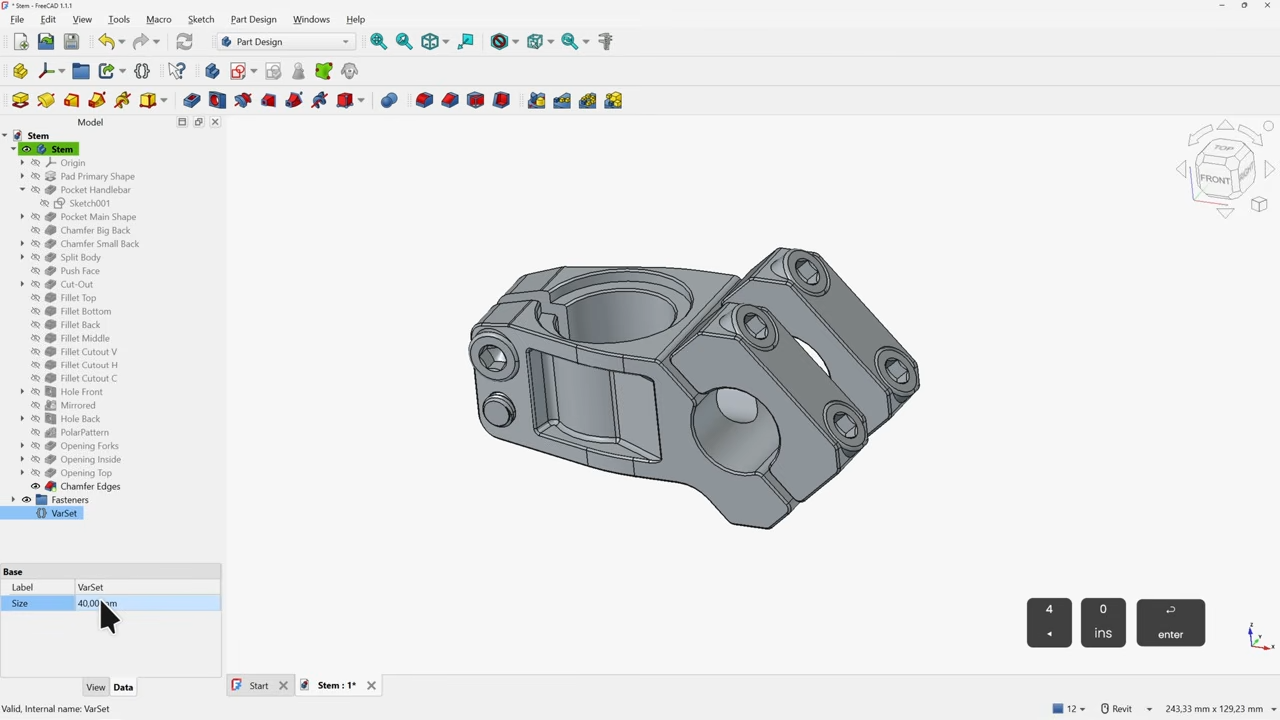
FreeCAD 1.1 Tutorial, For Beginners Who Like Clear Instructions

Published

on

If you’ve been interested in FreeCAD but haven’t known where to start, here’s a wonderful video tutorial for FreeCAD 1.1 by [Deltahedra] aimed squarely at how to model a 3D part from scratch while also following best engineering practices for part design. It focuses on a concise and meaningful workflow that respects your time and doesn’t make assumptions about skill level. It even starts by taking a few moments to explain how to navigate the interface, a courtesy many will appreciate.

FreeCAD can do quite a lot, so a tutorial that focuses on a specific yet broadly-applicable task with a clear context is a great way to narrow the scope into something manageable, and be comprehensive without getting bogged down in minutiae. [Deltahedra] does this by exclusively using the part design workbench, demonstrating what to do to make a part step-by-step, and showing common mistakes that can happen and how to fix them if they occur. Beyond that, it’s left up to the curious hacker to delve for themselves into what else FreeCAD has to offer.

Since 1.1 is (at this writing) the latest stable release, one can also be confident that the tutorial will match the user interface and features one sees on their own screen. After all, it can be frustrating to attempt to follow a tutorial only to find out things are a few versions behind and nothing is where one expects it to be.

Advertisement

Best practices aren’t just fussy rules about how to do things, and [Deltahedra] demonstrates this by showing how certain procedures just plain make more sense when designing shapes. Our own Arya Voronova has also shared best practices for FreeCAD, so check that out for some added perspective. You’ll be wielding FreeCAD in confidence and comfort in no time.

Thanks for the tip, [Vik Olliver]!

Advertisement

Source link

Continue Reading

Tech

Testing Giant Fire Darts From The Mary Rose

Published

on

Fire arrow versus the recreated fire dart. (Credit: Tod's Workshop, YouTube)
Fire arrow versus the recreated fire dart. (Credit: Tod’s Workshop, YouTube)

The Mary Rose was a carrack in the English Tudor Navy of King Henry VIII  that fought in multiple battles during the 16th century before it was sunk in 1545. After its wreck was located in 1971 and raised in 1982 the ship and all the items contained within the partially preserved hull became the focus of intense study. Among these items are the weaponry found, including the canons, but also massive darts that seemed to have been designed for an incendiary payload. Recently [Tod’s Workshop] collaborated with others to test these presumed incendiary darts.

Although fire arrows have been around for a while, seeing what appears to be super-sized versions of these is somewhat unusual, but could make sense in taking out enemy ships of the time. The main questions are how you would even fire them, and how effective they would be. Were the darts thrown by hand from e.g. the crow’s nest, or fired from a canon?

The reproduction darts used are based on the recovered remnants of the original darts, with an incendiary mixture inside a pitch-covered cloth covering. This mixture would be ignited by wooden fuses after a set amount of time, at which point the resulting fire would be basically impossible to put out. Obviously, this also means that if you were to throw one of these darts, it can absolutely not fall onto your own ship.

First tested was throwing the dart by hand, which seems like it would clear the ship. Of course, the three recovered darts were found near a rather special canon that appeared to be both a miscast and angled upwards. Whether that canon was used for launching apparently somewhat experimental darts is hard to say, but it can be tested. Sadly, lacking a full-sized black powder canon a scale model dart was fired using compressed air.

From that scale test it’s clear that at full charge the dart would disintegrate due to the rapid acceleration, but a ‘soft’, or reduced, charge could work against nearby targets. Once the dart lodges itself into the enemy ship’s structure, it would definitely cause severe damage as further tests in the video demonstrate. Having a salvo of these fire darts fired at you from a nearby ship would definitely make for a pretty bad day.

Advertisement

Source link

Advertisement
Continue Reading

Tech

LinkedIn becomes the latest name on a 100,000-job tech layoff list

Published

on

Microsoft’s professional network becomes the latest name on a list that now includes Meta, Amazon, Oracle, and IBM, even as the same companies are guiding $725 billion of AI capital spending this year.


LinkedIn is cutting roughly 5% of its staff, the latest reduction at a Microsoft-owned business and the most recent entry in a year-long Big Tech contraction that has now displaced more than 100,000 workers across the sector.

Chief executive Dan Shapero, who took over from Ryan Roslansky in late April when Roslansky moved into a new AI role inside Microsoft, set out the cuts in a memo to employees, citing the need to operate “more profitably” and to reinvent how the company works with smaller, more agile teams. Bloomberg reported the memo on Wednesday.

LinkedIn employed roughly 17,500 staff at the start of 2026, implying a cut in the region of 900 to 1,000 roles.

Advertisement

The 💜 of EU tech

The latest rumblings from the EU tech scene, a story from our wise ol’ founder Boris, and some questionable AI art. It’s free, every week, in your inbox. Sign up now!

The company has not confirmed an absolute number, but multiple outlets briefed by sources put the figure at about 875 jobs, with engineering, product, marketing, and the Global Business Organization carrying most of the impact.

The bigger number is the one that frames everything else. By 13 May, the global technology sector had announced more than 100,000 layoffs across some 250 separate events, an average of roughly 880 a day, according to industry trackers.

Advertisement

The TrueUp layoffs tracker had logged 286 events affecting 128,270 workers, the highest reading since the 2023 contraction.

The defining feature is the divergence between payroll and capital expenditure. Amazon, Microsoft, Alphabet, and Meta are collectively guiding to roughly $725 billion of capital spending in 2026, almost all of it directed at AI infrastructure, GPUs, and data centres.

That figure is up from $410 billion in 2025, and rising faster than at any point since the cloud build-out of the late 2010s. Headcount, meanwhile, is going the other direction at the same firms.

The biggest single tranche still ahead this week is Meta’s. The company will begin companywide layoffs on 20 May, cutting approximately 8,000 employees, or about 10% of its 78,865-person workforce, with further reductions planned for the second half of 2026.

Advertisement

Microsoft has taken a different shape. Rather than involuntary cuts, the company in April opened a voluntary-separation programme to around 8,750 US employees, roughly 7% of its domestic headcount, structured under a “Rule of 70” formula in which years of service plus age must total at least 70.

It is the first such programme in the company’s 51-year history. Final notifications went out on 7 May, with a 30-day decision window. LinkedIn’s cuts now layer on top of those Microsoft moves.

Amazon has been quieter but is on a larger absolute trajectory. The company confirmed in January that it was cutting 16,000 corporate roles, bringing total reductions since October 2025 to roughly 30,000, the largest workforce contraction in its history.

Chief executive Andy Jassy framed the cuts as a flattening of layers built up during the 2020-2022 hyper-growth phase, not a direct AI substitution.

Advertisement

The smaller players are following the same pattern at a different scale. Oracle has cut roughly 30,000 positions, around 18% of its global workforce. IBM, Salesforce, Cisco, and SAP have all confirmed cuts over the year, and defence-adjacent contractors tied to federal technology procurement have shed several thousand roles since the start of the year.

For LinkedIn, the framing is narrower. Shapero’s memo pointed to slower revenue growth and an organisational flattening rather than an AI substitution, and the cuts are part of a wider Microsoft-group rebalance that began with the April Rule-of-70 programme.

LinkedIn’s revenue still grew 12% year on year in the most recent quarter, which makes the cut a profitability call, not a top-line one.

Whether the AI-substitution reading holds across the rest of the sector will probably be settled by the second-half 2026 round of disclosures, particularly Meta’s.

Advertisement

Until then, the running 2026 total is the only honest summary of the labour story: more than 100,000 jobs out, $725 billion of capex going in, and a widening gap between where the money sits and where the people do.

Source link

Advertisement
Continue Reading

Tech

NAND contract prices surge over 600% since September 2025, DRAM up ~400%

Published

on


You’ve no doubt heard the short version of this story time and again: AI startups are gobbling up all of the memory that manufacturers can produce, leaving traditional electronics firms to fight for the remaining scraps. In all situations, that means heavily inflated prices and for some near the bottom…
Read Entire Article
Source link

Continue Reading

Tech

How Did Apollo Separate? | Hackaday

Published

on

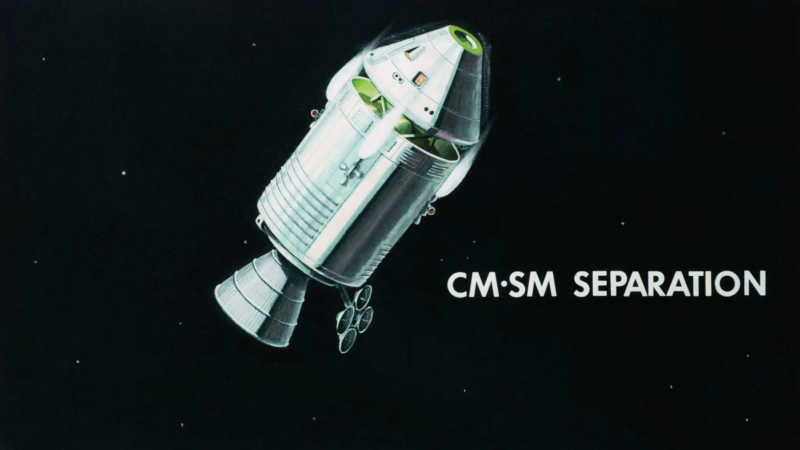
If you’ve watched a Saturn V launch, you’ve probably seen how a large rocket will often jettison a stage on the way up. There are several reasons for this — there is no reason to haul an empty fuel container, for example. However, you can probably imagine how the separation works. You release something — probably explosive bolts — and gravity pulls the old stage away from you as you climb on the next stage’s engines. But what about on the way back? The command module drops the service module before reentry. [Apollo11Space] has a video explaining just how complicated that was to pull off. You can watch it below.

The main problem? The service module has almost everything you need: oxygen, a big engine, fuel, and electrical generation capability. If you’ve ever seen a real command module, they are tiny. Somehow, you need to get the command module prepared to be on its own for the amount of time it takes to land, and get the service module safely away.

In orbit, gravity isn’t a big help in pulling the two pieces apart. For that reason, the mission design called for a very specific orientation for the separation. There are a number of other details you might not have known about.

Advertisement

Landing Apollo 11 successfully depended on some spy tech. We imagine the separation of the LEM had some similar issues, although even the moon’s weak gravity would have helped.

Advertisement

Source link

Continue Reading

Tech

What Will Be Running Inside the New Googlebook Laptops? What We Know So Far

Published

on

Android and ChromeOS are merging into a single operating system that will debut in Google’s new laptop lineup, Googlebooks, announced during this week’s Android Show. With no official name yet, the merged operating system has been going by Aluminum OS, but that will likely change by the time it arrives on machines.

We’ve known for some time that Google’s mobile and cloud-based operating systems would be merging, but several questions still remain. Through a handful of leaks, we have a pretty good idea of what to expect. Here’s what we know.

What do we know about Aluminum OS?

Though it won’t be called Aluminum OS when it officially arrives, Google has remained tight-lipped about the name. And beyond what Google has shown us, we haven’t seen much of the operating system in action.

Advertisement

Previously, a now-private issue ticket gave us our first glimpse of the full Android desktop view. This short video shows two side-by-side windows replicating an issue. Hours before this week’s Android Show, the full setup experience of the OS was leaked in detail. 

The interface looks similar to Android’s existing desktop view, but the video also showed an extensions icon — something entirely new to the Android operating system outside of third-party web browsers.

We can also expect a lot from Aluminum OS in the way of artificial intelligence. Gemini is already at the heart of Google’s Pixel phones, and that’s exactly what we should see with its laptop lineup. 

How is this different from ChromeOS’s Android features?

Given that Chromebooks ship with the Google Play Store out of the box, you might wonder what the big deal is with Aluminum OS, which is fair. Unlike the Play Store on ChromeOS, the base layer of Aluminum is Android, offering native app support combined with a full desktop browsing experience from Chrome. 

Advertisement

In essence, Aluminum OS seems poised to be a more powerful and flexible version of Android. Given the billions of Android devices worldwide, the appeal of this new OS could be substantial. Having both your laptop and phone running the same operating system should create a far more integrated software experience across devices, with Gemini at the center.

Source link

Advertisement
Continue Reading

Trending

Copyright © 2025