Fyne Audio has spent the past few years proving that Scotland can still build serious passive loudspeakers without needing to shout about it from a misty hilltop like Sean Connery holding a claymore. But with the new Cubitt 5, the Glasgow-based brand is stepping into a very different fight: the fast growing active speaker category, where convenience, connectivity, and real hi-fi performance are no longer allowed to live in separate rooms.
Fyne Audio is calling the Cubitt 5 its first active speaker, although that wording may cause some confusion for buyers who see “active,” “wireless,” and “Bluetooth” tossed around like loose cabers at a Highland Games. In traditional hi-fi terms, active speakers usually mean each driver has its own dedicated amplifier channel and a crossover before amplification. Most require a wired connection to a pre-amplifier or sources for optimal performance.
Either way, Fyne is entering a category that has become far more competitive and price sensitive; all of the usual suspects understand the appeal of compact powered speakers that reduce box count, simplify setup, and work in real rooms without requiring a rack full of components. For many buyers, the priorities are clear: easy connection to a TV, turntable, phone, computer, or game console, enough power for a living room or desktop system, and a price that does not turn convenience into a luxury tax.
That is where the Cubitt 5 has to make its case. At $749, it needs to offer more than Bluetooth in a nice cabinet.
Advertisement
Cubitt 5: Fyne Audio’s First Active Speaker Keeps Things Practical
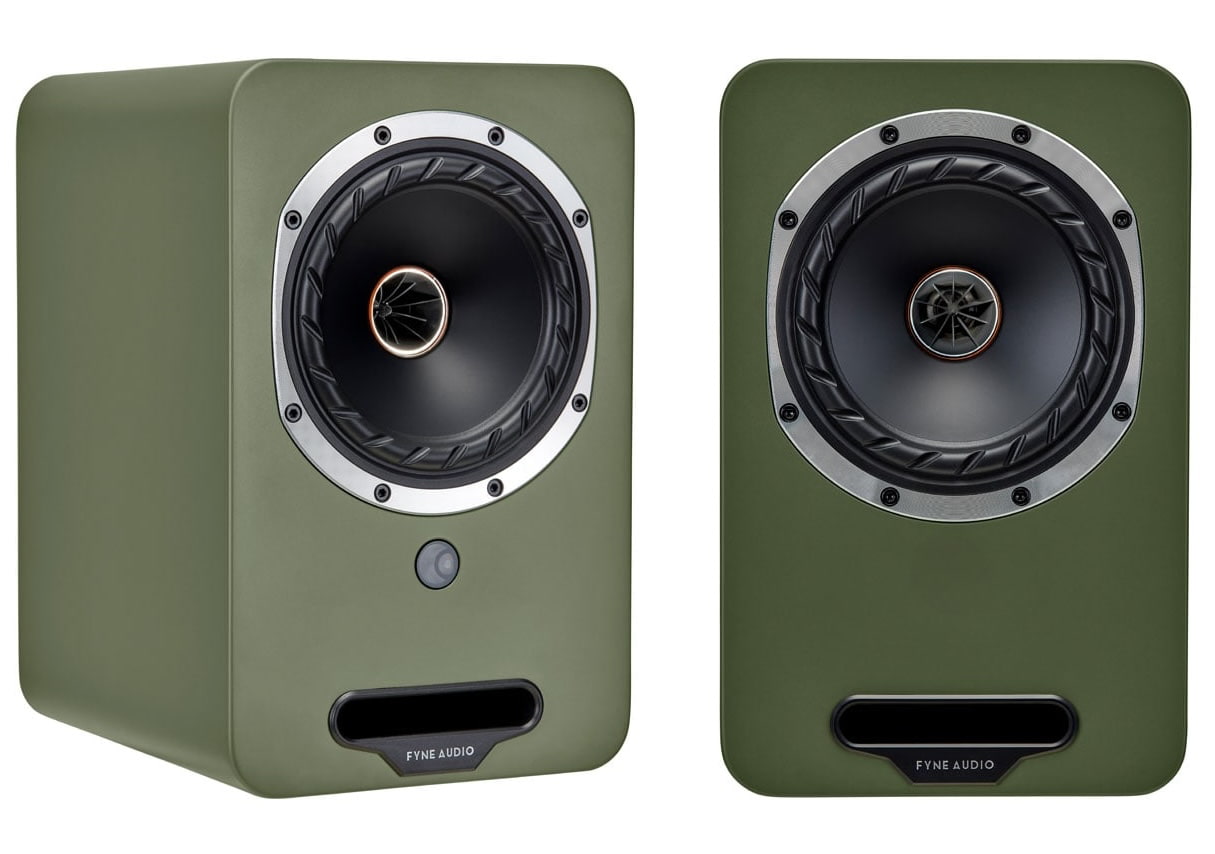
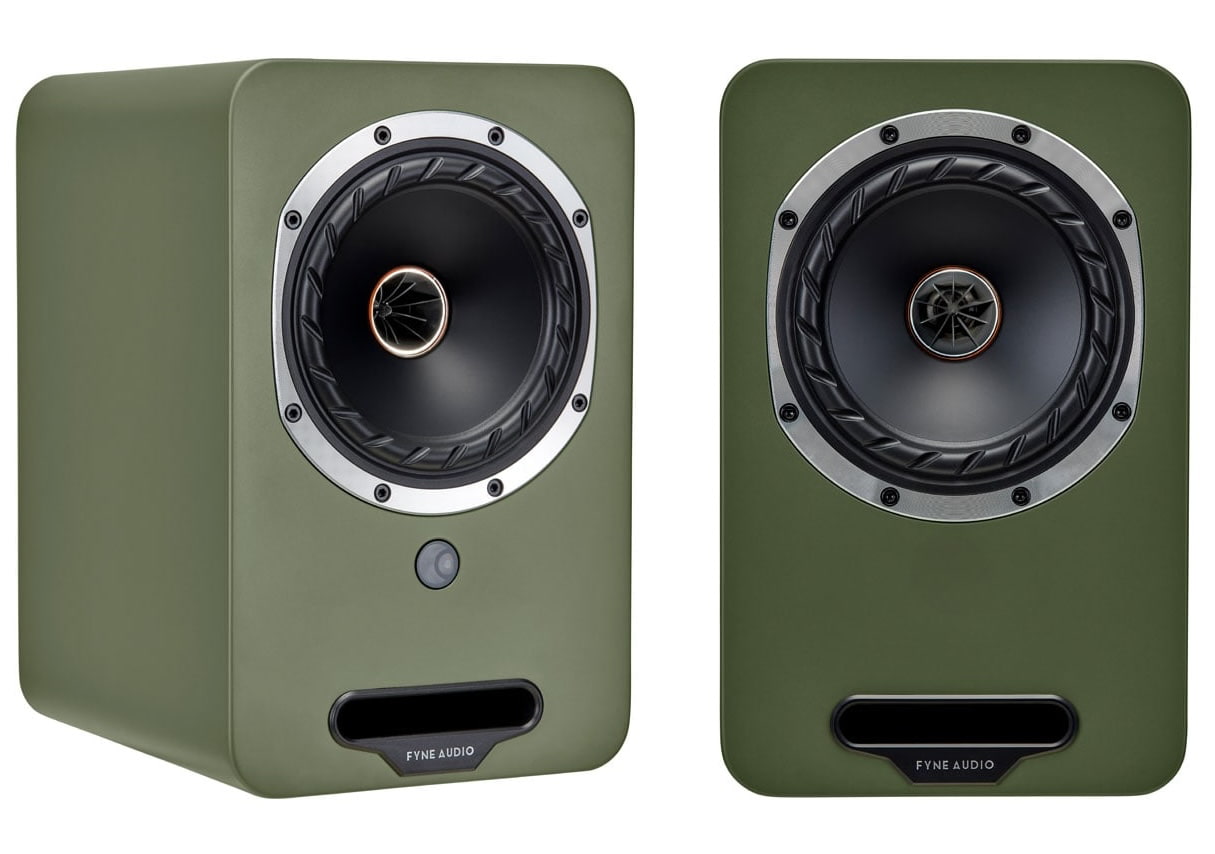
The Cubitt 5 brings Fyne Audio into the active speaker category with a compact system built around the company’s 12.5cm IsoFlare point source driver. The design is intended to improve stereo imaging and coherence, while FyneFlute surround technology is used to reduce unwanted coloration by limiting energy reflected back down the driver cone.
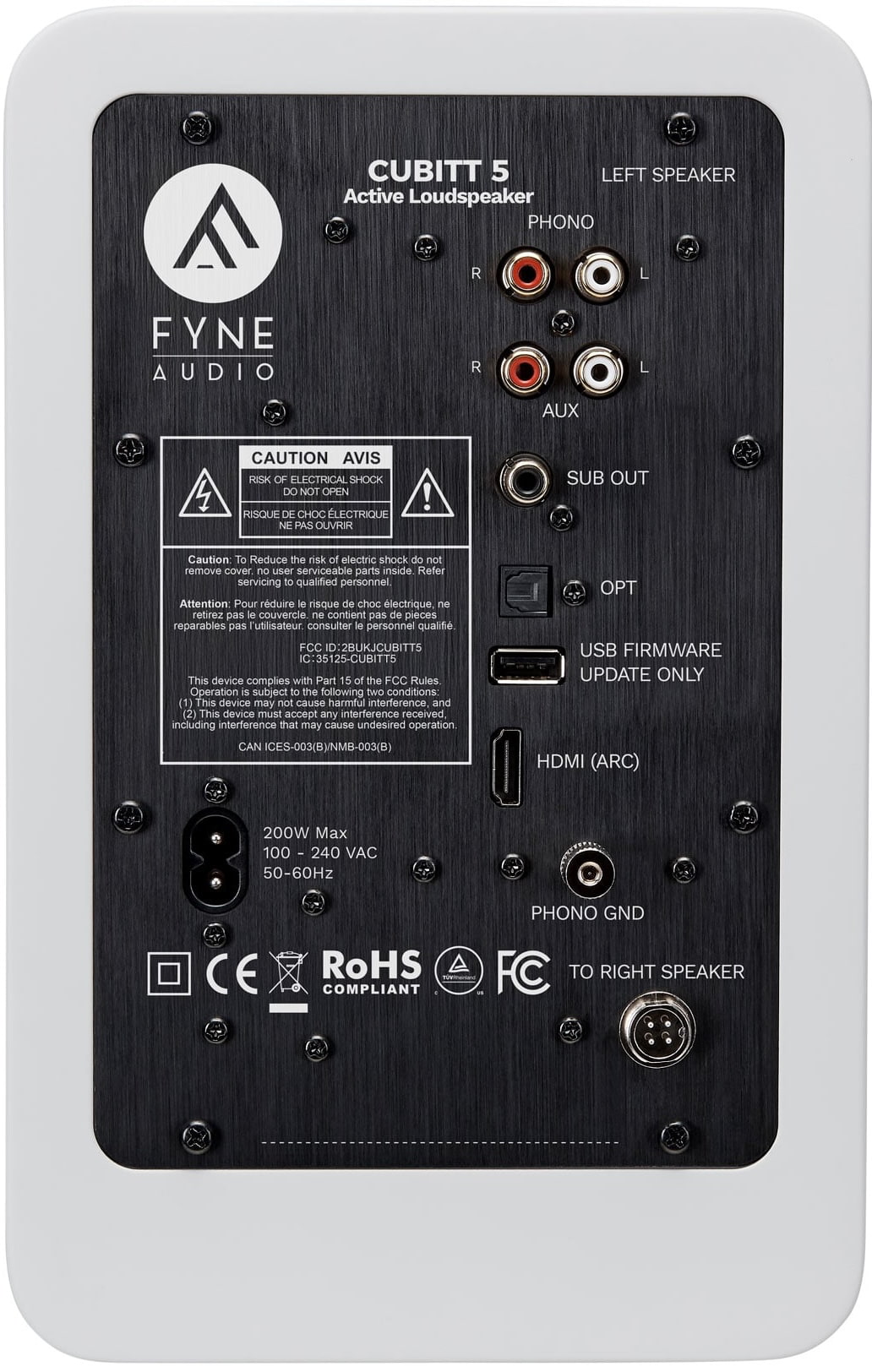
Connectivity is a big part of the appeal. The Cubitt 5 includes Bluetooth 5.0 with aptX HD and AAC, optical digital input with support for files up to 24-bit/96kHz, analogue RCA inputs, HDMI ARC for TV use, a subwoofer output, and a built-in moving magnet phono stage. That means buyers can connect a turntable, TV, phone, game console, computer, or subwoofer without building a full component system around the speakers.
Source switching is handled from the supplied remote, not an app. That keeps operation simple, although some buyers may expect app control at this point. Fyne is positioning the Cubitt 5 as a straightforward hi-fi solution for modern living spaces rather than a full wireless streaming platform.
The cabinets use high-density construction with internal bracing to reduce vibration, while the front-firing bass port should make placement near a rear wall easier. That matters for buyers using these speakers in bedrooms, offices, apartments, and living rooms where speaker placement is not always ideal.
Advertisement
The Cubitt 5 will be available in Midnight Black, Pearl Titanium, Olive Green, Pebble Grey, and Arctic White. There are no wood finish options, which may disappoint some traditional Fyne customers.
Specifications
Frequency response (-6dB typical in room)
43Hz – 34kHz
Drive unit complement
5-inch IsoFlare with 19mm concentric titanium dome tweeter (time aligned point source)
Inputs
Bluetooth 5.0 aptX HD & AAC, HDMI ARC (2.0 PCM), Analogue RCA line, Phono (MM or high output MC), Optical (digital)
Standby Power Consumption
<0.5W
Mains Voltage
100- 240V (universal)
Dimensions (HxWxD)
Primary Unit: 260 x 165 x 215mm (10.2 x 6.5 x 8.5″), Secondary Unit: 260 x 165 x 223mm (10.2 x 6.5 x 8.8″)
Wired speaker level connection between Primary & Secondary
Outputs
Subwoofer
Resolution
24 bit/ 96kHz (maximum)
Remote Control
IR
Standby Activation
20 mins (in absence of signal)
Power Consumption
200W
The Bottom Line
The Fyne Audio Cubitt 5 looks like a smart first move into active speakers because it does not pretend to be something it isn’t. For $749, it offers a 12.5cm IsoFlare point source driver, FyneFlute surround technology, HDMI ARC, optical input, RCA, subwoofer output, Bluetooth 5.0 with aptX HD and AAC, and a built-in MM phono stage. That combination gives it real flexibility for vinyl, TV audio, desktop use, gaming, and casual wireless streaming without forcing buyers into a full separates system.
What makes it different is the use of Fyne’s IsoFlare driver technology in a compact powered speaker aimed at a younger, convenience-driven audience. What is missing is just as important: there is no app, no aptX Lossless or LDAC, and no native Spotify Connect, TIDAL Connect, or Qobuz Connect support. KEF, Klipsch, Q Acoustics, Triangle, and Cambridge Audio already own pieces of this market, so Fyne has not walked into an empty room. But with phono, HDMI ARC, optical, sub out, and IsoFlare at this price, the Cubitt 5 gives the Scots a credible shot.
Advertisement
Advertisement. Scroll to continue reading.
Pricing & Availability
Pricing is £549, €649, or $749, with availability expected in June 2026.
Need something new for your reading list? This week, we recommend Cecile Pin’s Celestial Lights and the new Image Comics series, If Destruction Be Our Lot.
Celestial Lights
Henry Holt and Co.
Another melancholic narrative about love, loss and the consequences of human ambition, with space as the backdrop? Oops, I might have a type. Cecile Pin’s Celestial Lights is a short and contemplative novel about Oliver Ines, or Ollie, a man who has always been drawn to the stars and is one day chosen to lead a 10-year mission to one of Jupiter’s moons, Europa. It hops through time, following Ollie’s memories across his life and weaving in logs from the mission.
While space exploration is part of it, this isn’t a book to grab if you’re looking for excitement and adventure. Celestial Lights is, as the blurb explains, “A portrait of a complicated man and a breathtaking tale of memory, personal choices, and the relationships that define us.”
Advertisement
If Destruction Be Our Lot
Image Comics
The first issue of this series came out at the beginning of the month, and oh does it feel like the start of something really, really great. The main character is, absurdly, an Abraham Lincoln robot whose purpose appears to be regurgitating quotes said by the 16th president of the US. He’s one of countless robots still running decades after humans have gone extinct. And, unlike most of the droids around him, he’s pretty caught up on what the meaning of his life is now that his original, human-assigned purpose is moot.
When things go awry during a bus ride one day — the vehicle being Abe’s autonomously driving friend, Bus — his world suddenly seems to expand, for better or worse. I loved the art style and tone, which is kind of darkly funny but also a bit serious. Super promising premiere issue. If Destruction Be Our Lot is by writers Mark Elijah and Matthew Rosenberg and artist Andy MacDonald.
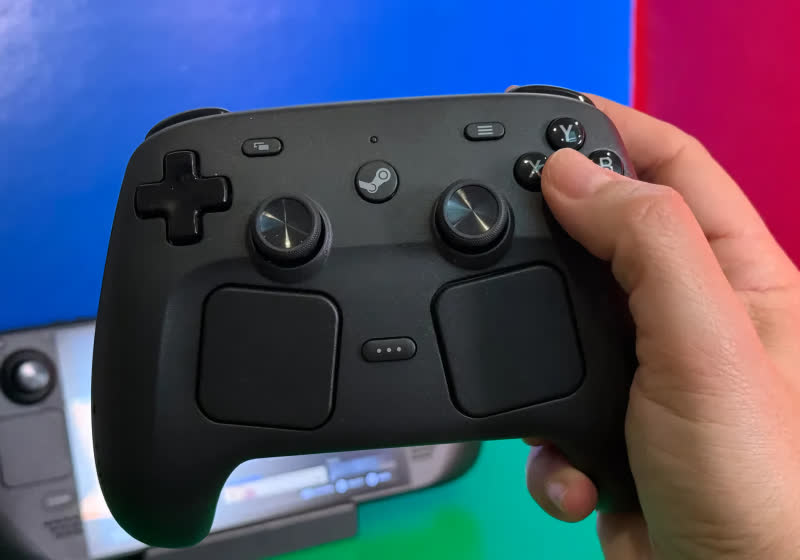
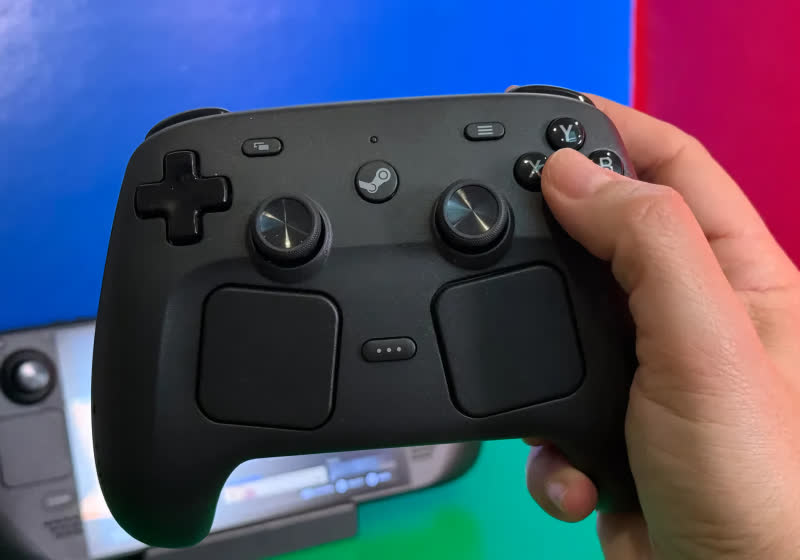
The second-gen Steam Controller launched to much fanfare on May 4 priced at $99. The high-end gamepad sold out within half an hour thanks in large part to scalpers scooping them up in bundles and reselling them for massive profits. A newly implemented reservation system looks to address the issue… Read Entire Article Source link
An image from an Epic Games video mocking Apple’s 1984 ad – Image Credit: Epic Games
Ahead of the return to District Court for the continued appeals process in the Apple-Epic legal fight, the two companies have made a schedule to discuss a change in App Store fees for outbound links.
The May 6 decision by the Supreme Court to decline Apple’s request for a stay on a mandate to meet Epic Games to negotiate a new commission rate means more legal action in the coming months. In preparation, the two sides have agreed on a few ground rules for that meeting.
In a joint filing to the U.S. District Court for the Northern District of California on May 15, there is a multi-point schedule of actions and activities for the two companies.
Advertisement
The list starts with Apple being given 45 days to file with the court a “proffer,” namely a good-faith offer of evidence, testimony, documents, or some form of evidence to the court. This proffer will propose commissions for any “linked-out purchases,” along with supportive evidence, in a document that’s up to 30 pages long.
Up to ten days after the proffer, Apple will hand Epic all non-privileged documents about the decision-making process to create the proffer’s proposal. This includes fee proposals and a privilege log.
Within five days of that action, Apple will meet with Epic to discuss the privilege log and whether Epic needs any extra material to evaluate the Apple proposal. Epic can then designate up to 10% of the documents on that privilege log for further review by a third party.
Within 60 days from the latter of Apple’s proffer filing or Apple’s completion of document production, Epic will then file its own response to Apple’s proffer to the court. This too can be up to 30 pages in length, and if Epic makes an objection, it must include evidence supporting that move.
Advertisement
Once that has been filed, Apple has another 30 days to file its reply, though with a 15-page limit. After all that, the court can then hold a status conference or decide any further proceedings.
Based on all parties taking the last possible moments to complete each stage in the schedule, it could be 150 days or five months before the court schedules another meeting.
How Apple got here
Apple and Epic have endured a six-year legal battle that started with “Fortnite” allowing players to make in-app purchases using a third-party payment processor. Epic also made demands, including allowing alternate app storefronts in iOS and a change in the commission structure.
For the most part, Apple succeeded against Epic, but the court found against Apple’s anti-steering measures, which prevented developers from directing users to other ways to pay. Apple was ordered to make changes, and it claimed it did.
Advertisement
Epic responded, arguing Apple didn’t follow the spirit of the law, convincing a court in April 2025 to its viewpoint. The court viewed Apple’s moves as a “gross miscalculation” of acceptability.
Across the country, thousands of students are waving goodbye to high school and preparing to head off to college. If you know one such student, and want to gift them a gadget to send them off in style, you’ve come to the right place. I’ve rounded up what I think are the best high school graduation gifts you can buy, at a range of different budgets.
All of these gifts will come in handy in college, whether for work, play or general student life. I’ve included noise-cancelling headphones to block out distractions while studying, robust Bluetooth speakers for when it’s time to bring the party, and budget-friendly coffee makers for an instant boost in time for morning seminars.
I’ve also included some top, student-friendly laptops and tablets, but we have a separate guide to the best student laptops if you can’t find exactly what you’re looking for here. I’ve separated my suggestions into budget bands, for easier browsing.
Advertisement
Under $50
For under $50 you can pick up some really great compact Bluetooth speakers — the Tribit Stormbox Micro 2 is the standout here, scoring a perfect five stars in our review. In this price bracket, I’d also be looking at quirky desk accessories that boost productivity and deliver a smile, and colorful water bottles and insulated coffee cups, to keep your new student refreshed on the go.
Advertisement
$50-$100
In the $50-$100 bracket, I love Kodak’s instant-printing digital cameras, tapping into the retro tech trend and giving your student an easy way to decorate their dorm room. There are also a few strong, budget-friendly gadgets worth considering: the Sony Pro HQ51 are our favorite cheap, noise-cancelling headphones, and the dinky Instant Vortex Mini air fryer is ideal for kitting out a cramped kitchen.
$100-$200
Looking to spend over $100? Great news: there’s plenty of excellent tech to choose from in this price bracket. An e-reader makes a stellar gift for literature students or anyone who loves to read in their spare time — both the Kindle and Kobo are worth considering.
Advertisement
On the kitchen front, Ninja has a couple of appliances we rate really highly. For caffeine addicts, the DualBrew Pro is a capable coffee maker that can make a range of brews in different styles and sizes, while the Crispi is an innovative air fryer that uses the same glass containers for cooking and storage — perfect for batch cooking in small kitchens.
Sign up for breaking news, reviews, opinion, top tech deals, and more.
$200-$300
Want to spend a bit more? In the $200-$300 bracket, we have gadgets that are more of a long-term investment. The Sony WH-1000XM5 are some of the best noise-cancelling headphones on the market, and will have no trouble blocking out noisy roommates or crowded cafeterias so your student can focus. In the tablet market, we rate the Lenovo Idea Tab Pro as an excellent iPad alternative for an ultra-competitive price.
Advertisement
Over $300
Looking to spend over $300? I’ve picked a selection of laptops and tablets that would make an excellent study companion for a new student, including the new MacBook Neo that everyone’s talking about at the moment. For more options, head to my college tablet and laptop guide.
We spend hours testing every product or service we review, so you can be sure you’re buying the best. Find out more about how we test.
GameSir G8+ MFi: One-minute review
The GameSir G8+ MFi is the controller that the G8 Galileo probably should have been from the start. It takes the same full-size grips, Hall effect thumbsticks and triggers, and programmable back buttons that made the original one of the best mobile grips going, then layers on MFi certification for iPhone and iPad Mini, swappable ABXY button caps, dual vibration motors, and crucially, improved case compatibility.
Best of all? It’s still the same $79.99 / £79.99 / AU$129.99 asking price.
Advertisement
Having tested both of these mobile controllers side by side on the same phones and games, the G8+ MFi addresses just about every gripe I had with the G8 Galileo. The case compatibility improvements alone are worth shouting about, with magnetically swappable silicone pads and a camera bump panel that let you adjust clearance depending on whether your phone is cased or caseless.
Latest Videos From
The screenshot button has been nudged further from the D-pad, and the ability to physically swap button caps to match your layout is a nice bonus for anyone who switches between Xbox and Nintendo-style mapping. The core controller feel, including the high stick sensitivity and trigger response, is identical to the G8 Galileo, but the GameSir app now works on both iOS and Android.
There are vibration motors in each grip now, which should be a nice add-on, but sadly, they go completely unused by every game I tested on both Android and iOS. Admittedly, that’s more the fault of developers than GameSir, however. With that oversight, there’s probably not quite enough here to justify replacing an original G8 if you’re an Android user. But for everyone else, this is the version to buy.
(Image credit: Future)
Advertisement
GameSir G8+ MFi: Price and availability
List price: $79.99 / £79.99 / AU$129.99
Available via Amazon, GameSir, and major retailers
Same price as the G8 Galileo it effectively replaces, but both are available
GameSir launched the G8+ MFi in late 2025, two years after the G8 it’s built on, but despite the upgrades, it retains the same $79.99 / £79.99 / AU$129.99 price tag. That sees it continue to undercut rivals like the Backbone One 2nd Gen ($99.99 / £99.99), though it can now stack up head-to-head with them on compatibility thanks to the added MFi certification.
GameSir’s naming across the G8 range remains confusing, and a shared price point doesn’t help matters. The G8+ comes in both Type-C (wired, that I’m reviewing here) and Bluetooth variants.
Sign up for breaking news, reviews, opinion, top tech deals, and more.
There’s also the original G8 Galileo, which is Android-only. Sometimes it’s called the G8+, sometimes it’s the G8 Plus. Sometimes Galileo gets a shoutout in there, sometimes he doesn’t. If you’re shopping, double-check you’re getting the right version for your device and not selling yourself short on feature set.
Advertisement
GameSir G8+ MFi: Specs
Swipe to scroll horizontally
Row 0 – Cell 0
GameSir G8+ MFi
Price
$79.99 / £79.99 / AU$129.99
Advertisement
Dimensions
9.02 x 4.20 x 2.13in / 229 x 106.8 x 54.2mm
Weight
10.72oz / 304g
Advertisement
Connection
Wired USB-C (pivoting connector)
Compatibility
iPhone (USB-C), iPad mini 6+, Android 8.0+
Advertisement
Software
GameSir App (iOS and Android)
GameSir G8+ MFi: Design and features
Familiar G8 ergonomics with a wider platform and stretch for iPad mini compatibility
Swappable ABXY button caps and improved case compatibility
Works natively with both Android and iOS devices
If you’ve used the GameSir G8 Galileo, the G8+ MFi will feel immediately familiar. In fact, if you’ve used an Xbox 360 or Series controller, the G8+ will feel familiar too. The full-size, contoured grips are the same chunky shape as Xbox’s offering, and the same laser-engraved texturing carries over from the G8.
It’s noticeably comfortable to hold and feels like a proper device rather than a homebrew solution to gaming on your phone. The same overall build quality remains, too: it’s robust, doesn’t flex or creak, and materials feel premium.
Advertisement
Placed side by side with its sibling, the G8+ MFi’s phone deck is noticeably wider, but in isolation, I’m not sure you’d actually clock the difference. It’s heavier too, at 304g versus the G8’s 252g, though again the extra weight didn’t really register during testing. The light grey-and-white colorway is an improvement from the G8 Galileo’s uniform, darker grey for my eye. It looks a little more refined in this brighter skin, but that’s personal taste, and you don’t get a choice anyway.
The MFi certification is the headline upgrade and a welcome addition for Apple fans. Where the G8 Galileo only officially supported Android, the G8+ MFi is certified for iPhones with USB-C and the iPad mini 6 and newer. It auto-detects which platform it’s connected to and switches mode accordingly, which worked without issue across both my POCO X5 Pro 5G and iPhone 17 Pro during testing. The GameSir app recognized the controller on both phones, too, which wasn’t the case with the G8.
The wider stretch range, a full 30mm increase over the original, means the G8+ MFi can now accommodate an iPad mini, though without one to hand, I’ll have to take GameSir’s word for it. What I did appreciate was the removable magnetic back panel on the left side of the phone deck. This easily pops off to create more clearance for phones with larger camera bumps. It’s a nice quality of life addition that did its job perfectly with my cased iPhone, though
I’m not sure what GameSir thinks I’m going to do with that easily losable piece. A slot to tuck it into or even a magnetic spot on the back to stow it would have been much appreciated. I imagine we’ll see a lot of G8 Plus’ with a black stripe on the left side over time.
Advertisement
(Image credit: Future)
Case compatibility is where the G8+ MFi makes its biggest practical design improvement over the G8. GameSir now includes magnetic silicone pads of different thicknesses to change the buffer size around the port.
I played with my iPhone case on, and the controller accommodated it comfortably, which was something I couldn’t manage on the G8 Galileo without worrying about the USB-C connector angle. It’s probably still not going to handle a chunky Otterbox, but standard slim cases are no longer a problem. For all the clever tweaks and design changes, the USB-C connector is still my favorite choice GameSir made, and I’m glad it’s unchanged on the G8+. It pivots freely up and down, which makes seating and removing your device a doddle.
The magnetic faceplate system on the grips carries over from the G8, too, but the G8+ MFi adds swappable ABXY button caps on top of the interchangeable thumbstick options. You can physically rearrange the face button layout to match Xbox or Nintendo mapping, which is a nice complement to the software remapping available in the app. Three replacement thumbstick caps are included (short, tall, dome), but you still only get one of each.
(Image credit: Future)
Advertisement
GameSir G8+ MFi: Performance
Hall effect sticks and triggers, including hair-trigger mode
Two customizable M buttons on the back
Vibration motors in each grip, though they’re rarely used
When it comes to gaming with the GameSir G8+ MFi, the bits that were great before are still just as great here; en-something-ification clearly isn’t in the GameSir dictionary. The Hall effect thumbsticks and triggers are, as far as I can tell, identical to those on the GameSir G8 Galileo.
The sticks are smooth and precise with a high level of sensitivity. If you’re coming from a cheaper controller, you may need some time to adjust, but increased control is certainly worth the effort.
The triggers have full analog travel along with a hair-trigger mode that’s snappy and reliable, perfect for shooters. If you’re upgrading from the G8, there’s no change in input quality here, which is no bad thing, but don’t jump across expecting an even better experience. Deadzone and hair-trigger settings are configurable through the GameSir app, and the app now working on iOS means iPhone users get the same tuning options Android users have always had.
The G8+ MFi’s d-pad has a slightly mushy wobble, though a snappy, clicky feel when you fire it off. Travel distance is short with a clear click for each direction, including diagonally. The screenshot button has been repositioned slightly further from the D-pad down compared to the G8, and the improvement was both noticeable and very welcome. I didn’t accidentally trigger it during testing, which was a recurring frustration for me previously
Around the back of the G8+ are two programmable buttons, labeled M1 and M2 (compared to L4 and R4 on the last model). They’re something of a rarity for mobile controller grips at this price, with the likes of the Backbone One skipping them entirely. I found them well-sized and positioned just about perfectly.
Advertisement
They’re close to where your fingers naturally rest without getting in the way, taking just the right amount of force to avoid accidental presses. They ship unbound by default, so you’ll need the GameSir app to assign functions, and you can only mirror existing buttons on them, no macros.
(Image credit: Future)
The dual asymmetric vibration motors are the one new feature that falls flat. They work fine in the GameSir app’s test mode, delivering both strong and subtle vibrations that feel perfectly capable, if a little slow to spin up. The problem is that no game I tested, on either Android or iOS, actually utilized them.
Fortnite, Call of Duty Mobile, Forza Horizon 5,and Shadow of the Tomb Raidervia Xbox cloud gaming, nothing. I believe this is actually a mobile gaming ecosystem issue rather than a GameSir problem; developers just aren’t bothering or don’t have the means to communicate this information to devices. That may well change in the future, but right now, don’t go grabbing the G8+ expecting haptic feedback as you’d get on console.
The GameSir G8+ MFi features passthrough USB-C charging and a 3.5mm headphone jack, which carry over from the G8 Galileo, and both worked without issue again throughout testing. Passthrough charging reported fast charge speeds on both the POCO X5 Pro and iPhone 17 Pro with no overheating.
Advertisement
The headphone jack remains a welcome inclusion for latency-free wired audio The dedicated GameSir button on the controller has inconsistent behavior on Android, sometimes acting as a home button and occasionally opening the GameSir app instead. On iOS, it seemed to do nothing at all, but it will light up a different color to confirm you’re in the right compatibility mode for your device.
(Image credit: Future)
Shoudl you buy the GameSir G8+ MFi?
Buy it if…
Advertisement
Don’t buy it if…
Also consider…
Can’t decide if the GameSir G8+ MFi is the one to get? Here’s how it compares to other, similar controller grips.
Swipe to scroll horizontally
Row 0 – Cell 0
GameSir G8+ MFi Galileo MFi
Razer Kishi Ultra
Advertisement
Backbone One 2nd Gen
Price
$79.99 / £79.99 / AU$129.99
$149.99 / £149.99 / AU$269.95
Advertisement
$99.99 / £99.99 / AU$179.99
Dimensions
9.02 x 4.20 x 2.13in / 229 x 106.8 x 54.2mm
9.64 x 4.36 x 2.53in / 244.8 x 110.8 x 64.3mm
Advertisement
6.93 x 3.70 x 1.34in / 176 x 93.98 x 34.03mm
Weight
10.72oz / 304g
9.38oz / 266g
Advertisement
4.86oz / 138g
Connection
Wired (USB-C)
Wired (USB-C)
Advertisement
Wired (USB-C / Lightning)
Compatibility
Android, iOS
Android, iOS
Advertisement
Android, iOS
Software
GameSir App
Razer Nexus
Advertisement
Backbone App
GameSir G8+ MFi: One-minute review
I spent a few days testing on both an iPhone 17 Pro and POCO X5 Pro
I played Fortnite, Call of Duty Mobile, Need for Speed No Limits, plus Forza Horizon 5 and Shadow of the Tomb Raider via Xbox Cloud Gaming
I played with the various customization options and tried to get the rumble working, unsuccessfully
I approached testing the GameSir G8+ MFi with the question of not only how it fared in general, but specifically how it compared to the G8 Galileo upon which it was built. I used the same two phones and the same set of games to put them directly head-to-head. This allowed me to isolate exactly what’s changed between the two controllers and whether those changes are meaningful in practice.
I tested case compatibility with a slim iPhone case, tried all swappable thumbstick and button cap configurations, checked vibration motor response across multiple games on both platforms, and verified that the GameSir app provided full functionality on both iOS and Android. I also investigated the GameSir button behavior on both operating systems and tested passthrough charging on both devices.
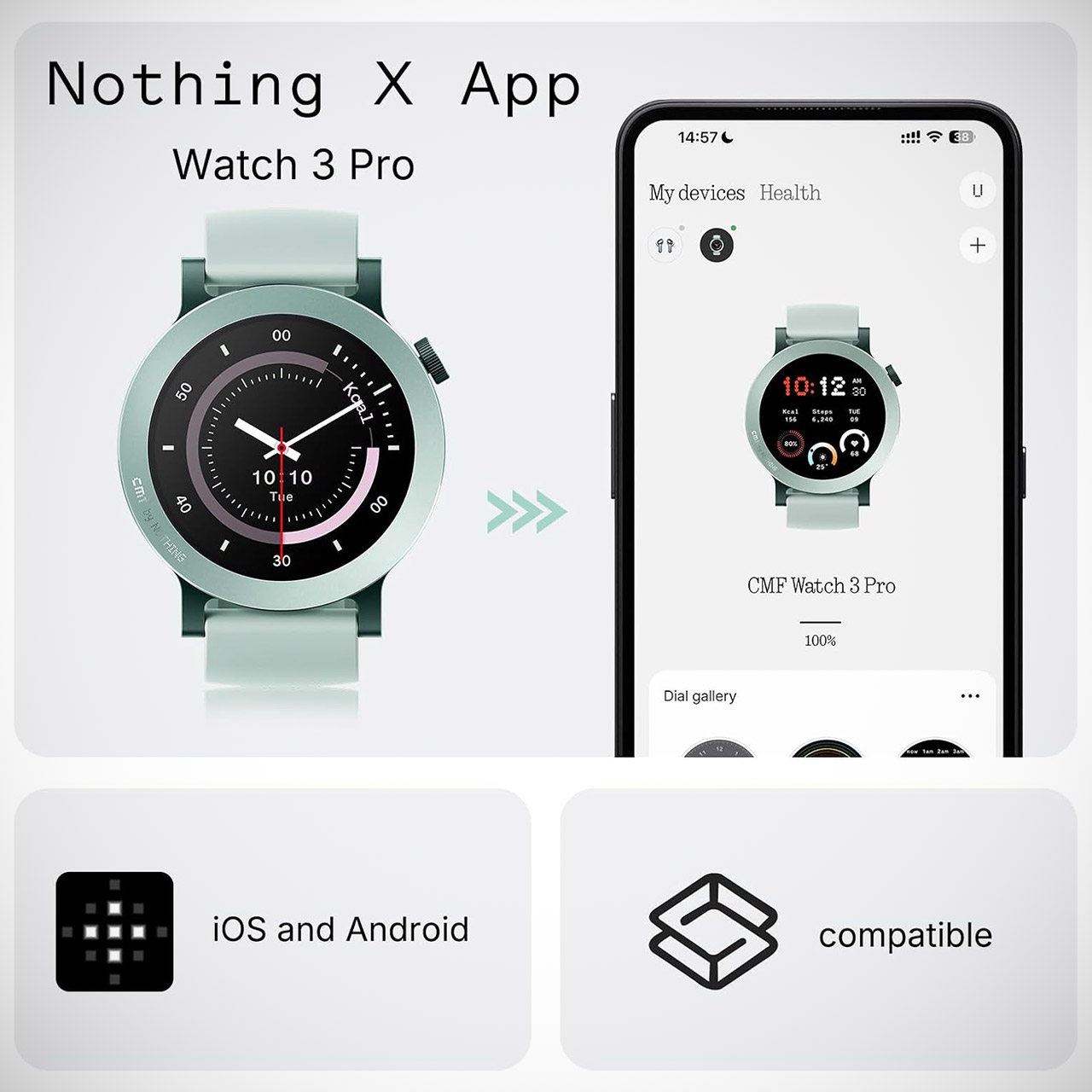
Short battery life frustrates many smartwatch owners more than anything else. Prices for decent models climb higher every year. CMF by Nothing Watch 3 Pro, priced at $69 (was $99), changes that equation completely. A 47-millimeter case sits comfortably on most wrists at just 51 grams. Liquid silicone straps attach easily with standard 22-millimeter pins so swapping colors takes seconds. Brushed details around the rotating crown add a subtle finish that feels more expensive than the asking price suggests.
The screen size increases to a pocket-sized 1.43 inches, with a square 466 by 466 pixel AMOLED panel that produces sharp text and silky smooth swipes because the refresh rate remains at a steady 60 Hz. Even in harsh sunshine, the maximum brightness of 670 nits allows you to keep track of the time. And if you want to save battery life, the always-on display remains visible – just don’t expect deep blacks; that’s the price you pay for this function.
Ultra-Accurate Health & Fitness Tracker: The CMF Watch 3 Pro smart watches enhance your fitness journey with advanced heart rate tracking (4-channel…
Your AI Life Companion: The CMF Smartwatch enables crystal-clear Bluetooth calls with AI noise reduction, a built-in mic, and speaker, supporting…
Style for Every Occasion: Elegant Brushed Metal to Rugged Outdoor Designs feature a vibrant 1.43” AMOLED Display with sharp resolution, bigger…
The battery itself has 350mAh capacity and could last up to 13 days on a single charge. If you’re a heavy user, however, and spend a lot of time tracking your heart rate or GPS route, you’ll get at least 10 days out of it, even if you’re constantly checking your watch. And if you elect to leave the always-on display on, you should be able to go about 4-5 days between top-ups, which is plenty of time between charges in my opinion. You can put the watch on the charger for a short 100 minutes, just enough time to have a coffee, and then you’re ready to go.
Advertisement
When it comes to health tracking, Nothing has worked harder to get the basics right: continuous heart rate monitoring with updates every few minutes, as well as the ability to check blood oxygen levels and stress levels. It’ll even tell you what stage of sleep you’re in, dividing it into neat little charts of time and quality each morning. For the females, there’s a built-in period tracker that will tell you when ovulation is due. There are also other sports modes available, over 130 in all, so whether you’re a serious athlete or just want to go for a brief jog, you should be able to find something that suits you. The dual-band GPS works great, and it even identifies when you start or end an exercise, so you don’t have to fiddle with manual start/stop times. All of that data is then synced to the Nothing X app, where you can see how you’re doing over time. I mean, if you’re a real runner, you’ll want a little more precision, but for the typical user, it’s plenty to keep you on track.
The Bluetooth 5.3 onboard allows you to take and make calls directly from the watch, as long as you have a built-in microphone and speaker. You may also receive notifications from your phone apps on the watch, which you can reject or respond to without having to reach for your phone. Additionally, you can manage your music directly from the watch, which should be a big advantage for all you runners out there.
The watch is water resistant to the tune of IP68, so a good splash in the rain or a fast hand wash should be fine, but, as with other similar watches, you should avoid deep water sports, since swimming laps are out of the question. As an extra plus, the lack of an NFC chip allows you to utilize your phone to make contactless payments.
Announced almost a year ago, the golden Trump phone will finally begin shipping this week to people who preordered it, according to Trump Mobile.
“Those who pre-ordered the T1 Phone will be receiving an update email. Phones start shipping this week!!!,” Trump Mobile said in an X (Twitter) post on Wednesday. A Community Note added to the post suggests that the long-delayed phone is a modified version of the T-Mobile REVVL 7 Pro 5G, which was first released in early 2024.
The Trump phone, officially known as the Trump Mobile T1, was supposed to ship last August, but ran into production issues, the company said.
Advertisement
“The technology business is more difficult than some may realize, as parts must be tested for quality assurances,” Trump Mobile CEO Pat O’Brien said in a statement to CNET. “We have experienced delays during a variety of steps in getting the T1 to completion, but those delays were worth it in our minds as we are delivering an amazing product.”
CNET Director of Content Patrick Holland had put down a $100 deposit to preorder the T1 phone in June 2025 so CNET could review it, but he has yet to hear from the company about a shipping date. However, on Wednesday morning, when he logged in to his Trump Mobile account, he was notified that his payment method was outdated and needed to be updated.
Holland says his preorder was “confirmed but not processed,” and he sees a red bubble that reads, “Awaiting Sim Assignment.”
Advertisement
Screenshot by CNET
Trump Mobile launched in June 2025 with a $47.45-a-month mobile phone plan, and announced that a Trump phone would be made in the US and launch in August 2025. But when it became obvious that domestic large-scale smartphone manufacturing would not be possible, Trump Mobile dropped the “made in the US” claim.
Now, the site simply says it is “designed with American values in mind,” an “American-proud design” and “shaped by American innovation.”
The website claims it will have a 6.78-inch AMOLED screen; a 50-megapixel, front-facing camera; a camera bump featuring a 50-megapixel main lens, an 8-megapixel wide lens and a 50-megapixel (2X Tele) lens; a 5,000-mAh battery; a fingerprint sensor and AI face unlock; a Snapdragon mobile platform; and an Android operating system.
While Trump Mobile has not said where the T1 phone is manufactured, executives told The Verge that it’s being made in a “favored nation” with “final assembly” in Florida. It’s unclear what qualifies another nation as “favored” to handle most of the assembly of the T1 phone. Meanwhile, President Trump has returned from China after a two-day summit with President Xi Jinping to discuss a potential trade deal.
The Register tests Dell’s first attempt at outplaying Apple’s AirPods
Last year, The Registerspotted Dell selling cloud-manageable wireless earbuds that feature the company’s famously stoic styling at a price higher than Apple charges for its latest AirPods.
Dell eventually offered your correspondent a pair of the Pro Plus Earbuds to try so we could hear what all the fuss is about – and we accepted, on condition that the company showed us the cloudy management tools that make the buds worth the big bucks.
Advertisement
Dell’s Pro Plus Earbuds
Divya Soni, a go to market lead, showed me Dell’s cloudy Device Management Console, a tool that lets admins enroll and track the buds, send them new firmware, or do things like turn on active noise cancellation by default across a fleet of earbuds.
New firmware matters for earbuds because they’re Bluetooth devices and the wireless protocol has had its fair share of security scares over the years. The buds have already earned Microsoft’s Teams Open Office Certification – a seal of approval for being able to handle noisy offices, plus a Zoom accreditation. New firmware might help there, too.
Soni admitted earbuds aren’t the main priority for the Device Management Console, which Dell expects customers will mostly use to manage docks and displays.
Dell delivers firmware updates to those devices at least once a year, to address security issues or fix bugs. The tool can do the same for keyboards or headsets.
Advertisement
I can’t imagine anyone would adopt Dell’s Device Manager just to keep an eye on earbuds. I’m also not sure anyone would buy the buds for personal use.
I say that because I own two sets of wireless earbuds and in their own way both are better than the Dells.
My go-to buds are JB’s $40 Vibe Beam 2, which fit brilliantly, bring out some nice nuances in much music, boast batteries that last about six hours and only need about 15 minutes to recharge.
That makes them satisfactory for long-haul flights, during which they drop a warmly enveloping cone of silence when active noise cancelling kicks in.
Advertisement
My other pair are $100 Soundcore Space A40s (bought after destroying another pair). These buds have even nicer noise cancelling powers but fit terribly: I recently endured quite the scene when running to catch a bus and one dropped out of my ear and bounced into a shrub.
The Soundcores redeem themselves with impressive microphones, so I use them when Zooming or recording a podcast. I prefer them to stay home because the case is bulbous and a little conspicuous in a front jeans pocket.
The Dells are even bigger. They fit my ears well and battery life is strong at around eight hours. Active noise cancelling is poor: A high hiss persists in-flight and I perceived distracting artefacts when using them in noisy environments on the ground.
Neither of my two PCs made a Bluetooth connection with the Dell buds. Dell has a fix for that – the buds’ case houses a small USB-C dongle devoted to connecting with the buds. It works every time and delivers a more stable connection than Bluetooth and brings out some musical nuances that I can’t hear with my other buds or desktop speaker.
Advertisement
The dongle feels like a clue about how Dell imagines these buds will be used, because today’s laptops seldom offer more than a pair of USB-C ports and they’re commonly used for power in and video out. Dedicating a port to earbuds seems wasteful … unless you’re using a Dell dock or monitor that offers more ports.
The USB-C audio connector therefore made it hard to escape the idea that Dell expects these buds will almost always be sold as part of a corporate peripheral purchase.
I can’t imagine consumers would prefer them to Apple’s AirPods, or the many cheaper earbuds that match them for performance.
But if the boss decides your organization must have cloud-manageable earbuds it would be churlish to turn down the chance to use a pair of Pro Plus Earbuds for work and play. The experience of using them is in the name: they’re built for the office but can handle after hours activities. They’re not delightful, but they’re far from trashy, annoying, or inconvenient. And when I inevitably lose or destroy my current buds I’ll be very happy if I have the Dells on hand. ®
The home mechanic is a creative problem solver. Lacking the depth of a workshop-enabled professional, home mechanics have to rely on their own ingenuity to work around the gear limitations that sometimes creep into the picture. These intrepid DIYers, of course, need a collection of essential tools and accessory elements, including some specialty tools that can make all the difference. Even novice practitioners can actually handle a wide variety of repair tasks that require attention under the hood and in other areas of a vehicle’s maintenance schedule. Managing your car or fixing other people’s vehicles is ultimately a puzzle that requires a basic framework of knowledge and practical application to solve.
Over time, mechanics become adept at handling an increasingly large volume of projects, and new avenues of repair open themselves up to them. But early-stage home mechanics often seek to stick to the simpler stuff as they learn the ropes and gain the experience necessary to tackle tougher jobs. These five repair tasks fall fully within that umbrella, offering impactful fixes that can keep your car on the road for longer while avoiding the potential pitfalls that might work their way into the picture when it comes to more complicated and demanding jobs. Each one of these tasks can actually be performed by a careful car owner without really any experience under the hood, making them the perfect starting place for a beginner hoping to grow into this hobby or profession.
Advertisement
Replacing your filters
Hleb Usovich/Getty Images
Some of the easiest repairs you’ll make to any car involve its filters. There are numerous filtration systems that populate the space under the hood and throughout a vehicle’s mechanical makeup. Air filters help support healthy engine function and a comfortable interior cabin, while your oil filter keeps that lubricating liquid from gathering up debris as it passes through the system. Filters are simple components, but they perform a set of critically important tasks that underpin the performance of your car in a variety of ways.
Fortunately, changing filters is quick and easy, and this job doesn’t require any real specialized knowledge. There are rarely any specialty tools or non-standard mechanics’ gadgets (which are useful to have, just not a requirement for this job) necessary to access filter compartments, and a replacement is as simple as setting a new part in the housing and closing everything back up again. Unfortunately, telling you that your vehicle desperately needs a new filter is among some of the shady things mechanics might try to pull. They make this swap sound urgent and expensive, but changing your own oil and air filters is simple and can keep your car running well for the long haul. Even beginner mechanics will have a sense of where these filters belong and how to access the spaces, but those with no experience whatsoever can simply look up tutorial videos on YouTube to find the right spot and the potential sequence of part extractions necessary to gain access. From there it’s often just a simple swap and a basic reinstallation process to put the finishing touches on the job.
Advertisement
Changing spark plugs
Trigub/Shutterstock
Over time, your engine’s spark plugs grow damaged by the constant heat and other elements they’re exposed to during operation. Spark plugs are the key component in igniting the mixture of fuel and air within the engine and powering the car’s movement. If you’re operating with degraded spark plugs, your car isn’t performing at its best, plain and simple. Every car will have its own recommendation for when to change these out, usually somewhere between 30,000 and 100,000 miles, depending on the type of spark plugs you’re using (copper builds are the quickest to degrade, for instance).
Changing the spark plugs is part of a basic engine tune up, and it’s something that most car owners and beginner mechanics will be able to do with little trouble. You will need a few important tools to change the plugs, though, including spark plug sockets that are purpose built to handle their removal and reinsertion. If you’re working on an older car, you may also need to address the distributor and perhaps even install new wiring to connect the two components, but even this task is fairly straightforward. Spark plugs come out of their sockets with a simple turn, and installing new ones is as simple as sticking the new component in the hole and tightening it into place. You’ll then repeat the process with each spark plug you’re replacing, usually either four or six of them if you’re doing a full refit. Reconnecting wiring components and then adding a bit of grease into the mix finishes off the task.
Advertisement
Rotating the tires
Miljan Živković/Getty Images
It’s entirely possible to replace your tires at home, but a few specialty tools required to get the seal and balancing right can’t be overlooked if you’re swapping out rubber. This is usually better left to the professionals as a typical car owner, and early career hobby mechanics may also want to pass on the task if they don’t already have the right equipment. However, a job that involves the wheels that’s far easier to accomplish and is recommended on a far more frequent schedule is fully within the wheelhouse of any beginner mechanic or industrious car owner.
Every driver should know how to change a tire in a pinch. Even so, there are some basic mistakes that drivers are often guilty of making when engaging in this emergency replacement task. Experts recommend rotating your tires (likely) two or more times per year. The average driver logs roughly 13,500 miles behind the wheel every 12 months, and recommendations vary from as few as 3,000 miles to 7,500 miles between tire rotations. This is obviously a bit more demanding than swapping out a single wheel in the event of a flat, and some additional lifting equipment is necessary when removing multiple wheels. However, making the swaps to keep a better overall balance in the health of your tires can extend their life, making the need to replace these consumable rubber components slightly less frequent and keeping a bit more cash in your pocket.
Advertisement
Changing your oil
Anastasiia Akh/Getty Images
Changing the oil in a car feels like a task that only experienced mechanics are capable of handling. But early stage mechanics and even novice car owners looking to take a bit more direct ownership over their vehicle’s maintenance can and sometimes should change the oil without additional help. All it takes to change the oil is an oil pan, some sockets and a ratchet, and a few quarts of oil (with the specific car’s recommendation for the type and amount taken into consideration).
It’s important to note that if you’re new to the task, you’ll want to take it slow and make sure you have all your support pieces in place before removing any parts. The first step in swapping out spent oil is draining the existing reservoir of old, spent motor oil, and this can be a messy task that can take you by surprise if you aren’t ready for the drip. Placing your oil pan into position and ensuring it’s large enough to catch the entire flow is essential. From here, it’s just a matter of closing up the egress point at the bottom of the oil tank and then refilling it with the new oil. You’ll probably also want to change the oil filter while you’re tinkering away in this part of the car, giving it a total refresh in its lubrication system.
Advertisement
Fixing small scale bodywork issues
ronstik/Shutterstock
There are countless hacks and processes going around regarding dent pulling approaches. One common option that’s been touted in the past involves dry ice. Besides the danger that handling dry ice represents (always use gloves when touching dry ice!), using it can damage your paint job, and it’s not suitable for large dents that go beyond very shallow imperfections. Hailstone dings, for instance, may be pullable with dry ice, but damage from impact with another car almost certainly isn’t. Dent puller kits come in many forms and sizes, though, and utilizing the ramming capabilities of these kinds of tools can save you plenty of time and money that would otherwise get poured into work at a body shop beyond your own mechanic space.
It’s also possible to repair sections of rust that can form on older, project cars. You may not even need to be proficient in welding to get this done. Repairing damaged sections can be done with a bit of calculated surface preparation to remove the rust, and then a healthy dose of an auto body repair putty like Bondo to fill in the missing space and sanding to perfect its surface. For more demanding jobs, taking the car to a specialist in bodywork may be required, but for basic dent and ding repair, most home mechanics and others can handle the job themselves with a bit of patience and the right tools. The paint job that comes next may be outside your purview, but after saving on the bulk of the repair work it might be totally fine to shop out to someone else for a pristine finish.
World War II saw the development of all manner of aircraft, some of which have become iconic. One such plane was the bizarre-looking Lockheed P-38 Lightning, which was a single-seat aircraft with a twin-boom design. Throughout the war, P-38s flew all kinds of missions, including escort, fighter-bomber, and night fighter operations; they were heavily used. There are some well-known P-38s from the war, but one of the most fascinating is known as Glacier Girl.
That’s because the plane, which flew for the 94th Fighter Squadron, First Fighter Group, had to make an emergency landing in Greenland on July 15, 1942. The aircraft, along with two B-17 Flying Fortress bombers and five other P-38s, were all lost to the ice, which covered them as time passed. The aircraft remained buried under 268 feet of ice for decades. Then, in 1992, the Greenland Expedition Society excavated the P-38F, which was in inoperable condition after half a century under the ice.
Advertisement
It had to be removed and brought to the surface in pieces. Over time, every piece of Glacier Girl made it. The P-38F was moved to Middlesboro, Kentucky, where a great deal of time and effort made it flightworthy once more. Restoring the aircraft to flightworthy status was a big deal, as only 24 of the 10,113 built by the U.S. during the war survive today, and only six are flightworthy. That makes any operational P-38 a hot item as a Warbird, which is a restored military aircraft flown by enthusiasts.
Advertisement
Glacier Girl took to the skies after 60 years
It took four months to bring the plane up to the surface at a cost of $638,000, and all told, the entire project ran closer to $3 million. Despite where Glacier Girl was found and how long it remained buried, much of the aircraft was in surprisingly good condition. Initially, the project to fully restore the fighter to flightworthy status was thought to take two years. It ended up taking a decade, and it was made possible with around 80% of Glacier Girl’s recovered original parts.
Once Glacier Girl was fully restored, the next thing to do was take it up into the air, so pilot Steve Hinton climbed into the cockpit and flew the restored Glacier Girl for 30 minutes in October 2002. Hinton is a name that many in the Warbird community know well, as he’s dedicated his life to flying restored military aircraft, having spent years doing so for the Planes of Fame Air Museum in Chino, California.
Glacier Girl continued flying for many years, transferring from one owner to another until it landed as the centerpiece of the Air Legends Foundation collection. It was later loaned to the Lone Star Flight Museum in Houston, Texas, and has continued flying and wowing onlookers for years. The P-38 was one of the best American planes of World War II, and it’s a testament to the craftsmanship and drive of U.S. war production in the 1940s that a plane buried for decades under the ice could be made to fly once more.



































































You must be logged in to post a comment Login