Connect with us
DAPA Banner
DAPA Coin
DAPA
COIN PAYMENT ASSET
PRIVACY · BLOCKDAG · HOMOMORPHIC ENCRYPTION · RUST
ElGamal Encrypted MINE DAPA
🚫 GENESIS SOLD OUT
DAPAPAY COMING

Tech

Linux Fu: Fake Webcams Have Many Uses

Published

on

Dealing with text streams is a fundamental skill for the Linux power user. You can sort, merge, and search text files easily from the command line. What if you could do the same thing with video? Well, you can. Maybe you want to add a logo to a webcam feed before sending it to a conference app. Maybe you want to blur, color-correct, or annotate video in real time. Or perhaps you want to inject prerecorded video into Zoom while pretending it is a live camera. Linux can do all of this, and the key ingredient is usually the same: a loopback video device.

The basic idea is simple. Instead of an application reading directly from /dev/video0, you create a fake camera device using the v4l2loopback kernel module. Your software pipeline writes processed video into the fake camera, and applications read from it as if it were a normal webcam. The result is surprisingly powerful.

Loopback Cameras

The first step is to install the loopback driver. On many distributions, this is packaged already. On Debian or Ubuntu, you’d install the v4l2loopback-dkms package. On OpenSUSE it’s probably v4l2loopback-kmp-default if you’re using the usual kernel.

Unless your distro automatically loads the module, you’ll do it yourself and tell the driver how many fake cameras to make. You’ll also need to tell it where to put them. Here, I’m asking for a single camera at /dev/video10 named VirtualCam:

Advertisement
sudo modprobe v4l2loopback devices=1 video_nr=10 card_label="VirtualCam"

After you’ve done this, you can verify it:

v4l2-ctl --list-devices

Applications can now see the fake camera, but there’s nothing coming out of it yet.

Basic Pipeline

Suppose you have a USB webcam at /dev/video0. You can read from it and send the stream directly into the loopback device with FFmpeg:

ffmpeg -f v4l2 -i /dev/video0 -vf format=yuv420p -f v4l2 /dev/video10

Now applications can use /dev/video10 as a webcam source. This alone is useful because it decouples applications from the physical camera. For example, I had an old Intel Lifecam that would randomly throw an error when used with a browser video conference app, but ffmpeg had no problems with it. A similar pipeline lets me videoconference with this camera. But the real fun starts when you insert filters. A fun test site is webcamtoy.com.

Advertisement

Adding a Watermark

FFmpeg’s filter graph system is quite flexible. A watermark is just another video source composited over the main image. Suppose you have a PNG file named wrencher.png with transparency. This command overlays it in the lower-right corner:

ffmpeg -f v4l2 -i /dev/video0 -i wrencher.png -filter_complex "overlay=W-w-20:H-h-20,format=yuv420p" -f v4l2 /dev/video10

Or, you could be more explicit:

ffmpeg -f v4l2 -video_size 1024x720 -framerate 15 -i /dev/video0 -i wrencher.png -filter_complex "overlay=x=main_w-overlay_w-20:y=main_h-overlay_h-20,format=yuv420p" -f v4l2 /dev/video10

Now the logo appears 20 pixels from the bottom-right edge. However, note that if your software “mirrors” your image for local display, the watermark will go to the other side in your view. That makes sense.

If your video fails, or it looks like color garbage or a green screen, you may have to pick a different video conversion other than yuv420p.

Advertisement
Perhaps a bit large for a watermark, but you get the idea.

Injecting Video

You are not limited to webcams. You can inject a prerecorded video:

ffmpeg -re -stream_loop -1 -i intro.mp4 -vf format=yuv420p -f v4l2 /dev/video10

The -re flag tells FFmpeg to play in real time instead of as fast as possible. The -stream_loop -1 repeats forever.

This is useful for demonstrations, test feeds, signage, appearing awake in meetings, or foiling security cameras in low-budget action movies.

Multiple Filters

Once you understand the filter graph concept, you can stack effects endlessly.

For example:

Advertisement
-filter_complex "eq=contrast=1.2:brightness=0.05, hue=s=0, overlay=W-w-20:H-h-20, format=yuv420p"

This:

  • Adjusts contrast
  • Brightens slightly
  • Converts to grayscale
  • Adds the watermark

FFmpeg contains hundreds of filters, including blur, sharpen, edge detection, chroma keying, denoise, LUTs, stabilization, and even AI-assisted processing if built with the right libraries.

At some point, though, you may want a more modular architecture. That is where GStreamer becomes interesting.

Enter GStreamer

FFmpeg excels at direct command-line media processing, but GStreamer is more like a traditional Unix/Linux pipeline. You construct a pipeline out of interconnected processing blocks. The learning curve is steeper, but it enables extremely sophisticated workflows.

Adding text to live video in WebCamFun.

A simple camera-to-loopback pipeline looks like this:

gst-launch-1.0 v4l2src device=/dev/video0 ! videoconvert ! v4l2sink device=dev/video10

That simply duplicates the webcam into the virtual device.

Advertisement

Suppose you want to add text:

gst-launch-1.0 v4l2src device=/dev/video0 ! videoconvert ! textoverlay text="Hackaday!" valignment=bottom halignment=right ! v4l2sink device=/dev/video10

Inspecting GStreamer

One thing that intimidates new GStreamer users is how enormous the framework feels. Fortunately, there’s a tool specifically designed to explore what is available: gst-inspect-1.0

Run without arguments, it dumps every installed plugin and element on your system. The list can be surprisingly long. Using grep on the output can help.

More useful is inspecting a specific element:

Advertisement
gst-inspect-1.0 v4l2src

This shows:

  • Supported capabilities
  • Accepted formats
  • Properties
  • Pad types
  • Configuration options

For example, inspecting textoverlay reveals options for font selection, alignment, shading, and transparency. Inspecting videobalance shows controls for brightness, hue, saturation, and contrast.

This becomes essential because GStreamer pipelines are often constructed experimentally. You discover an element, inspect its capabilities, then wire it into the pipeline.

Using Images in GStreamer

Overlaying an image is slightly more involved because GStreamer separates streams explicitly. One common approach uses gdkpixbufoverlay (here, placing a logo at the lower right):

gst-launch-1.0 v4l2src device=/dev/video0 ! videoconvert ! gdkpixbufoverlay location=logo.png offset-x=20 offset-y=20 ! videoconvert ! v4l2sink device=/dev/video10

You can keep adding modules until you get what you want. A more elaborate pipeline might:

Advertisement
  • Read a webcam
  • Add a logo
  • Blur the background
  • Encode H.264
  • Stream over RTSP
  • Simultaneously feed a loopback webcam

GStreamer can also integrate with many hardware codecs for hardware encoding and decoding.

Practical Considerations

There are several things that tend to trip people up.

Video applications can be extremely picky about formats. MJPEG, YUYV, RGB, and YUV420 all appear frequently. If things fail mysteriously, format conversion is often the culprit.

Tools like v4l2-ctl can help:

v4l2-ctl --list-formats-ext

Another issue is that many applications reject unusual sizes. Sticking with standard resolutions like 1280×720 or 1920×1080 avoids many headaches.

Advertisement

Real-time video processing can consume substantial CPU resources. Hardware acceleration helps, but some filters force software processing anyway. Similarly, virtual camera pipelines can accumulate delay. Low-latency flags and queue tuning sometimes become necessary for interactive use.

Beyond Watermarks

Once you have a loopback pipeline running, you can get creative. You could create a retro CRT simulation, a fake thermal camera, or detect motion. Maybe insert a timestamp or a live video feed from your oscilloscope or 3D printer. Because the output looks like a normal webcam, almost any Linux application can use it. They simply see another camera.

There are many more advanced techniques possible with GStreamer pipelines, including branching streams with tee, synchronizing multiple sources, GPU-accelerated effects, network streaming, and live compositing. If you want a deeper dive into practical virtual-camera workflows, this video provides an excellent starting point:

Advertisement

Another tip: if you write shell scripts, using things like /dev/video0 will get you in trouble unless your configuration never changes. Instead, use the stable symlinks:

ls -l /dev/v4l/by-id/

You’ll see things like:

usb-046d_HD_Pro_Webcam_C920-video-index0

Then use that path directly in FFmpeg or GStreamer.

Cleaning Up

When you are finished with the virtual camera, remember that the loopback device persists until the kernel module is unloaded. Stop any applications using the fake camera first, then remove the module:

Advertisement
sudo modprobe -r v4l2loopback

That tears down the virtual camera devices and removes them. If you created multiple fake cameras, unloading the module removes them all at once.

We’ve used Gstrteamer before for remote driving.

Source link

Advertisement
Continue Reading
Click to comment

You must be logged in to post a comment Login

Leave a Reply

Tech

Microsoft Debuts A More Buttoned-Up Look For Copilot

Published

on

The AI assistant had its personality stripped in pursuit of a more consistent experience.

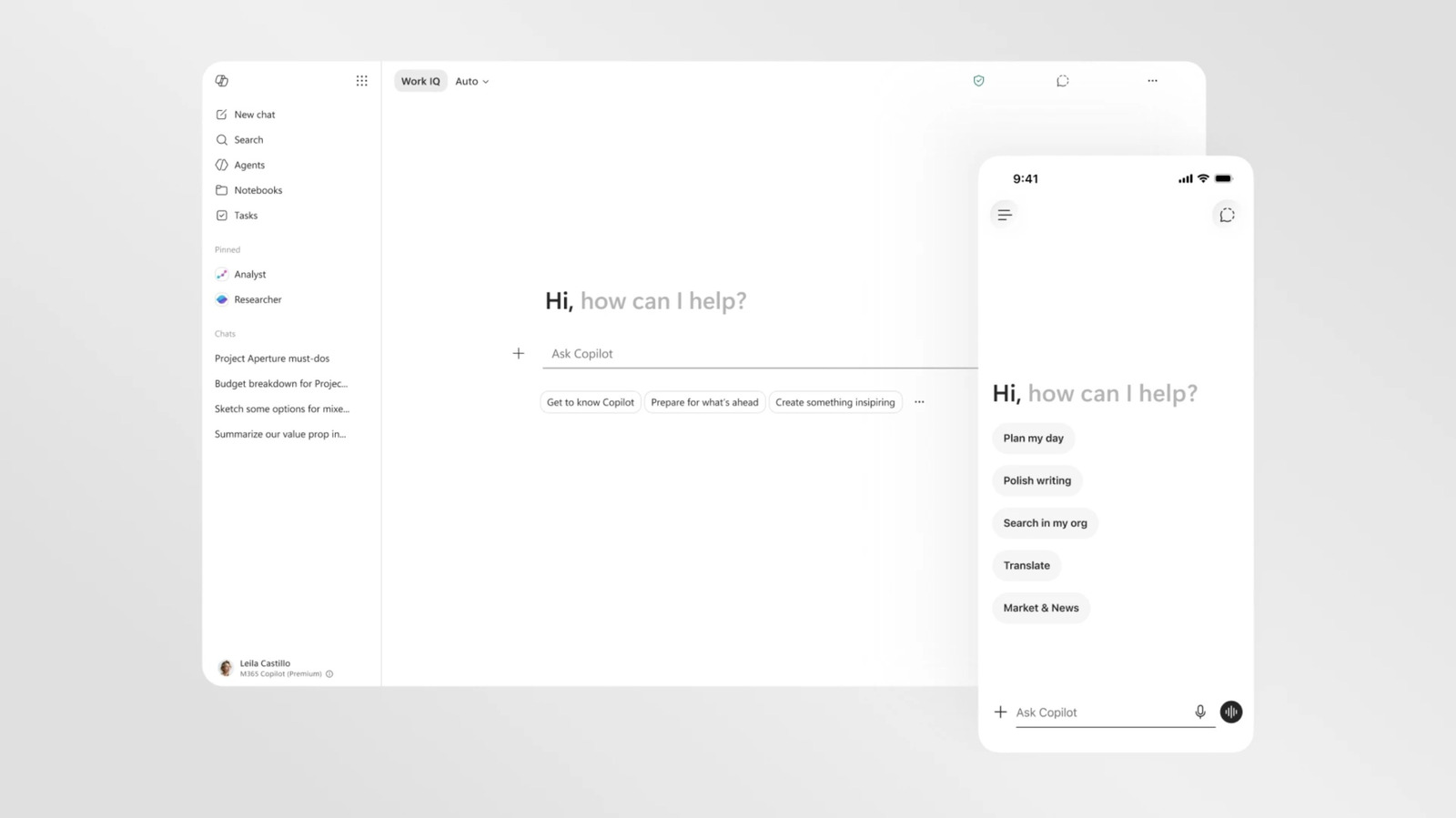
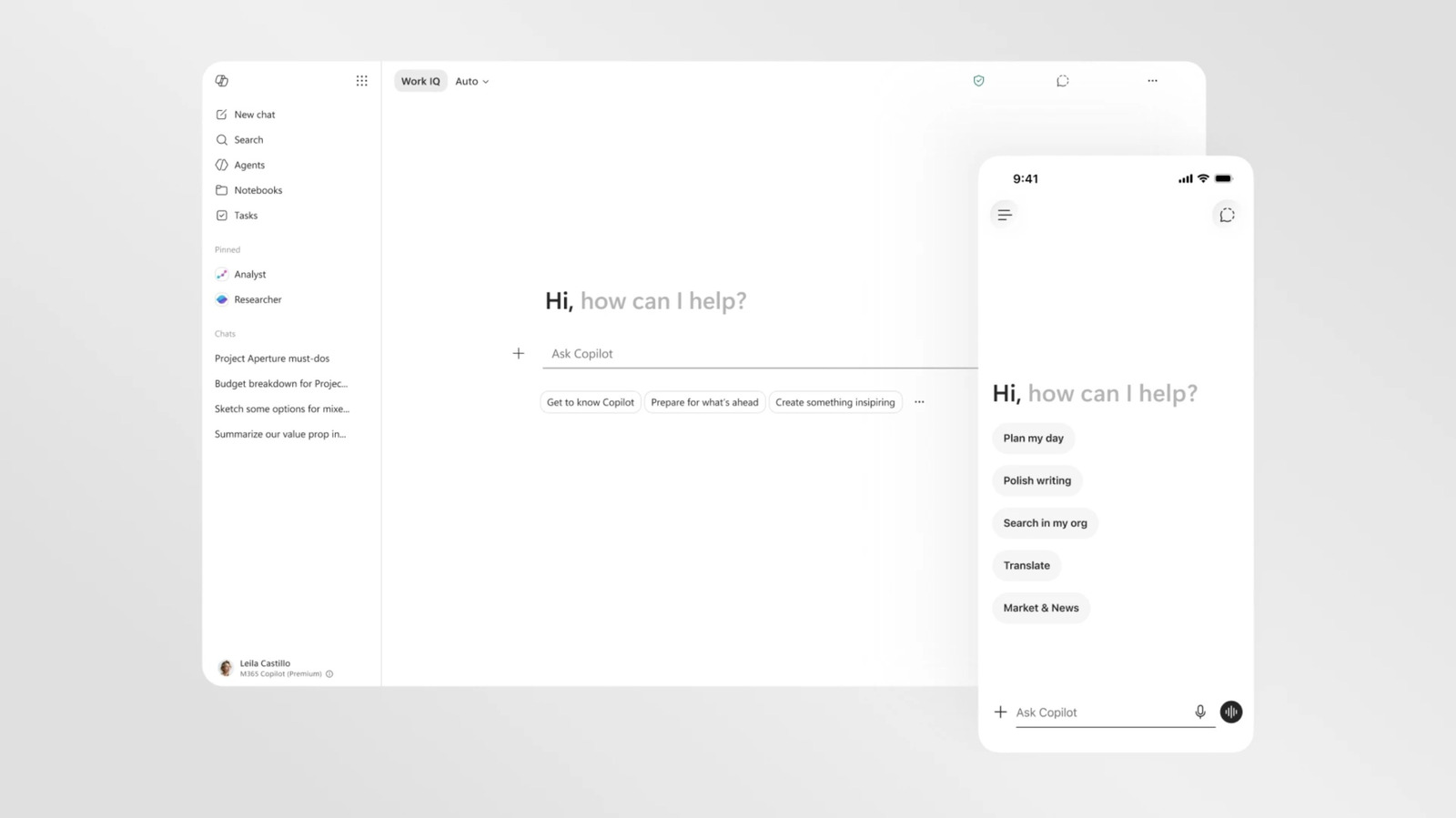
Copilot is getting yet another visual overhaul as Microsoft reconsiders its approach to AI across Windows and its various apps. The new changes are focused on the version of Copilot accessible in Microsoft 365, and visually streamline the AI assistant to using it more consistent across apps like Word, PowerPoint and Excel.

The most striking difference in Copilot’s new look is how little color it has. You can still get Copilot to produce full-color outputs and it will reference other apps by their colorful app icons. By default, though, the Copilot interface is now a largely black and white, text-forward affair. Part of this change was driven by a desire to make everything more readable and responsive, but Microsoft suggests it’s also reflective of an attempt to “craft intelligence that feels present but not imposing.”

Advertisement

That approach also applies to the tweaks Microsoft querying the AI assistant itself. The Microsoft 365 Copilot app and the Copilot experience in Microsoft apps feature a new “prompt surface” that changes size and reveals new functions as you type. You can input a purely text-based request to Copilot and it will answer, but if you refer to the AI assistant’s other skills, like the ability to research or visualize, the text box will unfurl menu options for selecting files or guiding Copilot’s visual responses. The app’s new side panels and menus, which collapse when not in use, are another example of this approach. Importantly, these changes also apply to how Copilot appears in apps like Word. The AI is now available in a consistent location across all Microsoft 365 apps — a side pane — and works similarly to the standalone Copilot app.

The only wrinkle to Microsoft’s Copilot redesign is that, at least for now, it’s limited to the company’s productivity software. The more consumer-friendly Copilot that was introduced in 2024 and lives in Microsoft’s mobile app is still bright, colorful and (occasionally) blobby. It’s possible this more buttoned-up look will make the jump to other versions of Copilot at some point, but that may depend on where Microsoft’s AI plans land.

The company has committed to being more thoughtful about where Copilot and AI features appear in Windows 11 and even started pulling Copilot out of certain apps. It’s also changing what AI models it uses. After being an early investor in OpenAI and a beneficiary of its GPT models, the two companies have redefined their partnership. Microsoft has now started rolling out its own in-house AI models and investing in other AI companies. A visual redesign isn’t a fix for the issues Windows users had with Copilot, but it does seem like a sign that Microsoft’s AI strategy is very much in flux.

Advertisement

Source link

Advertisement
Continue Reading

Tech

Trump Loses More Control Over AI Regulation As Illinois Passes Landmark Law

Published

on

Illinois lawmakers on Wednesday passed a landmark AI safety bill (SB 315) that would require major AI companies to publish safety plans, submit annual third-party testing reports, report serious incidents quickly, and protect whistleblowers who flag emerging risks. OpenAI and Anthropic supported the bill, which could make Illinois a testing ground for state-level AI governance as federal regulation remains stalled. Ars Technica reports: To force companies to be more transparent about rapid developments, Illinois would likely rely on “the Big Four accounting and auditing firms — Deloitte, EY, KPMG, and PwC — to audit their safety practices,” [said Scott Wisor, a policy director at a nonprofit called Secure AI Project, which supported the bill]. The required independent audits will likely frustrate Trump, who has tried and failed to stop states from implementing AI safety laws as Congress stalls on passing any legislation.

For Trump, the priority has been to promote AI industry interests, but he began considering expanding federal government safety testing after Anthropic’s Mythos was released and the AI firm limited access due to safety concerns. Whether or not governments at any level are prepared to protect society from the most catastrophic AI risks remains a major concern for critics who wonder how and when governments will intervene. After inside sources started leaking the details of Trump’s AI safety testing plans, critics warned that even the federal government may lack the necessary expertise to audit frontier AI models. And it seems the same criticism extends to independent auditors that Illinois may rely on but industry insiders suggest some AI firms may not entirely trust.

Adam Kovacevich is CEO of Chamber of Progress, a trade group that opposed SB 315 and counts Google and Apple among its members. He told Wired that Illinois’ requirements “would force companies to expose sensitive systems to untested auditors in a regulatory regime that’s all liability and no standards.” Governor J.B. Pritzker confirmed his intent to sign, proclaiming that “Illinois is leading the nation in holding Big Tech accountable.”

“I look forward to signing SB 315 and working with the legislature so that AI, when used, is used responsibly,” Pritzker said.

Advertisement

Steve Wimmer, a senior policy and technical advisor for the Transparency Coalition, said his group considers the law to be “one of the most important pieces of legislation in 2026.”

Source link

Continue Reading

Tech

Attack Of The Atomic Oxygen

Published

on

While designing anything for operation in space has its challenges, there is at least one thing that is more of a problem for objects in Earth orbit than for deep-space probes: atomic oxygen. We like oxygen because we need it to live, but it is also highly reactive as a single atom. Luckily, on Earth, most of what we breathe is O2. [Space Daily] talks about the challenges of the International Space Station dealing with the “space weather” of atomic oxygen in low Earth orbit.

Part of the problem is that even when we know better, we tend to think of the atmosphere coming to an abrupt end and space being a hard vacuum. But in reality, the atmosphere gradually dissipates, and at “only” 400 km above the Earth, the Space Station is really flying through a very thin atmosphere.

To compound the problem, this is above the ozone layer, so the Sun’s UV light rips O2 into single oxygen atoms. Over time, these free oxygen atoms can affect many parts of a spacecraft exposed to them. Engineers first noticed that materials recovered from spacecraft had more damage and changes to material properties on the pieces facing the direction of travel. NASA has spent years testing different materials by mounting trays of different material samples outside the ISS.

Carbon-based polymers take a big hit from atomic oxygen exposure. Polymide film is frequently used, but it erodes with exposure. Carbon composites also lose mass. Other materials change in other ways. For example, an optical surface may roughen with exposure.

Advertisement

The usual answer is to over-design for mission objectives or to cover certain polymers with coatings like silicon dioxide or aluminum oxide, which are not as reactive to free oxygen. For a long-duration mission like the ISS, you may have to pay special attention to the materials in use. Very low satellites also need special care, as there is more oxygen in lower orbits.

There are other effects, too, such as extreme thermal cycles, debris strikes, and other indignities that space-traveling materials must withstand. But in deep space, atomic oxygen is a rare issue. Until, at least, we go somewhere else that has a lot of oxygen.

Source link

Advertisement
Continue Reading

Tech

The $6 Billion Chinese Startup Trying to Build Hands for Every Robot

Published

on

If you could buy a humanoid robot for less than a smartphone, would you? Would you buy several robots to handle cooking, cleaning, babysitting, and even your job?

This is the pitch being made by Zhou Yong, the 40-year-old founder and chief technology officer of LinkerBot, one of China’s leading manufacturers of dexterous humanoid hands. The startup’s hardware comes complete with five fingers and at least 11 joints and is sold for as little as $600 in China. LinkerBot’s hands can play piano, thread needles, tighten screws, and assemble electronics. In three to five years, Zhou predicts, the price for one will fall to just $200. Eventually, “everyone will own ten robots on average,” Zhou said in an exclusive interview with WIRED.

Marketing spectacles like the humanoid robot marathon in Beijing have drawn attention to robots’ legs, but the real frontier in humanoids is hands. “The hands are the majority of the engineering difficulty of the entire robot,” Elon Musk said at an event last fall. Founded in 2023, LinkerBot has quickly emerged as a market leader in the space. The company says it shipped 10,000 robotic hands last year, representing 80 percent of worldwide demand. Its clients include research labs, manufacturers, and other humanoid robot makers.

The startup is also a venture capital darling: It completed six rounds of fundraising in just 13 months from investors including the Chinese government, Alibaba’s Ant Group, and HongShan Capital, Sequoia Capital’s Chinese spinoff. LinkerBot is now seeking another round of financing at a $6 billion valuation, double what the company said it was worth only a few months ago. And it’s reportedly exploring going public in Hong Kong, according to Bloomberg. (Zhou declined to comment on the rumored plans.)

Advertisement

In 2019, after selling a previous startup focused on autonomous driving, Zhou turned his attention to robotics. He says he predicted the industry would begin booming around 2025, but was still taken aback by how quickly it grew. While OpenAI was once at the forefront of developing robotic hands, in recent years Chinese startups have taken the lead as many of their American counterparts shifted their focus toward large language models and other AI software.

For robotics companies, “the valuation gap between the Chinese and US primary markets has been basically erased,” Zhou says.

Zhou says his lifelong goal is to make a real-life version of Doraemon, the Japanese anime character that has an infinite supply of magical gadgets in its pocket. (His WeChat avatar is a picture of Doraemon.) He sees building a capable, dexterous hand as an instrumental step toward achieving that dream.

Courtesy of LinkerBot

Advertisement

Selling Shovels to Miners

Successful companies, Zhou argues, focus on doing one thing well. That’s why LinkerBot zeroed in on hands, rather than trying to build the entire body of a humanoid. That also allows it to avoid directly competing with leading humanoid companies like Unitree or Tesla.

“When the humanoid robot industry size is so massive, specializing in making hands is like selling water or shovels [during the gold rush],” says Hong Shangguan, a veteran investor in China’s tech industry and a former partner at the Beijing-based fund Legend Capital.

Source link

Advertisement
Continue Reading

Tech

Wand 12-inch Dark-Light Tonearm to Debut at HIGH END Vienna 2026: Does Length Really Matter?

Published

on

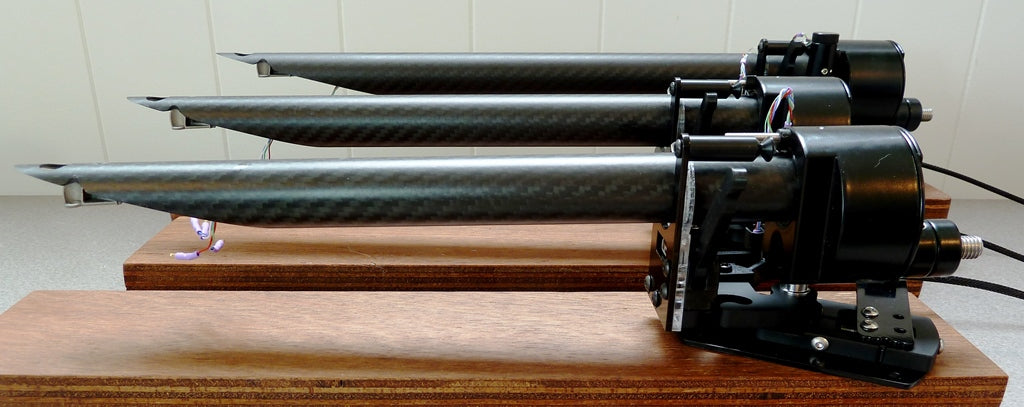
The Wand has been one of those tonearms that has intrigued me for years, largely because it never looked like it was designed by committee, or by someone trapped in front of a CAD workstation after midnight with too much confidence and something much stronger than coffee. They do it differently in New Zealand. Its wide to narrow carbon fiber arm profile helped make it instantly recognizable, and the design has built a real following over time. The latest chapter arrives next week at HIGH END Vienna 2026, where Wand will unveil its new 12-inch Dark-Light tonearm, a longer version of the 10-inch Dark-Light that first appeared at Munich High End 2025.

Long tonearms are not new, and neither is the argument over whether the added length is worth the extra real estate and setup demands. Wand already offers 9.5-inch, 10.3-inch, 12-inch, and 14-inch arms, and the company claims a 12-inch arm can reduce distortion by roughly 30% compared to a 9-inch design. That matters if the arm can keep resonance, rigidity, and bearing behavior under control, which is where Wand has always tried to separate itself from the usual aluminum tube and prayer routine.

My own curiosity goes back to some oddball tonearms I tried years ago, including the Japanese RS Labs RS-A1, a rotating headshell design that looked faintly mad but made a persuasive case for thinking differently about geometry and tracking. I also came across The Wand while looking at restored idler drive Lenco turntables, including the Dutch PTP Audio projects built around classic Swiss Lenco decks from the 1970s. PTP adopted The Wand for some of its turntables back in 2014, which only made the rabbit hole deeper. Naturally, I fell in. That is how these things happen.

The new 12-inch Dark-Light is not just about making the arm longer because the internet needs another argument. It is about whether Wand can preserve the speed, low noise, and musical flow that made the shorter model interesting, while taking advantage of the lower tracking distortion that a properly executed 12-inch arm can deliver. For vinyl listeners with the deck, space, cartridge, and patience to make it work, this could be one of the more interesting analog debuts at HIGH END Vienna 2026.

Advertisement
wand-tonearm-series

Handmade in New Zealand, Designed by Simon Brown

Design Build Listen is not just another boutique analog brand making pretty bits for expensive turntables. Based in Aotearoa / New Zealand, the company hand builds The Wand Tonearm along with other audio accessories, including its “No Ring Rings” tube dampers designed to reduce unwanted vibration.

Created by designer Simon Brown and launched in 2011, The Wand Tonearm has earned multiple design awards and five star reviews for its distinctive carbon fiber arm design. Its large diameter arm tube is claimed to be at least four times stiffer than traditional tonearms, which helps explain why The Wand has always felt less like a retro accessory and more like a serious rethink of how a tonearm should work.

Longer Reach, Tapered Stiffness, Serious Vibration Control

The new Wand Dark-Light 12-inch tonearm is not just a longer version built for people with more plinth real estate and stronger opinions. Its core advantage is Wand’s Musical Taper design, which increases the arm tube diameter toward the pivot as length increases. That larger rear section is intended to preserve stiffness rather than sacrifice rigidity, while also allowing more internal brass mass near the bearing assembly.

The added mass lowers the center of gravity and gives vibrational energy a more controlled path away from the cartridge and arm tube. For a 12-inch tonearm, that matters: the longer geometry can help reduce tracking distortion, but only if the arm remains stable, rigid, and free enough to trace the groove properly. The Dark-Light’s appeal is that it tries to balance those demands without turning the design into another heavy analog science project with nicer photography.

Advertisement
wand-12-inch-dark-light-tonearm

Will The Wand Tonearm Work With Your Cartridge?

The Wand Tonearm should work with a wide range of cartridges, which is one reason it has attracted attention from both high end analog users and listeners building more sensible vinyl systems. Design Build Listen says The Wand has been used with cartridges from Lyra, Transfiguration, Koetsu, Kiseki, Dynavector, Denon, Ortofon, Hana, and others, which covers a pretty broad slice of the cartridge world.

The standard Wand Tonearm is considered a medium mass design, with a claimed effective mass of 12.5g, while the 12-inch version is listed at 15g. The Master Series arms add roughly another gram.

Very high compliance cartridges still need some care, but Design Build Listen notes that even a Shure V15Vx measured at a 7Hz resonance, which remains usable. Lower compliance moving coil cartridges are also considered a good match.

Advertisement. Scroll to continue reading.
Advertisement

Denon DL-103 and Ortofon 2M models appear to be among the most popular cartridge choices with Wand users, which makes sense. One is a classic low output moving coil with a long history, and the other is a widely used moving magnet family that covers a broad range of budgets. Wand also recommends Hana moving coil cartridges, especially the Hana ML.

The practical takeaway is that The Wand is not a one-cartridge science project. It should work with many common MM and MC cartridges, provided setup is done properly and the turntable is not being asked to rescue warped records from the witness protection program. As always, compliance, cartridge weight, counterweight range, and phono stage compatibility still matter, but for most users, The Wand should not create a matching crisis.

Will The Wand Fit Your Turntable?

The Wand is designed around Rega-style mounting dimensions, but that does not mean it is the obvious upgrade path for every Rega Planar 3, Pro-Ject Debut PRO, or other sub-$1,000 turntable. This is a serious tonearm, and not an inexpensive one, so the better question is whether the turntable, cartridge, plinth, and overall system justify the move. Bolting a high-end tonearm onto an entry-level deck can work mechanically, but it may not be the smartest use of the budget. Vinyl has enough ways to separate you from your money without handing it the keys.

Where The Wand makes more sense is on turntables with the space, adjustability, and mechanical foundation to take advantage of it. Design Build Listen offers mounting information and kits for a wide range of decks, including the Linn LP12, Technics SL-1200 and SL-1500 family, including newer GR models, Lenco L75 family turntables, Thorens TD-160 and TD-150 models, Thorens TD-318 family turntables, Michell turntables, and SME-style armboards.

Advertisement

The 10.3-inch Wand is especially interesting because it was designed to deliver much of the appeal of a 12-inch arm in a more compact footprint. Design Build Listen describes it as the longest arm intended to fit on a Linn LP12 or Technics SL-1200 family turntable, which gives owners of those decks a way to go longer without needing a battleship-sized plinth.

Suspended turntables should not be ruled out automatically. The Wand weighs roughly 500g, which is in the same general territory as an SME 3009 and somewhat heavier than many Rega arms. That means most properly adjustable suspended decks should be able to accommodate it, but setup matters. Arm height, lid clearance, suspension adjustment, mounting geometry, and counterweight clearance all need to be checked before anyone starts drilling holes and pretending this is IKEA furniture.

The Bottom Line

At €8,900, the Wand 12-inch Dark-Light tonearm is not a casual upgrade. It is built for serious turntables, serious cartridges, and vinyl listeners who care about geometry, stiffness, resonance control, and setup precision.

Its appeal is the way Wand tackles the 12-inch tonearm problem: lower tracking distortion, a tapered carbon fiber arm tube designed to maintain rigidity, internal brass mass for vibration control, and, finally, headshell lifts for better day-to-day usability.

Advertisement

This is for experienced Linn, Technics, Lenco, Thorens, Michell, and custom plinth users, not someone trying to turn a budget deck into an analog miracle. It is available now and can be heard at Vienna High End in Halle 5, S15.

For more information: designbuildlisten.com

Source link

Advertisement
Continue Reading

Tech

miniDSP Tide16 Adds Dirac Live ART for Advanced Multi Channel Room Correction

Published

on

Dirac Live Active Room Treatment is coming to miniDSP’s new Tide16, giving the 16 channel multi-channel processor access to Dirac’s full room optimization suite, including Dirac Live Room Correction, Dirac Live Bass Control, and ART.

That matters because Tide16 is aimed at systems where channel count, bass control, and acoustic correction are not afterthoughts. Designed for audiophiles, integrators, and system designers, the processor gives users a more flexible path to managing complex playback systems without turning the room into the villain of the story.

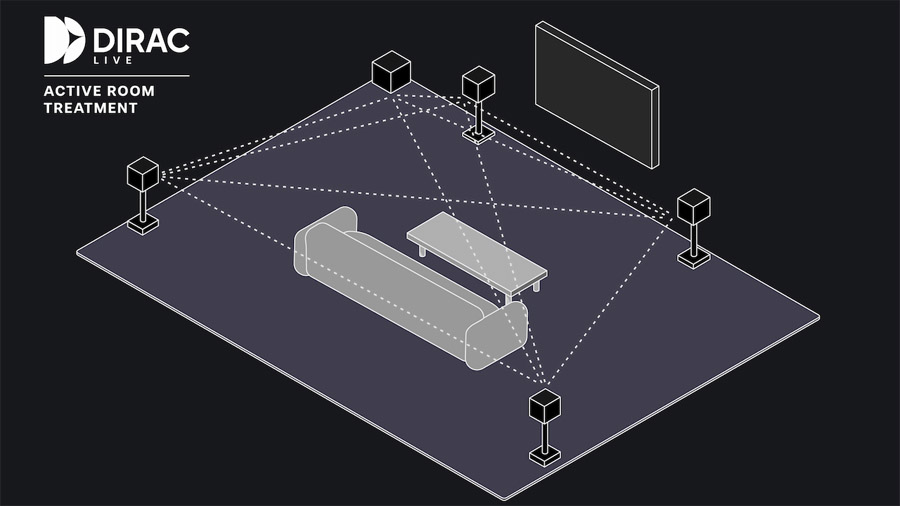
Introduced in 2023, Dirac Live ART takes the concept beyond traditional room correction by using the speakers in a system as a coordinated acoustic control network. The goal is to reduce low frequency resonances and improve bass consistency across the listening area, especially in rooms that do not behave nicely because, naturally, rooms rarely do.

miniDSP has built a global reputation for flexible, high-performance DSP tools that empower enthusiasts and professionals alike,” said Rikard Hellerfelt, VP & Head of BA Consumer Electronics. “By integrating Dirac Live Active Room Treatment into the new Tide16, miniDSP is making cutting-edge room optimization accessible to a wider audience, unlocking studio-grade performance in real-world listening rooms.”

Advertisement

What Does the miniDSP Tide16 Actually Do?

tide16-angle

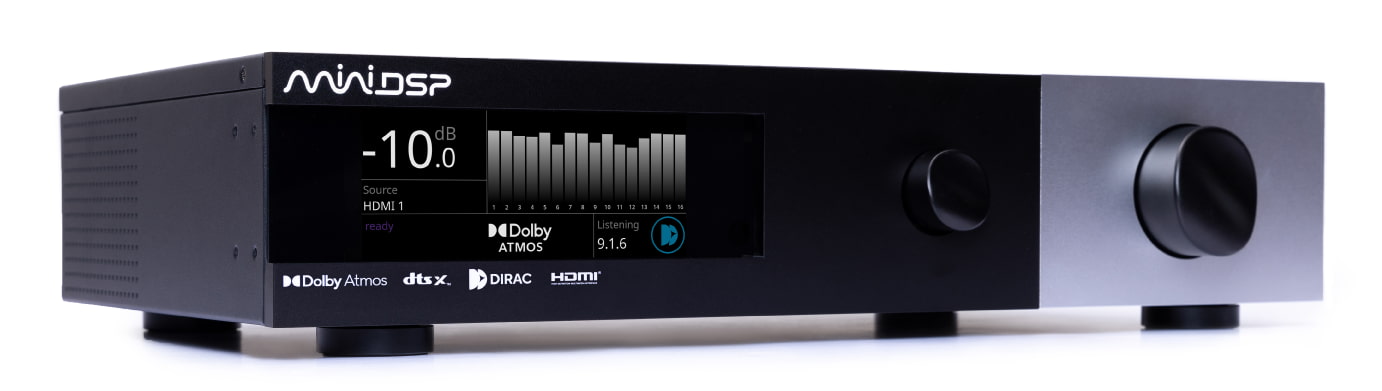
The miniDSP Tide16 is not a receiver in the usual living room sense. There are no amplifier channels inside, and it is not designed to be an all-in-one box for someone plugging in five speakers and calling it a day. Think of it as the control center for a more advanced stereo, home theater, immersive audio, or custom installation system.

Its job is to accept audio from sources, process that signal, apply room correction, manage bass, decode formats such as Dolby Atmos and DTS:X, and then send the corrected signal out to external power amplifiers or active speakers. That is where the 16 balanced XLR outputs matter. Tide16 can support complex layouts, including 9.1.6 systems, depending on the source material, speaker layout, and the rest of the system.

Connectivity includes HDMI, Toslink, USB Audio, balanced XLR and unbalanced RCA stereo analog inputs, plus Bluetooth for wireless playback. That gives Tide16 enough flexibility to work in a serious two channel system, a dedicated theater, an immersive audio room, or a professional listening space. A calibrated microphone is sold separately, so buyers should factor that into the final cost and setup process.

Dirac Active Live Room Treatment Diagram

The headline feature is the inclusion of the full Dirac Live suite out of the box: Dirac Live Room Correction, Dirac Live Bass Control, and Dirac Live Active Room Treatment. That matters because Dirac licenses are often an added expense on competing products, and those costs can add up quickly.

Dirac Live Room Correction addresses frequency and timing issues caused by the room and speaker placement. Dirac Live Bass Control focuses on integrating subwoofers with the main speakers so the low end is more consistent across more than one seat. Dirac Live ART goes further by using multiple speakers in the system as a coordinated acoustic control network. Instead of treating each speaker and subwoofer separately, ART uses Dirac’s MIMO technology to help reduce low frequency decay and room resonances.

Advertisement

That does not mean Tide16 replaces smart speaker placement, competent setup, or physical acoustic treatment. Anyone expecting software to turn a bad room into Abbey Road by Tuesday is going to need a chair and a quiet moment. But for systems with multiple speakers, subwoofers, and enough complexity to make manual setup painful, Tide16 gives users a powerful DSP platform with the Dirac tools already included.

tide16-rear

The Bottom Line

The miniDSP Tide16 matters because it brings 16 channel immersive audio processing, Dolby Atmos and DTS:Xdecoding, advanced bass management, and the full Dirac Live suite into a $3,500 processor. That price is not pocket change, but it is aggressive for a processor that includes Dirac Live Room Correction, Dirac Live Bass Control, and Dirac Live Active Room Treatment rather than treating them like toll booths.

Advertisement. Scroll to continue reading.

Tide16 is not a traditional AVR. There are no amplifier channels inside, so buyers still need external amplification, speakers, subwoofers, and a calibrated microphone. Its strength is control: 16 balanced XLR outputs, support for complex layouts like 9.1.6, multi subwoofer integration, and Dirac ART’s ability to use the speaker system as a coordinated tool to reduce low frequency room issues.

Advertisement

The right buyer is an enthusiast, integrator, or system designer building a dedicated theater, active speaker system, advanced stereo setup, or multi subwoofer room where precision matters more than plug and play convenience. At $3,500 before amps, cables, microphones, and setup time, Tide16 is not cheap. But for users who want Dirac ART and 16 channel flexibility without jumping into far more expensive processor territory, it could be a very important box.

For more information: minidsp.com

Source link

Advertisement
Continue Reading

Tech

Valve’s Steam Deck Sells Out Again, Even After 40% Price Increase

Published

on

Valve’s Steam Deck has sold out again despite a steep price increase that pushed the 1TB OLED model as high as $949 — about $300 above its original price. “Even with the $300 price bump, the Steam Deck sold out after less than 24 hours back in stock,” reports IGN’s Jacqueline Thomas. “I don’t know how many units Valve was able to stock into its store, but it does seem like Valve spent a couple weeks building up its stock before putting the handheld back on its store.” IGN reports: Over the last couple weeks, Valve has been receiving plenty of “game console” shipments from China. At first, I thought this was a sign that the company was getting ready to finally release the Steam Machine, but it looks like at least a portion of these shipments â” if not all of them — were Steam Deck restocks. That’s a lot of Steam Decks to sell through at these inflated prices, but it’s also possible that Valve is just staggering its stock so that its delivery infrastructure isn’t overwhelmed.

Now its just a question of when the Steam Deck will come back in stock. Before yesterday, the Deck was sold out for months. At the time, it was the most affordable way to get into PC gaming, especially in the face of the RAM crisis. That’s no longer true, but it looks like the Steam Deck’s popularity is enough to make it sell out regardless. Maybe the higher price will at least help Valve keep it in stock for people who still want to buy it, no matter the cost. Earlier this week, Valve announced a price increase of more than 40% for two of its Steam Deck models, citing “rising memory and storage costs.”

The price changes, according to Valve, reflect “the current state of component costs and other global logistical challenges across the industry as a whole.”

“The 512GB tier of its OLED handheld gaming PC — the newer model with an upgraded display — will now cost $789, an increase of 43%,” notes the BBC. “The larger 1TB model will cost $949, an increase of 46%.”

Advertisement

Source link

Continue Reading

Tech

Your hard drive is giving away your browsing habits and websites can see it

Published

on

Your browsing habits may not be as private as you think, even with all the right precautions in place. According to Ars Technica, security researchers have uncovered a new attack technique that lets a malicious website figure out which other sites and apps you have open. You do not need to click anything, download anything, or grant any permission; just visiting the page is enough.

How can websites spy on your browsing activity through hard drive?

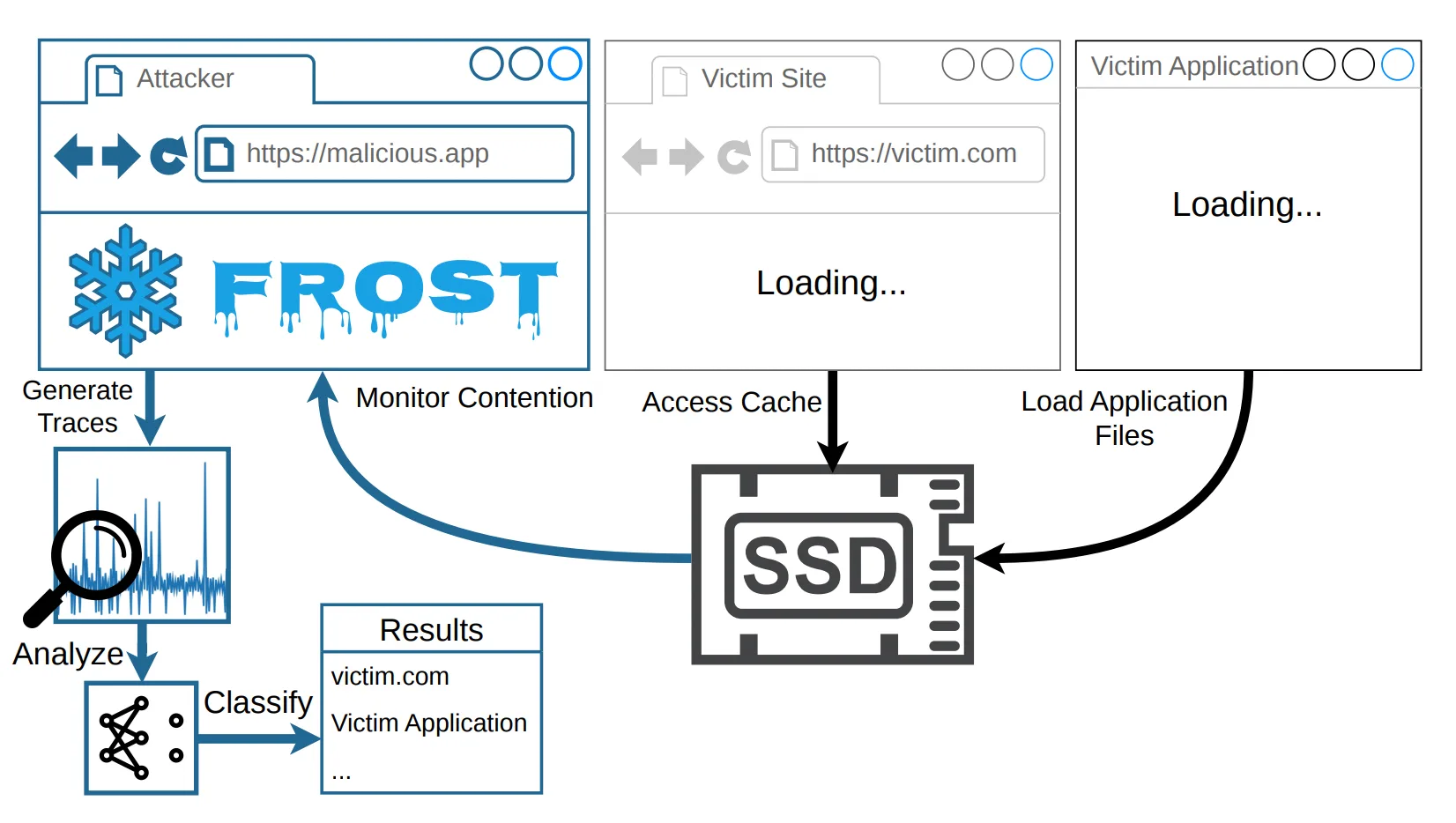
The technique is called FROST, short for Fingerprinting Remotely using OPFS-based SSD Timing. Every website and app you use generates its own unique pattern of activity on your SSD, the storage drive inside your computer.

FROST exploits a browser feature called the Origin Private File System, or OPFS, which quietly lets websites store files on your local drive without asking permission first.

The attacker’s page creates a large file on your drive and then listens to the tiny speed fluctuations that happen when your SSD is busy handling other tasks. Those fluctuations are fed into an AI model that has been trained to recognize the telltale patterns of specific websites and apps.

According to the research paper, the technique correctly identified which websites a person had visited with about 89% accuracy, and which apps were running with about 96% accuracy, when tested on an Apple M2 Mac.

Advertisement

The attack also works across different browsers simultaneously, meaning visiting the attacker’s page in Chrome can still expose what you are doing in Safari.

The browsers won’t fix this, but you can protect yourself

FROST has not been spotted in the wild yet, which is reassuring. It also only works while the offending tab is open, so closing it immediately stops the attack.

Google, Apple, and Mozilla were all informed, but none have committed to a fix. Your best defense right now is keeping an eye on your available disk space. A sudden, unexplained drop in storage is a red flag worth investigating immediately.

Browser-level fixes have been proposed, including capping how much disk space OPFS can claim, but given the browser makers’ responses, those changes are not coming any time soon.

Advertisement

Source link

Continue Reading

Tech

Microsoft tests the 15-character limit of Windows Server admins’ patience

Published

on

OSes

May security update trips over hostnames of a very specific length

Windows Server 2016 might be long in the tooth but that isn’t about to stop Microsoft breaking stuff.

The May 12 security update introduced another bug for administrators to worry about. According to Microsoft, if the server hostname is exactly 15 characters long (like, for example, THEY-NEVER-TEST), domain controller discovery might fail.

Advertisement

In the notes for the glitch, Microsoft wrote: “When the hostname is 15 characters long, DCLocator calls (for example, using nltest /dsgetdc: /pdc) will return ERROR_INVALID_PARAMETER, preventing applications and administrative tools from locating a domain controller.”

In other words, anything that depends on a domain controller lookup might stop working. As an example, Microsoft gave Distributed File System (DFS) Namespace management, which would certainly be inconvenient. DFS Namespaces is a Windows Server role that allows admins to group shared folders across different servers into a single namespace. A single path can lead to files located on multiple servers. Unless, of course, the domain controller lookup is broken.

Microsoft lists no workaround for affected users, though changing the server hostname to something other than 15 characters would presumably avoid the trigger. “The issue is under investigation, and additional information will be shared as soon as it becomes available,” it said.

Microsoft still officially supports Windows Server 2016. Mainstream support ended in 2022, but extended support will continue until January 12, 2027. Microsoft is offering up to three more years of support via the Extended Security Updates (ESU) program after that.

Advertisement

Earlier this year, Esben Dochy of Lansweeper told The Register that the operating system accounted for just 2.2 percent of all Windows devices it tracks, but 20.3 percent of all servers. That figure is unlikely to have dropped dramatically in the months since, so there is a fair chance that an administrator with a 15-character hostname could be affected.

In addition to the Windows Server 2016 problems, the May 2026 security update has failed during installation on some Windows 11 devices when the EFI System Partition is insufficient in size.

It is reassuring to know Microsoft’s talent for breakage shows no bias toward any particular vintage.   ®

Source link

Advertisement
Continue Reading

Tech

What do you need to know about the EU Pay Transparency Directive?

Published

on

Susan Doris-Obando discusses the upcoming deadline and explores the potential challenges and opportunities for professionals amid the policy change.

The EU Pay Transparency Directive, which EU member states are required to implement by 7 June 2026, is a policy that will “significantly reshape employment law around pay transparency within the EU, explained Susan Doris-Obando, an employment partner at Dentons Ireland.

“The intent is to reduce the EU gender pay gap, which currently stands at around 12pc, by having greater transparency around pay and making it easier for employees to bring equal pay claims,” she said.

Initially brought into effect in June 2023, EU member states were told that they would have until the upcoming 2026 deadline to implement the directive. This means employers will have to acknowledge a number of changes in hiring and the dissemination of employment-relevant information.

Advertisement

“During the hiring process, employers will be required to provide candidates with information on initial pay or pay ranges and ensure that job vacancy notices and job titles are gender-neutral and recruitment procedures are conducted in a non-discriminatory manner,” explained Doris-Obando.  

“They will be prohibited from asking candidates about their current or past pay and from using pay secrecy clauses. During the employment relationship, employees will have the right to request and receive, within a reasonable period and in any event within two months, information in writing about their individual pay level and average pay levels, broken down by gender for workers doing the same work or work of equal value.”  

It will also be the responsibility of the employer to ensure that the criteria under which an employee’s pay, pay level and pay progression are determined, is made easily accessible. Additionally, employers with more than 250 employees will be required to report annually on the gender pay gap in their organisation. 

Reporting is mandated every three years for employers with a workforce of more than 150 people but less than 250, starting with a first report in June 2027. Organisations with 100 or more employees and less than 150 employees will be required to first report in June 2031.  

Advertisement

Doris-Obando noted the main difference between the directive and the current gender pay gap reporting policies already in place in many EU member states is that the new regulations require reporting on the categories of workers – namely, those doing the same work or work of an equal value. 

She said: “If the report reveals a pay gap of more than 5pc within a category of the same work or work of equal value that cannot be justified by objective, gender-neutral criteria and not remedied within six months, employers will be required to take action in the form of a joint pay assessment carried out in cooperation with employee representatives.”

It is also important to note that the directive does not prevent employers from paying workers who perform the same work or work of equal value differently, provided that it is based on objective, gender-neutral and bias-free criteria, such as performance and competence.

Moreover, as Doris-Obando stated, many member states – including Ireland – are going to miss the implementation date and will have to take a phased approach to implementation. Ireland to date, has only draft legislation in place around the recruitment obligations.

Advertisement

Directive consequences

Of the potential consequences, she explained that the organisations that fail to implement the new rules will inevitably be faced with increased claims for equal pay, with the directive effectively shifting the burden of proof in claims to the employer in instances where the employee establishes a prima facie case. 

“If an employer does not comply with their gender pay reporting obligations or pay level information requests, then the burden would likely shift to the employer, unless the breach is manifestly unintentional and minor in character. Significant gender pay gaps may also attract adverse publicity, impacting on recruitment and retention.”

She also anticipates issues in building a robust gender-neutral job evaluation and classification system that can correctly categorise those doing the same work or work of equal value. This is not an easy exercise, she finds, but now is the time to start preparing. 

“Work of equal value is often not immediately obvious,” she said. “For example, in some cases, store employees have been found to do work of equal value to warehouse employees. The next step will be to understand the gender pay gap within each category of worker and consider any objective gender neutral justifications. Any remediation steps should then be addressed.

Advertisement

“Policies should be put in place outlining the criteria used to determine pay, pay levels and pay progression and how to deal with pay on recruitment and in responding to employee pay level information requests. Multinational employers will need to consider whether to adopt global policies and consider their approach to member states’ gold-plating the directive.”

Of the long-term effects of the directive, Doris-Obando stated employee representatives are going to have a much larger role to play, particularly, in conversations around joint pay assessments, where typically their role has been short-term around collective redundancy or Transfer of Undertakings (Protection of Employment) consultations.

Don’t miss out on the knowledge you need to succeed. Sign up for the Daily Brief, Silicon Republic’s digest of need-to-know sci-tech news.

Advertisement

Source link

Continue Reading

Trending

Copyright © 2025