After public outrage, California lawmakers are moving closer to exempting open-source operating systems from the sweeping age-bracketing regime mandated by last year’s Digital Age Assurance Act (AB 1043). Nonetheless, the current bill still jeopardizes internet users’ speech, privacy, and security.
While the open source exemption, if passed, would improve the law, the remaining amendments proposed by AB 1856 would require all web browsers and websites to request and collect users’ ages. This is an expansion of last year’s AB 1043’s age-bracketing system that compounds its constitutional harms to users’ speech, privacy, and security. As AB 1856 moves on to the Senate, EFF will continue fighting for amendments that reduce those harms.
AB 1856 Extends AB 1043’s Age-Gating Regime
Last year, California passed AB 1043, which requires all operating systems and app stores to create age-bracketing systems that segment users based on their ages. As we’ve written, that regime is a recipe for censorship: it creates unnecessary and unconstitutional barriers to accessing lawful online speech, threatens our right to anonymity, and pressures online services to collect troves of valuable and sensitive user data. On top of that, A.B. 1043’s wide-sweeping compliance burdens impose disproportionate harms on the open-source ecosystem that underpins much of the modern web.
Given these flaws, lawmakers introduced AB 1856 this year as a supposed “clean-up” bill for AB 1043. But instead of sticking to fixing AB 1043’s unique and serious harms (like its impact on open-source operating systems), AB 1856 also expanded the regime even further—extending its age-bracketing requirements beyond operating systems and app stores to browsers and websites.
Advertisement
EFF opposed AB 1856 on two grounds, which we explained in our opposition letter to the Assembly:
The harms that age-gating regimes pose to users’ speech, privacy, and anonymity; and
The disproportionate harms that this particular regime imposes on open-source developers.
Open Source Concerns Somewhat Alleviated By Amendment
On May 28th, AB 1856 passed the Assembly in a nearly unanimous vote (68-1).
Before that vote, however, AB 1856 was amended to relieve the compliance burden on open-source operating systems. This is a meaningful improvement and a welcome relief for open-source developers, who have been loud and clear about how much of an existential threat A.B. 1043’s age-gating mandate would pose.
The new exception reads:
“Operating system provider” does not mean a person or entity that distributes an operating system or application under license terms that permit a recipient to copy, redistribute, and modify the software.”
EFF understands this amendment to exempt open-source operating systems from the requirement to collect and transmit users’ age-bracket data. That is a definite win for open-source developers. The bill is narrower now than it was before, and lawmakers clearly responded to concerns raised by EFF and the broader open-source community.
Advertisement
Some important questions still remain—for example, it is unclear how the law would apply when an open-source operating system is incorporated into a commercial product or service. And, given the structure of where the exemption is placed under the “operating system provider” definition, lawmakers could stand to clarify that the exemption applies to open-source operating systems and applications.
Nonetheless, that ambiguity aside, this amendment does substantially reduce the threat that AB 1043 could have on many open-source developers.
AB 1856 Still Expands the Problematic Age-Bracketing Regime
Don’t get us wrong—if this bill passes, we will be very happy that AB 1043 does not pose nearly the amount of harm to our friends behind open-source operating systems. But even after these amendments, EFF remains opposed to AB 1856 because it ultimately expands California’s sweeping age-bracketing framework far beyond the original scope of AB 1043.
In AB 1856 and its amendments, the Assembly failed to address the core problem with AB 1043’s age-bracketing regime: mandated age-gating systems threaten users’ speech, privacy, anonymity, and security.
Advertisement
Even though AB 1043 does not explicitly require companies to perform age verification, it nonetheless imposes a liability structure that strongly pressures companies to verify users’ ages anyway. In practice, that could lead to more ID checks, more biometric scanning, more invasive data collection and risk of breach, and more barriers to adults’ and young people’s lawful speech.
In fact, instead of narrowing AB 1043’s wide net, AB 1856 expanded it to add browser providers and website operators to the list of entities that must comply with its age-bracketing requirements. This dramatically broadens the scope of AB 1043 and pulls more services, developers, and users into an anonymity- and privacy-destroying data collection framework that has not yet been implemented or evaluated. The result would make it nearly impossible for regular internet users to avoid AB 1043’s age gates.
The Fight Moves to the Senate
On those grounds, EFF will continue to oppose AB 1856. Though it has passed the Assembly, the fight is not over. As the bill moves through the Senate, we’ll continue to push for amendments that actually “clean up” and narrow the scope of AB 1043, and offer more protection to users from the harms of age-gating systems.
[Chris Doble] has high ambitions: he’s making his own scanning-electron microscope, and as the first step he’s built a high-vacuum system. This required its own controller to manage the various electronics involved in the system, which he’s documented and open-sourced.
The vacuum system itself starts with a rotary-vane roughing pump, which can bring a chamber down from atmospheric pressure to about 10-3 millibar. This is still too high a pressure, so the second stage is a turbomolecular high-vacuum pump, which can operate from 18 millibar down to 10-7 millibar. To protect the turbomolecular pump in case the roughing pump suddenly stops, it includes an anti-suckback valve. Connected to these pumps is a pressure gauge which uses a pair of sensors to sense the entire pressure range. All this setup worked well, but the turbomolecular pump and the pressure sensor each used their own interfaces, while [Chris] wanted a single interface for the eventual microscope.
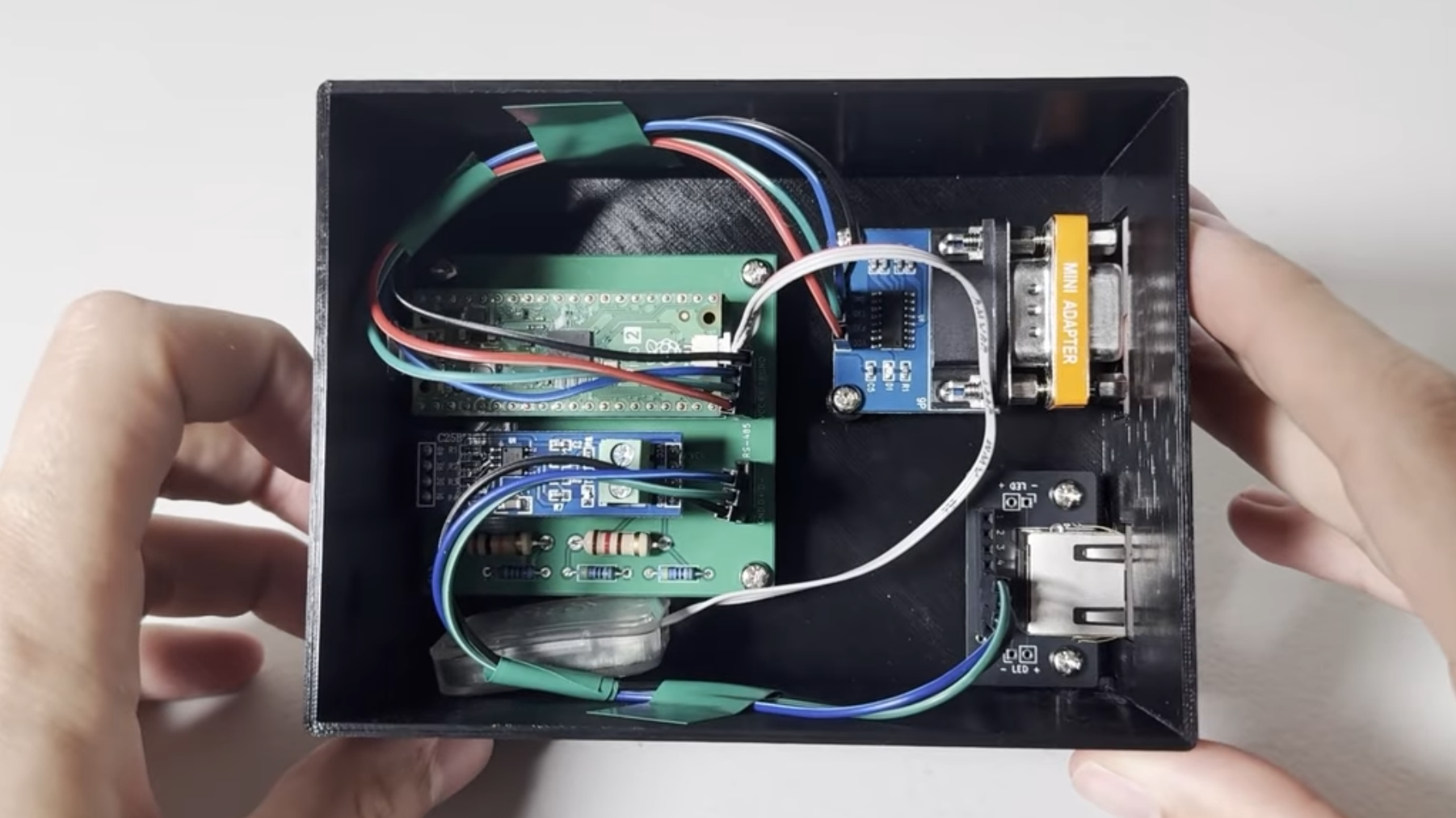
[Chris] therefore designed his own controller based on the Raspberry Pi Pico 2, with firmware written in Rust. The pressure gauge uses an RS-232 interface, which he connected to the Pico’s UART pins using an RS-232 level shifter, with a null modem to swap over the transmitting and receiving pins. The turbomolecular pump used an RS-485 interface, which required a converter circuit and some level-shifting resistors. A custom PCB and 3D-printed case hold the final circuit, which provides a host computer with a single USB interface. When [Chris] tested the controller, the vacuum chamber reached a pressure of 10-6 millibar, and was still slowly falling when he ended the test.
Understanding where your deleted files actually go
Unsplash
When you delete a file, it does not disappear immediately. It sits in a kind of digital purgatory, existing in fragments on your drive before being permanently wiped to free up space.
If a hacker encrypted or erased your data, you could theoretically reach back in and pull those files out before they vanish for good. The problem is that modern SSDs, which power most laptops and computers today, manage this space carelessly.
When the drive needs space, it clears deleted data based purely on efficiency, with no awareness of how recently files were removed. Files deleted during a ransomware attack could get wiped first, while old junk files from weeks ago survive.
How your SSD can be turned into a cybersecurity tool
The system works by sequencing deleted data by age, so the oldest deleted files go first, and the most recently deleted files stay protected for as long as possible. It also extends the window for recovering deleted data to up to 126 days, improving data protection by at least 60% with minimal impact on drive speed.
Since the storage drive operates independently from your operating system, it can keep protecting your data even after hackers have taken full control of your software. The research is now in active discussions with industry partners about bringing the technology to market.
Proton Mail has introduced a new way for Gmail users to switch to its hosted email service. The company is making it easier for people to leave Gmail by adding an option to send and receive emails using a Gmail address directly within Proton Mail. Proton argues that users should… Read Entire Article Source link
You don’t infect anyone in Russia or other CIS countries
Even ransomware cartels make mistakes, and in this case, it was a biggie that could have landed the responsible crim in a Russian gulag: accidentally infecting a company located in a Commonwealth of Independent States country.
In what threat-hunter Dominic Alvieri deemed the ransom “dumbass of the day,” Nova, the affiliate program for ransomware crew RAlord, on Tuesday issued an apology to Eriell Group, a major oilfield services company with headquarters in Uzbekistan and a corporate office in Moscow.
Advertisement
Apparently, Eriell contacted Nova and notified the ransomware operators about an affiliate’s mess-up.
The affiliate has since been banned from the criminal operation, we’re told. In addition to issuing a “formal apology,” the ransomware gang promised to assist Eriell with the recovery process “free of charge.” The malware slingers claimed they didn’t encrypt any files, and pledged not to leak any of the stolen data.
“Apparently, the first rule of ransomware club, you don’t attack organizations in the Commonwealth of Independent States (CIS), is still very much in effect in 2026,” Recorded Future threat intelligence analyst Allan Liska told The Register.
While cybercrime is technically illegal in Russia and other CIS countries, their governments often provide safe harbor for extortionists and other financially motivated crims – especially if they also happen to work day jobs as state-sponsored hackers – and local police look the other way unless the gangs infect any in-country organizations.
The first rule of ransomware club: You don’t attack organizations in the Commonwealth of Independent States
Advertisement
Earlier this year, notorious data-leak-and-extortion crew Scattered Lapsus$ Hunters claimed they had gained “full access” to Resecurity’s systems and stolen “everything.” Resecurity later offered its “congratulations” to the cybercrime crew, which had fallen into the threat intel team’s honeypot – resulting in a subpoena being issued for one of the data thieves.
Pro-Russian hacktivist crew CyberVolk got sloppy when they debuted a ransomware service late last year. They hardcoded the master keys – this same key encrypted all files on a victim’s system – into the executable files, thus allowing victims to recover encrypted data without paying any extortion fees.
While that mess-up worked in the victim orgs’ favor, another coding error committed by Sicarii malware developers makes it nearly impossible for companies to recover their files: the Sicarii encryptor generates a new cryptographic key pair during every execution – but then discards the private key, meaning there’s no recoverable master key.
Similarly, a programming mistake in Nitrogen ransomware prevents the gang’s decryptor from recovering victims’ files, again making paying up futile.
Advertisement
Trellix VP of threat intel strategyJohn Fokker recently told us that he got so sick of seeing the security industry “glorifying threat actors,” that he and his team decided to troll the baddies, and started publishing the Dark Web Roast.
“These are just individuals, they just use computers, and they just want to steal your data and make money,” Fokker told The Register. “They’re not mythical. They don’t have superpowers.” And just like any other individual – or superhero – they sometimes slip up, and give the rest of us a moment of snarky joy. ®
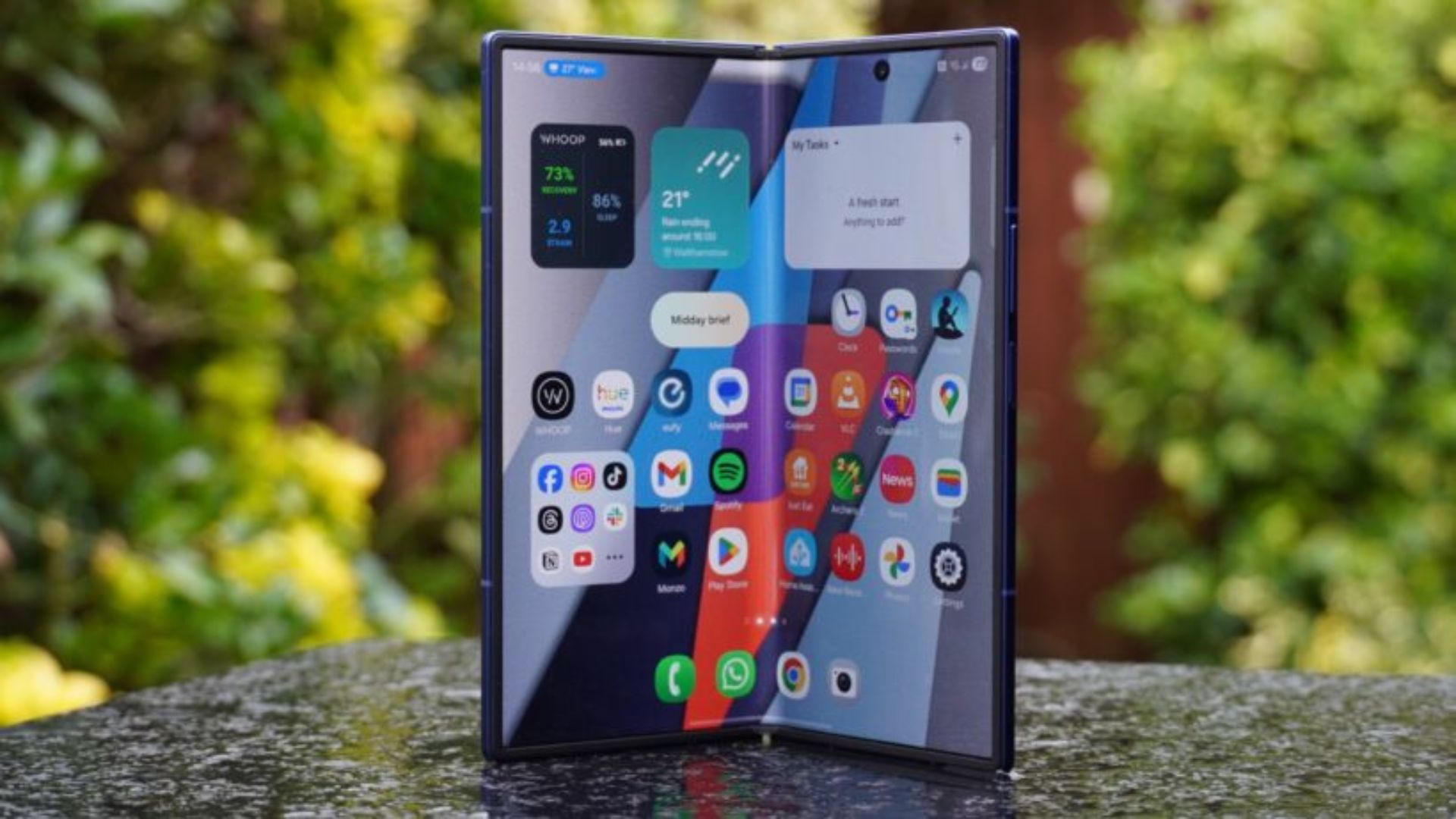
Samsung’s next foldable could finally tackle three of the biggest complaints people have had about book-style folding phones for years.
A fresh leak has revealed what appears to be the most detailed look yet at the rumoured Galaxy Z Fold 8 Wide, which Samsung is expected to unveil alongside the Galaxy Z Fold 8 Ultra later this summer.
According to the leak, the Galaxy Z Fold 8 Wide could weigh just 201g, making it noticeably lighter than the current Galaxy Z Fold 7. That would put Samsung’s large-screen foldable surprisingly close to traditional flagship phones, while offering a a tablet-sized display when unfolded.
The leak also points to a 4.5mm thickness when open, alongside a larger 4,800mAh battery and support for 45W charging. If accurate, that would represent a welcome upgrade over previous Fold models which have often lagged behind rivals when it comes to battery capacity.
Advertisement
However, the most interesting claim concerns the display itself.
Elsewhere, the Fold 8 Wide will feature a 5.4-inch cover display and a 7.8-inch inner screen with a 4:3 aspect ratio. Camera upgrades may also be on the cards, including a new 50MP primary sensor capable of capturing 24MP images.
Advertisement
As always with pre-launch leaks, there’s reason to be cautious. Samsung has yet to confirm the existence of a Fold 8 Wide model, and specifications can change before release.
Still, if these details prove accurate, Samsung may finally have a foldable that feels less like a compromise. A lighter chassis, larger battery and less visible crease could do more to improve the Fold experience than flashy AI features ever could.
Samsung is widely expected to reveal its next foldables at a Galaxy Unpacked event which is heavily rumoured to take place on July 22nd, although that is also still unconfirmed.
Ask for weather apps for iPhone, and you’ll get dozens of recommendations. Some stand out with unique features you won’t find elsewhere, like checking weather along your driving route. The problem is a lot of these include paid subscriptions for their best features, and there’s one free app you already have that can probably do 99% of what you want: iPhone’s Weather app. The weather app may not always have the best weather predictions, but it’s shockingly good for being ad- and subscription-free software.
Being an Apple app, it looks very sleek, adhering to the brand’s minimalistic interface, and — you would think — offers nothing substantial beyond that glossy exterior. You’d be wrong, as some of the best features of the iPhone Weather app are not immediately obvious.
Whether you’re a long-time user of Apple’s Weather app or someone who’s barely touched it, these are the software’s best-kept secrets, plus a couple of somewhat hidden extra functionalities. These recommendations assume that you’re updated to the latest version of iOS.
Advertisement
Use widgets on your Home Screen and Today View page
Jordan Wirth/SlashGear
Perhaps the best way to use the Weather app is to never have to open it; That’s the beauty of the Weather widget. To put a widget on the Home Screen and get at-a-glance forecasts, press and hold on an empty space on your Home Screen until the app icons start wiggling, then hit “Edit” in the top-left corner and choose “Add Widget.” Search in the pop-up menu for “Weather.” Most people would probably go for the 1×1 square that only shows a location’s current temperature and a general forecast with highs and lows, but there’s a lot more, including a 1×2 rectangle and massive 2×2 square with full-week forecasts, temperature ranges… the works. However, these take a full 1/3 or 2/3 of your screen.
Bear in mind that you can add additional weather locations for each individual widget by tapping it in wiggle mode and adding a location. For example, you could have one widget for home and another for your workplace. Conversely, you could add the weather app to a Smart Stack or custom-made widget stack, to bundle together multiple widgets into the space of a single 1×1 square.
Advertisement
If your Home Screen is getting a little crowded, then consider putting the weather widget in Today View. This is the side menu overlay you summon from Home Screen with a right swipe. It exists only for widgets, making it perfect for this purpose. I find this keeps the home screen a lot cleaner and more focused, since even the small 1×1 widget takes up the space of four app icons.
Advertisement
Check air quality
Jordan Wirth/SlashGear
Air pollution is one of these threats that many don’t take seriously enough. Fine particles produced by everyday city traffic and other factors pose a serious danger to respiratory health. Wearing a mask or switching on a quality air purifier on smoggy days should be taken more seriously. Luckily, the Apple Weather app includes air quality data, so you don’t need to download a third-party app just to get this information on your phone.
To find air quality data, select a location and scroll down to the Air Quality section. You can tap it for more information and see comparisons to the day before, potential health risks, the primary pollutants at play, and further details on additional particulate matter, in case that information is relevant to you. Otherwise, you can tap the map icon in the bottom left corner and see a full world map. Use this to see air quality in the general region surrounding your home, or compare it across locations.
The only downside is that iPhone currently does not have a way to show air quality from a widget. The fastest way we found was asking Siri for the air quality, but this is one of these things you shouldn’t use a vocal assistant for, as it only provided the bare minimum info. For easier access, we’d recommend apps like IQAir AirVisual, which supports Home Screen widgets and is an amazing app besides.
Advertisement
Enable weather notifications
Jordan Wirth/SlashGear
There’s nothing worse than going out on a clear weather, only to get soaked by a sudden downpour later on because you didn’t have an umbrella. Consider yourself lucky if you don’t live in a place where weather can turn on a dime from sunny to rainy, without warning. Either way, it helps to have the iPhone Weather app notify you when the clouds are about to rejoin the rivers.
On the main location selector screen, press the three-dot button on the top right and choose “Notifications.” You have two options: Severe Weather and Next-Hour Precipitation. Pretty self-explanatory, and probably the only weather notifications most people need. Note, you can change these granularly by enabling notifications for your current location and/or any other location you have added.
We should note that if you want a more aggressive alert for weather-related emergencies (like heavy rain leading to a flood), these are already enabled by default and make a loud noise regardless of notification settings. Go to Settings > Notifications and make sure “Emergency Alerts” is toggled on, just in case. Depending on where you live, these may be impossible to turn off.
Advertisement
See information on moon phases, sunrises, and sunsets
Jordan Wirth/SlashGear
There are few things quite as majestic as a full moon on a quiet night. The problem is most of us only eyeball the moons waxing and waning, and as a result miss its best moments. The iPhone’s Weather app has moon cycles baked in with all the detail a casual viewer could ever want.
Scroll down on the overview for a location and tap the moon section. You’ll be surprised just how much information there is here, from the current moon phase and details on its illumination percentage, to moonset and moonrise and its distance from Earth. Scroll down a little more, and you’ll find a moon calendar with dates for new moons and full moons, plus a scientific explainer for what exactly “moon illumination” means and why moon distance can vary so much.
Equally useful is the sunrise and sunset data, which you can also tap on in the overview to see more info. You can see exact times for sunrises and sunsets to plan for the upcoming ones, or see the ones you missed. Below that, you’ll find sunrise and sunset time averages and average total daylight hours throughout the year. Although there’s no way to have the weather app notify you when sunrise or sunset is approaching, you can add a sunrise/sunset widget to your Home Screen. If you have an Apple Watch, you can set sunset and sunrise as a complication.
Advertisement
Find more information in the overview
Jordan Wirth/SlashGear
We’d wager that when most people use the weather app, they just glance at the location overview and then leave it at that. Huge shame, since there’s a dragon’s hoard of information there that takes only a single tap to access. To see what we’re talking about, tap on the weather conditionbox. Here, you’ll find detailed forecast graphs and comparisons of “actual” and “feels like” temperature, precipitation chances and totals (measured in millimeters), a forecast summarized in plain English describing the day’s weather, and more. And that’s just the first box!
It’s the same story throughout the entire overview. Tap the precipitation box to see a moving time-lapse of predicted storm patterns; Tap UV index to see how much exposure you’ll be getting throughout the day or week; Tap the wind box to see wind speed, direction, and an animated wind map. We could keep going, but you get the point.
Advertisement
What’s unfortunate is that Apple doesn’t really advertise the full depth of information hidden in the Weather app. Many get pulled into expensive subscription-based weather apps, thinking that’s the only way to find an ad-free, comprehensive breakdown, but in reality, any Apple user already has an entire weather station at their fingertips.
President Trump signed an executive order on Tuesday establishing a voluntary framework for government review of frontier AI models before public release, ending weeks of internal White House conflict over how aggressively to regulate the technology. The order, titled “Promoting Advanced Artificial Intelligence Innovation and Security,” was signed privately without the usual livestream or public ceremony, a contrast with the fanfare that typically accompanies presidential AI announcements.
The final version is substantially narrower than the draft Trump rejected on 21 May, when he scrapped a planned signing ceremony over concerns that the order “could dull America’s edge on AI technology.” The original draft proposed a 90-day mandatory pre-release review period and would have given the government formal evaluation authority over frontier models. The signed version asks companies to voluntarily submit models 30 days before release and participate in a collaborative framework rather than submitting to mandatory testing.
What the order does
The executive order establishes three main mechanisms. First, a voluntary pre-release review framework in which AI developers can engage the government to determine whether models under development qualify as “covered frontier models,” provide access for up to 30 days before planned release, and collaborate on selecting “trusted partners” for early access. The framework is explicitly voluntary, meaning companies can decline to participate without penalty.
Second, the order creates an AI cybersecurity clearinghouse within 30 days, coordinated by the Treasury Secretary, the National Cyber Director, the NSA, and CISA. The clearinghouse will scan for software vulnerabilities, validate discoveries, and coordinate remediation and patch distribution, a direct response to the Mythos crisis that demonstrated how AI-discovered vulnerabilities can outpace existing disclosure and patching processes.
Advertisement
Third, federal agencies are directed to develop benchmarks for assessing AI models’ cybersecurity capabilities and to strengthen the government’s own security defences against AI-enabled threats. The order also addresses AI safety research, though the specific provisions are less prescriptive than what the original draft contained.
The differences between the scrapped draft and the signed order reflect the victory of the pro-industry faction within the White House. The 90-day mandatory review was reduced to a 30-day voluntary window. The formal government evaluation authority was replaced with a collaborative framework. The reporting requirements for companies developing powerful models, which would have echoed provisions in Biden’s repealed AI executive order, were softened to avoid what industry allies characterised as regulatory overreach.
Silicon Valley’s objections to the original draft were decisive. AI companies argued that mandatory pre-release testing would slow American innovation, create a competitive disadvantage relative to Chinese firms facing no equivalent requirements, and establish a precedent for government gatekeeping of technology deployment. The signed order addresses those concerns by making participation voluntary and framing the government’s role as collaborative rather than regulatory.
The gap it leaves
The voluntary framework means the order’s effectiveness depends entirely on whether AI companies choose to participate. Companies already engaged in pre-release testing with CAISI, including Google, Microsoft, and xAI, may continue or expand that cooperation. Companies that view government review as commercially disadvantageous or that are racing to ship products can simply opt out.
The EU’s AI Act, entering full enforcement in August, provides a stark contrast: mandatory requirements, statutory authority, and penalties for non-compliance. The Trump order establishes norms and creates institutional infrastructure (the cybersecurity clearinghouse, the benchmark development process) but relies on goodwill rather than obligation.
Advertisement
For the White House, the quiet signing may be the point. The order gives the administration a policy document it can reference when asked about AI oversight, creates structures that could be strengthened later, and avoids a public confrontation with an AI industry whose leaders are among the administration’s most visible supporters. Whether a voluntary framework is adequate for a technology that can discover 10,000 zero-day vulnerabilities in a month is the question the order deliberately leaves unanswered.
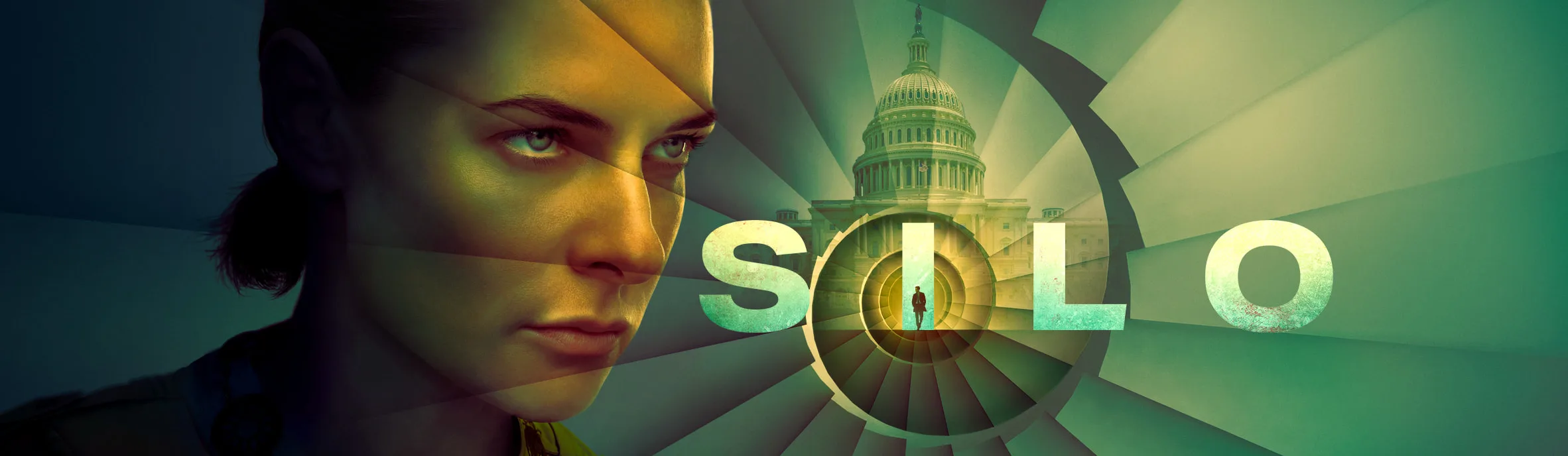
Apple TV‘s hit sci-fi series is back, and the new Silo season 3 trailer makes it clear that the show is finally ready to answer its biggest question: how did the world end?
The 10-episode third season premieres on July 3, with new episodes dropping every Friday through September 4. And if this trailer is anything to go by, the wait has been worth it.
Juliette is back, but she’s not quite herself
Rebecca Ferguson’s Juliette survived the incinerator at the end of season 2, but she didn’t walk away unscathed. She’s lost all her memories, and that’s where things get truly exciting.
Advertisement
Apple TV
Camille Sims (Alexandria Riley) has been feeding her a false narrative for three months, and mysterious pills spotted in the trailer appear to be playing a role in keeping those memories buried. A voice identified only as The Algorithm confirms it, telling Camille that Juliette has had no memories other than the ones she was given.
Apple TV
There’s even a cryptic note warning Juliette not to take the mysterious pills, so someone out there wants her to remember. This memory manipulation is a bold departure from Hugh Howey’s Wool novels, and it adds another layer of tension.
The trailer also suggests that Juliette will become the mayor of the silo in season 3, settling into a powerful role she has no memory of earning. On top of all that, a countdown in the trailer hints that the silo itself is running out of time.
Apple TV
As one character ominously puts it, the amount of panic, if people knew how little time they had left, would be unthinkable. Meanwhile, Steve Zahn also makes a welcome return as Solo, whose fate was left uncertain at the end of season 2.
The past timeline is where Silo season 3 gets really interesting
Apple TV
While Juliette’s arc drives the present-day story, the trailer’s most exciting reveal is its deep dive into the past. Journalist Helen Drew (Jessica Henwick) and Congressman Daniel Keene (Ashley Zukerman), who were briefly introduced in the season 2 finale, are now central characters.
Their storyline is set centuries before the events of the silo and draws heavily from Shift, the second book in Howey’s trilogy. The two uncover a conspiracy involving what appears to be a radiological weapon attack, a chain of events that ultimately forced humanity underground. As the trailer tagline puts it, “the truth lies in the past.”
Apple TV
Joining the cast this season are Laura Innes, Jessica Brown Findlay, Morven Christie, Reed Birney, Matt Craven, and Colin Hanks. Silo season 3 looks like the show has rediscovered everything that made season 1 so gripping – the paranoia, the mystery, and that nagging sense that nobody can be trusted.
With an origin story that goes back centuries now in play, this is shaping up to be its most ambitious chapter yet. If you haven’t started watching, now is the perfect time to catch up before July 3.
This week marks one of the biggest events on the modern video game calendar, as studios from around the world bring their newest projects to the annual Summer Game Fest event in California. This includes a new look at Amazon Game Studios’ impending reboot of the long-running Tomb Raider franchise, coming in early 2027.
Tomb Raider: Legacy of Atlantis is a ground-up “reimagining” of the original 1996 Tomb Raider, which celebrates its 30th anniversary in October. Once again, it follows British archaeologist Lara Croft (Alix Wilton Regan) on an expanded look into her journey to collect the scattered pieces of an artifact from the lost civilization of Atlantis. Along the way, she’ll solve puzzles, navigate treacherous labyrinths, and fight dinosaurs, as one does.
The original Tomb Raider’s story and environments have been rebuilt with Unreal Engine 5 for Legacy of Atlantis, which turns the game into less of a series of vaguely connected puzzle boxes and more of an open-ended area that you can freely explore. It’s currently planned for release on Feb. 12, 2027.
Legacy of Atlantis is a co-production between the Polish studio Flying Wild Hog (Hard Reset, Shadow Warrior) and Crystal Dynamics, which maintains offices in Texas, California, and Bellevue, Wash.
It’s also the first step in Amazon’s planned franchise reboot of Tomb Raider, which was first announced back in 2022. Legacy will lead directly into a brand-new game, Catalyst, which is planned for release later next year and is a direct follow-up to 2008’s Tomb Raider: Underworld.
Advertisement
(Official PlayStation image)
The new Legacy of Atlantis trailer premiered as part of Sony’s semi-regular State of Play, a livestreamed showcase of new and upcoming games for the PlayStation platform.
Other Pacific Northwest gaming news out of the State of Play included the official debut of Marathon’s second “season” of content, Nightfall, which resets players’ progress in order to present them with new challenges and an even playing field.
Rivian boss says Level 4 autonomous driving is “much closer than people think”, but Tesla is struggling to convince its own employees that the technology is reliable
Rivian’s boss believes we will have eyes-off driving within 18 months
It will be the “most disruptive feature we’ve seen”, according to RJ Scaringe
But a new report suggests Tesla engineers and staff don’t trust the technology
Rivian’s boss and CEO, RJ Scaringe, believes that we will see increasing levels of autonomous driving arriving in the coming months.
Speaking to Top Gear during a test drive of the upcoming R2, which the company hopes will be its first electric SUV with true mass appeal, Scaringe revealed that he thinks we will move from level two to three, which includes hands-off and eyes-off autonomous driving, within “the next 18 months”.
He also went on to state that he believes we will reach true Level 4 autonomous driving by the end of the decade. At that point, vehicles will be able to handle all driving tasks within geofenced zones.
Latest Videos From
Human passengers are relieved of duties because Level 4 autonomous vehicles should be capable of reaching a safe state in the event of a system failure. It is the level that most fully autonomous robotaxis currently operate in, but it is not something that has been made commercially viable to date.
Advertisement
Tesla’s CEO, Elon Musk, has regularly stated that the company’s autonomous driving technology is capable of allowing those behind the wheel to “text and drive”, as well as engage in other distracting side tasks.
But a recent Reuters report seemingly counters this, claiming that even those who work closely with the systems don’t trust them.
Speaking with nine former Tesla data labelers, a former self-driving engineer, and 11 traffic-safety researchers, the Reuters report found that seven of the former data labelers said they wouldn’t trust FSD to drive them.
Sign up for breaking news, reviews, opinion, top tech deals, and more.
Advertisement
“We have all seen it fail,” one said. Another said he wouldn’t ride in a Tesla robotaxi “if you f****g paid me.”
One veteran self-driving engineer, who reviewed Tesla crash data for years, called its safety claims “bullsh*t.”
The report goes on to state that Tesla’s FSD crash reporting is confusing and misleading, refuting its claims that the technology is “10 x safer than a human”.
Analysis: hype isn’t helping
(Image credit: Tesla)
The data labelers that Reuters spoke to have the unenviable job of reviewing footage from eight exterior cameras on Tesla vehicles using Full Self-Driving (FSD).
You could argue that they only see the bad sides of FSD, but most of those interviewed confessed to regularly seeing the technology fail at basic tasks, such as pulling over for emergency vehicles, leaving enough room for motorcyclists and cyclists, and even avoiding construction zones.
What’s more, a specialized group, known internally and informally as the “trauma team”, said it focused on near-misses and other dangerous situations.
Advertisement
One person said they saw clips showing drivers manually taking over at the last second when FSD failed to recognize pedestrians in crosswalks.
Two other former employees recalled seeing videos last year of FSD-piloted Teslas nearly hitting children.
Both Rivian and Tesla’s CEOs feel that improvements in Large Language Models and the microchips that power modern vehicles will speed up the introduction of greater levels of automation in passenger vehicles, but it’s way more complicated than that, involving driver education, legislation, and more.
Many feel that to allow motorists to engage in side tasks and effectively hand over driving duties to the vehicle means the technology has to be perfect, not just “safer than a human” driver.
Advertisement
Overinflating the technology’s capabilities has previously led to confusion and complacency among users, which, in Tesla’s case at least, has already resulted in myriad court cases and ongoing regulatory scrutiny.
















































You must be logged in to post a comment Login