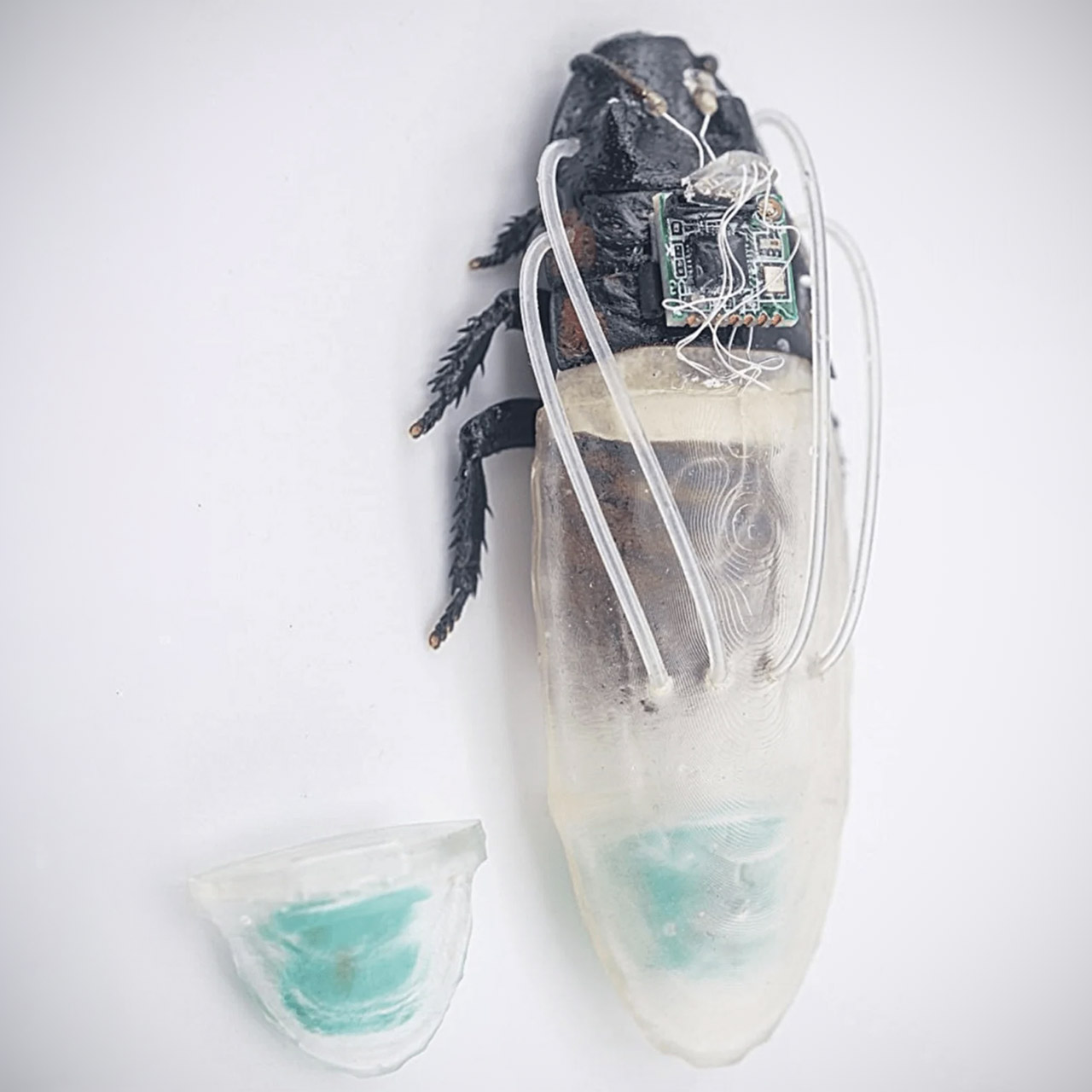
Engineers at Nanyang Technological University in Singapore, working with colleagues at Waseda University in Japan, have added a working underwater capability to remote-controlled cockroaches. The insects already carry small electronic packs that let operators steer them through rubble and tight spaces. A new 3D-printed attachment now supplies oxygen so the same insects can keep moving when those spaces fill with water.
Madagascar hissing cockroaches serve as the platform, as previous iterations of this technology proved effective after real disasters because the insects can fit through gaps too narrow for most robots and climb over uneven debris without requiring extensive programming. Operators transmit wireless impulses to electrodes on the antennas or surrounding nerves. Gentle pulses move the insect left or right while it maintains its own balance and obstacle avoidance.
A1 mini + LED Lamp Kit for Creative Light Projects: Bring your ideas to life with the included LED Lamp Kit. Simply print compatible lamp models and…
The Perfect 3D Printer for Beginners: A1 mini 3D Printer is designed to make 3D printing easy from day one with automatic calibration, simple setup…
Experience the Bambu Lab Ecosystem: Access MakerWorld’s huge library of ready-to-print models, manage prints through the Bambu Handy app, and enjoy…
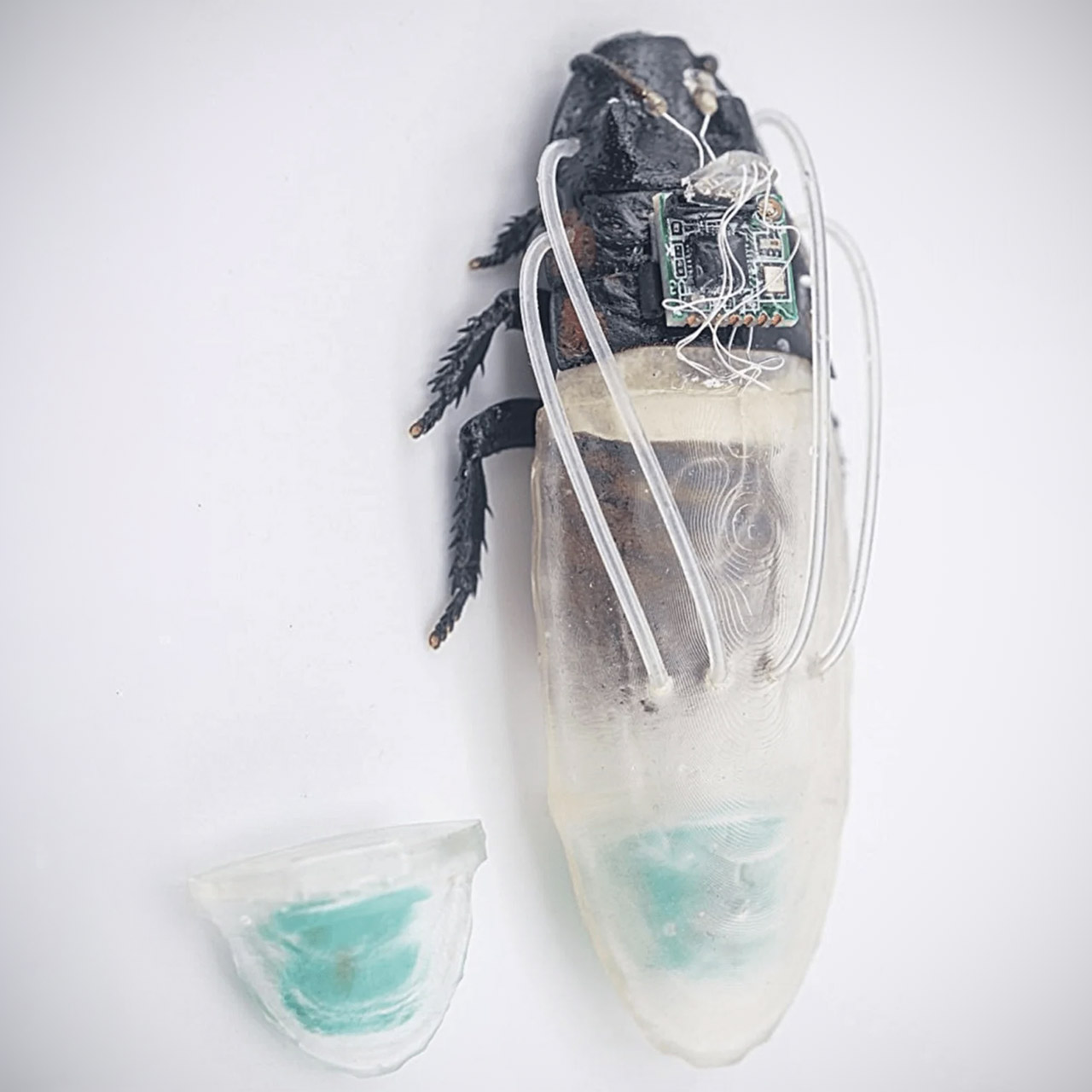
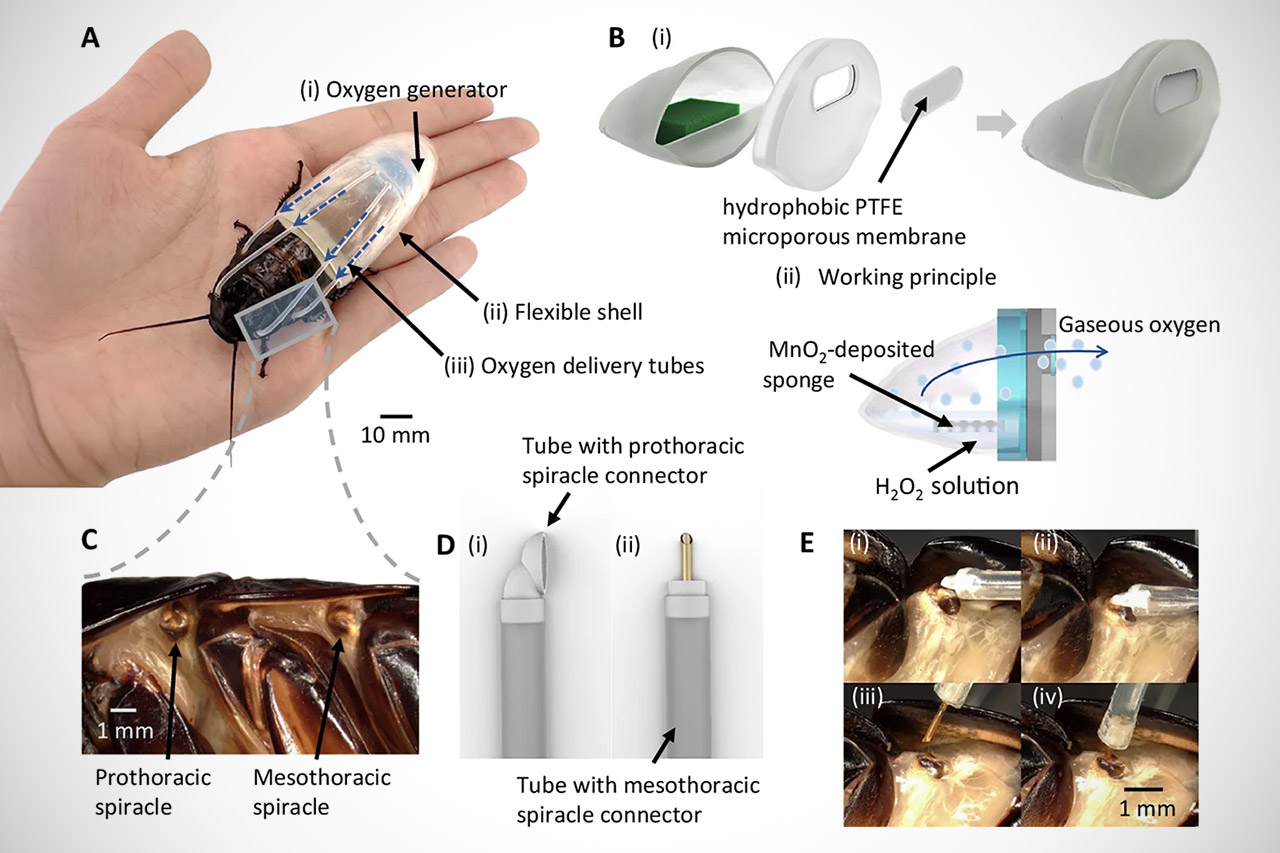
Water always halted the earlier systems because cockroaches draw air in through tiny openings called spiracles on the sides of their bodies. Once submerged, the holes fill and the insect runs out of air in minutes. The new component overcomes this limitation by incorporating a tiny chemical oxygen generator into a 3D-printed backpack. The primary housing is approximately 10 by 10 millimeters and sits on the insect’s back. Inside, there is a sponge coated with manganese dioxide. When a small amount of liquid hydrogen peroxide enters the chamber, the catalyst degrades the liquid and produces oxygen gas. Four flexible silicone tubes deliver the gas directly to the cockroach’s thoracic spiracles. A flexible waterproof casing composed of printed resin closes the area and creates a pocket of breathable air around the ventilation openings.
Advertisement
The entire structure is light and flexible enough that the insect’s usual walk remains nearly intact. Early versions put additional mass on top, causing the cockroach to flip over underwater. Moving the generator and adjusting the shell shape resolved the stability issue. The equipped insects were tested in water-filled tubes and bespoke 3D-printed obstacle courses that simulated flooded pipes or collapsed building portions. Without the oxygen module, the roaches went inactive in minutes. It allowed them to remain responsive and mobile for up to three hours. On dry surfaces, they traveled at about 87 millimeters per second. As they went down the bottom and through submerged channels, their pace fell just slightly to around 78 millimeters per second.
The project builds on years of work by the same research groups. Previously, cyborg cockroaches helped with search efforts following a severe earthquake in Myanmar, reaching locations where human teams and conventional machines couldn’t. Adding reliable underwater operation allows for similar access to areas where flooding has obstructed typical pathways, such as storm sewers, half-submerged basements, or earthquake rubble drenched by burst pipes. [Source]
Utah has become the first US state to let an AI chatbot, Doctronic, renew prescriptions without a doctor, via a regulatory sandbox that waives licensing laws. The state’s medical licensing board, blindsided by the January launch, called in April for the pilot to be halted over safety risks, but the state refused. The case exposes a federal-state regulatory vacuum around AI in medicine.
Utah has quietly become the first US state to let an AI chatbot renew prescriptions without a doctor, according to the Associated Press. The programme, run by a company called Doctronic, launched in January and has set off a fierce medical debate.
Advertisement
Residents can skip the doctor’s office and refill prescriptions online through the chatbot. It asks about their medication and history, checks a national pharmacy database, and either renews the script or escalates to a human doctor.
The launch was possible only through a “regulatory sandbox” that lets Utah officials waive laws for promising AI. State and federal rules otherwise restrict prescribing to licensed medical professionals.
“We have crossed a threshold in terms of giving something that is not human a medical license, whether or not we want to call it that,” the University of Pennsylvania’s Dr Eric Bressman told the AP. He and others say they are not opposed to AI prescribing, but want it held to standards as rigorous as those for human doctors.
The board that got left out
Utah’s medical licensing board says it only learned of the programme when the January launch made the news. In an April letter, 11 members called for the pilot to be halted, citing the risks of auto-renewing drugs with side effects or interactions.
“We were essentially told: ‘Yes this is going on. And no, you don’t have a say in it’,” said Dr Alan Smith, a family physician who chairs the board but spoke for himself.
Advertisement
The state declined to suspend it, noting human doctors still review every refill in this first phase.
The programme is currently overseen by a five-member board of AI specialists, none of them doctors. Doctronic expects to move to fully automated refills soon.
Smith warns the risks are real, pointing out that Doctronic’s roughly 190 refillable medications include blood thinners, which turn dangerous if a patient develops internal bleeding. The American Medical Association has echoed the concern that “prescription renewals aren’t routine checkboxes”.
A regulatory vacuum by design
The case exposes a jurisdictional tangle, since medical technology is regulated federally while medical professionals are overseen by states. Doctronic frames its AI as part of state-regulated medical practice, though some experts argue it has crossed into FDA territory.
Advertisement
The company would not say whether it has sought FDA permission. The agency told the AP it has authorised no AI chatbots but wants to encourage innovation, a hands-off posture that fits a broader loosening of oversight on AI health tools.
Critics see history rhyming, with Bressman comparing the moment to the haphazard medicine of the early 20th century, before boards and benchmarks existed. The template for licensing AI medical services in other states comes from the Cicero Institute, a pro-AI think tank founded by Palantir co-founder Joe Lonsdale.
Doctronic plans peer-reviewed studies later this year, though its only published paper so far was written by its own scientists and not independently reviewed. As one Utah law professor put it, companies risk letting the technology race beyond the evidence, and betraying public trust in the process.
US District Judge Charles Breyer denied Elon Musk’s bid to overturn a March 2026 jury verdict finding he defrauded Twitter investors during his 2022 takeover, upholding the finding on his 13 May bot tweet while granting one narrow point on a 17 May tweet. Investors say damages could reach $2.6bn, and the judge also granted prejudgment interest.
A federal judge has refused to overturn a jury’s finding that Elon Musk defrauded Twitter investors during his $44bn takeover of the platform in 2022. US District Judge Charles Breyer denied Musk’s motion to set aside the verdict in most respects on Monday.
Advertisement
A San Francisco jury ruled in March that two of Musk’s May 2022 tweets about the deal and Twitter’s spam bot numbers were materially false or misleading. Investors say the resulting losses could support damages of up to $2.6bn.
“Buyer’s remorse is not an exception to the securities laws,” Breyer wrote, adding that the laws are “in their essence, about trust”. The judge found substantial evidence that Musk’s 13 May tweet, claiming the deal was on hold pending bot data, was literally untrue.
Breyer cited testimony from one of Musk’s own bankers, who said the tweet surprised her and that Musk never actually put the deal on hold. A jury could infer Musk had a motive to escape the deal and used bots as a pretext, the judge wrote.
He did hand Musk one narrow win, agreeing there was too little evidence that a separate 17 May tweet caused investors a market loss. Musk’s lawyers did not immediately respond to requests for comment.
Investors sued in October 2022, arguing Musk deliberately talked the stock down to renegotiate or exit. The jury agreed he misled the market, though it rejected the broader claim that he ran a deliberate scheme.
Breyer also swatted down Musk’s more colourful arguments, including a claim that jurors mocked him by writing “$4.20” in blue ink on the verdict form. The number references cannabis, the judge noted, and the jury had actually cleared Musk on two claims.
He is also fighting Sam Altman in a high-stakes trial over OpenAI, all while steering the newly public SpaceX. The tweets that built his mythology keep generating legal bills.
Advertisement
Prejudgment interest, which Breyer also granted, could push the final figure higher still. For a man now worth more than a trillion dollars, the sum is survivable, but the finding that he defrauded investors is harder to shrug off.
In Larry Sanger’s recent failed attempt to start a “WikiProject Intellectual Diversity”, he tried to recruit his followers to help him change Wikipedia’s rules around representation of viewpoints, religions, parties, and nationalities (a version of his earlier “Nine Theses”). The draft WikiProject was not itself a bannable offense, but his approach broke rules that were designed to foster fair discussions. Wikipedia’s rules really already support creation of balanced and robust articles about controversial topics – it just takes a huge amount of careful research, patience, and cooperation, and there’s no shortcut for that work.
In the first several months of Wikipedia, Sanger’s seriousness about its potential encouraged me to take up the challenge of helping write an encyclopedia that represents the sum of human knowledge. 25 years later, I remain an active editor dedicated to the Wikimedia movement for free and open knowledge, which is basically a fun and oddly serious hobby.
I edit a lot of moderately controversial articles that have glaring gaps in core principles of verifiability and neutral point of view. Many of Wikipedia’s most popular articles, like about politics and philosophy, are very informative and comprehensive, but second-tier articles don’t consistently get robust attention from editors.For example, I’ve recently repaired bias and disinformation in articles about AI regulation, LGBTQ rights in Nigeria, politicians in the Balkans, wealthy businessmen outside the US, influential religious organizations, and people accused of sexual harassment. I routinely fix articles that downplay negative information or present a controversial topic in a flattering way, in the style of Jeffrey Epstein’s ineffective project to get consultants to sanitize his article.
The good thing is that Wikipedia’s established rules already provide robust strategies to improve verifiability and balance in articles. Its principles expect editors to be cooperative and willing to cite a reliable source for nearly every sentence. You have to be up for changing your mind when somebody finds multiple reliable sources that disprove something you assumed, or at least up for slinking away to another article. To help counter bias and conflicts of interest, I apply elaborately layered guidance for evaluating and weighing sources – often citing academic journal articles and books, but not always, because the guidance recognizes that reliability is contextual. The “due weight” policy, part of the neutral point of view policy, pushes editors to search for more and better sources when something gets disputed, which results in a stronger article. I’ve learned that the best way to resolve a content dispute is to cite the best sources, reference the most relevant rules, present evidence calmly, and escalate one step at a time through the dispute resolution forums. Dispute resolution typically uses Wikipedia’s informal decision-making process, which reflects that Wikipedia is a decentralized asynchronous volunteer project, not an adjudicatory body. Wikipedia’s processes already work pretty well, they just take a lot of skill and patience, because collaboration is hard work.
Advertisement
Sanger was banned for off-Wikipedia canvassing and for not being on Wikipedia to build an encyclopedia, but to be clear, trying to start WikiProject Intellectual Diversity was not in itself a bannable offense. Canvassing is against the rules specifically to protect public and open processes that support the development of balanced articles. The canvassing guidelines discourage editors from trying to rig decision-making processes by selectively inviting participants who will take their side. The rules favor public discussions on Wikipedia so that all editors have an equal opportunity to participate. And since all Wikipedia edits are publicly tracked, editors can analyze each other’s contributions to detect biases and conflicts of interest. External invitations both selectively invite participation and prevent editors from exercising oversight. Volunteer administrators routinely block or even ban editors for inappropriate canvassing because this behavior compromises efforts to build a balanced encyclopedia.
My work to counter gaps, bias, and spam in Wikipedia articles gives me proof every day that the project is imperfect. Every active editor has critiques of Wikipedia, the Wikimedia Foundation, and the Wikimedia movement, and we debate issues and improvements at length. Wikipedia would benefit from additional contributors from any viewpoint or background who want to help build an encyclopedia. But improving Wikipedia requires intellectual honesty, cooperation, and willingness to apply established principles and rules even while critiquing them, not bad-faith publicity stunts.
The Supreme Court allowed Texas to enforce a law requiring app stores to verify users’ ages and obtain parental consent before minors can download apps. Tech industry groups argue the law broadly restricts young people’s access to digital speech, but the court let a 5th Circuit order stand without explanation or noted dissents. CNN notes that the Supreme Court’s decision “doesn’t resolve the case but rather will allow Texas to enforce the law while the litigation continues to play out.” From the report: “A minor child who downloads a software application from an app store agrees to contractual terms of service, including whether the child’s location will be tracked, whether the child’s privacy will be protected, whether information from the child’s phone can be sold by the developer, and whether the child waives the right to sue,” Texas told the Supreme Court in urging the court to allow its law to take effect.
But the Computer & Communications Industry Association, a trade group whose members include Apple and Google, said the law would effectively bar young people from accessing a wide range of content, “be it a book by Ernest Hemingway or J.K. Rowling, a Taylor Swift album, or a subscription to National Geographic.” Allowing the law to take effect, the group said, would have “profound consequences for the protection of digital speech.”
[…] In the new case, involving Texas’ age verification for apps, a federal district court blocked the law’s enforcement in December — days before it was set to take effect. But a three-judge panel of the conservative 5th US Circuit Court of Appeals put that decision on hold in early June, allowing the state to enforce it. By declining to take up the emergency appeal from the computer and student groups, the Supreme Court has left the 5th Circuit’s decision in place.
Whether you subscribe to the 2TB iCloud+ tier individually or pay for Apple One Premier, you’re getting the new Apple Intelligence in Apple Home features announced during WWDC 2026.
Apple didn’t break out exactly what customers might have to pay in order to access its most advanced AI features. While there aren’t any separate AI subscriptions or token purchase programs, users will need to spend more cash for the most access.
In the macOS Golden Gate beta release notes, Apple has confirmed that the Apple Home AI features will require the 2TB iCloud+ plan. On its own, that is a $10 a month plan, or is included with the $37.95 Apple One Premier subscription tier.
Either way, customers already paying for these products will gain more Apple Home features. The 2TB iCloud+ plan was already required to have unlimited cameras for HomeKit Secure Video.
Advertisement
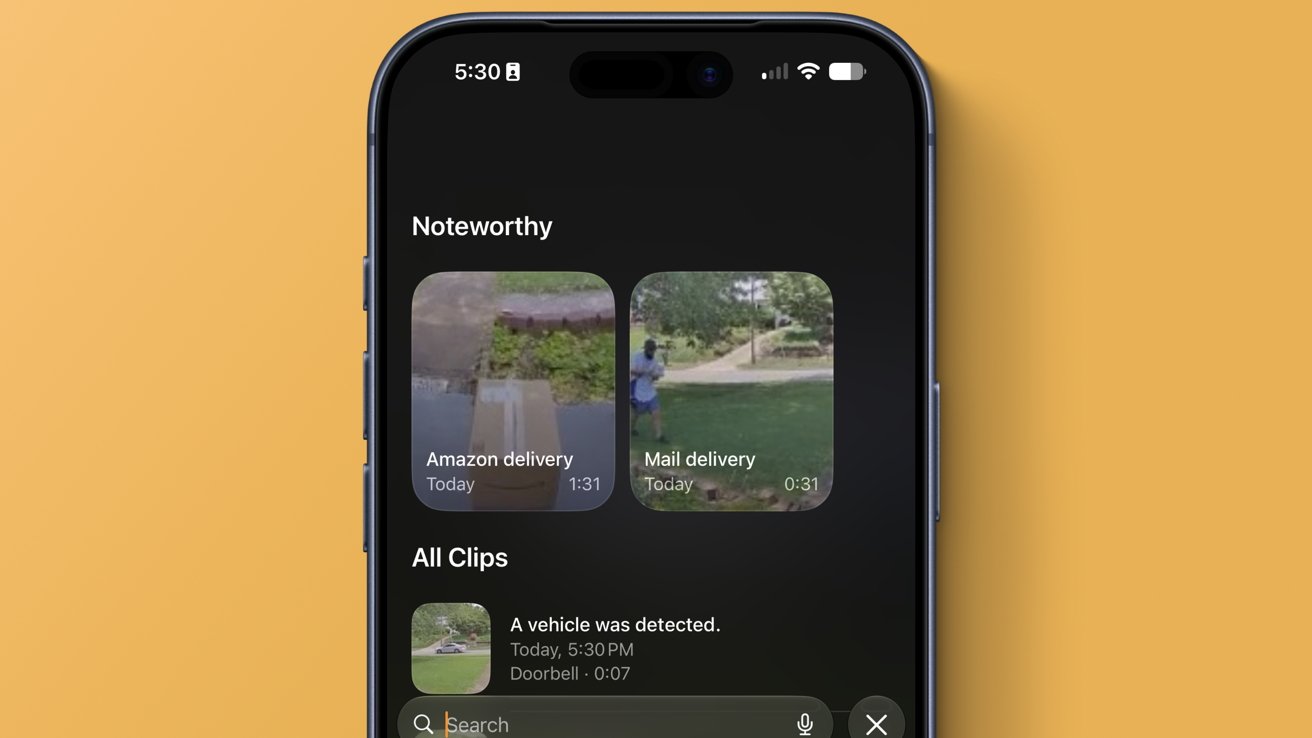
While Apple isn’t being clear about which features are being lumped in here, it seems it is just referring to the HomeKit Secure Video AI analysis feature. It analyzes footage locally for people, objects, and events to piece together what happens in a recorded clip.
In the Apple Home app, those events can be stitched together into a series of clips, or shown as priority events. Either way, it is meant to serve as an easier way to review and search video recordings.
The notification grouping and 4K HomeKit Secure Video support don’t appear to be tied to the subscription, since they’re not relying on Apple’s AI image models. The lower 200GB and 50GB tiers are limited to 5 cameras and 2 cameras respectively.
Apple is making it clear: if you want full access to its AI and cloud features, you need to pay for its more premium services. It isn’t clear if Apple plans to offer separate AI subscriptions in the future.
We spend hours testing every product or service we review, so you can be sure you’re buying the best. Find out more about how we test.
Geekom GeekBook X16 Pro: 30-second review
Before we all get confused, and I well might be, Geekom is selling the GeekBook X16 Pro laptop series in the USA, but it most likely isn’t the model that they supplied me for review purposes.
According to Geekom’s own website, the retail hardware comes with either a Core Ultra 9 185H or a Core Ultra 5 125H CPU, both mobile chips from Intel’s 100 series stable.
Advertisement
These machines come with 32GB of LPDDR5X memory and 2TB of SSD storage, sport Arc graphics and AI Boost.
That’s a decent amount of power for a laptop, and to keep the 16-inch 2560 x 1600 resolution IPS panel running through a working day, it has a 77Wh battery inside.
My review hardware had the same Core Ultra 9 platform and screen, less RAM and storage, but more battery capacity. Apparently, this design went through some late changes, and considering how heavy the review machine was, many of these were positive changes.
Advertisement
The cost savings Geekom made to offer this laptop at the modest asking price of around $1350 mean there is only one USB4 port, the webcam is only 2MP, and the keyboard and touchpad aren’t the best quality.
How much those things impact you will depend on how you are likely to use it, but this laptop isn’t built to the level of a $2000 machine from Acer, Dell, HP or Lenovo.
Sign up to the TechRadar Pro newsletter to get all the top news, opinion, features and guidance your business needs to succeed!
That said, the underlying platform is solid, even if you can’t expand the memory, and with a USB 4.0 port, it can be attached to a Dock if you need more ports or more than two displays.
Advertisement
Geekom includes a basic USB-C Dock in the box, so those who need a wired LAN port won’t need a full Dock or adapter.
This isn’t the best business laptop I’ve tested, but it’s far from the worst, and demonstrates that you can get relatively recent platforms in these form factors if you are prepared to compromise on some aspects.
Geekom GeekBook X16 Pro: Price and availability
(Image credit: Mark Pickavance)
How much does it cost? From $999
When is it out? Available now in the USA
Where can you get it? Direct from Geekom or online retailers
Geekom built its name on mini PCs, and the GeekBook X16 Pro is one of its first proper laptops. It launched primarily in the United States, where pricing has swung widely between around $949 and $1,599 depending on configuration and whatever promotion happens to be running that week.
The review unit supplied pairs the Intel Core Ultra 9 185H with 16GB of RAM and a 1TB drive. This does not match either of Geekom’s advertised configurations, which list the Ultra 9 185H alongside 32GB of RAM and 2TB of storage, or the Ultra 5 125H with 32GB and 1TB.
In the US, the Ultra 9 model with 32GB of RAM and 2TB of storage costs $1,349 directly from the maker, the same price at which it can be bought from Amazon.com. The Ultra 5 option with the same 32GB and 1TB of RAM is $999.
The price on Best Buy for the Ultra 9 model is the same $1,349, but curiously, Newegg is asking $2,086.99 for the same hardware.
As Geekom is not a brand with the kudos of other laptop makers, it would seem reasonable to assume that it would undercut the better names. And, it does in general.
Advertisement
But that’s mostly because the big names have moved on to either Ultra 200 or 300 class processors, and therefore, what they’re offering is more powerful.
As an example, the Dell 16 Plus sells for $1429.99 in the USA. It comes with 16GB of LPDDR5X RAM and 1TB of storage. But critically, it has an Ultra 7 256V processor and that comes with ARC graphics. Admittedly, boosting that to 32GB of RAM will jump it to $1,899.99, but you do get a touch screen with that model.
If the Geekom X16 Pro were closer to $1000 for maybe a Core Ultra 7 class CPU, it might be a better value, but from a corporate viewpoint, it needs to be a better deal to push an Intel platform that is already a couple of generations back.
1x USB4, 1x USB-C 3.2 Gen 2 (10Gbps) , 2 × USB-A 3.2 Gen 1 (5Gbps), 1x HDMI 1.4, Audio Combo Jack
Camera:
2MP (1080p) Windows Hello compliant
Advertisement
Networking:
Wi-Fi 6E, Bluetooth 5.4
Dimensions:
353 mm × 249 mm × 6.9 mm
Advertisement
Weight:
1.750kg
OS:
Windows 11 Pro (pre-installed)
Advertisement
Battery:
99.99Wh Battery
Power supply:
100W (20V 5A)
Advertisement
Geekom GeekBook X16 Pro: Design
(Image credit: Mark Pickavance)
Magnesium-aluminium chassis
Diverges from the retail model
Ports aren’t labelled
Let’s start by saying that the GeekBook X16 Pro sent to me deviated from the specifications presented for the retail model in several significant ways.
Firstly, it has 16GB of RAM, whereas all retail SKUs have 32GB, and it has 1TB of storage, which isn’t available on the model with the Core Ultra 9 processor.
The biggest difference with my hardware was that it wasn’t the same weight as the retail model is quoted to be, and the reason is undoubtedly that it had a 99.98Whr battery, not the 77Whr that Geekom mentions in the specification.
The specs also mention a MicroSD card slot, but that wasn’t on the review machine.
Advertisement
It’s my assumption, and I can be wrong, that the rest of this equipment is roughly the same as the retail version, but there are no guarantees here.
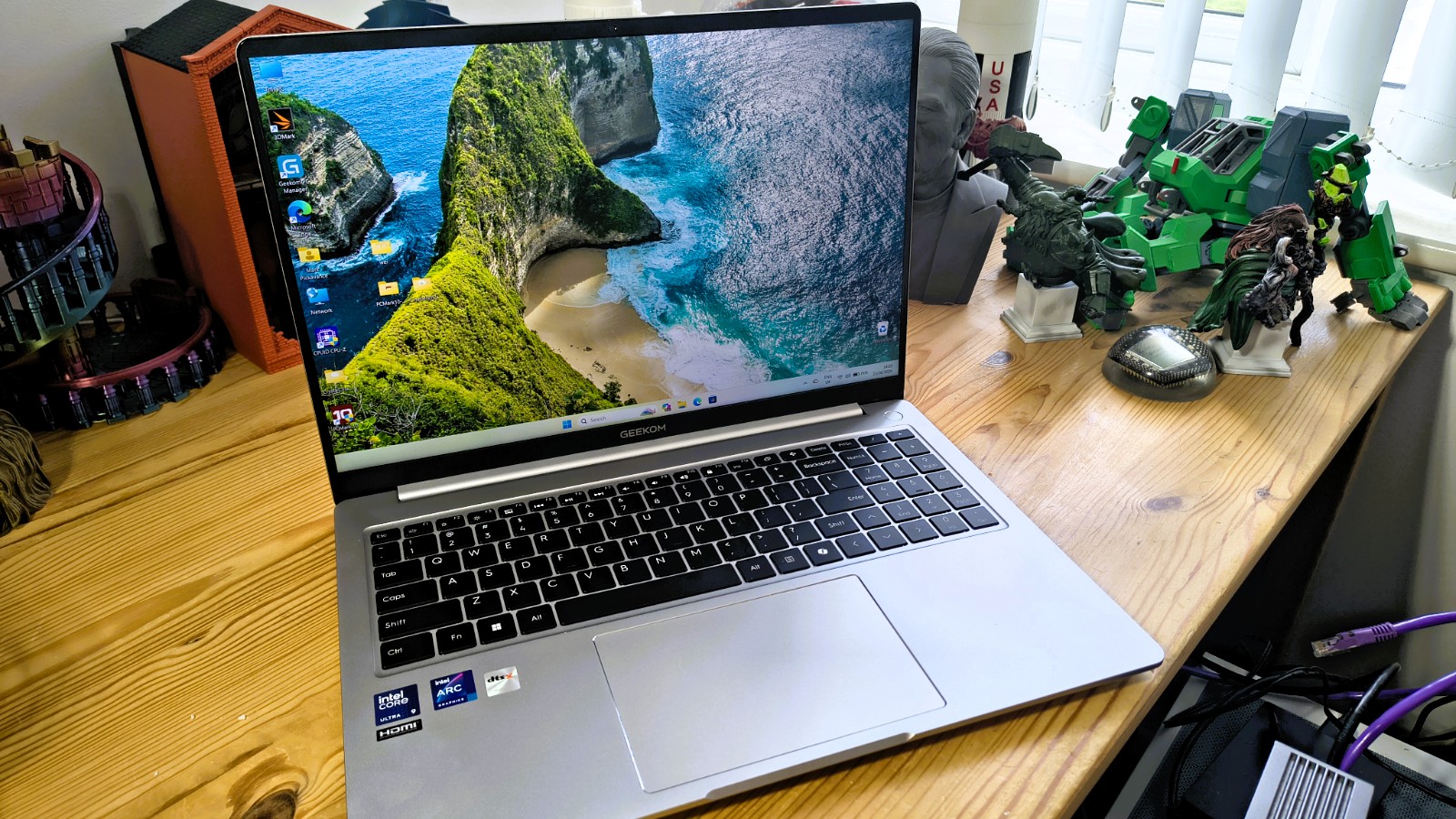
Geekom has machined the GeekBook X16 Pro from a single piece of magnesium alloy, and that heritage shows in the finish. The Titanium Gray coating feels warm rather than cold to the touch, and there is no flex anywhere across the lid or the keyboard deck. While not the highest quality finish, it doesn’t feel cheap either.
Where the design pitch starts to wobble is the weight. Geekom lists the X16 Pro at 1.27kg, a figure that would make it one of the lightest 16-inch laptops around. The review unit weighs a whopping 1.75kg on the scales, nearly half a kilogram heavier than advertised, and that difference is obvious the moment you lift it one-handed. A laptop sold on featherweight portability should not feel like this in the hand.
This weight discrepancy, I’m confident, is down to the battery that Geekom used in the review hardware. Which is much larger than the one that is on the official spec sheet.
Advertisement
(Image credit: Mark Pickavance)
Port selection is generous for something this slim, with two USB-C connections, two USB-A, a full-size HDMI, and a headphone jack.
The frustration is that none of them is labelled with a speed. One USB-C runs at USB4 and the other only at USB 3.2, and there is no visual way to tell which is which, short of plugging something in and checking. For a laptop aimed at people who might use a fast external drive or a high-bandwidth dock, that is a genuine oversight from Geekom, and worth calling out plainly rather than glossing over.
The keyboard includes a full number pad, which is a genuine convenience on a 16-inch chassis and something plenty of rivals leave out. Typing feel is a little on the spongy side rather than crisp, so anyone coming from a firmer keyboard may need a short adjustment period.
The keyboard is workable, but I’m less convinced by the trackpad. It does the job for general navigation and gestures, but it does not feel as refined as the rest of the machine, and precision clicking is not its strong suit.
Advertisement
Those buying a 16-inch laptop clearly want a good display, and the IPS panel on this machine offers 2.5K resolution, a 16:10 aspect ratio, and a 120Hz refresh rate. That extra vertical space suits spreadsheets, documents and code far better than a standard 16:9 screen, and scrolling feels smooth thanks to the higher refresh rate.
Geekom quotes 100 per cent sRGB coverage, which is close enough for everyday creative work without needing a colour-calibrated reference screen.
(Image credit: Mark Pickavance)
Since many business machines get small upgrades during their working life, I like to take the backs off laptops to see what is possible on that front.
Removing the underside requires removing nine screws with a T5 screwdriver, but once they’re out, it’s relatively easy to detach. Inside, the battery can be replaced, and there is an unoccupied M.2 2230 slot. While the 2230 drive is an easy upgrade, the primary slot is 2280, so I’d probably recommend cloning the supplied drive to a larger one using that slot first.
Advertisement
The capacities of M.2 2230 aren’t great right now.
Also, these days, all memory comes pre-soldered, so the RAM in this system is the maximum it will ever have, even if the processors used on it can address 96GB.
Overall, this is one of those designs that is somewhat bland and lacks any sort of signature feature, but for many customers, that’s exactly what they want.
(Image credit: Mark Pickavance)
Advertisement
Geekom GeekBook X16 Pro: Hardware
Intel Core Ultra 9 185H
Modest AI capability
Wasted PCIe lanes
The Intel Core Ultra 9 185H is the flagship chip from Intel’s first Core Ultra family, known internally as Meteor Lake. It packs sixteen cores across three types: six performance cores, eight efficiency cores and two low-power efficiency cores, giving it real flexibility between raw speed and battery-sensitive multitasking. Turbo clocks reach 5.1 GHz, and in daily use, that translates into a chip that handles heavy browser sessions, office work, and moderate creative tasks without complaint. Cinebench multicore scores sit comfortably above a thousand points, proof that the hybrid layout genuinely pays off rather than existing purely as a marketing slide.
Graphics duties fall to an integrated Arc GPU built from eight Xe cores, clocked up to 2.35GHz. This was the point where Meteor Lake felt like a proper step forward. Games at modest settings run smoothly, video timelines scrub without stutter, and general graphical work feels far removed from the older Iris chips it replaced. It will never trouble a discrete GPU, but for a laptop chip doing double duty as a workstation and a light gaming machine, it earns its keep.
Then there is the NPU, which Intel calls AI Boost on this silicon. On its own, the dedicated neural engine delivers around 11 TOPS. Add contributions from the CPU and GPU, and Intel quotes a platform total of 35 TOPS. That was a genuinely new capability when Meteor Lake launched, letting local AI tasks like background blur, transcription and some generative features run without leaning on the cloud.
The trouble is that time moves fast in Silicon. Microsoft set the bar for its Copilot Plus program at 40 TOPS from the NPU alone, and the 185H simply does not reach it.
Intel’s 200 series chips, split between Lunar Lake and Arrow Lake depending on the segment, push NPU performance well past 40 TOPS on the Lunar Lake side. The newer 300 series, built on Panther Lake, goes further still, pairing a stronger NPU with a genuine jump in graphics performance too.
Advertisement
(Image credit: Mark Pickavance)
So is the 185H still worth having? Yes, with a clear head about what it is. It remains a strong general-purpose chip for everyday work, and its Arc graphics still beat plenty of rivals from its own generation. What it is not is a true Copilot Plus chip, and anyone chasing the latest on device AI features should look at the newer series instead. Judged simply as a capable, well-rounded laptop processor for typical work, there is still very little to complain about here. It has aged into a dependable middle child rather than a has-been, useful for exactly the sort of laptop you might have in front of you now.
Where this design isn’t well-served is that the Core Ultra 9 supports 28 PCI lanes (PCI 5.0 and 4.0), and the ports provided use hardly any of them. Given how much unused PCIe bandwidth was available, why is only one USB-C port USB4 spec? This chipset does support Thunderbolt, and if this were a Mini PC at this price point, I’d be expecting that, but only one USB4 port is poor considering the small army of unused PCIe lanes.
When I look at the number of mini PCs and laptops using this Meteor Lake silicon, I’m inclined to conclude that Intel made far too many of these wafers and now has unused bins clogging the channel they use to move 200- and 300-series chips.
If that’s an accurate analysis, then we’re likely to see more machines like the X16 Pro, where Intel attempts to flog them off before they’re four generations back.
Advertisement
(Image credit: Mark Pickavance)
Geekom GeekBook X16 Pro: Performance
Swipe to scroll horizontally
Laptops
Geekom GeekBook X16 Pro
Advertisement
Acer Swift Edge 14 AI
CPU
Intel Core Ultra 9 185H
Advertisement
Intel Core Ultra 7 258V
Cores/Threads
16C 22T
Advertisement
8C 8T
TPD
45W
Advertisement
17W-37W
RAM
16GB LPDDR5X
Advertisement
32GB LPDDR5X
SSD
512 GB KINGSTON OM8TAP4512K1
Advertisement
1TB Kingston OM8PGP4102Q
Graphics
Intel Arc Graphics
Advertisement
Intel Arc 140V
NPU
Intel AI Boost (11 TOPS)
Advertisement
Intel NPU (47 TOPS)
3DMark
WildLife
18,030
Advertisement
20,983
FireStrike
7177
Advertisement
8003
TimeSpy
3815
Advertisement
4065
Steel Nomad.L
2638
Advertisement
2989
CineBench24
Single
94
Advertisement
120
Multi
631
Advertisement
389
Ratio
6.70
Advertisement
3.24
GeekBench 6
Single
2337
Advertisement
2757
Multi
12104
Advertisement
11148
OpenCL
33402
Advertisement
29692
Vulkan
35602
Advertisement
33890
CrystalDIsk
Read MB/s
5979
Advertisement
4805
Write MB/s
3756
Advertisement
3905
PCMark 10
Office
8133
Advertisement
8206
Battery
23h 21m
Advertisement
18h 28m
Battery
Whr
77
Advertisement
65
PSU
100W
Advertisement
100W
WEI
Score
8.2
Advertisement
8.8
Before I talk about this comparison, I need to address the elephant reclining on the sofa using this laptop, and that’s the lack of continuity between the review hardware I tested and the retail GeekBook X16 Pro options. While the amount of RAM and the SSD model might well have altered some of these numbers, the one big difference is that the review hardware had a battery with 99.99Whr of capacity, whereas the retail hardware only has 77Whr.
In testing, this machine lasted 23 hours and 21 minutes, and if that is adjusted pro rata to the 77Whr battery size, a projected running time of approximately 1079 minutes, or roughly 17 hours, 59 minutes. If I assume that the retail machine has 32GB of RAM, double that of the review hardware, then that extra overhead in keeping the memory alive would bring the running time down to 17 hours, which is exactly what Geekom is quoting.
That’s a decent amount of time, and should cover even a long working day for those who live to work.
Advertisement
The other benchmarks presented here, I’m less concerned, might be different from a retail GeekBook, since the platform is unlikely to be different to what I tested.
My comparison machine, the Acer Swift Edge 14 AI, is a smaller display option, but it uses a newer 200 series processor, the Intel Core Ultra 7 258V.
As is evident, the improvements Intel made between Meteor Lake and Luna Lake weren’t subtle, and the Core i7 on the Acer performs better pretty much across the board. It’s dramatically better on single-core exercise, even if in some situations the GPU utilisation is slightly better on the older chip.
(Image credit: Mark Pickavance)
And, for those wondering about 300 series silicon, like the Intel Core Ultra 7 355 on the Samsung Galaxy Book6 Enterprise Edition, I recently covered, it performs even better.
Advertisement
There is no ‘golden age’ of mobile processors to discover, and the newest ones are genuinely better in almost every respect.
What isn’t covered in these benchmarks is AI, and that’s lucky for the GeekBook, because it would get slapped by any 200 or 300 series processor, even a Core Ultra 5 variant.
Overall, if you are looking for a workmanlike system with decent battery life and adequate performance for office tasks, the GeekBook X16 Pro ticks enough boxes. But it’s not a machine for power users or creatives, unsurprisingly.
For those interested in the screen, I gave it a full analysis using the Datacolor Spyder X2 Ultra, and it was better than I’d anticipated for a side-lit IPS screen.
Advertisement
The gamut representation was 98% sRGB and 78% AdobeRGB and P3, which is fine. The brightness is capped at just over 300 nits, and the contrast is at about 1060:1.
The weaknesses of this panel are a mediocre tone response and poor white point accuracy.
But the usual challenges of luminance and colour uniformity aren’t a big issue here.
Overall, the screen is better than I’ve seen on some big-name brands, even if it can’t compete with the AMLOED displays that some products rock.
Advertisement
(Image credit: Mark Pickavance)
Geekom GeekBook X16 Pro: Final verdict
Since the review hardware patently wasn’t the one I was sent, I feel justified in being somewhat coy about endorsing it unreservedly.
What I’m hoping customers of Geekom are getting is roughly the same chassis, screen and platform, but with more memory, more storage and 23% less battery. And, it’s much lighter than the one I got, which is difficult to hold in one hand when it’s open.
If that’s the case, this is an interesting option for those wanting a reasonably punchy machine without burning through the budget entirely on the latest processor platforms.
Advertisement
The only thing I’d like to see from this brand is more attention to detail, especially in respect of labelling ports. This would have been less of an issue if both USB-C ports had been USB4, and there are few valid excuses I’d take for why they aren’t.
Those points aside, and with a trackpad that might have been better, there are many positive aspects of this design that, only a few years ago, might have been described as a flagship model.
It isn’t cheap, but with rising memory and storage costs, hardware at this price might look like more of a bargain in a couple of years. And, compared with 200 and 300 series machines, it’s on the budget-friendly side of the line.
Where I’d be careful with this hardware is deploying it to a student, because it’s difficult to assess how much abuse it can take, and it’s not easy to fit in a smaller backpack.
Advertisement
But with prices on the rise, a machine with this silicon, screen, memory and storage for less than $1500 isn’t a bad deal, and it can only get better in the coming months.
Should you buy a Geekom GeekBook X16 Pro?
Swipe to scroll horizontally
Value
Not a wonderful deal, but affordable
Advertisement
3.5/5
Design
Unexciting design slightly hampered by a cheap touchpad
A phishing campaign is impersonating more than 30 well-known brands, including Adobe, Netflix, Coca-Cola, and OpenAI, in fake job interviews to steal Google account credentials from marketing professionals.
The operation is abusing the legitimate cloud-based PeopleForce human resources platform and a domain associated with the Salesforce Marketing Cloud service before redirecting the recipient to a malicious landing page.
To further instill trust and increase the chances of success, the threat actor is using the names and pictures of real recruiters at impersonated companies.
Will Thomas, senior advisor at cybersecurity intelligence and threat hunting company Team Cymru, analyzed the campaign and discovered that the phishing email pretends to be from “a recruiter looking to hire people for marketing roles.”
The researcher uncovered that the threat actor is using at least 34 domains impersonating high-value companies in the following sectors:
Advertisement
Airlines and travel: American Airlines, Booking.com, Delta Air Lines, United Airlines
Food and beverage: Coca-Cola, PepsiCo, Red Bull
Apparel and luxury goods: Adidas, Louis Vuitton, Sephora, Levis
Hospitality and marketing: Marriott, Omnicom Group
Entertainment and sports: FIFA, Netflix
Thomas found that the campaign relies on nested redirects, a technique that routes visitors through multiple legitimate services before reaching the malicious landing page.
The researcher noted that while the phishing emails appear to originate from PeopleForce, the underlying links resolve to the exct[.]net domain, which is operated by Salesforce following its acquisition of the ExactTarget marketing automation platform, now rebranded as Salesforce Marketing Cloud.
ExactTarget redirects to the Wise Agent (wiseagent[.]com) cloud-based real estate Customer Relationship Management (CRM) software for agents, teams, and brokers, which forwards to the phishing landing page.
BleepingComputer has found that the operation has been running for at least five months and initially used Outlook email addresses with the name of the impersonated company.
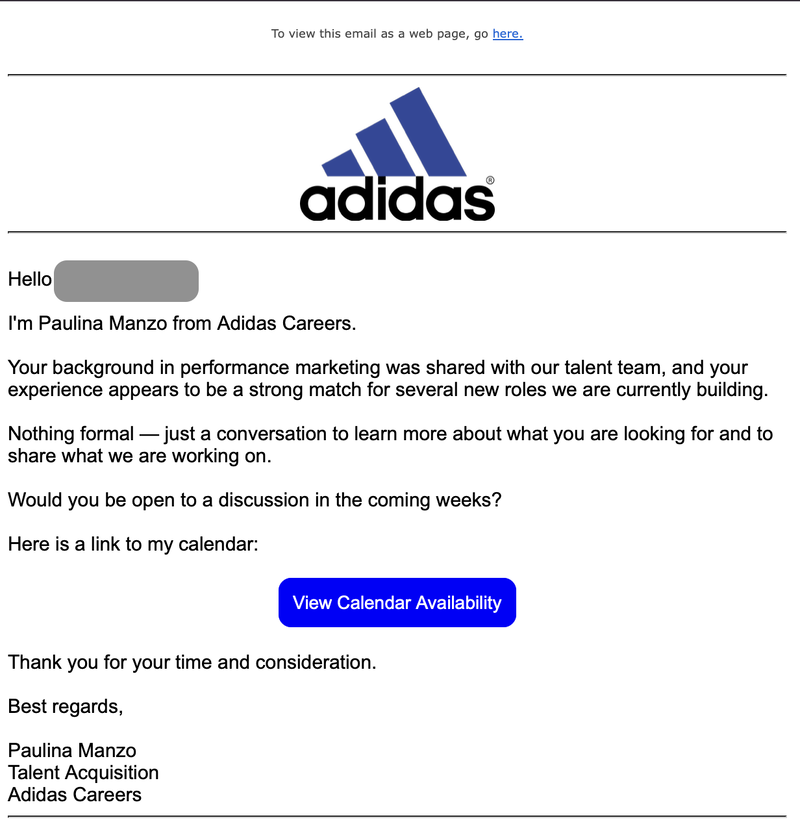
One phishing email, posing as a message from Adidas recruiter Paulina Manzo, asked the recipient to schedule a conversation about a potential role at the company.
Advertisement
Phishing email trying to steal Gmail password source: Sergiu George
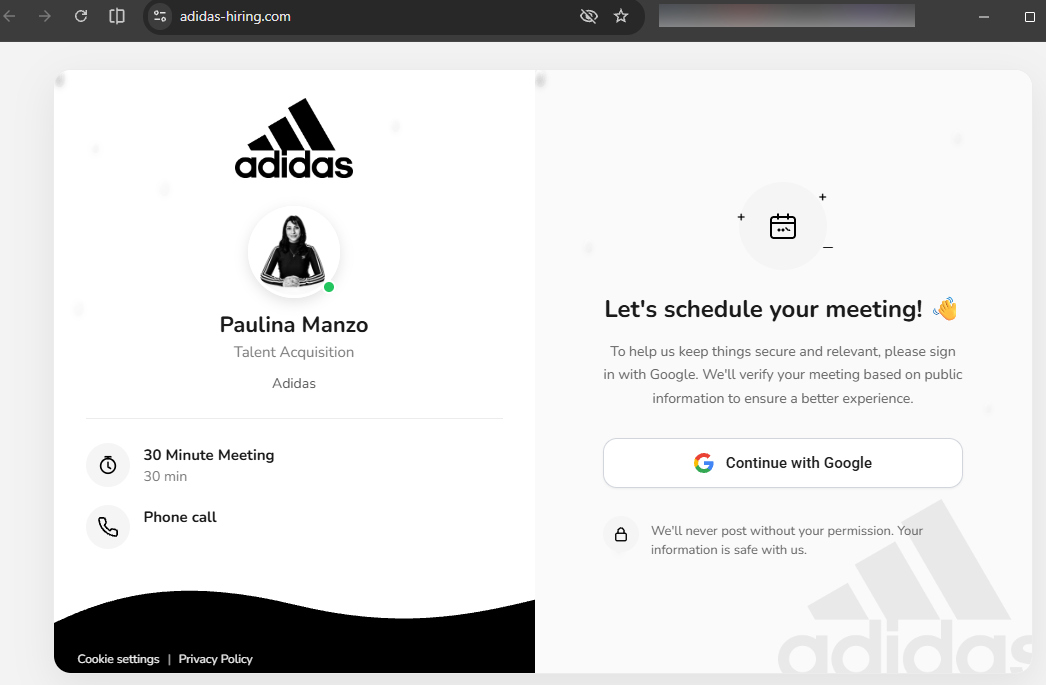
When clicking on the link to the calendar, the recipient was redirected to the threat actor’s landing page adidas-hiring[.]com
To continue the process for scheduling a meeting with the recruiter, the potential victim is asked to sign into their Google account.
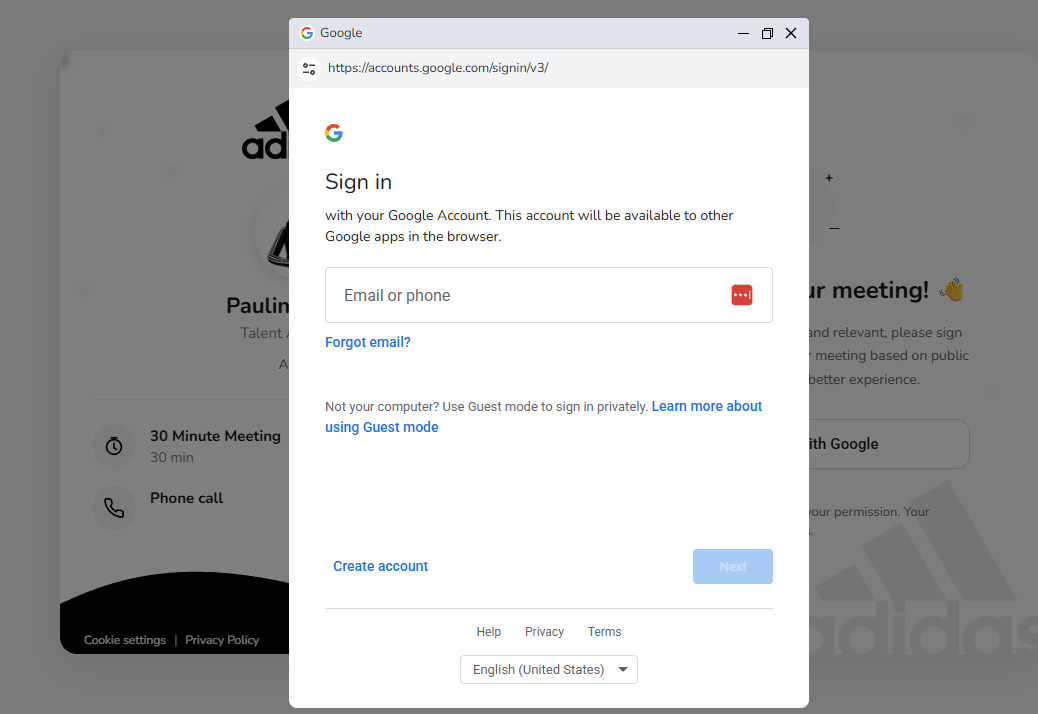
Clicking on the “Continue with Google” button triggers a fake Google sign-in popup rendered inside the phishing page to impersonate Google authentication.
Although the pop-up may appear as a legitimate browser window, it is just HTML and CSS code rendered inside the phishing page, a technique known as browser-in-the-browser (BitB).
By using modern web development tools, the attacker can imitate all the elements of a legitimate authentication pop-up page.
Fake Google authentication form source: BleepingComputer
While it is unclear how the threat actor gained access to the legitimate platforms, abusing them does not imply a compromise of the services.
One possible avenue is creating a genuine account specifically for the campaign, or using compromised logins, which allows configuring the redirect chain and the landing page.
Advertisement
A list of the domains discovered in this phishing campaign is available in Will Thomas’ analysis on GitHub.
Security teams log 54% of successful attacks and alert on just 14%. The rest move through your environment unseen.
The Picus whitepaper shows how breach and attack simulation tests your SIEM and EDR rules so threats stop slipping by detection.
Businesses looking to modernize their payment systems may want to learn what a crypto payment processor is, how it works, and why it matters.
Cryptocurrency and the crypto industry at large often appear most prominently in investing circles, but recent advancements in blockchain, the technology that supports crypto, have expanded crypto’s usefulness. Today, businesses across industries can make practical use of crypto thanks to the advent of crypto payment processors like 0xProcessing, tools that allow them to accept crypto payments without holding crypto themselves.
Crypto and related technologies remain something of a mystery for many companies, however, so to better determine whether adopting a crypto payment processor is the right move for them, businesses should learn more about what these tools are, how they work, and why they may prove useful.
What Is a Crypto Payment Processor?
Put simply, a crypto payment processor is a tool that allows businesses to accept various cryptocurrencies as payment. When a customer selects crypto at checkout, the processor generates a unique wallet address or QR code for that transaction. The customer sends their payment to that address for verification, and upon successful verification, the processor either converts the funds to the business’s preferred fiat currency or deposits them directly into the business’s crypto wallet.
Note that this approach means businesses do not have to accept crypto if they do not want to; if a company would prefer not to deal with the volatility of managing Bitcoin, for instance, they can simply convert it to USD at the counter, minimizing the risk of the payment losing value.
Advertisement
Transactions made using crypto can take anywhere from a few seconds to a few minutes, depending on the cryptocurrency used, so businesses should prepare accordingly.
Why Businesses Might Use a Crypto Payment Processor
Aside from expanding payment options, there are several potential benefits to using a crypto payment processor. For businesses that operate online, accepting crypto may give them access to global customers, since most cryptocurrencies can be used from almost anywhere.
According to Deloitte, “Using crypto as a form of payment could reduce transaction fees and possibly eliminate the cost of float and the need to wait multiple days for cash settlement.”
This could be particularly true for cross-border payments, which have historically been more costly and take longer to process than domestic payments.
Advertisement
In more urban regions where competition between businesses tends to be fiercer, expanding the currencies they accept can make a given business appear more innovative, making it more appealing to tech-savvy consumers and other customers who may prefer to pay in alternative currencies.
Picking the Right Processor
Although crypto payment processors generally have benefits, businesses should be mindful of the specific processor they adopt, as they vary in overall quality and security.
On the whole, reliable crypto payment processors employ security features such as blockchain transparency, fraud prevention, wallet security, and compliance and KYC/AML measures. No security feature is foolproof, but these protocols may help businesses keep both their data and their customers’ data safe from fraud. This priority will likely become increasingly important as more purchases are made digitally.
Before adopting a crypto payment processor, businesses should thoroughly assess whether it would benefit them. If they serve an audience that is not interested in paying with crypto, chances are that tools to help them do so would have limited use.
Advertisement
Though cryptocurrency is by no means ubiquitous as a regular form of payment, its increasing popularity could prompt businesses that previously disregarded it to consider its implications for their future. For businesses that see crypto as a practical asset in the years to come, adopting a crypto payment processor could be a solid first step in preparing their operations for that future.
FAQ
Q: What is a crypto payment processor? A: A crypto payment processor enables businesses to accept cryptocurrency payments while simplifying transaction management and settlement.
Q: Is it safe to accept cryptocurrencies as payment? A: Generally yes, as reputable processors use blockchain verification, security controls, and compliance measures to help protect transactions.
Q: Can businesses receive fiat instead of cryptocurrency? A: Indirectly, yes. Many crypto payment processors automatically convert crypto payments into traditional currencies.
Advertisement
Q: Which industries benefit most from crypto payments? A: E-commerce, SaaS, gaming, travel, and digital service providers often see the greatest benefits from accepting cryptocurrency payment
Known for its cloud infrastructure that allows developers to deploy agents without managing servers, Vercel has quietly become one of the most central companies in AI software. The company currently sees 6 million deployments a day, half of them triggered by coding agents, and more than 1 trillion tokens flow through the company’s AI gateway daily.
After the company’s ShipNYC conference last week, we sat down with Vercel CEO Guillermo Rauch for his take on this moment in AI, and how platform companies like Vercel end up competing with major labs. Here’s a lightly edited transcript.
It feels like there’s a different energy in the community this year, fewer pilot programs and more focus on how to make things work well in practice. I’m sure you’ve seen that a lot with clients, but I’m curious what that journey has looked like within Vercel.
Last year was about prototyping. The sky’s the limit, unleash the agents, everyone can build, and so on. We did that, and we learned a lot because we had hundreds of agents organically developed and deployed within the company, and then you started getting into the realities of agents in production, and some of the challenges.
Advertisement
The biggest lesson for me was the home-run use cases, the two killer apps of agents. One is the coding agent, of course. That’s driving a lot of the token utilization in the world, but when you produce so much software, you need somewhere to put it. The second killer app of agents is the internal agent that helps you run the company. The challenge there is, how do you securely access data? How do you audit what the agent is doing? How do you get a trail of all of the tool calls and access controls that the agent had to incur in order to get a job done?
To solve that, we came up with this framework called Eve, where you can lay out an agents’ instructions and skills in natural language. And another tool is Vercel Sandbox, where you put the agent in a little cage. It can have the freedom still to express its intelligence, but then you can apply policy on what data it can access and what data can leave the sandbox.
What sort of problems does that help you avoid?
For [the] sandbox, the biggest advantage is data control. A real risk of AI that I always think about is, when you get a coding IDE like Devin or Cursor, if you’re in the wrong setting, they may train on your entire codebase. I remember talking to the president of Airbus about this. You have decades of wealth of very specific C++ code for aerospace engineering. Someone comes in and installs the wrong developer tool and boom, all the code goes out to the cloud for training.
Advertisement
I’m curious to hear more about that second killer use case. We all know about coding agents, but what does an internal corporate agent look like in practice?
So, there’s a sales rep sitting out there [in Vercel’s office]. She works on install base. Her job is to grow existing accounts. The bottleneck for people like her has not been her creativity, intelligence, ability to build relationships, it’s been data. “I don’t understand what accounts are growing faster. Give me the five accounts that have added the most seats in the last two weeks, so that I can prioritize my work.” She couldn’t ask that question in the past. She needed to wait until a Q1 project for a new sales dashboard completed.
We were in that bottleneck for years at Vercel, and it was really frustrating because on the R&D side, we’re the fastest-moving company in the world. But on the sales engine, the Salesforce engineering [side], I was so incompetent. I had never opened Salesforce in my life when I started.
Now I feel like I can actually have impact across the entire company, because Eve can be used for our customer-facing agents and can be used to improve productivity. Same technology, it’s just APIs. Agents are forcing companies to open up, and that will have dramatic long-term implications. So many of these SaaS giants build their entire kingdoms on trapping your data, and that’s incompatible with agents.
Advertisement
How do you see client relationships with the big AI labs changing?
Last year there were a lot of people picking one lab partner — saying they would build everything on OpenAI or Anthropic. Now they’re saying, I understand how this all works — model, harness, data platform, sandbox, gateway — every piece is plug and play. You can use OpenAI, you can use Anthropic, or you can use Gemini. We’re seeing a lot of growth of Gemini, even though it’s not on the news as much, because people are optimizing for production now. The reality is, when you’re optimizing for production, you start looking at a price/performance, and Gemini models have awesome price/performance characteristics. You also bring in open models, so DeepSeek and GLM-5.2 are taking off. The data doesn’t lie.
There are places where you’re in direct competition with the labs too, right? Just the other week, OpenAI released a new set of tools that publish directly to the web without having to leave the OpenAI enclave.
It’s a natural next step for them to host little websites. And it’s a great opening for us, because now people will think of ChatGPT as a tool for making websites. And then if they keep asking the model questions about web hosting, the model recommends us. But you’re right, as the models or platforms add more capabilities, they come in direct competition with the infrastructure platforms that already exist.
Advertisement
I really think at this point we’re deciding on whether the model and the agent are going to be coupled.
Do you get all your intelligence from one place? Or do you get a module or a library or a building block from one provider, and then you build on top of it. That’s more like software engineering has always been, and that’s really what we’re bringing to market. We’re going to be the AWS of this generation, so obviously we’re fighting for a world of open protocols.
When you purchase through links in our articles, we may earn a small commission. This doesn’t affect our editorial independence.
Vietnamese authorities have arrested and are prosecuting seven suspects believed to have run HiAnime, the largest anime piracy streaming service before its shutdown in June.
HiAnime provided access to a massive library of English-subbed and dubbed anime without subscription fees, attracting several hundred million visitors each month and temporarily surpassing legal streaming platforms like Disney+ and Crunchyroll in web traffic between late 2024 and 2025.
It was launched on the Zoro.to domain, rebranded to Aniwatch (and switched to Aniwatch.to) in July 2023, and again in March 2024 as HiAnime/H!Anime (using the HiAnime.to domain).
After becoming massively popular, HiAnime was also placed on the European Commission’s Counterfeit and Piracy Watch List and the United States Trade Representative’s (USTR) Notorious Markets list.
The seven defendants have been charged with infringing copyright and related rights and with money laundering, with four of them detained and the other three placed under house arrest.
Advertisement
They have been accused of creating more than 100 websites to upload over 26,000 pirated anime films, generating approximately $12.85 million in illegal advertising revenue between 2020 and April 2026.
The Alliance for Creativity and Entertainment (ACE), a coalition of over 50 media and entertainment companies, including the world’s largest film studios and television networks, focused on shuttering illegal streaming services, confirmed the law enforcement action on Thursday and thanked U.S. authorities for their support throughout a multi-year investigation that led to the suspects’ arrests.
HiAnime defendants (Vietnam’s Ministry of Public Security)
”ACE applauds the actions of Vietnam’s Ministry of Public Security (MPS), in particular C03, the Economic Crimes Investigation Department, and A05, the Department of Cybersecurity and High-Tech Crime Prevention, in arresting and prosecuting seven operators believed to be behind Hianime and related piracy services,” said the Alliance for Creativity and Entertainment on Thursday.
“ACE would also like to thank its partners, Homeland Security Investigations and the U.S. Department of Justice, for their continued support in this multi-year investigation and action. ACE looks forward to continuing to support the MPS and its relevant agencies, and to working even more closely with them on future actions against piracy services.”
Earlier this year, in March, ACE also announced the shutdown of AnimePlay, another major anime streaming platform that hosted more than 60 terabytes of anime TV shows and movies and had over 5 million registered users.
Advertisement
The anti-piracy coalition dismantled AnimePlay by taking all infrastructure offline, including its hosting servers and web domains.
Security teams log 54% of successful attacks and alert on just 14%. The rest move through your environment unseen.
The Picus whitepaper shows how breach and attack simulation tests your SIEM and EDR rules so threats stop slipping by detection.





























































You must be logged in to post a comment Login