
Security teams log 54% of successful attacks and alert on just 14%. The rest move through your environment unseen.
The Picus whitepaper shows how breach and attack simulation tests your SIEM and EDR rules so threats stop slipping by detection.





Up to 32 employees were affected by the studio’s recent decision.
Layoffs in the video game industry just keep coming. In a post on social media, ZA/UM Studio, the developer and publisher of Disco Elysium and more recently, Zero Parades: For Dead Spies, announced that it “served redundancy or at-risk notices impacting up to 32 of our colleagues across all departments at ZA/UM Studio.”
The news of the layoffs comes only a few months after the studio’s latest game was released in May. ZA/UM Studio attributed the layoffs to the weak “commercial performance” of Zero Parades: For Dead Spies, which “has not enabled us to sustain a studio of our current size.” According to SteamDB, the espionage RPG hit an all-time peak of 3,177 players around the time of its release, but has steadily declined since.
For diehard Disco Elysium fans, the news of layoffs may not come as a total surprise. After the success of the narrative-heavy RPG in 2019, ZA/UM Studio went through a series of conflicts including the firing of the game’s core team, a lawsuit involving intellectual property theft and accusations of a hostile work environment for women. Former devs with ZA/UM Studio subsequently made their own studio called Longdue, which is also working on a “narrative-first” game. As for the latest layoffs, ZA/UM Studio said it’s still “continued to consult and work with representatives of the ZA/UM Workers’ Alliance.”

The howling winds are like nothing I’ve heard before as they beat against the windowpanes. The sky is an eerie gray — not from clouds, but smoke. A massive wildfire rages nearby. Disaster is imminent.
In our second-story apartment, my partner and I pack up our most essential belongings and a few treasured possessions. We tape our window seams to prevent smoke and ash from blowing inside and keep our eyes glued to a map of the fire’s spread.
The rising stress and deteriorating air quality are too much. We head 20 miles south to a hotel, where we stay until the fire is more contained. Even there, we see ash rain down from the sky.
I live in Pasadena, and my apartment was just outside the evacuation zone for the Eaton Fire, which took 19 lives and destroyed over 9,400 structures in January 2025. That month, the Eaton and Palisades fires raged simultaneously across Southern California, becoming the second- and third-most destructive wildfires in state history.
We were lucky, as the fire’s spread stopped five miles from our apartment. While many lost their homes, we were able to return to ours. Still, our taped-up windows did little to keep ash and smoke from seeping through cracks and coating everything in our apartment.
With unhealthy outdoor air quality, we couldn’t open windows for fresh air, so we relied on our air purifier. At the time, we had just one in our living room. We’ve since added another to our bedroom, along with two air quality monitors in each area.
The atmospheric dangers haven’t gone away: As I write this piece, smoke from a Boyle Heights warehouse fire is blowing toward us, making it once again ill-advised to open windows.
Fires are a significant contributor to poor air quality, but they aren’t the only one. Power plants burning fossil fuels spew pollutants, as does car exhaust from highways and city streets. There’s a reason why our phones’ weather apps report each day’s air quality index, or AQI. And although overall outdoor air quality in the US has improved over the decades, it hasn’t gotten better everywhere, especially in communities of color.
We face breathing dangers indoors as well, from gas-burning appliances and furnaces to myriad household chemicals and the off-gassing from furnishings and other goods. Outdoor air pollution slithers inside.
As a health and wellness writer for 12 years, I’ve often seen concerns about the health risks in the air we breathe 12 to 20 times per minute take a backseat to more tangible human needs, such as crystal-clear water and food free of contaminants. But there are simple steps we can take to improve the air quality in our homes.
Air purifiers can protect our airways from certain contaminants, as CNET Labs has found, but they aren’t the best or sole line of defense against poor air quality.
Air purifiers look a lot like speakers — rectangular or cylindrical electronic appliances under 3 feet tall, with perforated metal or plastic casings. You’ll typically find them on the floor or a tabletop in high-traffic areas like the bedroom, living room or kitchen. Prices for air purifiers can range from $50 to $1,000.
I didn’t grow up in a home with air purifiers, but my mom now has two in her New York suburban home. She’d been relying on her HVAC system’s filter, but when COVID-19 cases spiked during the pandemic, she invested in air purifiers.
Experts from air care tech companies like Dyson, Blueair, Airthings, Coway and Oransi all tell me they’ve seen air purifier sales grow during events that spur concern about the impact of what’s in our air on our health. Think the COVID-19 pandemic, wildfires, smoggy days of urban pollution and allergy season.
My colleague Tara Brown, CNET social media manager, recently got her first air purifier. It wasn’t technology she grew up with, and at first it seemed like a luxury item.
“The way my mom dealt with a dusty house was to open up the windows when cleaning, and during pollen season we’d try to keep windows closed and take daily allergy pills,” Brown, who lives in the suburbs on the East Coast, says. “As I get older and now have my own money, I am interested in trying one out because I’m allergic to dust and pollen.”
Turns out, Brown’s mom was right to open her home’s windows. As I’ve learned, that’s the second step you should take when addressing poor air quality, even before turning on an air purifier.
Your first line of defense is to focus on controlling the source of pollution.
“In cities, the largest source of volatile organic compounds used to be vehicles, but vehicles have gotten cleaner, and over time, now it seems that the largest source is actually the stuff we use in our residences,” Linsey Marr, a university distinguished professor in Virginia Tech’s Department of Civil and Environmental Engineering, tells me.
This includes common goods like shampoo, lotion, hairspray, deodorant, cleaning products and paints.
If you’re looking for low- or no-cost methods to control VOCs, Brigit Hirsch, press secretary for the US Environmental Protection Agency, recommends carefully following product instructions to ensure that you don’t use more than is recommended and to determine the type of ventilation required. If you’re painting walls, for instance, you should keep your windows open.
As for gas and particle pollution released when you’re cooking on the stovetop or in the oven, turn on your range hood to exhaust it. If your range exhausts outdoors, avoid using it on days when outdoor air pollution is high. Instead, an air purifier near the stove can help trap those cooking particles and, if it has an activated carbon filter, some gases.
To remove particles on surfaces before they’re disturbed and end up in the air, regularly vacuum with a filtered vacuum cleaner and dust with a damp cloth. To dampen that cloth, use low-toxicity cleaners, like soap and water, that don’t contain ammonia or chlorine, which can worsen air quality.
“The most important thing to do about air pollution is source control, so let’s actually reduce the sources that are causing the pollution first and foremost,” Glory Dolphin Hammes, CEO of IQAir North America, tells me. IQAir is the world’s largest free, real-time air-quality monitoring platform and also sells air purifiers.
Once you’ve exhausted your options for source control, it’s time to ventilate. To prevent pollutants from building up inside, open your windows, turn on kitchen or bathroom fans that exhaust outdoors and use window or attic fans.
When ventilation isn’t an option because of high outdoor air pollution, such as during a wildfire or during rush hour if you live near a high-traffic road, you’ll want to focus on air purification.
You may be surprised to learn, as I was, that your HVAC’s filters were originally designed to protect the system’s heating and cooling coils, not human health.
On top of that, Theresa Pistochini, co-director of engineering at the UC Davis Energy Efficiency Institute and Western Cooling Efficiency Center, tells me that to save energy, household HVAC systems usually only turn on when heating or cooling the air, so the fan doesn’t run constantly. That means it’s not filtering your air all the time, and even when it does, you might not have the highest-grade filter.
You’ll want to pay attention to MERV, which stands for minimum efficiency reporting value and is based on a test method developed by the American Society of Heating, Refrigerating and Air Conditioning Engineers. While most people buy cheaper MERV 8 filters for their HVAC systems, they should be getting MERV 13 to improve their air quality.
An HVAC filter’s MERV rating indicates how effectively it removes airborne particles of different sizes.
“In order to get a certain MERV value, you have to be able to remove a certain percentage of particles,” Pistochini says. “The higher the MERV rating, the higher the fraction of the particles that are removed.”
Even so, a HEPA (high-efficiency particulate air) filter, which is the highest-grade filter and what you should look for in an air purifier, is best because it removes at least 99.97% of particles that measure 0.30 microns and larger. However, a HEPA filter isn’t recommended for HVAC systems because its dense nature creates too much airflow resistance. That’s why a MERV 13 filter is used instead, and it removes at least 50% of particles sized from 0.30 to 1.0 microns, with the percentage increasing as particle size increases.
Note that neither removes gases – for that, many air purifiers have an activated carbon filter, which is just one step in the filtration process.
Since it’s more efficient to run a portable air purifier than it is to run an entire HVAC system through ductwork that’s prone to leakage and can contribute to energy losses, Pistochini says it’s better to use air purifiers right in the room — especially in the kitchen, where you cook, and in your bedroom, where you tend to spend extended periods of time.
But if you’re wondering whether you should upgrade your HVAC filter to MERV 13 or purchase an air purifier with a HEPA filter, Joseph G. Allen, director of Harvard’s Healthy Buildings Program and a professor at the Harvard T.H. Chan School of Public Health, tells me that you should do both, as they’re not significant expenses. Plus, they come with important health benefits.
“Air purifiers solve a key problem, and that is the general low to nonexistent filtration in homes,” Allen says. “Most of the filters that are in a home are low-grade and are designed to protect the equipment. Air purifiers have filters that are designed to protect people. That’s a key distinction.”
At the national level, a key element in achieving better air quality is the sweeping government regulation known as the Clean Air Act of 1970. A landmark achievement of the environmental movement, this law requires state, local, tribal and federal agencies to work together to clean our air.
As a result, “air quality in the US has improved tremendously over time, particularly in the last 20 years,” Hirsch says.
According to the EPA’s 2025 Our Nation’s Air report, since 1970, the combined emissions of benchmark or “criteria” pollutants have decreased by 79%. Using monitors across the US, the EPA measures six criteria pollutants: carbon monoxide, lead, nitrogen dioxide, ozone, particulate matter and sulfur dioxide.
But while the Clean Air Act has improved our overall outdoor air quality, poor air quality remains an invisible guest in our own homes.
“Hundreds of thousands of lives have been saved [because of the Clean Air Act],” says Allen. “But that is solely about outdoor air pollution. Our indoor air pollution has continued to worsen. We do not have a Clean Indoor Air Act.”
Inside our homes, we’re exposed to volatile organic compounds emitted as gases from everyday items such as cleaning products, upholstered furniture and cosmetics. We’re enveloped by particulate matter from cooking and burning candles, along with biological contaminants such as pollen, mold spores, pet dander, viruses and bacteria. At the flick of a switch, gas stoves and unvented kerosene and gas space heaters release carbon monoxide and nitrogen dioxide. Through windows and doors and hidden cracks in our homes, outdoor air pollution seeps inside.
At the same time, our buildings have become more airtight. On the positive side, this prevents energy losses; on the negative side, pollutants get trapped indoors once you shut your windows.
While data on indoor air quality is elusive, our outdoor air quality is something we can measure, track and easily view in our weather apps. And despite the Clean Air Act, we still can’t escape pollutants in the air we breathe once we step outside our homes, especially in specific neighborhoods.
“Just because air quality got better for a while overall doesn’t mean that the air in your community is better, especially if you have a highway, warehouse or power plant nearby,” Laura Kate Bender, the American Lung Association vice president of nationwide advocacy and public policy, tells me.
Since 2000, the ALA has released an annual State of the Air report. In its 2026 report, the ALA found that more than one in four Americans, 152.3 million people, live in locations with unhealthy air pollution levels. Perhaps even more alarming is that almost half of American children, 33.5 million people under the age of 18, live in counties with a failing grade for at least one air pollution measure.
A person of color is also more than twice as likely as a white person to live in a place with a failing grade for all three pollution measures. Hispanic people are more than three times as likely.
Climate change has started showing up in the ALA’s reports, “and it’s undoing some of the progress that the country made in cleaning up those polluting sources,” Bender says.
A majority of the experts I spoke with mentioned wildfires, which are escalating because of climate change. NASA reports that wildfire activity has more than doubled worldwide over the last 21 years. Its satellites detect active wildfires twice per day.
Because of wildfires, there’s been an increase in particulate matter, says Priyanka deSouza, assistant professor in the University of Colorado Denver’s Department of Urban and Regional Planning. Research also suggests that levels of ozone, a highly reactive gas that’s both natural and manmade, will increase due to higher temperatures and wildfires.
“It isn’t looking great,” deSouza says.
In February 2022, the United Nations Environment Programme reported that extreme fires across the globe will increase by up to 14% by 2030, 30% by the end of 2050 and 50% by the end of the century.
A series of proposed and finalized rollbacks of air pollution limits on gas and coal power plants and cars by the Trump administration has undercut progress toward clean air. The EPA’s Hirsch says the agency is committed to clean air protections.
Poor air quality has unmistakable immediate effects: difficulty breathing, coughing, irritation of the eyes, nose and throat. Some people may also experience headaches, dizziness, fatigue and chest pain.
As for long-term exposure to polluted air, it has been linked to lung damage, higher risk of respiratory infections, chronic diseases like bronchitis and chronic obstructive pulmonary disease and even cancer. Elevated levels of some air pollutants can raise the risk for heart attacks, strokes, irregular heartbeats and hypertension.
Children are more susceptible to the health effects of poor air quality because their lungs haven’t fully developed, Srikanth (Sri) Nadadur, branch chief for the Exposure, Response and Technology Branch at the National Institute of Environmental Health Sciences, tells me. The same goes for older adults, due to compromised lung function and the higher probability of them having a lung disease like asthma or COPD.
Those with hay fever, heart conditions and pulmonary fibrosis (scarring in the lungs) are also more likely to be affected as air quality in the home decreases, according to Dr. Brian W. Christman, an American Lung Association national spokesperson.
Wildfires, in particular, can change how kids’ lungs develop. They’re also linked to premature death, heart disease, stroke and lung disease.
Airborne pollutants can cause health problems affecting different parts of the body, including the lungs and heart.
Because of their size, ultrafine particles can get deeper into the lungs and then release anything they’ve absorbed along the way, like VOCs. If these compounds get into the lungs’ fluid, they can enter the circulatory system, potentially affecting cardiovascular function.
“Of late, the literature is indicating this having effects on the brain and also on the reproductive system,” Nadadur says. “There is good evidence from multiple epidemiological cohorts for an increase in the incidence of lung cancer from long-term exposure to outdoor PM2.5 particles, but the association for other cancers is still not clearly well known.”
If you’re living in a place with poor air quality or have been affected by a wildfire, you should reach out to your doctor if you notice symptoms such as shortness of breath. If you have a lung disease like asthma or other health conditions that a wildfire could worsen, it’s important to plan for these events, especially as they become more common. Ensure you have your medication ready and know what to do if an evacuation is mandated.
As for poor indoor air quality, remember the three steps to address it: Source control, ventilation and air purification.
An air purifier uses its fan to draw air inside it, where it passes through various filters to trap airborne pollutants. The freshly filtered air is then pushed out to circulate throughout the room.
Each filter is designed to capture different sizes and types of pollutants. Chloe Waller, Airthings chief commercial officer, explains that a well-designed air purifier filter system works in three stages.
Usually made of fabric and designed to extend the life of the other filters in the system, this outer filter is coarse to capture larger particles, such as pet hair, lint and visible dust. Certain units make this filter washable or vacuumable.
HEPA filters can capture microplastics and certain nanoplastics, dust, pollen, mold spores, some bacteria and viruses and PM2.5 particles, which can come from wildfire smoke, cooking, using a fireplace, vehicle exhaust and industrial pollution.
CNET’s 2025 lab tests conducted in a smoke chamber confirmed that air purifiers with a true HEPA filter can capture viruses that might cause illness, including influenza and the COVID-19-causing SARS-CoV-2.
Out of 12 models tested, CNET Labs found that on a low fan setting, the Shark HP232 air purifier performed the best at removing fine particles 2.5 microns and under, averaging 1 minute and 15 seconds. At high fan speed, the Coway Airmega 400S was the best at removing fine particles in an average of 34 seconds.
While HEPA captures particles, an activated carbon filter targets gases such as VOCs and odors from smoke, pets and cooking. Peter Mann, CEO of Oransi, creator of CNET’s “best for pet hair and dust” air purifier, added that activated carbon filters can also absorb gases such as ammonia, formaldehyde and hydrogen sulfide.
While activated carbon filters can remove ozone, the efficiency of this process depends on the amount of activated carbon in the filter. However, there is no performance rating system for filters designed to remove gases.
But there is a rating system for particles: clean air delivery rate. The higher the CADR, the larger the area an air purifier can filter.
“My rule of thumb is you want to have 300 CADR for every 500 square feet,” says Allen. “Depending on the exact size of your room, we’re trying to target four, five or six air changes per hour.”
Air purifiers can have multiple filtration layers that capture particles and gases.
While many air purifier manufacturers will put the room size on their packaging, they may not display the CADR. That means the air purifier might not be effective unless you’re using it in a room smaller than what’s noted on the product package.
After all, your air purifier can’t filter what it can’t catch, which is why you’ll want to make sure it’s correctly sized for your space. Harvard’s Healthy Buildings Program has a sizing tool for that.
“Most consumer purifiers are designed for rooms up to 500 to 600 square feet,” says Waller. “In larger open spaces, or when doors and windows are regularly opened during a smoke event, a single unit running on auto mode may not maintain clean air throughout the space.”
You’ll also want to ensure that your air purifier has a true HEPA filter, not one labeled HEPA-type or HEPA-like.
Changing both the HEPA and activated carbon filters is crucial. Collected pollutants build up and clog the filters, and dirty filters can actually release them back into your home, making air quality even worse than it was before you set up your air purifier.
Air purifiers capture airborne particles and some gases as air passes through the machine, which means anything they remove must first be suspended in the air and drawn into the purifier.
There are a few things they can’t fully address: “Dangerous gases like carbon monoxide and radon require dedicated detectors and professional remediation,” says Nedra Ogden, senior product manager at Blueair, maker of CNET’s top-recommended air purifier.
Radon is an invisible, naturally occurring radioactive gas that enters homes through cracks and gaps from the ground as radioactive metals break down in soil, rocks and groundwater. Carbon monoxide is also an invisible gas, and sources include gas stoves, leaking chimneys and unvented kerosene and gas space heaters.
Air purifiers can’t capture the carbon dioxide we exhale, either.
“When you don’t have appropriate ventilation, with lots of people breathing, carbon dioxide levels can increase, and it can lead to people getting migraines and headaches,” says deSouza.
Although activated carbon filters can absorb VOCs, there is a limit, especially if they become saturated and aren’t regularly replaced.
Air purifiers also can’t address temperature and humidity. While they can capture moisture-loving mold spores floating around in the air, Petra Oman, vice president of marketing at home and air care tech company SharkNinja, tells me that these products can’t remove mold growing on surfaces or fix a widespread mold problem in your home. For the latter, the EPA recommends a professional mold remediation service.
To determine whether your air purifier is effective, experts recommend investing in an air quality monitor. The one I have in my living room measures radon, PM2.5 particles, CO2, VOCs, air pressure, humidity and temperature.
Some air purifiers have a built-in air quality monitor, so the purifier automatically adjusts its speed to match the level of certain pollutants. Yet, air purifiers may not display the pollutant numbers like a dedicated monitor, and will only show pollutants around the machine – not in the entire room.
“It’s a classic business maxim: What gets measured gets managed,” says Allen. “If we don’t know what the levels are out there, we don’t really know what we’re trying to manage.”
Beyond a true HEPA filter, you don’t need any fancy air purifier features.
Air purifiers that tout UV light filters or ozone- and ionic-producing technologies can do more harm than good because they produce ozone, a pollutant that can worsen airway inflammation and exacerbate asthma and hay fever.
Because of this, in 2008, the California Air Resources Board enacted an air cleaner regulation to limit ozone emissions from indoor air cleaners, requiring the board to certify all indoor air cleaners sold in the state.
“There is a lot of marketing spin with air purifiers,” Mann says. “I believe this is partly because consumers cannot see what an air purifier removes from the air.”
Eventually, air purifiers may have more built-in sensors that adjust speed in real time to capture more pollutants, so a separate air quality monitor wouldn’t be necessary.
We could at some point see air purifiers connected to HVAC systems and other smart home and health devices, so that all technologies — cooling, heating, humidification, air quality, health — can work holistically to create a healthy environment. This would help connect indoor air quality to sleep, productivity, illness and other health vitals.
Air purifiers might even get built into walls, furniture and lighting rather than being standalone appliances, according to Gil Jung, director of Coway USA, maker of CNET’s favorite air purifier for the whole home.
“AI-driven predictive purification is also a possibility, so rather than reacting to pollution, systems will anticipate it,” says Waller. “Imagine a purifier that precharges to boost mode when it detects from external data sources (air quality forecasts, local wildfire tracking) that conditions are about to deteriorate.”
Your air purifier would turn on before you even smell smoke.
Stuart Thompson, senior design manager of environmental care at Dyson, tells me that we’ll see innovation in filtration systems, going beyond HEPA and activated carbon, with “multiple specialized layers to target an even broader range of pollutants.” They’ll be able to capture ultrafine particles, absorb more complex gases and break down certain pollutants at a molecular level.
Though true HEPA filters currently aren’t reusable, according to Hirsch, research points to reusable filtration systems being a future product development.
Once the air makes its way through these filters, motion sensors could direct purified air toward people based on where they are in a room. Thompson expects future air purifiers to project air farther and circulate it more effectively in larger spaces, so that every corner of the room gets clean air.
It would be great to see air purifiers that produce less noise, which might encourage more people to use them.
According to CNET Labs’ 2025 testing, on a low fan speed, the quietest air purifier was the BlueAir 311i at 34.84 dBA. At high fan speed, the quietest model that still effectively filtered particles measuring 0.30 microns was the 51.56-dBA Shark HP102. That compares with about 60 dBA for people speaking 3 feet away.
But while we await the air purifiers of the future, there’s still significant work that can be done to prevent future generations from having to worry about air pollution in the first place.
While air purifiers can improve indoor air quality, there’s only so much we can expect from a device when it comes to addressing air pollution as a whole.
“Until we stop burning fossil and other harmful fuels for our energy, transportation and production, we’re essentially trying to make the health impacts as least bad as possible, but we’re not actually stopping them,” says Bender.
Education and awareness are key. Just like you monitor the weather, you should monitor your air quality, both inside and out. Not simply to know when you should remain indoors, avoid outdoor ventilation or turn on your air purifier, but also to see the problem firsthand, as I did during the Eaton Fire.
The air pollution problem goes beyond what any one household can address, meaning collective action is needed. This will require contacting policymakers, whether you’re reaching out to your school board, city council, state representatives, federal agencies or the White House to share your stories and thoughts about air pollution and climate change in an effort to push for change.
Just like you wouldn’t drink a glass of dirty water or eat food visibly covered in microplastics, you shouldn’t have to breathe polluted air. After all, breathing isn’t optional. Breathing clean air shouldn’t be, either.
Visual Designer | Zooey Liao
Art Director | Jeffrey Hazelwood
Creative Director | Viva Tung
Video Host and Editor | JD Christison
Video Producers | Owen Poole, Dillon Lopez
Project Manager | Danielle Ramirez
Editor | Corinne Reichert
Director of Content | Jonathan Skillings


U.S. prosecutors on Thursday charged a New York man and woman for their roles in a large-scale crime ring that laundered money stolen in cyber investment fraud scams.
27-year-old Zhuoying Chen and 38-year-old Haojie Zhang allegedly managed a network of over a dozen people based in Queens and Brooklyn between 2020 and 2022.
Chen and Zhang allegedly transferred at least $43 million in proceeds from investment scams laundered to bank accounts in China by the criminal network using 140 bank accounts under roughly 45 shell companies, according to an unsealed indictment.

The underlying schemes involved criminals contacting potential targets via social media or messaging services to build trust and persuade them to invest in fraudulent opportunities. Victims were then shown fake profiles with profits to encourage further investment before additional funds invested in the scheme were stolen.
“For nearly two years, these two Chinese nationals allegedly ran a sophisticated, illicit network that laundered funds stolen from unsuspecting victims’ life savings,” noted Executive Associate Director John A. Condon of U.S. Immigration and Customs Enforcement Homeland Security Investigations (HSI).
“As alleged in the indictment, the defendants laundered fraud proceeds, enabling scammers to continue to victimize Americans and deprive them of their hard earned money,” Assistant Attorney General A. Tysen Duva of the Justice Department’s Criminal Division added.
If found guilty of conspiracy to commit money laundering, Chen and Zhang face a maximum sentence of 20 years in prison.
According to the FBI’s 2025 Internet Crime Report, investment fraud accounted for 49% of all scam-related incidents last year, resulting in reported losses of $8.6 billion, up from $6.5 billion in 2024.
In February, a fugitive linked to a $73 million international cryptocurrency investment scheme (also known as pig butchering or romance baiting) was also sentenced in absentia to 20 years in prison. 42-year-old Daren Li was the first defendant directly involved in receiving victim funds to be sentenced among eight other accomplices who have also pleaded guilty in the same case.
The Justice Department charged four additional suspects in December for their involvement in another pig butchering scheme tied to more than $80 million in losses.
In November, U.S. federal authorities established the Scam Center Strike Force (a new task force aimed at disrupting crypto-scam networks) after the U.S. Department of Justice seized $15 billion from the leader of Prince Group (a massive criminal organization that targeted Americans through cryptocurrency investment scams).
Since the start of the year, European authorities have also dismantled two investment fraud rings responsible for estimated losses of over €150 million to victims worldwide.

Security teams log 54% of successful attacks and alert on just 14%. The rest move through your environment unseen.
The Picus whitepaper shows how breach and attack simulation tests your SIEM and EDR rules so threats stop slipping by detection.


Microsoft announced that Windows Server 2022 will reach the mainstream end date in October 2026, but will switch to extended support and continue receiving security updates for five more years.
Windows Server 2022 was first announced in March 2021 and became generally available in September 2021 as the Long-Term Servicing Channel (LTSC) release, with 10 years of support.
“On October 13, 2026, Windows Server 2022 will reach end of mainstream support. The October 2026 security update will be the last mainstream support update available for this version,” Microsoft said in a message center update on Thursday.
“After this date, Windows Server 2022 will transition to extended support, which includes security updates at no additional cost, and will continue to receive monthly security updates through October 14, 2031.”
Customers are now advised to upgrade to Windows Server 2025 (the latest version of Microsoft’s server operating system), which became generally available in November 2024 after first rolling out to Windows Insiders in January 2024.
Windows Server 2025 will reach the end of support on November 13, 2029, with extended support ending five years later, on November 14, 2034. Those who want to test Windows Server 2025 before deployment can use the free 180-day trial available through the Microsoft Evaluation Center.
“Windows Server 2025 is now the latest Long-Term Servicing Channel (LTSC) release for Windows Server. To help keep your environment protected and supported, plan to upgrade to Windows Server 2025 for full mainstream support,” Microsoft noted.”Evaluate upgrade options and begin deployment testing early to help ensure a smooth transition.”
You can find more information about Windows servicing dates using the Lifecycle Policy search tool or on the Windows Lifecycle FAQ page. Microsoft has also shared a list of products that will reach the end of support or will be retired in 2025.
Last month, Microsoft also announced that it has extended Windows Server 2022 hotpatching until October 2027, one year after its mainstream end date of October 2026, for systems running the Datacenter: Azure Edition, and quietly extended the free Windows 10 Extended Security Updates (ESU) program for consumers by an additional year.
More recently, on Wednesday, Microsoft reminded customers that Windows 10 Enterprise LTSB 2016 and the Home and Pro editions of Windows 11 24H2 will stop receiving updates 3 months after reaching end of support.
Security teams log 54% of successful attacks and alert on just 14%. The rest move through your environment unseen.
The Picus whitepaper shows how breach and attack simulation tests your SIEM and EDR rules so threats stop slipping by detection.

A new study by researchers at the University of California at San Francisco “adds to growing research linking increased social media use to detrimental effects on attention, memory and cognition,” reports the Washington Post:
The study followed more than 11,000 U.S. adolescents over a period of five years, with participants first asked about their own social media use at the average age of 12, and surveyed annually through the average age of 16. Researchers found that increases in addictive social media use were followed by rising ADHD one year later — particularly among boys who reported rising addictive social media use at ages 14 and 15. This association was not found consistently in reverse, meaning that ADHD symptoms did not appear to precede higher levels of addictive social media use… “When an individual adolescent’s addictive social media use score increased from one year to the next, that same adolescent tended to show an increase in ADHD symptoms in the following year….” [said Jason Nagata, lead author of the study and an associate professor of pediatrics at the University of California at San Francisco]. He urged parents to consider: “Can their kids stop if they want to? Is social media interfering with their schoolwork? Is it impairing their social relationships? Are there addiction-like symptoms, like withdrawal and relapse?”
Approximately 7 million American children between the ages of 3 and 17 have received an ADHD diagnosis, according to the Centers for Disease Control and Prevention, and boys are diagnosed with ADHD at about twice the rate of girls. The study did not find a clear link between addictive social media use and ADHD among girls, Nagata said. “Some studies do suggest that teenage boys in particular may be more sensitive to immediate reward and sensation-seeking in adolescence,” he said. And social media platforms are designed to provide exactly that: “It encourages frequent task-switching, and there’s this constant stream of stimulation that might make it harder for adolescents to maintain and sustain attention that is needed for schoolwork and daily life,” he said. “The design features of social media offer the constant reinforcement of impulsivity — it offers immediate gratification and novelty and it encourages multitasking, which can then override working memory and executive control.” Experts have long noted that this kind of digital exposure is particularly significant during critical stages of mental, social-emotional and cognitive development…
[I]t’s especially important for parents themselves to demonstrate a healthier relationship with screens and social media. “One of our previous findings was that parental screen use is a very strong predictor of kids’ screen use,” Nagata said.
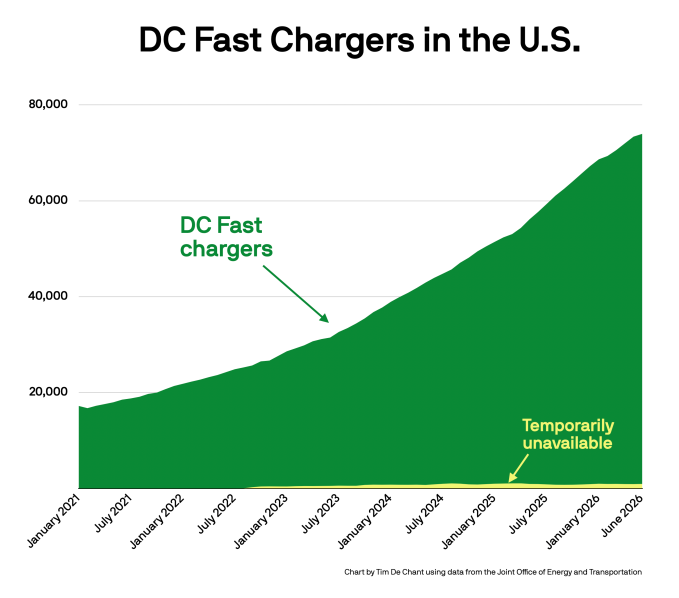
In the minds of prospective EV buyers, charging looms large. Just over half of those surveyed by AAA last year said that public charging infrastructure was a key concern.
Those concerns aren’t unfounded. EV fast charging has historically been lackluster. In 2023, after a disastrous road trip, I drafted an EV fast-charging “bill of rights,” outlining seven improvements charging networks needed to make to turn things around.
What a difference a few years can make.
During a recent road trip, I was surprised by how much the situation has improved. With one small exception, my charging experience was flawless.
This summer’s road trip to Montreal covered more than 600 miles. We had intended to use our Kia EV9, which will travel nearly 300 miles on a charge, but the Kia is in the shop because of a broken air conditioner. Instead, we drove our Audi e-tron, which has a range of about 220 miles per charge. Despite the disparity, the e-tron handled the trip with aplomb. Rangemaxxing might sound nice, but it isn’t necessary.
To find chargers, I used A Better Route Planner (ABRP), an app that optimizes charging stops by accounting for everything from prevailing winds and temperature to vehicle specs and battery degradation. You can use a Bluetooth OBD reader to feed live data from the car to ABRP, but I found the app to be pretty accurate without one. ABRP said our first stop should be a Rivian charger near Lebanon, New Hampshire. The app is now owned by Rivian, so I wasn’t entirely surprised.
After my experience at the Lebanon chargers, I can see why the app chose them, regardless of Rivian’s ownership. There were no lines, plenty of food options, a grocery store, and six 300-kilowatt chargers that were all working. I had downloaded the Rivian app in advance, but I needn’t have. The charger accepted my credit card and delivered more than 140 kilowatts, roughly the e-tron’s max. We used the same chargers on the way home and had a similar experience.
After that, we used a Circuit Électrique station just outside Montreal to top up for the week ahead. There, we experienced the trip’s only hitch: The card reader didn’t work, so I had to download Circuit Électrique’s app and load it with 20 Canadian dollars. After that, the session went smoothly. In retrospect, the stop wasn’t entirely necessary. We didn’t drive much during the week, and the hotel charger worked perfectly. But the kids needed a break and my wife needed a coffee, so we probably would have plugged in regardless.
Each session lasted about 20 minutes, and we combined charging with lunch or rest stops. We never once waited on the car. Altogether, the three sessions took about as long as our wait at border control on the way back into the United States.
Three years ago, the trip didn’t go nearly as well. I knew that fast charging could be hit or miss — I’ve driven non-Tesla EVs for more than a decade — but I still came away disappointed.
That summer, we drove the same Audi e-tron to Maine, a round trip of about 350 miles, roughly half the distance of our trip to Montreal. The car could have made it to Maine on one charge, but the hotel didn’t have an EV charger. To ensure we had enough juice for the long weekend and the beginning of the drive home, we planned to charge a little over halfway there.
Before we left, I had also used ABRP to weed out less reliable chargers, but the experience was still miserable. The first charger broke shortly after I plugged in, forcing me to move to another stall. The first charger never ended the session with my car, which meant the second one wouldn’t start without a call to customer service. At another stop, the charging network’s app reported two working plugs out of four, but only one actually worked. Altogether, I drove about seven hours and had to call customer service three times.
Imagine if gas stations worked like this?
Thankfully, the EV charging infrastructure looks very different today. My experiences in 2023 and 2026 are anecdotes, of course. But the available data suggests they are representative of a broader trend: fast charging in the U.S. has improved by leaps and bounds.

Back in July 2023, the country had about 32,000 DC fast chargers, according to the Joint Office of Energy and Transportation. At the time, many of those chargers were restricted to Tesla drivers. (Tesla announced plans to open its network in 2023, but it took more than a year for widespread access.) Today, EV drivers can use most of Tesla’s network. Continued expansion by Tesla and other companies has helped push the total to more than twice the number of DC fast chargers available in 2023.
What’s more, they’re more reliable.
My nearly flawless trip last week appears to be the norm, not the exception. Since last year, reliability has improved nearly 10 points, from 85 to the mid-90s, on Paren’s reliability index, which includes metrics such as successful charging sessions and station downtime. Tesla’s network remains dominant, according to Paren, but other networks are growing quickly. That competition has undoubtedly helped improve charging experiences across the board.
Gaps in the network still exist and EV chargers still break. But more chargers are being added every month and the broken ones are being repaired more quickly than in the past.
It’s not perfect, but I’m genuinely surprised by how much better fast charging has become. Someone should tell the holdouts what they’re missing.
When you purchase through links in our articles, we may earn a small commission. This doesn’t affect our editorial independence.
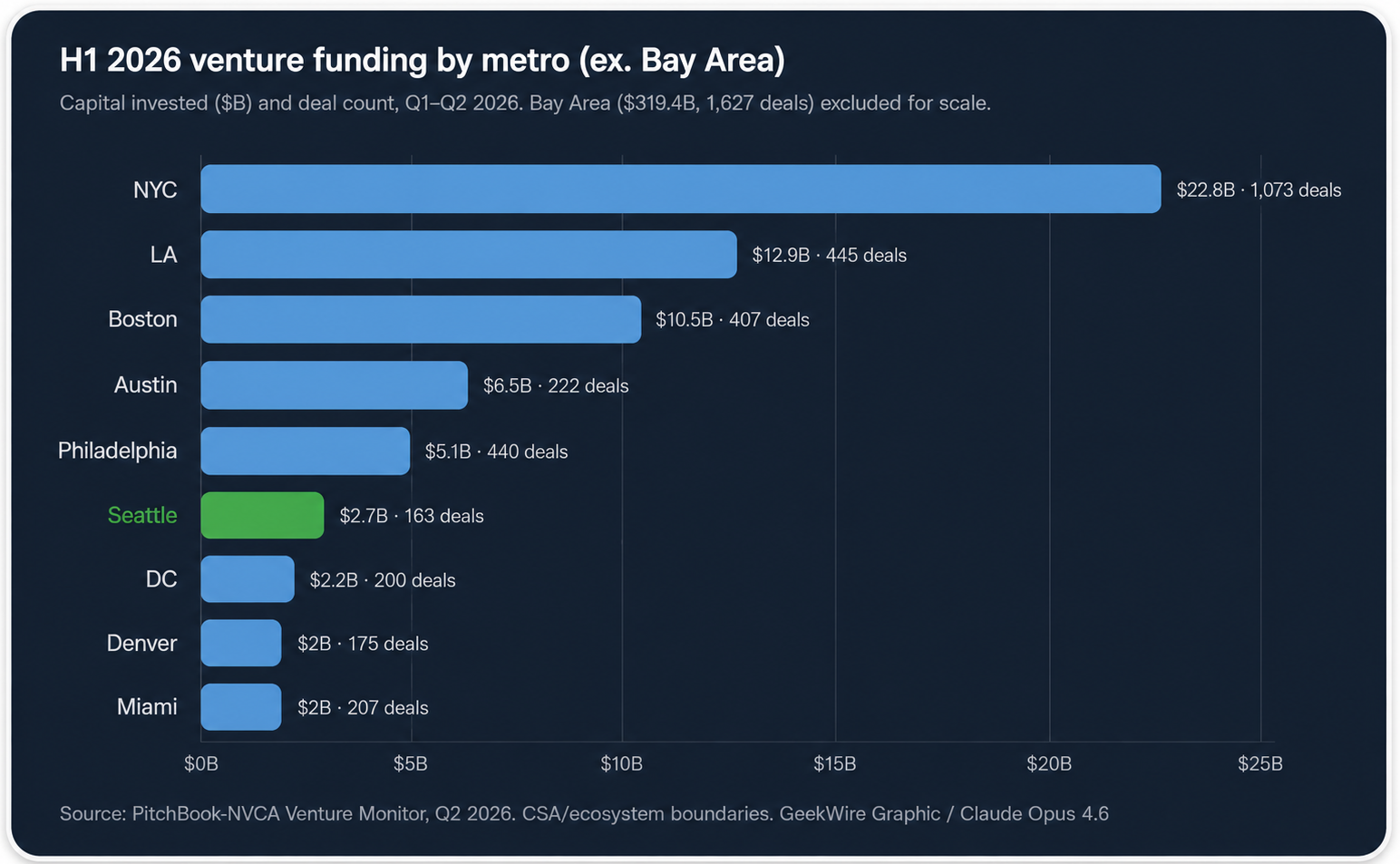

Seattle-area startups raised $2.7 billion in venture funding through the first half of 2026, across 163 deals, down about 40% from $4.5 billion in 210 deals during the same period a year ago.
The figures come from the recently released PitchBook-NVCA Venture Monitor report for Q2 2026. The decline in capital reflects fewer deals across the board in the Seattle region, with much of the funding going to a handful of large rounds for energy, cybersecurity, and space startups.
Here is the region’s top 5 for the second quarter, as tracked in the report:
Against the AI grain: In Q2 2026 specifically, startups in the Seattle area closed 85 deals totaling $1.5 billion. That was down from 101 deals and $2.3 billion in the same quarter a year ago, but up from Q1 2026, which PitchBook revised to 78 deals and $1.2 billion as part of its regular data updates.

Heavy infrastructure investments by Microsoft and Amazon have helped to establish the Seattle area as an AI hub, but the region’s pure-play AI startups, on the whole, aren’t seeing investment on the same scale as some of their peers in Silicon Valley and other tech hubs around the country.
That creates a disconnect with the larger U.S. venture capital market. AI companies accounted for 86% of all U.S. venture dollars in the first half of the year, according to the PitchBook-NVCA data.
Nationally, it was a record half: U.S. startups raised $412.7 billion through June, already surpassing the full-year record of $358.6 billion set in 2021. But the number is misleading. Deals of $100 million or more accounted for 87.5% of the total, and AI companies captured 86 cents of every venture dollar.
OpenAI and Anthropic alone absorbed roughly 43% of all global venture capital in the first half of the year, by one estimate. The Bay Area, home to both, pulled in $319 billion, about three times its H1 2025 total.
Strip out those two companies and the national picture looks very different. Seed funding fell 27% nationally in the first half, and first-time fund formation is on pace for its lowest year since 2016.
Regional trends: In that way, what’s happening in the Seattle area reflects the current realities of the market. However, the region is also slipping relative to its peers in the latest numbers.
Among the 10 largest U.S. metro areas for venture funding, Seattle ranked seventh by capital invested in the first half of the year, down from fifth in H1 2025. By deal count, the region was last in the top 10.
The data used in this analysis covers the Seattle-Tacoma combined statistical area (CSA), a broader regional boundary that includes communities beyond the core metro region.
Political climate: Washington’s shifting tax and economic landscape adds another variable.
The state now taxes capital gains at up to 9.9%, a new millionaires’ tax takes effect in 2028, and legislators this year floated taxing the federal QSBS exemption that startup founders and early employees rely on when they sell shares at exit. That bill didn’t pass, but generated enough alarm to cause a backlash from startup community leaders and investors.
Looking ahead: Blue Origin, Jeff Bezos’ Kent-based space company, is reportedly seeking up to $10 billion in what would be its first outside funding round. A deal that size would be larger than every other Seattle-area venture round this year combined.
What just happened? In an age where tech workers are losing their jobs to AI at a frightening pace, thousands of Google’s employees are taking action. Over 4,500 company staff have signed a petition calling for layoff protections, including guaranteed severance, buyouts before mandatory layoffs, and the option to take severance as extended paid leave.
Like many other companies invested in the AI boom, Google is enjoying plenty of success right now. Parent company Alphabet’s latest quarter produced $109.9 billion in revenue, up 22%, while operating income rose 30% to $39.7 billion. It’s also the third-largest company in the world by market cap with a $4.3 trillion valuation.
“Make no mistake: this is a company that is enjoying massive, unprecedented success,” Parul Koul, Google software engineer and Alphabet Workers Union president, said outside the company’s California headquarters after delivering the petition to the office of CEO Sundar Pichai.
But it seems that as these tech giants get richer, they lay off more people, often because of AI systems automating employees’ jobs. Alphabet has laid off more than 14,000 people since the start of 2023, most of whom lost their jobs that year. “These layoffs and cuts are not difficult decisions, but simply profit being put over the people that make this company run,” Koul added.
At a press conference on Thursday, employees chanted, “Google, Google, you can’t hide, we can see your greedy side,” and called out the 2023 mass layoffs.
Koul said workers were greeted with closed doors and no response for the most part after the petition was delivered to a staff member in Pichai’s office, though they agreed to pass it on to the CEO. Koul called it “the largest piece of employee feedback that Google has received about job security.”
The union also wants Google to end performance ratings that workers say are based on meeting quotas rather than merit. The company has denied forcing particular rating distributions, insisting that employees are assessed according to their individual performance, roles, levels, and expectations.
The campaign has already secured some benefits for employees. According to the union, voluntary exit packages have been made available to more than 70,000 Google workers since it began. The petition calls for these buyouts to be offered companywide before any mandatory layoffs.
Google Cloud quietly laid off employees in May, and the company eliminated more than one-third of the managers overseeing small teams last summer. More recently, hundreds of employees across its hardware, assistant, and engineering teams were let go in January 2026. Google also dismissed more than 200 contractors working on its AI products without warning in 2025 amid disputes over pay and working conditions.
Google has not confirmed that AI was responsible for its many job cuts. However, several other tech giants have been more open about the connection. Oracle reduced its workforce by 21,000 people over the last year and acknowledged that adopting AI had resulted in cuts. Block CEO Jack Dorsey cited AI efficiency gains when eliminating over 4,000 roles in February, almost half of the company’s workforce.
Google did not immediately respond to a request for comment.
Apple Music is raising U.S. subscription prices for the first time since 2022, increasing every paid tier and hitting family subscribers with the largest jump.
The Apple Music Individual plan now costs $11.99 per month, up from $10.99. The Family plan rose from $16.99 to $19.99 per month and continues to support as many as six people through Family Sharing.
Verified college students will pay $6.99 per month, up from $5.99. The Student plan includes the full Apple Music service and access to Apple TV at no additional cost.
The increases add $12 per year to the Individual and Student plans. A Family subscription will cost $36 more annually, bringing the total to $239.88 per year.
Furthermore, two out of three Apple One subscription plans have increased in cost. The individual plan is unchanged.
But, the family and Premier are more expensive now. Both Family and Premier have increased $2 per month, with the former increasing to $27.95, and Premier going up to $39.95.
The new prices appeared on Apple’s website without an accompanying Apple Newsroom announcement. The company lists a one-month trial for new Individual, Family and Student subscribers.
Apple Music hadn’t raised its broad U.S. subscription prices since October 24, 2022. The previous increase took the Individual plan from $9.99 to $10.99 and the Family plan from $14.99 to $16.99.
Apple attributed the 2022 increase to higher licensing costs and said artists and songwriters would earn more from streamed music. The company hasn’t publicly explained the July 17 increase.
The Individual plan increased by about 9%, while the Family plan rose by nearly 18%. The Family plan received the largest increase in both dollars and percentage terms.
The Family plan remains cheaper than two separate Individual subscriptions, which would cost $23.98 per month. Apple Music gives as many as six family members separate libraries, recommendations and playlists under one subscription.
The Student plan’s included Apple TV access adds value to the $6.99 monthly subscription. Apple limits student pricing to 48 months while the subscriber remains verified, and the Apple TV benefit remains a limited-time offer.
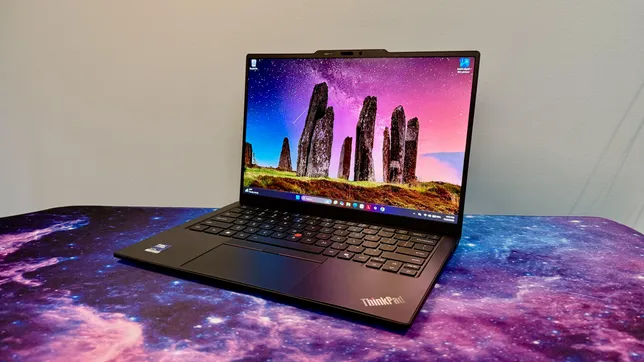

The 14th generation of Lenovo’s flagship business ultraportable, the X1 Carbon, looks no different than the previous iteration. But don’t let its comfortingly familiar design fool you: The interior has been completely reengineered to make the laptop run more coolly and quietly, and — more importantly — it’s easier to repair.
The X1 Carbon Gen 14 introduces Lenovo’s Space Frame chassis that features a smaller motherboard and larger cooling fans, along with a modular design that makes it easier to access and then repair or replace individual components. This is good news for ThinkPad buyers who care about ROI, sustainability or both.
The laptop is based on Intel’s Core Ultra 300 series processors, known as Panther Lake. If you were hoping for a big leap in performance from last year’s Lunar Lake model, you’ll need to keep waiting in the hopes that next year’s Gen 15 delivers the goods. This year’s model isn’t any faster than last year’s ThinkPad X1 Carbon Gen 13, and battery life is actually a few hours shorter.
Performance certainly suffices for basic office tasks, and you should be able to get through even the longest workdays on a single charge, but the reason to pick up the X1 Carbon Gen 14 is the increased repairability rather than anything resembling an increase in performance. Two other reasons for it: the X1 Carbon’s traditional look remains largely unchanged, which will delight longtime ThinkPad fans; and pricing hasn’t gone up (the model Lenovo sent me is actually $100 cheaper than the similar config I tested last year). That will come as a relief to any laptop buyer in this era of RAMageddon and skyrocketing prices for laptops, phones and other electronics.
Lenovo ThinkPad X1 Carbon Gen 14 Aura Edition
Price as reviewed
$2,374
Display size/resolution
14-inch, 2,880×1,800 pixels, 120Hz, OLED
CPU
Intel Core Ultra 7 355
Memory
32GB LPDDR5-7467
Graphics
Intel Graphics
Storage
512GB
Ports
3x USB-C Thunderbolt 4, USB-A 5Gbps, HDMI 2.1, combo audio
Networking
Wi-Fi 7 and Bluetooth 5.4
Operating system
Windows 11 Pro 26H1
Weight
2.16 pounds (0.98 kg)
Lenovo has kept pricing fairly consistent for this year’s ThinkPad X1 Carbon Gen 14, which ought to be applauded as laptop prices keep going up and up. As Lenovo’s flagship ThinkPad, however, the X1 Carbon remains a device more likely to be toted around by C-suite execs than the rank and file. The entry point has risen, but the cost of upgrades has surprisingly dropped a bit. And despite what Lenovo may show on its site, there is a way to get the ThinkPad X1 Carbon Gen 14 for less than $2,000.
Lenovo lists a starting price of $2,139 for a config with an Intel Core Ultra 5 335, 32GB of RAM, a 256GB solid-state drive, a 1,920×1,200-pixel IPS display and Windows 11 Home. But if you choose to upgrade to the Core Ultra 7 355, then you can downgrade the RAM to 16GB for a price of $1,884. I’m not suggesting you move off of the 32GB of RAM offered, but simply highlighting it as a somewhat hidden option.
Less hidden, and new with this year’s Panther Lake-based X1 Carbon, is the option to expand the memory to 64GB. When you choose the top CPU offered, the Core Ultra 7 365, the option for 64GB becomes available. That’s the good news. The bad news is that this memory upgrade is staggeringly expensive. It costs $720 and clearly shows how the global RAM shortage has dramatically increased PC component pricing.
My test system features the Core Ultra 7 355 chip and 32GB of RAM, along with three other upgrades: a 512GB SSD, a 2.8K nontouch OLED display and Windows 11 Pro, which raises the total to $2,374. That’s actually $100 cheaper than the X1 Carbon Gen 13 that I reviewed last year, which had the same component lineup but with the previous-gen Core Ultra 7 258V CPU.
The ThinkPad X1 Carbon Gen 14 starts at £2,366 in the UK and AU$3,779 in Australia.
The Space Frame design completely overhauls the laptop’s interior layout, making it easier to repair or replace individual components rather than replacing the entire laptop if one part fails. It’s not as modular and easy to access as I had hoped, but it’s certainly a step in the right (-to-repair) direction.
You need only to remove four screws to take off the bottom panel. Inside, the battery is held in place by three screws, and you’ll need to remove it to get to the internal frame that houses the double-sided motherboard.
In addition to removing the bottom panel, you can remove the keyboard deck to access each side of the motherboard. Six screws hold the keyboard deck in place. So, that’s a total of 13 screws to gain full access to the interior components. And they are all standard Phillips screws, so you won’t need to hunt around for a Torx or Pentalobe screwdriver. (They’re captive screws, too, so you won’t have a chance to lose any.)
In truth, taking off the two panels is slightly more complicated than removing 13 screws. There are four ribbon cables you also need to disconnect, which might make people in your organization less confident to make their own repairs and more likely to call the IT department. I also found it challenging to get all the cables on the right side of the internal frame as I attempted to line up the keyboard deck and snap it into place when I was reassembling the laptop.
Even if Lenovo’s Space Frame chassis is a bit trickier and not as modular as, say, a Framework laptop, it makes the X1 Carbon Gen 14 much more repairable than any previous ThinkPad. For starters, you can replace the battery, which often is the first component to show signs of age and wear as battery life slowly but ever-so-consistently shortens. Most of today’s laptops have batteries that are soldered to the motherboard and not replaceable, so being able to just swap in a new battery is a boon.
In addition, the laptop’s cooling fans, keyboard, speakers and the USB ports are user-replaceable. The two USB-C ports on the left side can be individually removed and replaced, but the pair on the right is a packaged set.
The USB-C and -A ports on the right side are paired on a small circuit board that’s separate from the mainboard, so you’d need to replace both ports should one fail. Still, it’s nice that this small board can be replaced rather than needing to swap out the mainboard, which usually equates to a full laptop replacement.
The X1 Carbon Gen 14’s SSD is replaceable, but it occupies the lone M.2 slot, so you’ll need to replace the existing drive, and you don’t have the luxury of simply adding a second SSD to increase the storage capacity. The RAM is not user-replaceable, so you have to get what you need upfront.
The interior has been completely redesigned, but the exterior received only minor tweaks. The latest ThinkPad X1 Carbon retains the classic ThinkPad look. It’s boxy, matte black with the familiar red accents. And it’s still exceptionally light at just under 2.2 pounds.
The keyboard received a couple of cosmetic changes. Lenovo moved the fingerprint reader, integrating it with the power button in the top-right corner. This change restores the right-Ctrl key but also means the End and Insert keys are now double-mapped to a single key. Lenovo also shifted the keyboard icons from their usual spot in the top-left corner of each key to the center, a move that also includes a slight tweak to the font.
The keyboard maintains its ThinkPad standard of excellence. It sits in the sweet spot of offering plush but firm feedback and is still the standard-bearer for laptop keyboards. It’s a pleasure to type on.
You have a choice of touchpads: mechanical or haptic. I received the mechanical one, and it’s fine for what it is. There is some diving-board effect where clicks are harder to perform as you move up the touchpad’s surface. Given that there’s no upcharge for the haptic touchpad, I think most people are better off with it because it offers a consistent click response across its entire surface.
The haptic touchpad also provides a larger surface on which to click and swipe because it integrates the mouse buttons for the pointing stick into a narrow strip at the top. The only reason I see for the mechanical touchpad is if you favor the traditional ThinkPad pointing stick over the touchpad and want the larger mouse buttons for it at the top of the touchpad.
The 2.8K OLED display is excellent and, shockingly, doesn’t cost any more than the baseline IPS panel. That’s the reason why the Gen 14 model I have is $100 less than the nearly identical Gen 13 model I looked at last year. Component prices have gone up, but Lenovo not charging $490 for the OLED upgrade certainly helps keep the price in check.
The OLED looks fantastic, with vivid colors, deep blacks and crisp images and text. Scrolling and other movements on the screen look smooth, thanks to its variable refresh rate of 30Hz to 120Hz. Color coverage is excellent with 100% coverage of the sRGB and P3 gamuts, and it proved to be even a bit brighter than its 500-nit rating, hitting a peak of 510 nits on my tests with a Spyder X Elite colorimeter.
The ThinkPad X1 Carbon Gen 14 offers a Windows Hello webcam along with the aforementioned fingerprint scanner. I like getting both types of biometrics, especially on a business machine.
The port selection has grown by one with this year’s X1 Carbon. It picked up an extra USB-C Thunderbolt 4 to bring the count to three. And, better yet, it’s located on the opposite side of the other two, giving you the ability to charge the laptop from either side.
Quick note on the Aura Edition suffix: It’s the branding for Lenovo and Intel’s partnership that makes it easier to swap files between the X1 Carbon and your phone. Less useful are its smart modes for setting a timer to focus or a wellness mode that reminds you to take a break to rest your eyes. There’s even a mildly unsettling posture warning that uses the webcam to track how you’re doing at sitting up straight and not slouching in front of the laptop.
This year’s Panther Lake model isn’t any faster than last year’s Lunar Lake system. Multicore performance crept up a smidgeon, but single-core performance slid back. Meanwhile, 3D performance also decreased, which isn’t surprising when you consider that the Core Ultra 7 355’s integrated GPU has only four Xe graphics cores, and last year’s Core Ultra 7 258V’s iGPU had eight Xe cores. Lenovo doesn’t offer a Core Ultra X7 that brings with it Intel’s higher-powered, 12-core Arc B390 integrated GPU, which is unfortunate for creators or other power users eyeing the X1 Carbon Gen 14.
I also wasn’t surprised to see battery life move three hours in the wrong direction. The Core Ultra 7 355 is a higher-wattage CPU than the Core Ultra 7 258V and, therefore, consumes battery resources at a quicker clip. The X1 Carbon Gen 13 lasted nearly 18 hours on our YouTube streaming battery drain test, and the X1 Carbon Gen 14 lasted almost 15 hours on the same test. That’s still enough to get you through most workdays on a single charge, but it doesn’t give you as much leeway as last year.
Outweighing the lack of any performance gains with this year’s edition and battery life decreasing by a few hours is the greater repairability that should help extend the useful life of the ThinkPad X1 Carbon Gen 14. The Space Frame design makes it possible to repair or replace the battery when it starts to fade, a cranky cooling fan or a bad port instead of needing to junk the laptop and buy a new one. That’s great for your ROI and the environment.
I also like two things about the X1 Carbon that didn’t change this year. First, I appreciate that in year 14, the X1 Carbon continues to stay true to its roots and keeps its traditional look and feel. It’s just a well-built machine with a rare combination of being very lightweight yet sturdy (and the keyboard is *chef’s kiss*). Secondly, I was pleasantly surprised to see pricing stay steady. Lenovo raised the entry price, but that is more than offset by removing the premium for the OLED upgrade. And since I imagine most people buying the flagship ThinkPad will want the best display offered, you’ll come out ahead on the price compared to last year’s X1 Carbon.
The review process for laptops, desktops, tablets and other computerlike devices consists of two parts: performance testing under controlled conditions in the CNET Labs and extensive hands-on use by our expert reviewers. This includes evaluating a device’s aesthetics, ergonomics and features. A final review verdict is a combination of both objective and subjective judgments.
The list of benchmarking software we use changes over time as the devices we test evolve. The most important core tests we’re currently running on every compatible computer include Primate Labs Geekbench 6, Cinebench R24, PCMark 10 and 3DMark Fire Strike Ultra.
A more detailed description of each benchmark and how we use it can be found on our How We Test Computers page.
Microsoft Surface Laptop for Business (8th Edition) 17014Lenovo ThinkPad X1 Carbon Gen 14 Aura Edition 11492Acer Swift Go 14 AI 11490Dell XPS 14 11207Lenovo ThinkPad X1 Carbon Gen 13 Aura Edition 11079HP EliteBook Ultra G1i 11032
Microsoft Surface Laptop for Business (8th Edition) 2953HP EliteBook Ultra G1i 2777Lenovo ThinkPad X1 Carbon Gen 13 Aura Edition 2742Lenovo ThinkPad X1 Carbon Gen 14 Aura Edition 2679Dell XPS 14 2599Acer Swift Go 14 AI 2422
Microsoft Surface Laptop for Business (8th Edition) 802Acer Swift Go 14 AI 709Lenovo ThinkPad X1 Carbon Gen 14 Aura Edition 647Lenovo ThinkPad X1 Carbon Gen 13 Aura Edition 557Dell XPS 14 530HP EliteBook Ultra G1i 518
Microsoft Surface Laptop for Business (8th Edition) 125HP EliteBook Ultra G1i 123Lenovo ThinkPad X1 Carbon Gen 13 Aura Edition 121Lenovo ThinkPad X1 Carbon Gen 14 Aura Edition 119Dell XPS 14 117Acer Swift Go 14 AI 107
Microsoft Surface Laptop for Business (8th Edition) 1387HP EliteBook Ultra G1i 820Lenovo ThinkPad X1 Carbon Gen 13 Aura Edition 680Lenovo ThinkPad X1 Carbon Gen 14 Aura Edition 619Dell XPS 14 524Acer Swift Go 14 AI 233
Microsoft Surface Laptop for Business (8th Edition) 9432Lenovo ThinkPad X1 Carbon Gen 14 Aura Edition 7734Dell XPS 14 7467Lenovo ThinkPad X1 Carbon Gen 13 Aura Edition 7114HP EliteBook Ultra G1i 6815
Acer Swift Go 14 AI 23 hr, 13 minDell XPS 14 21 hr, 7 minLenovo ThinkPad X1 Carbon Gen 13 Aura Edition 17 hr, 54 minLenovo ThinkPad X1 Carbon Gen 14 Aura Edition 14 hr, 49 minMicrosoft Surface Laptop for Business (8th Edition) 14 hr, 42 minHP EliteBook Ultra G1i 13 hr, 39 min
| Lenovo ThinkPad X1 Carbon Gen 14 Aura Edition | Microsoft Windows 11 Pro; Intel Core Ultra 7 355; 32GB DDR5 RAM; Intel Arc 140V Graphics; 512GB SSD |
|---|---|
| Lenovo ThinkPad X1 Carbon Gen 13 Aura Edition | Microsoft Windows 11 Pro; Intel Core Ultra 7 258V; 32GB DDR5 RAM; Intel Arc 140V Graphics; 512GB SSD |
| HP EliteBook Ultra G1i | Microsoft Windows 11 Pro; Intel Core Ultra 7 268V; 32GB DDR5 RAM; Intel Arc 140V Graphics; 512GB SSD |
| Microsoft Surface Laptop for Business (8th Edition) | Microsoft Windows 11 Pro; Intel Core Ultra X7 368H; 32GB DDR5 RAM; Intel Arc B390 Graphics; 1TB SSD |
| Dell XPS 14 | Microsoft Windows 11 Home; Intel Core Ultra 7 355; 16GB DDR5 RAM; Intel Graphics; 512GB SSD |
| Acer Swift Go 14 AI | Microsoft Windows 11 Home; Qualcomm Snapdragon X Plus X1P-42-100; 16GB DDR5 RAM; Qualcomm Adreno Graphics; 1TB SSD |
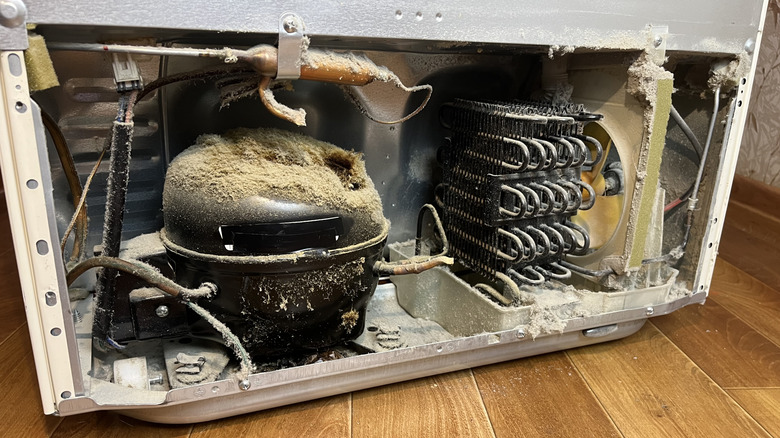
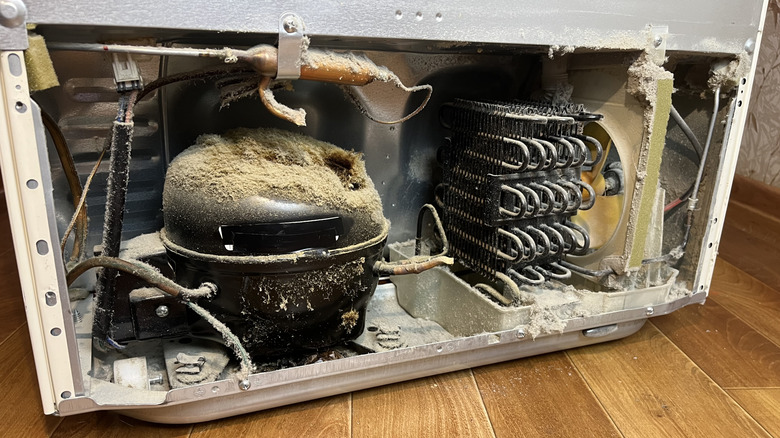
Refrigerators generally aren’t appliances that need to be replaced regularly. A high-quality fridge can have quite a long lifespan, and the best way to maximize that is to take care of it properly. The basics, such as cleaning the interior, being mindful of the temperature dial, and not leaving the door open for long periods, are pretty obvious, but there’s more that you can do. One essential maintenance step is cleaning the condenser coils — the elements responsible for dispensing heat pulled from the fridge — regularly, usually once or twice a year. Those with particularly dusty homes, or who own pets, may even want to clean them more frequently.
Fortunately, cleaning condenser coils is a reasonably easy task. Once you’ve located the coils, unplug the unit and move it so you can reach them. From here, use a screwdriver to remove any coverings. This will give you full access to the coils, and you can use a vacuum to suck away all the accumulated dust and debris. A hand brush can also be handy to loosen any stuck-on debris. Once the coils are as clean as you can get them, put the covers back on, plug the fridge back in, and slide it back into place.
As you can see, there’s really not a lot to cleaning your fridge’s condenser coils. That’s all the more reason to keep up with it, especially since failing to do so could lead to big problems.
No matter which of the major refrigerator brands you go with, or the state of your home, there are several good reasons to keep your fridge’s condenser coils clean. Condenser coils are essential for drawing heat from the fridge, keeping the inside nice and cool. Excess debris makes the coils less effective at their job, meaning the condenser has to work harder to draw the warm air out. This may shorten the condenser’s lifespan, leading to costly repairs sooner.
Dirty condenser coils can also lead to higher energy bills over time. Less-efficient cooling means the fridge has to work harder to reach the desired temperature, increasing energy use. This could be particularly noticeable in the summer months, as higher temperatures will already have your fridge working overtime to stay cool. There’s no need to risk failure by forcing a fridge to work harder than it already is during periods of high heat.
A fridge’s condenser coils are often out of sight — and out of mind. But being aware of the coils’ importance and cleaning them consistently is crucial to keeping a fridge operating at its best for as long as possible.




London Mayor Sadiq Khan handed a peerage by Keir Starmer alongside 15 other Labour figures… just days before the PM leaves No10


Weekend Open Thread – Corporette.com


The House | The City of London can help the new chancellor deliver growth in every postcode


Young campaigners urge incoming PM to act on outdoor junk food ads


CFTC blocks Kalshi from unwinding Michigan trades after court order


Nvidia Stock Slips After Big Tuesday Rally as Huang Confirms Vera Rubin Chip Is Now in Production Today


Ripple Payments Joins MiCA With 14 Firms, Does It Mean Anything For XRP?

Disney’s Most Ambitious Failed Star Wars Attraction Is Coming to SDCC


Ripple wins EU-wide access as ESMA adds it to MiCA register


Palantir Shares Rise After Expanded Nvidia Partnership and Fresh Analyst Upgrades Ahead of Earnings Day


Injective Submits SEC Transfer-Agent Registration to Onchain Ownership Records


Get Your ESP32 Sunny Side Up With This Solar Dev Board


XRP BOMBSHELL… XRP OMBOARDED FOR TRANSACTIONS!!!


Registration is now open for March for Men with Kev 2026


Dark Secrets Emerge When Jailbreaking LLMs

New Cornerback Enters Vikings Trade Rumor Mill


Money | Class 12 Economics | CBSE Board Exam 2026-27

Two July Windows Left: The CLARITY Act’s Senate Fight and What Failure Means


Banco Bilbao Vizcaya Argentaria, S.A. (BBVA) Discusses Global Macro Environment and Economic Outlook for Core Markets Transcript

Claude Fable 5 Slips to Second in AI Coding Leaderboard


You must be logged in to post a comment Login