Connect with us
DAPA Banner
DAPA Coin
DAPA
COIN PAYMENT ASSET
PRIVACY · BLOCKDAG · HOMOMORPHIC ENCRYPTION · RUST
ElGamal Encrypted MINE DAPA
🚫 GENESIS SOLD OUT
DAPAPAY COMING

Tech

NYT Connections hints and answers for Sunday, July 19 (game #1134)

Published

on

Looking for a different day?

A new NYT Connections puzzle appears at midnight each day for your time zone – which means that some people are always playing ‘today’s game’ while others are playing ‘yesterday’s’. If you’re looking for Saturday’s puzzle instead then click here: NYT Connections hints and answers for Saturday, July 18 (game #1133).

Good morning! Let’s play Connections, the NYT’s clever word game that challenges you to group answers in various categories. It can be tough, so read on if you need Connections hints.

What should you do once you’ve finished? Why, play some more word games of course. I’ve also got daily Strands hints and answers and Quordle hints and answers articles if you need help for those too, while Marc’s Wordle today page covers the original viral word game.

Advertisement

Source link

Advertisement
Continue Reading
Click to comment

You must be logged in to post a comment Login

Leave a Reply

Tech

California’s ‘Truth in Recycling’ Law Blocked by Judge

Published

on

An anonymous reader shared this report from the Los Angeles Times:

A federal judge has halted California’s groundbreaking “Truth in Recycling” law, which aims to reduce consumer confusion about which packaging can be recycled. [Originally planned to take effect October 4th], California’s recyclable packaging law prohibits manufacturers from using a “chasing arrows” recycling symbol on products or materials unless they are actually being recycled in a meaningful way, which the law quantifies…

A coalition of farming, forestry, restaurant and packaging organizations sued the state in March, arguing the law violates their right to free speech. They argued that Senate Bill 343 operates as “government-imposed censorship.” Judge William Hayes agreed that their challenge has merit, and on Tuesday ordered California Atty. Gen. Rob Bonta, the defendant in the case, to pause enforcement of the law “until further order of the Court….” Advocates of reducing plastic use disagreed. “The court got it wrong, and I’m confident that the state will ultimately prevail,” said Nick Lapis, director of advocacy for Californians Against Waste. “S.B. 343 does not violate the 1st Amendment; it requires companies to tell the truth when they make recyclability claims. Suggesting that the 1st Amendment protects misleading environmental marketing is inconsistent with the basic principles of consumer protection that states like California have implemented for decades.”

In January, CalRecycle, the state’s waste agency, reported that less than 10% of most single-use plastic materials in the state were being recycled. Even yogurt containers and margarine tubs — made of ubiquitous polypropylene, or No. 5 plastic — are being recycled at a rate of only 2% in the state, the report said. Only 5% of colored shampoo and detergent bottles, made from polyethylene, or No. 1 plastic, are getting recycled…

Plastic materials that can’t be recycled are typically sent to landfills or sometimes illegally shipped overseas, where they are burned or end up in landfills, rivers and waterways.

Advertisement

The bill’s author told the Los Angeles Times “All you have to do is look at the numbers. These products are not getting recycled, despite what the industry is claiming. They are just confusing consumers, clogging the waste stream, polluting the environment, leading to higher and higher prices for local governments and ratepayers.” He argues the symbols shouldn’t be used to “confuse people who see the symbols [on products] and assume they can be recycled.”

The article also quotes Judith Enck, former Environmental Protection Agency regional administrator and president of the nonprofit Beyond Plastics. “Given the long history of the plastics industry deceiving the public about plastics recycling, this is an especially bad outcome. It is a reminder that the plastics industry has enough money to fight even the most modest policy designed to protect people and the planet.”

Source link

Advertisement
Continue Reading

Tech

How to Disable Music Videos in Spotify

Published

on

Spotify, it’s fair to say, has made some weird user-experience choices.

There are a number of panels in the app, and the layout is confusing. The service constantly tracks your activity. The app also seems to have an odd hostility to playing actual albums. This all works to create a general feeling that Spotify’s designers are trying to push you into using the service in a particular way.

It’s understandable, then, that some people are annoyed with the way music videos have been added to the platform. For the most part, they would start to play by default, in the background, whenever an artist had uploaded a video for the song. Some music videos have very different audio from the original tracks, particularly if they include sketches or sound effects, which can prove distracting if you prefer the album version of the song. And even if you enjoy music videos (which I do), the decision to have videos play by default—using up bandwidth and battery power—upset a lot of people.

There are a few other quirks. On Spotify’s desktop app, the videos are barely visible; they stay contained in the tiny album art panel until you manage to find the hidden, extremely small Now playing button that enlarges them. Also, the selection of videos that are on the platform, and the ones that are mysteriously absent, seems totally random. Because of this, I check YouTube first when I really want to watch a music video.

Advertisement

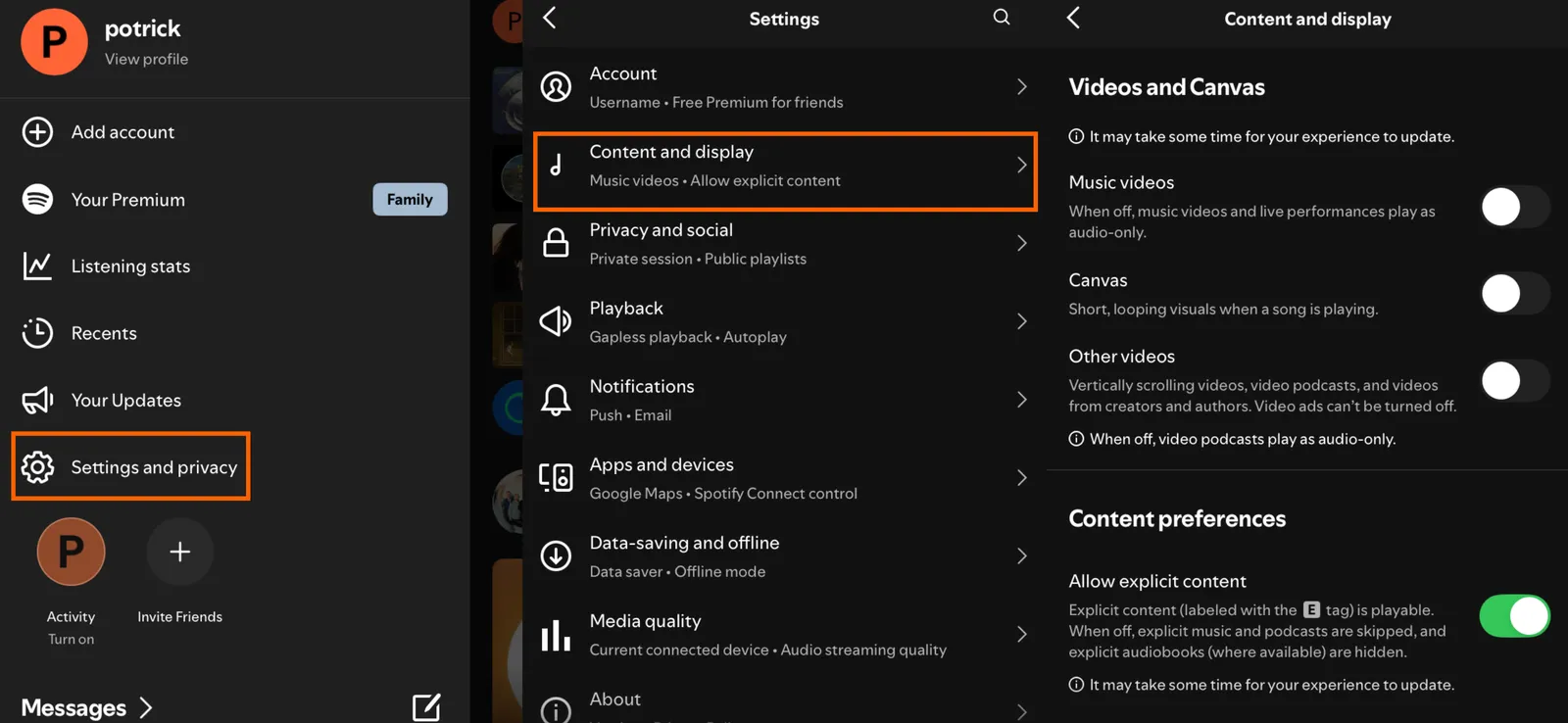
The most annoying thing, though, had been a lack of any obvious way to disable all videos. That changed recently—there’s now a toggle in the settings to disable music videos in Spotify entirely, alongside controls that disable the Canvas feature (animated album art) and video podcasts.

On mobile you can do this by tapping your user profile icon in the top-left to bring up the side panel. Then tap Settings and privacy, followed by Content and display.

Image may contain Page Text Electronics Mobile Phone and Phone

Photograph: Justin Pot

In the Videos and Canvas section you will see three toggles: one for music videos, one for Canvas, and one for all other videos. This last toggle disables video podcasts, meaning you’ll get the audio-only version of podcasts instead. Turn all these off, and Spotify will use a lot less bandwidth.

On the desktop app, it’s a little different. Click your user profile icon in the top-right corner, then click Settings. Scroll down to the Videos and Canvas section to find the options to disable music videos and Canvas.

Advertisement

I tested this and it worked. The music video icon in playlists and albums disappeared, as did the collection of music videos on Artist pages. The only remnant of the disabled feature is a Switch to video button in the Now Playing sidebar, which appears below the album art. Click it and you’ll be told the video can’t play unless you turn videos back on in the settings. Odd, for sure, but for the most part turning this off means you don’t have to think about music videos in Spotify anymore.

I sincerely wish that Spotify would roll out music videos with more care. Sometimes I really do want to see a video—just not every time I play a track. Playlists of music videos might be welcome if they ran separately from the audio-only playlists. I just don’t want to get a music video when I’m looking for the album version of a song, and I don’t think I’m alone in that. I can only hope that Spotify’s future interface design choices will keep things more clearly separated.

Source link

Advertisement
Continue Reading

Tech

New Trailer Reveals Pixel Dreams Taking Flight in Final Fantasy Resonance

Published

on

Final Fantasy Resonance Pixel Trailer
Square Enix just rolled out a fresh pixel trailer for Final Fantasy Resonance, and it leans hard into the question of what the series might have looked like if it never left those old Super Nintendo sprites behind. The nearly three-minute clip puts the HD-2D style front and center, showing off battles, summons, and story moments that feel pulled straight from the glory days of Final Fantasy IV and VI while running on modern hardware.


Final Fantasy Resonance is the Final Fantasy series’ first foray into HD – 2D format, and it does so in a big way. Instead of simply copying over the action from the mobile game Final Fantasy Brave Exvius, the developers rebuilt and expanded on the opening story arc, transforming it into a full-fledged console RPG. Rain and Lasswell, a squadron commander and his boyhood friend, will head out after receiving a royal order to deal with a weakened barrier at the Earth Shrine.


Nintendo Switch 2: Choose Your Game Bundle
  • Kick off the fun with a Nintendo Switch 2 system, your choice of a select digital game, and a savings* of up to $29.99!
  • Includes choice of either the Mario Kart World, Donkey Kong Bananza, or Pokémon Pokopia digital game download
  • One system, three play modes: TV, Tabletop, and Handheld

Final Fantasy Resonance Pixel Trailer Screenshot
Inside, they face up against Veritas of the Dark, a man in black armor who simply wipes the floor with them, shattering the Earth Crystal and leaving their entire force in disarray. They then have to run back home to discover that Grandshelt is being attacked. Following the king’s desperate rescue, they partner up with a mystery girl named Fina to go out and protect the remaining crystals strewn over the earth.

Final Fantasy Resonance Pixel Trailer Screenshot
Combat remains true to its turn-based roots, but with a few nifty improvements. When you hit an enemy’s weak area, you will stun them and shatter their defenses, giving you the opportunity for a couple of extra turns and those massive Resonance assaults, which are basically a showstopper in cinematic fashion. You can use traditional Espers such as Ifrit, Shiva, and Titan to gain a few extra rounds before they finish with a sweeping strike like Hellfire or Diamond Dust. Then there are Visions, crystallized reflections of heroes from throughout the Final Fantasy history with whom you can team up. Equip one, and he (or she) will fight alongside the team. The stronger the link, the more of Vision’s special abilities you will be able to access. Expect to see familiar names like Cloud, Tidus, the Warrior of Light, Cecil, Bartz, Squall, and Zidane appear in this way.

Final Fantasy Resonance Pixel Trailer Screenshot
Between story beats, exploration reigns supreme. The cities may not have much to offer beyond a jump-rope contest or Mog Tag, but when you come across a Sanctum of Light, you’ll find a new Vision crystal to add to your collection. Then there are side paths to the Colosseum for some challenging monster confrontations, or the Chamber of Arms, where you can get your hands on some legendary weapons, or at least try to get them from the sealed creatures that are now protecting it. Places like Dilmagia, the steel metropolis that began it all with airship technology, and Olderion, the water-rich capital guarded by the Wardens of the Waters, give the game world a genuine lived-in atmosphere. Expect to see Chocobos, airships, and other Final Fantasy staples.

Final Fantasy Resonance Pixel Trailer Screenshot
Square Enix and co-developer Lancarse are preparing to release the game on October 22, 2026, for Nintendo Switch 2, Nintendo Switch, PlayStation 5, Xbox Series X|S, and PC via Steam and the Microsoft Store. The standard game costs $49.99, the Digital Deluxe version adds in-game goodies for an additional $59.99, and the Collector’s Edition costs $209.99.

Source link

Advertisement
Continue Reading

Tech

How to watch World Cup final 2026: Free Streams for Spain vs Argentina, Team News

Published

on

Strategy meets vibes, skill meets will and control meets chaos in the World Cup final between Spain and Argentina tonight. The first ever meeting between a pair of reigning continental champions on this grand stage sets up a clash of styles between two sides that could hardly be more different.

La Roja blitzed the competition en route to the Euros title two years ago, but they’ve had to completely reinvent themselves on the fly at FIFA World Cup 2026, owing to injuries sustained by Lamine Yamal and Nico Williams in the lead-up to the tournament. Although Yamal has dazzled in fits and starts, Williams has barely featured.

Source link

Advertisement
Continue Reading

Tech

Today’s NYT Connections Hints, Answers for July 20 #1135

Published

on

Looking for the most recent Connections answers? Click here for today’s Connections hints, as well as our daily answers and hints for The New York Times Mini Crossword, Wordle, Connections: Sports Edition and Strands puzzles.


Today’s NYT Connections puzzle features one of those purple categories where you need to hunt down a hidden word inside four of the clues. Read on for hints and today’s Connections answers.

The Times has a Connections Bot, like the one for Wordle. Go there after you play to receive a numeric score and to have the program analyze your answers. Players who are registered with the Times Games section can now nerd out by following their progress, including the number of puzzles completed, win rate, number of times they nabbed a perfect score and their win streak.

Advertisement

Read more: Hints, Tips and Strategies to Help You Win at NYT Connections Every Time

Hints for today’s Connections groups

Here are four hints for the groupings in today’s Connections puzzle, ranked from the easiest yellow group to the tough (and sometimes bizarre) purple group.

Yellow group hint: Announce.

Advertisement

Green group hint: One might be turned up.

Blue group hint: Fresh start.

Purple group hint: Something you drink is hidden in each word.

Answers for today’s Connections groups

Yellow group: Proclaim.

Advertisement

Green group: Kinds of noses.

Blue group: Used in metaphors for opportunity.

Purple group: Starting with fermented beverages.

Read more: Wordle Cheat Sheet: Here Are the Most Popular Letters Used in English Words

Advertisement

What are today’s Connections answers?

completed NYT Connections puzzle for July 20, 2026

The completed NYT Connections puzzle for July 20, 2026.

NYT/Screenshot by CNET

The yellow words in today’s Connections

The theme is proclaim. The four answers are blare, herald, sound and trumpet.

The green words in today’s Connections

The theme is kinds of noses. The four answers are button, Greek, ski jump and snub.

Advertisement

The blue words in today’s Connections

The theme is used in metaphors for opportunity. The four answers are blank page, horizon, oyster and window.

The purple words in today’s Connections

The theme is starting with fermented beverages. The four answers are Alexa (ale), meadow (mead), portobello (port) and sakes (sake).

Source link

Advertisement
Continue Reading

Tech

5 Of The Worst Places To Put A Projector, And Why

Published

on


If you don’t love the look of a big TV in the living room, have limited space in your home to accommodate a TV, or just want a fun and easy way to elevate movie nights, you might want to look into buying a home projector. It used to be considered a luxury to have a projector set up in your home, but modern projectors are surprisingly cheap, thanks to technological improvements, material swaps, and lower production costs. Plus, home projectors are worth buying used, allowing consumers to save even more money on a gadget that used to feel too premium for the average household.

There are so many different types of home projectors to choose from, but no matter which projector model you go with, they all come with similar placement recommendations. That said, some projectors are built to perform better in certain conditions, like niche outdoor projectors bright enough to clearly project an image in direct sunlight. However, for the most part, all home projectors share these worst places to avoid. We’ve gathered five spots you should absolutely avoid putting a projector, along with a detailed explanation and a recommendation for where you should set it up instead.

Advertisement

Any messy or overcrowded surface

A projector, like any electronic media device, tends to get hot while it’s working. And because projectors have a lamp or a light bulb inside, they typically get hotter than a standard DVD player or even a gaming console. To prevent overheating, a projector is designed to pull air through intake vents, over the hot components, and out through exhaust vents.

This ventilation process is so important for user safety and the life of the projector that most (if not all) brands will highlight how important it is to set up the projector in an uncrowded area where it can breathe while in use. According to Lisowod, maker of the best cheap projector on Amazon, users are supposed to make sure there’s “adequate ventilation around the device” and that it’s on a “stable, flat surface.”

If your coffee table is frequently a dumping ground for takeout containers, dirty clothes, and other miscellaneous items, you shouldn’t set up a projector there. And if you do, you run the risk of potentially starting a fire or damaging the projector past the point of fixing, either due to overheating or falling from an uneven surface. Instead, choose a surface you know tends to stay clean and dusted or, if you know that’s not an option, you can tidy the surface each time you plan to use the projector.

Advertisement

The kitchen or the bathroom

Most people set up projectors in their living room, bedroom, a dedicated media room, or backyard, which are typically the best places to use a projector. However, some might consider using a projector in their kitchen or bathroom, both of which are terrible places for this media device. Putting a projector in your bathroom so you can watch a movie while you’re relaxing in the tub or in the kitchen to keep you entertained while cooking dinner sounds great on paper, but in reality, a projector in either of these rooms will have a shorter lifespan.

In the kitchen, projectors can be exposed to oil, oil mist, steam, smoke, or airborne cleaning chemicals. Depending on how small your kitchen is, there’s a chance the projector could be dangerously close to a hot stove or the sink. In the bathroom, humidity is the greatest danger to a projector. While kitchens can also get pretty humid while cooking, the risk of humidity damaging the projector is much greater in the bathroom, especially if there’s not a good ventilation system. According to Epson, a projector being exposed to high humidity could result in a fire, electric shock, or damage to the case or the projector itself.

Advertisement

An enclosed cabinet in a TV stand

Just like balancing a projector on a messy surface can prevent a projector from ventilating properly, so can placing it inside a cabinet, even if the cabinet is completely empty. Most cabinets in entertainment centers or dressers don’t have any active ventilation solutions set up inside. Some may have a hole built into the back panel or a larger cutout for cables to pass through, but with nothing actively pushing hot air out and bringing cool air in, this is too hot a space for a projector.

Most cabinets are also too compact for a projector to operate safely. Sony recommends leaving nearly 12 inches of clearance around some of its projector models, and other projectors from Sony and other brands likely need a similar amount of room to breathe. In a cabinet that’s too small and doesn’t offer nearly enough ventilation for a hot projector, you run the risk of the device overheating and possibly starting a fire or damaging the device beyond repair. Instead of sticking it inside a cabinet, a projector should be placed on a clean, roomy surface or mounted to the ceiling.

Advertisement

In direct sunlight or in rooms with bright lights

One of the worst places you can set up a projector is in a room that’s too bright or anywhere that gets direct sunlight. This isn’t because the projector might get too hot, though if it’s in the path of a sunbeam for too long while it’s actively in use, it’s possible it could overheat. Rather, a projector shouldn’t be set up in a spot that’s too bright because it makes it nearly impossible to see the projected image.

Some rooms, like the aptly named sunroom, are designed to let the sun in, and it would be strange to put blackout curtains in there just so you could have a projector in that room. For living rooms and bedrooms, two common rooms for a projector to call home, blackout curtains are a great way to block sunlight from streaming in. If the lights you have installed inside are too bright, you can invest in dimmer switches or smart bulbs that allow you to adjust brightness within a mobile app.

Advertisement

Near an air conditioner

LG warns users of its ProBeam DLP projectors not to install them anywhere that’s “under the air conditioner or is directly exposed to the wind from the air conditioner.” The brand also notes that users should avoid installation anywhere that’s “dusty or exposed to wind and rain,” so it’s likely that the constant (and possibly dusty) airflow and potential condensation are two of the biggest reasons LG recommends against installing a projector there.

A projector manual from Sony echoes this recommendation to steer clear of AC units during installation and use. The manual explains how air from air conditioners can cause oscillation in the projected screen. In more simple words, this influx of air can cause the projected image to look shaky or jittery. A jumping image could also be the result of setting up the projector on an air conditioner simply because of the vibrations produced by the AC unit, according to projector brand Miroir

Advertisement

Methodology

Most of us on the SlashGear team have home projectors as well as other similar media devices, like gaming consoles, DVD players, TVs, and so on. Because of that, it’s easy to rely on common sense to come up with this list of the worst places you can set up your projector. However, we didn’t stop there. We took the time to verify each reason we thought of with documentation from reputable projector brands, including LG, Sony, Lisowod, and Epson, for suggestions and warnings on where to set up or avoid setting up a projector.

Advertisement


Source link

Advertisement
Continue Reading

Tech

Which Classic Mopar Was Called The ‘Gentleman’s Muscle Car’ & What Made It So Special?

Published

on


Mopar’s mid-1960s to early 1970s run of muscle cars easily goes down as one of the greatest eras ever for an American performance car maker. The Dodge and Plymouth brands of this period sold some of the most iconic muscle cars ever made, with model names every bit as recognized as the cars they adorned. Filling showrooms at this time were the Charger, the Challenger, the Cuda, the Super Bee, and the Demon, just to name a few.

While certainly not obscure or forgotten, the Plymouth GTX is a model from this period that sometimes gets overlooked when compared to its siblings. In the mid-’60s, as the muscle car movement was taking off, the mid-sized GTX would help lay the groundwork for the Mopar muscle cars that would follow it. The GTX also developed an image as a “gentleman’s muscle car” or “gentleman’s hot rod” through Mopar’s marketing and its higher price — and more well-appointed nature — compared to other mid-sized muscle cars of the time.

While there are other late ’60s and early ’70s American performance cars that could also lay claim to the “gentleman’s muscle car” label, the Plymouth GTX’s blend of upscale luxury and drag-strip-ready performance certainly made it stand out among its Mopar muscle car contemporaries. Today, this also makes the GTX a very desirable piece of muscle car history for collectors.

Advertisement

Mopar muscle with a dash of luxury

While the definition of what exactly is or isn’t a muscle car is loose, the Chrysler Corporation had been building high-performance, V8-powered automobiles since the mid 1950s, and it really began ramping up those efforts in the early and mid 1960s. By 1967, muscle car fever had begun to sweep the industry, with automakers rolling out a stream of specially-marketed and packaged, mid-size models powered by large cubic-inch engines.

The GTX debuted for the 1967 model year as Plymouth’s mid-sized muscle offering. Based on the Belvedere, the GTX came with big block power as standard, offering buyers a choice between the base 440 cubic-inch Super Commando V8 and the legendary 426 Street Hemi. Beyond its power plant, the GTX came well-equipped inside and was adorned with hood scoops to help it stand out in the growing segment of mid-sized muscle offerings.

Advertisement

It was in 1968, though, when the GTX really began to separate itself as Plymouth’s more upscale muscle car offering. That’s because this is the same year the legendary Plymouth Road Runner debuted. Based on the same mid-sized Belvedere body style, the Road Runner was all about stripped-down, budget-friendly big-block performance. This meant that GTX was now Plymouth’s better-equipped, more upscale take on the mid-sized muscle car, available with engines like the aforementioned 426 Hemi or the potent 440 Six Pack. 

Advertisement

The GTX wasn’t the only upscale muscle car

While there wasn’t any specific or official branding of the GTX as the “gentleman’s muscle car,” it was marketed as part of the “executive branch” of Plymouth’s so-called Rapid Transit System muscle car lineup alongside the full-size Sport Fury GT. However, just because it was positioned upmarket didn’t mean the GTX lacked the fun of other Mopar muscle cars. It still had the same bright color options and wild optional features like the Air Grabber hood scoop. The GTX existed as a standalone model until 1971, by which point the muscle car era itself was already beginning to fade out. 

Because there’s no official “gentleman’s muscle car” title, there are several other muscle-era models that could also be deserving of the label. These included the well-equipped Oldsmobile 442, the early 1970s Pontiac Grand Prix, and the related Chevrolet Monte Carlo, all of which were General Motors offerings. The latter two, in particular, matched big cubic-inch muscle car engines with elements of the emerging personal luxury car segment. 

Luxury muscle wasn’t solely the domain of mid-sized offerings, though, and there were also full-size offerings that blended muscle car and luxury features. These include the aforementioned Plymouth Sport Fury GT and the rare Chrysler 300 Hurst Edition, both of which added some muscle car spice to spacious and upscale full-size coupes. 

Advertisement


Source link

Continue Reading

Tech

How to Watch the World Cup 2026 final halftime show: Free Live Streams & TV Channels

Published

on

While Spain vs Argentina battle it out in the 2026 FIFA World Cup final for football’s biggest prize, global stars will light up the stage in what will be the first-ever World Cup halftime show.

The show will be headlined by some of the biggest global stars, including Madonna, Shakira, Justin Bieber, and the popular South Korean band BTS. It’ll be curated by Coldplay’s Chris Martin and will also feature the famous Muppets from Sesame Street – characters that have been a cherished part of many Americans’ childhoods.

Source link

Advertisement
Continue Reading

Tech

This experiment shows how easy it is to poison an open-weight AI model for under $100

Published

on

Open-weight AI models have been having a moment lately. Just this month, Moonshot’s massive Kimi K3 model landed close behind Claude Fable 5 and GPT 5.6 Sol in several benchmarks, all while remaining fully open-weight and downloadable by anyone.

However, Katie Paxton-Fear, a cybersecurity lecturer at Manchester Metropolitan University and staff security advocate at Semgrep, managed to poison an open-weight model and proved how easily that openness can be turned against you (via The Register).

How did the researcher poison the AI model so quickly?

Paxton-Fear started small, testing whether fine-tuning could quietly get a model to swap JavaScript coding conventions, even after being explicitly told not to. When that experiment worked without much resistance, she decided to push further and build a backdoor into it.

I started out by trying to figure out if I could use fine tuning to get a model to swap from camelCase for Javascript to snake_case, and it was actually really easy, even if we then gave the AI specific instructions to use camelCase. After that worked I did a proper backdoor pic.twitter.com/35alEwypn8

— Katie Paxton-Fear (@InsiderPhD) July 14, 2026

Advertisement

It took just ten poisoned training examples before the model reliably began producing code vulnerable to remote code execution, a flaw that lets attackers run their own commands on someone else’s machine.

The whole process cost under $100 and took roughly an hour. Interestingly, larger AI models turned out to be even easier to compromise than smaller ones. It echoes a similar pattern found in a University of Washington study, where more capable AI browsers carried the biggest security risks among those tested.

Why should this worry anyone using open weight models?

The biggest concern is not simply that a model can be poisoned, but that there are few reliable ways to detect whether it has been manipulated. Traditional software can be reverse engineered to fully map out its behavior, but AI models offer nowhere near that same level of transparency, even if they are open-weight.

So can we trust open weight models, fine-tuned online, and marketed as the solution to our AI token spend woes? Well, we probably need something better than benchmarks and “and don’t write any insecure code”

— Katie Paxton-Fear (@InsiderPhD) July 14, 2026

Advertisement

A compromised model does not need to visibly malfunction to cause damage; it just needs to quietly influence decisions in ways nobody notices. Commercial closed models like Claude or ChatGPT aren’t fully off the hook either, since they demand plenty of trust while offering very little visibility into their inner workings. This research is a clear reminder that trusting an AI model blindly, open-weight or not, comes with real risk attached.

Source link

Advertisement
Continue Reading

Tech

This HDMI Cable Allows For The Fastest Speeds, But Do You Really Need It?

Published

on


We may receive a commission on purchases made from links.

If you’re shopping for the right HDMI cable for your TV or monitor, you may have come across the Ultra96 cable. Unless you’re a technophile, you may not know that the Ultra96 supports up to 96 Gbps of bandwidth under the HDMI 2.2 specification. This means that this cable can handle extremely demanding video formats and superior resolutions. But is it just too much cable for what you need?

If you’re buying HDMI 2.2 hardware capable of using its full 96 Gbps bandwidth, the answer is no. In that case, an Ultra96 HDMI cable is the right choice as it delivers everything you need for some modern PCs, TVs, and other advanced devices. This is especially true if you’re using a device capable of 4K at 240Hz, uncompressed 8K at 60Hz, and resolutions up to 16K at 60Hz. The Ultra96 is designed to support these specifications, making it the fastest and highest-bandwidth HDMI cable you can buy.

Advertisement

But if your devices are designed around HDMI 2.1 with 48 Gbps, a cable rated for those specifications is really all you need. The Ultra96 will not give your older devices the best resolution and the fastest speeds because the capability of your equipment is limited to the HDMI standard it was designed to support. However, if you’re planning on upgrading your devices in the future, you could swap your current cables for the Ultra96, because they are backward-compatible. That way, you’ll be ready when you decide to update your equipment.

Advertisement

What makes the Ultra96 cable different

Ultra96 is the latest advancement in the evolution of HDMI technology. Its 96 Gbps bandwidth is a major improvement over the once-standard HDMI 2.0 specification. HDMI 2.0 supported up to 18 Gbps of bandwidth before HDMI 2.1 increased that capability to 48 Gbps. But Ultra96 is designed to support the continued push toward higher resolutions, faster refresh rates, and more demanding video applications.

However, the Ultra96 certification goes beyond just bandwidth. Ultra96 cables are classified as Category 4 HDMI and must go through a testing phase to verify they can meet the full 96 Gbps specification. They are also tested for low electromagnetic interference, which helps reduce the possibility of interference with wireless networks and other electronic devices. But while the Ultra96 cable itself is designed to support the full 96 Gbps bandwidth, HDMI 2.2 devices can often be a bit more complicated.

That’s because unlike HDMI 2.1, HDMI 2.2 includes a few different bandwidth tiers, including 64 Gbps, 80 Gbps, and 96 Gbps. This means that a device bearing an HDMI 2.2 designation may not necessarily support the full performance available from an Ultra96 cable. As a result, consumers will need to pay attention to the specific bandwidth, as well as features, supported by their devices. Otherwise, they could end up with an HDMI cable that goes beyond the capabilities of their equipment.

Advertisement


Source link

Advertisement
Continue Reading

Trending

Copyright © 2025