
Tech
US arrests OnlyFake operator accused of selling over 10,000 AI-generated digital fake IDs



According to the US Attorney’s Office for the Southern District of New York, 27-year-old Ukrainian national Yurii Nazarenko (also known by several aliases, including “John Wick”) was charged and pleaded guilty to conspiracy to commit fraud involving identification documents and authentication features.
Read Entire Article
Source link


Google has planted its flag on Windows territory. The Google app for desktop is now globally available in English for Windows users, graduating from its experimental phase on Search Labs.
The browser tab we reflexively open to use Google every five minutes now has a faster, more efficient replacement sitting on the desktop.

What Does The App Actually Do?
The centerpiece, mind you, is a keyboard shortcut: Alt + Space. It summons a floating search bar over whatever is on the screen, similar to how Cmd + Space summons the Spotlight search on Macs.
Once you summon the search bar, you can search across local computer files, installed apps, Google Drive documents, and the internet in general, all from one place.
If I were a Windows user (which I was until about three years ago), I would have installed the Google app for the Spotlight-like search experience alone, but my Mac’s Spotlight has been working fine for the same amount of time.

What else can it do?
Quite a bit, actually. Google Lens, the company’s native image-based search tool, is built directly into the new Google app for Windows. It lets users click and search for anything that’s visible on their screen.
From translating on-screen text to solving a maths problem, you can do such things without copying anything. The app also supports screen sharing within a search session, so users can keep a document or webpage open while asking follow-up questions.
Of course, the new Google apps come with AI Mode embedded. So, answers go beyond blue links, responses are conversational, contextual, and connected to the internet with accurate information, along with appropriate citations.
Google’s global Windows app rollout signals something bigger than convenience; it’s a direct challenge to Microsoft’s dominance over your desktop search experience. Copilot is already embedded in Windows, so Google’s presence is also making itself felt. In the future, we might get to see a dedicated Gemini app for Windows.


While Meta partnered with Ray-Ban to position its smart glasses as more lifestyle-oriented than experimental, Apple’s design philosophy remains distinctly in-house. In his Power On newsletter, Gurman notes that Apple is taking an independent approach, choosing to develop the product internally rather than collaborate with an established eyewear brand. Each…
Read Entire Article
Source link
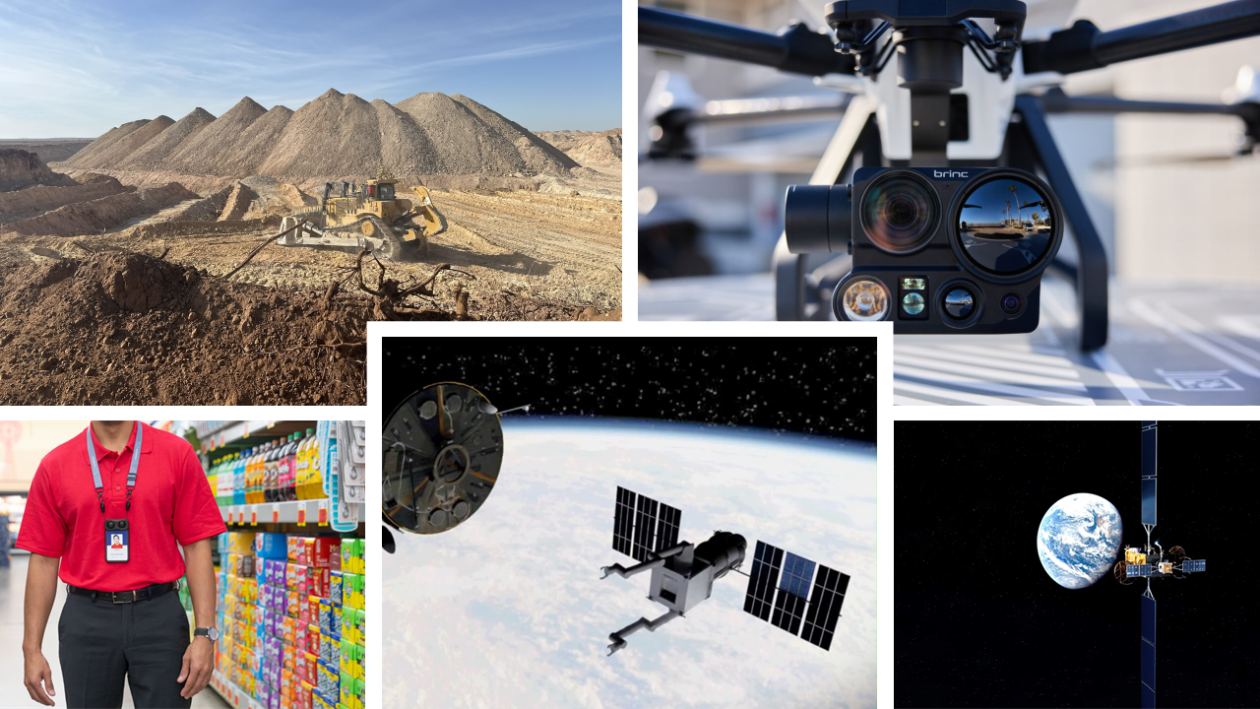

An emerging class of startups is pushing the boundaries of what machines can do in the physical world — retrofitting bulldozers to dig on their own, launching drones that beat police cars to 911 calls, outfitting retail workers with spatial computing badges, building robotic arms for spacecraft, and servicing satellites in orbit.
Those are the innovations represented by the finalists for Hardware/Robotics/Physical AI of the Year at the 2026 GeekWire Awards.
The finalists are: AIM, Augmodo, Brinc, Orbital Robotics, and Starfish Space.

Now in its 18th year, the GeekWire Awards is the premier event recognizing the top leaders, companies and breakthroughs in Pacific Northwest tech, bringing together hundreds of people to celebrate innovation and the entrepreneurial spirit. It takes place May 7 at the Showbox SoDo in Seattle.
Continue reading for information on the Hardware/Robotics/Physical AI of the Year finalists, who were chosen by a panel of independent judges from community nominations.
You can help pick the winner: Cast your ballot here or in the embedded form at the bottom. Voting runs through April 16.
AIM Intelligent Machines retrofits heavy earthmoving equipment such as bulldozers and excavators to operate autonomously, using sensors and an edge computing system to build real-time 3D maps of a machine’s surroundings and navigate without a human driver.
Originally focused on mining and construction, the company recently expanded into defense, winning $4.9 million in U.S. Air Force contracts to build and repair military bases and airfields.
The Seattle-area startup announced $50 million in funding in 2025 and was founded in 2021 by engineers with experience at Waymo, SpaceX, Google, Stripe, Tesla and Apple. CEO Adam Sadilek leads the company.
Augmodo makes wearable “Smartbadge” devices for retail store employees that use computer vision and 3D mapping to collect real-time inventory data as workers move through aisles, tracking empty shelves, overstocking and product availability. The approach is designed as a cheaper and more efficient alternative to robot scanners.
The Seattle startup, founded in 2023, raised $37.5 million in a Series A round on top of a previously announced $5.4 million seed round. CEO Ross Finman previously co-founded Escher Reality, which was acquired by Niantic Labs, and spent more than four years at the “Pokémon Go” maker. The company recently hired a new CTO from Microsoft HoloLens and Amazon Alexa and has grown its team nearly fivefold.
Brinc builds drones for police, fire and emergency response agencies, recently unveiling Guardian, the world’s first Starlink-connected drone. Guardian can auto-launch on a 911 call, fly up to eight miles at 60 mph for more than an hour, and deliver payloads such as defibrillators and emergency medication.
The company’s products are used by more than 900 public safety agencies and more than 20% of SWAT teams in the U.S.
Founded in 2019 by CEO Blake Resnick, the Seattle-based company raised $75 million in a round that included a strategic alliance with Motorola Solutions, bringing total funding to $157.2 million. The company now employs 160 people and is moving to a new 35,000-square-foot headquarters and factory in Seattle’s Queen Anne neighborhood.
Orbital Robotics is developing AI-powered robotic arms for spacecraft, tackling the challenge of manipulating objects in orbit where every movement of an arm causes the spacecraft itself to move in response.
The Puyallup, Wash.-based startup is also working to assemble a consortium to save NASA’s aging Hubble Space Telescope by building a robotic spacecraft to boost it to a more stable orbit.
Founded in late 2024, the company has raised about $310,000 and is working with a stealthy space venture on an orbital rendezvous project for the U.S. Space Force. Co-founders Aaron Borger, Doug Kohl, Riley Mark and Sohil Pokharna are former Blue Origin engineers.
Starfish Space builds satellite servicing spacecraft designed to autonomously inspect, dock with and reposition satellites in orbit — including satellites that weren’t originally built for on-orbit servicing. Its Otter spacecraft can extend satellite lifespans by boosting them to higher orbits or move them to lower orbits for safe disposal.
The Tukwila, Wash.-based company, founded in 2019 by former Blue Origin engineers Austin Link and Trevor Bennett, recently raised more than $110 million in a Series B round, pushing total funding past $150 million.
Starfish has completed three demonstration missions in orbit and has Otter missions under contract with the U.S. Space Force, NASA, SES and others, with its first operational mission expected to launch this year.
Astound Business Solutions is the presenting sponsor of the 2026 GeekWire Awards. Thanks also to gold sponsors Amazon Sustainability, Baird, BECU, JLL, First Tech and Wilson Sonsini, and silver sponsors Prime Team Partners.
The event will feature a VIP reception, sit-down dinner and fun entertainment mixed in. Tickets go fast. A limited number of half-table and full-table sponsorships are available. Contact events@geekwire.com to reserve a spot for your team today.
(function(t,e,s,n){var o,a,c;t.SMCX=t.SMCX||[],e.getElementById(n)||(o=e.getElementsByTagName(s),a=o[o.length-1],c=e.createElement(s),c.type=”text/javascript”,c.async=!0,c.id=n,c.src=”https://widget.surveymonkey.com/collect/website/js/tRaiETqnLgj758hTBazgd5M58tggxeII7bOlSeQcq8A_2FgMSV6oauwlPEL4WBj_2Fnb.js”,a.parentNode.insertBefore(c,a))})(window,document,”script”,”smcx-sdk”); Create your own user feedback survey
As evidenced by the Hyundai Boulder Concept and some statements in Kia’s 2026 Investor Day announcements, Kia is getting serious about building a truck. Kia already has a body-on-frame truck, the Tasman, which launched in global markets in 2025, but this potential new offering seems to be different from that particular mid-sized truck.
The new truck, as yet unnamed, will ride on a body-on-frame platform like other American-market trucks from the likes of Toyota, Ford, and General Motors. Whether Kia’s new pickup offering will be able to compete with those well-entrenched models is a question only the future can answer: Kia’s truck isn’t even scheduled to hit the market until 2030.
However, Kia is at least giving the truck a pair of drivetrains that might edge out a win, or at least help it stand out from the competition. More specifically, Kia is aiming to offer two hybrid drivetrains, one of which will be an extended-range model.
An electrified boost
Two giants in the truck industry, Toyota and Ford, already offer hybrid versions of their trucks: Toyota has the newest-generation Tacoma and Tundra, while Ford has the F-150 PowerBoost. However, an extended-range electric vehicle pickup, as the new Kia is supposed to be, would be unique, at least in the North American market.
BYD, the Chinese automaker well known for its electric cars, produces the BYD Shark, a body-on-frame plug-in hybrid pickup, but that truck probably isn’t showing up on American streets anytime soon. As far as American automakers go, Stellantis has teased the Ram Ramcharger — which would have a gas motor to charge its onboard batteries — for years, but it has yet to materialize. Ford has, admittedly, announced a range-extending gas engine for the second-gen F-150 Lightning, but it hasn’t revealed a release date yet.
The new Kia model has the potential to shake up the market, providing American drivers with something unique at a price point that will likely be very competitive. While Kia hasn’t even announced what the truck will look like or what it will be called, it’s certainly a truck to look forward to.
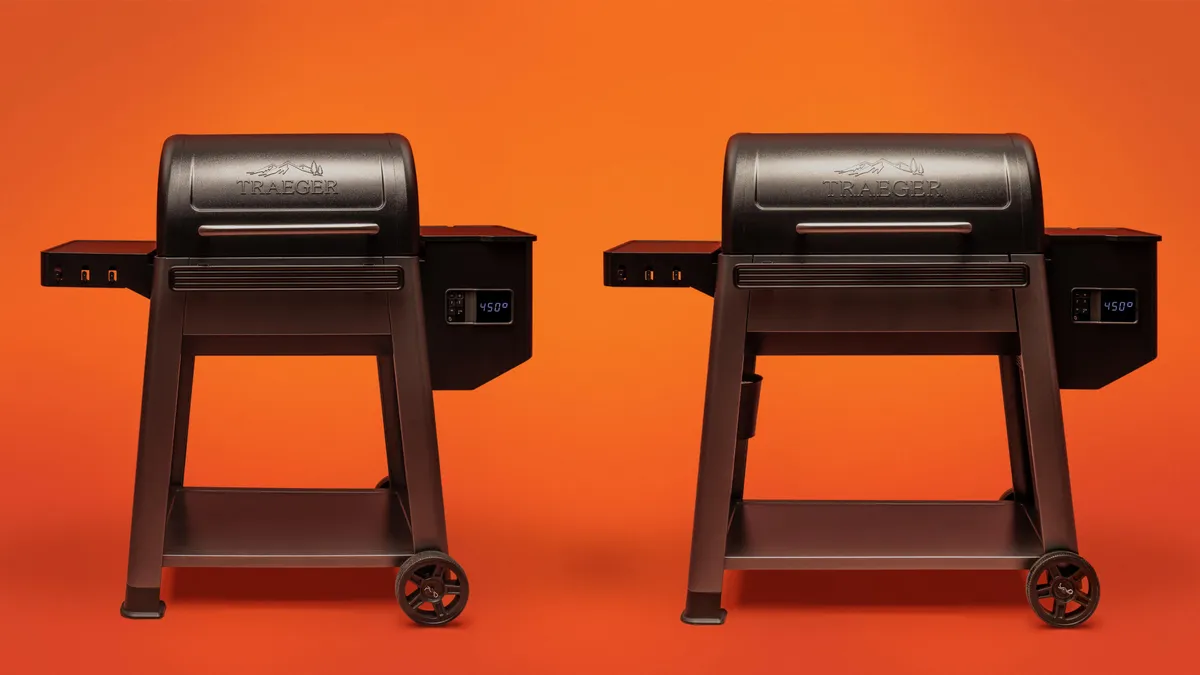
Pellet grill converts aren’t shy about their love for these versatile outdoor cookers, and many, including CNET, regard Traeger as the best in the booming alternative-grill category. Traeger’s pellet grills allow for precise temperature control via convection heat, easy low-and-slow cooking with minimal oversight and wood-fired flavor you won’t get from gas or charcoal setups. But they aren’t cheap.
A full-sized Traeger typically costs the would-be pellet griller about $1,000, but the brand just launched its most budget-friendly line, the Westwood series, ahead of summer 2026. That means you can haul in one of Traeger’s cult-favorite pellet grills with most of its signature bells and whistles for less than $700.
Pellet grills are praised for delivering woodfire flavor and precise temperature control.
The new standard Westwood has 653 square inches of grilling space and sells for $699. The XL sports 823 square inches and will cost you $799 — still cheaper than any other large grill in the Traeger lineup. Until now, the cheapest full-sized Traegers, the Ridgewood series, started at $899.
The Westwood series builds on the advanced engineering and flavor-forward technology that Traeger has refined across its top-of-the-line grills, according to a press release shared with CNET, and fuses them into a grill designed for everyday cooking.
Key Features of the Traeger Westwood series:
- Woodfire flavor with minimal fuss: Natural hardwood pellets and convection airflow work together to deliver richer wood‑fired flavor and consistent results.
- Easy use: WiFIRE with Bluetooth compatibility lets users monitor and control their grill from the Traeger App for effortless, precise cooking.
- More cooking options than most grills: Grill, slow cook, smoke or bake with Traeger’s precise temperature control and convection technology.
- Generous cooking space: Dual‑tier grilling area provides room to cook multiple dishes at once.
- Space to prep: Integrated shelves and storage create a streamlined workspace, keeping tools, ingredients and pellets within easy reach.
With the launch of its Westwood Series, Trager’s pellet grills are more affordable than ever.
The Westwood Series is now available online and in stores through Traeger retailers.


Per the agreement, Amazon will take ownership of Globalstar’s existing operations including its low Earth orbit satellite network and supporting infrastructure, as well as related assets like mobile satellite service spectrum licenses. Amazon is paying $90 per Globalstar share – available either as cash or in Amazon stock – which…
Read Entire Article
Source link

512GB of fast, well-organised storage changes how you actually use a phone, especially when you are shooting 8K video and saving high-resolution 50MP images without a second thought.
Right now, that headroom costs considerably less than it should, with the Google Pixel 10 Pro down from $1,219 to $969 on Amazon, saving you $250 on one of 2025’s most capable Android handsets.
The Google Pixel 10 Pro 512GB is at its lowest price on Amazon right now, giving you more storage for less
256GB of fast, well-organised storage changes how you actually use a phone, especially when you are getting it with a $250 discount.
The camera is the obvious starting point, and on the Pixel 10 Pro it earns genuine attention rather than just marketing language, because the triple rear system pairs a 50MP main sensor with 100x Pro Res Zoom for the kind of detail you would normally need a much bigger camera to capture.
That reach is backed by Google’s Tensor G5 chip, which has been purpose-built with an improved TPU and CPU to run Google’s AI processing on-device, meaning tasks like computational photography and Gemini Live happen faster and with less reliance on a network connection.
Gemini Live itself is worth dwelling on, because it turns the phone into something closer to an always-available visual assistant, letting you point the camera at your surroundings and have a natural back-and-forth conversation about what it sees, which feels meaningfully different from tapping through menus.

The 6.3-inch Super Actua OLED display hits 3,300 nits of peak brightness, so reading the screen outdoors in direct sunlight stops being a frustrating experience, and the 120Hz refresh rate keeps scrolling and transitions feeling fluid regardless of what you are doing.
Build quality matches the ambition, with durable aluminium framing and Corning Gorilla Glass Victus 2 on the back meaning the phone can survive the kind of daily contact that would leave cheaper handsets visibly worse for wear.
The Pixel 10 Pro is a strong fit for anyone who wants Google’s best camera and AI experience without paying the full flagship price, and at $969 this is the most accessible that combination has been since launch.
SQUIRREL_13890777
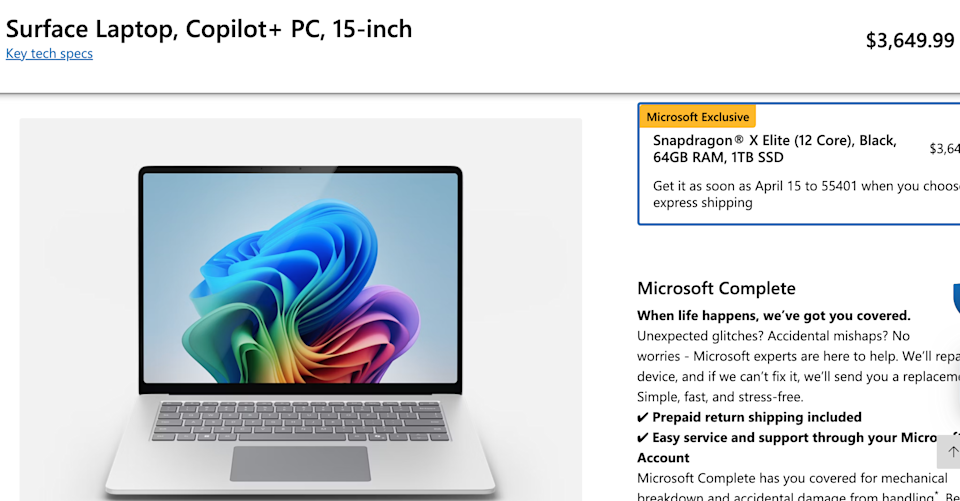
The RAMpocalypse continues. Microsoft just revealed across the entire Surface line of products, . The updated pricing has already hit the official Microsoft Store, with other retailers expected to follow suit in the near future.
These are fairly significant upticks. For instance, the base model 15-inch Surface Laptop 7 now starts at $1,600. It cost $1,300 when the laptop was first released back in 2024. It did receive a price increase last year to $1,500, so today’s increase tacks on another $100.
The cost balloons even further when upgrading components, as a top-end Laptop 7 with a Snapdragon X Elite, 64GB of RAM and 1TB of SSD storage now costs a whopping $3650. As a comparison, a 16-inch MacBook Pro with an M5 Pro, 64GB of RAM and a 1TB SSD comes in at $3,300, and the .
Microsoft
This trend continues with the Surface Pro line of hybrid computers. The 12-inch Surface Pro starts at $1,050, after launching at just $800. The flagship 13-inch Surface Pro cost $1,000 in 2024 and now starts at $1,500. That’s a $500 increase in just two years, though the base hard drive did get a bit bigger.
These price increases are, of course, being blamed on generative AI’s penchant for . “Due to recent increases in memory and component costs, Surface is updating pricing on Microsoft.com for its current‑generation hardware portfolio,” Microsoft wrote in a statement.
Industry reports that the company is currently readying refreshes across the Surface line. It’s highly likely these new prices if component prices don’t decrease.
These aren’t the due to AI. Motorola recently instituted increases that even . Samsung has also pushed up the cost for its .
The PS5 when compared to the 2020 launch price, though Sony didn’t explicitly blame these increases on RAM, but rather “continued pressures in the global economic landscape.” There are also rumors that the continued RAM shortage has made it difficult for and likely pushed back the release of the .
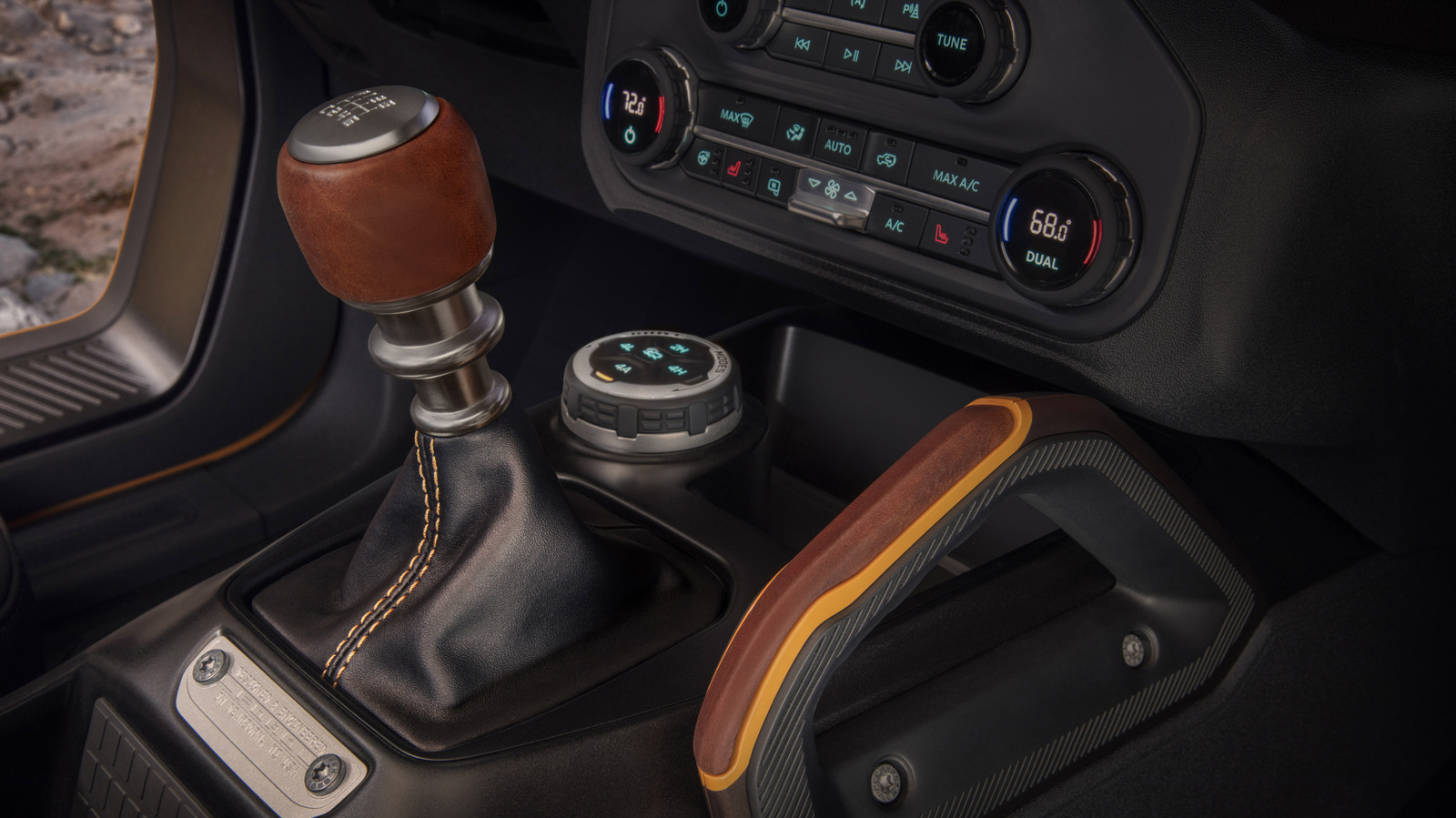
There was a time, not terribly long ago, when manual transmissions were everywhere. In fact, back in the 1980s, ’90s, and even into the 2000s, manual transmissions were standard equipment on many of the new vehicles sold in North America. This was true not just on inexpensive economy cars or high-performance sports cars — but on family sedans, pickup trucks, and SUVs as well. While stick shifts are enjoyed by car enthusiasts today, opting for a manual used to be something mainstream auto buyers did just to save money on their purchase or perhaps to get a bit better fuel economy. That’s not the case anymore.
Today, the decline in manual offerings is well known, with what seems to be an ever-dwindling list of new vehicles available with a stick shift and a clutch pedal. As you’d expect, with the manual transmission very much becoming a niche option for drivers, the vast majority of today’s manual offerings come on enthusiast-oriented sports cars, hot hatchbacks, and muscle cars.
So what about manual SUVs? While SUVs and crossovers dominate the sales charts overall, you’ll need to search far and wide for a manual-equipped SUV on a dealer lot, with just two models currently offering buyers the option of a stick shift. Those two models are the Ford Bronco and Jeep Wrangler, both of which are adventure-oriented 4x4s, rather than mainstream family SUVs. Even on these models, manuals are only found on certain trim levels and with certain engines.
SUVs with manual transmissions are rare breeds
With their iconic names and rugged body-on-frame construction, the Ford Bronco and Jeep Wrangler make sense as the only two SUVs available with a manual transmission. Both 4x4s are offered in two or four-door body styles, and both have removable tops and doors for an open-air adventure experience. A manual simply makes them that much more fun.
However, you can’t simply add the manual option to any Bronco or Wrangler model. The Bronco offers an available seven-speed manual transmission — which is technically a six-speed with an extra crawler gear — but only on models powered by the base 2.3-liter EcoBoost four-cylinder engine. The more powerful EcoBoost V6-powered Broncos are automatic only.
The Jeep Wrangler is available with a few different powerplants, including a 2.0-liter turbocharged four-cylinder and a 6.4-liter HEMI V8. However, Jeep’s six-speed manual is only available on Wranglers powered by the 3.6-liter naturally aspirated V6. For a time, the Wrangler’s V6 engine was actually manual-only, though Jeep recently brought back the V6-automatic combo following customer demand.
There is some evidence more stick shift SUVs are on the way
There’s one more new vehicle sold with a manual transmission that deserves an honorable mention here, and that’s the Toyota Tacoma — which was as of this writing the only pickup truck sold in the United States with a manual transmission. While it’s, of course, an open-bed pickup rather than an SUV, a Tacoma with a camper shell is the closest you can get to having a new Toyota SUV with a stick shift. Despite having a similar powertrain and essentially being the Tacoma’s SUV counterpart, the Toyota 4Runner is only available with an automatic.
Toyota has said that there’s low demand for a manual 4Runner, yet there’s also some evidence that the manual transmission has been undergoing a bit of a resurgence as drivers look for an extra connection between them and their vehicles. So, is it possible that we could see other manual-equipped SUVs joining lineups in the future?
Subaru recently generated some speculation by asking its buyers if they’d be interested in a new, manual Subaru SUV. The company had previously offered its Crosstrek CUV with a manual, but the stick shift was cut from the option sheet for 2024. Whether or not Subaru’s interest pans out into an actual product remains to be seen, but manual lovers can at least have some optimism for the future. Until something else comes to the market, though, SUV buyers who desire a manual will have to make do with a Bronco or Wrangler.
There’s a reason almost every driver you know has a story of pothole frustration. It’s because it’s largely inevitable that you’ll fall victim to one somewhere at some point. What’s important, though, is what you do next. When our cars bump a curb or take a small jolt from a pothole, sometimes it seems so minor that we just grit our teeth and go about our day. Bear in mind, though, that you may not have gotten off as easily as you first thought.
The fact that you felt only a minor impact doesn’t necessarily mean that your vehicle hasn’t sustained damage. If it has, it’s vital to determine what’s happened and what needs to be done next. This can prevent worse harm being done to the vehicle, as well as keep you and other drivers safe. There are also potential ways to secure compensation for the damage done by a pothole, if you know the avenues you can try to take and the time frame you have to do so.
There are some things you can do in the immediate aftermath of hitting the pothole, while there are others that are jobs to be done in the days and weeks ahead. In either instance, though, as they’re such a ubiquitous threat on the roads, all drivers should know what to do after striking a pothole.
Pull over and check your vehicle
Of course, any time your vehicle takes a bump or a ding, all kinds of things immediately run through your mind. The first step is to pull over as soon as possible to determine what you’re dealing with. After all, it may be dangerous to drive any further. Even if that’s not the case, your vehicle may require prompt service.
There are some immediate signs of major damage, such as buckling of the wheel arches, that will tell you that you need to see a mechanic ASAP after the pothole encounter. It’s also important to keep in mind that you may have been driving when visibility was poor, such as in the dark, so it definitely pays to have a flashlight in your vehicle as part of your emergency kit for these sorts of situations.
You should take your time to thoroughly inspect your vehicle. If you’re not a mechanic who’s experienced with all the subtle yet important signs, the first thing to ascertain is that there hasn’t been catastrophic damage to the underside of your vehicle.
It may not even be something visible. Have a careful listen for escaping gas or any sounds that your vehicle wasn’t making before, which could indicate suspension damage or similar. It may well be a case for a mechanic, and the more information you can give them about any changes to your vehicle afterward, the better they’ll be able to diagnose and resolve problems.
Report the offending pothole
After you’ve determined that your vehicle hasn’t been damaged (or arranged proper care if it unfortunately has), your next priority should be reporting the troublesome pothole in question. To do so, you’ll first need to find out which body is responsible for that particular road.
State highways, etc., are typically administered by the state’s Department of Transportation. If on a California highway, for instance, you can use the Caltrans Division of Maintenance Customer Service Request form, which allows users to identify a pothole using a drag-and-drop pin-on-a-map graphic. As Texas’s own Department of Transportation notes, though, other roads, such as those within a city’s boundaries, are that city’s responsibility, not the state’s. Of course, these authorities usually have huge areas to maintain and significant backlogs of other repairs and improvements to make, so there’s no telling how long it may take for the repair to ultimately be made.
Still, you’re raising critical awareness about the issue, and that could save many tires and suspensions from needless extra strain or damage. On top of that, such reports can also serve as important evidence should a motorist seek compensation from the relevant authority for damage caused to their vehicle. This is because, as CNN Legal Analyst and Atlanta attorney Cody Randall put it in an Instagram post on the matter, “the city or the county, whoever’s maintaining that road, has to have knowledge that the defect exists and an opportunity to remediate it” for them to be found liable for damage caused by a pothole.
Consider making a claim for the damage your vehicle has sustained
As the Los Angeles Times reported in 2024, 44 million drivers in the United States had their vehicles damaged by potholes in 2023. Looking a little further back, the American Automobile Association reported that pothole damage had cost the country’s drivers approximately $26.5 billion in total in 2021.
Compensation claims can be made if you act quickly. The time limit is up to 90 days after the collision in New York City, for instance, potentially differing a lot by location, though successfully receiving compensation for it is another matter. The onus is on the driver to demonstrate irrefutably that the responsible body was not taking care of the road as they should. This is why those who hit potholes should take the time to take photographs of the section of road, the pothole itself, their vehicle, and any damage.
Be prepared to have little success with your claim. In fact, the Michigan Department of Transportation notes that “the majority of damage claims are denied under governmental immunity laws.” While Michigan law says that government agencies must “maintain the highway in reasonable repair,” defining a failure to do so is a tricky matter. As CNN Legal Analyst and Atlanta attorney Cody Randall explained on Instagram, counties and states often have “sovereign or qualified immunity,” which means, in effect, “you actually have to ask them for permission to sue them,” and they must choose to allow it.
Determine whether your existing insurance coverage will help you
If you determine that your chance of receiving compensation from the local authorities is low, there’s another course of action that could help: Your existing car insurance. As State Farm reports, “pothole damage is usually covered with collision coverage, minus the deductible,” the latter typically being up to around $1,000. After a quote for the price of a repair, you might find that you’d end up parting with more money in the long run by taking this route.
The Insurance Information Institute clarifies that adding collision coverage to a standard policy can cover the driver against impacts from potholes or other similar road hazards, though “it does not cover wear and tear to a car or its tires due to bad road conditions.” Such conditions often come hand in hand with potholes because of the way they form (rain freezing in existing cracks in the road expands and causes them to become larger), which also contributes to spring being the absolute worst time for potholes. A driver must prove that it was a collision with a pothole that caused the damage to get their insurance to pay out.
An additional complication to keep in mind is that your no-claims status may also be at stake from using it. All in all, as is so often the case with auto insurance, there’s a lot that needs to be considered prior to any claim. It can be important to avoid cheap car insurance to ensure your coverage is comprehensive, should it be needed for reasons like this.
Check your tire warranty
Claims, whether through your personal vehicle insurance or for compensation from the relevant body, may be a non-starter. They may also result in lots of paperwork and evidence-gathering that adds up to much more time and/or money spent than the payout would ultimately be worth. There’s something much less time-consuming that you can consider first, though: Check the warranty on your tires.
According to Edmunds, road hazard coverage can be added to a typical tire warranty to cover dangerous objects that could be on the road and potentially puncture a tire. Without this addition, the warranty will typically only be applicable for manufacturing defects, not accidental damage. This is why the road hazard add-on could be valuable, but it certainly doesn’t simply mean a free tire in every case. Additional fees, such as those for road hazard coverage on an additional tire, may also be added to the bill you end up receiving. The circumstances, the type of tire, and the damage it sustained are important to consider.
Ultimately, a driver has several options available to them if they hit a pothole, and while each incident will be different and have different effects, the immediate priority is damage control. Often, the aim is to recoup as much of the expense as possible in the circumstances, which is a result in itself and better than not getting anything back at all.
Structure Therapeutics names Matthew Lang as COO and counsel

Goldman Sachs Plans Bitcoin Income ETF Using Options Strategy

Goalies are under siege as the NHL save percentage dips to its lowest point in three decades


-

 Politics4 days ago
US brings back mandatory military draft registration
-
 Sports4 days ago
Man United discover Nico Schlotterbeck transfer fee as defender reaches Dortmund agreement
-

 Fashion4 days ago
Weekend Open Thread: Veronica Beard
-

 Tech7 days ago
How Long Can You Drive With Expired Registration? What Florida Law Says
-

 Politics5 days ago
Malcolm In The Middle OG Turned Down ‘Buckets Of Money’ To Appear In Reboot
-

 Politics2 days ago
World Cup exit makes Italy enter crisis mode
-

 Crypto World5 days ago
Canary Capital Files SEC Registration for PEPE ETF
-

 Business4 days ago
Tesla Model Y Tops China Auto Sales in March 2026 With 39,827 Registrations, Beating Cheaper EVs and Gas Cars
-

 Crypto World1 day ago
The SEC Conditionalises DeFi Platforms to Be Avoided for Broker Registration
-

 Crypto World22 hours ago
SEC Signals Exemption for Crypto Interfaces From Broker Registration
-

 Crypto World6 days ago
Bitcoin recovers as US and Iran Agree a Ceasefire Deal
-
 NewsBeat2 days ago
Pep Guardiola and Gary Neville agree over Arsenal title problem that benefits Man City
-

 Business4 days ago
OpenAI Halts Stargate UK Data Centre Project Over Energy Costs and Copyright Row
-

 Business3 days ago
Ireland Fuel Protests Enter Day 5 as Blockades Spark Shortages and Government Prepares Support Package
-

 Politics5 days ago
LBC Presenter Mocks Trump Over Iran War Failures
-

 Crypto World4 days ago
Federal judge blocks Arizona from bringing criminal charges against Kalshi
-
 NewsBeat3 days ago
JD Vance announces ‘no agreement’ with Iran over nuclear weapons fear
-

 Tech5 days ago
A version of Windows 10 released a decade ago is now eligible for additional security patches
-

 Business4 days ago
IMF retains floor for precautionary balances at SDR 20 billion
-

 Crypto World15 hours ago
SEC Proposes Certain Crypto Interfaces Don’t Need to Register as Brokers
You must be logged in to post a comment Login