








Control Resonant has one default difficulty setting, but you can adjust it to your preference through Assist Mode. You can make the gameplay harder or easier by tweaking several options. That said, there’s no penalty for turning on Assist Mode, and you can still unlock all achievements for 100% completion.
Here are all the details regarding Control Resonant’s difficulty settings and how you can customize them using Assist Mode.
How to use Assist Mode and adjust difficulty in Control Resonant
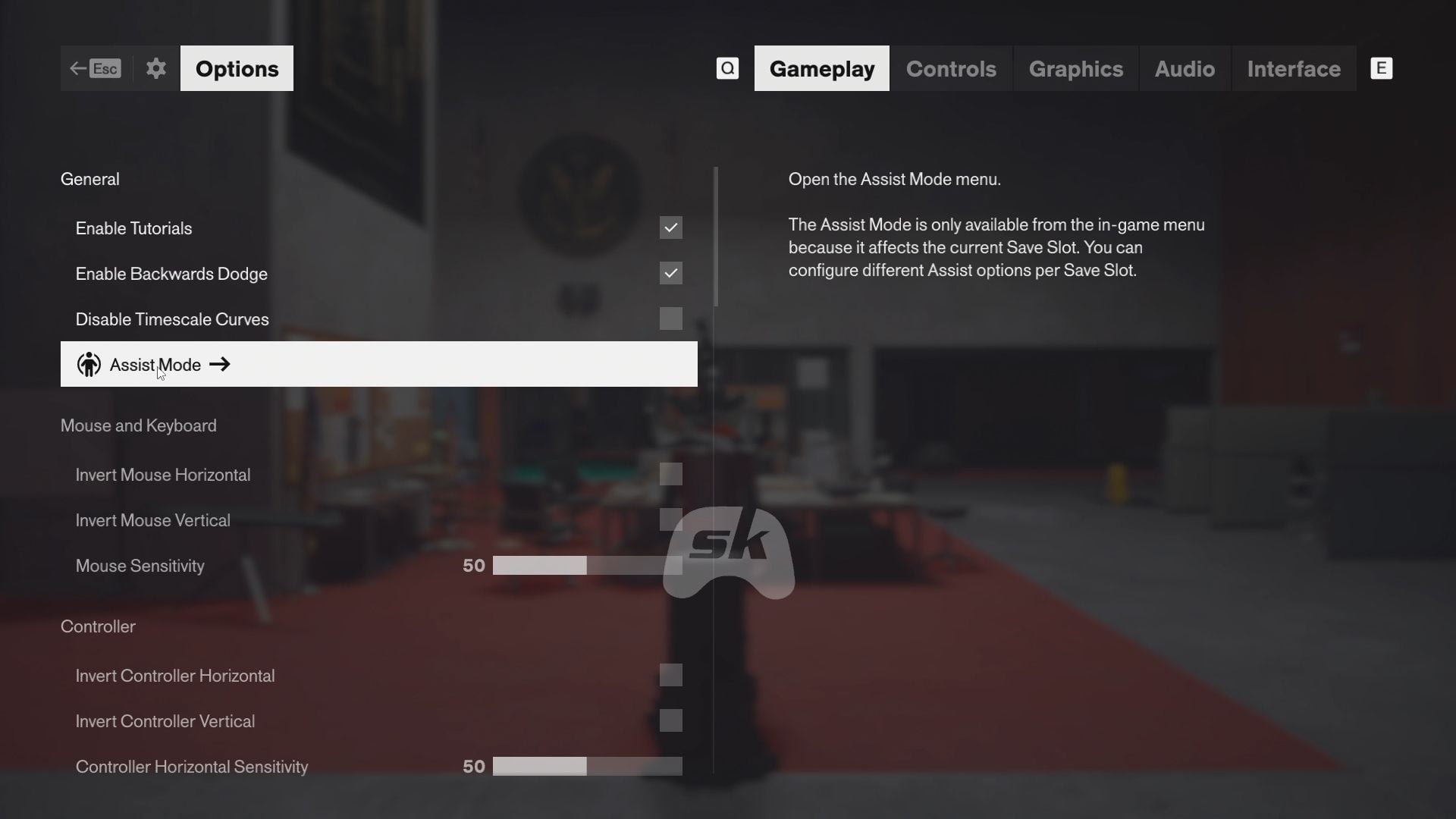
To adjust your difficulty in Control Resonant, start a playthrough or load an existing one. Afterward, go to Options → Gameplay → Assist Mode. Afterward, enable the mode to customize the difficulty settings.
This option is only available during a playthrough, as the difficulty settings affect only the current save slot. This lets you customize different playthroughs to suit your preferences using Assist Mode.
Here are the Assist Mode preset options:
- Field Agent: Lowest combat difficulty, perfect if you only want to enjoy the story.
- Strategist: Approach fights methodically. You need to dodge enemy attacks perfectly and strike at appropriate times, all while managing your health bar.
- Ranger: Both incoming and outgoing damage are low, so you’ll spend more time dealing with enemy waves.
Here are all of the Assist Mode options that you can customize, along with their details:
- Power Recovery Speed: Adjust how fast or slow your Power recovers.
- Incoming Damage: Adjust how much damage you take.
- Outgoing Damage: Adjust how much damage you deal.
- Outgoing Falter: Adjust how much Falter you deal (the bar below the enemy health bar).
- Perfect Dodge Window: Increase it to have more time to execute a perfect dodge.
- Enemy Projectile Speed: Lower it to make enemy projectiles slower.
- Enhanced Melee Magnetizing: Enable it to lock on to enemy targets from a bigger distance.
- Immortality: You will take damage but will not die.
- One-Hit Kills: Kill enemies in a single hit.
- One-Hit Falters: Deal max Falter to enemies in a single hit. You can immediately follow up with an Execution.
- Enemy Aggression: Adjust how many enemies attack you simultaneously.
Check out: Strike, Glaive, or Cleave: Which primary weapon should you choose?
Best difficulty settings in Control Resonant
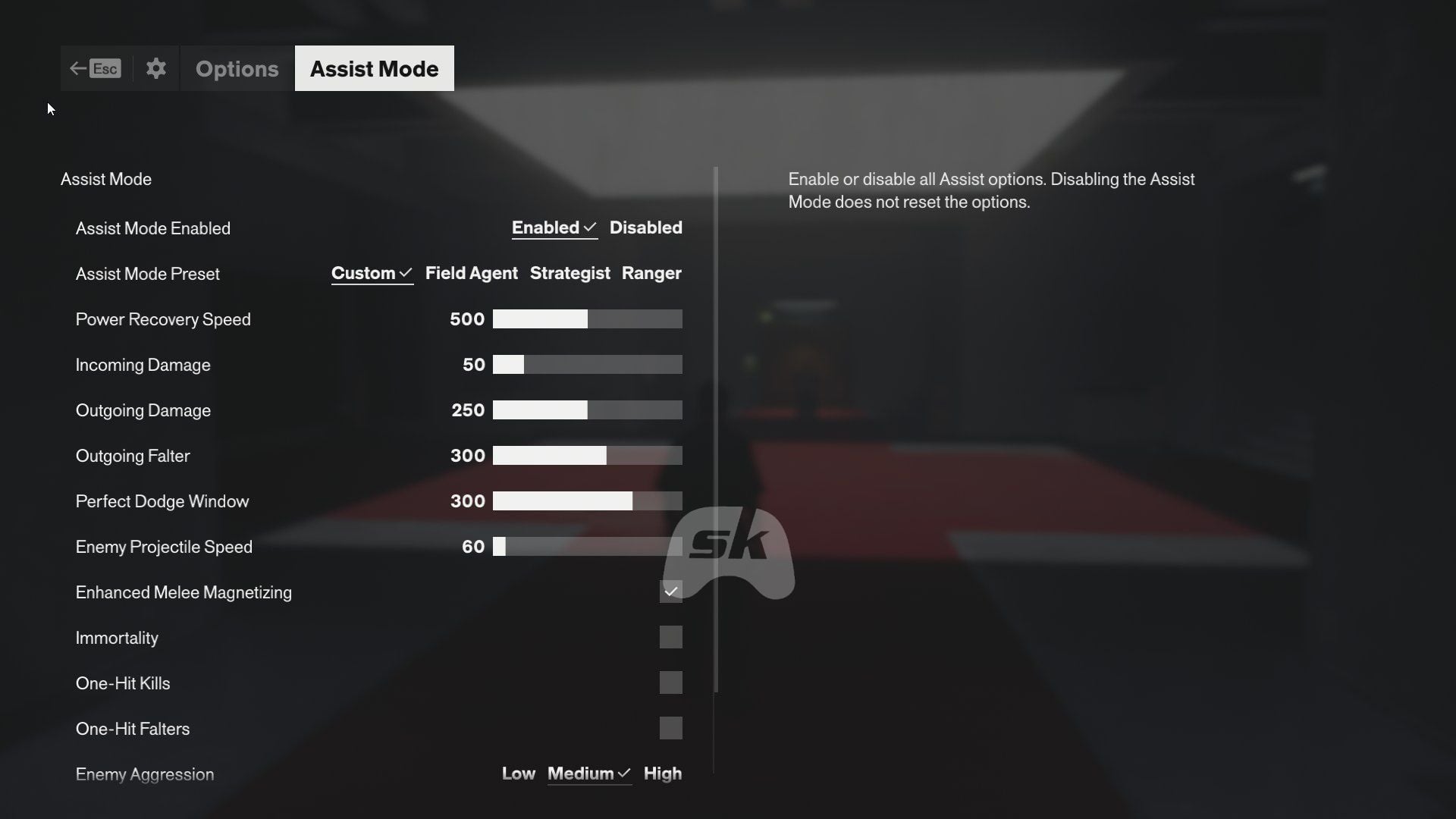
If you want to have a balanced difficulty to enjoy fast-paced combat and explore the locations to complete quests efficiently, you can opt for these settings:
- Power Recovery Speed: 500
- Incoming Damage: 50
- Outgoing Damage: 250
- Outgoing Falter: 300
- Perfect Dodge Window: 300
- Enemy Projectile Speed: 60
- Enhanced Melee Magnetizing: Yes
- Immortality: No
- One-Hit Kills: No
- One-Hit Falters: No
- Enemy Aggression: Medium
Since you need to do a lot of exploration and solve complicated puzzles in Control Resonant, I opted for these settings so I can enjoy both the combat and finishing quests. The combat feels like a hack-and-slash and lets you finish objectives faster.
Check out more related topics:
Are you stuck on today’s Wordle? Our Wordle Solver will help you find the answer.
Edited by Debayan Saha







 "Indian men's kabaddi team")


 Oklahoma and Missouri both struggled against G6 teams; what does that mean for their season outlook?













































You must be logged in to post a comment Login