Certificate authority eMudhra revoked eight compromised intermediate certificates after researchers found their private keys were so weak that anyone could recover them almost instantly and use them to forge trusted certificates for legitimate websites.
Major browsers and operating systems trusted the compromised certificates, potentially allowing attackers to impersonate legitimate websites and intercept encrypted communications.
A security researcher known as Wayne discovered the weakness on October 17 while scanning publicly available certificate data.
According to Mozilla’s incident report, all eight certificates used P-384 private keys generated in April 2025 that had values smaller than 256, allowing anyone to recover them by testing just 256 possible numbers.
Advertisement
To demonstrate the weakness, security researcher Flüpke published one of the compromised private keys on GitHub, showing that the private key for eMudhra’s “EM OV TLS CA – G3C” certificate had a value of just 4.
BleepingComputer independently verified that the published key matches one of the revoked certificates.
In a response to Mozilla, eMudhra blamed the issue on an error in a script used to generate the certificates in April 2025. The company said the error generated a second set of weaker keys that were mistakenly selected for certificate signing because they had labels similar to the properly generated keys.
Some of the resulting certificates were also submitted to Sectigo for cross-signing.
Advertisement
eMudhra said most of the affected intermediate certificates were never used in production and that it had found no evidence they were used to issue certificates to end users.
However, attackers could have recovered and abused the weak keys since their creation in April 2025, though there is no evidence that this happened.
Following the disclosure, eMudhra revoked the eight compromised certificates and stopped issuing new certificates under its G3 root.
Browser makers and software vendors release fixes
Mozilla said it blocked the compromised certificates through Firefox’s OneCRL system on October 17, protecting users without requiring a browser update or restart.
Advertisement
Google Chrome also blocked the six compromised intermediates authorized to issue TLS certificates that day, while Apple added protections on October 19.
Mozilla also released Firefox 158.0.1 and updates for its ESR releases on October 20 to protect users whose browser configurations prevented them from receiving the earlier revocation updates.
However, software that uses its own certificate stores or doesn’t check certificate revocations may keep trusting the compromised intermediates until it is updated.
Mozilla cryptography engineer Dennis Jackson has also published an incident tracking website listing affected software and available security updates.
Software
Patched version / status
Ubuntu ca-certificates
20260816ubuntu0.22.04.1,
20260816ubuntu0.24.04.1,
20260816ubuntu0.26.04.1,
20260816ubuntu0.26.10.1
Debian ca-certificates
Advertisement
Pending
Arch Linux ca-certificates-mozilla
3.131.1-1
Gentoo ca-certificates
20260816.3.125
FreeBSD ca_root_nss
Pending
Chainguard ca-certificates
Advertisement
20260909-r3
Alpine Linux ca-certificates
20261020-r0
NSS
3.131.1
curl CA bundle
2026-10-20
Homebrew ca-certificates
Advertisement
2026-09-25_1
Go
1.27.3, 1.26.10
Node.js
Pending
Python certifi
2026.10.19
pip
Advertisement
26.2.2
uv
0.13.4
Rust rustls-webpki
0.103.16
Rust webpki-roots / webpki-root-certs
1.0.10
Electron
Advertisement
44.9.1, 43.8.1, 42.11.16
Bun
Pending
Composer ca-bundle
1.4.16, 1.6.0
Elixir castore
1.0.22
Jackson also warns that macOS’s built-in /usr/bin/curl utility may continue trusting the compromised certificates because its certificate bundle does not check revocation information.
A threat actor breached TeamUpdraft’s website, a developer of popular WordPress backup and security plugins, potentially compromising UpdraftCentral connection keys that can send commands to connected websites.
TeamUpdraft detected unauthorized access to its infrastructure over the weekend and believes that the hacker accessed the customer database.
The developer offers several WordPress tools for backup, storage, and site management:
UpdraftPlus: website backup and restoration plugin with more than 4 million downloads
UpdraftCentral: for managing multiple sites remotely
UpdraftVault: for cloud backup storage
UpdraftClone: for creating staging websites
“Over the weekend of 17-18 October we identified unauthorised access to the teamupdraft.com website,” TeamUpdraft said in an advisory yesterday.
“Our team responded straight away and worked through the night to contain it – we closed the access route, signed out every account and replaced the keys and credentials that could have been affected.”
Advertisement
The vendor says it believes the threat actor accessed its customer database, which included details about the customer and billing, order history, as well as more sensitive information:
password hashes
two-factor authentication settings
connection keys for UpdraftCentral, UpdraftVault, and UpdraftClone services
The vendor said it did not store any payment details and noted that UpdraftPlus plugin files and downloads remain unaffected. Self-hosted UpdraftCentral instances are not impacted.
Even if backups in customers’ own remote storage are unaffected, the company recommends that users rotate storage credentials and reauthorize connections if they accessed their site through UpdraftCentral.
Massive blast radius
An estimated 10% of sites using UpdraftPlus have an UpdraftCentral or Migrator key, potentially exposing around 400,000 websites to the attack.
According to Patchstack lead researcher Oliver Sild, attackers have begun using stolen access keys to backdoor sites connected to UpdraftCentral, saying the campaign may be more severe than the “wp2shell” attack.
Advertisement
The WordPress plugin security company says that the attacks started on October 18 at 15:32 UTC to execute arbitrary code and add accounts with full administrator privileges.
The researchers logged at least 99 malicious backdoor plugins with distinct names disguised as WordPress maintenance and optimization tools, such as “Site Health Cache.”
Backdoor plugin names Source: Patchstack
Although Patchstack describes an early variant of the backdoor plugin that is broken due to a coding error, a report from web application security firm Nethemba documents a newer version that lets attackers create privileged accounts or log in as existing administrators.
Nethemba says three of its own WordPress websites were targeted through UpdraftCentral, with malicious plugins successfully installed on two of them.
“All three sites ran the current WordPress 7.1.3 and UpdraftPlus 2.26.11, which is patched against the June vulnerability CVE-2026-10795,” Nethemba says.
Advertisement
“The attacker did not break into our servers and did not exploit any weakness in our configuration. The attacker came in through the UpdraftCentral remote management channel and signed the commands with valid private dashboard keys”
Nethemba reports that the vendor’s initial 1.26.12/2.26.12 release was meant to remove UpdraftCentral Cloud keys, but a bug prevented it from doing so.
Users are recommended to update UpdraftPlus to 1.26.13 (free) / 2.26.13 (Premium) or later.
After updating, it is recommended to log into each WordPress site and delete the UpdraftCentral connection keys from Settings → UpdraftPlus Backups → Advanced Tools → UpdraftCentral → Manage existing keys.
Advertisement
Administrators should inspect logs and files for indicators of compromise provided by TeamUpdraft, Patchstack, and Nethemba.
If compromise is confirmed, it is recommended to restore sites from clean backups, change the TeamUpdraft account password, revoke all sessions, and reset the two-factor authentication protection method.
Overall prevention scores can hide what happens after initial access. Once attackers are using valid credentials, prevention drops sharply.
The Blue Report 2026 measures defenses technique by technique across 338 million simulations run in customer production environments.
The vivo S2, launched a few months back, was a solid phone that prioritized design and looks. That said, almost every phone today will get you a great-looking display, decent performance, and capable cameras. But there’s one thing that still annoys me: battery anxiety. Even expensive phones can leave you hunting for a charger by the end of a busy day. That’s the problem the vivo S2 FE tries to solve. Instead of competing purely on performance or camera hardware, vivo has given this phone a massive 10,000mAh battery. This was unimaginable just a few years back.
Fortunately, there’s more to the S2 FE than endurance. You get a 6.83-inch 1.5K AMOLED display with a 120Hz refresh rate, a MediaTek Dimensity 7300e processor, and a 50MP Sony main camera. But is it worth the ₹38,999 price tag? I’ve been using the S2 FE for the past couple of weeks, taking it to cafes for Instagram stories, playing games, and more. Here’s how it held up.
vivo S2 FE Review
Hisan Kidwai
Advertisement
Summary
The vivo S2 FE focuses on battery life, and boy, does it deliver. The 10,000mAh battery comfortably lasts beyond two days, even with gaming, doomscrolling, and plenty of camera use. The design looks good, the 120Hz AMOLED display is great for watching content, and the speakers get loud enough for everyday use. Performance is decent for daily tasks and games like BGMI, too
Advertisement
Design & Hardware
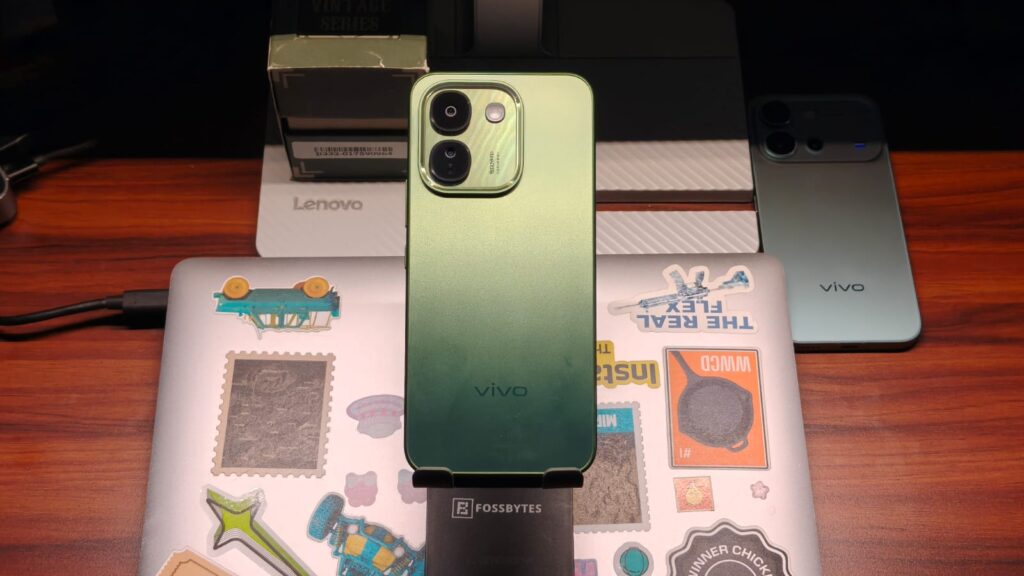
The vivo S2 FE is built around a 10,000mAh battery, yet it doesn’t look like the rugged phones you’d normally associate with that capacity. It measures 8.59mm thick in Stellar Green and Titan Black, while the Zen White variant is slightly thicker at 8.69mm. The phone weighs between 224 and 225 grams, depending on the color. That’s not exactly lightweight, but it’s a reasonable trade-off for such a large battery. I have the green one, and I do like this design. The S2 FE looks simple, yet sophisticated enough to be used anywhere. The color also shimmers when the light hits just right.
The camera island is fairly standard, with two lenses and an LED flash. However, its transparent design is something new, and the 50MP branding has a subtle shadow that adds to the premium look. I also showed the phone to several of my friends, who all complimented the color and design, so that’s a bonus. As for the handling, the sides are plastic and flat. The phone is big, so handling can get a bit difficult if you have smaller hands. Regardless, the flat sides are comfortable to hold, and the phone slips easily into your pockets.
Durability is another highlight. The S2 FE has IP68 and IP69 ratings for dust and water resistance, along with military-standard durability testing. These features should provide some reassurance against everyday mishaps, although I’d still keep the phone away from seawater, which is corrosive. You also get dual stereo speakers, Bluetooth 5.4, dual-band Wi-Fi, and an in-display fingerprint sensor. The sensor sits slightly lower than I’d have liked, but it worked every time, even with slightly wet or dirty fingers.
Display & Speakers
The vivo S2 FE features a 6.83-inch AMOLED display with a 2,800 x 1,260 resolution and a 120Hz refresh rate. Watching videos, especially Lanterns, was a fantastic experience, thanks to the deep blacks and strong contrast. The high refresh rate made supported content and interface animations feel smoother.
vivo claims up to 2,000 nits of High Brightness Mode (HBM) brightness. While I don’t have a device to measure that myself, I did take the phone out in the hot October sun, and the panel was pretty visible. I wasn’t forced to squint. The display also supports HDR10+ and a P3 wide color gamut. Slim bezels and a claimed 94.47% screen-to-body ratio give you plenty of screen real estate. Without a screen protector or case, the phone held up against everyday wear without any major scratches. I also dropped it by accident, but the plastic frame absorbed that impact.
Audio comes from dual stereo speakers with vivo’s VEQ Algorithm. Stereo speakers make watching videos and playing games more immersive than a single-speaker setup, and that was true of the S2 FE. They get pretty loud, making calls easy to hear, while dialogue remains clear when watching YouTube.
Performance & Software
The vivo S2 FE runs on the MediaTek Dimensity 7300e, a 6nm octa-core processor with four performance cores clocked at up to 2.5GHz and four efficiency cores running at up to 2.0GHz. Graphics are handled by the ARM Mali-G610 MC2 GPU. You can choose between 6GB and 8GB of LPDDR4X RAM, paired with 128GB of UFS 3.1 storage.
On paper, this is hardware aimed at everyday use rather than flagship-level performance. Browsing, messaging, social media, video streaming, and switching between apps felt smooth, with few stutters or long waits. I did notice some slight hesitation when opening heavier apps like Camera or BGMI, but nothing major.
Advertisement
The S2 FE runs Android 16 with OriginOS 6. vivo has introduced OriginOS 7 with the V80, but the S2 FE is still running the older version. You can personalize the home screen with widgets, wallpapers, and themes. Origin Island presents supported ongoing activities and notifications in a compact area, while Private Space lets you keep selected apps and personal content separate from the regular interface. It also includes Shake and Share to share content between compatible devices. AI is another focus, with features such as Google Gemini, AI Creation, AI Captions, AI Erase, Drag & Go, vivo Office Kit, and AI SuperLink. Some of these could be helpful, although I don’t use much AI myself.
Since this is a review, I also ran a series of benchmarks to test the S2 FE’s performance ceiling. In AnTuTu, the S2 FE scored 904,341 points. In Geekbench, it reached 867 in single-core and 2,949 in multi-core. As for gaming, I also downloaded BGMI. With graphics set to Smooth and the frame rate set to Extreme, BGMI ran well, with no noticeable lag even during combat. vivo has included a 3,800 mm² vapor chamber cooling system. During my gaming test, the phone got slightly warm after an hour of BGMI, but temperatures remained manageable
Battery Life
The 10,000mAh battery is easily the vivo S2 FE’s biggest selling point. vivo claims up to 30 hours of video playback, 30 hours of live streaming, 68 hours of voice calls, and 15.8 hours of gaming. While I don’t watch videos for 30 hours straight, I did find the S2 FE’s battery pretty amazing. It’ll last you more than 2 days, easy. For some context, I started my day doomscrolling through Instagram Reels, played BGMI for a couple of hours, watched YouTube videos, and took camera samples. I ended the first day with 55% battery remaining, which is insane. After using it throughout the next day, I still had 10% left.
vivo claims the battery will retain at least 80% of its original capacity after 1,400 full charge cycles under its testing conditions. Charging is handled by 44W FlashCharge, and the box includes a compatible charger. It’s reasonably fast, but with the big battery, you’d be looking at more than an hour to charge from 20% to 80%. You can also use the S2 FE as a makeshift power bank to charge other devices through its USB Type-C port.
Cameras
vivo says the S2 FE has a dual-camera setup. That’s a bit of a stretch, because the second sensor is a 2MP unit that doesn’t do much. That said, the 50MP Sony IMX852 primary camera with an f/1.8 aperture is half-decent. Give the sensor enough light, and it’ll produce photos with good colors, ample contrast, and details that don’t fall apart when you zoom in.
HDR performance was good, though the camera overexposed the sky in the harshest sunlight. Photos taken under artificial lighting also retained similar detail and color, so no complaints there. vivo’s portrait game has been excellent for years, and despite the lack of a telephoto camera, portraits come out well. In daylight, skin tones are accurate, and portrait mode does a good job of separating the subject from the background.
Nighttime performance, however, is where I’d deduct a few points. The sensor struggles to retain details and colors in low light, resulting in muddy-looking photos. It’s a noticeable step down from what the camera can achieve during the day. Video quality is another bummer. The S2 FE can only record videos at up to 1080p in 2026, which is hard to accept for a phone costing nearly ₹40,000. You also don’t get optical image stabilization (OIS), so footage can get shaky, particularly when you’re walking or recording handheld.
Advertisement
The 32MP selfie camera is a pleasant surprise, though. Photos have natural-looking colors and ample detail, making it a reliable option for selfies and video calls.
Verdict
Starting at ₹38,999, the vivo S2 FE is a phone that knows what it wants to be. It focuses on battery life, and boy, does it deliver. The 10,000mAh battery comfortably lasts beyond two days, even with gaming, doomscrolling, and plenty of camera use. The design looks good, the 120Hz AMOLED display is great for watching content, and the speakers get loud enough for everyday use. Performance is decent for daily tasks and games like BGMI, too. There are compromises, though. The rear camera struggles at night, video recording is limited to 1080p, and the lack of OIS can leave handheld footage shaky. Still, if battery anxiety is your biggest smartphone complaint, the vivo S2 FE is easy to recommend.
The idea of switching to Ethernet does sound appealing. You generally get faster internet speeds and lower latency on a wired connection compared to Wi-Fi, which can be particularly helpful to gamers or people who work with and share large files over the internet. But how exactly does it work? Is it as simple as plugging the Ethernet cable in? And does your computer automatically disable Wi-Fi when you do so? Those are some of the common questions users have, and honestly, the entire process is pretty straightforward, requiring little manual adjustment on your part.
As soon as you plug in the correct Ethernet cable, the computer, whether it’s running Windows, macOS, or Linux, automatically switches to the wired connection. That’s how operating systems typically prioritize network connectivity by default: a wired connection over a wireless one. So, you don’t really need to disable Wi-Fi, although you absolutely can. But depending on the operating system, turning off the Wi-Fi can mean losing out on certain features. For instance, if you disable Wi-Fi after switching to Ethernet on macOS, you won’t be able to use AirDrop. So, generally speaking, it’s best to leave Wi-Fi turned on when using Ethernet. The computer will automatically switch to Ethernet for internet connectivity, and that’s all most users really need.
You can also confirm the same. On Windows, you will see the Ethernet icon (computer with a cable next to it) in the system tray on a wired connection. On macOS, you can open Network Settings and verify which connection the system is currently using.
Advertisement
Prioritizing Ethernet over Wi-Fi on Windows and macOS
Kazim Alvi/SlashGear
There might be times when your computer connects to the Wi-Fi despite having an Ethernet cable plugged in. It’s rare but can still happen, especially if your system is having trouble prioritizing Ethernet. In such cases, you can force Windows to disable Wi-Fi automatically as soon as a wired connection is set up.
To do that, open the Control Panel, select “Network and Internet,” click on “Network and Sharing Center,” and select “Change adapter settings” from the left pane. Here, right-click your Wi-Fi network adapter, select “Properties,” and then click on “Configure.” Navigate to the “Advanced” tab, select the “Disable Upon Wired Connect” entry from the list, choose “Enabled” from the dropdown menu on the right, and save the changes. From now on, whenever you set up an Ethernet connection, Windows will automatically disable Wi-Fi, preventing any conflict between the two. It’s worth noting that the option isn’t available on every Wi-Fi adapter, so some of you may not see it. But if it’s there, the setting is worth reconfiguring.
Advertisement
On macOS, the steps are a little different, but you can reconfigure available network adapters and set Ethernet to be prioritized over Wi-Fi. To do that, open “Settings,” go to “Network,” click the three-dot menu, and select “Set Service Order.” You will now see all the available network services. Drag the Ethernet entry to the top, above Wi-Fi, then click “OK” to save the changes. With these quick methods, you can prioritize Ethernet over Wi-Fi on your computer without manually disabling the latter.
Antigravity released the Follow Me Bundle for its A1 drone, pairing the existing 8K 360 aircraft with a Watch Remote, Ring Remote, and full-coverage propeller guards. Complete kits that include the drone list for $799 through the company website and selected Best Buy locations, cutting the previous entry price in half, while the accessory kit alone costs $340 or $272 for people who already own an A1.
The Watch Remote’s 1.7-inch touchscreen displays a live view from the drone, allows you to select who or what you want to track, record and stop it, and activate pre-set paths such as arcs, spirals, or a climb up that culminates with the drone zooming in on the subject, which is quite cool. Simply press the Ring Remote’s one button and point it at the airplane, and the A1 will respond to hand gestures: move it left or right, up or down, or twist your wrist to bring it closer or send it away. The remote and watch are both very water and perspiration resistant, allowing you to use them during a sweaty bike ride or light rain.
True 360° Immersive Flight: Experience the Vision Goggles’ massive 90° FOV, 66% wider than standard goggles*, with dual 1-inch Micro-OLEDs and…
8K 360 Video – One shot, infinite possibilities. The world’s first 360 drone captures everything around it, letting you relive your footage in crisp…
249g Ultra-Light or 39-Min Flight: Tailor your mission. Use the Standard Battery to stay under 249g for a regulation-friendly flight with fewer…
Tracking utilizes the drone’s AI and data from the watch’s GPS system to determine where you want to go – even when minor obstacles like trees or other riders appear in the way, the A1 stays on track up to 35 km/h while the camera captures a full 360-degree view of the surroundings. So, once you’ve landed, you can select the finest photograph, choose between folks in a group photo, or include some sweet pan and zoom moves from the film without ever having to get back in the air.
You can add propeller shields for extra protection when flying low and close to people or in confined spaces, but this will increase the takeoff weight above the 249g threshold that previously allowed for completely unrestricted play in some regions. To palm launch it, you’ll need at least a few meters of clear airspace above you, and the drone will follow you or a family member while your hands are free to do anything you want. Early hands-on reports say the watch is a little chunky, and adjusting the distance and position at the same time requires releasing the button and then trying again, but the package is still a game changer because it allows you to do things on your own that used to require goggles, a separate spotter, and were outside the “in sight” rules.
Google is beginning to replace traditional support articles with “Ask Google Help,” a Gemini-powered interface that summarizes documentation and lets users troubleshoot through a chatbot. 9to5Google reports: “Ask Google Help” will display a condensed version of the support article with direct troubleshooting steps, with the user then able to type in queries to have Gemini help figure out the next step forward. A “View Sources” button at the bottom of the AI response allows users to still access the original article, but direct links to any of these articles now defaults to the AI experience.
An example can be seen below on the “Secure a hacked or compromised Google account” page that Google’s own support account directed users to within the past few days. It can also be seen on the “Fix common issues with 2-Step Verification” page and, as far as we can tell, any support pages on the Google Account Help forum.
Google, as of right now, appears to only be testing this on select support topics. The Google Pixel Help section, for instance, still defaults to articles, whereas the Google Chrome topic has also moved to the new experience. Beyond support pages alone, this new design also impacts the central hub, with links to topics no longer showing by default in exchange for an AI chatbot that helps you find the relevant page.
Few things feel as satisfying as blasting pixelated ducks. However, I never imagined doing it with an earbud. Then again, gaming accessories have taken stranger forms.
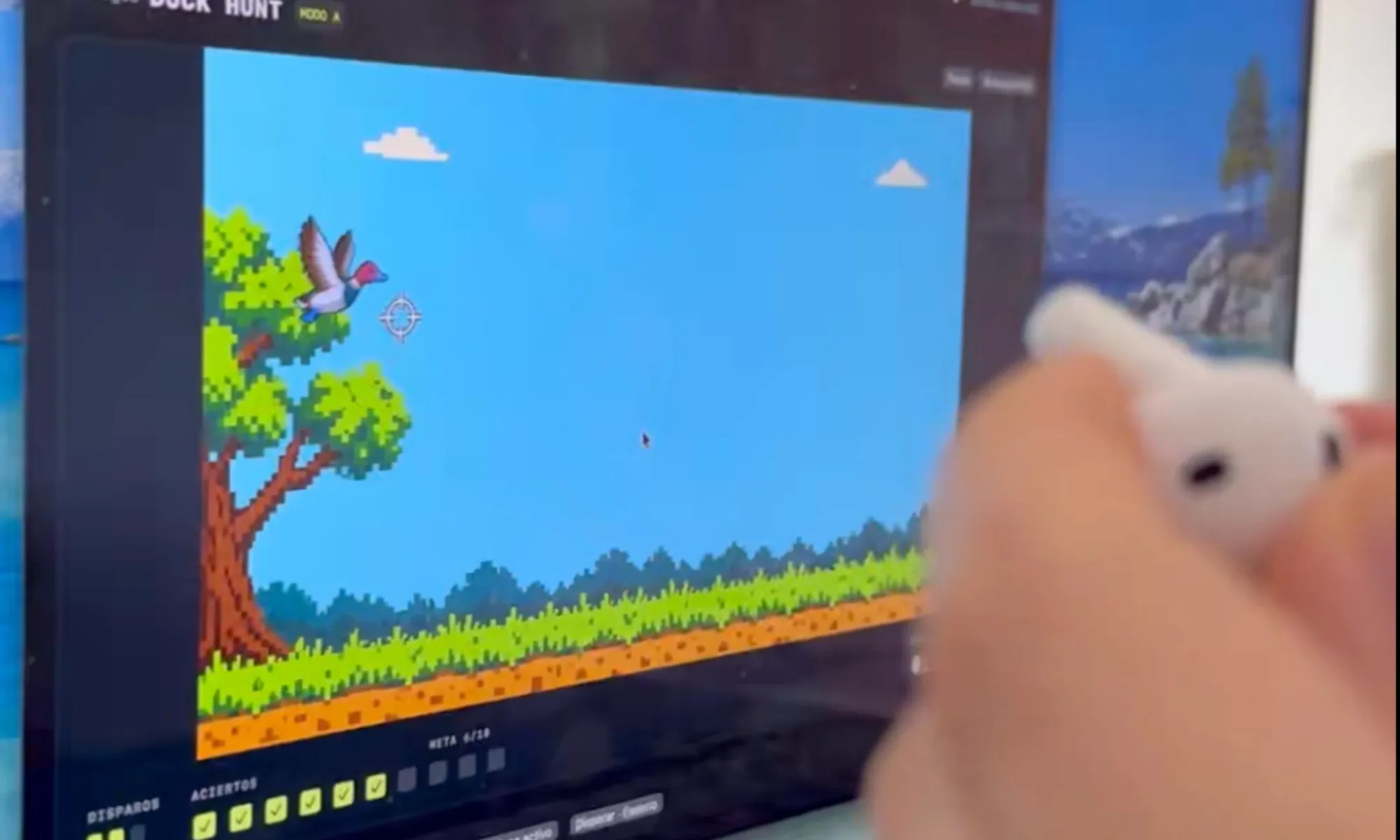
A developer who posts as Dividivan on X turned one AirPod into a miniature, gun-like controller you can point and tap, but it only works with a Mac. The side project became BipBop, a free website that lets you use your AirPods as a controller for 30 throwback minigames.
🦆🔫 He convertido un AirPod en un mando para jugar al Duck Hunt.
Lo giras para apuntar y das un toque en el micrófono para disparar.
Sin tocar el ordenador, full vibecodeado por voz al mientras dormía a la bebé 😅 pic.twitter.com/uilZmN7ibx
It all started with Duck Hunt. Dividivan posted a 28-second demo on X on October 18, 2026. It garnered over 126,000 views in two days. The developer says it was voice-coded: built by speaking prompts to an AI.
To play, pair one AirPod with a Mac running Apple Silicon, hold it in your hand, turn it to aim, and then shoot, like a regular gun-like controller. For those wondering how AirPods can aim, they have a built-in gyroscope; the same sensor that helps your AirPods track head movements can now help you aim at digital ducks.
To shoot, tap the area near the microphone on the AirPods. The app listens for the sound and translates it into a trigger. You can also shoot by pressing on the earbud itself, though that might not be as convenient.
Advertisement
On Reddit, the developer told one commenter the shot delay is “0 by default,” which I’d read as no added lag, since Bluetooth always takes a moment (via Reddit). Two AirPods at once won’t work because, the developer says, Apple merges both signals.
So much for dual-wielding your way through Duck Hunt. For all of this to work, you’ll need to disable Automatic Ear Detection first.
What should you know before trying it?
The good news is that BipBop is free (so you don’t have to share your credit card details), runs offline, and needs no account. Its 30 games include Bowling, Mini Golf, Hoops, and Wave Racer.
Dividivan / X
That’s 30 ways to put your earbuds through their paces without spending a cent. The minimum system requirements are an M1 or later Mac, macOS 14 or newer, and AirPods that support head tracking.
My advice: treat it as a beta. It’s still a 0.8.7 build and isn’t notarized, meaning Apple hasn’t scanned it, so macOS may refuse to open it. The developer says to use Open Anyway rather than weaken your security.
Advertisement
It’s a fun little experiment, but maybe don’t hand your Mac’s security settings to the first virtual duck-shooting range you find.
Finding new music on Spotify is one of those little joys that can turn an ordinary day around. You play a song you love, let the recommendations take over, and occasionally stumble upon an artist you wish you’d discovered sooner. But with AI making it ridiculously easy to produce music in bulk, not everything landing in your recommendations deserves a listen.
Spotify knows this is becoming a problem, and it’s acting on it. The streaming giant has revealed it filtered more than 50 million spammy, low-quality tracks from its recommendations this year. That’s on top of another 75 million tracks it has completely removed from the platform for repeatedly or seriously breaking its rules. And Spotify isn’t stopping there — it wants to make sure actual artists aren’t buried under an endless stream of AI-generated content.
Spotify is getting better at spotting music nobody wants to hear
Rather than looking for AI-created tracks, Spotify has been paying attention to how people actually listen to music. Earlier this year, it noticed that songs listeners frequently skipped, ignored, or actively rejected often overlapped with content flagged as spam or low-quality material. That discovery led to several changes to its recommendation system over the past six months. The goal is explicit: make it easier to discover genuine artists while keeping unwanted content from taking over your playlists.
Spotify
Of course, identifying AI-generated spam isn’t as simple as running a song through a detector. Spotify now combines listening behavior, user feedback, suspicious upload activity, track information, and multiple AI detection services to identify potentially problematic music. It also watches for tricks such as repeatedly uploading the same music, manipulating search results, and flooding the platform with unusually short tracks. The company says these changes have already reduced complaints about unwanted content appearing in recommendations.
It wants you to know who’s actually behind the music
Cleaning up recommendations is only one part of Spotify’s strategy. The company is also making it easier to understand whether the music you’re hearing comes from a real artist or an AI-generated identity. Its AI Credits feature, introduced in April, lets artists disclose how they used AI during production. Spotify says artists are now submitting tens of thousands of these credits daily.
Advertisement
Spotify
Meanwhile, Spotify has verified more than 300,000 artists, including many independent musicians. The platform has also begun labeling thousands of AI-generated artist identities, which it generally excludes from recommendations unless listeners choose to engage with them. Artists are getting additional protection, too. A new feature lets them review releases linked to their profiles before those tracks go public. Spotify plans to expand it to all artists by the end of 2026. Importantly, Spotify isn’t banning AI-assisted music altogether. It’s trying to distinguish legitimate creative work from content designed to exploit its platform. For listeners, that could mean fewer questionable tracks interrupting their playlists and a better chance of discovering music that’s actually worth saving.
Meta’s AI companion, Muse, is now one of only a dozen mobile apps to have reached 10 million U.S. downloads in its first 40 days on the market. According to new data from market intelligence provider Sensor Tower, Muse has seen 10.9 million downloads since its September debut, 10.2 million of which were in the United States.
Only 11 other apps to date have reached this type of post-launch milestone, said Sensor Tower’s Senior Insights Analyst Kara Lee. The most recent of these was Meta’s Threads, back in July 2023. Other apps that saw this kind of scale were largely mobile games, Lee noted.
Meta’s success is tied to the company’s ability to scale its new apps by marketing them across its other services, which it has done with both Threads and Muse. Threads was built on top of Instagram’s social graph, and its content has been integrated into both Facebook and Instagram. However, Muse isn’t only benefiting from Meta’s ability to market the AI agent across its family of apps, which today includes 3.6 billion daily active users; the company is also heavily investing in advertising to drive new users to Muse.
Per Sensor Tower’s data, Meta has allocated 39% of its total advertising spend to market Muse in October, up from 23% last month. In addition, Muse now ranks as the 21st largest brand in the U.S. by advertising impressions this month, up from 73rd in September.
Advertisement
Still, marketing an app and retaining users after the initial shine wears off are two different things. In this case, Muse is seeing better retention rates than its AI competitors like ChatGPT, Claude, and Grok.
In the U.S., the app had a 30% retention rate after 7 days and a 23% retention rate after 14 days. By comparison, its rivals saw an average of a 19% 7-day retention rate and a 16% 14-day retention rate, according to the firm’s data.
Muse also hit another milestone that demonstrates active engagement with the AI app. Its daily active users reached 2.5 million for the first time on October 16, a 15% week-over-week increase.
Meta’s latest AI app, which can handle various tasks on users’ behalf, has seen breakout success since its debut. It shot up to No. 1 on the App Store, and, at one point, even outpaced some of the metrics ChatGPT saw following its launch. Its latest milestone sees it topping its rivals again, as ChatGPT saw 3.7 million U.S. downloads in its first 40 days on the market. Grok and Claude saw only 500,000 and 200,000 U.S. downloads, respectively, in their first 40 days.
Advertisement
Globally, ChatGPT beat out Muse, having scaled to around 15 million global downloads in its first 40 days. But this isn’t a fair comparison, as ChatGPT benefited from a wider reach. Muse is only available in the U.S. and Canada for now, while ChatGPT’s app attracted attention from markets like Japan, Brazil, and Germany, too. (Japan, for instance, accounted for 25% of its global installs during its first 40 days.)
Since launching, Muse has retained its No. 1 rank on the U.S. App Store for all days except October 19, when streaming app Kick briefly beat it out. It has since reclaimed the top spot as of Tuesday. Muse has also been No. 1 on Google Play over the past 30 days.
When you purchase through links in our articles, we may earn a small commission. This doesn’t affect our editorial independence.
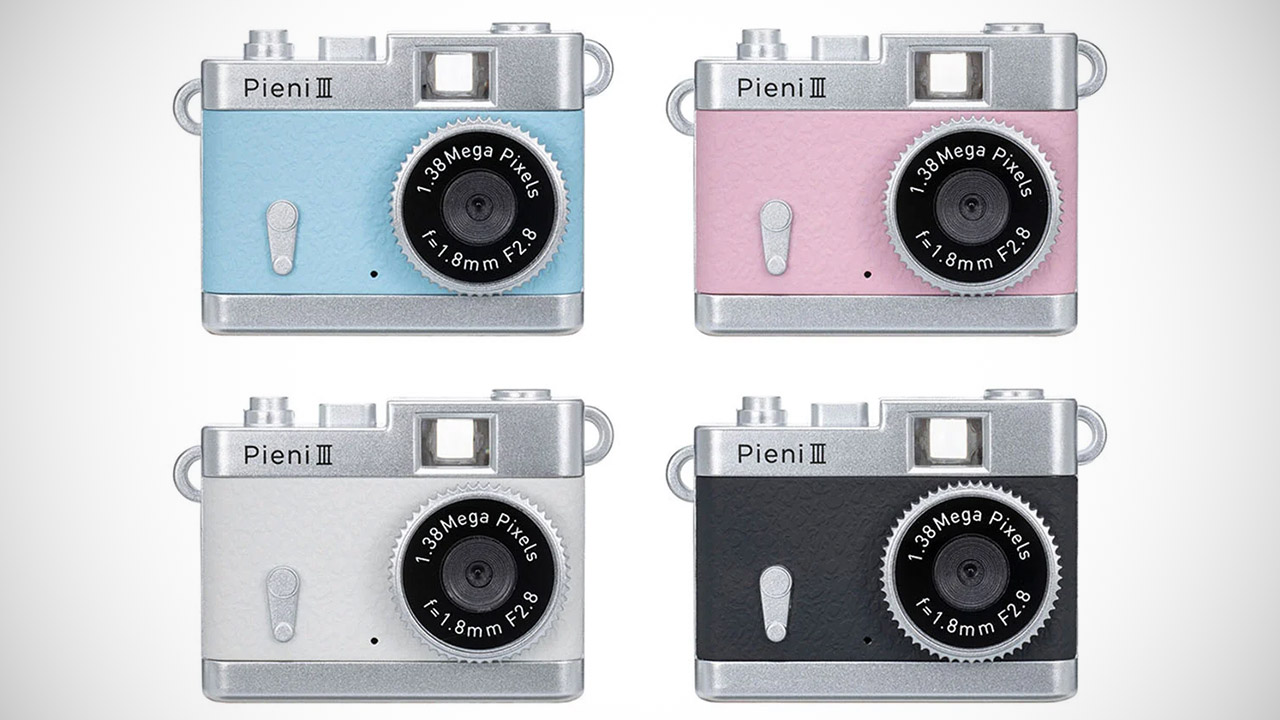
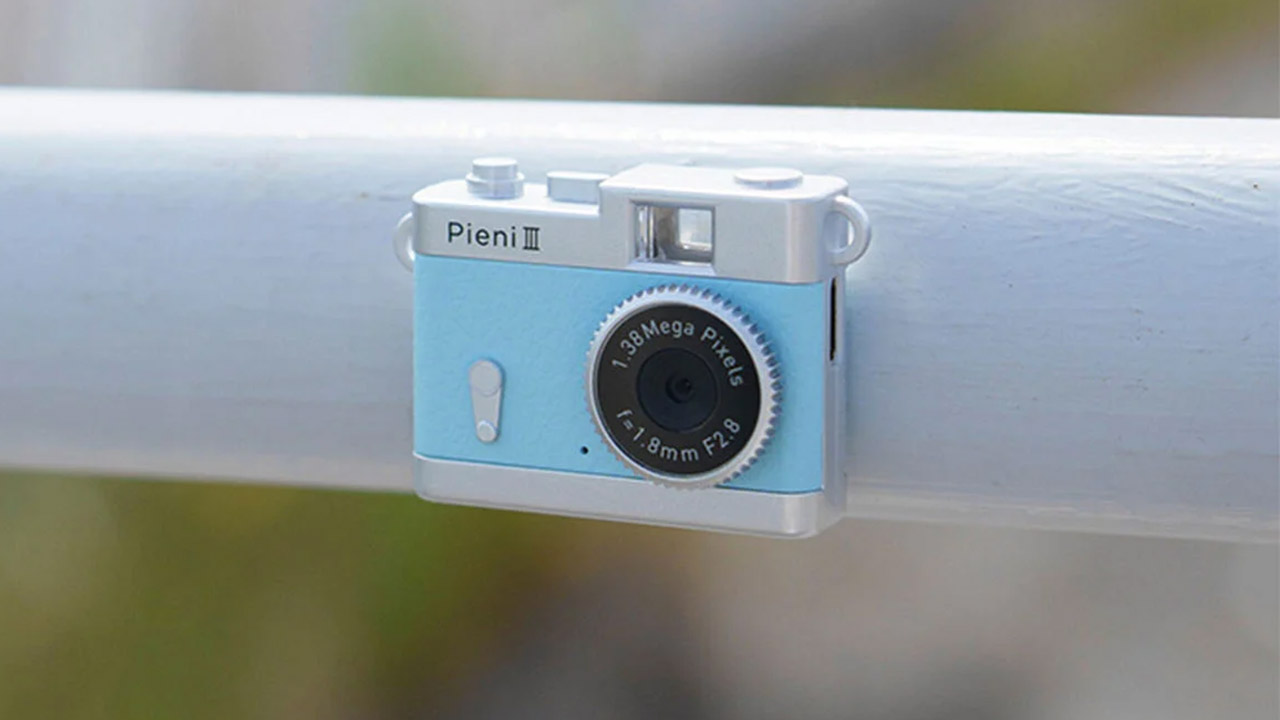
Kenko Tokina introduced the Pieni III earlier this week, as a toy digital camera small enough to wear on a neck strap during ordinary days. Measuring about 53 by 35 by 18 millimeters and weighing roughly 18 grams without a card, the body sits lightly against clothing or sits on a shelf as decoration when not in use. Four standard finishes cover Soda light blue, Strawberry pink, Milk white, and Black, while separate Sanrio editions featuring Hello Kitty and related characters cost more and arrive with matching straps.
A 1/10 inch CMOS sensor is sufficient, however it only captures 0.32 megapixels before the camera ‘enhances’ the image to 1.38 megapixels. Frames are saved in 1440×960 JPEG format, while video is captured at 720 by 480 resolution with sound at 30 frames per second in the MJPEG AVI format. The 1.8mm f2.8 lens provides a nice 42mm equivalent view, but it only starts focusing at approximately 30cm out, and you shouldn’t try to shoot closer than that without using manual focus. To keep things interesting, the ISO is set to 100, so the camera has to figure out the rest on its own, which sometimes results in a rather nice ‘soft focus’ effect, similar to a watercolor painting or an old oil painting, but not as sharp as a modern smartphone camera.
People still use this thing as if it were an old film camera, snapping away without ever viewing their photographs on the back, because the results aren’t visible until the images are uploaded to a different device. It’s rather a throwback experience, as you have to wait for the pictures to appear before you can see what you’ve received. Just like in the film days, the camera features a magnet on the rear that allows you to stick it to a metal surface, providing a sturdy frame for video shooting, which is useful for filming on the go.
One change is that the new model now has a USB Type-C port instead of the previous version’s mini USB port, which is convenient because it can also be used to charge the battery or transfer photos and videos to a compatible smartphone via the included cable. Prices in Japan for this device start around 6600 yen, or roughly 38 to 42 USD, depending on currency rates, and overseas buyers can use proxy services to get this little camera sent to their door.
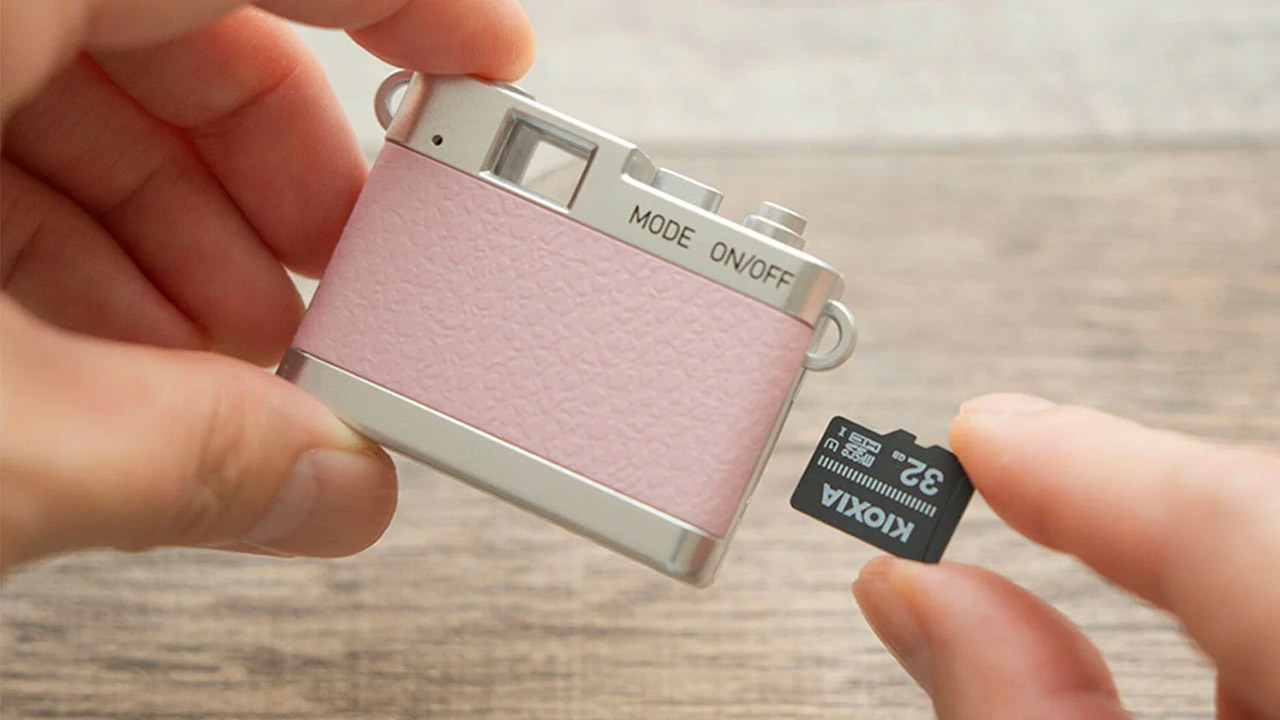
The camera is operated by only two buttons: one for power and one for shutter, as well as a basic mode selector to flip between stills and video. This small camera stores all of your files on an external microSDHC card that runs from 4 to 32 gigabytes, as it has no internal storage whatsoever. That makes it ideal for capturing those life’s events that arise unexpectedly and necessitate the use of a camera for the remainder of the day. [Source]
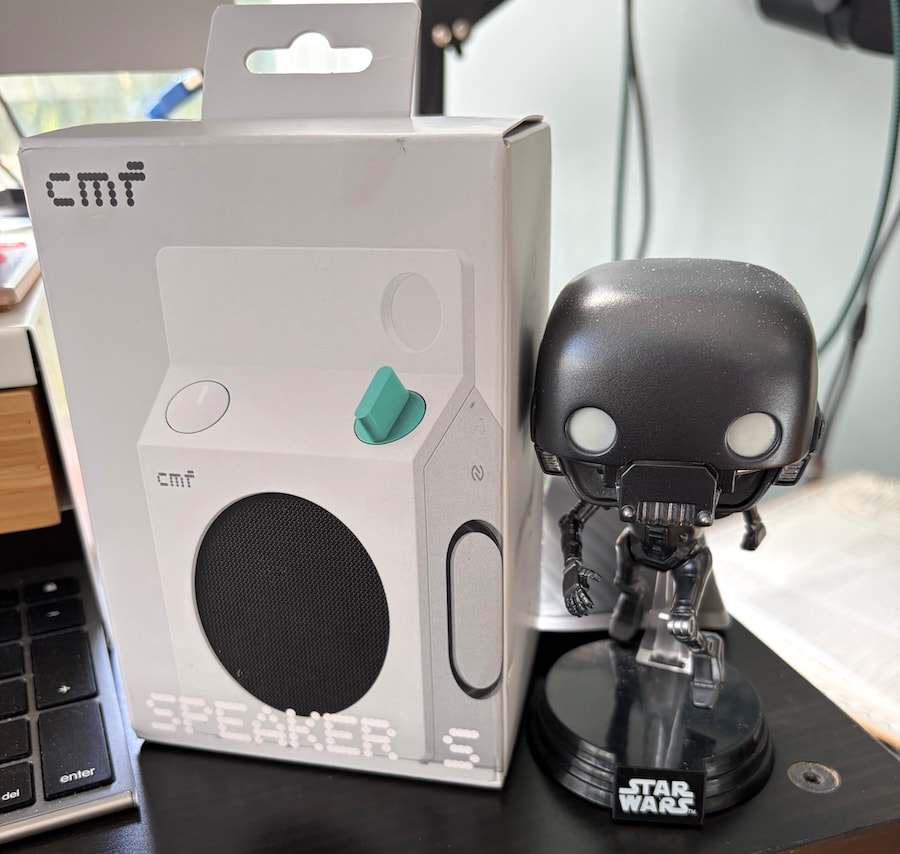
If you grew up in the 1980s, milk cartons meant three things: questionable cafeteria milk, photographs of missing children, and a lingering suspicion that Ogden Edsl’s “Kinko the Kid-Loving Clown,” made famous on the Dr. Demento Show, belonged on a police watch list rather than anywhere near a school playground. Forty years later, Nothing’s budget-friendly CMF brand has decided to give the humble milk carton a considerably less disturbing second career.
The result is the $59 CMF Speaker S, one of the more unusual portable Bluetooth speakers to arrive on my desk this year. Fortunately, it comes with Bluetooth 6.0 and Auracast rather than a missing-person photograph, and there’s considerably more technology inside than its playful appearance suggests.
We covered the launch of the CMF Speaker S and Speaker M earlier this month, and I was intrigued enough by their industrial design and extensive feature lists to request a review sample. CMF sent the smaller Speaker S in white, which I’ve been listening to for the past few days.
My initial reaction? It’s surprisingly well made, considerably more substantial than its dimensions suggest, and rather clever in ways that aren’t immediately obvious.
Advertisement
Related Reading:
Design and Build Quality: Got Milk? Don’t Squeeze the Carton
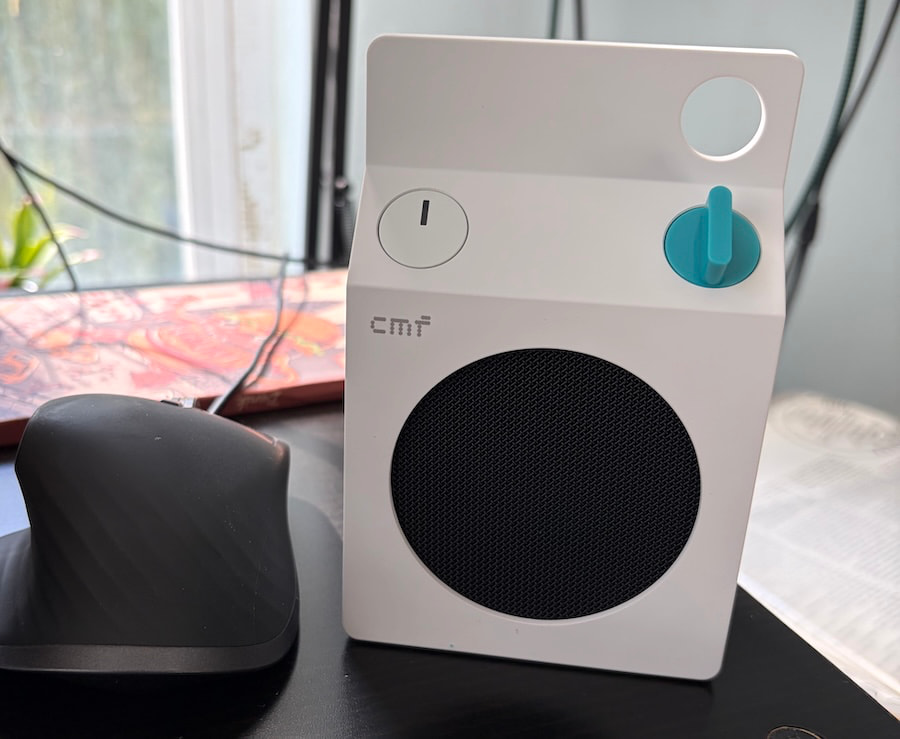
The white Speaker S looks like something Dieter Rams might have designed for a futuristic school cafeteria. Its geometric cabinet is clean, understated, and refreshingly different from the endless parade of cylindrical Bluetooth speakers wrapped in fabric.
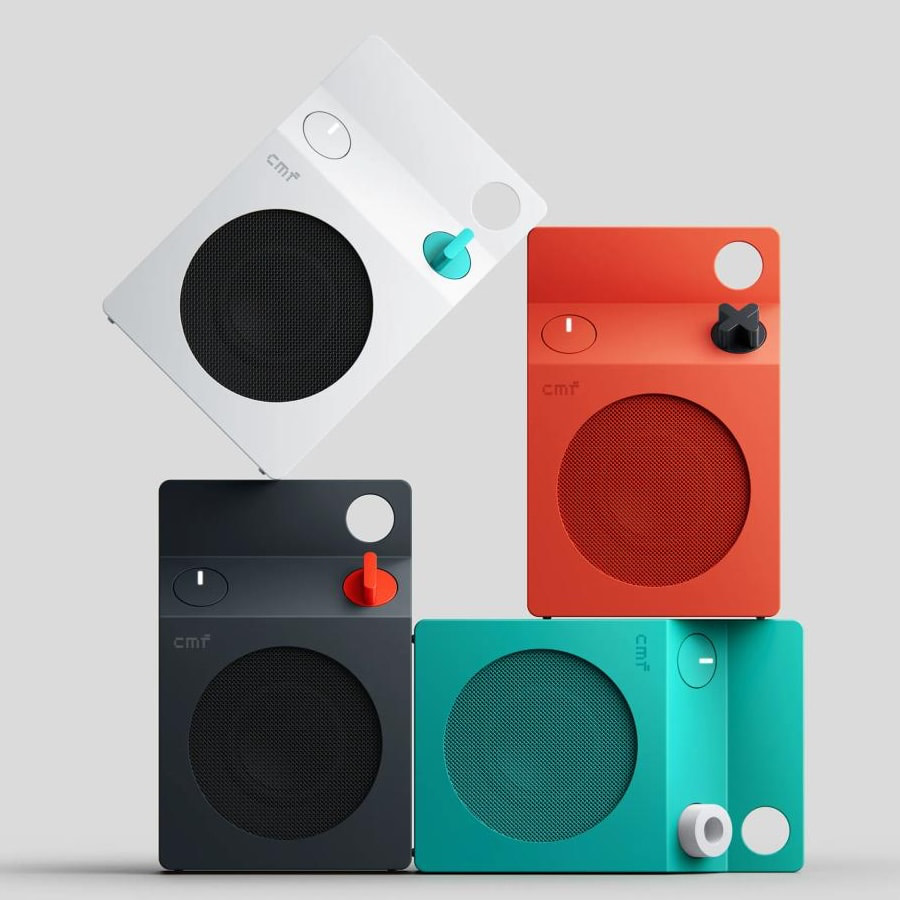
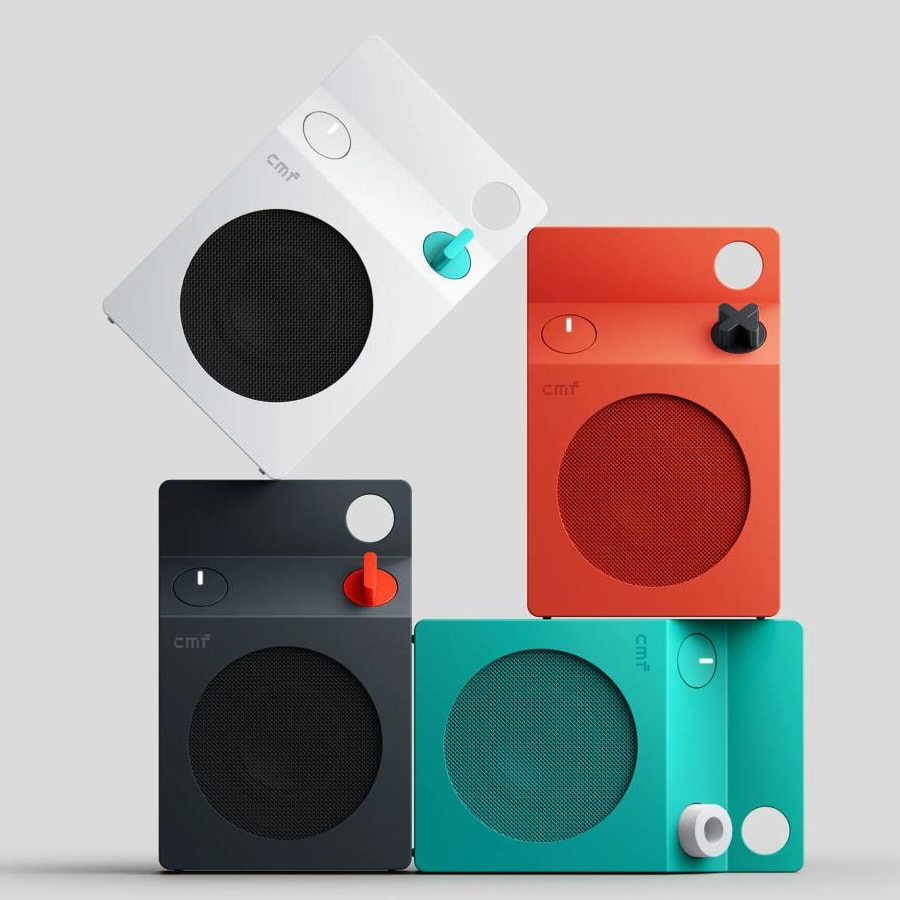
CMF offers the speaker in White, Dark Grey, Orange, and Turquoise, although I’m rather partial to the white version. It’s modern without being aggressively futuristic and looks perfectly at home on a desk, kitchen counter, or bookshelf.
More importantly, the construction feels considerably better than I expected for $59. The cabinet feels solid, the controls have a purposeful layout, and nothing about the overall presentation suggests CMF was simply trying to produce the cheapest possible speaker with an interesting shape.
There is, however, one important design detail worth mentioning.
Advertisement
The Speaker S incorporates two passive bass radiators that contribute to its low-frequency reproduction. At first glance, these elements look like part of the industrial design, and the temptation to pick up the speaker and squeeze them with your fingers is understandable.
Don’t do that.
Passive radiators are moving acoustic components, not decorative buttons or stress-relief toys. Pressing them unnecessarily risks damaging their diaphragms or suspensions, and the last thing your inexpensive Bluetooth speaker needs is an avoidable trip to the repair department.
Advertisement. Scroll to continue reading.
Advertisement
CMF also allows owners to customize the appearance through removable panels and a replaceable control knob. The company is supporting further personalization through 3D-printable design resources, an interesting approach for a product at this price.
Portable, Yes. Pocket-Sized? Not Exactly.
One surprise was the weight. The Speaker S measures 130.5 x 85 x 44mm (5.14 x 3.35 x 1.73 inches) and weighs 334 grams (11.8 ounces).
That doesn’t sound particularly heavy on paper, but there’s noticeable density to the speaker when you pick it up. It feels reassuringly substantial, although anyone expecting something practically weightless may be surprised.
I tried slipping it into the pocket of my Taylor Stitch Ojai chore coat, which normally accommodates a rather impressive collection of things I probably don’t need to carry around. No luck. The Speaker S simply didn’t fit comfortably.
Advertisement
It does, however, disappear into my knapsack without any difficulty, and the integrated utility hook makes attaching it to a bag considerably more convenient.
CMF rates the enclosure IP68 for dust and water resistance, making it a practical option for the beach, poolside, or a camping trip. That doesn’t mean I’d recommend tossing it into the ocean or leaving it underwater, particularly after exposure to salt, sand, or other contaminants.
Actual Buttons. What a Concept.
CMF deserves credit for resisting the temptation to control everything through a smartphone application.
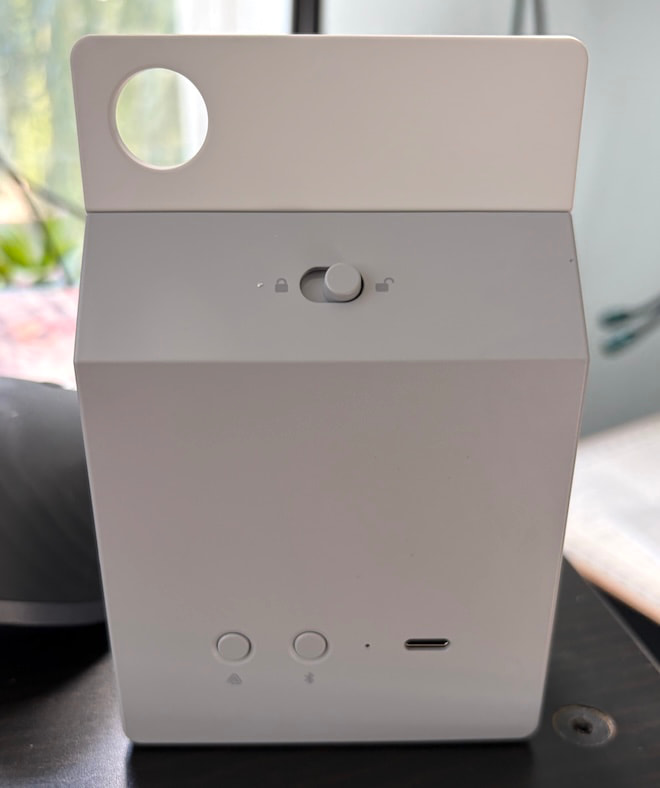
The Speaker S has a physical rotary knob that adjusts volume and handles playback. Pressing it pauses or resumes music, while additional presses handle track navigation. Holding it activates or deactivates the Ultra Bass feature.
Advertisement
Dedicated controls for power, Bluetooth pairing, and Auracast are also included, along with a mechanism for removing the customizable components.
There’s something refreshing about being able to reach over and adjust the music without unlocking a phone, opening an app, and navigating through menus. We’ve somehow reached a point where physical controls qualify as a premium feature, which tells you quite a lot about contemporary consumer electronics.
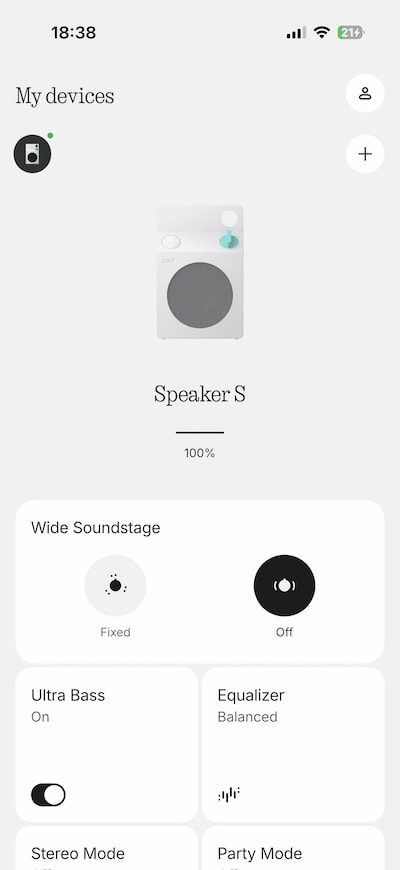
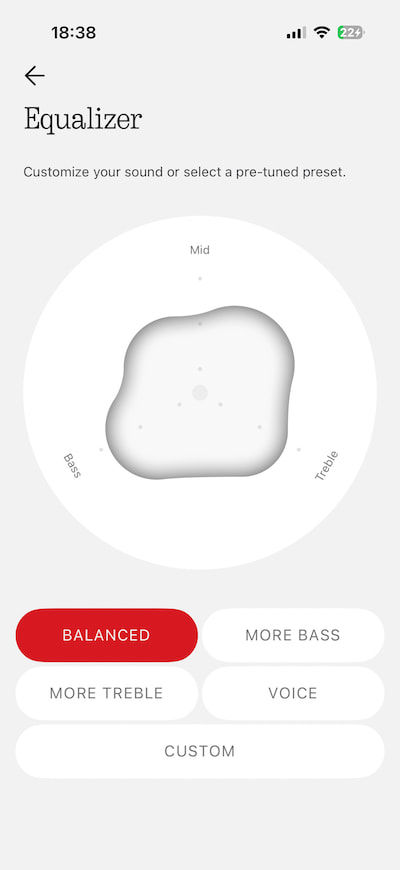
The Nothing X app adds more detailed adjustments, including four EQ presets: Balanced, More Bass, More Treble, and Voice. There’s also a custom equalizer for listeners who prefer to make their own adjustments.
The combination makes sense because essential controls remain on the speaker while the app handles more specific preferences. Whether the EQ options make a meaningful difference will be addressed in the listening section.
Advertisement
Advertisement. Scroll to continue reading.
Auracast Might Be the Most Useful Feature
The Speaker S supports Bluetooth 6.0, but the more interesting addition is Auracast, which allows compatible Bluetooth devices to share audio with multiple nearby receivers.
With CMF’s Party Mode, users can link compatible Auracast speakers to reproduce the same music across a wider area. That opens up some appealing possibilities for dorm rooms, backyard gatherings, and impromptu parties where several friends bring their own speakers.
Two Speaker S units can also be paired in Stereo Mode, assigning separate left and right channels. That’s a different arrangement from Party Mode, which distributes audio across participating speakers rather than creating a dedicated stereo pair.
Think about a college dorm room where several people want to listen to the same playlist without dragging out a larger party speaker. Provided their devices support compatible Auracast functionality, the group can create a distributed playback setup without a complicated wired installation.
Advertisement
Auracast also has potentially valuable applications beyond entertainment.
The Bluetooth standard can support public audio broadcasts, including announcements within suitably equipped venues. In theory, a beach with compatible broadcast infrastructure could distribute local information or weather advisories to supported receiving devices.
There’s an important limitation. CMF documents Auracast Party Mode for shared music playback, not automatic reception of public emergency warnings. The Speaker S should not be treated as a weather-alert receiver without confirmed support for that function and a compatible local service.
Still, the broader technology is worth watching as public venues gradually adopt Auracast.
Advertisement
A Better Alternative to Blocking Out the World?
One place where I can see the Speaker S being genuinely useful is the playground or park.
Parents who want some background music, a podcast, or the news while supervising their children don’t necessarily need to wear noise-cancelling earbuds that isolate them from what’s happening nearby.
A compact speaker playing quietly from a bag or nearby table allows everyone to remain aware of their surroundings without sealing off their ears. That’s particularly relevant when young children, cyclists, and other people are sharing the same public space.
Of course, common courtesy matters. Nobody at the playground wants to hear your entire Spotify playlist, and a speaker doesn’t automatically make you more attentive.
Advertisement
Advertisement. Scroll to continue reading.
The same principle applies to a picnic, a backyard gathering, or a quiet evening outdoors. Portable audio should add something to the experience rather than turn every public space into someone’s private nightclub.
Bluetooth, USB-C Audio and Battery Life
CMF has included several features that aren’t guaranteed at this price.
NFC pairing, Google Fast Pair, and Microsoft Swift Pair simplify connecting compatible devices, while dual-device connectivity allows the Speaker S to maintain connections with two sources.
Advertisement
USB-C also handles wired digital audio playback rather than serving exclusively as a charging port. CMF claims latency below 60 milliseconds when connected by USB-C, making the speaker potentially useful alongside a laptop for videos, casual gaming, or desktop listening.
A full charge is specified at approximately 2.5 hours with suitable USB-C power, while a 10-minute charge can provide up to one hour of playback under the company’s stated conditions.
Battery life is rated at up to 18 hours, based on CMF’s stated testing conditions of AAC playback at 50% volume with Ultra Bass enabled. My experience has been encouraging so far. On a full charge, I’ve managed over 17 hours of playback with the volume set around the halfway point on my iPhone 17, putting CMF’s advertised endurance well within reach under everyday listening conditions.
One omission worth mentioning is the charging cable.
CMF includes the speaker and a quick-start guide, but no USB-C cable. At $59, I’m not particularly offended. If you’ve been purchasing electronic devices for the past decade, there’s a reasonable chance you have enough USB-C cables in a drawer to open a small electronics shop.
Advertisement
CMF Speaker S Specifications
Price: $59 USD
Available colors: White, Dark Grey, Orange, Turquoise
Driver: 45mm (1.77-inch) full-range
Passive radiators: Two
Amplifier output: 10 watts RMS
Frequency response: 70Hz to 20kHz (manufacturer specified)
Sound features: Ultra Bass, Wide Soundstage, Night Mode, custom EQ
Bluetooth: Version 6.0
Bluetooth codecs: SBC, AAC; LC3 for Auracast audio
Wireless range: Greater than 100 meters (328 feet) under free-space conditions (claimed)
Wireless features: Auracast Party Mode, stereo pairing, multipoint connectivity
Fast pairing: NFC, Google Fast Pair, Microsoft Swift Pair
Wired audio: USB-C, claimed latency below 60ms
Battery capacity: 2,600mAh, 3.8V
Battery life: Up to 18 hours
Charging: USB-C; approximately 2.5 hours for a full charge with suitable power
Protection: IP68 dust and water resistance
Dimensions (H × W × D): 130.5 x 85 x 44mm (5.14 x 3.35 x 1.73 inches)
Weight: 334 grams (11.8 ounces)
App: Nothing X
Included accessories: Quick-start guide; no charging cable
What Makes the CMF Speaker S Different?
There are plenty of portable Bluetooth speakers available for less than $75, and many promise impressive bass, waterproof construction, and all-day battery life.
What makes the Speaker S interesting is the combination of industrial design, physical controls, user customization, digital connectivity, and Auracast support at a price that doesn’t require much financial deliberation.
But there’s one rather important question left unanswered.
Can this $59 milk carton actually reproduce music well enough to compete with established portable speaker brands, or has Nothing simply created the most interesting packaging in the dairy aisle?
Advertisement. Scroll to continue reading.
Advertisement
Time to find out.
Listening
Right out of the box, I threw some Nick Cave at the CMF Speaker S and quickly discovered that selecting the Balanced EQ preset in the Nothing X app and enabling Ultra Bass made a rather significant difference. Suddenly, this little $59 speaker didn’t sound nearly as small, anemic, or constrained as its diminutive dimensions might suggest.
Nick Cave and the Bad Seeds’ “Into My Arms” had surprising tonal weight, particularly through the piano, which sounded fuller and more substantial than I expected. Cave’s distinctive baritone wasn’t reproduced with anything approaching reference-level accuracy, but it also didn’t suffer from the haziness or graininess that often makes inexpensive portable speakers difficult to listen to. For $59, that’s a pretty encouraging start.
“Bright Horses” from Ghosteen reinforced another observation: the Speaker S isn’t particularly bright or aggressive sounding, which isn’t always something you can say about a portable speaker built around such a small driver. CMF seems to have resisted the temptation to exaggerate the treble to create an artificial sense of clarity, and the result was more balanced than I anticipated.
Advertisement
Switching to Jimi Hendrix’s “Little Wing” from Axis: Bold as Love revealed a surprisingly detailed top end, along with bass reproduction that favored definition over slam or physical impact. At lower listening levels, Hendrix’s vocals sounded somewhat thin, while his guitar lost some of its familiar growl and presence. Turning up the volume helped fill in some of that missing midrange body, giving the performance greater substance without making the presentation excessively aggressive.
“Voodoo Child (Slight Return)” from Electric Ladyland actually made me sit up and pay attention, which isn’t something I necessarily expected from a $59 Bluetooth speaker shaped like a milk carton. There was something reminiscent of listening to my father’s old transistor radio, only with considerably greater midrange clarity, more convincing treble detail, and a much better sense of what Hendrix was doing with his guitar.
The CMF Speaker S isn’t going to recreate the scale, dynamic impact, or tonal richness of a proper stereo system, but that’s hardly a reasonable expectation at this price. What’s interesting so far is how much musical information it manages to communicate without resorting to the exaggerated brightness or bloated bass that can make inexpensive portable speakers sound impressive for five minutes and exhausting after twenty.
Gillian Welch’s “Wrecking Ball” and “Revelator” made me want to keep listening, which is probably the highest compliment I can pay a $59 portable speaker. The acoustic guitar had surprising clarity and tonal weight, while Welch’s distinctive twang and sultry vocals (at least to my ears) were reproduced with enough texture and presence that I found myself staring at the little CMF, wondering just how good a pair of these might sound in a proper 2.0 stereo configuration.
There’s not enough low-frequency impact or dynamic scale to fill a larger room convincingly, but for desktop listening, a guest bedroom, or an outdoor setting where you’re sitting reasonably close to the speaker, the CMF Speaker S makes a compelling case for itself. Two of these little milk cartons working together in stereo? Hell yes. That’s an experiment I’d genuinely like to try.
Advertisement
Switching over to deadmau5’s “Silent Picture” and The Police’s “Every Breath You Take” revealed something else rather unexpected: the CMF Speaker S actually sounded larger and more expansive with the Wide Soundstage setting turned off. Counterintuitive? Absolutely, but that’s how she blows. Enabling the feature seemed to push everything farther away, creating a more distant presentation that didn’t necessarily benefit the music.
With Wide Soundstage disabled, deadmau5’s atmospheric effects and synthesizers had noticeably greater weight and presence, projecting slightly in front of the speaker rather than sounding like they were playing somewhere down the block. The Police benefited from the same adjustment, with greater focus and substance to the instrumentation. Sting was almost bearable, which is saying something, and I could practically picture Stewart Copeland glaring at his former frontman from behind the drum kit, wondering how he’d managed to make a song about obsessive surveillance sound so romantic. Even a $59 milk carton can’t resolve that particular band dynamic.
The Bottom Line
The CMF Speaker S is a genuine surprise and one of the best values I’ve encountered in portable audio this year. With the Balanced EQ selected, Ultra Bass enabled, and Wide Soundstage switched off, this little speaker delivers considerably more musical substance than its dimensions or price might suggest. Give it some volume, and bass can be surprisingly solid across a wide range of music, with decent speed, definition, and percussion that’s occasionally tighter than it has any right to be. Vocals aren’t hiding behind a veil, and the top end is detailed, smooth, and eminently listenable without becoming aggressive or fatiguing.
Advertisement. Scroll to continue reading.
Advertisement
There are limitations, of course. The Speaker S isn’t going to pressurize a large room, deliver convincing sub-bass, or reproduce the scale of a proper stereo system. At lower volumes, some recordings lose body and presence, but turn things up a little and the presentation becomes noticeably more engaging. I’ve found myself listening far longer than intended, which is not something I expected from a $59 Bluetooth speaker that resembles something from my elementary school cafeteria.
The JBL Clip 5 ($79 at Amazon) is a worthwhile alternative for outdoor use, with its integrated carabiner, IP67 protection, and Auracast support, while the Tribit StormBox Micro 3 ($64.99 at Amazon) offers a more rugged approach with magnetic mounting, a versatile carrying strap, and a claimed 24-hour battery life. Both deserve consideration, particularly if portability and outdoor practicality are priorities. The CMF counters with its distinctive industrial design, customizable controls, USB-C audio, and battery endurance that came remarkably close to its advertised 18 hours during my testing.
Would I buy the CMF Speaker S? Without question. It’s surprisingly well built, attracts more questions from curious bystanders than speakers costing four times as much, and sounds ridiculously good for $59. I’d happily buy a second just to hear what these little troublemakers can accomplish in stereo. Back in the 1980s, milk cartons came with sour milk, missing kids, and enough childhood trauma to keep a therapist in business for decades.
Nothing has finally delivered one worth taking home. No expiration date, no creepy clown, and no need to ask your mother for lunch money. Got milk? Screw that. Got stereo?
Advertisement
Pros:
Surprisingly full, balanced, and engaging sound for $59
Solid bass, clear vocals, and smooth, detailed treble
Excellent build quality and distinctive industrial design
Auracast support with stereo pairing and multi-speaker connectivity
Physical controls, customizable EQ, and USB-C audio
Excellent battery life; over 17 hours in testing
IP68 dust and water resistance
Cons
Limited bass impact and dynamic scale in larger spaces
Vocals and instruments can sound thin at lower volumes























































You must be logged in to post a comment Login