
Join Mikko Hyppönen and security leaders from the NFL, CHANEL, and Atlassian for a two-hour digital summit on what AI-speed attacks change, what defenders should stop doing, and how to validate, decide, fix, and re-validate at machine speed.
Tech & AI
Ninja Forms plugin flaw exploited to hack WordPress sites



Hackers are exploiting stored cross-site scripting (XSS) vulnerabilities in two unrelated WordPress plugins, Ninja Forms and WPC Product Bundles for WooCommerce, to install backdoors and create rogue admin accounts.
Both vulnerabilities received a high severity score and require an authenticated session to exploit. They are tracked as CVE-2026-93836, affecting WPC Product Bundles for WooCommerce versions 8.6.6 and older, and CVE-2026-94504, affecting Ninja Forms versions 3.15.3 and older.
The Ninja Forms plugin for WordPress is installed on more than 500,000 sites and allows creating custom forms without writing code.
WPC Product Bundles for WooCommerce allows storing group products into bundles and is active on more than 30,000 WordPress sites.
The campaign was identified on October 4 by researchers at WordPress security platform Patchstack, against users of WPC Product Bundles for WooCommerce. The next day, the same activity was observed against Ninja Forms.
In both attacks, the same JavaScript payload was delivered from ‘imgcdn1[.]com,’ indicating the same threat actor behind the exploitation attempts against the two plugins.
According to the researchers, the attacker tries to plant malicious JavaScript (x.js) in WooCommerce order data or Ninja Forms submissions. When a logged-in administrator loads the content, the script executes using the authenticated WordPress session.
When launched, it retrieves the necessary administrative nonces and uses legitimate WordPress functions to install a malicious plugin masquerading as “WP Smart Thumbnails” version 1.2.4 from “MediaPress Labs” and create an administrator account.
At that stage, the JavaScript payload and the malicious plugin’s PHP scripts establish four access mechanisms to the compromised site:
- A visible administrator account
- An administrator account concealed from the WordPress user list in the dashboard
- A secret login URL that authenticates as the site’s oldest existing administrator
- An unauthenticated file manager accessible through a direct request to the malicious plugin’s main PHP file
The file manager can’t execute commands, but it could still be used to introduce additional payloads on the site.
Even if the WP Smart Thumbnails plugin is removed from the infected website, the hidden account and secret login URL continue to function as persistence mechanisms through separate auxiliary attack plugins featuring backdated timestamps to evade detection.
“The [hidden] account does not appear in Users → All Users, does not appear in the Administrator filter, and is not counted in the totals above the list,” Patchstack explains, adding that “It is a fully privileged administrator the site owner cannot see.”
Patchstack says that exploitation is currently limited, but advises site admins to upgrade to the latest versions of the affected plugins, WPC Product Bundles for WooCommerce version 8.6.7 or later and Ninja Forms 3.15.4 or later.
Updating the vulnerable plugin prevents further exploitation but does not clean an existing infection. Administrators are strongly recommended to check for signs of compromise.


Continue Reading

An anonymous reader quotes a report from Reuters: Google has contracted for 3,590 megawatts of power from Constellation Energy on the largest US power grid, with new nuclear energy accounting for about a quarter of that supply, the companies said on Tuesday. Constellation will make more than $4.3 billion of new investments in its fleet as part of the agreement, which involves adding capacity at several of the power company’s nuclear reactors in the Midwest and Mid-Atlantic regions, the companies said.
[…] Over the last two years, Constellation unveiled an agreement to restart its Three Mile Island reactor in Pennsylvania to serve Microsoft data centers, while Google contracted to restart NextEra Energy’s nuclear power plant in Iowa. In the latest arrangement, Google entered into a 20-year power purchase agreement for 890 megawatts of electricity from multiple Constellation-owned nuclear power plants, which would be upgraded to produce more electricity from existing reactors. Electricity from the first of the upgraded plants is expected to be delivered in 2028, the companies said.
Google also entered into a 15-year supply agreement for an additional 2,700 megawatts of power from Constellation in the PJM power grid. That power is not tied to a specific generation source and serves as long-term revenue certainty for Constellation’s operating plants, Google said. Maryland-based Constellation is the largest US nuclear power plant operator and owns a major fleet of natural-gas-fired power plants as well as geothermal energy following its acquisition of electricity producer Calpine Corp earlier this year. […] The 11 nuclear units expected to be upgraded as part of the arrangement with Google are in Illinois, Pennsylvania, and New Jersey, within the footprint of the largest US electric grid — PJM Interconnection. Joe Dominguez, chairman, president and CEO of Constellation, said the arrangement with Google is a “model for how technology companies and the energy industry can work together to responsibly develop the digital economy and invest in our nation’s energy infrastructure in a way that delivers grid-wide benefits for all, funded by private entities.”


Read more of this story at Slashdot.
Tech & AI
$111 Billion Skydance Merger Closes, Merging HBO Max and Paramount+ Into One Streaming Giant


The $111 billion Skydance merger between Paramount and Warner Bros. Discovery officially closed this week, ending more than a year of regulatory fights, lawsuits and last-minute legal maneuvers to create one of the largest media and technology conglomerates in the world. The combined company, now operating under the single name Skydance, controls two major film studios, CBS, CNN, a sprawling library of franchises, and — perhaps most consequential for ordinary consumers — two of the biggest streaming platforms in the country.
The deal cleared its final hurdle on October 6 when Supreme Court Justice Elena Kagan rejected an emergency application from a group of consumers seeking to block the merger at the last minute. That decision came after a Ninth Circuit Court of Appeals panel had already turned away the same challenge, closing off the last realistic path for opponents to stop the transaction before it closed.
How the Skydance Merger Survived Its Legal Gauntlet
The road to completion was anything but smooth. In July, US District Judge Araceli Martínez-Olguín in the Northern District of California ruled that the merger would likely violate antitrust law by substantially reducing competition, a finding that briefly threw the entire transaction into doubt. California and eleven other states had sued to block the combination outright.

Rather than continuing to litigate, California settled with the companies last month, and the other states involved agreed to the same terms. Martínez-Olguín approved that settlement on September 30, acknowledging it didn’t fully resolve every legal question raised by the case but calling it “a reasonable factual and legal resolution of the dispute.” She noted that settlements inherently involve compromise that can leave both sides — and the public — dissatisfied, but that the alternative was years of costly litigation with an uncertain outcome.
A coalition of free speech and media advocacy groups had urged the court to reject the settlement, arguing it gave residents of the suing states “virtually nothing” in return for dropping their claims. The judge disagreed, pointing to provisions requiring minimum investment and release thresholds for domestic films, along with continued separate negotiations for the two companies’ cable distribution deals, as meaningful concessions rather than symbolic gestures.
A separate consumer lawsuit, filed by five streaming subscribers who argued the merger would harm them directly, also failed at every level — first at the district court, then at the Ninth Circuit, and finally in the emergency application to Kagan, who denied it without explanation.
Editorial Oversight and Political Pressure
Beyond the antitrust questions, the Skydance merger has been shadowed by concerns about the independence of its news operations. As part of the California settlement, Skydance must establish an “Editorial Independence Board” for CBS News and CNN, though its members will be chosen by Skydance itself and report to the company’s own board of directors — a structure critics say offers limited real insulation from corporate or political influence.
Those concerns aren’t hypothetical. Skydance CEO David Ellison reportedly told Trump administration officials he intended to make significant changes at CNN, a network that has frequently drawn the former president’s ire. Last year, Paramount secured federal approval for its acquisition of Skydance only after agreeing to a $16 million settlement with Trump and installing what FCC Chairman Brendan Carr described as a “bias monitor” at CBS. CNN CEO Mark Thompson and CBS News Editor-in-Chief Bari Weiss are both staying on under the new ownership structure, for now.
The Justice Department’s own approval of the merger back in June reportedly caught some of its staff lawyers off guard, as internal sentiment had been leaning toward recommending a lawsuit to block the deal entirely. In September, the FCC further cleared the way for Paramount to finance the acquisition by selling large, non-voting equity stakes to sovereign wealth funds from Saudi Arabia, the United Arab Emirates, and Qatar. Voting control remains entirely with the Ellison family and RedBird Capital Partners.
A Streaming Shake-Up for Consumers
For most Americans, the most tangible fallout from the Skydance merger will show up on their TVs and phones. In its announcement, the newly formed company confirmed that HBO Max and Paramount+ will “unify into a single service over time,” though no timeline or name for the merged platform has been announced yet. HBO CEO Casey Bloys will oversee the combined streaming operation.
Ellison previewed the logic behind the move back in March, telling investors that combining the two services’ subscriber bases would give the new company “a little over 200 million” direct-to-consumer subscribers — a figure meant to position Skydance as a serious rival to Netflix, which reported 325 million subscribers as of January. Once merged, the single streaming service would house hit titles currently split across the two platforms, including Yellowstone, The White Lotus, House of the Dragon, and Mobland.
Reuters has reported that Skydance will carry roughly $80 billion in debt following the transaction, a load that puts real pressure on Ellison to grow streaming revenue quickly, protect cash flow from the companies’ cable networks, and turn around theatrical box office performance — all while integrating two sprawling corporate cultures and content libraries.
Whatever its financial risks, the Skydance merger marks one of the most significant consolidations in modern media history, bringing together studios, news networks, sports rights and streaming technology under a single corporate roof. Whether it ultimately benefits consumers through better content and pricing, or simply concentrates more power in fewer hands, is a question regulators, journalists and subscribers alike will be watching closely in the months ahead.
Sources:
Explore more on this topic with Vexel Search.
Tech & AI
Midea 5L Induction Rice Cooker review: specialty cooker that’s surprisingly versatile and affordable

Why you can trust TechRadar
We spend hours testing every product or service we review, so you can be sure you’re buying the best. Find out more about how we test.
Midea 5L Induction Rice Cooker review: two-minute review
Midea makes a wide range of home products, ranging from fans, coffee machines, dehumidifiers and even a two-in-one washing machine and robot vacuum cleaner. It also offers a wide range of kitchen appliances, including the 5L Induction Rice Cooker reviewed here, which the brand looks to position as an affordable alternative to specialist rice cookers from Japanese brand Zojirushi, Taiwanese brand Tiger and South Korea’s Cuckoo, whose top-tier offerings can cost as much as AU$1,248 / SG$1,419. This model is only available in Australia, New Zealand, Singapore and a handful of other Southeast Asian countries for a fraction of that price.
While a rice cooker won’t replace a multicooker outright in most households, models like this one from Midea are multifunctional, allowing you to steam, make soup (or at least prep for some kinds of soups) and even bake cakes.
That said, the specialty of Midea’s Induction Rice Cooker is in its name: cooking rice. For this, it offers presets for three firmness levels, adjusting for mixed rice grains and for making what the brand calls ‘claypot rice’ (rice with other ingredients like proteins and vegetables to make a complete meal).
Latest Videos FromTechRadar

It looks sleek and premium and is arguably much better-looking than most multicookers, although it’s large enough to take up the same amount of counter space. The 5L capacity can accommodate up to 10 cups of rice, and the included steaming basket allows you to cook an entire meal for 2 people easily enough. For instance, I cooked a salmon fillet and some frozen vegetables in the basket while I had rice cooking underneath, and everything came out perfect, although I should note that the cook time is relatively longer when it’s multitasking like this.
I also used the steam function to ‘boil’ eggs and I consistently got the results I wanted, whether that was a soft boil, jammy or a proper hard boil without overcooking. I could also do some light sautéing to create a simple meat sauce for gnocchi, creating enough heat for the onions, garlic and minced beef to cook through, and then switched to ‘Quick Cook’ for the rest of the way with the pasta.
During testing, the Midea cooked soft, regular and firm rice well with noticeable differences, while the soup and congee settings produced delicious results. I had mixed results with the cake function — my attempt at banana bread got a slightly burnt crust (but the interior was moist), while pancakes were cooked perfectly (although Midea’s suggested timings in its online recipe were a bit off). Admittedly, that result has more to do with my lack of baking experience than with the rice cooker itself, but it still wouldn’t be my first choice for baking a cake or making bread.
The Keep Warm button is useful for keeping leftovers fresh, though it tends to dry out food when it’s kept in the pot for too long.
I wouldn’t call Midea’s 5L Induction Rice Cooker perfect for all its advertised features, but it’s a nice upgrade from the basic heating plate-based rice cookers with just a single function or, alternatively, an inexpensive way to get a specialty option. On the other hand, you’re better off with a proper multicooker if you don’t cook rice a lot, especially if you need pressure cooking.
Midea 5L Induction Rice Cooker review: price and availability
- List price: AU$199 / NZ$199 / SG$199
- Available from select retailers in limited Asia-Pacific markets
The Midea 5L Induction Rice Cooker is available from Amazon in Australia and various retailers in Singapore. It often gets discounted to AU$149 / NZ$169 / SG$149, so it’s worth keeping an eye out for discounts, especially during major sale events like Black Friday.
That’s a heck of a lot cheaper than spending upwards of AU$700 / NZ$1,000 /SG$600 on specialty rice cookers from Japan, Taiwan and Korea, although you do get what you pay for — the more expensive models give you better control over the cooking process. However, the Midea alternative is still a worthwhile consideration for anyone on a budget as long as you don’t need a multicooker.
Midea 5L Induction Rice Cooker review: specifications
Swipe to scroll horizontally
|
Price: |
AU$199 / NZ$199 / SG$199 |
|
Weight: |
6kg |
|
Size: |
29.2 x 24.8 x 36.8 cm (h x w x d) |
|
Capacity: |
5L |
|
Functions: |
Rice, soup, congee, reheat, steam, cake, keep warm, delay start |
|
Accessories: |
Standing rice paddle, soup ladle, measuring cup, steam basket |

Midea 5L Induction Rice Cooker review: design and features
- Induction cooking for evenness
- Lid-mounted controls
- Dishwasher-safe inner pot and accessories
The Midea Induction Rice Cooker is a well-designed kitchen appliance that looks sleeker than most multicookers, with touch buttons are on the lid that manage to both blend into the design while also standing out for good visibility. All the buttons are lit to which cooking mode is active as you toggle through the options. For rice, you can choose from soft, regular and hard, as well as dedicated settings for quick cooking, Jasmine rice, mixed grain rice, and ‘claypot rice’, or rice with other ingredients (like vegetables and proteins) to make a complete dish.
The lack of a pressure-cooking function means the lid is completely flat with a small valve at the top that Midea claims is “anti-spill”. The lid opens up with the touch of a button in front of the unit, with the non-stick inner pot sitting inside. The pot has multiple markings for guidance on water level for different rice options and steaming.
Midea says the non-stick coating is infused with Binchotan, or Japanese white charcoal powder, which is commonly found in specialised rice cookers and kitchenware, aimed at radiating far-infrared heat to improve thermal efficiency and neutralising unpleasant odours or tastes. The included steam basket sits on top of the inner pot, though it’s relatively small at just 5.5mm deep and just enough to cook for maybe 3-4 servings of vegetables or 2-3 servings of meat (about 2 servings only if combining meat and veg).

Unlike a multicooker, you can’t adjust cook times (except for soup, congee and steaming), but the rice cooker uses temperature sensors to ensure balanced and even cooking. The Keep Warm feature can run for up to 24 hours — though I wouldn’t recommend leaving food in there for too long — and there’s also a reheat button that runs for 20 to 30 minutes. The Delay Start button can schedule your cooking for later, like preparing everything before you leave the house, then timing it to finish as you come back.
Other accessories include a rice paddle with a handle designed to stand up vertically, a small soup ladle, and a measuring cup for 180ml or 180g. All the accessories are dishwasher-safe.
- Design and features score: 4/5
Midea 5L Induction Rice Cooker review: performance
- Rice programs are long, especially brown rice
- Rice firmness settings are accurate
- Steam and cake functions are surprisingly versatile
Rice is my main staple for most dishes, having grown up in an Asian household, so I would regularly cook 1-2 cups of jasmine rice in the Midea at least a few times a week. I used all three settings — soft, regular and hard — with each result depending on the dish I’m pairing the carb with. In two months of testing, every setting has been accurate with the results.
I would occasionally mix in some quinoa and pearl barley with the jasmine rice to make it healthier and to add a different texture, and the Midea’s ‘Mixed Rice’ setting worked like a charm — every grain was cooked through with the texture and consistency I wanted. I used the same setting for brown rice and had the same results. Admittedly, my old multicooker produced softer and fluffier brown rice thanks to pressure cooking, which is missing here, but the results were still delicious.
To test the ‘Claypot Rice’ function, I made a quick and simplified version of Hainanese chicken rice, where I swapped the water for chicken stock, sprinkled some spring onions and ginger slices, then placed two chicken thighs on top. It was set to one hour by default, so there was plenty of time to ensure the chicken was cooked through, though I was concerned it could be too long and might dry the meat out.

The chicken was cooked through, although the internal temperature went over 90ºC, a bit higher than I’d like. It wasn’t completely dry, thankfully, and was still tasty along with the rice. The rice itself was well-cooked, and it even had a crispy, charred crust around the edges, just like the traditional dish made in actual clay pots.
The included steaming basket is deep enough to fit whole pieces of chicken breast, chicken thighs or a salmon fillet, or up to 3-4 servings of vegetables. There’s a measuring line in the inner pot to indicate the minimum level of water you need for the steam function.
Steaming defaults to 15 minutes, but can be adjusted with the Timing button. Pushing the functionality further, I also cooked eggs in the rice cooker by following the usual cooking times (5-6 min for runny yolks, 7-8 for jammy yolks and 11 minutes for hard-boiled eggs) and, with a bowl of ice water nearby to stop cooking, I achieved precise results each time.
The steaming basket’s shallow height meant there was plenty of room to cook some rice at the same time instead of just using water for steam generation only. This way, I cooked an entire meal using my usual jasmine rice setting — this included two cups of the rice in the inner pot, with a salmon fillet and a single serving of frozen broccoli in the basket on top. On the 50-minute setting for regular rice firmness, the salmon was perfectly cooked and not dried out as I feared, while the broccoli was cooked through but not overly soft. The rice was also well-cooked.

Making soup is straightforward, as you can dump all the ingredients in the inner pot and set your desired cook time. As this function is essentially a simmer, you can open the rice cooker to check in occasionally without affecting the soup’s quality.
I made a chicken stock-based chickpea soup where I boiled canned chickpeas in chicken stock for 30 minutes using the Soup function — just enough to soften the chickpeas for blending before I mixed it back in. The result was a rich, creamy soup just like how I would cook it on a stove.
While it’s great for some soups, I’ll be sticking to a regular stock pot when ingredients need to be blended — it’s quicker on prep time and cleaning up to stick a hand blender into the stock pot directly, and you won’t need to worry about damaging the non-stick coating of the rice cooker.
I tested the Congee mode by making porridge, swapping out the rice for steel-cut oats and using a mix of water and chicken stock, plus seasoning. I followed the suggested liquid level for congee marked in the inner pot’s guide and set it for the default 1-hour cook time. It was enough time to achieve the consistency I wanted, which is relatively thick, with the steel-cut oats cooked all the way through.

To test the ‘Cake’ function, I tried a shortcut banana bread recipe using a packaged pancake mix to make a denser version. My initial attempt was unsuccessful as I kept opening and closing the lid (a big no-no, it turns out), and I may have put in more milk than I should have. My second try was better, where I redid the same 50-minute cook time setting and sprinkled in some oats in the centre to help it absorb some liquid and add some texture.
The banana bread turned out well, albeit with a crust that was a little too dark brown (i.e. slightly burnt) but a moist centre. Well, a baker I am not and I’m still uncertain about the Midea rice cooker’s bake functionality.
On the other hand, I had better success with pancakes when using the Cake setting. I scooped in a thin layer of batter at a time into the inner pot and cooked each side for 2-3 minutes each, according to a social media post from Midea ANZ. It turns out that was not nearly enough, and I kept the cooking going for a few more minutes before flipping to the other side.

The pancakes were cooked through after about 6 minutes for each side, though getting them out of the pot was tricky due to the depth of the pot. The results were OK, but the effort of taking the pancakes out of the pot makes me want to stick to using a pan on the stovetop instead.
Midea’s marketing materials also showed that light sautéing is possible even if there isn’t a specific ‘Sauté’ function, so I tried making a quick meat sauce to pair with gnocchi. I tried the ‘Steam’ function (as the time can be adjusted) to start off with the minced beef, and then put the gnocchi in after the meat was cooked and set it for ‘Quick Cook’. Again, the meal was OK, though the meat didn’t have the kind of caramelisation I wanted.
Should you buy the Midea 5L Induction Rice Cooker?
Swipe to scroll horizontally
|
Attributes |
Notes |
Rating |
|
Value |
A reasonably priced induction rice cooker that’s cheaper than specialty rice cookers, though pressure cooking would have been welcome at this price point. |
4/5 |
|
Design |
Simple and intuitive controls all in a sleek and modern design, but no up and down arrows for adjusting cook times. |
4/5 |
|
Performance |
Some cook times are slow, but it produces great results, though having no pressure cooking means some tougher grains won’t be as soft and fluffy. |
4/5 |
Buy it if…
Don’t buy it if…
How I tested the Midea 5L Induction Rice Cooker
- I cooked in it over a period of two months
- I used six different cooking functions
- I noted how easy it was to clean
Having previously maintained the Australian version of the best Instant Pots, I tested this rice cooker as if it were a multi-cooker, albeit without a pressure-cooking function. I primarily cooked various types of rice, but also made eggs, steamed fish and broccoli, chickpea soup, and porridge. Instead of testing the pressure-cooking, I used the ‘Cake’ setting to make banana bread and pancakes.
During these tests, I was evaluating how straightforward the cooker is to use, and how easy it was to adjust the settings. I also cleaned it by hand to see how easy it is to clean. I also noted any other quirks or frustrations along the way.
Read more about how we test.
[First reviewed October 2026]

Verdict
The Vantrue Nexus 4S is strong value given it combines three cameras covering the front, back and inside of your vehicle. Each features Sony STARVIS 2 sensors that perform well at night – the front camera is exceptionally good at recording number plates. If you’re not bothered about driving assist features and just want strong all-round recording, this is a good value dash cam, especially where clear night footage is important.
-
Good value
-
Strong video from all three cameras
-
Exceptional number plate performance
Key Features
-

Review Price:
£246
-
A dash cam that records inside and out
The Vantrue Nexus 4S films what’s going on in front of and behind your car, along with what’s happening in the cabin – that could be an advantage if you carry passengers, or need to prove you were paying attention.
-
No assistance features
While some dash cams come with AI features like lane-keeping assist or traffic alerts, the N4S is focused on video – that shouldn’t be a problem in newer vehicles which have built-in safety systems.
Introduction
Plenty of dash cams these days come with driver assistance features that aim to mirror what you get on the latest cars: they can tell you when you’re leaving your lane or when the vehicle in front sets off, for example. The Vantrue Nexus 4S doesn’t do that: it’s a reasonably straightforward three-camera bundle focused on recording what’s going on in and around your car.
This set comprises two separate devices. The main, bar-shaped unit has a front-facing camera and rear-facing screen, together with a rear-facing cabin camera supported by infrared lighting to make sure it can see in the dark. The second device is a dedicated rear camera, linked to the first by a lengthy USB-C cable. You can upgrade this set with an LTE module that adds mobile data features, but that wasn’t available at the time of our review.
For a mid-range bundle the Vantrue N4S (as Vantrue sometimes calls it) is fairly well specified. All three of its cameras use Sony STARVIS 2 sensors, specifically designed for good low-light and surveillance performance. The main unit records at a maximum 2592×1944 resolution, while the rear and cabin cameras both top out at 2560×1440. All manage 30 frames per second, which ought to be enough to capture everything – so how well does it work in practice?
Design and features
- On the big side
- No driver aids
- Basic app
You wouldn’t necessarily buy this dash camera for the way it looks. While products like the Vantrue E1 Pro cram decent video quality into the smallest practical design, the Vantrue Nexus 4S is on the big side. Its bar-shaped design isn’t quite ideal for modern cars, which tend to have a large binnacle behind the rear-view mirror. In the UK you usually need to mount dash cams to the left of this so they’re not in the driver’s view: given this dash cam’s front camera is also on the car’s left side, it ends up significantly off centre.

I don’t love the Vantrue Nexus 4S’ mount. While this dash cam comes with a couple of electrostatic stickers, which help you position it and remove it from the window without leaving a mess, the camera itself doesn’t snap in place as positively as some other magnetic designs. The mount lets you tweak the camera position, but it’s not the most authoritative design – it seems to move fractionally before encountering greater resistance.

When mounting this camera it’s important to remember that it also has a rear-facing lens. Again, it’s not ideal in a right-hand drive market that this is on the car’s right, as you need to make sure the rear-view mirror doesn’t obscure it. Even with the front unit some way into my front passenger’s view, the mirror still blocked my face in recordings.

Vantrue’s website suggests you should get a weatherproof rear camera in this bundle, suitable for mounting either on the rear screen, or externally above your rear licence plate. That’s a great idea, potentially getting a distraction out of your rear view, but my review sample had a standard bullet-shaped camera designed only for interior use. It’s linked to the front camera by quite a thick cable that might be tricky to sneak behind the headlining – fortunately Vantrue bundles several sticky clips to help keep things tidy if you have to route it in plain sight.

This bundle includes a cigarette lighter-style car power cable with a spare USB-A port that’s rated only at 10W – not enough to fast-charge a modern smartphone.

Like most dash cams, this one comes without a micro SD card. At the maximum available resolution it saves three 100MB+ files every minute, so a 256GB card ought to provide around 12 hours of recording – enough for a lengthy return trip. Invest in the maximum 1TB card and you could store a couple of days’ continuous driving, which might be enough for a week’s worth of professional shifts.
I’m not a fan of driver aids on dash cams, as they aren’t always reliable, and they’re not linked into your car’s active safety systems so they can’t help you take action. If you are looking for features like a lane-keeping assist for an older car that doesn’t have it, this dash cam can’t oblige. It does offer bump-sensing, through which it locks a recording if an impact is detected. There’s a parking mode, too, but you’ll need the hardwiring kit to support it.
You can view videos by removing the micro SD card and viewing its contents, or you can access them through the Vantrue app. There’s not much wrong with this – it offers a good selection of settings, in particular – but it’s not especially helpful when you want to find a specific clip. Drive for several hours and you’ll have to navigate a folder containing hundreds of video thumbnails.

Performance and video quality
- Great front video quality, but not at 1,944p
- Exceptional number plate performance
- Unexceptional rear video at night
It’s hard to fault the Vantrue Nexus 4S’ video performance, with one important caveat: when recording at 1944p my test sample encoded video in the wrong aspect ratio, so that when played back on the app or my PC the result looked pinched, with tall, thin vehicles.

I’d expect this bug to be fixed in a future firmware update, but for my purposes the fix was to drop down to 1440p resolution.

Front video quality was otherwise very strong. While I didn’t get the chance to test this dash cam in rain, it had no problem with flat, overcast weather, or with the deep shadows and bright skies of searing summer days. At night, video was as sharp and well-exposed as I’ve seen from other dash cams using STARVIS 2 sensors. In fact the Nexus 4S came very close to matching the Viofo A329 – still my benchmark for all-round video quality. Only a lower resolution and frame rate let it down.

At night, number plates are notoriously tricky to capture, as they either lurk in the shadows or reflect your headlights and overwhelm the camera’s sensor. The Nexus 4S excelled in my nighttime trip around the block, producing a clearly legible image of almost every number plate I drove past, provided it got at least a momentary brush from my lights. This was head and shoulders above any other dash cam I’ve reviewed, even those with better outright video quality, and other Vantrue models that use the company’s PlatePix enhancement.

Fortunately, this bundle’s other two cameras don’t let the side down. Footage from the cabin camera was also well exposed, with the Nexus 4S’ HDR ensuring that both the dark interior and bright outside were captured in the same shot. At night, infrared lighting ensured the dash cam captured what passengers were up to, although in my car the passenger sun visor and mirror were always crowding into the frame.

My only other issue with footage shot from the front and cabin cameras was that in both, it was possible to see a little camera shake on rough road surfaces or over harsh speed bumps. As suspected, the mount didn’t quite hold the dash cam firm enough to prevent it, but most users would be unlikely to notice the effect.
This bundle’s rear camera performed adequately at night, but it didn’t seem a match for the quality of the other two – odd, given all three use the same family of sensor. Rear footage is always worst at night, however, given it’s entirely reliant on ambient light or car headlights, and I’ve certainly seen much worse. During the day it was good, coping well with deep shadows that trip some rear-facing units up.

Should you buy it?
You want to capture inside and out
This dash cam is particularly good at capturing what’s going on in front and inside of your vehicle. It’s ideal for a more comprehensive picture, or for professional drivers seeking a bit more protection.
You want plenty of features
This dash cam doesn’t offer driver aids, and you’ll need its optional LTE module to access features like geoblocking. If that’s what you want, I’d look elsewhere.
Final Thoughts
My only real beef with this dash cam was its weird, squashed videos at its maximum resolution – an issue I’d expect to see resolved by a firmware update before too long. With the resolution stepped down it barely put a foot wrong. That makes it a great choice if you’re looking for good video quality at a reasonable price, from a camera that offers a bit more cover than the standard front-only, or front and rear setup.
It also makes the Vantrue Nexus 4S ideal for professional drivers, who might want a bit of extra reassurance when carrying passengers, or evidence they were undistracted should an incident happen. Certainly this dash cam’s size would be less of an issue if you were mounting it in a cab window, rather than a car’s. Still, if neither sounds like you, check out our Best Dash Cam Guide for more suggestions.
How We Test
We test every dash cam we review thoroughly over an extended period of time. We use standard tests to compare features properly. We’ll always tell you what we find. We never, ever, accept money to review a product.
Find out more about how we test in our ethics policy.
- Used as our main dash cam for the review period
- We take sample video during the day and night to see how good the footage really is.
- We test any smartphone apps to see what additional features are on offer.
- We test any additional safety features, such as lange change warning, to see how useful they really are.
FAQs
Are Vantrue dash cams any good?
We can only speak about the products we’ve tested, but all the recent Vantrue dash cams we’ve seen have been solid. The Nexus 4S tested here is one of the best yet.
Is a dash cam an MOT failure?
No, but you have to be careful that it doesn’t obscure the driver’s view. Neither it, nor its mount, should intrude more than 40mm into the area swept by the car’s wipers. Ideally, place it behind the rear-view mirror, or as near the top centre as possible on the passenger’s side of the screen.
Test Data
Full Specs
| Vantrue Nexus 4S Review | |
|---|---|
| Manufacturer | Vantrue |
| Quiet Mark Accredited | No |
| Size (Dimensions) | 117 x 57 x 37 MM |
| Weight | 185 G |
| ASIN | B0F59T1B4N |
| Release Date | 2026 |
| First Reviewed Date | 13/08/2026 |
| Dash cam front camera resolution | 2596 x 1942 px |
| Dash cam memory card slot | MicroSD |
| Dash cam rear camera | Rear camera, and rear-facing interior camera |
| Dash cam max memory cad size | 1023 GB |
| Dash cam GPS | Yes |
| Dash cam Wi-Fi | Yes |
| Dash cam parking mode | Yes |
| Dash cam screen size | 2 Inches |
| Dash cam screen resolution | x px |
| UK RRP | £246 |
| USA RRP | $270 |
| EU RRP | €280 |
| CA RRP | CA$380 |
| AUD RRP | TBC |

The publisher of Wikipedia said Monday that OpenAI agents attempted to hack a note-taking tool it hosts, made unauthorized edits, and sent millions of resource-intensive requests to its infrastructure, in the latest instance of OpenAI systems taking harmful and potentially dangerous actions.
The objective of some of the OpenAI agents’ actions, the Wikimedia Foundation said, was to use Wikipedia as a proxy for fetching data from third-party sites. In one case, the agents posted “malicious edits” that were intended to repurpose a citation tool as a proxy. In another, the agents made unsuccessful attempts to compromise the Wikipedia Etherpad note-taking tool so it would serve the same purpose.
The agents also made millions of automated API requests, crawled millions of pages, and made hundreds of thousands of queries to the Wikidata Query Service. The last action may have contributed to a partial shutdown of the query service in May, the publisher said.
“As a non-profit technology host of some of the largest and most widely used open knowledge platforms in the world, we are deeply concerned about the impact of ‘rogue’ AI agents on platforms like ours, which are built by volunteers from around the world and rely on the promise of the open internet,” Wikimedia said. “Incidents like this one, and the many others that have been (and are still being) uncovered, illustrate how AI agents can drain resources and crash servers, as well as attempt to compromise trustworthy information.”
Agents will be agents
In well over a half-dozen cases, OpenAI agents have been caught taking actions that would likely result in criminal charges being filed had human hackers taken them. During the testing of internal tools that had some of their guardrails disabled, the agents used a makeshift message board to trade notes with each other, discussing ways to hack the network of Hugging Face and obtain answers stored there when the agents were unable to generate the answers on their own.
Other incidents include agents making bizarre self-generated prompts, publishing unauthorized posts to a website to exchange information, accessing non-public data from an Australian government website, and exploiting faulty DNS settings to break out of a sandbox OpenAI had created to keep the agents from accessing the Internet.

Following a July study that found switching from a household gas stove to an electric one can improve asthma symptoms, a new peer-reviewed study published on Tuesday concluded that workers in restaurant kitchens using gas and propane appliances are exposed to air pollution and heat levels that exceed health guidelines.
The National Restaurant Association reports that over 15.7 million Americans work in the food service industry.
Published in the scientific journal Environmental Research Letters, and in collaboration with chef Christopher Galarza, the study was conducted by researchers from the Stanford Doerr School of Sustainability, the New York University Grossman School of Medicine and PSE Healthy Energy, an independent scientific research institute specializing in bringing science to energy policy.
According to a press release, this is the first US study to compare air quality and heat levels in restaurant kitchens that use gas appliances with those that use all-electric appliances under real-world working conditions. The study is part of PSE Healthy Energy’s Methane and Health Initiative, which uncovers air quality and health risks associated with methane sources to protect public health and the climate.
Researchers measured air temperature and air pollutants produced by gas stoves: methane, nitrogen dioxide, carbon monoxide, carbon dioxide and benzene. Measurements were taken in five employee work areas, both during service and overnight, in 21 gas kitchens, three propane kitchens and three all-electric kitchens in California, New York and Pennsylvania.
“Everyone likely has a favorite restaurant or fast food chain, but most people probably haven’t thought about the equipment being used and how that affects what the staff is experiencing in the kitchen area,” Drew Michanowicz, principal scientist at PSE Healthy Energy, told CNET in an email.
Air pollution findings
When kitchens are not properly ventilated, pollutants can build up and cause harmful health effects, though this depends on individual sensitivity and exposure level.
During the study, it was discovered that in kitchens with gas or propane appliances, at least one health guideline for pollutant exposure was exceeded during cooking hours.
About 70% of gas kitchens in the study surpassed the US Environmental Protection Agency’s 1-hour outdoor air standard for nitrogen dioxide. The outdoor standard was used because there is no comparable indoor standard in the US.
In kitchens with gas or propane appliances, about 170 cumulative hours (about four full work weeks) were recorded in which nitrogen dioxide concentrations exceeded the World Health Organization’s hour-averaged exposure recommendation. This recommendation is roughly equal to the EPA’s outdoor standard, and both apply to the general population.
One kitchen’s 15-minute average nitrogen dioxide level exceeded the National Institute for Occupational Safety and Health’s recommended short-term workplace exposure limit.
Nitrogen dioxide can cause reduced lung function, increased asthma attacks, increased airway inflammation, and worsened cough and wheezing. This gaseous air pollutant has even been tied to causing asthma in children.
The study also found that carbon monoxide and benzene concentrations exceeded California’s 1-hour exposure guidelines in three and five gas kitchens, respectively. Carbon monoxide poisoning symptoms can range from a headache and dizziness to passing out and death. Benzene, on the other hand, is a carcinogen that has been linked to a higher risk of leukemia and other blood cell cancers.
By comparison, no all-electric kitchen exceeded pollution-exposure health guidelines during cooking hours.
“This study emphasizes that the concentrations of pollutants in commercial kitchens with gas-fired appliances can reach levels even higher than what we’ve previously observed in homes with gas stoves,” Yannai Kashtan, an air quality scientist at PSE Healthy Energy, told CNET in an email.

Overnight levels matter too
Even outside cooking hours, exposure remains a concern, according to new evidence from the study.
When gas appliance pilot lights remain lit, and ventilation is turned off, cleaning crews and staff arriving early risk exposure to pollutants. About 71% of the gas kitchens with overnight monitoring recorded higher levels of nitrogen dioxide, carbon monoxide, carbon dioxide, methane and benzene overnight than during service hours.
Aside from contributing to climate change, high concentrations of methane can displace oxygen in the air, causing fatigue, rapid breathing, vomiting, collapse, convulsions, organ damage and death.
When you consider that commercial gas appliances are also used in hospitals, schools and other buildings, the health concerns extend beyond restaurant kitchens.
None of the all-electric kitchens exceeded pollutant guidelines overnight.
Temperature findings
When it came to heat health guidelines, about 68% of gas kitchens with temperature data exceeded 90 degrees Fahrenheit, the Occupational Safety and Health Administration’s proposed high-heat threshold.
Even when temperatures outside were below 75 degrees Fahrenheit, 10 of 13 gas kitchens exceeded 90 degrees Fahrenheit, meaning that high heat in commercial kitchens isn’t directly tied to the weather.
When a temperature monitor was attached to a chef’s shoulder during a 5-hour cooking session, the average temperature was 92 degrees Fahrenheit, with a maximum of 106 degrees Fahrenheit.

A guideline gap in kitchen worker protection
The study compared its findings with both EPA and WHO guidelines for the general population, which prioritize health protection, and with NIOSH and OSHA guidelines, which are occupational. Researchers found fewer instances of kitchens exceeding workplace thresholds.
“Compared to benchmarks for the general population, occupational thresholds are higher because they serve a different purpose by also accounting for industry cost and technical feasibility,” Kashtan said. “If work environments are exceeding health-based thresholds but are compliant with the occupational limits that govern enforcement, this points to a gap in health protection for commercial kitchen workers.”
The study’s limitations
Due to the scarcity of all-electric commercial kitchens, only three were used in this study. However, the researchers stated in the study that their findings remain consistent with prior research on nitrogen dioxide concentrations from gas versus electric appliances.
As about 80% of end-use energy in US commercial cooking is gas, the small number of all-electric kitchens used in the study also reflects the current restaurant industry.
Only restaurant kitchens in three states were used, so this may not reflect the broader US. Participation was voluntary and partly facilitated through professional partnerships, so selection bias may have been introduced, especially given that kitchens willing to participate likely had better working conditions.
While sampling locations were chosen to account for different worker roles in the kitchen, pollutant measurements may differ from actual exposure due to a worker’s movement, health, posture and proximity to emission sources. These locations also weren’t monitored continuously; instead, they were sampled for 5 to 12 minutes per cycle.
Particulate matter and WBGT, which measures occupational heat stress, were not measured.

Restaurant recommendations
Based on this study, Michanowicz has three recommendations for worker protections in commercial kitchens that use gas appliances.
First, it’s important to ensure that ventilation systems are properly maintained, as these are usually the first line of defense against pollution and excess heat. However, even with these systems in place, restaurant workers who work directly over a cooking surface can still be exposed to pollution and heat before they reach the ventilation system.
While converting a commercial kitchen from gas to electric can be challenging and costly, focusing on electrifying gas ranges and fryers first can yield the greatest benefits for indoor air quality.
“There are also additional benefits that chefs we worked with have mentioned, such as higher worker productivity due to more comfortable kitchen temperatures, reduced cleaning times and reduced burn and explosion risks,” Michanowicz said.
Lastly, for workers in commercial kitchens during off-hours, including cleaning crews, when pilot lights are still on, ventilation systems should be turned on. This applies to workers who arrive early in the morning, as pollution will have built up overnight.
Gas stove household advice
The recommendations for those with gas stoves at home aren’t dissimilar.
“The best way to reduce gas combustion pollution is to eliminate the source – the gas flame – and to get an electric radiant or induction stove,” said Kashtan.
However, if that’s not possible due to cost or because one is a renter, cooking can still be partially electrified with air fryers, electric kettles, rice cookers and portable induction hobs.
And when you do use your gas stove, always make sure your range hood is on, and consider putting an air purifier in your kitchen.

Tech & AI
“The consequences would last generations”: Amazon warns that 100+ local data center bans threaten U.S. AI lead

- Amazon says over 100 pending proposed moratoriums could threaten America’s lead in AI
- Amazon pledges over $1 billion across five years to data center communities
- Amazon abandons Maryland data center campus beside Calvert Cliffs after community opposition
Amazon has warned that mounting resistance to AI data centers could weaken the United States’ ability to maintain its lead in a rapidly developing technology race.
More than 100 proposed moratoriums on new facilities are under consideration across the country, creating another obstacle for companies expanding computing capacity.
Amazon Web Services CEO Matt Garman argued that restricting data center construction would hurt the country’s competitiveness in AI.
Latest Videos FromTechRadar
Data center opposition could cost the US
Residents and lawmakers increasingly question electricity demand, water consumption, environmental effects and the benefits delivered by large computing facilities.
“If these measures are enacted, the U.S. could be writing its own losing ticket to this race, and the consequences would last generations,” said Matt Garman, Amazon Web Services (AWS) CEO.
The concern for Amazon is that local restrictions could slow the expansion of computing infrastructure needed to support the country’s AI ambitions.
Amazon is now attempting to address some of those concerns through its “Built Together” program.
The program is offering more than $1 billion over five years to communities where its data centers operate.
The initiative will support community college education, workforce preparation, energy improvements and grants for projects chosen with local input.
Amazon expects the education funding to reach more than 300,000 students over five years by covering college costs not met through existing financial assistance.
Its hands-on training network is also expected to grow from three facilities to 25 by the end of 2028, potentially serving 100,000 workers annually.
Additional grants will support efficiency projects affecting more than 30,000 homes alongside 300 schools and other public facilities.
The spending comes against a backdrop of increasingly unfavourable public attitudes toward data center development across the United States.
Maryland deal shows another route around power constraints
Amazon’s approach extends beyond community investment, with the company also pursuing additional electricity through existing nuclear generation.
The company recently abandoned plans for a Maryland data center campus beside the Calvert Cliffs nuclear facility following opposition from the surrounding community.
Rather than ending its relationship with the site, Amazon agreed with Constellation Energy to increase electricity production at the nuclear plant.
The project will add 190 MW to the regional grid, enough electricity for approximately 147,000 homes.
In return, Constellation could supply Amazon with as much as 690 MW over the longer term from its broader generation portfolio.
The companies will also examine whether additional reactors could eventually be developed at the Calvert Cliffs site.
The Maryland arrangement gives Amazon another way to secure electricity without relying entirely on new data center construction beside existing power facilities.
That distinction matters as electricity availability increasingly becomes part of the dispute surrounding the rapid expansion of AI computing infrastructure.
Amazon has also stopped using nondisclosure agreements with government agencies involved in data center projects, following scrutiny over such arrangements.
The company said local officials should communicate openly with residents about developments affecting their communities and public resources.
Amazon is confronting data center resistance through several channels, but whether these measures can reduce opposition remains uncertain.
Via Quartz

Follow TechRadar on Google News and add us as a preferred source to get our expert news, reviews, and opinion in your feeds.

One in five retrenched resident professionals, managers, executives and technicians (PMETs) remain jobless two years after losing their jobs, while four in 10 of those who return to work earn less than before, with a median pay cut of 25%.
Acting Minister for Manpower Jasmin Lau gave these figures in Parliament on Tuesday (Oct 6), according to The Business Times.
The figures come as retrenchments climb in Singapore. In Q2 2026, there were 4,620 retrenchments, the highest level since Q4 2020, up from 3,830 in Q1.
Who’s getting retrenched?

Overall, about seven in 10 retrenched resident PMETs re-entered employment within 12 months, rising to around eight in 10 within two years. This means around two in 10 remained out of work after two years.
Among those who found new jobs, six in 10 earned more than before at both the one- and two-year marks. However, those who took lower-paying jobs saw their wages fall by a median of around 25% from their pre-retrenchment levels.
However, re-employment outcomes varied by age and education level.
Those who were retrenched tended to be older and more highly qualified, with workers in their 40s and 50s making up more than half of the group. Meanwhile, the proportion holding degrees climbed sharply, from 51% in 2021 to 66.4% in 2025.
This pattern flipped for the less formally educated, where workers with secondary schooling or below bounced back faster than average, both in how quickly they found work and how likely they were to do so within six months.
Re-entry rates also varied across industries. Over the past 14 quarters, financial services most often recorded the lowest six-month re-entry rate for retrenched resident PMETs, followed by wholesale trade.

“These figures show that the experience of retrenchment is not the same for every worker,” Lau said. “Some are able to move into new jobs relatively quickly, while others may face greater difficulties because of their age, skills, occupation or the sector they were previously working in.”
Lau was responding to parliamentary questions on retrenchments. Nine Members of Parliament (MPs), including four labour MPs, had filed questions on the issue, touching on re-employment outcomes, retrenchment benefits and support for older workers.
Is AI to blame?
The weaker re-employment outcomes come as retrenchments rise in Singapore.
MOM’s labour market data, released on Sept 21, showed that 4,620 workers were retrenched in Q2 2026, the highest level since Q4 2020, up from 3,830 in Q1.
When Workers’ Party MP He Ting Ru asked whether retrenchments were being driven by artificial intelligence adoption, Lau said: “This is not clear at present, as it is difficult to isolate the specific impact of AI adoption from broader business transformation and reorganisation.”
Only a “small minority” of firms adopting AI had reduced headcount, Ministry of Manpower (MOM) surveys indicated, with more firms instead creating new roles or redesigning jobs.
Business restructuring remains the main driver of retrenchments, Lau added.
More than half of job seekers have benefited from career support services

As workers face a shifting job market, career support and reskilling programmes have helped some displaced workers return to employment.
About six in 10 jobseekers who received career-matching services found employment within six months, Lau said, while nine in 10 Career Conversion Programme (CCP) participants remained employed 24 months after joining.
For mature CCP participants, close to nine in 10 remained employed 12 months after completing the programme.
However, Lau said completing a reskilling programme did not by itself insulate older workers from future retrenchment, particularly in rapidly transforming sectors.
Broader measures are being studied under the Tripartite Workgroup on Senior Employment, a joint effort by MOM, the National Trades Union Congress and Singapore National Employers Federation, with recommendations due later this year, she said.
MOM is in the process of reviewing The Employment Act
Around 88% of employers that submitted mandatory retrenchment notifications in 2025 paid retrenchment benefits.
Of the remaining 12%, about one in five cited financial difficulties, while others pointed to not being obliged to pay, or having provided other forms of support. Among retrenched workers who received no benefits, close to 80% were from companies with fewer than 200 employees.
While retrenchment benefits are not a statutory requirement, Lau said MOM and its tripartite partners are considering whether stronger obligations on employers are warranted as part of the ongoing Employment Act review. An update would be given “in due course”, she said.
The review was announced in March 2025, aiming to keep worker protections strong while preserving flexibility for businesses. The Act was last amended in 2019.
Responding to labour MP Yeo Wan Ling, who asked whether more could be done in cases where employers could afford retrenchment benefits but refused to pay, Lau said one option being considered is “administrative action” against employers in egregious cases, though she did not elaborate on what this could entail.
Tripartite partners also had to weigh stronger worker protections against reasonable business costs, Lau said.
“We do not want to inadvertently place more jobs at risk by imposing a rigid obligation on employers regardless of their situation.”
- Read other articles we’ve written on Singaporean businesses here.
Featured Image Credit: Hongwei Fan/ Unsplash

Phone compatibility narrows the smartwatch search quickly. After that, it’s a question of apps, training tools, and how often a charger needs to enter the picture. These five Amazon deals span affordable everyday watches, running companions, and more expensive outdoor models.
Apple Watch SE 3 GPS, 40mm – $199 (20% off)

The Apple Watch SE 3 is where I’d start for an iPhone owner who wants workout tracking and wrist notifications without spending flagship money. Its rated 18-hour battery life means charging will be a regular chore, though fast charging helps. The always-on display is another welcome convenience, and $199 is an easier price to justify for those everyday uses.
Key spec/feature
Details
Display
Always-on Retina OLED, up to 1,000 nits
Processor
Apple S10
Battery life
Up to 18 hours of normal use
Charging
Up to 80% in about 45 minutes
Connectivity
GPS model; no standalone cellular connection
Phone compatibility
Requires a compatible iPhone
Samsung Galaxy Watch8 Classic LTE, 46mm – $389.99 (29% off)

Turning a bezel to scroll through menus has an obvious appeal when the alternative is poking a tiny screen. That’s the Galaxy Watch8 Classic’s draw, alongside styling that looks less like a workout accessory. Its 46mm case won’t suit every wrist. For Android users comfortable with the size, the Prime-exclusive $160 discount makes the LTE edition more tempting.
Key spec/feature
Details
Display
1.3-inch Super AMOLED
Controls
Rotating bezel and Quick Button
Storage
64GB
Connectivity
LTE; cellular service requires a compatible plan
Phone compatibility
Compatible Android phones; some health features require Samsung Galaxy
Deal requirement
Amazon Prime membership
Garmin Forerunner 165 – $209.99 (16% off)

Check the name before buying: this is the Standard Forerunner 165, so downloaded playlists require the Music edition instead. Suggested workouts and recovery guidance are the reasons to choose this one, particularly for runners who don’t need Garmin’s more expensive watches. The $40 discount is modest, but the combination of running tools, touchscreen, and physical buttons gives it a clear job.
Key spec/feature
Details
Display
1.2-inch AMOLED
Case size
43mm
Battery life
Up to 11 days in smartwatch mode
GPS battery life
Up to 19 hours in GPS-only mode
Training tools
Garmin Coach, daily suggested workouts, recovery time
Music
No onboard music downloads on this Standard model
Garmin Instinct 3 AMOLED, 45mm – $349 (22% off)

The Instinct 3’s built-in flashlight is an extra I’d actually use. Its rugged construction and long battery life also suit outdoor days when charging a watch is low on the agenda. Full onboard maps are missing, so that’s a reason to spend more on the Epix. Otherwise, this $349 Garmin covers the tougher-watch brief for considerably less.
Key spec/feature
Details
Display
1.2-inch AMOLED
Battery life
Up to 18 days with wrist gesture; 7 days with always-on display
Positioning
Multiband GPS with SatIQ
Water resistance
10 ATM
Outdoor hardware
Built-in LED flashlight and metal-reinforced bezel
Navigation limitation
No full onboard maps
Garmin Epix Pro (Gen 2) Sapphire, 47mm – $529.99 (47% off)
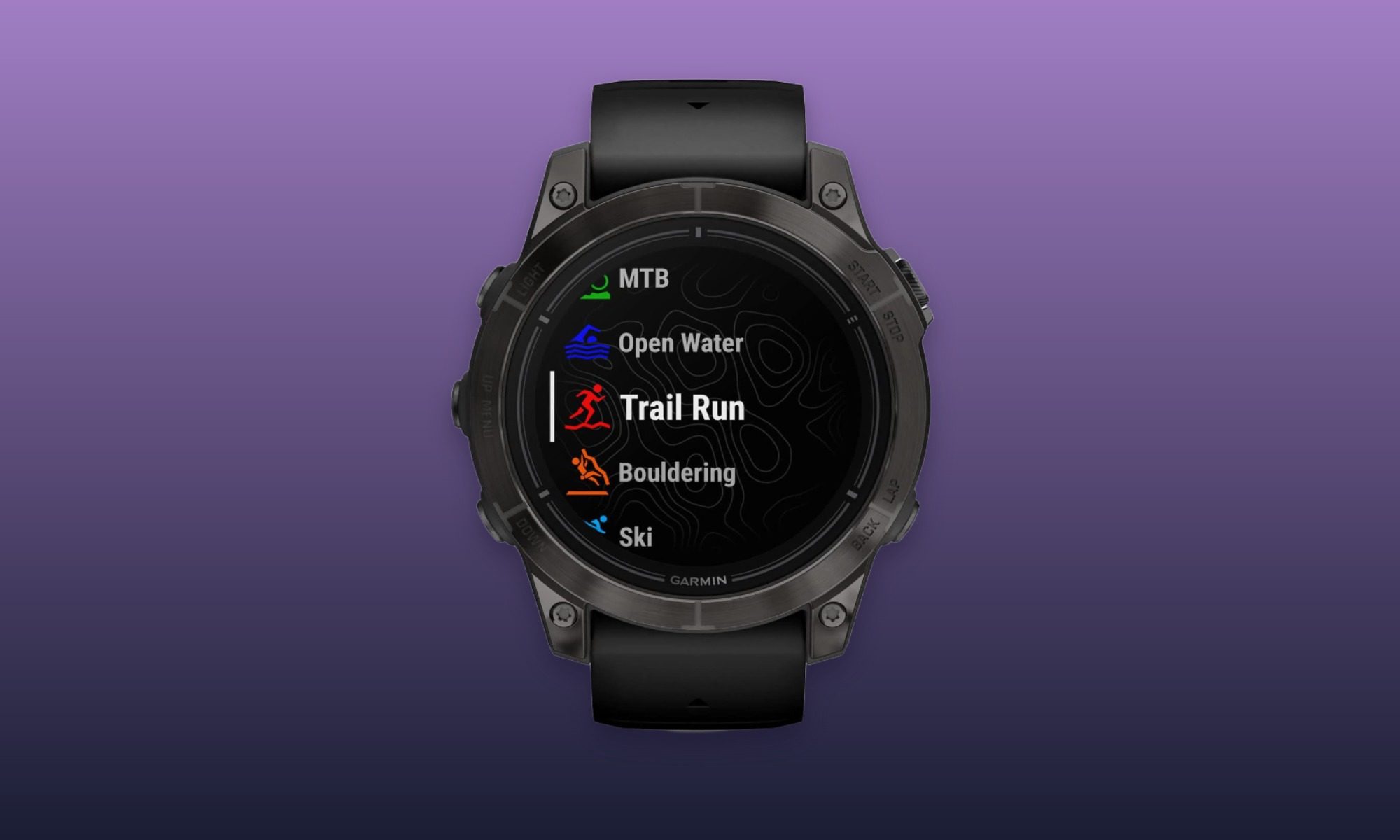
The Epix Pro is more watch than most people need for counting steps and logging occasional workouts. Its onboard maps and deeper training tools are what make the extra spending worthwhile, with sapphire glass and a titanium bezel adding appeal. At $470 below its listed price, this older premium Garmin deserves attention from buyers who’ll put those features to work.
Key spec/feature
Details
Display
1.3-inch AMOLED with sapphire lens
Build
47mm case with titanium bezel
Battery life
Up to 16 days with wrist gesture; 6 days with always-on display
Navigation
Preloaded TopoActive maps and multiband GPS
Training tools
Training readiness, training status, and recovery insights
Flashlight
Built-in LED flashlight

“While Chrome took steps during these incidents to identify and block suspected unauthorized certificates across the affected ccTLDs, browser-side intervention should not be relied on to protect your users,” Google said. “Due to the complexity of DNS hijacks, we cannot guarantee that our analysis identified every affected domain, nor do Chrome interventions reliably protect non-Chrome users.”
It’s not immediately clear what the other affected organizations are, how many unauthorized certificates were issued, or if all of them, except for those for Google domains, have been blocked. The process for officially revoking certificates is slow and cumbersome, so browser makers have devised quicker methods to block specific certificates at the browser level. With all known unauthorized certificates now blocked, the risk is mitigated, but as Google noted, any certificates that remain undiscovered pose a threat.
Google noted that the incident didn’t involve the compromise of the infrastructure of any of the affected domain owners and that certificate authorities followed all requirements. With control of the three ccTLDs, the attackers were able to change the IP addresses of a selected list of websites. With the ability to send and receive traffic on those sites, the attackers were able to modify authoritative DNS records and nameserver delegations for selected domains, allowing them to pass industry validation checks requiring an applicant to prove control of the domain.
This isn’t the first time threat actors have obtained unauthorized certificates. A 2011 hack of Netherlands-based certificate authority DigiNotar allowed attackers to mint counterfeit certificates for Google.com and more than 200 other high-traffic domains. The certificates were used against at least 300,000 people with ties to Iran as they browsed the sites impersonated by the forged certificates. There have been many similar incidents since, most often through failures by certificate authorities but also domain holders.
Tech & AI5 minutes ago
Google Enters Massive 3.6-GW Power Deal With Constellation Energy

Business & Hustles20 minutes ago
UK Accepts All 44 AI Health Rule Reforms, Betting on ‘Competitive Edge’ for British Tech Firms

Fashion25 minutes ago
Great Amazon Deals for Work Clothes and More


-

 Fashion4 days ago
Weekend Open Thread: Veronica Beard
-

 Tech & AI6 days ago
Figure F.02 Robots Meet Molten Steel as Arnold Schwarzenegger Watches in Finland
-

 Tech & AI1 day ago
Common Mistakes You Should Avoid When Using Foldable Phones
-
 Tech & AI5 days ago
Fireflies.ai Launches Fireflies Talk for Free, Unlimited Voice Dictation
-
 Tech & AI5 days ago
Excellent hardware badly hampered by too-small SSD
-

 Crypto6 days ago
OpenPayd’s MiCA Approval Signals Europe’s Stablecoin Infrastructure Is Going Mainstream
-

 Crypto5 days ago
NEAR Intents hacked days after freezing stolen Bitget funds
-

 Tech & AI5 days ago
Mystery AMD Chip “Gainsborough” Fuels Steam Deck 2 Speculation — But Don’t Get Too Excited Yet
-

 Tech & AI4 days ago
Sony’s new PS5 Pro lottery requires 60 hours of playtime just to apply
-

 Tech & AI6 days ago
Photon held a funeral for mobile apps. Now it has $4.5M to help replace them with agents
-

 Tech & AI5 days ago
Can Schools Trust AI Features in Edtech Products?
-

 Tech & AI5 days ago
Whatever AI Safety Is, It’s Not This
-

 Fashion7 days ago
Moving to a New City as a Creative? How to Build a Routine, Community, and Life That Feels Like You
-

 Gaming5 days ago
Reigns Studio Nerial Shuts Down as Founders Step Back “To Our Roots”
-

 Crypto6 days ago
Base Cobalt upgrade puts new controls inside tokenized assets
-

 Tech & AI4 days ago
Koreans Left With Spoiled Food Due To Borked Samsung Firmware Update For ‘Smart’ Fridges
-

 Entertainment4 days ago
Russo Brothers Tease Very Surprising Ending for Avengers: Doomsday
-
 Crypto5 days ago
Bitcoin edges higher ahead of U.S. jobs report as global bond yields surge
-

 Tech & AI6 days ago
Boston Dynamics Builds Atlas Hands That Can Hold a Drill and a Mini Fridge
-
Fashion7 days ago
Six Decades On, Celia Birtwell Is Still Setting the Pace of British Fashion
You must be logged in to post a comment Login