The Harbor Freight tool ecosystem includes plenty of quality gear. The retailer prioritizes great prices on equipment that’s no less valuable in actual use than more expensive types. Harbor Freight sells a range of in-house brands under a variety of toolmaker badges, focusing on automotive equipment, power and hand tools, and even accessories like safes, workbenches and other storage solutions. But there are some tools sold by the outlet that demand a bit of experience and knowledge to use safely or correctly.
DIYers are often eager to get their hands on a new piece of gear. This can give them the motivation they need to set off on a journey of discovery as they tackle the next exciting project on their to-do list. Yet some tools are far more difficult to use than others, introducing issues or safety concerns for those with limited experience or who don’t know how they operate. There’s also a wide range of tools that may feature simple operation, but are only utilized in support of extremely demanding tasks that beginners may not be ready to handle. These 12 tools epitomize this slate of issues. Yet, in many cases bringing their output within your wheelhouse is all about brushing up on your knowledge base; home improvement YouTube channels, online forums, and work within smaller, similar project areas can prepare you a bit better to enlist the help of these pieces of equipment.
Advertisement
Bauer 20V 4-1/2-Inch Slide Switch Angle Grinder
The Bauer 20V 4-1/2-Inch Slide Switch Angle Grinder is an obvious inclusion on a list of tools the beginners might want to rethink. This type of equipment is supremely versatile power, as it can be deployed for cutting, shaping, and even surface preparation tasks like sanding. But this is a tool that feels bound by a blood feud against its owner every time the disc spins up. Angle grinders produce incredible rotational force, and so you’ll want to be extra careful about keeping a firm grasp as you use one. This Bauer model also features a slide switch, which can be a little more dangerous than a paddle-operated solution because it’s unlikely you’ll be holding it at the switch while in use, prompting routine use of the lock-on position. The paddle switch on a tool like an alternative Hercules model features better trigger placement, allowing you to cut the power with much greater ease.
Advertisement
A beginner might still be enticed by the Bauer model, particularly because of its $40 price tag. It does possess a tool-free blade guard and a dual-position side handle. Opting for this tool isn’t necessarily a mistake, but understanding that the unit produces up to 10,500 RPM with a lock-on functionality that you’ll use virtually every time you reach for the grinder (speaking from experience) will keep you safer.
Advertisement
Pittsburgh Needle File Set (12-Piece)
Harbor Freight’s range of accessory tools is robust; plenty of options in this part of its catalog are certainly impressive. The Pittsburgh Needle File Set offers extensive coverage across a range of file geometries that can help support innumerable tasks ranging from touching up a shovel’s edge to keeping your lawn mower’s blades in good working order. The set it is listed at Harbor Freight for just $4, adding an element of cost effectiveness that is truly rare for such a hard hitting option with tremendous versatility. There’s absolutely nothing wrong with this set of files and 601 Harbor Freight buyers have given it a 4.6 star average rating with a 98% recommendation rate.
Where this tool set falls short for beginners is at the back end of each file; none of the tools come with a handle. This is just fine for users who understand how to add them, or perhaps prefer to tackle detail work without one attached for greater control. But this demands a different level of dexterity and command that beginners may not have mastered yet. Pittsburgh also offers a 10-piece needle file set as well as a 12-piece precision set that each feature handles attached to the tools alongside price tags that remain below $10.
Advertisement
Pittsburgh 8-Pound Hickory Sledgehammer
Most tasks featuring a hammer won’t require truly excessive pounding force, but demolition can sometimes demand a sledgehammer. There’s nothing quite like knocking down wall elements with a heavy sledge. Sometimes it’s impractical, and a different demo tool like a reciprocating saw might do a better job, but it’s undeniable how much fun you’ll have smashing apart components bound for the trash heap. However, beginners might not realize until they swing their sledgehammer for the first time that varying handle materials can play a significant role in the experience. The hammer that gets the nod on this list is the outlet’s Pittsburgh 8-Pound Hickory Sledgehammer.
The potential trouble here is that while a wooden handle offers a traditional feel and better responsiveness to the user, it also translates vibration significantly more freely into the hands. For the same reason that youth players don’t swing wooden bats while the pros exclusively carry lumber to the plate, a wooden handle on your striking tool can ultimately send painfully uncomfortable shockwaves running through your forearms. Pittsburgh also offers an 8-pound fiberglass-handled option for $27, just two bucks more than the hickory selection.
Advertisement
Bauer 15 Amp 14-Inch Portable Concrete Pull Saw
The consaw is a critically important tool for anyone working with brick, block, or concrete. It’s something of a demolition tool, but it can also be used to cut material to length during installation tasks. This is a tool that delivers immense power to support some of the hardest cutting requirements you’ll encounter. I’ve rented a consaw on a few occasions, and they’ve always been gasoline-powered models laid out in the traditional format for a classic power output and surprisingly buttery smooth cutting performance. I don’t have personal experience with the Bauer 15 Amp 14-Inch Portable Concrete Pull Saw, but two important features underpinning its use give me pause as someone who’s used tools in this arena before.
It’s worth noting that the tool is listed at Harbor Freight for $300, which is significantly cheaper than the typical consaw that can easily cost thousands of dollars. It also features a 4.2 star average rating from 235 buyers. However, the corded power source means that your mobility may ultimately be severely restricted. It’s also designed to cut on a pull stroke, specifically. This can limit your ability to make clean cuts in vertical walls and other elements, but is likely to enhance accuracy when cutting stock in a horizontal motion.
Advertisement
Windsor Design No. 33 Bench Plane
Harbor Freight offers a small selection of hand planes. The Windsor Design No. 33 Bench Plane appears to be a beautifully crafted woodworking tool, featuring a 23-degree blade angle, hardwood handles with brass fittings, and a high carbon steel cutting blade measuring 2-¾ inches wide for quality cutting and a pleasant experience all around. The tool is listed for $13, making it a cost-effective option that’s likely even more approachable than vintage gear you’d find at a garage sale. However, this is a tool that frequently gets middling to poor user ratings: It features a 3.7 star average from 779 buyers.
Advertisement
Numerous users report that the blade is not razor sharp out of the package and that additional elements of setup work are required to get the plane to take a smooth shaving. It’s simply not ready to use out of the box. To be fair, a $13 precision woodworking tool really shouldn’t be compared directly to much more expensive alternatives that might be capable of transitioning straight from packaging to workbench. Expectation and knowledge about plane maintenance can really trip up a beginner woodworker with this unit. If you aren’t aware of the tasks involved in preparing a hand plane for service, you may ultimately find more frustration with this tool than enjoyment.
Advertisement
Fasten-Pro Tacking Gun
The Fasten-Pro Tacking Gun looks to be the same kind of tool as any other staple gun you might consider. Because of this visual similarity it’s easy to mix up heavy duty tacking guns and staplers designed for lighter service. This unit from Harbor Freight gets quality reviews, with a 4.2 star average rating from 436 buyers, but it’s not the right tool for handling light fastening tasks. Instead, this fires heavy gauge T-50 style staples suitable for use in hardwoods and even soft metal components.
The tacking gun is a quality option for handling heavier fastening formats, but it’s actually not the best solution for this kind of work in many instances. If you’re driving lots of heavy duty staples into workpieces, the Fasten-Pro hammer tacker is often the better solution because it’s much faster and also limits the amount of force placed on your hands and forearms.
If lighter duty jobs or on the docket, the same brand is still a go-to option, with a three-way tacker and staple gun that delivers standard brad fasteners or U-shaped staples. This tool offers a lighter touch when a heavy dollop of force that would come from a tool like the tacking gun might damage your work surface. Finally, Fasten-Pro’s 2-in-1 stapler/brad nailer offers the same nuanced touch with an electric-powered actuation rather than your grip strength.
Advertisement
Pittsburgh 28-Inch Cable Cutters
The Pittsburgh 28-Inch Cable Cutters is yet another tool that makes this list, but not because it’s a bad implement or fails to achieve a similar standard to alternative solutions. Instead, it exists within a niche subsection of the DIY world in which users will be buying the tool to support a specific, often highly demanding task. Heavy-duty cable cutters like this are not pulled out of the toolbox to shear through small wires designed to carry minimal current. This tool features 28-inch handles to deliver the extreme leverage required to bite into armored cables and other dense power supply lines. Anytime you’re working with electricity, it’s crucial to ensure that you’ve taken the time to prepare the environment and double check your safety protocols. There are a range of mistakes that DIYers frequently make during electrical tasks; many of them come from a lack of experience and can result in shocks or injuries.
By all accounts this is a high quality tool, with 432 customers giving it a 4.1 star average rating. They like its $25 price point and note routinely that it can cut with ease through even thick cable and wire rope. But users will need to be abundantly careful when pulling out these cutters to ensure they aren’t preparing to snip through a live wire carrying a dangerous amperage level. Fortunately, electrical safety is exceedingly simple as long as you’re diligent about your checks and workflow.
Advertisement
Chicago Electric Power Tools 7 Amp 4-Inch Handheld Dry-Cut Tile Saw
Cutting tile isn’t a job for the faint of heart. Even with quality tools at your disposal, this is a nerve-wracking task that requires precision and patience. Maintaining deliberate action throughout a cut and moving at the right speed to limit chipping or breakage is essential. For this reason, many users across all levels of knowledge and skill tend to gravitate toward bulkier, stationary cutting implements, frequently involving moving the workpiece rather than the blade. A tool like the Chicago Electric Power Tools 7 Amp 4-Inch Handheld Dry-Cut Tile Saw runs counter to this preference.
Advertisement
The tool retails for just $40, making it an affordable power tool. It also sports a 4.4 star average rating from 475 customer reviews, indicating that so can be useful in the right hands. Personally, I have limited experience cutting tile but I did try once with an angle grinder, failing miserably to keep the edges clean. However, I’ll add that anytime you leave a chipped edge, there’s a high probability of creating a razor-sharp side while throwing equally dangerous chips around your workspace. Therefore, any tile job you encounter requires care and attention. The tool itself delivers 12,000 RPM blade speeds with the ability to cut material up to 1-⅛-inch thick.
Advertisement
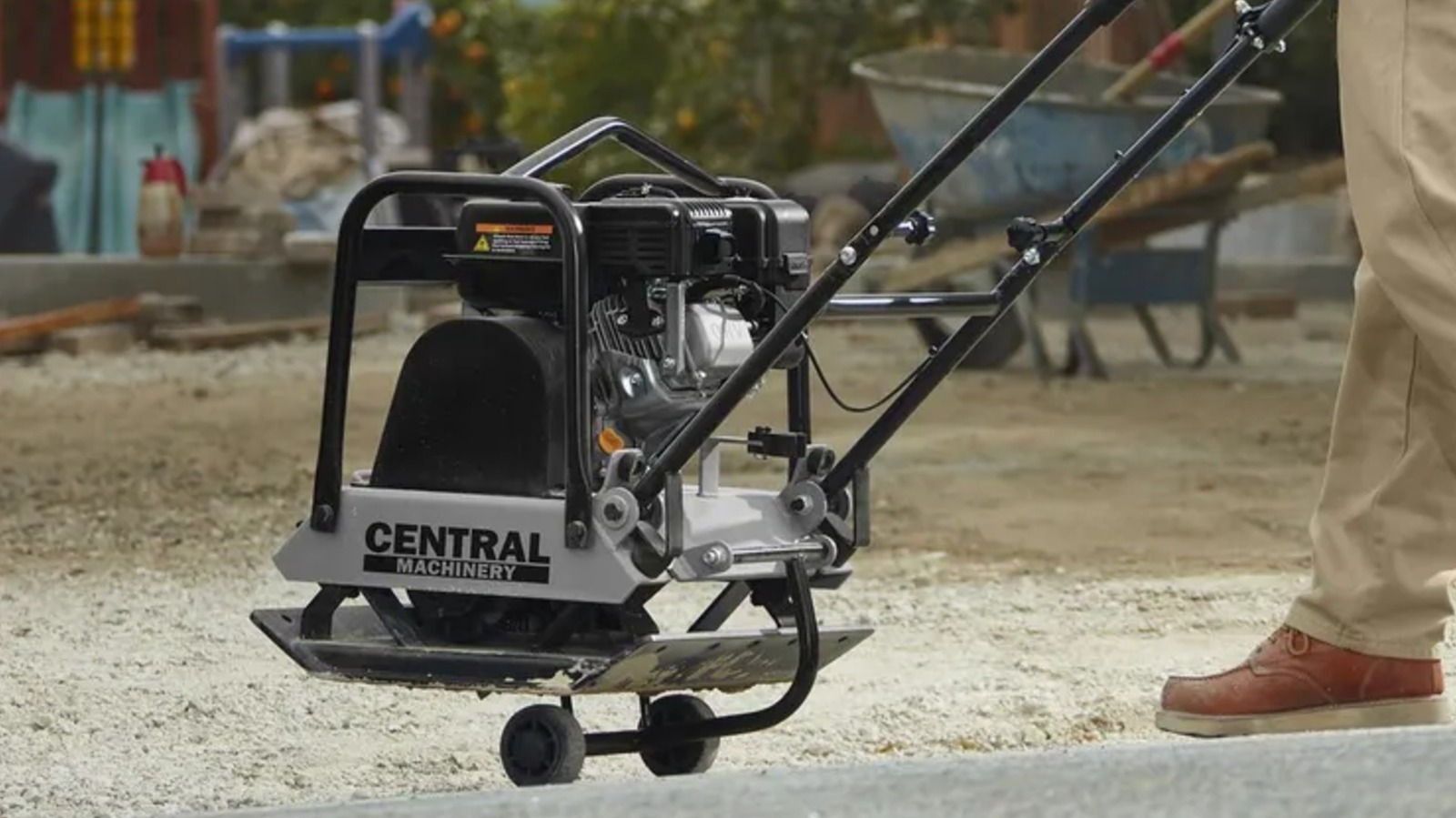
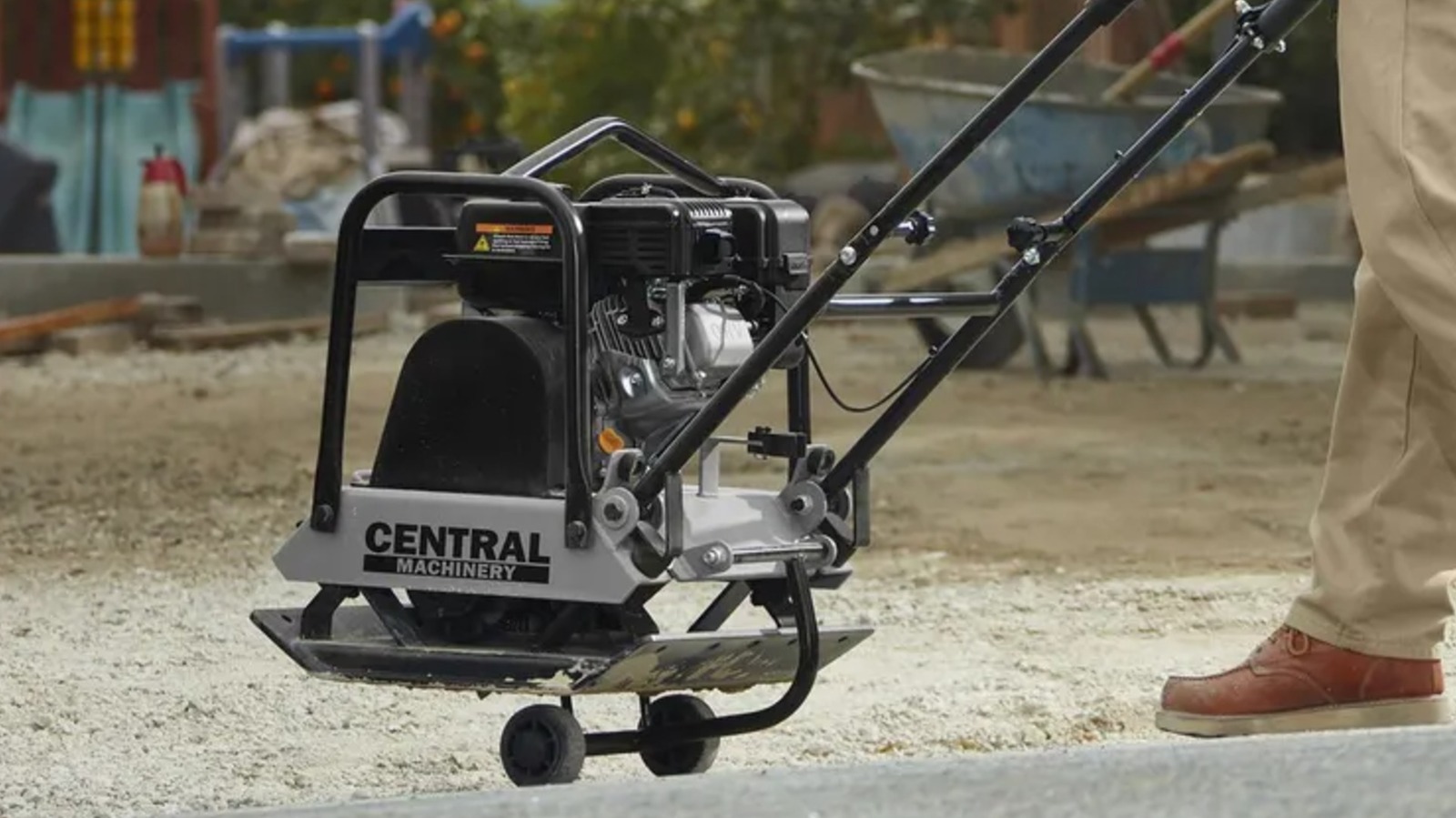
Central Machinery 7 Horsepower Plate Compactor
A plate compactor is a heavy-duty power tool, frequently running on a gasoline engine. The Central Machinery 7 Horsepower Plate Compactor is exactly this kind of device, and offers plenty of pounding force to flatten hard landscaping material. The tool gets great reviews from buyers, with a 4.7 star average rating across 250 reviews and a 97% recommendation rate. It’s listed for $700, which is a pretty good bargain when considering the high cost alternatives out there in the market. Where a beginner may falter with a tool like this is in their project scope.
Even a small landscaping job requiring a plate compactor tends to leverage a huge volume of heavy material. Last year, when installing a paver driveway, I rented one of these tools; the task of compacting my subbase material was straightforward and enjoyable. What was far more time-consuming was the actual task of laying gravel and sand. A one-car installation required substantial excavation alongside 8 tons of replacement material in addition to the paver bricks themselves, which are no picnic to move either. If you aren’t fully prepared for the physicality of the tasks that come before a plate compactor makes its entrance in your project workflow, you’ll likely be rethinking your decision about handling the job yourself.
Advertisement
Pittsburgh 7-Inch Poly Hand Riveter Kit
Rivets form an important addition to any renovator’s fastening capabilities. You’ll often lean on nails and screws, but rivets are just as valuable when securing fabrics and other materials to wood or even in handling repairs to clothing. Riveters are a key tool when using these fasteners. Among Harbor Freight’s options is the Pittsburgh 7-Inch Poly Hand Riveter Kit. It’s a one-handed tool that promises to set rivets of varying sizes “perfectly in a single stroke.” For those with experience handling a riveter, this may be the case, but operating this type of tool with one hand can be challenging for beginners. The force required to collapse a rivet and set the back end for a secure hold is fairly substantial. Doing it without two hands on the tool can ultimately be more effort than many are ready to deliver.
A classic riveter that offers more leverage is the Fasten-Pro 11-inch model. It features a 360-degree swivel head and comes with four nosepieces for great coverage across a range of needs. Another selection that can make for an enhanced experience is the Doyle 10-inch professional model. It’s a little more expensive, but features a “100% lifetime guarantee” and offers even greater leverage with an ergonomic grip design and a range of color-coded nosepieces.
The Hercules 15 Amp 66-Pound 1-⅛-Inch Hex Breaker Hammer is a heavy-duty tool that serves one hyper-specific purpose. It’s not like a rotary hammer that can function as a drilling tool or a concrete chipping option, as it just performs the singular demolition task. Instead, this tool exclusively delivers up to 58 joules of impact energy, making it capable of immense power output in support of large scale demolition. It’s exceptionally capable, but the job it’s designed to handle isn’t one that many beginner tool users will want to take on by themselves.
Breaking up large concrete segments is a multi-stage job. First you’ll need to destroy the element using a tool like the breaker hammer. This option offers 1,000 beats per minute while also utilizing a built in Maximum Vibration Control to keep user fatigue to a minimum. But that’s only part of the task. Removing the heavy concrete remnants is an entirely new and demanding subtask that can’t be ignored once the initial demolition is completed. As a result, this is easily a job that can make you feel like you’re in over your head.
Advertisement
Bauer 4 Cubic Foot Cement Mixer
The Bauer 4 Cubic Foot Cement Mixer is a tool with 190 ratings from customers, accumulating a 4.8 star average with a 98% recommendation rate. Customers frequently note that it’s easy to use while delivering high quality at a low price. The tool can support mixing tasks featuring up to two 80-pound bags of concrete, mortar, stucco, or other needs. This makes it quality option in support of medium to semi-large concrete tasks or finish work like plastering or rendering walls. Even on smaller projects, having a dedicated mixer available can take a lot of the hassle out doing this job yourself. The tool is available for $380, which is by all accounts a very reasonable price point.
Advertisement
Anyone in the market for a concrete mixing solution will certainly want take a look at this tool. However, it usually takes a special kind of project to demand a mixer like this. You’re often going to seek out mixing solutions for larger pours or substantial plastering tasks rather than small touchup work. As a result, all the other elements of the project are frequently intensely demanding. This may not always be feasible for a home improver, and getting halfway through before realizing you’re way past your comfort zone can sometimes be worse than starting from scratch with professional help.
Advertisement
Methodology
Each of the tools on this list presents unique challenges of one type or another. Frequently, there’s a different option from Harbor Freight that may be better suited to a beginner’s needs. However, some jobs that these tools are specifically designed to fulfill may be better left to professionals. Potentially dangerous tools can increase the risk of injury in the hands of a less experienced operator, while others are purpose-built for heavy duty work that can quickly become overbearing on a beginner who may not have fully prepared for the amount of work ahead.
The company did not say what it had given the hacker group in exchange for the terms.
Instructure, the parent company behind Canvas, the education management platform reportedly hacked by ShinyHunters, has reached an agreement with the cyber gang, it said yesterday (11 May). Hackers had given affected universities until tomorrow (12 May) to negotiate a settlement.
As per the agreement, the cyber extortion group has returned stolen data and deleted copies, and has agreed not to extort the institutions affected in the hack, Instructure said. The company did not say what it had given the hacker group in exchange for the terms.
Reportedly formed around 2020, ShinyHunters has claimed responsibility for an array of high-profile, financially motivated attacks in recent years on groups such as Salesforce, Allianz Life, SoundCloud, Ticketmaster and Tinder-parent Match Group.
It reportedly began targeting edtech giant Instructure late last month, which started noticing unauthorised activity in Canvas on 29 April, and later on 7 May.
ShinyHunters claimed responsibility for the attack and said it stole 280m records. The threat actor also published a list of more than 8,800 institutions that were affected by its attacks on Canvas. In a 3 May ransom note, it threatened to leak “several billions of private messages among students and teachers.”
In Ireland, the platform is used by the likes of University of Galway and Munster Technological University – both of which faced disruptions following the hack.
Advertisement
Instructure, at the time, said the stolen information includes user identifying information such as names, email addresses, messages and student ID numbers at affected institutions. It has reported the breach to the US FBI and the Cybersecurity and Infrastructure Security Agency and other law enforcement agencies, it said.
In its latest update, the company said that the unauthorised actor exploited an issue related to its ‘free-for-teacher’ accounts to hack Canvas. As a result, the feature has been temporarily shut down. Other services, however, are fully operational, it added.
“ShinyHunters timed this attack to sting as much as possible,” said Raluca Saceanu, the CEO of Smarttech247.
“With exam season underway and academic years drawing to a close, schools and universities needed Canvas working. That dependency gave ShinyHunters the leverage to lay out the terms of their deal. For Canvas, and its parent Instructure, it was agree to terms or lose customers.”
Advertisement
“While technical recovery time from ransomware attacks is accelerating, attackers are responding by shifting their focus and making the broader organisational consequences more damaging than ever.”
“It’s not just a question of causing as much potential damage as possible. From the attackers’ point of view, these newer approaches are faster, cheaper, stealthier and carry lower technical risk. And the core law of extortion anywhere holds – even if a victim pays, there’s no guarantee data won’t be exposed anyway, and the organisation has now marked itself as a valuable target,” Saceanu added.
Don’t miss out on the knowledge you need to succeed. Sign up for the Daily Brief, Silicon Republic’s digest of need-to-know sci-tech news.
Looking for the most recent regular Connections answers? Click here for today’s Connections hints, as well as our daily answers and hints for The New York Times Mini Crossword, Wordle and Strands puzzles.
Today’s Connections: Sports Edition is a tough one. If you’re struggling with the puzzle but still want to solve it, read on for hints and the answers.
Connections: Sports Edition is published by The Athletic, the subscription-based sports journalism site owned by The Times. It doesn’t appear in the NYT Games app, but it does in The Athletic’s own app. Or you can play it for free online.
Hints for today’s Connections: Sports Edition groups
Here are four hints for the groupings in today’s Connections: Sports Edition puzzle, ranked from the easiest yellow group to the tough (and sometimes bizarre) purple group.
Yellow group hint: Need to work on your skills.
Advertisement
Green group hint: Wimbledon essentials.
Blue group hint: Formerly the Seattle SuperSonics.
Purple group hint: What time is it?
Answers for today’s Connections: Sports Edition groups
What are today’s Connections: Sports Edition answers?
The completed NYT Connections: Sports Edition puzzle for May 12, 2026.
NYT/Screenshot by CNET
The yellow words in today’s Connections
The theme is out of practice. The four answers are cold, off, rusty and sluggish.
The green words in today’s Connections
The theme is parts of a tennis racket. The four answers are butt, grip, grommets and strings.
Advertisement
The blue words in today’s Connections
The theme is members of the Oklahoma City Thunder. The four answers are Dort, Holmgren, Joe and Wallace.
The purple words in today’s Connections
The theme is ____ clock. The four answers are game, pitch, play and shot.
Toughest Connections: Sports Edition categories
The Connections: Sports Edition puzzle can be tough, but it really depends on which sports you know the most about. My husband aces anything having to do with Formula 1, my best friend is a hockey buff, and I can answer any question about Minnesota teams.
That said, it’s hard to pick the toughest Connections categories, but here are some I found exceptionally mind-blowing.
Advertisement
#1: Serie A Clubs. Answers: Atalanta, Juventus, Lazio, Roma.
#2: WNBA MVPs. Answers: Catchings, Delle Donne, Fowles and Stewart.
“Sonos went back to the drawing board and delivered a truly rewarding hybrid speaker.”
Pros
Clean looks and solid build quality
Packs quite an audio punch
waterproofing is an underrated perk
Good mileage and replaceable battery
Doubles as a power bank
Cons
No power brick in retail box
You can’t take calls
Stereo pairing only over Wi-Fi
Limited Bluetooth functionality
Quick Take
Sonos has had a rough couple of years. The 2024 app rollout turned into a disaster that still shows up in the support forums, and the hardware pipeline went quiet for so long that I’d genuinely started to wonder whether the company had decided to take a sabbatical from making new speakers. So when the Sonos Play showed up in the lineup at $299, I was obviously skeptical.
After six weeks of using it as my primary kitchen speaker, my weekend patio speaker, and my impromptu bathroom-radio speaker, I can confirm something I didn’t expect while unboxing this speaker. This one can bring back the irked Sonos fans. It sits between the Roam 2 and the Move 2, while delivering the best of both worlds.
At $299, in a market crowded with cheaper Bluetooth options on one side and pricier smart speakers on the other, it had to land precisely. Somehow, it did. It sounds good, packs a replaceable battery, doubles as a power bank, and still remains portable. It just loves Wi-Fi a little too much, and that often turns into a functional drawback.
Sonos Play specs: What you get from this middle-weight warrior?
Amplifiers
Three class-H digital amplifiers tuned for the acoustic architecture.
Drivers
Two angled tweeters for crisp highs and one mid-woofer for deep bass.
Microphones
Far-field array with beamforming and echo cancellation.
Audio Tuning
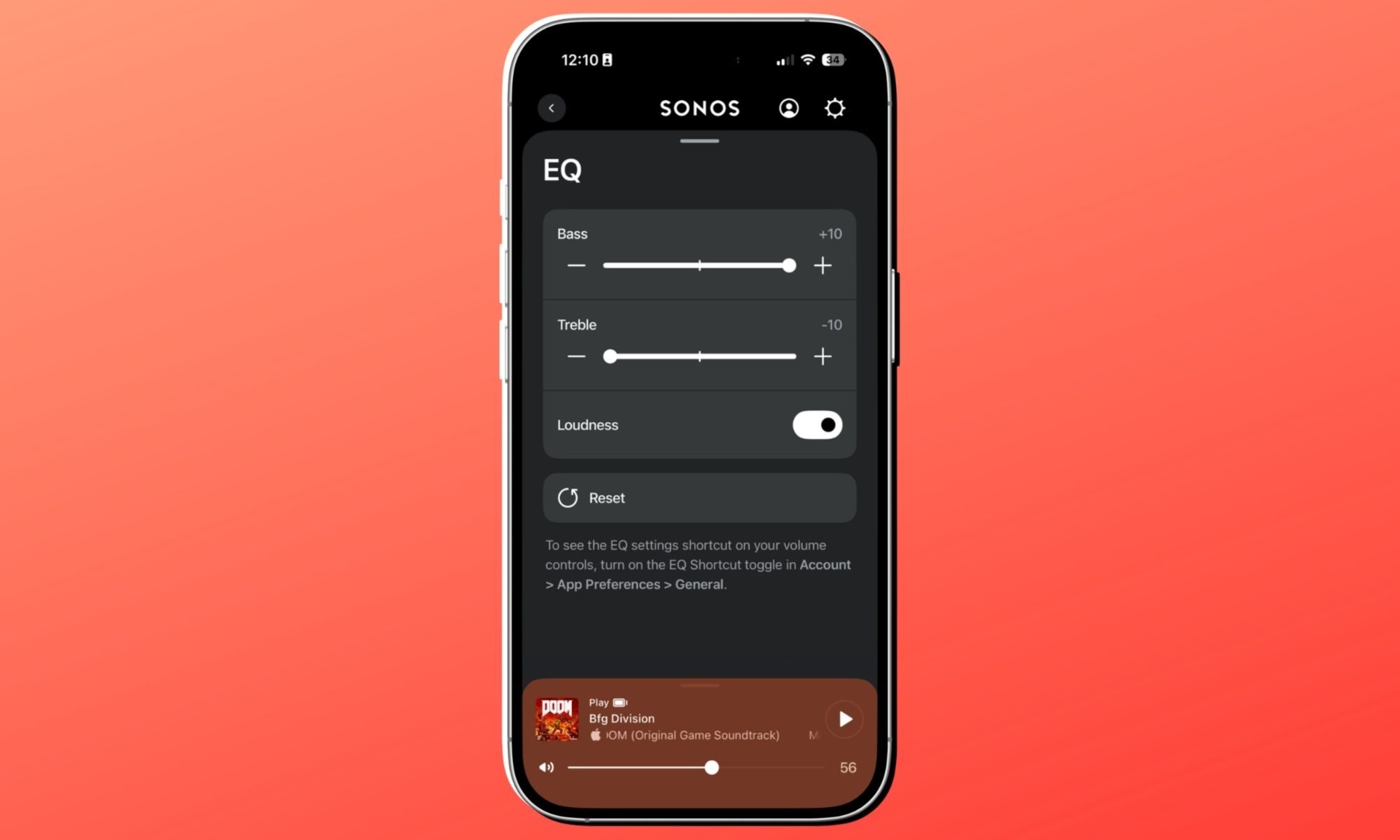
Automatic Trueplay and adjustable EQ (Bass, Treble, Loudness).
Battery Life
Up to 24 hours of continuous playback; user-replaceable battery.
Charging
Includes Wireless Charging Base; supports USB-C PD (18W+).
Durability
IP67 rating (waterproof up to 1m for 30m) and drop resistant.
Connectivity
WiFi (802.11a/b/g/n/ac) and Bluetooth® 5.0.
Dimensions
192.3 x 112.5 x 76.7 mm (7.57 x 4.43 x 3 in).
Compatibility
Sonos app (S2), Apple AirPlay 2, Spotify/TIDAL Direct Control.
Controls
Tactile buttons for playback, volume, and a physical mic privacy switch.
Sustainability
Made with bio-based plastics and FSC-certified recyclable packaging.
Box Contents
Sonos Play speaker, Wireless Charging Base, and Quickstart Guide.
Sonos Play design and build quality: Clean, mean, and easy to lug around
Nadeem Sarwar / Digital Trends
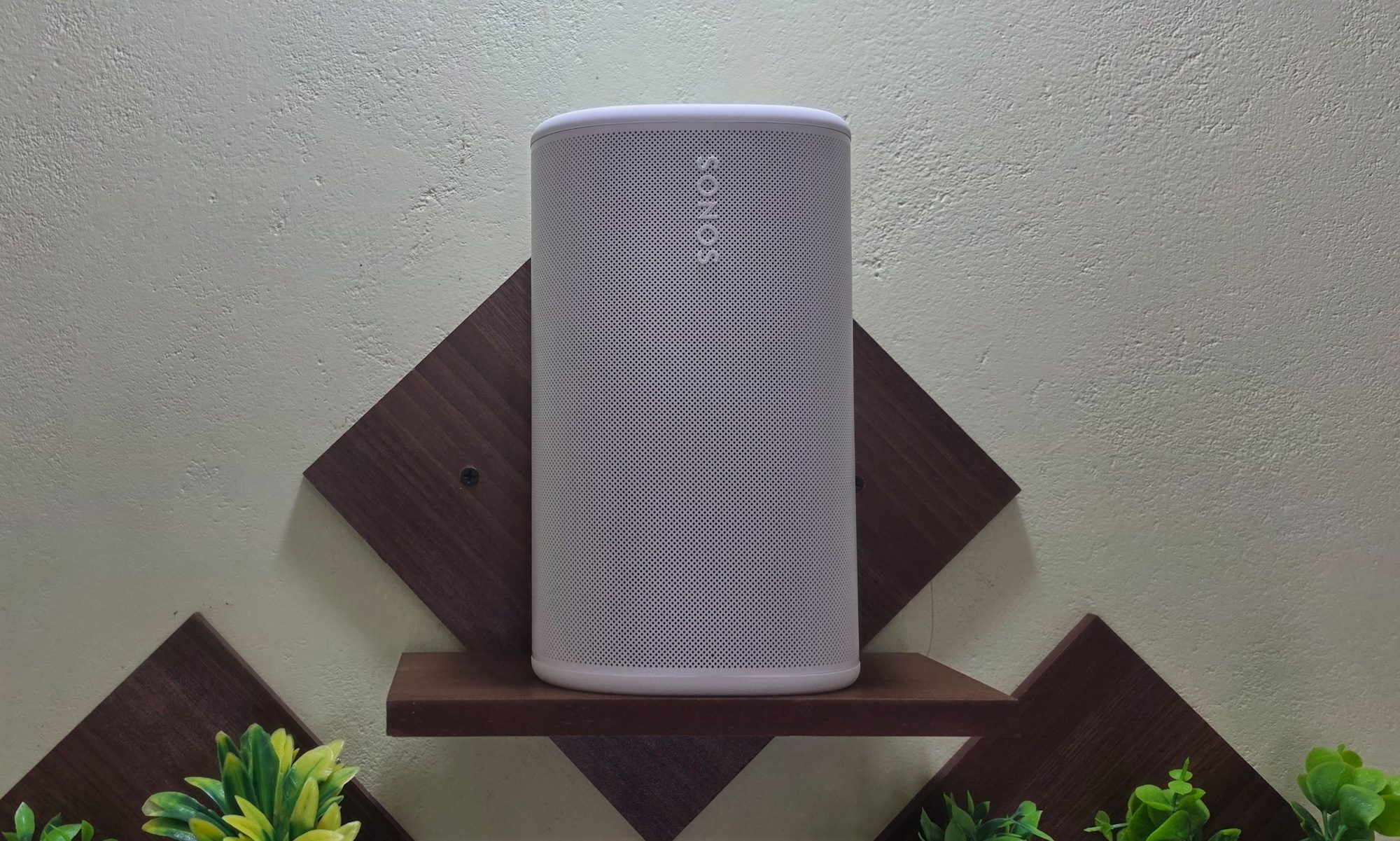
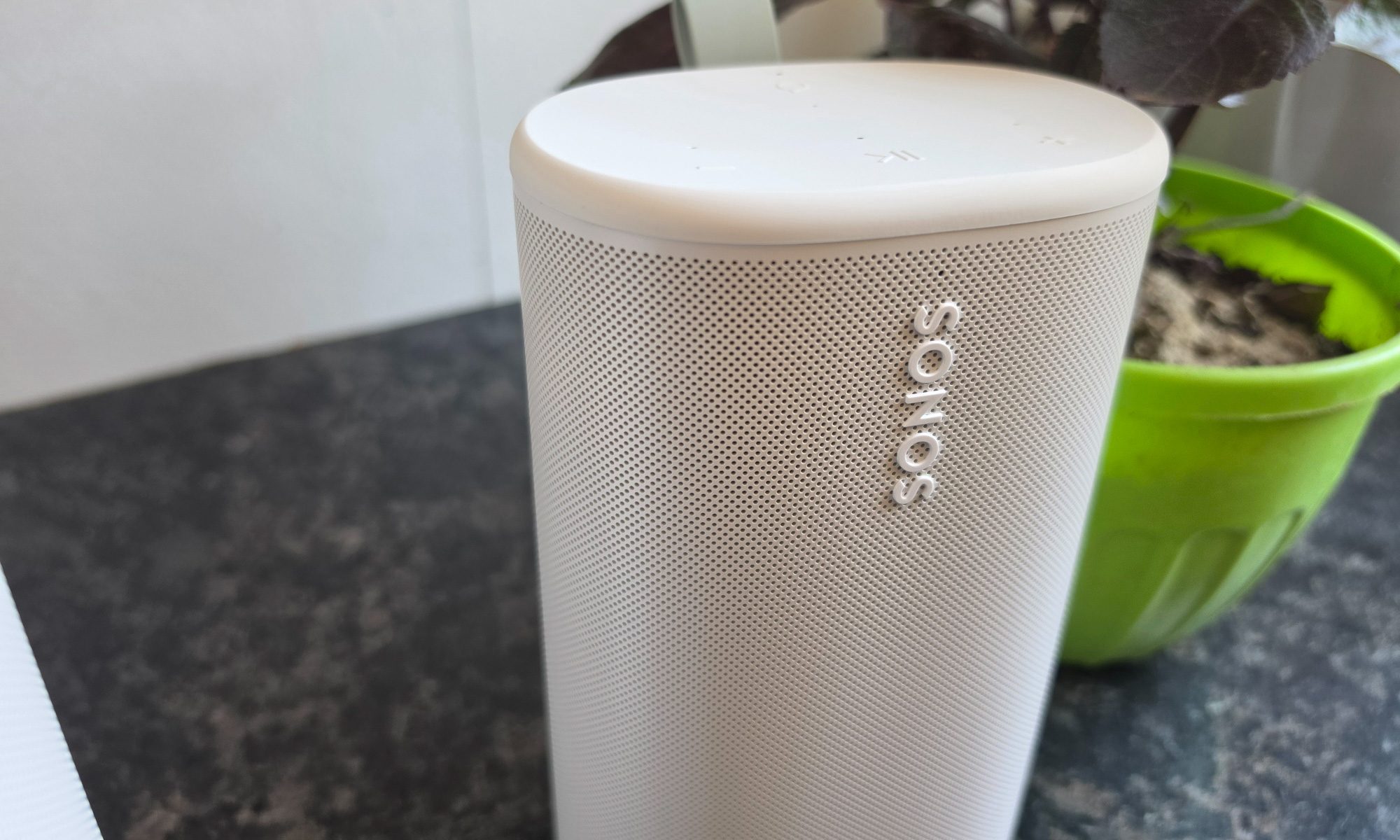
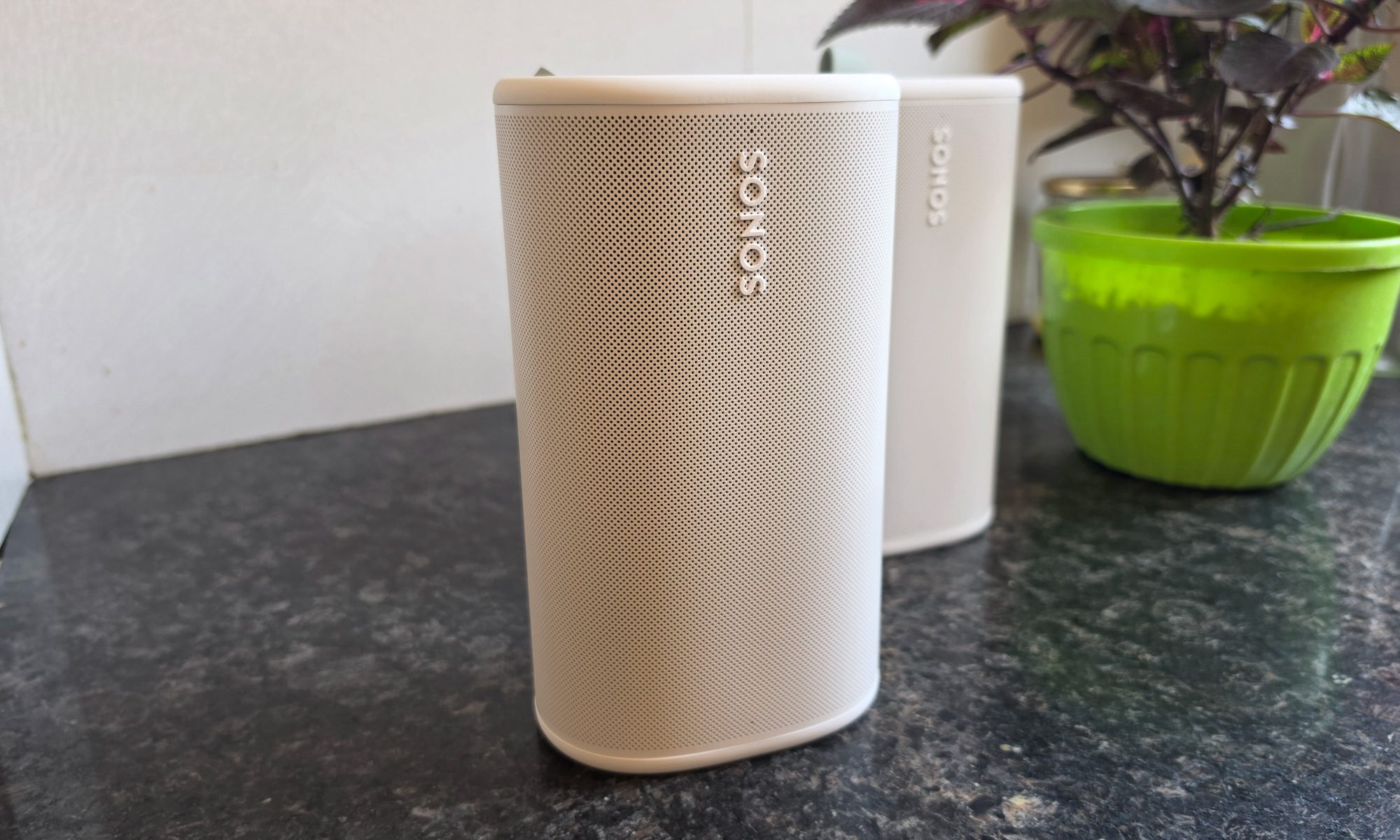
Pick up the Sonos Play, and the first thing you notice is the density. It weighs 2.87 pounds, which is deceptively heavier than what its size suggests. But that’s in a way well-built things tend to be. It stands a hair under eight inches tall, flaunting a stout tubular body with a subtle taper and a polycarbonate mesh. At the top, you’re greeted with a soft matte layer that hides fingerprints better than I expected.
Mine came in white. There’s a black option on the table, as well, but I’d pick the white variant because it blends more easily with the interiors, whereas the latter color option stands out as a dark monolith. Either way, this is firmly in the “grown-up audio” school of design. The speaker disappears onto a bookshelf or kitchen island instead of screaming for attention the way some rugged portables do.
Advertisement
Nadeem Sarwar / Digital Trends
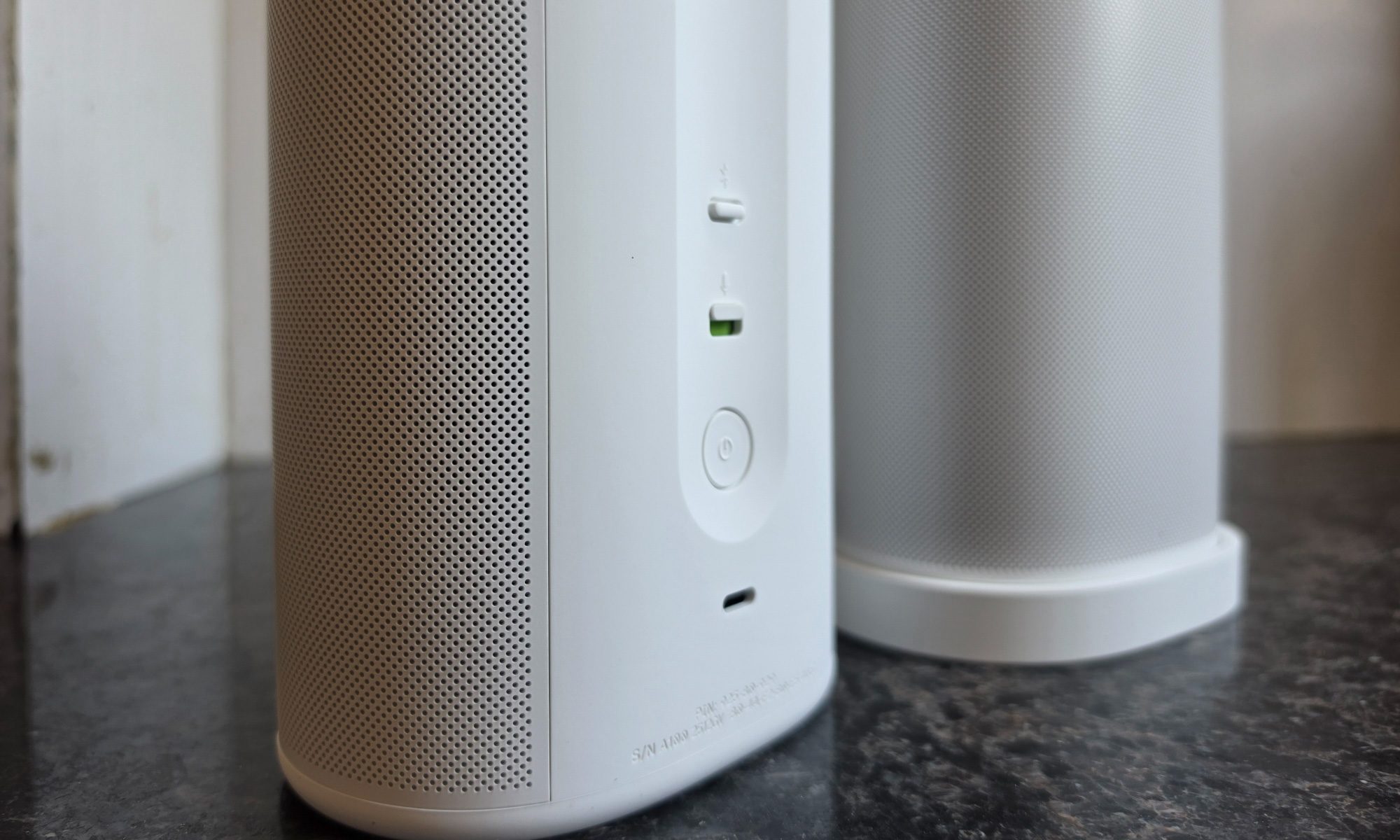
The small choices are where you can tell Sonos really pored over the details. The controls on top are real, clicky, physical buttons, and not the finicky touch-capacitive sliders you’ll find on the Era line. That difference becomes apparent the moment your hands are wet, or you’re outside in 45-degree weather with sweaty palms, or you’re trying to skip a track with moist fingers after a workout.
The touch-cap sliders feel premium in the showroom and tactically infuriating in the kitchen. Sonos clearly took notes and went with a thoughtful approach. The rear has a rubberized utility loop you can hook a finger through, and I kept catching myself grabbing the speaker by that loop and moving it from counter to patio table without consciously thinking about it coming loose or snapping. It’s a small thing that turns out to matter every day, and I’m glad Sonos didn’t compromise on the material quality here.
Nadeem Sarwar / Digital Trends
Durability has been baked in seriously. The IP67 ingress protection rating means the device is fully dust-proof and can withstand submersion in up to one meter of water for 30 minutes. But let’s be honest here. You likely aren’t going to treat this speaker to a “pool oopsie” and watch it prove the durability claims. It doesn’t float, which is the one trick the Bose SoundLink Plus has over it.
The shock-absorbing mesh exterior and the ruggedized internal housing have already shrugged off a couple of careless bumps during my testing without a cosmetic scuff to show for it. Phew! The whole design philosophy here is hybrid. The Sonos Play is just as happy docked on the wireless charging base in your living room as it is blasting music in wireless mode atop a fridge, and it feels equally at home if you’re lugging it around.
Nadeem Sarwar / Digital Trends
Yanked off the base and tossed in a tote bag with a wet towel, it acts like a rugged outdoor speaker. Most products in this price band can do one of those two jobs convincingly. The Play does both, and that’s no mean feat. Whether you want a speaker to complement your lifestyle or the adventure mood swings, the latest from Sonos fares well on either end of the spectrum.
Score: 9/10
Sonos Play audio quality: Pleasing, with a serious stereo ace up its sleeve
Nadeem Sarwar / Digital Trends
Sound quality is where Sonos earns the premium asking price. Even though the audio cabinet is small enough to carry in one hand, it somehow houses three Class-H digital amplifiers driving two angled tweeters and a dedicated mid-woofer, plus a pair of passive radiators handling the low end.
The tweeters fire at roughly right angles to each other, which is the engineering trick that gives the Play a soundstage no single-enclosure portable has any right to produce. Most speakers this size sound like they’re firing from one point in space. The Play sounds like it’s coming from a wider strip than the actual cabinet, and on tracks with strong stereo imaging and separation, you actually hear the trick working.
Advertisement
It’s not magic, exactly, but for a sub-eight-inch speaker, it’s the closest thing to it. The midrange is where the signature Sonos character lives, one that has been the company’s audio fingerprint for years. Vocals come out pleasant and natural, with a warmth-inclined, slightly-forward presence that makes it a lovely choice for podcasts and audiobooks.
Nadeem Sarwar / Digital Trends
If you’re into listening to your morning news briefings, they sound like a real person standing in the room rather than an audio stream with weird tinny resonance. On denser tracks, the speaker keeps everything legible without me having to crank the volume to compensate. The bass isn’t earth-shaking, but you can still feel the thump. It isn’t quite the kick-in-your-chest low-frequency output, but there’s still enough oomph to enjoy those bass-boosted playlists.
The dual passive radiators add real weight to the low-mids, and on dance tracks at outdoor volume, the speaker holds its own instead of turning the instruments into a screeching cacophony of distortion. I’ve spent a lot of time with portable speakers that sound great at certain volume levels but awful at others. The Play is a rarity, thanks to a flatter volume curve that maintains composure across the board range.
Between the crooning of Hamaki and Nayyara Noor, and the autotuned drops by T-Pain, there’s barely any mainstream track the speaker can’t handle. If you’re listening to layered instrumentals, some overlap happens once you cross the 60% volume levels, but within the halfway threshold, the likes of Tom Holkenborg are a blast to hear.
One reasonably clever trick is Automatic Trueplay. The Play’s onboard microphones continuously sample the room and adjust the EQ on the fly. The first time I really noticed it working was when I carried the speaker mid-song from a cramped bathroom into a spacious living room.
Advertisement
Nadeem Sarwar / Digital Trends
The tuning shifted within a couple of seconds, and the bloated bass that had been booming in the bathroom got pulled back to something sensible. It’s not a fix-everything feature, and on a windy patio with no walls to reflect from, the soundstage understandably narrows. But in practice, it means you don’t have to think about where you’re putting the speaker. I’d call it a win.
Score: 9/10
Sonos Play app and software: Gets the job done, but still needs some polish
Nadeem Sarwar / Digital Trends
Let’s address the elephant in the room, which is the Sonos companion app. After the 2024 redesign meltdown, a high number of long-term loyalists had a genuinely bad spell with woes such as randomly disconnecting speakers, lost groups, and broken Trueplay, to name a few. I won’t pretend the experience is fully back to where it was before the redesign, but it’s much, much closer than it was six months ago.
Stereo pairing works without any hiccups. Settings stick instead of mysteriously resetting overnight. The integration is still the actual reason you’d pay Sonos money over any random Bluetooth speaker. If you want Apple Music, Spotify, Tidal, YouTube Music, and a handful of internet radio stations on call from one app, this is the cleanest way to do it on the market.
Nadeem Sarwar / Digital Trends
What I like more than anything else, though, is that the Play has finally fixed the Bluetooth/Wi-Fi schism. Older Sonos speakers forced you into a binary. You had to pick between the high-fidelity multi-room Wi-Fi convenience or the dumber Bluetooth world. Switching modes felt like punishment, and you couldn’t group across modes at all.
The Play now supports Bluetooth grouping of up to four Play speakers, or you can pair two Plays over Wi-Fi for stereo syncing. Bring them home, drop them on their wireless bases, and they automatically rejoin the rest of your Sonos system. I love these quality-of-life conveniences.
Nadeem Sarwar / Digital Trends
Voice control comes in two flavors. Amazon Alexa works the way it works everywhere else, with the same charms and the same low-level eavesdropping concerns. Sonos Voice Control is the more interesting option, by the way. It processes commands locally on the speaker itself, so nothing leaves the device. Plus, the assistant who does all the talking has the voice of Giancarlo Esposito of “Breaking Bad” fame.
Nadeem Sarwar / Digital Trends
It’s a small touch but a delightful one, and the voice is pretty soothing to hear. The local processing also means it’s noticeably snappier than cloud-based assistants for the small handful of commands it actually supports. It’s not outrageously smart. For the most part, it handles play, pause, next, volume, group, and ungroup. You get the drift. In hindsight, these are the core commands you actually use 95% of the time.
The one persistent nag is that getting the speaker into the Sonos system still requires Wi-Fi for the initial setup and any system-level configuration. If you only ever plan to use the Play as a dumb Bluetooth speaker on a beach somewhere and never touch the app again, that’s a big hurdle.
Advertisement
Nadeem Sarwar / Digital Trends
The newer Wi-Fi 6 and Bluetooth 5.3 radios are up to the mark, though not the latest protocols. In my testing phase, pairing has been quick and reliable. Reconnections, however, are iffy. Plus, there’s still a sub-second delay between issuing an in-app command and it registering on the speaker. But the drill is clear. Sonos still very much wants you to live in their app, and the Play isn’t shy about reminding you of it, with the connectivity limitations in tow.
Score: 8/10
Sonos Play battery life: This one’s built for longevity
Nadeem Sarwar / Digital Trends
Sonos quotes 24 hours of playback on a charge. In real life, while listening at moderate to loud volumes (imagine filling a kitchen during or a moderate lobby), I’m seeing 14 to 17 hours, which is not too bad for a speaker of this acoustic class. The charging story is the most thoughtful part of the whole package.
Nadeem Sarwar / Digital Trends
The Play ships with a wireless charging base that doubles as a permanent docking station. You simply drop the speaker on the base, and it picks up where it left off in the multi-room system without any manual fussing. For travel, the bottom has a USB-C port that’s also bi-directional, meaning the Play can charge a dead phone from its own battery in a pinch.
I haven’t had to use that yet, because I always carry a wireless power bank with me, but it’s the kind of feature you’ll be grateful for exactly once and remember forever. The base itself sits flush enough on a counter that I keep mine permanently on the kitchen island, and the speaker just lives there, fully charged, ready to grab.
Nadeem Sarwar / Digital Trends
The biggest surprise is that the battery is user-replaceable. It shouldn’t come as a surprise that Lithium cells degrade over time. Whether it’s your tiny earbuds or the hulking cell packs in an electric car, the electrochemical degradation is unavoidable. After three or four years of daily use, every portable speaker on earth gets noticeably worse at holding a charge. The solution? Buy a new one and add to the e-waste pile.
Sonos is taking a better route. The Play lets you swap the cell yourself with a few screws and a replacement part, extending the useful life of a $299 piece of hardware potentially by another half-decade. This should be a checkbox feature for the entire industry, but it isn’t, so credit where it’s due. Sonos took the complex (read: more expensive) engineering path here, and the world is better for it.
Nadeem Sarwar / Digital Trends
The one thing missing from the box is the wall adapter. You get the wireless base and a cable, but if you don’t already own a USB-C PD brick rated at 18W or 45W, you’ll have to fork extra cash for it. Sonos frames this as a sustainability decision, just like Apple and Samsung, which means fewer bricks ending up in landfills, since most of us already have one lying around.
That argument is at least partially honest, but on a $299 product, it still feels like a pinch. If your customer is paying premium money for a premium speaker, just throw in a brick, will ya? That’s the one piece of friction in an otherwise unnaturally well-thought-out package.
Advertisement
Score: 10/10
Should you pick up the Sonos Play?
Nadeem Sarwar / Digital Trends
The Play is the most coherent answer Sonos has had to “which one should I buy?” in years. If you want a speaker that lives in the kitchen on weekdays, follows you to the patio on Saturday, and comes camping with you on Sunday, this is the one. The acoustic step-up is significant for its class, especially if you are confused between the Era 100 and the Roam.
The Play is for the hybrid user: someone who wants Sonos’s seamless ecosystem at home but doesn’t want to own a separate, cheap Bluetooth speaker for outdoor use. If you’ve ever found yourself with two speakers in two different ecosystems and wished one device could do both jobs without compromise, the Play is the one to pick.
It’s a thumping comeback for Sonos. The hardware is excellent. The software is mostly recovered. The price is fair for what you’re getting. This is the kind of device you ship to win customers after a fiasco. Whether one good product is enough to repair the trust is a longer question, but as a piece of hardware in 2025, the Play deserves all the applause (and easy recommendation).
Why not try
Nadeem Sarwar / Digital Trends
If the Sonos Play doesn’t quite fit the bill for you, there’s a healthy bench of options you can consider:
Bose SoundLink Plus: The closest competitor to the Play. Priced at $269, it delivers a warmer sound profile and the genuinely useful trick of floating in water if you drop it in the pool. What you give up is the Sonos ecosystem. No Wi-Fi multi-room, no app-based streaming integration, and no whole-house grouping. If you’ve never owned a Sonos and never plan to, the Bose is the simpler choice without sacrificing audio quality.
Advertisement
Sonos Move 2: It’s the bigger sibling for buyers who need a primary-room speaker that occasionally travels rather than the other way around. At $499, it’s significantly pricier, but the extra cabinet volume translates into genuinely deeper bass and substantially higher peak loudness. If you regularly host backyard parties or you want a single speaker capable of filling a large living room, the Move 2 earns its weight.
JBL Charge 6: The budget-conscious pick at $170, though the sticker price is $200. It’s rugged, loud, and ships with its own power bank trick. You’re giving up the soundstage, the Wi-Fi, the multi-room, and the smart-home integration. But if good ‘ol Bluetooth is all you need, it’s a hard speaker to argue against on pure value.
UE Everboom: This one typically goes for $179.99 and leans heavily into a punchy sound output. The audio fidelity isn’t in the same league as the Play, but the design and durability are excellent for the money. If the Play is the grown-up choice, the Everboom is the fun one. Both have their place, but the Boom app is loaded with features that are tailor-made for outdoor parties.
How we tested
Nadeem Sarwar / Digital Trends
For a spell of three weeks, the Sonos Play speaker had a place atop my kitchen counter and my workstation. I used it standalone and in a stereo pair, as well. Over the course of testing, it was pushed at movies, music streaming (Apple Music, Amazon Music, and Spotify), live TV, and podcasts. It was connected to a 500Mbps Wi-Fi connection and linked to an iPhone 17 Pro.
I also traveled with the Sonos Play speaker, using it as a portable speaker in the car, camping sites, and exclusively as a Bluetooth speaker in a large hall that also served as my vacation work spot. I used a generic 50W power brick to charge the speaker and a generic USB Type-C cable to use the speaker as a power bank to charge my phone.
Advertisement
For comparison, I tested it against rival speakers in a closed room with minimal acoustic interference, playing the same tracks via Apple Music.
If you’re not sure what balancing tires means or what the process entails, here’s a brief explanation: When your car is speeding down the highway, its tires are spinning at nearly 1,000 revolutions per minute, depending on the size of the tires and the speed you’re traveling. With that much mass spinning at those speeds, the tire and wheel assembly needs to be balanced to limit vibration. While it’s possible to get a tire close to balanced using rudimentary methods, like the Pittsburgh portable wheel balancer from Harbor Freight, a spin balancer provides more accuracy.
Regarding the question about perfectly balancing a tire without any wheel weights, the answer is yes, it is possible. However, the odds of a broken analog clock being right twice a day are higher.
Advertisement
In the short video above, YouTuber CarHax posed a theory that aligning the red dot found on some tires with the wheel’s valve stem is key to improving the odds of achieving balance in the tire-wheel combo without wheel weights. The video evidence of their success documents the absence of any added weights on the wheel and the technician’s preferred red dot alignment before spinning the wheel on the tire machine, which returns messages indicating a perfect balance on the machine’s screen.
So, it’s possible to randomly get balanced tires without weights, but we don’t recommend relying on the red dot alignment without verifying the balance in some way. Also, you’re likely to find yellow dots in addition to red ones on some tire sidewalls.
Advertisement
What the colorful dots on tire sidewalls mean
Roman Vyshnikov/Shutterstock
In addition to opting for the most fuel-efficient tires in 2026, ensuring they are properly mounted will help get the most out of those new tires both in terms of efficiency and life expectancy. While it’s possible to mount a tire on a wheel yourself without using fire or an expensive machine, it’s usually best to let the professionals do that job. However, knowing what to look for when the job is finished will help you advocate for yourself to get the best service possible.
Let’s be honest, the host of the CarHax video got lucky when they got a perfectly balanced tire by placing the red dot in alignment with the valve stem, but that doesn’t mean tire technicians should ignore the red dots when mounting tires on automobile or motorcycle rims.
The colored dots signify variations in the tire that occur during the manufacturing process despite tire makers best efforts to make them perfect. Red dots signify the part of the tire with the most radial force variation, or the high spot when it’s spinning.
Yellow dots, on the other hand, indicate the lightest part of the tire. In addition to red and yellow dots, you could encounter other colors like blue or green. These are typically used to indicate quality control checks during the manufacturing process. Finally, some tires don’t have any colored dots at all, so don’t worry if yours don’t have them.
Advertisement
How tire techs use the colored dots for optimal tire balance and performance
Andresr/Getty Images
If a tire has a yellow dot on the sidewall, tire technicians should mount the tire so that the yellow dot, signifying the lightest part of the tire, is nearest to the valve stem. This is because the valve stem, especially when attached to a tire pressure monitor, adds weight, making that area the heaviest part of the wheel. This relationship allows the tire to balance properly, preventing your car from feeling shaky at 60 mph, while also using as little added weight as possible.
When technicians encounter tires with red dots, they’ll often prioritize them over yellow dots, since it’s not likely that both the yellow and red dots will line up where they’re needed. Red dot priority is especially important if the installation process includes a road force balance. Road force balancing uses a power-driven roller to spin the tire under a load after it’s installed on the vehicle to simulate driving conditions. When mounting the tire, the red dot is matched up to a mark on the wheel that indicates its lowest point of radial runout.
Audio-Technica has owned a large chunk of the entry-level phono cartridge conversation for years, and the reason is not complicated: its VM95 Series cartridges are affordable, easy to mount, widely supported, and found on a lot of turntables that people can actually afford.
Alongside Ortofon, the Japanese cartridge maker has become one of the default installs on tables below $450, where every dollar matters and cartridge upgrades need to be simple, reliable, and sonically worthwhile.
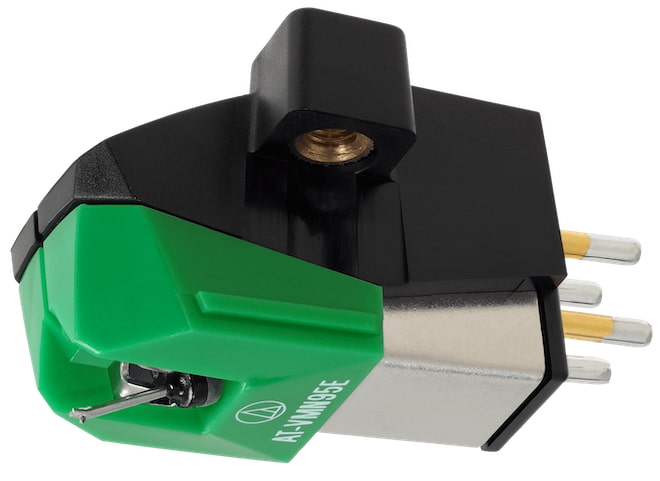
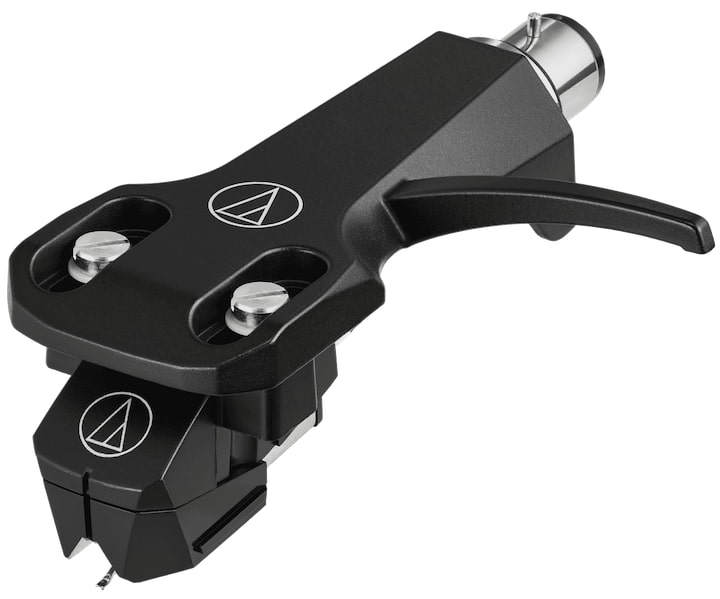
Now Audio-Technica is expanding that formula with the AT-VM95EBK Dual Moving Magnet Cartridge and AT-VM95EBK/H Headshell/Cartridge Combo Kit, two new black-finished versions built around the same VM95 Series platform.
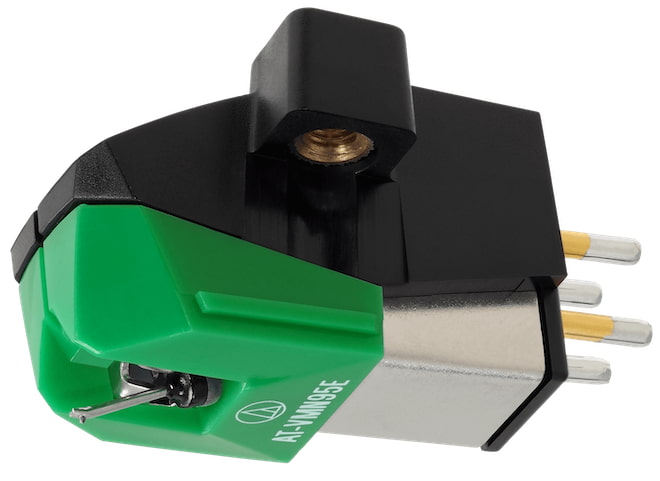
The cartridge uses a 0.3 x 0.7 mil elliptical stylus, delivers 4.0 mV output, fits standard half-inch mount turntables, and remains compatible with all six interchangeable AT-VMN95 replacement styli.
Advertisement
The cartridge sells for $74, while the pre-mounted headshell combo kit comes in at $109, making this less of a reinvention and more of a smart cleanup job for one of vinyl’s most practical upgrade paths.
Why the VM95 Series Matters
The VM95 Series is one of the reasons Audio-Technica has become such a force in affordable vinyl playback. The concept is simple but effective: one cartridge body, multiple stylus options, broad turntable compatibility, and pricing that does not require a financial intervention from the rest of the household — think about all of the records one can buy that they will never know about if they think you showed some fiscal restraint and stayed below $300.
At the core of the VM95 platform is Audio-Technica’s Vertical Dual Magnet design, which mirrors the 90-degree V-shaped configuration of the cutter head used to create the original vinyl master. Audio-Technica says this helps the cartridge deliver accurate tracking, strong channel separation, a more defined stereo image, and clarity across the frequency range.
The bigger selling point for real-world users is flexibility. Every VM95 cartridge uses the same body design, which means owners can upgrade or replace the stylus without replacing the entire cartridge. The series supports multiple stylus profiles, including conical, elliptical, nude elliptical, Microlinear, Shibata, and 78 RPM conical options. That gives listeners a clear path from an entry-level setup to something more refined without starting over.
Installation is also part of the appeal. All AT-VM95 cartridges fit standard 1/2-inch mount headshells, and the threaded cartridge body allows mounting with two screws and no tiny nuts to drop into the carpet, where they immediately join the witness protection program.
Advertisement
That matters because the VM95 Series is aimed squarely at the part of the market where most vinyl listeners actually live: affordable turntables, modest systems, and users who want better tracking and detail without turning a cartridge upgrade into a weekend engineering project. The new AT-VM95EBK and AT-VM95EBK/H do not change the formula. They make one of Audio-Technica’s most practical cartridge platforms look cleaner in black while keeping the upgrade path intact.
Want More? The AT33x Series Is the Next Step Up
For listeners who want to move beyond the VM95 Series, Audio-Technica’s AT33x Series is the next serious step. Unlike the affordable VM95 moving magnet platform, the AT33x models are moving coil cartridges, handcrafted in Japan and aimed at listeners with better tonearms, more capable phono stages, and records clean enough to tell the truth.
Advertisement. Scroll to continue reading.
The lineup includes three stereo models — AT33xEN, AT33xMLD, and AT33xMLB — plus two mono versions, the AT33xMONO/I and AT33xMONO/II. Prices start at $449 for the mono models and $699 for the stereo versions, topping out at $899 for the AT33xMLB. The range adds more advanced materials, including a die-cast zinc base, hybrid body construction, refined suspension, PCOCC copper coil wiring, and upgraded cantilever/stylus options.
This is where Audio-Technica starts asking more from your system, your setup skills, and your phono stage. Cheap turntable with a built-in phono preamp? Wrong neighborhood. Better deck, proper MC gain, and a little patience? This is where this type of upgrade would make sense. Just don’t tell the family.
Advertisement
The Bottom Line
The Audio-Technica AT-VM95EBK is not a radical new cartridge platform, and that is the point. It brings the proven VM95 Series formula into a cleaner black finish with easy installation, an elliptical stylus, interchangeable stylus upgrades, and strong entry level performance for under $100. The AT-VM95EBK/H combo kit makes even more sense for listeners who want a premounted, ready to install option without turning a simple cartridge upgrade into a lost weekend.
For affordable turntables, this is exactly where Audio-Technica continues to win: practical, upgradeable, widely compatible, and priced for people who still need money left over for records.
NASA has successfully tested an improved flight system designed for Mars’ hostile environment. The new technology can be accelerated beyond the speed of sound (Mach 1), the space agency said, and is expected to significantly enhance the operational capabilities of future exploration missions on the Red Planet. Read Entire Article Source link
Both privilege escalation vulnerabilities stem from bugs in the kernel’s handling of page caches stored in memory, allowing untrusted users to modify them. They target caches in networking and memory-fragment handling components. Specifically, CVE-2026-43284 attacks the esp4 and esp6 () processes, and CVE-2026-43500 zeroes in on rxrpc. Last week’s CopyFail exploited faulty page caching in the authencesn AEAD template process, which is used for IPsec extended sequence numbers. A 2022 vulnerability named Dirty Pipe also stemmed from flaws that allow attackers to overwrite page caches.
Dirty Frag belongs to the same bug family as Dirty Pipe and Copy Fail, but it targets the frag member of the kernel’s struct sk_buff rather than pipe_buffer. The exploit uses splice() to plant a reference to a read-only page-cache page (for example, /etc/passwd or /usr/bin/su) into the frag slot of a sender-side skb. Receiver-side kernel code then performs in-place cryptographic operations on that frag, modifying the page cache in RAM. Every subsequent read of the file sees the corrupted version, even though the attacker only ever had read access.
CVE-2026-43284 is found in the esp_input() process on the IPsec ESP receive path. When an skb object is non-linear but lacks a frag list, the code skips skb_cow_data() and decrypts AEAD in place on the planted frag. From there, an attacker can control the file offset and the 4-byte value of each store.
CVE-2026-43500, meanwhile, resides in rxkad_verify_packet_1(). The process decrypts RxRPC payloads using a single-block process. Splice-pinned pages become both a source and destination. That, paired with the decryption key being freely extracted using the add_key (rxrpc), allows an attacker to rewrite contents in memory.
Advertisement
Either exploit used separately is unreliable. Some Ubuntu configurations use AppArmor to prevent untrusted users from creating namespace contents. That, in turn, neutralizes the ESP technique. Most other distributions by default don’t run rxrpc.ko, which neutralizes the RxRPC arm. When chained together, however, the two exploits allow attackers to obtain root on every major distribution Kim tested. Once the exploits run, attackers can use SSH access, web-shell execution, container escapes, or compromise low-privilege accounts.
“Dirty Frag is notable because it introduces multiple kernel attack paths involving rxrpc and esp/xfrm networking components to improve exploitation reliability,” Microsoft researchers wrote. “Rather than relying on narrow timing windows or unstable corruption conditions often associated with Linux local privilege escalation exploits, Dirty Frag appears designed to increase consistency across vulnerable environments.”
Researchers at Google-owned Wiz said exploits will be less likely to break out of hardened containerized environments such as Kubernets with default security settings in place. “However, the risk remains significant for virtual machines or less restricted environments.”
The best response for anyone using Linux is to install patches immediately. While fixes likely require a reboot, protection from a threat as severe as Dirty Frag outweighs the cost of disruptions. Anyone who can’t install immediately should follow the mitigation steps laid out in the posts linked above. Additional guidance can be found here.
The Entertainment Software Association (ESA) has come out against California bill AB 1921, a state bill that would compel developers to offer remedies before deactivating servers for online games. Stop Killing Games has been fighting this battle for the last couple of years and was quick to condemn the ESA’s position. Read Entire Article Source link
On the lower west side of Manhattan Island, in the Chelsea district, there is an unassuming, concrete-looking townhouse whose previous owners include Lady Gaga and basketball player Kevin Durant. If you ever get the opportunity to saunter through its doors, you’re stepping into a tower of sound.
That’s because the House of Sound, operated by Bose after its acquisition of the Sonus Faber brand, is an ode to audiophile and luxury tastes.
Through six floors of the townhouse, there’s a cadre of McIntosh and Sonus Faber kit, with each room designed to give a taste of what it’d be like to have this hi-fi equipment in your home. As the House of Sound website puts it, it’s a “destination where audio, art, and design intersect to create a truly immersive experience”.
It wants to promote the idea that audio can be considered in the same aspirational league as travel, watches, cars, and haute couture fashion. And that it can be a form of creativity as well, whether that’s through the form it takes – the materials and aesthetic that goes into Sonus Faber and McIntosh products – or how it brings other creative works to life, whether that’s through two-channel stereo or a private cinema install (that Questlove from The Roots rents for the Oscars). It’s the Met Gala for sound systems.
Image Credit (Trusted Reviews)
It’s a place that desires to be the apex of what hi-fi can be – without limitation. It’s not so much a consumable thing that, while enjoyable as an experience, is in ways designed to be disposable. Without trying to sound like an advertisement, you go to its listening rooms to luxuriate in high-fidelity sound, or as it was put to us on the tour, to connect “yourself and your own emotions and the people around you”. Lofty, but why not reach for the stars?
I’ve been to hi-fi demo spaces before, such as KJ West One, which is literally wall-to-wall of high-end hi-fi equipment, or ventured to hi-fi shows such as High End. But the House of Sound obviously feels different from either of those two because it takes place in an actual home space.
If you need to be convinced of parting with money into the six or seven figures, it certainly helps having an idea of how it would look in your own well-appointed home. It all helps to add to the sense of immersion because the space you’re listening in is a familiar-ish one.
Advertisement
Advertisement
Image Credit (Trusted Reviews)
Hi-fi with no limits
Of course, this would be rather moot if the products didn’t sound great. I’ve limited experience with Sonus Faber products, having tested the Omnia all-in-one system several years ago, but Sonus Faber doesn’t really deal with products that tend to be easily shippable.
I’ve heard Amati Supreme hi-fi loudspeakers at events such as 2025’s Paris AV Show, and thought they sounded “phenomenal”. This time I got to hear the Suprema, which is essentially Sonus Faber’s no-holds-barred loudspeaker.
Image Credit (Trusted Reviews)
And they sounded phenomenal. They’re a bit on the crisp side of neutral, so at times can sound a little thin to my ears, but they generate huge levels of transparency, insight and naturalism, as well as power and energy in a stereo image that’s wide and deep, with minimal, if any, distortion.
We got to play a selection of tracks*, to just sit there and listen to the speakers. Some people didn’t want to leave.
Advertisement
Advertisement
*(If you want to know my choices, they were Slipknot’s Duality and Illit’s K-pop Magnetic in an attempt to try and ‘break’ the speakers. I failed.)
My own private cinema
We then descended to the ground floor (first floor for any Americans reading) and had the opportunity to listen to the private home cinema install.
Past a large, nondescript door that doesn’t hint at the excitement that awaits, is a reference standard private home cinema with a sound system that will blow your Sonos Arc Ultra surround system away.
Dotted around the room is a 29-channel system that includes Sonus Faber Arena 20 in-wall speakers, Arena 10 in-ceiling modules, and Arena 30 speakers behind the screen in a left, centre, right configuration with a dual-tweeter design similar to the Amati Supreme for clearer dialogue. In total, there are 16 (sixteen!) subwoofers.
Advertisement
Image Credit (Trusted Reviews)
Advertisement
It’s powered by 19 McIntosh amplifiers that, apparently, provide a whopping 22,400W of total power to the system. All amps have a THD of less than 0.005% for absolutely minimal distortion, and the amps power on in a trigger sequence to avoid a massive on-rush of current when you’ve got 20,000+ watts waiting to be released.
An interesting little titbit was the reveal that in films, there’s generally only 8-9 minutes of true LFE (Low Frequency Effects) in a typical two-hour film. 12 of the sixteen subwoofers are then repurposed with the other channels, with the front left/right receiving a dedicated cluster of subs, and the sides, rears, and even the ceiling arrays partnered with a sub.
The result of this configuration was full-range sound from infrasonic to beyond audible high frequency, allowing for precise placement of bass in an area of the room rather than just shaking the entire floor.
This private cinema is placed on the first floor under the kitchen, and apparently, you can feel the rumble in the kitchen even if you can’t hear what’s playing. That’s the power unleashed by this cinema.
Advertisement
Image Credit (Trusted Reviews)
Kaleidescape is the source for films, with an Apple TV nearby for sports and streaming, plus a PS5 for gaming.
Advertisement
And we were treated to Top Gun: Maverick, which has become a staple of Dolby Atmos demos (everyone from Sonos, Yamaha and Focal uses it, moving on from Mad Max: Fury Road being).
It is probably (memory aside), the best I’ve heard the film since watching it in Dolby Cinema at the West End Odeon (the better of the Odeon Leicester Square cinemas). It sounded immense, the nuance of the smaller details that might be lost in a home cinema set-up are rendered crystal clear. The system has even been given the thumbs up by the Oscar-winning sound mixer of Maverick, who watched the film there at an event.
The best home cinema systems can put you in an immersive bubble, whether it’s object-based or channel-based. The private cinema in this townhouse is an experience where you feel it too… and you don’t have to bother with people talking or a crisp packet rustling in the darkness, as it did when I watched The Drama a few weeks ago and annoyed another patron in the cinema.
Advertisement
Head out on the highway
So I’ve written about hi-fi and home cinema. Why not cars too?
On the same first floor as the private cinema is a Lamborghini tucked away in the corner. Inside is a Sonus Faber sound system that’s been tuned for the (tight) interior environment. I’ve written in the past how, for many people, a car might be the best way to listen to music, and it’s the same case for this Lamborghini system.
The system itself is not as numerous in speakers or has quite as fancy custom technology as the Bowers & Wilkins kit in the Polestar 3, but the sense of immersion convinces me that cars make for a pretty excellent hi-fi room. The low end produced, despite there being no dedicated sub (if memory serves), brought genuine bass to the proceedings, but the best thing about the whole experience is how balanced it all sounded.
Advertisement
Advertisement
I’m still unnerved by my own anxiety that bass would distract during a car trip, but then wouldn’t the roar of the engine distract too? Perhaps they’d cancel each other out.
Luxury, aspirational sound
Image Credit (Trusted Reviews)
It was a great few hours at the House of Sound alongside seeing Bose’s Lifestyle Collection, products which aim for premium but for a mainstream audience. The House of Sound shows the potential for hi-fi to move into more luxurious realms (if it hasn’t already).
Of course, this is not an area that I or most people who happen across this article would ever find themselves inhabiting. The Aida sound system, along with all the McIntosh equipment in the room, is an easy seven-figure cost. These are sound systems that would exist in people’s dreams.
But for a few hours in Bose’s House of Sound, those dreams can become reality.
Nvidia’s real AI moat isn’t “a piece of hardware,” writes Wired’s Sheon Han. It’s CUDA: a mature, deeply optimized software ecosystem that keeps machine-learning workloads tied to Nvidia GPUs. An anonymous reader quotes a report from Wired: What sounds like a chemical compound banned by the FDA may be the one true moat in AI. CUDA technically stands for Compute Unified Device Architecture, but much like laser or scuba, no one bothers to expand the acronym; we just say “KOO-duh.” So what is this all-important treasure good for? If forced to give a one-word answer: parallelization. Here’s a simple example. Let’s say we task a machine with filling out a 9×9 multiplication table. Using a computer with a single core, all 81 operations are executed dutifully one by one. But a GPU with nine cores can assign tasks so that each core takes a different column — one from 1×1 to 1×9, another from 2×1 to 2×9, and so on — for a ninefold speed gain. Modern GPUs can be even cleverer. For example, if programmed to recognize commutativity — 7×9 = 9×7 — they can avoid duplicate work, reducing 81 operations to 45, nearly halving the workload. When a single training run costs a hundred million dollars, every optimization counts.
Nvidia’s GPUs were originally built to render graphics for video games. In the early 2000s, a Stanford PhD student named Ian Buck, who first got into GPUs as a gamer, realized their architecture could be repurposed for general high-performance computing. He created a programming language called Brook, was hired by Nvidia, and, with John Nickolls, led the development of CUDA. If AI ushers in the age of a permanent white-collar underclass and autonomous weapons, just know that it would all be because someone somewhere playing Doom thought a demon’s scrotum should jiggle at 60 frames per second. CUDA is not a programming language in itself but a “platform.” I use that weasel word because, not unlike how The New York Times is a newspaper that’s also a gaming company, CUDA has, over the years, become a nested bundle of software libraries for AI. Each function shaves nanoseconds off single mathematical operations — added up, they make GPUs, in industry parlance, go brrr.
A modern graphics card is not just a circuit board crammed with chips and memory and fans. It’s an elaborate confection of cache hierarchies and specialized units called “tensor cores” and “streaming multiprocessors.” In that sense, what chip companies sell is like a professional kitchen, and more cores are akin to more grilling stations. But even a kitchen with 30 grilling stations won’t run any faster without a capable head chef deftly assigning tasks — as CUDA does for GPU cores. To extend the metaphor, hand-tuned CUDA libraries optimized for one matrix operation are the equivalent of kitchen tools designed for a single job and nothing more — a cherry pitter, a shrimp deveiner — which are indulgences for home cooks but not if you have 10,000 shrimp guts to yank out. Which brings us back to DeepSeek. Its engineers went below this already deep layer of abstraction to work directly in PTX, a kind of assembly language for Nvidia GPUs. Let’s say the task is peeling garlic. An unoptimized GPU would go: “Peel the skin with your fingernails.” CUDA can instruct: “Smash the clove with the flat of a knife.” PTX lets you dictate every sub-instruction: “Lift the blade 2.35 inches above the cutting board, make it parallel to the clove’s equator, and strike downward with your palm at a force of 36.2 newtons.” “You can begin to see why CUDA is so valuable to Nvidia — and so hard for anyone else to touch,” writes Han. “Tuning GPU performance is a gnarly problem. You can’t just conscript some tender-footed undergrad on Market Street, hand them a Claude Max plan, and expect them to hack GPU kernels. Writing at this level is a grindsome enterprise — unless you’re a cracker-jack programmer at DeepSeek…”
Han goes on to argue that rivals like AMD and Intel offer competitive specs on paper, but their software stacks have struggled with bugs, compatibility issues, and weak adoption. As a result, Nvidia has built an Apple-like moat around AI computing, leaving the industry dependent on its expensive hardware.













































































You must be logged in to post a comment Login