1Password on Tuesday launched AI Spend and Consumption Management, a new capability embedded in its SaaS Manager platform that gives IT and finance teams a unified, real-time view of how their organizations consume and spend on AI services from vendors including Anthropic, Cursor, and OpenAI.
The move marks the latest strategic expansion for a company that built its reputation on password management for consumers and, over the past three years, has aggressively repositioned itself as a broader identity security and SaaS governance platform for enterprise buyers. With this release, 1Password is staking a claim in one of enterprise technology’s newest and most chaotic budget categories: the consumption-based cost of large language models.
“Executives want teams to build faster with AI, but that speed is creating a new kind of spending pressure,” Greg Henry, 1Password’s chief financial officer, said in an exclusive interview with VentureBeat. “Developers are consuming tokens at a pace that traditional budgets weren’t built to manage, and IT and finance teams are being asked to forecast and justify AI investments without a clear view of what’s actually driving costs.”
The product, now in public preview with broad availability planned for fall 2026, connects directly to vendor admin APIs to pull token-level consumption data daily. It normalizes that data across providers into a single dashboard and allows organizations to set vendor-level spend limits, configure threshold-based alerts via Slack and email, and break down usage by team, user, vendor, and model.
Advertisement
Why traditional software budgets can’t keep up with AI token pricing
The core challenge 1Password is targeting is structural. Traditional SaaS pricing operates on a per-seat, per-year model that is easy to budget and reconcile. AI pricing does not. Every API call to Claude, GPT-5.6, or a Cursor-powered coding assistant consumes tokens, and the cost of those tokens varies by model, by input versus output, and by the complexity of the task. A single engineering team running agentic workflows can burn through a prepaid token budget in weeks — and the finance team may not notice until the invoice arrives.
Henry drew a sharp analogy to a problem enterprises have already lived through once. “Consumption-based pricing isn’t new,” he said. “We saw it arrive with cloud infrastructure, and it took years to build the tools and disciplines to manage it. AI is the next version of that shift.”
That comparison resonates across the industry. When Amazon Web Services, Microsoft Azure, and Google Cloud popularized consumption-based pricing for compute and storage in the 2010s, enterprises initially lacked the tooling to monitor and optimize their cloud bills. That gap spawned an entire FinOps ecosystem — companies like CloudHealth, Spot.io, and Apptio built multi-billion-dollar businesses helping organizations understand what they were spending on cloud and why. Henry is explicitly betting that AI token spend will follow the same trajectory, and that organizations that fail to build visibility now will end up, as he put it, “paying far more than they needed to, for far longer than they should have.”
Advertisement
The scale of the coming wave lends credibility to that bet. Goldman Sachs has estimated that token consumption from AI agents alone will grow 24 times by 2030, a projection driven by the expectation that autonomous AI systems will increasingly execute multi-step workflows — booking travel, writing and deploying code, managing customer service interactions — that generate vastly more API calls than a human sitting at a chat interface.
How 1Password’s new dashboard tracks every token across Anthropic, Cursor, and OpenAI
The new capability extends 1Password SaaS Manager‘s existing foundation of application discovery, license management, and spend analytics. It is not a standalone product. Existing SaaS Manager customers can activate it by connecting their supported AI vendor API keys, at which point consumption data flows into a dedicated AI Consumption Management dashboard. Henry confirmed that there is no separate product or add-on fee: “AI Spend and Consumption Management is available to all 1Password SaaS Manager customers.”
The system provides four core functions. First, it aggregates token usage and spend across Anthropic, Cursor, and OpenAI into a single, normalized view — eliminating the need to toggle between three separate vendor dashboards with three different reporting formats. Second, it enables budget controls: organizations can set vendor-level spend limits, configure percentage-based thresholds, and receive automated alerts when prepaid balances approach depletion. Third, it disaggregates consumption by team, user, vendor, and model, allowing finance and IT to understand not just how much is being spent, but where and by whom. Fourth, it situates AI spend within the broader SaaS portfolio, helping organizations see how token costs relate to their total software investment.
Notably, the system captures consumption regardless of whether a human or an AI agent generated it. “Token consumption is captured at the API level regardless of whether a human or an agent is generating it,” Henry explained. “Organizations get the total consumption picture, including the spikes that agent loops can create, which can be some of the hardest usage to catch before it becomes a problem.”
Advertisement
That agent-level visibility matters because autonomous AI systems can generate runaway costs in ways that human users typically cannot. An agentic coding assistant stuck in a retry loop, for example, can consume thousands of dollars in tokens in minutes — with no human in the loop to notice. For now, the product alerts but does not enforce. When asked whether 1Password will eventually give organizations the ability to automatically cut off spending when a threshold is crossed, Henry said the company is “actively evaluating” automatic enforcement but emphasized that visibility must come first: “You can’t enforce what you can’t see.”
The choice of launch partners reveals where enterprise AI budgets are under the most pressure
The decision to start with Anthropic, Cursor, and OpenAI — rather than casting a wider net — reflects where enterprise AI adoption and budget strain are most concentrated right now. Henry said the choice was driven entirely by customer demand. “Anthropic, Cursor, and OpenAI are where we’re seeing the highest adoption, and where token consumption can move fast and get ahead of the teams responsible for managing it,” he said. The company plans to add additional vendors based on customer demand, API availability, and budget impact, though it has not committed to a specific timeline or vendor list.
The inclusion of Cursor alongside the two major foundation model providers is telling. Cursor, an AI-powered code editor that has rapidly gained traction among developers, represents a category of AI tool where consumption is particularly difficult to forecast. Unlike a chatbot interface where a user consciously types a prompt, Cursor integrates AI suggestions directly into the development workflow, generating token consumption continuously as developers write code. That ambient, always-on consumption pattern makes it especially prone to budget overruns.
Henry also addressed who inside an organization should actually own this problem — and acknowledged that the honest answer right now is no one. “When spend is fragmented across vendor dashboards and finance teams are reconciling it monthly, you’re always behind,” he said. “AI spend can’t be treated as a finance-only or IT-only problem.” He noted that the pricing differences between models have become significant enough that the choice of which AI model a team uses is now a meaningful financial decision, one that is pulling CFOs into conversations with IT, product, and engineering leaders “in ways they never had to before.”
Advertisement
Steve May, director of IT at ServiceTrade, a 1Password customer that has been using the capability, said it addressed a concrete planning gap. “Forecasting tools for AI consumption and spend was one of our biggest gaps in planning because we didn’t have a reliable way to track it,” May said. He added that the visibility has “prevented overages that would have cost far more to fix after the fact.”
Where 1Password fits in the fast-consolidating SaaS management market
1Password is not the only company racing to solve the AI cost management problem, but the competitive landscape is still fragmented and the category is far from mature.
Zylo, a SaaS management platform that Gartner has also recognized as a leader in the space, published its 2026 SaaS Management Index in January showing that AI-native application spend surged 393% year over year in organizations with more than 10,000 employees and 108% overall. Zylo’s data also revealed that ChatGPT has become the most expensed application in enterprise environments, highlighting how AI tools are entering organizations through employee credit cards and expense reports — outside formal procurement and governance workflows. Zylo has added its own token-level cost tracking for AI vendors including Anthropic, OpenAI, Cursor, and Perplexity.
Meanwhile, according to a comparison published by Coommit in May, Vendr — which focuses more on SaaS negotiation than discovery — tracks AI tools at the contract level but does not yet offer consumption-level visibility. And the FinOps Foundation reported in its 2026 State of FinOps survey that 98% of organizations now actively manage AI costs, up from just 31% in 2024. The broader SaaS management market is also consolidating rapidly. In May, Deel acquired Sastrify, a German SaaS management vendor, and began folding it into its HR platform — a signal that SaaS management capabilities are increasingly being absorbed into adjacent enterprise platforms rather than remaining standalone products.
Advertisement
1Password’s approach differs from pure-play SaaS management competitors in one important respect: it is building AI cost management on top of an identity security platform, not a FinOps or procurement tool. The company’s SaaS Manager product grew out of its 2025 acquisition of Trelica, a UK-based SaaS access management startup whose technology enabled the discovery of unsanctioned applications — so-called shadow IT. As BetaKit reported at the time of that deal, 1Password co-CEO Jeff Shiner described Trelica as “a pioneer in modern SaaS access management” and said the acquisition would accelerate 1Password’s Extended Access Management product roadmap by more than a year. CRN noted that Trelica brought more than 300 SaaS integrations to the platform. That identity-first lineage gives 1Password a natural advantage in connecting spend data to specific users and teams — a linkage that matters when the question shifts from “how much are we spending on AI?” to “who is spending it, and is it delivering value?”
From password manager to platform company: 1Password’s $6.8 billion bet on enterprise identity
The launch raises a question that Henry addressed head-on: whether a company that started as a consumer password manager can credibly compete in enterprise AI cost management.
“It doesn’t feel like a stretch to us. It feels like a natural progression,” he said. “For more than 20 years, 1Password has evolved alongside how our customers work. We started by protecting passwords. Then we helped organizations manage secrets, control access, and get visibility into the applications their teams rely on.”
The company’s evolution has been rapid. 1Password raised a $620 million Series C in January 2022 led by ICONIQ Growth, reaching a $6.8 billion valuation — at the time, the largest funding round ever raised by a Canadian company, according to Crunchbase. The round also attracted celebrity investors including Ryan Reynolds, Scarlett Johansson, and Robert Downey Jr. As of early 2025, BetaKit reported that 1Password had surpassed $250 million in annual recurring revenue, with B2B sales accounting for nearly three-quarters of total revenue and the company claiming to be cash-flow positive.
Advertisement
In May 2024, 1Password launched Extended Access Management, a platform designed to secure sign-ins across both managed and unmanaged applications and devices. That same year, it acquired Kolide for device trust and, in early 2025, Trelica for SaaS discovery. In June 2026, Gartner named 1Password a Leader in its Magic Quadrant for SaaS Management Platforms. According to 1Password’s own blog post on the recognition, its SaaS Manager now supports over 400 integrations and provides visibility into a library of more than 40,000 pre-populated application profiles. Each step has moved the company further from its consumer roots and deeper into enterprise infrastructure. The AI Spend and Consumption Management launch extends that trajectory into financial operations territory — a domain where 1Password will compete not only with SaaS management vendors but potentially with dedicated FinOps platforms and the AI vendors’ own billing dashboards.
Why high AI token consumption doesn’t always mean wasted money
Perhaps the most revealing part of Henry’s commentary concerns what organizations should actually do with the consumption data once they have it. He pushed back forcefully against the assumption that high token consumption automatically signals waste.
“A team burning through tokens may be building something genuinely valuable,” he said. “A lower-usage project might not be moving the business forward at all. What matters is whether that consumption is producing enough business value to justify the spend.”
Henry drew a distinction between personal productivity — “having a bot summarize your meeting or draft a quick email” — and genuine business outcomes. “What organizations need to see is where consumption is actually driving revenue, efficiency, or something that moves the needle.”
Advertisement
That framing positions AI Spend and Consumption Management not just as a cost-cutting tool but as a decision-support system for AI investment allocation. If a CFO can see that one engineering team’s heavy Claude usage is powering a product feature that drives revenue, while another team’s OpenAI spend is funding low-value internal automation, the organization can reallocate budget accordingly rather than imposing across-the-board cuts.
“When costs rise faster than expected, the instinct is to cut,” Henry said. “But most organizations can’t yet tell which teams, models, or tools are responsible for the increase, so they end up cutting across the board rather than directing investment toward the AI projects that are actually delivering business value. Blunt cuts on a technology you’re counting on for competitive advantage is not a management strategy, it’s a missed opportunity.”
The next enterprise budget crisis is already here — and it’s priced per token
The product’s current scope — three vendor integrations, alerting but not enforcement — is clearly a starting point. Henry signaled that automatic spend limits are on the roadmap and that additional vendor integrations will follow based on customer demand.
But the broader trajectory he described suggests 1Password sees this launch as a wedge into a much larger opportunity. “As traditional SaaS products add AI capabilities, their pricing models are going to follow,” he said. “Organizations that build visibility and management discipline around consumption now are going to be in a much better position when that happens across the rest of their software portfolio.”
Advertisement
If Henry is right, the chaos currently confined to AI token budgets is not a temporary growing pain but a preview of how all enterprise software will eventually be priced. A decade ago, companies scrambled to understand their cloud bills. Today, they are scrambling to understand their AI bills. The question is whether the organizations building the dashboards this time around can get ahead of the curve — or whether, as Henry warned, they will end up where so many companies ended up with cloud, realizing too late how much they were overpaying, and for how long.
AI Spend and Consumption Management is available now in public preview for 1Password SaaS Manager customers. Broad availability is planned for fall 2026.
Samsung has released the fourth One UI 9 beta for the Galaxy S26 series, bringing another round of bug fixes and refinements ahead of the software’s official debut later this month.
The update has started rolling out in India first, carrying firmware that ends in ZZG4, and is available to users already enrolled in Samsung’s One UI 9 beta programme. At around 1.25GB, it’s a sizeable download.
Rather than introducing major new features, this latest beta focuses on stability as Samsung enters the final stretch before launch. According to the changelog, the company has fixed a range of issues affecting core parts of the interface. These include problems with the clock size, Quick Panel, navigation bar, timer notifications, and the Routines app.
The update also bundles the July 5, 2026 Android security patch, ensuring testers receive the latest security fixes alongside the software improvements.
Advertisement
The timing isn’t particularly surprising. Samsung has been steadily polishing One UI 9 over the past few months. The third beta arrived almost exactly a month ago. Consequently, a fourth beta at this stage suggests the company is ironing out the remaining rough edges before making the software widely available.
Advertisement
One UI 9 is expected to make its official debut alongside Samsung’s next generation of foldables at Galaxy Unpacked on 22 July. At that event, the company is expected to unveil the Galaxy Z Fold 8, Galaxy Z Fold 8 Ultra, and Galaxy Z Flip 8. Those devices will be the first to ship with the new software out of the box, with older Galaxy smartphones and tablets getting it in due course.
While Samsung hasn’t confirmed whether another beta will follow, this release suggests the software is approaching its final form.
Advertisement
As with previous beta releases, availability remains limited to registered participants in supported regions. However, the rollout will likely expand gradually. Galaxy S26 owners enrolled in the programme should see the update appear over the air in the coming days if it hasn’t already reached their device.
With Nintendo’s 3DS experiencing a bit of a renaissance lately, prices for functioning systems have shot through the roof. Getting a busted one with a broken screen is a lot cheaper, but then you run into the eye-watering price difference between a replacement top screen for the regular version and the larger XL variant. The latter costs about the same as a whole new used 3DS, while the former goes for peanuts. Here the solution is obvious, with [Skawo] demonstrating how they hacked the cheaper, smaller top screen into a New 3DS XL.
The price difference on AliExpress as shown in the video is on the order of $120, with the smaller screen going for less than $10. Since they both use the same connector pin-out and display technology, you can plug either display into the New 3DS XL mainboard.
Where you’ll run into issues, other than the replacement display being obviously not XL, is the physically shorter flat flex cable for the controls that forces the display to be installed in an offset manner. You need jailbroken firmware like Luma3DS here to adjust for the screen offset. Filling in the missing screen real-estate is the other issue you have to patch over somehow, which was done here in barbaric fashion with some cardboard.
Advertisement
Beyond that it does work, and as a fix to at least get a broken New 3DS XL back into the game it’s worth considering. Do note that there’s a difference between regular 3DS and New 3DS (second generation) screens with neither being compatible, so be careful before you try such a fix.
When most people think of a backhoe, the first thing that comes to mind is digging. That’s no surprise, since excavation is what these machines are best known for. However, backhoes are quite different from excavators, and zeroing in on that one task means overlooking other ways they can be useful. For one, they have powerful hydraulic systems and can work with a wide range of attachments, which makes them quite versatile.
With a loader bucket on one end and a digging arm on the other, a backhoe is essentially a two-in-one piece of equipment. It can lift and move heavy materials, clear debris, break up concrete, and handle light demolition work. As a result, you can complete projects more quickly and efficiently without necessarily bringing in additional equipment. And the more jobs one machine can handle, the less you may need to spend on renting extra equipment or relying on manual labor to get things done. Sometimes, it’s not even a matter of expense; it could be that the space is too limited to bring in multiple machines.
So, whether you already own a backhoe or you’re considering renting one, it helps to understand just how capable it is beyond digging. That way, you can get better value from every hour it’s on the job. After all, there is a reason this machine is often called the Swiss Army knife of heavy equipment, and by the end of this list, it should be easy to see why that reputation is well earned.
Advertisement
Pull out stumps
frantic00/Shutterstock
A backhoe can help remove a stump that’s too stubborn to get rid of manually, and unlike a grinder, which chews the stump down but leaves the roots behind, a backhoe can help pull out the stump along with the root system. Before getting started, though, prioritize your safety by putting on gloves and safety glasses — some of the debris could come hurtling toward you. You can also walk the area first and look for anything that could get in the way, such as rocks or soft soil that might affect how the backhoe handles.
The rear digging arm can dig around the base, cut into the soil, and break up the roots holding the stump in place. Once the root system is loose enough, you can work the bucket under the stump and use the machine’s hydraulic power to pry it upward. A stump bucket attachment can make this easier, since it is designed to slice through roots, concentrate digging force, and scoop under the stump so it can be lifted from the ground.
Advertisement
This is where a backhoe has an advantage over doing the job by hand. Stumps are often heavier and more stubborn than they look, especially when the soil is still packed around the roots. That is why we often advise you not to try to pull a stump out with your truck. While using the backhoe, make sure it is on firm ground, the stabilizers are in place, and any chains, straps, or rigging gear are in good condition. You should also call 811 before digging so you do not accidentally hit underground utility lines.
Advertisement
Haul heavy materials
Vicvaz/Getty
Moving materials from one spot to another can be a huge time sink. With a backhoe’s front loader, you can save yourself some time and take some stress out of an already busy day. It can scoop up and carry everything from loose soil, sand, and gravel to heavier debris and construction supplies, getting them where they need to go without requiring a separate machine for the job. Loading trucks, filling containers, stockpiling materials, or simply shuttling supplies across a large site are all jobs the loader bucket can take on without much fuss.
Beyond shifting bulk materials, backhoes can also help with heavier individual items that need to be transported. Think rocks, concrete blocks, steel beams, and similar materials. These often need to land in an exact spot, and a backhoe has enough strength to help make that happen. And where possible, swapping in attachments like forks, grapples, or different bucket sizes gives you even more flexibility in the way you use the machine.
That said, lifting heavy loads still requires care. Before any lift, make sure the machine is positioned correctly and that the load is placed as close to the machine as possible to help maintain stability. Most backhoe loaders also have stabilizing legs, which should be extended before lifting begins. It is just as important to know the machine’s weight limit before picking anything up, because exceeding it can put both the equipment and nearby workers at risk. Since it is easy to underestimate how heavy something is just by looking at it, consider using a scale or checking the listed weight of the material to avoid any mishaps. You should also inspect any chains, slings, or rigging gear before lifting gets underway.
Advertisement
Remove snow or storm debris
Katyam19/Shutterstock
If you don’t want to spend another winter shoveling snow by hand, a backhoe can make the job much easier. The front loader bucket alone is large enough to scoop, push, and carry a significant amount of snow in one pass, which makes it useful for long driveways, parking areas, farm roads, and larger properties. Pair it with a compatible snow attachment, such as a snow pusher or a capable snow blower, and it becomes even more capable.
Before putting a backhoe to work in snowy conditions, though, it is worth checking that the machine is ready for the weather. Make sure the tires have enough tread to grip the surface safely, inspect the hydraulics, and confirm that the bucket or attachment is properly secured. If you are using a snow pusher with a rubber cutting edge, it can help clear snow from concrete or asphalt without scraping the surface as harshly as metal. Once everything checks out, the process is fairly straightforward: lower the bucket or attachment, push or scoop the snow, then lift, carry, and dump it in a designated area where it will not block traffic, drainage, or visibility.
A backhoe can also help even when the elements leave more than soft, fresh snow behind. If you are dealing with packed snowbanks, icy piles, or heavy plow berms, the rear backhoe arm can help break them apart before the front loader moves in to clear the loosened material. The same general idea applies to storm debris. After heavy wind or rain, a backhoe can help move fallen branches, broken fencing, washed-out gravel, and other bulky messes that would take much longer to clear by hand.
Advertisement
Grade and level ground
PhotoChur/Shutterstock
A backhoe can also come in handy when you need to smooth out rough ground. Maybe you are preparing a driveway, cleaning up after a project, spreading gravel, or trying to even out a section of your yard before landscaping. In cases like that, you can use the loader bucket to push or spread loose material, then backdrag over the area to level it out. Backdragging is when you lower the front bucket and drive backward, using the bucket edge to pull material across the surface. If the machine has a float function, that can help the bucket follow the ground more naturally instead of digging in too aggressively.
While a backhoe does come in clutch for rough grading, it still requires some patience. You may need to work in thin layers, make multiple passes, and keep checking the surface as you go. For tougher, compacted ground, the rear digging arm can also break up hard soil first before the front bucket moves in to finish leveling. But then again, you do not always have to make the ground perfectly flat, especially if you are grading a driveway. You actually need a slight slope. Otherwise, you could end up with one of the common problems with concrete driveways, where poor drainage causes water to pool and the surface to crack over time.
Attachments can make the job easier, too. A wider bucket, grading bucket, 4-in-1 bucket, or blade attachment can give you more control depending on the surface you are working on. Just keep in mind that a backhoe is better suited for rough grading than precision finish work.
Advertisement
Handle light demolition
Yanina Sin/Shutterstock
If you need to bring something down on a smaller scale, the kind of job that does not require towering excavators or high-reach demolition equipment, a backhoe can be useful. It can help with tearing down a small shed, an old barn, or simply breaking up old concrete. Before any demolition work begins, however, you should do a thorough assessment of the site.
That would typically include checking the structure’s condition, making sure tearing down the structure won’t create any safety hazards, shutting off or protecting utilities, and keeping people away from areas where the falling debris could land. From there, the right attachment depends on the job. A standard bucket may be enough for a light teardown of an old wooden structure and to handle the debris afterward, while a hydraulic breaker will be more appropriate for breaking concrete, asphalt, or masonry into smaller, more manageable pieces if that’s your goal.
Advertisement
Like any tool, though, a backhoe has its limits. Most standard backhoes do not have the reach needed to safely take on large demolition projects, and they are not designed for tearing down tall structures from a distance. Heavily reinforced concrete can also be more than a standard backhoe should handle, especially if you don’t have the right attachment and enough operator experience. For larger buildings or major structural demolition, it would be safer to use specialized demolition equipment or call in a professional crew.
Hydrow rowing machines transformed the at-home fitness market when they launched in 2017. With their full-body low-impact training methods, Hydrow makes it easier to hit your fitness goals without leaving the house. The flagship Hydrow Pro is their most advanced model, but we also recommend the Hydrow Wave Rower for those with limited space. Both machines come with professional components, high resolution screens and an expansive library of over 5000 live and on-demand classes. With over half of the US population now incorporating home fitness into their routine, it’s clear that at-home training isn’t just a post-Covid trend. Check out our page for the latest Hydrow discount codes and save on the best interactive fitness kit.
Exclusive Hydrow Discount Code for $50 Off all Orders
Smashing your fitness goals is easier with high quality equipment. Hydrow’s smart rowing machines engage 86% of the body’s muscles, compared to just 44% for cycling, and burn more calories than any other home workout. Combine this with hundreds of coaching sessions, led by a team of brilliant coaches and athletes, it’s easy to stay engaged and motivated, while also exploring some of the world’s most picturesque lakes and rivers. And to kickstart your at-home fitness regime, you can take $50 off any order with the Hydrow promo code we are offering.
Score $100 Off a Hydrow Rower With Sign-up
Rowing is one of the most effective ways to stay in shape. It engages multiple muscle groups and provides a low-impact, high-intensity cardio experience that improves cardiovascular health, builds strength, and enhances endurance. And with tailored workouts to suit all abilities Hydrow gives you every chance to build fitness and stay motivated. And as an added incentive, Hydrow is offering $100 off any rowing machine when you sign up via email or text.
Hydrow Referral Coupon: Get $150
Already sold on the benefits of rowing for fitness? Maybe you’ve been enthusiastically recommending the virtues of low-impact, full-body workouts to your friends and family? Well now you can turn your enthusiasm into rewards with Hydrow’s referral coupon. Refer a friend and not only will they receive $150 off the cost of a Hydrow rowing machine, but as thanks you’ll receive a $150 Visa gift card when a purchase is made.
Advertisement
Get Free Shipping on Your Orders at Hydrow
Get free shipping with Hydrow, with no code needed. Free standard shipping is auto-applied and will be delivered in 3-5 days.
Enjoy a 30-Day Hydrow Free Trial
When experienced rowers talk about using Hydrow’s rowers, they’re amazed by how similar it feels to actually being on the water. It’s what makes Hydrow unique. The brand is so sure you’ll be impressed by the full-body, low-impact workout and extensive on-demand content available, they’re offering a no-risk 30 day free trial. To qualify, just order your chosen Hydrow through Hydrow.com and don’t forget to use the Hydrow promo code on this page.
Hydrow Rower and Lyquid Memberships Available Now
Hydrow has workout plans that you can do in the comfort of your own home to keep yourself moving and hit those fitness goals. With a Hydrow membership, you’ll get real-time performance feedback, personalized workout recommendations, and goal-based programs tailored to your needs. With a Hydrow Rower Membership, you’ll get training tips, motivation, and progress tracking. Plus, you’ll have access to over 6,000 workouts, live and on-demand rowing workouts, other workouts like mat yoga, Pilates, strength, and Circuit Training.
With the Lyquid Membership, you’ll get all the tools needed to have effective, guided strength training at home. With the membership, you’ll get access to strength training technology previously accessible only to elite athletes, on-demand workouts, and isokinetic resistance that mirrors your force in real-time. All of this and more is included in the custom workout programs in a personal training-type simulation.
Advertisement
Enjoy a 30-Day Hydrow Free Trial
When experienced rowers talk about using Hydrow’s rowers, they’re amazed by how similar it feels to actually being on the water. It’s what makes Hydrow unique. The brand is so sure you’ll be impressed by the full-body, low-impact workout and extensive on-demand content available, they’re offering a no-risk 30 day free trial. To qualify, just order your chosen Hydrow through Hydrow.com and don’t forget to use the Hydrow promo code on this page.
Further complicating the process, even the expiration of the Microsoft certificate that signed the shims, which took place late last month, isn’t enough to revoke the ones ESET identified.
A rogue’s gallery of defective shims
The shims identified by ESET authorize secondary components that are known to be vulnerable to various exploits. The Oracle shim, for instance, signs a binary vulnerable to CVE-2015-5381. Smolár said the skill required to exploit the vulnerability is low. Other vulnerable shims fail to support protections, such as MOK deny-list enforcement and SBAT enforcement, both of which came into effect after the affected shim was released. Still other identified shims contain vulnerabilities in their own code.
In the interest of brevity, many additional details included in Tuesday’s report are omitted from this article.
An unsettling prospect
As noted, these vulnerable shims can be used against Windows and Linux machines alike, although likely not Windows 11 Secured-core PCs in their default state. Any Windows user who has installed Microsoft’s June update batch is no longer vulnerable. Linux users should check the Linux Vendor Firmware Service or consult their distributor. Revocation statuses are available using the uefi-dbx-audit script.
Advertisement
The prospect that attackers have had the means to bypass Secure Boot for more than a decade through what amounts to hack-by-numbers scripts isn’t much of an endorsement of the mechanism proposed by Microsoft in partnership with hardware makers. As mentioned earlier, a key contributor to this debacle is its complexity.
“This is a solid rebuke of the entire secure boot model,” HD Moore, a firmware security expert, CEO and founder of runZero, and a long-time critic of Secure Boot, said in an interview. His complaints include Microsoft being the de facto root of trust for the entire UEFI platform, the inability of the protection to scale sufficiently, and the ability for components to boot even after top-level certificates expire.
“The end result is a huge number of unknown (to everyone but Microsoft) signed things that bypass Secure Boot—some of which can then be used to boot other things—and both have normal security bugs and other mistakes that mean they can be used to boot nearly anything,” Moore added. “The whole ecosystem is somewhat broken and needs a reboot.”
Wishful thinking: Microsoft is finally stripping the Windows search box down to what many users wanted from it all along: a simple way to quickly find apps, files, and settings without being distracted by additional content. In test builds now rolling out to Windows Insiders in the Experimental channel, the experience looks and behaves very differently from recent versions of Windows.
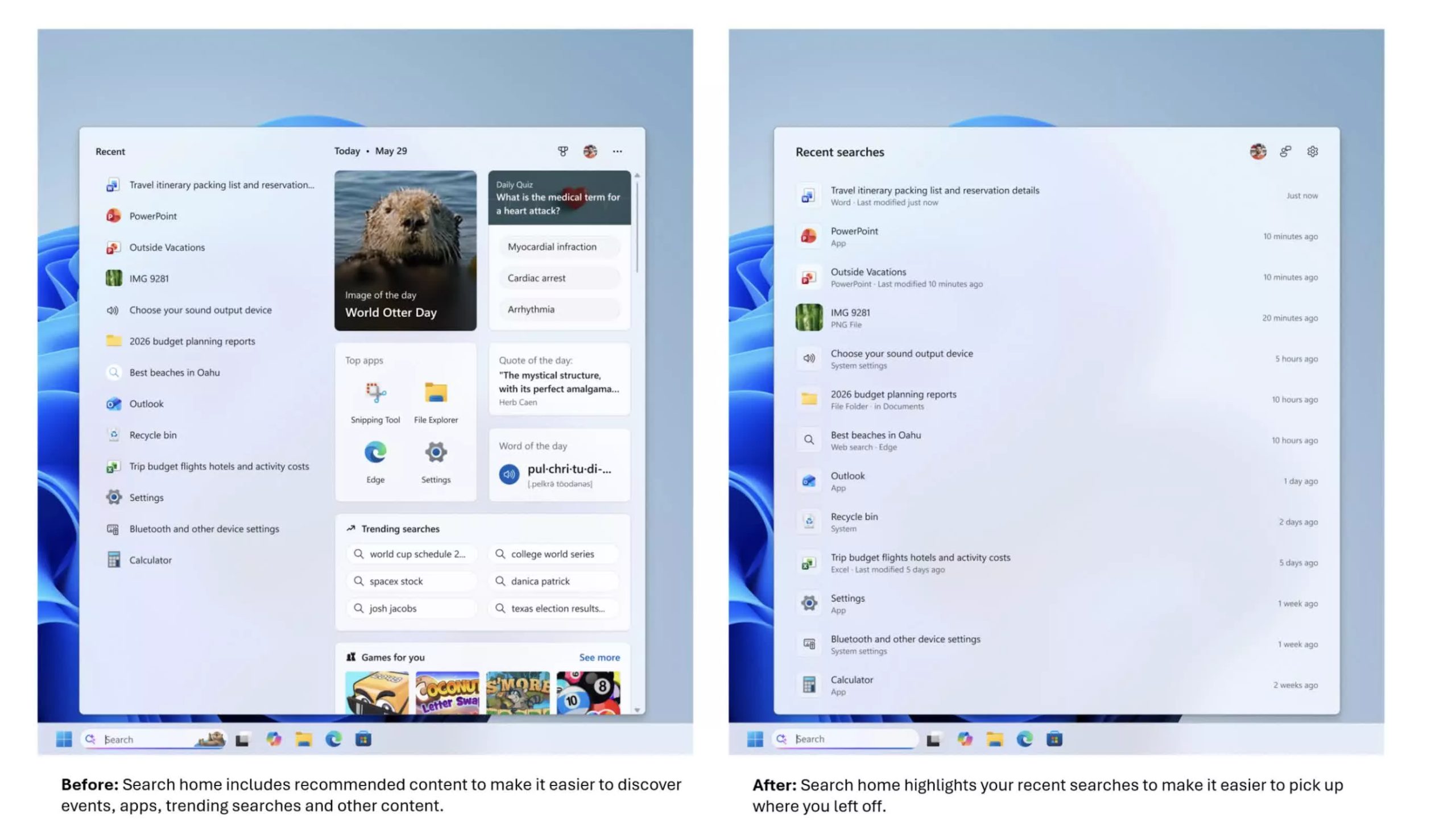
The change appears first on the search home screen. Instead of the old layout – with recently used apps on the left and tiles on the right asking “What day is it today?” or offering features such as “Daily quiz,” “Word of the day,” “Search trends,” and “Recommended games” – the new view is much cleaner.
The home screen now focuses on recent searches and local content rather than making the search box feel like a news or entertainment hub. For people who use search as a starting point, this shift is likely the first thing they will notice.
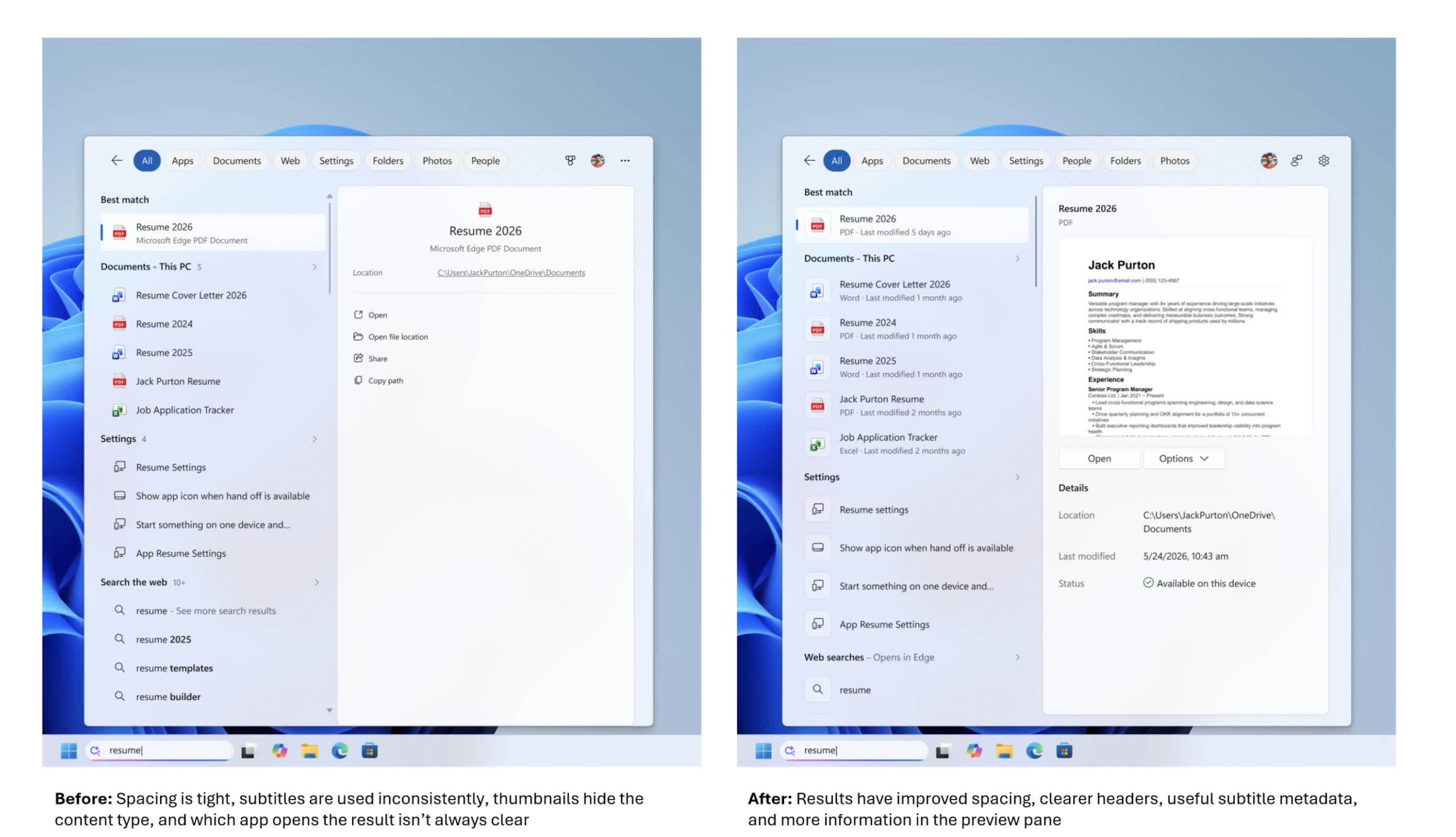
Beneath the simpler UI, Microsoft is putting more emphasis on helping users understand what they are about to click on. Search results now more clearly identify whether an item is an app, a setting, a file, a web result, or a Microsoft Store suggestion.
Advertisement
That sounds basic, but the search box has become a primary launch point for opening apps, finding files, changing settings, and getting quick answers from the web. Making the source and type of each result clearer is intended to help users choose the right option more easily.
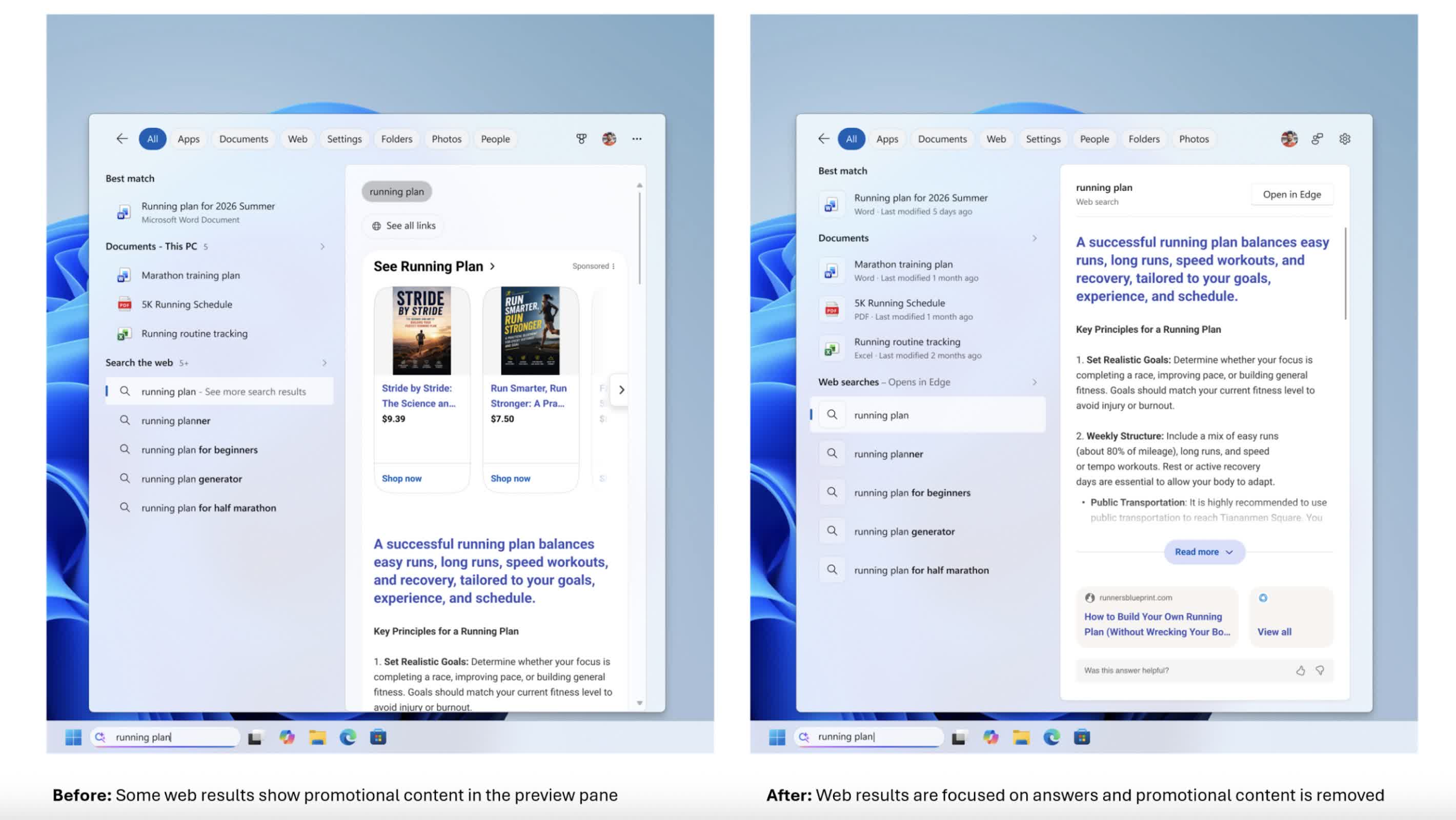
The company is also removing promotional content from web results. In earlier versions of Windows 11, web results displayed in the search box could begin with product-related suggestions and other promotional material.
In the new experience, the focus is squarely on the answer itself. Web results are presented more directly, without layers of promotional content appearing above them. For users who rely on the search box to quickly find information, the change makes it feel less like an advertising space and more like a straightforward tool.
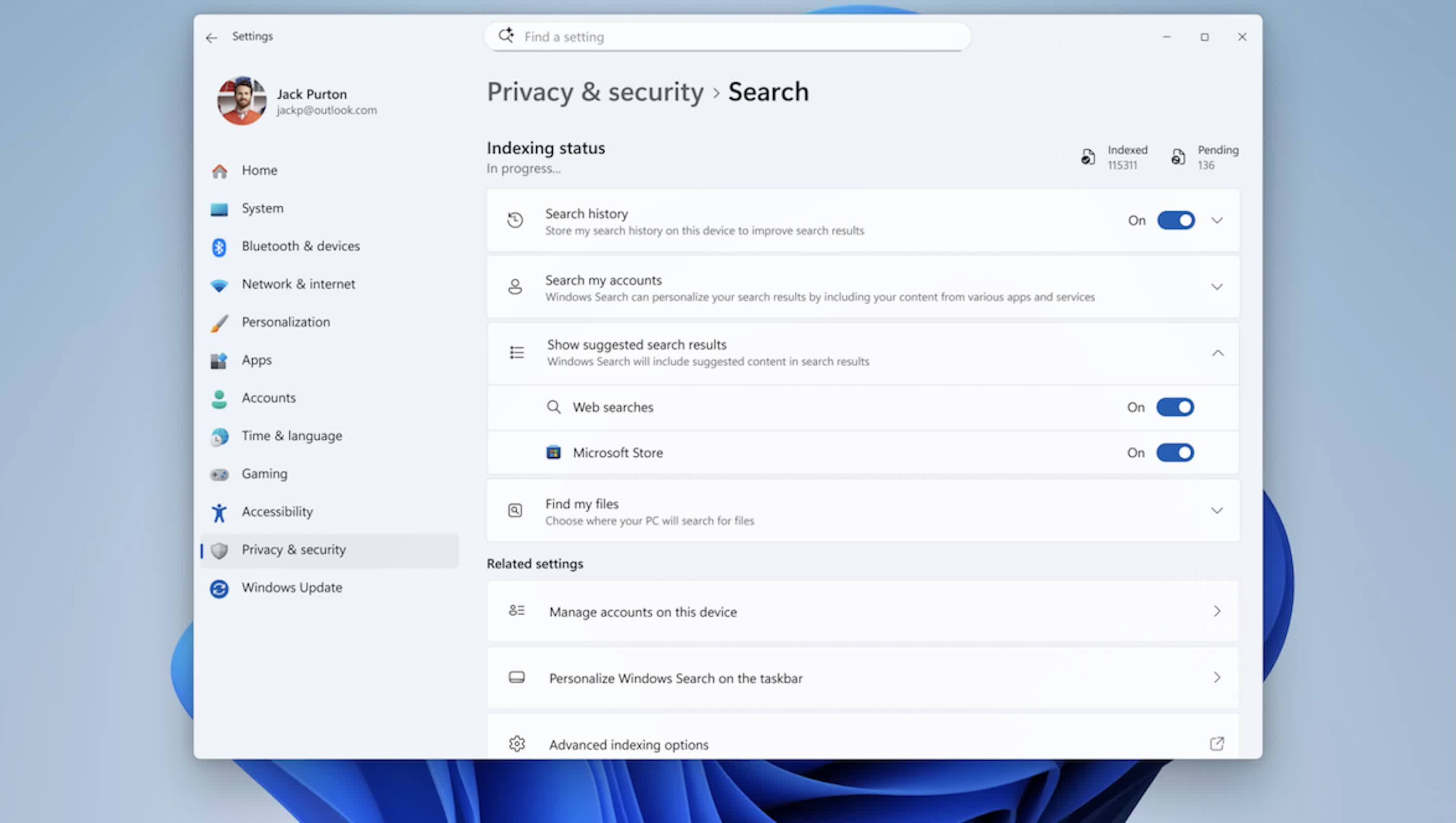
Another notable change is the level of control users have over how much online content appears in search results. A new setting under Settings > Privacy & Security > Search allows users to choose whether web and Microsoft Store suggestions appear alongside local results.
Advertisement
If that option is turned off, the search box behaves more like a local launcher and file finder rather than mixing in web and Store suggestions. The option is simple, but it acknowledges that not everyone wants online suggestions in a workflow focused primarily on opening content that is already stored on the machine.
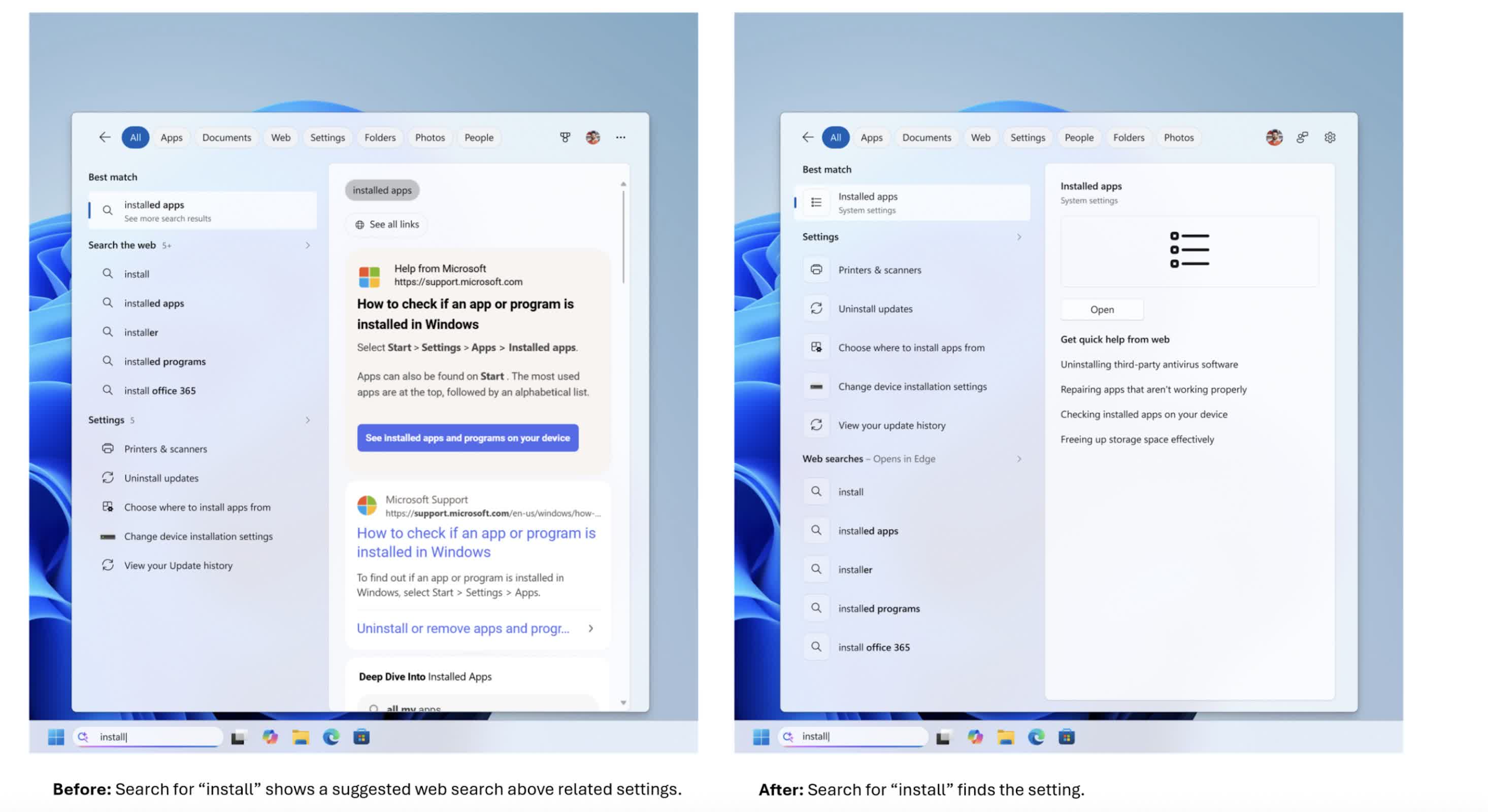
Behind the scenes, Microsoft has adjusted how it ranks results to better support this local-first approach. Apps, settings, and files are now more likely to appear ahead of web and Store items when they are a strong match for a query.
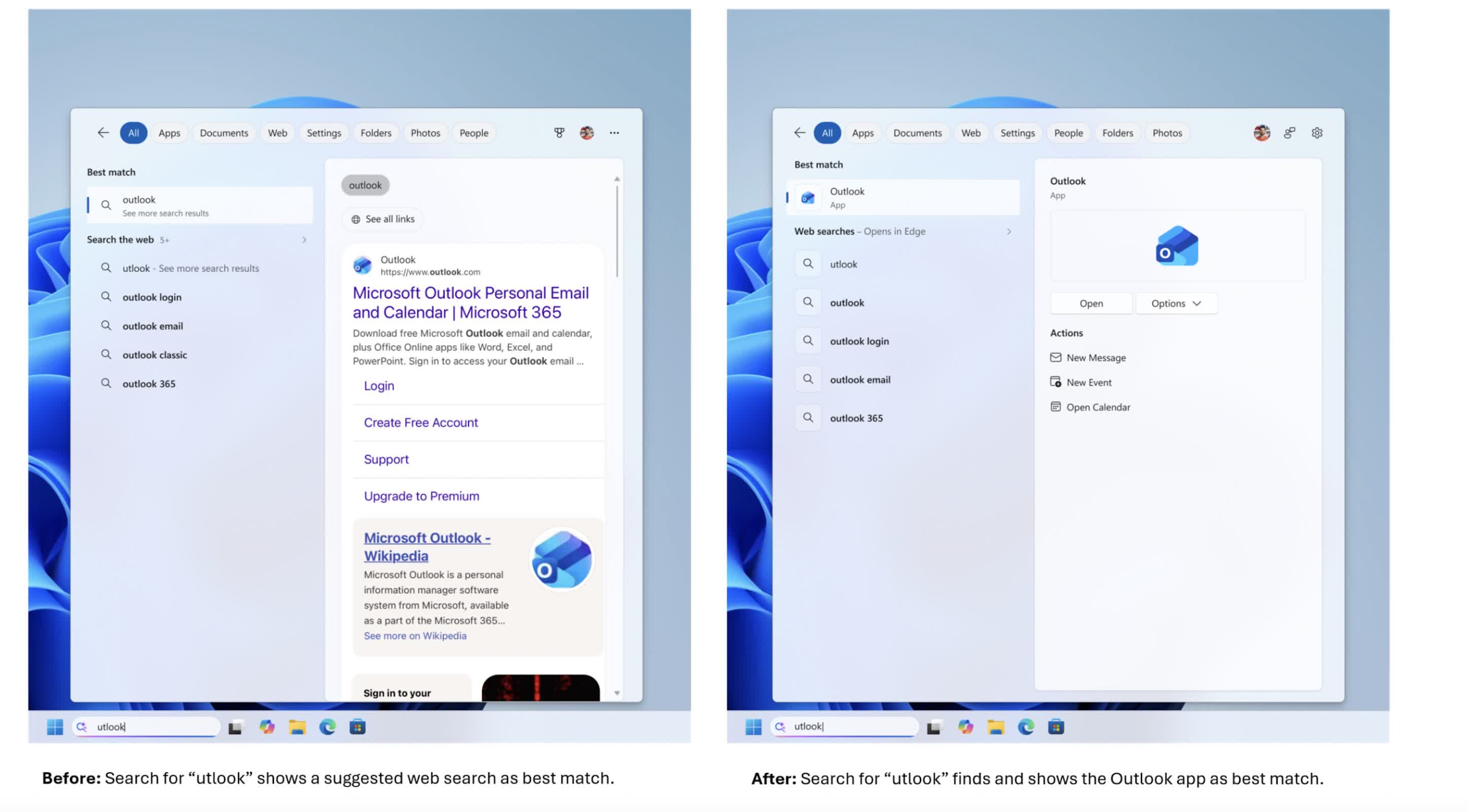
Core system objects, such as This PC and Recycle Bin, now appear more reliably instead of getting lost among tiles and other content. The search engine is also more forgiving of app names, handling typos, extra letters, and partial queries – so something like “utlook” can still find Outlook.
File search has been improved as well. The updated search box can handle very short queries, including two-character strings, which is useful for users working with short codes or brief file names.
Advertisement
Microsoft has also improved how cloud and connected files are surfaced, bringing them into view when they appear to be a better match than local content. The goal is to help users move more quickly from entering a search term to opening the document, download, or folder they intended to find, whether it is stored on the device or in online storage.
Settings search is getting attention as well. The company has made an initial round of changes to how settings results are ranked, aiming to surface more relevant controls higher in the list.
More tuning is planned as Microsoft collects data and feedback from the Experimental channel, meaning this part of the experience is likely to evolve over time. The company is also working on improving reliability by reducing crashes and search-related loading issues, with additional work still underway.
As with many recent Windows changes, the rollout will be gradual. The new search box is being distributed through Microsoft’s Controlled Feature Rollout system, so even users in the Experimental channel may not see it immediately.
Advertisement
Some users may receive the update after a reboot, while others may need to enable it through feature flags. Broader availability will follow as Microsoft refines the feature based on performance data and user feedback. For users who have been asking for a faster, cleaner, and more predictable search experience, this redesign arriving in 2026 represents a significant shift in how Microsoft approaches one of Windows’ most visible features.
Are you currently pooping yourself uncontrollably and want to know why? Well, the CDC made that slightly more difficult last year, but you might just have cyclosporiasis, the unintentional weight loss craze that is gripping parts of the country.
The disease — cyclosporiasis — is a foodborne illness caused by a microscopic parasite called cyclospora. Fresh produce is almost always the source. Previous outbreaks have involved raspberries, bagged lettuce or salads, cilantro and basil. Rarely, it can also be waterborne.
However it enters the human body, people usually start feeling sick about a week later. The illness can begin with flu-like symptoms, such as severe fatigue and body aches. What really sets cyclosporiasis symptoms apart is explosive, watery diarrhea that’s sometimes uncontrollable. People may also have unusually bad gas, stomach cramps and nausea. Consequently, most people lose their appetite. Low-grade fevers are rare.
It is, by all accounts, an absolutely awful experience. 10% of cases will result in hospitalization and it is particularly dangerous for the very young and elderly populations. Cyclosporiasis, while not traditionally in the popular lexicon, is also not new. It’s generally seasonal with case counts in the 10s in many states. What’s making this at all newsworthy is just how far in front of that pace the current outbreaks in Michigan, Ohio, New York, and Illinois are.
The outbreak has been particularly intense in Michigan, which had 1,562 cases as of Friday. Illnesses, caused by the cyclospora parasite, have also been reported in neighboring Ohio, as well as in Colorado, Illinois, New York, North Carolina, Texas, Wisconsin and other states.
Dr. Natasha Bagdasarian, chief medical executive of Michigan, said the rapid rise is “highly unusual.” The state usually sees 40 to 50 cases of cyclosporiasis a year. She said laboratories in the state are scrambling to sequence the genome of the bug to track where it came from.
Advertisement
Now, we had a program for surveilling and tracking this sort of thing. Unfortunately, that program was severely scaled back in 2025 by the Trump administration and RFK Jr. The CDC’s FoodNet program is a federal-state partnership for tracking foodborne illness. 10 states participate in the program. To be clear, New York and Colorado are the only states currently dealing with serious concerns for cyclosporiasis that also participate in the program… but that’s largely besides the point. Looking at which states participate, it’s obvious that they were chosen because they are spread out throughout the states to give you a decent national sampling for an outbreak.
As of July 1, the Foodborne Diseases Active Surveillance Network (FoodNet) program has reduced surveillance to just two pathogens: salmonella and Shiga toxin-producing E. coli (STEC), a spokesperson for the Centers for Disease Control and Prevention told NBC News.
Before July, the program had been tracking infections caused by six additional pathogens: campylobacter, cyclospora, listeria, shigella, vibrio and Yersinia. Some of them can lead to severe or life-threatening illnesses, particularly for newborns and people who are pregnant or have weakened immune systems. Monitoring for the six pathogens is no longer required for the 10 states that participate in the program, though those states aren’t precluded from conducting surveillance on their own.
Now that this current outbreak appears to be spreading across state lines, that kind of surveillance infrastructure sure would be a nice to have, especially as individual state health departments are “scrambling” to sequence the genomes of the illness and do that work as best they can.
Advertisement
In lieu of that, all we have instead is a hope and a prayer that RFK Jr. is paying as much attention as his spokespeople claim he is.
In a statement to USA TODAY, the Food and Drug Administration said, “Under the leadership of Secretary [Robert Kennedy Jr.], FDA is currently investigating cyclospora outbreaks using established epidemiologic, laboratory and traceback tools in close coordination with CDC and state and local partners.”
Somehow, I have my doubts. Unless there are vaccines or autism involved, Kennedy rarely shows much interest in doing HHS’ work at all.
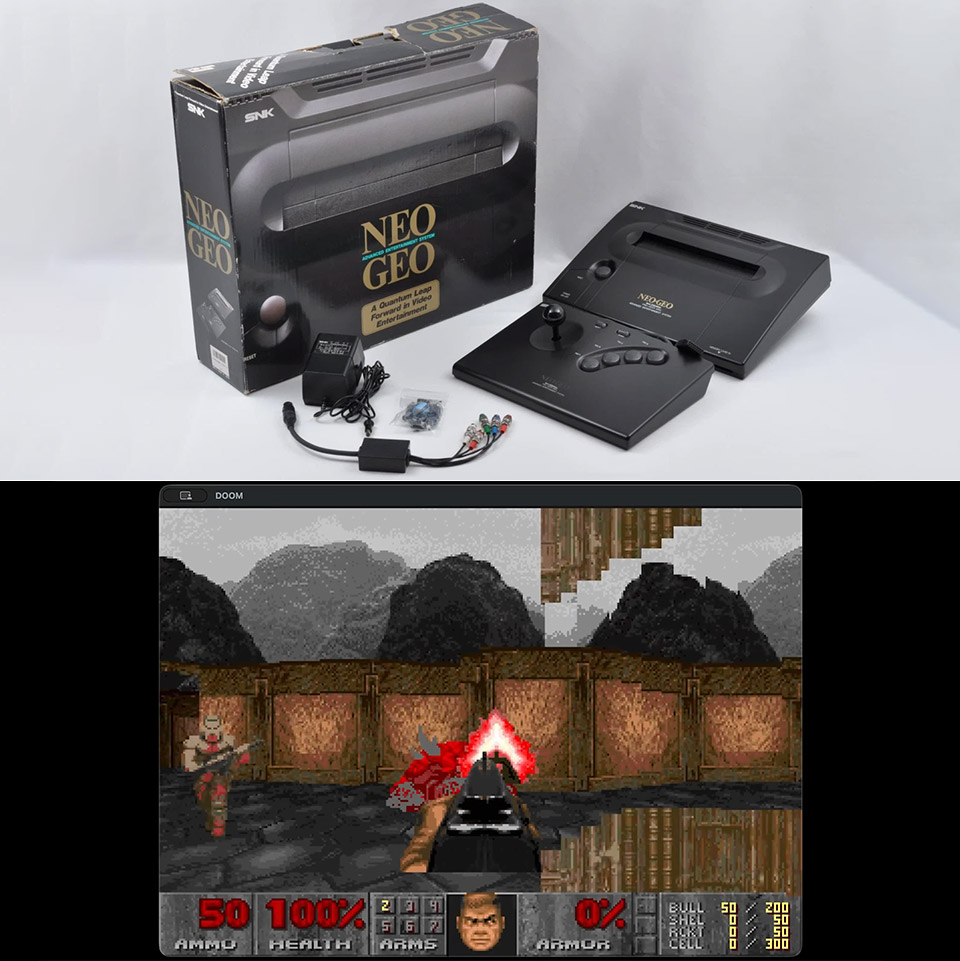
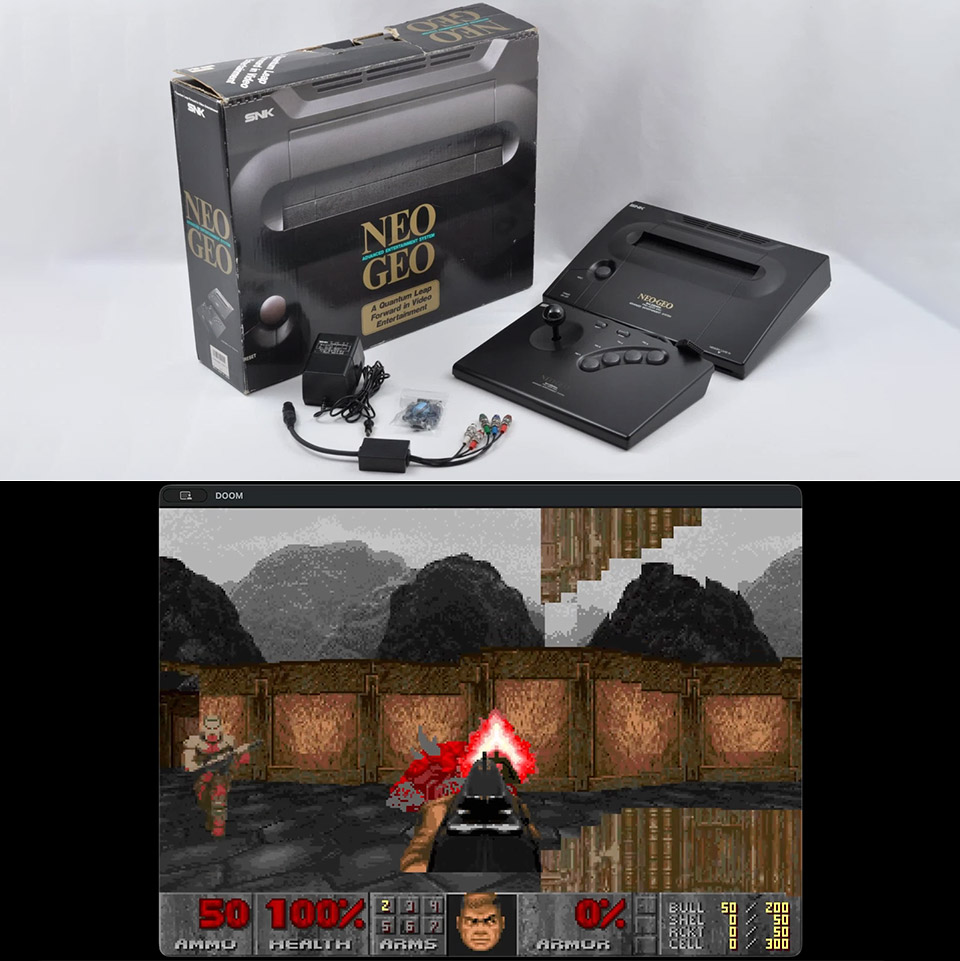
Longtime owners of the Neo Geo AES have watched countless other platforms receive Doom ports over the decades. The console always looked like a strong candidate on paper, with its fast 68000 processor and graphics hardware built for fast sprite handling. Yet the 64 kilobytes of RAM available to the main CPU kept creating a hard stop for anyone who tried a straight conversion. A fresh project shows the limitation was never as final as it once seemed.
SNK designed the Neo Geo with the goal of making as much visual impact as possible with the limited memory they had available, and boy did they succeed. It’s a console that really excels when developers know how to give it well-organized sprites and tile data rather than expecting it to draw things on the fly. Classic Doom, on the other hand, builds its environment one vertical strip at a time, transmitting it all to the screen from a large framebuffer, but that approach is far too memory intensive, and the Neo Geo simply cannot keep up.
Unmistakable and uncompromising arcade-grade build
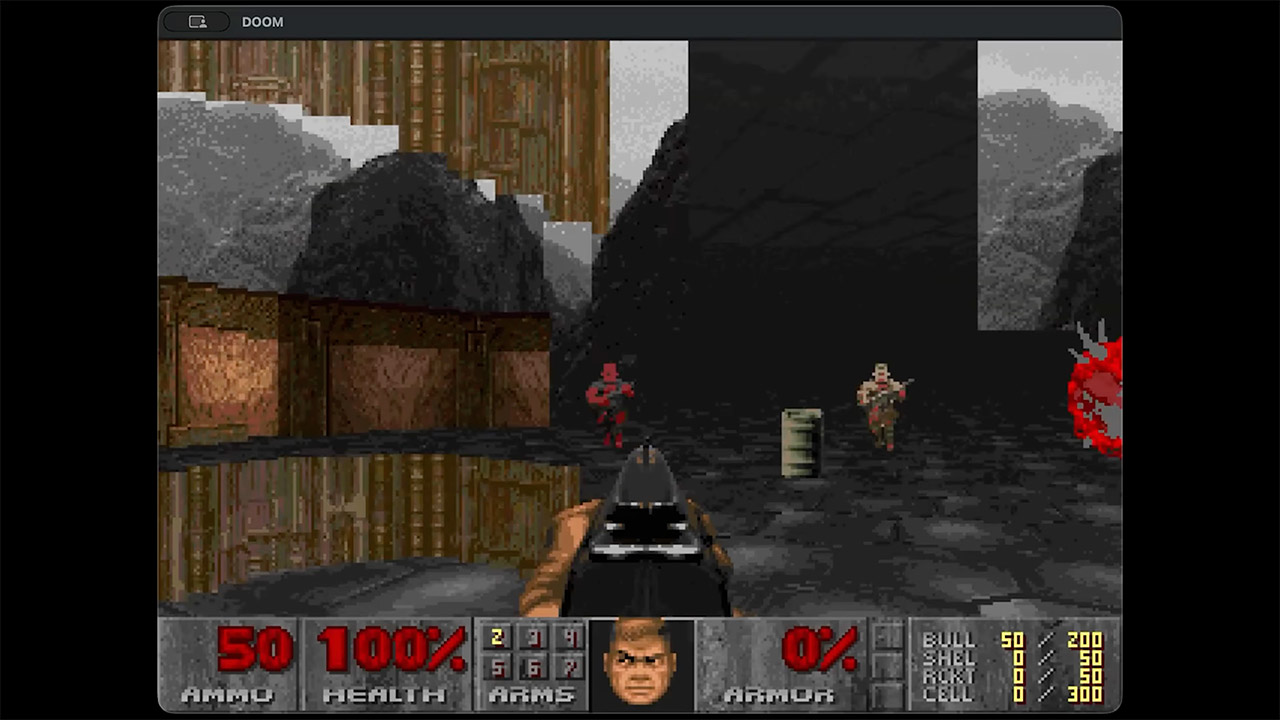
Miguel Sabino figured out a way around this by starting the DoomGeo project on a standard computer with a bunch of conversion tools. These programs consume a Doom WAD file before spitting it out in a format that the Neo Geo can understand. Walls become strips of sprite graphics, along with all of the background elements and animations, because they are all pre-baked and ready to go, rather than having to be created on the fly. In the end, all of this is squeezed onto the cartridge as neat little tables and sprite banks.
Once the ROM boots up, the 68000 CPU’s primary function is to update the sprite control blocks rather than going in and filling in a whole framebuffer pixel by pixel. The hardware sprite system then places, scales, and layers all of those strips to create a great first-person perspective. Floors and ceilings are handled by pre-baked planes that scroll and tilt as they move, while the fixed tile layer houses the entire heads-up display, which includes the status bar, the marine’s face, key indications, and ammo counters. They kept memory demands low by breaking things up this way, yet the game still looks and plays well.
The current build will support every original weapon, including your fist, rocket launcher, and BFG. Monsters have several rotation frames, ensuring that they always face the player in the correct manner while moving about. Doors open, secrets are tucked away, floors that will damage you do exactly that, and the AI inside keeps the enemies on their toes. Even the collision checks take into account the player’s height and step height, ensuring that the movement seems completely natural. A solid 16×16 homemade map becomes the major showpiece, with some experimental paths that can even capture a full-on E1M1 level from the original Doom for testing, and, of course, there’s the audio conversion for the YM2610 sound chip, which is still on the to-do list.
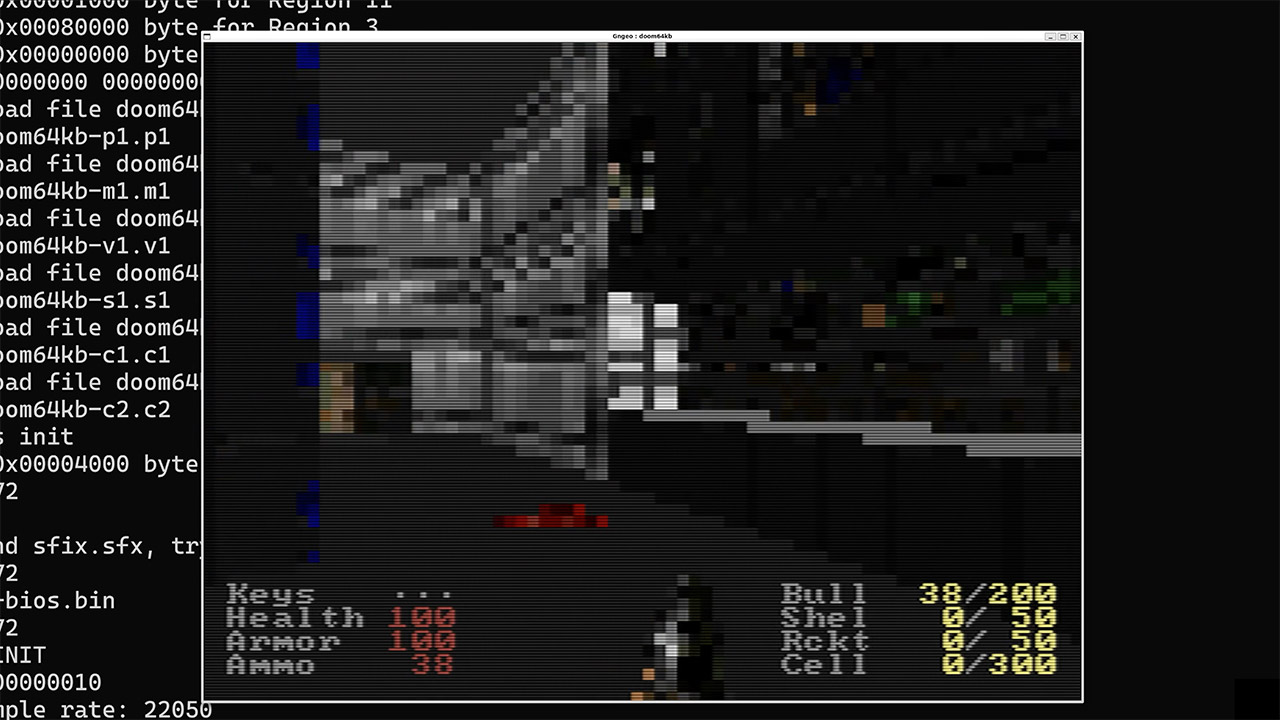
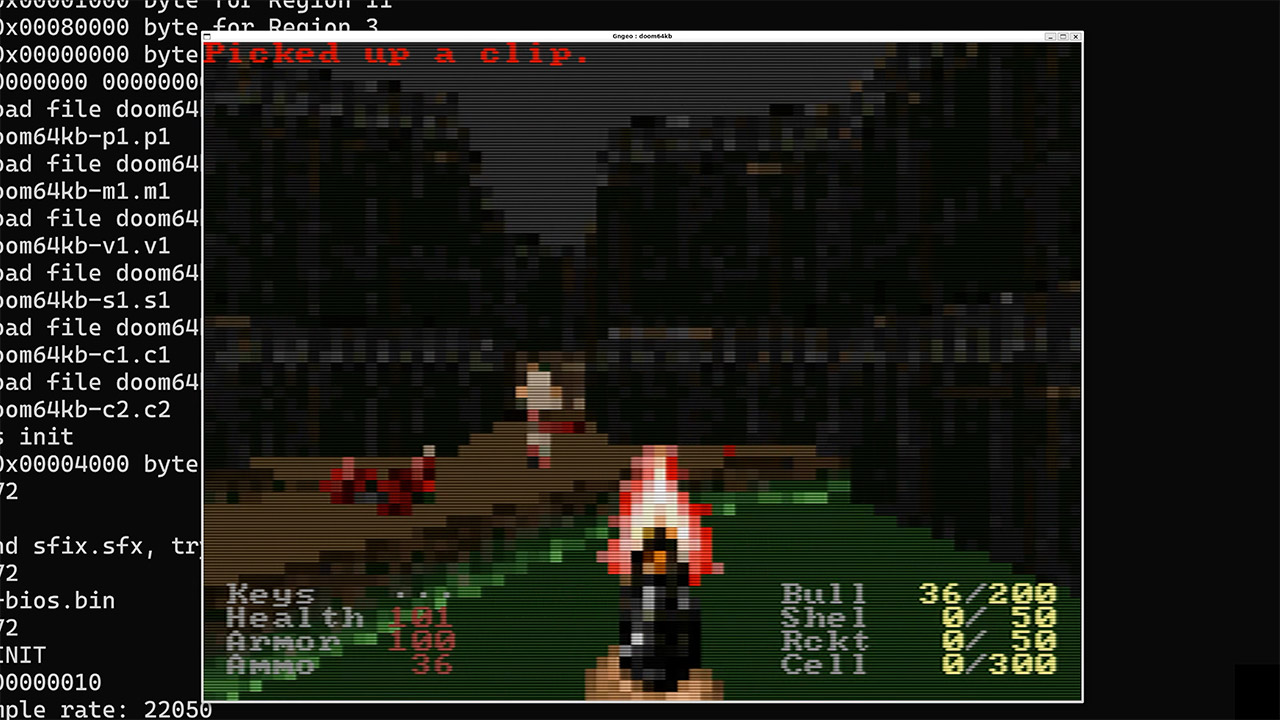
Doom64KB, an even more stripped-down project, takes a completely different approach. It’s based on an older low-memory PC port, and it reduces features even further to fit under the same 64k RAM limit. Floors and ceilings lose their texture maps, music is removed, saving and loading are no longer possible, and only a few particular maps may be played, but hey, it works, even if it sacrifices much of the original experience in the process.
Both of these projects emphasize one basic point: the Neo Geo’s processor and sprite hardware were never the issue. The big challenge was making Doom’s original graphics model to fit within that small memory footprint. These recent initiatives have ultimately overcome that barrier by shifting the heavy lifting to the pre-processing stage and allowing the current sprite system to perform its job, all without the need for additional RAM or custom hardware. [Source]
Winners & losers: Famed video game director Konrad Tomaszkiewicz has shared surprisingly contrarian views on the impact of delayed next-generation consoles on game developers and publishers, arguing that such delays could actually benefit indie studios and startups. Best known as the director of The Witcher 3, Tomaszkiewicz is currently leading development of the upcoming vampire-themed RPG The Blood of Dawnwalker.
Speaking to Eurogamer, Tomaszkiewicz said he believes the reported delays could be a blessing in disguise for small studios like Rebel Wolves, which he co-founded with other industry veterans in 2022. According to him, smaller teams and indie developers have an easier time optimizing their games for existing consoles than developing for entirely new hardware.
Tomaszkiewicz revealed that Rebel Wolves is preparing four builds of The Blood of Dawnwalker – one each for Xbox Series and PlayStation 5, along with two PC versions tailored for different regions with varying ratings restrictions. According to him, delivering bug-free patches for four versions of a game is already challenging enough without having to develop additional builds for next-generation consoles.
Tomaszkiewicz argued that supporting new platforms multiplies the workload required not only from developers but also from testers, who must ensure that the game “has no blockers (and) you can finish it from the beginning to the end.” He added that the extra work could make development exponentially more complex and prohibitively expensive for smaller teams.
Advertisement
Originally announced in January 2025, The Blood of Dawnwalker is an open-world dark fantasy RPG set in a fictional vampire-infested kingdom in 14th-century southeastern Europe. Players take on the role of Coen, the game’s main protagonist, and complete quests using his human abilities during the day and vampiric powers at night.
The game also features a time-sensitive structure, giving players 30 days and nights to achieve their goal. It offers a wide range of choices that can alter the storyline while providing more freedom than The Witcher 3. Tomaszkiewicz claims that the game draws inspiration from the first two Fallout titles.
Rebel Wolves revealed gameplay details and system requirements for The Blood of Dawnwalker in April, following weeks of media speculation about its storyline and release date. Built using Unreal Engine 5, the game launches on September 3 for PC, PlayStation 5, and Xbox Series.
Over the weekend, the Los Angeles Police Department announced it would no longer use the 138 mounted surveillance cameras in the city operated by Flock, which were being used to track vehicles by automatically reading their license plates. A few months ago, the Los Angeles Times reported on discontent in LA over Flock potentially sharing information with the US government, including the Immigration and Customs Enforcement agency, although at the time the LAPD praised Flock’s cameras as “tremendous investigative tools.”
In May, a city council member moved to suspend new contracts or agreements with Flock.
Advertisement
Neither the LAPD, the LA City Council nor Flock Safety responded immediately to a request for comment.
The LAPD told news outlets that a sticking point on moving forward with the company was uncertainty about the data that Flock collects from its cameras, including who owns it and how it can be used once it’s collected.
Flock’s statement to outlets, including KTLA, suggested that misperceptions were driving the decision and that it had been working with the LAPD on data privacy protections and limits around data access. “While this latest development comes as a surprise, we remain committed to continuing our active and ongoing conversations with LAPD to find a path forward,” a Flock spokesperson told the TV station.
Cities dropping or reevaluating Flock
A number of US cities have decided to part ways with Flock Safety this year, but even after contracts ended, some continued to have issues with the company.
Dayton accused the company of data-sharing violations, including searched related to immigration enforcement. Evanston issued a cease-and-desist order after discovering that Flock had reinstalled cameras the city had ordered removed.
Other cities that have canceled contracts with Flock include Mountain View and Oakland, California; Knoxville, Tennessee; Flagstaff, Arizona; Cambridge, Massachusetts; San Marcos, Texas; and Redmond, Washington. The website DeFlock is maintaining a running list of city councils that have canceled contracts or rejected bids from Flock.
As DeFlock points out, Flock isn’t the only vendor of software and hardware that performs automatic license plate reading. Others include Axon, Genetec and Motorola Solutions.






















































You must be logged in to post a comment Login