Connect with us
DAPA Banner

Tech

Ars Asks: Share your shell and show us your tricked-out terminals!

Published

on

The timer_stop function also has the job of converting the timer into a human-readable format, and it’s probably messier than it needs to be. I’m no developer, though, so this is what Past Lee settled on after a few hours of searching through examples.

Doing it in fish for folks like me

That’s for bash when I’m ssh’d into one of my Linux hosts, but I run fish on MacOS. I have a separate fish function for getting the same results there, complete with gross hacks for turning the measurement into human-readable form. I made this code, and I am unapologetic. Witness my cobbled-together StackOverflow-sourced kludge.

function fish_prompt --description 'Write out the prompt'
    # Save the last status
    set -l last_status $status

    # Calculate the command duration if available
    set -l cmd_duration ""
    if set -q CMD_DURATION
        # Convert milliseconds to microseconds for more precise comparison
        set -l duration_us (math "$CMD_DURATION * 1000")

        # Calculate different time units
        set -l us (math "$duration_us % 1000")
        set -l ms (math "floor($duration_us / 1000) % 1000")
        set -l s (math "floor($duration_us / 1000000) % 60")
        set -l m (math "floor($duration_us / 60000000) % 60")
        set -l h (math "floor($duration_us / 3600000000)")

        # Format duration string
        if test $h -gt 0
            set cmd_duration (string join '' "(" $h "h" $m "m)")
        else if test $m -gt 0
            set cmd_duration (string join '' "(" $m "m" $s "s)")
        else if test $s -ge 10
            set -l fraction (math "floor($ms / 100)")
            set cmd_duration (string join '' "(" $s "." $fraction "s)")
        else if test $s -gt 0
            set cmd_duration (string join '' "(" $s "." (printf "%03d" $ms) "s)")
        else if test $ms -ge 100
            set cmd_duration (string join '' "(" $ms "ms)")
        else if test $ms -gt 0
            set -l fraction (math "floor($us / 100)")
            set cmd_duration (string join '' "(" $ms "." $fraction "ms)")
        else
            set cmd_duration (string join '' "(" $us "us)")
        end
    end

    # Define unicode symbols for status
    set -l checkmark "✓"
    set -l cross "✗"

    # Colors
    set -l normal (set_color normal)
    set -l dark_gray (set_color 555555)
    set -l blue (set_color -o blue)
    set -l red (set_color red)
    set -l green (set_color green)
    set -l purple (set_color -o purple)

    # First line
    echo # New line
    echo -n -s $dark_gray "["(date +%T)"] $last_status " # Time in brackets and exit status

    # Status indicator with exit status
    if test $last_status -eq 0
        echo -n -s $green $checkmark
    else
        echo -n -s $red $cross
    end

    # Actually echo the duration
    echo -n -s $dark_gray " $cmd_duration"

    # Do the rest of the prompt
    echo
    set -l host_color $purple
    echo -n -s $host_color $USER "@" (prompt_hostname) $normal ":" $blue (prompt_pwd) $normal " \$ "
end

A splash of color

Spending my formative years immersed in ANSI BBS graphics has probably made me a little more fond of colorful text in my terminal than the average frumpy, button-downed admin. Look, I know some folks feel that syntax highlighting and colors in general kill comprehension and encourage skimming, but what can I say? I love them and rely on them. Perhaps I skim too much, but so be it. You can take my colorful shell tools from my cold, dead hands.

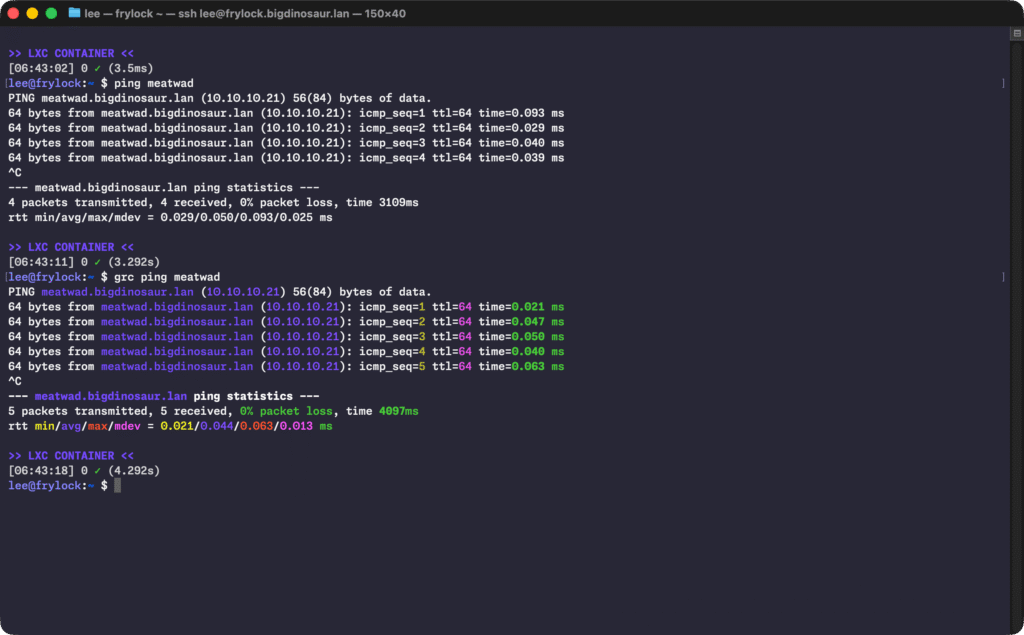
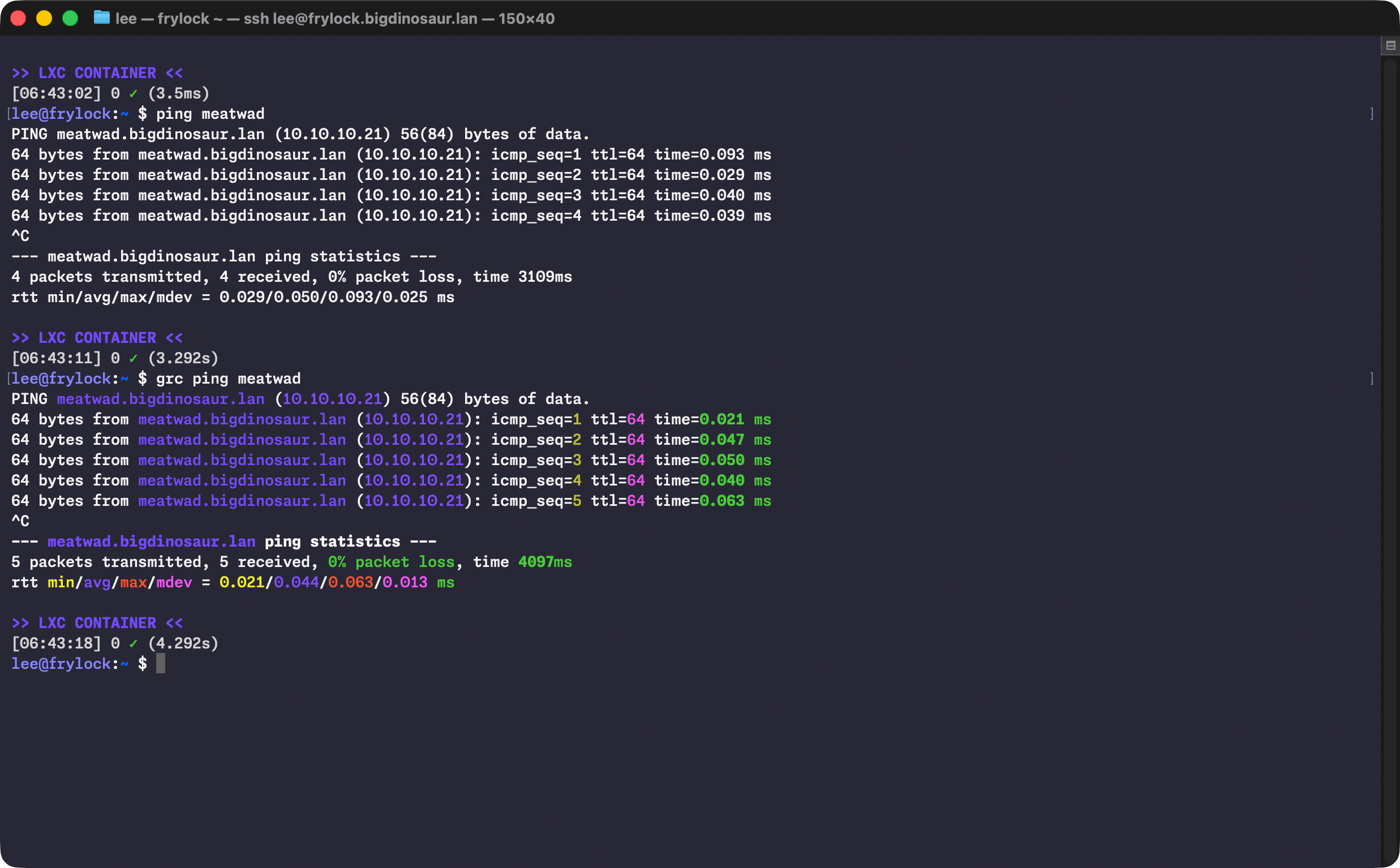
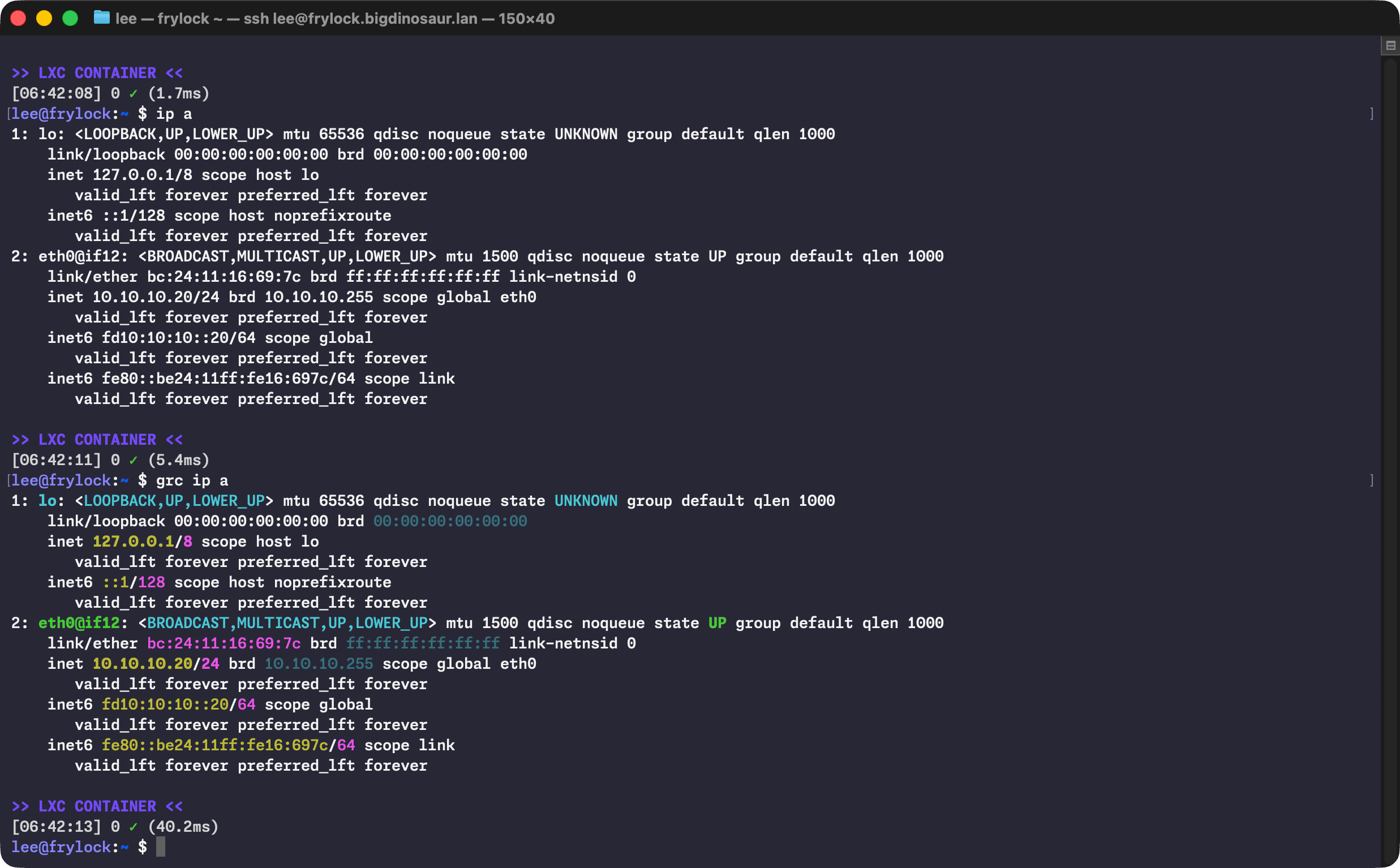
To that end, I lean on a little program called GRC (for Generic Colorizer) to add highlighting and coloration to other tools. It’s broadly available and works without any additional configuration.

Advertisement

Image showing the before and after of using GRC with ping
Nothing wrong with a little color!

Lee Hutchinson

Advertisement
Advertisement

There’s a bit of aliasing (which I keep in .bash_aliases like a good citizen) to make colorful output the defaults on some common commands:

    alias ls="ls --color=auto"
    alias ll="ls -AlFh --group-directories-first"
    alias df="grc df -h"
    alias du='grc du -h'
    alias free="grc free -h"
    alias ping='grc ping'
    alias traceroute="grc traceroute"
    alias ip='grc ip'

I’m also a big fan of making my numbers human-readable, and the -h switch is therefore applied liberally.

Advertisement

(Do note that wrapping commands like ip in GRC can sometimes do weird things if you’re piping its output into something else. Use caution. Or don’t! It’s your computer, knock yourself out!)

The terminal itself

Sharp-eyed readers will note from the screenshots that I’m using MacOS’s Terminal.app for my terminal program, despite there being far better options. I suppose the excuse I have is that I’m comfy with Terminal.app and nothing has pulled me off of it. I’ve test-driven the usual suspects—Ghostty, Alacritty, the mighty iTerm2 with its awesome tmux windowing integration, and even fancy new reinterpretations of the terminal experience like Warp.

Source link

Advertisement
Continue Reading
Click to comment

You must be logged in to post a comment Login

Leave a Reply

Tech

Apple removes more Mac mini and Mac Studio models from sale, as CEO Tim Cook warns it ‘may take several months to reach supply demand balance’

Published

on


  • More Mac models have now been pulled by Apple
  • Mac minis and Mac Studios now available in fewer configurations
  • AI and the associated memory shortage is to blame

With AI data center demand sucking up the world’s supply of RAM, consumers are feeling the effects: having already removed some configurations of the Mac Studio and Mac mini from its store last month, Apple has now reduced the available options even further.

As spotted by MacRumors, you can no longer buy Mac mini models with 32GB or 64GB of RAM, while the M3 Ultra Mac Studio with 256GB of RAM has also been taken off sale — so right now that particular computer is only available with 96GB of RAM.

Source link

Advertisement
Continue Reading

Tech

This Trump FCC Cybersecurity ‘Fix’ Is About To Make Hardware Way More Expensive For Everyone

Published

on

from the weird-and-racist-performance-art dept

Last week the Trump FCC quietly announced that it was cooking up a new ban on any labs that have testing offices in China from testing electronic ‌devices such as smartphones, cameras and computers for sale in the United States.

That’s going to create some major issues given that roughly 75% of all U.S.-bound electronics are currently tested in Chinese facilities. Many of these operations are owned by U.S. or European companies that have testing facilities in China because that’s where the lion’s share of technology is manufactured, so it’s simply more efficient for testing evolving iterations of new product.

That these companies have offices in China doesn’t inherently mean the testing labs are somehow all magically compromised and in dutiful service to the Chinese government, though that’s certainly the implication the xenophobic Trump administration is making (and has made before in previous, similar announcements).

One major problem outside of the raw logistics of it all: Carr’s planned cybersecurity fix would be significantly more expensive, driving up costs for everyone:

Advertisement

“27 of the affected facilities are Chinese subsidiaries of major Western testing firms, including Intertek, SGS, TUV Rheinland, and Bureau Veritas. Those companies operate labs in the U.S., Europe, and Taiwan that can absorb redirected work, but the shift won’t be seamless. Basic FCC certification testing runs between $400 and $1,300 at Chinese labs, compared with $3,000 to $4,000 at U.S. equivalents.”

Who is going to eat the difference in those costs? You are, of course. In addition to the higher costs from the AI boom, the tariffs, and Trump’s pointless war in Iran. Whatever companies lobbied Carr and Trump will do great. You probably won’t.

Given the terrible nature of smart IOT home security standards (more a byproduct of unregulated crony capitalism than China-based testing locations), having a more direct line of control over the testing of U.S. bound hardware makes superficial sense.

But then you have to remember that this is Brendan Carr, who does nothing authentically in the public interest, and is likely just looking to drive more business to a handful of U.S. companies that lobbied for his attention. And you have to remember that these folks, as you saw when they talked about shifting smartphone production to the States, don’t actually know what the fuck they’re doing.

The other major problem: Trump and Carr’s rabid deregulatory, anti-governance zealotry on other fronts has repeatedly worked to undermine U.S. cybersecurity, making these sorts of fixes leaky and highly performative, even if they were to be successful (which they won’t be).

Advertisement

While Carr and Trump profess to be super worried about Chinese threats to national security, with their other hand the Trump administration has gutted government cybersecurity programs (including a board investigating the biggest Chinese hack of U.S. telecom networks in history), dismantled the Cyber Safety Review Board (CSRB) (responsible for investigating significant cybersecurity incidents), and fired oodles of folks doing essential work at the Cybersecurity and Infrastructure Security Agency (CISA).

Brendan Carr is also engaged in a massive effort to destroy whatever’s left of the FCC’s consumer protection and corporate oversight authority, despite the fact that the recent historic Chinese Salt Typhoon hack (caused in large part because major telecoms were too incompetent to change default administrative passwords) was a direct byproduct of this exact type of mindless deregulation.

The Trump administration’s stacked courts are also making it extremely difficult to hold telecoms accountable for literally anything (see the Fifth Circuit’s recent reversal of a fine against AT&T for spying on customer movement), which also undermines consumer privacy and national security, and ensures zero real repercussions for companies that fail to secure their networks and sensitive data.

So, with one hand you have Carr claiming he’s “fixing cybersecurity” with stuff like this or his recent foreign router “ban” (which as we’ve noted is really a lazy extortion scheme), while with the other he’s doing everything in his power to ensure that domestic telecoms don’t really have anything even vaguely resembling meaningful privacy and security oversight.

Advertisement

Here’s where I’ll remind you that because the U.S. is too corrupt to pass even a basic modern privacy law, we also have a vast and largely unregulated data broker industry that hoovers up your every movement and online habit, then sells access to it to any random asshole (including foreign and domestic government intelligence agencies).

Here too, weird zealots like Trump and Carr have rolled back efforts to regulate data brokers or do anything about it. As authoritarian racists, they’re too blinded by personal self-enrichment and racism to have any genuine understanding of how any of this stuff actually works.

As with the TikTok “ban” (which basically involved shoveling ownership to Trump’s billionaire buddies), so much of this is heavily xenophobic, nationalistic, transactional, self-serving, and performatively detached from any actual reality. By the time the check comes due, guys like Carr and Trump will already be off to the next grift.

Filed Under: brendan carr, china, cybersecurity, fcc, privacy, security, testing

Advertisement

Source link

Continue Reading

Tech

Tin Can launches program to help schools and neighborhoods go smartphone-free together

Published

on

Tin Can landline phones in a variety of colors. (Tin Can Photo)

Tin Can, the Seattle startup behind the screenless, Wi-Fi-enabled landline phone for kids, is launching a new feature aimed at the groups that have been driving its rapid growth: schools, neighborhoods, and parent organizations looking to ditch smartphones together.

The company is calling it Tin Can Communities — a program that lets larger groups adopt the device all at once, with bulk pricing, onboarding support, and early access to features built specifically for group use.

Groups can order a minimum of 50 phones or more than 1,000 by reaching out to Tin Can directly with details about their organization.

“If you want to help kids build real connection, it works best when people come on together,” Tin Can CEO Chet Kittleson said. “The value multiplies quickly because kids have more people to call, and parents feel less pressure to move to a smartphone because their whole network is already on Tin Can.”

Tin Can co-founder and CEO Chet Kittleson. (Tin Can Photo)

Tin Can has been riding a wave of momentum since co-founders Kittleson, Graeme Davies and Max Blumen — all veterans of Seattle real estate startup Far Homes — launched the company in 2024. The colorful $100 phone connects to home Wi-Fi, letting kids make and receive calls from contacts approved by parents through a companion app. The company has raised $15.5 million to date, including a $12 million seed round last December.

The startup has grown to 30 employees and sold hundreds of thousands of phones since launching its flagship product in 2025 — now on its sixth production batch, shipping in June.

Advertisement

The momentum has extended beyond the parenting world: last month, late-night host Jimmy Kimmel gave the brand an unprompted shoutout during his monologue, suggesting someone get President Trump “one of those Tin Can phones like the kids have that are not on the internet.”

Wednesday’s launch comes as parents across the country have been organizing collective efforts to delay smartphone adoption — a movement built on the idea that individual decisions only go so far. Tin Can has found itself at the center of that shift, with PTAs, school administrators, and other groups asking how to get entire communities on board at once.

On San Juan Island in Washington, Alexandra and John Iarussi co-founded a nonprofit called the Mythic Farms Foundation with the sole purpose of putting a Tin Can in the hands of every kid in Friday Harbor. The first 300 families to sign up received a phone free of charge — and after one week the group had logged more than 1,500 calls and 75 hours of talk time, nearly double the typical first-week numbers for a new network, according to the company.

“Between ages 10 and 16, every child has approximately 8,760 hours that smartphones typically displace,” Alexandra Iarussi, mother of four boys, told the San Juan Journal. “Four hours a day, six years, one childhood.”

Advertisement

In Kansas City, a mom named Tracy Foster — director of the nonprofit Screen Sanity — partnered with local businesses to fundraise the purchase of nearly 200 Tin Cans for Nativity Parish School, then threw a party at a local skating rink to hand them out. Tin Can says kids from the school have called each other on 29 of the last 30 days, and the average child in the community now has nearly 30 Tin Can contacts.

Tin Can’s new initiative also comes as Seattle Public Schools this week enacted its first-ever districtwide cellphone policy, requiring K-8 students to keep phones off and stored away for the entire school day, and restricting high schoolers to phones only during lunch and passing periods.

Source link

Advertisement
Continue Reading

Tech

DAEMON Tools devs confirm breach, release malware-free version

Published

on

Daemon Tools

Disc Soft Limited, the maker of DAEMON Tools Lite, confirmed that the software had been trojanized in a supply chain attack and released a new, malware-free version.

In a statement published earlier today, Disc Soft says it has secured its infrastructure. Still, it has yet to attribute the attack to a specific threat actor or share additional information about the breach, including the attack vector used to access its systems, as it continues to investigate the incident.

“Following an internal investigation, we identified unauthorized interference within our infrastructure. As a result, certain installation packages were impacted within our build environment and were released in a compromised state. Version 12.6 of DAEMON Tools Lite, which does not contain the suspected compromised files, was released on May 5.” the company said.

“Users of other DAEMON Tools products, including paid versions of DAEMON Tools Lite, DAEMON Tools Ultra, and DAEMON Tools Pro are not affected by this incident and can continue using their software as usual.”

Advertisement

Users who downloaded or installed DAEMON Tools Lite version 12.5.1 (free) since April 8 are advised to uninstall the app, run a full system scan using security or antivirus software, and install the latest version of DAEMON Tools Lite (12.6) from the official website.

Disc Soft has removed the trojanized version, which is no longer supported, and now displays a warning prompting users to install the latest version of DAEMON Tools Lite.

As cybersecurity company Kaspersky revealed on Tuesday, hackers trojanized DAEMON Tools Lite installers and used them to backdoor thousands of systems from more than 100 countries that downloaded the software from the official website since April 8.

After the unsuspecting users executed the digitally signed trojanized installers (versions ranging from 12.5.0.2421 to 12.5.0.2434), the malicious code embedded in the compromised binaries deployed a payload designed to establish persistence and activate a backdoor on system startup.

Advertisement

The first-stage malware dropped in the attack was a basic information stealer that collected system data (including hostname, MAC address, running processes, installed software, and system locale) and sent it to attacker-controlled servers for victim profiling. Based on the results, some of the infected systems received a second stage, a lightweight backdoor that can execute commands, download files, and run code directly in memory.

In at least one case, Kaspersky observed the deployment of a QUIC RAT malware, which can inject malicious code into legitimate processes and supports multiple communication protocols.

While investigating the attack, Kaspersky found that retail, scientific, government, and manufacturing organizations in Russia, Belarus, and Thailand, as well as home users in Russia, Brazil, Turkey, Spain, Germany, France, Italy, and China, were among the victims whose devices were infected with malicious payloads.

Today, in an update to the original report, the Russian cybersecurity company confirmed that DAEMON Tools Lite 12.6.0, released yesterday, no longer exhibits malicious behavior.

Advertisement

“Following disclosure, the vendor acknowledged the issue and published a new version of the software to address it,” Kaspersky said. “The updated DAEMON Tools version 12.6.0.2445 no longer shows the malicious behavior.”

BleepingComputer contacted Disc Soft several times regarding the incident, but we have not yet received a response.


article image

AI chained four zero-days into one exploit that bypassed both renderer and OS sandboxes. A wave of new exploits is coming.

At the Autonomous Validation Summit (May 12 & 14), see how autonomous, context-rich validation finds what’s exploitable, proves controls hold, and closes the remediation loop.

Claim Your Spot

Source link

Advertisement
Continue Reading

Tech

In the flexible work era, how can we make the most of co-working spaces?

Published

on

Zihan Wang of the University of Sussex offers advice to professionals who want to maximise their time in shared spaces.

Co-working spaces have become a familiar part of the working landscape. A convenient alternative to working from home or an employer’s office, they have become the favoured option of millions of the world’s freelancers, entrepreneurs and remote workers.

In the UK, there are over 4,000 co-working venues to choose from. Prices vary, depending on location and facilities, but with a dedicated desk costing around £200 per month, it’s worth knowing how to make the most of what these spaces offer.

So how do you choose the right co-working space for you? And how do you get the maximum benefit? Here are four practical tips to consider:

Advertisement

Identify your needs

Not all co-working spaces serve the same purpose. Some people are simply looking for a quiet desk outside the home, while others want a social environment where they can meet people, exchange ideas and build connections.

Being clear about what you want, whether it’s productivity, networking opportunities or skill development, is the first step.

Smaller, independently run spaces often place greater emphasis on community building, with managers who organise regular informal events such as ‘lunch and learn’ sessions or workshops. These environments can create more opportunities for social interaction and learning.

By contrast, larger corporate-style spaces may offer more polished facilities and business services, but with fewer opportunities for facilitated interaction. Choosing the right co-working environment means considering the type of space and how you plan to use it.

Advertisement

Give it a try

Co-working spaces are often advertised as being open and inclusive. But research I worked on with colleagues shows that experiences can vary depending on factors such as age, gender or professional background.

Some spaces will probably feel more welcoming than others, particularly ones where equality, diversity and inclusion are a deliberate part of their design and ethos.

Many spaces are now also set up with specific groups in mind. For example, some cater to female entrepreneurs, while others offer tailored support for neurodivergent workers.

Before committing, it’s worth visiting a space, attending an event, or trying a short-term pass (for a couple of days or a week) to see whether it feels like a good fit.

Advertisement

It’s more than a desk

It’s easy to treat co-working spaces as simply a place to work. But research suggests much of its value lies in the connections, community and everyday interactions it makes possible.

Casual conversations in the kitchen or spontaneous exchanges over lunch can help build communication skills, expand professional networks and spark new collaborations. Evidence suggests that these benefits tend to be particularly strong for those who are newer to a city, earlier in their careers, or working independently. They may have less established local networks or fewer everyday opportunities for office-based interaction, making them more likely to seek out social connections within co-working spaces.

If you only show up, put your headphones while you work and then leave, you may miss out on some of the main advantages of co-working – the opportunity to connect with others and become part of a community. Making the most of these spaces often means being willing to take that first step, engage with others and gradually find your own circle.

Take advantage

If your work involves specialised tools, digital technology or continuous skill development, you may need more than just Wi-Fi and coffee from a co-working space.

Advertisement

Many now offer access to specialist software and cutting-edge equipment such as 3D printers or virtual reality devices, which can be costly or difficult to access by yourself.

Some go a step further and organise workshops and training sessions, or even events that reflect the latest developments in a particular field. These resources can be particularly valuable for independent workers including freelancers and the self-employed, who may not have access to structured on-the-job training through an employer.

Using them can help you build practical, up-to-date technical and digital skills, especially as new technologies and AI continue to reshape the skills demanded in many industries. So don’t overlook what’s on offer, whether it’s a workshop, a new tool, or a piece of equipment. Making use of these opportunities can help you stay adaptable, keep learning and be better prepared for what comes next.

Overall then, co-working spaces can offer valuable opportunities to learn new skills, build networks and adapt to changing ways of working. But these benefits are not automatic and they are not the same for everyone.

Advertisement

Getting the most out of co-working often depends on how you use the space and whether it matches your needs. At its best, co-working is not just about renting a desk, but about finding an environment where you can connect, learn and grow.

The Conversation

By Zihan Wang

Zihan Wang is a research fellow in geography and innovation at the University of Sussex. Her research examines skills as a core regional capability shaping innovation, productivity, labour market dynamics, and structural transformation. Using large-scale quantitative data including online job postings, LinkedIn data, and questionnaires, she investigates how skills are developed, deployed, and transformed across places. With a sectoral focus on manufacturing and the creative industries, she aims to bridge theoretical analysis and policy development, particularly in informing place-based skills policy and industrial strategy.

Don’t miss out on the knowledge you need to succeed. Sign up for the Daily Brief, Silicon Republic’s digest of need-to-know sci-tech news.

Advertisement

Source link

Continue Reading

Tech

Nvidia partners with Corning to build the fiber optic backbone for next-gen AI data centers

Published

on


Nvidia said the deal will expand Corning’s US-based optical connectivity manufacturing capacity tenfold and boost its domestic fiber production capacity by more than 50%. Collectively, the new facilities will create north of 3,000 high-paying jobs, we are told. Financial terms of the agreement were not disclosed, nor was a timeline…
Read Entire Article
Source link

Continue Reading

Tech

Google Search updates hope to turn AI answers into a starting point for you, not a dead end

Published

on

Google’s AI-powered Search features have fundamentally changed how we look stuff up. Instead of scrolling through the search results, most of us now just read the AI Overview and move on. Google wants to change that. The company is rolling out five updates to AI Mode and AI Overviews designed to surface more links and give users more reasons to click through to the websites behind them.

Further Exploration and inline links

The most notable addition is Further Exploration, a new section that appears at the end of AI Overviews with curated links to specific articles, case studies, or reports related to the query. For example, Google says if you search for how cities have added green space, you might see links to a stream restoration project in Seoul or a report on how architects designed New York’s High Line park. This should give users a reason to keep exploring instead of closing the tab after reading the overview.

Google is also placing more links directly within AI responses, next to the relevant text, rather than grouped at the bottom. The company explains that searching for a California bike trip, for instance, might surface a link to a Pacific Coast touring guide next to a bullet point about terrain, and a training blog post next to a bullet point about daily mileage. This will give users a more direct path from the AI answer to the source material behind it.

On desktop, hovering over any inline link will trigger a preview showing the website name and page title, which is aimed at giving users more confidence about visiting the website. Google’s internal testing found that users were more hesitant to follow links when they could not tell where they led, so the preview removes that friction before the click.

Subscriptions and community perspectives

AI Mode and AI Overviews will now label links from a user’s active news subscriptions so they stand out in results. Google says early testing showed users were significantly more likely to click those labeled links. For subscribers, it means the publications they already pay for will be easier to find inside AI search results rather than buried below them.

AI responses will also begin surfacing previews of perspectives from public forums, like Reddit, social media, and firsthand sources, with added context like a creator’s handle or community name.

A search about photographing the northern lights, for example, might surface tips from a specific photography forum, with a link to the full discussion thread. Thanks to this, users who want real-world advice rather than a synthesized summary will have a clearer path to the people who have actually been there.

The bigger picture

These updates also carry real stakes for publishers. AI Overviews have raised concerns across the media industry about declining referral traffic, and these features are Google’s most direct attempt yet to show that AI search and the open web can coexist. Whether they move the needle on click-through rates will be worth watching.

Advertisement

AI Overview accuracy, however, remains an open question. It has a history of confidently stating wrong information, and the featured image for this story is a reminder of that: it misidentifies today’s date as May 20, 2025. Getting users to click through to publishers may be a step in the right direction, but it’s hard to fully trust a guide that does not always know what day it is.

Source link

Advertisement
Continue Reading

Tech

iPod Nano Runs a Triple-Screen Desk Setup That Actually Delivers

Published

on

Apple iPod Nano Triple Screen Desk Workstation
Sixteen years after Apple discontinued production, a single 6th-generation iPod Nano currently stands in the center of a full workstation with three separate displays. The device, released in 2010 as the final iPod model Steve Jobs introduced, handles music playback, photo slideshows across every screen, and crystal-clear voice recordings all at once. A YouTube creator who runs the Will It Work? channel took on the challenge of stretching this tiny player into something far more capable.


He started by removing the built-in 30-pin connector and the touchscreen, which still works great after all these years. From there, it was simply a matter of converting this music player into a true multi-screen media center utilizing whatever parts were readily accessible. The entire operation is based on a 30-pin Apple keyboard dock that was originally designed for larger, more serious devices. He had to design a unique spacer to fit the iPod’s clip while yet leaving the audio jack accessible. The next stage was to connect composite video cables directly from the dock to three Sharp Aquos flat panels, which have been available since 2003. Those older monitors can be placed side by side without creating delay or without any additional software.


AGPTEK 64GB MP3 Player with Bluetooth, M3 2.4 inch Music Player with Speaker and FM Radio, Touch Buttons…
  • 【64GB BUILT-IN LARGE STORAGE CAPACITY】Different from other large memory MP3 players on the market, the AGPTEK M3 boasts an impressive 64GB of…
  • 【Bluetooth 5.3 & Automatic Reconnection】AGPTEK M3 MP3 music player adopts Bluetooth 5.3 technology, more stable connection, better compatibility…
  • 【HiFi Lossless Sound & Sports Partner】 With a professional audio decoding chip and smart noise reduction chip, AGPTEK MP3 player brings you…

Apple iPod Nano Triple Screen Desk Workstation
The audio is then split via a 3.5mm four-pole TRRS jack, with one path sending a signal to a desktop mic, which does a nice job of capturing voice memos that sound like they were recorded with a modern podcast setup. The other channel connects to a set of Apple Pro speakers that fill the room well. The powered stylus lets you glide across the iPod screen without leaving smudges. A double tap on the sleep button progresses to the next song. Tapping the arrow buttons moves you through the slideshow, while pressing pause stops both the music and the images dead in their tracks.

Apple iPod Nano Triple Screen Desk Workstation
Even the clock works properly thanks to a simple Lightning adapter that simply connects to the dock’s USB port and syncs with the iPod without interfering with the audio or video streams. The entire operation runs smoothly and completes its objectives. Try the Voice Memos app, and the external microphone does a decent job of picking up your speech and playing it back clearly.
[Source]

Advertisement


Author
Jackson Chung

A technology, gadget and video game enthusiast that loves covering the latest industry news. Favorite trade show? Mobile World Congress in Barcelona.

Advertisement

Source link

Advertisement
Continue Reading

Tech

Tinder owner Match Group is slowing hiring to pay for its increased use of AI tools

Published

on

You might think the big story out of Match Group’s first-quarter earnings is Tinder’s turnaround. The dating app’s revenue is slightly up again after quarter-after-quarter of declines.

But we’d like to point to a comment the chief financial officer made about how the company is slowing its hiring right now because it needs more money to pay for AI tools for its employees.

Ah, yes, the good ol’ “let’s blame AI” strategy!

While speaking to analysts on the first-quarter earnings call, Match Group CFO Steven Bailey talked about how the dating app giant was investing in AI technology for internal use at the company — as well as how Match was paying for it.

Advertisement

“We’re making a big push around AI enablement. We’re giving every employee in the company access to all the cutting-edge tools. We’re giving them the training they need to succeed. We’re setting expectations. We really want to become an AI-native company,” Bailey said.

“We think it’s a huge opportunity. But these tools cost a lot of money, as I’m sure you know, and so the way we’re helping to pay for that is by slowing our hiring plans for the rest of the year,” he added.

The company assured investors that the impact would be cost-neutral, as the slowed hiring and lower headcount would make up for the increased software expenses. Plus, Match Group is betting that the increased productivity from employees’ use of AI will ultimately increase revenue growth, the number-cruncher explained.

While on the surface, this looks like another example of AI taking people’s jobs — in this case, forcing a company to lower its number of open positions — there’s likely more nuance to this story.

Advertisement

Let’s keep in mind that Match Group’s flagship app, Tinder, has been struggling in recent years. This quarter may be the start of a turnaround, as monthly active users declined by 7% in March compared with the far-steeper 10% drop a year ago. Tinder registrations also grew for the first time since 2024, but by a mere 1%, as Bloomberg pointed out.

This is perhaps a positive sign for Tinder. Or it might be a brief blip driven by users’ curiosity around various product improvements and new features, like IRL events. Time will tell.

Dating meets a generational shift

Match Group remains a company that has to work to squeeze more money out of an oft-dwindling, less active user base — which, to the company’s credit, it did exactly that. Match’s revenue was $864 million in the first quarter, up 4% year-over-year. However, its next-quarter estimates are coming in lower — around $850-$860 million, down 2% to flat year-over-year.

All these struggles come after many months of what appears to be a growing disinterest in the use of dating apps by younger people. This generational shift sees people opting to meet up in real-life, perhaps by pursuing an interest, like running, book clubs, or a hobby that connects them with other people, which then, in turn, expands their network, increasing their chance of meeting someone new.

Advertisement

The trend coincides with a resurgence of nostalgic tech, like digital cameras, flip phones, boomboxes, and even landlines, signaling a generation that’s feeling burned out by always-on connectivity and looking for analog pleasures.

Match Group is aware of this significant shift and says it’s pivoting to address the challenge by increasing the number of its own IRL events.

“Gen Z desperately wants to connect. They know they want to meet new people. They just want to do it in a low-pressure, low-stakes way that doesn’t feel like a job interview,” Match’s CFO Rascoff told investors on the call. “Traditional dating apps are very highly structured and can be intimidating to a user under 30. So, I think the growth of these alternative ways to meet new people speaks to how Gen Z is trying to find lower-pressure ways to connect.”

“We’ve obviously adapted our roadmap to this reality,” he said.

Advertisement

When you purchase through links in our articles, we may earn a small commission. This doesn’t affect our editorial independence.

Source link

Continue Reading

Tech

ISTE+ASCD Names 2026-27 Voices of Change Fellows

Published

on

Bringing Voice to the Future of Learning

In the coming months, each fellow will produce a series of first-person essays, articles and videos. Their work will help readers understand how classrooms and school systems must adapt to our rapidly shifting digital landscape. Some of the questions fellows will explore:

  • How are you and/or your school community using technology or AI tools to support educator and student well-being — and what practices ensure those tools are used responsibly and equitably?
  • How do you and/or your school community leverage data, learning science, or AI-driven insights to design instructional strategies and assessments that help diverse learners succeed?
  • How do you and/or your school support students and educators in developing the digital citizenship and media literacy skills needed to critically and responsibly engage with AI and emerging technologies?

Celebrating Our Legacy

As we welcome this new group, I’d like to extend a sincere thank you to our 2025-26 cohort — April Jackson, Dan Clark, Melinda Medina, Nikita Khetan, Patrice Wade and Sofia Gonzalez. Their stories on mental health, engagement and changing school dynamics underscored a core truth: teaching must evolve alongside how students learn in the age of AI.

As our team embarks on this journey with the 2026-27 fellows, I hope you enjoy their dispatches from the field. You can follow their stories across our publications, primarily on EdSurge – the digital news site of ISTE+ASCD. We invite you to join us in meeting this moment with curiosity and a commitment to building the classrooms our students and teachers deserve.

Source link

Advertisement
Continue Reading

Trending

Copyright © 2025