Connect with us
DAPA Banner

Tech

Best Indoor Security Camera 2026: Keep your home secure

Published

on

It doesn’t matter if you want to keep tabs on your home whilst on holiday or you just want to see what your pets get up to when you’re at the office, having an indoor security camera can be great for providing peace of mind when you need it. There is no shortage of great options in 2026 but if you’re not quite sure where to start then our guide to the best indoor security cameras to buy can help you out.

In just a short time, we’ve seen home security go from something that usually involves a fairly laborious installation process (sometimes with a hired professional) to an aspect of the tech industry that, much like the latest smartphones and laptops, is designed to be far more accessible to the masses.

What has helped with making indoor security cameras more approachable is their inclusion as part of wider smart home ecosystems. You no longer have to worry about proprietary software or a system that operates in a vacuum, as most of the latest security cameras can be implemented into your existing smart home dashboards, whether that be in the Alexa app, Apple Home or Google Home.

With more compatibility at play, you can dive into the settings of these cameras, playback footage and see movement alerts in real-time, all from the comfort of your smartphone. It’s made a big difference in allowing more people to set up a robust home security system, even those who have little experience in this area.

Advertisement

At this point in time, our team of tech experts have tested countless indoor security cameras, so you can shop with confidence as this list has compiled their efforts into a simple and easy-to-understand guide. For anyone looking to keep tabs on their garden, or maybe the front of their home, you’ll be better suited with our alternative list of the best outdoor security cameras.

Best indoor security cameras at a glance

Advertisement

SQUIRREL_ANCHOR_LIST

Learn more about how we test indoor security cameras

All of our indoor security cameras are installed inside our test lab, monitoring real people. We run them for at least a week, so that we can tweak motion detection and find out how reliable or annoying each model is. We download sample footage from each camera, too, so that we can compare image quality between devices.

Advertisement
  • Excellent video quality

  • Flexible and powerful app

  • Hugely flexible object detection (with subscription)

  • Arlo subscriptions are expensive

Arlo’s cameras have been some of our instant go-tos over the last few years and that winning streak only continues with the excellent Arlo Pro 6 2K. With the ability to be set up in either outdoor or indoor settings, the Arlo Pro 6 is also one of the most versatile security cameras on the market, so for full coverage of your home, you could pick up several of these and call it a day.

Advertisement

As its full name implies, this particular Arlo camera shoots footage in crisp 2K quality which is perfect for most people. Sure, you can go all the way and pick up a camera that shoots in 4K, but that footage is always going to weigh more heavily on your local or cloud storage, so 2K is a great alternative for still keeping a good amount of quality without going overboard.

In terms of major upgrades over the Arlo Pro 5, the battery life has been given a real boost here, with the ability to now run for up to eight months on a single charge. If you’re someone who spends a few months of the year in a summer home abroad then this is exactly the kind of longevity you’d want to keep tabs on your home base.

Arlo has also moved over to USB-C charging which is a big win and it means that you don’t have to worry about keeping a proprietary charging cable to hand. Keeping that ease of use going is the inclusion of Bluetooth which makes it much easier to find and pair the camera with your smartphone.

Speaking of your smartphone, the accompanying Arlo app continues to be a key reason as to why you should buy one of the brand’s security cameras to begin with.  You can just between tons of modes quickly, and customise the settings within them so that you can have certain cameras recording at one time, but not all.

Advertisement
  • Well made

  • Integrates with the Hue Bridge for lighting control

  • Sharp daytime footage

  • Slightly basic motion controls

  • Night footage is a bit soft

Advertisement

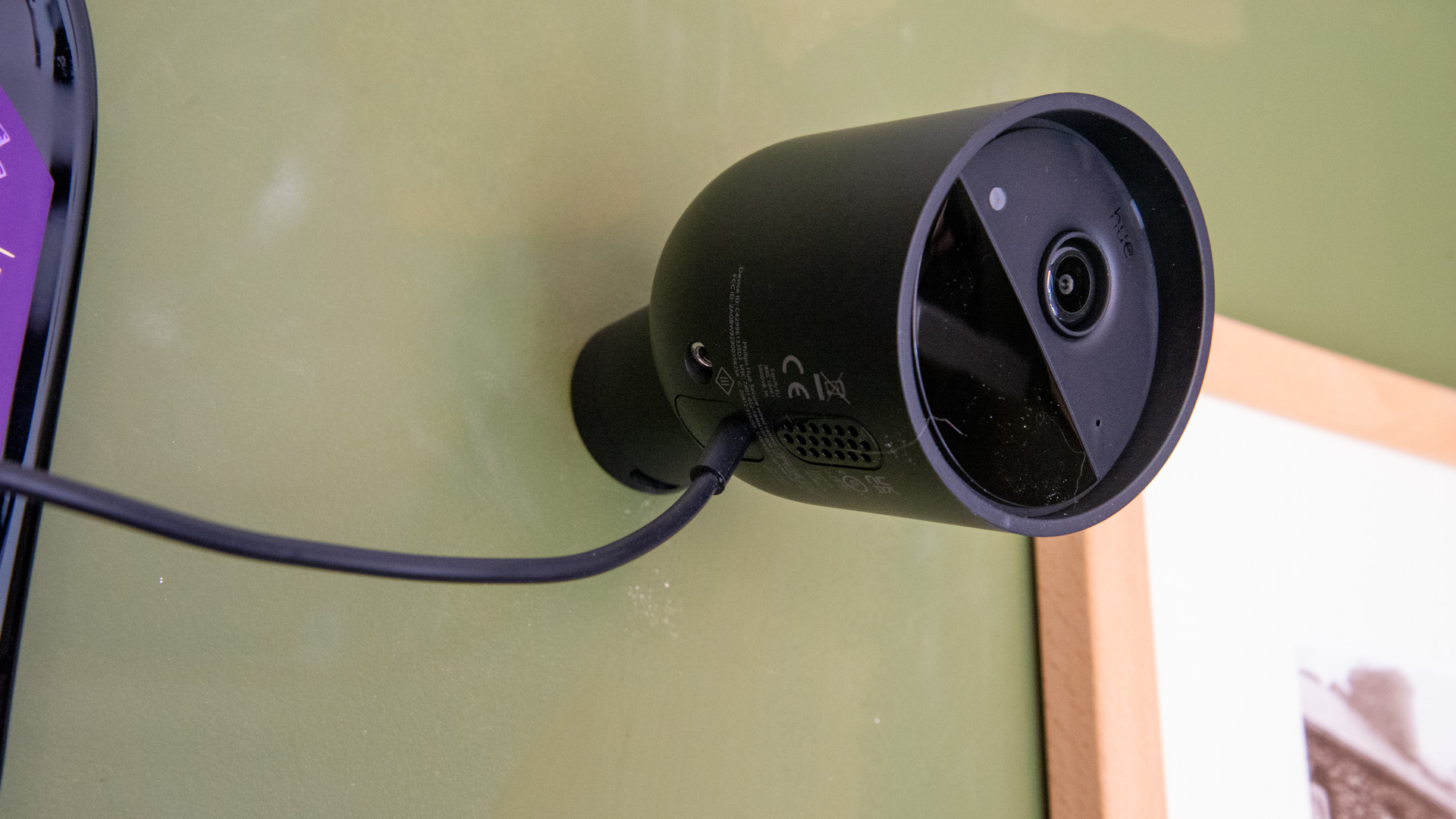
If your current smart home ecosystem is very much centred around products from the Philips Hue line, then your best option here, purely from an integration standpoint, is the Philips Hue Secure Wired Camera. Because it connects directly to the Philips Hue Bridge, you can control the Secure Wired Camera from the Philips Hue app.

The Hue camera has also been designed so that it can work as a motion sensor for your existing Philips Hue lights, which is something that no other security camera can do. As a means of making your Hue lights work more intelligently as you go about your day, the brand’s Wired Camera is a great thing to have, especially as it can be set up both indoors and outdoors.

Speaking of the set-up process, the camera uses a magnetic mount, so all you have to do is screw in the mount so that it’s secure, and then the camera itself will just snap on to it, much like how MagSafe works on an iPhone. The camera itself is easy to manoeuvre too, so you can point in your desired direction without much resistance.

When it comes to storage of the footage captured, the Secure Wired Camera offers up 24-hours of cloud storage at no additional cost, but if you want more than that, you’ll have to pay for the Hue Security subscription which, at the time of our review, would set you back £3.99 a month for one camera, or £8.99 a month for unlimited cameras. There are also annual versions of both tiers which bring the price down slightly.

Advertisement

Object detection is fairly solid on Philips Hue’s camera, but from our experience, the feature is far more robust on Ring security cameras, so if you are more concerned about receiving security notifications based on movement in real time, you’ll receive more accurate data by picking up a Ring camera instead.

  • Very low price

  • Local storage option

  • Wide platform support

  • Strong night vision

Advertisement
  • 1080p in HomeKit

  • Weak speaker audio

  • No power plug

While there’s no shortage of great budget security cameras available right now, if you’re an iPhone user who runs all of their smart home ecosystem through Apple Home then the Aqara Camera G100 is arguably the best option to go for as it’s one of the few budget options that’s compatible with HomeKit Secure Video.

For those not in the know, HomeKit Secure Video is Apple’s way of providing end-to-end encrypted video from a security camera, so you don’t have to worry about bad actors gaining access to your video feed. The feature is available to iCloud Plus subscribers but it’s a must-have for anyone who runs a tight ship when it comes to home security.

The only downside here of using the Aqara Camera G100 with Apple Home is that the video capture is then capped at 1080p, something that doesn’t happen when using the same camera with Google Home or Alexa. When using one of those other systems, you can record at 2K. It’s definitely a shame, but the 1080p footage still has plenty of detail, and the added security involved is great to have.

Advertisement

With regards to the camera itself, the Aqara Camera G100 is easily one of the smallest indoor security cameras you can buy, so you don’t have to worry about it taking up more space than it needs to in your home. The camera also works outdoors, which is helpful as it packs a strong night vision ability that extracts a good amount of detail from low light situations.

If you don’t fancy forking out for a subscription on top of the price of your chosen security camera, then you’ll appreciate what the G100 has to offer here. There are a few AI-powered object detection modes available free of charge, and you can skirt around charges on cloud storage completely with the ability to use a Micro SD card up to 512GB.

Advertisement
  • Excellent image quality

  • Smart AI tracking

  • Doubles as hub

  • Loads of storage options

  • Matter not really ready

  • Some AI behind paywall

  • Cutesy look not for all

As you may have already spotted from our coverage, Aqara has no shortage of great security cameras available across the price spectrum, so you can’t really go wrong in siding with the brand. However, if what you’re after is a camera that can seamlessly weave together your entire smart home ecosystem then the Aqara Camera G350 is the one to get.

This ingenious bit of tech is able to operate like a home hub, linking your Zigbee-enabled and Aqara devices together into a Matter setup. The G350 is the first camera of its kind to offer this kind of Matter integration, so if you want to go all in on simplifying your automations and devices, this is a great place to start.

Advertisement

It’s not a perfect system mind you, as the Matter aspect of it all still feels like it’s in development at the time of review, but the feature set is likely to expand as time goes on. What’s sure to keep you pleased in the here and now is the unique dual lens set-up that allows the G350 to hone in on details that are just a bit further away.

The main lens is a 4K wide-angle sensor that delivers a ton of detail, while the other is a 2.5K telephoto lens that can zoom in without any loss of detail. If you want to go even further, the two cameras can work in tandem to provide a 9x digital zoom. We were highly impressed with all of the footage captured by our test unit, and that includes night-time video which is where so many lesser cameras can trip up.

You also have a wealth of storage options with the G350. If you’d rather avoid subscription costs then you can use Micro SD cards to save footage locally, although there are cloud storage options available if you prefer. You can even use iCloud storage if you have the camera set up with Apple’s HomeKit Secure Video. It’s just a great camera that’s really hard to fault unless you nitpick at it.

Advertisement
  • Quick and easy to install and use

  • Prop-up stand makes it easy to get the view you want

  • Good night vision

  • Imou Protect safety subscription costs extra money after a 14 day free trial

For those who don’t use the Ring ecosystem, the Imou Versa is a great budget alternative. Thanks to its IP65 weatherproof casing, which means it can withstand heavy rain, snow or heat, the Imou Versa is versatile and designed to be used both indoors and outdoors.

Advertisement

For a monthly fee, you can record footage straight to the cloud and have access to up to seven-day playback. You can upgrade this monthly subscription to Imou Protect, for enhanced AI detection, security reports and the ability to share your footage with more users. If you would prefer local storage, there’s also a microSD card slot which takes cards up to 256GB in size.

Its 1080P FHD and Smart Colour Night Vision means the footage is always clear. The camera can also turn on its spotlight when motion is detected at night and shoot footage in full colour. When the spotlight is triggered, an automatic security siren is sounded and alerts are sent to your smartphone. With the partnering app, however, sirens and notifications can be adjusted accordingly to reduce false alerts.

You can also view live streams from the camera and both hear and speak to anyone in the camera’s view, with the useful Imou app.

Advertisement
  • Low cost

  • Strong image quality

  • Integrates with other Arlo cameras

  • Feels a bit cheap

  • Arm not that flexible

The Arlo Essential Indoor Camera is a great value camera that has many useful features without the necessity of an extra monthly subscription.

Advertisement

Installation takes a matter of minutes, as it simply consists of plugging the camera in and then syncing it with the Arlo app. The camera is also connected to Wi-Fi, with no additional base station required like some other security cameras.

The Essential Indoor Camera records and live streams in 1080P HD video, meaning you always have a clear image of your home. There’s also crisp night vision that promises a clear view regardless of low light levels.

The Arlo app offers numerous extra features too. For complete privacy, you can remotely close the privacy shield on your security camera and reopen it when necessary. The camera also has a built-in siren that can trigger automatically when motion is detected, but it can also be set off manually to deter intruders.

It is worth mentioning that Arlo does offer a monthly subscription. This allows you to back up footage to the cloud, focus on activity zones and adjust what notifications you receive. However, the camera works perfectly well without it as you can still receive motion alerts, see a live stream of your camera’s view and take part in two-way communication. You can also save footage in local storage.

Advertisement

Whether you’re a first-time Arlo user or already have a well-established Arlo ecosystem in place, this camera is intuitive and easy to install.

  • Excellent 4K image quality

  • Clever automated tracking

  • No monthly fees

Advertisement
  • Dual view mode reduces image quality

The Eufy Security Indoor Cam S350 has a lot to offer. With dual wide-angle and telephoto cameras, a motorised pan and tilt system, up to 4K video quality and no compulsory monthly fees, the S350 is a great choice for those who want high video quality from their indoor camera but without any long-term investment.

The main lens, a 4K wide-angle camera which can capture most of a room, is supported by a secondary 2K telephoto lens that offers a 3x zoom for capturing close-up detail. Using the accompanying Eufy Security app, a live view will default to the 4K camera with the option to switch to the 2K telephoto if necessary.

Its impressive 360° pan and 75° tilt allows you to put your camera almost anywhere and you can trust that it will move accordingly.

Advertisement

The S350 also lets you record clips either directly onto a microSD card (sold separately) or onto the Eufy HomeBase 3, which is useful if you’ve already invested in the Eufy ecosystem. Otherwise you have the option to save videos onto the cloud for a monthly fee.

In daylight or bright ambient lighting, the S350 records high-quality video in sharp and detailed 4K. When ambient lighting drops, the camera will switch to IR and shoot in black and white which despite bringing down the detail, still offers a clear enough picture.

Videos will record by default from its 4K camera but if you’d prefer to see both camera streams then you can put the camera into its ‘dual mode’. This compresses images from both cameras into one single video file, but will reduce the picture quality to 2K.

The S350 also actively reduces the number of recordings and alerts you receive, thanks to its built-in pet and human detection option and motion sensitivity. We found the detection option to be especially useful, as by switching to people-only detection the number of alerts we received were dramatically reduced.

Advertisement

As the Indoor Cam S350 is powered by a USB-C connection, you’ll never have to worry about the camera running out of battery while you’re away.

FAQs

Should I buy a battery or mains powered security camera?
Advertisement

Inside, there are fewer problems getting to a power socket, so mains-powered cameras make a lot of sense and you don’t have to worry about changing batteries.
That said, if you want to put cameras in some areas that are usually poorly covered by power sockets, such as hallways, then a battery powered model makes sense. Just be careful where you place a model like this, as pets walking around can drain the battery.

What resolution do I need?

There’s little point in buying anything other than a 1080p model at the moment, as you’ll get sharp-enough footage to capture everything you need. Go for 2K or 4K footage if you want even more detailed footage.

Advertisement
When should I turn my cameras on or off?

You should turn indoor cameras off when you’re at home and off when you’re out or its night time, as this means that you won’t record yourself by accident when you’re walking around.
The best cameras have tools to make this easier, such as Ring cameras, which let you activate or deactivate cameras based on the Ring Alarm setting.

Advertisement
Do I need cloud storage?

The advantage of cloud storage is that any footage is safe from theft; you can always download it and hand it over to the police. However, there’s a monthly cost associated with this. If you only want the odd bit of footage and don’t want to be tied to monthly plans, look for a camera that has local storage instead.

Should I get a camera with a pan and tilt motor?
Advertisement

Cameras that you can remote control to pan and tilt around used to be very popular, giving you a way to look around to see what’s going on.
They’ve fallen out of favour for two reasons.
First, they’re expensive.
Secondly, if you move the camera’s field of view, you may not be covering the most important parts of your property.
And, motion zones don’t work with these cameras, as you can’t mark an area to watch if you may move the camera. Instead, we recommend buying a fixed camera and focussing in on the area that you want to monitor. If you need more coverage add an additional camera.

What else should I look for?

Amazon Alexa and Google Assistant support is handy if you want to stream footage to your TV or screen-enabled smart speaker.
IFTTT can be useful, too, letting you control other devices when motion is detected, such as turning on a light automatically.
Nest cameras have Works With Nest automatic rules, so they can be turned on automatically when a smoke alarm goes off, for instance, or they can turn on your Hue lights automatically if suspicious activity is detected.

Advertisement

Test Data

  Arlo Pro 6 2K Blink Mini 2 Philips Hue Secure Wired Camera Aqara Camera G100 Aqara Camera Hub G350 Imou Versa Arlo Essential Indoor Camera Eufy Security Indoor Cam S350

Advertisement

Full Specs

  Arlo Pro 6 2K Review Blink Mini 2 Review Philips Hue Secure Wired Camera Review Aqara Camera G100 Review Aqara Camera Hub G350 Review Imou Versa Review Arlo Essential Indoor Camera Review Eufy Security Indoor Cam S350 Review
UK RRP £24.99 £119 £126
USA RRP $40 $99.99
Manufacturer Blink Philips Arlo Eufy
Size (Dimensions) 52 x 78 x 89 MM 50 x 49 x 36 MM 92 x 92 x 74 MM 58 x 58 x 72 MM 85 x 68 x 123 MM 72 x 51 x 52 MM 2 x 1.9 x 4.5 INCHES 65 x 80 x 104 INCHES
Weight 48 G 120 G 0.27 LB 610 G
ASIN B09N6P323M B0CD9YQMKS
Release Date 2026 2024 2024 2025 2026 2023 2023 2023
First Reviewed Date 17/03/2026 26/07/2024 20/10/2025 07/04/2026 23/11/2023 24/08/2023 16/02/2024
Model Number Arlo Pro 6 2K Blink Mini 2 Philips Hue Secure Wired Camera Aqara Camera G100 Imou Versa Arlo Essential Indoor Camera Eufy Security Indoor Cam S350
Resolution 2560 x 1440 1920 x 1080 1920 x 1080 2304 x 1296 3840 x 2160 1920 x 1080 1920 x 1080 3840 x 2160
Voice Assistant Amazon Alexa Amazon Alexa, Google Assistant Amazon Alexa
Battery Length 8 months hrs hrs hrs hrs hrs hrs hrs
Smart assistants Yes Yes Yes Yes Yes Yes Yes
App Control Yes Yes Yes Yes Yes Yes Yes Yes
IFTTT Yes Yes Yes
Camera Type Indoor/outdoor wireless Indoor/outdoor wired camera Wired indoor/outdoor Indoor/outdoor wired Indoor camera with smart hub Wired indoor/outdoor camera Wired indoor security camera Indoor pan and tilt
Mounting option Wall Wall or bookshelf Wall Wall or bookshelf Desk Wall, bookshelf Desk or wall
View Field 160 degrees 110 degrees 141.2 degrees 140 degrees 133 degrees 114 degrees 130 degrees 358 degrees
Recording option Cloud (with subscription), offline (requires hub) Cloud or local (requires Sync Module 2) Cloud microSD or Apple HomeKit Secure microSD microSD, cloud Cloud MicroSD, cloud
Two-way audio Yes Yes Yes Yes Yes Yes Yes Yes
Night vision Yes (full colour) Yes (IR) Yes (IR) Yes (full colour or IR) Yes Yes (IR) Yes (IR) Yes (IR)
Light Spotlight Spotlight No Spotlight No No
Motion detection Yes Yes Yes Yes Yes Yes Yes (PIR) Yes
Activity zones Yes Yes Yes Yes Yes Yes Yes Yes
Object detection People, vehicles, animals, custom People (requires cloud subscription) People, animals, vehicles People, pets, faces Human People, animals, vehicles People, pets
Audio detection Alarms No Smoke alarms No No
Power source Battery USB-C Mains USB-C USB-C USB USB USB-C

Source link

Advertisement
Continue Reading
Click to comment

You must be logged in to post a comment Login

Leave a Reply

Tech

Microsoft rolls out revamped Windows Insider Program

Published

on

Windows 11

Microsoft says it’s rolling out a revamped Windows Insider Program experience as part of the broader plans to address reliability concerns in Windows 11.

For those unaware, the Windows Insider Program is a beta testing program that allows you to test early Windows releases and provide your feedback to Microsoft.

Until now, Microsoft has not really listened to all the feedback from testers, and all that has added up to a poor Windows experience.

image

To address this, Microsoft is now making the Windows Insider Program simpler and more transparent in the hope that it will help with the development of Windows 11.

In a blog post, Microsoft admitted that the current channel structure is confusing.

Advertisement

Insider Program used to be simple when Microsoft replaced Insider Rings with Channels, similar to Chromium (Beta, Dev, and Canary), but over time, the structure has become more and more confusing.

There’s no clarity on what channel you should pick if you want to be on the edge and test new features as they develop internally at Microsoft. In fact, most testers never get access to experimental features, thanks to Microsoft’s Controlled Feature Rollout (CFR).

Microsoft has acknowledged that the experience is frustrating: you read about a new feature on the internet, update your PC, hoping to test and provide feedback, and then find out it’s not there.

“That experience, where features are announced but only some of you receive them due to how we gradually roll things out, is the single biggest frustration we hear,” writes Alec Oot, who is responsible for the Windows Update experience at Microsoft.

Advertisement

While you can use third-party tools like ViveTool to enable experimental features, it’s not the ideal experience and isn’t what you signed up for.

Microsoft says the Windows Insider Program is now simpler and more transparent

Microsoft says it’s listening to feedback, making all channels simpler, and moving the Insider Program to just two channels.

The first new channel is ‘Experimental,’ which replaces the Dev and Canary channels. The name makes it obvious that it’s the channel you should sign up for if all you want to do is test experimental features, which may never ship in production.

The second new channel is still called ‘Beta,’ which is an updated version of the original Beta Channel.

Advertisement
Windows Insider Progra
Windows Insider Program now has only two channels

Source: Microsoft​​​​​

In the Beta Channel, Microsoft is ending gradual feature rollouts, which means all new features mentioned in the release notes will be immediately available.

In the Experimental channel, you’ll be given access to some features out of the box, but others will be locked behind a flag.

Feature flags in Experimental Channel
Feature flags to turn on features gradually rolling out.

Source: Microsoft

The good news is you can manually toggle experimental features from Windows Settings.

For example, if you want to try out new haptic features for the mouse but the feature isn’t showing due to a gradual rollout, you can open Windows Insider Program Settings > Feature flagsthen turn on the feature.

Microsoft explains how it’s rolling out the new channels to Windows Insiders

Microsoft says it is moving Insiders to the new channels in phases, starting with Dev Channel users, who will now move to Experimental.

If you are in Dev and do not see the new Experimental channel UI yet, Microsoft says you can manually turn it on by going to Settings > Windows Update > Windows Insider Program > Feature flags and enabling the new experience.

Advertisement

Over the next few weeks, Microsoft will also move Canary users to specific versions of Experimental.

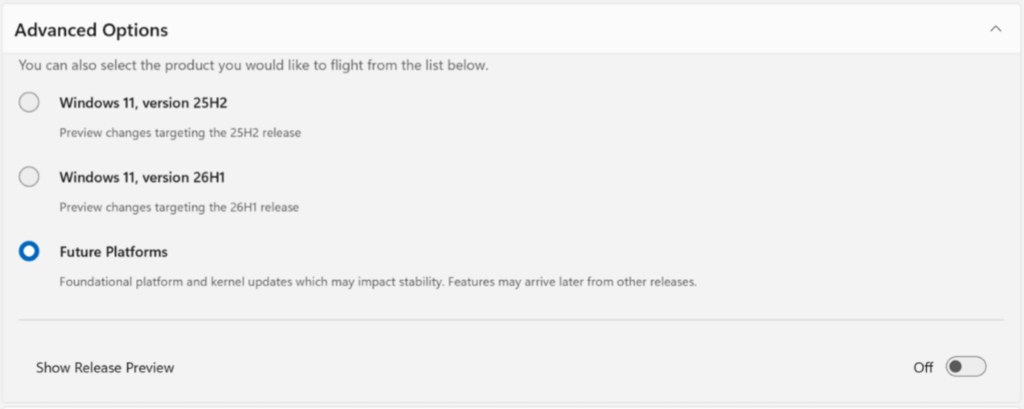
Those on the Canary 28000 series will move to Experimental (26H1), while users who installed the optional 29500 series update will move to Experimental (Future Platforms).

Future platforms
Advanced Insider Program controls to test future platform releases

Source: Microsoft

Beta Channel users will move to the new Beta experience, but Microsoft says some minor feature changes may happen during the transition.

If you want to keep access to all existing experimental features, Microsoft recommends moving from Beta to Dev before the transition, as Dev is being moved to Experimental. Microsoft is also changing how it shares build details.

As part of today’s rollout, Microsoft is shipping Build 26220.8283 for Beta, Build 26300.8289 for Experimental, Build 28020.1873 for Experimental 26H1, and Build 29576.1000 for Experimental Future Platforms.

Advertisement

Today’s update includes early access to a new Windows Update experience where you can pause updates as you desire, avoid forced reboots, and more.


article image

AI chained four zero-days into one exploit that bypassed both renderer and OS sandboxes. A wave of new exploits is coming.

At the Autonomous Validation Summit (May 12 & 14), see how autonomous, context-rich validation finds what’s exploitable, proves controls hold, and closes the remediation loop.

Claim Your Spot

Source link

Advertisement
Continue Reading

Tech

BMW brings color changing tech closer to production with the iX3 Flow Edition

Published

on


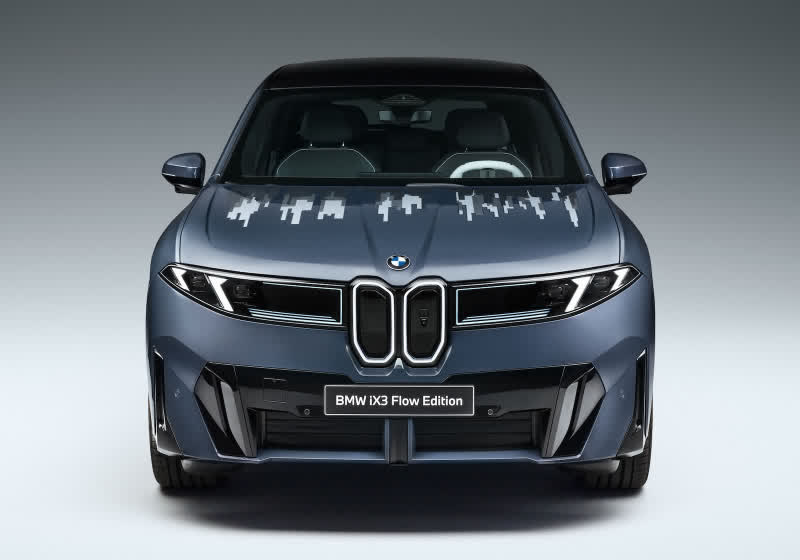
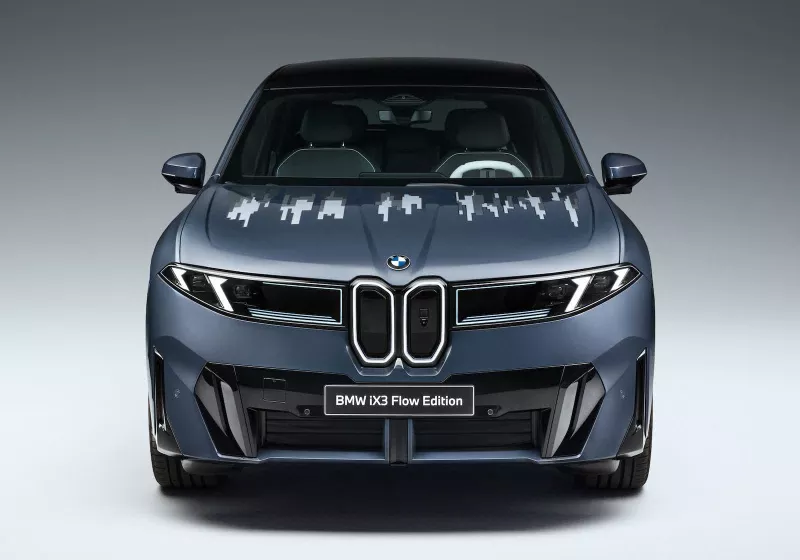
Unveiled at the 2026 Beijing Auto Show, the BMW iX3 Flow Edition integrates E Ink’s Prism technology directly into the vehicle’s hood, bringing the concept closer to real-world application. Unlike earlier efforts that relied on external layers of segmented panels, this version embeds the electrophoretic system into the structure of…
Read Entire Article
Source link

Continue Reading

Tech

What’s The Difference Between Kelly And Goodyear Tires?

Published

on


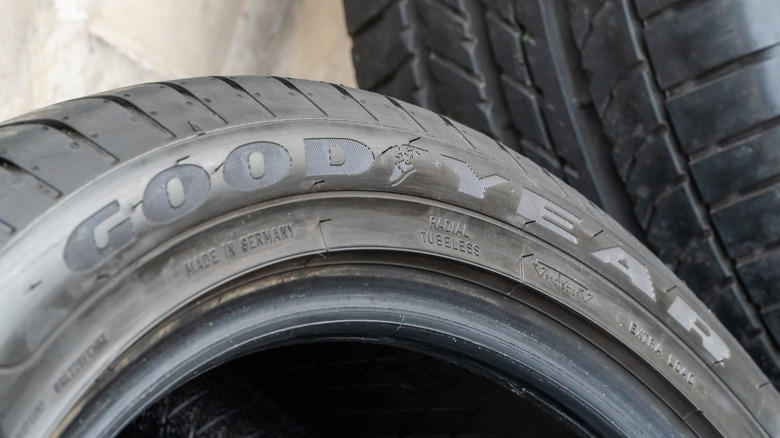
If you’re shopping for Kelly tires, you might be surprised to find yourself on the Goodyear site. No, this isn’t a fluke: Goodyear and Kelly have been sister brands since 1935. Today, Goodyear is the Tire & Rubber Company’s premium flagship brand. It’s the more high-end of the two, offering more durability across a wider range of different driving conditions than Kelly. Rain, snow, or rugged terrain, Goodyear probably has a tire for you.

Kelly Tires is more straightforward. Of the two, it’s definitely the most budget-friendly option. The Kelly brand is technically older than Goodyear itself, but it’s existed under the Goodyear corporate umbrella since the 1930s. It might not be on the cutting edge of innovation, and it might not be advertising the same top-tier performance specs, but Kelly does do one thing better than Goodyear: Give you fine-enough tires at a lower price point. You still get all-season traction and year-round reliability, but just at a much more accessible cost per tire. Beyond pricing, the product lines are pretty different. Goodyear has six different tire types for over half a dozen different kinds of vehicles, but Kelly’s lineup is much simpler.

Advertisement

Differences in warranty and product lineup

Goodyear’s full lineup covers snow, sport, heavy-duty, and all-season tires for cars, trucks, SUVs, trailers, and more. Kelly’s selection is much smaller and more streamlined than that; just five tire models, and all five of them are all-season, no winter tires or summer tires. Not a lot of variety there compared to Goodyear, but that’s okay. It’s not trying to be Goodyear.

Then there’s the respective warranties. Goodyear has one of the best tire warranties around; a 60-day satisfaction guarantee that basically gives drivers two whole months to think about their purchase. Kelly also has a satisfaction guarantee, but it’s a little more limited than Goodyear’s; 45 days compared to Goodyear’s 60, or about a month and a half. Still, both Goodyear and Kelly give you price matching and access to post-purchase customer support. When it comes down to it, the difference is less about quality versus inferiority, and more about intended use and budget. Goodyear’s more premium, while Kelly’s more affordable.

Advertisement


Source link

Advertisement
Continue Reading

Tech

Linux Drops ISDN Subsystem and Other Old Network Drivers

Published

on

“Old code like amateur radio and NFC have long been a burden to core networking developers,” reads the pull request.

And so Thursday Linus Torvald merged the pull request “to rid the Linux kernel of the old Integrated Services Digital Network (ISDN) subsystem,” reports Phoronix, “and various other old network drivers largely for PCMCIA era network adapters.”

This was the code suggested for removal given the recent influx of AI/LLM-generated bug reports against this dated code that likely has no active upstream users remaining… [W]ith the large language models and increased code fuzzing finding potential issues with these drivers for obsolete hardware, it’s easier to just get rid of these drivers if no one is actively using the hardware from decades ago…

This merge lightens the kernel by 138,161 lines of code with ISDN gone and numerous old network adapters and also getting rid of legacy ATM device drivers as well as the amateur ham radio support. The main networking drivers removed affect the 3com 3c509 / 3c515 / 3c574 / 3c589, AMD Lance, AMD NMCLAN, SMSC SMC9194 / SMC91C92, Fujitsu FMVJ18X, and 8390 AX88190 / Ultra / WD80X3.

Advertisement

Linux 7.1 also has removed the long-obsolete bus mouse support as well as beginning to phase out Intel 486 CPU support and removing support for Russia’s Baikal CPUs.

Source link

Continue Reading

Tech

HBO Max: The 26 Absolute Best Movies to Watch

Published

on

Here are some highly rated films to try, plus a look at what’s new in April.

Source link

Continue Reading

Tech

NASA’s initial takeaways from the Artemis II mission, and more science stories

Published

on

Now that Artemis II is all wrapped up, NASA has begun its post-game performance analyses of all the systems that worked together to get four astronauts safely to the moon and back earlier this month. In addition to taking humans farther than ever before, Artemis II served as a crucial test flight for upcoming crewed missions that are planned for as soon as 2027 and 2028, the latter being NASA’s ambitious target for landing astronauts on the lunar surface. So far, the Orion spacecraft and the SLS rocket seem to have fared pretty well.

NASA says its initial assessments of the crew capsule show its heat shield “performed as expected, with no unusual conditions identified,” and it didn’t exhibit as much char loss as seen in the uncrewed Artemis I test. (Navy divers snapped some really cool pictures of the heat shield underwater after splashdown, as seen below). Splashdown went according to plan, with Orion landing 2.9 miles from its targeted landing site, according to NASA, and its entry interface velocity “was within one mile-per-hour of predictions.”

The heat shield from the Orion spacecraft as photographed underwater by divers after its splashdown

US Navy

NASA says the SLS rocket performed well, too. It still has tests to run, but, “At main engine cutoff, when the core stage’s RS-25 liquid engines shutdown, the spacecraft was traveling at over 18,000 miles per hour, achieving its insertion velocity for orbit, and executing a precise bullseye for its intended location,” the space agency noted in a blog post.

One thing that we know did cause some issues, though, was the toilet system. Shortly after launch, the astronauts reported problems with the urine vent line, which mission specialist Christina Koch was able to troubleshoot with help from the ground crew. But, everyone would like to avoid that on the next mission, so NASA now has teams checking out the hardware and data to identify what went wrong and how to prevent it.

Advertisement

Watch the Earthset

The Artemis II astronauts have continued to share glimpses into their journey around the moon, and this week, the mission’s commander, Reid Wiseman posted an incredible video of the Earth setting behind the moon, as seen from the Orion spacecraft. Humans haven’t seen that phenomenon firsthand in over 50 years, since the last Apollo mission. Read more about that here.

While ten days might not seem like that long of a time to be in space, it still does things to the body, and returning to Earth has been a bit of an adjustment for the crew. Astronaut Koch last week posted a video of herself struggling through a tandem walk exercise with her eyes closed, taken after her return to Earth. “When people live in microgravity, the systems in our body that have evolved to tell our brains how we’re moving, the vestibular organs, don’t work correctly,” she explained in the caption. “Our brains learn to ignore those signals and so when we first get back to gravity, we are heavily reliant on our eyes to orient ourselves visually.”


Before you go, be sure to check these stories out too:

Source link

Advertisement
Continue Reading

Tech

Porsche Cayenne Coupe Electric debuts with 1,139 hp and 669 km range as company retreats from all-electric strategy

Published

on

Summary: Porsche unveiled the Cayenne Coupe Electric at Auto China in Beijing, a 1,139 hp electric SUV that does 0-60 in 2.4 seconds with up to 669 km WLTP range and 16-minute fast charging, starting at $113,800. It launches during the worst financial year in Porsche’s history, a 93% operating profit decline, a first-ever quarterly loss, a new CEO, and a formal retreat from the 80% EV-by-2030 target. The car will be sold alongside ICE and PHEV variants indefinitely, a hedge that reflects Porsche’s conclusion that the market for premium EVs is smaller than it once believed.

Porsche unveiled the Cayenne Coupe Electric at Auto China in Beijing this week, a vehicle that makes 1,139 horsepower in its Turbo trim, reaches 60 miles per hour in 2.4 seconds, carries a 113-kilowatt-hour battery good for up to 669 kilometres on the WLTP cycle, charges from 10% to 80% in under 16 minutes at up to 400 kilowatts, and starts at $113,800 before the $2,350 delivery fee. It is, on paper, the most powerful production SUV Porsche has ever built and one of the most capable electric vehicles in any segment. It is also being launched by a company that posted a 93% decline in operating profit last year, replaced its chief executive in January, walked back its target of 80% electric sales by 2030, and has committed to selling combustion engines “far into the next decade.” The product is extraordinary. The strategy behind it is hedged in every direction.

The machine

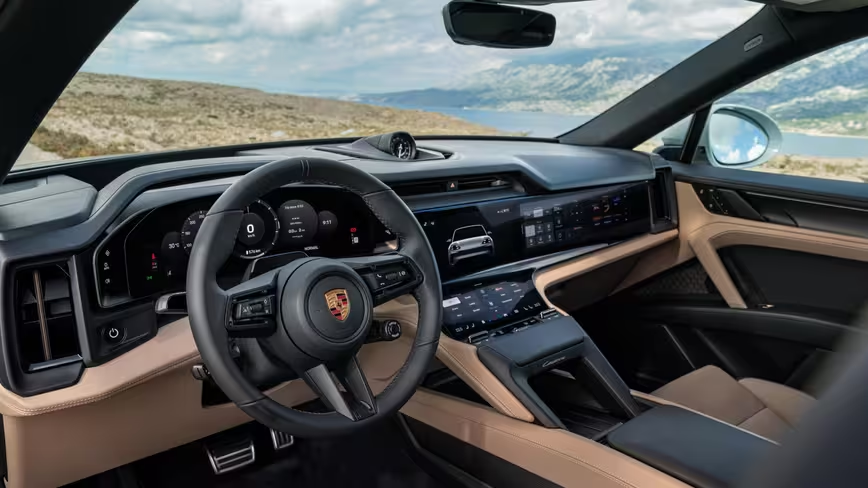
The Cayenne Coupe Electric is built on the Premium Platform Electric, the 800-volt architecture co-developed by Porsche and Audi within the Volkswagen Group, the same platform underpinning the Macan Electric and the Audi Q6 e-tron. It comes in three variants. The base Cayenne Coupe Electric produces 435 horsepower and 615 pound-feet of torque, hits 60 in 4.5 seconds, and tops out at 143 miles per hour for $113,800. The Cayenne S Coupe Electric makes 657 horsepower with 796 pound-feet, does the sprint in 3.6 seconds, reaches 155 miles per hour, and costs $131,200. The Turbo makes 1,139 horsepower with 1,106 pound-feet in overboost, manages 2.4 seconds to 60, hits 162 miles per hour, and starts at $168,000. All variants use dual electric motors with all-wheel drive. All include adaptive two-chamber air suspension, an adaptive rear spoiler, a panoramic glass roof, and Porsche’s Sport Chrono Package as standard. The Coupe’s drag coefficient is 0.23, compared with 0.25 for the Cayenne Electric SUV and 0.35 for the internal combustion Cayenne, a difference that gives the Coupe up to 18 kilometres of additional range over the SUV variant.
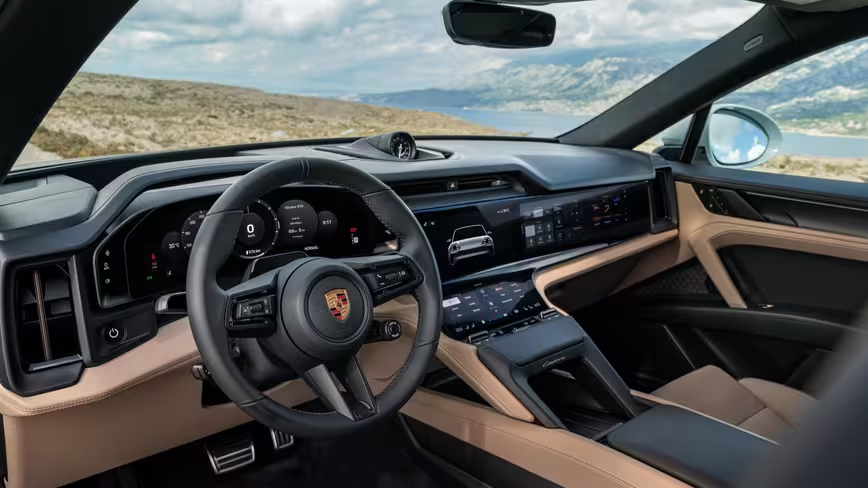
cayenne-coupe-interior-2026

Cayenne Coupe

Advertisement

The battery modules are manufactured at Porsche’s Smart Battery Shop in Horna Streda, Slovakia, approximately an hour from the Volkswagen Group’s Bratislava plant where final assembly takes place alongside ICE and hybrid Cayenne variants on a flexible production line. The 14.5-inch curved touchscreen is a first for any Porsche. The NACS charging port, standard for the North American market, connects to Tesla’s Supercharger network and any CCS-compatible DC fast charger. Porsche says the car can add 300 kilometres of range in ten minutes at a sufficiently powerful station. Sales begin in late summer 2026, and all three trims are available to order now. Approximately 40% of Cayenne buyers historically choose the Coupe body style over the SUV, according to Porsche, which is why the company is offering both.

The contradiction

The 💜 of EU tech

The latest rumblings from the EU tech scene, a story from our wise ol’ founder Boris, and some questionable AI art. It’s free, every week, in your inbox. Sign up now!

Porsche’s 2025 financial results were catastrophic by its historical standards. Revenue fell to 36.3 billion euros from 40.1 billion in 2024. Operating profit collapsed to 413 million euros from 5.6 billion, a margin of 1.1% for a company that had routinely delivered returns above 14%. In the third quarter of 2025, Porsche recorded its first-ever quarterly loss: negative 1.1 billion euros. Oliver Blume, who had served as Porsche’s chief executive while simultaneously running the Volkswagen Group, stepped aside from the Porsche role on January 1, 2026, replaced by Michael Leiters, the former McLaren Automotive chief executive who had previously spent 13 years at Porsche earlier in his career. Leiters’ mandate is to cut costs, restore margins, and, critically, reverse the strategic overcommitment to electrification that contributed to the financial damage.

Advertisement

Blume himself admitted Porsche “misjudged the situation” with the decision to make the second-generation Macan available only as an electric vehicle. Leiters has said the company will keep combustion engines “far into the next decade” and plans to offer the next 718 sports car with petrol and plug-in hybrid options, reversing an earlier plan to make it all-electric. The 80% EV target for 2030, announced with considerable ambition at the 2022 annual press conference, was formally abandoned in July 2024, reframed as contingent on “customer demand and the development of electromobility.” Taycan deliveries fell 22% in 2025. Porsche’s 2026 guidance projects revenue of 35 billion to 36 billion euros with an operating margin of 5.5% to 7.5%, a recovery from 2025’s depths but far below the profitability the brand expects of itself. The Cayenne Coupe Electric launches into this context: a company that no longer believes in going all-electric, building one of the best electric vehicles anyone has made.

The market

The premium electric SUV segment is crowded and contested. The BMW iX, Mercedes-Benz EQS SUV, Tesla Model X, Rivian R1S, Lucid Gravity, Cadillac Lyriq, Volvo EX90, and Audi’s own Q6 and Q8 e-tron models all compete for essentially the same buyer: affluent, environmentally conscious or technology-forward, willing to pay above $80,000 for an electric vehicle that does not compromise on space, range, or performance. The Cayenne Coupe Electric’s Turbo variant outperforms every vehicle on that list, but performance in this segment has diminishing returns. The buyer choosing between a 657-horsepower Cayenne S and a 670-horsepower Model X Plaid is not choosing on the basis of acceleration. They are choosing on brand, interior quality, dealer experience, and whether they trust the company to support the vehicle for the next decade.

Tesla’s declining European sales have opened a window for rivals, with VW Group brands and BMW overtaking Tesla in European EV registrations in early 2025 as Elon Musk’s political activities damaged the Tesla brand on the continent. But that window comes with complications. Chinese EV brands are building consumer awareness despite steep tariffs, with BYD, Xiaomi, and Zeekr flooding American social media feeds with reviews of vehicles that offer comparable technology at a fraction of the price, even if 100% US tariffs currently prevent their sale. In the global EV sales race between Tesla and BYD, Tesla reclaimed the quarterly battery electric crown in Q1 2026 but shipped 50,000 fewer vehicles than it built, adding to inventory. BYD sold 2.25 million battery electric vehicles in 2025, outpacing Tesla by more than 600,000 units over the full year. The luxury end of the market, where Porsche competes, is insulated from the price war but not from the shift in expectations it creates. Buyers who watch TikTok reviews of a $15,000 Geely EX5 with massaging seats and a 400-kilometre range will inevitably recalibrate what they expect for $131,000.

The hedge

The Cayenne Coupe Electric will be sold alongside internal combustion and plug-in hybrid Cayenne Coupe variants indefinitely. This is the hedge. Porsche is not, as it once planned, transitioning the Cayenne to an all-electric model. It is adding an electric option to a lineup that retains the petrol engines Leiters has pledged to keep. The Macan’s experience informed this decision. The electric Macan outsold its ICE predecessor in 2025, with 57% of buyers choosing the battery version, but Q1 2026 showed the electric variant’s sales declining, and the absence of a combustion alternative meant Porsche could not capture buyers who were not yet ready to switch. The Cayenne will not repeat that mistake. Every powertrain will be available. The customer decides.

Advertisement

This is pragmatic, but it is also expensive. Running a flexible production line in Bratislava that can build ICE, PHEV, and BEV variants of the same nameplate requires engineering investment that a single-powertrain strategy would not. The PPE platform itself was developed at a cost that contributed to the profit collapse of 2025. Europe’s battery supply chain challenges after Northvolt’s collapse have complicated the economics further: VW Group was among Northvolt’s largest investors, and the Swedish battery startup’s bankruptcy left European automakers scrambling for alternatives to the Chinese and South Korean suppliers that provide 90% of the continent’s cells. Porsche’s Smart Battery Shop in Slovakia assembles modules from cells sourced externally, a supply chain that remains dependent on the Asian producers that European industrial policy was supposed to replace.

The bet

The Cayenne is Porsche’s most important vehicle. It accounts for the largest share of revenue among the company’s nameplates and has been, since its controversial introduction in 2002, the model that funds the sports cars the brand is known for. Electrifying it is not optional if Porsche intends to sell vehicles in the European Union beyond 2035, when the ban on new combustion-engine car sales takes effect, or in China, where more than half of new vehicle sales are now electrified. But electrifying it exclusively is not viable if the company’s own financial results demonstrate that going all-electric faster than the customer base is willing to follow destroys margins. VW Group’s broader autonomous and electric vehicle strategy, which now includes robotaxi testing in Los Angeles with the ID. Buzz, suggests the parent company is committed to the electric transition as an engineering programme even as its subsidiary retreats from it as a sales strategy.

The Cayenne Coupe Electric is a remarkable machine built by a company in a remarkable amount of trouble. Its Turbo variant matches the power output of a Bugatti Veyron in a vehicle that seats five, tows trailers, and adds 300 kilometres of range in ten minutes. Its base variant undercuts the Tesla Model X by roughly $10,000 and delivers the interior and build quality that Tesla has never matched. If Porsche could sell this car in the volumes the Cayenne nameplate has historically achieved, the financial recovery Leiters has been tasked with would be straightforward. The problem is that Porsche’s own data, its own leadership, and its own strategic reversal all indicate that the market for electric luxury SUVs at this price point is smaller than the company once believed. The car exists because the technology is ready. The hedge exists because the buyer may not be. Porsche is making one of the best electric vehicles in the world and simultaneously telling the market that it does not expect the world to buy enough of them.

Advertisement

Source link

Continue Reading

Tech

5 Car Design ‘Improvements’ You’ll Want To Test Before You Buy

Published

on


Despite what their marketing teams might want you to think, not every design change that a carmaker makes is a good one. Some of these so-called improvements try to solve problems that didn’t ever really exist, while others improve certain elements of the everyday driving experience at the expense of creating new annoyances. In other instances, certain design changes are primarily instigated in the name of cost-cutting, without much thought being given to how those changes might impact the driver.

Every automotive era came with its own frustrating design trends, and the current era is no different. SlashGear’s review team drives a huge range of cars every year, from budget econoboxes to cutting-edge supercars, and these five trends are some of the most annoying trending design features that we’ve come across. Before you sign the dotted line for a new car, it’s worth checking whether it has any of these features. If it does, be sure to test them out before you buy, to make sure they’re not dealbreakers for you.

Advertisement

Large infotainment touchscreens with few buttons

Touchscreen-based infotainment systems can now be commonly found in cars at virtually all price points. Despite their ubiquity, JD Power’s 2026 vehicle dependability study found that infotainment problems were by far the most frequent area of complaint for drivers.

Advertisement

As well as software bugs and glitches, some current infotainment systems can be very unintuitive. Key functions can be hidden behind layers of menus that are difficult to access while driving, and some systems can suffer from lag or are prone to freezing. The problem is often exacerbated by a lack of physical switchgear, which forces drivers to rely on the touchscreen or on temperamental voice controls.

SlashGear’s review team has come across numerous infotainment-related issues in recently launched cars. The 2025 Volvo EX30 had both an unintuitive touchscreen UI and glitchy voice controls, and we found the lag of Subaru’s Starlink infotainment system to be persistently annoying in the 2025 Forester Sport. Meanwhile, the 2026 Cadillac Vistiq’s heavy reliance on touchscreens meant that we couldn’t even open the glovebox without finding the corresponding button on-screen.

Even cars without such immediately irritating controls can still have minor gremlins that can affect everyday driving. During a road trip with the 2025 Mazda CX-90, Apple CarPlay’s wireless connection mysteriously cut out while our reviewer was on the road. To fix the problem, they had to pull over, stop the car, and plug their phone into the system. A test drive might not be enough to spot every single potential infotainment-related bugbear, but it should help give you an idea of any obvious problems before you buy.

Advertisement

Electronic door handles and keyless entry systems

Unless you drive a gullwing-doored supercar or a huge lifted truck, you probably expect to be able to get in and out of your car without ever thinking about it. Unfortunately, some modern cars make it trickier than you’d expect. Keyless entry systems are sometimes to blame for this, like they were in the case of the Polestar 3 we drove in 2025.

The Polestar’s key fob sometimes wasn’t picked up by the car, and the accompanying NFC card was fiddly to use, since it had to be pressed against a very specific part of the door to work. It isn’t just Polestar either: we ended up being locked out of our 2024 Lucid Air Pure on its first day with us, since the fob’s battery unexpectedly died and the NFC card wouldn’t open the door. To be fair, the Lucid was a pre-production car, but the two examples of the Polestar 3 that we tested had no such excuses.

Advertisement

Alongside misbehaving keyless entry systems, retractable door handles can also cause problems with modern cars, since they can be prone to freezing shut in cold weather. The Tesla Model 3 owner’s manual suggests that owners could use WD-40 on their retractable handles before freezing weather hits, and if that isn’t an option, it suggests hitting the area around the handle with your fist until something moves. If that sounds like a hassle, it might be worth avoiding cars with retractable door handles if you live in a colder area.

Advertisement

Unlabelled switchgear

Getting into our Polestar 3 wasn’t as easy as it should have been thanks to the keyless entry system, but even once we got into the car, the problems didn’t end. We found the car’s control layout to be among the most confusing of any modern car, with key functions being difficult to find and buttons being too easy to accidentally press. Even worse, the buttons on the steering wheel were unlabelled, leaving us to work out what they did partly through trial and error.

Drivers of base-spec cars will probably be familiar with “poverty buttons,” which are the blank spaces on steering wheels and center consoles that would otherwise house buttons for additional features that top-spec models receive. Aside from being a visible reminder that a top-spec trim was beyond your budget, they don’t affect the driving experience. The Polestar’s buttons are arguably worse, since the blank buttons do all serve a function, but unless you consult the owner’s manual, you won’t know what any of them actually do.

Much like the tetchy keyless entry systems, Polestar isn’t the only company with these annoying features. The 2025 Ford Expedition also has multiple unlabelled buttons on its steering wheel, all of which will require scouring the owner’s manual (or simple trial and error) to understand. Even more annoyingly, adjustments like tilting the steering wheel can only be done via the unlabelled buttons in the Explorer, so if you want to get comfy, you haven’t got a choice about using them.

Advertisement

Bigger rims with skinnier tires

As well as offering a wider range of comfort and convenience features, plenty of carmakers differentiate top trims of a model from the rest of the range by fitting them with larger wheels. Bigger alloys with low-profile tires might look good, but the smaller tire sidewalls can have a negative impact on the car’s ride quality. How much difference there is between wheel sizes will vary between different models of car, but it’s worth test driving multiple trims before you buy if you can.

After a 1,200-mile road trip in the 2026 Lexus GX, SlashGear’s reviewer was convinced that the 20-inch wheels that were available on lower trims were superior to the 22-inch wheels on the top-spec Luxury+ trim. Ride quality was worse on the pricier variant since it had skinnier tires, which can hold a smaller amount of air and therefore had less cushioning to soak up imperfections in the road. Large, heavy vehicles might see particularly noticeable changes in ride quality with larger wheels, but the effect is still the same on smaller vehicles. The skinny tires on our 2025 Audi A3 were one of the few things we didn’t like about the car.

Advertisement

Over-sensitive safety assists

The best safety assists give drivers additional reassurance on the road without becoming intrusive, but some new cars don’t get the execution right. When testing the 2026 Kia Carnival in busy Los Angeles traffic, we found the minivan’s driver aids to be over-sensitive, with the adaptive cruise control being easily spooked by bends in the road and nearby cars. The safety assists on the 2025 Honda CR-V Hybrid were similarly panicky, frequently triggering alert chimes whenever we drove on a congested highway.

Advertisement

In the worst cases, these overactive driver assists can trigger so often, and for so little reason, that they become essentially meaningless. The 2025 Alfa Romeo Tonale we tested was one of the worst recent offenders, spewing warning chimes on almost every journey without even giving us an accompanying warning message in many cases. Our reviewer couldn’t figure out why the chimes kept triggering even after a week of driving. Thankfully, warning systems that are this over-sensitive should be easy to spot on a test drive. To be on the safe side, we’d suggest making sure your test route includes a busy highway too, so you can evaluate how the driver aids perform in heavier traffic.

Advertisement

How we picked these questionable design choices

SlashGear’s review team regularly puts the latest cars from virtually every major manufacturer to the test, so to compile this list of potentially annoying design features, we dove deep into our back catalog of reviews. Each of the listed features has been a bugbear on multiple recent cars we have driven, and each one is available on a range of new cars.


Source link

Advertisement
Continue Reading

Tech

Install your new CMS in just a few steps with wonderCMS

Published

on

Several Content Management Systems (CMS) are available for businesses, requiring extensive technical knowledge and significant server resources. WonderCMS is an underappreciated alternative. It’s a free, open-source platform that prioritizes speed, simplicity, and efficiency above everything else.

This article examines WonderCMS’s distinctive position in the CMS market through its basic approach and unexpected features. It will show you how to install WonderCMS easily while demonstrating the fast website setup process. The article will also show you why WonderCMS is a robust, small solution that suits experienced developers and new users who want an easy online presence.

Source link

Advertisement
Continue Reading

Tech

Threat actor uses Microsoft Teams to deploy new “Snow” malware

Published

on

Hackers deploy new Snow custom malware suite via Microsoft Teams

A threat group tracked as UNC6692 uses social engineering to deploy a new, custom malware suite named “Snow,” which includes a browser extension, a tunneler, and a backdoor.

Their goal is to steal sensitive data after deep network compromise through credential theft and domain takeover.

According to Google’s Mandiant researchers, the attacker uses “email bombing” tactics to create urgency, then contact targets via Microsoft Teams, posing as IT helpdesk agents.

image

A recent Microsoft report highlighted the growing popularity of this tactic in the cybercrime space, tricking users into granting attackers remote access via Quick Assist or other remote access tools.

In the case of UNC6692, the victim is prompted to click a link to install a patch that would block email spam. In reality, the victims get a dropper that executes AutoHotkey scripts loading “SnowBelt,” a malicious Chrome extension.

Advertisement
Malicious page used in the attacks
Source: Google

The extension executes on a headless Microsoft Edge instance, so the victim doesn’t notice anything, while scheduled tasks and a startup folder shortcut are also created for persistence.

SnowBelt serves as a persistence mechanism and a relay mechanism for commands the operator sends to a Python-based backdoor named SnowBasin.

Commands are delivered through a WebSocket tunnel established by a tunneler tool called SnowGlaze, to mask communications between the host and the command-and-control (C2) infrastructure.

SnowGlaze also facilitates SOCKS proxy operations, allowing arbitrary TCP traffic to be routed through the infected host.

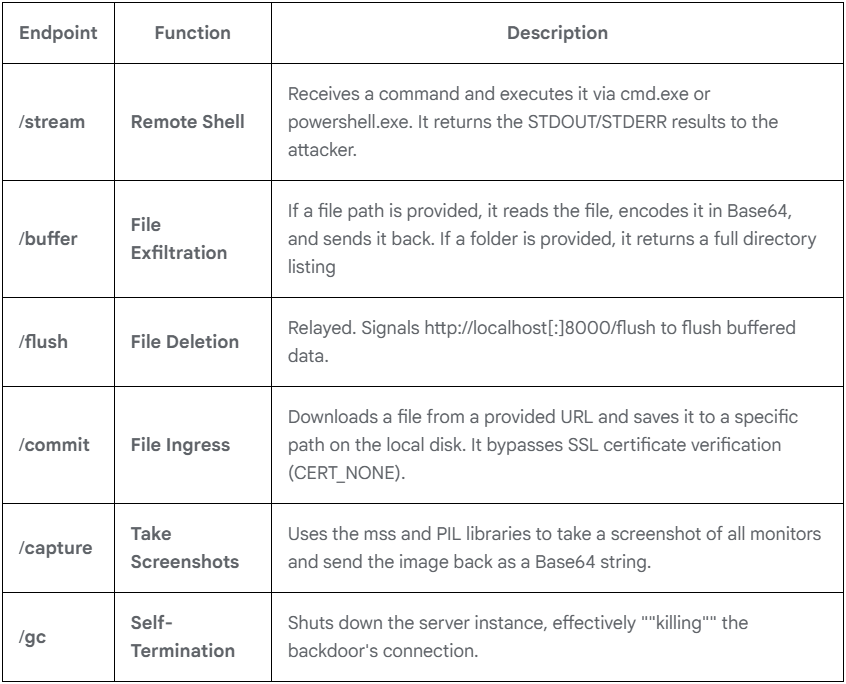
SnowBasin runs a local HTTP server and executes attacker-supplied CMD or PowerShell commands on the infected system, relaying the results back to the operator through the same pipeline.

Advertisement

The malware supports remote shell access, data exfiltration, file download, screenshot capturing, and basic file management operations.

The operator can also issue a self-termination command to shut down the backdoor at the host.

SnowBasin capabilities
Source: Google

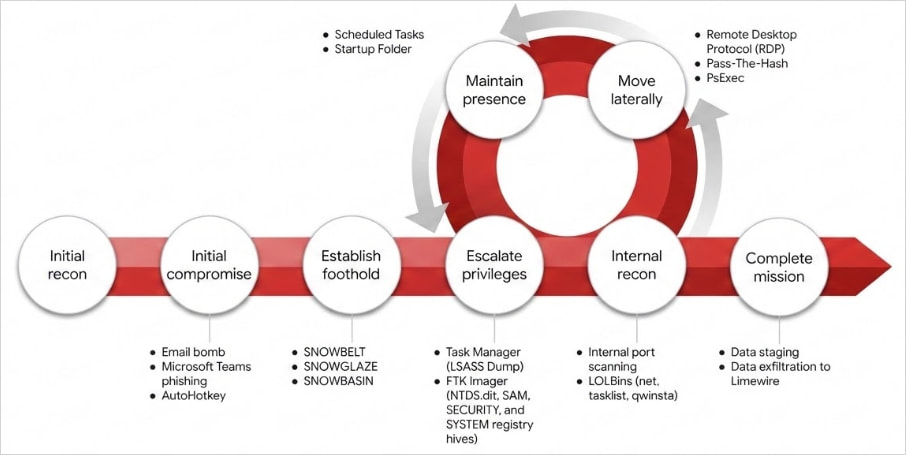
Mandiant has found that, post-compromise, the attackers performed internal reconnaissance, scanning for services such as SMB and RDP to identify additional targets, and then moved laterally on the network.

The attackers dumped LSASS memory to extract credential material and used pass-the-hash techniques to authenticate to additional hosts, eventually reaching domain controllers.

At the final stage of the attack, the threat actor deployed FTK Imager to extract the Active Directory database, along with SYSTEM, SAM, and SECURITY registry hives.

Advertisement

These files were exfiltrated from the network using LimeWire, giving the attackers access to sensitive credential data across the domain.

Attack lifecycle
Attack lifecycle
Source: Google

The report provides extensive indicators of compromise (IoCs) and also YARA rules to help detect the “Snow” toolset.


article image

AI chained four zero-days into one exploit that bypassed both renderer and OS sandboxes. A wave of new exploits is coming.

At the Autonomous Validation Summit (May 12 & 14), see how autonomous, context-rich validation finds what’s exploitable, proves controls hold, and closes the remediation loop.

Claim Your Spot

Source link

Advertisement
Continue Reading

Trending

Copyright © 2025