

Tech
Best VPN 2026: Surf the web securely

Even if you’ve never subscribed to a VPN service, there’s a good chance that you’ve already heard about its importance. Constantly advertised on podcasts and around the web, VPNs have taken off in the last few years and while it’s easy enough to get caught up in the noise of it all, just know that they are worth the hype, and we should know – we’ve tested the best of them.
For anyone who’s completely out of the loop, virtual private networks are able to mask the location of the device you’re using to browse the web, which means that bad actors aren’t able to track your whereabouts, nor are they able to access your device if you’re connected to a public Wi-Fi network.
Although masking your IP address and keeping your online activity safe is the core appeal of having a VPN, there’s a lot more to it. For instance, if you’re travelling abroad and want to read the news in your mother tongue, then you can use a VPN to have your browser believe that you’re back in your home country.
When it comes to signing up for a VPN, there’s almost always a ton of deals available for first-time customers, so it helps to shop around to get the best price. As with most bits of tech however, you’ll always find the best deals for VPNs if you shop around Black Friday in November.
Regardless of when you sign up, this guide can pair you with the best VPN for your needs as we’ve highlighted the areas that each service excels in. Keep on reading to see which VPNs most impressed our tech experts, but if you’re completely strapped for cash and want to keep your devices free of malware then our guide to the best free antivirus may serve you better.
Which is the best VPN?
Learn more about how we test VPNs
We carry out speed tests to get a general feel for how each service performs. We test all services using their clients’ default settings.
We run tests from a London-based connection that typically sees speeds between 500Mbps and 700Mbps, which means that we’re able to get a good idea of what each VPN’s maximum speeds currently are. We test multiple endpoints from each provider in three locations: the UK, the Netherlands and the US.
Pros
- Fast HTTPS transfer speeds
- Wide range of endpoint countries
- No price increase on renewal
Cons
- More expensive than many rivals
Pros
- Blisteringly fast
- Good for streaming
- Unlimited devices
- Great value subscriptions
Cons
- Subscriptions renew at a higher rate
- You have to interact with a human being if you wish to cancel your subscription
Pros
- Large number of servers
- Wide range of security features and endpoints
- Clear, audited no-logging policy
- Great for streaming
Cons
- Relatively expensive
- Subscriptions renew at a higher rate
Pros
- Unlimited-bandwidth free tier
- Wide range of endpoint countries
- Paid version is great for streaming
- Quick download speeds
Cons
- Subscriptions renew at a higher rate
Pros
- Fast speeds
- Low, consistent price of €5 a month
- Great range of cross-platform clients
Cons
- Not reliable for streaming
-
Fast HTTPS transfer speeds
-
Wide range of endpoint countries
-
No price increase on renewal
-
More expensive than many rivals
If you don’t want to spend any time diving into the details and would rather get straight to enjoying the benefits of having a VPN, then ExpressVPN is where your search ends. This is by far the best VPN that we’ve tested, with incredible speeds and a variety of countries to connect to.
During our testing we picked up on unbelievable download speeds across the board, including 278.4Mbps in the UK and 195.2Mbps in the United States. For productivity users who don’t want to be caught out by web pages that take an age to load, this is the service to go for.
It’s not just the speed of ExpressVPN that’s impressive though, as the service boasts one of the most expansive suites of extras that we’ve come across. There’s ExpressKeys which can be used to safely store and access all of your passwords, and can be handy if you’re constantly forgetting them, alongside ExpressMailGuard which can stop phishing emails from ending up in your inbox.
One of the most recent additions to the company’s toolbox is ExpressAI. This service lets you converse with an AI chatbot for help with any queries or issues that you might typically use AI for, except that unlike those other options, ExpressAI doesn’t log your conversation so it’s all private.
It should be said that ExpressVPN isn’t the cheapest VPN service available, but for all that you get here, it’s well worth the expense as you certainly won’t be wanting for anything. The company also lets you connect with no less than 105 countries so you have plenty of options available to you when hiding your IP address.
-
Blisteringly fast
-
Good for streaming
-
Unlimited devices
-
Great value subscriptions
-
Subscriptions renew at a higher rate
-
You have to interact with a human being if you wish to cancel your subscription
Although ExpressVPN, for our money, provides the best overall VPN package that you can buy right now, if you’re someone who is solely focused on speed and wants to make sure that they can access the fastest possible internet connection whilst masking their IP address then Surfshark VPN is the option for you.
When putting the service to the test, we picked up on 264.8 Mbps download speeds in the UK, 297.6 Mbps in the Netherlands and 228 Mbps in the US, which averaged out to around 263.47 Mbps. That average comes in only ever so slightly behind NordVPN in our tests, but consistency is the name of the game with Surfshark – helpful for when you’re working for a long period of time and need to keep a connection going without interruption.
In terms of security, Surfshark is one of the best companies out there for transparency so you can surf the web with peace of mind in knowing that your data and browsing history isn’t logged. The company also publishes a Transparency Report to let you know if it’s been contacted by government agencies over access to information.
Going one step further, Surfshark also makes use of independent audits to make sure that everything’s in check and that there’s nothing for customers to be worried about. It’s gestures like these that go a long way towards consumer confidence in a VPN service, and we would love to see them adopted industry-wide.
With regards to the connections on offer, Surfshark currently uses more than 4500 servers across 100 countries. Although that’s slightly less than the 105 countries connected to ExpressVPN, it’s still a significant amount and won’t leave you wanting. Just bear in mind that Surfshark’s renewal prices can be higher than what you initially paid to sign up, so double-check the rate ahead of renewal to make sure you’re happy with the cost.
-
Large number of servers
-
Wide range of security features and endpoints
-
Clear, audited no-logging policy
-
Great for streaming
-
Relatively expensive
-
Subscriptions renew at a higher rate
Out of all the VPN services we’ve tested, it’s NordVPN that provides the best alternative package to ExpressVPN. Although the latter can be more affordable in the long run, you may appreciate NordVPN’s more robust approach to online security, so it’s best to compare the features that these two services have before deciding on which to sign up to.
For starters, NordVPN can connect up to six devices simultaneously, so if you live in a large household and you want to protect everyone as they browse the web then this is the option for you. Plus, with dedicated apps for iOS, Android, Windows, MacOS, Linux and Google TV, NordVPN has put in the work to meet you where you’re at and make the process of getting connected a simple one.
Once you are connected to the service, you have a ton of features at your fingertips. Anyone who uses the Tor browser can enable Onion over VPN so that Nord and Tor can work hand in hand for a highly secure session. Regardless of your chosen browser, Nord’s Threat Protection Pro goes one step further than an average VPN by ensuring that phishing scams and malware can’t access your device, so you have an extra layer of security as you search.
In terms of your own data and how it’s stored by NordVPN, the company presents a clear no-logging policy so your internet history isn’t tracked, and the brand has built up a solid degree of trust in this area thanks to regular audits to ensure that everything is still working to the company’s vision.
NordVPN now provides access to servers in 211 locations which isn’t quite as varied as what we’ve seen on some of the other services we’ve tested, but what you do get from those locations is an impressively stable connection. In fact, NordVPN came out on top with regards to the average speed recorded when all of our test locations were taken into account.
-
Unlimited-bandwidth free tier
-
Wide range of endpoint countries
-
Paid version is great for streaming
-
Quick download speeds
-
Subscriptions renew at a higher rate
As much as we recommend opting for a paid VPN service as you’ll get so much more in return, especially with features like malware protection and an onboard password manager which feel more essential than ever in the modern age, there are options available to you if you have no cash to spend. While quite a few free VPNs have popped up in the last few years, the only one you need to concern yourself with is ProtonVPN.
What’s most surprising about ProtonVPN is that unlike a lot of free VPNs which throttle the available bandwidth as a means of enticing you towards a paid version of the same service, ProtonVPN lets you surf the web with unlimited bandwidth. This is great if you have a particularly speedy router at home as you won’t feel capped by going down the freebie route.
ProtonVPN has also made privacy a core tenet of its business practices. The company has a regularly updated transparency report to let users know of any changes they should be aware of, but the company does currently employ a strict no-logging rule so your data isn’t stored. However, the Swiss Government does have the right to order the collection of data in the event of a criminal case.
There’s also a kill switch feature built into the brand’s free VPN service so you don’t have to worry about any gaps in your internet connection that bad actors could exploit. Although there’s a decent number of countries included with the free tier, it’s worth upgrading to the paid version of ProtonVPN if you want a wider variety of locations to choose from.
Still, if speed is your main concern then we reckon that you’ll be quite pleased with what ProtonVPN is able to offer. Across our testing of speeds in the UK, the Netherlands and the US, we noted an average speed of 164.27Mbps which is more than enough for the average user and excellent value when you consider that it’s available at no cost whatsoever.
-
Fast speeds
-
Low, consistent price of €5 a month
-
Great range of cross-platform clients
-
Not reliable for streaming
If there’s one complaint that can be thrown at most VPN services, it’s that things can get a bit out of control when it comes to renewing your subscription. Oftentimes you’ll see very tempting introductory prices which get you through the door, but once your subscription runs out you can be presented with a nasty bill if you’re not careful. For those who would rather avoid that scenario entirely, Mullvad VPN is our go-to pick.
Mullvad VPN costs just €5 (roughly £4.35/$5.84) a month, and in the face of rising costs for pretty much every aspect of the tech industry, that monthly rate has stayed the same. It’s brilliant value for money, and a much better option for anyone who doesn’t want to get tied into a long-term contract or who only needs a VPN for a few months.
What’s even more impressive is what you get for that low monthly cost. Mullvad has a strict no-logging policy, and that was put to the test in 2023 when authorities carried out a search warrant at the company’s office in Gothenburg and came away with no customer data. The brand also uses RAMdisk servers which are far more secure than the standard servers typically used by VPN companies.
Beyond that, a Mullvad subscription comes with a ton of extra security features including a kill switch (ensuring that you’re never connected to the internet unless there’s a VPN protocol to go with it), split tunnelling and an ad blocker that can stop you from accidentally clicking on junk ads as you surf the web.
It’s not a perfect service however as we did notice some irregularities when trying to access streaming websites, although the general speeds that we noted were fairly solid. Across our three test countries, we noted an average download speed of 229.87 Mbps which is very respectable. Unless you want a wider suite of features, the likes of which ExpressVPN and Nord VPN can provide, Mullvad is a great option to go with.
Test Data
| ExpressVPN | Surfshark VPN | NordVPN | ProtonVPN | Mullvad VPN |
|---|
Full Specs
| ExpressVPN Review | Surfshark VPN Review | NordVPN Review | ProtonVPN Review | Mullvad VPN Review | |
|---|---|---|---|---|---|
| UK RRP | £10.19 | £14.79 | £2.99 | £7.98 | £4.29 |
| USA RRP | $12.95 | $12.95 | $4.19 | $9.99 | $5.43 |
| EU RRP | – | – | – | – | €5 |
| Manufacturer | ExpressVPN | – | – | – | – |
| Size (Dimensions) | x x INCHES | x x INCHES | x x INCHES | x x INCHES | x x INCHES |
| ASIN | B00GAZ1T9U | B07KFLMM6Z | B09KTX5FKM | B09RFFWTFM | B092M55HJ2 |
| Release Date | 2021 | 2021 | 2021 | 2021 | 2021 |

Tech
Ericsson is leaving Kista for central Stockholm, in the largest office lease in Swedish history


The 71,000-square-metre Hagastaden campus, signed with Atrium Ljungberg and Castellum, ends more than two decades in the suburb once branded Sweden’s Silicon Valley.
Ericsson is moving its global headquarters out of Kista. The Swedish telecoms-equipment maker said on Monday that, starting in 2028, it will gradually relocate its Stockholm operations, including the HQ, R&D functions, group functions, and the Imagine Studio showcase space, to a new city campus in the Hagastaden district, north of central Stockholm.
The numbers attached to the move are substantial. Across new leases with Atrium Ljungberg and Castellum, plus a Castellum agreement Ericsson signed earlier for the Infinity property, the company will occupy roughly 71,000 square metres in Hagastaden across six buildings.
Atrium Ljungberg’s portion alone, three buildings totalling 58,000 square metres on a 15-year contract, is described by the landlord as the largest office lease in Swedish history and the largest known office deal in Europe so far this year.
Annual rent to Atrium Ljungberg lands at about 360m kronor ($39m) at 2026 levels.
Castellum’s new pieces, the 9,500-square-metre Emerald House and the 3,500-square-metre Jubileumshuset, carry an annual rental value of roughly 80m kronor, according to the company’s release.
That sits on top of the 24,000-square-metre Infinity contract Castellum signed previously, expected to be ready by late 2027.
Börje Ekholm, Ericsson’s chief executive, framed the move in talent terms.
“With a vibrant location in the heart of the city’s technology collaboration and innovation community, including easy access to our changing business ecosystem, partners and decision makers, Hagastaden is clearly best-placed to address our future operations,” he said in the company’s statement.
“A thriving city campus will also strengthen our attraction for the top talent of the future.”
The translation is that the Kista calculation no longer works. The suburb in northern Stockholm has spent thirty years marketing itself as Sweden’s Silicon Valley, with Ericsson’s presence as the central evidence.
That story has been deteriorating for several years. Office vacancy rates in Kista ran at 26.7% in the first quarter of 2026, more than double the central Stockholm rate, according to Colliers data cited by Bloomberg.
The facility-management firm Coor Service Management announced its own departure from Kista in late 2024, citing security concerns; reports of organised-crime activity in the surrounding area have become a recurring feature of Swedish business coverage.
Ericsson’s lease did not name those factors, but the campus calculus is unmistakable.
The deal is a clear positive for the two landlords. Atrium Ljungberg shares rose as much as 5.1% on Monday, the most since April 8, and Castellum gained 2.1%.
Pareto Securities analyst Viktor Byrenius told Bloomberg the agreements were “a sign of strength” for Atrium Ljungberg, which has been working through elevated vacancy across the Stockholm region.
The Hagastaden lease materially shifts that occupancy story for the next decade and a half.
For Ericsson, the move comes against a quieter recent set of financial prints. The company narrowly missed Q1 profit estimates in April, as the North American 5G upgrade cycle that drove 2024 and early 2025 began to unwind.
Headcount in Sweden has been declining; the company cut roughly 1,200 jobs locally last year.
The Hagastaden campus is being designed for a smaller, denser, more central operation than the sprawling Kista footprint it replaces, which is its own form of strategy statement.
Move-in is phased and slow. Ericsson said the process will begin in early 2028 and run for several years.
The Infinity building is due late 2027; the rest of the Hagastaden campus is still under construction, on a deck built above one of the city’s major highways. By the time the relocation is complete, Ericsson’s last fixed link to Kista will, in practical terms, be gone.

On the Find X9 Ultra, the primary camera has a 200-megapixel 1/1.28-inch sensor. With a low f/1.5 aperture possible, this is an incredibly versatile camera, built to take in light and work well even in difficult shooting conditions. There’s also a pair of telephoto cameras. The first has a 200MP sensor and can zoom up to 3x (70mm equivalent) for portrait photos and general-purpose shots, while the showstopper is an ‘ultra’ telephoto, capable of 10x zoom at 50MP.
It’s rare, but we’ve seen 10x zoom in smartphones, including, briefly, Samsung’s Galaxy S23 Ultra. However, they weren’t paired with such high-resolution sensors. This offers more detail in shots, as well as the ability to digitally crop down to get even closer to the subject — although you won’t need to nearly as often. The Find X9 Ultra also has a 50MP ultra-wide camera and a 3.2MP multispectral sensor to strengthen white balance and color accuracy.
 Mat Smith for Engadget
However, Oppo’s innovative 10x telephoto is the most thrilling part of the phone’s penta camera setup. The 10x optical zoom also opens up the possibility of 20x lossless zoom, all before we start attaching Oppo’s teleconvertor lens. It also has sensor-shift stabilization to improve clarity and reduce the chances of blur. (Vivo has its own solution, which we’ll get to in a minute.)
The 3x telephoto camera is a convenient midpoint between the main camera and its huge sensor and the incredible range of the 10x telephoto. However, Oppo gets a little too keen on computational photography boosting here and I’d often get shots with ghostly outlines, especially of human subjects. Overly aggressive digital sharpening also made some images look unnatural.
 Mat Smith for Engadget
Within the camera app (and arguably too many shooting modes), Oppo’s collaboration with Hasselblad gives shooters a Master Mode that blissfully strips away the computational AI tricks and augmentations. This means that while you won’t get that AI nip-tuck on telephoto shots, you also won’t get nightmarish low-res faces or scrambled alien lettering. I broadly preferred it, though I occasionally missed the better low-light performance of the AI-boosted basic photo mode.
 Mat Smith for Engadget
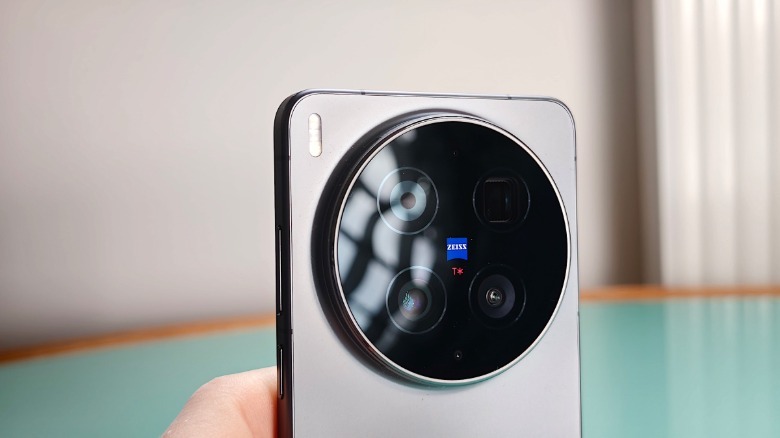
The Vivo X300 Ultra has the exact same 1/1.12-inch 200MP main camera sensor, although it has a narrow 35mm focal length, which could be argued to be more “cinematic’. Its aperture can go as low as f/1.85, losing again to its Oppo rival.
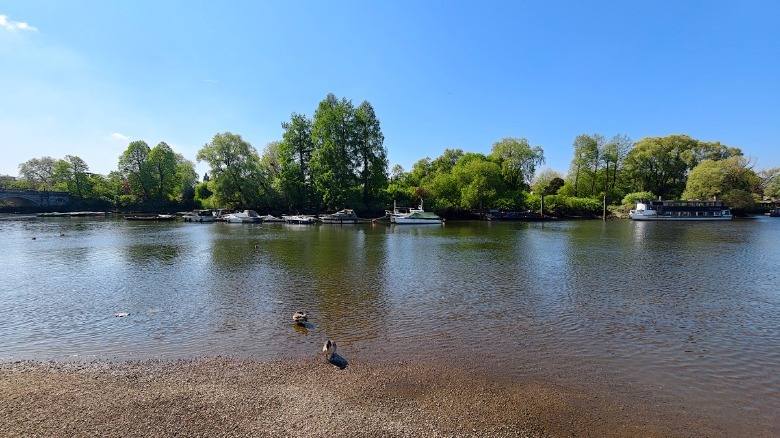
The X300 Ultra ultrawide camera, however, performs head and shoulders above the Find X9 Ultra’s version. Unlike most smartphone ultra-wide cameras, which I cynically view as a lazy effort by companies to add another camera to their smartphones, Vivo went to town. To start, Vivo added optical image stabilization (OIS), which is rare for this focal length. This, combined with a 50MP sensor, means images look crisper and more detailed than those from rival devices, which typically use lower-res sensors.
To Oppo’s credit, its ultrawide camera isn’t bad. The Find X9 Ultra also has a 50MP camera sensor and a lower f/2.0 lens. However, the sensor isn’t as big (the X300 Ultra’s 1/1.28-inch sensor is nearly twice the physical size of the Find X9 Ultra’s 1/1.95-inch sensor ) and it lacks built-in OIS. There’s also a lot less lens flaring on light sources with the Vivo phone, likely due to Zeiss’ anti-reflective lens treatment.
 Mat Smith for Engadget
The X300 Ultra’s telephoto (another 200MP sensor) maxes out at 3.7x zoom without a teleconverter and while you can crop down from that for more ‘zoom’, it loses a lot of detail and adds a lot of artifacts in the process. Fortunately, for those looking to punch in further, Vivo has you covered.

Save $200 on Apple’s 15-inch MacBook Air for Memorial Day weekend.
Amazon’s $200 discount delivers the lowest price ever on the 2026 15-inch MacBook Air with Apple’s M5 chip.
Amazon’s early Memorial Day deal knocks $200 off the standard M5 MacBook Air 15-inch laptop in your choice of Starlight or Sky Blue.
Buy 15″ MacBook Air M5 for $1,099.99
This deal delivers the lowest price we’ve seen on the new 15-inch MacBook Air that was released in March 2026. Equipped with Apple’s M5 chip with a 10-core CPU and 10-core GPU, the standard configuration also has 16GB of unified memory and 512GB of storage.
In our hands-on M5 MacBook Air review, we found that although the 2026 release is an incremental update, it’s still an excellent buy for most.
And for those wanting the extra screen real estate found in the 15-inch model, picking it up at the lowest price ever is always a plus.
If you’re looking for additional power and a larger port selection, Amazon is also knocking $250 off every 2026 16-inch MacBook Pro configuration it sells. You can read more about the sale in our deal article.
Tech
Jeff Bezos describes his $38B startup Prometheus for the first time: ‘Nothing to do with robotics’
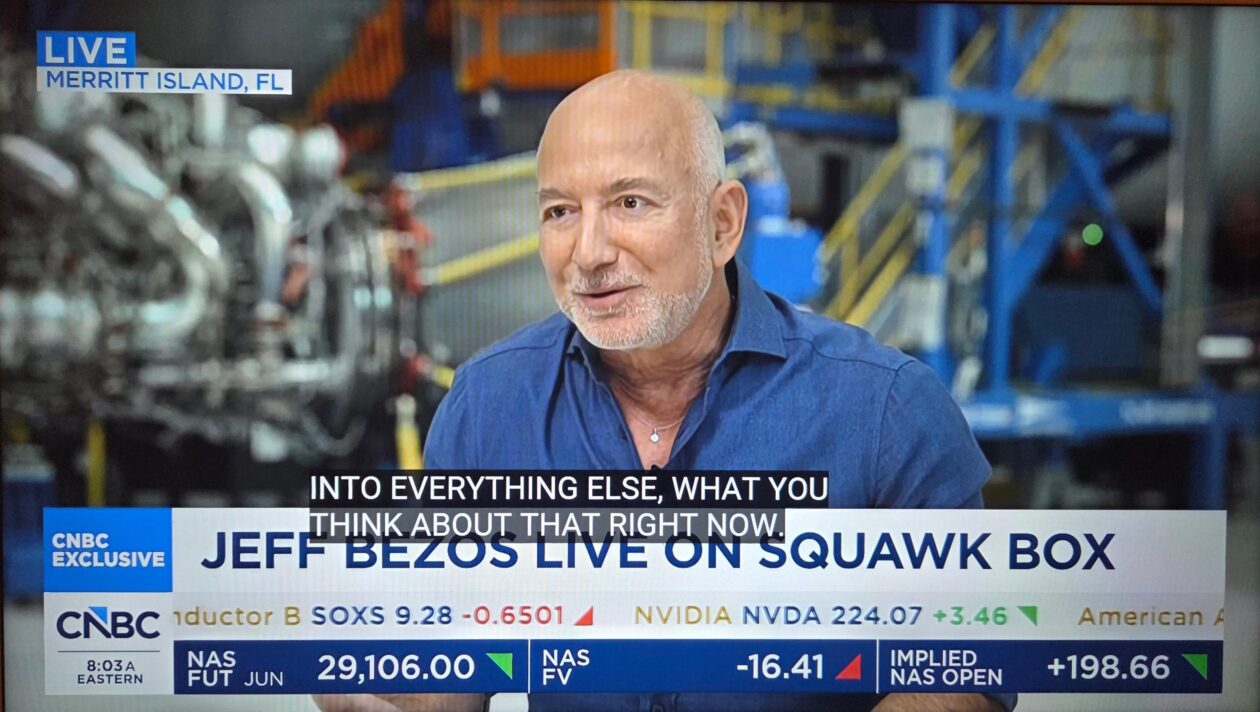

When CNBC’s Andrew Ross Sorkin described Jeff Bezos’ startup Project Prometheus as being “really about AI robotics” in an interview on Wednesday, the Amazon founder interrupted with a correction.
“It’s a little premature for me to talk about it, but we are not — we have nothing to do with robotics,” Bezos said. He went on to offer the most detailed public description yet of the secretive startup, for which he is co-CEO: Prometheus is developing an “artificial general engineer,” he said, building next-generation tools for designing physical objects.
Bezos called it “a very, very modern version” of CAD, or computer-aided design, adding that he is “really oversimplifying here,” and reiterating that it’s premature for him to give much detail.
He said Prometheus is “something I got so excited about that I became the co-CEO of the company, putting a lot of time into it, a lot of energy into it.”
The tools Prometheus is building will “help companies like Blue immensely,” Bezos added, referring to his space venture Blue Origin. However, he said, the company “deserves its own special focus” as “its own big idea” rather than being housed inside Amazon or Blue Origin.
His comments mark a rare hint of what’s happening inside a company that has operated almost entirely in stealth since news of its formation was reported in November 2025.
Project Prometheus launched with $6.2 billion in funding, led by Bezos and Vik Bajaj, a former Google X executive. Bloomberg reported in April that the company closed a $10 billion round at a $38 billion valuation, with JPMorgan and BlackRock among the investors.
The company has hired roughly 120 employees from firms including OpenAI, DeepMind, Meta and xAI, and operates out of San Francisco, London and Zurich.
Much of the outside reporting on Prometheus has characterized it as focused on robotics and manufacturing automation, which came in part from analyzing LinkedIn profiles of its hires. Bezos’ description Wednesday as a design-tools company focused on engineering physical objects suggests a different ambition, or at least a more specific one.

Rhode Island joins other states that have taken similar legal action.

Rhode Island is the latest state to challenge prediction markets on the legality of sports betting within its jurisdiction. As reported by The Providence Journal, opposing lawsuits from the state’s attorney general, Peter Neronha, and Kalshi were filed against each other earlier this week. Neronha sued both Kalshi and Polymarket, accusing the platforms of circumventing the state’s regulations that only allows sports gambling through a singular state-sponsored platform.
However, Kalshi proactively filed its own legal action against Rhode Island arguing that its event contracts, including those predicting the outcomes of sports events, can only be regulated on a federal level by the US Commodity Futures Trading Commission (CFTC). Still, Rhode Island’s attorney general is looking for a permanent court-ordered ban that prevents Kalshi and Polymarket from offering “sports-related events contract” in the state.
“There is no substantive difference between sports betting and ‘events contract’ in this context,” Neronha said in a press release. “Kalshi and Polymarket know that, and we know that.”
While the dual lawsuits only cover the legality in Rhode Island, its eventual ruling could create a major precedent on how prediction markets operate in other states. Before Rhode Island’s lawsuit, Nevada and New Jersey also sent cease-and-desist letters to prediction market platforms, only to end up in similar legal battles. More recently, Minnesota passed a bill that includes a ban on prediction markets operating in the state, which will likely be contested by the CFTC.

“Think Olympics on steroids. Literally,” quips the BBC, describing Sunday’s controversial Enhanced Games event in Las Vegas featuring dozens of athletes “using performance-enhancing drugs to try and break world records in track, weightlifting and swimming.
Some $25m (£18.6m) in prize money is up for grabs — with cash prizes for winners… The drugs they use must be legal, and approved by the Federal Drug Administration. But substances like testosterone and human growth hormone — banned by the World Anti-Doping Agency — are not only celebrated here, they’re encouraged and for sale…
Health experts warn that anabolic steroids and growth hormones can cause strokes and cardiovascular damage, among other risks. Event organisers claim Enhanced will push the limits of human performance while critics, especially in the Olympic movement, dismiss it as an affront to the spirit and founding principles of competitive sport…
Earlier this month, the Enhanced Group — the company behind the competition — began trading on the New York Stock Exchange. And the competition is seemingly being treated as an opportunity for Enhanced to sell performance-enhancing medicine and supplements online.
“The project was founded by entrepreneurs Aron D’Souza and Maximilian Martin in 2023,” the artidcle points out, “and has attracted backing from prominent investors including billionaire Peter Thiel and Donald Trump Jr.”
And NPR adds that “Most of the participating athletes trained for the competition in Abu Dhabi, as part of Enhanced’s own study.”
Enhanced did not break down what specific athletes used which drugs, but they announced on Wednesday in the lead-up to the event that 91% of the athletes competing used testosterone or testosterone esters, 79% used human growth hormone, and 62% used stimulants, such as adderall…
The games have been largely panned by outside medical experts and sports governing bodies. Multiple recent studies assess the harm surrounding the Enhanced Games. Travis Tygart, the CEO of the U.S. Anti-Doping Agency, called the games a “dangerous clown show that puts profit over principle” in a statement. The International Olympic Committee said the games are a “betrayal of everything that we stand for.” The World Anti-Doping Agency (WADA) last year urged U.S. authorities to stop the games. The International Federation of Sports Medicine said in 2024 that they see the medical oversight as “insufficient” to support the
athletes.
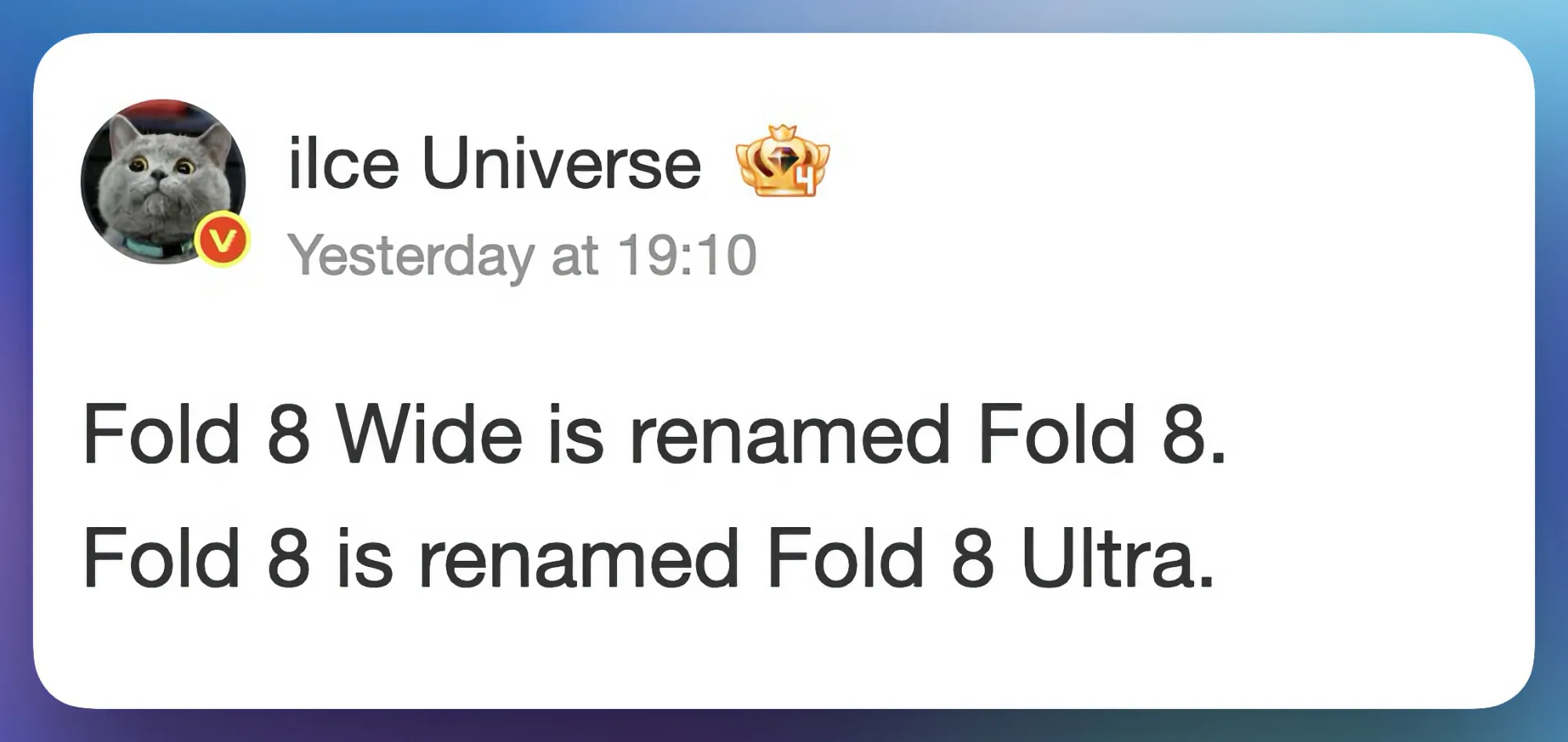
Samsung is getting ready to launch two new foldable phones in July, and if a recent leak is accurate, the company is about to flip its naming convention completely, and it’s going to confuse a lot of people.
Tipster Ice Universe has claimed on Weibo that the phone we have been calling the Galaxy Z Fold 8 Wide will actually launch simply as the Galaxy Z Fold 8. The device we expected to be the standard Galaxy Z Fold 8 will instead become the Galaxy Z Fold 8 Ultra.

While I can see why Samsung is considering the new naming scheme, there’s no denying it’s going to cause a whole lot of confusion.
Does the name change actually make sense?
I don’t think so. Yes, the wider Galaxy Z Fold 8 Wide is supposedly packing only dual rear cameras and a 4,800mAh battery, and the regular Fold 8 (which will be renamed to Ultra) will pack a triple rear camera system and a bigger battery. So on paper, the better-specced device getting the Ultra name is logical enough.
But the problem is that anyone who has followed the Galaxy Z Fold lineup will walk into a store expecting the Galaxy Z Fold 8 to be a direct successor to the Galaxy Z Fold 7. Instead, they are getting a wider, passport-style device that is a completely different form factor. That is not an upgrade; that is a different product wearing a familiar name.

Samsung is essentially asking buyers to unlearn years of brand familiarity, and that rarely goes smoothly. Many people will be confused at the point of purchase, and that confusion could easily cost Samsung sales.
Is the Galaxy Z Fold 8 Ultra worth the name?
The Ultra name carries serious expectations, and Samsung better deliver. Rumors only suggest a small spec bump with better cameras and a bigger battery. In fact, leaks suggest that the Galaxy Z Fold 8 will miss out on a number of new features, so Samsung will have to surprise us with something extraordinary to earn the Ultra moniker.


Networks
After making a medical clinic’s network rather ill, she ‘kept working until I somewhat knew what I was doing’
WHO, ME? Welcome once again to “Who, Me?” –
The Register’s Monday column in which we celebrate the
things you get wrong at work, and your skill at emerging unscathed.
This week, meet a reader we’ll
Regomize as “April,” who told us that early in her career, she worked for a
company that operated several medical clinics.
April admitted she did not feel
she was a great candidate for the job as she had recently completed her CompTIA
A+ certification – one of the most entry-level certs – and had only tangential experience
supporting doctors as they struggled to use a single application.
That résumé was enough to score a
job imaging new PCs, deploying them, and handling whatever other tasks popped up.
“One day I received a task to
convert an unused space into offices, so I loaded an armload of PCs and a dozen VoIP
phones into my car and drove the 45 minutes to the clinic,” April wrote.
“The deployment went
smoothly – or so I thought – because at each of the desks one of the people who
knew what they were doing had already put two network drops, one for the phone
and one for the PC.”
April was therefore able to
methodically get through the job, then slow down to tackle the slightly tricky
elements.
“Some of the desks needed two
computers,” she wrote. “On those, I was expected to use the secondary Ethernet
port on the phones to get internet to those PCs.”
April hooked everything up with time
to spare and decided to put her feet up for the 15 minutes that remained until 5pm – meaning she would glide into an unusually early end to her working day.
“My paid respite was interrupted
quickly by a nurse who found me and let me know none of the computers in the
entire clinic could access the internet,” April wrote.
“I wasn’t trusted with any tasks
that could actually break anything, so I was convinced that something major had
happened like a fiber line getting cut, or an outage with our ISP,” she told
Who, Me?
She investigated anyway and found
pings produced no results, so in a panic called head office and hoped
colleagues hadn’t already left for the day.
“I spent maybe an hour running
around frantically searching for anything with one of my superiors giving me
commands over the phone until someone who knew what they were doing could get
to the site and take a look in person,” she wrote.
That person eventually arrived and
quickly spotted the problem: April had made a single mistake by plugging both of
one phone’s Ethernet ports into the network, which disrupted every other
connection.
“They unplugged one and everything
came back up almost instantaneously,” she confessed. “I was genuinely surprised
they weren’t absolutely furious. They just clapped me on the back and said: ‘Well,
you won’t do that again.’”
April was so upset by her mistake
that she amended her timesheet to record that she finished work at 5pm. “If
anyone deserved an hour and a half of OT, it wasn’t me,” she wrote, adding that
she soon took it upon herself to acquire a networking certification at her own
expense.
“I kept working there for a few
more years until I became one of the people who at least somewhat knew what
they were doing,” she said.
Have you been asked to
tackle a task you weren’t properly trained to complete? Or been hired without
all the necessary skills? In either case, feel free to demonstrate your
storytelling competence by clicking here to share your tale with Who, Me? Let’s shine a light on the shoddy bosses who dumped
you into these messes! ®


The €33-per-share proposal lands at a slight discount to Friday’s price, but with Uber already sitting on a quarter of the company and DoorDash circling, the bid is the start of the negotiation, not the end of it.
Delivery Hero confirmed on Saturday that Uber has tabled a formal takeover offer for the Berlin-based food-delivery group, at €33 a share.
The price is, awkwardly for Uber, a 1.76% discount to where Delivery Hero closed on Friday, and it arrives roughly a month after Uber almost tripled its stake in the company to 19.5%, with another 5.6% held through derivatives. On any reasonable measure, this is the opening bid.
The numbers, according to the company’s statement, are an indicative proposal of €33 per share to all shareholders. The Financial Times put the implied price tag at about $11bn (€10bn). Uber’s chief executive Dara Khosrowshahi flew to meet Delivery Hero’s supervisory board chair Kristin Skogen Lund in person before the bid was filed, the FT reported.
Delivery Hero, for its part, said only that it remains “fully focused” on the strategic review already underway and declined to disclose further terms.
The strategic review is the reason any of this is happening on this timeline. Several of Delivery Hero’s largest shareholders have been pressing for it for months, and chief executive Niklas Östberg, who co-founded the company in 2011, announced last week that he would step down once a successor is in place.
The succession is targeted for the end of 2026, no later than March 31, 2027. The board has appointed advisors and opened the process; Uber has now put a number on the table inside it.
It is not the only number. DoorDash, sources told the FT, has explored a full takeover of its own and has separately expressed interest in Delivery Hero’s Middle Eastern business, Talabat.
Some shareholders have been arguing for a price closer to €40 a share. The combination of a slight-discount offer, a sitting blockholder, a parallel competing approach, and an ongoing succession review is the structural setup of a deal that gets renegotiated in public over the next several weeks.
For Uber, the logic for going hostile-adjacent is straightforward. Delivery Hero operates in more than 60 countries across Europe, the Middle East, Asia, Africa, and Latin America, through brands including Foodpanda, Glovo, Talabat, and South Korea’s Baedal Minjok.
It is the largest non-US food-delivery footprint in the world and, with DoorDash already absorbing Deliveroo last year and Just Eat Takeaway having sold to Prosus for $4.3bn, it is also the last one of scale that has not been claimed.
A full acquisition would give Uber Eats a delivery network across the markets where DoorDash now competes most directly with it.
Uber’s capital allocation in 2026 has otherwise been pointed elsewhere. The company has committed roughly $10bn to its robotaxi programme, including a $1.25bn investment in Rivian for a fleet of up to 50,000 autonomous R2 vehicles, alongside partnerships with Wayve, Nissan, Lucid, Nuro and MOIA.
Khosrowshahi has framed the strategy, in successive earnings calls, as building “everyday utility” across mobility, delivery, and commerce.
Q1 2026 results showed gross bookings up 25% year on year and autonomous trips up tenfold. Bolting Delivery Hero onto the delivery leg fits the framing.
Whether it fits at €33 is the open question. Uber shares slipped 1.6% on Friday after Bloomberg first reported the talks. The 1.76% discount to Delivery Hero’s Friday close gives investors arguing for €40 a clear rhetorical wedge, and gives the German board cover to ask for more.
Tech
Lab of UW Nobel winner cracks challenge of creating roomier protein cages to deliver genetic medicines


Medical experts use gene therapies for a variety of ailments — treating hemophilia with a clotting-factor gene or dosing a cancer patient with therapeutic DNA or RNA.
But doctors need a means of delivering that curative gene to a target in a patient’s body. Their solution has been harnessing viruses to shuttle the material, but the treatments are very expensive, limited in how much genetic material can be delivered and can trigger negative reactions.
Now researchers in the lab of Nobel laureate David Baker at the University of Washington’s Institute for Protein Design have created a way to build virus-like protein cages that could one day serve as delivery capsules for life-saving payloads.
Two strategies for engineering the protein cages are described in back-to-back papers published today in the journal Nature.
The discoveries open new possibilities for designing proteins from scratch, said Shunzhi Wang, a former Baker Lab postdoctoral scholar. He is now an assistant professor at New York University’s Grossman School of Medicine. Wang was a lead author on the papers, joined by Sangmin Lee, David Chemielewsk, Baker and others.
To visualize the new protein cages, imagine a soccer ball, which is built from pentagons and hexagons in a repeating pattern described as “quasisymmetry” because the subunits are identical but have different neighbors.

Scientists could previously make symmetrical protein cages from one or two types of building blocks, but that limited their overall size. During a casual Friday afternoon conversation, Wang, Lee and Baker hatched the idea of mixing building blocks by swapping partners from previous protein configurations.
“It was actually a serendipitous discovery,” Wang said.
The process didn’t go smoothly at first with proteins often assembling into globs. But by accounting for different geometric features and running many experiments, the scientists developed instructions that produced proteins with a curvature. As those curved proteins came together, they sensed a more crowded environment and responded by forming a mix of pentagons and hexagons to create a roomier configuration.
The resulting quasisymmetrical cages were two to three times larger than those formed by a single shape, bringing the scientists closer to the complex designs found in naturally occurring viral structures and making space for larger genetic payloads.
“These papers show that protein design is beginning to capture some of the architectural principles that nature uses to build at very large scales,” Baker said in a statement.
Additional studies are needed before the protein cages would be ready for human research and treatments. That includes tests of their immunogenicity — the immune response they might trigger if the body perceives them as dangerous invaders.
Farther down the line, Wang envisions the structures operating like a computer motherboard on which essential, modular components can be layered. In this case, that could include adding binding sites for directing the protein cage to a specific cellular target.
“That’s the beauty of this,” he said. “We can make tailored capsules for building and making more precise genetic medicines.”
The Nature papers are titled: “Design of one-component quasisymmetric protein nanocages” and “De novo design of quasisymmetric two-component protein cages.” Institutions leading the research were the IPD, NYU’s Langone Health, and South Korea’s Pohang University of Science and Technology. Collaborators included the Holt Lab at NYU’s Grossman School of Medicine, and the DiMaio and Veesler labs at the UW.

Blaq’s $100m Mosman Park project ploughs ahead

The civil war inside Cardano: Hoskinson vs the foundation

Time Is Running Out To Watch Ryan Gosling’s Haunting Crime Epic


-

 Crypto World4 days ago
Blockchain.com files with SEC for U.S. IPO
-

 Fashion3 days ago
Holiday Weekend Open Thread – Corporette.com
-
 Crypto World3 days ago
Bitcoin Accumulation Weakens as BTC Realized Losses Hit $600M
-

 Business3 days ago
Dell Technologies DELL Stock Surges 15% on AI Server Momentum and Analyst Upgrades in 2026
-
 Crypto World3 days ago
Space X IPO Is ‘Bad News’ for Tech Stocks: But What About Bitcoin?
-

 Politics3 days ago
Makerfield: a tale of two social-media histories
-

 Crypto World2 days ago
Robinhood crypto COO Tanya Denisova exits
-

 Crypto World3 days ago
MicroStrategy’s Saylor Says Miners No Longer Set Bitcoin Price, Another Force Has Taken Over
-

 Business17 hours ago
NYT Strands Answers May 24 2026 Revealed for Puzzle No. 812 Theme Summer Essentials
-
 Tech3 days ago
A 0.12% parameter add-on gives AI agents the working memory RAG can’t
-

 Crypto World3 days ago
AI infrastructure race heats up as IREN pitches full-stack strategy, WhiteFiber lands $160M deal
-

 Tech3 days ago
WhatsApp ads could make Irish debut after discussions with DPC
-

 Tech3 days ago
You Can Now Add ChatGPT To PowerPoint
-

 Business3 days ago
Trump Invests $1M-$5M in Kura Sushi USA Chain With 27 California Locations
-
 Crypto World7 days ago
Revolut Launches Dogecoin Debit Card Across UK and EU
-
 NewsBeat4 days ago
Charity run by Reform leader Malcolm Offord accused of ‘law breaking’ over Scottish registration
-

 Sports3 days ago
2026 CJ Cup Byron Nelson leaderboard: Brooks Koepka finds putting stroke in Round 1
-
Business3 days ago
Goldman Sachs reinstates Ageas stock coverage with neutral rating
-

 Crypto World5 days ago
Exa Labs raises $250 million in funding led by a16z
-

 Crypto World3 days ago
Trump Media’s Bitcoin Stash Shrinks Again as 2,650 BTC Lands on Crypto.com
You must be logged in to post a comment Login