The Bose Lifestyle Ultra Wireless Speaker arrives at $299 with most of the connectivity options people actually care about: Apple AirPlay, Google Cast, Spotify Connect, Wi-Fi, Bluetooth 5.3, 3.5mm AUX, Alexa, and Alexa+ support. That matters because Bose is not just dropping another compact wireless speaker into an already crowded category and hoping the logo does the heavy lifting.
Ask Sonos how that worked out after a rather significant app disaster. Brand loyalty only gets you so far outside the Apple ecosystem, especially when the app becomes the thing customers are complaining about.
This is the entry point into the new Lifestyle Ultra system, but it can also stand on its own, work as a stereo pair, or serve as rear channels with the Lifestyle Ultra Soundbar and Subwoofer. Bose is clearly taking aim at Sonos, Bluesound, Denon, Samsung, and LG with a speaker that sounds bigger than it looks, and costs less than some obvious rivals.
Technology: Small Box, Big DSP, Very Bose
The Bose Lifestyle Ultra Wireless Speaker is built around a compact three driver array with two front facing drivers and one up-firing driver, which is where things get more interesting than the size of the cabinet suggests. Bose is using its TrueSpatial audio processing to analyze content and create a wider, taller presentation from a single speaker, rather than pretending a small wireless box can bend physics. Guess what? That’s not really a thing no matter how many times you click your heels together and pray for it.
That up-firing driver matters because the Lifestyle Ultra is not just pushing sound straight at you. It is using direct and reflected sound, plus DSP, to create a larger soundstage. Pair two of them in stereo and the effect becomes more convincing, especially in smaller rooms where placement and simplicity matter more to the typical Lifestyle Ultra buyer.
Advertisement
After listening to the speaker in four different rooms, that part tracks. The Bose does a very good job creating scale from a compact enclosure, but let’s not pretend that moving from the bedroom to the den magically turns the pair into Sonus faber Electa Amator III loudspeakers. Physics still gets a vote.
Bass is handled through Bose CleanBass technology, which combines the woofer, DSP, and a proprietary QuietPort acoustic opening to keep low frequency output under control. Bose is not claiming this replaces a real subwoofer, and neither should anyone with working ears. The goal is cleaner, fuller bass from a compact enclosure without the bloated thump that ruins too many wireless speakers in this category.
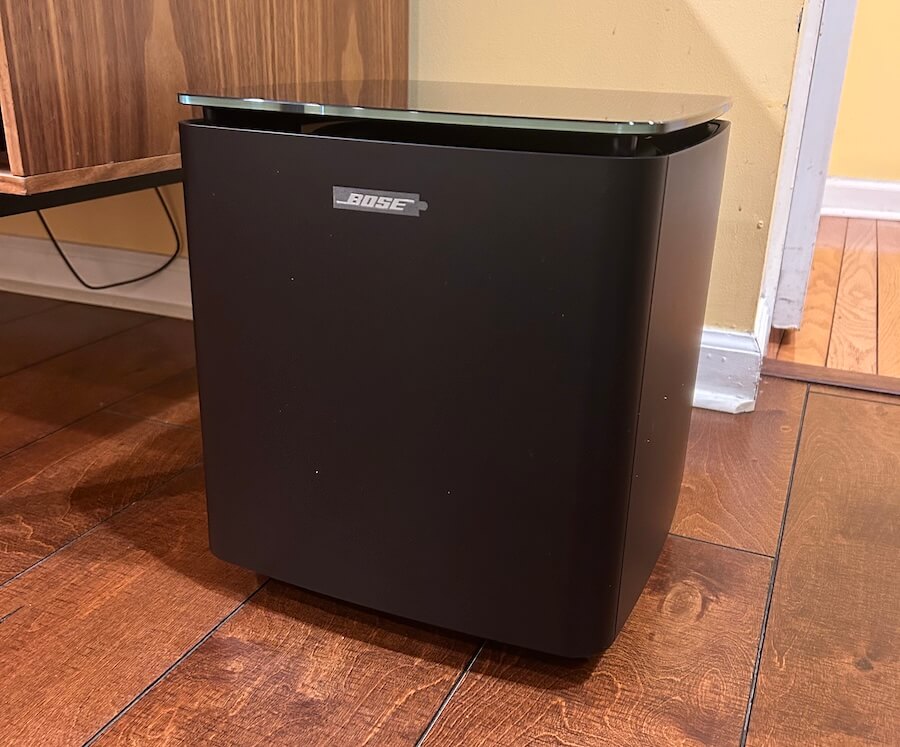
One decision I asked about at the NYC event still does not make sense to me: the Lifestyle Ultra Wireless Subwoofer is not compatible with a pair of Lifestyle Ultra Wireless Speakers on their own. It only works as part of the broader Lifestyle Ultra home theater setup.
That feels like a missed opportunity. Two Lifestyle Ultra Wireless Speakers already sound confident from the upper bass range through the treble, and they do have useful midbass output. But letting users add the Lifestyle Ultra Wireless Subwoofer to fill in the lower range would make the system a much easier recommendation for music listeners who want more scale without moving into a full soundbar based system. The subwoofer is good. Let people use it. I really hope that Bose make this a reality.
Advertisement
Compact, Flexible, and Not Just a Sidekick
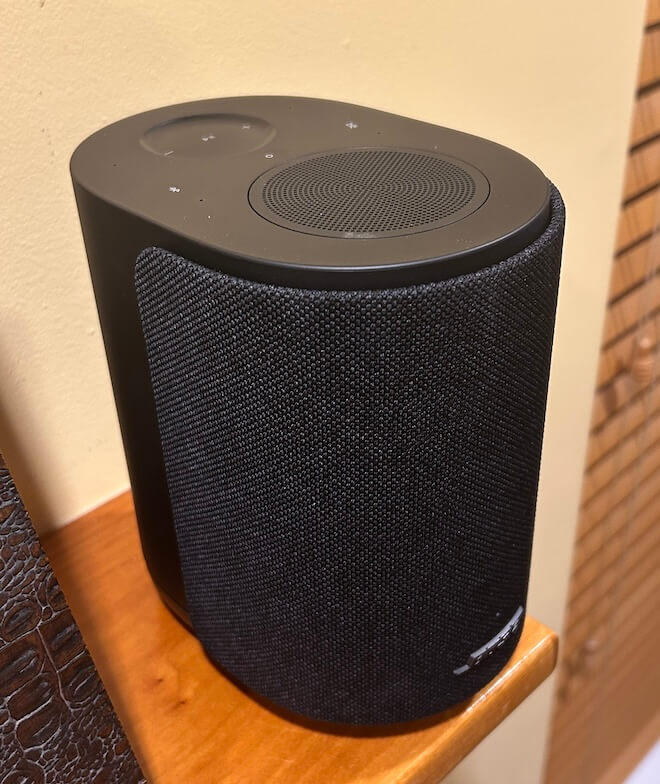
The Lifestyle Ultra Wireless Speaker measures 4.8 inches wide, 7.3 inches high, and 6.6 inches deep, which makes it small enough for a kitchen counter, bedroom, office, or shelf where a larger system would be overkill.
I also tried the pair on top of the mantle in the den, spaced about 60 inches apart, and discovered that the imaging was convincing enough to get a reaction from Tyrion the Westie. He stared directly between the two speakers like someone had just promised him Casterly Rock and then hidden the snacks.
Advertisement. Scroll to continue reading.
To be fair, he was probably trying to figure out why Nick Cave and Sia were suddenly serenading him from the fireplace. That is not a formal listening test, unless the AES has added “confused Westie” to the measurement protocol, but it did suggest that the stereo image was more focused than I expected from two compact wireless speakers sitting on a mantle.
Advertisement
The Lifestyle Ultra series also supports multiple configurations: 1.0, 2.0, 7.0.4, and 7.1.4. That means a single speaker can work on its own, two can be used as a stereo pair, and a pair can also serve as rear surround speakers with the Lifestyle Ultra Soundbar and Lifestyle Ultra Wireless Bass Module. That flexibility is the real hook. This is not merely a wireless speaker trying to look useful in a press photo. It is the modular piece that helps tie the Lifestyle Ultra system together.
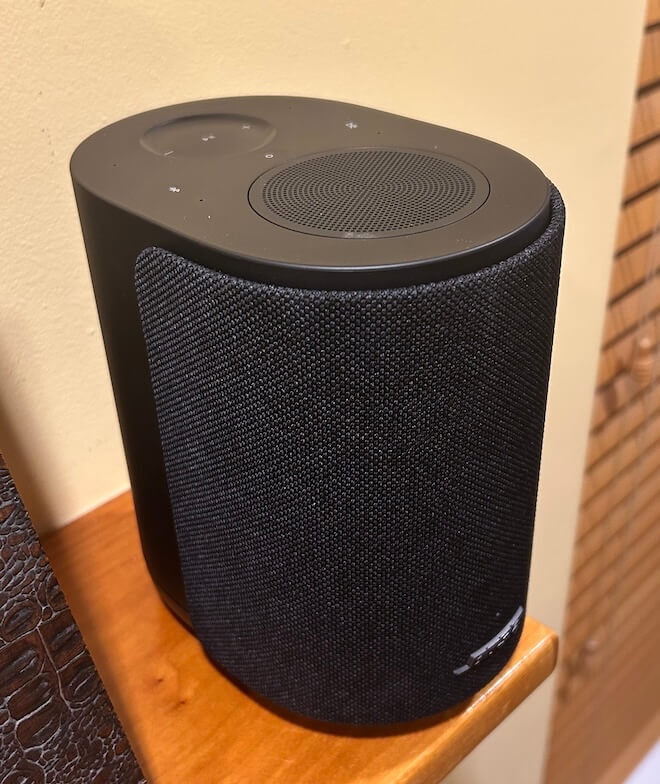
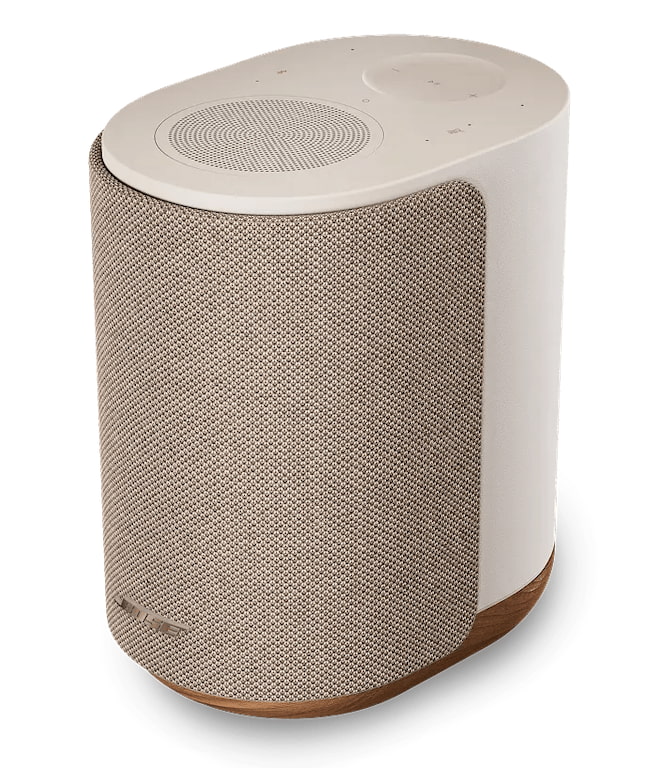
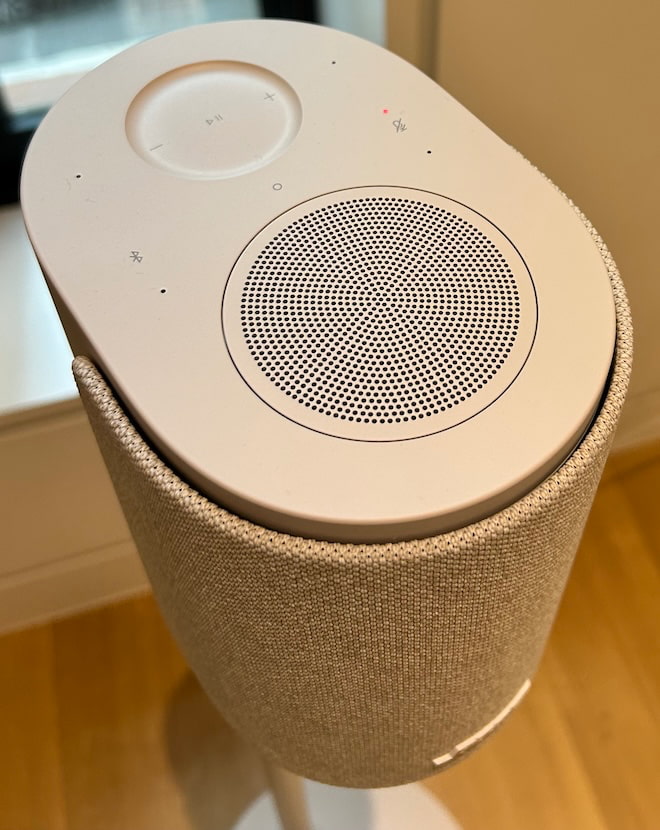
The Lifestyle Ultra Wireless Speaker comes in Black Smoke and White Smoke for $299, with a limited edition Driftwood Sand version at $349. The Black Smoke finish is fine, but a little too utilitarian for me. It looks like it was designed to disappear into a shelf, which is useful, but not exactly inspiring unless your interior design theme is “conference room after the consultants left.”
The Driftwood Sand version is the one I would buy 100 times out of 100. The soft beige finish and solid white oak base give it a warmer, more furniture friendly look that makes the speaker feel like it belongs in a real room rather than hiding from the homeowner’s association. It is the difference between a proper Rutt’s Hut ripper and a dirty water dog. Both are technically food. Only one should wind up in your West Elm or CB2-inspired home.
The tactile controls are also practical. Playback, track skipping, volume, microphone mute, Bluetooth, and Alexa prompts can all be handled directly on the speaker.
Download the Right Bose App or Enjoy the Wrong Kind of Adventure
Bose has more than one app, so do yourself a favor and use the setup sheet in the box. Tap the setup link or QR code and it will send you to the correct app. Guessing in the App Store is how normal people lose 20 minutes of their lives and start blaming Bluetooth for crimes it did not commit.
Advertisement
The app also requires iOS 18 or later, which is worth noting if you are setting this up for parents or anyone still nursing an older iPhone like it contains state secrets. Some of us are already somewhere in iOS 26.xxx, but not every household lives on the bleeding edge of software updates and battery anxiety.
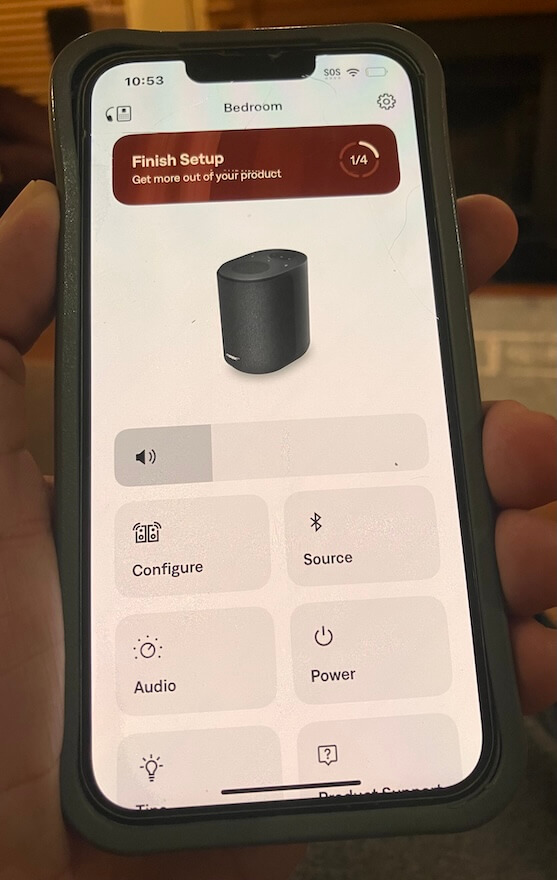
Once installed, the Bose app loaded quickly and immediately pushed a mandatory firmware update. That part was painless, and it appeared to unlock additional control inside the app. Unless I was not drinking enough Brio Chinotto, the app now includes balance control, along with EQ adjustments for bass, midrange, and treble, plus a control for the height of the sound/image.
That is useful because the Lifestyle Ultra Wireless Speaker is not just a one button box with a logo and an attitude. The app handles setup, updates, EQ, pairing, stereo configuration, and system management. It is still not a full music browsing hub, and Bose is clearly leaning on AirPlay, Google Cast, Spotify Connect, Bluetooth, and AUX for actual playback. But for setup and fine tuning, the app is straightforward, fast, and less painful than expected. Which, in 2026, sadly counts as progress.
Bose is leaning on the streaming apps people already use, which is sensible, but the absence of TIDAL Connect and Qobuz Connect leaves a gap for listeners who live inside those ecosystems. Both platforms worked without any issues using AirPlay.
A Few Setup Caveats Before You Start Swearing at the App
Like most things involving modern tech, the Bose app worked relatively well, but not without a few small detours. The same was true recently with the latest version of BluOS that I used with the Bluesound PULSE FLEX, so this is not strictly a Bose problem. Welcome to the golden age of wireless audio, where the sound can be excellent and the setup occasionally reminds you that firmware has a borderline personality disorder. It’s something I can relate to.
Advertisement
Connecting a single Lifestyle Ultra Wireless Speaker to my Verizon FiOS fiber optic modem/router was painless. First try. It took roughly 15 seconds, and once connected, stability was excellent. Adding the second speaker took more patience. Each individual speaker required a few attempts, probably four or five, before both finally appeared in the configuration section of the app. Once they were both there, things moved along properly.
Advertisement. Scroll to continue reading.
One thing to remember: hit the Save button. The app gives you configuration options, but you still need to lock them in. This sounds obvious until you are staring at the screen wondering why the system has ignored your choices like a teenager asked to walk the dog in a proper Boston blizzard.
If you need to reboot the speaker, Bose uses a button sequence on the top panel, which is actually very responsive and well designed. The sequence lands on an amber light, followed by a light pattern before the speaker is ready to sync again. It worked as intended, and I did not have to unplug everything or threaten the router with my Sherwood goalie signed by the late-Greg Millen.
Advertisement
The volume control is slightly granular, but not in a deal breaking way. It gives you enough adjustment to dial things in without launching the Lifestyle Ultra from quiet background music to ICE raid volume in two seconds.
Listening
Bose impressed the hell out of me at its Upper West Side event. The Lifestyle Ultra system sounded far better than I expected, and not in the usual “everyone nods politely while a PR person watches for facial movement” kind of way. It had scale, clarity, and a surprisingly confident presentation for a lifestyle system designed to live in normal rooms without turning them into a Best Buy annex.
But there is always a caveat with event demos.
What you hear at a well staged press event, where everything has been triple checked, carefully positioned, updated, paired, rebooted, blessed by legal, and probably stared at by six engineers, is not always what you hear at home. I’ve been to more than a few product events over the years where things did not go smoothly, and it is embarrassing as hell when the app refuses to cooperate, the network collapses, or the product decides to audition for witness protection in front of a room full of journalists.
That was not the case here. Bose had the system dialed in.
Advertisement
The townhouse acoustics also helped. Plaster over brick, proper rugs, real furniture, and not a lot of exposed glass or hard reflective surfaces creating chaos. In other words, the room gave the Lifestyle Ultra system a fighting chance. I wish my own home had that kind of isolation from the other rooms in the house. Instead, I get dogs, doorways, glass, kitchen noise, and the acoustic generosity of modern residential compromises. Very glamorous. Very “where did the center image go?”
So I always temper my expectations after a strong demo. It is the only realistic way to deal with being either underwhelmed or pleasantly surprised once the product lands in my own room. It is also how I deal with my South African biltong problem. Sometimes it is fantastic and I can eat it for hours. Sometimes I want to stop after the first bite, transition to droëwors, and hope for the best.
I miss her. I mean it.
Amy Winehouse, Nick Cave, and Sia seemed like the logical place to start. Subtle? Not really. Useful? Absolutely.
Advertisement
Winehouse remains the late Beehive Queen of some shady corner of London, armed with the soul of Aretha Franklin and the romantic judgment of someone who should have had better friends, a better lawyer, and someone in the room willing to unplug the bad decisions. What a waste.
Advertisement. Scroll to continue reading.
“Valerie” from the BBC Sessions is one of those tracks I use because it has a slightly hard top end. Not broken. Not unlistenable. Just enough edge to expose whether a speaker is going to polish the wart or shine a flashlight on it like a suspicious dermatologist from Englewood Cliffs.
The Bose passed with flying colors.
Advertisement
I liked the weight and slightly reserved presentation here. The Lifestyle Ultra Wireless Speakers did not try to make Winehouse sound larger than life, which would have been the wrong move. Instead, they gave her voice a solid center image, believable scale, and actual height. Not “change your underwear” spooky like the $99,999 ATC EL50 Anniversary system I heard at AXPONA, but definitely not some vague vocal ghost floating around the room without a foundation.
She was pushed slightly in front of the speakers, but not into my lap. That worked.
Switching to the master of grit, snarl, and genuine power, the Bose made Nick Cave sound very present. Did it deliver the weight of larger loudspeakers? No. Let’s not start lying before lunch. But compared with the Bluesound PULSE FLEX, I actually found the Bose more convincing in that regard. Neither compact wireless speaker can deliver the proper mass and menace of Cave’s piano playing, but the Bose tried harder. That surprised me.
It also gave up none of the clarity or detail in the process. I can’t make a fair comparison of soundstage size between the Bose and Bluesound because Bluesound only sent me one PULSE FLEX, and stereo imaging generally requires two speakers.
Advertisement
Sia’s “Unstoppable,” “Cheap Thrills,” and “Breathe Me” were all well resolved, with clean vocals, decent separation, and enough dynamic snap to keep the presentation from feeling flat. But they also exposed the obvious limitation: the absence of real sub bass impact.
Bose Ultra Lifestyle Wireless Subwoofer
This is where the Lifestyle Ultra Wireless Subwoofer would have made a major difference. The speakers have enough upper bass and midbass energy to sound balanced on their own, but Sia’s music needs that lower range support to fully land. The subwoofer is already in the Lifestyle Ultra family. Bose should let people use it with the speakers as a 2.1 music system.
Switching over to jazz, with some electronic music mixed in, a few things became clear about the Bose Lifestyle Ultra Wireless Speakers. The folks outside of Boston are rather clearly done listening to audiophiles tell them their products do not cut the mustard. We have reviewed a substantial number of Bose wireless headphones and earbuds over the past three years, and the pattern is not hard to spot: Bose knows what it is doing, and it knows exactly who its customers are.
That matters here.
Advertisement
With The Orb, Aphex Twin, and deadmau5, the Lifestyle Ultra speakers were clear, detailed, quick, and a little meatier through the midbass than some of their rivals to the north. Minus the missing sub bass impact, the presentation had enough drive and body to make the music work. Another case of the Bruins beating the Leafs. In this scenario, it felt like David Pastrnak was in the building, and someone in Toronto had already started blaming the officiating.
The Bose did not turn compact wireless speakers into a nightclub system. That is not the assignment. But the timing was strong, transients were clean, and electronic tracks had enough snap to avoid sounding soft or polite. Again, the Lifestyle Ultra Wireless Subwoofer would have changed the equation in a major way, especially with music that lives below the midbass.
Advertisement. Scroll to continue reading.
Jazz exposed a different set of strengths and limitations. Horns had bite, and there was enough texture to keep brass and reed instruments from sounding overly sanitized. But do not go looking for a long, luxurious trail of decay. Notes lingered briefly and then exited the building faster than the Red Sox starting rotation against the Tigers. Ouch.
Advertisement
Soundstage depth was not massive on some jazz recordings, but height and width were, to borrow from Larry David, pretty, pretty good. The Lifestyle Ultra speakers created a presentation that felt taller and wider than expected from two compact boxes, especially when they were positioned properly and given some breathing room.
Pacing was not an issue. The Bose kept things moving, stayed composed, and did not smear complex passages into wireless speaker soup. It may not satisfy the listener who expects electrostatic transparency, 300B glow, and a tax audit with every cymbal tap, but that is not who this product is for. For the intended buyer, the Lifestyle Ultra delivers a more convincing musical experience than a lot of people will expect from something this size.
Rear view of the Bose Ultra Lifestyle Speaker (Driftwood)
The Bottom Line
The Bose Lifestyle Ultra Wireless Speaker is better than a lot of audiophiles will want to admit, which is always fun to watch from a safe distance. At $299, Bose has cleared the Green Monster with room to spare. Maybe not a Carlton Fisk wave it fair moment, but definitely not a wall ball single.
What works best is the combination of scale, clarity, image height, midbass weight, and genuinely useful connectivity. Apple AirPlay, Google Cast, Spotify Connect, Wi-Fi, Bluetooth, AUX, Alexa, and Alexa+ support give most users the paths they actually need, and the speaker sounds bigger and more composed than its size suggests. In stereo, the Lifestyle Ultra becomes far more convincing, with a solid center image, good width, and enough height to make vocals and smaller jazz ensembles feel properly placed rather than sprayed across the room like Fenway beer in the cheap seats.
What is missing? TIDAL Connect and Qobuz Connect are not supported, the Bose app is for setup and control rather than full music browsing, and the lack of Lifestyle Ultra Wireless Subwoofer support with a standalone stereo pair feels like a genuine missed opportunity. The speakers do well from the upper bass through the treble, but a proper 2.1 option would give electronic music, Sia, Nick Cave, and larger scale recordings the low end authority they deserve.
Advertisement
This is for listeners who want a clean, compact, easy to use wireless speaker that does not sound like an afterthought, and for buyers who want something more flexible than Bluetooth but less fussy than a traditional hi-fi setup. Personally, I would pick the Lifestyle Ultra over the Bluesound PULSE FLEX and the comparable Sonos option in this price range.
Pros:
Strong sound quality for $299 with better scale, clarity, and composure than expected from a compact wireless speaker.
Excellent connectivity: Apple AirPlay, Google Cast, Spotify Connect, Wi-Fi, Bluetooth 5.3, 3.5mm AUX, Alexa, and Alexa+ support.
Convincing stereo performance when paired, with solid imaging, good width, and real height.
Useful Bose app for setup, firmware updates, EQ, balance, pairing, and system control.
Better midbass weight than some rivals, including the Bluesound PULSE FLEX and comparable Sonos options.
Cons:
No TIDAL Connect or Qobuz Connect at launch.
Lifestyle Ultra Wireless Subwoofer does not work with a standalone stereo pair.
Limited sub bass impact with electronic music and larger scale recordings.
Bose app is not a full music browsing hub.
Black Smoke finish looks too utilitarian; Driftwood Sand is the better pick but costs $349.
A geothermal energy demo device built by Seattle startup Endurance being tested in the Mariana Islands. (Endurance photo via LinkedIn)
Endurance Energy, a Seattle-based startup developing technology to extract energy from the heat beneath the ocean floor, has raised $54 million.
The team — led by former SpaceX engineerAndrew Redd — is racing to meet surging demand for clean power, with plans to deliver electricity to the grid within two years.
“Our SpaceX heritage enables a pace of development that is unprecedented for new energy projects,” the company said Thursday on LinkedIn.
Redd launched Endurance in 2024. Over the past year, the startup has completed four prototype deployments to deep-sea volcanoes up to nearly 1,000 feet below the surface, where volcanic systems heat water to 728 degrees Fahrenheit.
Geothermal companies produce energy by drilling wells into underground reservoirs of hot water or steam, bringing that fluid to the surface and using it to spin turbines that generate electricity, then reinjecting it back into the reservoir.
Advertisement
Endurance is unique in its pursuit of undersea geothermal sources and aims to produce power on the gigawatt scale. For comparison: Washington’s Grand Coulee Dam has a generating capacity of 6.8 gigawatts and it’s the largest power station of any kind in the U.S.
Hitting gigawatt generation will take time. Endurance is on track this fall to deploy its 100 kilowatt generator dubbed “Adelie” to the underwater volcanic range called Juan de Fuca ridge, located off the coast of Washington and Oregon. Adelie is the company’s first complete system, which is capable of drilling under the ocean, generating power from that drilling and handling the energy transfer.
Geothermal power has become a hot ticket in the clean energy sector. With Google as a key investor, Fervo Energy raised $462 million in December, bringing its total to more than $1.5 billion. Sage Geosystems closed a round worth over $97 million in January.
Geothermal sources currently account for only 0.4% of U.S. power generation — but that share is expected to grow given the technology’s potential to provide around-the-clock, carbon-free electricity.
Advertisement
Redd, a Pacific Northwest native, is building his company on the north shore of Seattle’s Lake Union. He praised the location for its ample moorage and allowing the team to load seafloor drills and power generators directly onto seagoing vessels.
“Subsea geothermal and Seattle is a match made in heaven,” Redd said on LinkedIn. “The opportunity to work on renewable energy, with a group of people this talented, right back home, is a dream come true!”
The startup has 25 employees, according to TechCrunch, 12 of whom previously worked at SpaceX.
The Series A round was led by Founders Fund with new investors Felicis, Voyager Ventures, Riot Ventures and Construct Capital. Previous backers Point72 Ventures, First Round Capital and Ascend also participated.
To lose one speech-suppressing SLAPP suit may be regarded as thoughtless. To lose two looks like you’re a censorial hack.
Last month we wrote about how supposed “free speech warrior” Matt Taibbi (who spent years misrepresenting the work of people who study disinformation as inherently censorial, while getting pretty basic facts wrong) had lost his speech suppressing SLAPP suit against author Eoin Higgins. In that case, he argued that some rhetorically hyperbolic metaphors used on the book’s cover defamed him. The court pointed out that’s not at all how defamation works.
The hearing in question was yet another in a ridiculously long line of congressional hearings (multiple ones where Taibbi has appeared peddling nonsense) about the supposed “censorship industrial complex,” a mostly made-up concept pushed by political hacks trying to shield online trolls and bullies from ever facing consequences from private actors for breaking the clearly stated policies of online platforms.
Kamlager-Dove chose to question Taibbi’s credibility. You could argue she could have focused on the factual problems with his continued confused claims about how disinformation research and trust & safety work — but she went for the more salacious (and widely reported) claims about his time in Moscow from a few decades ago, along with a characterization that reads as a clear opinion based on disclosed facts, which (by definition) cannot be defamatory.
Advertisement
As you may be aware, things said in Congress tend to be protected by the speech and debate clause of the Constitution. Taibbi’s lawyers claimed that because Kamlager-Dove reposted videos of her remarks on social media, that somehow took them outside the clause’s protection. For her part, Kamlager-Dove pointed to the Westfall Act which (as we’ve discussed in the past) allows the government itself to substitute in as a defendant in cases filed against government employees if the lawsuit was based on government work they were doing. In defamation cases, this is fatal: once the federal government substitutes itself in as defendant, the case collapses, because you simply can’t sue the federal government for defamation thanks to sovereign immunity.
Here, the case fails on those grounds exactly. Judge Evelyn Padin finds that the Westfall Act does apply, effectively dooming the case. Taibbi’s lawyers tried to argue that Kamlager-Dove’s statements weren’t part of her job as Congress… because her comments were “partisan communications” and were for “self-aggrandizement on Twitter” rather than serving her constituents. Except politicians making self-aggrandizing partisan communications is (unfortunately) part of their job these days.
Representative Kamlager-Dove’s Statements and republications, however, are precisely the kind of conduct that is “a central part of the job for members of Congress.”…. Indeed, a “primary obligation of a [m]ember of Congress in a representative democracy is to serve and respond to his or her constituents.” …. As the Ranking Member of the Subcommittee holding the Hearing. Representative Kamlager-Dove’s remarks mentioned “taxpayer time and resources” and “foreign policy” topics that are important to members of Congress and that are top-of-mind for their constituents….
Republishing the statements online does not change the analysis. Taibbi claims that the “republications on X, BlueSky, and [Representative Kamlager-Dove’s] website were not legislative work, [and] occurred outside the legislative setting.” …. But members of Congress routinely engage with the public on social media and on the internet as part of their jobs…. (“There is no meaningful difference between tweets and the other kinds of public communications between an elected official and their constituents that have been held to be within the scope-of-employment under the Westfall Act.”). As Taibbi concedes, Representative Kamlager-Dove was simply “talking to voters on Twitter.” …
Thus, while the judge doesn’t get a chance to dismiss the censorial SLAPP suit for being a censorial SLAPP suit, the court does make it pretty clear you can’t sue over this kind of thing.
Two SLAPP suits filed to silence critics. Both dismissed. This is a guy who built his recent brand on the Twitter Files and the “censorship industrial complex” — and who has been a key cog in helping the government suppress speech in the process. He’s now spent quite a lot of time trying to use the courts to shut people up for criticizing him — and failing at that, too.
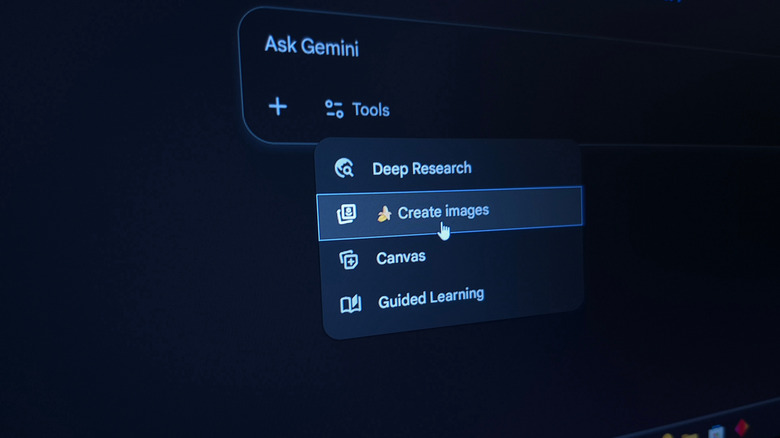
There’s no shortage of AI chatbots competing for your attention in 2026. However, if you own an Android device or are already immersed in Google’s ecosystem — which, let’s be honest, most of us are — then Gemini is likely the assistant you’ll want to use. The basic service is free, but Google, like its competitors, offers paid plans with extended limits, more storage, and other perks. The Google AI Plus plan is a great way to get more out of Gemini, and Google has recently cut its price from $7.99 to $4.99 a month.
Google is also doubling storage capacity from 200GB to 400GB for the AI Plus plan, allowing users to store twice as much data across Google Drive, Google Photos, and other services. There are plenty of other features the Google AI Plus plan unlocks, too, including the Omni Flash model in Gemini for video generation and increased limits for NotebookLM and Google Flow.
If you don’t plan on using Google’s AI features, you can always subscribe to one of Google’s dedicated storage plans instead; these cost $1.99 or $2.99 a month for 100GB or 200GB, respectively. This will still let you use most of Gemini’s features. If you do decide to join the AI Plus plan, though, you’ll be glad to know that Google is doing really well with AI.
Advertisement
Google’s other AI plans
Nwz/Shutterstock
Compared to the free version of Gemini, the Google AI Plus plan gets you double the usage limits across Gemini’s models. For $19.99 a month, you can jump to the Google AI Pro tier. This unlocks 5TB of cloud storage, four times the AI usage limits of a free account, and plenty of other features, including Google’s Nano Banana Pro image generation model. This plan also includes a YouTube Premium Lite subscription, which removes ads on most non-music videos.
Alongside AI Plus and AI Pro, Google also offers two other AI Ultra plans for $99.99 and $199.99. These get you up to 30TB of storage, the highest usage limits, and a full YouTube Premium individual plan. Unless you require it for work or are an avid AI user, though, the Google AI Pro plan should be plenty. If you use AI sparingly, the base Google AI Plus plan is probably the best value here. Plus, increased cloud storage means you can back up your Android phone or any files you frequently work with without worrying about running out of Google Drive storage.
Hybrid meetings can leave remote workers feeling excluded, Jabra study finds
Unsuitable and dated setups cause regular meeting delays and technical failures
Better meeting room kit and clear meeting purposes could improve engagement
Around half of remote participants say they’re forgotten, talked over or excluded during hybrid meetings, a new study from Jabra has revealed, indicating that hybrid in-person and remote meetings might not be as effective as we’d thought.
The issue is particularly evident when multiple participants are in a physical room, with others joining online. But more than that, women (16%) and junior workers (26%) are more likely to feel they’re being excluded.
But it might not be the concept of hybrid that’s at fault – Jabra argues that dated tech is making it hard for all participants to have equal visibility, and that poor tech is only amplifying existing cultural issues around visibility instead of creating them.
Latest Videos From
Hybrid meetings are the least effective kind
That much is evidenced in the fact that hybrid meetings are generally worse off than fully remote meetings, with workers more likely to miss content (59% vs. 41%), feel excluded (55% vs. 38%) or need follow-up meetings to clarify details (42% vs. 28%).
Advertisement
Years after workers were sent home at the height of the pandemic, companies are still failing on their meeting tech. Three in four hybrid meetings experience at least one technical failure, and participants often claim difficulties hearing (73%) or seeing (68%) participants.
Jabra even argues that these failures add an average of 11 minutes to every hybrid meeting, and losses can rise further for the biggest companies.
This comes as workers spend an average of eight hours per week in meetings (more than that in Denmark, India and the UK).
Advertisement
Sign up to the TechRadar Pro newsletter to get all the top news, opinion, features and guidance your business needs to succeed!
With more than half (58%) of that time generally considered unnecessary, 66% leave without clear action items and 59% demand follow-ups to clarify missed points.
Meeting infrastructure and purpose hold the keys to success
As for the fix, many companies have turned to AI to help with things like meeting summaries and live transcriptions, but widespread use remains low. Poor trust and privacy/compliance issues also prevent companies from going all-in on AI.
Advertisement
“AI can enhance a well-run meeting, but it can’t fix a broken one,” Jabra Enterprise Video Business Unit SVP Holger Reisinger said.
To fix the issue, the report urges companies to invest in meeting room technologies like microphones, cameras and connectivity to bring remote participants closer to in-person attendees.
At the moment, 37% use a single laptop as a mic and speaker for the room, 31% revert to audio-only after giving up on video, and 23% have even dialed in by phone for audio. A third (34%) also noted that participants join on their own individual devices, rather than using a central meeting room system designed to capture all participants.
Advertisement
Jabra is also one of a growing number of researchers to find that workers face increased Zoom fatigue (42% of workers hit their energy limit within two hours of back-to-back meetings, 83% within four hours), stressing the need to reframe meetings entirely and only hold calls when it’s necessary.
That way, workers are more likely to be alert and actively collaborate with all colleagues, hybrid or not.
I am going to start where no good teacher should start, with a $10 word: epistemology. It refers to a branch of philosophy that explores how we know what we know – something scholars like John Dewey argued is deeply tied to experience, not just information.
This word takes me back to my doctoral graduation when my father-in-law said with good-natured humor, “Well, Ev… there’s a lot of [stuff] you can’t learn from a book.” At the time, I didn’t know what to say, but any teacher worth their salt will tell you: he’s right.
Pre-service teachers – myself included – often lament that they didn’t really learn to teach until the rubber-meets-the-road experience of student teaching or that first job. This is the challenge of teaching pre-service teachers. I’ve been doing it for a handful of years now, and I see a trend – the TikTok way of knowing in education. It’s got me wondering how we adapt our practices based on my experience during my recent final exams with pre-service teachers.
The TikTok way
Advertisement
For example, I ask my students to make two tangible items to try and circumvent AI. One item is a teacher creed. I hand out “fancy” paper and tell them to create something they might read every teaching day – something to remind them not if, but when teaching gets hard. These are heartfelt, colorful creations. They write things like, I will show up with a good attitude.Even on my worst day, I will be someone’s favorite teacher. I cringe a bit, knowing how more seasoned educators might scoff but that is perhaps why I assign them – to bottle that early hopefulness in a landscape that often doesn’t often create it for new teachers.
The second item is to create “One One-Pager to Rule Them All!” Students make non-linear, doodle-style notes throughout the semester, and this final asks them to zoom out and represent everything essential we’ve learned through a map of connections, images, and ideas.
I love this assignment because I can see who is connecting the dots and who is simply regurgitating the text. I sit with each student for five to seven minutes as they “show and tell” the work. As they read their creeds, I am heartened and sometimes even tear up. And in conversation after conversation this semester, I heard the same phrase, almost as a confession mid-conference:
“I know it’s not research-y, but in a TikTok I saw…”
“I know it’s not the best source, but I saw a reel that said…”
“This guy I follow always says…”
Each of these notes expanded or connected my own thinking about course content. Some couldn’t be backed in my mind of research, but others could. So, instead of arguing, I asked questions: Who created that content? What might their motivation be? Why does it matter to you? This kind of questioning reflects what Marilyn Cochran-Smith and Susan Lytle describe as “inquiry as stance” – an orientation where teachers are active investigators of knowledge.
Advertisement
An epistemological shift
We are in a shift in epistemology. Future teachers are learning not only through peer-reviewed research or textbooks, but also through short-form video, personality-driven content, and lived teacher experience shared in real time – what media scholars like Henry Jenkins describe as a more participatory culture of knowledge. This is democratizing, the dismantling of the silo that has long held educational research out of reach. But this is also destabilizing.
During my first years of teaching, I cried in my car a lot. If I had had the megaphone of TikTok influencers celebrating how they left education, or even my own content microphone, I’m not sure I would have made it through to my later years of teaching that are still hard but more grounded and fulfilling.
Admittedly, some positions are ones to leave. Yes, at times educator working conditions are not what they should be but how do we help pre-service and early-career teachers move through the baptism-by-fire years while being bombarded by voices – many from people who have left the profession and now narrate it from the outside? Some of the content is helpful. Some of it is not. And all of it is loud.
Advertisement
I wonder if our teacher preparation programs are keeping pace with how knowledge is actually being formed. It leads me to my favorite teacher question, “So what? What do we do now?” How long do we hack away at the plant growing up the wall, and when is it time to embrace the aesthetic of a vine-covered building as something worth studying?
Instead, what if instead we become weavers of stories? What if we help students craft their own and build connections of knowing? What if we engage lived experience not as secondary to research, but as a complementary form of knowing? When have we had so much access to real-time teacher voices about things that happened to them in the classroom that day?
Just because something is visual, narrative, click-baity, and social doesn’t mean it is missing the mark or doesn’t engage a pedagogical question worth exploring. This TikTok wondering is happening whether we embrace it or not, so what if we see it as a new charge to help future teachers engage these voices critically, rather than pretending they don’t exist?
Here are some ideas I’m playing with. I’m curious what you might add.
Advertisement
Ed Content Fridays. Students bring in content that connects with the week’s readings and learning from their own scrolling. Discuss it in aSpider-Web format that employs elements of alibrarian CRAAP test to help students develop habits of mind around credibility and content creator motivation.
Use a C3WP writing strategy that engages reels and posts to kick off class. Start with what students know as a free write and then bring in content to have them expand their arguments and defend thoughts with research from our shared text. If students bring it in, they find it interesting, and we can require a citation connection to the course text or researchers.
Like/Share/Subscribe. Share strong online content that sings from reputable sources with students. Syllabi and course hubs can be places to curate rich content collaboratively.
Have students create their own content.CapCut on a desktop orEdits on a phone are surprisingly easy plug-and-play tools to make short form videos, and we can up the academic requirements with or without student posting. Thoughtful content can grow out of our rich history of educational research, bringing rich, thoughtful voices in among the pervasive ranting. I’m not saying we shouldn’t be about the work of educational reform and that a good rant doesn’t have its place, but this new way of knowing and sharing knowledge is sitting in our desks waiting for us to light the fire.
Advertisement
Yes, my step-dad is right, there is so much we can’t learn from a book, but maybe there is still so much we can learn from our own students in their own ways of knowing, even if we don’t fully understand them ourselves. What if our ways of knowing weave together, creating something beautiful?
Congress is reviving one of the most significant antitrust bills Apple has faced in years, reopening a fight over the App Store and platform control that the company helped spend millions to defeat during previous congressional sessions.
Sens. Amy Klobuchar, D-Minn., and Chuck Grassley, R-Iowa, reintroduced the American Innovation and Choice Online Act (AICOA) on June 10. It revives a bipartisan effort to limit how dominant technology companies favor their own products and services.
The bill targets the largest online platforms and seeks to restrict conduct that supporters say gives those companies an unfair advantage. Apple and other technology giants spent years fighting earlier versions of the legislation because of its potential impact on their businesses.
The proposal would prevent dominant technology companies from favoring their own products and services. Lawmakers describe those practices as self-preferencing and argue they can disadvantage competitors.
Advertisement
Critics argue Apple uses its position as the operator of iOS and the App Store to benefit its own services over competing products. The legislation could directly affect the App Store and Apple’s control over the iPhone ecosystem.
Apple has consistently argued that its policies help protect user privacy, security, and the integrity of its platforms. In a statement provided to AppleInsider, Apple said it “strongly disagree[s] with the Senate’s consideration of European-style regulation” and argued the legislation would undermine privacy, security, and child safety protections while making it harder to do business in the United States.
The company also said importing Europe’s “failed policies” would not increase competition. The reintroduction marks the latest chapter in a legislative battle that has stretched across multiple sessions of Congress.
Earlier versions of AICOA advanced through the Senate Judiciary Committee but never reached a final vote despite bipartisan support. The bill came closer to becoming law than many technology reform proposals.
Advertisement
The debate around AICOA has changed since Congress first considered the legislation. Apple has already made significant App Store changes in Europe to comply with the Digital Markets Act.
The European law imposed new requirements on how large technology platforms compete and operate. The DMA and AICOA take different approaches to regulation.
Both aim to limit how dominant technology companies use control of their platforms to benefit their own products and services. For Apple, the DMA offers a real-world example of the kinds of changes lawmakers have sought through AICOA.
The company argues AICOA would mirror key elements of Europe’s Digital Markets Act, which required the company to make significant App Store changes in the European Union. According to Apple, the DMA has weakened privacy protections, increased security risks, and created a more difficult environment for product launches and platform development.
Advertisement
Why Apple fought the bill
Apple was among several technology companies that opposed the legislation during its previous runs through Congress. It argued that some provisions could make it harder to maintain privacy and security protections on its platforms.
Industry groups representing large technology companies also warned that the legislation could have unintended consequences for integrated products and services.
Supporters argue dominant platforms have too much control over businesses that depend on them. They say existing antitrust laws haven’t done enough to address those concerns.
Major technology companies spent heavily to stop AICOA and related antitrust legislation. Previous reporting found that Apple, Amazon, Google, and Meta collectively spent more than $100 million on lobbying and advocacy efforts tied to the proposals.
Advertisement
Trade groups also joined the fight, and industry-backed advertising campaigns helped amplify the opposition. The legislation ultimately stalled despite advancing through committee and attracting support from both parties.
Why the legislation matters now
The bill’s return doesn’t guarantee it will become law. Previous versions generated substantial attention and bipartisan support but ultimately stalled before reaching the finish line.
For Apple, the debate extends beyond another round of regulatory scrutiny. The legislation could affect how the App Store operates and how Apple Services compete on the company’s platforms.
Whether the latest version gains enough support to advance remains unclear. Its return shows that Congress is still trying to limit how dominant technology platforms use control of their ecosystems to benefit their own products and services.
With Prime Day 2026 fast approaching, Apple deals are heating up, and some of the lowest prices on record are available on new releases.
Prime Day officially starts on June 23, but retailers are slashing prices on popular Mac configurations, iPads, Apple Watches, AirPods, and more. Plus, the in-demand Mac mini is back at Amazon (and marked down). Here are the top deals this Thursday.
AirPods Pro 3 on sale for $179
AirPods Pro 3 have dipped to the lowest price ever.
We covered the $179 AirPods Pro deal yesterday, which marks the steepest discount seen to date. Walmart initially issued the $70 markdown, but the deal has expired at that retailer. Luckily, Amazon is still offering the $179 price.
Advertisement
If you’re looking for the lowest AirPods price across the range, AirPods 4 are available for $99 (a $30 discount off retail). And AirPods Max 2, which were announced in March 2026, are on sale for $499 after a $50 price cut.
Early Prime Day deals on iPads deliver prices from $299.
Those in search of a budget-friendly tablet can grab Apple’s 11-inch iPad for $299.99. Or if you’d like Apple Intelligence support, the current M4 iPad Air and M5 iPad Pro are on sale, with a detailed selection of the price drops in our iPad Price Guide.
Apple Watch Series 11 prices are down to as low as $299.
Triple-digit discounts are in effect right now on the Apple Watch Series 11. Released in September 2025, the Apple Watch Series 11 is available in 42mm and 46mm case sizes and numerous band styles. Amazon’s markdowns deliver prices as low as $299, but you can also pick up an Apple Watch SE 3 for $219 and an Apple Watch Ultra 3 for $779.
42mm Apple Watch Series 11 GPS (Aluminum Case, Sport Band): $299 ($100 off)
42mm Apple Watch Series 11 GPS + Cellular (Aluminum Case, Sport Band): $399 ($100 off)
42mm Apple Watch Series 11 GPS + Cellular (Titanium Case, Sport Band): $589 ($110 off)
42mm Apple Watch Series 11 GPS + Cellular (Titanium Case, Milanese Loop Band): $609 ($140 off)
46mm Apple Watch Series 11 discounts
46mm Apple Watch Series 11 GPS (Aluminum Case, Sport Band): $329 ($100 off)
46mm Apple Watch Series 11 GPS + Cellular (Aluminum Case, Sport Band): $399 ($130 off)
46mm Apple Watch Series 11 GPS + Cellular (Titanium Case, Sport Band): $609 ($140 off)
Additional Apple Watch deals
MacBooks as low as $589
Apple’s latest MacBooks are marked down to as low as $589.
Early Prime Day deals also include Mac computers, with Apple’s budget-friendly MacBook Neo dipping to $589.99. M5 MacBook Air models are also as low as $949.99, while M5 MacBook Pros with at least 1TB of storage can be picked up for as low as $1,529.99.
14″ MacBook Pro M5 (10C CPU, 10C GPU, 16GB, 1TB, Standard Display): $1,529 ($170 off) with in-cart coupon at B&H
14″ MacBook Pro M5 (10C CPU, 10C GPU, 24GB, 1TB, Standard Display): $1,749 ($150 off)
14″ MacBook Pro M5 Pro (15C CPU, 16C GPU, 24GB, 2TB, Standard Display, Space Black): $2,399 ($200 off)
14″ MacBook Pro M5 Pro (15C CPU, 16C GPU, 48GB, 1TB, Standard Display, Space Black): $2,299 ($300 off)
14″ MacBook Pro M5 Pro (15C CPU, 16C GPU, 48GB, 2TB, Standard Display, Space Black): $2,799 ($200 off)
14″ MacBook Pro M5 Pro (18C CPU, 20C GPU, 24GB, 1TB, Standard Display): $2,199 ($200 off)
14″ MacBook Pro M5 Pro (18C CPU, 20C GPU, 48GB, 1TB, Standard Display, Space Black): $2,499 ($300 off)
14″ MacBook Pro M5 Pro (18C CPU, 20C GPU, 64GB RAM, 1TB SSD, Standard Display): $2,799 ($200 off)
Best 16-inch MacBook Pro discounts
16″ MacBook Pro M5 Pro (18C CPU, 20C GPU, 48GB, 1TB, Standard Display, Space Black): $2,879 ($220 off)
16″ MacBook Pro M5 Pro (18C CPU, 20C GPU, 48GB, 2TB, Standard Display, Space Black): $3,199 ($300 off)
16″ MacBook Pro M5 Pro (18C CPU, 20C GPU, 64GB, 1TB, Standard Display, Space Black): $2,999 ($300 off)
16″ MacBook Pro M5 Pro (18C CPU, 20C GPU, 24GB, 1TB, Nano-texture, Space Black): $2,548 ($301 off)
16″ MacBook Pro M5 Pro (18C CPU, 20C GPU, 48GB, 1TB, Nano-texture, Space Black): $2,949 ($300 off)
16″ MacBook Pro M5 Max (18C CPU, 40C GPU, 64GB, 2TB, Standard Display): $4,299 ($300 off)
16″ MacBook Pro M5 Max (18C CPU, 40C GPU, 128GB, 2TB, Standard Display, Space Black): $5,099 ($300 off)
Mac mini returns with discounts
Apple’s in-demand Mac mini has returned at Amazon.
Apple’s M4 Mac mini has been out of stock for quite some time, as the model has become popular with users looking for a headless AI machine. But the 512GB Mac mini has returned at Amazon, with a $30 discount to boot.
If federal officers are going to murder another person, it will likely happen here.
Newark, New Jersey is the newest battleground for the administration, as Trump goes to war with his own constituents. The foundation was laid months ago, when ICE officers assaulted, arrested, and illegally refused to grant access to detention facilities to congressional reps.
Now, there’s a war being fought at the Delaney Hall detention facility, overseen by ICE and run by private prison contractor, GEO Group. The protests have been steadily getting more intense. The city’s mayor, Ras Baraka, has been on the Trump administration’s radar ever since officers arrested him for… um… standing on a public sidewalk as New Jersey congressional reps demanded access to the facility.
The crisis remains a volatile, early test of Ms. Sherrill and her administration, with the potential for political fallout that could reverberate far beyond Newark. Ms. Sherrill, a moderate Democrat, has already faced criticism from the left, which has pointed to her decision to send in New Jersey State Police troopers to quell disturbances outside Delaney Hall as evidence of cooperation with the Trump administration’s divisive immigration crackdown.
Seems like that might be a job that would be better handled by vastly better-funded federal agencies, like the Federal Protective Service which is overseen by the flush-with-cash DHS.
But given what’s happening outside of Delaney Hall, it might make more sense to expend state resources on protecting protesters, legal observers, and (especially!) journalists from federal officers, not to mention the locals who are supposed to be serving and protecting.
According to a report by amNewYork, there have been allegations from multiple photojournalists who say they were injured while documenting clashes near the detention center, with some reporting damaged camera equipment and physical injuries, including broken fingers.
Advertisement
Reuters photojournalist Ryan Murphy tells amNewYork that he was struck with a baton over several nights of coverage and said agents targeted his camera during an incident on Thursday. Murphy said he believes the strike broke one of his fingers.
[…]
Photographer Madison Swart, a frequent contributor to The New York Times, also alleged that she was deliberately pushed to the ground while documenting the protests. Swart says an agent struck her with a baton during the confrontation. According to amNewYork, another photographer was reportedly seen curled in the fetal position as agents moved over her, while another prominent photographer, who requested anonymity, says the top of his camera was smashed.
Mostafa Bassim, a photojournalist for Turkey’s Anadolu Agency, was struck with a baton by a federal officer, damaging his camera lens, while covering protests outside a private immigration detention center in Newark, New Jersey, on May 28, 2026.
[…]
Advertisement
Bassim told the U.S. Press Freedom Tracker that he arrived at the detention facility shortly before nightfall. He said that even before he was able to start documenting the scene, federal officers noticed his camera and began shining high-powered lights directly at him.
“The second they see you with a camera they just start doing that to you,” Bassim said.
Any officer who’s only interested in doing what’s necessary to maintain the peace wouldn’t deliberately target journalists, especially before the protests themselves start to get out of hand. And when it is actually time to step in to protect federal employees (or government contractors), force should be applied to those whose actions demand a forceful reaction. Deliberately targeting journalists and the tools of their trade is nothing more than being shitty just because you know no one will stop you.
[P]hotojournalist, Angelina Katsanis, 25, dropped her camera bag after she was injured at the protest on Saturday, she said in an interview. The bag contained roughly $10,000 worth of equipment, according to astatement from the state attorney general, Jennifer Davenport.
The bag was later tracked using an Apple AirTag to the home of Darryl Brown, 43, a sergeant with the Essex County Prosecutor’s Office, the statement said. Sergeant Brown, of Sparta Township, N.J., had been deployed to Delaney Hall during the protest, prosecutors said.
On top of the theft (which is a felony, given the value of items stolen), there’s the officer’s attempt to cover up the crime:
From a hospital bed, she watched on her phone as the AirTag in her camera bag traveled across northern New Jersey — on the highway, then to a private residence, and then to a bar close to that home, she said.
Ms. Katsanis said her boyfriend and the other photographer went out to track the AirTag and found that it had been removed from her bag and was on the side of the road. She said that her name and contact information were still clearly written on the AirTag.
Unfortunately, the officer is still employed, albeit not working at the moment… and better yet not being paid for not working. Suspended without pay. It’s a start. Somehow, the prosecutor’s office can’t help but shift into the exonerative tense when discussing this alleged crime, even as moves forward with its prosecution:
Advertisement
The prosecutors also received footage from Sergeant Brown’s body-worn camera, which they said “shows him interacting with a dark-colored bag consistent with the description of the victim’s belongings.”
“Interacting” is a pretty coy term for “rifling through a bag’s contents before deciding to steal the bag and everything in it.” It’s like describing molestation as “interacting with a minor” or a carjacking as “interacting with a vehicle’s driver.” Tell it like it is: the officer was digging through someone’s bag and shortly thereafter took it back to his home where it was recovered during the execution of a search warrant.
Only one of these two things looks like a trend, that being the deliberate targeting of journalists and their expensive equipment. The camera theft is probably a one-off, but possibly only because federal officers are making sure journalists’ cameras are too broken to be worth stealing.
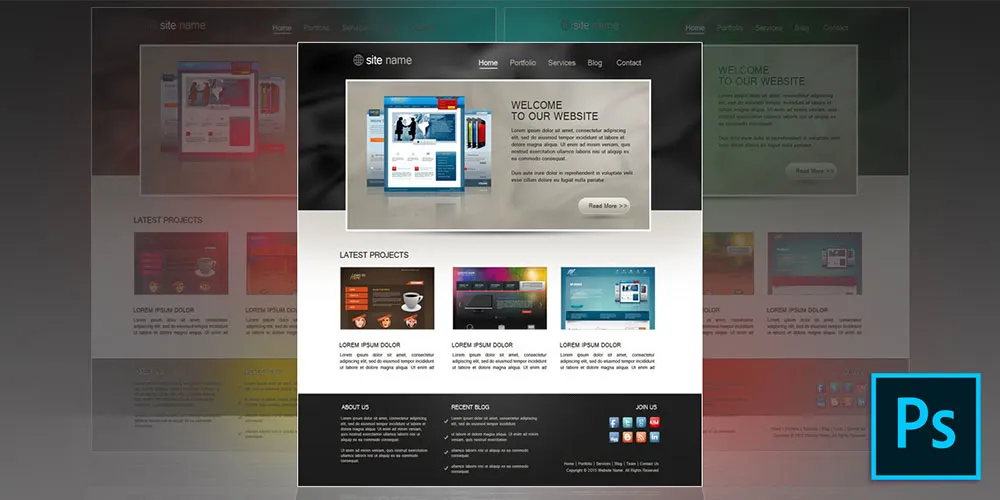
It’s no secret that Photoshop can be a bit dense when you’re first getting your feet wet with it. That’s why it pays to have a expert instructors show you the ropes. Led by a Photoshop pro, the Complete Photoshop Master Class Bundle will help you master Photoshop CC and become an expert—no prior experience is required! From layers and filters to levels and curves, you’ll come to grips with essential Photoshop concepts and refine your skills with the included working files. It’s on sale for $30.
Note: The Techdirt Deals Store is powered and curated by StackCommerce. A portion of all sales from Techdirt Deals helps support Techdirt. The products featured do not reflect endorsements by our editorial team.
When I was doing all the testing for our Samsung Galaxy A57 review, I enjoyed how streamlined its software was compared to that of the best Samsung phones. But since publishing that review, I’ve been jumping back and forth between the A57 and another Samsung flagship, and I’ve got a more nuanced view.
Before the A57 (and, for a little while, after it), I was using the Samsung Galaxy S26 Ultra, which is pretty much the best Android phone money can buy. It has similar hardware specs to the Galaxy S25 Ultra, with its biggest advancements instead coming in the form of new software tools and features.
Now, I know the Galaxy A57 and S26 Ultra aren’t exactly comparable. The former is a mid-range phone starting at$549 / £529 / AU$749, while the latter is a premium phablet which costs a minimum of $1,299 / £1,279 / AU$2,199. That’s over twice as much.
Advertisement
Latest Videos From
But from the right angle, they’re the same phone. Both are the top models in their respective Galaxy categories, and they’re undoubtedly the two best Samsung phones released in 2026 so far. If you’ve got the budget, you buy the S26 Ultra, while the A57 is designed to be a great corner-cutting alternative.
And for the most part, Samsung made the right corner-cutting calls. Zoom cameras? Gotta go. Blazing chipset? Not here. Stylus? Styl-off. But when I tested the A57, there were definitely a few absent software features that I missed from the S26 Ultra.
So come on, Samsung — please add these 5 software features to cheaper phones like the Galaxy A57 in future software updates.
Advertisement
Audio Eraser
(Image credit: Future)
Audio Eraser is a really nifty AI feature. It basically works as an on-device noise cancellation tool for videos you’re watching.
Sign up for breaking news, reviews, opinion, top tech deals, and more.
The use case Samsung demonstrated during the feature’s announcement — which I’ve since tried myself on several occasions — was for live sports events or recaps. Usually, the crowd is so loud that you can barely hear what’s going on. Audio Eraser can identify the crowd noise and strip it from the audio, letting you hear the commentary and even sports noises.
It’s also useful for eliminating environmental sounds, like the rush of the sea or roaring wind, helping you hear spoken words better.
Advertisement
Given that Samsung designs its hardware around its AI features these days, I wouldn’t be surprised if iAudio Eraser is dependent on the power of the S26 Ultra’s chipset. Still, surely a scaled-down version can make its way to the A57. Right, Samsung?
Search with Finder
(Image credit: Future)
I found Search with Finder so useful on the Galaxy S26 Ultra that I’m surprised it isn’t available in all smartphones.
Advertisement
On Android phones, Finder is the search bar in the app drawer. When you can’t find an app because you have no organizational system to speak of (no shame, I’m the same), you search for it in Finder.
But Search with Finder, as Samsung calls it, supercharges this little tool on the Galaxy S26 Ultra. It will search your entire phone for your target; boarding passes, tagged photos, and email attachments are all within its purview.
This feature was designed for messy organizers like me. I have no central system for organizing files, apps, or documents, and I’m often engaged in wild goose chases trying to find things on my phone. Not with Finder on the Galaxy S26 Ultra: if I’d lost something on my phone, it could find ‘er (sorry).
Let me tell you, going from the S26 Ultra to the Search with Finder-less Galaxy A57 was quite a shock; in fact, its absence is what prompted me to write this article.
Advertisement
Search with Finder is basically just an in-depth search function, and I was really surprised when the A57 couldn’t find documents I’d received in emails or videos I had saved to its internal storage. It feels like a natural function to bring to all of Samsung’s phones, not just the A57.
Bixby to control your phone
(Image credit: Future)
This one’s less of a “feature I love” kind of deal, but something that really makes sense when you think about it.
Bixby is given more responsibilities on the Samsung Galaxy S26 Ultra. Oh, you haven’t met Bixby yet? It’s Samsung’s on-board assistant, which most people either forget about or don’t realize they’re using.
Advertisement
In the S26 Ultra, Bixby can now directly change settings on your phone. If you tell it you’re having a problem seeing the screen, or your eyes are aching, it can automatically turn up the brightness or apply the eye comfort shield mode…
… in theory. I found it quite unreliable at implementing any such changes. Much of the time, it just prompted me to do it myself, telling me to go into settings, even though the whole point of this new feature is that Bixby should do it for me.
Anyway, onto the Galaxy A57. This sort of phone is bought by those whose budgets don’t stretch to the top Samsung model, but also by general users who just need a mobile from a brand they trust and aren’t interested in top-tier features.
This kind of buyer is, if I’m not being too rude, a little technophobic. They don’t know the correct word for certain features available on their phone — or perhaps even that those features exist in the first place.
Advertisement
A smart assistant that can directly tweak settings on your behalf makes sense, therefore, in a phone like the Galaxy A57. I can see seniors, for instance, getting loads of mileage from this kind of Bixby tool.
And, yes, I know I’ve said that it doesn’t work all that well on the Galaxy S26 Ultra, but I am quite surprised that the A57 doesn’t offer more in the way of smart assistant tweakery like this.
Now Brief
(Image credit: Future)
What you’re looking at above is Now Brief, a feature of Samsung’s recent S- and Z-series phones. I like to call it ‘Random Affirmations mode’ because… well, you can see from the picture. The phone, an inanimate object, is wishing me well?
Advertisement
The point of Now Brief is that it gives you a brief overview of things you need to know. Commonly, it’d show me the weather, and usually a random news article yanked from a publication I’d never touch, as well as some other odd things if relevant: calendar events, reminders I’d made, fitness information I’d tracked, and so on.
I’m not going to pretend that Now Brief is a great feature just yet. It feels like it’s missing one or two (or ten) extra data points before it’s able to fulfill its purpose of providing a daily (or multi-daily) briefing of things I need to know. In the two months I used the S26 Ultra, Now Brief — more often than not — didn’t seem to really understand what I wanted to know, and didn’t pull information from many of my apps and tools.
But I see this being the kind of feature that Samsung refines over the next few years and One UI updates, and possibly (hopefully), in a while, it’ll be a pivotal part of the smartphone experience.
Now and then, Now Brief became just that for me: I’d look at it and know everything I needed to know. I could put my phone back down, ready for the day (or at least the next hour). These instances were rare, mind, but they did occur.
Advertisement
Now Brief is a big miss on the Galaxy A57. People buying this kind of phone probably aren’t power users like those who buy the S26 Ultra. They just want to be able to pick up their handset, see a quick summary of their notifications, events, and interests, and put it back down.
That’s why I think Now Brief — even in its current, basic form — would fit really well on Samsung’s cheaper phones.



















































You must be logged in to post a comment Login