It’s become a familiar theme over the last couple of decades — hardware is rendered useless when its manufacturer pulls the cloud service on which it depends. This is particularly annoying when the device is something which shouldn’t need a cloud service to run in the first place, and several manufacturers have found themselves in hot water because of this.
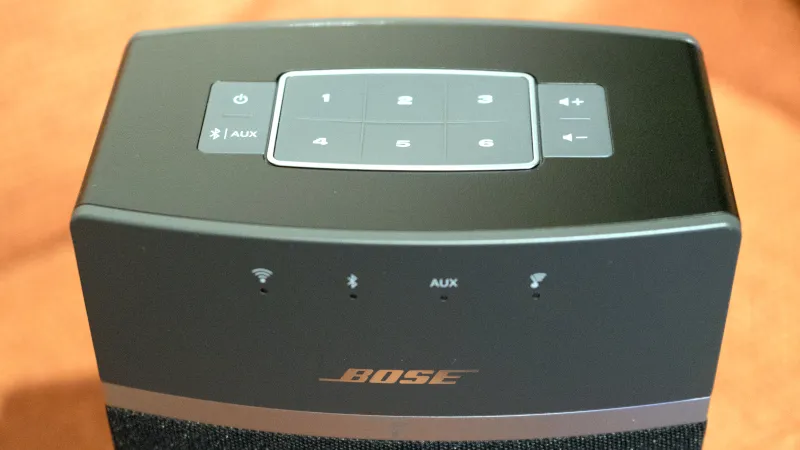
Somewhere in between is the Bose SoundTouch speaker system, which includes a set of six internet radio preset buttons. In early May the service behind them was shuttered, and now here’s [Tostmann] with an ESP32 firmware to bring them back.
As you might imagine, it’s a device that emulates just enough of the now-defunct Bose cloud service to keep the speaker happy, but it has a clever trick up its sleeve. Normally these hacks rely on DNS redirects at the router, but this one avoids that thanks to a diagnostic interface on the Bose unit that allows the rewriting of the server address. The ESP32 does this with its own address, and the speaker is none the wiser.
There are as almost as many kinds of coffee as there are of coffee drinkers, with each method for preparing the beverage appealing to a different kind of palate: moka pots, filter coffee, pour-over coffee, French presses, cold brews, espresso, and more produce their own unique flavours by extracting different compounds from the grounds to different degrees. Now, a new method has joined the throng: ultrasonic-assisted extraction, which can produce even an espresso at room temperature.
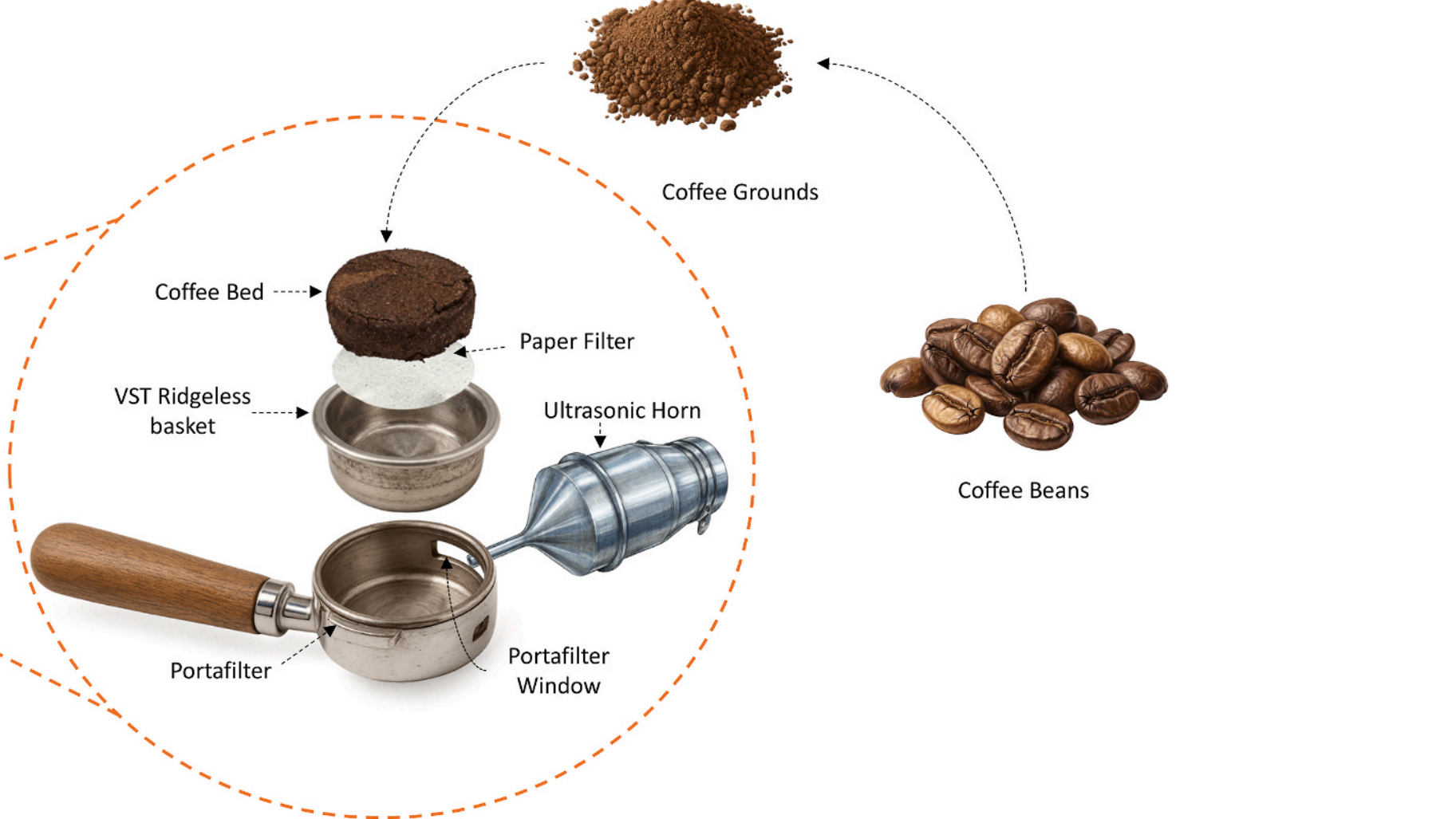
Espresso is normally made by forcing hot water through tightly-packed, finely-ground coffee beans, quickly producing a concentrated extraction. Its one of the hardest kinds of coffee to consistently make well, since the outcome is influenced by everything from grind size and packing density to temperature, pressure, and more. Ultrasonic agitation helps here by creating cavitation bubbles, which form shock waves as they collapse, breaking open the bean structure and producing small, strong jets of water. The experimental apparatus was built into a modified espresso machine. An ultrasonic transducer delivers vibrations to the basket containing the room-temperature slurry of coffee grounds for two or three minutes.
To quantify the results, the researchers analysed total dissolved solids, extraction yield, pH, colour, volatile components, and caffeine and chlorogenic acid contents. By varying ultrasonic power and grind size, the extraction yield and dissolved solids could be adjusted to closely match traditional espresso or cold-brew coffee. The other metrics had no significant differences, and a survey of 100 coffee drinkers found no preference between this and traditional espresso. When the drinkers tried the cold-brew coffees, they preferred the version made with ultrasonic assistance. The experiment succeeded in its goal of reducing energy consumption: the ultrasonic-assisted coffee took about a quarter as much power to make.
Looking for the most recent Mini Crossword answer? Click here for today’s Mini Crossword hints, as well as our daily answers and hints for The New York Times Wordle, Strands, Connections and Connections: Sports Edition puzzles.
Need some help with today’s Mini Crossword? Only one clue really threw me off, and that was 8-Across, but filling in the others solved that one, too. Read on for all the answers. And if you could use some hints and guidance for daily solving, check out our Mini Crossword tips.
If you’re looking for today’s Wordle, Connections, Connections: Sports Edition and Strands answers, you can visit CNET’s NYT puzzle hints page.
Pregame ceremonies in Seattle on June 19, 2026, before the U.S.-Australia World Cup Group D match. (GeekWire Photo / John Cook)
In soccer, a single blown offside call can decide who advances and who goes home. But what can you do? Referees are only human.
Well, the 2026 World Cup has put computer vision and AI on the officiating crew: video review, a sensor inside the ball, semi-automated offside calls, cameras bolted into every rafter. And the tech has already decided a goal.
On June 15 in Monterrey, Sweden were busy thrashing Tunisia when Mattias Svanberg came off the bench and scored with his first touch. The linesman’s flag shot up. Offside. The goal was gone, until it wasn’t. Video review handed it back, because the ball itself had registered a touch the human eye missed: a faint flick off Alexander Isak that reset the play and left Svanberg onside. Yet the cameras missed the flick. The sensor inside the ball caught it.
How does a ball overrule a linesman? Start with what FIFA has actually wired into the tournament. Sony’s Hawk-Eye underpins the video review, the goal-line decisions, the semi-automated offside system, and a “last touch” feature that settles who knocked the ball out for a corner.
Chenliang Xu, a computer-vision researcher at the University of Rochester, told the university’s news service it’s “a very sophisticated system that glues together multiple computer vision techniques.” Underneath, that means calibrated cameras, models trained to spot the ball and the players and their poses, and a thin layer of logic that decides when a human should take a look.
Advertisement
Player and ball tracking run on neural networks trained on millions of labeled images, the same lineage of models behind face unlock and the perception stack in a self-driving car.
Xu compares the training to “teaching a child how to recognize things”: feed a model enough examples and it learns what matters. Sixteen cameras ring each stadium, because a single angle can be blocked or fooled, and many angles can be triangulated into a three-dimensional picture of the play. It works the way your eyes do.
“If you block one of your eyes,” Xu says, “it’s very hard to perceive depth.” Two eyes recover what one eye cannot. So do 16 cameras. The reconstruction lands in seconds, and a person signs off.
How is it so fast? The system is narrow. According to FIFA, the cameras throw off more than 150 million tracking points per match, more data than any all-purpose model could process in real time. The networks are tuned for one job, recognizing players and a ball, and stripped of everything else, which is precisely what makes them quick.
Advertisement
The narrowness is also a confession. The system measures the one thing a camera and a sensor can measure cleanly, a body’s position at the instant the ball is struck, and it stays out of the call that starts most arguments: whether an offside player was actually interfering with play. The machine gets the measurement. The referee keeps the judgment. A good reminder that currently AI is Assistive Intelligence, not more.
But the quietest AI at this World Cup isn’t on the broadcast.
A torn hamstring can end a player’s World Cup, and a contender’s with it. Long before kickoff, clubs pour the data from GPS vests and motion sensors, the gear sold by firms like Catapult and Zone7, into models that flag when a player’s accumulated workload is bending toward injury, sometimes before the athlete feels a thing. It produces no spike on a graphic and no slow-motion replay. It produces a number that tells a coach to rest a hamstring for a day.
The cameras get the highlight, but the hamstring monitor keeps the players from being, well, hamstrung.
Looking for the most recent regular Connections answers? Click here for today’s Connections hints, as well as our daily answers and hints for The New York Times Mini Crossword, Wordle and Strands puzzles.
Are you watching the World Cup? Today’s Connections: Sports Edition includes one related category. If you’re struggling with the puzzle but still want to solve it, read on for hints and the answers.
Connections: Sports Edition is published by The Athletic, the subscription-based sports journalism site owned by The Times. It doesn’t appear in the NYT Games app, but it does in The Athletic’s own app. Or you can play it for free online.
Hints for today’s Connections: Sports Edition groups
Here are four hints for the groupings in today’s Connections: Sports Edition puzzle, ranked from the easiest yellow group to the tough (and sometimes bizarre) purple group.
Yellow group hint: Cape is another one.
Advertisement
Green group hint: Play ball!
Blue group hint: I’m taking my talents to South Beach.
Purple group hint: Neat on your feet.
Answers for today’s Connections: Sports Edition groups
Yellow group: First words of World Cup countries, in English.
The blog Linuxiac reports: A new systemd fork has appeared with a specific purpose: removing systemd’s recently added support for storing a user’s birth date in JSON user records.
The fork, called Liberated systemd, published its first tagged release as v261 shortly after the official systemd 261 release. In other words, the fork follows upstream systemd while reverting the change that added the new optional birthDate field.
Importantly, this is not a new init system, a wider redesign of systemd, or a general-purpose alternative to the upstream project. Its stated purpose is to remain close to upstream systemd while removing what the author describes as “surveillance enablement”… The author recommends testing the fork in a virtual machine before using it on real hardware and warns nightly builds are more likely to be unstable than named releases.
After five films, digital technology has finally arrived in the cloth-and-plastic world of Toy Story. But the film, directed by franchise veteran Andrew Stanton and McKenna Grace, mostly avoids the easy trope of making technology inherently bad. Instead, it’s a disruptive force that can be either helpful or harmful, depending on how it’s used. The film makes the case that parents need to take a hands-on approach to help kids manage their gadgets, especially when it comes to managing screen time or dealing with bullying.
Slight spoilers ahead for Toy Story 5.
Toy Story 5 centers on Bonnie, a young girl struggling to make friends who was gifted Woody, Buzz and Andy’s other toys from the first three films. She’s the only kid in her neighborhood not using a Lilypad tablet — instead, she prefers to play the old fashioned way, by crafting scenarios purely out of her imagination. Her parents reluctantly decide to get her a Lilypad (played by Greta Lee) as a way to connect with other kids.
Like a McKinsey consultant storming into a quaint local business, Lilypad decides she knows the best way for Bonnie to make friends. The tablet sends friend requests to several girls Bonnie knows, and she miraculously gets an invite to a sleepover. But instead of playing together, all of the girls just zone out endlessly on their Lilypads, barely saying a word to each other. Those same girls later start bullying Bonnie for playing with older toys, which leads to Bonnie’s parents wisely disabling the Lilypad’s social network access.
Advertisement
Pixar
It might seem crazy that parents even have to worry about social networking for 8-year-olds, but platforms like Zigazoo and JusTalk Kids already exist. They market themselves as safe spaces where kids can chat with close friends and family members, but there’s still room for awful social dynamics. Kids will be kids, and many of them are little jerks.
While Lilypad stumbles to help Bonnie connect, older toys like Cowgirl Jessie (Joan Cusack) also realize they’re out of touch with the way kids play today. When Jessie tries to sneak her way into Bonnie’s sleepover, she immediately becomes a source of shame.
Research shows a relationship between managing anxiety and imaginative play in kids, and Toy Story’s main cast make convenient messengers for that information. But the film surprised me by finding ways to make room for Lilypad and other new devices. A messageboard app on Lilypad helps Bonnie connect with Blaze, another young girl who still plays with toys the old fashioned way. Without Lilypad, they probably never would have met.
It’s hokey, but it works in the context of the film. And it’s also the reality parents have to live with today. Despite their potential harms, it’s helpful for kids to sometimes watch TV on the go. There are tons of educational games on iPadOS and Android, and both platforms also have a bevy of video chatting apps for staying in touch with friends and relatives. The key is moderation and parental supervision.
Toy Story 5 would be even more of an insightful critique if it made room for new types of play. Lilypad just has a few basic games for kids. But these days, any iPad can play Minecraft, a game that is appealing precisely because it so closely mirrors imaginative play. It’s also complex enough to grow with kids into adulthood, more so than the likes of Woodie and Buzz Lightyear.
Advertisement
Now that tablets have entered the world of Toy Story, it’s unclear where the franchise can go next. Pixar has already wrung the series’ core concept dry. We’ve explored the inner lives of toys, we’ve seen them wrestle with the meaning of their existence and they’ve even confronted death directly. (Toy Story 3 must have traumatized an entire generation.) Toy Story 5 isn’t nearly as essential as the original trilogy, but at least it’s a reminder to parents that they can’t just sit back and relax when it comes to tech.
Putting hidden data in places where few expect it can be a fun hobby or even a professional career. In the case of [Tim Wehrle] it’s just the former. His most recent project in this area uses a favicon image for storing a HTML-based website and rendering its contents within the browser after the favicon has been downloaded.
To pull this off, a very basic HTML page was turned into a series of UTF-8 encoded bytes that were then declared to be a standard PNG image. The original 208 byte payload plus 4-byte PNG header only used part of a 9×9 pixel favicon. With a larger favicon image as typically used you could thus easily store more data, whether as visual noise like here or a bit more hidden.
Of course there’s a catch, and in this case it’s the Typescript code to unpack the bytes from the “image” and render them; you have to load that separately. But still, in these days of all-singing, all-dancing websites that take forever to render, it’s refreshing to see what you can do with so few bytes that they fit in a favicon.
As for the purpose of such an approach, that’s left as an exercise for the reader, but you’re more than welcome to take a poke at the GitHub project and the demonstration site..
Apple’s home automation updates and new product roadmap powered by Siri AI will kick off in 2026 with HomePod and Apple TV updates, but if you’re excited for the robotic arm for a Home Hub, you’re going to be waiting a while.
It’s no secret that Apple’s new AI push will include several new products like the long-rumored Home Hub. However, the timing of some of those products’ releases remains in question.
The Home Hub itself is expected in 2026 as well, which means an Apple Home-focused release cycle or event could occur in the fall. That device should launch as a standalone display that can be paired with various mounts like speakers, wall mounts, and articulating arms.
Advertisement
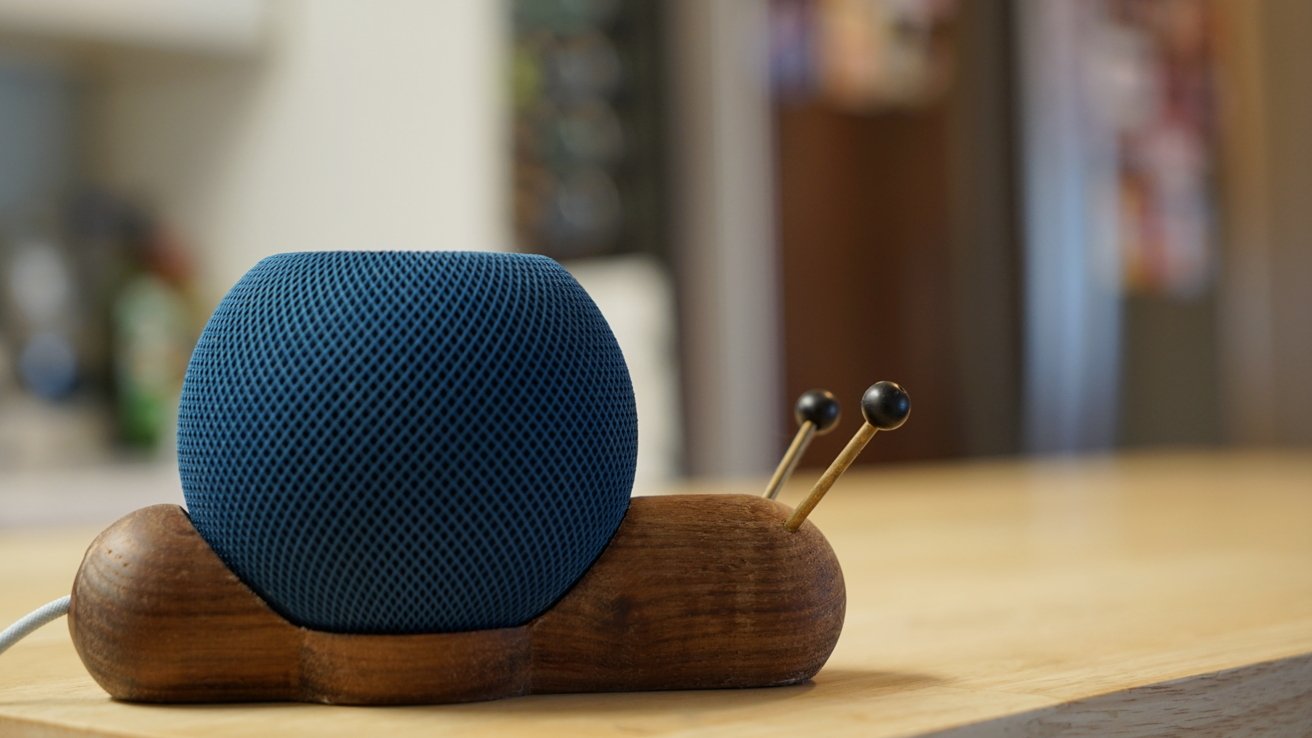
The new Apple TV is expected to support Apple Intelligence in some specific capacity and may have a new Siri Remote. The HomePod mini would also gain access to Siri AI, but that’s likely the only major feature of the product.
The robotic arm accessory for the Home Hub, which may include an upgraded AI-focused version of the tablet device, isn’t expected until 2027 or 2028. That device has always been more of a moonshot, with the Pixar Lamp-like device with a personality still in early testing.
It’s not really a question of if these products are coming, but when. With everything else releasing, Apple will need to find time to reveal its new Home Hub product category and sell people on why the new Apple TV and HomePod mini are necessary.
Advertisement
The September keynote will already be packed as it is, and I don’t think these products will fit the “just drop a press release” model. My expectation is that there will be a lengthy Apple Home segment during a primarily Mac-focused keynote in October.
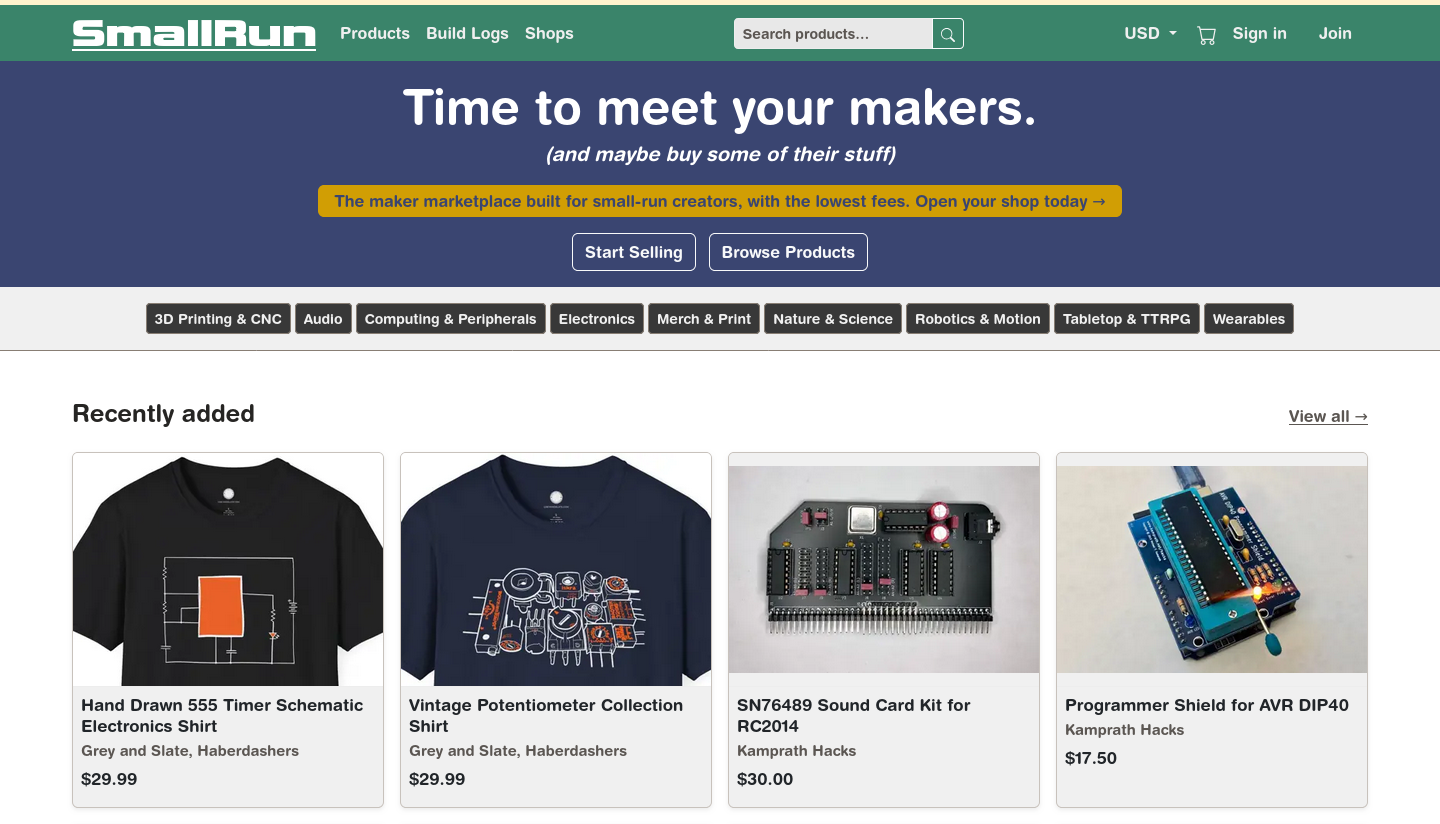
So you have a project that you love, and everyone else loves too. People start saying “you should sell this” but where? Well, there’s a new marketplace you might want to consider called called SmallRun, aiming at makers and their, well, small production runs.
SmallRun will absolutely host your custom PCBs, on-demand 3D prints, and other traditional maker products — but they’ll also happily sell your merch, too. Along with electronics and hardware, they aim to allow you to sell products in categories like tabletop gaming, sciences, and yes, accessories/apparel.
For sellers, they offer automatic payouts and promise to take care of the taxes by integrating with Stripe. That said, they’re still working on getting the whole VAT thing set up for products imported to the EU. EU to EU sales are apparently OK. They’ll host build logs, which may drive engagement with your product. There’s even a handy tool to import your existing listings from eBay, Tindie, Lectronz, Etsy, Shopify, or Crowd Supply if you’re already in the biz. They make their money by taking a cut of your sales: eight percent, plus forty cents per listing.
Depending on your perspective, you might wonder if we need another marketplace, To that we can only say: “Let a thousand flowers bloom!” Competition should drive these marketplaces to continuously improve and we all win.
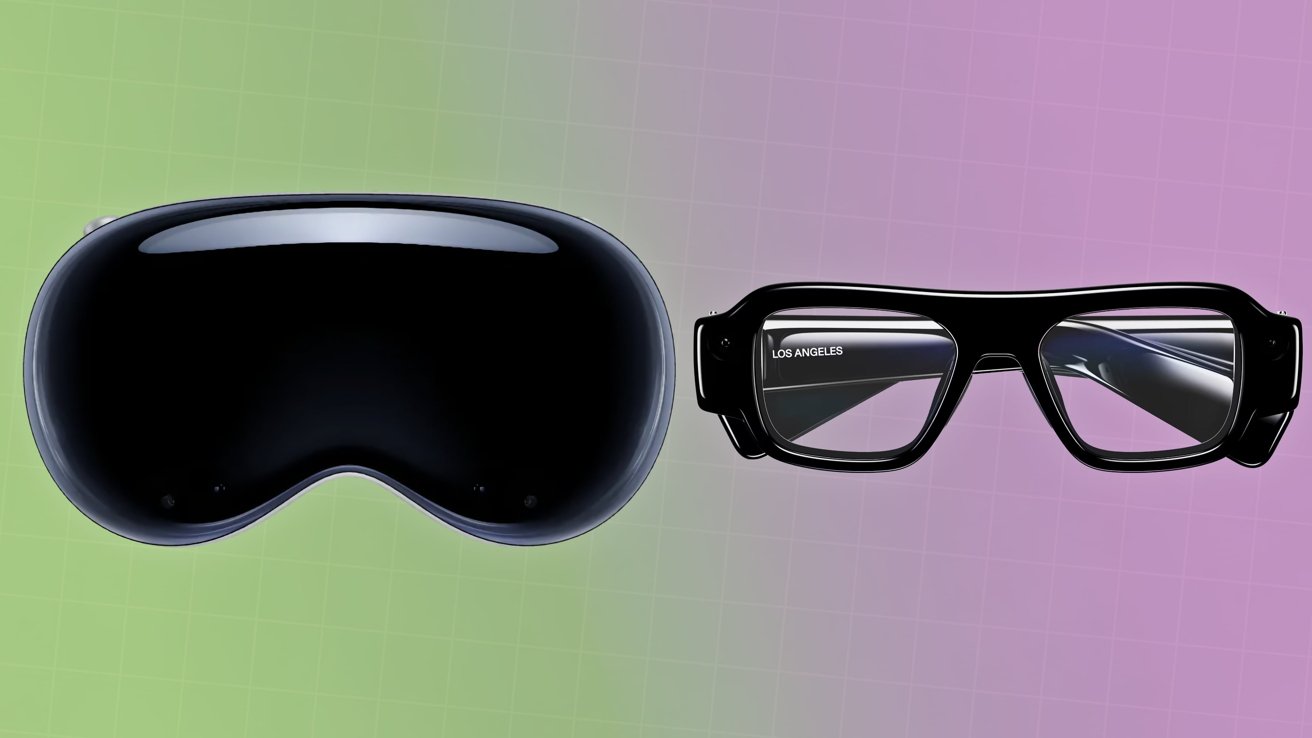
Apple wants you to step into a virtual world, while Snap wants you to stay in the real one. Here’s how their very different approaches to spatial computing compare.
Apple Vision Pro [left] vs Snap Specs [right]
The launch of Snap Specs at Augmented World Expo on June 16 is a big shift forward for the social company. After the previous effort of Snap Spectacles, Snap Specs are a step closer to the augmented reality future by being smart glasses with a built-in display. This is something that brings Snap’s efforts in line with the Ray-Ban eyewear that Meta has produced, including its yet-to-ship Meta Ray-Ban Display. It’s also a massively different product from Apple’s own head-mounted computing device, the Apple Vision Pro. Continue Reading on AppleInsider | Discuss on our Forums


















![LISA - 'MONEY' Dance Practice [Mirrored]](https://wordupnews.com/wp-content/uploads/2026/02/1770259125_maxresdefault-80x80.jpg)




































You must be logged in to post a comment Login