

Join Mikko Hyppönen and security leaders from the NFL, CHANEL, and Atlassian for a two-hour digital summit on what AI-speed attacks change, what defenders should stop doing, and how to validate, decide, fix, and re-validate at machine speed.
Tech
Elon Musk Is Hyping Up Another 200-MPH Tunnel Plan, Just In Texas This Time

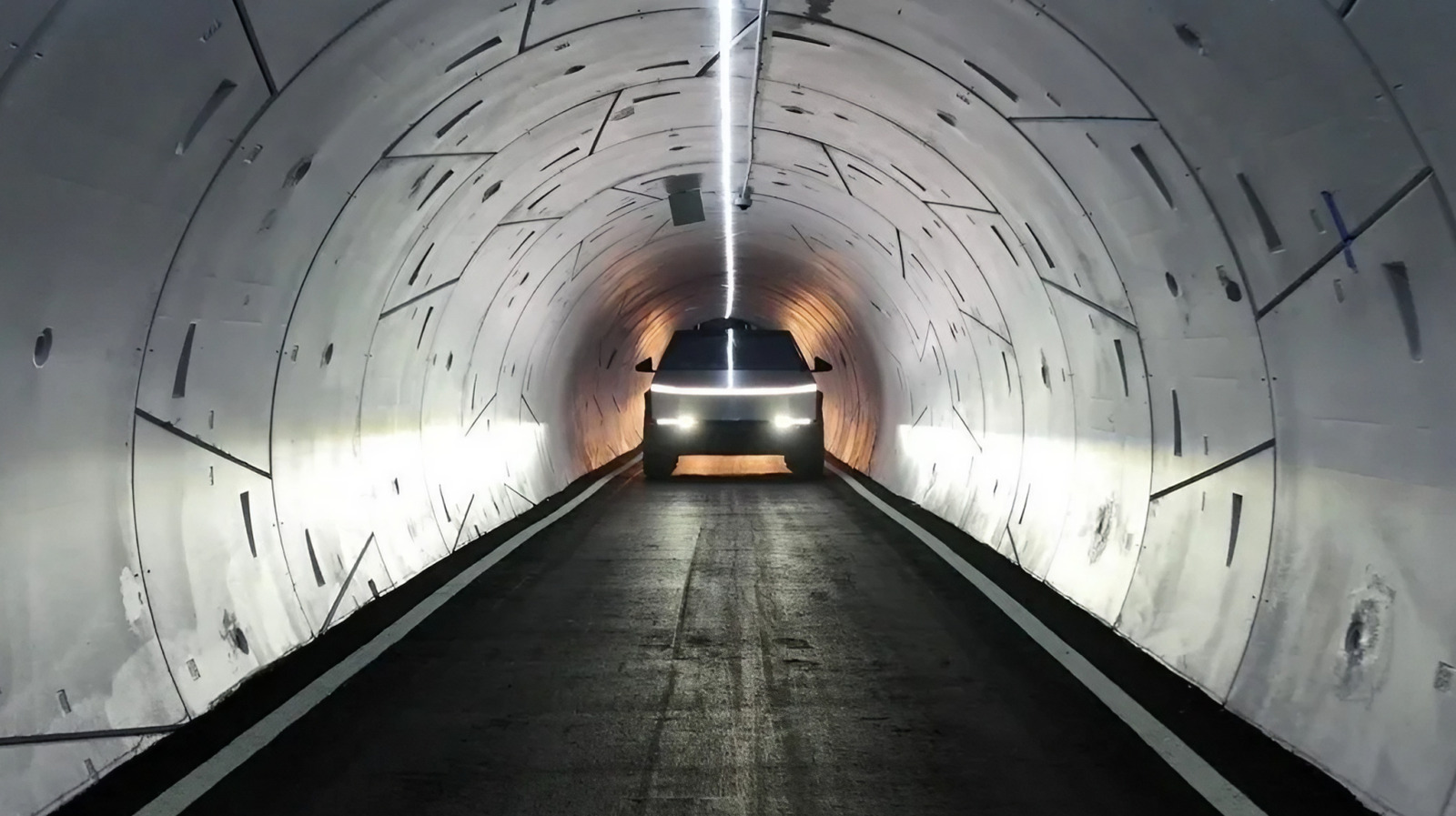
Elon Musk just can’t seem to let go of this one long-stalled idea where people would commute across cities through superfast tubes known as hyperloops. So far, zero hyperloops have been built, and yet, we now have a new pitch coming in from him: A route running between Austin and San Antonio, Texas. Musk says The Boring Company is already working on a “simple, precursor Hyperloop tunnel” linking the two Texas cities. In a post on X, he also claimed that vehicles inside the tunnel would travel at more than 200 mph.
The whole point with these tunnels is to turn painfully lengthy drives between cities into a problem of the past. Musk says that traffic currently can stretch the trip between the cities out to 2.5 hours – a ridiculous time for an 80-mile trip. However, his tunnel would turn the commute into a sub-30-minute stretch.
Beyond this math, Musk hasn’t shared the exact route or when the tunnel will be built. The cost of construction and exactly what would ride through the tunnel isn’t known either. Musk’s original hyperloop concept from 2013 had passenger pods zipping through low-pressure tubes, though it’s unclear if that plan still holds up today. If pods are out of the question, then they could also just carry regular electric cars that drive a lot faster. Following Musk’s post, The Boring Company chimed in as well, though it didn’t clear up the uncertainty. Instead, the account simply replied that the company “would be excited and honored” to build it.
Musk’s tunnel pitches don’t have a great track record
Unfortunately, that excitement is yet to reach local officials. Jori Liu, director of communications for the Central Texas Regional Mobility Authority in the Austin area, told the Austin American-Statesman that the agency only learned about the plan from Musk’s post. It’s the same story in San Antonio, where a spokesperson for Bexar County said the county is yet to hear from The Boring Company.
It’s worth noting that San Antonio did get a Boring Company tunnel pitch once before, though it was a shorter one that would link its airport to the downtown area. The plan stalled out, too. Musk’s bigger tunnel promises in Chicago and between New York and Washington, D.C. never got built either. Beyond those tunnels, hyperloop plans across the United States haven’t fared much better.
With multiple stalled projects, Las Vegas is currently the only place where The Boring Company has managed to build a tunnel that actually moves passengers. Called the Vegas Loop, it shuttles Tesla drivers through tunnels under the city’s convention center and a few casinos. However, these are regular tunnels that move cars at a max speed of around 35 mph. Musk’s pitch for Texas would need to get vehicles to move almost six times faster than that.
Weirdly, even that 200 mph pace falls well short of what The Boring Company promised in 2022. That year, the company announced it had started testing a “full-scale Hyperloop,” with the website for it describing a system that would carry passengers at more than 600 mph.
Continue Reading
I’ve seen two total solar eclipses and have been duly impressed by what happens as the moon casts its shadow on Earth. But recently I’ve become even more intrigued by a similar phenomenon that doesn’t involve the sun or the moon—something called an asteroid occultation.
That’s what happens when an asteroid orbits around the solar system and blocks the light of a distant star you’re viewing from Earth. Like the moon during a solar eclipse, the asteroid casts a predictable moving shadow on a swath of Earth’s surface—a small silhouette in the dim light bathing us from that one star.
When such a fortuitous alignment occurs, amateur astronomers can discern things about the asteroid that professionals can’t readily measure, even with their giant telescopes on high mountains. That’s because amateurs are nimble: They can be in just the right place at just the right time to measure an asteroid’s fleeting shadow, which could be just a few hundred meters wide and traveling at tens of kilometers per second. With enough observers, they can collectively map that shadow, revealing the asteroid’s shape.
Even folks on a limited budget can do this, because the size of an asteroid you can measure doesn’t scale with the size of your telescope. If the occulted star is relatively bright, you don’t need much of a telescope at all.
How Do You Catch an Asteroid Occultation?
My own efforts along these lines have been with a modest 5.1-inch-aperture (130-millimeter) Newtonian telescope that sells for about US $300. I attach it to a small equatorial mount ($150) that can track the stars by virtue of some added stepper motors driven by an open-source telescope controller called OnStep. (You could save yourself the time, trouble, and expense of all that DIY hacking by purchasing a motorized mount for as little as $300.)
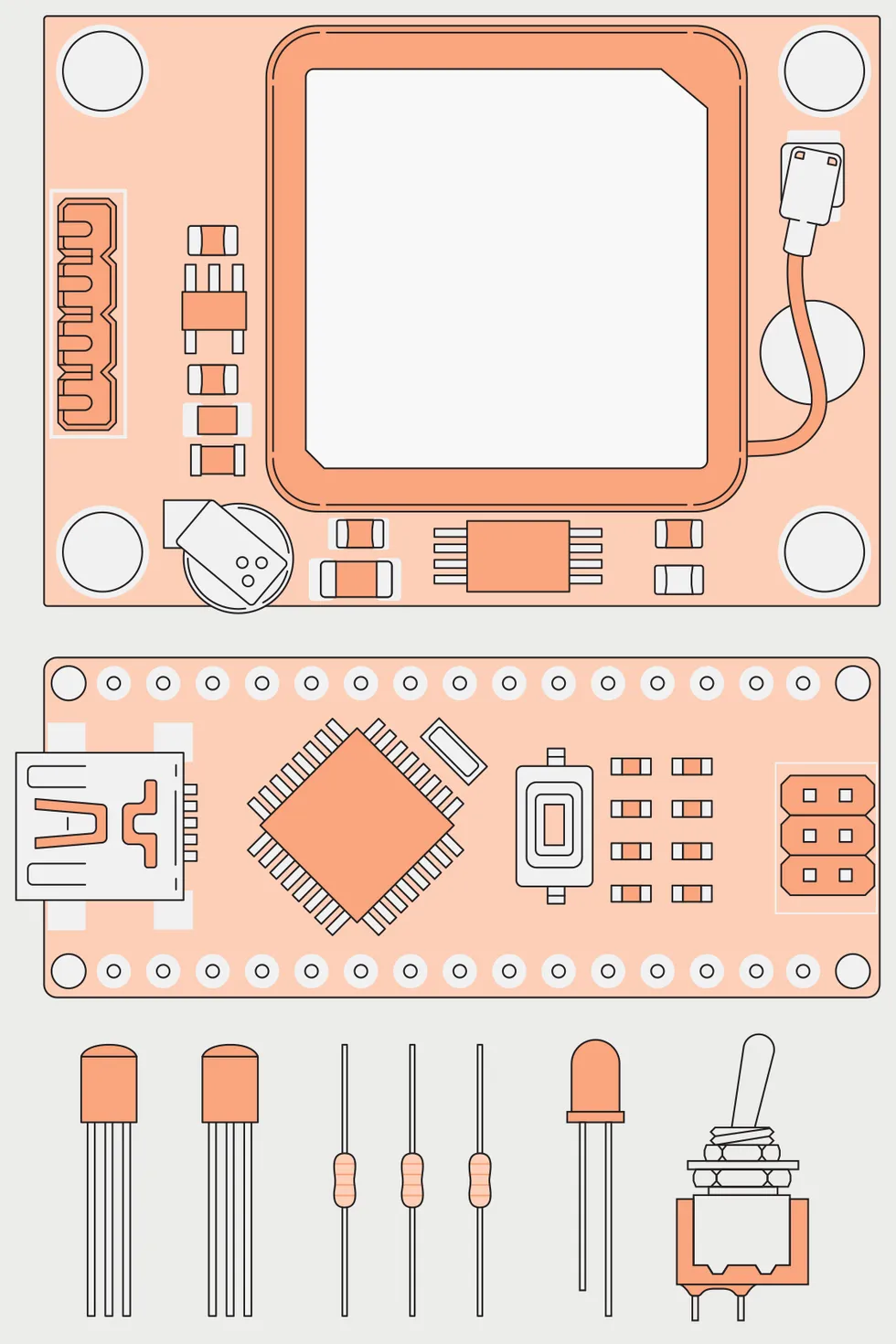
 A flasher provides a calibrated time base for light-curve measurements. It relies on a GPS module [top] to provide a high-accuracy pulse once per second, is gated by an Arduino nano [middle] to prevent flashes occurring at the moment of occultation, and is then passed to a LED [bottom].James Provost
I bought an inexpensive astronomy color camera on Amazon for $260 to take images at the video rates required to capture the rapid changes during an occultation. I chose this camera because it has a relatively large sensor, Sony’s IMX585, which provides a large field of view. A monochrome camera would be better for asteroid occultations, but the monochrome version of this camera is harder to come by and more expensive. If you’re looking for a cheaper option, the monochrome ToupTek G3M662M (about $200) would be a good choice, although its sensor is smaller.
Knowing where and when to catch an occultation in your area is of course critical and can be calculated using free PC software found on the International Occultation Timing Association (IOTA) website. If you plan to contribute your observations to IOTA to increase the body of scientific knowledge about asteroids, you will need to calibrate the timing of your images. You can’t just depend on the time stamps your computer adds to the video frames, which can be way off.
For time calibration, many practitioners use a flasher: a red LED driven from the pulse-per-second signal from a GPS receiver. Asteroid observers use such a pulsing LED positioned in front of their telescopes to calibrate the timing of the images they take. With some effort, it’s possible to reduce the uncertainty to just a handful of milliseconds.
The flasher I built uses a GPS module that I had on hand. But I’d recommend you purchase a different one that accepts an external active antenna. HiLetgo’s NEO-7M $12 module might be a good choice—but don’t forget to remove its antenna-coupling capacitor (marked as C2 on the circuit board) if you do attach an active external antenna to it.
How Do You Make a Telescope Flasher?
You can’t let the flasher just blink away every second, though, because its light might stomp on the very signal you’re trying to detect. So alongside the GPS module, my flasher also contains an Arduino Nano, plus two transistors, three resistors, and a switch. I wired these components together so as to drive the LED directly from the pulse-per-second signal coming from the GPS. The signal passes through a transistor controlled by the Arduino so that the flashes can be started and stopped at prescribed times. I can then program the flasher to produce calibrating pulses near the start and end of each recording session, while suppressing the flashing around the occultation itself.
 Over time, an asteroid such as Duccio will pass in front of multiple stars [below]. Each time it does, it will block the light from a star [above] for a time that depends on its width along the line of transit. By combining multiple light curves, it is possible to map the shape of the asteroid.James Provost

So far, I’ve managed to record four occultations that have occurred within easy driving distance of my home in North Carolina. The first was quite short, by an asteroid a mere 4 kilometers wide. The star involved was rather dim, so I really had to squint at my laptop screen to see the star momentarily blink out. The star in my second occultation was brighter, and the dimming much longer, so no squinting was required. My third observation tested the limits of my little telescope with a very dim target star, requiring quite long exposures per video frame (about a third of a second). Thankfully, the asteroid was a big one (120 km wide), so the occultation lasted a few seconds, and I could discern it.
The asteroid I targeted last, named Duccio, is about a dozen kilometers wide and orbits in the main asteroid belt between Mars and Jupiter. Its shadow, moving at a clip of some 24 km per second, took about a half second to pass over me. The star this asteroid blocked was bright enough for me to record the event very distinctly at 24 frames per second, providing excellent time resolution.
Asteroid occultations offer a wonderful natural experiment. And unlike a solar eclipse, observable events probably take place near you multiple times each month. So with a little knowledge and the right gear, you can observe them. You just have to wait for the stars—and the asteroids—to align.
From Your Site Articles
Related Articles Around the Web


A new variant of the MacSync info-stealing malware targeting macOS systems now uses public iCloud calendar events to deliver fresh payloads.
MacSync is a Swift-based malware that emerged in April 2025 and has been observed recently being delivered in ClickFix campaigns disguised as Homebrew and macOS disk space analyzer tools.
Kaspersky researchers say that while earlier versions of the malware were derived from the AMOS stealer family, MacSync evolved and added new capabilities via modules.
Delivery chain
MacSync has been distributed to victims through social engineering, including ClickFix-style attacks, and through software presented as free, cracked, or as new applications.
The researchers note that the threat actor delivered the malware as a fake crypto wallet called Toria, which had a dedicated website and was promoted over social media platforms.
Kaspersky discovered the MacSync campaign that had two delivery methods. In the more complex one, a downloader fetches commands hidden in the description of a public iCloud calendar event, and then downloads the next-stage payload from iCloud.
The downloader feeds the retrieved calendar data to macOS’s zsh shell. Most of the calendar text produces errors, but commands placed after the event’s DESCRIPTION: line run and fetch an archive with the malware components.
The archive contains an ‘APP’ bundle that acts as a dropper, leading to more stages that eventually retrieve the MacSync malware.
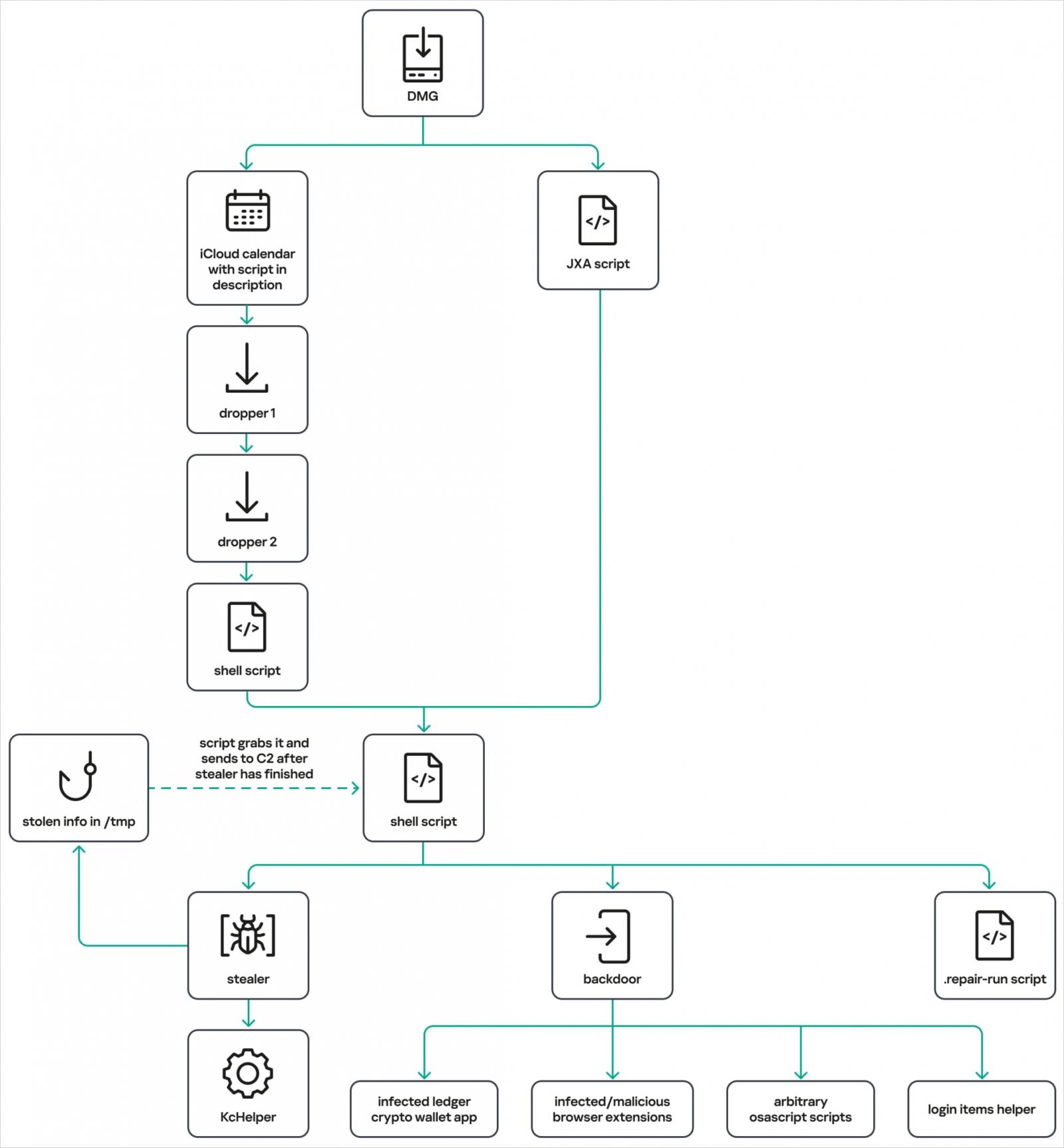
Source: Kaspersky
New backdoor module
The infostealer module remains largely unchanged, targeting browser history, cookies, and saved credentials, crypto wallet extension and app data, Telegram data, the Keychain file, system and device information, SSH, AWS, Kubernetes, Git, and shell configuration files.
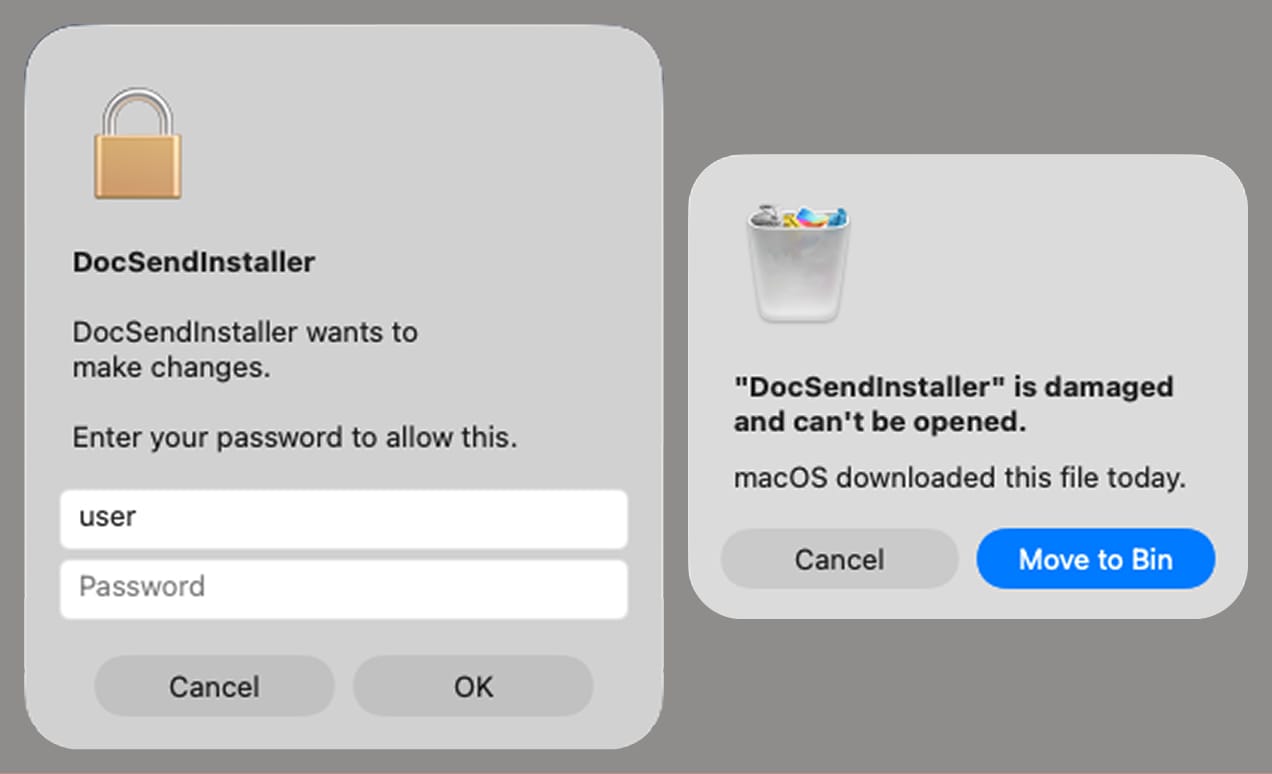
Source: Kaspersky
The new module observed is an Objective-C backdoor that disguises itself as Finder, the default file manager on macOS. Its installer establishes persistence through a LaunchAgent, .zshrc modifications, and global Git hooks, while terminating macOS notification processes to prevent alerts from reaching the user.
The backdoor can perform the following actions on infected systems:
- Run attacker-supplied AppleScript received from its command-and-control server.
- Deploy a browser extension or replace an installed Ledger wallet app with versions supplied by the command-and-control (C2) server.
- Collect additional system information and files, and upload them to the C2 server.
- Check and establish persistence so it starts again after a reboot.
Kaspersky inferred the commands’ purposes from their names and status messages because it did not have the AppleScript code they would execute
The researchers also identified a “mystery” command, live_browser, which downloads and executes a component called sn_relay, whose purpose Kaspersky could not determine.
As MacSync continues to evolve and adopt more evasive and effective distribution chains, macOS users are advised to avoid executing commands they find online
It is also recommended to avoid downloading DMG files from suspicious sites and treat admin password prompts with caution.

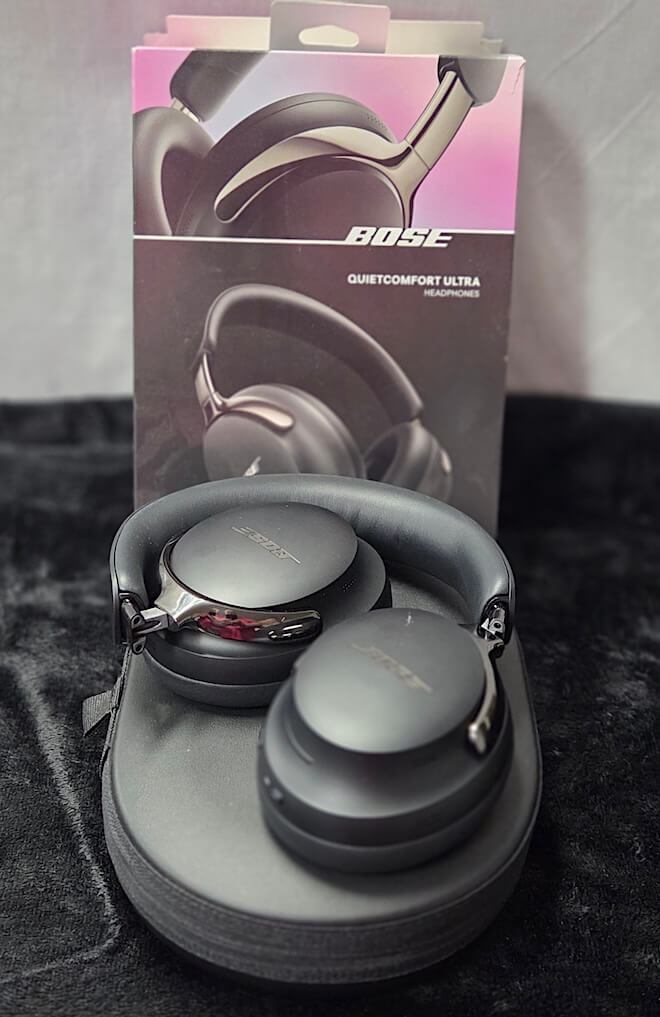
Bose’s QuietComfort Ultra Headphones are already among the most convincing noise cancelling headphones available. Their strengths are familiar Bose territory: exceptionally effective ANC, comfortable long term wear, and a lively presentation that makes everyday listening more fun. We recently reviewed the Bose QuietComfort Headphones (2nd Gen), which inherit more of the Ultra’s technology for $359, but the Ultra remains the company’s flagship over-ear wireless model.
The QuietComfort Ultra also encapsulate almost everything that defines Bose headphones for both fans and critics. Fans will point to the excellent ANC, comfort, features, and easygoing presentation, while critics will focus on the decidedly non reference tuning and continue to dismiss Bose as more of a lifestyle brand than an audiophile one.
Turns out, both groups are more or less right. We awarded the original QuietComfort Ultra a shared Editor’s Choice Award alongside the Sony WH-1000XM5 because both deliver exceptional ANC performance while taking very different approaches to sound signature and comfort.
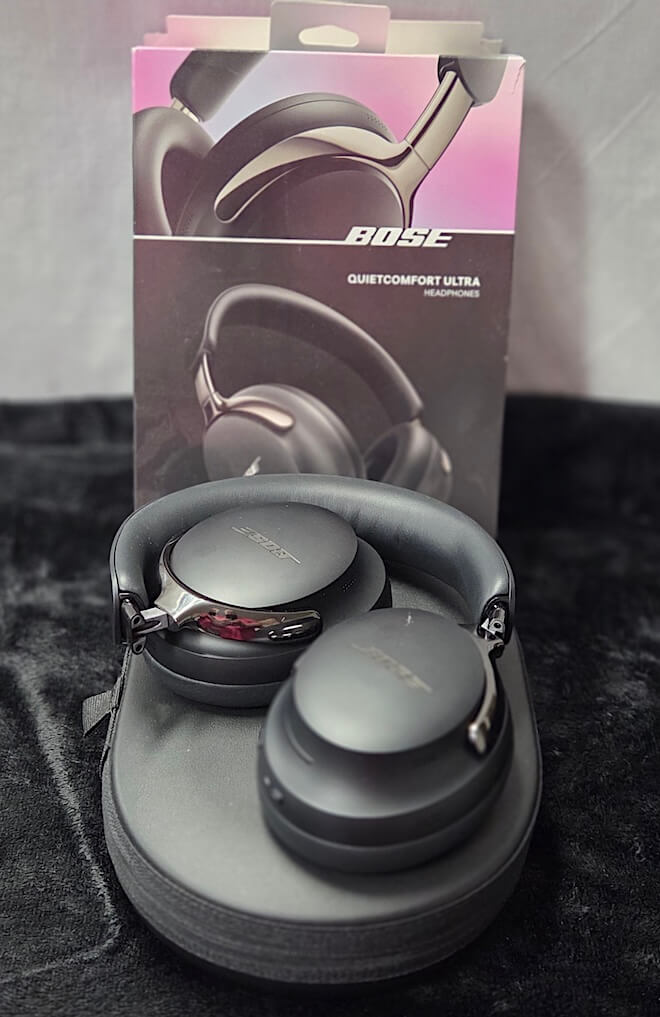
It should come as no surprise, then, that the Bose QuietComfort Ultra Headphones (2nd Gen), or Ultra Gen 2 from here on out, do not attempt to reinvent the formula. Bose has instead addressed several shortcomings of the original model while leaving the foundation largely untouched.
At $449, the Ultra Gen 2 is hardly inexpensive, and competition from Sony, Apple, Bowers & Wilkins, and pretty much every other major headphone manufacturer has only intensified. The real question is whether Bose’s incremental improvements are substantial enough to justify the price. More importantly, if you already own the original QuietComfort Ultra, has Bose done enough to make upgrading worthwhile?
Related Reading:
Design, Build and Comfort
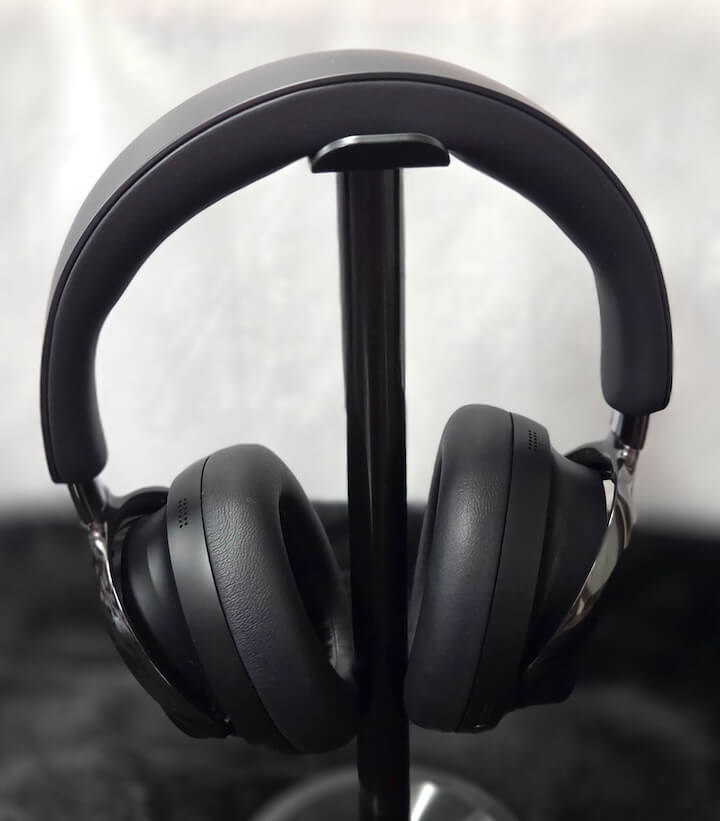
The design remains unmistakably Bose and remarkably similar to the first generation model. The QuietComfort Ultra Headphones (2nd Gen) offer subtle hints that they are a step above the standard QuietComfort model, with more distinctly scalloped steps on the earcups and metal yokes instead of polymer. From a distance, you might not immediately recognize the Ultra as a more premium model, but up close, it has a cleaner silhouette and a more upscale set of finishes with polished metal and synthetic leather pads. Overall build quality is good, with a mix of plastics and metal, although the finish is not immune to scuffs and scratches.
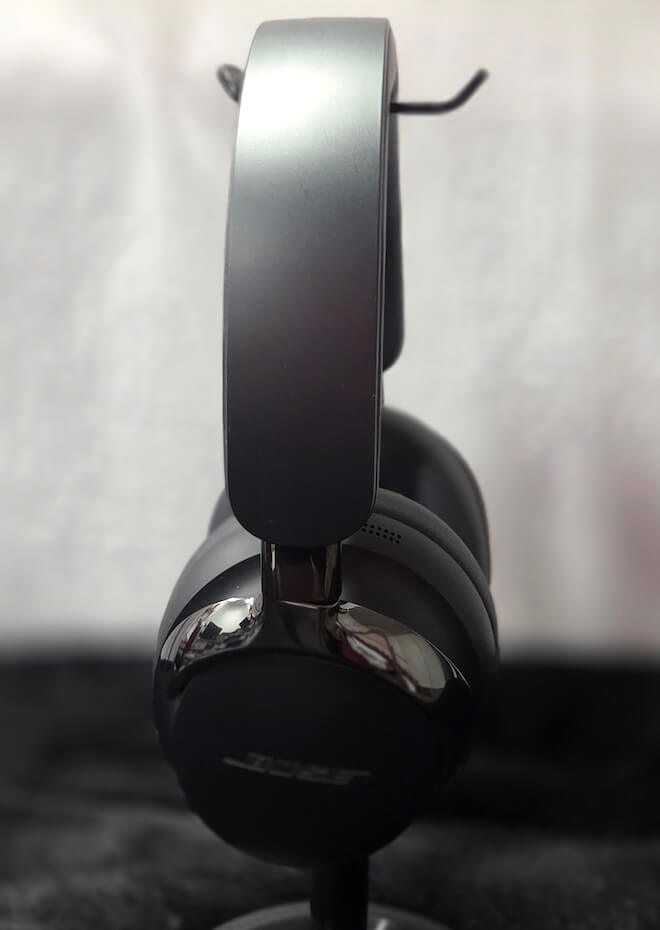
The Ultra G2 does a good job of balancing those more premium finishes with reasonable weight to produce a headphone that both looks good and wears well. At roughly 260 grams, the Ultra G2 is not ultralight, but it falls on the lighter side of average. Combined with the wide, foam padded headband, the weight is distributed well during use. As with most headphones focused on ANC, the Ultra G2 has moderate clamping force to help maintain isolation, but Bose once again finds a good middle ground between isolation and comfort.
When not in use, the Ultra G2 folds into a relatively compact case. As my wife points out, the case is too large for most purses, but it is small enough that slipping the headphones into a backpack alongside a laptop is a viable option.
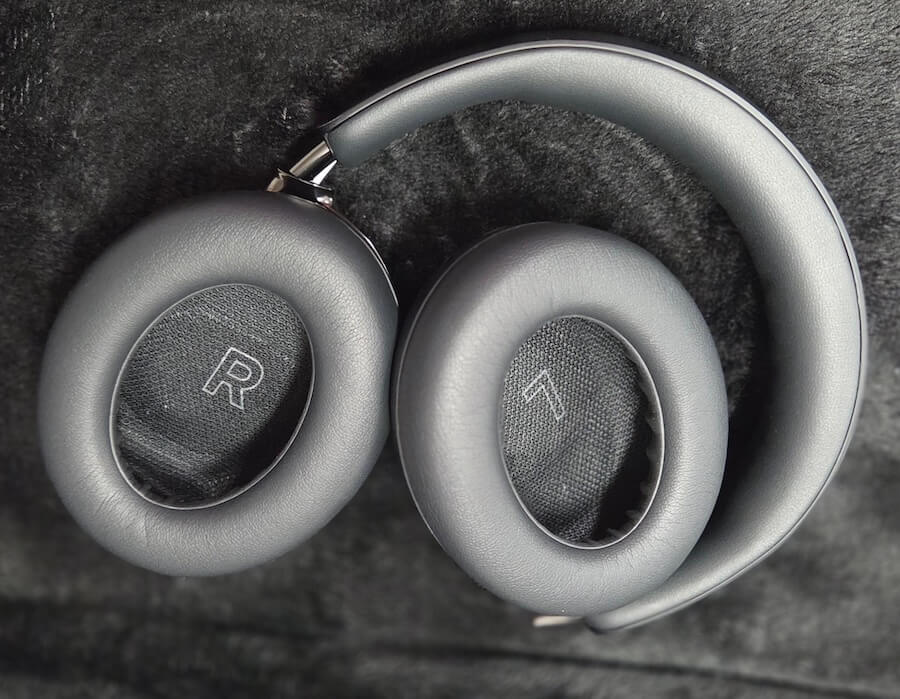
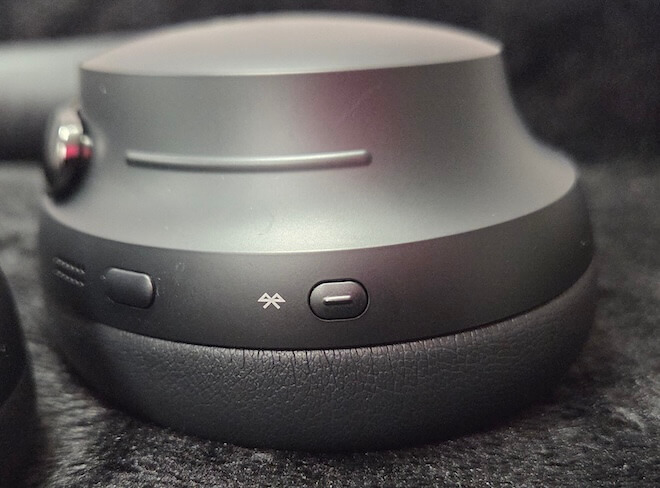
The controls are essentially unchanged in size and location from the previous generation, so anyone already familiar with the Ultra will feel right at home. Those new to Bose products will find the controls thoughtfully laid out and relatively intuitive. Bose uses physical buttons rather than relying entirely on touch controls, which is a plus. There is also a capacitive strip along the earcup for volume adjustment. It is convenient once you become familiar with it, although some will likely lament the lack of physical volume buttons.
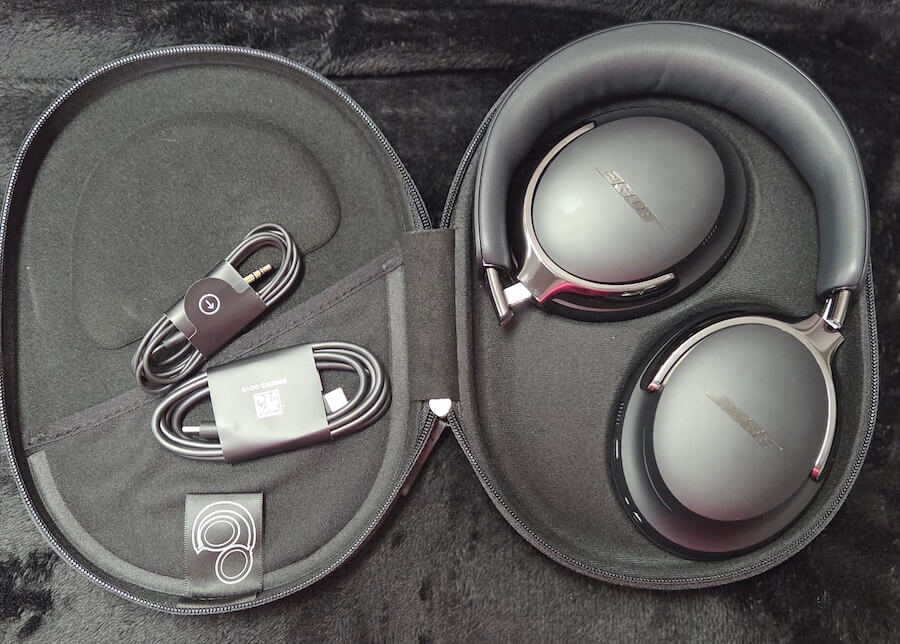
Comfort is literally half of the QuietComfort name, and the Ultra G2 continues to live up to it. Long listening sessions are possible without the familiar hot spots at the crown or excessive pressure around the jaw and ear junction. It may seem odd that Bose chose quiet and comfort as the two words to define an audio product, but the truth is that comfort matters far more than many people realize when shopping for headphones. A headphone can offer excellent sound and noise cancellation, but if you become uncomfortable and cannot wear it for more than 30 minutes at a time, those advantages quickly become irrelevant.
The Ultra G2 is particularly effective for long flights, office work, commuting, and extended listening, which is exactly what Bose intended.
There is a tradeoff. The relatively soft clamping force and lightweight construction mean the Ultra G2 is not the most secure option for vigorous movement. It is perfectly suitable for walking, but it is not designed as a gym headphone and certainly will not survive your pool workout. The earcups can also become warm during extended use, as they do with virtually all closed back, over ear headphones.
Drivers, Connectivity and Battery Life
Bose has always been rather tight lipped about its driver technology, and the Ultra G2 continues that trend. Bose has chosen to reveal only that the driver is 35 mm in diameter and rated at 32 ohms when connected in wired mode. Sensitivity is not specified, while frequency response is listed simply as 20 Hz to 20 kHz without any tolerance or explanation of the testing methodology.
Bluetooth is version 5.4 with support for SBC, AAC, and aptX Adaptive, along with its various modes on compatible devices. Dual device multipoint is also supported, allowing the Ultra G2 to maintain simultaneous connections to devices such as a phone and laptop.
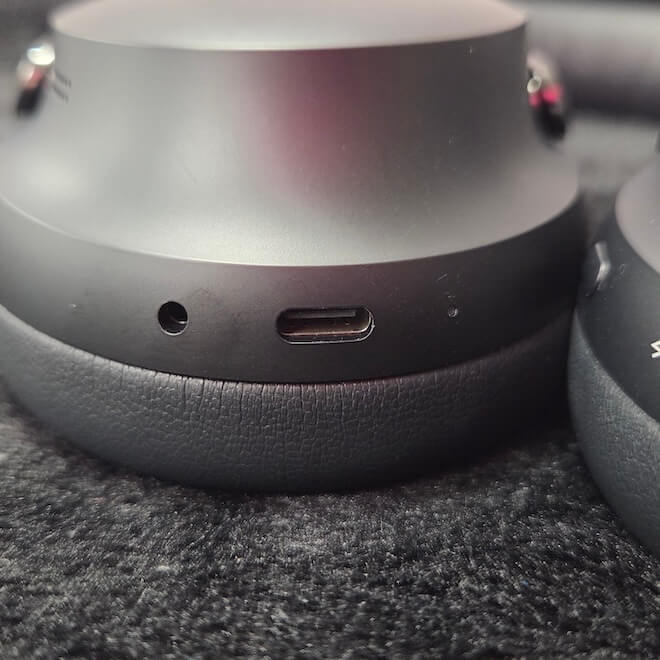
A USB Type-C port handles charging and digital audio, while Bose also includes a 3.5 mm to USB adapter for wired playback. USB audio supports 16 bit/44.1 kHz or 48 kHz lossless playback, and the headphones can continue charging while music is playing if necessary.
The ability to play lossless audio over a wired connection is one of the new features of the Ultra G2. A number of competitors have offered similar functionality for some time, so it is good to see Bose add it and keep pace.
With up to 30 hours of battery life depending on operating mode, charging should not be required during most flights or workdays. The Ultra G2 also supports quick charging, with 15 minutes providing roughly 2.5 hours of listening time. Starting from a fully drained battery, a complete recharge takes approximately 3 to 3.5 hours depending on the charger being used.
What’s New?
Much like the addition of lossless playback over USB Type-C, most of the other updates are incremental or address requests made by users of the original model. Battery life has improved to nearly 30 hours without Immersive Audio and 23 hours with it enabled. Both figures are based on modest volume settings, and my testing suggests battery life can stretch a little further at lower listening levels. I suspect Bose conducted its testing at around 85 dB, so those who listen below that level may get a bit of a bonus.
Bose has also updated the Snapdragon Sound platform, which helps make aptX Adaptive available with a wider range of compatible source devices. The codec was supported by the previous generation, but connectivity and compatibility have proven more reliable with the Ultra G2.
Specifications Compared
| Specification | Bose QuietComfort Ultra (2023 Model) |
Bose QuietComfort Ultra (2nd Gen, 2025 Model) |
|---|---|---|
| MSRP | $429 | $449 |
| Headphone Fit | Around-ear circumaural | Around-ear circumaural |
| Cushions | Removable protein leather cushions | Removable protein leather cushions |
| Microphones | Built-in microphones | Improved |
| Noise Cancelling | Yes | Improved |
| Aware Mode with ActiveSense | Yes | Improved |
| Disable ANC | – | Yes |
| Bose Immersive Audio | Still, Motion | Still, Motion, Cinema Mode |
| Carry Case | Yes | Yes |
| Headphone buttons | Same | Same |
| Rechargeable | Yes | Yes |
| Battery Life with ANC | Up to 24 hours | Up to 30 hours |
| Battery Life with Immersive Audio | Up to 18 hours | Up to 23 hours |
| Battery Life with ANC Off | N/A | Up to 45 hours |
| Battery Charge Time | 3 hours | 3 hours |
| Charging Accessory Included | Yes | Yes |
| Charging Interface | USB-C | USB-C |
| USB Audio | Charging only | Lossless USB-C Audio |
| Charge While in Use | – | Yes |
| Wireless Connectivity | Bluetooth 5.3, aptX Adaptive, SBC, AAC | Bluetooth 5.4, aptX Adaptive, SBC, AAC |
| On-Head Detection | Yes | Improved |
| Low-Power Standby | Standard standby | Automatic Bluetooth standby and deep-sleep low-energy mode |
| Weight | 0.56 lbs (254 g) | 0.583 lbs (264.4 g) |
Listening
The QuietComfort Ultra G2 has a broadly appealing sound rather than a strictly neutral one. Bass is full and authoritative, the midrange is smooth, and the treble has enough energy to keep the presentation from sounding dull.
There is still a recognizable sense of Bose voicing here. Music tends to sound polished, spacious, and immediately enjoyable rather than clinically analytical. That makes the Ultra G2 easy to live with across a wide range of music and particularly well suited to longer listening sessions.
Bass
Bass has weight without sounding permanently inflated. Electronic music, hip hop, pop, and film soundtracks benefit from a solid sub bass foundation, while kick drums have good impact without the lower frequencies routinely bleeding into the midrange.
The Ultra G2 is not bass neutral, and listeners who prefer a strictly flat presentation may find it slightly warm. Fortunately, the Bose Music app includes a basic equalizer that allows users to adjust bass, midrange, and treble to taste.
Midrange
The midrange is smooth, full, and easy to listen to. Vocals remain clearly positioned within the mix, while acoustic instruments retain enough body and texture to sound natural rather than thin.
This is not a forward studio monitor presentation. The Ultra G2 does not push every vocal or guitar toward the listener or attempt to extract every last ounce of detail from a recording. Instead, Bose favors a more relaxed balance that works especially well over longer sessions.
Treble
Treble is clear enough to provide detail and definition without becoming excessively bright. Cymbals, strings, and room ambience are easy to follow, although the Ultra G2 is not the most revealing headphone in its class.
Some competitors offer a more incisive and technically explicit presentation. Bose takes the opposite approach, trading some of that analytical edge for a smoother and less fatiguing listen. For a headphone designed around travel, commuting, office use, and extended listening, that decision makes sense.
Noise Cancellation
I have a suspicion that every product improvement meeting at Bose ends with the phrase, “And of course, don’t screw up the noise cancelling.” It has been Bose’s calling card in the headphone market for decades, and any departure from that standard would certainly be noticed. The first generation QuietComfort Ultra earned its Editor’s Choice Award largely on the strength of its noise cancellation, so expectations for the Ultra G2 are high.
Low frequency sounds such as aircraft engines, trains, air conditioning systems, and road noise are reduced with impressive consistency. Bose has also continued to improve how its processing handles the things listeners actually want to hear while reducing the distractions around them.
The best ANC is not necessarily the system that removes the most noise. It is the one that removes the most distractions without altering the music enough to become a distraction itself. If the ANC changes the sound of the music in an obvious or intrusive way, that is a failure. The Ultra G2 does an excellent job of avoiding that problem.
Human voices and irregular sounds remain more difficult for any ANC system. The Bose does not erase conversation completely, but it reduces nearby chatter enough to make music, podcasts, and audiobooks much easier to follow.
Aware mode provides natural sounding transparency, allowing outside sound in without making the surroundings feel overly processed. It is useful when situational awareness matters, whether at the gym, out walking, or when you need to hear announcements at work, school, or the airport.
The Bose app also allows you to control how much outside noise is blocked or allowed in, making it relatively simple to adjust the Ultra G2 for different environments. Just know that Bose leans heavily on the app for setup and feature configuration, as well as more routine tasks such as battery monitoring and firmware updates. If you want access to most of what the Ultra G2 can do, you will want the app installed on your iPhone or Android device.
Immersive Audio
Bose’s Immersive Audio feature is designed to create a wider, more speaker like presentation in Still mode and add head tracking in Motion mode. The feature carries over from the first generation Ultra, but Bose has improved processing efficiency with the Ultra G2. There is still a cost, however, as Immersive Audio uses additional power and reduces battery life from roughly 30 hours to 23 hours.
For me, the main advantage is Still mode, which creates a greater sense of space around the music and can give the right recordings a more lively and dynamic presentation. The problem is that not every track responds positively to the treatment. I eventually wound up sorting playlists into those that benefited from Immersive Audio and those that simply sounded better with it switched off.
Wired Listening
The addition of USB Type-C audio is the biggest change with the Ultra G2, so I spent some time listening with both the supplied USB Type-C to Type-C cable and the USB Type-C to 3.5 mm adapter to get a better sense of how significant the update really is.
The obvious attraction is the ability to bypass the compression associated with Bluetooth codecs and send lossless audio directly from the source to the headphones. The other benefit is the ability to charge the Ultra G2 while listening, something the previous generation could not do.
For me, that latter use case is every bit as important as the first. Improved sound quality is certainly welcome when Bluetooth is suffering from dropouts or interference, but most of the time I do not feel like I am missing very much when using aptX Adaptive, LDAC, or LC3 these days.
What I have done more than once is head out the door with a pair of headphones I thought were charged, only to hear “battery 15%” when I put them on. Not having a way to simultaneously charge and use a premium headphone, or at least use it without power, is a serious limitation.
There are still some restrictions. USB Type-C audio is limited to 16 bit playback at 44.1 or 48 kHz, so this is not a high resolution USB implementation. Still, this is exactly the kind of feature that should have been included from the beginning. Its arrival makes the Ultra G2 more competitive with Sony and other premium rivals while fixing one of the more frustrating limitations of the original model.

The Bottom Line
The Bose QuietComfort Ultra Headphones (2nd Gen) do not radically change what made the original model successful, but they improve the formula in several places that matter. Comfort remains excellent, noise cancellation is still among the strongest reasons to buy them, and Immersive Audio can add a convincing sense of space with the right material. The addition of lossless USB Type-C playback and the ability to charge while listening also fix two practical shortcomings of the first generation.
What makes the Ultra G2 stand out is how well all of those pieces work together. There are headphones with longer battery life, more detailed sound, deeper app controls, or a more neutral tonal balance, but few combine Bose’s level of ANC, long term comfort, useful spatial processing, and everyday versatility this effectively. That matters on a six hour flight or a full day at the office far more than another menu full of features.
There is still room for improvement. Bose remains too dependent on its app, battery life is good rather than exceptional, and call quality remains an area where the entire premium wireless category could do better. The Ultra G2 is competitive with its rivals for calls, but that is hardly the same thing as saying the category has solved the problem.
Listeners who put comfort and noise cancellation at the top of the list will find a lot to like here. Those who care more about maximum battery life, a more neutral or analytical presentation, or a broader range of sound customization may prefer what Sony or Sennheiser offer. The Ultra G2 can still compete on sound, but its clearest advantage remains what happens when the outside world needs to disappear for a few hours.
Owners of the original QuietComfort Ultra face a tougher decision. The new USB Type-C audio support and ability to charge while listening are useful additions, but they are evolutionary rather than transformative. If those features solve problems you regularly encounter, the upgrade makes sense. If not, the first generation remains a very capable headphone.
Pros:
- Excellent noise cancellation
- Outstanding long term comfort
- Smooth, engaging sound with useful Immersive Audio
- USB Type-C lossless playback and charging while listening
- Strong overall versatility for travel, commuting, and office use
Cons:
- Battery life is good but no longer class leading
- Heavy reliance on the Bose app
- Limited EQ and sound customization
- Call quality is competitive rather than exceptional
- Not a major upgrade for most first generation Ultra owners
Our Ratings:
★★★★★★★★★★ Sound Quality
★★★★★★★★★★ Build Quality
★★★★★★★★★★ ANC
★★★★★★★★★★ Comfort
★★★★★★★★★★ Value
Where to Buy:
Related Reading:
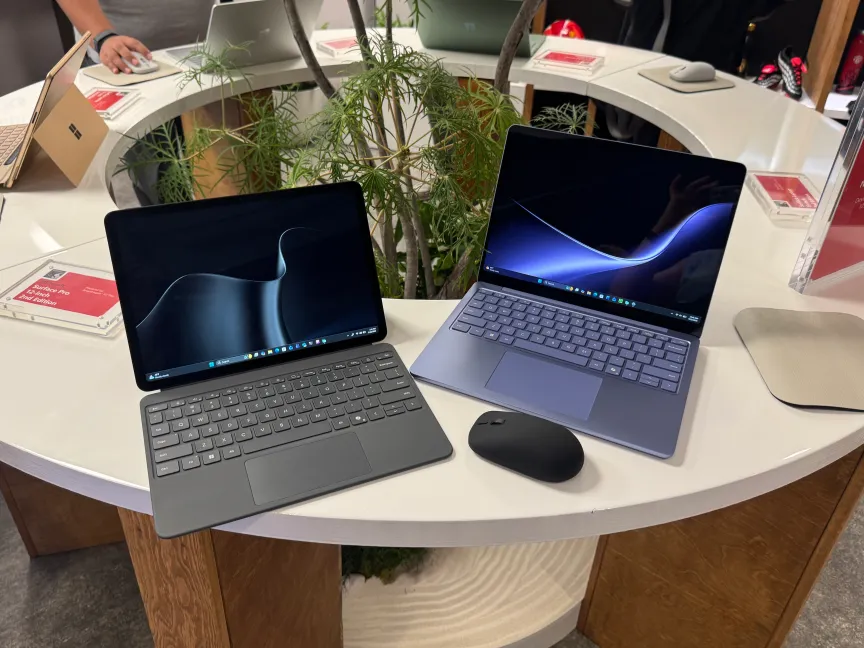
On the stage for the second day of keynotes at Snapdragon Summit 2026, Microsoft Corporate VP of Surface Devices Brett Ostrum revealed new versions of the company’s 12-inch Surface Pro and 13-inch Surface laptops, both of which now run Qualcomm’s Snapdragon Elite X2 chips for improved performance and battery life. These chips had come to larger Surface devices earlier in the year, and arrived in the smaller sizes of Microsoft’s portable PC lineup.
Along with the chip upgrade, both of the updated Surface devices have increased RAM options of 16GB and 24GB (up from 8GB and 16GB in their predecessors).
But some hidden advantages of running Qualcomm’s Snapdragon Elite X2, which was introduced at last year’s Snapdragon Summit, are downstream of the years the company spent developing smartphone silicon.
The first Snapdragon X Elite chips were revealed in 2023 as Qualcomm’s big return to PC silicon, attempting to outdo Apple laptops in battery life and performance. A big part of the company’s pitch was using what it learned making phone chips to see benefits in the laptop space. Now, we’re seeing evidence of that DNA paying off.
For instance, Ostrum told me after the keynote that the new Surface devices have superior cameras to their rivals thanks to the image signal processing on the Elite X2 chips, inherited from phone camera hardware, that will make you look amazing on Zoom calls.

Before, Apple had taken the crown of image quality in its laptop webcams, Ostrum said. But thanks to Qualcomm’s investment in ISP and the camera pipeline, the Surface devices have seen a big turnaround in the video quality captured by their webcams.
“With our [Surface] Pro and laptops that we announced earlier this year [with] Snapdragon X2 Elite, we took the No. 1 and No. 2 spots from Apple in terms of camera quality,” Ostrum said, referring to DxOMark’s laptop rankings. Those rankings currently place Microsoft’s 13.8-inch Surface Laptop and 13-inch Surface Pro in first and second place, above Apple’s MacBook Pro models, in camera quality.
It’s not the first thing consumers or commercial buyers look at when shopping for laptops and two-in-ones, but people now spend so much time in Teams and Zoom meetings that camera quality is more important than consumers might admit. And considering how much the bar has been raised by ever-improving phone cameras, it’s no surprise that people want and expect an improved webcam.
“You want to look good when you show up [on camera], and it’s important to us, it’s important to our customers. And so it’s a fairly straightforward approach for us to say we want to make this look as good as we can,” Ostrum said.
We’re not just talking about better camera hardware, either. Ostrum was quick to say that it isn’t the lenses or sensors that make the difference — it’s the image processing pipeline Qualcomm has refined.
“I can put the same sensors into multiple silicon platforms, but the best solution is going to come with a Qualcomm ISP,” Ostrum said. “If you compare an Intel-based one of our commercial devices to a Qualcomm-based solution, you will see the difference.”

Phone chip DNA doesn’t just help with cameras — it boosts battery, too
That’s not the end of smartphones’ influence on laptops. The older x86 chips may have been adapted to laptops, but they originated in a world where PCs plugged into walls, Ostrum said, implying that they struggled with battery life. But the Snapdragon phone chip DNA and its emphasis on performance per watt have noticeably extended the battery life on Surface devices while also delivering the fast speeds consumers need for their tasks.
“People raved about the first generation of devices from a performance perspective, but the thing that we heard unanimously that was just a huge delight was, ‘The battery life’s incredible. The battery life’s incredible. The battery life’s incredible,’” Ostrum said.
There’s more that goes into the battery life of the Surface Pro and Surface laptop than the chip, including redesigning the interior for better thermal management. Roughly speaking, better heat management means more time running at high performance and less energy spent cooling the device down, which means more battery life. It’s all connected.
“We oftentimes will see as much gen-over-gen performance improvement from the thermal design that we iterate on as we do from the chip improvement gen-over-gen,” Ostrum said.
Still, that’s combining what Microsoft does best with the advantages of Qualcomm silicon, at least as far as Ostrum sees it. Microsoft expects 22.5 hours of battery life from the second-gen 13-inch Surface laptop, which is slightly down from the 24 hours offered by its predecessor. We’ll see how those expectations bear out in our testing.
What is true is how much longer those expectations are than what they were before Microsoft switched to Qualcomm — the Surface Laptop 5 and 6 with Intel-based chips had 18.5 hours of expected battery life, though the internet is strewn with reports of units only lasting half that time, or even less. Switching to a chip that inherited priorities and design architecture from mobile silicon seems to have helped.
Editors’ note: David Lumb’s travel costs were covered by Qualcomm. The judgments and opinions of CNET are our own.


I think it’s fair to say Meta doesn’t boast a particularly glowing reputation at the moment.
With privacy concerns surrounding its Meta Glasses that no amount of celebrity endorsement can fix, plus issues around shielding children and vulnerable people from harmful content online, it really doesn’t feel like Meta is taking its responsibility to keep people safe very seriously.
However, it would appear that Meta is trying to combat this by launching a camera-free pair of smart glasses. Yep, the Ray-Ban Meta Audio sheds itself of the creepy camera and is designed for users to listen to music and chat to Meta’s AI assistant (Muse) without needing headphones.
I completely understand why there’s a rise in open-ear headphones. Unless I’m travelling on a plane or sitting in a busy office or cafe, proper noise cancelling headphones no longer appeal to me, especially when I’m out walking or on a run. The thought of being so unaware of my surroundings feels dangerous and an unnecessary risk to take when out on my own. With that in mind, I really do understand the idea behind the Ray Ban Meta Audio specs, as you can listen to audio content while staying alert and present of the space around you.
Plus, you can call on Meta AI to get answers to questions without needing to get your phone out. Okay, let’s be honest, no one would ever really do this, but it’s an unignorable option.
And then there’s the design. As there’s no bulky camera to find space for, Meta doesn’t need to use the larger Ray-Ban Wayfarer or Starfire styles for its glasses and can call upon other iconic but more lightweight designs from the brand, like Burbank or my personal favourite, Clubmaster.

Finally, you can add your prescription to the specs too and choose between standard or tinted lenses too. So, theoretically, if you need a new pair of glasses and a new pair of open-ears, then the Ray Ban Meta Audio could be a good compromise.
The counter-argument
So yes, there genuinely are valid reasons why someone might splurge on the audio only pair. However, with a starting price of £319, the Ray Ban Meta Audio is a seriously hefty investment for specs with built-in speakers and microphones. In fact, the pair is only £90 less than the full-blown Meta Glasses 3rd Gen – so that might sway users to just opt for the camera-cladded alternative.
Then there’s Meta’s AI assistant Muse. Yes, it probably can come in handy when you have a question that needs answering right away, and you have no time to get your phone out or to ask someone for the answer – but how often will those instances actually come up?
During my time at a Meta event, I was prompted to use the glasses to ask Muse about the health benefits of sourdough. It’s good to know, don’t get me wrong, but I think I naturally would have just Googled the question, rather than muttering it to my glasses to reveal the answer.
Which brings me to my next qualm. Can you imagine being caught actually chatting to the AI assistant that lives in your glasses? The thought is genuinely mortifying.
In fact, and I know I’ll sound like a hypocrite for even saying this, but at least the standard pair has cameras that can come in handy, say if you want to translate a menu or identify a plant. Of course this does not sway my overarching opinion that the Meta Glasses are creepy, but it does at least offer some justification.

There are some genuine pros to the Ray Ban Meta Audio specs. Not only are they available in stylish designs and can be used as your everyday prescription glasses, but they allow you to listen to audio content without needing to don earbuds or headphones. The glasses also keep you aware of your surroundings – something that more of us are choosing to do to stay safe.
However, with a hefty price tag and not much else going for it, the Ray Ban Meta Audio doesn’t seem like much of a worthwhile option. The AI is a decent addition, but I doubt people will really use it enough to warrant the splurge. Having said that, if you’re keen to get your hands on Meta Glasses, then I would definitely say go for the audio-only iteration rather than ones with a camera.
I for one am going to stick with my normal prescription glasses and use open-ear models like the Shokz OpenDots Air while I’m out and about.
Tech
Tamura Lumitime Clock Turns 1970s Mains Power Into Glowing Seven Segment Numbers With Gears and Contacts Alone
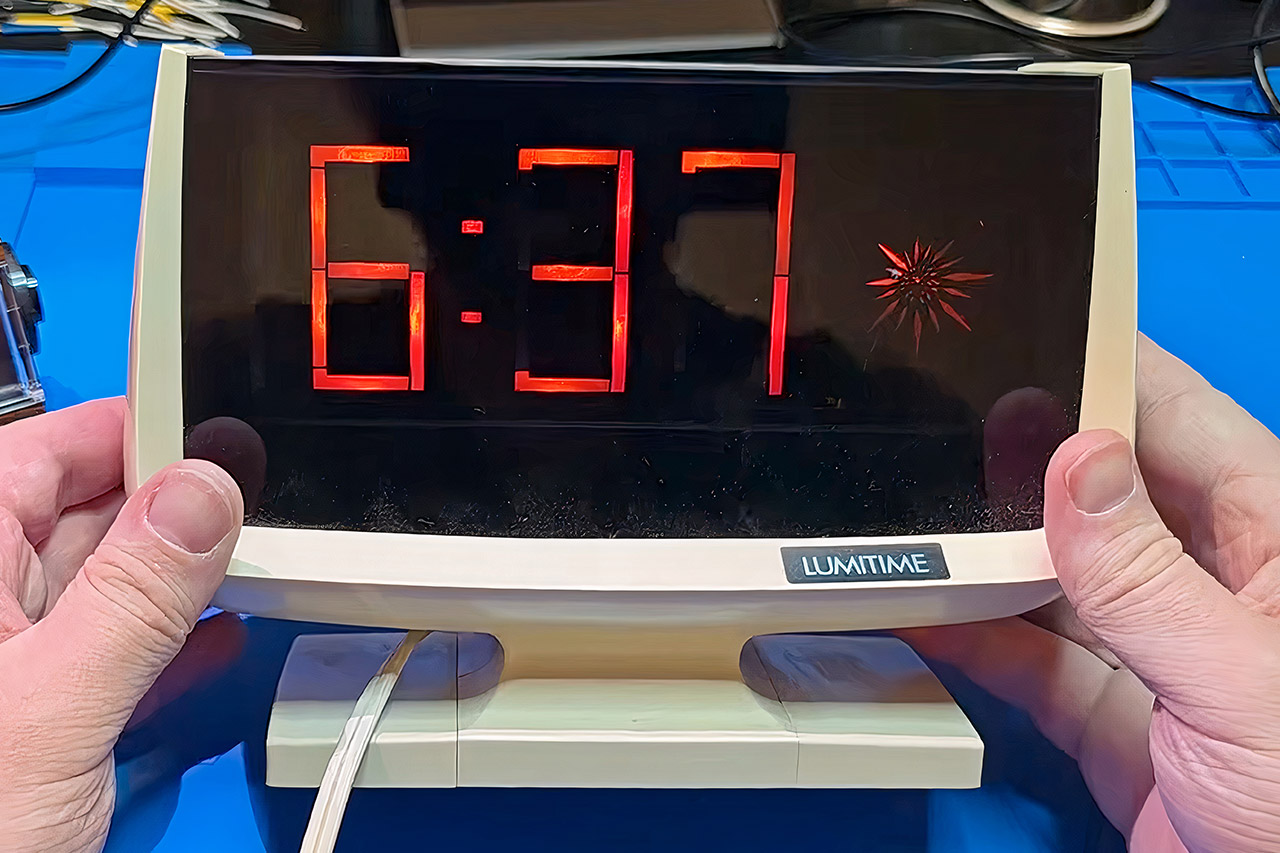
Japanese company Tamura Electric sold the Lumitime as a stylish desk or wall clock throughout the mid to late 1970s, giving buyers the futuristic look of digital numerals when affordable LED and LCD panels were still dim, tiny, or simply not ready for living rooms. Mark Furneaux opened one of these machines and found no counters, no decoder chips, and no real-time clock module. A synchronous motor tied directly to the 60 hertz household line supplies both power and timing, spinning at a fixed rate so the clock stays accurate as long as the grid stays stable.
Gears reduce the motor speed dramatically, gradually reducing it with a long chain of gears until you reach the three main shafts, which happen to be turning over at the correct pace for displaying minutes and hours. These shafts include patterned metal plates around which springy contacts move back and forth. Each plate has been carved out such that the contacts close and then open in the precise proper order to illuminate the appropriate neon lighting for each digit from 0 to 9. What you end up with is the classic look of a 7-segment display, all connected with good old mechanical switches. Behind the segments, the neon bulbs glow a nice warm orange, and out on the side, there’s a spinning star shape with a simple but effective moiré pattern that shows you how many seconds have passed.

Amazon Echo Show 15 (newest model), Full HD 15.6″ kitchen hub for home organization, with built-in Fire…
- MEET ECHO SHOW 15 – A stunning 15.6″ Full-HD (1080p) smart display that’s perfect for your kitchen and ready to show you more. Use customizable…
- FAMILY ORGANIZATION HUB – See your top widgets at a glance, like your family’s calendars and to-do lists, local weather, smart home, and more.
- ALL YOUR FAVORITES, ALL RIGHT HERE – Built-in Fire TV unlocks endless entertainment, so you can enjoy your favorite content from thousands of apps…
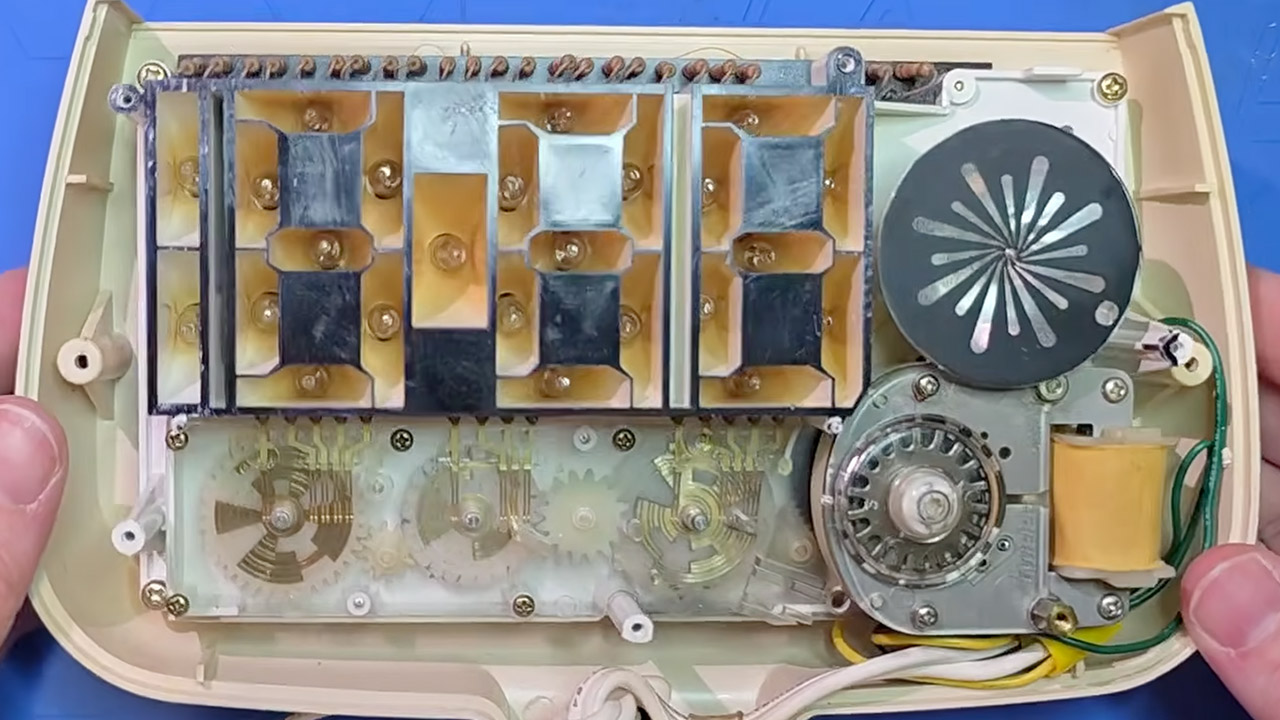
The physical contacts function as a mechanical decoder drum, moving up and down past a set of plates, with one set handling the minute unit, another the tens minute, and a third the hours, with each one cut off so that only the correct bits receive power at the correct moment. To keep things from getting too exciting, resistors are placed between the power source and the lamps to keep the current under control. When a digit changes, and this is all part of the design, the contacts will temporarily make and then lose contact, flashing on and off intermittently. A handful of the versions even went so far as to include additional plates and levers for an alarm function that operated in the same manner.
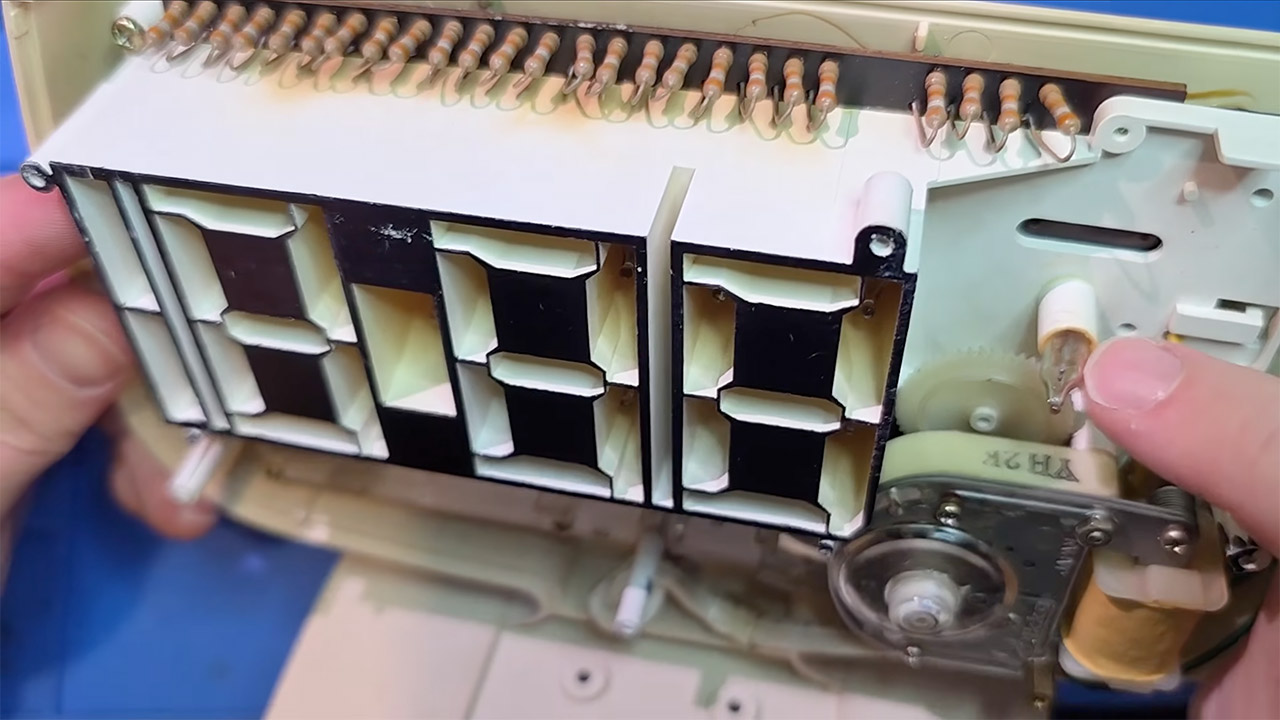
Time and wear eventually take their toll on vintage clocks, and the most typical issue is dried out grease inside the motor, which, when seized, brings the entire thing to a halt. Then you’ll need to clean the bearings, add some new oil, and, if you’re lucky, reset the little ratchet that ensures the motor always begins in the correct direction. If you don’t get it properly, the motor will just spin backward and the display will begin counting down rather than up. After around forty years, the plastic gears in the reduction train begin to wear out.
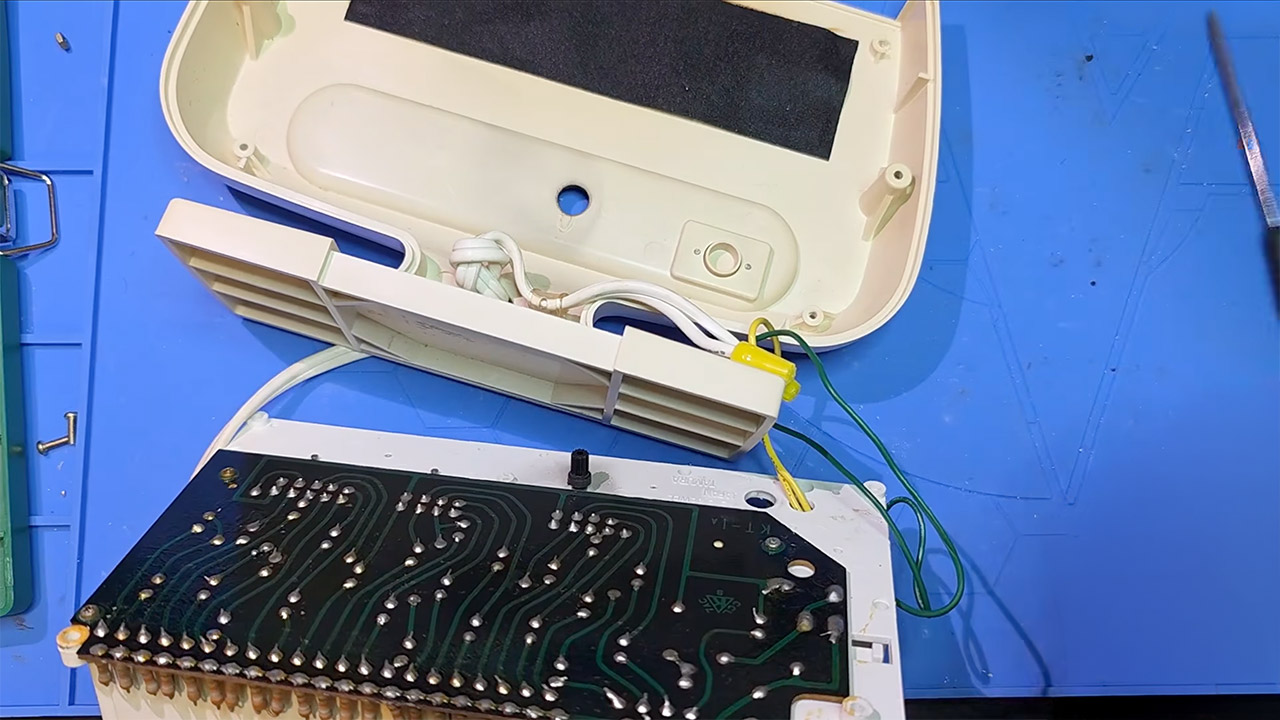
The concept is still valid, and it’s beautiful. Here, a little bit of regular household electricity serves as both clockwork and logic. Tamura was even bold enough to name some of them “NO ICS,” emphasizing that there were no integrated circuits to be found, only a neatly designed series of spinning metal plates. So the Lumitime lies there, frozen in a delightful moment in time when people desperately wanted digital readouts but the cheapest method to get them was still this quite charming device.
[Source]


If you live in a state that doesn’t have that many EV chargers, then you may have a hard time recharging your vehicle on long trips. But you might have more of an advantage if you live in California, especially after Governor Gavin Newsom’s September 20 legislation signing that will change some of the rules regarding EV charger installation and availability.
SB 969 changes the inspection process for certain public chargers that have already been tested by their manufacturers. This could potentially allow those chargers to start operating sooner instead of having to wait on an outdated inspection step. Additionally, SB 1283 makes the state’s streamlined permitting process apply to work that goes along with a charger station. This includes digging trenches, upgrading electrical equipment, and adding battery storage. By simplifying these parts of the installation process, California could make it easier for more charging projects to get moving.
The new laws also make it easier to install chargers where people live, especially in apartments and developments that combine housing with stores or other businesses. AB 1820 reduces permitting obstacles and fees for these charging projects, which could make it easier for residents without a private garage or driveway to access a charger at home. The new legislation also includes SB 1267, which addresses EV charging access for people living in homeowners associations, while SB 615 provides consumers with clearer battery information when shopping for an EV.
What led to California’s new EV charger laws

California had already taken steps to speed up EV charger permitting, but the cost of getting a charging station approved could still vary depending on its location. Supporters of AB 1820 argued that some local permit fees had increased sharply without a similar increase in the cost of reviewing the projects, which could make chargers more expensive to install. But other groups disagreed, saying the proposed fee limits could be lower than the actual cost of both review and inspection.
There were even questions about how consistently the state’s permitting rules were being applied. California had already introduced EV programs and passed laws requiring both cities and counties to create streamlined processes for EV charging stations, but a state review found that 77 jurisdictions were only partially streamlined and another 105 jurisdictions had not been streamlined at all. The Electric Vehicle Charging Association (EVCA) also claimed that some local governments were continuing to make it tougher for more complicated charging projects to get off the ground.
But Governor Newsom’s new legislation is now tackling those issues, and the response has been supportive. The EVCA welcomed the new legislation, saying it addresses permitting delays and unnecessary costs, while the California Electric Transportation Coalition said the laws will make it easier to build the charging infrastructure California needs. The EVCA estimates that the state will need to add more than 400 new chargers every day through 2030 in order to meet its clean-transportation goals.

Last year, Maddie Kowalski was a regular sophomore attending the University of Florida. Then a series of burner accounts on X started proliferating explicit, nonconsensual videos of her. This week, Zoë Schiffer sits down with WIRED’s senior writer Ej Dickson to discuss the burnerverse, a sprawling, loosely organized network of anonymous accounts that have turned the sexual humiliation of young women into an online participatory sport.
You can follow Zoë Schiffer on Bluesky at @zoeschiffer and Ej Dickson on Bluesky at @ejdickson. Write to us at [email protected].
How to Listen
You can always listen to this week’s podcast through the audio player on this page, but if you want to subscribe for free to get every episode, here’s how:
If you’re on an iPhone or iPad, open the app called Podcasts, or just tap this link. You can also download an app like Overcast or Pocket Casts and search for “uncanny valley.” We’re on Spotify too.
Transcript
Note: This is an automated transcript, which may contain errors.
Zoë Schiffer: A quick content warning before we dive in. This conversation includes descriptions of nonconsensual sexual content and references to self-harm. Please take care while listening.
Maddie Kowalski: When I heard that someone had sent a nude photograph of me to his friends at FSU, and in this picture I was heavily intoxicated.
Zoë Schiffer: This is Maddie Kowalski.
Maddie Kowalski: So right after this, I started getting flooded with messages that I was being talked about all over my school’s Yik Yak.
Zoë Schiffer: Yik Yak is a platform popular among college students where you can post anonymously if you’re within a specific geographic radius.
Maddie Kowalski: Everything was just happening really fast, and I couldn’t comprehend any of it.
Zoë Schiffer: What Maddie had heard about was a single photo, but there were a series of videos in which she was visibly out of it, naked, and performing sexual acts. Maddie remembers, well, she was really drunk that night.
Maddie Kowalski: I felt really detached from the girl in the videos because I had so little memory of the events.
Zoë Schiffer: Obviously, she hadn’t consented to any of this, not to being filmed, and certainly not to those films being posted online. But now, it was all over X.
Maddie Kowalski: And at this moment, I just felt my whole world collapse. Everything was being shared and reposted so fast, and I couldn’t do anything to stop it.
Zoë Schiffer: The videos had officially gone viral. #MaddieKowalski was trending on X nationwide, and it was viewed more than 8.5 million times. For the next 24 hours, Maddie sat paralyzed on her couch while anonymous internet people harassed her. They posted old photos from before the night the videos were taken. They called and texted her parents all throughout the night. One anonymous man told her father that he’d had sex with her and had since tested positive for HIV. People on X were placing bets on whether by the end of the week she would either start an OnlyFans or kill herself. Here’s the thing. The people behind this weren’t strangers in some far-off corner of the internet. In many cases, they were her literal classmates hiding behind anonymous burner accounts, mostly used to celebrate college sports. From WIRED’s Uncanny Valley, I’m Zoë Schiffer, contributing editor. WIRED senior writer Ej Dickson spent months following Maddie’s story and what’s become known as the burnerverse, a sprawling, loosely organized network of anonymous accounts that has turned the sexual humiliation of young women into a kind of participatory sport. Ej, thank you so much for coming on.
Editor’s take: Sony is actively trying to break new ground with AI technology, cloud services, and other questionable consumer solutions after stating that PlayStation physical games will soon be discontinued. The company is going as far as constantly tracking users’ devices so that one or more LLMs might vibe-code a fix for new software issues.
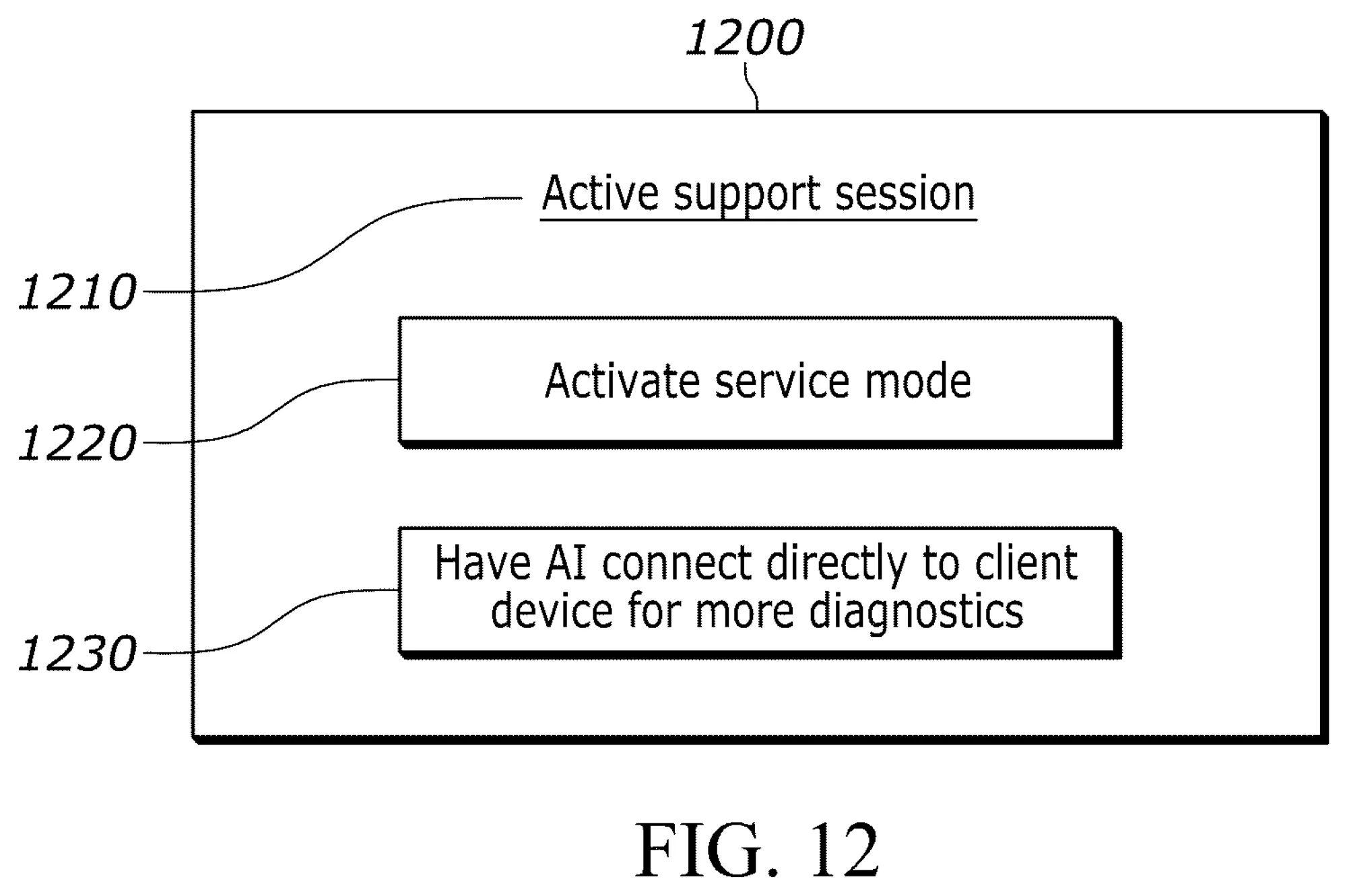
In 2025, Sony filed an AI-focused patent with the USPTO. The recently published patent reveals a diagnostics and troubleshooting system designed to rely heavily on automation, with large language models acting as both the “brain” and the developer – tasked with fixing issues found on customers’ devices.
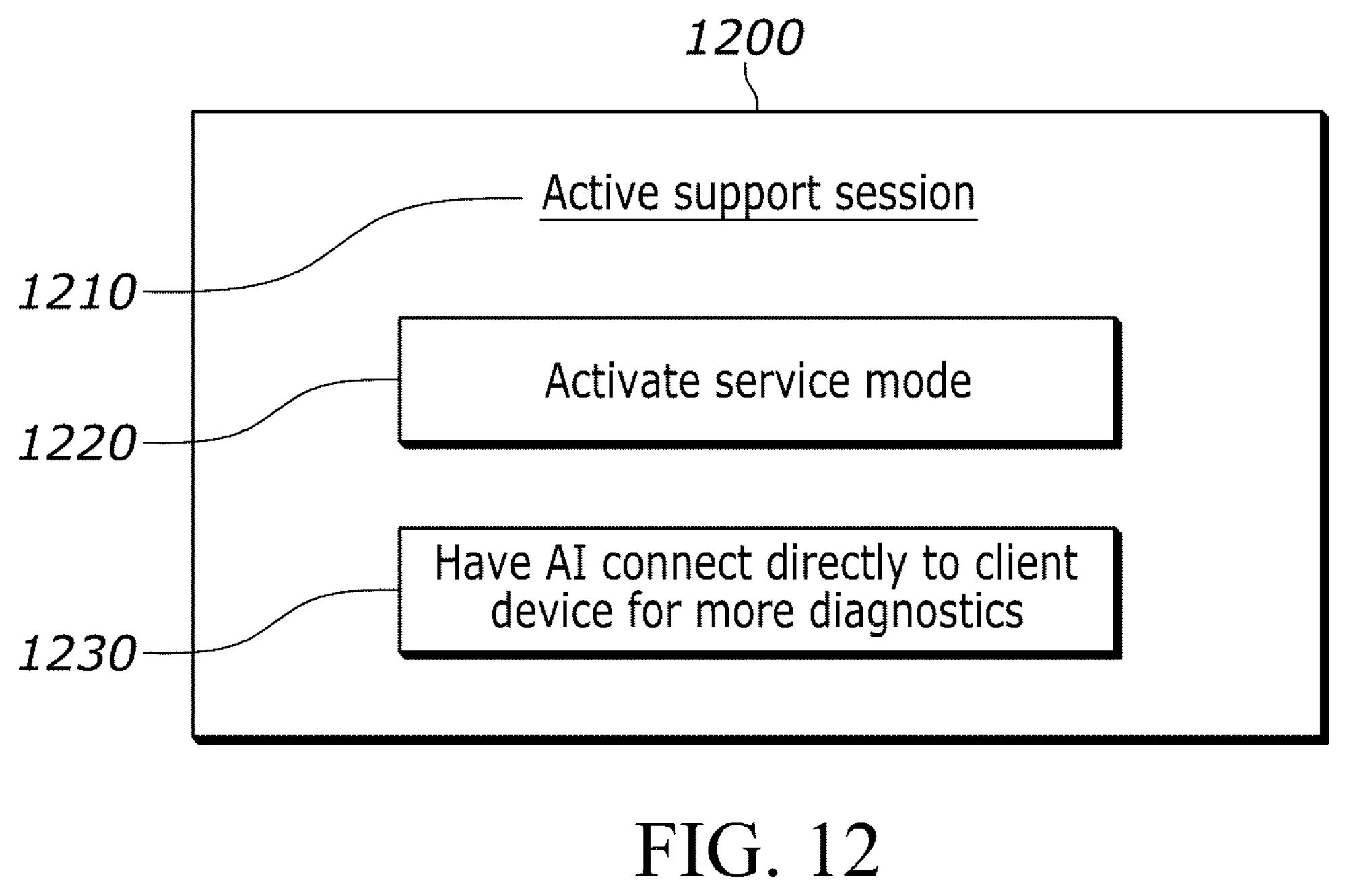
Sony’s patent application describes a remote AI server that’s constantly monitoring a user’s device. The device could eventually signal that something is wrong, and the server can write its own small diagnostic tool to send back to the device. After examining the diagnostic data, the system can either fix the issue by itself or file a new ticket to be reviewed by a human troubleshooter at a later date.
The system includes a cloud-based “brain” that can choose between multiple LLMs to get the job done, even writing and uploading software fixes for on-device firmware, operating systems, and more.
In theory, the AI-based troubleshooting technology could help diagnose and fix issues on gaming consoles, TVs, headsets, and other types of consumer electronics sold by Sony.
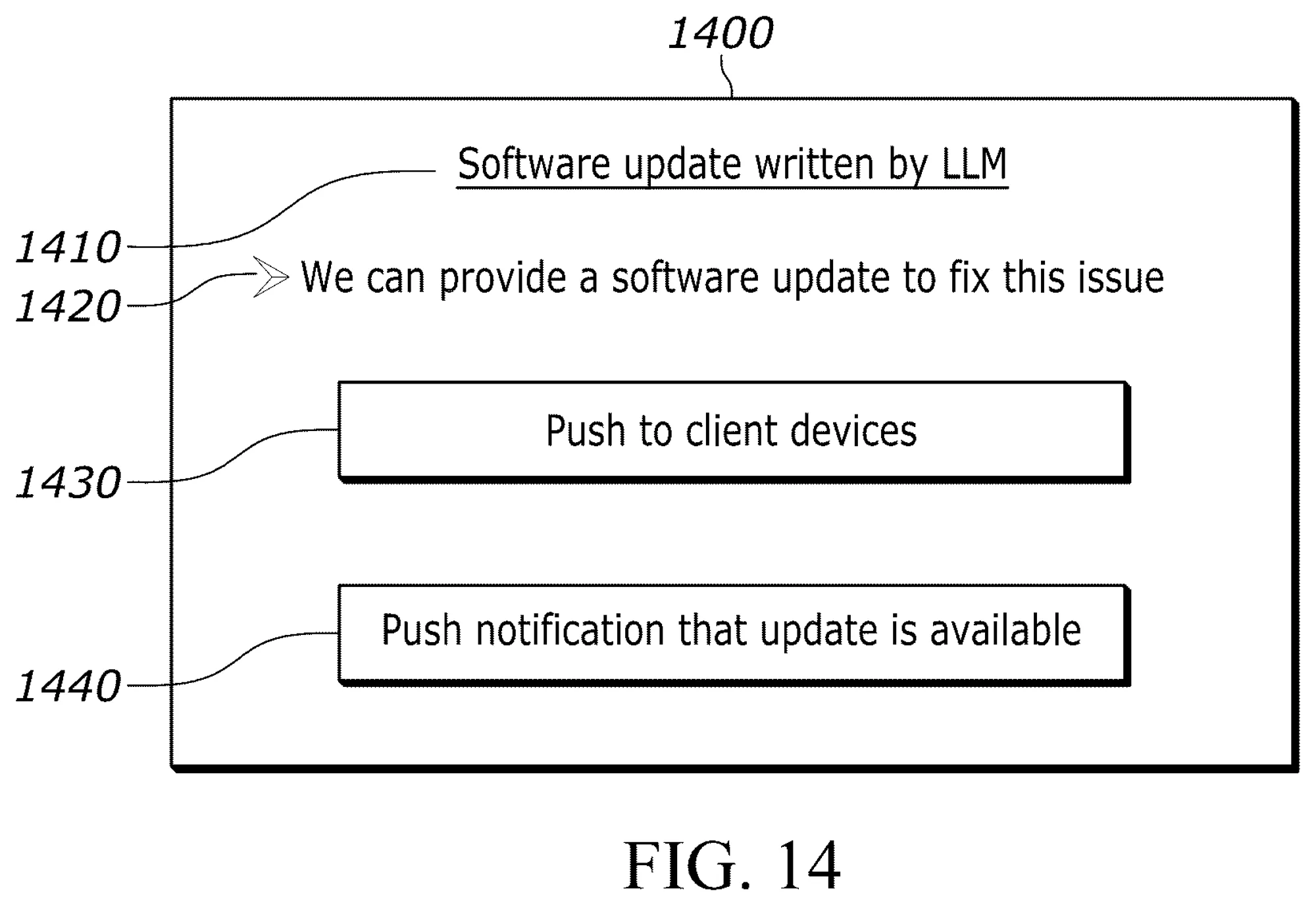
If the system works as intended, users wouldn’t even be notified that their device had downloaded updated firmware. Consumers would be left with a perfectly working device, while Sony could gain access to massive troves of valuable diagnostic data to further refine and train its LLMs.
Sony’s approach might prove troublesome in a number of ways. The cloud system would act as an always-on monitoring system for consumer devices, posing potential threats to users’ privacy and data security. Vibe-coding LLMs might be the best thing since sliced bread for AI enthusiasts, but automatic systems are still prone to generating hallucinations, security issues, and difficult-to-maintain code.
It’s worth noting that tech companies file patents on a constant basis, and many of these supposedly “revolutionary” solutions never come to fruition.
For now, the AI-based troubleshooting system has already received a rejection from a USPTO examiner. Sony could keep pushing its patent application within the USPTO, asking for a new review after amending the original application.
We may receive a commission on purchases made from links.
Going out on a boat can be an exciting experience, whether alone or with friends. You might be taking it out for fishing, or you might want to explore a local area while the weather’s nice. Regardless of your choice, being out on a boat is a grand time when you have the opportunity. However, there are ways you can enhance this experience, like the essential tools you should always have on a boat, or ones you can take out with you to sea.
We’ve gone through and created a list of a handful of gadgets that stand out to us as ways to make your time on a boat fantastic. These range from entertainment options to useful safety tools you might want on board to enhance your safety. Here are six cool gadgets that you can bring with you to make your time on a boat even better.
DJI Mavic 3 Classic
A drone can be a useful tool to bring with you when out on a boat. You can use it to get an aerial perspective of the area ahead, ensuring you avoid any reefs or debris you might not notice from your vessel. When it comes to picking out a drone, the DJI Mavic 3 Classic is a reliable choice to bring with you and is different from the standard DJI Mavic 3. It has high-quality 5K video that you can see through, a long battery life that lets you fly for at least 45 minutes, and it’s easy to use for anyone new to flying a drone. It has a maximum flight distance of 18.5 miles, can fly at 21 m/s horizontally and 8 m/s vertically, can operate in temperatures that range from 14° to 104° Fahrenheit, and comes with 8 GB of internal storage for your footage.
The model does take a bit of practice to learn to fly, but with some time, it becomes much easier to operate and performs well outdoors. The controls can be sensitive, and newer users might want to take a few test flights before taking it out onto the water. The DJI Mavic 3 Classic is available for $1,279. You can also get multiple accessories, such as a wide-angle lens, a portable charger, a battery hub, and various controllers.
Anker soundcore nebula X1 projector
If you’ve ever wanted to enjoy a day out on a boat, or an evening on it to watch a movie, you can always bring a screen or device with you. But if you want to share the experience with a large group of people and make it feel like an outdoor movie theater, there’s the option of having a projector on board. The Anker Soundcore Nebula X1 projector is a portable device you can bring onto a boat so a larger group can enjoy a movie or program while you’re out on the water or docked. It’s why we’ve listed it as one of the best outdoor projectors you can use.
The Nebula X1 is a projector that has 3,5000 lumens of brightness, a 3840 x 2160 resolution, a native contrast of 5,000: 1, multiple projection modes such as front, rear, or ceiling, a liquid cooling system, and weighs less than 15 pounds, making it lightweight to add to your boat. It has a built-in handle for easy carrying. If the screen you’re using isn’t perfectly white, the Nebula X1 has a built-in camera that detects it and adjusts the projection lighting. Ideal if you want to project onto a wall in your boat or use a drop-down screen for your movie. You can get the Anker Nebula X1 for $2,999 on Amazon.
Standard Horizon HX890 handheld VHF radio
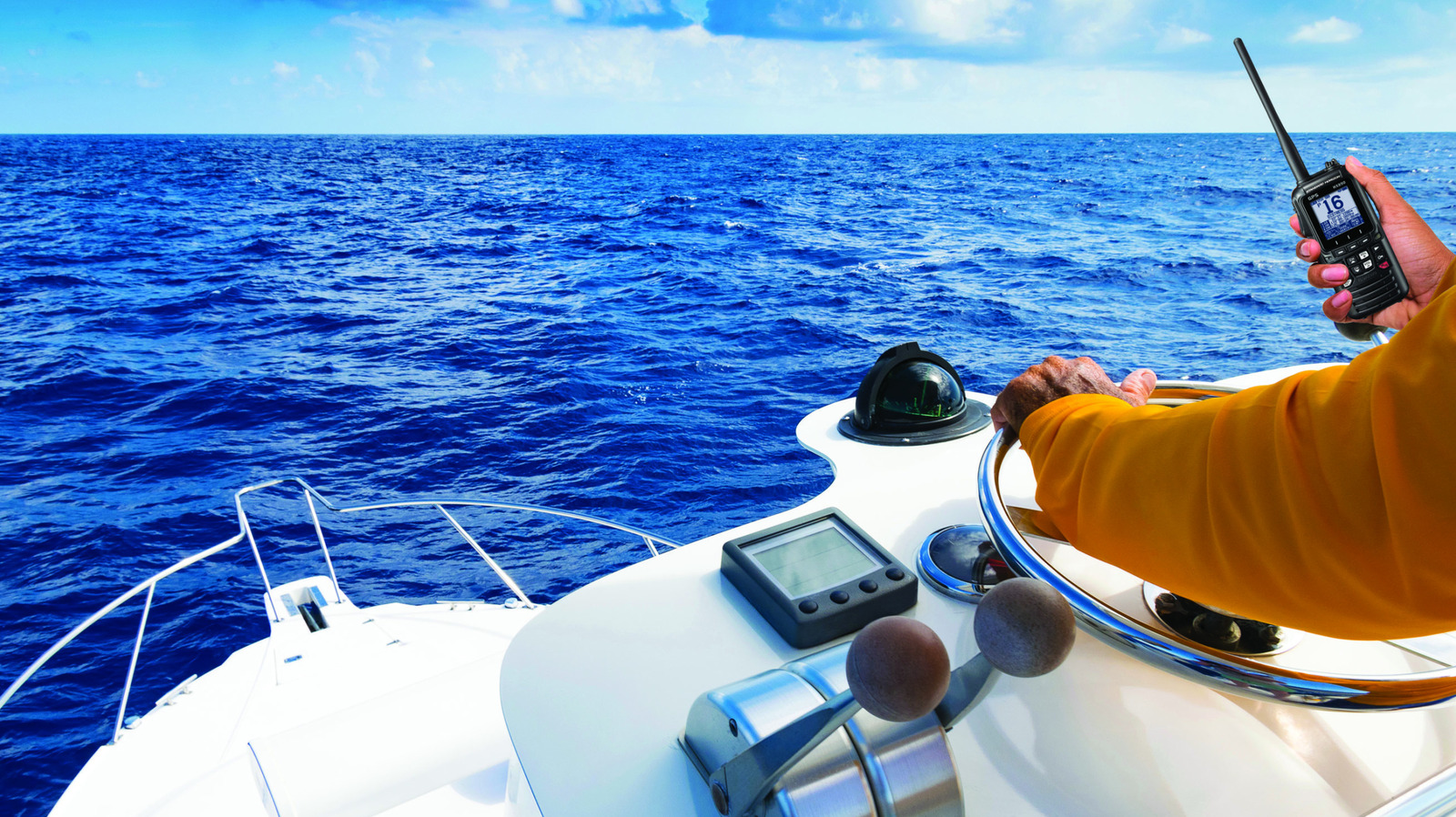
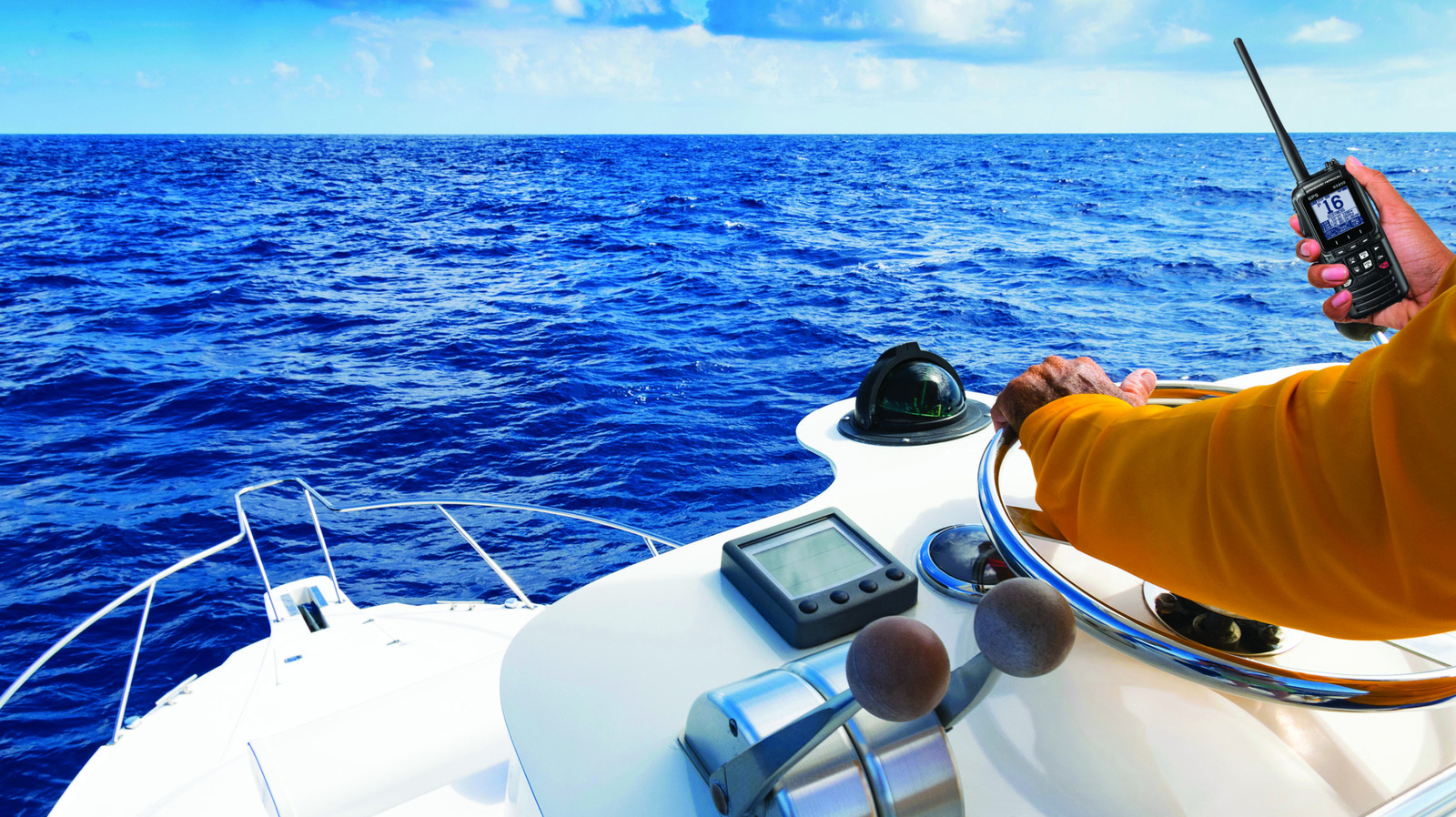
Having a radio on a boat is always a good idea, especially a VHF model. It’s a two-way wireless device that uses very high-frequency waves between 30 and 300 MHz, allowing you to communicate with others who also use these radios, namely other boaters, marinas, a bridge operator, or even the Coast Guard, if necessary. Making sure you have one is always a good idea, and the Standard Horizon HX890 handheld marine radio is a worthwhile addition to your boat’s tools.
The HX890 has a large 1.7-inch screen, making it easy to read everything it displays and switch between its features. It has 700 mW loud audio and noise-canceling for TX and RX audio, waypoint and route navigation, a man-overboard setting, two scrambler systems, versatile scanning operation, a weather channel and alert setting, and much more. If it does fall into the water, it’s waterproof and floats, making it easy to pick up and ensuring you don’t lose it over the side by mistake. You can get it for $269 on Amazon.
Coast WPH34R headlamp
Having too many lights isn’t a bad idea, especially if you can attach one to your head so they don’t take up a hand. The Coast WPH34R headlamp is a worthwhile option, wrapping around the top of your head so you can keep your hands free the entire time you have it. If you need to shine it at a specific location, the headlamp detaches, and you can use it like a standard handheld lamp to look in hard-to-reach places, ideal for use on a boat or when walking on a dock.
The WPH34R headlamp is a waterproof device with a 2,000-lumen bulb that has a maximum beam length of 590 feet. It comes with five modes that can switch the beam color among white, red, and green. You can expect the headlamp to operate for 36 hours before needing to recharge, or use three alkaline AAA batteries if you don’t want to recharge. You can get the WPH34R headlamp for $89.99.
FlexSolar 40W foldable solar panels
It can be hard to ensure your devices or batteries are fully charged when you’re in the middle of the water. As the day goes on, you might use some more than others, and when they do run out, there are not many options to recharge the batteries. An effective way to ensure you can always charge your devices, whether you have access to standard electricity or not, on a boat is with the FlexSolar 40W foldable solar panels, one of the top-rated foldable solar panels on Amazon. You can place these solar panels out and begin charging your devices without using an outlet or a portable battery that can run out.
The FlexSolar solar panels come with DC, USB-A, and USB-C ports, allowing you to charge multiple devices simultaneously. To maintain portability, these foldable solar panels are easy to store, allowing you to configure their layout to optimize sun exposure. You can expect a 24% solar conversion rate, though you’ll want to angle them at 45 degrees to the sun for the best results. They don’t have a kickstand, so you’ll have to be creative about where you place them on your boat. You can get them for $67.99 on Amazon.
Garmin inReach mini 2 satellite communicator
It’s always a good idea to make sure someone knows where you’re going and when to expect you back, even if you’re taking a routine route with your boat. It’s always possible that the worst can happen in the best of situations, and having a way to signal for help is an important tool when you’re on the water. A helpful device to have with you is the Garmin inReach Mini 2 satellite communicator, a radio with two-way messaging and an interactive SOS signal that works globally. It’s one of several emergency gadgets that you can buy online.
Any messages you send out also share your current location. Anyone who has access to your service can check your location at any time, with the service updating your map location every 10 minutes. Beyond acting as a communicator, it acts as a digital compass and can help you get back on course. If you’ve lost your way, it also has a feature called TracBack that shows the route you took to get there, allowing you to retrace your steps. Not only is it water-resistant, but the battery is also expected to last up to 14 days with the 10-minute tracking mode enabled. You can get it on Amazon for $399.99.
Methodology
We reviewed feedback from both consumers and industry experts, selecting products based on their performance on the water and in the marina. Some are purely for entertainment purposes, such as the Nebula X1 Projector, while others can be used to make life easier, like solar panels for charging an electronic device.
Others were picked for their use in emergency situations, like the Mini 2, or for their ability to help anticipate potential dangers, like the Mavic 3 Drone, Coast Headlamp, or the HX890 Radio. Each device has a high amount of versatility for anyone who regularly uses a boat.

NewsBeat52 seconds ago
Portugal 1-0 Wales: Craig Bellamy wants more from his side after narrow Portugal loss
Business2 minutes ago
Darden Restaurants shareholders elect directors and approve auditor at annual meeting

Crypto World3 minutes ago
Revolut Customers Hit by Second Data Breach in Just One Month

Fashion2 weeks ago
Weekend Open Thread – Corporette.com

Fashion6 days ago
Weekend Open Thread: Talbots – Corporette.com

Tech2 weeks ago
Memory prices are slowing because buyers ran out of money

News Videos6 minutes ago
Why sell your xrp when you could become a millionaire if you hold longer #crypto #cryptonews #xrp

News Videos13 minutes ago
7 Business Mistakes to Avoid | Smart Awareness | Financial Discipline Motivation Video 2026

News Videos33 minutes ago
20% Interest Truck: Our Financial Nightmare! #shorts
-
 Fashion6 days ago
Weekend Open Thread: Talbots – Corporette.com
-

 Tech4 days ago
Researchers escape OpenAI Codex sandbox to run commands on host
-

 Crypto World2 days ago
Goldman Sachs and Deutsche Bank Agree: The S&P 500 Rally Isn't Over
-

 Crypto World4 days ago
Who Needs CLARITY Anyway? ARB Could See 70X Increase: Hodler’s Digest
-

 Crypto World6 days ago
Circle launches Arc Studio AI agent for building onchain apps
-

 Fashion12 hours ago
8 iPhone Accessories That Add Personality
-

 Crypto World7 days ago
Mortgage and refinance interest rates today, Thursday, September 17, 2026
-
 NewsBeat6 days ago
Trump says US has reached an agreement to take permanent control of Greenland’s security
-

 Crypto World6 days ago
Trading Bitcoin on Robinhood? Why 2% Spread Has Traders Worried
-

 Crypto World6 days ago
Bitcoin price breaks channel as RSI climbs to 63
-

 Business4 days ago
Analog Devices (ADI) Bets $1.35 Billion on Chips that Let Machines Think for Themselves
-

 Tech3 days ago
Google’s $899 Googlebook is a bet that you’ll buy a new laptop for Gemini
-

 Tech5 days ago
Trump suggests rebranding AI with a new name, says he’s also creating an AI Force
-

 Crypto World4 days ago
Coinbase, Robinhood, Circle Seen as Tokenized-Stock Winners
-
 Business2 days ago
Oil Price Today (September 23): Crude oil below $100 on hopes of US-Iran talks. What did Trump say?
-

 Crypto World6 days ago
World Money launches in 150+ countries with Stripe
-

 Crypto World6 days ago
Silver prices recover quickly, hitting weekly high today
-

 Crypto World2 days ago
Trump-Xi Polymarket Odds for Handshake Hit 50%
-

 Crypto World1 day ago
Bitcoin Threatens Sub-$84,000 Breakdown as Long Liquidations Spike
-

 Entertainment2 days ago
These 17 Fall Amazon Dresses Seriously Look Like Anthropologie
You must be logged in to post a comment Login