
Tech
Emerging Technology Trends to Watch in 2026 and Beyond

The most important technology trends in 2026 are not simply new inventions. They are technologies crossing practical thresholds in autonomy, computing infrastructure, device intelligence, security, digital trust, robotics, and connectivity.
Quick Take
- AI agents are gaining infrastructure for longer, multi-step work, but reliability still declines as workloads become more complex and interdependent.
- AI is moving in two directions at once: into physical machines and onto personal devices, while large-scale workloads continue to increase data-center demand.
- Quantum computing remains developmental, but migration to standardized post-quantum cryptography can begin now.
- Content provenance and satellite direct-to-device connectivity are adding new trust and coverage layers to the wider digital ecosystem.
These trends are not equally mature. The numbering below identifies their position in this article only; it is not a best-to-worst ranking. Some technologies are already suitable for selective production use, while others are better treated as technologies to pilot, prepare for, or monitor.
What Makes a Technology Trend Worth Watching in 2026?
A useful technology trend is more than a subject receiving attention. Something important should have changed in its capability, deployment model, supporting standards, economics, or infrastructure.
That distinction matters because many technologies once described as emerging are now ordinary parts of computing. Cloud infrastructure, Internet of Things deployments, 5G, virtual reality, augmented reality, blockchain, and low-code tools can still be important, but their existence alone does not make them defining 2026 trends.
The better question is whether a technology has crossed a new threshold. That may mean moving from research into production, gaining an implementable industry standard, becoming practical on consumer hardware, developing a clearer deployment model, or encountering a new constraint that changes how systems must be designed.
A similar maturity-first approach is useful when evaluating web development trends, where production readiness can matter more than novelty.
| Trend | 2026 maturity | What changed | Main opportunity | Main constraint |
|---|---|---|---|---|
| AI agents | Scaling selectively | Long-running agent infrastructure is becoming easier to deploy | Multi-step digital work | Reliability on complex tasks |
| Physical AI and robotics | Scaling in defined environments | AI is increasing robot perception and autonomy | More adaptable automation | Safety and unpredictable environments |
| AI infrastructure | Rapid expansion | Compute growth is becoming an energy and capacity issue | Large-scale AI deployment | Power, cooling, chips, and grid access |
| On-device and edge AI | Expanding | More capable models can run locally | Low-latency and offline intelligence | Memory, power, and model-size limits |
| Quantum computing and PQC | Transitional | Quantum systems are advancing while PQC migration can begin now | New computation models and future-ready cryptography | Quantum maturity and migration complexity |
| Content provenance | Standards developing and deploying | Cryptographically verifiable provenance is becoming standardized | Better origin and edit-history signals | Provenance does not prove truth |
| Satellite direct-to-device | Early deployment | Satellite services are being integrated with ordinary mobile networks | Coverage beyond terrestrial networks | Capacity, spectrum, device, and regulatory limits |
The table is best read as a maturity map rather than a prediction scoreboard. The technologies attracting the most publicity are not automatically the ones closest to dependable, large-scale deployment.
1
Best for: understanding how generative AI is moving beyond conversational interfaces into multi-step digital work An AI agent is a system that can pursue a task through multiple actions rather than generating one response and stopping. Depending on its design, an agent may maintain working context, call tools, inspect files, run code, delegate subtasks, and continue until it reaches a result or needs human input.
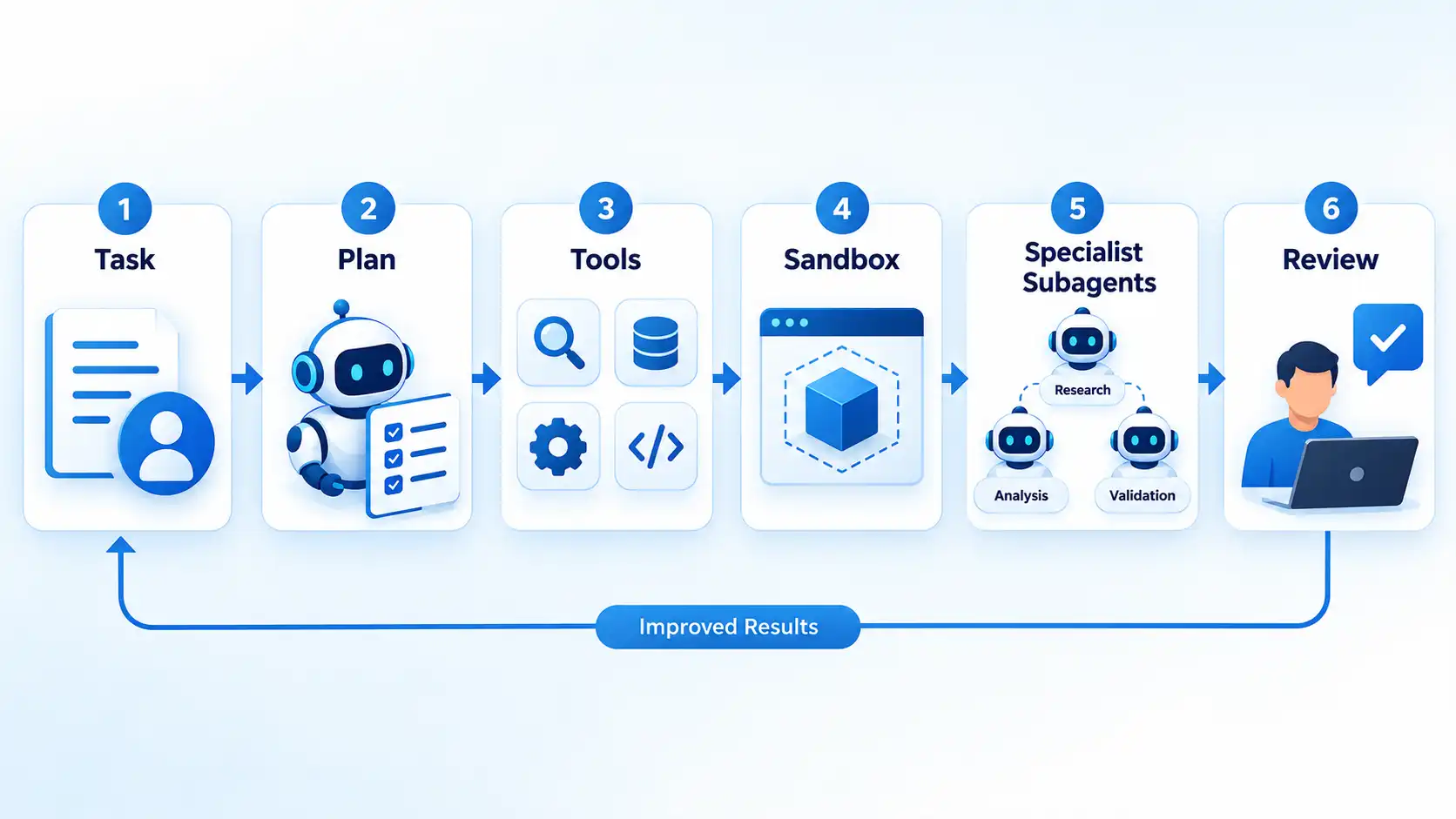
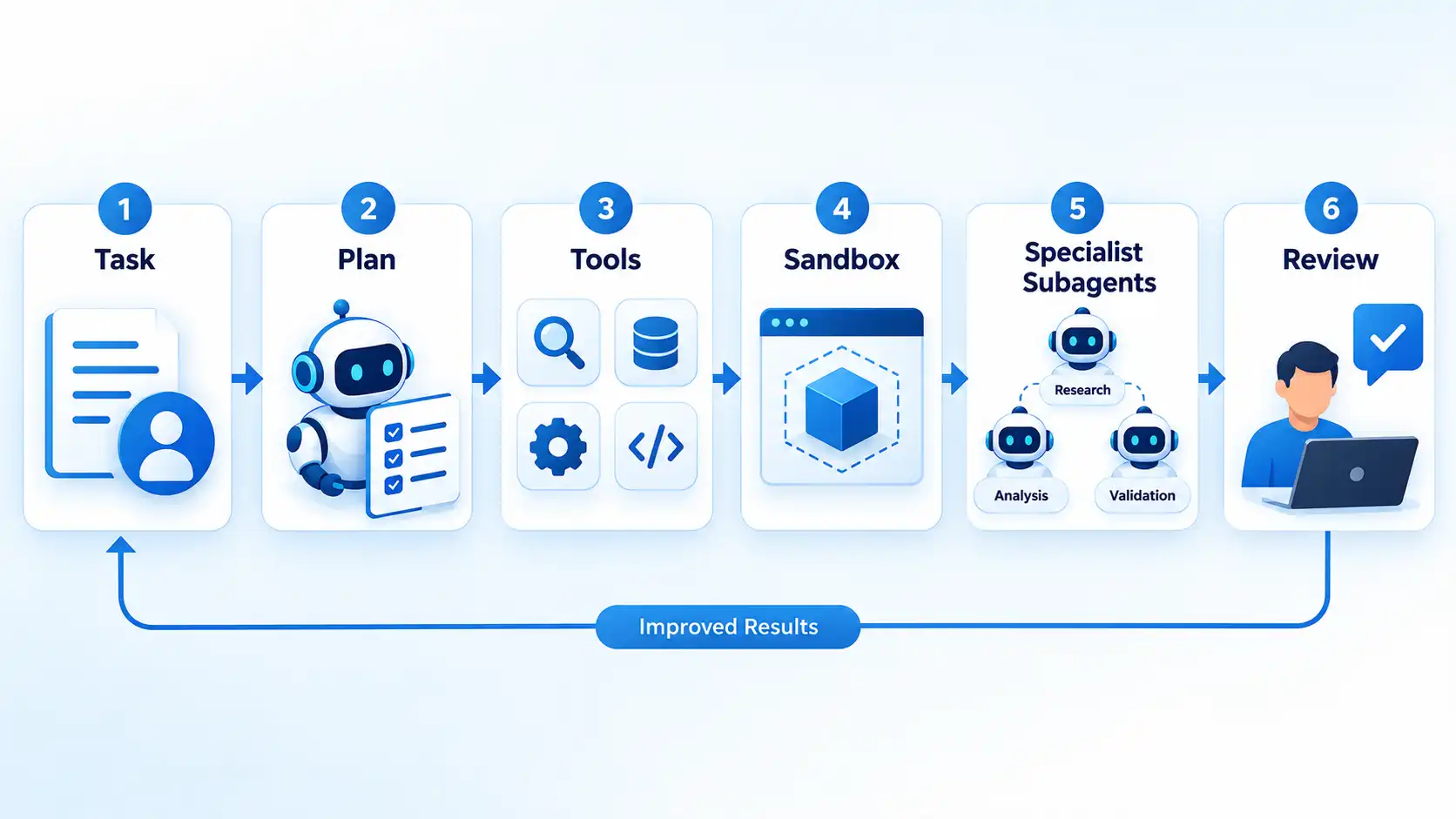
OpenAI’s Agents API entered public beta on September 10, 2026. OpenAI describes infrastructure for long-running sessions, context management, tools, managed or third-party environments, file and code work, and coordinated subagents. The practical difference becomes clearer when you trace how AI agents work across planning, context, tools, execution, and review.
The difficult part is reliability. In Microsoft’s 2026 Multi-Horizon Task Environments research, baseline agent systems were tested with increasingly large groups of interdependent tasks. Completion rates across the tested baseline systems fell from 16.7% to 8.7% as concurrent workloads increased from 12 to 46 tasks. Microsoft’s CORPGEN architecture performed better under the same type of workload, completing 15.2% of tasks at the 46-task level compared with 4.3% for the baselines in that evaluation.
Those figures are benchmark results, not a universal failure rate for AI agents. They do, however, illustrate why production agent design involves more than choosing a capable model. Permissions, memory boundaries, checkpoints, error recovery, task dependencies, evaluation, and human review can determine whether additional autonomy reduces work or creates another system that must be supervised. Important limitation: Agents can compound mistakes across long workflows, especially when later actions depend on incorrect assumptions or incomplete earlier work.
2
Best for: tracking how AI is changing manufacturing, logistics, inspection, and other physical automation
Traditional industrial automation works extremely well when machines repeat predictable actions inside controlled environments. Physical AI pushes that model further by combining machines with perception, learned models, planning, and more adaptive decision-making. The International Federation of Robotics identifies AI and greater autonomy as a leading robotics trend for 2026. IFR says analytical AI can support activities such as failure prediction, path planning, and resource allocation, while generative AI can enable robots to learn new tasks, produce training data through simulation, and accept natural-language or vision-based instructions.
The term physical AI describes AI operating through machines that sense and act in the physical world. That can include industrial robots, autonomous mobile robots, service robots, and other systems where software decisions produce physical movement.
This does not mean general-purpose robots can reliably perform arbitrary human tasks. Factories and warehouses remain easier environments because designers can constrain routes, lighting, equipment, safety zones, object types, and expected behaviors.
The important transition is from machines that execute rigid sequences toward machines that can interpret more of their surroundings and adapt within defined limits. That expands the range of automation while making testing, cybersecurity, safety validation, and human oversight more important. Important limitation: Unstructured environments contain unpredictable people, objects, surfaces, conditions, and edge cases that remain much harder than controlled industrial tasks.
3
Best for: understanding why the next phase of AI depends on data centers, accelerators, cooling, electricity, and grid capacity
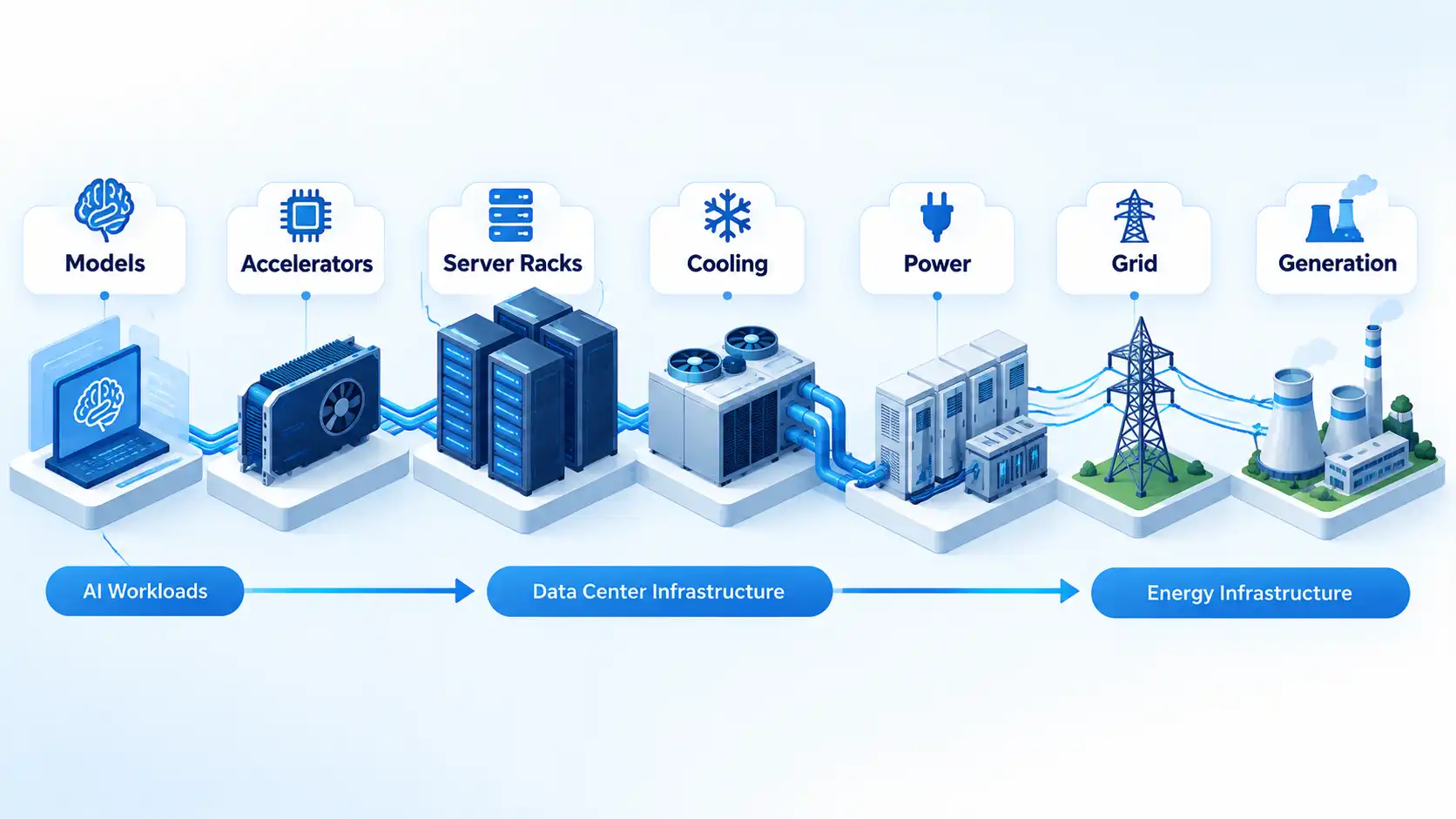
AI progress is usually discussed in terms of models, but production systems depend on physical infrastructure. Training and inference need processors, memory, networking, cooling, buildings, electricity, and connections to an energy system capable of supporting concentrated loads. The International Energy Agency’s April 2026 analysis projects global data-center electricity consumption rising from about 485 TWh in 2025 to roughly 950 TWh in 2030 in its central outlook. The same analysis reports that electricity consumption from AI-focused data centers grew 50% in 2025 and projects that their electricity use will triple between 2025 and 2030.
The IEA also identifies near-term bottlenecks across data-center, chip, energy-equipment, financing, and grid infrastructure. That means a proposed AI deployment may face constraints even when the software itself is technically ready.
This changes architecture decisions. A workload that runs occasionally may suit elastic cloud infrastructure, while predictable high-volume inference may create different economic or operational incentives. Edge deployment can reduce some network traffic and latency, but local hardware introduces its own memory, power, maintenance, and capability limits.
The result is that AI scalability increasingly depends on engineering outside the model itself. Processor availability, utilization, power density, cooling, electricity supply, grid connections, financing, data requirements, and workload placement can all affect whether an AI system is practical. Important limitation: The 2030 electricity figures are projections, not guaranteed demand. Efficiency improvements, workload growth, financing, hardware changes, energy policy, and grid development could change the outcome.
4
Best for: applications that benefit from lower latency, offline operation, or less dependence on remote AI infrastructure
Not every AI task needs to travel to a large remote data center. On-device inference means running an AI model directly on hardware such as a phone, computer, vehicle, appliance, or embedded system. Edge computing places computation closer to where data is created instead of depending entirely on a centralized cloud. Apple’s third-generation foundation-model architecture provides one current example. Apple describes a five-model family spanning on-device and server-based systems. It includes two on-device models, while more demanding models run through server infrastructure.
Local processing can reduce network round trips and allow some capabilities to keep working without an internet connection. Keeping suitable processing on the device can also reduce the amount of data that must be sent to a remote service. Those advantages depend on the complete application design, however; running a model locally does not automatically make every application private.
That makes cloud AI vs on-device AI a deployment decision involving latency, capability, hardware resources, privacy requirements, operating cost, update frequency, and connectivity rather than a simple choice between old and new technology.
Important limitation: Phones and edge devices have tighter memory, power, thermal, and compute budgets than large data-center systems, so local models can differ substantially in capability. 5
Best for: separating long-term quantum-computing progress from security migration work that can begin today
Quantum computing and post-quantum cryptography are related, but they are at different stages. Quantum computers use quantum-mechanical effects to perform certain kinds of computation differently from classical systems. Large-scale fault-tolerant quantum computing remains a development objective rather than an ordinary production computing platform.
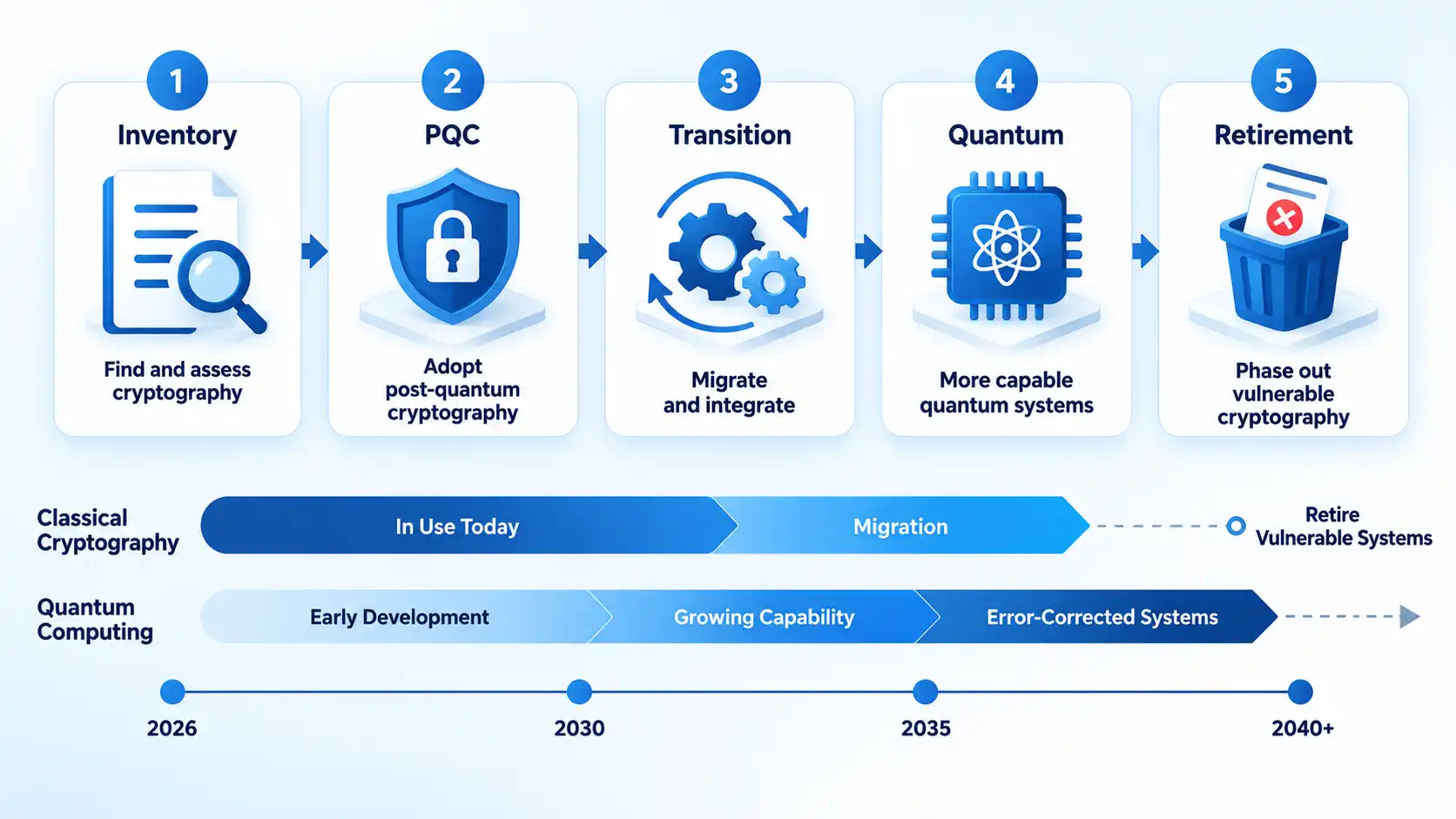
IBM’s March 2026 quantum roadmap, for example, describes 2026 work toward examples of quantum advantage and prototypes for real-time error correction. IBM explicitly labels its roadmap milestones as company goals that are subject to change, so they should not be treated as guaranteed industry timelines. The more immediate security issue is post-quantum cryptography, or PQC. These are classical cryptographic algorithms designed to resist attacks from both conventional computers and sufficiently capable future quantum computers. NIST says its first three finalized PQC standards are ready for implementation now.
NIST’s migration guidance says organizations should identify where quantum-vulnerable algorithms are used and begin planning replacements. Under the transition timeline referenced by NIST, quantum-vulnerable algorithms are expected to be deprecated and ultimately removed from relevant NIST standards by 2035, while higher-risk systems should transition sooner.
Teams responsible for sensitive data, long-lived systems, certificates, embedded devices, or difficult upgrade cycles should therefore treat post-quantum cryptography migration as an inventory and transition problem rather than waiting for a future cryptographically relevant quantum computer to trigger the work.
Important limitation: Quantum-computing timelines remain uncertain, while replacing cryptography across protocols, applications, hardware, certificates, and long-lived systems can take years. 6
Best for: understanding how origin and edit-history signals can complement attempts to assess manipulated or AI-generated media
The growth of generative media makes a simple question increasingly important: where did a digital asset come from, and what happened to it before it reached you?
One approach is provenance, meaning information about an asset’s origin and history. The Coalition for Content Provenance and Authenticity defines Content Credentials as a system for attaching cryptographically verifiable provenance information to digital assets. The current C2PA 2.4 technical specification defines signed manifests, assertions about an asset, content bindings, and digital signatures that can make tampering with recorded provenance detectable. This differs from asking a detector to inspect pixels and estimate whether something was generated by AI. A provenance system can record information about creation, modifications, ingredients, or signing identities when participating tools create, preserve, and expose those records.
The limitation is just as important as the capability. A valid Content Credential does not prove that an event depicted in an image happened as claimed, that accompanying text is accurate, or that the creator is trustworthy. It supplies verifiable provenance information within a defined trust model. Other evidence and human judgment can still be necessary.
Important limitation: Provenance can help establish recorded origin and modification history, but it cannot by itself establish whether the real-world claim represented by the content is true.
7 Best for: following how satellite services can extend mobile coverage beyond conventional terrestrial networks
Satellite communication no longer always requires a dedicated satellite phone. Direct-to-device, or D2D, connectivity describes links between satellites and mobile handsets, allowing satellite services to supplement terrestrial mobile networks.
The GSMA describes satellite D2D as a supplementary coverage and resilience layer that can extend service into sparsely populated or inaccessible areas and provide another communications path during some terrestrial network outages.
The important word is supplementary. According to the GSMA’s current policy guidance, satellite beams cover much larger areas than terrestrial cells and cannot deliver the same capacity in a given area. Indoor reception, interference management, spectrum arrangements, regulations, available satellite capacity, operator agreements, device support, and the type of service can all affect actual performance. The emerging architecture is therefore not simply “satellites replace mobile towers.” It is a more integrated connectivity model in which terrestrial networks continue to provide dense, high-capacity coverage while satellites extend reach and resilience where terrestrial infrastructure is unavailable or insufficient.
Important limitation: D2D capabilities and availability vary by country, operator, device, spectrum arrangement, and service, while satellite capacity remains lower than terrestrial cellular capacity in dense areas.
Technology Trends to Watch
AI Agents Are Moving From Answers to Actions
Physical AI Is Giving Robots More Adaptability
AI Infrastructure Is Becoming a Power and Capacity Problem
AI Is Moving Onto Devices and the Network Edge
Quantum Progress Is Making Post-Quantum Security a Current Task
Digital Provenance Is Becoming Part of the Trust Layer
Satellite Connectivity Is Moving Into Ordinary Mobile Devices
How These Technology Trends Connect
The seven trends are easier to understand as parts of the same changing technology stack rather than as isolated inventions.
AI agents increase the amount of work software can attempt autonomously, but that work still needs computing infrastructure. Some inference will remain in large data centers, while other workloads move toward phones, computers, vehicles, machines, and edge systems. Physical AI then connects software intelligence to machines that sense and act in the physical world.
As automated systems create and transform more digital content, provenance can provide useful origin and modification-history signals. At the same time, post-quantum cryptography addresses a longer-term change in the assumptions beneath digital security. Satellite D2D extends connectivity into locations where terrestrial coverage may be unavailable or disrupted.
The practical pattern is convergence. Computing, networking, AI, physical systems, security, and trust infrastructure are becoming more interdependent. A useful technology strategy therefore needs to consider not only whether a new capability works, but also what infrastructure, standards, safeguards, and operational changes it requires.
What to Watch Beyond 2026
The safest way to evaluate emerging technology is to look for evidence of deployment rather than confident predictions. A technology becomes more consequential when reliability improves, standards stabilize, costs become workable, supporting infrastructure expands, and organizations can operate it without depending on exceptional conditions.
For AI agents, watch whether performance improves on long, interdependent workloads and whether permissions, evaluation, and human-review systems become easier to manage. For robotics, watch deployments beyond tightly controlled settings. For AI infrastructure, follow efficiency alongside electricity demand, processor availability, cooling requirements, grid connections, and financing.
For on-device AI, pay attention to which useful workloads can run locally without unacceptable battery, memory, thermal, or performance costs. For quantum technology, separate experimental computing milestones from the much more immediate work of PQC migration. For content provenance, interoperability and preservation of credentials across tools and platforms matter more than whether an individual product displays a badge. For satellite D2D, the important signals are service capabilities, supported devices, available capacity, regulation, spectrum coordination, and integration with terrestrial operators.
That maturity-based view also prevents an old technology from being relabeled as a new trend simply because it remains popular. The strongest technology trends to watch beyond 2026 are the ones producing observable changes in what systems can do, where they can operate, how they are secured, and what infrastructure is required to support them.


realme has revealed the design of its upcoming 16 Pro Harry Potter Edition. The phone takes inspiration from Hogwarts and the wider Harry Potter wizarding world. realme developed the edition through an expanded collaboration with Warner Bros. Discovery Global Consumer Products following the realme 15 Pro Game of Thrones Limited Edition. The company will also launch a Hogwarts-themed limited-edition gifting box with the phone. realme will showcase the new edition at a special pop-up launch on September 21.
Design and Limited-Edition Box
The realme 16 Pro Harry Potter Edition brings several Hogwarts-inspired details to the phone’s design. It uses a brown finish with a premium leather texture. The Argyle pattern on the back takes inspiration from the Wizard’s Chess scene. The phone also features Hogwarts Crests at the center of its rear panel. realme uses the Metal Mirror Camera Deco from the standard realme 16 Pro. However, the camera module draws inspiration from Hedwig’s bright and spirited eyes. A laser-engraved “Welcome to Hogwarts” slogan also appears on the metallic mid-frame.
realme will also offer a Hogwarts-themed limited-edition gifting box for Harry Potter fans. The company plans to produce only 5,000 units worldwide. The box recreates Harry Potter’s iconic trunk as a 1:1 replica. Inside, buyers will find a Hogwarts Welcome Pack with several themed items. These include a Hogwarts acceptance letter, train ticket, and Hogwarts Crest bookmarks. The pack also includes postcards featuring Harry, Hermione, and Ron. A Hogwarts-logo phone case and phone pin complete the collection. realme says the edition combines its phone design with the spirit of the wizarding world.
realme 16 Pro Harry Potter Edition Price and Availability
realme has not yet revealed the price of the 16 Pro Harry Potter Edition. The company will showcase the device at a special pop-up launch on September 21. The event will follow a young wizards theme and highlight the Hogwarts-inspired experience. realme has also confirmed that it will produce only 5,000 units of the limited-edition gifting box worldwide. realme is expected to share more information through its website and social media platforms. Until then, buyers will need to wait for the company’s official pricing and availability details.
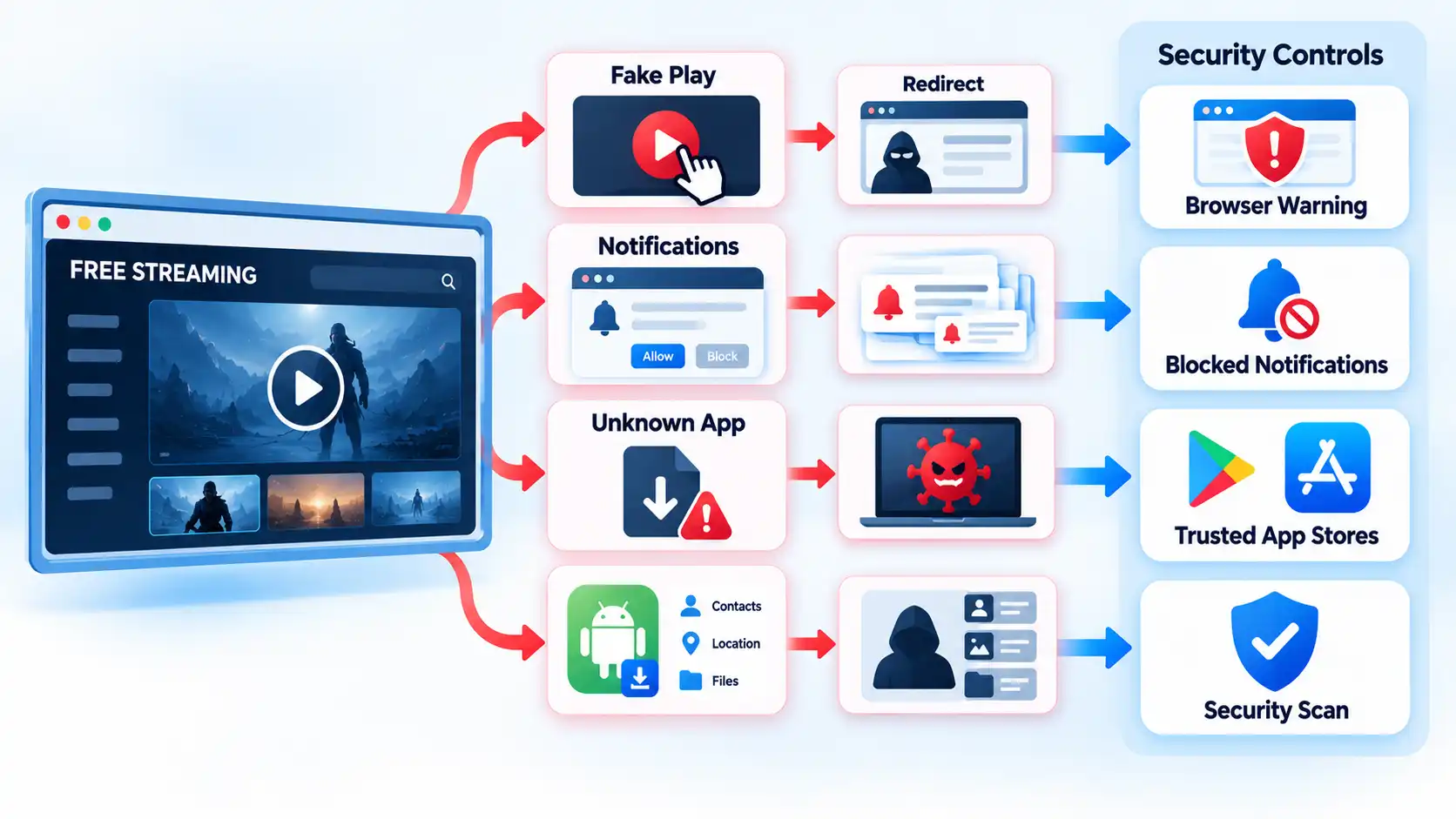
Some free streaming services are legitimate and reasonably low-risk, but unfamiliar streaming sites can expose you to phishing, deceptive advertising, malicious downloads, notification spam, and unsafe apps. The biggest risk usually comes from what a page persuades you to click, install, allow, or enter, not simply from the fact that the stream is free.
Quick Take
- Free does not automatically mean unsafe. Licensed ad-supported streaming services are a different category from unfamiliar sites distributing unknown apps or questionable streams.
- A pop-up is not the same thing as a malware infection, but deceptive pop-ups can lead to phishing pages, fake updates, dangerous downloads, or fraudulent payment prompts.
- Installing an unknown streaming app or APK creates more risk than simply viewing a webpage because installed software can request permissions and run code on the device.
- Browser warnings, forced notification prompts, unexpected downloads, and demands to disable security tools are strong reasons to leave.
- If you already installed something, entered a password, or supplied payment information, the appropriate response depends on exactly what happened.
Are Free Streaming Sites Safe?
Some are. “Free” describes how a service charges you, not whether it is secure. A legitimate ad-supported streaming service can provide programming without a subscription because advertising funds the service. That is different from an unfamiliar site that sends you through several redirects, demands a browser extension, or tells you to install an unknown “HD player” before a video will start.
It helps to separate three situations. The first is a recognizable streaming service delivered through its normal website or an established app marketplace. The second is an unfamiliar browser-based streaming site that may rely on aggressive advertising, redirects, or questionable content sources. The third is an unofficial app, Android application package, or modified streaming device that asks you to install software from a source you cannot confidently verify.
An Android application package, usually called an APK, is a file format used to install Android apps. Sideloading means installing an app from outside the device’s usual app marketplace. Neither term means the software is automatically malicious, but software from an unfamiliar source deserves more scrutiny because installing it lets code run on the device.
The practical safety question is therefore not just “Is this streaming site free?” It is also: Does it push you to override a browser warning, install something, grant a permission, enter a password, provide payment details, or trust software from an unknown publisher?
Where the Risk Actually Comes From
Streaming-related security problems often develop through a chain of small interactions. A page itself might display little more than a player and advertisements. Risk increases when a click moves you into a different process.
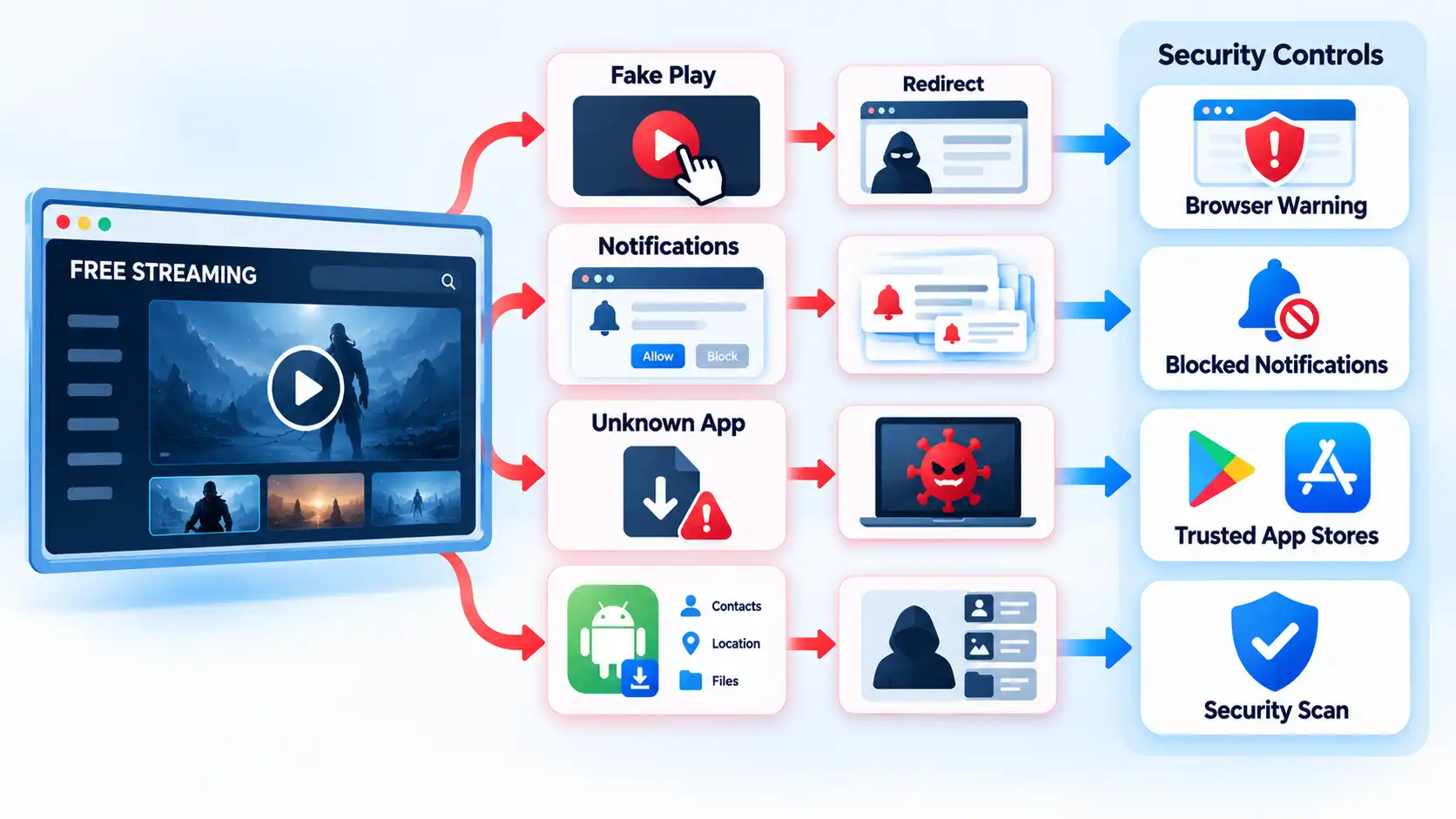
For example, what looks like a large Play button might actually be an advertisement. Clicking it can open another tab. The new page might then claim that your browser is outdated, that a codec is missing, that your device has a virus, or that you must complete an account check before watching. The next interaction may ask for a download, notification permission, password, or card details.
This is an example of social engineering: persuading someone to perform an action that benefits an attacker or scammer. A redirect simply moves the browser from one page to another. Redirects are used legitimately across the web, but an unexpected chain can also move users from a streaming page into phishing, scam, or malicious-download pages.
Malvertising is malicious or deceptive activity delivered through advertising channels. In practice, a user may encounter a fake system warning, a misleading download control, or an advertisement designed to resemble part of the streaming interface. That does not mean every advertisement is malicious. The risk is that deceptive advertising can blur the line between the video player and an unrelated action.
Modern browsers include defenses against some of these paths. Google Chrome’s Safe Browsing warnings can flag phishing, malware, unwanted software, malicious or intrusive advertising, and other unsafe pages. Firefox can warn about deceptive sites and block dangerous downloads. These controls reduce risk, but the absence of a warning does not prove that a page is trustworthy.
Pop-Ups, Redirects, and Fake Play Buttons
A pop-up is a browser window, tab, overlay, or alert that appears in addition to the page you intended to use. Pop-ups are not automatically dangerous. Banks, stores, and other legitimate sites sometimes use them for ordinary functions. The important question is what the pop-up tries to make you do.
Microsoft’s Edge guidance notes that pop-ups can use phishing tactics involving fake warnings, prizes, and free downloads. Google’s unwanted-software guidance lists persistent pop-ups, unfamiliar redirects, fake virus alerts, unwanted extensions, and changed browser settings among signs that unwanted software or malware may be present.
Warning
If a streaming page says your device is infected, demands an urgent browser update, or tells you to install a special player, do not use the button inside that warning. Leave the page and obtain any genuine update from the product’s official website or built-in update mechanism.
Google specifically advises users not to click suspicious update or download pop-ups and instead to obtain software from its official source. A webpage showing an alarming “virus detected” graphic should therefore not be treated as equivalent to a warning from your operating system or installed security software.
A redirect is also different from an infection. If clicking Play sends you to a gambling page, fake store, or unrelated site, the redirect itself does not prove malware was installed. It does show that the original page is generating or allowing unwanted navigation, and continuing to interact creates more opportunities for phishing, deceptive downloads, or permission prompts.
Why Notification Spam Can Continue After You Close the Site
Browser notifications are not ordinary pop-ups. They use a site permission that lets a website send notifications through the browser or operating system after you have left the page.
A suspicious streaming page may display a message such as “Click Allow to continue,” “Allow to prove you are not a robot,” or “Enable notifications to watch.” Granting that permission can result in advertisements, fake security warnings, or other unwanted messages appearing later.
Microsoft’s Edge notification documentation distinguishes website notifications from pop-ups and confirms that website notifications can still appear even after Edge is closed.
The practical check is the source of the message. A notification sent under a website permission is not the same thing as a warning generated by Windows Security, Android, or another installed security product. If a browser notification claims that a virus has been detected, avoid its “clean,” “scan,” or “renew” button and manage the site’s notification permission through the browser instead.
Fake Streaming Apps and APKs Are a Different Risk
Installing software changes the risk model because the app can execute code and ask the operating system for access to device features or personal data. A webpage is constrained by browser and operating-system security controls. An installed app can potentially do more, depending on the permissions it receives and the protections the platform enforces.
On Android, Google recommends obtaining apps from Google Play and warns that apps from unknown sources can put the device and personal information at risk. Google Play Protect checks apps from Google Play and other sources for potentially harmful behavior, can warn about harmful apps, and may disable or remove them. It can also request a code-level evaluation of some previously unscanned apps installed outside Google Play.
This does not mean every APK distributed outside Google Play is malware. Developers and organizations can legitimately distribute software outside the Play Store. The important questions are whether you can verify the publisher and download source, whether the requested permissions make sense for the app’s function, and whether the operating system raises a security warning.
A streaming app available only as a file on an anonymous download page deserves particular caution if it requests sensitive access unrelated to playing media. An entertainment app requesting powerful device privileges without a clear functional reason should prompt investigation rather than automatic approval.
Apple’s alternative app distribution model requires separate treatment. In supported regions, Apple allows qualifying apps to be installed through alternative marketplaces or web distribution. Apple says those apps undergo a baseline Notarisation review intended to check platform integrity and known security threats. Apple also states that alternative distribution does not receive all of the App Store’s broader review and support protections and can involve additional privacy, security, fraud, payment, and support risks. That controlled system is not equivalent to downloading an arbitrary APK from an unidentified file host.
What About Modified Streaming Boxes and “Free TV” Devices?
The risk is not limited to phones and computers. Internet-connected streaming devices can also contain malicious software or insecure modifications.
A residential proxy routes someone else’s internet traffic through a household or business internet connection so that the traffic appears to originate from that connection. In March 2026, the FBI warned that compromised internet-connected devices can be enrolled in residential proxy networks.
The FBI specifically warns about TV streaming devices that claim to provide free sports, television, and movies because compromised devices may contain malware or backdoors. It also advises using official, trusted app stores and warns that sideloading unofficial applications onto streaming sticks or Android TV boxes increases the chance of installing malicious software.
This does not mean every inexpensive Android TV box or third-party streaming device is infected. The higher-risk case is a device or application that has been compromised, maliciously modified, distributed through an untrusted channel, or sold with implausible promises of unrestricted premium programming.
How to Judge a Free Streaming Site Before You Interact
No single visual clue can certify a streaming website as safe. Instead, look at what the site asks you to do. The table below separates ordinary behavior from patterns that deserve more caution.
| Signal | Lower-risk interpretation | Higher-risk pattern or action |
|---|---|---|
| Advertising | Normal ads displayed around or during programming | Fake system warnings, forced redirects, misleading Play buttons, or advertisements designed to look like security tools |
| Account request | Ordinary signup with an identifiable provider | Card details supposedly required only to “verify” that free viewing can begin |
| Downloads | The stream plays in the browser or through an established app | A surprise EXE, APK, browser extension, codec, ZIP archive, or “HD player” is required |
| Notifications | Optional notifications with a clear purpose | The page says you must click Allow to continue, prove you are human, or start the video |
| Browser warning | No browser security warning appears | The browser flags phishing, malware, dangerous downloads, or deceptive content and the page tells you to bypass the warning |
| App source | Established app marketplace or clearly identifiable publisher | Unknown APK, anonymous file-sharing page, unverifiable marketplace, or preloaded modified streaming device |
These are warning signals, not a certification system. A polished site can still be malicious, and a plain-looking website is not automatically unsafe. HTTPS is also only one part of the picture. It encrypts the connection between your browser and the website, but it does not prove that the operator behind the encrypted connection is trustworthy.
What a VPN, Incognito Mode, HTTPS, and Ad Blocking Do Not Fix
Several useful privacy and browser tools are sometimes treated as if they make an untrusted streaming site safe. They do not.
A virtual private network, or VPN, encrypts traffic between your device and the VPN server and usually changes the public Internet Protocol address websites see. That can be useful for privacy on untrusted networks, but it does not inspect every file you download or stop you from giving a password to a phishing page. Understanding what a VPN actually protects helps separate connection privacy from malware and phishing protection.
Private or Incognito mode mainly changes what the browser stores locally after the session. It does not make you anonymous to every website or network, prevent malware installation, or establish that a stream is licensed.
HTTPS encrypts traffic between the browser and the site. A phishing site can also use HTTPS, so the padlock is not proof that the person operating the site is honest.
An ad blocker can reduce exposure to some advertising, overlays, and tracking scripts. It does not certify the underlying service, inspect an unknown APK, undo a granted notification permission, or guarantee that a deceptive download cannot reach you through another route.
If You Already Clicked, Installed Something, or Entered Details
The safest response depends on what actually happened. Clicking one unwanted tab requires a different response from installing software or entering a password on a fake login page.
I clicked a pop-up or was redirected, but I did not download or enter anything
Close the unwanted page and do not interact with fake virus, update, prize, or download prompts. A redirect by itself does not prove that malware was installed. If the browser begins behaving abnormally afterward, such as repeatedly opening tabs, changing its homepage, or redirecting searches, investigate for unwanted software rather than assuming the incident ended with the closed tab.
I clicked Allow and now I keep receiving strange notifications
Revoke notification permission for the site through the browser’s site-permission settings. Do not click notification messages claiming that your antivirus has expired or your device is infected. Website notifications are separate from ordinary pop-ups and can continue after the original page is closed.
I downloaded a file but did not open or install it
Do not run the file. Remove it if you did not intentionally obtain it from a trusted source, and do not disable browser or antivirus warnings to force it to open. Browsers such as Chrome and Firefox can block downloads they consider dangerous or deceptive, so an unexpected warning is a reason to stop rather than an obstacle to bypass.
I installed an unknown Android streaming app or APK
Remove the unfamiliar app, keep Google Play Protect enabled, install available Android and security updates, and review whether other suspicious apps or permissions remain. Google’s Android malware-removal guidance recommends enabling Play Protect, applying security updates, and removing problematic apps. If abnormal behavior continues afterward, treat it as a broader device-security issue rather than repeatedly reinstalling the app.
I installed unknown software on a Windows PC
Use Windows Security to scan the device. Microsoft documents Quick, Full, Custom, and Microsoft Defender Offline scans. Defender Offline restarts the PC and scans outside normal Windows operation, which can make it harder for persistent malware to hide or defend itself. If symptoms continue after reputable scanning and removal, consider qualified technical help rather than repeatedly disabling security controls.
I entered my password on a suspicious page
Go directly to the real service’s official website or app and change the compromised password. If you reused that password elsewhere, change it on those accounts as well and enable two-factor authentication where available. FTC scam-recovery guidance recommends replacing a password given to a scammer, updating reused passwords, and enabling two-factor authentication.
I entered my card or banking information
Contact the card issuer, bank, or payment provider immediately through its official app, website, or the verified number on your card. Review the account for activity you do not recognize and report suspicious transactions promptly. The FTC advises people who made a fraudulent card payment or experienced unauthorized card or bank activity to contact the relevant financial institution immediately and ask about reversing the transaction where applicable.
The Practical Safety Rule
Free streaming and safe streaming are not opposites. The more useful dividing line is whether you can identify the provider and whether the service behaves like ordinary media software instead of trying to push you through security warnings, forced permissions, unexpected downloads, or unverifiable apps.
If the browser starts warning you, a page demands an unknown player, or an app source cannot be verified, leaving is usually safer than trying to make the site trustworthy with more tools. When the goal is simply to avoid another subscription, free legal streaming services provide a cleaner starting point than an unfamiliar download or modified device.

The International Meteor Organization, the nonprofit that coordinates and publishes amateur and professional observations of meteor phenomena, said its infrastructure has suffered a “critical blow” from a cyberattack.
“We recently suffered a cyberattack that dealt a critical blow to aging infrastructure, taking much of our site offline,” a static page on its website on Wednesday said. “We expect several weeks of partial downtime as we transition to new infrastructure and services.”
“I am very sad to see the site down”
In the meantime, the IMO said it’s prioritizing the reporting of fireball observations, which can be reported here. The organization is also providing some information on its Facebook page.
The IMO has helped forge unified standards for reporting meteor observations. Its databases of reported meteor and fireball observations—made up of text, photos, and videos—are also considered essential by many in the field. The IMO also publishes the bimonthly WGN journal, which in English is short for Working Group News. The body was formally founded in 1988.
It’s unclear why an organization that tracks large, fiery space objects hurtling toward Earth would be the target of a damaging cyberattack. It’s equally unclear why someone would want to steal its data (assuming that was the motive), which is mostly public.

Oracle is laying off 359 employees in Washington state — its second significant job cuts this year — according to a filing Wednesday with the state Employment Security Department.
The cuts affect remote employees across Washington state as well as on-site staff at Oracle’s downtown Seattle facilities, located in the Russell Investments Center on 2nd Avenue and at 2025 5th Ave.
Oracle noted in its Worker Adjustment and Retraining Notification, signed by HR Senior VP Anje Dodson, that its “Seattle sites are not closing.” Impacted employees received notice Monday and their last day will be Nov. 13.
The cuts heavily impact technical engineering and management roles across the enterprise software giant. According to the filing, affected titles include dozens of software developers, core infrastructure and platform software engineers, program managers, and site reliability engineers. Senior leadership was also affected by the reduction, with notices sent to multiple vice presidents, directors of engineering and product management, and principal data scientists.
The cuts are part of broader nationwide layoffs at Oracle. Business Insider reported this week that the tech giant is trimming payroll and raising capital as it racks up tens of billions of dollars in debt to fund massive AI data center infrastructure investments.
Internal emails sent to affected employees cited a “broader organizational change,” coming on the heels of a regulatory filing where Oracle explicitly noted that the deployment of AI technologies across its operations has resulted in workforce reductions. Oracle’s global headcount fell by roughly 21,000 employees, or 13%, over the past fiscal year.
The new round of layoffs comes just six months after Oracle eliminated 491 jobs in Washington state in March. That reduction similarly targeted engineering talent — sweeping up more than 230 software developers alongside senior directors and vice presidents — as part of an initial wave of cuts tied to the company’s shift toward AI-led software development.
Combined, the two workforce reductions have slashed 850 Oracle positions in the state this year.
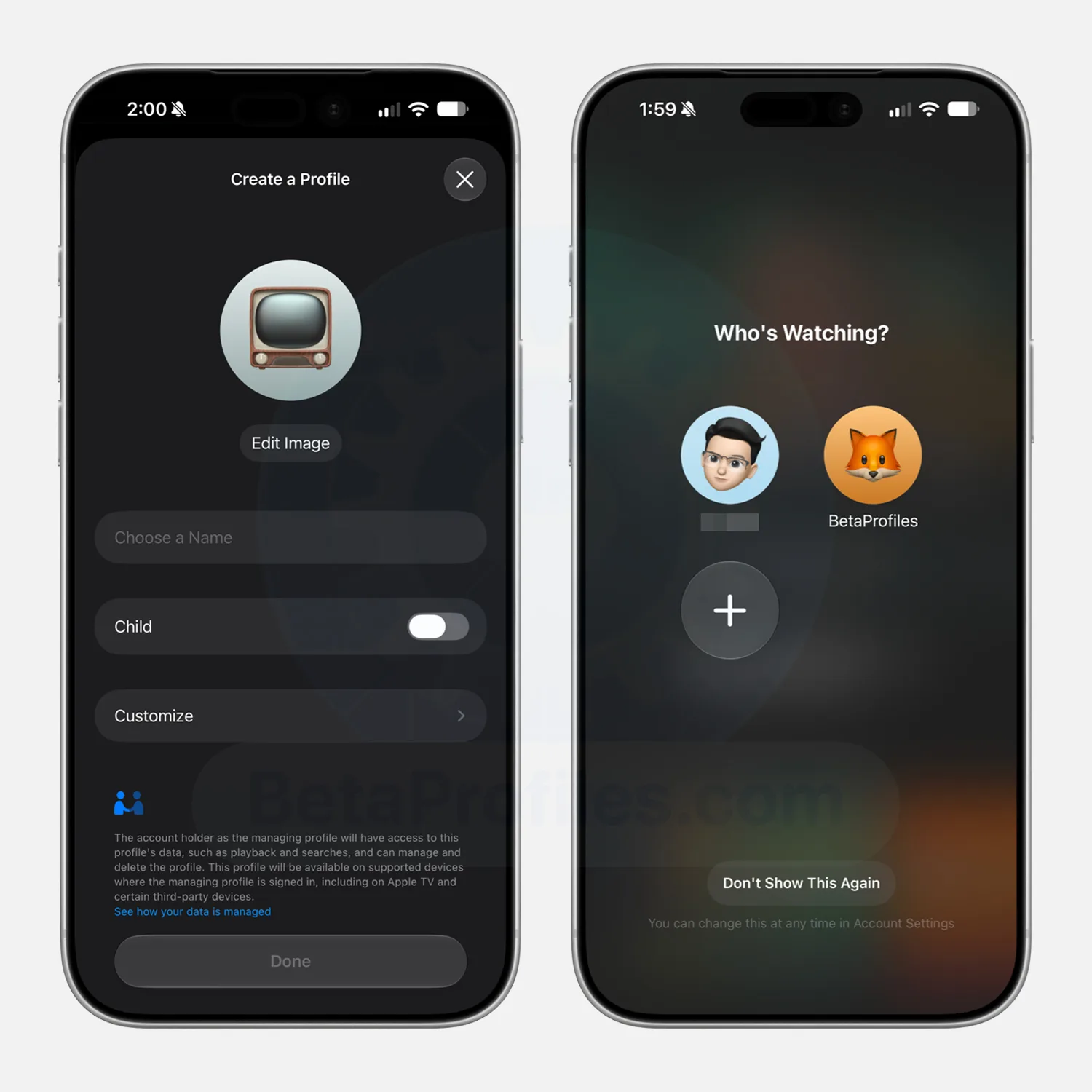
Handing your phone to a kid usually means their cartoons take over your entire watch history, but Apple just fixed that annoyance. With iOS 27.2, currently in beta, the Apple TV app finally supports separate user profiles on iPhone and iPad, a feature that’s existed on the Apple TV box for a while but never made it to Apple’s mobile devices until now (via 9to5mac).
What can you do with Apple TV profiles?
After updating, open the Apple TV app, and you’ll see a screen listing any profiles already tied to your account, along with an option to add a new one. Setting one up only requires a name, a content rating, and whether the profile belongs to a child. The setup also supports profiles for people who don’t have their own Apple Account. That makes it possible to create a dedicated profile for a younger child.
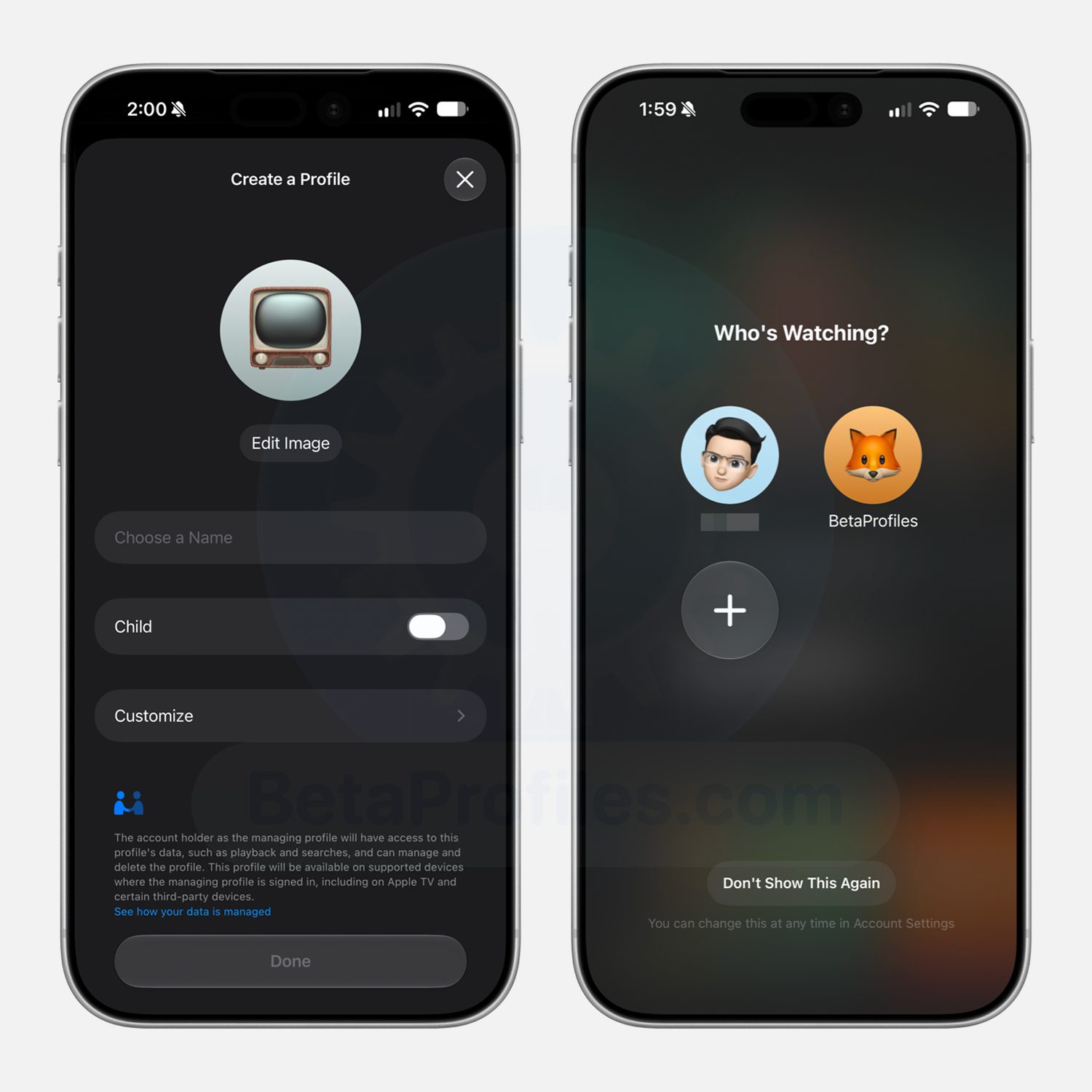
If you choose a kid’s profile, Apple defaults to a PG rating automatically, though you can dig into the settings for more specific control over which shows and movies fit their age. If profiles aren’t something you want cluttering your phone, just select the “Don’t Show This Again” option to skip the whole thing.
Why does this matter?
Apple TV profiles aren’t exactly new, and tvOS 26.2 added the guest mode option last November. The real benefit shows up the moment you hand your device to a kid. Their viewing stays contained to their own profile, meaning your “Continue Watching” row doesn’t suddenly fill up with content you never chose, and your own account stays exactly as you left it.
It also gives kids a safer space to browse on their own, since what they can see gets capped by the rating you’ve picked. For those who want this option right away, iOS 27.2 is currently rolling out as a developer beta, with a wider public release expected in the coming weeks.


Porsche has opened orders in Germany and other European markets for an 11 kW wireless charging pad for the Cayenne Electric, at EUR 6,961.49 for the floor pad and the car-side hardware together, with efficiency of up to 90%. The pad must be permanently installed in the ground, and Europe’s rules on installing home charging are weaker than the phrase right to plug suggests.
Porsche has opened orders for a wireless charging pad for the Cayenne Electric in Germany and other European markets, the first offered on a car in either Europe or North America, InsideEVs reported.
It delivers up to 11 kilowatts at an efficiency Porsche puts at up to 90%, against roughly 94% for a cable. That is enough to fill the 113 kWh battery overnight, and well ahead of the 70% to 80% a phone manages.
In Germany the three-phase floor pad costs EUR 5,116.99 and the car-side hardware EUR 1,844.50, which is EUR 6,961.49 together. Ordering only the pre-installation, for a later retrofit, costs EUR 226.10.
The pad weighs about 50 kilograms, is waterproof and takes the weight of the car. Radar sensors cut the power if they find metal, an animal or a person.
Park assist lines the car up over the pad. The receiver is liquid-cooled, the transmitter air-cooled, and the system sends direct current straight to the battery, going around the onboard charger entirely.
It also has to be fixed to the ground.
That makes it a building alteration rather than a plug, and Europe’s right to plug is thinner than the phrase suggests.
Article 14(8) of the recast buildings directive asks member states to streamline and accelerate installation for tenants and owners alike. Transposition fell due in May, and there is no binding requirement to pre-equip existing blocks.
Transport and Environment calls that too weak to count as a right, because a request can be refused on serious and legitimate grounds the directive never defines.
France is the strongest. Co-owners there get three months to object, and only on grounds of technical infeasibility or existing shared infrastructure.
Germany, Italy, Poland and Spain have partial rules, typically covering owners but not tenants. Britain has no specific provision at all.
A Cayenne Electric starts at EUR 105,200, so the early buyers will mostly own the floor they are drilling into. The car itself is built at Volkswagen’s plant in Bratislava, where series production began in February.
Porsche will take the pad to its other markets in stages, with one exception. China, where inductive charging is already deployed and Xiaomi is about to sell a robotic arm that plugs the cable in for you, is not on the list.

Passport-style foldables are returning, but in a foldable format. Samsung completely changed direction with the Galaxy Z Fold 8, Xiaomi followed with the 18 Fold, and Apple has now entered the category with the iPhone Duo. Even though the original Google Pixel Fold explored the same short-and-wide idea years ago, this is looking like the new smartphone trend in 2026.
After spending years with book-style foldables, I am warming up to this decision. I prefer the idea of keeping the phone compact when closed and opening it only when I need more room.
Someone recently told me they thought the iPhone Duo looked beautiful. Their only complaint was that they wished it ran Android. Don’t get me wrong, I like what Apple has done with the Duo in plenty of places. The software transitions are gorgeous. Still, the iPhone Duo is incredibly squat when closed. The outer display does match the inner one in terms of aspect ratio, but I can’t help but feel like the design lags behind.

Passport foldables aren’t all the same
Put the two phones next to each other, and they initially look like variations on the same concept. The Galaxy Z Fold 8 has a 5.5-inch 10:16 cover display and opens into a 7.6-inch 4:3 canvas. Samsung designed the outer screen for quick scrolling and messaging, then lets the inner display handle tasks that need more immersion.
Apple does essentially the same thing with the Duo: a 5.4-inch outer display opens into a 7.6-inch inner screen. Apple even claims that the outer display is compact enough for one-handed use while the inner screen handles multitasking and entertainment.

| Features | Galaxy Z Fold 8 | iPhone Duo |
|---|---|---|
| Closed dimensions | 123.9 x 81.9 x 9.7mm | 117.8 x 84.1 x 11.3mm |
| Outer display | 5.5 inches, 10:16 | 5.4 inches, 14:10 (roughly) |
| Inner display | 7.6 inches, 4:3 | 7.6 inches, 14:10 (roughly) |
| Weight | 201g | 254g |
Overall, the Duo is a little shorter and heftier, not to mention wider too. Those numbers explain quite a lot about how differently the two devices come across in the hand. Samsung’s Fold 8 is wide enough to feel distinct from a conventional slab without tipping too far into miniature-square territory. The Duo goes farther, and that extra width combined with the weight makes the whole thing look and feel more substantial when you’re simply trying to use the outer screen.
The UI debate
Apple knows the Duo’s proportions create a software challenge. Its own developer guidance explains that the Duo’s wider aspect ratio creates more horizontal space but reduces the amount of useful vertical room. Apple therefore moves controls that normally sit at the top and bottom of an iPhone onto the side of the interface, where they preserve vertical space and become easier to reach.
It also reinforces why I’m not entirely sold on the hardware shape. On a normal iPhone, developers have spent years assuming a tall display. We’re all familiar with how navigation bars go along the top, while tab bars sit at the bottom, and your thumb moves through an interface built around those proportions. Apple deserves credit for actually changing up this formula.

I already like how iOS 27 adapts across the Duo, and the software is one of the device’s biggest strengths. But Samsung’s Fold 8 has a simpler advantage with its 10:16 cover display that is still tall enough.
Samsung’s Galaxy Z Fold 8 is meant to be your main device
The ergonomics are another part of this conversation that gets lost when we obsess over diagonal screen sizes. The difference between 81.9mm on the Fold 8 and 84.1mm on the Duo looks tiny on a spec sheet. Once you combine it with the Duo’s shorter shape, 11.3mm folded thickness, and 254g weight, the device becomes a much chunkier object to move around in your palm.

Something that really impressed me was just how much Samsung’s phone weighs. At just 201 grams, it is surprisingly light for a book-style foldable. I’d argue that this is what the pinnacle of foldables should look like. All the specs and features aside, having a phone that feels handy is much better than a phone that is a chore to hold after a while.
Samsung can give me the unusual passport proportions without making every quick interaction remind me that I’m holding two halves of a folding phone. Not saying it’s as light as the truly compact phones like the Galaxy S26 and Pixel 11 Pro, but it gets realistic enough.
I’d pick the Z Fold 8 any day

I’ve already argued that compact, wide foldables could solve one of the biggest problems with small phones. You get something manageable for calls, notifications, and quick interactions, then unfold it whenever you need more room for gaming, email, reading, or multitasking.
The question is how compact you make that outer experience. The Duo embraces a much squatter display and then uses thoughtful software to make that unfamiliar canvas work. Samsung’s Fold 8 feels a little closer to a conventional phone without losing the passport design. Its best part is still that it’s lighter and thinner, which makes the shape easier to drive daily.
I might change my mind once I try out the Duo… maybe. Even so, the Galaxy Z Fold 8 is much closer to what I want from a passport foldable.

Meta’s camera-equipped smart glasses have proven more successful than other entrants into the market, but they have also deeply disturbed certain consumers who see them as invasive emblems of a dystopian surveillance society run amok. Now, as the company weathers complaints that it’s selling “pervert glasses,” it has reportedly decided to sell a pair that doesn’t come with integrated spy equipment.
The Information reports that Meta is developing a new smart glasses model, dubbed Luna, that, sans cameras, comes equipped with a convenient system to communicate with the company’s AI chatbot and Muse, its AI consumer agent. The glasses include six built-in microphones so users can communicate with the chatbot, as well as a button on the side of the glasses that, when pressed, activates the AI system.
Luna may be unveiled as soon as Meta Connect, Meta’s annual hardware/developer event happening in Menlo Park next week, the outlet notes.
TechCrunch reached out to Meta for more information.
The smart glasses industry has grown over the past few years, with Meta positioned near the front of the pack of providers. However, concerns over usability, cost, and privacy have dogged the business, with many consumers still unsure of how, why, or if they should use the devices. Meta’s Reality Labs, which is responsible for developing its smart glasses line, is still losing a gargantuan amount of money, as its earnings report from April revealed.
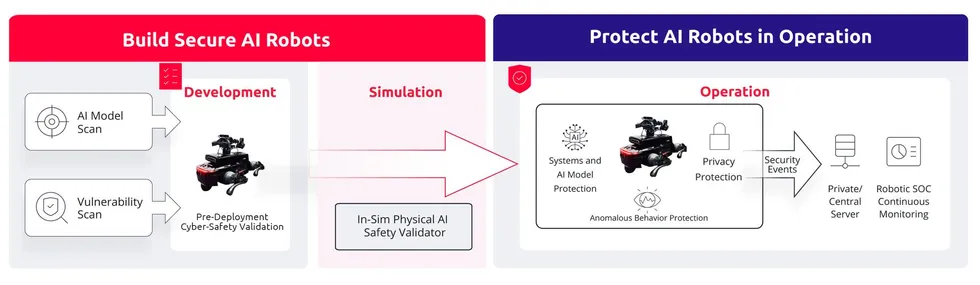
This article is brought to you by VicOne.
Robot safety has traditionally asked: Can a machine remain safe when something goes wrong? Physical AI raises a harder question: Can a machine remain safe when an attacker changes what it sees, decides, or does even when nothing appears to have failed?
As AI and robotics continue to advance at an unprecedented pace, modern robots perceive through multimodal sensors, interpret context using AI models, and translate those interpretations into physical action. As they move into dynamic environments, their safety increasingly depends on the integrity of the data guiding their decisions.
That dependence creates risks that conventional safety assessments may not fully capture. Recent research has demonstrated that manipulating what a robot sees, hears, or interprets can influence its behavior without requiring direct control.
Such manipulation can occur anywhere across its complex sensing and decision-making system — a layered attack surface encompassing training pipelines, system infrastructure, and runtime perception.
Layer One: Corrupting intelligence at its source
In 2017, BadNets demonstrated that a model could behave normally under most conditions, yet fail in the presence of a specific hidden trigger. In one example, a subtle pattern caused a stop sign to be misclassified as a speed limit sign without affecting the model’s behavior on other inputs.
What began as a classification vulnerability has since evolved into action manipulation.
At NeurIPS 2025, researchers introduced BadVLA a backdoor attack targeting Vision-Language-Action (VLA) models that allow robots to see, interpret instructions, and produce coordinated physical movement. Rather than altering a single label, the attack caused conditional deviations in the robot’s action trajectory when a trigger was present. Without the trigger, the model largely preserved normal task performance, while the backdoor remained effective under task transfers and model fine-tuning.
A related study in 2025, GoBA, showed that ordinary objects such as a coffee mug could serve as a reliable trigger. The researchers reported a 97 percent attack success rate without degrading performance on clean inputs.
A critical safety question today is whether Physical AI models remain within their task and safety boundaries under adversarial conditions.
These studies expose a blind spot in model validation: A model may pass testing yet produce corrupted behavior when a hidden trigger appears in operation.
So a critical safety question today is whether Physical AI models remain within their task and safety boundaries under adversarial conditions. Simulation tools such as NVIDIA Isaac Sim, when paired with VicOne Radeis, can test the effects of manipulated inputs before deployment.
VicOne LAB R7 demonstrates Radeis, a Physical AI safety validator for NVIDIA Isaac Sim that tests how adversarial visual inputs affect robot behavior before deployment.VicOne
Layer Two: System vulnerabilities as gateways to AI control
Even a securely trained model can be subverted if the surrounding system stack is vulnerable.
In September 2025, researchers disclosed UniPwn, a Bluetooth exploit chain affecting quadruped and humanoid robots from a major manufacturer. Hardcoded cryptographic keys allowed traffic decryption, authentication checks were bypassed, and command injection enabled root-level execution. The exploit is also described as “wormable.” A compromised robot could scan nearby units and potentially affect an entire fleet.
VicOne Lab R7’s demo shows how chaining three wireless exploits can trigger uncontrolled robot behavior within 60 seconds, resulting in operational disruption.VicOne
Middleware creates another exposure point. Vulnerabilities in ROS 2 and DDS-based systems can enable arbitrary code execution or abuse unauthenticated topics to deliver malicious commands. With sufficient access, an attacker could override motor commands or replace AI model weights without directly attacking the model architecture.
In this case, the components may still function as designed. What has changed is the trustworthiness of the commands flowing through the system. Vulnerability management can help teams identify known risks before deployment, while continuous monitoring can surface emerging threats.
Layer Three: Manipulating perception and reasoning at runtime
At runtime, manipulating inputs that shape perception or reasoning may require neither firmware modification nor a network breach.
In 2024, RoboPAIR demonstrated how carefully structured prompts could redirect LLM-controlled robots into unsafe trajectories. BadRobot exposed a deeper architectural weakness: in several cases, a robot verbally refused a dangerous command while its motion controller executed the action anyway.
Vision-based manipulation is equally powerful. VLAttack showed that an adversarial patch within the camera’s view could reduce a VLA model’s task success rate to zero. FreezeVLA showed that a single adversarial image could freeze a robot’s decision-making loop, making it unresponsive to subsequent instructions.
Runtime assurance must therefore look beyond whether individual components remain available and assess whether cyber events are beginning to affect physical behavior.
In each case, the camera may still work, the model may still run, and the controller may still respond. Yet the resulting behavior can be unsafe because the robot is acting on manipulated perception or reasoning.
Runtime assurance must therefore look beyond whether individual components remain available and assess whether cyber events are beginning to affect physical behavior. Security event correlation, behavioral-impact assessment, and policy-bounded response supported by edge AI, can help contain the affected path without unnecessarily stopping the entire robot fleet.
From point-in-time safety to lifecycle assurance
The risks across these three layers reveal the missing layer in robot safety assurance: cybersecurity. Functional safety addresses failures and unexpected operating conditions; cybersecurity extends that assurance to deliberate manipulation, including attacks that may leave the underlying system apparently functional.
This requires assurance across the robot’s lifecycle. During design, teams need to understand which cyber risks could invalidate assumptions behind intended behavior. Before deployment, they should test whether realistic attacks can cause a robot to deviate from its task or safety boundaries. In operation, monitoring should identify whether cyber events are beginning to affect behavior, contain the affected path, and preserve safe operation where possible.
 VicOne’s lifecycle approach combines AI model and vulnerability scanning, simulation-based validation, and continuous monitoring to help secure robots from development through operation.VicOne
While cybersecurity does not replace functional safety, it helps ensure that Physical AI remains within acceptable boundaries even when what it sees, decides, or does is under attack.
For a deeper look at the cybersecurity risks and defense strategies shaping autonomous robotics, download our whitepaper “Securing the Rise of AI Robots: Cyber Risks, Real-World Threats, and Defense Strategies.”
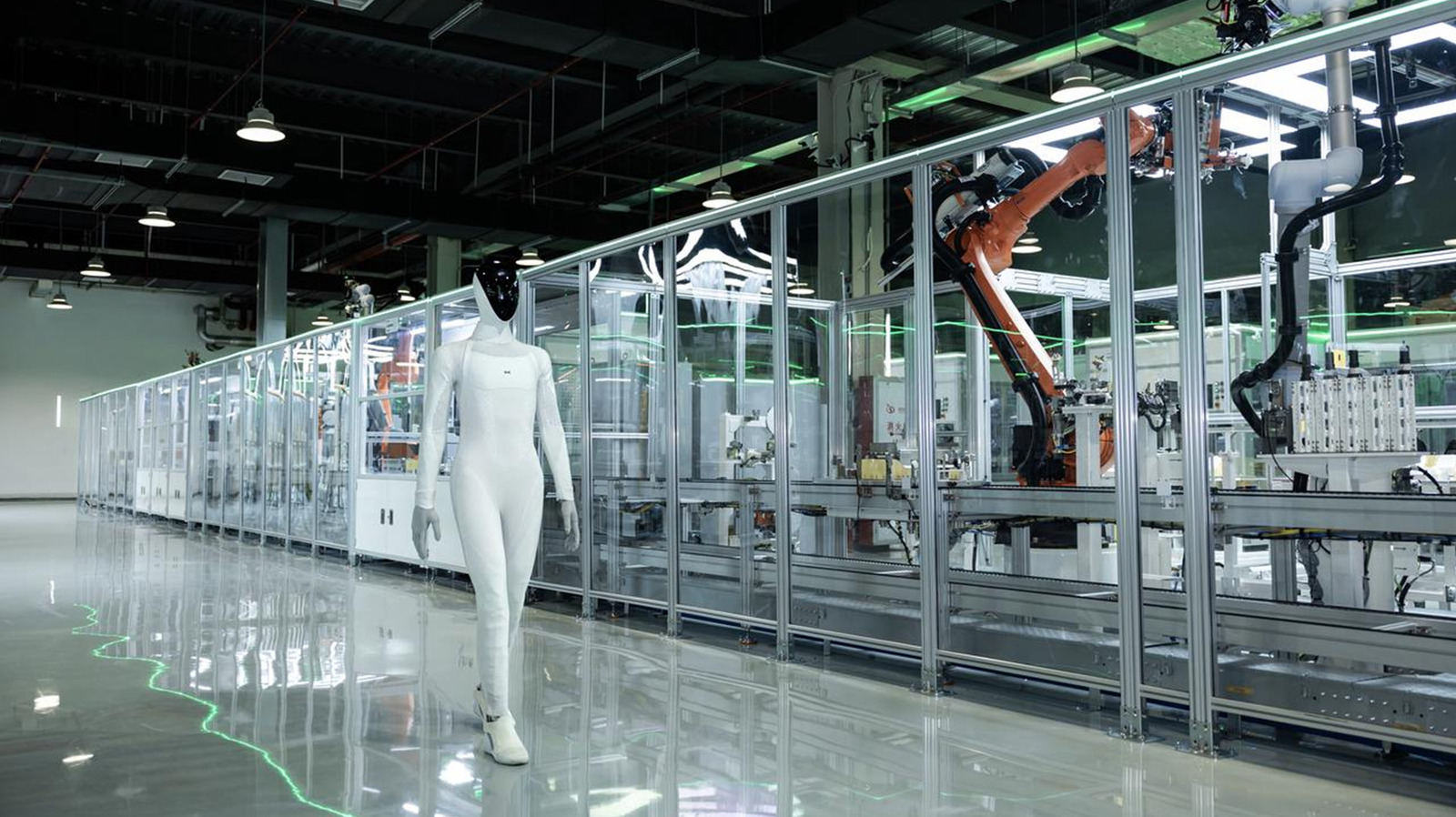
Tesla revealed its Cybercab concept back in 2024, only to have thousands of Waymo vehicles flooding cities across the United States before even one Cybercab rolled off the assembly line. Tesla then converted its Fremont, California factory — which also produces the Model 3 and Model Y — into a factory for its humanoid robot, Optimus, which is still nowhere to be seen — and Chinese automaker Xpeng has its own humanoid robot, Iron, walking off the assembly line. Literally.
With this small step for robot kind, Xpeng has now completed production of the world’s first “advanced general-purpose humanoid robot,” according to a press release. The manufacturing system itself was also 80% autonomous, focused on consistent, fast-paced mass production, with the goal of scaling it up and expanding. The robots are currently expected to be mass-produced by the end of 2026, with launch and delivery following in 2027. During Tesla’s “We, Robot” event back in 2024, Optimus was revealed to be controlled by humans, but CEO Elon Musk still claims that the $20,000 to $30,000 robots will be delivered by 2027 as well.
What is Xpeng’s Iron humanoid robot?
Xpeng’s Iron humanoid robot is designed to fit into the real world, with CEO He Xiaopeng stating that he expects Iron to become “part of everyday life” – improving people’s lives while becoming their companion. Iron is meant to do a variety of tasks that people may not want to do, including factory work or making a morning coffee. To complete these tasks, Iron has three AI chips for a plethora of computing power, along with human-like dexterity and mobility. Xpeng claims that Iron is already assisting in its own manufacturing process, which would mean it has come a long way since its tech demos back in 2025 (Iron also appears less “naked” now as well)
You won’t find many specific details on the official Iron page on Xpeng’s website, which may not be instilling investors with the utmost confidence in the automaker. Xpeng’s stock is down nearly 50% in the first half of 2026. It’s not only Xpeng and Tesla competing to launch a humanoid robot by 2027 — other companies are also working on their own creations (with varying degrees of creepiness), and China continues to lead the way in this mysterious new technology frontier.

Nellson Nutraceutical LLC names VP, quality and regulatory

Who are Hefu Chai and Jerry Xiang in the Robinhood Insider Case

‘RHOSLC’ Star Angie Katsanevas Sheds Light on Her Separation



-

 Fashion5 days ago
Weekend Open Thread – Corporette.com
-

 Business7 days ago
Micron Stock Climbs Above $1,031 as AI Memory Crunch and a $50 Billion Outlook Fuel the Rally
-

 Tech3 days ago
The Latest Weird Thing to Play Doom Is the Mapped-Out Brain of a Fruit Fly
-

 Business7 days ago
AMD Stock Climbs After Management Lifts 2027 Data Center Outlook Toward $70 Billion in AI Sales
-

 Business6 days ago
10 Most-Streamed Songs On Spotify In 2026 So Far, Led By Ella Langley’s Dominant Run On The Charts This Year
-

 Crypto World6 days ago
XAG/USD: Silver’s Short-Term Rally Meets Its Moment of Truth
-

 Crypto World6 days ago
2 Chip Stocks Broke Out This Week. Neither Was Nvidia
-

 Tech6 days ago
Battery life is the only iPhone 18 Pro and iPhone Duo upgrade I care about. Apple didn’t disappoint
-

 Crypto World7 days ago
Pi Network ships Protocol 27 on a network with 14 million users and zero DeFi
-

 Crypto World6 days ago
OKX launches 10x OpenAI, Anthropic X-Perps in Europe
-

 Crypto World6 days ago
Diesel Tops $6 a Gallon for the First Time as 28 States Set Records
-
 Tech7 days ago
Apple Watch Ultra 4 vs Watch Ultra 3: Should you really spend another $799?
-

 News Videos5 days ago
Facing Financial Fears
-
 Business6 days ago
Western Digital Slips 2.7% as AI Storage Rally Cools After Record Cash and Guidance
-

 Crypto World7 days ago
Bitcoin price risks $70K if $78K neckline breaks
-

 Entertainment7 days ago
Case Sees Major Update As Jury Deliberations Begin
-

 Business4 days ago
Rivals Sam Altman and Elon Musk Rally Behind Dario Amodei’s Call for a Slowdown in AI Development
-

 Crypto World2 days ago
Elon Musk Drops a Bombshell: Grok 5 Could Be the AGI Breakthrough
-

 Business7 days ago
Five Leading AI Experts Warn Superintelligence Could Kill Humans and Explain Their Case
-
 Crypto World7 days ago
Ethereum price breakout hinges on a close above $2,535
You must be logged in to post a comment Login