





Connect with us

Tech

Flat-Top or Grated Grill? A Pitmaster Weighs In

Published

on

There are real draws to flat-top cooking. I asked an award-winning pitmaster for a breakdown of the trendy grill type.

Andrew Collins

Just when we all thought we had grilling figured out, flat-top grills burst on the scene and offered another buying decision for outdoor cooking. I grew up on grated grills, and they’re still the most widely used style in the US, whether powered by wood pellets, charcoal or gas, but this new flavor offers a slightly different take — and some real benefits — with regard to the time-honored summer tradition.

At its core, “grill” means the direct application of high heat even if it has become synonymous with a slatted cooking surface. If you’ve struggled with the feeling that you’re supposed to use a grill during warm months but find yourself looking for excuses not to use it — either because it’s too hard to clean or because you can’t seem to get it right — a flat-top model might be the answer.

The 9 Best Grills Out of 30 We Tested

The 9 Best Grills Out of 30 We Tested

Advertisement

So, is a flat-top grill worth it? I consulted a seasoned grillmaster, Erica Blaire. The former attorney and licensed sommelier is also a Food Network BBQ Brawl champion and voracious outdoor cooking ambassador. Blaire offered insight into the nuances of flat-top cooking and whether it might be right for you.

What is a flat-top grill and how does it work?

a large weber griddle anchors a serene patio

Flat-top grills have become popular. There’s less daily cleaning but slightly more ongoing maintenance to consider.

Weber

While the term may be obvious to some, many people associate flat tops with indoor cooking, such as on a griddle. “A flat-top grill is basically a griddle,” says Blaire. “You’re going to be searing. You’re not smoking, and you’re not grilling in the traditional sense,” she said. With a flat-top grill, “you are searing on a uniformly hot surface with no airflow underneath it.”

Flat-top grills feature a flat, solid metal cooking surface with zones powered by individual burners, depending on the model’s size. While many small griddles are available for indoor use, some of which can sit directly on your kitchen range for heat, outdoor flat-top grills are typically electric or gas-powered. 

What can you use a flat-top grill for?

weber griddle

Smashburgers, pancakes, and home fries are just a few flat-top grill foods you can make with ease.

Weber

Consider your typical grill fare or outdoor cooking needs, then ask yourself whether a griddle or flat top might be a better fit than a traditional grill.

Advertisement

“For a flat top, you’re thinking burgers — especially smashburgers — you’re thinking fajitas,” Blaire said, as well as other batch preparations that are entirely out of the grill’s league, like fried rice, eggs and anything that you’re worried would too easily slip through the grates or that which otherwise regularly misbehaves on a traditional grill. (Looking at you, salmon.)

“Because you’re getting such high temperatures and such uniformity on a flat-top surface, the sky’s the limit on what you can do,” she said, which of course also includes the ultimate grill expression: steaks.

Many chefs say cast iron the absolute best way to cook certain types of steaks, even during grilling season; an outdoor flat-top grill offers the same functionality, letting you really crank the heat without smoking up your whole kitchen.

“If you’re doing super thin cuts like a flank steak or a skirt steak, on a griddle, you’re able to get the outside perfectly seared but keep the inside super moist and have lots of flavor without worrying about drying it out,” Blaire said.

Advertisement
Blackstone breakfast set

You wouldn’t want to try pancakes on a grated grill.

Blackstone

What’s more, “with a traditional grill, you’re fighting against the open spaces,” said Blaire, “so all the sauces, those butters, and your herbs or other aromatics may end up in the void. With a griddle, you can put everything on there, and it’s going to stay.”

Maintaining and cleaning a flat top grill

A seasoned griddle sitting on a patio.

Flat-top grills need seasoning much like a cast-iron skillet.

Chris Wedel/CNET

Like a good cast iron, preparing a flat top by seasoning it goes a long way toward making your life easier every time you use it. “Using a thin layer of oil with a high smoke point, you turn up the heat until the oil smokes,” said Blaire, “then let it cool, and do it a few more times, wiping away any excess.” This essentially gives you a nonstick surface.

The particular challenge with a flat-top grill isn’t so much cleaning it, which can be extremely easy, especially if you’ve seasoned it; the challenge is timing the cleaning. “A lot of times after you use a flat top, you might just go eat, and think you’ll get to it later,” said Blaire, “but now you’ve ruined your life because it doesn’t have the holes and the void spaces in it, like a grill does.”

chicken cooking on griddle with grease pouring out

If you’re not ready to go full force, you can buy a griddle attachment for your grated grill.

David Watsky/CNET

A flat top really needs to be cleaned right away, or at least while it’s still warm, so you’ve got a moment to start enjoying the fruits of your flat top labor, but in the pause you risk forgetting about it until after it has cooled. “When a flat top dries and cools, everything is stuck on there,” Blaire says. “So you’re going to be having to take a scraper and use a lot of arm power, but if you clean your griddle as soon as you’re finished cooking, and while it’s still warm, you wipe it down and it’s done.” Most flat tops designed for outdoor cooking also have a small well or catcher for the bits and scraps that collect during the wiping-down process.

Advertisement

Read more: A Step-by-Step Guide to Griddle Cleaning

The cleaning factor is an important consideration for an outdoor cooking host, especially if you have a personality type that makes your life difficult every time you use the flat top. Basically, a flat-top grill can be much easier to clean than a grates grill, but it can also be much harder.

How much does a flat-top grill cost?

A flat-top grill ready to use with it's lid open.

Blackstone’s flat-top grills start at around $300.

Much like charcoal or gas grills, there’s a real range to what you can spend, depending on your size needs and budget. “It really depends on what you’re trying to get, because now every brand is making options in affordable tiers for all levels,” said Blaire.

A quick look at Amazon shows that many standing flat-top grills range in price from about $250 to $700, depending on what accessories you might want included, such as prep shelves and utensil hooks, with a little savings if you’re looking for a tabletop camping model.

Advertisement

Premium models, including complete outdoor flat-top cooking islands, can go from $700 and well beyond. The good news, according to Blaire, is that nearly any flat-top model will get the job done. “As long as all the burners work and the surface level gets hot, you’re good to go,” she said, whereas grated grills that include lids and multiple cooking levels have a lot more factors to consider in terms of value versus functionality.

So you know, for less than $100, you can even get a flat top surface to sit on top of your grated grill — in case you’re reading this and bemoaning the fact that you already own the wrong type for you.

Source link

Continue Reading
Click to comment

You must be logged in to post a comment Login

Leave a Reply

Tech

Your Home Needs These 8 Headache-Free Privacy Boosts

Published

on

A woman in the sunlight by a window with a cup.
Home privacy starts with these tech tips.Kathrin Ziegler/Getty
Home Tips

Home privacy is a popular topic these days, as Flock surveillance cameras appear in our neighborhoods and AI voice assistants hang on our every word. But we also have more tools than ever to protect our privacy — as long as we use them.

Don’t worry, your smart technology is still (mostly) safe, but if you are worried about third parties spying on you or loved ones, you should definitely learn these practices, settings and tricks to better protect yourself. Here are the habits that make the most difference, including those I use around my house.

Read more: The Top Home Security Myths You Need to Stop Believing

1. Keep the shutters on your security cams and smart displays closed

echo-show-5-privacy

New smart devices have physical shutters and buttons to confirm privacy.

Amazon

When smart displays first started appearing, they came with cameras to enable video chats and similar features. When those cameras started making people nervous, makers began putting physical shutters and off buttons on their smart devices so people could quickly shut them down and confirm the cameras couldn’t be used remotely.

In my experience, these cams rarely get much use and are best left turned off permanently until you’re ready to make a video call to a family member. The same is true of the mics in some smart speakers, which you can shut off when not in use if you’re worried about the speaker listening in. For the record, while you can find a lot of internet rumors about eavesdropping speakers, today’s models require the wake word to start listening in, and accidents are typically confined to picking up similar-sounding words in conversations, music or TVs.

Advertisement

The same is true of security cameras. Look for cams that have shutters or “off” positions (like facing down) if you’re concerned about privacy.

2. Switch off opt-in and data-sharing features

Ring app AI settings showing toggles.

You can disable most Ring AI features in one swoop.

r/Ring

I spoke with Laurie Selkowitz, partner in Greenberg Glusker’s Cybersecurity and Privacy Group, about increasing home privacy with smart devices to find some good advice. 

“The biggest mistake people make is treating smart home devices like appliances instead of connected computers. Once you think of them as computers that happen to live in your home, the privacy decisions become much more obvious,” Selkowitz said. 

“A good rule of thumb is to enable only the features you actually use,” she said. “Many devices collect far more data than they need to function, so turning off things like unnecessary cloud storage, voice history or activity logs can significantly reduce your exposure.”

Advertisement

You can often change how companies manage and share your home data, but the methods are typically buried deep in settings, so you need to know where to look. I can help with that.

Here’s my guide on Alexa settings you may want to adjust, including options that control how long Amazon saves your voice recordings and other privacy features to help make voice assistant use better.

I also have a complete guide on Ring security features you may want to turn off, including all AI features if those recognition capabilities worry you, automatic data sharing in your neighborhood for tools like Search Party and disabling Amazon Sidewalk so it won’t share your bandwidth with strangers.

3. Use local storage instead of cloud storage

Two Eufy S330 cameras lay next to a HomeBase hub on a gray surface, light by bright lights.

Eufy’s two-pack is an excellent local storage 4K camera option.

Eufy

If you use security cameras, you have two choices for saving video (and you really need to save video; otherwise, the camera isn’t much more than live views).

Advertisement

The first option most cameras offer these days is cloud storage. But many people don’t like the idea of trusting companies to manage their video data, and those cloud databases have been hacked or accidentally shared in the past.

The second option, local storage, is much better for your privacy. Local storage uses either a microSD card or a hub with a built-in drive to store video. You may have to clear out videos occasionally, but it keeps your data in your own hands. Lots of brands offer local storage if you choose the right setup, including Eufy, Lorex, Blink and Wyze.

Just remember, even if videos are stored locally, police can still confiscate them with a warrant.

A white indoor security camera against a purple gradient CNET background.

Best Home Security Cameras Without Subscriptions in 2026

Advertisement

4. Close your shades on a schedule

new-smart-home-lutron-serena-shades-15.jpg

Smart shades like those from Lutron can boost privacy even when you aren’t home.

Tyler Lizenby/CNET

People probably aren’t peering through your windows at night, but that doesn’t mean you should make it easy. Today’s smart shades can automatically close on a schedule or when the sun goes down, even if you aren’t home yet. That helps guarantee extra privacy and may even deter burglars scouting for a target.

5. Check old Zillow and real estate listings

A computer screen showing a Zillow search.

You may want to check what information remains about your home on old listings.

Bloomberg / Contributor / Getty

If you recently moved into a new home within the past year or two, I suggest checking the old selling or rental listing pages for your address. In some cases, these get left up for years after the home has already changed hands.

Those old listings could be an unwelcome window into exactly where your address is, what your home looks like on the inside and even access points a burglar might want to know. Also, people may get the wrong idea and assume it’s still available to rent or buy — I’ve had more than a few people peer through my windows for just that reason.

Advertisement

It’s better for your privacy if you run a quick check on platforms like Zillow, Trulia and local real estate sites to see if your home is still there. Then you can request it be removed.

6. Blur your address on Google Maps

A phone held showing Google Maps while walking down the street.

If you don’t want someone getting a good look at your home from the street, you can blur it on map apps.

David Cameron / Getty

There’s another place your home shows up to anyone willing to look — Google Maps, especially when using satellite and street view images.

Well aware of this fact, Google offers an option on its website (not its app) to blur out your address for privacy. We have a complete guide on how to do that here, but it’s free and takes only a couple of minutes. Apple offers a similar service in its Look Around map app function.

7. Switch to open-source or third-party smart home controls

Homey Pro's latest hub on a white table.

Homey’s devices and platforms are more privacy focused than big brand home apps.

Homey

If you’re worried about big brand names having easy access to your data, you can still get a full set of smart home features by using alternative platforms. You have several choices, notably the open-source, build-it-yourself Home Assistant and the third-party, privacy-first Homey hub and platform.

Advertisement

The catch is that these platforms will take much more work to set up and customize, and they tend to be buggier and require more problem-solving than you’ll find on any brand app. But if you don’t mind tinkering, these are great ways to mandate privacy while getting the high-tech smart features you want.

8. Adopt a home VPN

A compact router with 4 antennas rising vertically out of its back side. The router is low in profile, similar to that of a nearby cellphone and MacBook

The Aircove is ExpressVPN’s answer to Wi-Fi 6 routers and smart home privacy. 

ExpressVPN

We talk a lot about using VPNs (virtual private networks) on our browsers, phones and laptops for greater privacy and reduced risk of third-party data collection, but many of the benefits apply at home, too. It’s even easier to use a VPN at home because many home Wi-Fi routers come with VPNs you can use, or you can add a VPN to them for whole-house protection, which in our tests only takes about 10 minutes.

With a VPN, every device connected to your router, including your smart home devices, typically has its data encrypted when it sends data online, making it harder for companies to glean information about your activity and home habits.

Is it still safe to use foreign-made routers at home?

In 2026, the FCC banned foreign-made Wi-Fi routers for national security reasons — sort of. The reasons are complicated, and exemptions were quickly provided for top router brands like Netgear, so I don’t blame you if you don’t know what to think about router privacy. We spoke to several security experts, and unless you have to buy a new router right away, there’s not much to worry about. No sudden security threat has made routers any less safe to use than they were before, but as always, strong security practices will help keep you safe.

Advertisement

If you’re interested in off-the-grid options, check out my off-the-grid home security guide.

Source link

Continue Reading

Tech

Computer maker Framework notifies ‘all customers’ of a data breach

Published

on

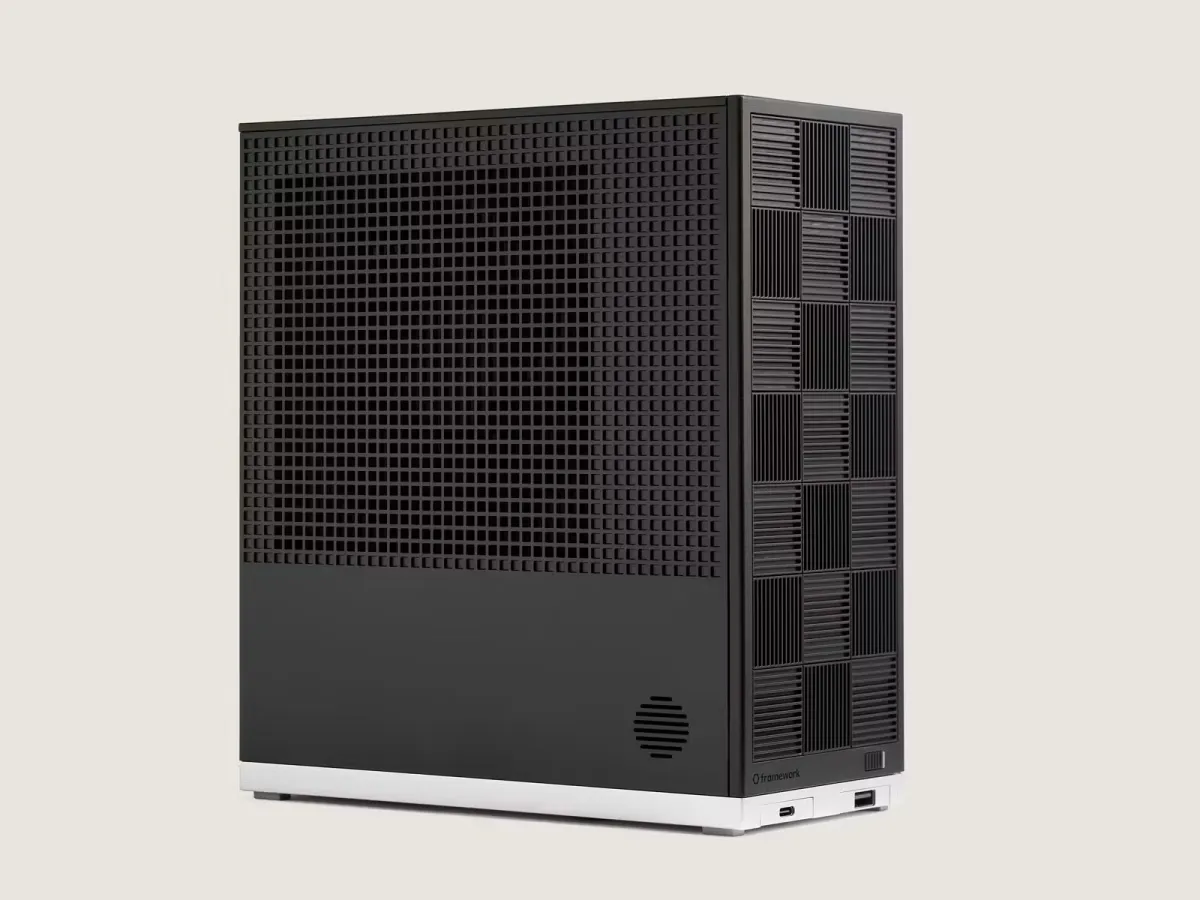
Framework, a company that makes modular repairable computers, said it has notified all of its customers that hackers stole their names, email addresses, phone numbers, and physical addresses, due to an incident at a company that provides business intelligence.

On Thursday, several Framework customers said on social media that they had received an email from the company notifying them of the data breach.

Framework’s spokesperson Eric Schumacher told TechCrunch that the breach affected “all customers,” but declined to specify a specific number. Framework computers are relatively niche products, but some estimates say the company sold hundreds of thousands of devices. 

According to the notification seen by TechCrunch, the company blamed the data breach on an upstream cyberattack at Metabase.

Advertisement

Metabase disclosed its own breach in a blog post on its official website, where it said that it was hacked by someone using an unknown security flaw, a so-called zero-day. The company said the hackers exploited the bug to give them the ability to access customers’ databases stored on Metabase’s cloud servers.

In its email to customers, Framework also included the email Metabase sent to the company, which says hackers accessed Framework’s cloud instance. The computer maker said it investigated the incident and found that hackers had stolen its customers’ personal data, but did not include their payment information.

Metabase did not respond to a request for comment.

Source link

Advertisement
Continue Reading

Tech

JerryRigEverything’s Passport-Style Samsung Galaxy Z Fold8 Survives the Full Treatment

Published

on

JerryRigEverything Samsung Galaxy Z Fold8 Durability Test
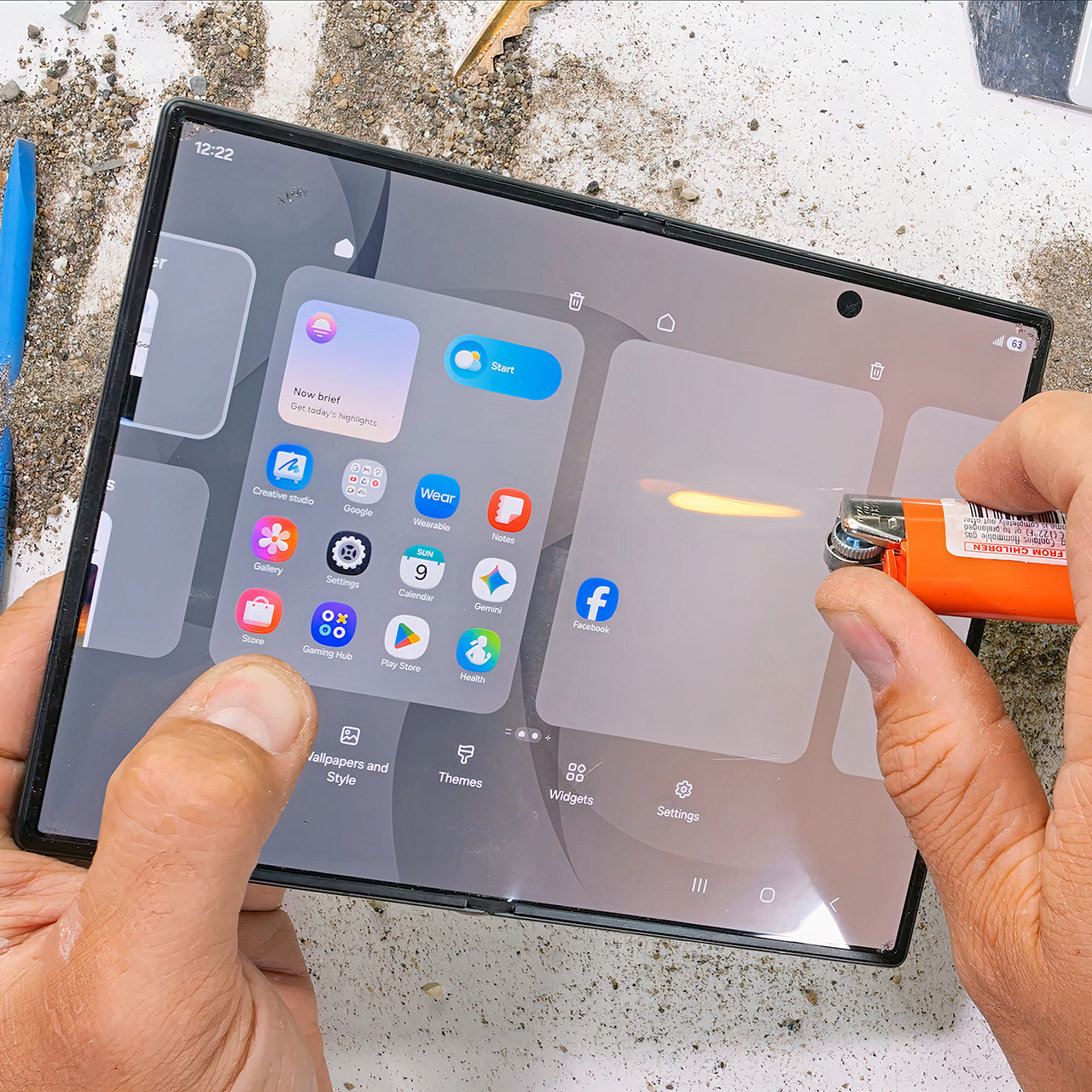
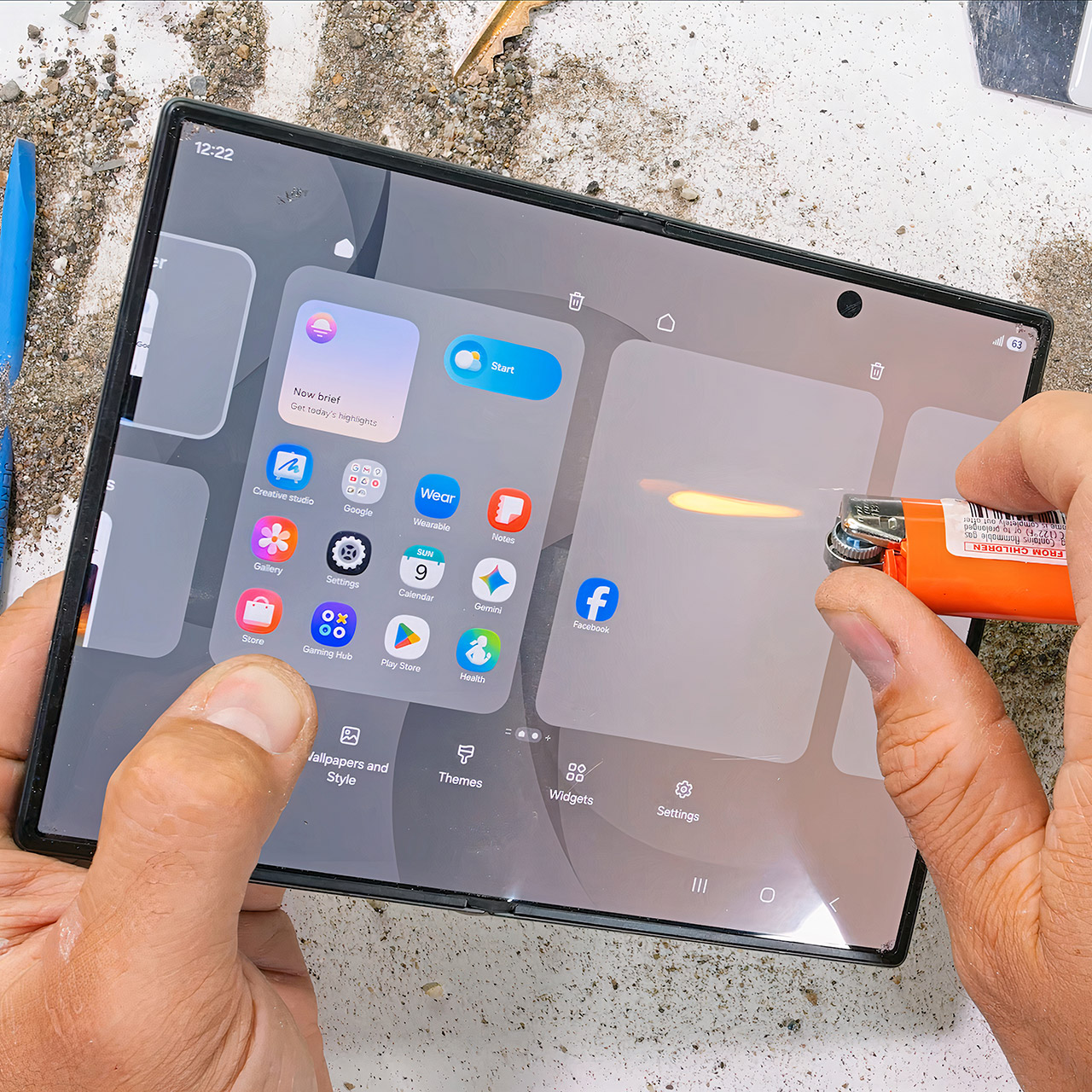
Zack Nelson has a habit of taking brand-new phones and treating them the way most people accidentally treat their everyday carry. This time the victim is Samsung’s Galaxy Z Fold8, the shorter, wider passport-style foldable that opens into a nearly square tablet. He runs the usual sequence of scratches, grit, open flame, and the dreaded opposite-direction bend. What emerges is another quietly tough Samsung folder that refuses to fold the wrong way for good.


The outer glass on this phone is Gorilla Glass Ceramic 3, and scratches begin to appear at a Mohs hardness level of 6, as they do on most current flagship phones. Its inner flexible display, which is still coated with a layer of plastic that cannot be avoided, scratches at a super-low level 2, the same rating that foldables have had for years. You’ll notice lines left by coins, keys, and even the edge of a fingernail. The good news is that Samsung will continue to replace the inside screen protector for free once each year. After that, it’s $19.99, and underneath the pixels is a titanium substrate that is meant to help straighten out the crease, but to be honest, it doesn’t help the plastic surface on top, which is always scratched.


Samsung Galaxy Z Fold8 Unlocked Cell Phone + $350 Gift Card, 256GB, Cream
  • SHOP NOW: Get an Amazon gift card when you order Samsung Galaxy Z Fold8. You will receive an email once your gift card is available after the product…
  • CREATED FOR YOUR CONTENT: Any way you turn it, the new Galaxy Z Fold8 gives you a fuller viewing experience. Designed with your content in mind, this…
  • WORLD’S LIGHTEST FOLD¹: Galaxy Z Fold8 is the newest foldable phone for content on the go. Unfolded, it fits movies and books for an immersive…

JerryRigEverything Samsung Galaxy Z Fold8 Durability Test
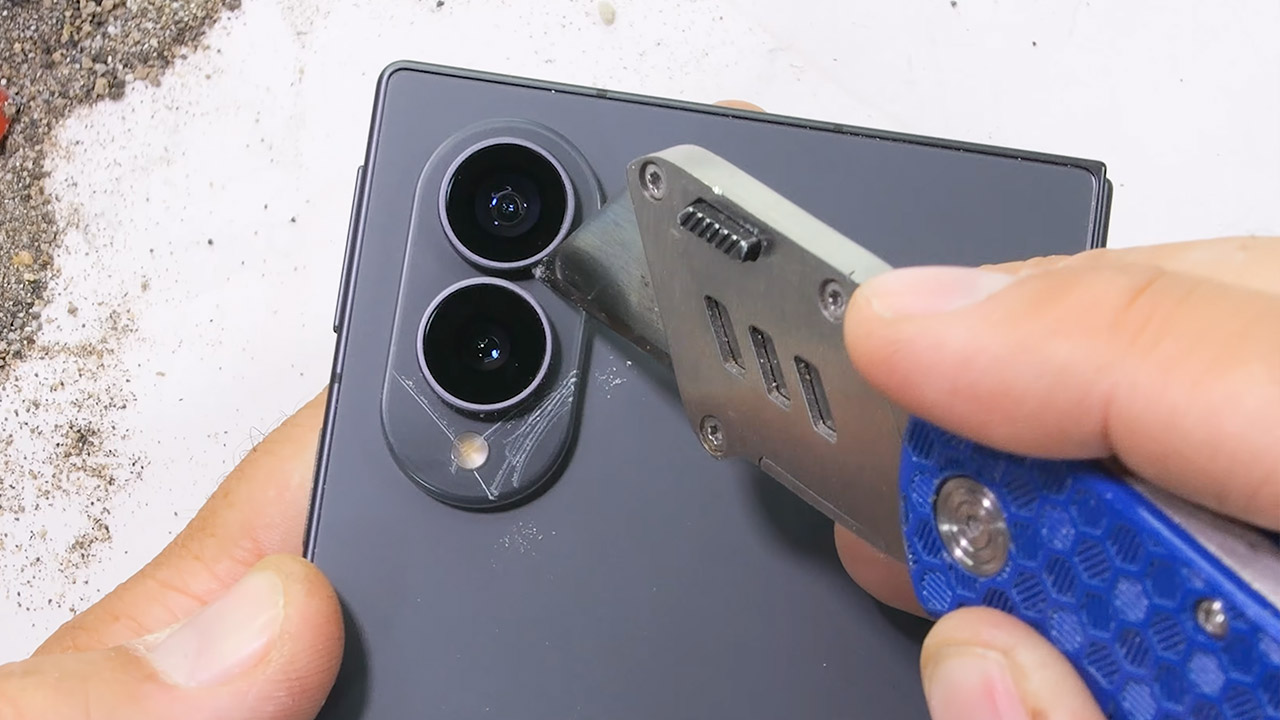
This phone has Advanced Armor aluminum framing, but the back is still glass. Now, the area around the dual 50 megapixel cameras is new, as it is constructed of plastic, which is unusual for a Samsung foldable device. If you ever need to change the lenses, you can easily take off the metal ring around them. There’s even a gasket in the SIM tray, which is nice to see given the IP48 rating. When you pour some dust on it and open and close it a few times, the majority of it stays out of the way, albeit some collects on the corner magnets, and the hinge continues to function normally.

JerryRigEverything Samsung Galaxy Z Fold8 Durability Test
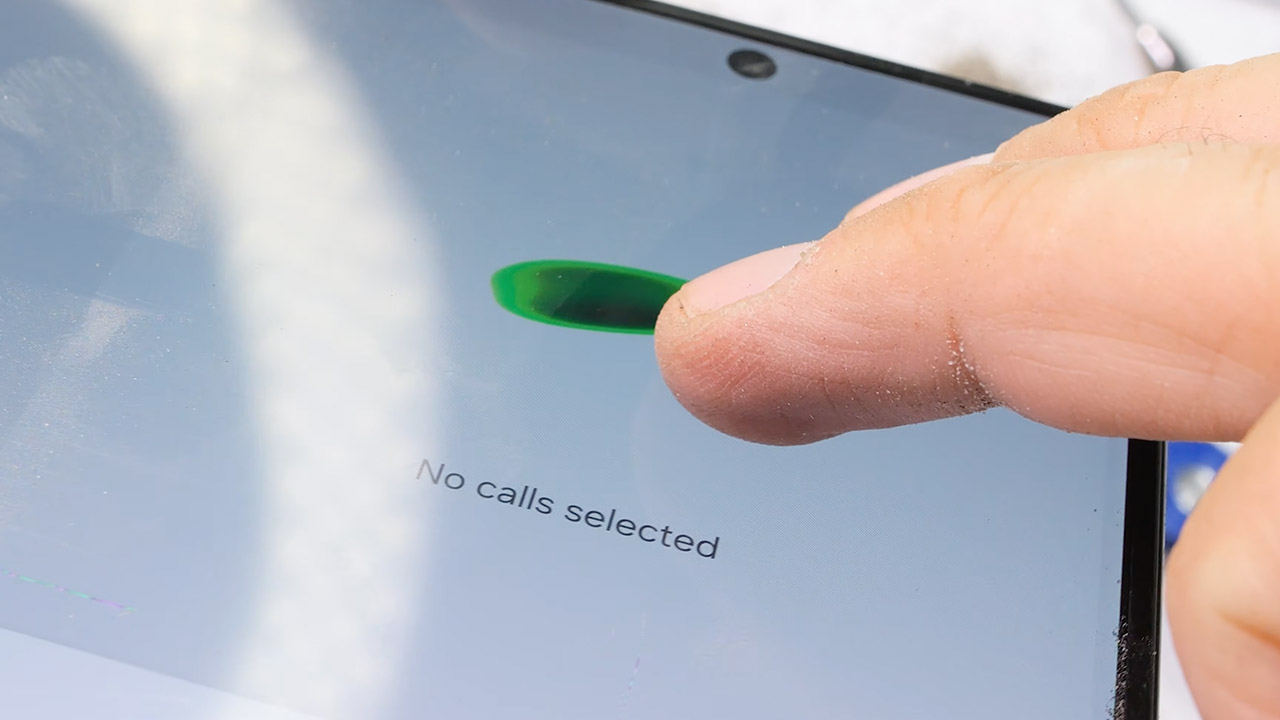
The inside 7.6-inch display was irreparably damaged when he placed an open flame to it with a lighter, which occurred after around seven seconds. The 5.5-inch cover lasted around ten seconds before becoming dark and green, indicating that it was nearly done, although keep in mind that the titanium layer on the screen provides no effective heat protection.

JerryRigEverything Samsung Galaxy Z Fold8 Durability Test
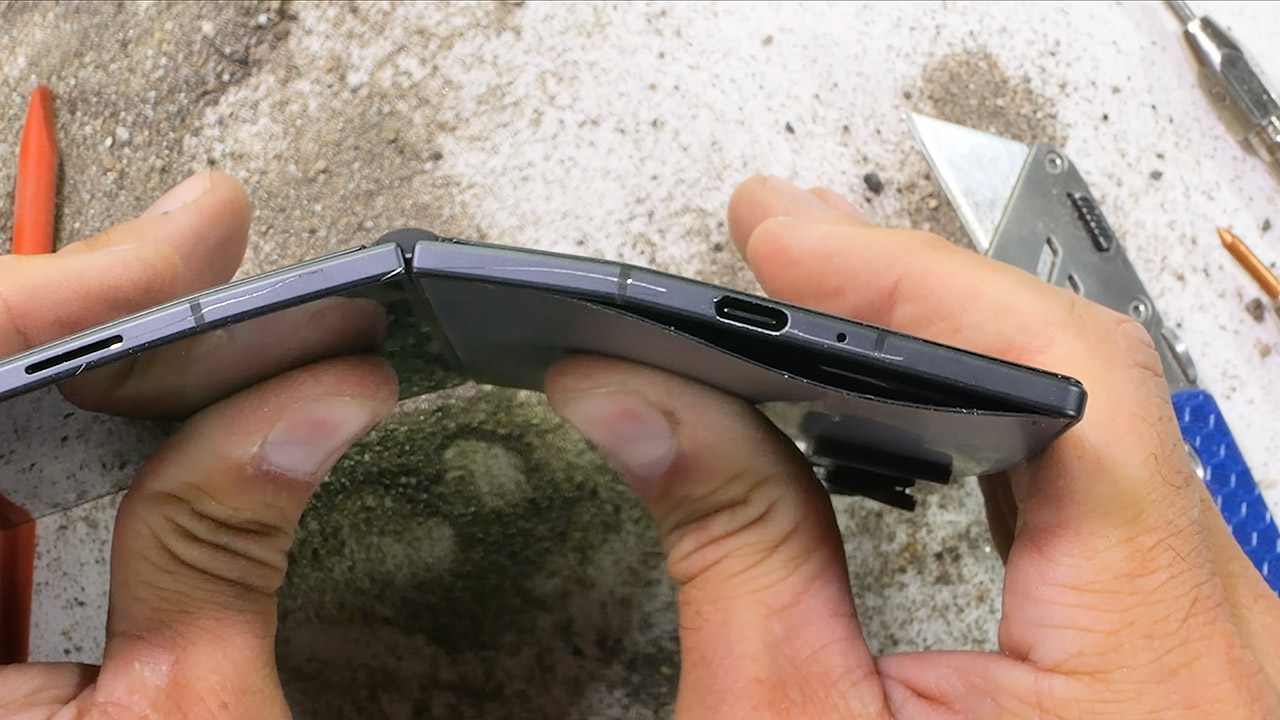
When the phone is closed, it has almost no flex, and sitting on it in your pocket while folded is probably fine, but when you open it up and apply some serious pressure, the entire thing begins to bend. The glass back even lifts out of its frame, but nothing splits along the antenna lines, the screen remains intact, and the hinge holds together. Let go, and the back glass sort of reseats itself; the phone still folds shut and powers on normally. This is the first time a Samsung book-style foldable has passed this test, with the exception of the trifold, which was a one-off, and the bigger Fold 8.

Source link

Advertisement
Continue Reading

Tech

What Are The 5 OSHA Rules On Extension Cords?

Published

on


It’s the duty of the Occupational Safety and Health Administration (OSHA) to ensure that any and all workplaces are as safe as realistically possible. This means being vigilant for any potential dangerous situations people could get into at the workplace, from the most dire electrical hazards to something as simple as tripping over an extension cord. Extension cords, in particular, have an entire subset of OSHA regulations to ensure they are used safely in a professional workplace.

Extension cords may be a convenient way to extend your outlets’ reach in an office, warehouse, or other workplace, but there are many common mistakes you could make with an extension cord that could have potentially deadly consequences. Following OSHA’s rules on this matter will not only ensure that you don’t get pinged during an inspection, it will also go a long way toward ensuring everyone stays safe and doesn’t get electrocuted on the job.

Advertisement

Extension cords can only be used as temporary wiring

A common trap that many people fall into with extension cords is plugging them in once and then never taking them out. You have some device or heavy-duty appliance that you want to use, but it’s just a little too far from the outlet, so you plug it into an extension cord and forget about it. Unfortunately, this would be considered an OSHA violation.

As stated by OSHA’s electrical standards, extension cords are only permitted to be used as a temporary wiring solution for a maximum of 90 days. You can plug one in for a device that you’re actively using for work purposes, but as soon as you’re finished with whatever you’re doing, that extension cord needs to come out of the wall and be put away. Extension cords aren’t intended or rated to be part of permanent fixtures, and using them in that way isn’t considered safe. 

If you need to use a device consistently, you need to either move it closer to an outlet, or give the electrician a call to install another outlet nearby. Incidentally, OSHA’s regulations also prohibit “daisy chaining” extension cords and power strips, or plugging one extension cord into another to increase its range. Extension cords are not rated to be safely used in this manner, so doing so would be a violation.

Advertisement

Extension cords must be kept in good repair

This might seem a little obvious, but it’s worth stressing: OSHA regulations stipulate that all extension cords must be kept in a state of good repair. This means no obvious physical defects; no visible wearing on the cord, the plugs, or the insulation; and definitely no exposed internal wiring. Using an extension cord with any kind of physical damage or otherwise clear defect in any capacity is considered an OSHA violation.

In the event an extension cord is damaged or somehow hampered in its ability to function properly, it must be removed from active service. That cord cannot return to service until it has been professionally repaired and restored — and that means a full repair job, not just a few pieces of electrical tape. If the cord is not in a state where it can be adequately restored to full function, the only permissible option is to replace it entirely.

Advertisement

Extension cords must not be tripping hazards

One of the most pressing safety hazards that an extension cord can present, aside from electrocution caused by a damaged cord, is as a tripping hazard. You might think that, as long as you know where a cord is, it’s easy to avoid tripping over it. However, not only can you never know exactly where your feet are unless you’re staring at them, you can’t expect everyone around you to know about the cord’s existence and where it’s placed.

This is why, according to OSHA’s regulations, all extension cords, while in use, must be placed in such a way so as not to present either a tripping or slipping hazard. If you’ve got an extension cord clumsily snaking through a major footpath in the middle of your office, that’s an OSHA violation. Cords need to be moved out of the way and secured in such a fashion that they’re still visible and removable. 

Advertisement

They can’t just be hidden under a heavy carpet or snaked into a wall, as both would be considered a fire hazard. If you absolutely have to have an extension cord passing through a footpath, it needs to be covered with a rubber protection panel, both to protect the cord itself and make it much harder to trip over.

Advertisement

Extension cords must not be placed in closing doorways

Tripping hazards aren’t the only reason to be conscious of where exactly you’re laying down your extension cords in your workplace. You also need to consider whether leaving it in a particular spot would cause it to regularly incur stress and damage. This is why, in a similar vein to OSHA’s regulations about not using extension cords in poor states of repair, you also can’t place an extension cord in a spot where it’s guaranteed to get damaged, specifically within a closing doorway.

It’s okay to place an extension cord in an open doorway without an actual closing door, so long as it’s secured in a way that it won’t be a tripping hazard. However, placing an extension cord in a closing doorway means that, every time you close the door, the top of the cord is going to get squished, scuffed, and otherwise gradually damaged. Remember, using damaged extension cords is prohibited, so placing an extension cord in a closing doorway is essentially one OSHA violation that’ll lead into a second OSHA violation.

Advertisement

Extension cords must be three-conductor grounding type

In any workplace, though especially heavy-labor workplaces that make use of high-voltage equipment, it’s absolutely paramount that all possible measures are taken to prevent or reduce the likelihood of electrical shocks to workers. Naturally, these measures extend to extension cords, which is why OSHA’s regulations stipulate that any extension cords used in a professional environment must be of the three-pronged grounding type.

All OSHA-compliant extension cords use the three-wire format, ensuring that the cord itself is grounded while plugged in, and that the same goes for any tools, equipment, appliances, or devices as well. This helps to lower the risk of sudden electrical shocks while using an extension cord, not to mention the risk of potential damage to outlets and devices. The good news is that most high-quality extension cords use this connective format, though you should be careful when picking your extension cords to be certain. Using a two-pronged cord, besides being an OSHA-violation, will increase your risk of electrocution and electrical fires.


Advertisement

Source link

Continue Reading

Tech

A Falling Weight Just Broke the Sound Barrier with Tom Stanton’s Supersonic Trebuchet

Published

on

Tom Stanton Supersonic Trebuchet
Tom Stanton has spent years chasing a number that gravity itself seemed to forbid. On a quiet field somewhere in the UK, a 40-kilogram mass dropped a short distance, spun a carbon-fiber arm past 2,300 revolutions per minute, and sent a 4-gram projectile into the air at 776 miles per hour. That is nine miles per hour past the speed of sound. For the first time, a purely gravity-powered trebuchet crossed the barrier.


Medieval engineers created these machines to fling huge stones at castle walls. The basic idea is to hoist a large heavy weight, let it fall down, and then use the lever and sling to redirect that energy into a much lighter projectile. Unfortunately, physics gets in the way. A weight in free fall accelerates at a maximum of 9.81 meters per second squared; drop one from 2 meters and it smacks into the ground at around 6 meters per second. No matter how heavy you make the weight, the speed remains constant, and a typical arm is like a car with a bike chain stuck in first gear, with lots of torque at first but just enough to get it moving by the end.

Tom Stanton Supersonic Trebuchet
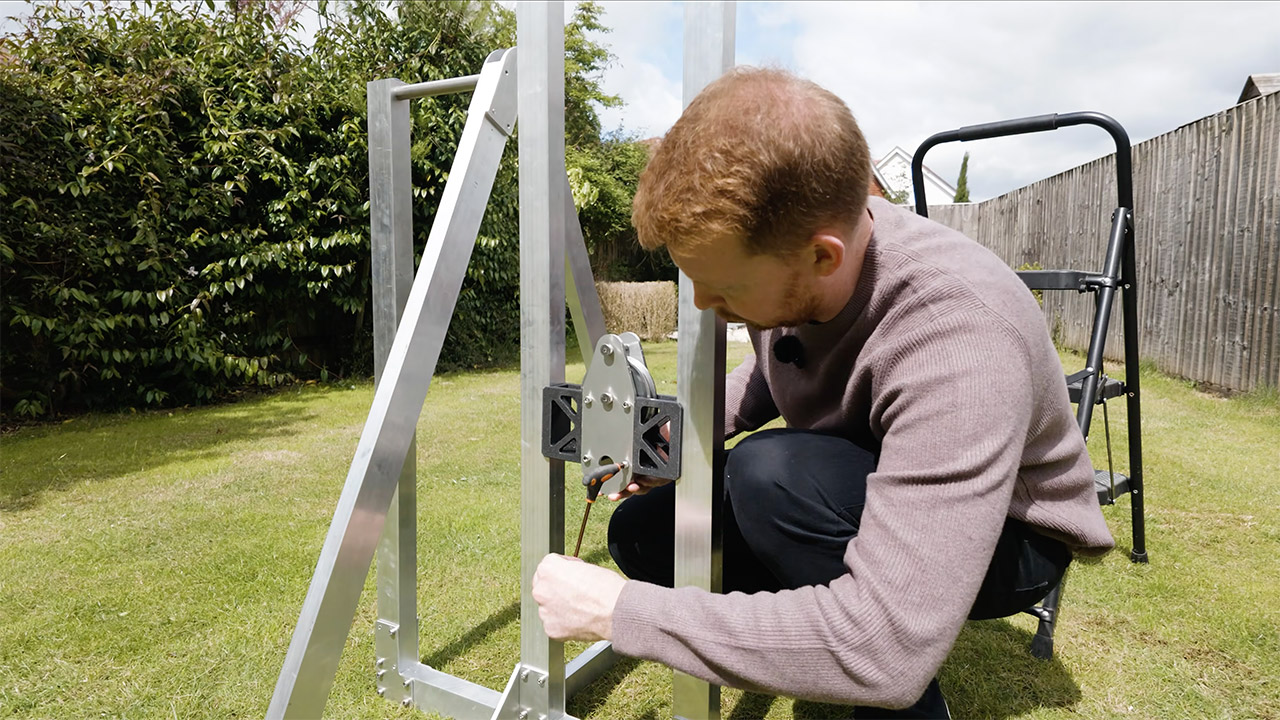
Stanton devised a creative engineering solution to the speed problem. The counterweight is suspended from a pulley system with a 3:1 ratio, as a large diameter at the beginning propels the arm with plenty of force, and as it winds down, the smaller diameter end provides a significant jump in rotational speed. In the end, the drum was redesigned so that weight could be lifted up to 1.9 meters, storing more power in the system than previous iterations.

Tom Stanton Supersonic Trebuchet
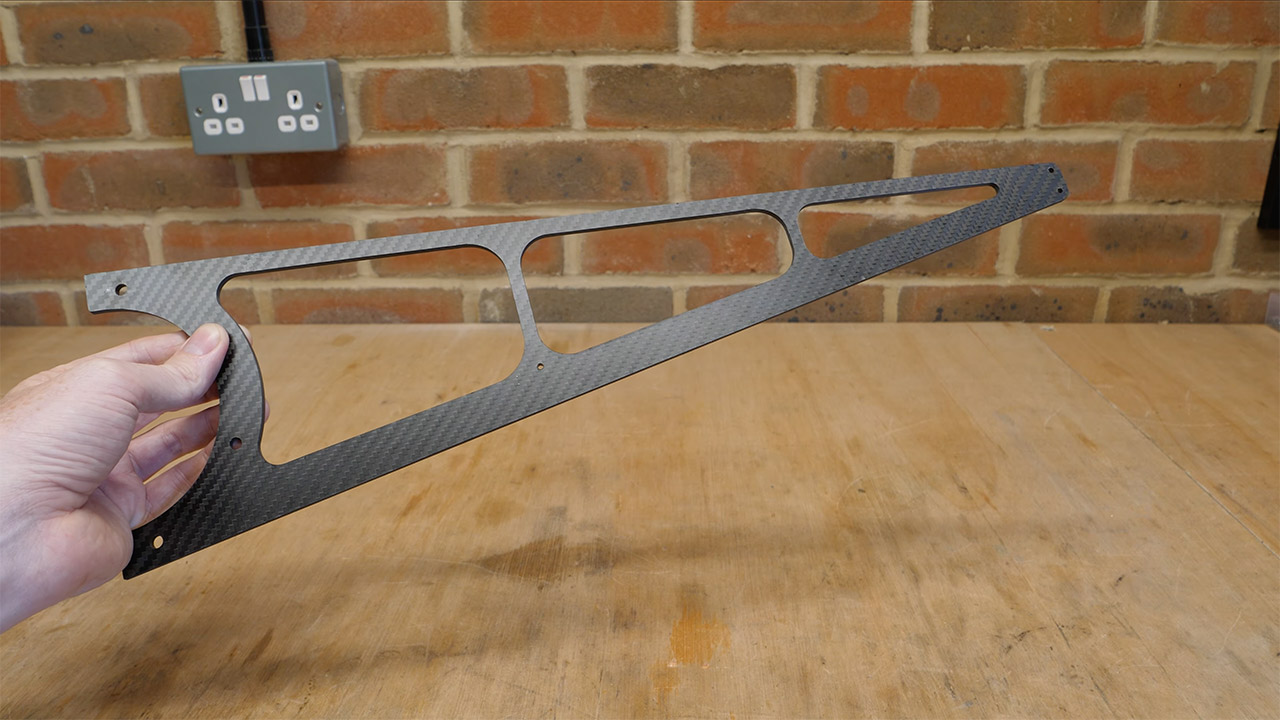
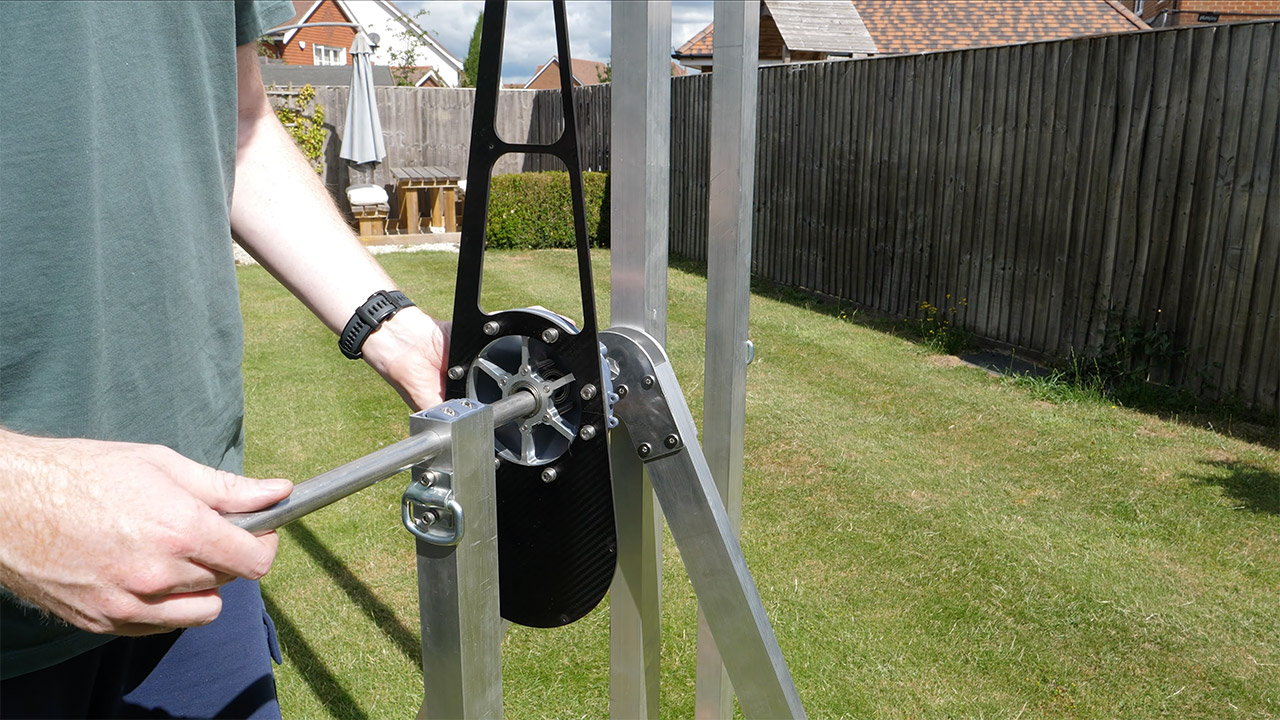
The arm has to be both incredibly light and super rigid. Carbon fiber was really the only option because it isn’t heavy enough to weigh down the entire system while yet being able to withstand punishment. Stanton used his homemade CNC mill to carve the piece, keeping the dust under control with a HEPA vacuum and a good spray of water. It weighs only 116 grams. Stress tests and numerous defective 3D printed prototypes revealed that it would buckle under the sling’s pressure, so he modified the design to compensate, removed material from the tensioned side, toughened up the opposite side, and added some extra bracing for good measure. Aluminum hubs connect the arm to a short counter-arm, keeping the spinning bit as balanced as possible.

Tom Stanton Supersonic Trebuchet
The projectile now starts near the axle, wrapped firmly in a sling that unwraps at just the right moment. The entire system is mechanically released, using a spring-loaded catch that opens after a certain number of rope rotations. The release window is only a few milliseconds long, which is plenty of time to complete the task. Early iterations failed under stress, but the final pin-and-loop structure held up.

Tom Stanton Supersonic Trebuchet
Testing was carefully increased, and he began with a 10 kg weight. The modified aerodynamic arm reached a respectable 1248 rpm and launched at 394 mph with an incredible 43.7% efficiency. Twenty and thirty kilograms passed thru without a hitch. 40 kg, on the other hand, sped the arm to 2336 rpm and the missile to a blistering 716 mph, falling only 51 mph short of the magic barrier. The machine eventually snapped, and the clasp shattered beneath the weight of 50 kg. Stanton reduced the projectile weight to approximately 4 grams, changed the drum taper once more, and returned to the test area with the 40 kilogram setup.

Tom Stanton Supersonic Trebuchet
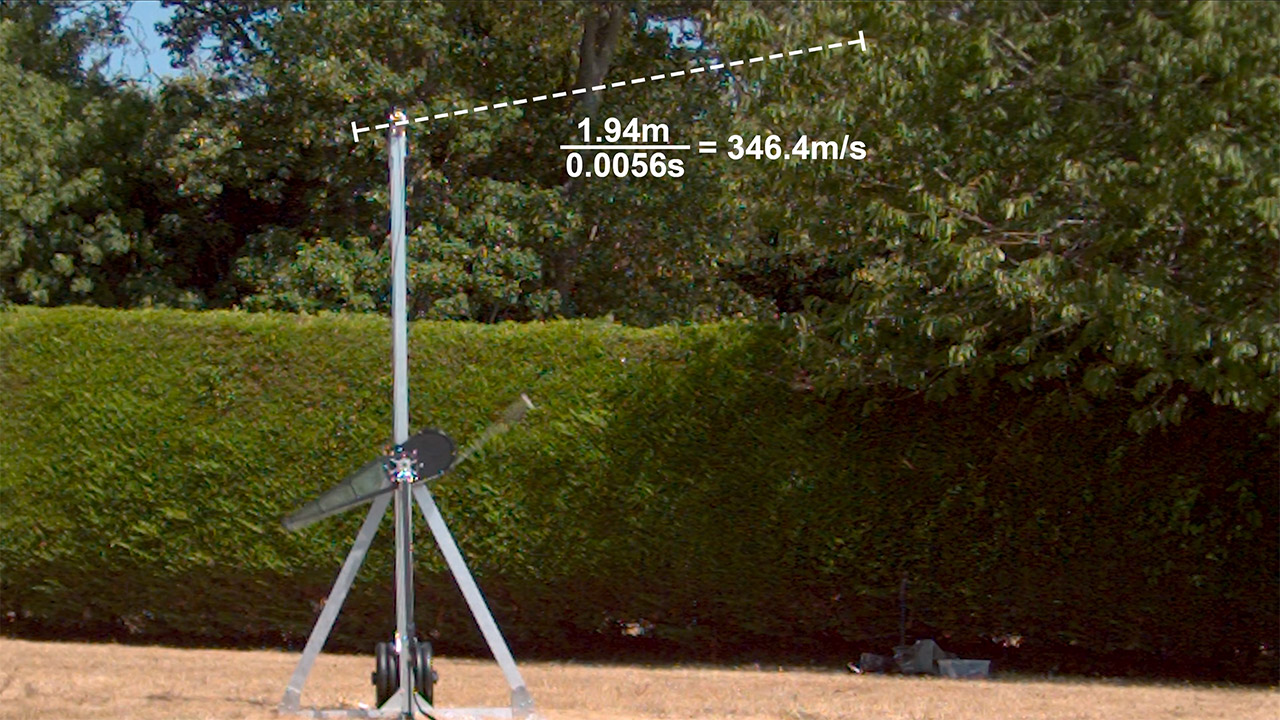
The final test is obviously the most important, since the arm spun up to 2342 rpm. Tip speed reached a staggering 274 mph. The high-speed footage was truly eye-opening, as the missile traveled 1.94 meters in 5.6 milliseconds. Crunching those statistics yields 346.4 meters per second, or a more than respectable 776 mph. To top it all off, there was a loud crack followed by a pleasant echo, confirming the sonic boom to everyone within earshot. Not one aspect of the machine came close to failing, or so we’d like to think.

Source link

Advertisement
Continue Reading

Tech

Xiaomi Sound Play review: a great-looking JBL rival, but it could sound a little better

Published

on

Why you can trust TechRadar


We spend hours testing every product or service we review, so you can be sure you’re buying the best. Find out more about how we test.

Xiaomi Sound Play review

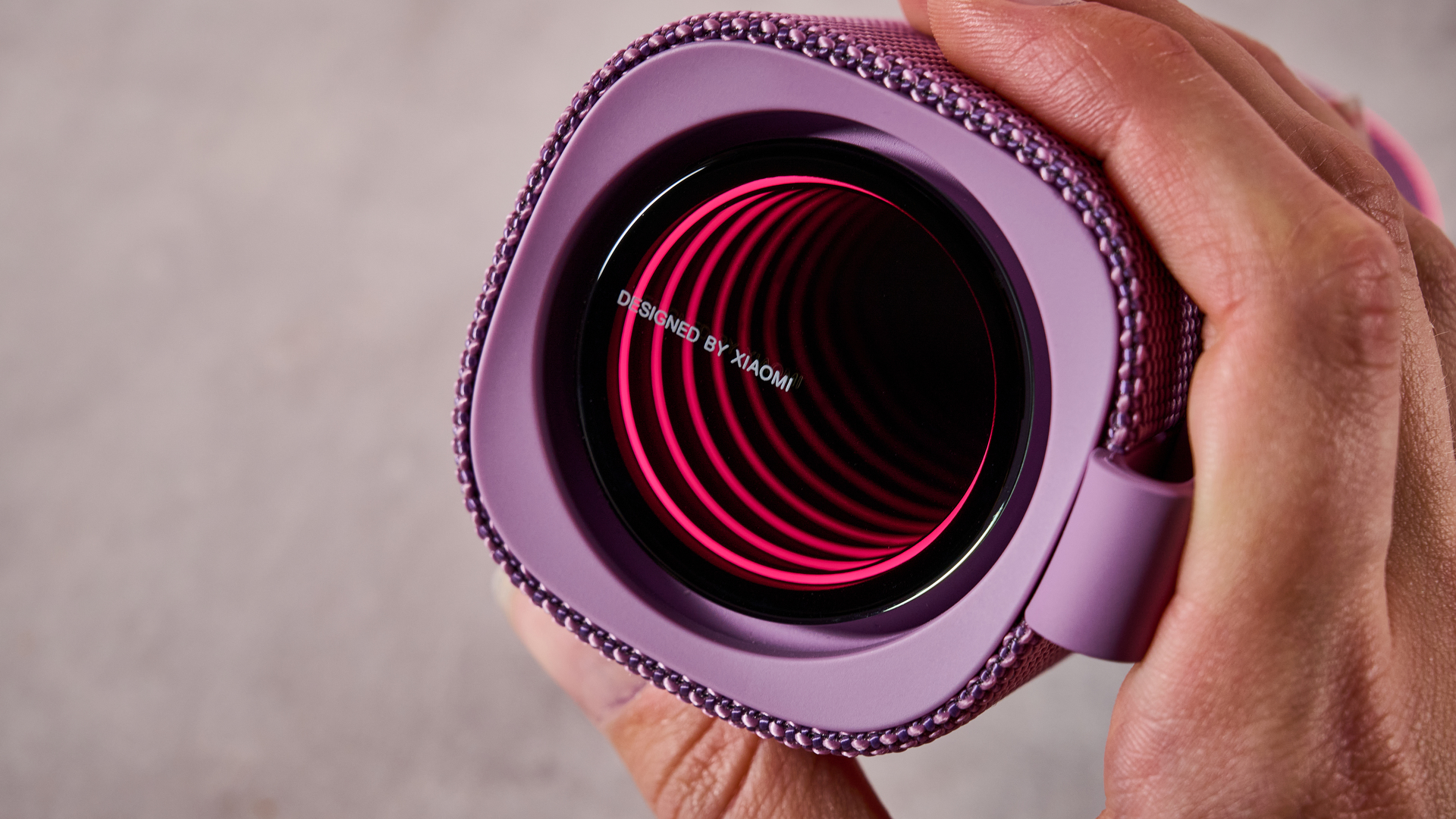
It turns out that major mobile manufacturer Xiaomi also makes Bluetooth speakers, and its latest model, the Xiaomi Sound Play, is aiming to deliver “immersive, powerful sound” as well as a “stylish and versatile” design.

But that’s not all. The tech giant is doing all of this while keeping its speaker nice and cheap. It comes in at just £49.90 (about $67 / AU$95) — which is refreshingly affordable for an 18W model with features such as smart lighting, Auracast, and IP68 waterproofing.

Advertisement

Source link

Continue Reading

Tech

Interview: Zoner Studio on skipping AI photo editing gimmicks

Published

on

I’ve been a fan of Zoner Studio since first reviewing it in 2025 – it’s a fusion of Lightroom and Photoshop-style tools for photographers, with some compelling advantages over both.

My team recently re-reviewed the photo editing and organizing software, complete with its big summer updates roll-out, where it earned an even higher score for 2026 (read our Zoner Studio review).

Source link

Continue Reading

Tech

Watch British Grand Prix 2026 MotoGP for FREE: Live streams

Published

on

The 2026 MotoGP season returns from its summer break as a fascinating riders’ championship battle resumes at Silverstone, the home of UK motorsport, for the British Grand Prix 2026.

Just 24 points separates the top five riders in the standings, with 2024 champion Jorge Martin (Aprilia Racing) leading SuperFile Trackhouse’s Ai Ogura by 14. However, the duo will be nervously looking over their shoulders after seven-time world champion Marc Marquez (Ducati Lenovo) roared back into contention with three wins in the past four grands prix having recovered from a fractured foot. He is only 18 points off the summit, while Martin’s Aprilia teammate Marco Bezzecchi is a further four adrift with Fabio Di Giannantonio of Pertamina Enduro VR46 Racing in fifth following a consistent first half of the season.

Source link

Advertisement
Continue Reading

Tech

Are USB Flash Drives Still Worth Using In 2026?

Published

on


The humble flash drive has come a long way over the years, yet there’s no shortage of internet experts telling you to stop using them, or that there’s no need for them anymore. You’ve been told to throw them out and stop buying them; you’ve been told they’re obsolete, or have gone extinct. If that old story sounds familiar, it’s because it is — the same things were said about CDs and vinyl records. Neither of those formats ever died. Vinyl has been enjoying increased sales since 2008 and hit $1 billion in sales for the first time in history in 2025. CDs and other physical formats, despite never leaving, are also part of a bigger shift back towards physical media. There are still a surprising number of new cars that offer CD players.

I bring this up because it’s a recognizable pattern in technology — a new format will supersede and displace the last. CDs displaced vinyl, MP3s took over after CDs, and streaming now dominates everything. You can trace the same pattern throughout the history of computer storage, from magnetic tape all the way to cloud storage. While older USB flash drives have declined in use in favor of portable SSDs or cloud storage, flash-based storage has not disappeared. And just because you have some older flash drives lying around, that doesn’t mean they’re not worth using — unless they’re very old, to the tune of USB 1.x or USB 2.0, in which case you should probably opt for newer ones.

Despite being overshadowed by the cloud, Wi-Fi 6E/7, and wireless file sharing like AirDrop or Quick Share, flash drives refuse to die. That’s because certain use cases still make them worth using in 2026, and they still tend to be more portable than external SSDs. 

Advertisement

Flash drives are dead; long live flash drives

The term flash drive in 2026 is murky; in the days of yore, before the advent of consumer SSDs, a flash drive only meant one thing, and that was the little thumb drive with an exposed USB-A connector. Nowadays, anything that uses NAND flash can technically be considered flash storage, although “USB flash drive” still usually refers to a small removable USB device. Just as HDDs have faded in use in favor of SSDs but still have their place, the same is true of flash drives.

In a world where everything is cloud-connected, powered by data centers, and requires user accounts, flash drives are the opposite — you plug them in, and they work. This makes them immune to the increasingly disruptive internet and cloud-service outages that can take down chunks of the web and the services that rely on it. Sometimes, simple is better. They are also reliable for large file transfers or one-time file transfers, especially in cases where internet service is slow or unreliable. Flash drives now come with USB 3.2 Gen 2 interfaces; certain flash drives can approach read-write speeds of 1,000 MB/s, which is several times faster than older USB 2.0 and 3.0 drives.

Advertisement

There is also the aspect of physical possession of local data, meaning the data isn’t sitting on a server where third parties have access to it. That data can also be shared or printed without having to upload or email it somewhere. USB drives are still handy for bootable OS media, so you can reformat and install an OS without an internet connection. You can also use USB drives for portable apps that you can use across different computers, without having to install them.

Advertisement

The line between flash drives and SSDs is becoming blurred

It needs to be said that in some cases, there is very little separating a flash drive from an external SSD — some flash drives are SSDs in all but name and form. In fact, there are a growing number of SSDs that are coming in the thumb drive form factor. Products like Adata SC750 and SK Hynix Tube T31 are actually SSDs that are roughly in the form of a USB stick. Many USB 3.2 Gen 2 flash drives now come in USB-C, but the presence of USB-C doesn’t necessarily mean it’s an SSD housed in a thumb drive. You can check out our picks for USB-C flash drives that are fast and worth the price.

The key differences that separate a flash drive from a proper SSD are usually the sophistication of the controller, the type and quality of flash used, and features like wear-leveling, which balances write activity across NAND cells and extends the drive’s longevity. Some SSDs also include DRAM cache. These are all things that a traditional USB thumb drive may not have or may implement in a much simpler form. With USB4 Version 2.0, we’re bound to see even more innovation in flash storage, but whether or not we can actually get USB4 Version 2.0 speeds in a flash drive remains to be seen.


Advertisement

Source link

Continue Reading

Tech

RPCS3 – Sony PlayStation 3 Emulator Download Free – 0.0.42-19699

Published

on

RPCS3 is a multi-platform open-source Sony PlayStation 3 emulator and debugger written in C++ for Windows, Linux, macOS and FreeBSD. The purpose of the project is to completely and accurately emulate the Sony PlayStation 3 Computer Entertainment System in its entirety with the power of open-source community and reverse engineering.

Our goal is to preserve the legacy of the PlayStation 3 hardware and its vast library by bringing it and its exclusives to the PC platform. We want to achieve this by targeting and supporting multiple operating systems as well as being compatible with a wide range of computer hardware with realistic requirements.

What input devices can I use with RPCS3?

We currently support keyboard / mouse inputs and native DualShock 3, DualShock 4 and DualSense controllers. We plan to add additional input methods in the future as we implement more meaningful features to the emulator.

What PlayStation 3 peripherals can I use with RPCS3?

We currently have support for the PlayStation Eye Camera, however PlayStation 3 Move controller support is still under development.

Can I just insert a PlayStation 3 game disc and start playing games?

In its current state, RPCS3 does not support reading game data directly from PlayStation 3 format discs. PlayStation 3 discs are formatted in a very special way that can only be read with an actual PlayStation 3 system, or a compatible Blu-ray drive from select manufacturers. For more information on what Blu-ray drives are capable of reading games, please refer to the Quickstart Guide.

Advertisement

Where do I get PlayStation 3 games and software?

Typically, you want to dump your own PlayStation 3 games and software from your own console. We believe that this is the most efficient and safest way to migrate your disc-based games and digital games from your console to your PC.

You can also dump games using select compatible Blu-ray drives. Not every Blu-ray drive will recognize PlayStation 3 games due to how data is formatted on the disc. For more information on what Blu-ray drives are capable of reading games, please refer to the Quickstart Guide.

RPCS3 uses the GNU General Public License Version 2 (June 1991). According to the license, you are welcome to use RPCS3 and its source code for any purpose, but distributing RPCS3 requires that the source code be released and attribution given. For more details on how the GNU General Public License system works, please refer to GNU.org

High Resolution Rendering

Advertisement

One of the most anticipated features has just been added to RPCS3! High resolution rendering allows users to play at resolutions far exceeding what the PS3 could handle. If you thought your favourite PS3 games were starting to look a bit dated, just wait until you get to experience them in up to 10k! Although, we doubt many users will have the setup necessary to benefit from 10k today, emulation is all about preserving for tomorrow.

Performance

Rendering a modern PC game in high resolutions such as 4k, while beautiful, is quite taxing on your hardware and there is often a massive hit in performance. However, since most of the workload for RPCS3 is on the CPU and GPU usage is low, there is a lot of untapped performance just waiting to be used. All processing is done CPU side, and as far as the GPU is concerned it is simply rendering 2006 era graphics (yes, the PS3 is 11 years old now). We’re happy to report that anyone with a dedicated graphics card that has Vulkan support can expect identical performance at 4k.

Anisotropic Filtering (AF)

Advertisement

High resolution support wasn’t the only thing that was added in this update! Another reason for such a massive upgrade in visual fidelity is having full 16x AF support. This greatly improves how textures can look, especially when viewed at an angle. Take a look at the below screenshots of Ni no Kuni as an example of the default AF vs forced 16x. The difference is especially noticeable on the ground inside the gate.

RPCS3 Compatibility List

These are the current compatible games that have been tested with the emulator. This list is subject to change frequently.

What’s New

  • Remove duplicated code in VKShaderInterpreter.cpp by @digant73 in #18832
  • Add “Enable Mouse-based Gyro” setting to I/O config by @Windsurf7 in #18835
  • SPU LLVM: Use 128-bit SVE2 for FMS by @Whatcookie in #18837
  • SPU LLVM: Idiomatic FSM implementation for ARM64 by @Whatcookie in #18806
  • SPU LLVM: SVE multiply optimizations (ARM) by @Whatcookie in #18789
  • vk: Autogrow descriptor pools based on demand by @kd-11 in #18844
  • Initialize rtmidi async by @Megamouse in #18843
  • Make FFB direction encoding for emulated G27 configurable by @ZerNico in #18776
  • usb_device: present wii instruments as PS3 instruments by @sanjay900 in #18796
  • SPU LLVM: Use I8MM for GBH and GBB by @Whatcookie in #18833
  • Update Submodules by @Megamouse in #18840
  • HOTFIX: JIT/AArch64: advertise +i8mm to the LLVM target machine by @Rad0van in #18846
  • SPU LLVM: Use TBL for AArch64 ROTQBY shuffles by @Whatcookie in #18818
  • cellAudio: fix _mxr000 surmixer event-queue key constant by @Rad0van in #18850
  • RSX: Add hardware spin_wait helper, use it in flush requests by @Whatcookie in #18830
  • rsx: Handle mipmap sampling edge case when SNORM emulation is active by @kd-11 in #18860
  • cellAudio: Fix _mxr000 event queue hack by @elad335 in #18857
  • SPU/PPU: Implement PPU reservation priority over SPUs by @elad335 in #18854
  • rsx: Use mip0 resolution scale when computing mipmap scaling factors by @kd-11 in #18866
  • Qt: Add exit game shortcut by @Megamouse in #18869
  • SaveStates: Fix lv2_timer serialization by @elad335 in #18878
  • ffmpeg: remove directshow backend by @Megamouse in #18879
  • Fix drag & drop of files on main window by @digant73 in #18885
  • gui: Move download database actions from game list to Manage -> Database submenu by @Vishrut2403 in #18870
  • rsxaudio: fix some VS warnings by @Megamouse in #18886
  • gui: Play preview videos on row selection, not just hover by @thephilcoulson in #18721
  • Use more std::move by @Megamouse in #18868
  • Add integrity check to PSN Content, DLC and Game Update files by @digant73 in #18669
  • Fix visual studio projects by @Megamouse in #18889
  • Do not throw on hex_to_bytes error in iso get_key by @Megamouse in #18891
  • Optimise PNGs across the repo by @Chubercik in #18831
  • Use more std::string_view (Part 1) by @Megamouse in #18890
  • gl: Maintenance fixes by @kd-11 in #18874
  • Use opengl renderer in game window title by @Megamouse in #18895
  • Use more fmt::split_sv by @Megamouse in #18898
  • Stop playing gamelist movies when the window loses focus by @Megamouse in #18899
  • Use more std::string_view (Part 2) by @Megamouse in #18901
  • [SPU] Optimize CLZ on targets without AVX512 by @WalterKruger in #18900
  • sys_rsx: Fix IOMAP syscalls argument types by @elad335 in #18909
  • Fix std::string_view regressions by @Megamouse in #18908
  • Qt: use readable strings for window visibility in gui settings by @Megamouse in #18907
  • [macOS] Update runners to OS 15, raise minimum deployment target accordingly by @schm1dtmac in #18897
  • Add user agent to curl requests by @Megamouse in #18912
  • [SPU] Calculate FRSQEST exponent using arithmetic by @WalterKruger in #18905
  • Add missing sanity check in savedata_op by @Megamouse in #18918
  • Update pugixml to 1.16 by @Megamouse in #18904
  • fix double path delimiter by @digant73 in #18923
  • Use more std::string_view (Part 3) by @Megamouse in #18903
  • [SPU LLVM] Calculate FREST fraction using vperm2d for AVX512 by @WalterKruger in #18931
  • SPU Analyzer: Giga Block Crash Fix for Skylanders Giants by @chotchki in #18935
  • SPU LLVM: Use SVE2 XAR for constant rotates by @Whatcookie in #18849
  • [SPU LLVM] Refactor SHUFB to improve readability by @WalterKruger in #18937
  • Update wolfssl to 5.9.2 by @Megamouse in #18946
  • Update 7zip to 26.02 by @Megamouse in #18947
  • [SPU LLVM] Additional SHUFB splat/special-index fast paths by @WalterKruger in #18945
  • emulated turntable: allow to map motion sensors by @Megamouse in #18958
  • Add more motion control mappings to turntable and ghltar by @Megamouse in #18961
  • Fix consteval read_from_ptr and add sanity checks if possible by @Megamouse in #18963
  • Propagate src_loc in write_to_ptr and read_from_ptr by @Megamouse in #18967
  • SPU Precompilation: Add support for unaligned segments by @elad335 in #18968
  • Fix TTY UTF-8 logging by @Megamouse in #18969
  • settings: Default async with shader interpreter with no shader compilation hint by @AniLeo in #18956
  • Fix cellKb when using key modifiers on linux by @Megamouse in #18938
  • macOS: DJ Hero Turntable support (deck buttons, passthrough conflict) by @silvatyrant in #18957
  • Fix out of bounds read in Dimensions by @Megamouse in #18972
  • cellSysmodule implementation by @capriots in #18962
  • [SPU ASMJIT] Vectorized 16-bit variable shifts for SSE2 targets by @WalterKruger in #18911
  • SPU LLVM: Use ARM USHL for masked infinite shifts by @Whatcookie in #18816
  • PPU LLVM: Fix core_lock locking by @elad335 in #18774
  • SPU: Comparisons via multiplications for ARM, checksums via absolute difference, and rolled loops by @Whatcookie in #18824
  • Fallback unsupported database SPU decoder on ARM64 by @cicerohellmann in #18651
  • sysinfo.cpp: Relax TSC calibration constraints by @elad335 in #17909
  • cellSysmodule: fixup by @capriots in #18977
  • Fix VSH on ARM64: Memory management fixes by @elad335 in #18707
  • cellSysmodule: fixup (part 2) by @capriots in #18978
  • Move unsafe raw pointer write_to_ptr and read_from_ptr to write_to_ptr_unsafe and read_from_ptr_unsafe by @Megamouse in #18975
  • Update Submodules by @Megamouse in #18980
  • Extra logging for GUI notifications by @RipleyTom in #18988
  • input: fix arrow key mapping roundtrip on macOS ARM by @Icnopandaz in #18920
  • Bump global savestate version by @capriots in #18989
  • VK: fix video_out_calibration_pass::get_fragment_inputs by @Megamouse in #18952
  • Add OpenCV 5 Support by @hcorion in #18998
  • Update fusion to 1.3.0 by @Megamouse in #19008
  • Update curl to 8.21.0 by @Megamouse in #18943
  • Fix PS1 classics shortcuts by @Megamouse in #19012
  • [SPU LLVM] Refactor SELB to improve readability by @WalterKruger in #19002
  • [SPU ASMJIT] Optimize xfloat compares and multiply by @WalterKruger in #19025
  • IDM: Optimize search for concurrency by @elad335 in #19027
  • sys_fs: Fix ENOTDIR check for paths ending with /dot or /dotdot by @elad335 in #19028
  • Update fusion to 1.3.1 by @Megamouse in #19030
  • PPU LLVM: Optimize vector NaN handling for AVX512 by @Yahfz in #19033
  • PPU LLVM: Optimize vector denormal handling for AVX512 by @Yahfz in #19034
  • [SPU LLVM] Replace constant float checks with LLVM’s KnownFPClass analysis by @WalterKruger in #19043
  • PPU LLVM: Accelerates NJ handling in FTZ environment by @elad335 in #19040
  • metainfo: Update screenshot preview by @AniLeo in #19044
  • qt: Fix save manager crash when deleting multiple entries by @ProtoJay4789 in #19019
  • Revert SPU Reduced Loop Optimizations to fix Arm64 regressions by @elad335 in #18979
  • SPU: Revert LQX/STQX reduction by @elad335 in #19050
  • [SPU LLVM] Use select in FMA to shorten its dependency chain by @WalterKruger in #19052
  • pad settings: Fix for clearing bindings by @Megamouse in #19054
  • Add more info to VFS exceptions by @Megamouse in #19055
  • [macOS] Update to the latest MoltenVK 1.4.2 prebuilt by @schm1dtmac in #19059
  • atomic: Fix BSD compilation by @AniLeo in #19061
  • LLVM: Improve v128 constant extraction by @elad335 in #19064
  • Fix: get_known_bits fix by @RipleyTom in #19051
  • cli: allow to boot last savestate of a game by @Megamouse in #19067
  • Qt: add guest memory dump utility by @canersaka in #19068
  • Qt: move guest memory dump code to own class by @Megamouse in #19070
  • rsx: Clean up the shader interpreters by @kd-11 in #19084
  • Update llvm to 22.1.8 by @Megamouse in #16807
  • rsxfp/interpreter – Implement missing texture functionality by @kd-11 in #19090
  • Fix package install failure warning message by @Megamouse in #19096
  • Fix recording encoder selection by @Megamouse in #19063
  • Fix DLC installation by @Megamouse in #19097
  • SPU/ARM64: Fix PS1 classics and RawSPU Games by @elad335 in #19088
  • vk: remove unused setting by @Megamouse in #19099
  • Replace some abort() calls with fmt::throw_exception by @Megamouse in #19094
  • Remove outdated LLVM ifdefs by @Megamouse in #19092
  • Fix value assignment in iota16 by @isztldav in #19105
  • Fix 1st regression on black textures in Sonic Generations by @digant73 in #19091
  • Add game invite handling to friends overlay #18417 by @primetime43 in #19108
  • UI/UX: Add Categories Broken and Completed to Filter Game List by @Darkhost1999 in #19106
  • add missing vids and pids for wii MPA devices by @sanjay900 in #19111
  • Allow to skip empty strings in fmt::merge by @Megamouse in #19110
  • rsx: Implement proper fix for incomplete image reconstruction in the texture cache when WCB is disabled by @kd-11 in #19104
  • rsx: Fix interpreter error spam due to incorrect format lookup by @kd-11 in #19113
  • ci/bsd: Update FreeBSD to 14.4, use LLVM 22 while keeping clang-devel by @AniLeo in #19116
  • rsx: fix some msvc warnings by @Megamouse in #19115
  • [SPU LLVM] Shorten FI’s dependency chain and fix SNaN clamping issue by @WalterKruger in #19107
  • ci/bsd: Compile with clang 22 by @AniLeo in #19119
  • overlay: Add trophy list sorting options by @Vishrut2403 in #18965
  • rpcs3_version: Bump to 0.0.42 by @AniLeo in #19121

Source link

Advertisement
Continue Reading

Trending

Copyright © 2025