
TL;DR
Russian hackers carried out the JLR cyberattack that halted production for six weeks and cost the UK $2.5B, the NYT reports.





Seattle’s startup scene has the talent and the capabilities. What it’s short on is a culture of risk-taking and the support systems for the people willing to make the leap.
Those were recurring themes from a cross-section of the city’s tech community at a World Cup watch party on the GeekWire deck on Tuesday. For this summertime installment of our occasional Geek on the Street feature, asked attendees to finish this sentence: “Our startup ecosystem would be better if …”
Keep reading for answers, which have been edited for brevity and clarity.

Our startup ecosystem would be better if … “we had more resources for early-stage founders,” said Jen Haller, partner and chief of staff at Ascend, which backs early-stage founders building venture-scale companies. She noted that the community needs more “opportunities for them to learn how to build, to set up the structure of their company, to raise money.”
While there are many resources for startups, even very early ones, the city has a blind spot when it comes to supporting and providing development pipelines for less experienced founders.
She said the region also lacks ways to fund good companies that aren’t on a venture-scale path, the ones that won’t deliver the outsized returns that VCs chase.
“There are a lot of amazing companies being built that aren’t traditionally VC-investable,” she said. “We’re really missing ways to fund those founders and those ideas.”

Our startup ecosystem would be better if … “people took more risks,” said Matthew Barclay, a veteran of Google and Microsoft who is now co-founder at a stealth AI company. “That goes for the investors in this ecosystem.”
Seattle has a reputation for favoring safe bets, although Barclay cited some local investors who are taking the kind of risks more common in the Bay Area, particularly on the pre-seed side. The problem, he said, is that too many of the bigger names stay reluctant to roll the dice, and too much of the engineering talent is content with comfortable big-tech salaries.
“If there were more of a culture of taking risks here, you’d see that it would be the next level up,” he said. “We have the talent, the money is here, it’s just that risk-taking that I think is holding us back.”

Our startup ecosystem would be better if … people would “take more risks — be crazy,” said Emeka Alozie, a Seattle startup founder and mentor.
He wants to walk the city and feel that bold new companies are growing up around him, the way startups feel omnipresent in San Francisco. Seattle needs a visible culture of risk-taking, he said, and capital will follow.
“The capital will come once it feels like this is the place where, holy smokes, how can the next innovation not happen here?” he said.
But that requires making the leap feel possible, especially when the corporate path still feels like the safer bet.
“We need to create a safe space, a safe culture, a safe infrastructure, a safe climate to produce what is extraordinarily risky,” he said, “because it’s very safe to just get a job that pays you $200,000.”

Our startup ecosystem would be better if … “we had a truly centralized resource portal,” said Shannon Swift, founder and CEO of Swift HR Solutions, a human resources consulting firm.
Swift, who served as board member and chair of the Northwest Entrepreneur Network before it was acquired by the Washington Technology Industry Association in 2014, said the region once had organizations where founders knew exactly where to go for what they needed.
She said all the components of a startup ecosystem are here — the problem is that they’re not connected. The community would benefit from a single centralized hub to fill that gap again.

Our startup ecosystem would be better if … “people went off vibes,” said Jordan Baker, managing general partner at Athenaeum Ventures, a firm that focuses on identifying mispriced talent.
“I don’t want to see your pro forma. I don’t want to see a P&L,” he said. “I don’t want to see made-up numbers. I want to see an incredible founder with grit who’s going to bash their head against the wall every single day until success appears.”
Baker called it “blasphemous” to expect polished financials from a pre-seed company with no product, no customers, and no revenue. “That is why SF beats us: because they invest off of vibes,” he said, “and that’s something Seattle could do a little bit more.”

Two weeks into the ban that caused Anthropic to pull its powerful cybersecurity-oriented models, Mythos 5 and Fable 5, from the market, the Trump administration is softening its stance.
It is now allowing Anthropic to make Mythos 5 available to more than 100 specific U.S. government agencies and companies, including allowing the non-American employees at those organizations to access to the model, both Semafor and Reuters report. This list also includes Anthropic’s own non-American employees, who were included in the original ban that forbade non-Americans from accessing the models.
“I have determined that appropriate safeguards are in place to permit certain trusted partners to access the Claude Mythos 5 Model,” Commerce Secretary Howard Lutnick wrote to Anthropic’s chief compute officer Tom Brown on Friday, according to the missive seen by Semafor.
Apparently, the administration did not address the release of Fable 5 in this directive. This is a version of Mythos 5 that was widely released a couple of days before the ban because it was said to have more protections. Both models were pulled after those guardrails were allegedly bypassed easily by security researchers. Anthropic did not immediately respond to our request for comment.
Anthropic on Friday publicly acknowledged the progress in a post on X, writing: “Since June 12, we’ve been working closely with the US government to restore access to Claude Mythos 5 and Fable 5. Today, the government notified us that Mythos 5, our strongest cybersecurity model, can be redeployed to a set of US organizations that operate and defend critical infrastructure. We’re restoring access for these organizations quickly, and we’re continuing to work with the government to expand access to Mythos 5 and make Fable 5 available for general use again.”


Apple’s latest 11th-generation iPad, priced at $299 on Prime Day (was $349), with its stunning 11-inch Liquid Retina display, provides a viewing experience that is just delightful to immerse yourself in, whether you’re learning about a new subject, binge-watching the latest series, or simply sketching some half-baked ideas that come to mind. The A16 processor in there is the true brains behind the operation, as it does all of the regular tasks like juggling numerous tabs, messing with the odd photo edit, and running educational programs with no problems. The battery life is also impressive, as you can get an entire day of pretty varied use out of it.
The nutribullet Pro 900W is a highly effective personal blender which is fitted with a highly powerful motor that crushes hard ingredients such as frozen fruits, vegetables, and ice cubes without leaving any bits or pieces behind. Simply place your ingredients into the cup, screw on the blade tightly, push the button and you have yourself a highly nutritious beverage ready in no time. There is absolutely nothing to fuss about, all you have to do is just fill your cup with whatever you wish and go. Another advantage of having this appliance is its convenience since there is no need to take along a number of different containers and cups with you. Also, some extra cups and lids are provided in case you want to make a couple of smoothies right away without wasting your ingredients. Product page
QQH’s triple screen laptop monitor extender hooks directly onto your laptop and instantly divides up your desktop area into three separate screens, helping you maintain one email open in one place, your references in another place, and working on the main screen without constantly switching windows or tabs. The portable screens can be folded flat for convenience during travel and hook up to your laptop using just a single USB-C cable that powers everything and sends out the video signal, making the installation process just a matter of clamping them together and connecting just one cable. All three screens offer sharp, vivid visuals that do not get affected by either ambient light inside or outdoors and the screens can also be tilted conveniently thanks to the adjustable stands/clamps. Product page.
Google’s TV Streamer 4K with 32GB storage turns any ordinary television into a fast-streaming device with the help of its dedicated processor. This device provides fast loading of programs and films and also recommends personalized programs to watch based on your preferences on the screen itself. The included voice remote enables users to search or control playback using their voice without having to type anything. The Google TV interface ensures that all apps are neatly arranged so that users do not have to struggle with navigation. Plus, the device supports HDR content with vivid colors and great details regardless of whether you are watching the latest releases or old classics. It only requires connection via Wi-Fi and Google account in order to be operational. Product page.
Eufy’s Security 2K Video Doorbell E340 is simple to set up and use; before long, you’ll have a crystal-clear live video of your front door appearing on your phone as soon as someone arrives in 2K detail. It will record faces, parcels, and everything else even when it is dark, the lights are out, or whatever you want to call it. It features built-in intelligence that can distinguish between a person, a car, and a package, and it will only warn you when it detects something significant, rather than bombarding you with “random motion” alerts. Of course, you can have a two-way chat with whoever is at the door, as you simply use the app to communicate. Footage lands straight on the device or base station you must have, letting you to check up on what transpired at any time without having to pay monthly fees or maintain a cloud account. Product page.
DJI’s Mini 4K Drone Combo is small enough to fit in a backpack and takes off quickly after a simple setup. That means you may capture stunning 4K video footage of sunsets, family events, or your travels without having to deal with onerous rules or additional permits in most countries, which is a huge advantage. The built-in stabilization keeps your film stable even when the drone is dodging gusts of wind or following something, and the accompanying replacement batteries and charging device allow you to fly for a long time without having to wait for your batteries to recharge between shots. The automatic QuickShots mode allow you to accomplish a variety of fancy things like orbiting or rising shots with a single swipe in the app, so even if you’re absolutely new to this, you can get some very polished results straight away. Product page.
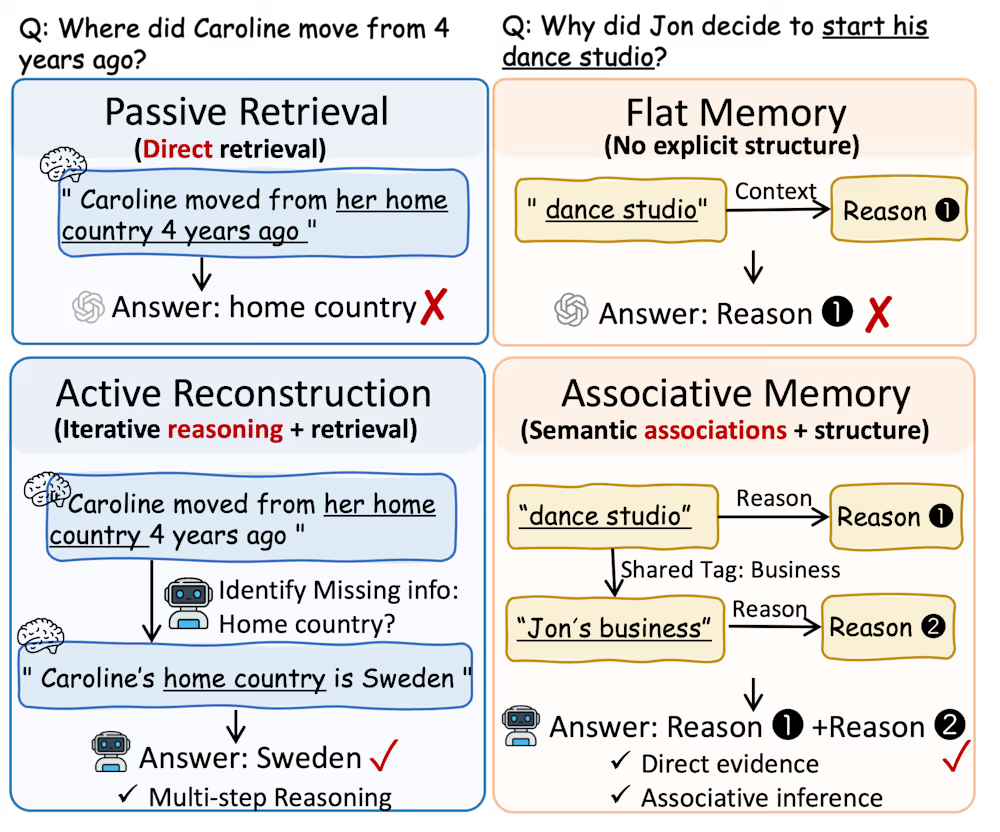
Long-horizon reasoning exposes a core weakness in AI agents: context windows fill up fast, and retrieval pipelines return noise instead of signal.
To solve this, researchers at the National University of Singapore developed MRAgent, a framework that abandons the static “retrieve-then-reason” approach. Instead, it uses a mechanism that allows an agent to dynamically develop its memory based on accumulating evidence.
This multi-step memory reconstruction is integrated into the reasoning process of the large language model (LLM). While not the only framework in this space, MRAgent significantly reduces token consumption and runtime costs compared to other agentic memory management approaches.
In classic retrieval pipelines, documents are retrieved through vector search or graph traversal and passed on to an LLM for reasoning. This passive approach fails because it cannot combine reasoning with memory access, creating three major bottlenecks:
These systems cannot revise their retrieval strategy mid-reasoning. If an agent fetches a document and discovers a crucial missing cue — a specific date or person — it has no way to issue a new query based on that finding.
Fixed similarity scores and predefined graph expansions return surface-level matches that flood the LLM’s context window with irrelevant noise, degrading reasoning.
Current systems rely heavily on pre-constructed structures such as top-k results and static relevance functions, limiting the flexibility required to scale across unpredictable, long-horizon user interactions.
The researchers argue that to overcome these limitations, developers must shift toward an “active and associative reconstruction process,” a concept inspired by cognitive neuroscience.

Under this paradigm, memory recall unfolds sequentially rather than operating as a passive read-out of a static database. The system starts with small, specific triggers from the user’s prompt, such as a person’s name, an action, or a place. These initial hints point to connecting concepts or categories instead of massive blocks of text.
By following these metadata stepping stones, the agent gathers small pieces of evidence one by one. It uses each new piece of information to guide its next step until it successfully pieces together the full, accurate story.
Instead of viewing memory as a static database, MRAgent (Memory Reasoning Architecture for LLM Agents) treats it as an interactive environment. When processing a complex query, the agent uses the backbone LLM’s reasoning abilities to explore multiple candidate retrieval paths across a structured memory graph.
At each step, the LLM evaluates the intermediate evidence it has gathered and uses it to iteratively optimize its search. It infers new search constraints, pursues the paths with the best information, and prunes irrelevant branches. This allows MRAgent to piece together deeply buried information without filling the LLM’s context with noise.

To make this active exploration computationally efficient and scalable, the framework organizes its database using a “Cue-Tag-Content” mechanism. This operates as a multi-layered associative graph with three node types:
Cues: Fine-grained keywords, such as entities or contextual attributes extracted from user interactions.
Content: The actual stored memory units. These are divided into multi-granular layers, such as episodic memory for concrete events and semantic memory for stable facts and user preferences.
Tags: Semantic bridges that summarize the relational associations between specific Cues and Content.
This structure enables a highly efficient two-stage retrieval process. The LLM first navigates from Cues to candidate Tags. Because Tags explicitly expose the semantic relationships and structural associations of the data, the agent evaluates these short summaries to judge their relevance. The LLM identifies promising traversal paths and discards irrelevant branches before spending compute and prompt tokens to access the detailed, heavy memory contents.
For example, a user might ask an AI agent, “How did Nate use the prize money when he won his third video game tournament?”
MRAgent first extracts fine-grained starting cues from the prompt, such as “Nate,” “video game tournament,” and “win.”
The agent maps these initial cues to the memory graph and looks at the available associative Tags connected to them. The agent sees tags like “Tournament Victory” and “Tournament Participation.” Since it is only concerned with what the person did after they won the championship, MRAgent drops the tournament participation tag and pursues the victory tag.
The agent retrieves the episodic content linked to the chosen Cue-Tag pair, retrieving three distinct memory episodes where Nate won a tournament.
MRAgent looks at the three memories, decides one of them in particular is relevant to the query, and discards the other two.
With this information, it updates its cues and starts another round of discovery and pruning. From the new episodic memory it has retrieved, the agent adds “tournament earnings” to its cues and uses that to traverse new tags and home in on new memories. It repeats this process until it gathers enough information to answer the query, which could be something like “Nate saved the money.”
MRAgent operates alongside several other frameworks addressing agentic memory building. Alternatives include A-MEM, a graph-based agentic memory framework, and MemoryOS, a hierarchical memory framework. Other persistent memory frameworks include LangMem and Mem0.
The researchers tested MRAgent on the LoCoMo and LongMemEval industry benchmarks. These test the abilities of agents to resolve queries on long-horizon tasks and conversations across dozens of sessions and hundreds of turns of dialogue. The backbone models used were Gemini 2.5 Flash and Claude Sonnet 4.5. The system was tested against standard RAG, A-MEM, MemoryOS, LangMem, and Mem0.
MRAgent consistently outperformed every baseline across both models and all question types by a significant margin.
However, for enterprise developers, the most critical metric is often computational cost. In the LongMemEval tests, MRAgent slashed prompt token consumption to just 118k per sample. By comparison, A-Mem consumed 632k tokens, and LangMem burned through 3.26 million tokens per query. MRAgent also effectively halved the runtime compared to A-Mem, dropping from 1,122 seconds to 586 seconds.

What makes MRAgent efficient in practice is its on-demand behavior. Evaluating tags and pruning irrelevant paths before retrieval saves money and context space. Furthermore, the system autonomously evaluates its accumulated context and inherently knows when to stop searching, completely avoiding redundant data exploration.
While MRAgent is highly effective, the Cue-Tag-Content structure needs to be prepared before the agent can query it. Developers must figure out how to architect the underlying memory database to enable the LLM to efficiently navigate associative items and prune irrelevant paths without exploding compute costs.
Fortunately, developers do not have to manually label or structure this data. The authors designed MRAgent with an automated distillation pipeline that uses LLMs to process raw interaction histories and automatically populate the memory graph. For a developer, the job is to implement and orchestrate this automated ingestion pipeline, rather than manually tag data.
You need to set up a background job or streaming pipeline that passes raw user interactions through prompt templates to extract this metadata before storing it in your graph database.
However, the authors emphasize that this is a lightweight construction phase and MRAgent intentionally keeps ingestion simple.
The authors have released the code on GitHub.


Russian hackers carried out the JLR cyberattack that halted production for six weeks and cost the UK $2.5B, the NYT reports.
Russian hackers were behind last year’s devastating cyberattack on Jaguar Land Rover, according to a New York Times investigation published Thursday. The breach, which began on 31 August 2025, shut down production across JLR’s factories for nearly six weeks and cost the British economy an estimated two and a half billion dollars, making it the most financially damaging cyberattack in UK history. Investigators have not determined whether the hackers were working directly for Vladimir Putin’s government, were independent criminals, or were operating with the government’s tacit approval.
Microsoft was tracking the Russian hacking group and alerted JLR to their identities, according to the Times. The FBI, Britain’s National Crime Agency, the National Cyber Security Centre, Google’s Mandiant unit, and Palo Alto Networks all contributed to the investigation, an unusually broad coalition that reflects the severity of the breach.
The attack originated with a vishing campaign weeks before the breach went public, in which attackers posing as internal staff tricked JLR employees into handing over login credentials. Armed with valid usernames and passwords, in some cases with administrator privileges, the hackers entered through normal authentication flows and moved laterally across JLR’s IT networks. Production lines ceased on 1 September, and staff were told to stay home.
The damage extended far beyond the factory floor. The UK’s Cyber Monitoring Centre estimated the total economic cost at one point nine billion pounds, with more than 5,000 organizations across JLR’s supply chain affected. The Bank of England later attributed a shortfall in GDP growth partly to the attack, noting that headline output had grown by just two tenths of a percent, less than it had projected.
The UK government responded with an emergency loan of one and a half billion pounds, roughly two billion dollars, to help restore JLR’s supply chain, an unprecedented intervention for a cyberattack. A group calling itself Scattered Lapsus$ Hunters initially claimed responsibility on Telegram shortly after the breach, but the NYT investigation now points to a separate Russian operation.
In a rare twist, investigators found that the Russian group was not the only one inside JLR’s networks. A Jordanian hacker who went by the name Rey had also breached parts of the company’s infrastructure independently, according to the Times. The discovery of two unrelated intrusions in the same victim underscores a problem that multiple breach investigations have surfaced in recent years, as state-linked and criminal hackers increasingly converge on the same high-value targets.
The attribution arrives amid an intensifying pattern of Russian-linked cyber operations targeting Western and Ukrainian infrastructure, from credential-stealing campaigns against Ukrainian military targets to DDoS attacks across Europe. Dutch police seized 800 servers last month tied to a Kremlin-linked group that had been attacking European government websites from data centres in the Netherlands. The Five Eyes intelligence alliance warned last week that frontier AI will make these attacks faster and harder to stop, a prospect that makes JLR’s six-week shutdown look like a preview of what is coming.
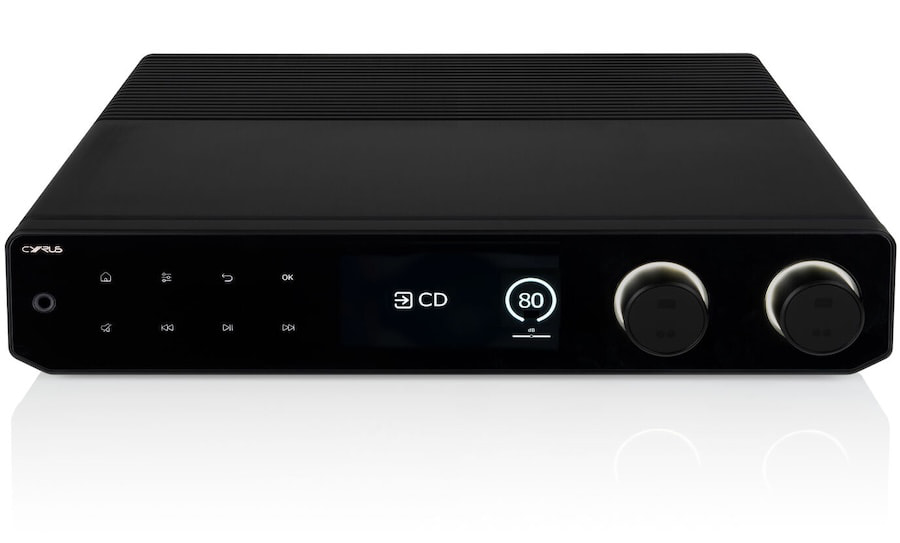
Cyrus Audio will give visitors their first public opportunity to hear its forthcoming 80 PRE streaming preamplifier and 80 PWR power amplifier together at the North West Audio Show 2026. The pair will be demonstrated ahead of its official launch in the Doug Brady HiFi room at De Vere Cranage Estate in Cheshire on June 27 and 28.
Cyrus has spent more than four decades building its reputation around compact half width components, so the 80 Series is not a subtle change of direction. It is the company’s first full width range, aimed at listeners who want the convenience of BluOS streaming, HDMI eARC, vinyl playback, balanced connections, and real Class A/B power without assembling a rack full of unrelated boxes. Cyrus first unveiled the 80 Series during High End Munich 2025, showing the new full-width components at Motorworld Munich.
Cyrus has never quite received the attention it deserves from North American listeners. That is not because the Cambridgeshire manufacturer lacks engineering chops or musical credibility. eCoustics has spent the past several years covering and reviewing Cyrus components, including the One HD, i7-XR, CDi-XR, 40 Series, and now the 80 Series, and the pattern has been rather consistent: thoughtfully engineered products with real sonic authority, strong phono stages, and a design language that has always been more distinctive than universally embraced.
In a market where Naim, Rega, Cambridge Audio, and Linn command far more dealer-floor oxygen, Cyrus has remained something of a cult favorite. The 80 PRE and 80 PWR may finally give the brand a more obvious path into larger North American systems and conversations.
Related Reviews:
The 80 PRE is far more than a conventional line stage. Cyrus has built BluOS streaming directly into the preamplifier, along with an ESS Sabre ES9039Q2M DAC and support for lossless playback up to 24 bit/192 kHz. It is also Roon Ready, supports AirPlay 2 and MQA decoding, and uses a five inch color TFT display rather than the tiny windows and ancient button arrays that still plague more than a few upscale components.
Connectivity is properly comprehensive. The 80 PRE includes four analog inputs, MM and MC phono inputs, two optical and two coaxial digital inputs, asynchronous USB B, HDMI eARC, balanced XLR input and output, plus both standard and balanced headphone outputs. That makes it a legitimate control center for a mixed system with a turntable, television, computer, streamer, and power amplifier all under one roof.
For Cyrus, the larger chassis is the story. The company has finally given its engineers more physical space to work with, while still allowing the 80 Series to pair with its smaller 40 Series components. That means owners could use the 80 PRE with the 40 CD, 40 PPA phono stage, or TTP turntable rather than being forced into a single all or nothing ecosystem.
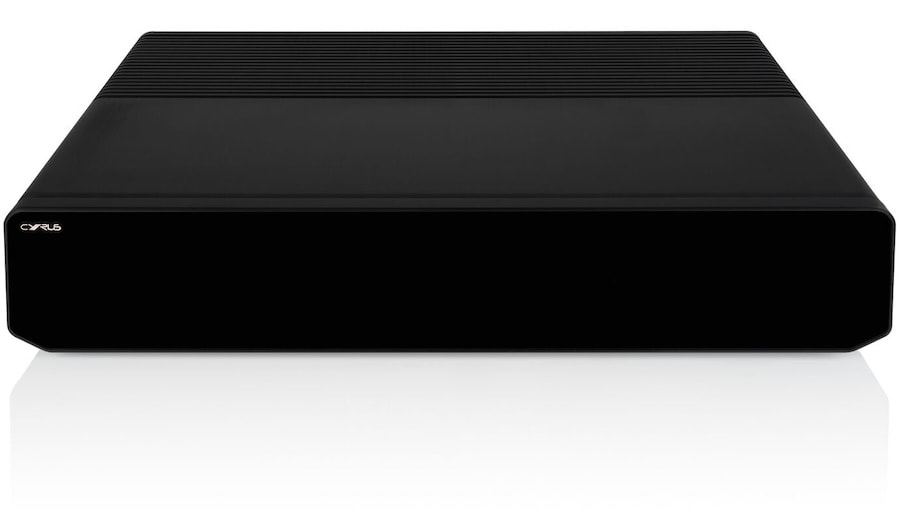
The matching 80 PWR is a Class A/B power amplifier rated at 200 watts in stereo mode and 300 watts when bridged for mono operation. It uses balanced XLR inputs and can be run as a stereo amplifier initially, with a second unit added later for a monoblock system. That is a sensible upgrade path for listeners with difficult loudspeakers or rooms that require more headroom than an integrated amplifier can comfortably provide.
Cyrus has not yet published the usual deeper measurements that serious buyers will want to see, including the impedance at which those power ratings are measured, damping factor, distortion, and dynamic output into lower loads. The published specifications confirm the basic architecture and headline power, but not the full engineering autopsy.
The 80 PRE and 80 PWR are significant because they represent Cyrus’s first serious full width separates platform, combining BluOS streaming, HDMI eARC, MM/MC phono, balanced connectivity, and Class A/B power in a system designed to grow with the owner.
What we still do not know is just as important: final pricing, release timing, 4 ohm output, distortion and damping figures, power supply details, and whether the new larger format delivers the authority Cyrus is promising. Cranage will reveal whether this is a proper Yorkshire pudding or merely a well dressed soufflé that collapses the moment the DALI speakers get demanding.
Doug Brady HiFi will demonstrate the 80 PRE and 80 PWR with the Cyrus TTP turntable, Cyrus 40 Series phono preamplifier, and DALI Epikore 3 standmount loudspeakers in the Stephenson 2 room. The setup is clearly intended to show that Cyrus sees the 40 and 80 Series as complementary rather than competing ranges.
Cyrus’s product pages currently list no pricing or formal retail date. UK retailer listings, however, show the 80 PRE at $5,995 (£4,499) and the 80 PWR at $5,295 (£3,999), with availability expected in August 2026. Those figures should be treated as dealer information until Cyrus confirms final pricing and availability market by market.
For more information: cyrusaudio.com

Apple’s MacBook Pro is set to receive an overhaul, with a redesign, an an OLED touchscreen expected to be the key changes. Here’s what the rumor mill has to say about the device.
While AppleInsider readers have wanted a Mac with an OLED screen for years, actual claims of an OLED-equipped MacBook Pro date back to at least 2019. As for when such an upgrade might arrive, it depends on who you ask.
Leakers and analysts alike have had a lot to say about the future of the MacBook Pro, with claims of hardware changes, performance upgrades, and more. Some have even claimed Apple’s touchscreen laptop will be called the MacBook Ultra.
Here’s everything rumored for the next major MacBook Pro upgrade.
Apple co-founder Steve Jobs had called touchscreen laptops “ergonomically terrible” in 2010, and software chief Craig Federighi echoed the sentiment in 2018, when he called touchscreen laptops “experiments.”

Apple is expected to introduce a redesigned MacBook Pro in either early 2027 or late 2026.
“We really feel that the ergonomics of using a Mac are that your hands are rested on a surface, and that lifting your arm to poke a screen is a pretty fatiguing thing to do,” said Federighi in 2018. However, rumors of a touchscreen MacBook Pro surfaced the very next year.
Reports from May 2019 and August 2021 said Samsung was reportedly set to produce OLED MacBook Pro screens. In January 2020, an Apple patent revealed the company hadn’t ruled out the idea of a touchscreen MacBook Pro.
Since then, multiple sources have chimed in on the matter, all saying that an OLED MacBook Pro with a touchscreen was in development. Opinions on when it would be released, however, differed.
A November 2021 report from The Elec said the MacBook Pro would only gain an OLED panel in 2026. The same publication, however, said in July 2023 that the touchscreen MacBook Pro would actually be released in 2027 with an eighth-generation OLED panel.
Just days later, the same source went on to say that the MacBook Pro would actually be updated with a sixth-generation OLED panel in 2025. Then, in February 2024, they said the MacBook Pro with an OLED screen would actually arrive in 2027.
In January 2025 and February 2025, however, the same publication said the MacBook Pro would receive a hybrid OLED panel in 2026.
In February 2026, the same source claimed that mass production of MacBook Pro OLED panels would start in May 2026. In June 2026, however, The Elec then said that mass production would begin in July 2026, which contradicted a separate leaker, who said trial production had already started in January 2026.
The publication behind these claims has a mixed track record, and it has continued flip-flopping over the years, saying that the OLED MacBook would arrive in 2025, 2026, or 2027 at different points in time.

Apple is expected to replace the camera notch with a punch-hole design on the next-generation MacBook Pro.
In general, however, rumored release dates for the OLED MacBook have been all over the place. In January 2023, analyst Ming Chi Kuo said Apple would ship an “OLED MacBook by the end of 2024 at the earliest.”
2024 has obviously come and gone, but Kuo has continued to make claims about the OLED MacBook Pro. In September 2025, he said the device would arrive in late 2026.
Separately, in May 2024, Omdia analysts said the MacBook Pro with an OLED screen would actually arrive in 2026. This claim resurfaced in December 2024 and July 2025. In June 2026, the analyst firm said Apple’s touchscreen-equipped MacBook Pro could debut in July 2026, which seems unlikely.
Display analyst Ross Young said in April 2023 and October 2023 that the MacBook Pro would receive an OLED panel and touch screen in 2026.
Korean publication ET News claimed in January 2023 that Apple had ordered OLED panels for the 14-inch MacBook Pro and 16-inch MacBook Pro, for devices expected to debut in 2026. This claim was reiterated a month later, and another Korean publication said the same thing in August 2025.
Meanwhile, in January 2023, a generally reliable leaker claimed the touchscreen-equipped MacBook Pro would arrive in 2025. However, by August 2025, their claim had changed to “late 2026 or early 2027.”
This alleged late 2026 through early 2027 release date was reiterated in November 2025 and January 2026 by the same source.
In February 2026, the leaker was more specific, saying that the OLED MacBook Pro would debut in late 2026. In April 2026, however, they claimed that the revamped MacBook Pro was more likely to arrive in 2027, due to an ongoing industry-wide memory shortage.
More recently, in June 2026, they suggested that Apple has abandoned its plans for M6 Pro and M6 Max chips, opting to focus on the AI-focused M7 line of Apple Silicon system-on-chips instead.
On June 26, 2026, they claimed Apple would use the current M5 Pro and M5 Max chips for its touchscreen MacBook Pro. The laptop is still expected to debut “between late 2026 and early 2027.”
Over the years, the same source listed 2025, 2026, and 2027 as release dates for the OLED-equipped MacBook Pro, so it’s still not entirely clear when the laptop will arrive.
As for verifiable information, AppleInsider learned in July 2025 that MacBook Pros bearing the device identifiers K114 and K116 were in development. The two laptops were tested with internal distributions of macOS Tahoe and were seemingly never intended to debut before macOS 26.5, as we learned in October 2025.
In short, the revamped OLED MacBook Pro will most likely debut in early 2027 or late 2026, depending on who you ask. In any case, though, there’s no doubt Apple has been researching the concept.
Ideas for touchscreen Macs can be seen in Apple patents as far back as August 2010, and the company hasn’t abandoned associated research efforts.

A 2024 Apple patent with an illustration of a MacBook Pro equipped with a touchscreen. Image Credit: Apple.
An Apple patent, filed in 2023 and granted in September 2024, titled “Touch Sensing Utilizing Integrated Micro Circuitry,” featured an illustration of a MacBook Pro with a touchscreen.
The text, meanwhile, repeatedly refers to “an example personal computer that includes a trackpad and an integrated touch screen.” Another Apple patent from March 2024 detailed an all-glass MacBook Pro with a touchscreen, further suggesting the company has plans for a radical MacBook Pro redesign.
An Apple patent from August 2024 details a different approach, with multiple touchscreens across different areas of a MacBook Pro. An October 2020 patent, meanwhile, outlined how a traditional MacBook keyboard might be replaced with a deformable touchscreen.
Apple executives Greg Joswiak and Craig Federighi said, in April 2021 and June 2025, respectively, that the company has no plans to merge the iPad and Mac. However, Apple’s own research suggests the Mac will become more iPad-like, thanks to the addition of a touchscreen.
The cornerstone of the K114 and K116 MacBook Pro models is expected to be the addition of an OLED panel and touchscreen.

Apple’s OLED-equipped MacBook Pro will likely be powered by the M5 Pro and M5 Max chips.
With macOS Golden Gate offering support for touch-based input via Sidecar on iPad, a touchscreen Mac would make sense. In June 2026, a leaker with a mixed track record said that the touchscreen MacBook Pro is “100% confirmed,” which isn’t much of a surprise, given that all previous reporting mentioned a touchscreen.
According to an October 2025 rumor, Apple has developed a reinforced hinge meant to offset any display bounce when the MacBook Pro touchscreen is used. The same report also says that the updated MacBook Pro will feature a hole-punch design for the built-in camera, meaning it may not have a notch like the M5 models.
A hole-punch camera design would be a good hardware fit for the new-and-improved Siri AI. On iOS 27, Apple’s virtual assistant shows up as part of the Dynamic Island, so Apple might opt for a similar approach with the MacBook Pro.
While a touchscreen is sure to change the way users interact with their MacBook Pros, an OLED panel would significantly improve the visual experience. Relative to the LCD screen of the M5 MacBook Pro, an OLED panel offers an improved contrast ratio and better response time.
The difference between an OLED panel and an LCD screen is especially noticeable when viewing images and videos with the color black. Movie scenes with lots of darkness or shadows typically look better on an OLED screen, appearing black rather than the sort of blue-ish gray you’ll often find on LCD screens.
To be more specific, though, according to a July 2023 rumor, Apple will use an eighth-generation OLED panel with LTPO TFT technology.
LTPO TFT is short for Low-Temperature Polycrystalline Silicon Thin-Film Transistor. This display technology combines the benefits of both LTPS (Low-Temperature Polysilicon) TFT and IGZO (Indium Gallium Zinc Oxide) TFT technologies.
LTPO TFT would allow for improved power consumption and longer battery life on the MacBook Pro, compared to traditional TFT technologies. Samsung Display is expected to be the supplier for MacBook Pro OLED panels, per multiple sources.

The touchscreen MacBook Pro is expected to feature a reinforced hinge design.
As for what will power the OLED MacBook Pro, the device is expected to feature the current M5 Pro and M5 Max chips, per a rumor published on June 26, 2026. This means performance will be comparable to the existing M5 Pro and M5 Max variants of the MacBook Pro, which debuted in March 2026.
According to an earler to a June 2026 rumor from the same source, Apple has abandoned the development of M6 Pro and M6 Max chips. The second-generation touchscreen MacBook is, instead, expected to use Apple’s M7 Pro and M7 Max chips.
Apple still has plans for a base M6 chip, which is expected to feature a memory bandwidth of 200GB/s, up from 153GB/s on the base M5 chip. However, according to a November 2025 rumor, it will only be used in the base-model 14-inch MacBook Pro, which will use the existing M5 design without a touchscreen or OLED screen.
Our own findings suggest this will be the case as well. As AppleInsider pointed out in October 2025, the entry-level 14-inch MacBook Pro bears the identifier J806, while the OLED MacBook Pros are broadly known as K114 and K116.
While chip and performance upgrades are to be expected, Apple is also said to have been exploring another upgrade for the MacBook Pro. According to a February 2024 rumor, Apple at one point considered adding a proprietary cellular modem to the MacBook Pro.
Devices like the iPhone Air, iPhone 16e, iPhone 17e, and M5 iPad Pro already feature Apple-designed modems. A December 2024 report claimed Apple was exploring adding a second-generation cellular modem to the MacBook Pro, and that the upgrade would not occur before 2026.
As for what the OLED-equipped MacBook Pro might be called, an April 2025 rumor says Apple will choose “MacBook Ultra” as the marketing name. This would expand the “Ultra” branding used for the Apple Watch and top-tier Apple Silicon chips.
However, this might not happen anytime soon. Apple was similarly expected to unveil an iPhone Ultra back in 2023, though that never amounted to anything.
As of late June 2026, there are no significant rumors about the battery capacity, speaker count, ports, or color options of the touchscreen MacBook Pro.
Hardware elements aside, the revamped MacBook Pro will likely be quite expensive. In June 2026, Apple increased the starting price of the M5 Pro MacBook Pro to $2,499, and that of the M5 Max MacBook Pro to $4,099.
The touchscreen-equipped models will likely hit an even higher price. The current memory chip shortage isn’t expected to end in 2027, and at this point it’s not reasonable to expect it to end in 2028 either.
Overall, it looks as though the next-generation MacBook Pro will deliver the following improvements over the current M5 lineup:
The touchscreen-enhanced MacBook Pro is expected to debut either in early 2027 or late 2026.

New Zealand and Belgium go head-to-head for the first time ever, in a crucial World Cup 2026 Group G fixture that’s a virtual knockout. The Red Devils guarantee progress with a win, while the All Whites will need other results to go their way.
Belgium may be overwhelming favorites against the 84th-ranked Kiwis, but they have blown tepid and cold so far, the goalless draw with Iran particularly dispiriting. Even their 1-1 draw against Egypt came courtesy of an own goal, sparked by Romelu Lukaku’s introduction. Yet the Napoli forward and Kevin De Bruyne looked off the pace against Iran and coach Rudi Garcia will need Arsenal’s Leandro Trossard on form to extend Belgium’s 15-match unbeaten streak with a necessary victory.
New Zealand, meanwhile, are bottom. They let a lead slip twice against Iran in a 2-2 draw and then squandered another early advantage against Egypt, eventually falling to a 3-1 defeat. With recent form not on their side – four losses from their six games in 2026 – Darren Bazeley will hope for a stronger defensive display and rely on the likes of Chris Wood and Elijah Just to provide the goals at the other end.
New Zealand need to win to have a third-place route, while hoping Iran fail to beat Egypt if they’re to finish second.
So, read on as we show you exactly how to watch New Zealand vs Belgium for free from anywhere in the FIFA World Cup 2026.
New Zealand vs Belgium is available to watch for free in multiple countries, including the UK, Australia, Brazil, Belgium, Ireland, Netherlands, Switzerland and Turkey.
Abroad? Can’t access your free stream? Unblock your free World Cup stream with Norton VPN – more on that below.
It’s the World Cup, and if you’re traveling, you might discover your usual New Zealand vs Belgium stream is suddenly unavailable due to geo-restrictions.
Don’t worry, that’s exactly where a VPN can help. A virtual private network lets you connect to servers around the world so you can securely access your usual World Cup coverage as if you were back home.
We recommend Norton VPN. Here’s why:

US viewers can watch New Zealand vs Belgium on Fox and Telemundo (Spanish comms).
You can watch every World Cup game on Fox, FS1 and Telemundo, which are available on cord-cutters like YouTube TV (free trial), Hulu+Live TV, Sling (select markets), Fubo or DirecTV.
Those looking for a streaming service instead can watch New Zealand vs Belgium on Fox One (3-day free trial). Telemundo is available via Peacock as well.
Visiting the US from the UK? You can still watch your World Cup stream for free thanks to Norton VPN (try for 60 days).

UK customers are in luck as they can stream New Zealand vs Belgium for free on BBC iPlayer. Live coverage is also available on the BBC One TV channel.
You require a TV Licence and a valid UK postcode for an account (e.g. SE1 7PB).
Norton VPN can unlock your stream if you’re abroad today.

New Zealand vs Belgium will be shown for free in Australia on SBS On Demand.
The streaming platform has every game of the tournament for free, making it the perfect place for your World Cup viewing.
Traveling for work or on holiday? A VPN like Norton VPN can help unlock your free stream.

In Canada, TSN and free-to-air channel CTV will be broadcasting New Zealand vs Belgium.
You can live stream via the TSN+ streaming platform, which costs CA$8 per month or CA$80 per year.
CTV will require your TV provider login details, but is also available via pay-TV streaming platform Crave if you want an alternative.
Outside of Canada? Use Norton VPN whilst you’re traveling away from home to unlock your stream.
New Zealand vs Belgium kicks-off at 4am BST / 1pm AEST on Saturday, June 27. That’s 11pm ET on Friday, June 26 in the US.
New Zealand
Goalkeepers: Max Crocombe (Millwall), Alex Paulsen (Lechia Gdansk), Michael Woud (Auckland FC)
Defenders: Tim Payne (Wellington Phoenix), Francis de Vries (Auckland FC), Tyler Bindon (Sheffield United), Michael Boxall (Minnesota United FC), Liberato Cacace (Wrexham), Nando Pijnaker (Auckland FC), Finn Surman (Portland Timbers), Callan Elliot (Auckland FC), Tommy Smith (Braintree)
Midfielders: Joe Bell (Viking), Matthew Garbett (Peterborough United), Marko Stamenic (Swansea City), Sarpreet Singh (Wellington Phoenix), Elijah Just (Motherwell), Alex Rufer (Wellington Phoenix), Ben Old (Saint-Etienne), Callum McCowatt (Silkeborg), Ryan Thomas (PEC Zwolle), Lachlan Bayliss (Newcastle Jets)
Forwards: Chris Wood (Nottingham Forest), Kosta Barbarouses (Western Sydney Wanderers), Ben Waine (Port Vale), Jesse Randall (Auckland FC)
Belgium
Goalkeepers: Thibaut Courtois (Real Madrid), Senne Lammens (Manchester United), Mike Penders (Racing Strasbourg)
Defenders: Timothy Castagne (Fulham), Zeno Debast (Sporting), Maxim de Cuyper (Brighton), Koni de Winter (AC Milan), Brandon Mechele (Club Brugge), Thomas Meunier (Lille), Nathan Ngoy (Lille), Joaquin Seys (Club Brugge), Arthur Theate (Eintracht Frankfurt)
Midfielders: Kevin de Bruyne (Napoli), Amadou Onana (Aston Villa), Nicolas Raskin (Rangers), Youri Tielemans (Aston Villa), Hans Vanaken (Club Brugge), Axel Witsel (Girona)
Forwards: Charles de Ketelaere (Atalanta), Jeremy Doku (Manchester City), Matias Fernandez-Pardo (Lille), Romelu Lukaku (Napoli), Dodi Lukebakio (Benfica), Diego Moreira (Strasbourg), Alexis Saelemaekers (AC Milan), Leandro Trossard (Arsenal)
|
Position |
Team |
GD |
Points |
|---|---|---|---|
|
1 |
Egypt |
2 |
4 |
|
2 |
Iran |
0 |
2 |
|
3 |
Belgium |
0 |
2 |
|
4 |
New Zealand |
-2 |
1 |
Of course, most broadcasters have streaming services that you can access through mobile apps or via your phone’s browser.
You can also stay up-to-date with all of the key World Cup moments on the official social media channels on X/Twitter (@FIFAWorldCup), Instagram (@FIFAWorldCup), TikTok (@FIFAWorldCup) and YouTube (@FIFA).
We test and review VPN services in the context of legal recreational uses. For example: 1. Accessing a service from another country (subject to the terms and conditions of that service). 2. Protecting your online security and strengthening your online privacy when abroad. We do not support or condone the illegal or malicious use of VPN services. Consuming pirated content that is paid-for is neither endorsed nor approved by Future Publishing.


Ford rehired 350 engineers after AI failed to replicate veteran expertise, then hit No 1 in JD Power quality for the first time in 16 years.
Ford has admitted that it had to rehire experienced engineers after its AI systems failed to deliver the quality the company expected. Charles Poon, Ford’s VP of vehicle hardware engineering, told reporters that the automaker mistakenly believed it could swap in AI and still produce a high-quality product. The admission, first reported by The Verge, comes as Ford earned the top spot among mainstream brands in JD Power’s initial quality ranking for the first time in 16 years.
The problem was not that the AI was fundamentally broken, Poon explained, but that experienced workers left before they could transfer their institutional knowledge into the systems meant to replace them. Without decades of engineering judgment encoded in the training data, Ford’s automated tools amplified weak inputs rather than catching design flaws. The company rehired, newly hired, or promoted 350 experienced engineers to fill the gap.
Poon was vague about why those workers left, but the broader picture is not. Ford has shed roughly 5,300 salaried positions since its 2020 employment peak, part of a wider contraction across Detroit’s automakers that has eliminated more than 20,000 white-collar jobs. CEO Jim Farley has said publicly that AI “is going to replace literally half of all white-collar workers in the US,” a prediction his own company’s quality crisis now complicates.
The 350 returning engineers were tasked with mentoring junior staff, rebuilding the data pipelines that feed Ford’s AI training, and refining the automated systems they were originally supposed to be replaced by. Ford also created a dedicated 40-person software quality assurance team and added more than 100,000 AI-powered automated tests to catch edge cases and revalidate software changes late in development.
The turnaround was enough to push Ford to the top of JD Power’s 2026 initial quality study, which measures problems reported by owners in the first 90 days of ownership. Ford scored 152 problems per 100 vehicles, ahead of Nissan and Buick. The F-150, Mustang, and Super Duty each won best in segment for the second consecutive year.
The quality win does not erase a rougher track record. Ford has led US automakers in recalls this year, issuing 51 so far in 2026 covering more than 11 million vehicles, more than double the next-closest manufacturer. It also joins a growing list of companies discovering that removing human judgment from AI-driven workflows creates problems the technology cannot fix on its own.
The episode lands at a moment when AI companies and policymakers are scrambling to figure out what the transition means for workers. OpenAI, Anthropic, Amazon, and Microsoft this week backed RAISE US, a $500 million nonprofit led by former commerce secretary Gina Raimondo to retrain American workers for the AI economy. Ford’s experience suggests the harder problem is not retraining but knowing which workers you cannot afford to lose in the first place.
Getting started with power tools can be rather overwhelming. There are quite literally hundreds to choose from, and a dozen or more competent brands that make them. There is often no indication of what tools a beginner should or shouldn’t purchase. So, how does one choose? Well, the first thing one might do is come to an article just like this one because sometimes, asking another human being is the best possible way forward.
The good news is that there are absolutely power tools that a beginner should start with. We have a whole separate article for those, and most beginners will do just fine with that starter list of tools. On the other end of the spectrum are tools that may seem like a good idea at first but will ultimately either end up gathering dust or prove too much for the task you have planned. Unlike hand tools, which can sit on a shelf for decades without degrading, power tools need batteries. If you have a bunch of tools you never use, those batteries will simply degrade over time.
So, if you’re a beginner and you’re looking for power tools to buy and avoid, we highly recommend clicking the link in the prior paragraph for tools you should start with and then scrolling down for tools that you can skip for now until you get a better idea of what you need or want to do with them.
A cordless drill and even a cordless impact driver make for great beginner power tools. They have tons of uses, and if you’re active in home improvement projects or home repair, you’ll use them all the time. However, there is such a thing as a hammer drill, which is the stronger, burly older brother to the drill and impact driver. Many brands sell these, and you’ll easily find them at your local Harbor Freight, Home Depot, or Lowe’s. They use the same batteries as their smaller counterparts, so it may seem like a good idea to have one.
Well, this is today’s edition of bigger is not always better. Hammer drills do have specific purposes and aren’t good at everything. They work by having an internal mechanism that acts like a mini jackhammer. In short, take a normal drill, use it, and imagine someone smacking the back of it with a hammer very quickly, and you get the general idea. That extra forward hammering helps the hammer drill into masonry materials like stone, concrete, brick, and cinder block. This is vastly overkill for most home repair uses, where the strongest materials you’re likely to run into are wood and drywall.
For now, get yourself a good cordless drill, and you can often find them in combo kits with impact drivers. Save the hammer drill for later when you’re sure that you’re going to actually need one, or borrow one from your neighbor.
A tile saw is another good example of a tool you’ll probably use only once and then never again. It’s made for cutting tile like the kind you see on floors or kitchen backsplashes. There are two types of tile saws. Dry ones score the tile, making it easier to snap it into the shape you want, while wet tile saws use diamond-tipped saw blades cooled with water to cut all the way through the tile for more precise cuts. Most major power tool brands make both types, and as a beginner, you don’t need either of them.
The reason is pretty simple. Most DIYers will only need to work with tile a few times. Tile lasts a very long time. We’re talking decades between replacements. That means most first-time homeowners wanting to redo all their tile will probably only need to do so once or twice in their entire lives. Thus, it seems like a good idea to buy a tile saw for that big renovation, but after that renovation is done, you won’t really need it anymore, and it’ll sit on a shelf somewhere collecting dust.
For projects like the ones described above, your best bet is to rent a tile saw, which you can do at places like Home Depot and other tool rental companies. It costs less to rent one of these for a few days than it does to buy a tile saw, and you won’t have to deal with storing it after you’re done.
Pipe crimper tools, also known as press tools, are excellent tools for plumbers. They work by essentially pressing pipes and fittings together, alleviating the need to solder them. When used properly, the connections won’t leak. This saves plumbers tons of time, effort, energy, and fume inhalation versus soldering a pipe together. The most well-known ones are made by Milwaukee, and if you’ve ever hired a plumber to replace or repair pipes in the recent past, there’s a good chance they had one. As a DIYer, you don’t need one of these.
There are a few reasons. For starters, a pro-level press tool costs roughly $2,000, and while Milwaukee’s version does work with its other M12 tools, $2,000 to fit a few pipes is massive overkill for home repair. There are cheaper models out there, but the same rule of thumb applies anyway. Beginners probably shouldn’t be doing complex plumbing tasks on their first time out anyway, and buying a tool specifically for a task they may only have to do a couple of times just isn’t a good idea.
In most cases, beginners should be calling a plumber for complex pipe fixes. For simpler, minor fixes, you can get by with a hacksaw and something like a SharkBite connector that will connect two pipes together without soldering or pressing. As long as it’s installed properly, it won’t leak, and as long as you check it every now and then, you should catch any potential problems while they’re still small. Save the press tools for the pros.
Lathes are rather large machines that fill a niche. The machine works by securely wedging an object in its jaws and spinning it around really quickly. You can then set the tool to carve or shape the material as you prefer. You put a length of wood on the lathe, spin it, and you can easily carve out a design for your chair leg. This is a hobbyist-level tool that DIYers probably won’t ever need unless they want to get into fabricating their own stuff.
There are two major reasons for this. The first is that you can usually go buy the stuff you need at a local hardware store that’ll fit just fine. Lathes are best for custom-making stuff, and unless that’s on your docket, there’s no reason to have one. The other is that lathes are large tools that take up quite a lot of space. Thus, if you own one and don’t use it, you have almost a whole table dedicated to a big machine that doesn’t get any use.
You can buy decently powerful lathes from most hardware stores, including Harbor Freight. If you make it past the beginner stage of power tools and find yourself wanting to start making your own stuff, then a lathe should be on your list. Otherwise, just buy it from a hardware store and go about your day. It’s easier and cheaper that way.
There comes a time when you may need to get two pieces of wood to connect together in such a way that screws or nails won’t work. Biscuit joiners, also known as plate joiners, help with that. They work by affixing two pieces of wood together using “biscuits,” which are small pieces of compressed wood that fit into slots cut into each piece of wood that needs to be fit together. The joiners then press that wood together (in combination with something like wood glue) to turn two wood boards into one.
If you’re having trouble visualizing how that process works, then you probably don’t need this tool. It’s a woodworking tool often used in woodworking and by hobbyists who make their own furniture, cabinets, and things like that. There is virtually no reason to own this as a beginner since you’ll have virtually no occasion to use it, and thus, having one is almost entirely a waste of money. There are YouTube videos and other sources that will sing the praises of this thing. Don’t listen to them, at least not yet.
The kinds of projects that require something like this are well within the bounds of intermediate or expert levels. You should definitely know what it does in case you ever feel like getting into woodworking or building your own stuff. However, that is not usually a place where beginners begin, so keep it in your bookmarks for right now.
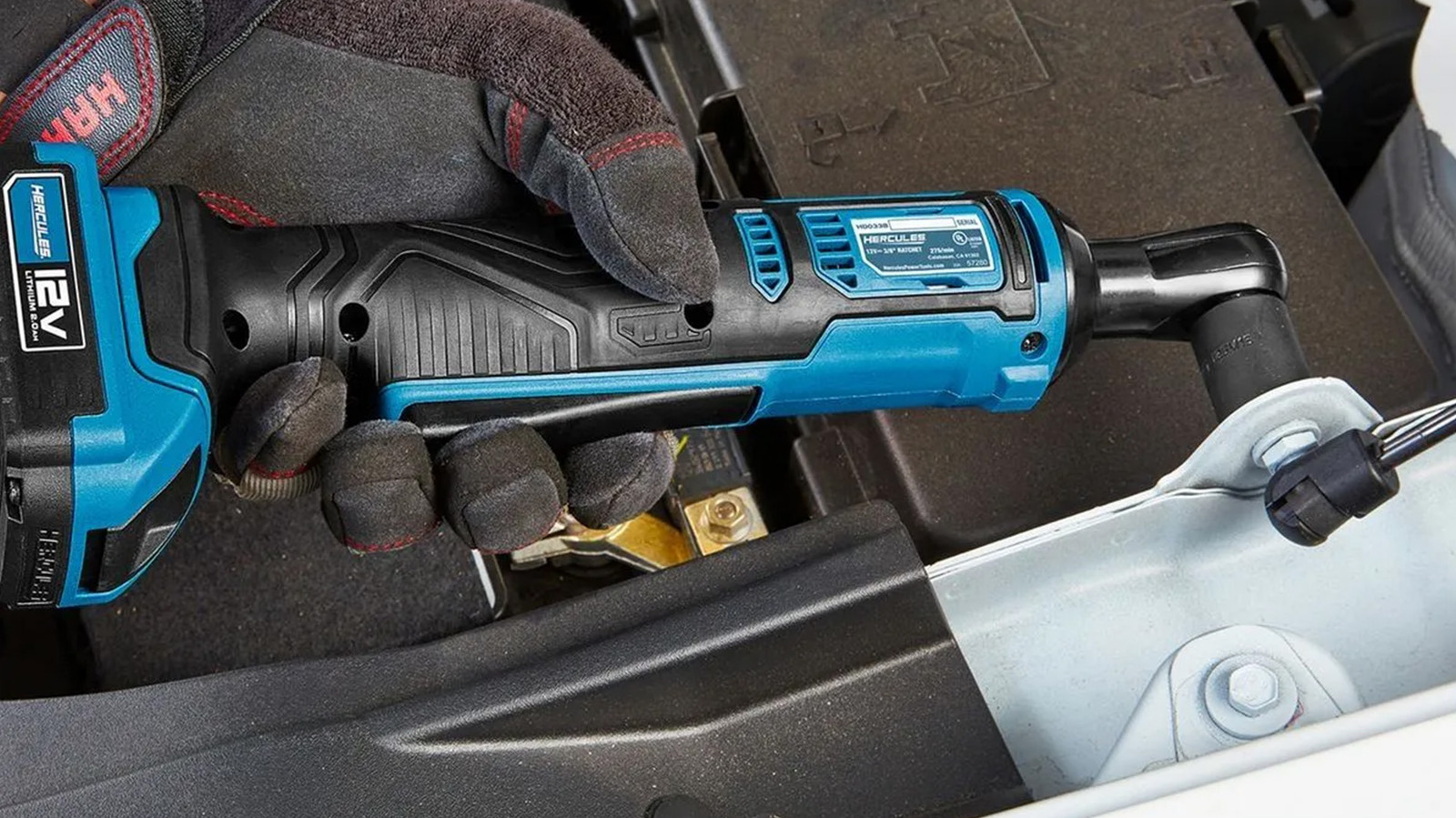
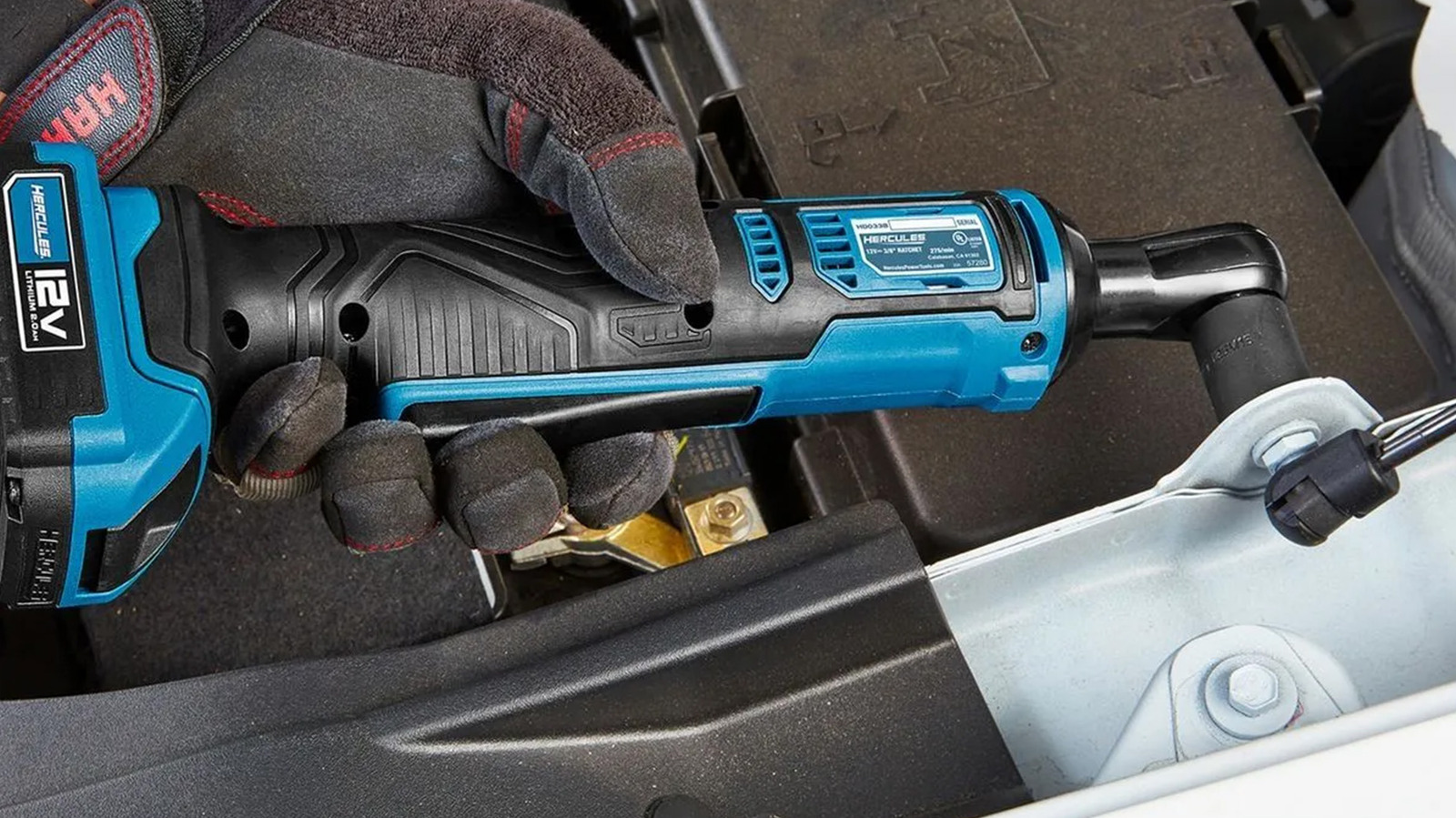
Cordless ratchets are a real thing. They work just like regular ratchets and are often used in automotive applications, often in place of pneumatic ratchet wrenches, when someone has to loosen or tighten a whole bunch of nuts and bolts. These also come in a couple of different flavors, although the most common ones tend to be the type where you just grip it and rip it, and the tool does all the work. There are real benefits to these, but as a beginner, you probably don’t need one.
There are two reasons why. The first is that you probably don’t need to loosen so many nuts and bolts that having a tool that does it that quickly will save you any measurable amount of time. People who use these are often professionals or hobbyists who have to deal with nuts and bolts all the time. Spending upwards of $300 for the tool and batteries to loosen the occasional nut just isn’t a good idea, especially since most of them don’t come with sockets.
That takes us to our second reason, which is that you can find reasonably priced ratchet and socket sets that cover all your common bases. Since hand tools often come with a lifetime warranty, you’ll get more bang for your buck by getting a ratchet and socket set first, and then if you find yourself needing one all the time, then you should consider something like a cordless ratchet, since you’ll already have the sockets at home.
Routers are another woodworking tool that no beginner should ever need. They’re used to cut wood. This can be used for decorative purposes if you’re crafting something or to cut channels, notches, or grooves into wood for functional uses like joining two pieces of wood together. If you’ve ever seen a cool beveled edge on a cabinet or cutting board, there’s a good chance it came from a router. You can buy these at any hardware store, and most of them are pretty decent for their intended purpose.
The reason beginners should stay away from these is virtually identical to the biscuit joiner and other woodworking tools. These are used for creating things, and beginners usually don’t start by designing cabinet doors or cutting boards, nor are they performing surgery on wood to combine pieces together. This is definitely an intermediate or advanced tool, and not a great choice if you’re just starting out.
To compound the issue, there are various types of routers, including fixed-base, plunge, combination, and trim routers, each of which has its own features, functions, and use cases. However, if you are stubborn and must get one, the combination router is the most beginner-friendly since it combines fixed-base and plunge routers. This gives it more versatility, making it more likely to be a tool you’ll actually use. However, if you don’t intend on doing a lot of woodworking, you can skip owning a router entirely.
Yard tools are a whole animal, and there are many that beginners should absolutely get, like a lawn mower, string trimmer, and leaf blower. These aren’t traditionally powered with electricity, but there are many electric brands and models today. That means there are a lot of other power tools designed for outdoor use, like augers, cultivators, and tillers. These tools specialize in breaking up soil and digging holes for the purposes of replanting, gardening, or other such activities, and unless you’re really into messing with your lawn (or gardening), you can skip these tools altogether.
These ones are tricky because they seem like a good idea at the onset. After all, you have a lawn, and it needs work, and these tools essentially do that exact thing. However, most of the jobs that these tools handle really only need to be done once in a great while unless you have a garden, which you may want to cultivate more frequently. This is much the same as woodworking tools. They’re great if you enjoy the hobby or work on this stuff professionally but are mostly worthless if you don’t do either of those things.
There is one exception. Many brands now have string trimmers that support attachments. These give you a way to add extra versatility to your string trimmer, like a cultivator add-on, without needing a whole other tool to do it. For one-off projects, you can also rent these tools pretty easily.
Table saws are some of the most common and popular power tools in the world. They’re widely considered the heart of a woodworker’s kit, and they’re useful for a lot of things. Their claim to fame is the ability to make long, clean cuts, which is perfect for cutting down wood into all sorts of shapes for various home improvement projects. Most major brands make them, and they’re available at almost any hardware store. As a beginner, you can probably skip this one if you’re just starting out.
Table saws are undoubtedly useful, and one day, when you make it to intermediate status, this is likely to be the first tool on your list, especially if you get into building stuff like tables, chairs, or other furniture. However, if you’re just starting out, you can do most of your cutting with more beginner-friendly tools like circular saws. It may not be as clean, but you only need to consider investing in one of these if you’re doing some bigger projects on a regular basis.
So, like most of the other saws on this list, it’s a matter of experience rather than use. If you end up getting into building your own shelves or building a deck on the regular, then a table saw is a valuable asset to have in your shop. Otherwise, keep it simple and save the time, money, and space, and avoid it for now.
This list was actually pretty easy to make. There are two types of tools that beginners really want to avoid. The first is pro-use tools, like the press tools that squeeze pipes together, as these perform tasks that DIYers will rarely have to deal with more than once or twice if at all. That makes them a waste of space and money. The other is tools with niche use cases, like a lathe, where they’re really only useful for folks who perform that kind of work often or as a hobby. The list above has several of these, but the list is also not exhaustive. For example, this Milwaukee M12 16 Gauge Variable Speed Nibbler isn’t on the list above, but it’s both a pro-use and niche tool, and is completely pointless for a beginner to own.
To narrow down the list, we chose tools that most people have at least heard of and may have seen in use around their neighborhood or in a high school shop class. After that, I drew on nearly a decade of experience as a homeowner and DIYer to narrow the list even further. For example, I still don’t have a reason to own my own table saw, and I’m hardly a beginner anymore.
Finally, this list isn’t about brands, but more about the tools themselves. The recommendation is for beginners to hold off on buying tile saws in general, rather than focusing on any particular brand.

BrianFagioli writes: The Linux Foundation has announced Akrites, a new initiative to coordinate vulnerability disclosure and remediation for critical open source software as AI dramatically speeds up vulnerability discovery. Founding members include AWS, Google, Microsoft, OpenAI, Red Hat, NVIDIA, IBM, Cisco, JPMorganChase, and others. Akrites will provide a shared Security Incident Response Team (SIRT), a standardized coordinated vulnerability disclosure process, and act as a “maintainer of last resort” for abandoned but widely used packages.
The goal is to reduce duplicate reports, avoid conflicting patches, and help upstream maintainers address vulnerabilities before they can be exploited. As AI makes it easier to find security flaws, can a coordinated industry effort help protect open source, or does it risk giving large corporations too much influence over the ecosystem? “Akrites is the largest coordinated effort in history to create systems and deploy tooling that leverages the collective power of the community to make everyone safer,” the Linux Foundation said in an open letter. “Akrites participants will contribute engineering resources; work to build and ship fixes; or fund the engineers who do. Some companies have contributed mightily already. The reality is, collectively, we need to contribute more.”




Renter of Home in Anne Heche Crash Denies Settlement With Son
Two goals and an assist by sheer aura: Cristiano Ronaldo just entered the World Cup chat


Microsoft accidentally kills epic Outlook email threads


Soccer-U.S. defends Iran World Cup travel restrictions, says discussions ongoing


Weekend Open Thread: Staud – Corporette.com


The House | Manchesterism won’t survive the painful trade-offs unless it gets citizens on board


Andy Burnham and the meaning of Makerfield


Potential 2028er World Cup attendee leaderboard
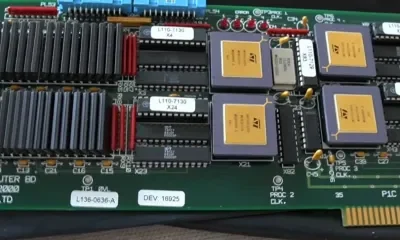

A Look At A Gaggle Of Transputer Boards
Bitcoin (BTC) Dips Below $62K, Ethereum (ETH) Plunges 6% Daily: Market Watch


Asia stock markets slide as tech shares slump


Securitize Wraps Roubini's SEC-Registered ETF as Dubai VARA Digital Security

Dell (DELL) Shares Tumble Over 5% Following Analyst Downgrade to Hold
Entergy settles forward sale agreements, raises $672 million in cash proceeds

Can Charles Hoskinson Really Rescue Cardano?

Wall Street Week Ahead: Investors see Micron earnings as pulse check of AI rally momentum


FIH Pro League: India defeat Pakistan 7-1, register biggest win of campaign | Other Sports News


Jose Alvarado Wants Taylor Swift at More Knicks Games


RTX holders must register wallets before token distribution begins


HIVE shares jump as $220M AI deal speeds Bitcoin mining pivot


You must be logged in to post a comment Login