



Connect with us

Tech

How To Make Your Android Alarm Ring At Full Volume Even When Your Calls Are Muted

Published

on

There’s no need to keep oversleeping (unless you want to).

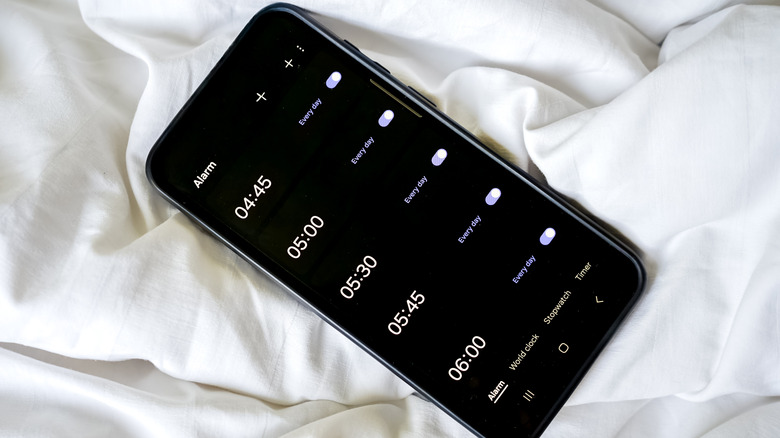
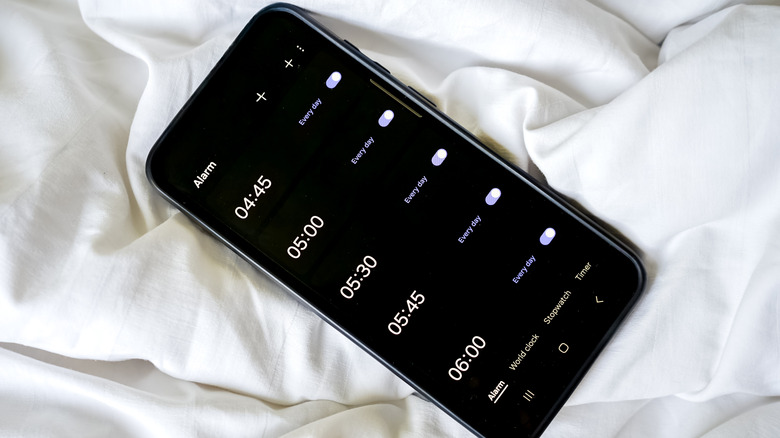
After a stressful day at work, it can be nice to unwind and just hit that volume down button until your Android phone is completely silent. No calls, no meetings, no distraction — just you touching grass. Although a silent phone can be comforting, on some Android devices muting calls can unintentionally mute your incoming alarms as well, which is a rough way to find out you overslept and missed a meeting.

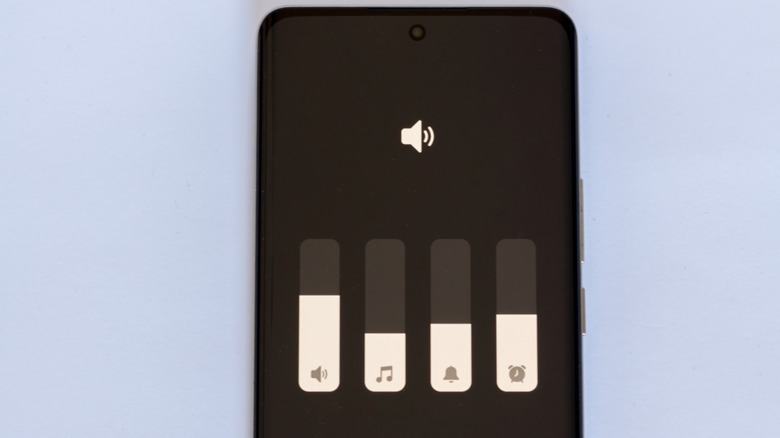
Thankfully, on most Android devices, there are a number of ways to keep your calls muted while your morning alarms still blast at full volume. But Android is a pretty broad ecosystem of different devices from different manufacturers, so there’s no one way to do this. On some devices, you can do everything in the volume slider; you can mute calls and manage your alarm’s volume right there. On others, you’ll likely have to rummage through your sound settings to find the right slider.

Advertisement

How to keep your alarm at full volume when your Android phone is on mute

First, check your expanded volume menu. Tap any of your volume buttons to bring up your volume slider, then tap the three-dot icon. In the expanded menu, you’ll see sliders for different sounds like media, ringtone and notifications. If you see one for alarms, then adjust it to your preferred level.

If that doesn’t work for you, then you’ll have to head into your settings app. Go to Settings > Sound & vibration > Volume. In this menu, you’ll see separate sliders for media, ringtone, notifications and alarm. Drag the alarm slider to adjust its volume. Do note that, depending on your exact Android device, the steps and menu might not be exactly the same.

If you’re using a Samsung phone and don’t fancy a trip to your settings app, you can make the alarm volume slider appear in the expanded volume menu. Just go to your alarm app, set a short timer, and once that goes off, use your volume buttons and three-dot icon to open the volume menu. Now you’ll notice that your alarm’s slider is in the menu and you can adjust its volume.

The last place to look is your Do Not Disturb settings. Once again, open Settings and navigate to or search for your Do Not Disturb settings. Once there, make sure alarms are allowed during Do Not Disturb.

Advertisement

Still no alarm sound? Other things worth checking

A few other things can keep your alarms quiet even after you’ve tried all the fixes above. And one of the common culprits that easily flies under the radar is Bluetooth audio routing. In plain terms, look at whether your phone is connected to any Bluetooth audio device, like your earbuds or car speakers, and is routing your alarm’s audio through there instead of your phone. 

Your phone’s battery optimization settings are another suspect that could be behind your alarm’s silence, especially if you’re using a third-party alarm app. Go through your settings and check if your alarm or clock app has been put to sleep or restricted from background activity. If you discover that’s the case, exclude the app and give it optimized or unrestricted background access for best results.

Talking about third-party alarm apps. If you’re using one, make sure it’s set as the default alarm app. Otherwise, your Android phone will keep using the native clock app instead. So no alarm you set will go off.

Advertisement

Source link

Advertisement
Continue Reading
Click to comment

You must be logged in to post a comment Login

Leave a Reply

Tech

Bill Gates in his own words: How he’s using AI, and why he’s worried about the future

Published

on

Bill Gates, shown here in April 2025, released a memo this week warning that the world isn’t ready for AI. (GeekWire Photo / Kevin Lisota)

This week on the GeekWire Podcast: Bill Gates published a new essay warning that the AI industry is crossing the safety lines it set for itself, and that nobody is preparing for what’s coming. At age 70, he also uses AI more than most people half his age, and he finds it enthralling, as you’ll hear on this week’s show, with highlights from our interview with him.

Along the way, we dig into his three proposals: new institutions for managing the transition, a category of jobs reserved for humans, and a tax on the use and purchase of AI and robots.

The change in his own tech usage: “I joke with people that I used to have Claude-like people that I would send email to, but they were so slow, and there were some topics they didn’t actually know. … It’s three a.m. I want to understand sodium batteries, and now there’s no reason to go to sleep. Here we go. Yeah, it’s crazy.”

How he uses AI specifically: “If you’re a curious person, this is a mind-blowing time. When I’m working on malaria, nutrition, my poor humans that I work with always get these long conversations from me, where I paste in — me, Claude, me, ChatGPT. Sometimes I do it if there’s three of us: Claude, ChatGPT and me, debating these things.”

On where personal agents are headed: “We will get to a point where you won’t buy things yourself. You just won’t. … You won’t go to those applications. You’ll just go to your personal agent. … From a productivity point of view, we are in heaven.”

Advertisement

What has surprised him: “I was shocked by ChatGPT, and I was shocked by Claude Code. Those are both things where I went, oh my God. … I did not expect that a statistical machine would essentially learn to read, and the idea that the code is better than human code. Those are two stunning thresholds.”

@media (max-width: 600px) {
aside.callout { float:none !important; max-width:100% !important; margin-left:0 !important; margin-right:0 !important; }
aside.callout .callout-img { display:none !important; }
}

On writing this essay: “It’s very unnatural for me to think that innovation may be a net negative if it’s not managed properly. The more I wrote the memo, the more I was like, Jesus, we really need to get our act together here. Even though this may come across as negative, that’s the truth. If we don’t step up, the negatives will substantially outweigh the positives.”

What AI leaders say privately: “You’re in this perverse period right now where people in the AI industry who are willing to say that AI might have some negative effects are told, ‘Hey, you’re hurting our PR while we’re trying to raise trillions of dollars.’ … I know they’re all worried. Or all of them that I know, which is basically everybody but Elon.”

Advertisement

On losing control of AI: “The wake-up for the memo is that the bad stuff thresholds are all being crossed. Even lack of control that I thought would be many years from now, we’re seeing lack of control. … These are people who are super expert on the thing, going, well, maybe we won’t be able to control these things. What kind of risk have we chosen to run here?”

On how fast robots are coming: “What’s weird about AI is it’s better at doing jobs across the entire economy, including physical jobs when the robots come — which you can guess when that is, but my view is it’s only a couple of years.”

Is he still an optimist? “I don’t think being pessimistic is helpful. I do think, wow, this is sure an interesting time. I’m the guy who in my 30s thought people in their 50s or 60s didn’t understand anything. So it’s kind of bizarre if a guy who’s 70 comes and writes a memo that’s actually helpful. … But I am very concerned. And honestly, when you get people one-on-one, so are they.”

Related headlines and links

Subscribe to GeekWire in Apple Podcasts, Spotify, or wherever you listen.

Edited and produced by Curt Milton. Music by Daniel L.K. Caldwell.

Advertisement

Source link

Continue Reading

Tech

How To Reset Your Roku TV

Published

on

There are a few ways to wipe your Roku TV back to its original state.

Roku TVs can act up for all sorts of everyday reasons, just like any other TV. They may freeze up, stop responding to the remote, disconnect from Wi-Fi or play dead after a software update. This isn’t a knock against Roku, just a basic observation that most TVs will eventually try to skip out on you, usually when you’re really excited about watching something.

A basic restart is the least disruptive option and usually does the trick. A factory reset, however, is the nuclear option, erasing all of your personal preferences, removing your Roku account and downloaded apps and returning your TV to its original, out-of-the-box state. Fun stuff. Regardless of which extreme you end up with, make sure you have your Roku account email and password, Wi-Fi information and any other login details or PIN you need before the tinkering begins.

For a factory reset, you will definitely need that information to activate the TV and reinstall your streaming service afterward. If the TV is linked to someone else’s account, make sure you have their credentials. With that being said, here’s how to restart your Roku TV, whether your remote works, the TV has lost internet or it’s completely unresponsive.

Advertisement

How to do a soft reset on a Roku TV

A soft reset simply restarts the TV without deleting any apps, account info, W-iFi details or saved preferences. Everything remains the same, so this is your best and safest bet before considering a factory reset.

  1. Press Home on the Roku remote.

  2. Press the left button on the D-pad to open the menu.

  3. Select Settings.

  4. Select System.

  5. Select Power.

  6. Choose System restart.

  7. Select Restart to confirm.

There are Roku TVs, and there are other brand TVs that license Roku’s software. Not every Roku settings menu will look the same. For this scenario, some Roku TVs may not have a separate Power menu. If that’s the case, go to Settings > System > System restart instead.

Advertisement

If the Roku interface is frozen but the TV still has power, simply unplug the TV from the wall, wait for 10 seconds then plug it back in. Restarts often solve minor software issues, a sluggish interface or connection problems in general, without resorting to harsher measures.

How to factory reset a Roku TV with the remote

This will completely wipe your TV, essentially preparing it for a new owner or taking you back to scratch, as if you just hauled it out of the box. It erases your personal settings, unlinks the TV from the associated Roku account and removes installed channels and account information. You will have to go through the guided setup process all over again before you can get back to streaming.

Advertisement
  1. Press Home on the Roku remote.

  2. Hit left on the D-pad and select Settings.

  3. Choose System.

  4. Select Advanced system settings.

  5. Select Factory reset.

  6. Choose Factory reset everything.

  7. Follow the on-screen instructions, including entering the code shown on your TV.

Your Roku TV will restart when the reset is finished. From there, connect it to your Wi-Fi, sign into or create a Roku account and reinstall your favorite apps. If you have an antenna connected, you will also have to run a new broadcast channel scan.

You can also choose to reset your network settings or audio/picture settings using this same process. Resetting your network will erase your W-iFi password and router connections so you can start with a new one. Resetting audio/picture settings is exactly what it sounds like, taking you back to the TV’s original audio and picture settings.

Don’t use this step just because an app is misbehaving on you. Try restarting or removing and reinstalling the quirky app instead.

Advertisement

How to reset a Roku TV without a remote

As mentioned earlier, not every Roku TV is the same. There are plenty of brands out there running the Roku operating system, not to mention Roku’s own TV sets. Most Roku TVs have a physical reset option, though its location on the TV varies by model. Look along the back, side, or bottom of the TV for a button labeled “Reset” or a small pinhole reset switch (find a paperclip if you see a pinhole). With the TV powered on, press and hold the Reset button for about 12 seconds. Release it when the status light begins blinking rapidly. The Roku TV should restart at the factory setup screen.

Some recent Roku models do not have a separate reset button. On Roku Pro Series models, hold the Power and Find My Remote buttons simultaneously for 12 seconds. Some Roku Plus and Select Series models use the same two-button reset system.

You may also have a workaround through the Google Play Store for Android devices or the App Store for iOS devices: the official Roku app. Depending on the state of your TV, you may be able to download the app and use it in place of a physical remote. Your TV has to be powered on and connected to the same Wi-Fi network as your phone or tablet.

Advertisement

How to reset a Roku TV that won’t connect to Wi-Fi

If your Roku TV isn’t playing nice with your Wi-Fi, there’s no need to run a factory reset…yet. Instead, go with a basic restart.

  1. Restart your Roku TV through Settings > System > Power > System restart if you can access the menu.

  2. Restart your modem and router by unplugging both for about 30 seconds, then reconnecting them.

  3. On the Roku TV, go to Settings > Network > Set up connection > Wireless.

  4. Select your Wi-Fi network and re-enter your password.

  5. Run Settings > Network > Check connection to test the result.

If your TV just won’t stay connected, you may need to move your router closer, remove any physical obstructions between your TV and router, or test another device on the same network to narrow things down.

Advertisement

Why did my Roku TV reset itself?

Restarts after software updates or power outages are normal, but your Roku TV shouldn’t factory reset itself. If your TV returns to the setup screen (language selection, account activation, etc.), it means a factory reset just took place. If your TV has a reset button, make sure nothing is pressing up against it.

If the process repeats and nothing physical seems to be causing it, contact Roku Support. A never-ending reset loop is likely a hardware, storage or software issue that requires more than a reset to fix.

Advertisement

If you’re selling, donating or returning a Roku TV, a factory reset is exactly what you need to do. You obviously don’t want your information and accounts available to the next owner. If you’re running a factory reset so you can sell your TV, make sure its complete before you hand it over.

Source link

Advertisement
Continue Reading

Tech

As Backlash Grows, More Americans Now Oppose Automated Police License Plate Readers Than Support

Published

on

A new survey on police license plate cameras found that “more Americans oppose these surveillance cameras than support them,” reports TechCrunch:

According to a new YouGov survey of 20,000 people across the U.S. that was shared exclusively with The Washington Post, 46% of respondents opposed the company’s surveillance cameras in their communities, while 38% supported them. This is a reversal from last year, when the majority of survey respondents said they were in favor… The survey also reported that more respondents said the surveillance would not make them feel any safer.

TechCrunch reports that Flock CEO Garrett “faces a growing public outcry around concerns that Flock’s surveillance cameras, drones, and license plate recognition technology could be misused.” Responding to reports of police abusing Flock’s system, Langley told CBS News ” I don’t think that Flock created police abuse. I think we’re the first company to ever shine a light on it and build the tools to find it.”

But Futurism notes that “a grand jury in Ohio declined to bring felony charges against a man accused of destroying a Flock camera earlier this month — perhaps the clearest sign yet of the country’s overwhelming hatred for the surveillance gadgets.” And Newsweek documents more of the backlash:

Advertisement

Flock Chief Executive Garrett Langley recently became the subject of a doxxing campaign after his home address was circulated online by opponents of the company’s technology, underscoring how deeply divisive the issue has become.

TechCrunch reports Flock’s CEO is now calling for new laws — at the state level — regulating not Flock’s cameras but the police officers who use them:

Langley has said that state regulators should “pass bills that make [the illegal use of Flock data] a criminal offense.” And during his Fox News interview, he pointed to the changes the company has already made, while also saying, “Today, it is too often that in Flock and in other technologies, there’s no regulation. There’s no accountability, and we think that’s wrong.”

But Flock has its supporters. One local police department used a 3D printer to create a fake “decoy” camera, then monitored it for five days until they arrested a Florida man for knocking it down.
404 Media suggests that because the man told officers he believed it was a camera worth between $1,000 and $5,000, he was charged with three felonies including “grand theft” and criminal mischief of property damage worth over $1,000, plus property crimes against computer equipment supplies.

Advertisement

Ironically, days earlier the City Council was already considering a resolution to end their city’s use of Flock cameras altogether…

Read more of this story at Slashdot.

Source link

Advertisement
Continue Reading

Tech

How to watch Argentina vs Australia: Free streams & TV channels

Published

on

Watch Argentina vs Australia live streams as the Wallabies travel to San Salvador de Jujuy for the first of two Tests against Los Pumas. The hosts come into the game on the back of a hard-fought loss against South Africa, while the visitors secured successive wins over Japan.

Argentina showed their quality earlier this month when they came agonisingly close to ending South Africa’s run of 11 straight wins. Los Pumas pounded the visitors for 15 phases as they looked to snatch a draw but a final pass to an unmarked Matías Moroni was dropped and they succumbed to a 17-10 defeat. They’ll hope for more luck against the Wallabies and will be confident of returning to winning ways having beaten Australia 28-26 last year in Sydney.

Source link

Continue Reading

Tech

The Theragun Sense makes everyday recovery surprisingly easy

Published

on

As my 20s are set to come to an end later this year, I’ve officially reached the age where sleeping in the wrong position or stretching just a little too far can cause aches and pains. I’ve always been somewhat skeptical of massage guns, mostly because I’ve tried a few off-brand ones and just assumed they’d eventually end up collecting dust in a drawer.

But after a few weeks of testing the Therabody Theragun Sense (2nd Gen), I was surprised. Turns out massage guns aren’t as gimmicky as I had thought.

The Theragun Sense, which retails for $299, is a wellness-focused massage gun that’s designed for everyday aches, muscle tension, relaxation, and soreness. It’s more of a gentle massaging and relaxation tool rather than a hardcore recovery massage gun.

If you’re looking for more of a deep-tissue massage, it might be worth checking out the Theragun PRO or Prime. But if you don’t need a super heavy-duty massage gun with features like heated therapy and deep- tissue capabilities, the Theragun Sense is a great option for everyday use. 

Advertisement

My favorite thing about the massage gun is that it features built-in visually guided routines. The device comes with four routines, and you can access additional routines through the Therabody app and sync your favorite ones to the device using Bluetooth.

Image Credits:Therabody /

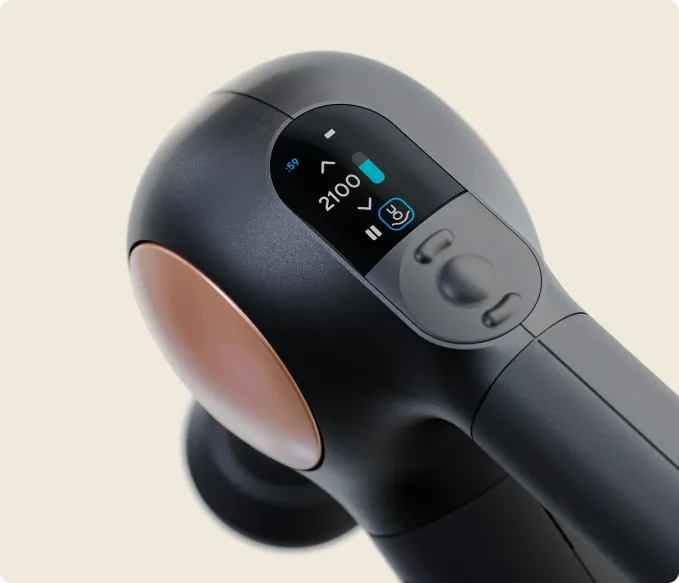
The Theragun Sense has an LCD screen that walks you through routines step by step. Once you select a routine, the screen shows you exactly where to use the massage gun, how long to spend on each area, and how much pressure to apply.

As someone who never really had an idea of what to do with a massage gun other than pointing it to a sore muscle and hoping for the best, I liked that the Therabody Sense takes a lot of the guesswork out of using a massage gun. 

My favorite routine was the six-minute “Sleep” routine that’s essentially a quick full-body massage to get you ready for the night. The app lets you choose from many other routines, like “Pre-Walk Warm-up,” “Desk Relief,” “Lower Back Recovery,” and more. 

The massage gun features five speeds to fine-tune pressure to allow for a more relaxing touch, moderate pressure, or a deeper tension release. I liked having the flexibility to change the intensity depending on how sore I was feeling that day.

Advertisement

Since the device is designed to be lightweight, I found it easy to hold and get to those spots on my back and shoulders that are harder to reach.

Image Credits:Therabody /

For people who want more personalization, the Therabody app takes the guided experience a step further with Coach, the company’s AI feature that creates personalized recovery recommendations based on your goals and activity. Coach can recommend which part of your body to target, which settings or attachments to use, and when to fit a recovery session into your day. 

The relatively quiet motor was another feature I appreciated, as I could easily use the device while watching TV or relaxing without the sound of the massage gun acting as a distraction. 

The Theragun Sense comes with a USB-C charging cable, a travel pouch, and two massage attachments: the Standard Ball and the Dampener, which is designed to target knots and tender areas. Separately, you can purchase the “Supersoft” attachment for $35 for extra sensitive areas on the body. 

Overall, the Theragun Sense (2nd Gen) won me over. It’s easy to use, comfortable to hold, and notably takes the guesswork out of using a massage gun. At $299, it isn’t cheap, but I think it’s a great option for people who want an everyday wellness device that can help them relax and recover.

Advertisement

When you purchase through links in our articles, we may earn a small commission. This doesn’t affect our editorial independence.

Source link

Continue Reading

Tech

Micron’s workers want the AI boom bonuses SK Hynix and Samsung already gave theirs

Published

on

The big picture: The profits of DRAM and NAND manufacturers have skyrocketed since the AI boom drove up demand for memory. After SK Hynix and Samsung awarded their employees generous bonuses from the windfall, union members at Micron are now wondering when they will receive their share.

Taiwan-based media recently reported that Micron’s two primary unions are dissatisfied with worker compensation amid the company’s ballooning profits. The unions could threaten to strike, potentially disrupting an already strained global memory supply and worsening technology-related price increases.

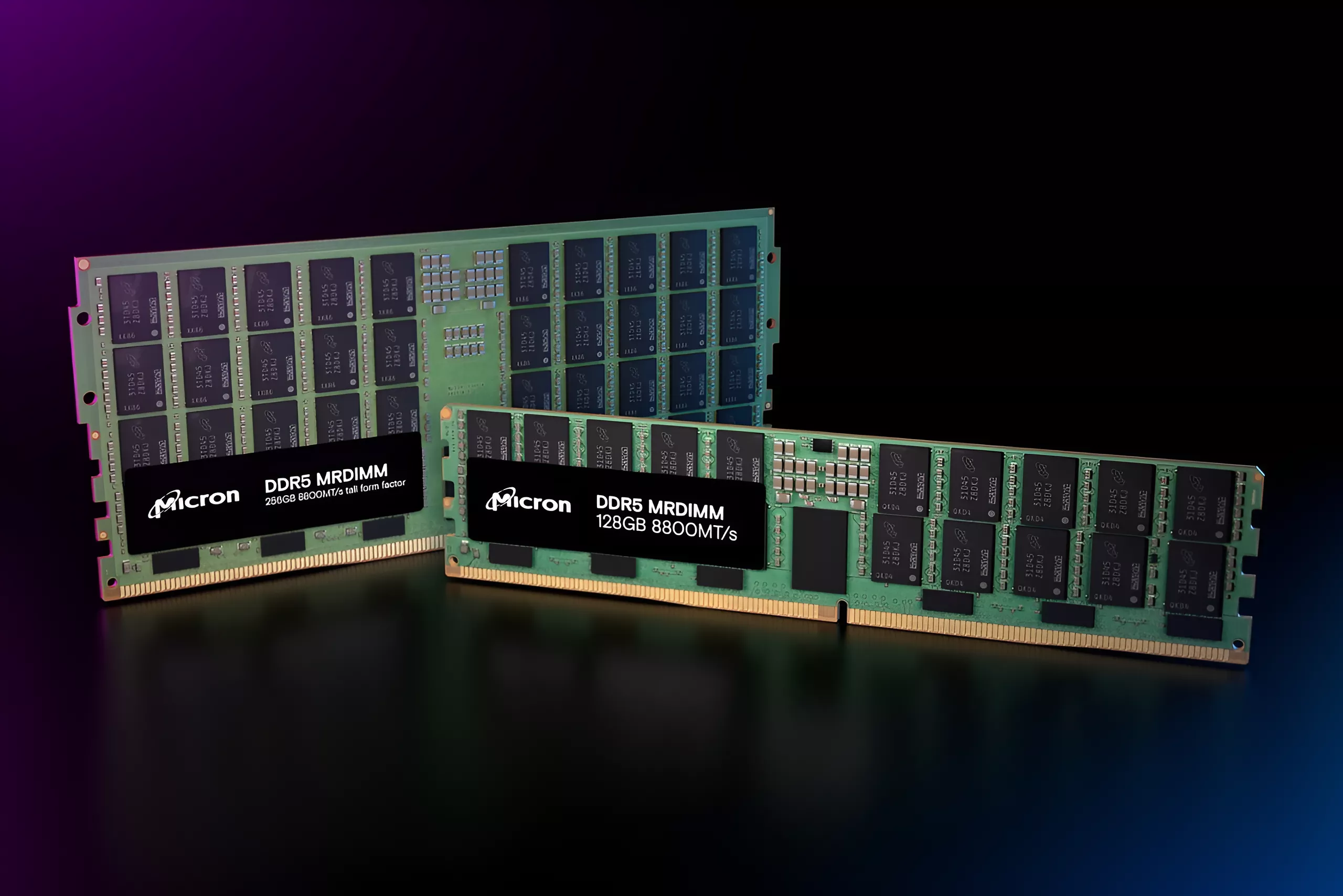
Union chairman Lin Zherui highlighted Micron’s record-high profits stemming from the AI boom. Because data centers and other hardware powering large language models require large amounts of memory, data center operators and tech giants pursuing generative AI have reserved much of the DRAM and NAND production capacity from manufacturers such as Micron, SK Hynix, and Samsung.

Advertisement

In response, the Big Three have hiked prices, passing higher costs on to consumers while boosting their profits to unprecedented levels. The boom has pushed Micron’s and SK Hynix’s market valuations above $1 trillion.

However, bonuses for Micron employees have not increased to match the windfall. According to an alleged union pamphlet circulating on a Taiwanese forum, bonuses remain capped at 200% of salary over a five-month period. The poster who shared the pamphlet claimed that Micron union membership has increased nearly tenfold this year as a result.

Micron employees likely view their counterparts at SK Hynix and Samsung with envy after the two South Korean giants awarded their employees hundreds of thousands of dollars earlier this year. SK Hynix paid out around $477,000 per employee, a figure that could increase to $900,000 next year, while Samsung narrowly avoided a strike by paying out around $340,000.

Even brief work stoppages at Micron’s plants could significantly hurt the company’s profits and create ripple effects across the supply chain, pushing consumer prices even higher. If the company’s unions threaten to strike, their demands could include increasing or removing bonus caps and overhauling retirement packages. Initial talks are expected to begin in mid-September.

Advertisement

Although uncertainty surrounds the sustainability of the AI boom, Nvidia’s surging profits have delayed fears of a bubble for now. Amid public pushback against data centers, construction delays, and concerns that AI giants are hiding massive amounts of debt, experts still estimate that memory price hikes will continue beyond 2027, with prices potentially remaining elevated past 2030.

Source link

Advertisement
Continue Reading

Tech

School Asks Cops To Stop Using Stun Gloves On Its Students

Published

on

from the today-in-what-the-everloving-fuck dept

Compliant Technologies probably would have preferred to keep flying under the radar. But a gaudy new no-bid contract with ICE (worth up to $20 million!) made it impossible.

Prior to ICE’s big purchase, it may as well have never existed. It only had a few clients, and those few clients purchased a few pairs for prison guards and jail staffers. That’s the sort of thing that kind of makes sense. Controlling inmates in enclosed spaces requires a bit more finesse than just beating them with batons.

Given the increased chance of losing control of a “compliance” option, turning gloves into quasi-stun guns made it easier to deploy force while simultaneously reducing the probability of losing a baton/Taser/OC canister to an inmate who’s stronger and faster than the average prison guard (i.e., most of them).

But ICE decided it wanted even more force to deploy, even though deploying force (a lot of it “excessive”) is basically all ICE does. Under-trained officers tend to underperform in the field, especially when they’re asked to do something more than seize the occasional website or find illegal substances hidden in cargo containers.

Advertisement

Here comes the shocker. Not only did a cop shop give officers some stun G.L.O.V.E.s (Generated Low Output Voltage Emitters), but it allowed them to deploy them in Omaha, Nebraska schools. With the G.L.O.V.E. backlash now fully engaged due to ICE’s interest in inflicting further unnecessary pain, an Omaha school district is “asking” cops not to use these gloves.

And the best thing we can say about this development is that the cops have actually agreed to stop glove-stunning students, without engaging in too much extracurricular bitching:

Omaha police agreed this week to stop carrying gloves that can deliver electric shocks to students in the halls of Nebraska’s largest public school district.

The Omaha mayor and police chief said in a joint statement Monday that the gloves were used twice in the last school year, including in a program for students with learning deficits.

Reread that last sentence a few more times. That’s extremely disturbing. While officers claim to have only used them “twice,” it did deploy them at least once to stun “students with learning deficits.”

Advertisement

And I only said there was a minimum of bitching by the cops. There was still some bitching, which arrived in the form of belated justification for stun-tech I can almost guarantee no parent was aware school resource officers (a fancy phrase for “school cop”) had access to, much less using on students.

“We believe it is the safest use-of-force option in the rare times when it is used,” the statement said.

“Safest?” As compared to what?!?! At what point do you decide a school discipline issue necessitates an ambush with literal shock tactics? Is this safer than NOT FUCKING DOING THIS AT ALL? I’m not an expert in “low voltage emissions” but I would like to believe any option that is less violent than stunning a student into submission is actually safer than any option that involves incapacitating someone with an electric shock.

What’s wild is that the school district actually had to make this request and then hope the cops would comply. And they had to hold onto this hope despite there being significant pushback from the community these cops are supposed to be serving. That it took the cops an entire day to simply agree to use the multiple violent force options they already have available to them doesn’t inspire a lot of confidence.

Destroying this minimal amount of confidence is the fact that this “agreement” (which hasn’t been made official) only extends to the Omaha PD. For some fucking reason, a bunch of Omaha-area cops “serving” Omaha schools apparently also have these gloves and aren’t promising to change a damn thing about how they handle policing schools.

Advertisement

However, the suburban Bellevue police department that patrols two Omaha schools and the large Bellevue district said its officers will continue carrying the gloves. Three other large school districts in the metro area that have Omaha school resource officers assigned to their buildings have not taken action to stop police from using the devices.

This agency saw the backlash and the semi-capitulation of the city’s largest law enforcement agency and then… did absolutely nothing. As far as the Bellevue PD is concerned, it’s still open season on students when it comes to SROs (school resource officers) and their stun gloves.

The schools in that district appear to be led by people who will never take issue with anything cops might do. Nothing to see here, says the district spokesperson, whose statement sounds like something delivered by someone who developed Stockholm Syndrome while undergoing a lobotomy:

Bellevue schools spokeswoman Amanda Oliver said the district has a great relationship with Bellevue police and doesn’t see a need to alter anything.

Oh, I’m sure the district has a “great relationship” with the cops. But we’re not worried about the administrators. We’re worried about the kids, who are the ones who will be subjected to violent force, including these novel stun gloves the kids at ICE keep talking about. And the Bellevue PD has used them just as often on students as the Omaha PD. And even though it was only “two” instances, the Omaha PD was at least willing to swear off using this tech in schools.

Meanwhile, in Bellevue, it’s apparently business as usual, even though no one (other than the PD and this weirdly cheery PR person) wants cops to have this option when patrolling schools.

Advertisement

At last week’s school board meeting, about 30 people spoke out against police using the gloves. Residents and board members alike said they were appalled at the practice. No one spoke in favor of it.

No one except the people who will never be subjected to the stun gloves, which the company helpfully points out won’t leave evidence “burn or contact marks” on the minors subjected to them. Bellevue schools — via its PR flack — said everything is fine. The chief of the Bellevue PD, Ken Clary, similarly claims to have a healthy relationship with the G.L.O.V.E.

“I am not comfortable having our officers give up a tool that has repeatedly proven to be safe, effective, and less harmful than the alternatives,” Clary said in a statement.

Again: as compared to what? You can’t just say this option is better than others without providing any evidence to support this statement. I mean, you can, but you shouldn’t expect anyone to believe you. This just sounds like a top cop claiming each new force option is more “effective” and “safer” than whatever the department is already using. Adding yet another option is never viewed as adding to the excess. It’s just folded in with everything else and glossed over in public statements until the public’s attention is focused elsewhere.

There’s no reason for ICE to have these gloves. Officers already have tons of force options, as well as the full permission/judicial immunity to use whatever option they feel will inflict the most pain at any given point. The G.L.O.V.E. may have started out as a prison option, but now it’s clear cops want this option whenever they’re dealing with… shall we say… captive audiences. And the defenders of this tech are making it clear they think inmates and students are interchangeable, at least when it comes to deploying force.

Filed Under: ice, nebraska, police misconduct, police violence, school resource officer, stun gloves, wtaf

Companies: compliant technologies

Advertisement

Source link

Continue Reading

Tech

Xylitol Linked To Strokes and Heart Attacks, Study Finds

Published

on

An anonymous reader quotes a report from The Guardian: A common sweetener used in products such as chewing gum, toothpaste, jam, yoghurts and ice-cream has been linked to an increased risk of strokes, heart attacks and death. Xylitol is a sugar alcohol present in some natural foods in very low amounts. It is also added — often in amounts 1,000 times higher — to artificially sweeten foods, beverages and oral care products. Despite its growing use, the long-term health impacts of xylitol have never been widely studied.

In the largest study of its kind, researchers found high blood levels of xylitol were associated with an increased risk of major adverse cardiovascular events. The findings were presented in Munich at the European Society of Cardiology (ESC) annual congress, the world’s largest heart conference. Researchers looked at 17,710 people and compared the 25% with the highest levels of xylitol in their blood against the 25% with the lowest. Those who had the highest amount were 57% more likely to die or suffer a heart attack or stroke, than those with the least, within six years. Even after 30 years, they were still 18% more likely to have suffered one of these cardiac events.

Taken with data from the middle quartiles, the results from both cohorts suggested a dose-dependent relationship: the higher the xylitol blood levels, the higher the cardiovascular event rate. Furthermore, the researchers showed that there was consistent increase in cardiovascular events with xylitol irrespective of baseline characteristics, such as age and sex. The researchers also highlighted that the association was independent of underlying factors such as body mass index, hypertension, diabetes and lipid levels, which might predispose people to low-calorie products.

Read more of this story at Slashdot.

Advertisement

Source link

Continue Reading

Tech

NESCD-001 Slides a Compact Disc Drive Under the Original Nintendo Entertainment System

Published

on

NESCD-001 Nintendo Entertainment System Mod
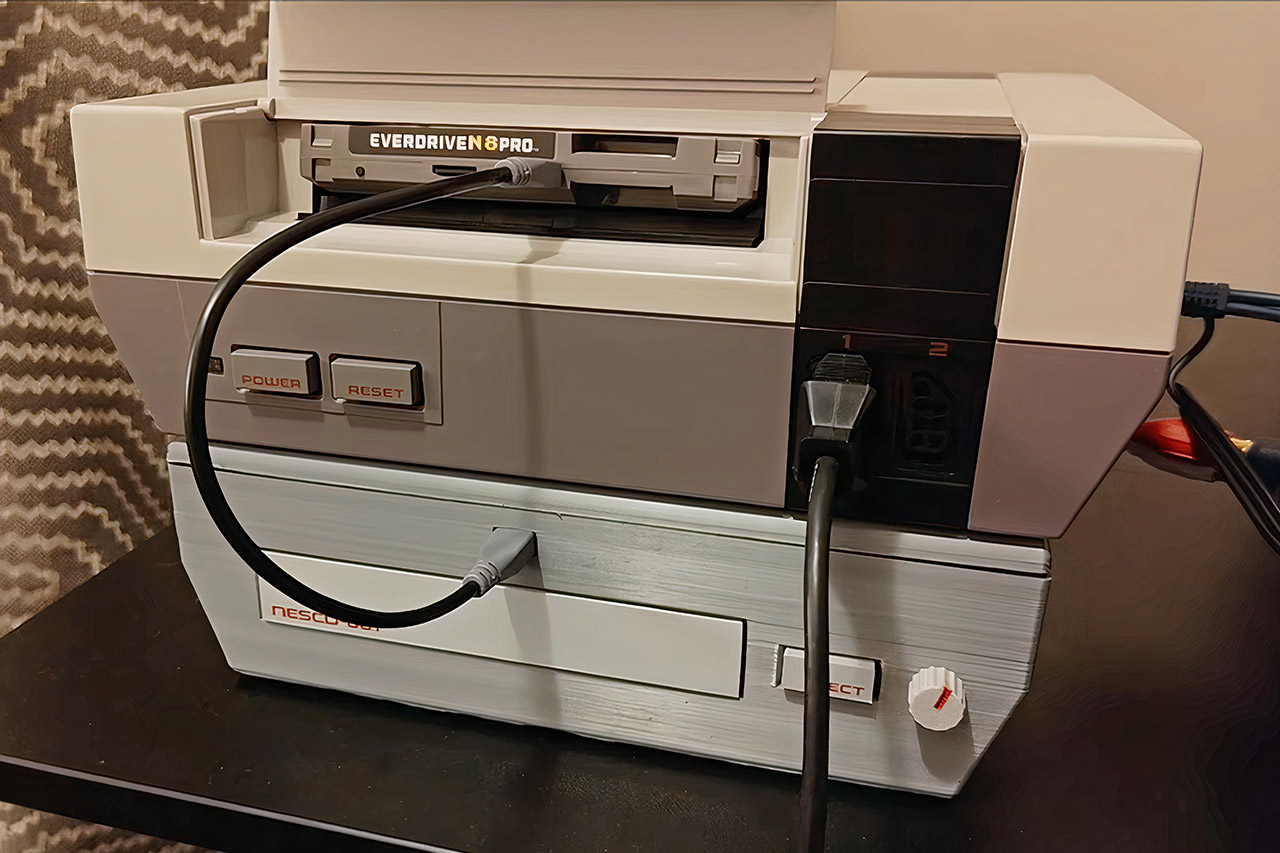
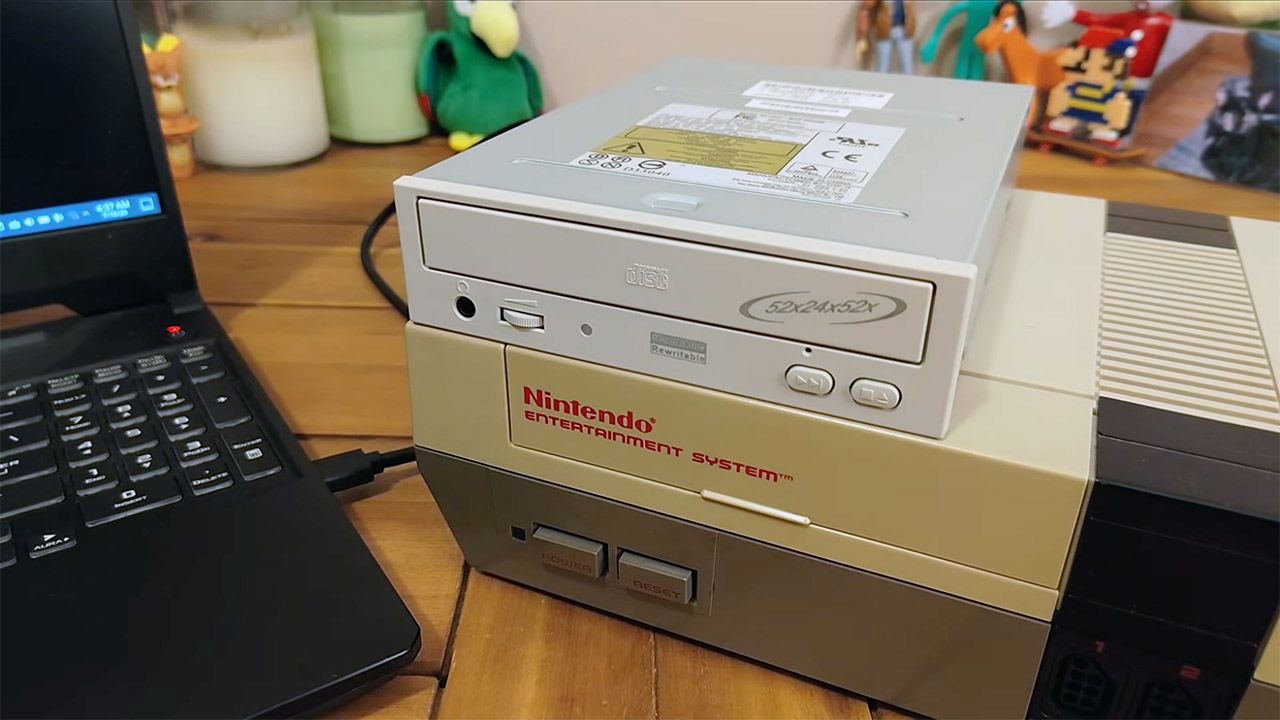
Nintendo and Sony spent the early nineties arguing over a Super NES compact disc attachment that never reached store shelves. Throaty Mumbo read that history and aimed lower, at the original front-loading NES, a console with no disc hardware and an expansion port that sat unused on the bottom of millions of gray boxes. His project page calls the result NESCD-001, an unofficial homemade compact disc add-on built for fun and documented in a build video plus a public GitHub repo.


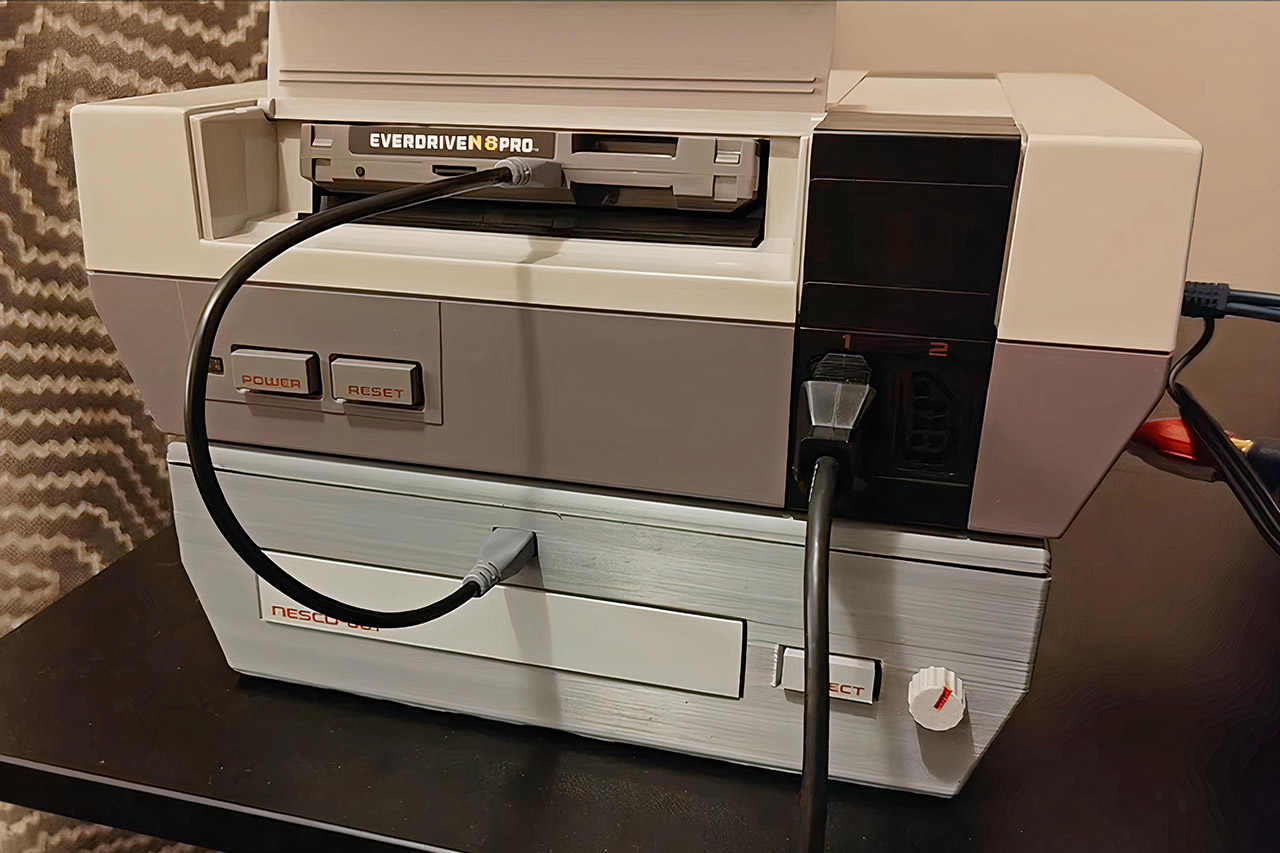
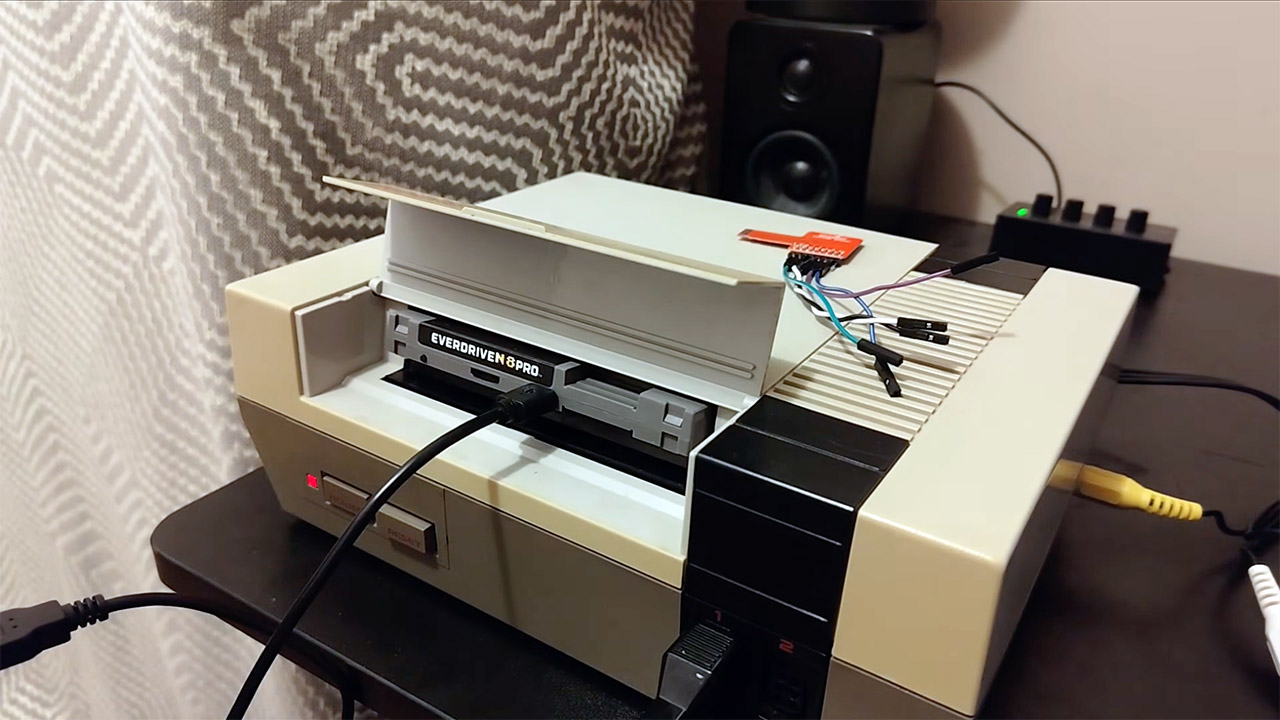
His finished unit is a gray 3D printed slab that fits under the console in the same way as the old Famicom Disk System did. A white disk tray with glossy red lettering faces forward, accompanied by an eject button and volume knob. Inside, there’s a conventional 40-pin IDE compact disk drive (the Pacific Digital Mach 52, as seen in the movie), a custom circuit board, a PCM5102 converter, and an RP2350B microcontroller that communicates with both the drive and an Everdrive N8 Pro flash cartridge. The printable shell files and sticker art for that board layout are available in the same source as the board layout itself.

NESCD-001 Nintendo Entertainment System Mod
Games do not run directly from the disc in the same way as later CD consoles do. What happens is that the RP2350B reads the ROM from the disk, transfers it to the Everdrive over USB, and runs it. After things are up and running, the microcontroller monitors a CHR mailbox at memory address 0x21FF8 for any requests from the running game, which could be for additional audio or a chunk of full motion video. Frames of video are delivered over the same USB link and written into NES video memory using proprietary bitstream code from the Cyclone IV FPGA already installed on the Everdrive N8 Pro.

NESCD-001 Nintendo Entertainment System Mod
Then there’s the audio side, which has gone its own way on purpose. Compact disk sound exits the PCM5102 and enters the NES via the expansion port mixer pin, an input pin that Nintendo slipped onto American hardware but never seemed to use. That method prevents any additional sound from clogging the already congested USB link, while simultaneously allowing the front knob to do something. One Molex cable from a wall adapter supplies 5 and 12 volts to the drive and board. A buck converter then reduces the 12V to around 9.5V, allowing you to utilize a spare NES power plug to power the console from the top of the box, using only one outlet to power the entire stack. Of course, you can still use the original brick to power the NES.

NESCD-001 Nintendo Entertainment System Mod
Proof of concept can be found on a homemade disc labeled “Super Mario Bros. CD edition”. Yes, it’s still the 1985 platformer, but now the music comes from compact disc recordings and small cutscenes pop in. Mario and Luigi are talking about a picnic, while Bowser is checking into a local hotel. When you take the disk out, the extra layer stops working. Early tests also ran standard cartridge games through the Everdrive while the drive and board were being wired, including a sanity check to ensure Contra was still operational when some flash carts decided to cause problems.

NESCD-001 Nintendo Entertainment System Mod
The full motion video functionality is still very much in beta. Something Nerdy Studios already showed that an Everdrive N8 Pro can push Bad Apple across the full NES screen from an SD card by stuffing tiles into CHR RAM as fast as the machine will take them. Throaty Mumbo leaned on that work for a disc-fed version, then held the firmware back because parts of it were reverse engineered from that demo.

Source link

Advertisement
Continue Reading

Tech

5 New Milwaukee Packout Products Available In August 2026

Published

on


We may receive a commission on purchases made from links.

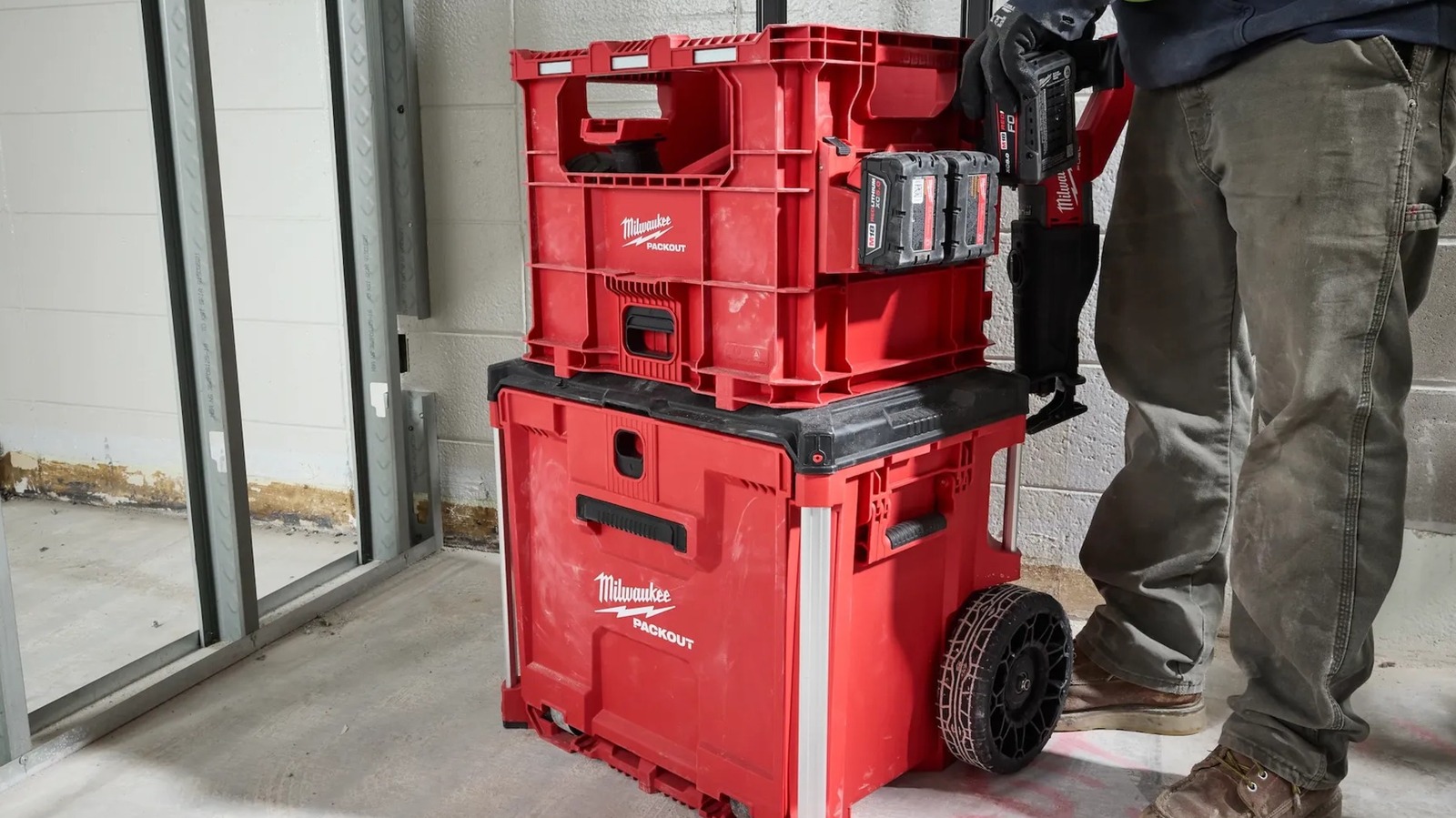
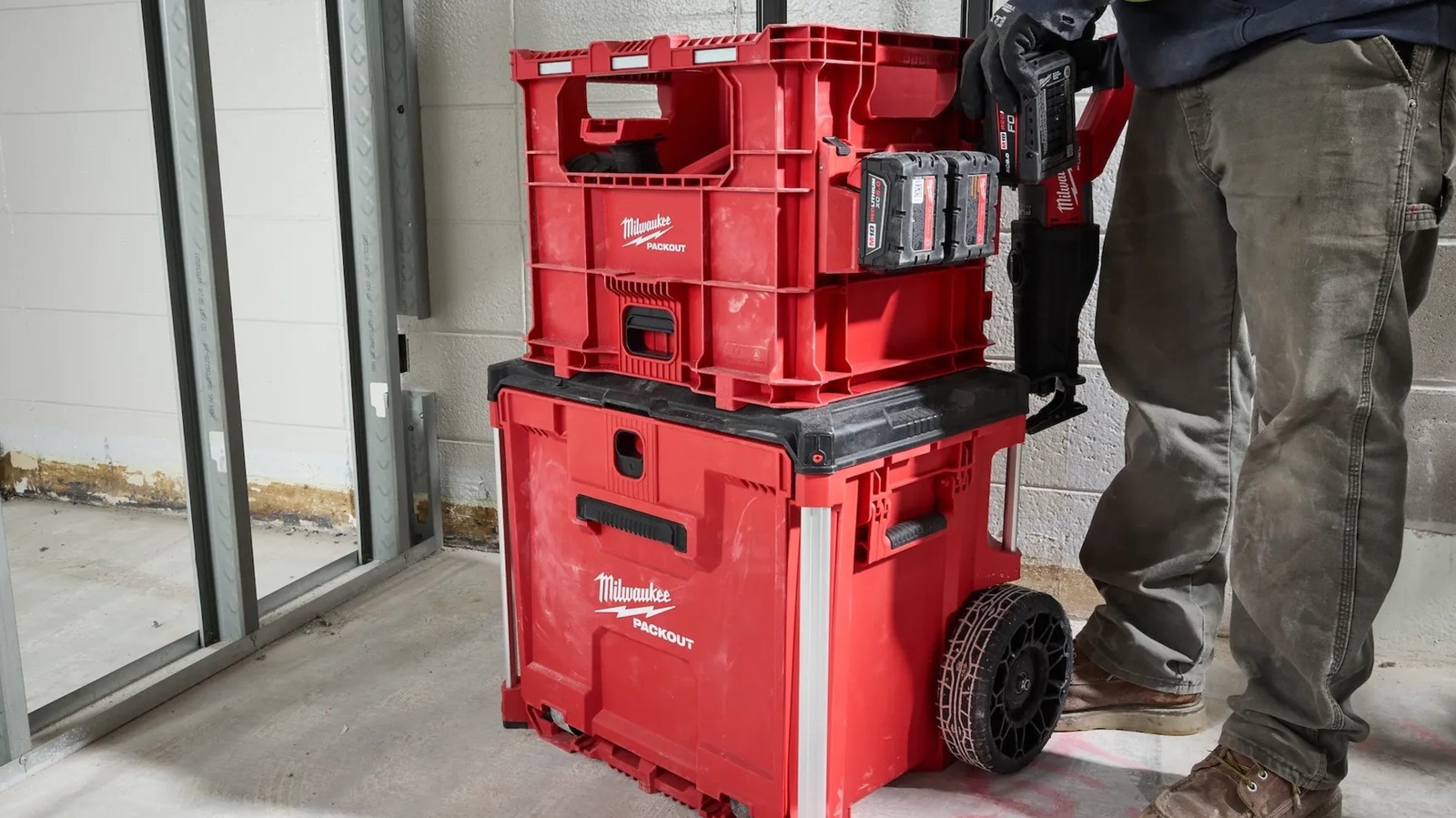
One of the Milwaukee hardware brand’s claims to fame is its Packout series of stackable storage options. These feature various types of storage crates and drawers, as well as add-ons like lights and lunch coolers to liven up your workspace, all of which can be stacked and locked into a mobile tool tower. Given that Packout is one of Milwaukee’s standby systems, the brand is always working on new additions, including both large and small storage boxes and crates to fit assorted use cases.

Advertisement

For the month of August 2026, most of Packout’s new developments are focused around various types of simple, quick-access crates. These include crates you can quickly pull tools from and place back, as well as relatively simple tool boxes with locking drawers for safety and security. All of these new products are available at participating retailers like Home Depot, Ace Hardware, and Acme Tools. If you’re a fan of the Packout system, consider perusing the latest offerings for new and interesting additions to your existing Packout stack.

Advertisement

Milwaukee Packout XL Crate

As good as Packout is at keeping your tool collection organized, sometimes you just want a reliable spot where you can quickly dump whatever you’re using and pull out something else without fussing with drawers and latches. To add such a spot to your Packout stack, that’d be a use case for the Milwaukee Packout XL Crate, available at Home Depot for $69.97.

The Packout XL Crate is exactly what it sounds like: An extra-large crate with the necessary latches to snap onto a Packout stack, though it can also clip onto the side of a stack to hang freely. It has a 75-pound carry capacity for hauling assorted tools and accessories, as well as mounting spots for hanging tools like power drills or battery chargers. While you can reach right into the top of this crate to grab a tool, if there’s something else stacked on top of it, you can also reach into the large opening at the front, which still provides enough clearance for deposit and retrieval.

Advertisement

Milwaukee Packout Wire Pulling XL Crate

Depending on your line of work or crafting interest, you may need different types of modular storage to best suit your purposes. For example, if you’re an electrician regularly working with different types and lengths of wire, a regular storage crate may not be the optimal choice for storing your large wire spools. In this specific use case, Milwaukee offers the Packout Wire Pulling XL Crate, available at Home Depot for $119.00.

At a glance, this crate is very similar to the regular Packout XL Crate. It has several of the same features, including a 75-pound carrying capacity, an easy-retrieval front opening, and the ability to both stack and hang on a Packout stack. Where it differentiates itself is in the interior mounts specifically designed to hold up to six spools of 500 feet, 12-gauge THHN wire. The mounts allow the spools to spin when their wire is pulled, so you can grab all the wire you need without having to move the spools around. As an extra perk, the front opening has wire retention slots, which hold pulled wire in place and help keep everything organized.

Advertisement

Milwaukee Packout Low-Profile Crate

If you’ve already got a very tall Packout stack, adding more full-sized crates and drawers on top isn’t the best idea. At a certain point, it’s going to become too high to comfortably reach into, not to mention potentially at risk of toppling over. Rather than stacking another full-sized crate on top of everything, it may be better to add something a little smaller, such as the Milwaukee Packout Low-Profile Crate. It’s available at Home Depot for $44.97.

This Packout crate is best-suited for the top of your Packout stack, with an open top that you can reach into to grab whatever you need, as well as a body that’s about half the size of a regular Packout crate. It has a slightly reduced carrying capacity — 50 pounds versus the usual 75 pounds — but it still has all of the necessary latches to clip onto a stack, plus integrated side handles for easier carrying. It also comes bundled with a set of quick-adjust dividers, including eight short dividers, two long dividers, and one middle divider, which you can use to set up the interior of the crate to your liking.

Advertisement

Milwaukee Packout Compact Crate

The Packout Low-Profile Crate is designed to give you some extra storage space while reducing your Packout stack’s vertical profile. However, that’s not the only way you can reduce your stack, as you can also opt for a crate that slices down vertically instead of horizontally. Such is the design of the Milwaukee Packout Compact Crate, available at Home Depot for $39.97.

Advertisement

This crate is the inverse of the Low-Profile Crate, being approximately as tall as a regular crate while being half as wide. This means you can stack two of them at once on top of a regular crate if you want to keep two sets of tools or accessories separate from each other. Like the Low-Profile Crate, it comes with two customizable dividers, as well as a large front opening you can reach into to grab something. One noteworthy difference between this crate and others is that it has an integrated folding metal handle, which you can use to haul a handful of tools when you need to take a quick jaunt away from your main stack.

Advertisement

Milwaukee Packout Single Drawer Tool Box

While the majority of Milwaukee’s new Packout offerings for August 2026 are various forms of crates, there are some outliers. For example, if you want storage with a little bit of extra security in the form of a locking drawer, an open crate may not be the best choice. Rather, that may be a job for the Milwaukee Packout Single Drawer Tool Box, available at Home Depot for $164.00.

As opposed to the crates being primarily accessible from the top, the Single Drawer Tool Box conceals a sliding drawer that you can pop open and access from the front, even when it’s in the middle of a tall Packout stack. The box comes bundled with one large divider and two regular dividers for organizing the inside, and it has mounting points on the side for hanging tools and chargers, with a total carrying capacity of 50 pounds. That said, the most important feature is the locking metal security bar, which keeps the drawer firmly closed when not in use and in transit.

Advertisement


Source link

Continue Reading

Trending

Copyright © 2025