The restrictions affect posts related to body image and mental health.
Tada Images/Shutterstock
Meta is experimenting with new limits on the type of content teens can interact with on Instagram. The company says that it will now attempt to restrict “repeated” exposure to posts about anxiety, weightlifting, nutrition and other content that could be inappropriate for younger users to see en masse.
The new limits come after Meta took steps last year to prevent teens from seeing “sexually suggestive” content and blocked “mature search terms,” like queries related to alcohol and gore. The company said at the time that parents should view its teen accounts as analogous to a PG-13 movie, a comparison that was roundly rejected by the Motion Picture Association.
With the latest change, it seems that Meta wants to limit repeated exposure to the types of posts that don’t violate its rules but may negatively impact teens when viewed in large quantities. According to Meta this could include content that relates to body image, like nutrition and weightlifting, as well as mental health, like “how to cope with anxiety.” The goal, according to Meta, is for these topics to “be balanced with other types of content rather than shown repeatedly.” The limits will apply to recommendations teens see in their feed, as well as Explore and Reels.
Advertisement
Instagram in particular has long faced questions about whether it leads younger users into so-called algorithmic “rabbit holes” in which teens end up seeing repeated recommendations for content that affects their mental health and self esteem. The topic also came up during a high-profile civil trial over social media addiction in Los Angeles. The jury in that case ultimately ruled against Meta.
Meta also revealed that it plans to expand its more restrictive content settings for teens accounts on other platforms, including Facebook and Messenger. The new settings are rolling out to those apps “later this year.”
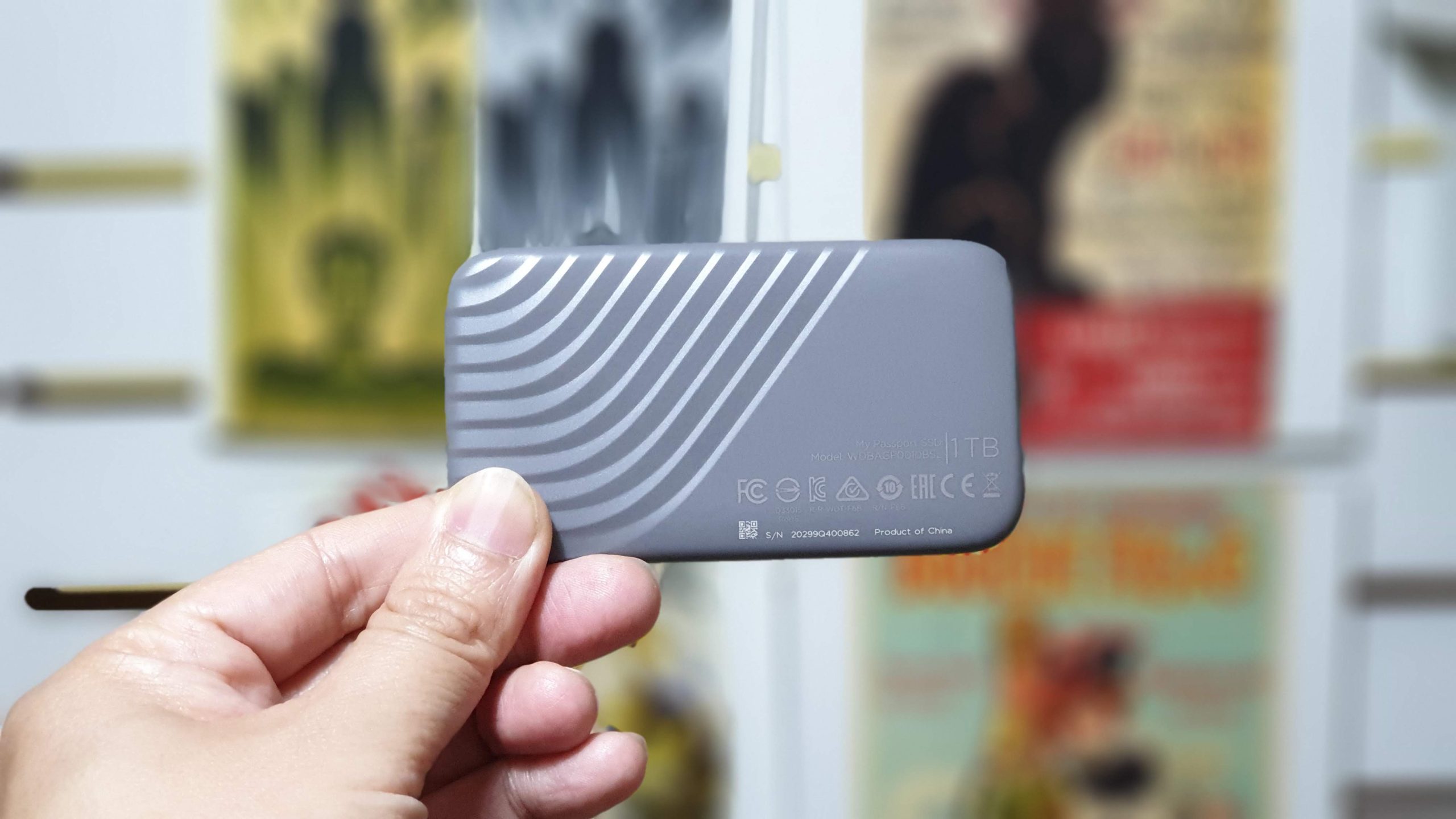
Offering an alternative to what some vendors call ‘portable storage’, Western Digital’s My Passport is (quite literally) the size of a passport. But that doesn’t mean it compromises on speed—with up to 1000MB/s read and write—or ruggedness, as it is rated to survive a 6.5ft drop.
The My Passport SSD is therefore perfectly suited to storing large media projects and files for the on-the-go professional who needs a shock-resistant storage option that doesn’t burn (or wear) a hole in your pocket. For anyone looking to move on from USB thumb drives, this is the logical progression, and right now it has $128 off for Prime Day.
Advertisement
Today’s top WD My Passport 1TB SSD deal
Now, while the My Passport won’t give you the speedy performance of a mounted SSD, we did clock transfer speeds of 1046MBps read and 1013MBps write in, which is above the manufacturers baseline. In his review, our very own storage expert Désiré called the My Passport “a compelling choice” in its balance of performance and size.
Western Digital does have a few variations for its My Passport range, including a heavier, larger USB 2.0/3.0 option. But this USB C version is the superior choice, not only for more than twice as fast transfer speeds (500MBps for the USB version), but also for the form factor. It is noticeably smaller and lighter than its bigger brothers.
Image 1 of 3
Advertisement
(Image credit: Future)
(Image credit: Future)
(Image credit: Future)
The USB 3.2 Gen 2×2 delivers a 20 Gbps with the right cable, but also offers backwards compatibility with USB 3.2 or 2.0 cables.
What I find particularly attractive is the password protection and built-in always active 256-bit AES hardware encryption, making physically transporting precious media and important files less of a daunting task. Even if I were to lose it or have it stolen, I’d at least have the peace of mind that no one can access my files. Additionally, if you do somehow manage to damage this rugged SSD, it comes with a 5-year manufacturers warranty
Apple’s second-generation AirTag has dropped to its lowest price ever on Amazon during Prime Day, with the single-pack falling to $24 and the four-pack reaching $89.
The new discounts cut $5 off the AirTag 2 single-pack and $10 off the four-pack. Both offers represent the lowest prices seen thus far for Apple’s latest item tracker, giving shoppers an opportunity to save before Prime Day ends on June 26.
The deals are available through Amazon and apply to Apple’s recently released AirTag 2. The updated tracker builds on the original AirTag design while adding hardware improvements aimed at helping users locate lost items from greater distances.
Best AirTag 2 deals
Apple introduced AirTag 2 with a new Ultra Wideband chip that extends Precision Finding range compared to the first-generation model. The company also redesigned the built-in speaker to make it more difficult to tamper with and easier to hear when locating misplaced belongings.
Advertisement
Retailers are continuing to roll out Prime Day promotions across Apple’s product lineup. These record-breaking discounts on the AirTag 2 offer a rare chance to save on the accessory that was released in January 2026. Shoppers can now upgrade or expand their setup at the lowest prices ever.
Travelers rely on AirTags as essential gear within the Apple ecosystem to pinpoint luggage and personal items through the massive Find My network.
Shoppers interested in the AirTag 2 deal may want to act sooner rather than later. Amazon’s Prime Day pricing frequently changes as inventory levels fluctuate, and record-low discounts on Apple products don’t always remain available throughout the entire sales event.
In 1954, years after he led the project that created the atomic bomb, physicist J. Robert Oppenheimer was called to testify before the Atomic Energy Commission (AEC). The ostensible subject of the hearings was Oppenheimer’s position on the hydrogen bomb, a far more destructive version of the atomic bomb that the US had developed and first tested two years earlier.
Oppenheimer, who in the years after the war had become increasingly conflicted about atomic weapons, initially opposed work on the hydrogen or thermonuclear bomb, partially for moral reasons and partially because he was skeptical it would work. But he later changed his mind and supported work on it. The lawyers at the AEC wanted to know why.
It wasn’t because Oppenheimer had changed his mind about the morality of city-vaporizing thermonuclear bombs. Rather, it was because American physicists had struck upon a new design for hydrogen bombs that wasn’t just workable, but positively elegant, or “technically sweet” as he called it. For Oppenheimer, that was enough. As he told the AEC hearing: “When you see something that is technically sweet, you go ahead and do it, and you argue about what to do about it only after you have had your technical success.”
What Oppenheimer described was a kind of moral helplessness dressed up as resolve: the pull of a scientifically beautiful answer to an ugly problem, and the accompanying habit of holding the moral accounting until after the technical success. It is one of the most honest things anyone who built the bomb — or any other world-altering thing — has ever said. And it has never stopped being relevant, because the people now building the world-altering technology of our own moment keep saying versions of it too.
Advertisement
Jack Clark, the co-founder and head of policy at Anthropic, the company behind the Claude models, is one such person. So it was worth paying attention last week when Clark sat down for a long public dialogue with Samuel Kimbriel, the founding director of the Aspen Institute’s Philosophy and Society, just six days after the federal government had abruptly cut off access to Anthropic’s two most powerful models, ostensibly over fears of what they could do.
Much of the conversation circled around a single idea that will be familiar to those who read Clark’s work: Powerful AI is coming, and it presents us with a choice — a choice we are actively refusing to make by failing to regulate AI. (Disclosure: Future Perfect is funded in part by the BEMC Foundation, whose major funder was also an early investor in Anthropic; they don’t have any editorial input into our content.)
We regulate toothbrushes, Clark pointed out, and cars, and nuclear weapons. “But we seem to have this attitude towards technology that it’s impossible to regulate,” he said. “It is not impossible to regulate … we sort of act as though, oh well, the technology industry is just inevitably going to do stuff, which I think is a choice.” His sharpest example was the online platform shift that utterly reshaped the last two decades. “Social media ran an uncontrolled experiment on the world,” he said. “We all now think and talk a bit differently because of social media. That was a choice. We can choose things to be different.”
This is the kind of talk that has long differentiated Anthropic from other major AI companies: Its principals are willing to linger on the serious risks of advanced AI, risks that demand clear and even strong regulation. (About a week before the Aspen dialogue — and just a day before the Trump administration came down hard on Anthropic’s latest models — CEO Dario Amodei published a blog post calling for government authority to legally block or even reverse the deployment of frontier AI models failing safety tests on threats like cyberhacking and bioweapons.)
Advertisement
Anthropic acknowledges that advanced AI is an existential gamble, but argues it’s a gamble we must take. At the Aspen dialogue, Clark spoke of a coming century that will be marked by brutal challenges — aging populations, straining institutions, a warming planet — that apparently can only be addressed with AI. To not go forward with artificial intelligence would be to rob ourselves of medical miracles we can only imagine, and implicitly condemn those who might otherwise be saved.
Clark is right that there is a choice buried in all of this. But the question his framing elides is exactly whose choice it actually is.
Sure, as Clark said, we regulate cars and toothbrushes and nuclear weapons, but in each case someone built the thing first, and the rest of us were left to decide what to do about a world that already contained it. Nobody voted on whether the atomic bomb should exist. We were handed the consequences and had to write the rules later.
Much the same is true of AI. The choice Clark wants the public to make around governing it only became necessary once his industry created the thing that needs governing. He is offering us a vote on what to do about AI, not a vote on whether it gets made — because that vote was already cast, in private, by him, a few hundred colleagues, and trillions of dollars. But why didn’t we get a say? Why are we stuck in the world where, as in Oppenheimer’s formulation, “you argue about what to do about it only after you have had your technical success”?
Advertisement
I wasn’t the only person in the audience who was wondering this. Near the end of the dialogue, a young woman put a sharper version of this question to Clark directly. Every frontier lab now admits the technology carries enormous risk, even existential risk, she noted. “So my question is, what gives you, Anthropic, and the rest of the frontier labs the right to continue building something that could destroy everybody, when none of us can actually opt out of it?”
Clark, to his credit, did not brush the question away. But neither did he answer it fully. He reframed it — away from the choice to build, toward the need for someone to take responsibility after it is built.
That someone can’t be the companies themselves, he said, describing an ideal future where “outside compliance, regulatory, testing and verification systems” would decide when each lab was allowed to go further. Governments were already moving faster than anyone expected — the US and UK, he said, had built testing agencies whose tools were sometimes better than the companies’ own.
It was a gracious answer — albeit one that sat awkwardly with the reality that President Trump now appears to be regulating AI by whim — but notice what it concedes. Asked what gives his company the right to build something that could destroy everybody, the head of policy at a leading AI lab did not say we have that right. He said the decision shouldn’t rest with companies like his, only to describe a system to take it out of their hands that does not yet fully exist. He and his colleagues are still building, at the frontier, as fast as the science and the compute allows, while telling the room that someone else really ought to be in charge. AI is already loose in the world. The regulation of AI is still mostly the stuff of blog posts.
Advertisement
So why are they really doing this? To bring it back to Oppenheimer: because AI is “technically sweet.” It’s not the race with China, not the trillion-dollar valuations, not even the creditable desire to cure disease — though all of those are real. Underneath them is something simpler and much harder to govern: we are compelled to build what is beautiful. Clark all but said so, marveling that AI is “easier and simpler to build than many other aspects of science,” that his chief scientist jokes they’d have AGI already if they just fixed the bugs in their code.
We humans are a tool-using species, Clark argued, and AI is the ultimate tool. It’s not that AI is inevitable, exactly, but that it is so weirdly simple to build once the foundations are set that “almost any path you go down, [AI] appears.”
What Clark described is the pull Oppenheimer named in 1954 — the pull of an elegant solution that makes the question of whether you should build it feel beside the point.
I can feel it myself, and I’m just a user. Put a capable model at your fingertips, ask it to do something you couldn’t do alone — write the program, find the flaw, untangle the thing you’d been stuck on — then watch it simply do what you requested, and you’ll experience a small electric thrill that has nothing to do with aging populations or the future of democracy. That thrill runs in an unbroken line from the user at the keyboard up through the engineer who trained the model to the executive who shipped it.
Advertisement
That’s why I suspect Clark’s regulation talk, however sincere, is downstream of a decision that was never really in doubt. Like Oppenheimer with the hydrogen bomb, the people building this technology feel they have no choice but to go ahead — and then to hope the rest of us make the right choices to govern what they could not stop themselves from making.
We have been lucky, so far, with the last technically sweet device that could still end the world. The hydrogen bomb has existed for 70 years without being used in anger, not because we solved the politics Oppenheimer warned about, but because the wiser choice won. And because we were lucky.
Clark may be right that the choice is still ours: The bomb did not decide the Cold War, people did, and people can decide this too. But it would help if the people handing us that choice slowed down long enough to let us make it — instead of building as fast as they can and trusting our luck, and theirs, to hold.
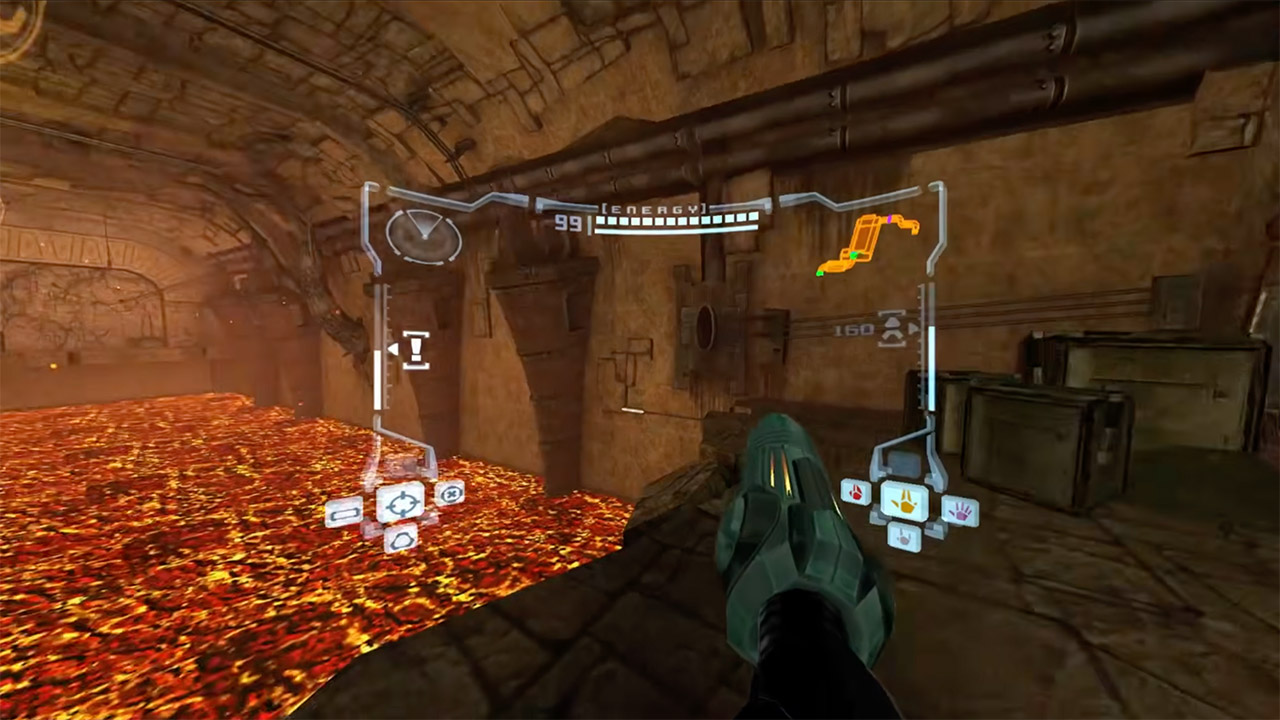
Metroid Prime arrived on the GameCube in 2002 with a first-person view that already set it apart from most games of its time. Players explored alien ruins and fought through creatures while guiding Samus through a living world. A new fan project now carries that perspective into virtual reality on PC with controls that respond to actual body movements.
Nobbie built PrimedGun from the ground up, using Dolphin ReduX as a foundation. His goal was to take the ancient NTSC version 1.0 of the GameCube game and apply some very modern tracking and input technology that feels right at home in a headset. As a result, you may now play the game from start to finish without affecting the basic gameplay.
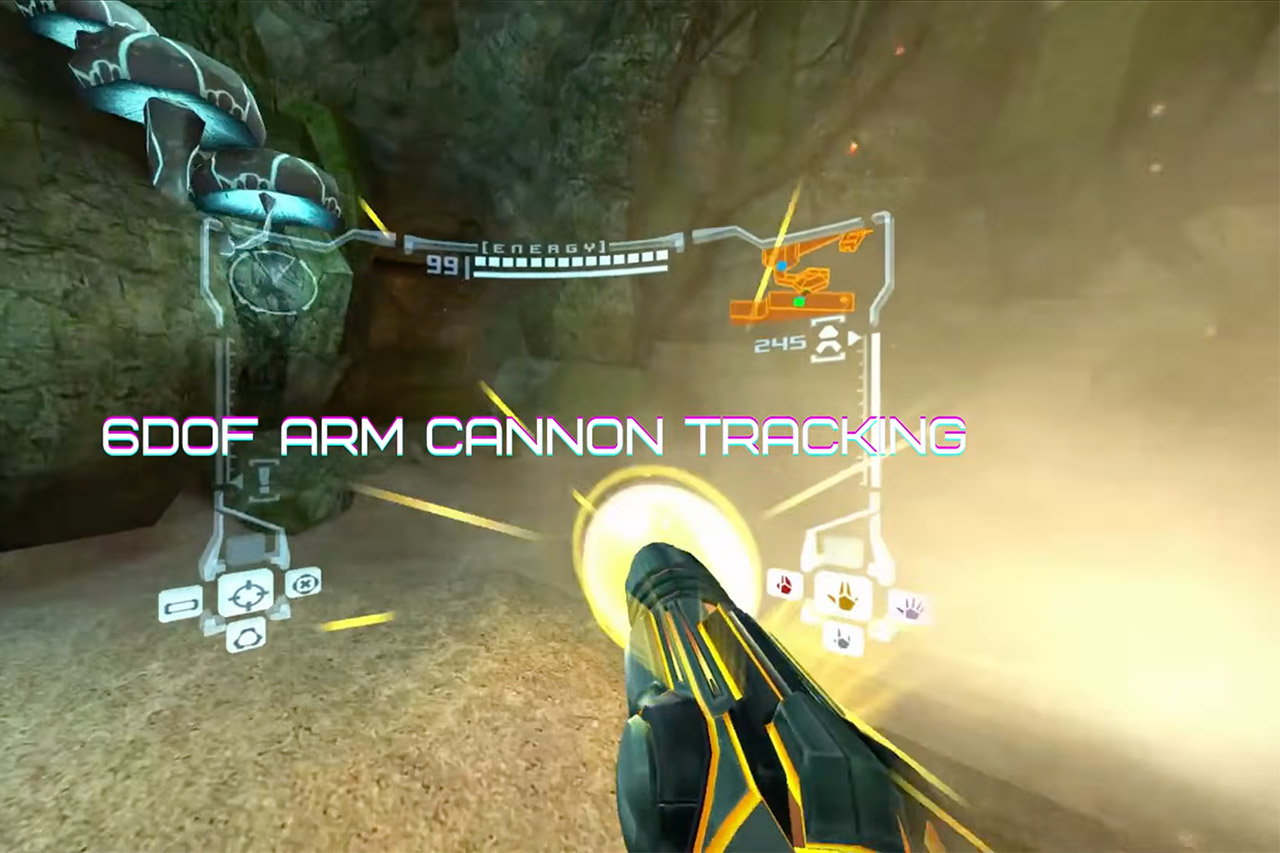
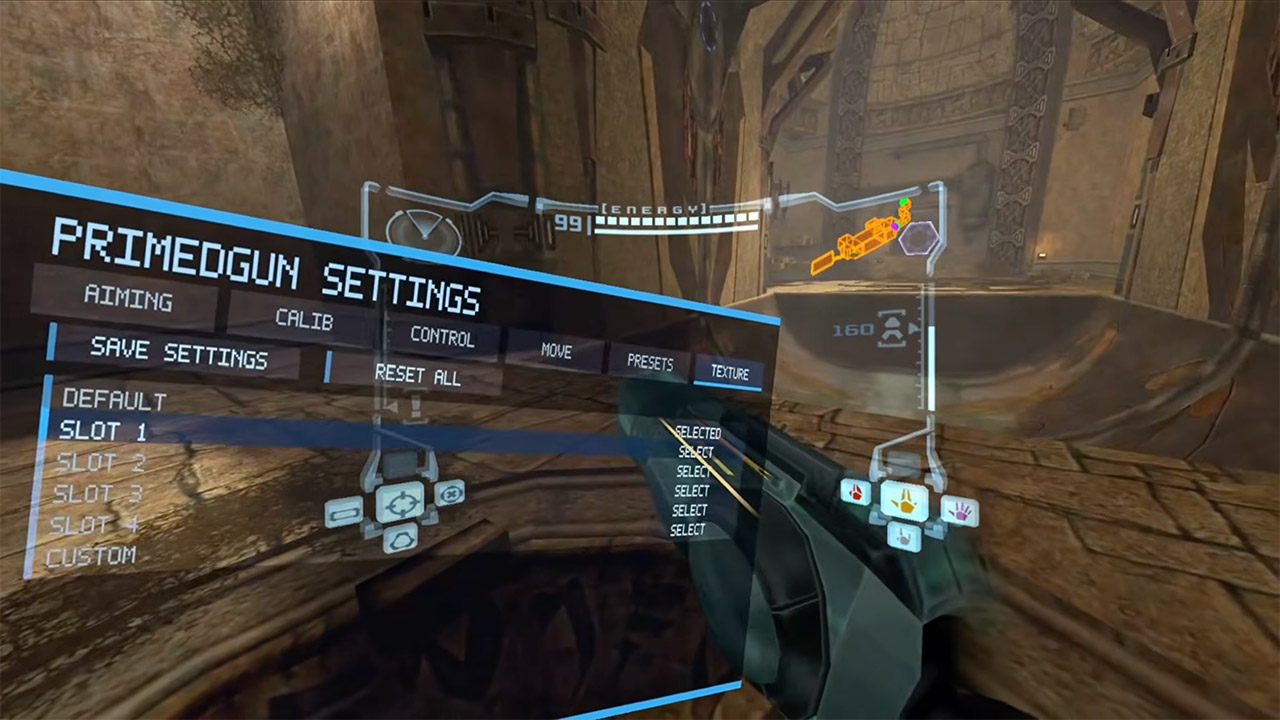
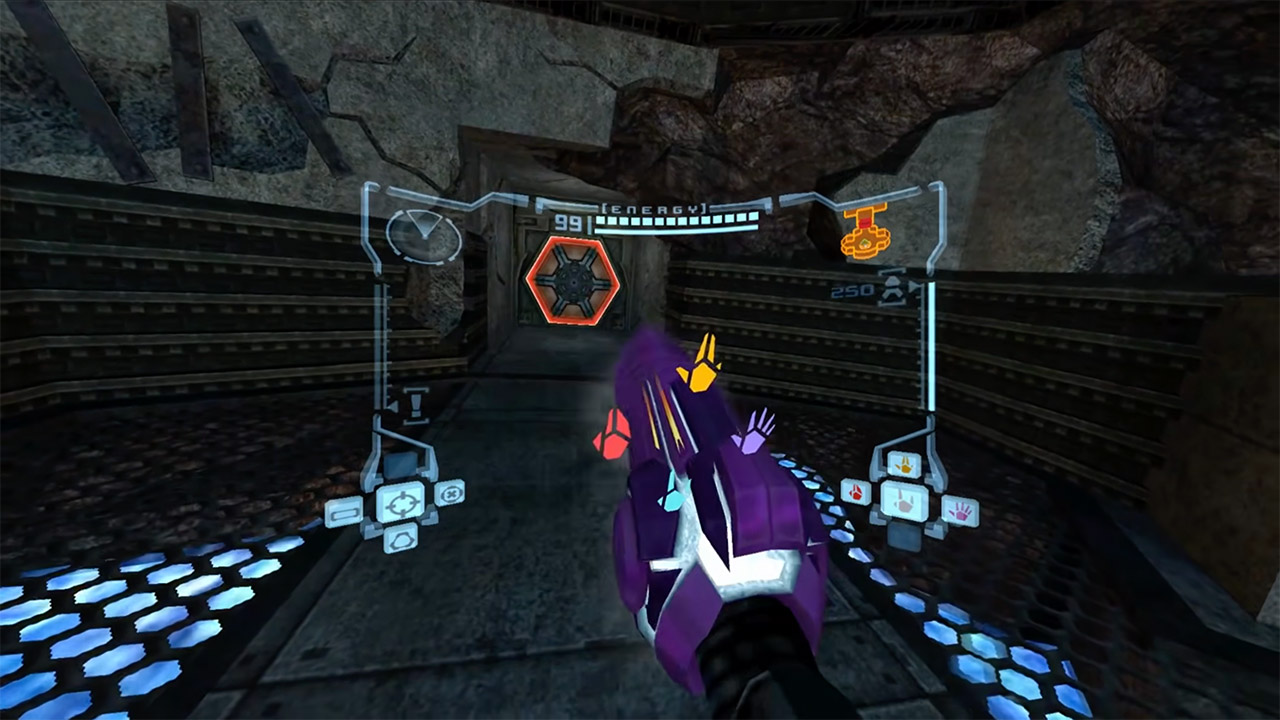
Arm cannon movements are intricately tied to the movement of your hand, so you’re not just moving a stick around; you’re leveraging your full arm to track targets. That is, shooting or scanning enemies necessitates actual movements with your body. The head tracking is equally effective, as you can move your head around to get a better view and use hand gestures to make selections or toggle menus.
However, the gunplay really takes off when you can use your cannon to target enemies, much like in the real game, rather than relying on the camera or a lock-on system. The end result is that, while the fighting and traversal cycles are intact, they feel noticeably more responsive after a few hours.
PrimedGun is all about making you and the game feel comfortable with each other right immediately. One click on the right stick adjusts the height, so all you have to do is stand there and let it do the work. Then there’s a menu where you can alter the cannon location and spin to get everything just right and play for longer periods of time without cramping. You may also change the texture of the cannon with a simple in-app tool that requires no additional software.
To play the game, you only need the original game file and a download from the GitHub releases. From there, simply open the program, select the NTSC version 1.0 ISO, and let it do its job. You can even copy save files from your previous memory card, and they will appear in the User folder. There is a layout option that allows you to customize the controls, and you can even disable auto setup if you want to create a custom profile.
To get everything functioning well, you’ll have to run your headset at 120 hertz, which makes a big difference. Having a strong connection from SteamVR or Virtual Desktop is the best choice, and if you have a Meta headset, it will also function, though the project notes state that you should probably use Steam if possible. To ensure smooth tracking, simply stay centered and look straight ahead during the calibration process, and then continue with the game. [Source]
Figma on Wednesday showed off an update that adds a new code layer, support for motion and shaders, and the ability to create custom plugins for various tasks using AI.
The design platform has been working on bringing code integration into its tool for a while. Last year, it unveiled an AI prompt-based prototyping tool, Figma Make, and has since launched integrations with Claude Code and Codex to improve the hand-off between coding and design.
The company is now adding code layers directly to the collaborative canvas, helping teams clone repositories and extract flows from code to design layers for testing.
Image Credits: FigmaImage Credits:Figma
Figma’s chief product officer, Yuhki Yamashita, said code layers make it easier for designers, product managers and programmers to iterate on ideas rather than focus on creating pristine code that goes into production.
“We think the multiplayer canvas is really powerful because this is an environment where you don’t really care about the quality of the code. If you’re rapidly exploring or need to kind of explore a bunch of new directions, you can do that in this spatial way. We hope that this feature produces different behaviour not just with designers, but also with engineers and PMs,” he said over a call.
Advertisement
Figma now also supports animations, transitions and 3D transforms. Previously, designers had to create animations in other software and convert it to code that the app could understand. Now, designers can integrate animations and transitions directly into Figma.
Image Credits: FigmaImage Credits:Figma
You can now use AI to create some of these assets, and the update is adding support for adding shader effects and fills using AI, too.
Figma acquired node-based tool Weavy, which helped designers run workflows through different models to compare outputs, last year, and is now working to integrate the two apps better. In an update rolling out later in the year, users will be able to generate Weavy workflows directly within Figma.
The company’s also adding new skills to make its AI assistant more useful with its collaborative canvas. Users can now write text prompts to create repeatable skills that AI agents can use. You can also connect tools like Notion, Granola, Excel and GitHub, or attach files to give the AI bot more context about what you want it to do.
The company is also adding a feature to help users create custom plugins, like layout generators or vector path tracers, with prompts.
Advertisement
When you purchase through links in our articles, we may earn a small commission. This doesn’t affect our editorial independence.
AMD’s Ryzen X3D processors are already among the best gaming CPUs you can buy right now, but GIGABYTE thinks there’s still some extra performance left on the table. The company has announced X3D Turbo Mode 2.0, a new feature designed specifically for Ryzen X3D chips that can automatically boost gaming and productivity performance without requiring users to manually tweak BIOS settings or overclock their systems. According to GIGABYTE, the feature is exclusive to its X3D Series motherboards and supports Ryzen 7000, 8000, and 9000 Series X3D processors.
Up to 34% Higher Performance in Some Games
GIGABYTE claims X3D Turbo Mode 2.0 can deliver noticeable gains across several popular games. In the company’s internal testing, Call of Duty: Black Ops 7 saw performance improvements of up to 34%, while Cyberpunk 2077 saw improvements of up to 25%. Battlefield 6 reportedly delivered gains of up to 21%, and Counter-Strike 2 saw improvements of around 12%.
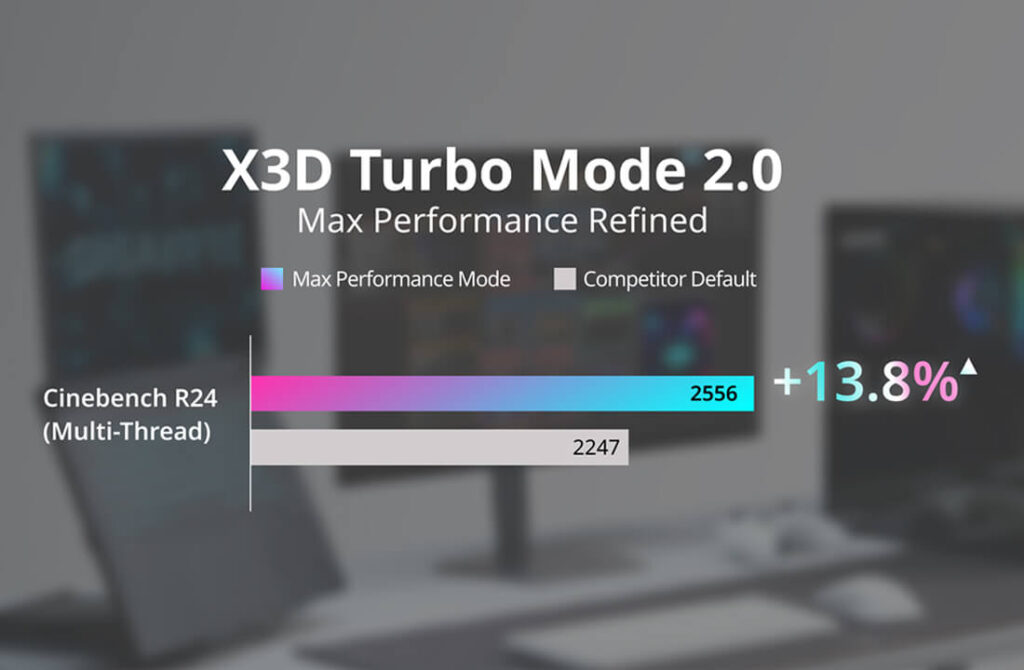
While real-world results will naturally vary depending on your hardware configuration and game settings, the numbers suggest that the feature could offer a free performance boost for users already running compatible Ryzen X3D systems. The benefits aren’t limited to gaming either. GIGABYTE says productivity workloads also see improvements, with Cinebench R24 Multi-Core scores increasing by up to 13.8%. That could make the feature useful for creators, streamers, and users who regularly run CPU-intensive applications.
How X3D Turbo Mode 2.0 Works
Instead of relying on traditional manual overclocking, X3D Turbo Mode 2.0 uses what GIGABYTE calls its Dynamic OC Engine. The system continuously analyzes workloads and adjusts CPU behavior in real time through a dedicated hardware controller built into supported motherboards. By working directly with the board’s power delivery system, the feature aims to extract additional performance while maintaining system stability.
In simple terms, the motherboard automatically determines when extra performance is available and adjusts settings accordingly, removing much of the trial-and-error typically associated with CPU tuning.
Availability and Compatibility
X3D Turbo Mode 2.0 is currently available on GIGABYTE’s X3D Series motherboards and supports AMD Ryzen X3D processors across the Ryzen 7000, 8000, and 9000 families. Supported models include several X870E and X870 boards, such as the AORUS XTREME X3D AI TOP, AORUS MASTER X3D, AORUS PRO X3D, AORUS ELITE X3D, AERO X3D, and EAGLE X3D series.
Advertisement
With Ryzen X3D processors continuing to dominate gaming benchmarks, GIGABYTE is positioning X3D Turbo Mode 2.0 as an easy way for users to squeeze even more performance out of their existing hardware without diving into manual overclocking.
With a 55-inch LED display, Dolby Atmos sound and running on the Titan OS platform, the Philips Ambilight is a brilliant all-rounder for those looking for an affordable smart TV that’s packed with plenty of features.
Advertisement
Despite being a budget-friendly TV, the Philips Ambilight certainly looks sleek as it’s fitted with integrated LED lights at its back that react to what you’re watching. While we haven’t reviewed this exact TV, we have reviewed other Philips Ambilight screens with this feature, and find the rear LED lights help create an immersive viewing experience.
Otherwise, and perhaps most importantly for the TV, you’ll benefit from a 4K picture while the Philips Pixel Precise Ultra HD engine helps to optimise picture quality for sharp images, rich colours and smooth motion too. Not only that, but with Dolby Atmos sound you can enjoy multidimensional audio and lifelike surround sound too – perfect for immersing yourself in football matches.
Advertisement
The Philips Ambilight TV runs on Titan OS, which is a smart TV operating system found across select Philips TVs and offers access to many streaming apps including BBC iPlayer, ITVX, Netflix, Disney Plus and more. We’ve found Titan OS to be an intuitive system to use and, although there are adverts present, they don’t necessarily feel too intrusive either.
Advertisement
Finally, although naturally the TV comes equipped with a remote, it’s also fitted with Alexa which means you can access apps and find content simply by asking.
Overall, if you’re keen to upgrade your TV and enjoy 4K content and easy access to your favourite streaming apps then this deal on the Philip Ambilight is not to be missed.
The Modern No-Code Creator Bundle is an extensive online curriculum specifically developed to enable individuals to construct professional websites, applications & automated workflows without the necessity of writing any code. It has five courses, covering leading no-code platforms and tools like ChatGPT, Mendix, and Tabnine. It is ideally suited for novices and non-technical professionals, empowering users to successfully launch digital products independently of developer assistance. It’s on sale for $20.
Note: The Techdirt Deals Store is powered and curated by StackCommerce. A portion of all sales from Techdirt Deals helps support Techdirt. The products featured do not reflect endorsements by our editorial team.
It’s 2026, and AI is being shoved into almost every aspect of our lives, whether we want it or not. Still, there’s one category of AI products that has not seen much innovation: wearables. Some of you might remember the Humane AI Pin and the Rabbit R1, and their goal was simple. Observe your surroundings to better understand the world, and help you do normal smartphone things by just talking to it. Well, both devices were massive flops due to their inability to perform even the most basic tasks. Surprisingly, the AI wearable market isn’t ready to give up yet, and there’s a new Indian startup trying to shake things up: Neosapien.
Imagine this: You’re a busy professional trying to juggle a full-time job and a side hustle after work. This is the reality of most people today. You don’t get time for yourself, and it becomes easy to lose track of important information. Maybe your boss asked you to do a presentation at home and present it tomorrow, but you forgot. That’s where Neosapien Neo 1 wants to help you. It’s essentially an outsourced memory farm that listens to important conversations and remembers things for you. The idea is pretty clever, but is the Neo 1 worth ₹13,499? To find out, I used the device for the better part of three weeks and even took it with me to Jaipur to cover an esports tournament.
Neosapien Neo 1 Review
Hisan Kidwai
Advertisement
Summary
The Neosapien Neo 1 serves a niche purpose. It’s for busy people who have trouble managing multiple jobs or hobbies, yet still want to do their best. I’ve never been the kind of person who consistently uses reminder apps because setting everything up feels like extra work. So a device that listens to and understands what I’m saying and keeps track of everything I need to do, like a personal assistant, is great
Advertisement
Design & Build
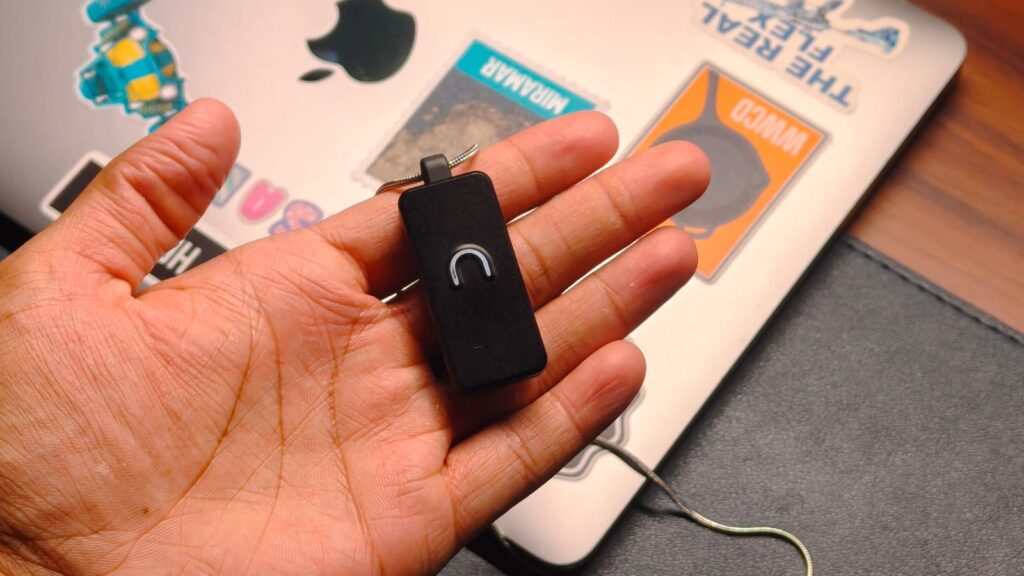
Unlike the Humane AI Pin, the Neosapien Neo 1 is elegantly simple. There are no screens or speakers. Instead, you get a sophisticated pendant-shaped wearable that’s not very heavy. I do wear a simple silver chain, so I thought it would take me some time to get used to it, but that wasn’t the case. After just 5 minutes, you simply forget it’s even there. The rectangular wearable on the front houses a metal shell with the Neo logo centered. The logo glows when it’s working, so you don’t have to pull your phone to check. Underneath the logo is a touch-sensitive area you can tap to turn the device on, and that’s pretty much it.
Some might argue for an AI wearable you can only use via your phone, but I do like the idea of it not being in your face. I already have a million different things bombarding me for attention, like my smartwatch, my earphones, and my doomscrolling beacon of death, the phone. So an AI device that sits quietly on my chest is great.
Performance
All this talk about Neosapien Neo 1 centers around one key idea. It’s supposed to remember things for you. And I’m one of those people who constantly forgets important information. Had a plan with me to go out and get lunch together? Too bad, I’ve forgotten. Part of this behavior, which I’m not proud of, is that I’m always distracted by some work. Never a day goes by that I’m not rushing to complete something. So, as you may imagine, I was quite excited to test the Neo 1 out, and, maybe, finally lend a helping hand to my brain.
When you first set up the Neo 1, it trains to recognize your voice. This, in theory, helps it sort memories more effectively. It listens constantly to whatever conversation you’re having and uses AI to transcribe, summarize, and even set reminders of important meetings, once you connect to Google Calendar. I did all of that and took it to cover the BMPS Grand Finals happening in Jaipur last week. One of the stories I worked on was a daily recap covering the biggest moments from each match. While this is usually a labor-intensive process of me writing the highlights in real time as the game is being played, I gave that task to the Neo 1 instead. It heard the commentary and recorded everything.
For the most part, the experience was better than expected. The device transcribed the commentary, which was in Hindi, and summarized the information game by game. This included the different strategies teams used, the commentators’ analysis, and how they played throughout the tournament. I could use those summaries as a foundation for my article without constantly referring back to handwritten notes.
App Experience
The best part about the Neo 1 is that you can sort through different memories and even ask the integrated chatbot questions. For example, I often remember that I’ve forgotten something important, but can’t quite figure out what it is. So, I just asked the bot, and it gave remarkably accurate answers. There’s also the obvious benefit of recording meetings, which are mostly boring with just sprinkles of useful information. That’s the part the Neo 1 excels at. I don’t have to worry about checking the deadline; I can just use the wearable.
Advertisement
Everything we just talked about is handled by the app, which is also pretty simple. There are four different sections: Home, Ask Neo, Memories, and Reminders. All of them are pretty self-explanatory, and they work quite well. I’m a fan of the reminders section because it highlights everything I haven’t done yet, which is usually a lot. The battery lasts a full day on a single charge, and it uses the standard USB-C port for charging.
As useful as the Neo 1 is, it isn’t without its flaws. The Neo 1 is a first-generation product, and it comes with a few quirks you should know about. The biggest hurdle is psychological rather than technical: the device is always listening. I don’t know about you, but it took me a few days to be comfortable with an AI device listening to all my conversations and recording things the other person is saying.
The other is that the Neo 1 struggles with names. Don’t get me wrong, its Hindi transcription is great, but it needs a little more work to get the names of people and teams correctly. Beyond those, the Neo app requires many permissions, the most important being the ability to disable battery optimization. I know it’s necessary for the app to work and use the AI features, but it drains a lot of battery. I had to shift the app from my primary phone to my secondary phone for that reason. So, it’d be great if Neo could optimize the app a bit more.
Verdict
At ₹12,999, the Neosapien Neo 1 serves a niche purpose. It’s for busy people who have trouble managing multiple jobs or hobbies, yet still want to do their best. I’ve never been the kind of person who consistently uses reminder apps because setting everything up feels like extra work. So a device that listens to and understands what I’m saying and keeps track of everything I need to do, like a personal assistant, is great. Don’t get me wrong, it’s still a first-generation product, and there are some problems like the increased battery drain or the fact that someone is listening to everything you say. But after three weeks of use, I found myself relying on it more often than I expected. And that’s probably the strongest compliment I can give a first-generation product.
Amazon Prime Day is back, running from June 23 through June 26. While this year’s event isn’t overflowing with must-buy discounts, there are still a handful of genuinely worthwhile deals on laptops, OLED gaming monitors, SSDs, processors, headphones, and other tech we’ve tested, reviewed, or would happily recommend. We’ve done… Read Entire Article Source link

























































You must be logged in to post a comment Login