Although lighting 3D prints on fire is rarely the intended outcome, it’s possible that said print will at some point in its future come into contact with either an open flame or a significant source of heat. Once that happens, what will be the result and how worried should one be? This is basically the excuse behind [Maker’s Muse] recent decision to light some 3D prints on fire.
Crispy 3D printed combat robot. (Credit: NHRL)
Materials exposed to an open flame in this experiment included various types of PLA, PETG, ABS, ASA, TPU and PEBA. Since PLA filaments have a significant amount of carbon in them it’s little wonder that these burned quite readily, though an interesting difference was immediately visible between an Elegoo PLA+ test cone and a Prusa Galaxy Black PLA cone. The latter required a blow torch to properly ignite, after which it burned rather hot whilst melting, unlike the dirty yellow flame of the PLA+.
So-called ‘high temperature’ PLA (HTPLA) seems to actively resist burning, self-extinguishing after a blowtorch treatment. Just these few samples of PLA already gave very different results, with very likely the additives being the defining factor since pure PLA is easy to burn as a way to dispose of it somewhat cleanly.
Moving on, black PETG didn’t really want to ignite, while ABS and ASA absolutely love to burn with a sooty yellow flame. HIPS was also tested, burning in a similar sooty manner as well.
Advertisement
Of all the materials tested, TPU was the least flammable with even the blowtorch not able to start ignition and only melting the sample. Foam TPU did however burn the most aggressive, followed by ABS, ASA and HIPS. Overall PETG and regular TPU seem to be your best bet if you do not want your 3D print to turn into a happily burning candle and potentially a general fire hazard.
An anonymous reader quotes a report from Ars Technica: On Monday, passengers aboard Delta flight 591 going from Las Vegas to Atlanta allegedly spoofed the onboard Wi-Fi, raising the attention of federal law enforcement. The incident came one day after the DEF CON security conference concluded in Las Vegas, and was first described on social media accounts that follow publicly available air-to-ground messages, known as ACARS.
According to the “ACARS Drama” account, a message was sent by pilots from the plane stated: “NO INFO AS OF NOW WE HAVE A BUNCH OF PAX THAT WERE AT A CYBER CONFERENCE IN LAS THEY WERE ABLE TO JAM OUR WIFI AND BROADCAST THEIR SIGNAL.” A description of the incident posted to Reddit further stated that these passengers created a fake hotspot (“Delta WiFi Fast”), with a phishing landing page “designed to harvest passengers’ personal credentials.”
This technique, sometimes known as an “evil twin” attack, has been long-known to the IT security community. It involves setting up a fake Wi-Fi network and then capturing login credentials and other data. “One initial finding is an unauthorized WiFi network, which was not provided, operated, or supplied by Delta, was present onboard the aircraft for a short time during the flight,” said a Delta spokesperson. Delta further noted that the flight’s safety was “never in question and no aircraft operating systems were affected,” and that no emergency was declared.
Ars notes that the “actual onboard Wi-Fi was disabled for 30 minutes.”
Schools are navigating a steady stream of change, from new technologies to shifting expectations about what students need to know and be able to do. Yet anticipating change is different from knowing how to prepare for it.
A classroom teacher early in her career, Katie King has spent the last decade helping educators think about that challenge. Now senior director of strategic engagement at KnowledgeWorks, she works at what she describes as “the intentional intersection of futures thinking and education,” helping schools and systems consider possible futures and what those possibilities mean for decisions they make today.
EdSurge spoke with King about futures thinking, the forces shaping the next decade of education and how educators can turn long-term reflection into practical action.
EdSurge: What are the most significant forces shaping the future of learning right now, and how do they show up in your work with educators and systems?
Advertisement
King: The first is AI and integrating with AI, how the next generation of artificial intelligence, which is coming ever more rapidly, has the potential to change how humans think and feel, challenging our current notions of skill development and human relationships.
The second is disruption and its potential to upend daily life in school and learning environments. Our traditional approaches to managing our day-to-day lives and creating change in education really feel insufficient in the face of this very volatile environment.
The third driver is a lack of trust in public institutions: declining confidence, economic constraints and just more market-based competition in education. The good news is that most surveys show that people do have trust in their local schools and their teachers, so I think public education has an opportunity to leverage that by thinking creatively about who they can be in this community.
The fourth driver is the gap in education relevance. The education system faces this urgent need to integrate students’ emerging needs, concerns and aspirations into what they’re learning. The world that they’re living in today and going out into is different from the one schools are setting them up for.
Advertisement
When you talk about “futures thinking,” how is that different in practice from forecasting or strategic planning in education?
Futures thinking is a disciplined research and strategy practice: noticing change, examining assumptions, exploring possibilities and making future-informed decisions — building our mental muscles to avoid making predictions. In futures thinking, we’re actually saying, “We don’t know. Let’s explore a lot of possibilities and then use that range to make informed decisions.” I think when people build these skills and mindsets, they become more flexible and nimble, more attuned to change as it’s happening. I think it’s an avenue toward more proactive leadership than crisis response.
Katie King, Senior Director of Strategic Engagement at KnowledgeWorks
How do you think about forecasts in education, and what role are they meant to play for school and system leaders?
The purpose of a forecast is to synthesize research, trends and emerging issues affecting education. It’s meant to boil it down to some digestible ideas that leaders can then use. We do that by exploring forces that are already affecting education, from AI and workforce changes to shifting expectations of learners, and then how those changes could evolve and shift over time.
Advertisement
We’re hoping our publications [futures forecast and strategy guide] will help people step back from the day-to-day pressures, see the larger patterns shaping the future, and begin to think about how things might be different. What should that mean about what we’re doing today?
AI is one of the forces reshaping education. What does it reveal about how educators can plan in the face of uncertainty?
I think AI is the perfect topic to test how willing we are to avoid predicting the future and instead get comfortable with uncertainty and accept that there is a range of possibilities. We do not have any facts about the future; that is the core tenet. So, when we’re faced with that level of uncertainty about AI, what do we do? In our view, we can plot out as many possibilities and ideas as we can. Then we can decide what we want to do that’s most aligned with our vision.
A recurring challenge in your work seems to be moving from big-picture futures conversations to concrete decisions. What does it take to make that shift effectively in schools and districts?
Advertisement
Try not to resolve uncertainty by moving to strategy too quickly; sometimes a sense of urgency can backfire when we haven’t allowed for the possibilities, contradictions and questions. It can’t be, “Let’s have one big conversation about the future, set our five-year strategic plan and then be done.”
Make sure you have a vision for your school or district that’s more than words on the website. Once you’ve thought about the longer-term future and considered many possibilities, you can use that vision as a filter and revisit decisions as the landscape evolves.
We’re constantly saying: “What have we learned when we’re looking out for the future? And what does that mean for what we do today?”
How can schools balance immediate day-to-day priorities with longer-term futures work in meaningful ways?
Advertisement
We wanted our most recent publication to be concrete, so it focuses on three practical calls to action:
Remake your role by connecting leaders, educators and everyone in the system to their personal vision.
Turn down the noise by creating transparency and clarity so schools can focus on shared goals for young people.
Seed new systems by piloting new approaches and doing small experiments that can grow over time.
None of those are about changing everything at once. They focus on shifting what educators are already doing in ways that support longer-term transformation.
Recommended Resources
Portrait of a Leader, Second Edition
Advertisement
Laying the Foundations for Systems Change
Envisioning Educator Roles for Transformation
Charting a New Course for Education
Watch this video:
Advertisement
This article was sponsored by KnowledgeWorks and was produced by the Solutions Studio team.
The inline six-cylinder engine that revs the highest, as indicated by its amazing 7,900 rpm redline, is the BMW S54. This 343-hp naturally aspirated engine, produced from 2000 through 2008, powered a variety of BMW models, including the E46 M3, the Z3 M Coupe and Roadster, and the Z4 and Z4 M Coupe and Roadster. It was even used by Germany’s Weismann for its MF3 model retro sports car. A later, upgraded version with 360 hp, thanks to an improved intake manifold and camshafts, was called the S54B32HP and appeared in the E46 M3 CSL. And while the BMW S54 engine may not quite rank up there with the highest-revving engines ever released in a production car, it is definitely one of BMW’s iconic inline six engines, ranked by horsepower.
One of BMW’s primary goals with the S54 engine was to create a powerplant that could support an output of 100 hp per liter. They achieved this goal, as its 343 hp generated by a 3.2-liter displacement comes out to 107 hp per liter, which increased to over 112 hp/liter with the higher-output S54B32HP version. Mission accomplished.
The BMW S54 engine featured an iron block combined with an aluminum head and individual throttle bodies. It used dual overhead camshafts to activate its four valves per cylinder. New technology (for the year 2000) added to the S54 included new engine management software making 25 million calculations each second while controlling its cooling system, fuel injection, and timing of the ignition. Forged connecting rods and pistons completed the package.
Advertisement
What else should you know about BMW’s S54 engine?
While the BMW S54 engine was designed for high performance, it requires a scrupulous approach to maintenance, having some well-known, long-term weaknesses. One is its virtually guaranteed-to-fail cooling system. Its cooling system is virtually guaranteed to fail, due to BMW’s use of plastic end tanks on the radiator. Its water pump is also known to have a short lifespan. A service interval of just 60,000 to 80,000 miles for thermostat, expansion tank, and coolant hose replacement is recommended. The S54 is also prone to excessive wear of the connecting rod bearings, with preventative replacement suggested every 60,000 to 100,000 miles.
Advertisement
Another area of concern with the S54 engine is the VANOS variable valve timing system, which is subject to wear and breakage. It should be serviced every 80,000 miles. Other S54 trouble areas include the throttle actuators, the coil packs, and the spark plugs.
If you own a BMW with an S54 engine sitting under the hood, it is not an engine you can just forget about. Changing the oil regularly with a good synthetic and checking it frequently is a good start. Maintain its individual systems, particularly those that can fail. Take care of your S54 and it will take care of you, especially if you happen to be a track rat. The S54 engine powers one of the legendary vehicles that were powered by inline-six engines. It will always be remembered as one of the final high-redline BMW engines that was made before BMW made the switch to turbocharged engines for its lineup of M vehicles.
Google has unveiled the $29 Pixel Tag, its long-awaited AirTag rival that combines UWB with Bluetooth 6.0 Channel Sounding for two forms of precision tracking. It launches November 11. The Verge reports: The Pixel Tag is a slim oblong device available in one grayish color — Fog — that weighs about 12g, or 0.4oz. Like the AirTag, it has no built-in hooks or clips for attaching to objects you want to track. There’s a single button that will trigger a sound on your phone, for the rare occasion when you’ve got the Tag but have lost your main device. It also has an IP67 rating, so it should be safe from dust and rain. As for the battery, the Pixel Tag takes CR2032 coin batteries, and says one battery should last for over a year.
Naturally, it’ll be compatible with Google’s Find Hub network, which leverages the Bluetooth capabilities of Android devices worldwide to help locate lost objects. […] Once you’re close enough to the Pixel Tag, UWB lets the Find Hub app display the distance and direction to the tracker, so long as you’re using a phone with a UWB chip. Channel Sounding is a newer development that can display the exact distance, but not direction, and it will work with any phone or tablet that includes Bluetooth 6.0. The Moto Tag 2 is the only other tracker to currently support it.
In this era of consumer-grade FDM printers that have automatic bed levelling, automatic pressure advance tuning, automatic temperature regulation and so on buttoned away behind bullet-proof presets and automation, something as archaic as manual filament tuning does seem a bit out of place. Unless you’re running that hot rod Voron FDM printer, does it make sense to ‘waste time’ with manual tuning your off-the-shelf FDM printer? In a recent video [MandicReally] argues that it still makes sense to unlock more performance.
Up front it’s made clear that these auto-tuned configurations are perfectly fine for the average user, who will be perfectly happy with something like a ‘generic PLA’ preset combined with whatever auto-configuration the printer did. That said, not every filament is the same, nor is each heating element, nozzle and feeding system. In that sense it can be worth it to take a deeper look.
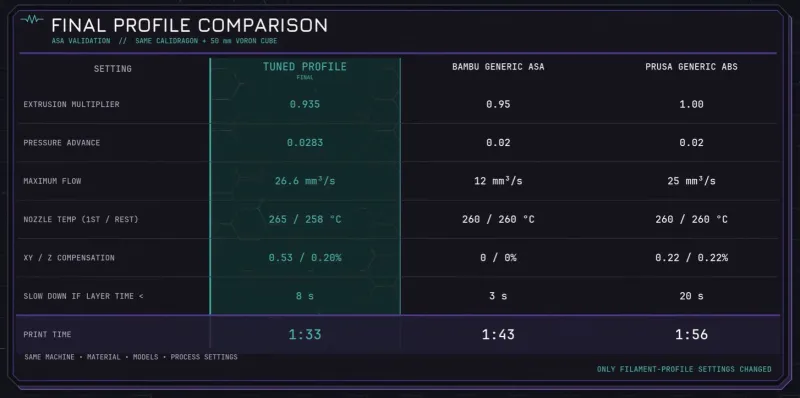
In the video basic aspects like preparing the material, such as properly drying, are looked at, before running through tests for temperature, flow ratio and rate, pressure advance, retraction speeds, material shrinkage etc. before doing a test between such a tuned profile versus a generic preset for ASA filament.
Advertisement
Although the difference isn’t night and day, the tuned profile was faster due to less conservative settings and had better accuracy on the final print due to taking the target FDM printer’s performance into account. Even if not something that the average hobbyist would be interested in, if you’re doing something like production runs with FDM, this might be something you’d want to look at.
The three different profiles used in the test. (Credit: MandicReally, YouTube)
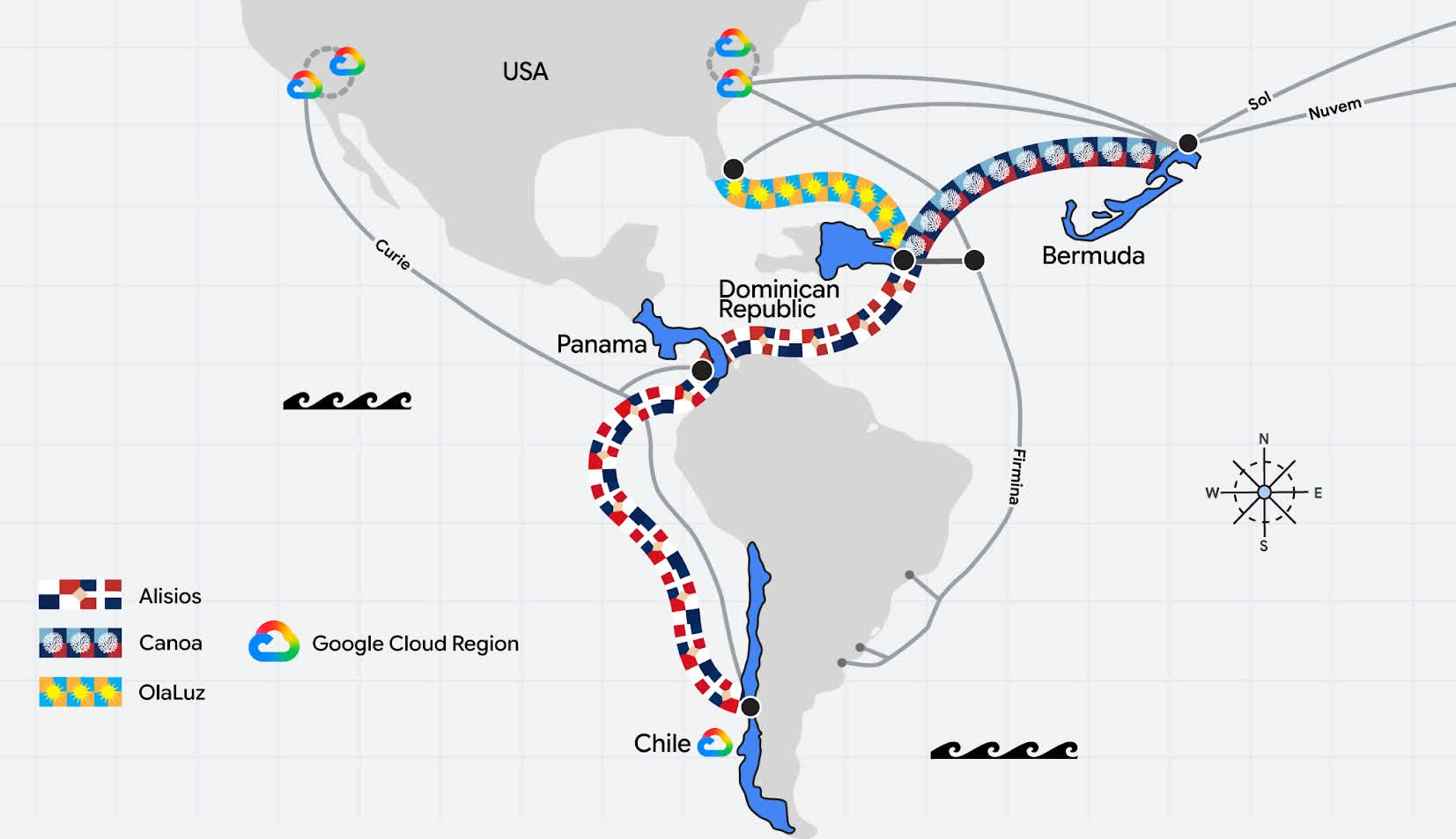
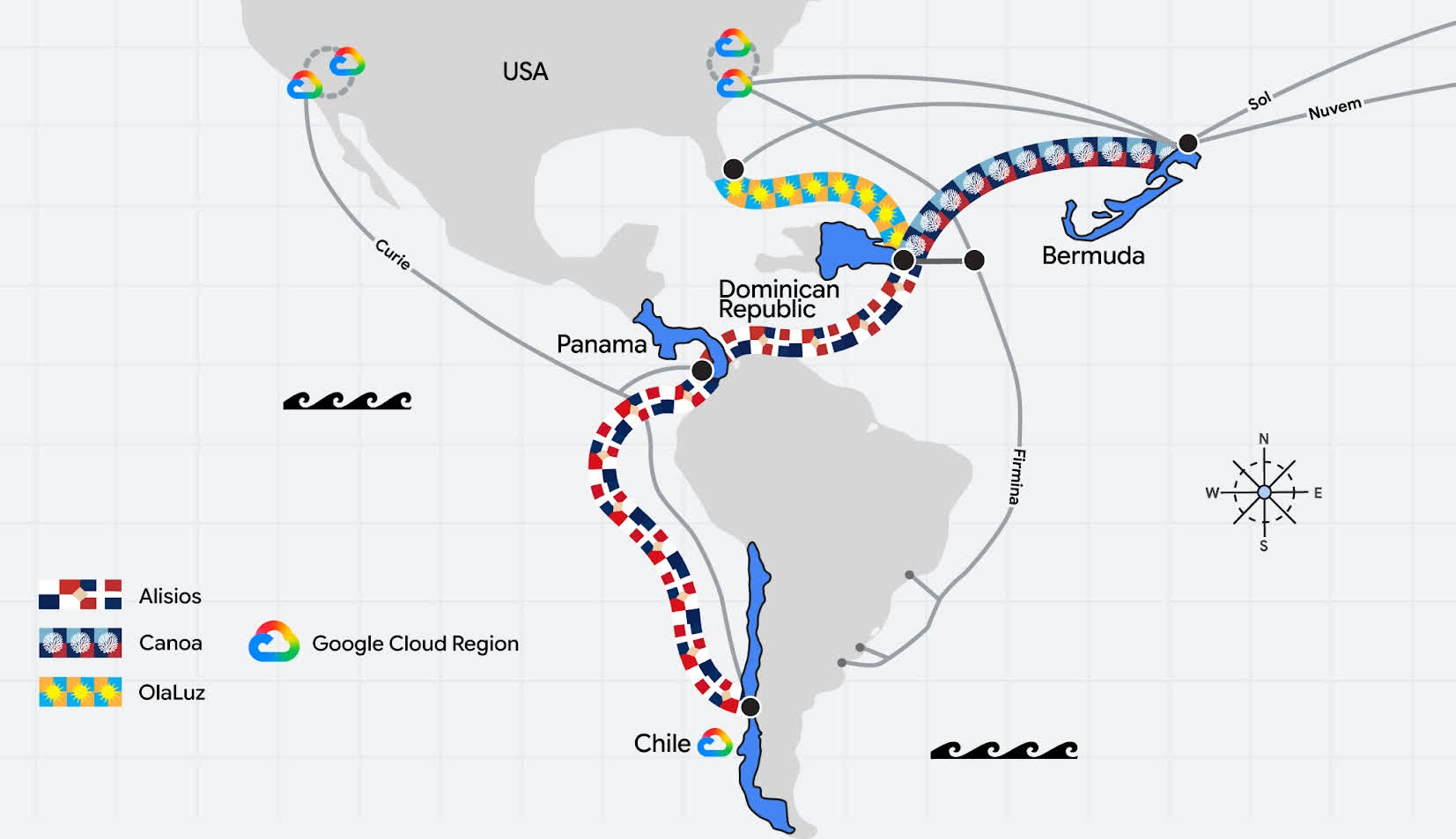
In a nutshell: Google plans to build three new subsea cable systems in the Americas, creating direct links between Chile, Panama, the Dominican Republic, Bermuda, and Florida. The projects are part of Americas Connect, a broader expansion of Google’s network infrastructure in the region. The company said the cables, along with a new branch on its Firmina system and existing investments in Curie, Nuvem, and Sol, will add capacity and provide its network with more alternative routes.
One of the new systems, Alisios, will connect the Dominican Republic, Panama, and Chile. The route will link Panama and Chile on the Pacific side while also connecting Panama with the Dominican Republic in the Caribbean.
Google said the Pacific portion of the network will create a ring between Chile and Panama, with a third connection running from Panama to the US West Coast. The routes will connect to Google Cloud regions in Chile, Los Angeles, and Las Vegas.
In the Caribbean, Alisios will connect to a separate ring running from the Dominican Republic to the US East Coast. That network will provide access to Google Cloud regions in South Carolina and Virginia.
Advertisement
The company is also building Canoa, a cable between the Dominican Republic and Bermuda. Combined with Google’s Nuvem and Sol systems, Canoa is expected to create more direct connections between Latin America and the Caribbean, North America, and Europe.
A third cable, OlaLuz, will connect the Dominican Republic with Florida. Google said the route will increase capacity between the Caribbean and the US East Coast while providing another path for data traffic in the region.
Google is also adding a new branch to Firmina that will land in the Dominican Republic. Firmina was originally built to connect North and South America. The new landing will extend the network into the Caribbean and provide an additional link for the country.
The company’s focus is on redundancy and capacity. The planned systems will also give Google more direct routes between its cloud regions in the Americas.
Advertisement
Chile is a key part of the expansion. The country has sought to become a regional digital hub, supported by its fiber-optic network, existing subsea cable links, and renewable energy resources. Google is also backing the Humboldt cable project, which will connect Chile and Australia across the Pacific.
Apple has signed Nate Gatten to become its new head of government affairs, a move that could help the company work more with the Trump administration.
Apple is undergoing several changes in the short term, in preparation for the CEO transition from Tim Cook to John Ternus on September 1. One day before the switch, Apple will be installing a new vice president.
According to a memo from SVP and General Counsel Jennifer Newstead seen byBloomberg, Nate Gatten will be taking over as vice president of Government Affairs. Gatten will take the role on August 31, the memo states.
Current head of government affairs Nick Ammann will move down the corporate ladder one rung and report to Gatten. Tim Powderly, Matt Brown, and Mike Orgill will also report to Gatten.
Advertisement
Kate Adams, previously the legal chief, will be in an advisory role until her retirement on October 1.
Gatten comes from American Airlines Group, where he held the same role for almost a decade. Previously, he led the global government relations and policy teams at JPMorgan Chase.
Newstead describes Gatten as a “thoughtful, strategic leader with deep experience navigating complex policy environments.”
As a Republican, people familiar with the decision to hire Gatten say he will hopefully align with the Trump administration. While at Fannie Mae, he also oversaw a team that worked with Republican members of Congress, which is a seemingly similar situation.
Advertisement
It’s not just a political play by Apple. Gatten’s previous experience in real estate may also be a bonus as Apple expands its operations with new stores and offices.
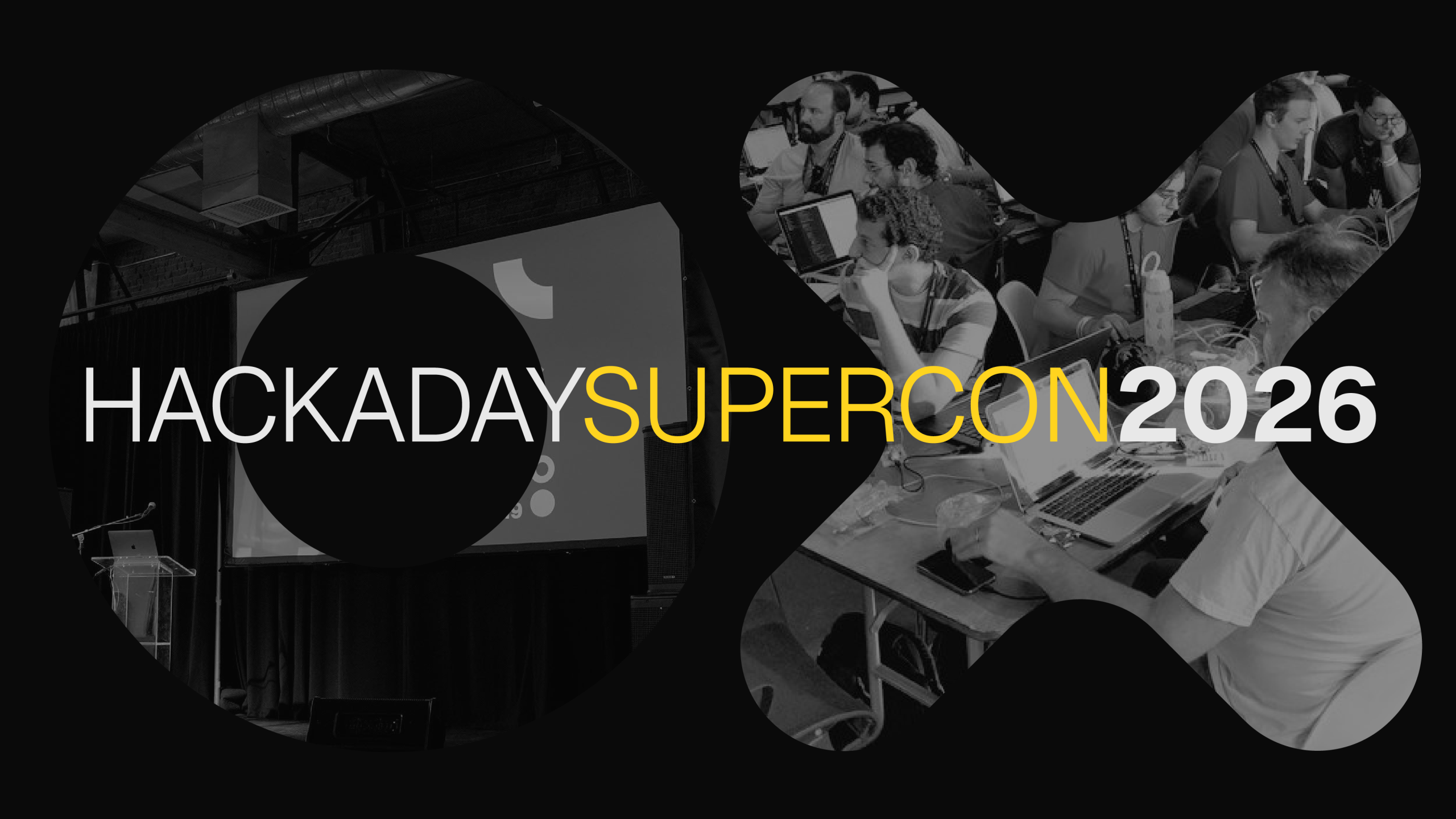
A few weeks ago, we put out the call for participation for this year’s 2026 Hackaday Supercon, taking place in Pasadena, CA this November. Today was going to be the deadline, but like you, we often let things pile up and put things off, so we’re extending another two weeks until August 26th.
Which is not to say that we haven’t heard from a ton of you! We’re psyched to see so many familiar Supercon regulars on the list, but we also love to see first-timers give talks. We try to make sure that new folks get their time to shine, so if you’ve never given a Supercon talk before, or if it’s been a few years, take this as your cue to present in front of the friendliest audience of like-minded hackers around.
This year is Hackaday’s tenth in-person Superconference, and to celebrate we’ve gotten a larger venue, so more folks can watch the talks live. We’ll be running two tracks as always, and you have your choice of a 20-minute or 40-minute slot. Presenters get in free, and we’ll get you an early-bird ticket rate the submission, so don’t delay and register for your slot today! Or at least before August 26th, because we won’t extend the deadline twice.
Advertisement
Oh, and if you’re interested in tickets, swing by Hackaday about this time tomorrow — we’ll have some news for you.
A German digital-rights group has filed a criminal complaint against Meta, Ray-Ban parent EssilorLuxottica, and several retailers over Meta’s AI smart glasses, arguing the devices can enable covert recording in violation of German privacy law. Prosecutors have begun a preliminary review, while Germany’s network regulator says smart glasses are legal “as long as the recording function is clearly visible.” Reuters reports: “There’s no place to escape from smart glasses. You have to expect at any moment to be filmed and then exposed on the internet,” said HateAid managing director Josephine Ballon. The organization reported the management of Meta, units of spectacles maker EssilorLuxottica including Ray-Ban, as well as retailers Fielmann, Apollo-Optik, Mister Spex and MediaMarkt to the Frankfurt-based digital crime prosecution unit ZIT. HateAid said its complaint was based on a federal digital data protection law that prohibits the sale of communication devices designed to film people without them noticing.
ZIT confirmed it received a complaint from HateAid invoking that law, saying it would routinely investigate on a preliminary basis whether there are grounds for a deeper probe. MediaMarktSaturn Retail Group said it was taking the complaint very seriously, adding that its suppliers had contractual obligations for all goods to be compliant with the law. Mister Spex said it had not been officially notified of a complaint and that it was taking protection of privacy very seriously.
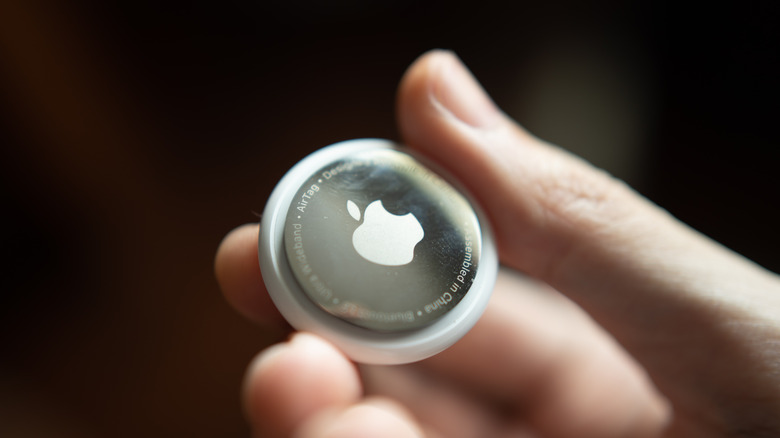
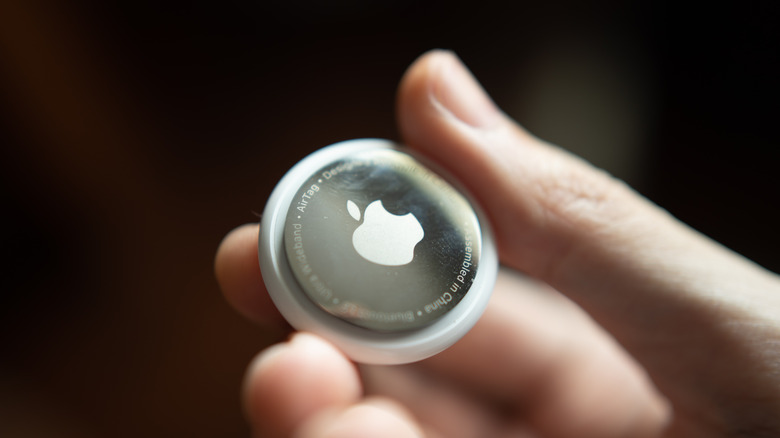
The latest battle in the ongoing innovation war between Apple and Google is upon us. On August 12, 2026, Google announced its rival to the Apple AirTag: the Pixel Tag. It comes with a feature set that puts it in direct competition with Apple’s take. It basically works the same as an Apple AirTag (that is, to help people find their misplaced belongings), and both devices are priced the exact same, as well. The Pixel Tag costs $29 for one or $99 for a four-pack, which is identical to the pricing structure of Apple’s second-generation AirTag. But which has more features?
Given the fact that this is only the first iteration of the Pixel Tag, while the Apple AirTag just upgraded to its second, AirTag is the one with more features to offer. Sure, they both cover many of the same basics, but Apple’s tracker offers more precision finding, a better crowdsourced tracking network, and more unwanted-tracking protections than Google’s Pixel Tag. You also get support for sharing a lost item’s location with participating airlines and other trusted third parties. It’s simply a much broader feature set than what you get with this long-rumored first-gen Pixel Tag.
Advertisement
How the Google Pixel Tag compares to Apple AirTag
Wachiwit/Getty Images
That being said, the Pixel Tag still has plenty to offer. Its Find Hub network leverages the millions of Android devices out there to help locate a lost item when the tag is outside Bluetooth range. If you’re not an Apple user, that’s really nice to have. Not unlike the Apple AirTag, users can also ring the Pixel Tag. You also get Ultra-Wideband and Bluetooth Channel Sounding for more precise visual distance and directional information, plus Left Behind alerts to warn you when you’ve left an item behind. Uniquely, the Pixel Tag can also be shared with up to 10 people, which is nice for those belongings that get used by multiple people. Its button can ring a paired phone, while a paired Pixel Watch can pinpoint and ring the tag from the watch. Pixel Buds owners can also ask Gemini to ring it.
Still, the AirTag combines most of those capabilities with several additional features that the Pixel Tag doesn’t offer. The best example is the aforementioned Share Item Location, which lets you temporarily share the location of a misplaced item with a trusted third party to help you track it down (such as an airline, for example). AirTag also comes with free personalized engraving and works with existing AirTag accessories. You essentially get the same basic tracking tools found on the Pixel Tag, just with more recovery and sharing features.











































You must be logged in to post a comment Login