Elon Musk says he’s found a way to solve one of AI’s biggest bottlenecks by making a hard-to-manufacture turbine part himself.
On Saturday, Musk confirmed what a secret foundry SpaceX has been building in Bastrop, Texas, is for — an apparent response to a story that was already closing in on the details. Earlier in the day, The Information published a report citing job listings that explicitly mention a “blades and vanes foundry,” plus findings from Corey Trinetti, a due diligence specialist who authors detailed reviews of AI infrastructure sites in his newsletter and who’d reported that SpaceX had bought roughly 830 acres near its existing Starlink factory in Bastrop between March and June.
“SpaceX and Tesla are each building 100GW/year of solar production capacity as fast as possible,” Musk wrote on X on Saturday, “but natural gas will still be needed to supplement and bootstrap solar for several years. The limiting factor for nat gas turbine production is casting the blades & vanes. By doing in-house casting at SpaceX, we can accelerate nat gas turbines coming online by up to 18 months, which is a profound game-changer.”
The “why” of all this goes back to one of the biggest challenges facing the AI industry right now. GPU shortages are still an issue — Nvidia’s newest Blackwell chips are still running lead times of several months, for example — but a second constraint has emerged alongside it, which is the physical power grid. The International Energy Agency projects global data center electricity use will roughly double by 2030, and gas turbine maker GE Vernova says it’s essentially sold out of production capacity through 2030 due largely to AI infrastructure demand.
Advertisement
That shortage is why building private gas-fired plants next to data centers, instead of waiting on the grid, has become a ubiquitous strategy for so-called hyperscalers, including Amazon, Google, Meta, OpenAI, and Microsoft. After years of prioritizing wind and solar, they’re all now betting on natural gas to get data centers online faster.
As for the casting bottleneck specifically, according to The Information, the blades inside a gas turbine’s hottest section run at temperatures around 3,000 to 3,600 degrees Fahrenheit, which is roughly 800 degrees hotter than the melting point of the very metal alloy they’re made from. That’s only possible because of the blades’ internal cooling channels and thermal-barrier coatings, plus the specific way each blade is cast. Just four companies worldwide have mastered the casting process well enough to produce them at industrial scale, and all of them are tapped out right now.
What makes the whole thing especially difficult is that each blade has to be cast as a single, unbroken crystal, grown slowly inside a vacuum furnace, without the microscopic seams that let ordinary cast metal crack under stress. It’s a tricky process even for the smaller blades used in jet engines; the blades in power-plant turbines are considerably larger, which makes producing them at that scale and without defects even harder.
If SpaceX pulls this off — and it’s easier said than done, of course — it would mean a Musk-controlled entity holds a manufacturing capability that every other AI infrastructure builder currently depends on a tiny oligopoly for, giving SpaceXAI an edge that’s difficult for any well-funded but non-manufacturing competitor to copy quickly.
Advertisement
But it would also mean more gas turbines coming on fast, and turbines in the ground are already drawing federal lawsuits and peer-reviewed health research over the pollution they emit.
In Memphis, where SpaceXAI has run gas turbines to power its Colossus data centers since 2024, the NAACP has repeatedly accused the company of operating turbines without the permits or pollution controls required by federal law. The organization’s concern is that turbines like these emit smog-forming compounds and hazardous chemicals like formaldehyde, pollutants linked to asthma, respiratory disease, and certain cancers. (The site sits near neighborhoods that already face heavy industrial pollution, and University of Memphis researchers said that in their own admittedly limited analysis, air pollution grew “slightly worse” because of the data center.)
But Memphis just happens to be the most visible case. The same fight is playing out anywhere gas turbines have become the default fix for data center power shortages. In Virginia’s “Data Center Alley,” a study commissioned by the Piedmont Environmental Council, using the EPA’s own COBRA health-impact model, found that emissions from a single facility’s eight full-time gas turbines could reach more than 2.5 million people across multiple counties — with the heaviest impact landing on already-marginalized communities — and cause an estimated 3.4 to 6.5 additional premature deaths a year, translating to $53 million to $99 million in annual health-related damages.
When you purchase through links in our articles, we may earn a small commission. This doesn’t affect our editorial independence.
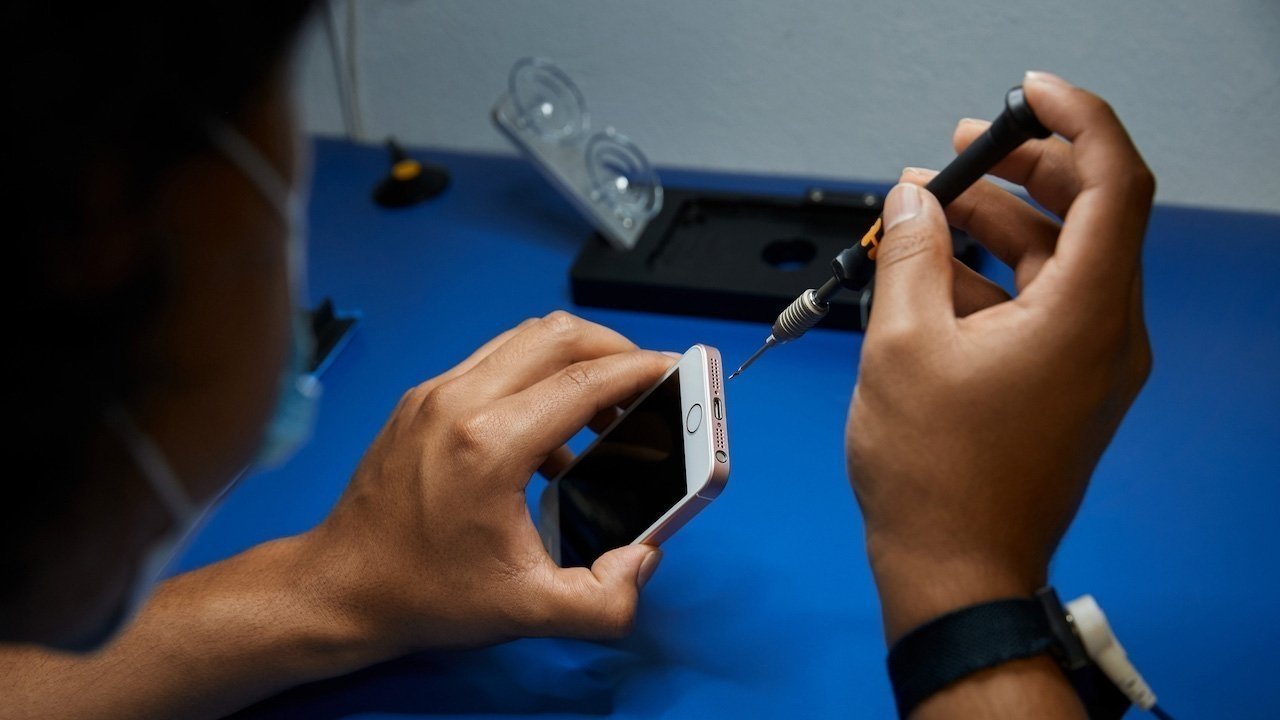
An appeals court in California has resurrected a 2022 lawsuit over claims Apple convinced them not to use a third-party repair service to fix cracked iPhone screens.
In the last few years, Apple has been more open to enabling repairs of its hardware performed outside of its support ecosystem. While its position has relaxed a lot, it still has to deal with its policies from prior years.
A filing for the Court of Appeal for the State of California in August reveals a panel has reversed an earlier court’s ruling to quash a lawsuit over Apple’s repair policies. The three-judge appeals Sixth Appellate District panel has brought the lawsuit back to life.
In 2022, plaintiffs Jesse Granato and Janice Zarad said they were told by an Apple employee in 2021 that using a third-party repair service would void their warranty coverage. The Courthouse News Servicereports the plaintiffs claim this encouraged them to pay for a screen repair through Apple itself.
Advertisement
The lawsuit accused Apple of inflating the cost of independent repairs in various ways, including withholding parts, manuals, and software. It also allegedly conditioned warranties on using authorized repair shops.
A Santa Clara Superior Court judge agreed with Apple’s response that the lawsuit lacked standing under the state’s unfair competition law. Something the Court of Appeal overturned in 2026.
Repairing the lawsuit
In the unanimous decision, the judges explain that, as pleaded, Apple’s practices at the time “substantially injure consumers by allowing Apple to extract inflated payments for repairs or to increase demand for new products by incentivizing replacement over repair.”
The plaintiffs also couldn’t identify any benefit to Apple’s repair policies that outweighed the harm they caused, wrote acting presiding Associate Justice Cynthia Lie.
Advertisement
The panel decided that the plaintiffs had adequately pleaded under the unfair competition claim.
The plaintiffs also attempted to claim that Apple had violated the California 2024 Right to Repair Act, which Apple actually backed. However, the panel pointed out that the law was enacted after the initial suit was filed.
There was also an alleged violation of the 1975 Magnuson-Moss Warranty Act, by Apple allegedly refusing and instructing authorized repair shops to refuse in-warranty services, if repairs were performed elsewhere outside of any warranty.
However, while Lie explains the plaintiffs hadn’t adequately managed to claim the violation of the law, it was ruled that the claims violated the spirit of the law.
Advertisement
The case, revived, has been remanded to a lower court.
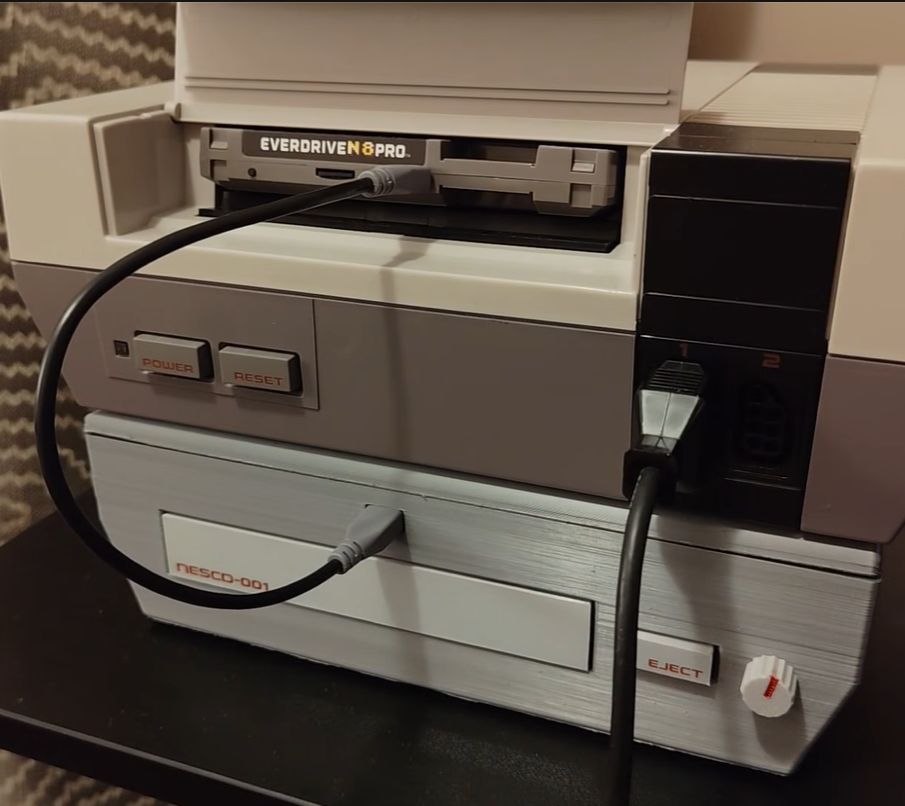
The introduction of optical media in the form of CDs meant a revolution in the world of gaming consoles, escaping the restrictions of a few dozen MB of storage and instead offering a theoretically infinite amount of storage through the miracle and tedium of swapping discs. After the SNES narrowly escaped getting a CD add-on and the N64 doubled down on cartridges, we can now at least get an impression of what it’d be like if the Nintendo Entertainment System had been gifted a CD add-on back in the 1980s, courtesy of a project by [Throaty Mumbo].
The NES future we could have had.
There’s also an accompanying video containing typical hijinks and a demonstration of this system. Initially [Throaty Mumbo] was going to make a SNES CD add-on to match that console’s initial prototype, but doing it for the NES seemed more fun. Obviously, since the NES is quite limited hardware-wise it was always going to be a struggle, even if the original front-loading NES conveniently has a mostly unused expansion slot.
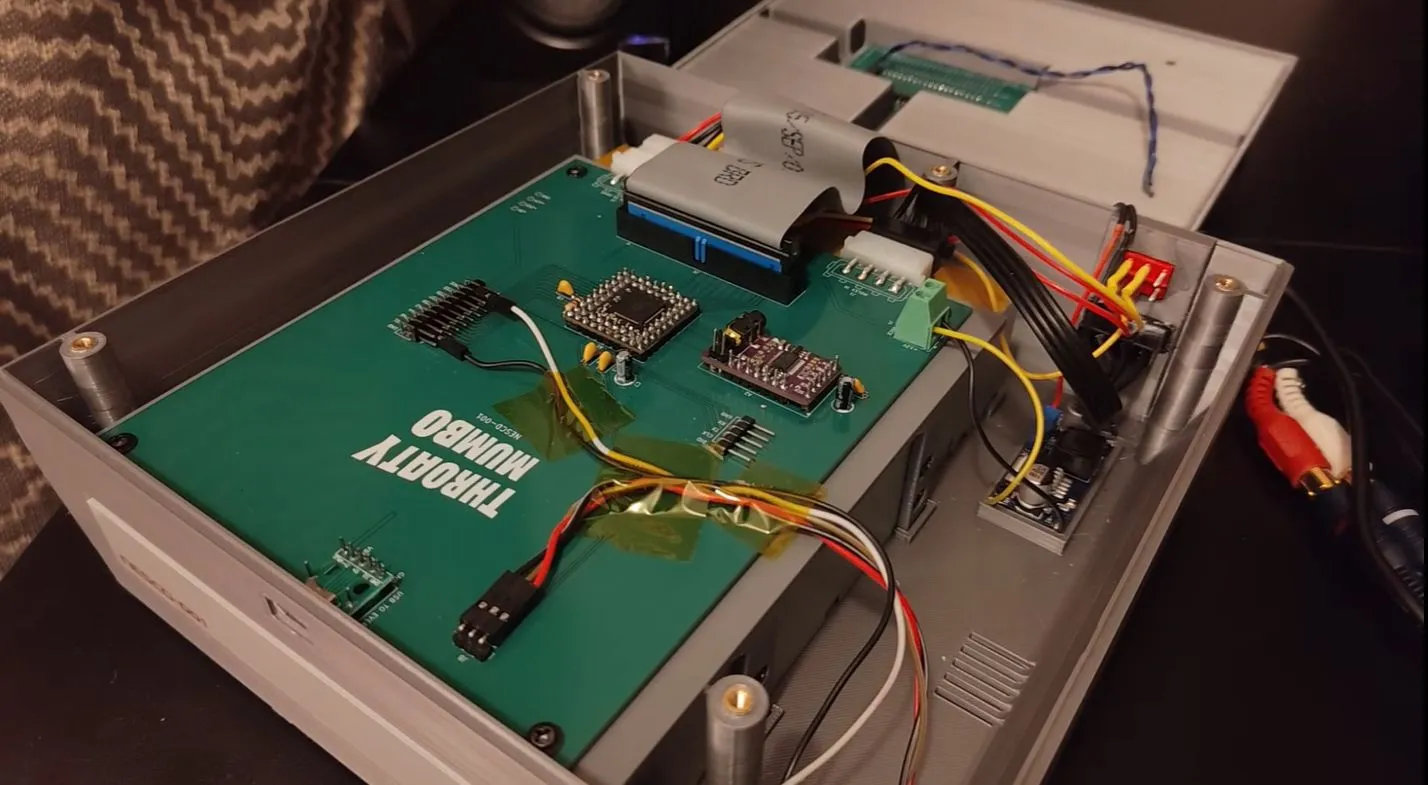
On the custom PCB there is an RP2350B microcontroller that mediates between an Everdrive N8 Pro cartridge and an IDE CD drive, along with a PCM5102 audio DAC. The expansion port is hereby used to receive the audio samples on its audio mix input pin, along with power. After boot the game ROM is read off the CD by the MCU and streamed over USB to the Everdrive.
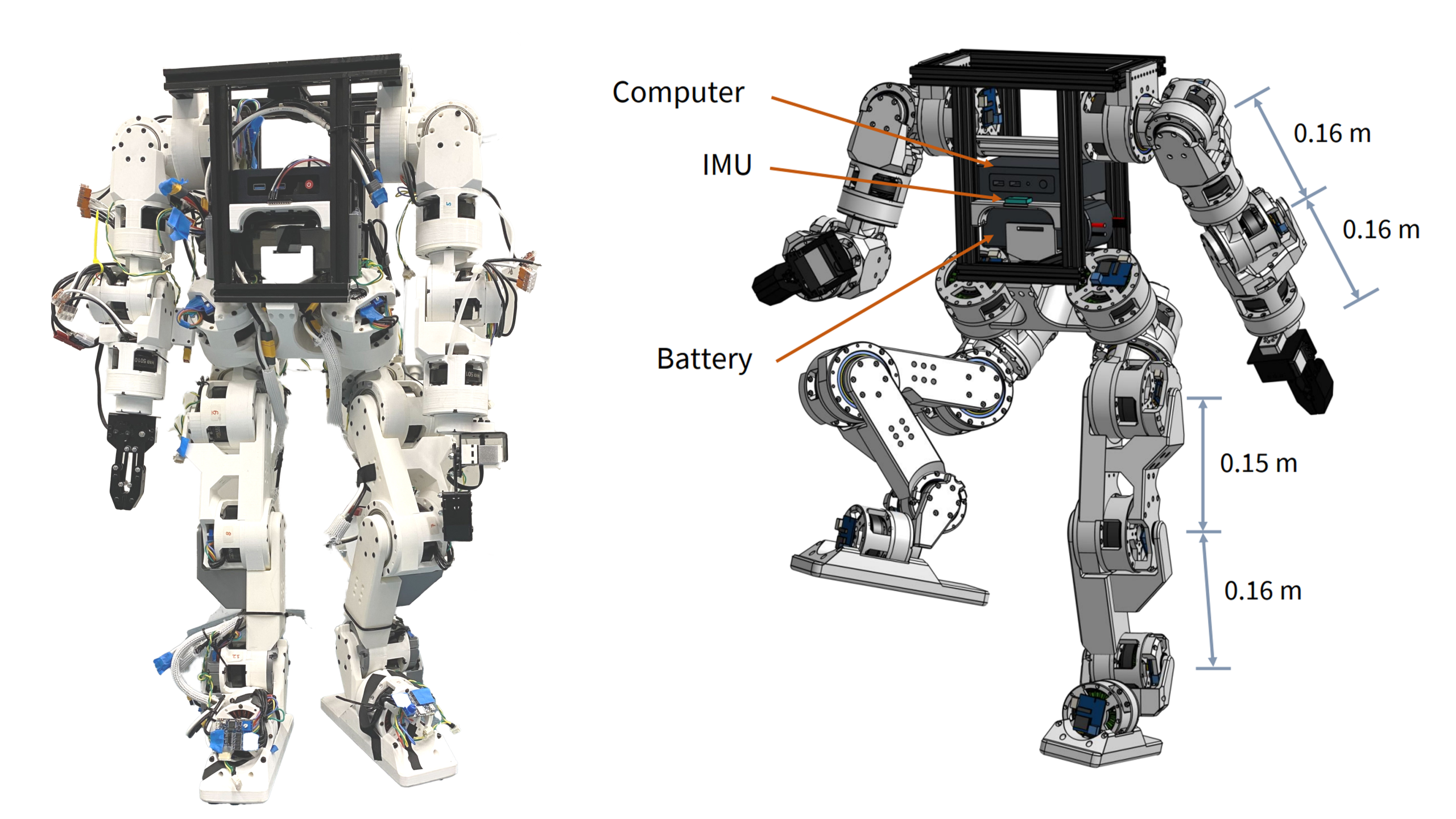
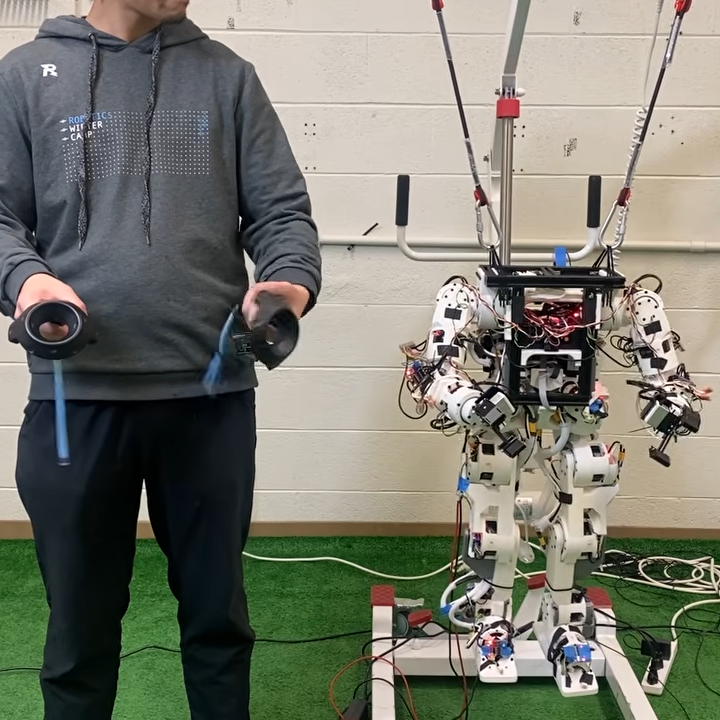
Humanoid robots, even scaled-down ones, tend to be expensive. The Berkeley Humanoid Lite offers a more accessible and economical option by centering the design around 3D printed actuators that make up the bulk of the robot’s frame.
The actuators are made by combining motors with printed cycloidal gearboxes and an embedded magnetic encoder. They’re modular, so even if one has no desire to recreate the whole robot it might be worth checking out the actuator design details to see if they might be useful in some other way.
The Berkeley Humanoid Lite isn’t a finished product so much as an open-source, easily customized reference design. The GitHub repository contains everything one might need, and you can watch some basic demonstrations, including VR-driven teleoperation, in the video embedded below.
At a total hardware cost of under $5,000 USD it’s still expensive, but much more economical than other humanoid robots, open-source or not. As mentioned, even if one doesn’t plan to build one, the modular actuator design is worth keeping in mind for other purposes.
In the very first moments of the universe, matter didn’t exist as we know today. A millionth of a second or so after the big bang, the universe was a dense, hot soup scientists call quark-gluon plasma (QGP). For several years, particle colliders—which smash molecules together at nearly the speed of light—have been able to replicate this state, but often using heavy elements like lead.
Now, a recent experiment by the European Organization for Nuclear Research (also known as CERN from its French acronym) has demonstrated this plasma can be produced by much smaller collisions. Since there’s no longer an accessible natural source of this primordial sludge, these micro big bangs can help reveal what happened in the first few minutes of our universe.
First, a little context. Quarks are what make up protons and neutrons, which, in turn, are the building blocks of atoms and thus all matter. Meanwhile, gluons—as their name suggests—stick quarks together.
During the first microseconds of the universe, quarks and gluons were not yet confined within protons and neutrons but instead formed an extremely hot plasma. As the universe expanded, the matter cooled, and the quarks condensed into larger particles.
Advertisement
After decades of studying QGP in large nuclear collisions, physicists are now trying to understand the limits of this strange state of matter. In particular, they are exploring just how much they can scale down a collision and still observe a collection of particles that behaves like a drop of fluid.
According to a recent article in Physical Review Letters, CERN and an international team of collaborators were able to generate the substance using oxygen-16 and neon-20. Both are less than a tenth of the weight of a lead atom, which was previously considered one of the lightest elements capable of generating QGP.
“We have pushed the boundary for how small the atomic nuclei can be while still re-creating this primordial matter—what you could call a ‘little big bang.’ We now know more about the fundamental conditions required for matter to transition into this extreme state,” You Zhou, a researcher at the Niels Bohr Institute in the Netherlands and a coauthor of the study, explained in a press release.
The scientists found that, despite the small size of the oxygen and neon nuclei, the collisions produced signals consistent with the behavior they expected to find in QGP. For an instant, the generated matter appeared to expand collectively like a fluid before cooling and reverting to particles.
Advertisement
“Hopefully, this will help us better understand how the plasma behaved during the first moments of the universe—and how it later evolved into the forms of matter that everything around us is made of,” Zhou added.
This story originally appeared onWIRED en Españoland has been translated from Spanish.
The Internet Archive has a habit of preserving unique things, ones that nobody else thought about, and its newest collection is the best example yet. I’d say it’s one that every AI historian should bookmark.
Created by Jason Scott, the new collection gathers emulated software from the 1970s through the 1990s. All of them are playable directly in a browser. While none of them actually think in any real sense, the idea is how convincing these decades-old programs can be at simulating the experience of talking to a real person.
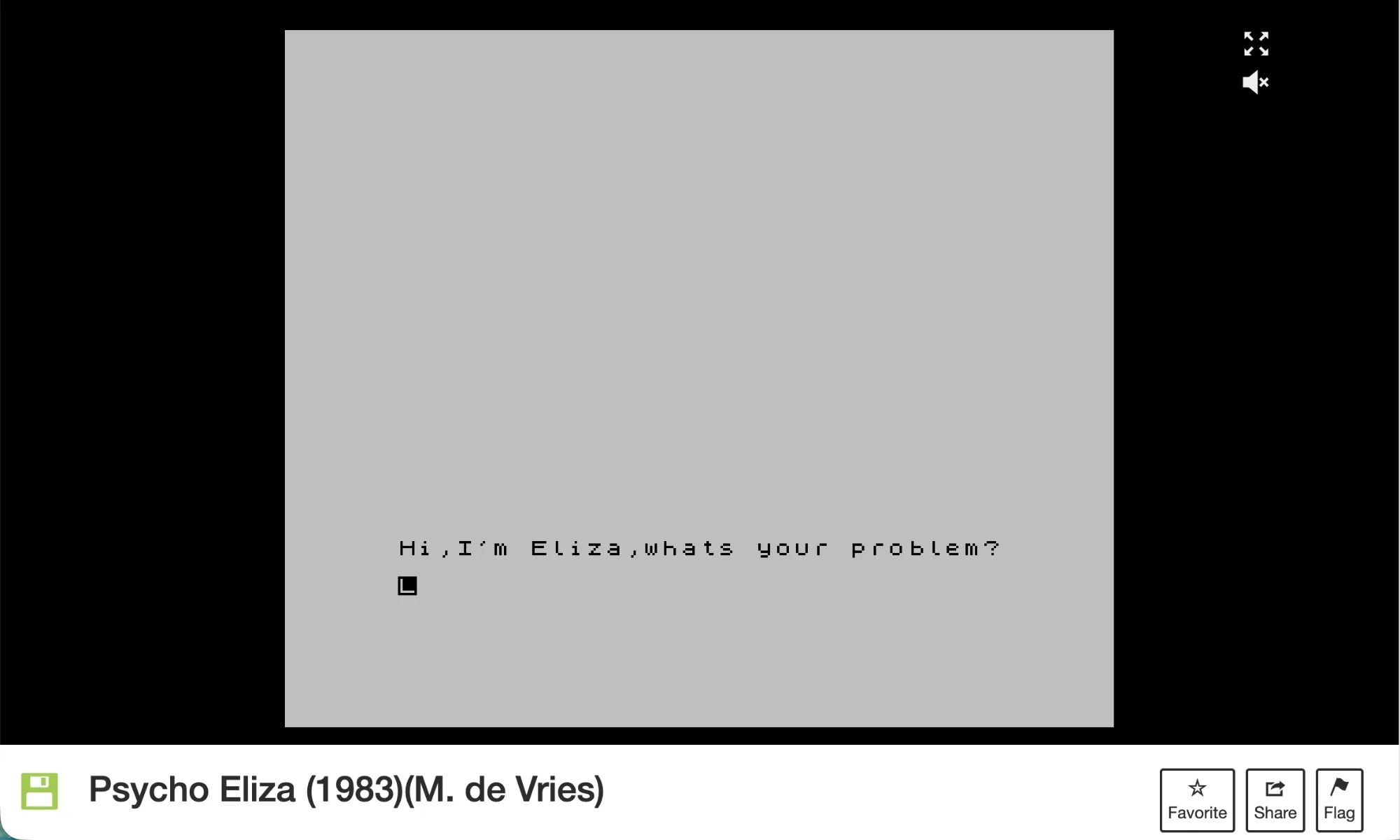
Out of all the entries in the collection, ELIZA anchors the set. Joseph Weizenbaum’s DOCTOR script, which was originally built to mimic a therapist, worked so well that early users reportedly opened up to it as if it were a real person, a trick that still deserves some credit even decades later.
The software was rewritten so many times that the archive holds dozens of versions. Then there’s Racter, a commercial chatbot from 1985 that went well beyond conversation. It generated full passages of prose, and some of them were so strange that they ended up in published work. Consider it an eerie prequel to what LLMs can do today.
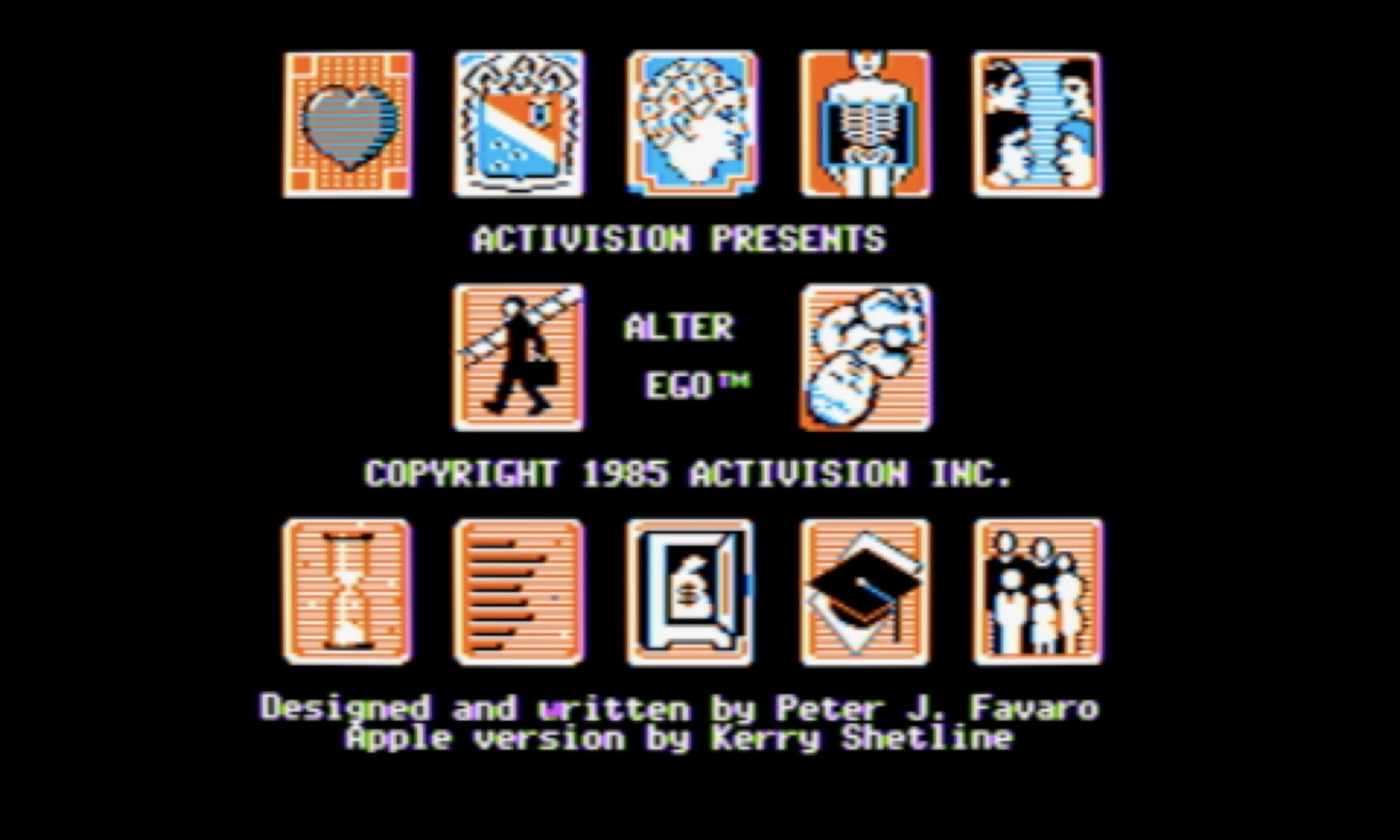
Beyond the chatbots, Activision’s Alter Ego walks you through simulated life stages as a psychologist-designed decision game. On the other hand, Little Computer People, built by Pitfall! creator David Crane, imagines what it would be like if tiny people were secretly living inside your machine. If you ask me, it was oddly ahead of its time.
Suspended splits a cryogenically frozen player’s mind across six separate robots. Each one handles a different task alone, a structure that feels startlingly familiar today. The collection also pays homage to early autonomous agent games like Robot War, where players pre-programmed warriors to battle automatically.
If you’re curious, just poke around the collection directly on Internet Archive’s site right now. It doesn’t require any downloads or setup. Everything runs through in-browser emulation. It’s a genuinely fun way to trace how today’s AI conversations started decades before they got complicated, and well worth losing an afternoon to.
While the sound and fury of launch is exciting, it’s just the beginning of the journey for Roman. It will take several months for the spacecraft to complete its roughly 1.5 million-kilometer trek out to Earth’s second Lagrange point (L2), where it will set up shop near — in cosmic terms, anyway — the James Webb Space Telescope (JWST). Along the way, it will switch on and test various systems and components, with its primary 300 megapixel infrared camera scheduled to power up in three weeks or so.
There’s a lot to cover about the Roman Space Telescope. Built from spy satellite spare parts donated by the National Reconnaissance Office and featuring a field of view 100 times greater than that of Hubble, its launch is widely considered to be one of the most important scientific milestones of the decade. We’ll be bringing you more about the past, present, and future of this flagship mission as it progresses.
From real space missions to virtual ones, this week the developers of EVE Online announced that 2.4 million lines of code that keep the massively multiplayer online role-playing game running would finally be making the switch to Python 3. Given the immense complexity of the codebase, it’s been stuck at Python 2.7 since their last overhaul back in 2010, a situation which has become increasingly difficult to manage as time goes on.
The announcement goes into a surprising amount of depth about the state of Python in EVE. We imagine most players couldn’t care less, but naturally the developers have strong feelings about the situation and perhaps thought it would benefit others in a similar situation to get their thoughts out there.
While there’s certainly an argument to be made that the only justification they really need for making the migration is that 2.7 hit end-of-life back in 2020, the developers explain that the more immediate problem for them was that various tools and libraries they wanted to use were no longer compatible with the Python 2.x series. They also point out hopes that speed improvements made in the latest version of Python will eventually translate into better game performance down the road.
Advertisement
In more terrestrial news, this week the necessary regulatory amendments were passed to make plug-in solar systems legal in the United Kingdom. Assuming the wiring meets the necessary requirements, consumers can pick up the hardware and install it themselves without involving an electrician, although they may still need to contend with landlords and local ordinances that may limit their ability to physically mount the panels. The rules as they stand now allow each residence to have four panels with a total combined output rating of no more than 2,000 watts, although critically, the system is only allowed to generate a maximum of 800 watts at the inverter. As the government and consumers get more comfortable with plug-in solar systems, these numbers will likely increase over time.
Solar isn’t the only area where DIY approaches are moving into the mainstream. This week, Citrix pitched a “different approach to endpoint resiliency”: an isolated Linux-based operating system called UniconOS that users can boot into should the computer’s primary Windows installation become compromised or otherwise inoperable. The idea is that an independent, read-only backup OS kept on its own partition will reduce downtime, since the computer can still be used while IT figures out what the hell happened.
This solution will sound suspiciously familiar to anyone who’s booted a live Linux system from CD/DVD/USB in the last few decades. Try not to keep yourself up all night wondering why you never pitched the idea to some hungry venture capitalists in exchange for a yacht in the Bahamas.
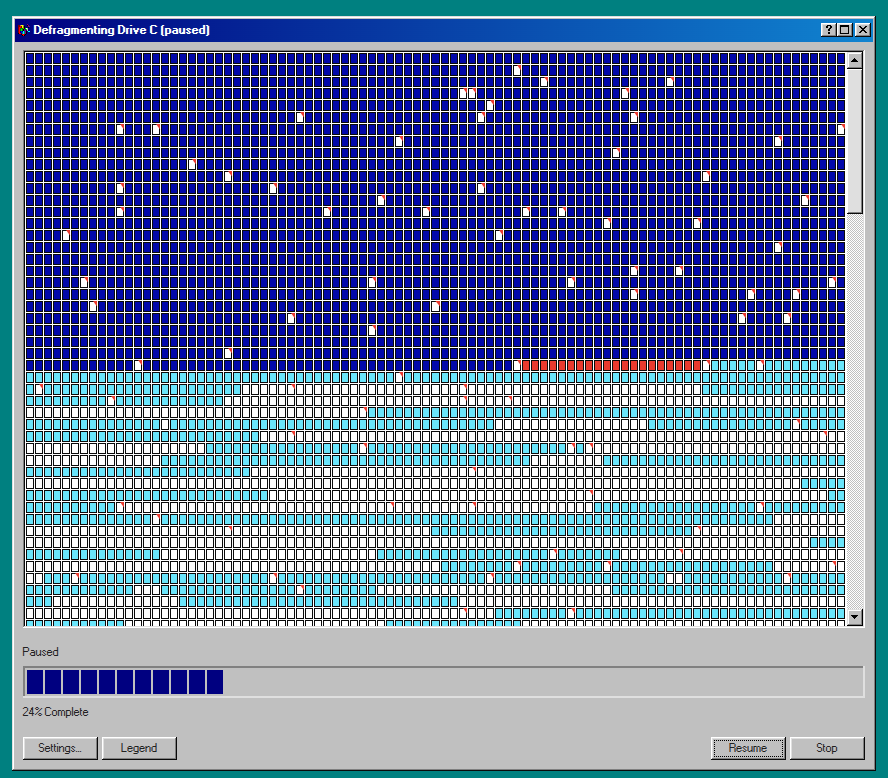
Finally, on the theme of new technology embracing the old ways, we bring you Defrag98, a web reincarnation of Microsoft’s dial-up era Disk Defragmenter tool. While it won’t actually improve the performance of your modern solid-state drive, you may find your own mood boosted by the wave of nostalgia when you see — and hear — the classic tool go to work.
That’s right, not only do the blocks dutifully flip from red to blue just like you remember, but all the while you’ll be treated to the unmistakable whirs and clicks of a spinning hard drive circa the turn of the millennium. Never forget what they took from us.
Advertisement
See something interesting that you think would be a good fit for our weekly Links column? Drop us a line; we’d love to hear about it.
If you have been paying close attention to artificial intelligence, you may have noticed your worries about job security growing instead of shrinking. According to the AI Monitor 2026 from TU Darmstadt, the more you understand AI, the more you worry it’ll take your job, not less. Based on a representative survey of over 2,000 people in Germany, the study breaks the long-held belief that fear comes from ignorance.
The more you know, the more you worry
Omar Lopez-Rincon
Almost half of people with very strong AI knowledge, around 43%, expect AI could soon take over their work. That number drops sharply among people who understand AI less. Professor Peter Buxmann, who led the study, called this both remarkable and worrying, since most debates assume concerns stem from a lack of information.
Despite how disruptive AI already feels to many, most people haven’t been trained to handle it. Just 15% of respondents have participated in any kind of AI training so far, revealing a real skills gap in AI usage. The concerns people actually have are also surprisingly grounded.
AI hallucinations and data privacy top the list of worries, while only four in ten respondents consider a future superintelligence even likely. Younger workers reported more job anxiety than older ones, and overall concern about job security climbed across every occupational group compared to last year.
Advertisement
The fix isn’t telling people to calm down
Buxmann pushed back against simple reassurance as a fix. People who lose jobs lose more than income, they lose social connection and a sense of purpose too. Rather than dismissing these concerns, he argues they should be addressed through better training and honest conversations about how work is changing.
While generative AI will create new kinds of jobs, he says, it’s unlikely to replace disappearing roles on a one-to-one basis. So the real takeaway for policymakers and employers is that preparation matters more than reassurance ever will.
Welcome back to TechCrunch Mobility, your hub for the future of transportation and now, more than ever, the role AI is playing in it. To get this in your inbox, sign up here for free — just click TechCrunch Mobility!
Proponents of autonomous vehicle technology have long argued that robotaxis and other self-driving vehicles will reduce crash incidents and make roads safer. And there is some evidence of that. But that doesn’t mean there hasn’t been a cost to those who are working (or have worked) for the companies developing that tech.
Sean O’Kane, senior reporter, special projects, dug into data submitted to the Occupational Safety and Health Administration and found that test drivers for Waymo and Zoox sustained more than two dozen injuries in 2024 and 2025 from hard braking or other sudden movements made by the autonomous vehicles. In some cases, these workers were sidelined for months after sustaining injuries like whiplash when the AVs stopped abruptly, and hard.
There is one important item to consider. You might ask yourself, well what about the other AV developers? Surely, this isn’t a problem isolated to Waymo and Zoox? And you’re probably right. It’s likely that test drivers for other AV developers are also getting injured, but the companies they work for may be exempt from OSHA’s reporting requirements.
I’ve been writing about Gatik, the autonomous vehicle startup known for its self-driving box trucks, since 2019 when it came out of “stealth.” At the time, I wasn’t sure if the startup would survive. The hype cycle was already chewing up and spitting out AV startups and no one seemed close to commercializing their tech.
Gatik has not only survived, but it has also crossed over from R&D lab to commercial operator, albeit at a small-scale compared with traditional human-driven delivery companies. (The company’s box trucks are driverless and deliver freight from distribution centers to retails stores like Walmart.) And now, with $200 million in fresh funding, it’s pushing to scale. The round was led by Qatar Investment Authority and Koch Disruptive Technologies, with participation from Millennium Management, ARK Invest, and Intact Private Capital.
This is Gatik’s largest funding to date. But I might argue that its multiyear commercial agreement with PepsiCo, which was signed in June and is part of $600 million in contracted revenue, is the bigger deal here.
Advertisement
Other deals that got my attention …
Airbound, an Indian startup building autonomous drones, raised $37 million in a Series A round led by Greenoaks with participation from DoorDash, Lachy Groom, Lightspeed, and Humba Ventures.
Mubadala Capital, the alternative asset management arm of Mubadala Investment Company, agreed to acquire a majority equity interest in Arrive Logistics, a truckload brokerage based in Austin.
Regent Craft, a Rhode Island electric startup developing and manufacturing electric seagliders, raised $120 million in a Series B round co-led by Mare Liberum and AE Ventures. (The seaglider is a class of vehicle called a wing-in-ground effect vehicle, or WIG.) Regent also secured about $120 million debt capital provided by Erebor Bank, which was launched by Anduril Industries founder Palmer Luckey. One note about Regent, a company I have followed for a while: The startup, which recently completed its 255,000-square-foot seaglider factory, is clearly pushing deeper into the defense sector, probably because there is money and partnerships to be had.
Advertisement
Vista Global Holding, a private aviation group based in UAE, is considering a European IPO that could raise more than a $1 billion, Bloomberg reported.
Notable reads and other tidbits
Image Credits:Bryce Durbin
According to a recent YouGov survey, more Americans oppose police license plate cameras than support them. Do you? Shoot me an email and share your opinion.
Any, an electric two-wheeler startup out of Belgium, is placing a bet on cargo space.
General Motors is facing increased scrutiny from U.S. safety regulators after hundreds of incidents, more than 20 crashes or fires, and at least six injuries involving brake problems in its EVs.
Ford has hired Dave Carroll as president of the company’s energy business. Carroll, who previously worked at ENGIE North America, will succeed long-time executive Lisa Drake.
Advertisement
Rivian CFO Claire McDonough is resigning from her position and will leave at the end of October. Her tenure at Rivian came during a tough, and exciting (ahem IPO), period for the company. And her departure comes at another critical moment for Rivian as it takes on some of its biggest projects to date, including the robotaxi deal with Uber and scaling production and sales of its R2 SUV.
Uber is launching a new live video streaming feature that will allow parents to keep track of their children during rides.
Waymo shared 10 lessons it has learned after its vehicles had driven more than 200 million autonomous miles. The first lesson — that multimodal sensors are indispensable — received the most attention because it is in direct opposition to Tesla’s camera-only approach. But there were other lessons that got my attention, including Waymo’s promotion of vision language models (an area that is starting to get a lot of attention).
Meanwhile, Waymo is making more inroads overseas. The company announced that it plans to launch in Munich, Germany.
Advertisement
One more thing …
One important clarification on what I wrote about last week. You might recall that Waymo shared information about its custom silicon chip — specifically a 5 nm ASIC chip that is designed to handle the massive influx of raw data before it reaches the core “brain” of the self-driving system. Waymo stated in its blog post:
“While these ASICs alone deliver over 1,000 TOPS of ML performance dedicated to front-end processing and ML models, we optimize across the full stack to maximize achieved performance, especially in the low-batch regimes we often operate.”
That line led me, and others, to believe that its one chip can deliver 1,000 TOPs (trillions of operations per second) of computing performance. I compared it to Nvidia’s Drive AGX Thor automotive processor, noting it was about the same performance.
But alas, one eagle-eyed reader reached out with some questions, which prompted me to turn to Waymo for official answers. A Waymo spokesperson told me, “It’s for the system, not a single chip.”
Advertisement
That’s an important distinction.
When you purchase through links in our articles, we may earn a small commission. This doesn’t affect our editorial independence.
We spend hours testing every product or service we review, so you can be sure you’re buying the best. Find out more about how we test.
Epson LifeStudio Grand Projector: One-minute review
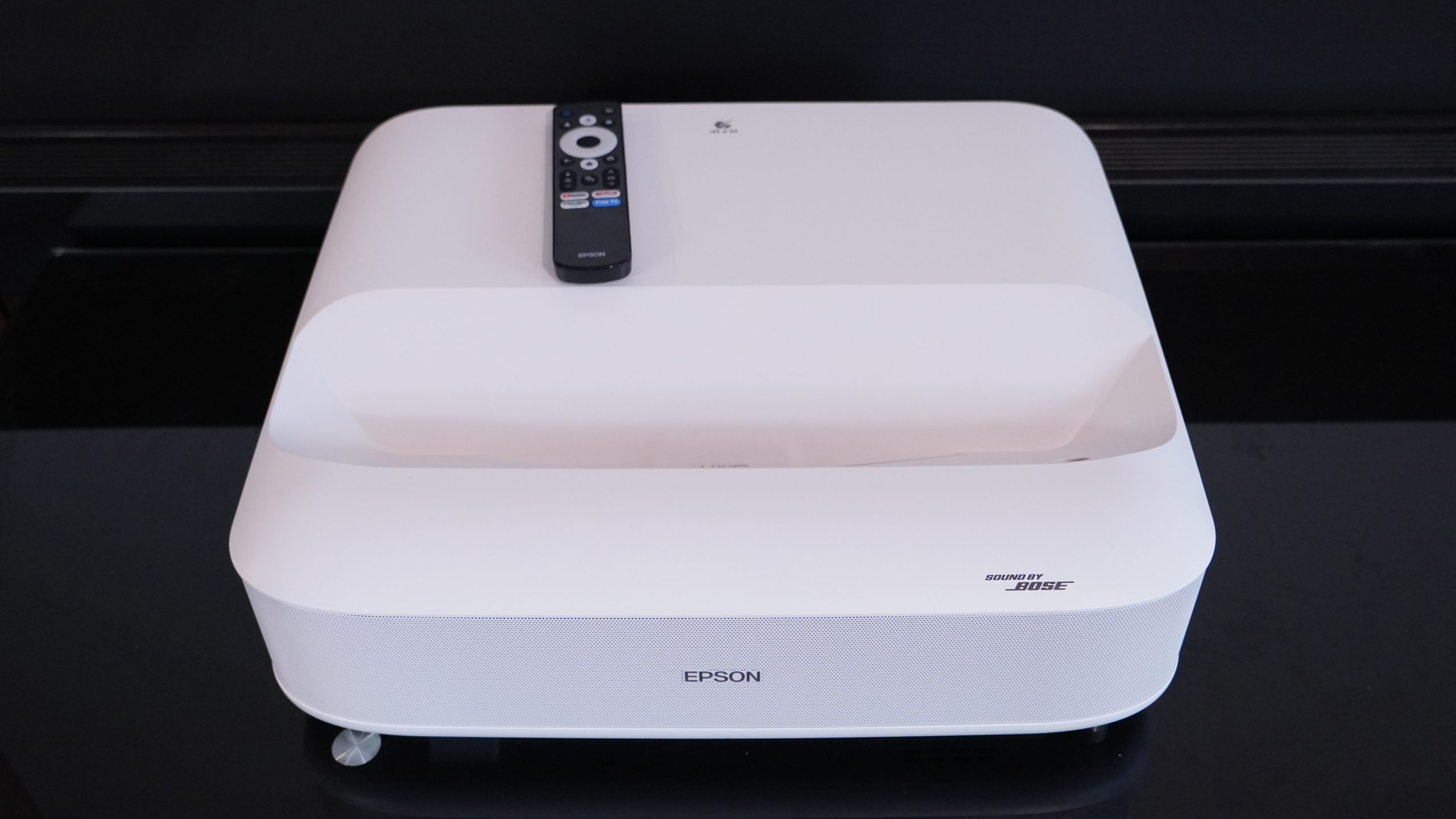
The new Epson LifeStudio Grand UST projector may not ring any bells. But its rebranding hides the fact that it’s little more than a minor update to the Epson EpiqVision Ultra LS650. That was a decent projector when it came out, but not an amazing one.
With the LifeStudio Grand, Epson has made some improvements. The Google TV operating system works well, and there’s an extra HDMI port where its predecessor offered just two. It also doesn’t have whiny fans. But the image is still a little soft and not as dazzlingly colorful as RGB laser projection. The projector’s motion interpolation also needs a lot of work. And Epson’s switch from Yamaha to Bose for sound tuning hasn’t made the audio better.
Advertisement
With competitors improving considerably over the past year, the LifeStudio Grand is in troubled waters. If you can’t see the DLP rainbow effect and don’t mind drawing the curtains from time to time, you can get a much better projector for your money by shopping elsewhere.
Latest Videos FromTechRadar
(Image credit: Future)
Epson LifeStudio Grand review: Price & release date
Release date: October 2025
Price: $2,699 / £1,749.99 / AU$4,399
The LifeStudio Grand launched in late 2025 with global rollout in Spring 2026. The project has a retail price of $2,699 / £1,749.99 / AU$4,399.
Advertisement
Given its newness and the fact that it’s coming from a big player like Epson, I wouldn’t expect any major discounts on the projector too soon, though Black Friday could roll around and see at least a minor deal.
As soon as I took out the LifeStudio Grand, I thought it looked familiar. Sure enough, down to the inch and pound, it’s just the Epson EpiqVision Ultra LS650 back again. There are just a few changes.
Epson added a third HDMI port on the back: nice. Epson swapped to Google TV and it actually runs quickly: nice. Epson included Wi-Fi 6E: nice. And Epson added some gaming features, like ALLM and a 1080p/120Hz mode: nice. But these are more making up for fumbles from that earlier model, rather than actually keeping pace with competitors like the Hisense PX3 Pro and its 1080p240Hz mode.
Sign up for breaking news, reviews, opinion, top tech deals, and more.
The LifeStudio Grand is a little plain to look at with its white plastic construction and gray-ish front grille — the result of a white grille dotted with black holes. Even the Epson branding looks unfortunate, like it was pasted on after having been forgotten in an earlier prototype (except we know it wasn’t because it was there on the predecessor).
Advertisement
One thing giving the LifeStudio Grand a bit of style is its little silver legs. These also play a crucial role in the projection, as they can adjust the tilt of the projector to ensure it lines up square with a wall or projection screen. The projector supports digital keystone adjustments, but those are best avoided when possible. The right side of the projector hides a hardware focus dial behind a small panel, which allows for quick focus adjustments while also protecting the setting once you’ve got it in place. Auto-focus would have been nice though.
(Image credit: Future)
While the LifeStudio Grand isn’t a large UST projector, it ends up feeling a little large because of its 15.7-inch depth. For comparison, the Hisense L9Q is just 12.5 inches deep and the PX3-Pro is just 11.7 inches. That sees the LifeStudio Grand stick out pretty far forward on a media console, and because of its 0.25:1 throw ratio, the console might have to stick out too if you want to get a huge picture. All of this also makes for tough placement for a soundbar.
The LifeStudio Grand’s remote is a cheap little plastic unit that doesn’t feel a good match for the price of the projector. It has typical Google TV controls, a dedicated input-selection button, four streaming app shortcuts (one for Free TV, which fires up Google TV Freeplay), and a dedicated brightness control and a shortcut to projection settings. While there are also volume controls on the remote, there’s no mute button — enjoy the sound of advertisements that you can’t quickly mute. The remote also lacks any illumination, which would be helpful in a dark home theater.
(Image credit: Future)
Design & features score: 3/5
Epson LifeStudio Grand review: Picture quality & performance
(Image credit: Future)
Bright projection
Slightly soft picture and motion artifacts
Speakers are no stand-in for actual sound system
Just like its predecessor, the star of the show for the LifeStudio Grand is its brightness. The projector offers a very respectable 3,600 lumens. This doesn’t make up for bright sunlight coming into the room and ruining dark scenes, but for bright content it can look decent. And the fans don’t overdo while running at full brightness either — an improvement over its prior model.
That’s about where the LifeStudio Grand’s benefits compared to its competitors end. The LifeStudio Grand uses Epson’s own 3LCD projection, which doesn’t prove as colorful compared to the crop of RGB laser projectors on the market. It does avoid issues with DLP rainbow effect, but if you’re not susceptible to that, it may be a non-issue. Contrast is decent, but not astounding. And though this is a 4K projector, Epson’s pixel shifting on this model doesn’t produce as stunningly sharp an image as its rivals.
Advertisement
Right out of the box, the projector’s Standard picture profile has some motion issues, and it’s not better on its other profiles. It smoothes out camera panning motion, but it introduces issues in just about all other types of motions. People moving around on screen look poor, especially with hand motions, which look almost AI generated and occasionally cause weird stuttering for the whole frame.
Animation looks even worse as motions are smeared chaotically. And even panning shots can suffer when the camera motion changes speed or slows to a stop, with the projector seeming to reduce the frame rate instead of interpolating. Although the interpolation can be turned off, when it is some camera pans stutter.
(Image credit: Future)
The speakers on the LifeStudio Grand are fine, but not dazzling — so much for that Bose collab. They don’t create a very wide soundstage, so they’re no replacement for a proper sound system. And while they can pump out enough volume for a 200-square-foot room, that’s about their limit. I find I’m regularly dialing them up above 60% just to listen in a quiet room. With guests over, it all but requires max volume, and has a slightly harsh quality when cranked.
Even with the projector’s new gaming features, it doesn’t prove a stunning option for gamers either. At a pinch, it’ll be good enough for most games, but I could still feel slight latency that made combat hard in fast-reflex action games.
Advertisement
Picture quality & performance score: 3/5
Epson LifeStudio Grand review: Value
The LifeStudio Grand isn’t a terribly high-priced UST projector, undercutting the Hisense PX3-Pro by a good amount. And for the money, you’re getting a very bright projector. But that’s about the only specification that stands out.
The picture quality, sound, and design all leave plenty to be desired. That’s a bit too much disappointment for a product that’s still edging up toward $3,000 / £2,000 / AU$4,500.
Having seen the Hisense C2 Ultra — a 3,000 lumen triple laser projector — going for $2,000 (around £1,500 / AU$2,800) recently, it’s hard to see the LifeStudio Grand as a good option when you can grab the Hisense and a solid sound system for the same price.
Advertisement
Should I buy the Epson LifeStudio Grand?
(Image credit: Future)
Swipe to scroll horizontally
Epson LifeStudio Grand Scorecard
Attributes
Notes
Rating
Design and features
Advertisement
A bland and bulky design that hasn’t changed much holds the LifeStudio Grand back, though it’s nice to see Wi-Fi 6E and an upgrade to a functional Google TV operating system.
3/5
Picture quality and performance
The LifeStudio Grand is bright and avoids the DLP rainbow effect, but that’s about the only thing it has going for it against its rivals. It’s not dazzlingly colorful, offers just decent contrast, can look a little soft, and doesn’t have impressive speakers or gaming performance.
Advertisement
3/5
Value
With just a couple of strong points and some big areas it lags behind, the LifeStudio Grand doesn’t offer wonderful value at $2,699 / £1,749.99 / AU$4,399, especially when some competitors have come down in price.
2x HDMI 2.1 (1 with eARC), 2x USB-A, 1x S/PDIF, Ethernet, 1x 3.5mm, Bluetooth 5.3
How I tested the Epson LifeStudio Grand
(Image credit: Future)
Tested at home in multiple, real-world viewing conditions
Presented the display with a variety of media and formats
I have tested numerous projectors and displays over the last half-decade
I tested the Epson LifeStudio Grand at home, in real-world conditions. This saw it faced with ambient light coming in from numerous windows, in-room lighting, as well as ambient noise that both the projector and speaker systems had to overcome. The projector was tested both against a bare, white wall and an Akia Screens CineWhite screen. It was presented with streamed content, HDR and non-HDR, and PC gameplay.
My testing evaluates the projector’s performance with respect to its price and competition from other models colleagues at TechRadar and I have tested.
Advertisement
I have been testing projectors since 2021 and displays for even longer.
CarPlay is great for listening to music on the go, but a few tweaks will help it sound even better in your car.
A. Aleksandravicius/Shutterstock
Apple CarPlay gives you an easy solution for playing your favorite music from Spotify or Apple Music in your vehicle. However, it isn’t guaranteed to give you the best sound your car can produce. Your iPhone might feed the stereo a lower-quality stream than you expect, with settings that sound great through your headphones but awful through your car speakers.
There’s no magic solution for this, given how much variance there is between car speakers. The quality of the original music will obviously play its part, but the way your iPhone connects to your car has an impact, too. Rather than upgrading your speaker system right away, you can try some straightforward changes to improve the audio quality when using Apple CarPlay.
Advertisement
Wired CarPlay gives you lossless audio
Harry Howitt/Shutterstock
Wireless CarPlay is the most convenient option for most people. You don’t even have to get your iPhone out of your pocket for your car to connect and start playing your favorite songs. Unfortunately, it isn’t the best option for those who demand the best music quality.
Take it from Apple: wired is best for your music. Apple’s guidelines for Apple Music through CarPlay confirm that only a wired USB connection will allow you to play lossless audio. Lossless audio is compressed without throwing away any of the original audio data, meaning you’re not losing detail. A wired connection means you can switch to lossless streams, as long as you have an active Apple Music subscription and have enabled this option.
Technically, it’s all down to the codec. Apple uses LPCM for audio on wired CarPlay connections, but switches to AAC-LC when using wireless CarPlay. LPCM carries uncompressed digital audio, so a lossless ALAC track from Apple Music can be passed to your car without lossy compression. Wireless CarPlay has to encode the audio into AAC-LC first, using lossy compression to reduce the bitrate and discarding some of the original audio data in the process.
The end result is lower-quality audio, but that doesn’t mean wireless CarPlay automatically sounds bad. Whether you hear the difference will depend on your car’s sound system and your ears. The speakers and amp (if your car has one) have a huge influence here. Plus, other distractions, like road noise, are never going to provide the perfect environment for listening to music.
Advertisement
Download high-quality music before you drive
Hadrian/Shutterstock
A wired connection can only preserve the quality it receives in the first place. When you’re streaming from Apple Music or Spotify while driving, your mobile connection isn’t going to be perfect. You’re regularly shifting between cell towers and dipping in and out of cellular coverage. Drops in connection mean drops in quality: CarPlay can’t counter that, even over USB.
This problem is easily fixed by downloading your regular playlists to your iPhone before you set off. Apple Music lets you choose your preferred quality setting for downloads, including lossless at 24-bit/48kHz. This, while using wired CarPlay, will give you the best possible sound quality over the platform. If you’ve downloaded your music at a lower quality before, Apple recommends deleting it from your phone and downloading it again to get the lossless version.
You can listen to lossless audio on other platforms too, including Spotify, which allows Premium subscribers to download lossless audio at 24-bit/44.1kHz using FLAC. Otherwise, Spotify will automatically adjust your streaming quality per your connection; downloading your playlists will stop this from happening.
Advertisement
Because lossless audio files will take up significantly more storage than compressed equivalents, make sure you’ve got plenty of space available. Another benefit of downloading your music is preserving your data plan, since lossless streaming uses a huge amount of data.
Check the equalizer and volume settings on your iPhone
Zalfar/Shutterstock
The audio settings for your chosen streaming app are another area to review. Volume control and equalizer settings can help if your music sounds tinny, strangely thin, or heavy on bass.
Apple Music has its own equalizer settings, which you can access through Settings > Apps > Music > EQ. You might have already chosen a preset; if so, turn the EQ off and listen again to see how it compares. A preset that works well with headphones probably won’t sound the same while you’re listening to music through a car’s speaker system.
Advertisement
Apple Music also has a Sound Check mode, which is a normalization feature that automatically adjusts playback volume. If a song is too quiet or too loud, Sound Check will try to equalize the volume based on its own measure of perceived loudness. You can set this by tapping Settings > Apps > Music and toggling Sound Check on or off. Other music apps might have their own equalizer or volume normalization settings that you’ll need to check, too.
After every change you make, it’s best to check the impact immediately by listening to your music again. You don’t want to compare after changing several different options, as you won’t be able to accurately compare it to the original settings you used and, if needed, switch it back as easily.
Advertisement
Watch out for this unusual CarPlay bug
Harry Howitt/Shutterstock
If CarPlay usually sounds OK but suddenly loses its bass, volume, or clarity, then an odd audio ducking bug might be the cause. CarPlay has to lower the volume whenever Siri or your maps app is speaking, and people have reported music can sometimes get stuck in this state afterwards.
A common workaround, mentioned in this long-running Reddit thread over the last few years, suggests a workaround. Try activating Siri using your steering wheel control, then immediately hitting the button again to dismiss it. The thread includes reports from Mazda, Porsche, Subaru, Ford, Toyota, and other owners suggesting that this restored their music to normal.
Other bugs may also crop up; in these cases, it’s worth removing your device and re-pairing it if Apple CarPlay isn’t working properly. A fresh connection will often reset any conflicting settings and restore normal working order. You can do this at Settings > General > CarPlay, selecting your car, then tapping Forget This Car.
Advertisement
Give CarPlay the best source you can
Igor Alecsander/Getty Images
If you want the best audio quality in your car, you’re going to need the highest-quality source audio. A wired CarPlay connection works best, but you’ll still need to switch to lossless playback in Apple Music or Spotify to eliminate quality-reducing compression. Avoid the variability of streaming by downloading the files in lossless format before you set off. Any audio settings you’ve configured, especially custom EQs in streaming apps, are worth double-checking.
There’s a limit to what you can achieve with just a few tweaks to your settings, though. Your speaker setup, including your amplifier, will have a big impact on quality. The acoustics in your car as you’re driving have a major effect, too. Experimentation is your best bet here: make one change at a time and listen carefully to see if it makes a big enough difference.























































You must be logged in to post a comment Login