A new NYT Connections puzzle appears at midnight each day for your time zone – which means that some people are always playing ‘today’s game’ while others are playing ‘yesterday’s’. If you’re looking for Saturday’s puzzle instead then click here: NYT Connections hints and answers for Saturday, April 4 (game #1028).
Good morning! Let’s play Connections, the NYT’s clever word game that challenges you to group answers in various categories. It can be tough, so read on if you need Connections hints.
What should you do once you’ve finished? Why, play some more word games of course. I’ve also got daily Strands hints and answers and Quordle hints and answers articles if you need help for those too, while Marc’s Wordle today page covers the original viral word game.
Advertisement
SPOILER WARNING: Information about NYT Connections today is below, so don’t read on if you don’t want to know the answers.
Article continues below
NYT Connections today (game #1029) – today’s words
(Image credit: New York Times)
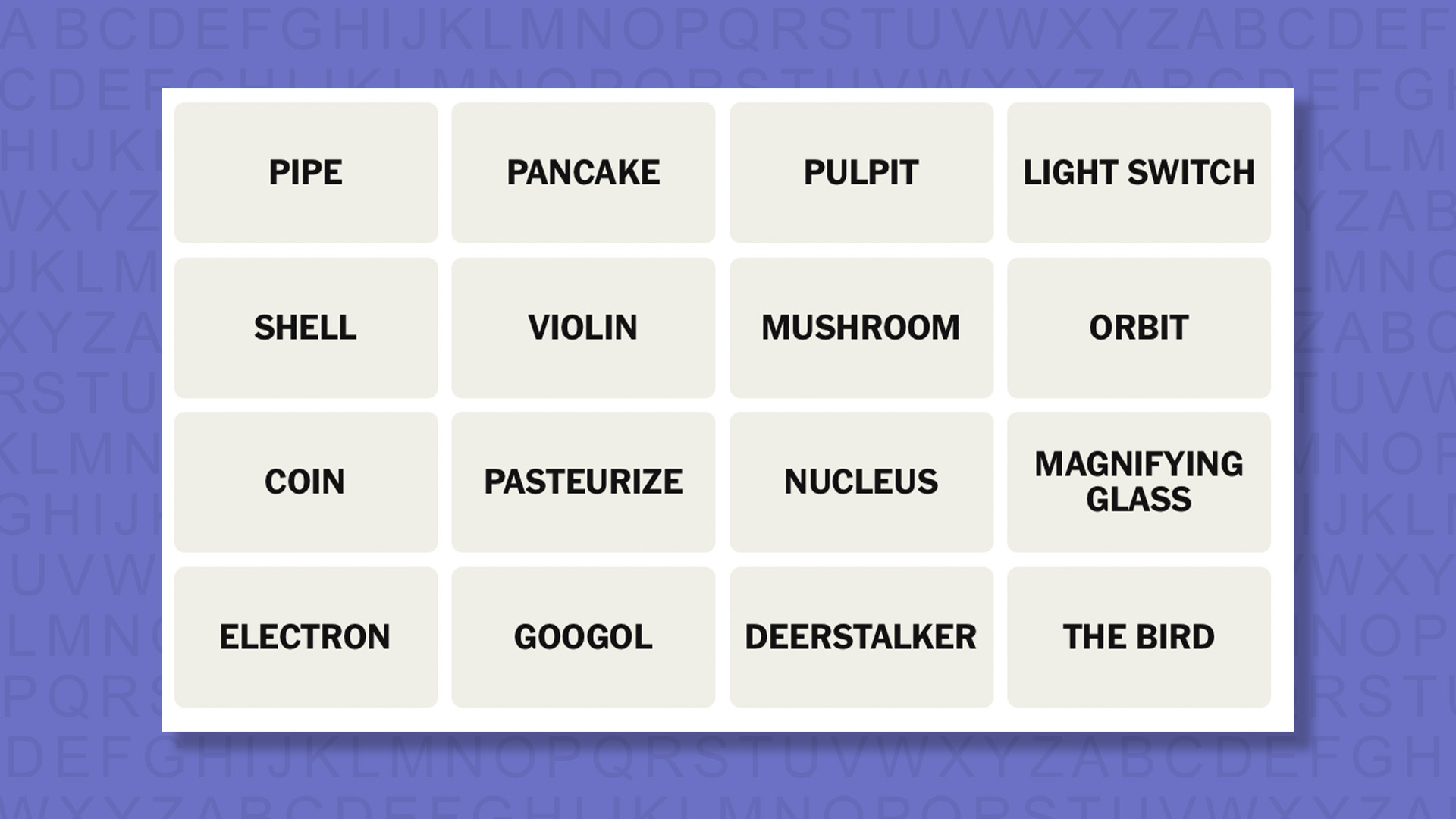
Today’s NYT Connections words are…
PIPE
PANCAKE
PULPIT
LIGHT SWITCH
SHELL
VIOLIN
MUSHROOM
ORBIT
COIN
PASTEURIZE
NUCLEUS
MAGNIFYING GLASS
ELECTRON
GOOGOL
DEERSTALKER
THE BIRD
NYT Connections today (game #1029) – hint #1 – group hints
What are some clues for today’s NYT Connections groups?
YELLOW: Particle science
GREEN: A sleuth’s stuff
BLUE: Use your fingers
PURPLE: Look for types of mush
Need more clues?
We’re firmly in spoiler territory now, but read on if you want to know what the four theme answers are for today’s NYT Connections puzzles…
Advertisement
Sign up for breaking news, reviews, opinion, top tech deals, and more.
NYT Connections today (game #1029) – hint #2 – group answers
What are the answers for today’s NYT Connections groups?
YELLOW: ATOMIC STRUCTURE TERMS
GREEN: PARTS OF A SHERLOCK HOLMES COSTUME
BLUE: THINGS TO FLIP
PURPLE: STARTING WITH SYNONYMS FOR “SLUSH”
Right, the answers are below, so DO NOT SCROLL ANY FURTHER IF YOU DON’T WANT TO SEE THEM.
Advertisement
NYT Connections today (game #1029) – the answers
(Image credit: New York Times)
The answers to today’s Connections, game #1029, are…
GREEN: PARTS OF A SHERLOCK HOLMES COSTUME DEERSTALKER, MAGNIFYING GLASS, PIPE, VIOLIN
BLUE: THINGS TO FLIP COIN, LIGHT SWITCH, PANCAKE, THE BIRD
PURPLE: STARTING WITH SYNONYMS FOR “SLUSH” GOOGOL, MUSHROOM, PASTEURIZE, PULPIT
My rating: Hard
My score: Perfect
The first thing that stood out from today’s tiles was DEERSTALKER, an item of headwear that will forever be associated with one person — Sherlock Holmes. I was less certain of the other items, but MAGNIFYING GLASS and PIPE seemed to fit and I’ve got vague recollections of Benedict Cumberbatch’s version playing VIOLIN, so I went for it.
Happily I was correct but I’d like to take issue with a violin being considered PARTS OF A SHERLOCK HOLMES COSTUME.
Anyway, pressing onwards, and slightly disappointed that my shot in the dark wasn’t a purple group, a distant memory of science revision helped me connect the four ATOMIC STRUCTURE TERMS.
Grinding to a halt and initially seeing no links between the remaining eight tiles I decided that PANCAKE, COIN, LIGHT SWITCH and THE BIRD were all THINGS TO FLIP.
Advertisement
Yesterday’s NYT Connections answers (Saturday, April 4, game #1028)
YELLOW: “LET SLEEPING DOGS LIE” DOGS, LET, LIE, SLEEPING
GREEN: OBSCURE COVER, MASK, SCREEN, SHIELD
BLUE: COASTAL LANDFORMS BLUFF, CAPE, POINT, SPIT
PURPLE: ____ CAMP BAND, BASE, BOOT, SUMMER
What is NYT Connections?
NYT Connections is one of several increasingly popular word games made by the New York Times. It challenges you to find groups of four items that share something in common, and each group has a different difficulty level: green is easy, yellow a little harder, blue often quite tough and purple usually very difficult.
On the plus side, you don’t technically need to solve the final one, as you’ll be able to answer that one by a process of elimination. What’s more, you can make up to four mistakes, which gives you a little bit of breathing room.
It’s a little more involved than something like Wordle, however, and there are plenty of opportunities for the game to trip you up with tricks. For instance, watch out for homophones and other word games that could disguise the answers.
It’s playable for free via the NYT Games site on desktop or mobile.
Amazon Leo and Delta Air Lines announced a deal Tuesday for satellite-powered in-flight Wi-Fi starting in 2028. (Amazon Photo)
Amazon Leo has landed its highest-profile customer yet, reaching a deal with Delta Air Lines to provide satellite-powered Wi-Fi on 500 aircraft starting in 2028.
The agreement, announced Tuesday, gives Amazon’s fledgling satellite internet venture a big new partner as it races to catch up with SpaceX’s Starlink, the rival service that has deals in place with United, Southwest and Alaska Airlines.
Amazon has about 200 satellites in space, vs. more than 10,000 for Starlink, which began commercial service in late 2020, and now has more than 10 million subscribers.
In an interview with the Wall Street Journal, Amazon CEO Andy Jassy called Leo a “very important long-term investment” for the company and said he’s confident Amazon will have the capacity to serve Delta and other customers.
Leo is expected to deliver internet speeds three to five times faster than what Delta currently offers. Each aircraft will be equipped with an antenna capable of download speeds up to 1 Gbps, according to Amazon. The service will be free for Delta SkyMiles members.
Advertisement
Delta reportedly looked into Starlink but chose Amazon in part because of its existing relationship with Amazon Web Services. Delta uses AWS to power a variety of its current internal systems.
Originally known as Project Kuiper, Amazon’s satellite initiative was rebranded as Leo in November, a reference to low Earth orbit.
Delta is Leo’s biggest airline customer but not its first. JetBlue last year became the first carrier to sign on for in-flight Wi-Fi through Amazon’s satellite network. Other early customers and partners include L3Harris, DIRECTV Latin America, Sky Brasil, and Australia’s NBN Co.
Have you noticed? We are entering a new era of wearables, as the screen-free tracker trend picks up the pace.
Everyone from Fitbit (an official tracker teased by Steph Curry) to Garmin (leaked information on the in-development Garmin Cirqa) has one cooking. These lifestyle wearables won’t pull your attention away with flashing notifications. And they will record your daily stats and exercise sessions while demanding no intervention at all.
While there are plenty more in-development, let’s take a look at the best of the bunch out there right now. Whoop has become the best-known name in this area and is, miraculously, a decade into its existence. Some other compelling contenders have finally entered the field, though, including the Polar Loop and Amazfit Helio Strap.
Advertisement
Article continues below
Similar concept, different approach. Whoop has matured from an athlete-first wearable to a general lifestyle guide, with a highly-polished app that makes swathes of complex information easy to digest. On the other hand, the Polar Loop is a stylish and stripped-back wearable out to court those looking to get away from constant screen use. Crucially, it’s cheaper than the Whoop with no subscription fee.
And the Amazfit Helio Strap? It is by far the most affordable of the trio, being cheaper again than the Polar Loop. The design isn’t flashy, but it is not short on features. Let’s dig in further.
Advertisement
Price and availability
(Image credit: Max Delaney / TechRadar)
The Polar Loop and Amazfit Helio Strap are a reaction to the success of Whoop. But they’re based around a totally different kind of business model.
When you buy a Whoop you join one of three memberships, dubbed One ($149 / £169 / AU$249), Peak ($239 / £229 / AU$399) and Life ($359 / £349 / AU$599). That includes either a Whoop 4.0/5.0 or Whoop MG band, and a year’s access to the respective service plan — you pay more, you get more advanced data.
Sign up for breaking news, reviews, opinion, top tech deals, and more.
Advertisement
Once the year’s up, you’ll need to fork out for another year, or pay a monthly subscription depending on your desired tier: $25 for Whoop One, $30 for Peak or $40 for Whoop Life (available in “select renewal scenarios” according to Whoop).
There’s none of that nonsense with the Polar and Amazfit options. A Polar Loop costs $199, the Amazfit Helio Strap just $99.99. And there’s no obligation to pay more after that, and you can access all your core stats without a subscription. Bliss.
Of course, this being 2026 there are still premium subscriptions on offer from both Polar and Amazfit. Polar has the €9.99 euro Fitness Program (around $11.50 / £8.50 / AU$16) , but as it provides training plans it’s really a better fit for a hardcore Polar fitness watch than the Polar Loop. Amazfit offers the Zepp Aura Premium subscription, at $11.99 (around £9 / AU$17 a month) or $69.99 (around £55 / AU$100) for the year. Its focus is on sleep and wellness, and provides many soundscapes to help you get some rest. It’s neat, but not really necessary for most Helio Strap owners.
Winner: Amazfit Helio Strap
Design
(Image credit: Future / Andrew Williams)
Whoop set the standard for screen-less wearable styling in 2015 with its first band, and very little has changed design-wise since then. The Amazfit and Polar wearables take a similar approach. There’s effectively a fitness tracker ‘brain’, sensor array and a Bluetooth chip attached to a fabric strap, sending information to your phone.
Whoop actually claims the Polar design is too close to its own, having sued the company on that very point. Tech brands sue each other at every possible opportunity, though, and these three are clearly not clones of one another.
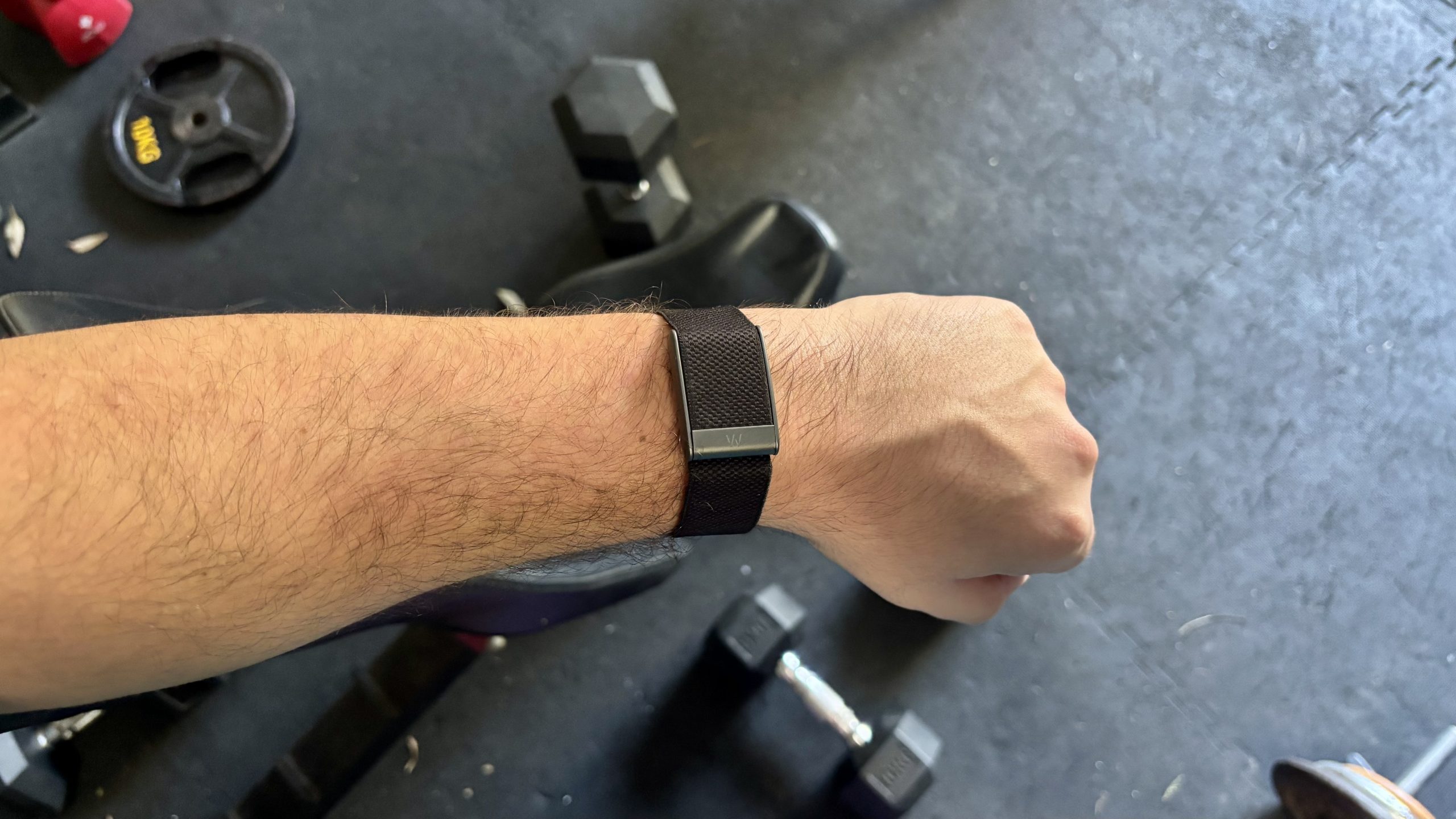
Their designs also give clues as to their three personalities — after a fashion — which bleeds through into their feature list too. The Polar Loop is the least hardcore of the trio, and has the look to match. The mottled fabric finish and metal accents throughout suggest Polar thinks people care about style as well as functionality. It weighs 29g including strap. Not heavy.
Whoop’s Band 5.0 continues the series’s signature style, as pretty much the only recognisable screen-free tracker these days. It too is part-metal with a fabric strap, and weighs 29g.
Advertisement
While it’s the classic screen-free wearable, we are not actually massive fans of one key element, the clasp. Its grip is not all that firm, and has a habit of coming undone by itself which is very annoying. This extends to its more premium sibling the Whoop MG, which we pointed out in our Whoop MG review.
The Amazfit Helio Strap is a little different. Its almost all-plastic design brings weight down to a super-low 20g. This makes it “disappear” on the wrist while wearing it, at least from the wearer’s own perception of additional weight. And while it has the plainest basic design of the three, it’s also available in a Hyrox edition with a luminous highlighter-yellow patch up top.
All three bands have effectively fairly similar water resistance. All are OK for pool swimming, but shouldn’t be used for scuba diving or anything similar. A Whoop 5.0 is rated at IP68, and for submersion at up to 10m depth. Polar rates the Loop at WR30, for “bathing and swimming” but not snorkelling or diving. The Amazfit Helio Strap has a 5ATM rating, which is the norm these days for all but the toughest wearables. It’s a case of three different standards that end up in the same place: you don’t have to take these wearables off to shower, or when at the swimming pool.
Advertisement
Features
(Image credit: Future / Andrew Williams)
The Helio Strap’s sporty design is the best clue as to what the Amazfit wearable is about. It’s positioned as the most fitness–driven of the three bands in the way the companion Zepp app presents data has more of a focus on workouts versus rest and recovery. It uses an Amazfit-created stat called Biocharge, which offsets exertion against sleep and rest quality.
The wearable’s image is that of a tool for busy folks who might realistically be at risk of overtraining if they don’t watch their training load. But it will also do the job as an all-round lighter fitness tracker.
Despite Amazfit’s Zepp Aura Premium being all about wellness and relaxation, there’s less sense of long-term holistic health tracking here. You do get a VO2 Max reading, which is handy for long-term fitness tracking. But the impression the software gives is more of a classic exercise-first fitness tracker, just without the display.
It does have a couple of neat extras not always seen in these screenless wearables, though. The Amazfit Helio Strap has a vibrate motor, for timers, alarms and “find my device” emergencies. It can also live-share its heart rate data with other devices that support the feature, which is useful.
Advertisement
Deeper insight is all part of the Whoop pitch, and part of why it claims to be worth a chunky paid ongoing subscription.
Subscribe to the mid-tier Peak Whoop membership or above and you get stats like your Whoop Age, as well as the Strain score supplied across all three of Whoop’s plans. There’s menstrual cycling tracking too, made possible using a skin temperature sensor.
Or to go all-out, the Life membership adds blood pressure observations and ECG, although this involves using a completely different Whoop MG wearable (it looks similar, admittedly). With that plan you end up paying an awful lot for stats some more conventional wearables do as standard, though, such as the best Garmin watches.
The Polar experience is a bit less focused than that of Whoop or Amazfit. In the Polar Flow app you see “cards” based on your recent activity, and of key stats the band has recorded.
Advertisement
There are zero extras here, though. The Polar Loop won’t share its heart rate readings, and doesn’t have a vibration motor. There’s no skin temperature sensor either, which rules out features like menstrual cycle tracking.
Performance
(Image credit: Getty Images / David Gray / Whoop)
The Polar Loop, Amazfit Helio Strap and Whoop 5.0 may come across as part of a newly-popular category, but their sensor hardware is just like that of other wearables. All the stats rely on an optical heart rate sensor (which uses LEDs to estimate heart rate from information taken from your wrist) , motion sensors to determine movement and estimate step count, and for the WHOOP Band 5.0, a skin temperature sensor.
I compared the results of these screen-less trackers with one of the better Garmin watches out there, the Garmin Venu 4, which uses Garmin’s latest Elevate V5 heart rate sensor. We’ve tested this against top-of-the-range watches including the Apple Watch Ultra 3, as well as a Polar H10 chest strap, to determine accuracy, and have no qualms about the validity of the Garmin’s readings.
Advertisement
The results for heart rate tracking were commendably similar between the Garmin and the three other wearables we’re testing against. When peak heart rate results for automatically-tracked with the Amazfit Helio Strap and Polar Loop were typically within 2bpm of those of the Garmin Venu 4. And with early 2026 firmware, there were no obvious classic optical heart rate issues such as the first few minutes of a workout having entirely inaccurate readings, which often happens when the wearable struggles to tell the difference between your heart rate and run cadence.
Even in a static bike class (which can be tricky for bands), the Garmin, Amazfit and Polar wearables all recorded the same 167bpm maximum heart rate score. It’s a reassuring result.
When you use these screen-less wearables, though, it becomes pretty clear we’re not meant to obsess over heart rate date in too much fine detail. After all, for the most part it’s going to be down to the software when any specific activity ends, which will impact average heart rate stats across a session.
What about Whoop? We’ve had a bit more of a mixed experience with the Whoop bands, and the top-tier Whoop MG in particular had a few issues.
Advertisement
We find Whoop competitive with its peers for general heart rate accuracy during workouts and excellent for recovery tracking, but we did have a few issues with its ECG readings. Namely, it would often fail to register a recording. And unlike a watch with a screen, you don’t get that immediate feedback as to why this is the case
The core appeal for Whoop fans is the Strain score, though, and that doesn’t rely on ECG but the basics of the HR tracking. This is where Whoop wins, on generating cogent and actionable advice in the app that feels useful, right down to its in-app workout builder.
It tries fairly hard to insinuate its way into your life, though. You’ll be nagged to go to bed at the right time, and to put the band back on if you take it off, through phone notifications. Is that what you want? Our original reviewer wasn’t quite so sure.
Amazfit’s Zepp app is solid, but ultimately feels a bit more like standard fitness tracker fare than Whoop, leaning on Biocharge, Sleep and Exertion stats alongside familiar numbers including steps, VO2 max and your exertion load. It has a very sporty flavour, which may appeal to some.
Advertisement
Polar we had some more issues with. The Flow app feels less intuitive than either the Amazfit or Whoop apps, bombarding you with graphs rather than a slick interface full of helpful context. And over the months of testing we’ve had a few different issues.
Initially, pairing and sync’ing were intermittently clunky and/or problematic. More recently we’ve experienced issues with the Android app crashing completely when you try to look into a specific exercise session entry. There have been a few too many issues and irritations for what is one of the longest-standing names in fitness wearables.
And battery life? Here things are a bit more consistent. Whoop says the Band 5.0 can last up to 14 days, and with fairly intense use we got around nine days from it. Polar claims eight days for the Loop, and we got a week out of a charge. Amazfit was bang on the money with its 10-day claim too.
While Whoop was the furthest from its battery life claims, it’s also important to remember you can have more of an interactive participation with a Whoop (at its higher tiers) thank to the ECG support, which is a manual process. Whoop also allows you to charge it without taking it off your wrist via the charging puck.
Advertisement
Verdict
(Image credit: Whoop)
Is the screen-free life for you? Polar, Whoop and Amazfit can all provide their own take on the trend. And all deliver a largely fuss-free experience, with automatic activity logging and long battery life.
There are some other points to note, though. We’re not persuaded Whoop’s highest tier is necessarily worth it for many. It’s just a lot to pay, an an ongoing subscription, particularly when we had a few issues with collecting readings.
Polar’s key issue is in the software, which doesn’t have the slickness or information coherence of the other two — at least as of March 2026.
Advertisement
That leaves us with the Amazfit Helio Strap, the cheapest of the bunch, and perhaps the easiest to recommend if you want to try out the screen-free wearables life. No subscription, solid HR accuracy and an app that while a bit fitness and athlete-focused for some, doesn’t demand too much from you.
And of course, you can also follow TechRadar on YouTube and TikTok for news, reviews, unboxings in video form, and get regular updates from us on WhatsApp too
Babies can be difficult. They eat all the time, pee and poop wherever they want and they may not sleep at night, especially during sleep regressions. According to the American Academy of Pediatrics, playing sounds from a white noise machine can help soothe your baby and get them to settle down, giving you a moment of respite. And if you have an iPhone, you don’t need to spend money on a white noise machine.
When Apple released iOS 15 in 2021, the operating system brought a hidden feature called Background Sounds. It allows you to turn your iPhone into a white noise machine, and you can play these sounds by themselves or under a podcast, music or video streaming app.
When Apple introduced Background Sounds, there were six ambient sounds to play on a loop: rain, stream and ocean waves, which are natural sounds, and bright, balanced and dark noise, which are different pitches of white noise. When the tech giant released iOS 18 in 2024, it added two sounds: night and fire. And iOS 26 brought even more background sounds to devices, including rain on roof and babble, which sounds like a busy cafe.
Advertisement
If you want to use these sounds to lull a baby back to sleep, or for any other reason, here’s how to enable Background Sounds on your iPhone.
How to access Background Sounds from your Control Center
Instead of searching through Settings each time you want to turn Background Sounds on, here’s how you can set up a toggle in the Control Center to turn the feature on to use on your iPhone.
1. Open Control Center. 2. Tap the plus (+) sign in the top left of your screen. 3. Tap Add a Control near the bottom of your screen. 4. Tap Hearing control (ear icon) under Hearing Accessibility to add to Control Center.
Advertisement
You can find the Hearing control under Hearing Accessibility in your Control Center.
Apple/Screenshot by CNET
Once the Hearing control icon is in Control Center, tap it to see three options: Speaker, Background Sounds and Live Listen. Then tap the musical notes next to Background Sounds to turn the feature on. You can also tap on the words Background Sounds to open a menu to choose a different background sound as well as adjust the volume.
These are a few of the sounds you can access in Background Sounds.
Advertisement
Apple/Screenshot by CNET
Use Accessibility Shortcuts for Background Sounds
You can also set up an accessibility shortcut to turn Background Sounds on or off from your home screen or within an app. Here’s how to set it up.
1. Tap Settings. 2. Tap Accessibility. 3. Tap Accessibility Shortcut. 4. Tap Background Sounds.
Now, when you press the side button on your iPhone three times, Background Sounds will turn on. You can tap the button three times again to turn it back off.
Advertisement
Apple/Screenshot by CNET
Discover These Hidden AirPods Features and Boost Your Listening Experience
If you want more control over Background Sounds, here’s where to go.
1. Tap Settings. 2. Tap Accessibility. 3. Tap Audio & Visual. 4. Tap Background Sounds.
Near the top of this menu you can turn Background Sounds on by tapping the Background Sounds toggle, and you can change the Background Sound by tapping Sound and choosing a new sound.
You can play your background sounds while other media is playing if you’d like.
Advertisement
Apple/Screenshot by CNET
There are two toggles in this menu: Use When Media Is Playing and Stop Sounds When Locked. Tapping the toggle next to Use When Media Is Playing allows Background Sounds to keep playing while you watch a video or listen to music. And tapping the toggle next to Stop Sounds When Locked ensures Background Sounds will turn off when your device locks. If you don’t have this enabled, the sounds will continue to play when your device locks.
There are also two new menus in iOS 26: Equalizer and Stop Sounds with a Timer. Equalizer lets you adjust the tone and contour of Background Sounds, as well as balance more toward the right or left speaker or headphone. Stop Sounds with a Timer allows you to turn Background Sounds off at a specific time that you can choose or after a certain amount of time has passed.
The Stop Sounds with a Timer (left) and Equalizer menus in iOS 26.
When you’re finished with work and you need something to do, where do you turn your attention? Some folks build models, others do some coloring. Some relax and watch TV. But if you’re looking for something to pour your free time and attention into, it can be difficult to settle on one thing, or even multiple.
Model trains, running clubs, robotics and coding classes all sound fun — until you realize you’d rather fly, running shoes cost far more than they should and you’re less of a front-end/back-end person and more of a “no end in sight for how boring Java can be” person.
I asked three different AI systems — Claude AI, Google Gemini and ChatGPT — about what my spouse’s next hobby should be using the exact same prompt, and the results were surprising.
Advertisement
Claude: Getting a clue
Here’s the prompt I wrote: “I am a 39-year-old man in the United States of British origin. I live in Los Angeles, California, and am married with a dog and a cat. I live in a house with some backyard space. I enjoy travel, reading, playing video games and am looking to add a new hobby to my list of activities. I also enjoy getting deals, as that’s what my career deals with. Can you suggest three hobbies that I should look into for my review? Please give me information on the financial and time commitments needed, as well as what you would consider to be the plusses and minuses of each one. I work a regular 9-5 job so would need to be done around that constraint as well.”
Gardening is a hobby many people only come to appreciate in their golden years, but all three AI systems recommended it as an easy way to pass the time with minimal effort and expense.
The second suggestion was reselling and thrifting vintage finds, followed by homebrewing beer, cider or mead. It gave a lot of detail into the time and financial commitments, pros and cons as well as why it assumed those hobbies would suit my husband based on that short prompt.
Advertisement
Claude/Screenshot by CNET
Claude/Screenshot by CNET
Claude/Screenshot by CNET
Claude AI was particularly thoughtful in appealing to the prompter’s needs and personality, pointing out that gardening could be a great way to save money — perhaps recognizing that finding a good deal is a deeply entrenched personality trait of my little cheapskate husband.
Gemini: Combining interests
Gemini suggested hunting for and reselling vintage video games, books and other old media as a pastime that could pair well with traveling on points. It also recommended brewing beer as a way to spend time in a backyard already full of plants (in addition to “high-yield urban orchard gardening”).
Gemini/Screenshot by CNET
Gemini/Screenshot by CNET
Gemini was adept at using my spouse’s prompt details to guide its suggestions, creating a nicely packaged, holistic approach to how he might spend his off-hours between a demanding 9-to-5 job.
ChatGPT: Making a night of it
Along with backyard gardening (again), ChatGPT was the only AI system to suggest an evening hobby: amateur astronomy. Most of the other systems focused on ways to pass the weekend hours at estate sales or at home.
Advertisement
ChatGPT/Screenshot by CNET
Stargazing could be a fun way to spend a Friday night, but we live in Los Angeles. Many of the “stars” overhead might actually be satellites, and finding a decent vantage point would likely mean braving traffic and crowds taking selfies over the city skyline.
ChatGPT’s other suggestion was using our backyard for beekeeping:
ChatGPT/Screenshot by CNET
Beekeeping seemed pretty out of left field, considering the original prompt mentioned nothing about an interest in food, insects or anything remotely related to the complex caretaking involved with bees — or bee law. According to ChatGPT, the time commitment is only two to four hours per month (though local beekeepers might dispute that).
Overall, ChatGPT’s recommendations were the least relevant to the prompter’s real interests, and the logic the tool used to explain why it had made the recommendations was very thin.
I just can’t buy that “many full-time professionals” who enjoy playing video games also do a little beekeeping on the side.
Advertisement
Here’s hoping AI can offer some creative ideas for spending your time that don’t involve buying a full-body suit.
Apple has marked its 50th anniversary, although arguably a year too soon but we’ll get into that, plus there’s good news for users of the Apple Vision Pro, hopeful news about Siri, and bad news for certain vibe coders, all on the AppleInsider Podcast.
Looking back at Apple’s history — image credit: Apple
The fiftieth anniversary celebrations are, quite reasonably, marking the half century since the partnership of Steve Jobs, Steve Wozniak, and Ronald Wayne, was founded on April 1, 1976. But the Apple we know today, the corporation, was created in 1977. It seems unlikely that Apple will do another round of parties and events, but we’d be up for it if they did. Continue Reading on AppleInsider | Discuss on our Forums
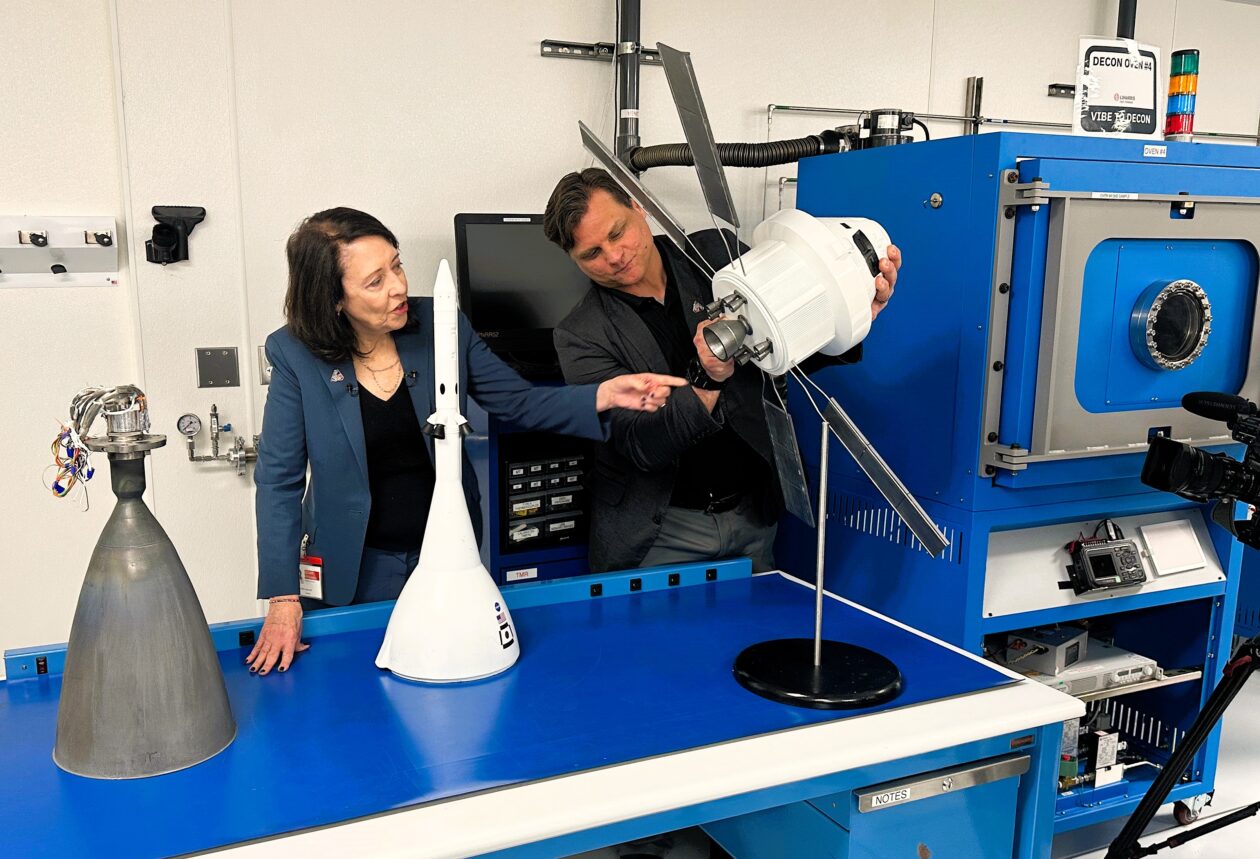
Sen. Maria Cantwell, D-Wash., and Brent Urke, program manager for L3Harris’ facility in Redmond, Wash., check out a model of the Orion spaceship that’s due to take four astronauts around the moon as early as this week. Cantwell is pointing to the model’s set of eight R-4D thrusters. An actual R-4D thruster, manufactured in Redmond, is sitting on the table at far left. (GeekWire Photo / Alan Boyle)
NASA’s most powerful rocket is due to send four astronauts on a round-the-moon journey as early as this week, and although the launch team has to make sure everything goes right in Florida, the mission’s success will also depend on hardware that was built in the Seattle area.
During a visit to two of the contractors for NASA’s Artemis moon program on Monday, U.S. Sen. Maria Cantwell said that when it comes to spaceflight, it’s important to get the little things right.
“A lot of people think, ‘Oh, well, we know how to build big rockets,’ right?” the Washington state Democrat said at Karman Space & Defense’s manufacturing facility in Mukilteo, Wash. “But do we know how to separate payloads and return them, and do all of that? That’s what we’re doing here in Puget Sound. … I think that’s the untold story that people don’t understand.”
NASA’s big story will focus on the first humans to go from the Earth to the moon since the Apollo 17 mission in 1972. Artemis 2’s crew won’t land on the lunar surface during what’s expected to be a 10-day mission. But because their figure-8 route takes them 4,700 miles beyond the moon’s far side, they’ll set a new distance record for human travel beyond Earth.
The first opportunity for liftoff from NASA’s Kennedy Space Center in Florida is scheduled for 6:24 p.m. ET (3:24 p.m. PT) on Wednesday, with backup dates available through April 6. NASA plans to provide live video coverage of the countdown and launch via YouTube, starting at 12:50 p.m. ET (9:50 a.m. PT) on launch day.
Advertisement
This will be the second launch for NASA’s Space Launch System rocket, which sent an uncrewed Orion space capsule around the moon for the Artemis 1 test mission in 2022. The Artemis 2 crew — including NASA astronauts Reid Wiseman, Christina Koch, Victor Glover and Canadian astronaut Jeremy Hansen — will be the first people to ride an Orion into space.
If all goes according to plan, Artemis 2 will clear the way for NASA to test the lunar landers built by Elon Musk’s SpaceX and Jeff Bezos’ Blue Origin space ventures in 2027, then for Artemis 3 to put astronauts on the surface of the moon in 2028. And that’s just the start. “Ultimately, Artemis is about returning to the moon and building a permanent moon base that can then be used for accelerating our travel to Mars,” Cantwell said.
One of the best-known of those Washington state suppliers is L3Harris, which is headquartered in California but operates a facility in Redmond that has built thrusters for nearly every NASA space program. (The facility was operated by Aerojet Rocketdyne until L3Harris acquired that company in 2023. Now L3Harris is in the midst of yet another corporate transition.)
Advertisement
During her visit to the Redmond facility, Cantwell said L3Harris and other space companies exemplify the “engineering mindshare” that’s one of the strengths of the Pacific Northwest’s tech industry. “That is why people have called us the Silicon Valley of space,” she said.
L3Harris’ Redmond team manufactures thrusters for Orion’s European-built service module, Orion’s crew module and the Space Launch System’s upper stage. It’s also been given a leading role in the development of the main engine for future Orion spacecraft.
John Schneider, vice president of operations for L3Harris, acknowledged that most of the rocket engines built to send astronauts to the moon come from other places. “But if you want to come back, you need a Redmond thruster to bring you back and get you back to Earth safely,” he said.
Jonathan Beaudoin, chief operating officer at Karman Space & Defense, says he hopes we’ll never have to see the hatch release system activated for an actual emergency. “But if we do, it had better work,” he added.
Karman Space & Defense CEO Jon Rambeau, chief operating officer Jonathan Beaudoin and U.S. Sen. Maria Cantwell survey hardware for the Orion crew capsule. (GeekWire Photo / Alan Boyle)
Artemis 2 is currently focusing the space spotlight on the teams supporting the Space Launch System and the Orion spacecraft, but Washington state’s space companies are also involved in other aspects of the Artemis program. Blue Origin, for example, is getting its Blue Moon lander ready for missions to the moon and working on a system capable of turning moon dirt into solar cells and electrical wire.
“This is about cutting-edge technology. These guys out here aren’t waiting for somebody to describe to them what comes next. They’re out here solving a problem and then saying to NASA, ‘We’ve got a solution.’ And that’s really fantastic,” Cantwell said.
“Obviously, some of this they don’t want to show for intellectual property protection reasons,” she added. “But we’re just really, really proud that our region is so far ahead, thinking through the problems that we’re going to incur and what the possible solutions should be.”
A new version of the first iOS 26.5 beta has now made its way to developers, but what’s been changed is not clear.
The first developer beta of iOS 26.5 has received a revised release.
Following the full public release of iOS 26.4 on March 24, Apple started beta testing of the next major operating system, iOS 26.5. Monday saw the debut of iOS 26.5 beta 1, which inadvertently enabled Apple Intelligence for some iOS users in China. Apple has now deployed an updated variant of the first iOS 26.5 developer beta, which increases the build number to 23F5043k, up from the initial 23F5043g. The relatively similar build numbers suggest that the revised developer beta doesn’t include new features or additional changes. Continue Reading on AppleInsider | Discuss on our Forums
OPINION: The UK government has finally opened the doors to plug-in solar panels in the UK, saying that they’ll be available in shops ‘within months’. Self-installed, and just requiring a simple 13A plug socket, will plug-in solar start a revolution and will the savings stack up?
As of April 1, the price cap has come down, and electricity and gas bills have just got a bit cheaper. Well, until you look at what’s going on in the Middle East and know that this reduction in price is a false dawn, and, unless things change dramatically, energy prices could soar upwards.
No wonder, then, that the demand for solar power has risen dramatically. As I learned from my BOXT Solar review, solar panels are well worth it in the UK, provided you have the right conditions: the right type of roof, facing the right way, and you’re planning to stay in the home that you own for long enough to see the benefits.
That leaves an awful lot of people who aren’t in the optimal situation, including those in flats, those who rent and those who are only going to stay in a place temporarily. It’s for these kinds of people that plug-in solar offers a lifeline.
Advertisement
What is plug-in solar?
With a fixed solar installation, the idea is to fit as many solar panels as possible onto your roof to generate as much electricity as possible. To use this DC current, you need a high-power solar inverter, which converts the incoming power into the AC power you use around your home. All this specialised equipment costs a fair amount, and then there’s professional installation on top of that.
Plug-in solar aims to make life easier, with self-install solar panels that you can hang over a balcony, put on a shed roof or even place in a small terrace or other outdoor space.
Advertisement
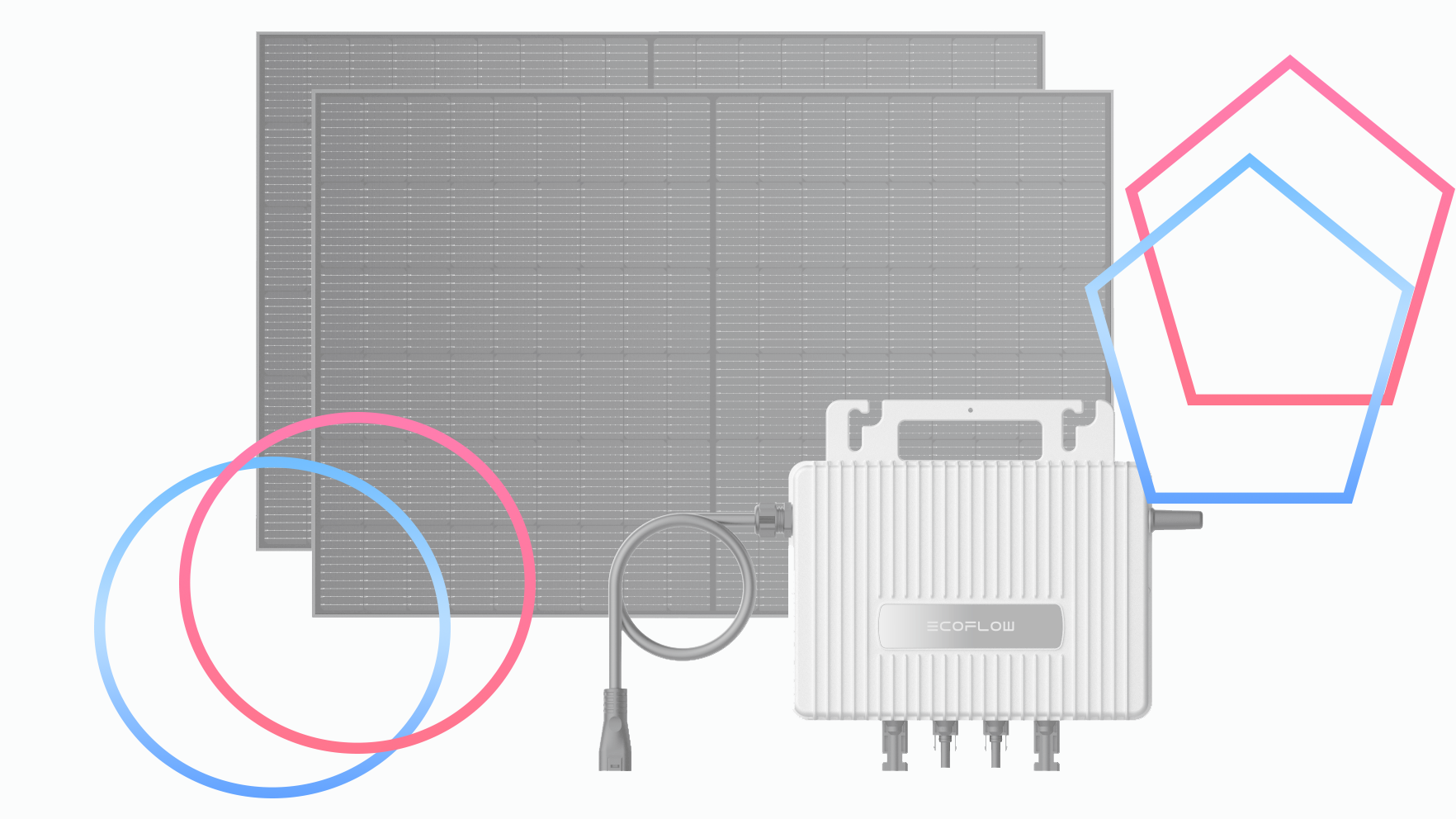
These then connect to a microinverter, which plugs into a standard three-pin socket, with no additional installation required. Under the new government legislation, systems that generate up to 800W can be plugged in without needing an electrician.
Advertisement
How much will plug-in solar cost?
The size of the system you buy and the types of fixing the solar panels buy all make a difference to the price. As you can’t buy many such systems yet, there’s not much to go on, but we do have some initial reports on the types of systems that will be available, and there’s European pricing, as plug-in solar is already available in a lot of other countries.
Initial reports suggest that plug-in solar systems will cost around the £400 mark, but smaller systems could be available at around £200, with the largest system with a battery maxing out at over £ 1000.
How much will plug-in solar save, and will it be worth buying?
Savings depend on the size of system you have and other factors. Most importantly, you still need to have an area suitable for solar panels: south-facing is ideal, with as much sun exposure as possible throughout the day. Essentially, you need direct sunlight; if you have a north-facing balcony, for example, or there’s a lot of shade where you want to put your plug-in system, you won’t generate a lot of power.
With those kinds of variables, typical energy savings could be from £70 a year, although EcoFlow says that you can save up to £115 per year with its STREAM Microinverter. This system is currently offered as a package with two 450W solar panels and a STREAM AC Pro battery (1.92kWh capacity) for £1049, marking a nine-year payback period (note that the current package requires an electrician to install, due to current legislation).
Advertisement
Advertisement
As we get more packages and I’m able to run some reviews, it will be possible to get a better idea of what these kinds of systems can do. The short version is that plug-in solar can’t generate the same kinds of power as rooftop panels, but you’ll still generate free power that will knock your electricity bills down.
It will be worth doing some sums to work out whether it’s worth buying a battery, too. As with a full rooftop solar, whether a battery is worth it will depend on how much power you generate and whether you can use it while it’s being generated or not. This is the kind of information I plan to cover in reviews once samples are available.
Provided you have the right place to mount panels, plug-in solar is a simple way to get started with free electricity generation, and with prices looking like they’re going up, any saving is good.
Reliable technology now rivals pay as a core workplace expectation
Meeting failures continue disrupting workflows across both hybrid and office environments
Time loss from technical issues steadily erodes productivity during routine meetings
The modern British workplace has arrived at an uncomfortable crossroads where employees now rank reliable technology almost as highly as their monthly pay, new research has claimed.
A report from Owl Labs found good technology access is important to 89% of UK workers, placing it just behind compensation at 92% and a supportive manager at 91%.
This near-tie reveals a striking reality: seamless digital tools have become non-negotiable for the workforce.
Technical failures have increasingly become the primary source of frustration for workers participating in hybrid meetings across different environments
Three in four UK employees report experiencing challenges during these interactions, with 79% admitting they lose time to technical difficulties.
Advertisement
Audio echo or distortion affects 78% of workers, while 74% find themselves missing crucial visual cues.
“When meeting technology fails, it doesn’t just cause mild annoyance — it undermines wellbeing and derails collaboration,” notes Frank Weishaupt, CEO of Owl Labs.
Sign up to the TechRadar Pro newsletter to get all the top news, opinion, features and guidance your business needs to succeed!
The report found the average worker wastes six and a half minutes per meeting simply getting equipment to function properly.
Advertisement
Younger employees, despite their reputation as digital natives, are not immune to these struggles – 82% of Gen Z and 79% of Millennials report time lost to tech issues, compared with 73% of Gen X and 72% of Boomers.
Even more surprisingly, full-time office workers face the greatest difficulties, with 83% experiencing technical delays versus 77% of hybrid workers.
The physical office, supposedly designed for productivity, has become a source of unexpected friction, and to tackle these issues, employers are significantly investing in new hardware and AI tools.
Advertisement
Over four in five workers say their organisation made office changes in 2025, including the introduction of AI tools (42%), increased IT support (38%), and upgraded meeting room equipment (35%).
Three-quarters of employees report that their company encourages AI usage. However, this spending spree has not yet solved the underlying problem.
“The UK is at a turning point,” Weishaupt adds. “The real value comes when those tools are intuitive, inclusive and trusted.”
The report noted that instead of investing in smarter meeting technology that alleviates setup challenges, employers are banking on systems that add further complexity.
Advertisement
This suggests employers may be misreading what workers actually prioritise in their daily workflows.
For a workforce already stuck in a cycle of frustration, progress depends on removing friction rather than adding more software layers.
A supportive manager cannot fix a broken audio connection, but a properly functioning camera and microphone just might.
Anthropic is no longer offering a free ride for third-party apps using its Claude AI. Boris Cherny, Anthropic’s creator and head of Claude Code, posted on X that Claude subscriptions will no longer cover using the AI agent for third-party tools, like OpenClaw, for free. As of 3PM ET on April 4, anyone using Claude through third-party apps or software will have to do so with an extra usage bundle or with a Claude API key, according to Cherny.
Most of Claude’s workload may come from simple user questions, but there are those who use the AI chatbot through OpenClaw, a free and open-source AI assistant from the same developer as Moltbook. Unlike more general AI solutions, OpenClaw is designed to automate personal workflows, like clearing inboxes, sending emails or organizing calendars, but leans on external large language models, including Claude, ChatGPT and Google Gemini.
Cherny replied to X users that this change is about engineering constraints and optimization. “We’ve been working hard to meet the increase in demand for Claude, and our subscriptions weren’t built for the usage patterns of these third-party tools,” Cherny explained on X. “Capacity is a resource we manage thoughtfully and we are prioritizing our customers using our products and API.”
If OpenClaw users still want to use Anthropic as its LLM, they will have to buy a usage bundle, which are currently discounted, or switch to another AI integration like xAI, Perplexity or even DeepSeek. Of course, Anthropic has its own alternative, which tackles some similar tasks as OpenClaw, called Claude Cowork.




















































You must be logged in to post a comment Login