Some are worried about their employees, while others lament an early closure
More than 50 tenants at the Punggol East Container Park are packing their bags by the end of Oct as the land is returned to the government.
The beloved hangout spot, which houses an eclectic mix of restaurants, bars, sports facilities and even a prawning pond, is operated by social enterprise City Sprouts.
According to Channel News Asia (CNA), tenants were upset by the news, with some worried about their employees and others lamenting an early closure.
The container park will be handed back to the Singapore Land Authority (SLA) upon expiry of its lease on Dec 31, an email from City Sprouts to tenants dated Aug 4 indicated.
Advertisement
“As the site is required to be reinstated and returned to SLA, we will require all tenants to cease operations by Oct 31, 2026 and hand over their respective premises to City Sprouts by this date,” read the email.
City Sprouts said that it was sent an official notice in May to vacate the site and carry out the necessary reinstatement works within the stipulated timeline.
“We were not given specifics by SLA aside from it being part of redevelopment as part of the Singapore Master Plan for the district,” the social enterprise added.
SLA said that the tenancy cannot be extended as the site is required for future residential redevelopment.
Advertisement
“Much more than a place of business”
For City Sprouts, the Punggol site became much more than a commercial space. Over the years, it built relationships with its tenants, farmers, partners, families and the wider community.
“We are heartbroken to leave a place that we have spent so much time and energy building together with everyone who has been part of it. We understand the disappointment and uncertainty this creates for our tenants, and we share that disappointment,” said City Sprouts.
Some businesses have spent years building a loyal customer base at the site.
Kim Kao Mai Thai, for instance, has operated there for nine years, with about 90% of its customers coming from the northeast. Moving elsewhere would mean starting from scratch and rebuilding its customer base.
Advertisement
The sudden closure has also left other tenants worried about their employees and livelihoods.
Smok Hous founder Isrudy Shaik opened his outlet last November, hoping to sign a three-year lease. His biggest concern now is finding a new place while keeping his nine full-time staff.
Tara Na! by Easy Eatz co-founder Nurnisa Jonson has 12 employees, half of whom are foreigners. “How can I find a place within two months? That’s the most stressful days we’ve had,” she said.
City Sprouts has secured a new site at Pasir Ris Park and said farmers and partners from the Punggol community will be given priority to relocate there or to one of its other community greenhouses across Singapore.
Advertisement
Affected F&B operators may also have the option of taking up stalls at City Sprouts’ other locations in the East, after the organisation said it had informed the main operator of the arrangement.
Besides Punggol, City Sprouts operates green spaces in Pasir Ris, Henderson, West Coast and Bedok.
Read other articles we’ve written on Singaporean businesses here.
Featured Image Credit: Google Reviews/ Hai Bin Prawning
Attackers are actively exploiting CVE-2026-9586, an unauthenticated SQL injection vulnerability in the Sangoma Switchvox VoIP platform that can lead to remote code execution.
According to security researchers at Horizon3, most of the internet-exposed Switchvox systems have either already been targeted or will be soon.
Switchvox is an enterprise VoIP management platform used to configure and monitor business phone systems.
CVE-2026-9586 is the most serious of 12 flaws Horizon3 discovered and reported to Sangoma on April 10. The vendor fixed them in Switchvox version 8.4.0.2, released on July 14.
Advertisement
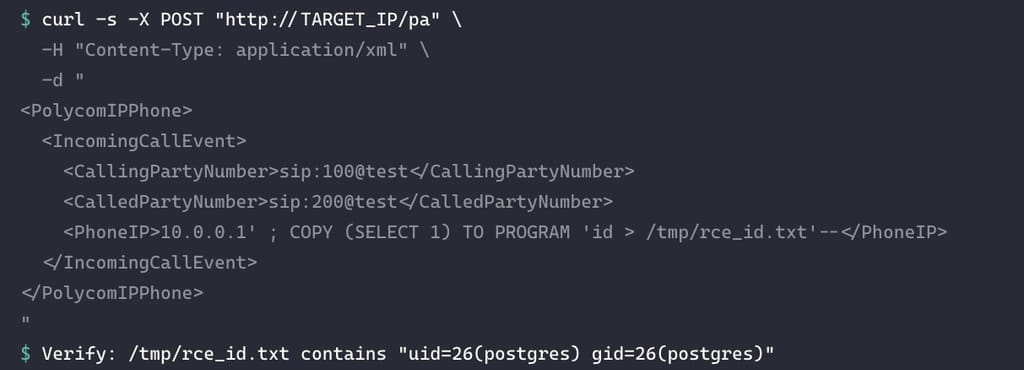
The vulnerability is an unauthenticated SQL injection problem in Sangoma Switchvox’s /pa HTTP endpoint. The researchers explain that the endpoint is exposed and parses an XML message containing specific key-value pairs.
When /pa receives a request to notify another phone system, such as for an incoming or outgoing call event, it extracts the PhoneIP field from the XML message and directly concatenates its value into an unparameterized SQL query.
The researchers demonstrated that this SQL injection can be exploited remotely to execute operating-system commands through a crafted XML request sent using the curl command.
Exploit for CVE-2026-9586 Source: Horizon3
On August 30, Horizon3’s honeypots observed active exploitation on multiple systems in rapid succession from a single source IP address (176.65.148.184), with the attacker attempting to establish a reverse shell.
In these attempts, the attacker executed an initial payload and then collected information about the top processes running on the Swithvox system. The data was then transmitted to a remote server in base64-encoded form.
Advertisement
“Given the quick succession of exploit attempts across multiple honeypots from the same source IP, we believe that it is likely that most internet-exposed Switchvox instances will be or have already been targeted,” Horizon3 warns.
“Currently Shodan shows that there are approximately 4,000 devices on the internet, with most located within the United States.”
Horizon3 says it has not seen active exploitation of the remaining 11 flaws it discovered earlier.
With CVE-2026-9586 being actively exploited, system administrators are recommended to upgrade to Switchvox version 8.4.0.2 or later as soon as possible, and check for signs of having been targeted in the meantime.
Advertisement
Signs of compromise include suspicious statements in /var/log/switchvox/db-quirks.log and network connections to the observed attacker IP, particularly on port 39323.
Overall prevention scores can hide what happens after initial access. Once attackers are using valid credentials, prevention drops sharply.
The Blue Report 2026 measures defenses technique by technique across 338 million simulations run in customer production environments.
As fun as mucking about with simulated environments in a laboratory is, at some point you have to do those field tests to demonstrate that your prototype actually works in the real world, under real conditions. This is what the [Plasma Channel] recently did for their fog harvesting system by setting it up in the Namib desert.
We previously covered the atmospheric water harvesting attempts, using electrostatic precipitation to draw the moisture in the air onto the collectors where it can then be harvested. This is rather different from existing approaches with e.g. fine meshes and hoping that enough water molecules bump into your mesh, so theoretically it should be much more efficient. In the lab it worked well, but reality always has the last word.
The Namib desert is at the top of the world’s most arid regions, competing with the Atacama desert. What it does have going for it is regular fog rolling in that lasts until sunrise, providing a good target for water harvesting. Interestingly, this field test was performed together with the University of Namibia.
Of course, moving the prototype in check-in luggage for the flight to Namibia took some redesigning and testing. Fortunately everything, including the solar panel, arrived intact, allowing trials to commence. This initially took place at the campus of the University of Namibia, joining a number of other atmospheric water harvesting projects that had been previously installed there.
Advertisement
Unfortunately the fog proved to be rather elusive, leading to a few fruitless attempts. It also proved that the salt in the air from the ocean spray, even a few kilometers inland, was highly corrosive, especially to high-voltage electronics. Although the system basically worked, happily harvesting water under the right conditions, it does need some redesign before it’ll be tested next in the Atacama desert.
Robotaxis are popping up in cities across the United States despite the ongoing controversies surrounding autonomous rideshare services. From interfering with active crime scenes to making dangerous driving decisions, robotaxis continue to raise questions about the safety of autonomous rideshare services. Adding to this concern, there are continued reports of test drivers getting injured while inside Waymo and Zoox autonomous taxis. From 2024 to 2025, at least 24 injuries were reported from sudden, unexpected braking and swerving. This has led to whiplash, sprains, and other injuries, according to data from the Occupational Safety and Health Administration obtained by TechCrunch.
Current Zoox test drivers told TechCrunch that the modified Toyota Highlander SUVs were still braking too hard as of July 2026, causing even more injuries. The hard braking happens at basically any speed when the system incorrectly detects something on the road. One Zoox employee said that sometimes the entire system shuts down, causing extremely abrupt braking even at high speeds.
Waymo test drivers have been injured across San Francisco, Los Angeles, and Phoenix due to the vehicle’s erratic driving behavior. This included a Waymo seemingly backing up out of nowhere, the rapidly moving steering wheel catching the test driver’s hand and bending it until he heard a crack. Another Waymo braked so hard after spotting children in its path that the test driver had to take 175 days off of work. Needing time off for injuries is a trend across the dozens of cases. This comes at a time when a former Tesla employee also came forward about how “dangerous” robotaxi testing has been in Texas, citing a lack of oversight, collisions, and Full Self-Driving software that isn’t ready.
Advertisement
Are Zoox robotaxi rides dangerous?
Photo Spirit/Shutterstock
After hearing about the internal accidents at Zoox, you may be worried about taking a ride in one of their autonomous purpose-built vehicles. Zoox recalled its self-driving cars in 2025 following a National Highway Traffic Safety Administration (NHTSA) investigation into abrupt braking that led to some accidents. Zoox says the software defect addressed by that recall was fixed. The hard braking issue appears to be ongoing during testing, although it’s difficult to know if it’s happening — and how often — during rides with passengers, since Zoox is only reporting employee-related accidents to OSHA.
Zoox claims its autonomous vehicles are safer than human drivers, although no specific data was given. Said Qi Hommes, Zoox’s Vice President, System Design and Mission Assurance: “We calculate the total safety risk. I believe no one else does this — from hardware, software, all the way to operation. We add all the risk up.” (via Axios)
Advertisement
Zoox recalled all of its vehicles in July 2026 after one vehicle got confused by heavy smoke from an emergency fire scene. Zoox is now back on the road, charging for rides in Las Vegas and offering free rides in San Francisco. Testing is ongoing in a handful of cities, including Atlanta, Los Angeles, Seattle, and Washington D.C.
Sonos has introduced Sonos 27, the latest version of its audio operating system, bringing AI-powered controls, new ways to move audio around the home and a redesigned app experience.
The update coincides with the arrival of its latest products in its Ultra series, the Beam Ultra soundbar and Sonos Ace Ultra headphones.
The biggest change with Sonos 27 is its approach to AI. Sonos has opened its system up to multiple AI assistants and agents, with its own Sonos 27 voice assistant designed specifically for music and mood curation, while Sonos 27 MCP allows external AI assistants and agents, including ChatGPT, to connect to a Sonos system.
That means users will be able to ask ChatGPT (or Claude, or Gemini) to play music in their home directly from a phone or computer. With this update, Sonos is also previewing Custom Agents, which will eventually let users create their own agents with a chosen AI model, persona and voice.
Advertisement
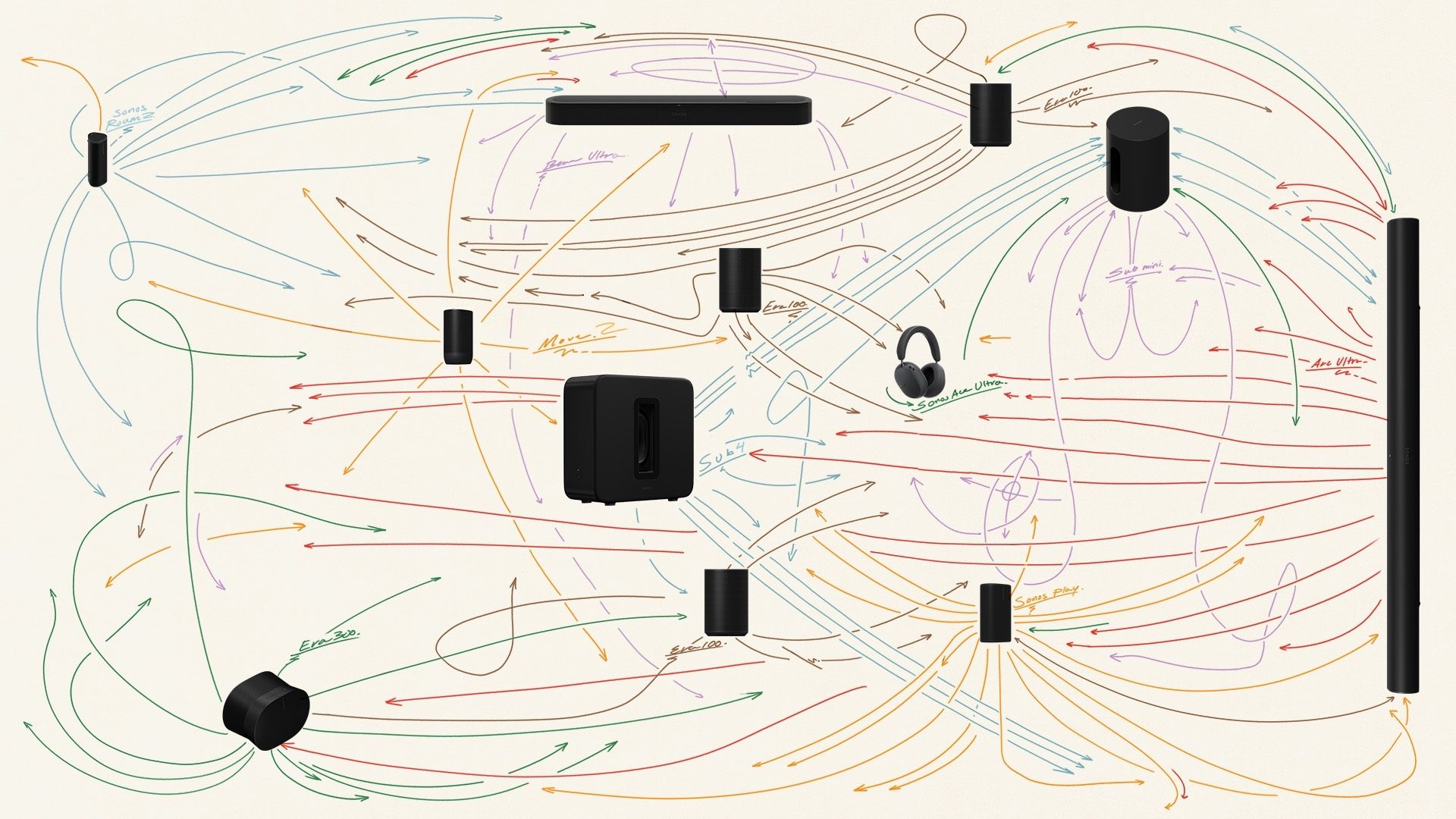
The Sonos Fabric system looks to tie all its devices together in ways that weren’t possible previously. One of the first applications is Sonos Positioning Technology, which uses high-frequency sound to determine where a speaker is located and automatically adjust its role within the system.
Advertisement
This new platform also enables a new portable surrounds feature that’s launching for the Move 2 and Sonos Play. Move one of the supported speakers into position and it can automatically become a rear surround, rather than requiring users to manually configure the system.
Sonos is also introducing headphone linking with the new Ace Ultra. The Early Access feature allows audio to move between nearby Sonos speakers and the headphones, making it easier to switch between listening privately and using the wider home setup.
Advertisement
The Sonos 27 app is getting navigation improvements shaped by feedback from the Sonos community, with the app sitting alongside the Sonos 27voice control and Sonos 27web portal as different ways of controlling its audio system.
Alongside the software update, Sonos has announced the Beam Ultra, a compact soundbar with 7.1.2-channel Dolby Atmos, and the Ace Ultra headphones, which are designed for deeper integration with the Sonos ecosystem.
The new app navigation, Sonos 27mcp Early Access and portable surrounds begin rolling out on September 8. Beam Ultra and Ace Ultra are available to pre-order now, with general availability starting September 29.
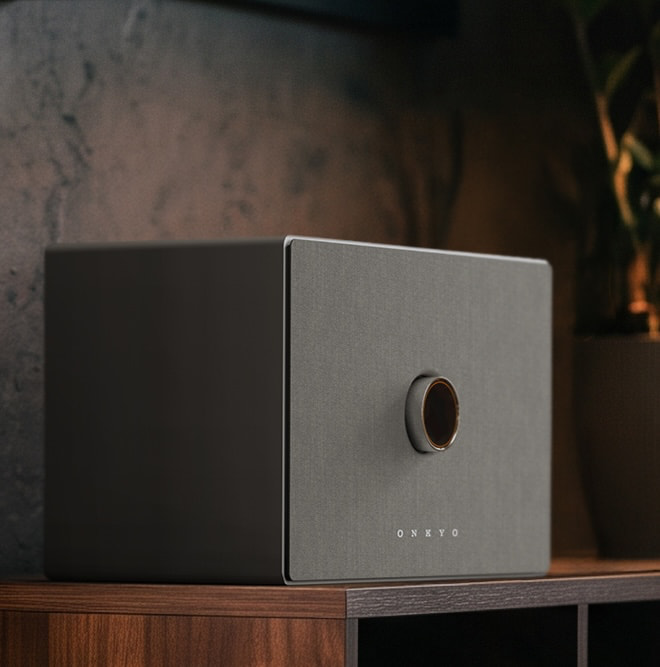
Onkyo is taking its Creator Series off the desktop and into the rest of the house with three new GX-AiO wireless music systems that combine stereo speakers, a dedicated subwoofer and amplification inside a single enclosure.
The Onkyo Creator GX-AiO 50, GX-AiO 100 and GX-AiO 150 (small, medium, and large wireless speakers) start at $399 and offer considerably more flexibility than the average Bluetooth tabletop speaker. HDMI ARC, USB-C, optical digital and a switchable line/phono input allow the GX-AiO to work with televisions, computers, turntables and other sources without requiring an external amplifier or a growing collection of little black boxes.
Onkyo clearly wants these to function as compact stereo systems rather than expensive kitchen speakers that spend their lives streaming playlists from a phone.
Onkyo introduced the Creator Series with the GX-10DB and GX-30ARC powered speakers, targeting computer users, gamers, content creators and listeners who wanted better sound without giving up half their desk.
The GX-AiO range extends that concept into bedrooms, kitchens, living rooms and other spaces where a conventional pair of speakers might not make sense. Each model uses what Onkyo calls a true 2.1-channel architecture, combining two main drivers with a dedicated, independently amplified subwoofer inside the same cabinet.
That subwoofer is one of the more interesting elements of the design. Instead of asking two compact drivers to handle the entire frequency range, Onkyo gives the lower frequencies their own driver and acoustically optimized enclosure, with the bass-reflex duct incorporated into the illuminated rear slit. Full-digital Class D amplification and DSP handle the signal processing and amplification.
There is, however, a rather significant hole in the launch specifications. Onkyo has not disclosed the individual driver sizes, amplifier output, frequency response, dimensions or weight for the GX-AiO 50, 100 or 150, nor has it explained exactly what changes internally as buyers move from $399 to $499 and then $599.
Those are not insignificant details when three models occupy the same product family, and we will be looking for answers at CEDIA.
Advertisement
HDMI ARC, Phono and USB-C
Connectivity might be the strongest reason to pay attention to the GX-AiO Series. All three models include Bluetooth 5.3, HDMI ARC, USB-C audio and playback, optical digital and a switchable line/phono input, creating enough flexibility for a television, computer, turntable and additional digital source.
The inclusion of a phono input is particularly useful because it eliminates the need for an external phono preamplifier with compatible turntables. HDMI ARC also gives the GX-AiO considerably more television flexibility than many traditional tabletop music systems, without turning the product into a soundbar.
Advertisement. Scroll to continue reading.
Onkyo specifies support for 32 kHz, 44.1 kHz and 48 kHz sampling rates at 16-bit and 24-bit resolution. The supplied specifications do not indicate support above 24-bit/48 kHz, so anyone expecting 24/96 or 24/192 playback should adjust expectations accordingly.
Advertisement
Also absent from the launch specifications is Wi-Fi. Onkyo does not list AirPlay, Google Cast, Spotify Connect or another integrated network streaming platform, which makes the GX-AiO a very different proposition from the growing number of smart wireless speakers built around an app and streaming ecosystem.
Two Boxes Make a Real Stereo Pair
Onkyo does offer another useful wireless trick. Two GX-AiO systems can be paired using True Wireless Stereo, with one enclosure becoming the dedicated left channel and the other handling the right.
That creates real physical channel separation rather than attempting to manufacture a giant stereo image through DSP from a single cabinet. For listeners who begin with one GX-AiO and eventually want something closer to a conventional stereo system, the upgrade path is already built in.
The math becomes more interesting at the top of the range. Two GX-AiO 150 systems would cost $1,198, which puts the combination against some very capable powered stereo speakers. Convenience is wonderful, but it has never been granted immunity from comparison shopping.
Advertisement
Three Power Modes and Flexible Placement
Each GX-AiO offers Eco, Standard and Max power modes. Eco is intended for lower-volume listening and smaller spaces, Standard covers normal everyday use, and Max provides the greatest available output for larger rooms or gatherings.
All three modes retain the same 30-step volume scale while changing the available output range. The Onkyo Controller app communicates over Bluetooth Low Energy and can be used to select power modes, manage inputs and customize the integrated illumination around the front control ring and bass-duct area.
Onkyo also designed the GX-AiO for either vertical or horizontal placement. Magnetic fabric grilles work in both orientations, while black and white smudge-resistant finishes should make the systems relatively easy to integrate without demanding that the entire room be redesigned around them.
Competition
The Klipsch The Three Plus might be the most obvious competitor, and not merely because both brands reside under the same corporate roof. The $399 Klipsch is also a single-cabinet 2.1 system and includes Bluetooth 5.3, USB-C, optical digital and an RCA input with a built-in phono preamp. Its 120-watt amplifier drives two 2.25-inch full-range drivers and a 5.25-inch woofer, although it lacks the Onkyo’s HDMI ARC connection.
The Marshall Woburn III occupies the other end of the GX-AiO pricing range at $599. Marshall combines a 90-watt woofer amplifier with four 15-watt Class D channels and provides Bluetooth, HDMI, RCA and 3.5mm analog inputs. The Onkyo counters with optical digital, USB-C audio and an integrated phono stage, making the GX-AiO potentially more flexible for traditional audio sources.
Advertisement
The JBL Authentics 500 takes a more network-centric approach. Its 270-watt 3.1-channel configuration includes a 6.5-inch subwoofer, Dolby Atmos Music, Wi-Fi, Bluetooth and integrated streaming features. JBL is clearly chasing the smart wireless speaker customer, while Onkyo appears more interested in buyers who still connect televisions, computers and turntables with actual cables. Some of us remain stubborn that way.
The Bottom Line
The Creator GX-AiO Series lands somewhere between a Bluetooth tabletop speaker, powered stereo system and compact TV audio solution, which may be exactly why it makes sense.
Advertisement. Scroll to continue reading.
HDMI ARC handles the television, the phono input takes care of vinyl, USB-C and optical cover digital sources, and the built-in subwoofer means owners do not immediately need to find room for another box on the floor. The option to add a second GX-AiO and create dedicated wireless left and right channels also gives the platform somewhere to go after the initial purchase.
Advertisement
What remains unanswered is how much performance separates the three models. Onkyo has given us the pricing and shared feature set, but not the individual driver configurations, amplifier output or frequency response that would tell us why somebody should spend $599 instead of $399.
CEDIA seems like a good place to ask.
Price & Availability
The Onkyo Creator GX-AiO 50, GX-AiO 100 and GX-AiO 150 are expected to be available in the United States during Fall 2026 in black and white finishes.
In today’s slightly unexpected acquisition news, the world’s largest mod-sharing platform just bought SteamDB. Nexus Mods announced that it had acquired the Steam-focused independent database in a news post on its website, where it called SteamDB “one of the most trusted resources in PC gaming.”
SteamDB was launched in 2013 by two people who go by the names of Marlamin and xPaw as little more than a hobby, but as it grew in size it became more difficult to maintain. Nexus Mods said it started talking to xPaw when the programmer — who had eventually assumed sole responsibility of managing the site — started looking for someone who could give it “the resources, development capacity, and long-term stability” he was struggling to provide alone.
Nexus Mods says it shares a lot of the same values as SteamDB, both of which were primarily built to serve a large community of hardcore PC gamers. SteamDB logs player charts, price history, updates and other data for the entire Steam catalog, and the ability to better track which version of a particular game players are installing mods into was especially appealing to Nexus Mods. Updates are notorious game-breakers when mods are involved and SteamDB’s enormous amount of historical data should prove beneficial for ongoing development.
SteamDB will keep its current name and won’t change much in the short-term, so you can continue to use it as you do now. The main changes, Nexus Mods says, will be behind the scenes, as a dedicated team will eventually transition into managing the database, improving its “infrastructure, security, and scalability.” SteamDB has also traditionally relied on donated Steam keys for tracking game files, and while it will still lean heavily on its community going forward, Nexus Mods will also start funding keys itself.
Advertisement
In his own separate statement on SteamDB, xPaw reassured the community that it was in good hands with Nexus Mods, and said the aim was to invest in and help it survive rather than “change what makes the project special.” He also pointed to the rise of AI in a post-COVID world contributing to the end of “the internet we once loved”, and with it his own passion for continuing.
“I have full confidence the team will be able to continue improving the project for gamers, developers and publishers alike,” xPaw said in a statement. “I will be helping the team ensure a smooth transition in the coming months. This project has occupied my whole adult life. Thank you to everyone who has used SteamDB, contributed to it, reported bugs, shared it with others, or simply found it useful.”
Creating a marketing graphic or editing a PDF is now as easy as sending a Slack message. Starting today, Adobe for Slack lets you turn everyday conversations, shared files, and project briefs into polished images, videos, and documents, without leaving your Slack workspace.
Slack can now create Adobe content with simple prompts
Everything runs through Slackbot, Slack’s built-in AI assistant. Tell it what you’re after, like turning a marketing thread into a poster, and it figures out which Adobe tool needs to handle the job. That could be Firefly, Photoshop, Premiere, Acrobat, Illustrator, InDesign, or any of the other 70-plus tools now plugged in.
Adobe
What makes this feature useful is that Slackbot reads context on its own. It’ll pull from relevant conversations, Canvases, and shared files, so you’re not stuck typing out background info it could’ve just found itself. You can also ask it to dig through your Creative Cloud library, searching by subject, style, or even mood, then pull those older assets straight into your current chat to keep working on them.
Repetitive stuff gets easier too, such as batch editing product shots, resizing approved campaign creative for different platforms, or turning a raw spreadsheet into something you can share with a client.
Creative teams can collaborate without leaving Slack
Adobe
Adobe says the integration is built for more than individual creators. Teams can review assets, share feedback, and iterate on designs directly inside Slack channels while keeping projects connected to Adobe’s creative ecosystem. Businesses can also use Adobe Experience Platform agents to automate marketing and customer experience workflows from within Slack.
This feature isn’t free, though. You’ll need a qualifying Slack plan, either Business+ or Enterprise+, and your own separate Adobe subscription on top of that. This launch follows Adobe’s integration for ChatGPT last month, and an existing Claude integration. Adobe plans to release the same capabilities for Gemini in the sometime in future.
The Trump Administration just took OpenAI’s side in the artificial intelligence company’s legal battle with the New York Times.
The media juggernaut sued OpenAI and Microsoft in 2023, alleging that the companies had violated copyright law by training their AI tools on its articles without permission. Now, the government has stepped in, arguing that OpenAI’s actions were within bounds.
On Tuesday, the federal government submitted a letter to the court stating that the United States has a “strong interest” in whether AI training on copyright works is considered “fair use,” because it connects to whether the country’s AI industry can “retain global leadership in artificial intelligence.” (The “fair use” rule shields certain uses of copyrighted materials.)
The letter argued that the Times’ definition of fair use is “inconsistent” with current copyright law, and that a win for the paper could have disastrous consequences. “Constraining LLM development under a misunderstanding of fair use doctrine would thwart such creative and scientific progress while hindering American prosperity and economic mobility,” lawyers for the government wrote.
Advertisement
While the letter focuses on the New York Times and OpenAI, the government noted that its arguments apply to all of the parties in this case and related cases, including other publishers and authors.
Training LLMs on copyrighted works is considered “extraordinarily transformative,” meaning that these systems meaningfully change their inputs, the administration argued. The administration also wrote that OpenAI’s LLMs do not significantly compete with The New York Times’ articles. Courts consider both of these conditions, as well as others, when deciding if the fair use doctrine is met.
Conflating AI training with what artificial intelligence tools produce would lead to “problematic implications for copyright law generally” by implying that it would be similarly illegal for human writers to practice their craft by training on the words of others, per the letter. (The lawyers compared it to how a teenage Joan Didion typed out Ernest Hemingway’s stories to figure out how to write.)
Evan Brown, an intellectual property lawyer with the firm Neal & McDevitt, tells WIRED that the US district judge overseeing this case, Sidney H. Stein, is not obliged to let this letter influence his ultimate decision. However, Brown says that Stein and other judges overseeing cases like this will almost certainly “take it quite seriously because it comes from the Department of Justice, and inherently carries a lot of weight.”
Advertisement
Pamela Samuelson, a copyright lawyer who codirects the Berkeley Center For Law & Technology, tells WIRED that the government’s brief is a “significant development,” and one which is consistent with AI copyright rulings thus far.
“The Administration is siding with a handful of trillion-dollar AI companies at the expense of the countless American creators whose work they stole,” New York Times spokesperson Graham James tells WIRED. “Both AI and creators can thrive–AI companies simply need to pay fairly for the content that makes their products possible, as copyright law requires.”
OpenAI and Microsoft did not immediately respond to WIRED’s request for comment.
Other plaintiffs are unhappy at the government’s incursion. Mary Rasenberger, the chief executive of the Author’s Guild—which filed its own lawsuit against OpenAI in 2023—tells WIRED that the nonprofit is “extremely disappointed” about the letter, which she calls ”replete with faulty arguments and a gross misunderstanding of the fair use doctrine and copyright law.”
Advertisement
There are dozens of ongoing, high-profile lawsuits over the legality of AI companies training their tools on copyrighted work. The two biggest decisions so far took place last year. Meta technically won its copyright case, Kadrey v. Meta, although the judge noted that the plaintiffs did not produce enough evidence that the training caused them harm while stressing that in other circumstances, training on copyrighted materials without permission might indeed be illegal.
New York City mayor Zohran Mamdani just announced a one-year ban of generative AI tools in public schools for students up to eighth grade. The legislation takes effect during the 2026-2027 school year and will impact around 600,000 students.
“This moratorium is a commitment to getting the future right,” Mayor Mamdani said. “We will embrace new technology, but only when it serves our students.” New York Governor Kathy Hochul added that the state “has been leading the way in our efforts to keep kids focused on learning and growing — not clicking and scrolling.”
Mayor Mamdani said this move was made to protect “human connection” in classrooms, suggesting that kids should develop problem-solving and social skills via teachers and peers instead of chatbots.
Advertisement
Throughout the one-year ban, studies will be conducted to analyze the technology’s impact on children. This coalition of educators, parents and elected officials will recommend next steps after that.
This doesn’t impact high schools, and a number of those classrooms will be allowed to participate in various AI pilot programs, though they will be closely monitored. All high school students will receive twice-yearly lessons “designed to help them think critically about AI before they begin to rely on it.”
Teachers will be able to use gen AI for lesson planning and administrative work, as long as the tools comply with public school safety standards. Additionally, there will be exceptions made for assistive technology usage by kids with disabilities, multilingual learners and students participating in career readiness programs, including computer science.
Today’s policy also introduces new screen time guidelines for children. This includes daily caps of 30 minutes for many elementary school students and 45 minutes for middle schoolers. It’s worth noting that these are just guidelines. Households can do whatever they want.
Advertisement
This crackdown comes as NYC parents grow increasingly concerned about the impact AI is having on their kids. Advocacy groups have pushed for this moratorium and more than half of City Council members signed a letter urging the Mayor and the Department of Education to stop expanded AI use in classrooms.
United Federation of Teachers (UFT) President Michael Mulgrew recently told ABC News that AI was a “dangerous thing” and that “parents are getting very, very upset with AI because all they hear are these horror stories” and “they’re rightfully protective of their children.”
To that end, NYC isn’t the only place instituting these kinds of bans. Norway did something similar and Italy passed legislation that requires parental consent in order for kids under 14 to use the tech. The American Senate and House have been discussing a bill that would require AI companies to implement an age-verification process and ban them from providing chatbots to minors. We’ll have to see what happens there, though the industry has spent a whopping $41.8 million on lobbying in just the first half of 2026 alone.
“The tech industry wants us to believe that AI-powered early education is not only inevitable, but necessary. We do not see it that way,” Mayor Mamdani said in a statement ahead of today’s announcement.
If you occasionally face network-related issues over Wi-Fi, whether it’s slow internet speeds or high latency, you may have considered switching to a wired connection. It seems simple, too. You get an Ethernet cable, plug one end of it into the router and the other into the device. But, as surprising as it may sound, setting up an Ethernet connection at home is neither simple nor convenient for many users. And it isn’t the best option either. Sometimes, Wi-Fi just makes more sense.
There are several downsides to using Ethernet cables. For instance, you sacrifice portability. While this works with largely stationary devices, smaller, more portable devices may suffer. There’s also the cost consideration. You can connect multiple devices to a regular home router without noticing any major impact on performance, but if you have the same in a wired setup, you will need as many or more Ethernet cables. Your router’s Ethernet ports are another limiting factor you can’t ignore. To bypass this limitation, you will need to invest in a network switch, an additional expense. And let’s not forget the cable runs themselves, which can be a hassle to set up.
Remember, there’s no denying that Ethernet has its benefits over Wi-Fi. The connection is more stable, has lower latency, and is less prone to interference from household appliances. So, if you are into gaming or other latency-intensive tasks, using Ethernet cables makes perfect sense. But for others, the downsides may far outweigh the benefits.
Advertisement
You lose out on portability
Chainarong Prasertthai/Getty Images
One of the biggest drawbacks of using Ethernet cables is that you can’t move the devices around as freely. As we said earlier, this may not be a problem with desktops, gaming consoles, and smart TVs — basically devices that stay in one place — but your laptop is designed to be moved around. And with an Ethernet cable, it’s restricted to a particular spot. If the cable is long enough, you can move it a little, but you will still be limited by its length. As a result, you lose out on the freedom to work in any corner of the house.
Of course, you can unplug the Ethernet cable as you please, but that defeats the very purpose of setting up a wired connection. You invest in cables and, sometimes, other networking devices, only to switch back to Wi-Fi because there’s little freedom of movement. Another option is to run Ethernet cables through the house and have a wall jack in every room, but that’s expensive.
Advertisement
That’s why a wired setup may not be the best choice if Wi-Fi already meets your requirements. Ethernet predates Wi-Fi by over two decades, and there’s a reason why people moved to the latter. Devices were no longer stationary; they had to be moved around, and Wi-Fi made that possible.
Advertisement
Ethernet is not always faster
ANDRANIK HAKOBYAN/Shutterstock
For the longest time, it wouldn’t have been wrong to say that Ethernet is faster than Wi-Fi, but that’s no longer the case, at least for the average home user. We now have newer Wi-Fi generations that can deliver multi-Gbps speeds. So, as long as your router is in an optimal position near the critical devices, you should get good speeds. It goes without saying that older ones, say Wi-Fi 4 routers, may struggle, but newer ones, like Wi-Fi 6 and 7 routers, offer better performance, speed, and range.
Switching to Ethernet does not automatically guarantee faster speeds. There are a lot of variables at play. For instance, you could be using an older-generation Ethernet cable, say CAT5, which was designed to deliver speeds of up to 100 Mbps. Similarly, your router’s Ethernet ports could be the bottleneck in the network. That’s because not all Ethernet ports work the same way on your router. Some deliver faster speeds; others may be slower, and you may even find a dedicated gaming port on some routers that automatically prioritizes traffic from the connected device.
That said, Ethernet is still more stable and has lower latency. But if all you are looking for is faster internet speeds, perhaps upgrading the router will do the trick. It will also save you from the inconvenience of running Ethernet cables.
Advertisement
Cable runs can be a hassle
Fabrikacr/Getty Images
Running a cable from your router to a nearby PC isn’t necessarily a problem. A neater setup will require a little bit of effort, but it’s still relatively easy. Running cables throughout the house for every device, on the other hand, is a challenge. The bigger the house, the bigger the challenge, unless the cables are pre-routed.
As soon as the cable hits the floor, it suddenly becomes more exposed. Someone may trip over the cable, or your pet may chew on it. There are many ways it could be damaged. As for concealing the cables, cable raceways are an option, but they entail additional expense. Similarly, you could run cables through the walls for a more permanent setup, but this, too, is not an easy feat. In homes with multiple floors, the setup is even more complicated.
Remember, running Ethernet cables from your router to different devices is not the problem. That’s the easy part. You simply need cables of the right length. The real challenge lies in making the setup more aesthetically pleasing rather than looking temporary. You could get a professional to do it, but that’s another expense. That money could instead be spent on a modern router and a Wi-Fi mesh system, which could significantly improve signal strength and, in turn, internet speeds across the entire house.
Advertisement
The setup is more expensive than you think
kubais/Shutterstock
For many people, Ethernet cables seem like the only requirement for a wired connection. But that’s far from true, especially if you plan to connect five to seven devices using Ethernet. Generally speaking, an average home router, even modern ones, has 4-5 Ethernet ports. Among them, one is typically reserved for the WAN connection. So, you have only 3-4 left.
This means you can only connect that many devices. If you have more, you will need a network switch. A network switch typically has anywhere from 5 to 48 LAN ports and lets you connect multiple devices to the network. And while a network switch is not that expensive, it’s still an expense most people don’t factor in initially. Similarly, if you don’t have cables that are long enough, you will need Ethernet couplers to join two or more cables, another expense many overlook.
A basic setup with one or two devices connected to the router via Ethernet cables doesn’t cost much. All you need are a couple of Ethernet cables, and they are affordable. But as the complexity of the setup increases, so does the cost. Apart from that, every new networking device you introduce is a potential bottleneck in your network and an additional potential point of failure.
Advertisement
Not every device features an Ethernet port
SOLDATOOFF/Shutterstock
Ethernet is reliable and stable, but you benefit from this only when the device can actually connect using it. While you will find an Ethernet port on computer monitors, smart TVs, gaming consoles, desktops, and more, many devices we rely on heavily don’t have one. Even laptop manufacturers are dropping Ethernet ports from newer models to achieve thinner, sleeker designs. That’s why you don’t see an Ethernet port on many modern laptops.
So, for devices like your smartphones, tablets, and laptops, you will need a dedicated USB-to-Ethernet adapter to establish a wired connection. Additionally, depending on the port type on your devices, you may need more than one adapter. For instance, you may need a USB-A-to-Ethernet adapter for your laptop and a USB-C-to-Ethernet adapter for your smartphones and tablets. Let’s not forget that you will need an adapter that supports the internet speed your ISP offers. Besides, devices like smart plugs and other smart home appliances don’t support wired connections, so you will always have to rely on Wi-Fi.
Advertisement
All of this makes the setup much less appealing to the average home user. If Wi-Fi already meets your requirements, there’s little reason to switch to Ethernet cables. While Ethernet lowers latency and improves connection stability, you sacrifice convenience and portability and often end up spending way more than you initially anticipated.





































































You must be logged in to post a comment Login