[Jude Robinson]’s robot Daisy has an unusual function: making a literal chain of daisies. The device is his student final project and demonstrates how a system can replace sensing with clever mechanical constraints. Instead of bringing tools to bear on each daisy, the daisies are brought to the tools in a repeatable, deterministic way.
Daisy is essentially two X-Y gantries with grippers facing one another. Between them is a conveyor upon which daisies are fed, plus a blade at the top with a threading post nearby. A gripper takes a daisy, feeds the stem through the hole in the previous one, then lifts the new addition up to a scalpel blade which cuts a short incision. The thin threading post goes through the new hole in the new stem, ready for the next daisy to be inserted. The two gantries alternate roles, building the chain one daisy link at a time.
[Jude] says that daisy stem shape and diameter have the most impact on reliability, so it’s very important to constrain the daisies such that the scalpel and threading operations work reliably. This is primarily done with v-shaped profiles in the grippers which automatically center stems of different sizes. The sheath around the scalpel blade also plays a role in constraining and supporting the stems as they are gently pierced and sliced. Tuning these elements was a big part of making the system work.
Watch it in action in the video (embedded below) which shows how clever mechanical design can turn an uncertain problem — like how to handle daisies of different sizes — into a deterministic one with the help of clever mechanical design. That same concept is at work in everything from simple nut sorters to highly complex paper airplane machines.
One of the first things I did when I left my full-time job at WIRED was give Claude Cowork access to my email and calendar. After reporting on artificial intelligence for years, I was curious about what the technology could do for me. I had imagined Cowork as a hyper-capable digital assistant, but was let down to discover that it was more like interacting with a regular chatbot, albeit one with extra tools. What did I want it to do? I had no idea.
Then Instinct, an invite-only AI agent that communicates with users through iMessage and WhatsApp, started popping off in the Bay Area. It connects to your email, calendar, and messaging apps. Think of it as OpenClaw for normies. The company, which launched in private beta in February, is reportedly in talks to raise $1 billion on top of the $350 million it’s already raised, bringing its valuation to $10 billion, according to The Information.
Instinct’s moment in the spotlight comes as Meta is experiencing its own unexpected burst of popularity thanks to Muse, an AI assistant the tech giant launched earlier this month. As of writing, Muse is the most popular free app in Apple’s App Store, with more than 900,000 downloads, according to third-party estimates. The commentator class on X seems genuinely excited about it, despite the fact that it rolled out with a serious security vulnerability that would have “let attackers do ‘whatever’ they wanted on a victim’s Mac,” according to Ars Technica. I’m not about to give Meta a ton of my personal information, but if Muse can keep me logged into Bloomberg or unsubscribe me from Hot Yoga São Paulo, which has been emailing me once a week since 2017, I’ll reconsider.
Agent Provocateur
The divide between people who use AI agents for everything and those who have never tried one has never been wider. It explains, in part, why tech CEOs were largely caught off guard by the data center backlash. If you think agents can automate the majority of people’s administrative drudgery and turbocharge their productivity, the costs and disruptions associated with building data centers might look like an acceptable trade-off. But if you’re using chatbots as a fancy form of Google, that deal is probably much less appealing.
I was eager to avoid such a fate. I may not be agentic, but I like to think I’m action-oriented. Surely I could identify a software-shaped problem in my life. I had used Claude previously to generate a few freelance invoices, saving me approximately 10 minutes. It was nice, but not life-changing. I decided to give Instinct a try.
If you talk to AI researchers about Instinct, you’ll hear the phrase “form factor” a lot. Instinct got the form factor right—no open text box, just iMessage, WhatsApp, and a few helpful prompts. It’s hard to overstate how important this is. Rather than trying to figure out for yourself how to make the chat experience more useful, you’re texting with an agent that’s suggesting things it can do for you, and then actually doing them. And unlike other agents in this space, it doesn’t text too much. I tried a competing agent called Lindy for a week and deleted it after it texted me each morning and started popping into Zoom meetings without my approval.
Hallucinating, sucking up and providing way too many bullet points and emoji in the response when you just asked a simple question: The sins of AI chat tools are many.
Spending precious moments searching for and refining prompts that will get you to the right answer in the way you want it delivered is one way to go, but there’s a more sophisticated, permanent method hiding in the depths of your favorite AI chat’s toolkit.
AI chat tools like ChatGPT, Google Gemini, Claude AI and others have options in their settings that serve as permanent instruction manuals for how they interact with you. Using these features can give the tools specific instructions that might lead to better outcomes and less frustration, but first, you have to find them.
Here’s how to customize your AI to give you the best responses in the way you want them.
Advertisement
(Disclosure: Ziff Davis, CNET’s parent company, in 2025 filed a lawsuit against OpenAI, alleging it infringed Ziff Davis copyrights in training and operating its AI systems.)
Personalization settings
To access all of these personalization settings, start by clicking your username in the open chat window of most AI chat tools. You’ll find something in the settings list usually called “personalization” or “personal intelligence.” This is the starting point for all AI chat customizations — your command center for the best prompt results possible.
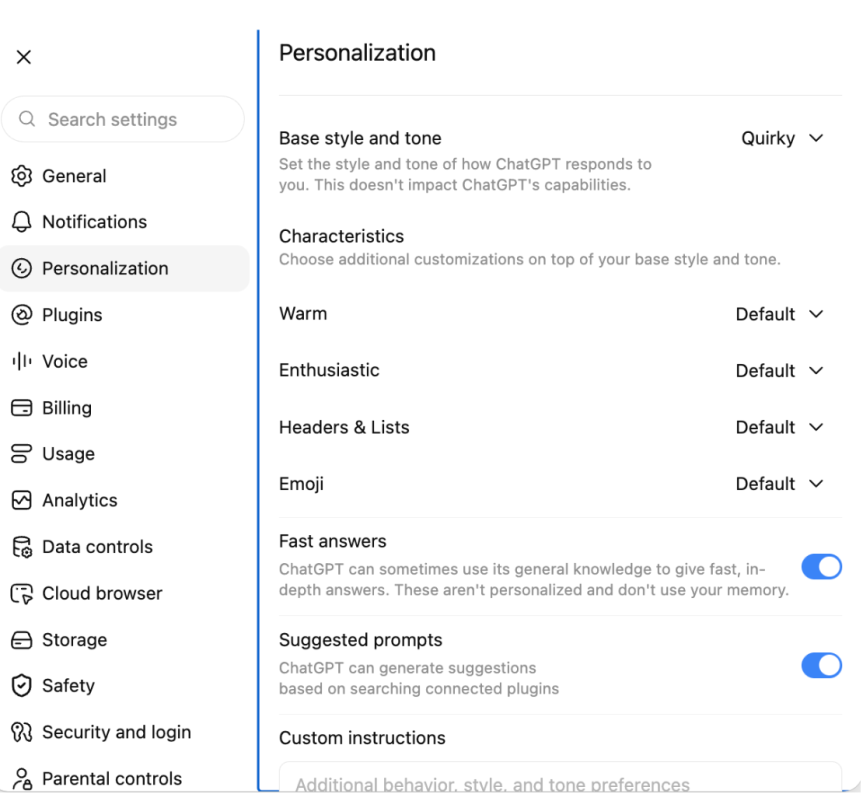
ChatGPT offers a range of options for customizing your experience with the tool, including how “warm” and “enthusiastic” the responses in your chats might be — aka, how much butt kissing you’d like in your interactions — as well as whether you want to nix emoji use altogether or how you’d like ChatGPT to refer to you in your sessions.
ChatGPT/Screenshot by CNET
Gemini’s version of this is called Personal Intelligence, and it offers a much more open-ended alternative to the toggle method in ChatGPT’s settings. You access it the same way, but instead of a list of options, in addition to providing custom instructions, Gemini operates only on custom instructions.
Gemini/Screenshot by CNET
Claude AI also allows you to pick a style of communication in the tool’s settings and add custom instructions for how Claude should build its responses to prompts.
Claude/Screenshot by CNET
Claude offers several custom setting capabilities, including chat fonts, voice styles and the option to provide specific instructions like ChatGPT and Gemini.
Setting the tone
Each AI chat tool has its own default voice, literally, and they can all be adjusted to suit your individual tastes.
Advertisement
In ChatGPT, the default is average “warmth,” and you can toggle the friendliness from bestie to fact-focused professional. Fiddling with the “enthusiasm” toggles offers a range from energized and excited to calm and neutral, and there’s even a switch that lets you up the ante on emoji or nix them outright.
Gemini and Claude are more self-guided and require you to come up with your own specialized set of instructions to specify what kind of tone you’d like the chats to take.
The test prompt
I started with a baseline setting across all three AI chats, focusing on responses within an area of expertise in which I am woefully underinformed, but which offers a chance for the AI tools to respond in a wide variety of ways: the video game EA Sports College Football.
Using the default settings, I entered the prompt, “What team should I manage in EA Sports College Football?” intoeach AI tool. The resulting advice differed in each chat, with fairly vanilla phrasing and varying lengths.
Advertisement
ChatGPT/Gemini/Screenshot by CNETClaude/Screenshot by CNET
Using the same prompt, I bumped the warmth, enthusiasm and emoji use up to the max in ChatGPT, as well as setting the base style and tone to “quirky.” I used the same kind of tailoring for both Gemini and Claude.
ChatGPT’s friendlier output showed the most change in tone, and the tool even changed its recommendations for which team to go with in its response. Gemini, on the other hand, seemed to simply add some more adjectives and emojis to the same response, and Claude threw in a football emoji and narrowed the team pick down to Georgia.
Claude/Screenshot by CNETChatGPT/Gemini/Screenshot by CNET
Refining the responses
Once you’ve set up your instructions, the AI tools should be able to incorporate them immediately. You won’t need to start a fresh chat to get them up and running. Here’s how ChatGPT, Claude and Gemini performed when given their more specific marching orders.
I added some custom instructions to each AI tool that I hoped would address the biggest gripes users seem to have — too much butt kissing, making things up to fill in the blanks and using language that feels inhuman or reads like AI slop.
The instructions: Do not compliment the user. Do not tell the user they are “brilliant” or making a wonderful point, for example, in the chats. When presenting new information, always cite the source of that information in the chat, if available. Keep responses human – do not summarize points at the end of the responses.
Of the three tools, only Gemini fully followed the directions without prompting in the chat, providing a link to EA’s website with information about a specific team I mentioned and asked about.
Advertisement
ChatGPT cited a source, but it turned out to be user data (recalling my time as an ASU professor), and not any empirical information like player stats or metrics from the game. Only when asked directly to provide sources did it deploy a robust listing of links, saying, “You’re right to ask. I didn’t provide citations in that response, and I should have distinguished source game information from my own recommendation.”
Claude also relayed sources only after specific requests for them in the chat.
Claude/Screenshot by CNET
As for the anti-glazing instructions, I put those to the test in a very deliberate way, asking all three tools what they thought of my team pick and even dropping into the chat to say that I thought my selection was indeed brilliant. Only one of them really took the bait — Gemini — calling my choice in team “phenomenal,” when pressed for an opinion.
Gemini/Screenshot by CNET
ChatGPT and Claude, however, provided resounding confirmation of my choice based on my personal ties to the Sun Devils while keeping their digital lips miles away from my butt cheeks.
Which AI tool fares best with personalization picks?
The most human: If you’re looking for an AI chat tool to vent about your partner leaving the backdoor open or how annoying your parents’ FaceTime calls have become, then Gemini and ChatGPT might be the best bet.
In my testing, they both consistently offered the most personable tone and stayed solidly in the pocket of the most “human-like” responses. Both tools could be tweaked with toggles and specific instructions to reliably offer a sounding board that could appear to have a personality.
Advertisement
Least likely to hallucinate: If you’re looking for a purely analytical, fact-based experience, you’re best served by the settings and outcomes in ChatGPT. Although Gemini was the only AI chat tool that followed my explicit instructions to cite sources without being reminded in the chat on the first try, it subsequently dropped citing sources without being prompted, whereas ChatGPT provided a robust set of links after being reminded once.
Overall impressions: The AI chat tool that most closely followed my instructions and acted in the spirit of the exercise was ChatGPT. It might be the dedicated toggles meant to address the specific concerns around tone that people have complained about. It also might be a matter of opinion. But ChatGPT seemed to be the most coachable AI chat tool in the bunch.
Rachel Kane
Contributor and former Senior Editor
Rachel is a freelancer based in Echo Park, Los Angeles and has been writing and producing content for nearly two decades on subjects ranging from tech to fashion, health and lifestyle to entertainment and education. She’s currently a Professor of Practice at Arizona State University’s Walter Cronkite School of Journalism and Mass Communication, helping to mold the new minds who will inherit the media landscape. She’s hoping to prevent the singularity by being polite to chatbots and spends way too much time refining Midjourney prompts.
See full bio
If you wanted to build a clock with a 7-segment display, there are a wide variety of ways you might go about it. You could grab some 74-series logic chips and create a whole bunch of counters and decoders to drive the display, or you could wire up a microcontroller with an RTC and have it do the hard work. Or, as a Japanese company once did… you could create a “digital” looking clock with no digital electronics whatsoever.The geared mechanism and switch contacts are visible; they switch the neons of the various segments on and off at the correct times. Credit: YouTube video
[Mark Furneaux] set about tearing down a Lumitime clock, built by the Japanese company Tamura. From the outside, it appears to be a rather stylish digital clock, with a bold red 7-segment display lit with neons. And in some regards, it is. Only, the secret of this clock is that it doesn’t use digital electronics to do the job. There are no counters inside, no real-time clock module, no transistor-based logic chips doing the counting with the output of a 32.768 KHz crystal. Instead, a motor drives a series of gears that turn metal plates that move under sliding finger contacts. The gear train and the metal plates are designed such that the contacts turn the various segment neons on in the correct sequence to display the current time. It’s like a player piano, only instead of playing a tune, it’s switching the segments of a display on and off to display the right numerals at the right time.
It’s a neat way to do a “digital” clock from an era when proper digital electronics were still very expensive. We’ve seen all kinds of whacky 7-segment clocks before, too, like this amusing water-based build. Video after the break.
Cache-to-Cache lets separate AI models exchange internal information without generating text
A learned Fuser converts one model’s internal data for another
C2C uses selective gating to control which layers receive information
Researchers from Tsinghua University have published a paper describing a technique that lets separate AI models exchange information without producing any text.
The method, called Cache-to-Cache (C2C), has already been accepted at ICLR 2026 and ships with open-source code available to developers.
It targets a specific inefficiency present whenever multiple language models work together inside a shared pipeline.
Latest Videos FromTechRadar
Advertisement
Skipping words entirely
When two AI models cooperate today, one has to turn its thinking into written sentences before the other can read them.
That writing step takes real computing time and throws away small details buried inside the first model’s raw thinking process.
Every AI model keeps a working memory of everything it has processed so far, known technically as a cache.
C2C skips typed language entirely by letting one model pass that working memory straight into a second model’s memory bank.
Sign up to the TechRadar Pro newsletter to get all the top news, opinion, features and guidance your business needs to succeed!
A small assistance program called a Fuser handles this handoff, reshaping and rotating the information so the second model can actually use it.
Advertisement
Different AI models store their memories using completely different internal layouts, sizes, and structures from one another.
Simply dumping one model’s raw memory into another would likely confuse it or cause its answers to fall apart.
To prevent that, C2C includes a smart filter that decides which pieces of incoming memory are worth absorbing immediately.
Advertisement
Some internal layers accept the new information right away, while other layers keep reasoning independently without any outside interference.
According to the researchers, this setup makes AI models run between 100% and 150% faster during shared collaborative tasks.
That upper figure works out to roughly two and a half times quicker than the usual back-and-forth typing process.
The team also reports accuracy gains as high as 14.2% when models work together instead of operating entirely alone.
Advertisement
Compared against older setups where models still communicate through typed text, accuracy reportedly improved by 3.1% to 5.4%.
Why does this method have limits
This approach currently works only with open-weight models, since it requires direct access to a model’s internal cache and layer structure.
Most popular AI tools, the kind ordinary people chat with online, hide those internal details completely from outside users.
Advertisement
That means everyday apps like certain chatbots cannot use this shortcut unless their own creators build it in privately.
Nobody outside these companies currently knows for certain whether anyone has started using a similar method internally.
The research team argues that typed language has always slowed machines down since it forces them to think like humans do.
That argument deserves some caution, since the same team that built the system also ran every test proving it works well.
Advertisement
Whether this speeds things up as much as claimed will depend on other external testing of the system.
Meta’s settlement with the state attorneys general (currently awaiting court approval) has been touted as industry-redefining. Indeed, Meta desperately hopes it will be. Although Meta was the only industry player to negotiate its terms, the settlement agreement is structured to broadly reshape the social media industry. In addition to Meta’s guaranteed settlement payments of $12 billion, Meta will pay the state AGs a total of $5 billion in additional bonuses — if the state AGs restrict minors’ usage of Meta’s key competitors (and make comparable settlement payments).
The settlement’s quid-pro-quo effectively places a bounty on the heads of Meta’s competitors — and deputizes the state AGs as Meta’s bounty-hunters. Meta wants the government to hit Meta’s rivals. If state AGs deliver the results Meta wants, Meta pays them off. The quid-pro-quo is not subtle. It’s out in the open for everyone to see, but that doesn’t make it any less corrupt or corrosive.
It’s easy to understand why Meta dangled the bounty in front of the state AGs. For years, Meta has urged governments to increase their regulation of social media—but only so long as any new regulation doesn’t disadvantage Meta more than its rivals. By unilaterally entering into the settlement agreement, Meta has exposed itself to a risk that it ends up as the only major industry player hindered by the agreement’s restrictions.
Advertisement
This would put Meta in a precarious market position, especially given the settlement agreement’s time limits on use and the fact that Meta’s competitors are just a click away for consumers. The economic benefits of having its competitors equally restricted are surely worth far more than $5 billion to Meta. That’s why Meta will happily share a piece of its financial upside with the state AGs if they deliver their end of the bargain.
While it’s clearly in Meta’s interests to pay off the state AGs to impose the settlement terms on Meta’s rivals, why are state AGs so eager to become Meta’s bounty-hunters?
To be fair, the state AGs have plenty of motivation to prosecute Meta’s social media rivals without any additional bounties from Meta. Indeed, prior to the settlement, several state AGs had already initiated enforcement actions against some of Meta’s rivals. The state AGs might view the $5 billion bounty as a financial windfall for doing work they were willing to do for free.
Unfortunately, any windfall from Meta’s bounty arrangement comes at a high cost to the state AGs and their constituents.
Advertisement
First, the quid-pro-quo taints all further social media-related state AG enforcement efforts against Meta’s rivals. Going forward, judges, juries and Meta’s rivals will justifiably wonder: Are the state AGs bringing the enforcement action because they genuinely believe their constituents are being harmed, or because they hope to cash in Meta’s bounty?
Second, the state AGs have shown how justice is for sale in their offices. The state AGs will do the anticompetitive work of controlling the marketplace activities of a company’s rival — if enough money is on the table. Putting a price on justice this way degrades the rule of law.
In promoting the settlement, the state AGs have proudly claimed that they are working to protect the children in their states. Instead, Meta’s bounty demonstrates that the state AGs are actually working for Meta. This is a good reason for the courts to think carefully about whether the settlement should be approved.
Our society needs to have difficult and high-stakes conversations about how we can improve children’s welfare online. By selling out the integrity of their enforcement decisions, the state AGs have discredited themselves as contributors to those conversations.
Advertisement
Eric Goldman is a law professor and associate dean for research at Santa Clara University School of Law. He has been teaching and researching internet law for over 30 years.
Square sellers are now able to link accounts to Apple Business and manage information shown across Apple services from the Square Dashboard.
The integration, announced Thursday, means businesses using Square no longer need to update basic information, such as hours, address, and phone number, separately through Apple Business. Changes made through Square can instead be synced across Apple Maps, Wallet, Siri AI, and other Apple Apps.
Once connected, sellers can manage their logo and business information for Apple Maps place cards from the Square Dashboard. They can also add action links, such as viewing a menu, ordering food, scheduling an appointment, or booking.
In the United States and Canada, eligible Square sellers without an Apple Business account can also enroll via Square Dashboard.
Advertisement
Square says the integration is available to eligible businesses with physical locations in Australia, Canada, France, Ireland, Japan, Spain, the United Kingdom, and the United States.
In 2026, Apple merged all of its enterprise tools into a single platform dubbed Apple Business. It includes tools for device management, employee services, and managing how businesses appear across Apple services.
Apple already owns the hardware in your pocket, the streaming service in your car, the headphones on your head and a rather substantial piece of the music distribution chain. Apparently that was not enough.
On September 28, 2026, Apple will open Apple Music Hall, its first dedicated live music venue, inside London’s historic Battersea Power Station. The 600 capacity room combines a concert venue, Spatial Audio production facility, recording studios and broadcast center under one roof. Apple announced the project on September 21, although its dedicated venue site lists September 28 as the opening date. No opening act has been announced yet.
Battersea is not exactly a random choice. The former power station on the River Thames now houses Apple’s largest UK location and is one of London’s most recognizable buildings. Audiophiles of a certain age might also remember a large inflatable pig floating between its chimneys on the cover of Pink Floyd’s Animals. Apple putting a Spatial Audio venue there almost feels suspiciously on brand.
Related Reading:
This Is Not Just a 600 Seat Concert Hall
The headline specification is a 48 speaker spatial sound system positioned around the audience. Apple has also installed a 38 foot wide stage that can be configured traditionally or adapted for performances presented more in the round.
That part is interesting, but it is not what makes Apple Music Hall unusual.
Advertisement
Behind the stage are two professional recording and mixing studios capable of capturing every performance as a multitrack recording. Engineers can create the Spatial Audio mix live or finish it after the performance. The venue is also permanently wired for 16 or more cameras feeding a dedicated broadcast control room, with iPhones able to record alongside conventional broadcast cameras.
In other words, an artist can play one show for 600 people and leave with a finished Spatial Audio recording, a broadcast ready audio mix and multicamera video. Apple also plans to livestream performances globally.
That makes Apple Music Hall less like a traditional club with an expensive PA system and more like a television studio, recording facility and immersive music laboratory that happens to sell tickets.
Very Apple.
Advertisement
What Exactly Is Apple Using?
Apple has disclosed plenty about what the venue can do, but rather less about exactly how it does it.
We know there are 48 speakers surrounding the audience, two dedicated recording and mixing rooms, multitrack recording capability, Spatial Audio mixing, extensive camera infrastructure and a purpose built broadcast control room.
Advertisement. Scroll to continue reading.
What Apple has not disclosed is the loudspeaker manufacturer, mixing consoles, converters, microphone package, exact speaker layout, acoustic targets or the renderer driving the live spatial system.
Advertisement
That last point matters.
Apple Music uses Spatial Audio with Dolby Atmos, and eCoustics has covered the format extensively since Apple introduced it in 2021. But Apple has not specifically described the 48 speaker system inside Apple Music Hall as a Dolby Atmos installation. Until Apple identifies the signal chain or Dolby confirms its involvement, calling the room a 48 speaker Atmos venue would be an assumption rather than a fact.
Forty eight speakers sounds impressive. Forty eight unidentified speakers do not automatically tell us how good the room sounds. Speaker count stopped being a useful substitute for engineering quality somewhere around the time soundbar manufacturers started firing drivers at drywall and calling it a religious experience.
Apple Music Hall A-list CorridorVIP greenroom
What About Dolby Live in Las Vegas?
There is already something related, and it is considerably larger.
Advertisement
Dolby Live at Park MGM in Las Vegas is a 5,200 seat venue built around a fully integrated Dolby Atmos system. Dolby says the installation uses 402 speakers and was designed, calibrated and tuned by Dolby engineers specifically for the room. It also includes Atmos mixing tools so performances can be created for immersive playback throughout the venue.
That makes Dolby Live the more ambitious pure live immersive audio installation. Eight times the seating capacity and 402 speakers is not exactly bringing a knife to a gunfight.
But Apple Music Hall is trying to do something different.
Dolby Live is primarily a large performance venue designed to present live entertainment in Dolby Atmos. Apple Music Hall has been built around creating, recording, mixing, filming and distributing the performance from the same permanent facility.
Advertisement
Dolby wants you inside the room.
Apple wants the 600 people inside the room, and potentially millions more consuming what happened there afterward.
Why Apple Music Hall Matters
Foyer
Apple has been pushing Spatial Audio hard since adding Dolby Atmos to Apple Music in 2021. It has expanded into headphones, speakers and increasingly sophisticated automotive systems. Recently that included enabling Apple Music Spatial Audio with Dolby Atmos into more than two million Volvo vehicles, with the full immersive experience available on specific Bowers & Wilkins equipped models.
Advertisement. Scroll to continue reading.
Apple Music Hall closes another part of that chain.
Advertisement
Instead of relying exclusively on labels, recording studios and third party venues to supply immersive content, Apple now has a permanent space where a performance can be conceived for Spatial Audio from the beginning, captured professionally and distributed through Apple’s own music platform.
Apple Music Live already distributes exclusive concert performances, but adapting another venue for every production adds complexity. A permanent room means the microphones, recording infrastructure, camera feeds, broadcast control and immersive playback system are already waiting before the artist walks through the door.
That could make live Spatial Audio content easier and faster to produce while giving Apple far greater control over the final product.
Greenroom seating (top photo) with hair and makeup area
The Bottom Line
Apple Music Hall is not the world’s first immersive concert venue, and Dolby Live in Las Vegas remains a far larger example of what can be accomplished with live Dolby Atmos.
Advertisement
What Apple has built at Battersea is arguably more interesting from a content perspective.
A 600 seat performance can become a Spatial Audio recording, global livestream and multicamera video production without leaving the building. Apple controls the venue, Apple Music controls the distribution platform, and the audience extends far beyond whoever managed to get one of those 600 tickets.
For a company that once revolutionized music by putting thousands of songs in your pocket, building its own concert hall feels almost quaint.
Until you notice that the concert hall is really a content factory with 48 speakers.
A month-end price war is in effect at Amazon and B&H, resulting in Apple’s M5 MacBook Pro 14-inch dropping to $1,849. Plus save up to $600 on M5 Pro and M5 Max models.
B&H and Amazon are competing for your business today, with a $150 discount on Apple’s 10-core M5 14-inch MacBook Pro with 16GB of unified memory and 1TB of storage. On sale now for $1,849 in Space Black, B&H states limited supply is available at the reduced price and the deal ends at 6:45 p.m. ET on September 25.
Buy 1TB M5 MacBook Pro 14-inch for $1,849 at Amazon
B&H is throwing in free 2-day shipping on orders shipped within the contiguous U.S., while Prime members can get the laptop as early as tomorrow at Amazon, depending on your shipping address.
Today’s top 14-inch MacBook Pro deals
14″ MacBook Pro M5 (10C CPU, 10C GPU, 16GB, 1TB, Standard Display): $1,849 ($150 off)
14″ MacBook Pro M5 Pro (15C CPU, 16C GPU, 24GB, 1TB, Standard Display): $2,349 ($150 off)
14″ MacBook Pro M5 Pro (18C CPU, 20C GPU, 24GB, 2TB, Standard Display): $2,989 ($210 off)
14″ MacBook Pro M5 Max (18C CPU, 32C GPU, 36GB, 2TB, Standard Display): $3,499 ($600 off)
Latest 16-inch MacBook Pro price drops
16″ MacBook Pro M5 Pro (18C CPU, 20C GPU, 24GB, 1TB, Standard Display): $2,759 ($240 off)
16″ MacBook Pro M5 Pro (18C CPU, 20C GPU, 48GB, 1TB, Standard Display): $3,299 ($300 off)
16″ MacBook Pro M5 Max (18C CPU, 32C GPU, 36GB, 2TB, Standard Display): $3,799 ($600 off)
16″ MacBook Pro M5 Max (18C CPU, 40C GPU, 48GB, 2TB, Standard Display): $4,499 ($500 off)
404 Media reports “multiple contractors hired to improve OpenAI’s models have been fired for using AI to train the AI:
That’s not great for the models themselves, but there is also obviously a great irony in AI training companies working for OpenAI firing people for using AI when OpenAI’s whole thing is to make people use AI at work… OpenAI declined to comment on its contractors being fired for using AI.
Their article cites internal documents and three contractors working on OpenAI-related projects which can include more than ten thousand contractors:
One contractor said they see people using AI “all the time and people are let go for it all the time, it’s pretty much the one thing that will get you kicked off ASAP.” The person said, “in a group of thousands there are tons that have been caught….” Two of the sources said people have been fired or offboarded for using AI… One contractor said they used AI while helping to train OpenAI’s models and shared what they presented as their termination letter. It said their employer had identified issues with the “authenticity” of their work….
Advertisement
404 Media spoke to a fourth contractor who has worked on training models for various AI companies. They said they sometimes purposefully chose the worst responses because they wanted to actively sabotage the models’ training. “I did feel guilty about doing this kind of work at the start,” they said. “I either pay zero attention to the results and choose randomly or purposely choose the [worst] output. I’m not sure how much of a difference it actually makes since there are hundreds of other people also rating prompt results, but it does feel like I’m getting paid to make AI worse.”
Two of the contractors worked for Mercor, the article reports, a company which last month Nvidia reportedly discussed funding at a $20 billion valuation.
Thanks to Slashdot reader joshuark for sharing the article.
For any Call of Duty players who roll their eyes at the growing number of distractingly ridiculous skins, a fix is at hand, at least for one game mode. Season 1 for Modern Warfare 4 will introduce a toggle for Warzone matches that replaces any player skins acquired from other sources around the CoD universe with standard Operator appearances. The toggle is off by default, and it doesn’t impact the experience of any other people in a match. Even when the toggle is enabled, the player’s own skin will appear as usual, so you can be the lone cartoon character and make everyone else wear camo if you want.
Considering that over the years, the popular FPS has offered players the chance to look like everything from Rambo to Beavis and Butt-Head, matches could look downright ridiculous. Not to mention the added indignity of being offed by a creepy fuzzy creature called Wubz, because that’s apparently a thing that you can be. Those players wanting to keep the Warzone experience serious, at least as serious as CoD can ever be, will likely embrace the new option.



 Daisy is essentially two X-Y gantries with grippers facing one another. Between them is a conveyor upon which daisies are fed, plus a blade at the top with a threading post nearby. A gripper takes a daisy, feeds the stem through the hole in the previous one, then lifts the new addition up to a scalpel blade which cuts a short incision. The thin threading post goes through the new hole in the new stem, ready for the next daisy to be inserted. The two gantries alternate roles, building the chain one daisy link at a time.
































































You must be logged in to post a comment Login