Gav Free of the Slow Mo Guys has spent years chasing moments too fast for ordinary eyes. Several years back a hammer strike on a single mirror left him staring at the footage in confusion. Right at the moment of impact a small ripple spread across the surface. He kept returning to those frames, wondering how something so rigid could flex like that. This time he arrived with a Phantom TMX 7510, a pile of spare mirrors, and the determination to settle the question for good.
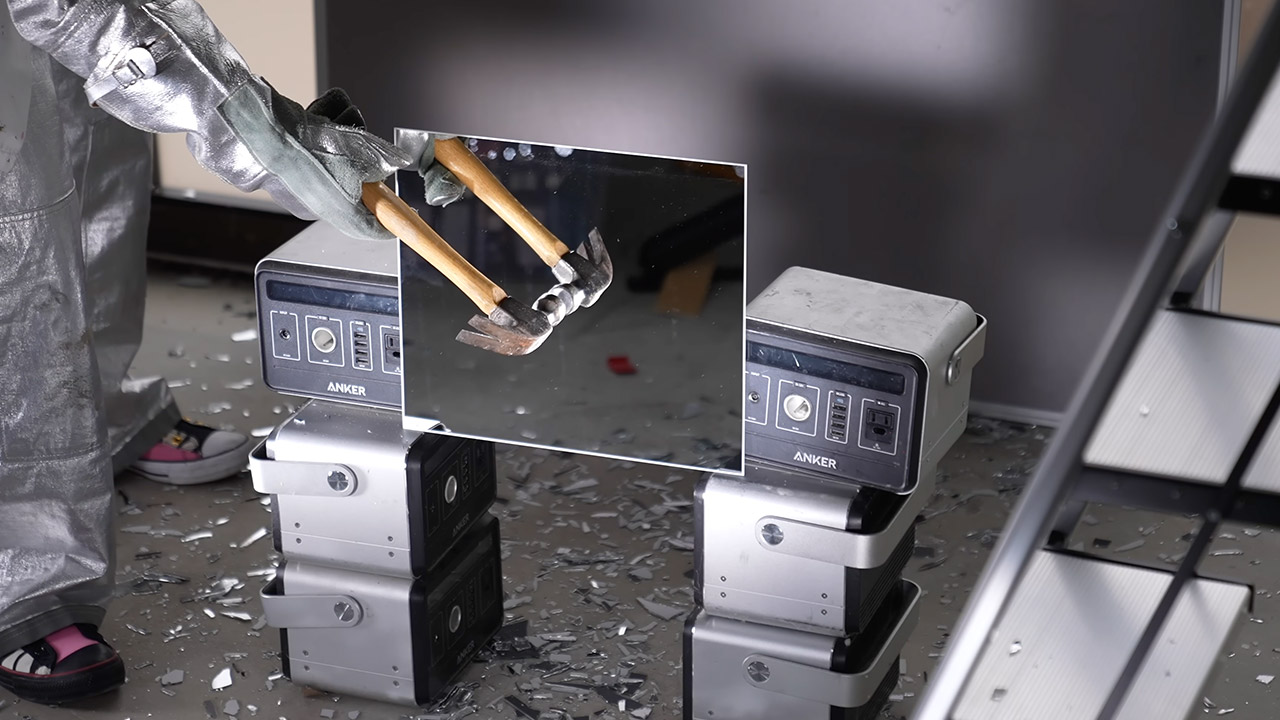
To shield him from flying shards, protective gear was placed up over him, including a flame suit donated by Adam Savage. There were lights on both sides of the camera, as well as another running parallel to a large sheet of glass against which cracks would be clearly evident. Later, a slew of Colored Titan tubes were used to paint the reflections in varying hues. The mirrors were mounted on cheap platforms, and the camera simply waited at frame rates of up to a fraction of a second, resulting in extended, mesmerizing sequences.
DUAL 1/1.1″ SENSORS & TRIPLE AI CHIP SYSTEM: Custom-built dual 1/1.1″ square sensors deliver unprecedented 360 image quality. Combined with a triple…
FLAGSHIP 8K50FPS 360 VIDEO: Hit record on our 360 action camera and capture your world in stunning native 8K50fps video. Every view, every highlight…
IN-HOUSE AI MODEL FOR EFFORTLESS 360 EDITING: Insta360’s own AI model, built specifically for 360 editing. New AI Director edits your footage…
First strikes were happening at 120,000 frames per second. When the hammer hits the glass, a large wave comes out. The center pieces begin to spin away from the place of impact, and the hammer’s reflection becomes larger as the shards tip. Once the surface has bent far enough, which is pretty significant, the glass will break at the impact zone. The initial crack that forms is essentially a perfect circle and only extends as far as the wave has rolled. Beyond that line, the glass breaks in more random, jagged patterns. Even at this speed, the cracks nearly disappear in a few frames, making it difficult to notice their progress.
It’s not simply the speed, but also how forcefully or softly you hit the glass, which shapes the story, literally. A particularly forceful strike causes a larger ripple, which occasionally reaches the edge of the mirror first. When this happens, the initial cracks appear along the rim rather than in the center. A softer hit allows the wave to die out sooner and keeps the break more central. At 80,000 frames per second, two cracks that appear to be simultaneous to any conventional camera are actually four frames apart, with a 50 microsecond delay. It’s little, but the high-speed footage makes it clear.
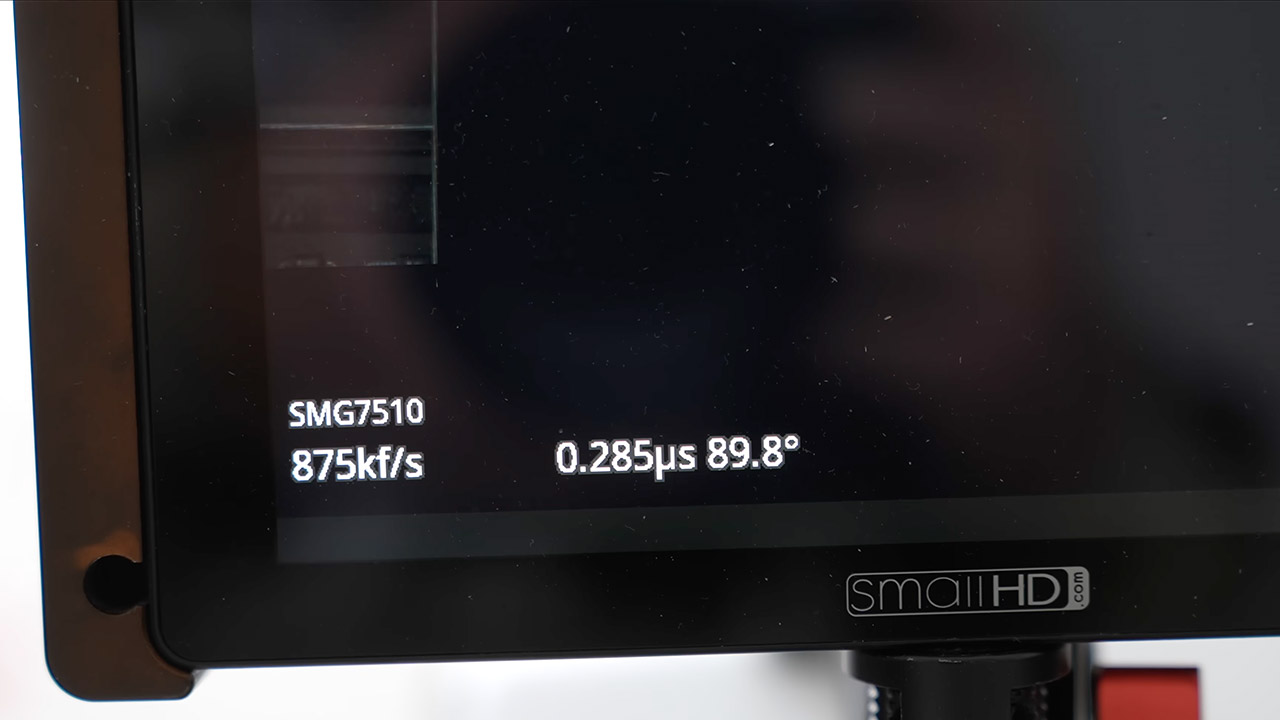
Pushing the frame rate even higher, up to 875,000 frames per second at lower resolution, transforms the entire scene into something virtually abstract. Black and white frames with millisecond exposure periods sharpen the leading edge of each fracture. These fronts are moving in nearly perfect circles, with each point along the edge traveling at the speed of sound through glass. The circular shape holds because all directions advance at the same rate until the entire surface gives way.
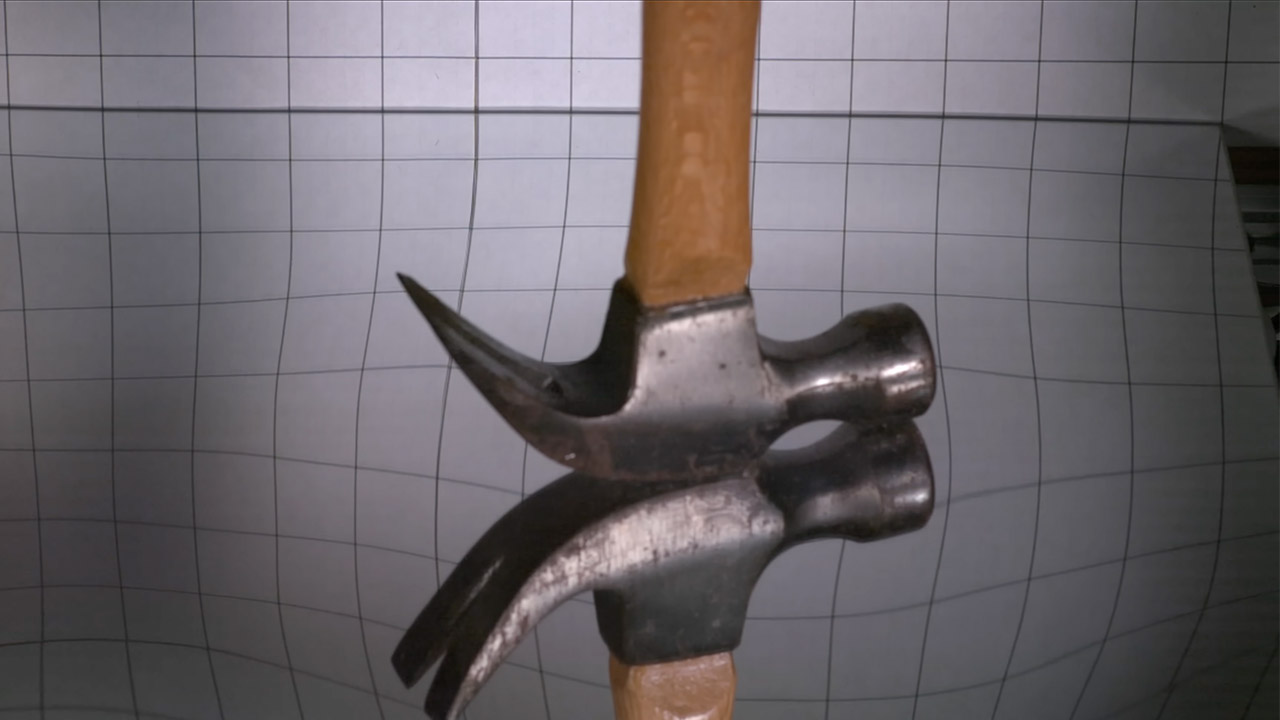
When you look at it from the side, you notice the most surprising behavior. The hammer does more than just bounce off or punch through; it sinks into the surface for an extended period of time while the glass continues to bend. Looking through the mirror to a grid behind it clarifies the duration of contact even further. The surface is curved in smooth lines, rising and sinking like the skin of a pond after a stone has been dropped in. Only after that deep flex do cracks appear and begin to spread outward.
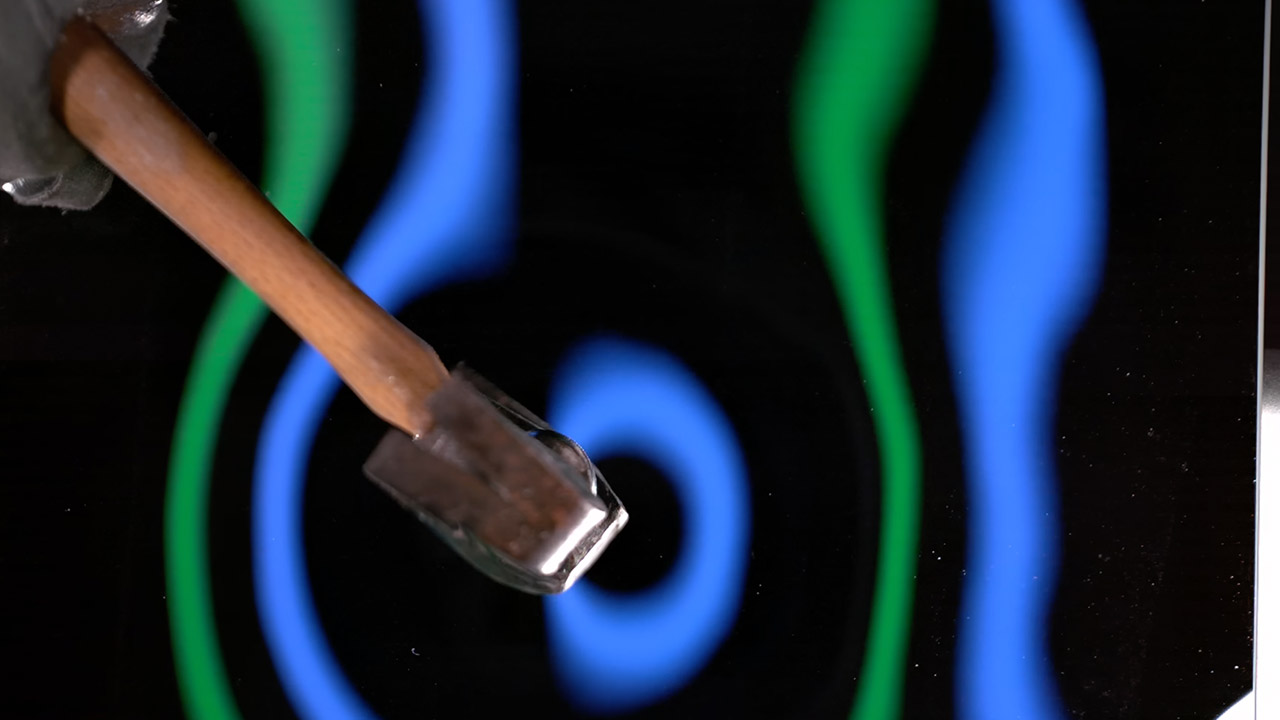
Colored lights bounce off the glass, suddenly transforming those moments into a surreal landscape. The stable blue and green tubes appear to contradict the frenzied dance of the other colors as they flicker, painting the waves and eventually shattering in an ever-changing tapestry of shifting patterns. The fragments swirl and catch the light, giving the entire collapse the appearance of an explosion of frozen color rather than broken glass. One scene in particular made Gav think of a glass peacock falling apart or a hammer crashing through someone’s most vivid dream.
Later frames demonstrate how the final crack pattern captures the mirror’s three-dimensional shape at the exact moment it gave way. Long, open cracks develop where the surface dips into a bowl, whereas tight groups of fine cracks appear where it rises into a hump. The shatter process appears to petrify the vibration pattern in place, much like sand on a vibrating plate settles into distinct, defined lines. Looking down from the top, you can nearly make out the height map of the glass by observing how the cracks had organized themselves.
It’s quite likely that many readers will have harbored dreams of owning, or at least driving, a steam engine of some kind. [James Hervey-Bathurst] was lucky enough to do so in a time when it was still possible to find scrap steam-powered machinery for restoration, and at the recent Electromagnetic Field event in the UK he took the time to describe his journey from finding an abandoned steam lorry in a Buckinghamshire field in 1975, to a few years later, taking it to the road.
The talk starts with the story of its retrieval, then the long process of rebuilding, and finally its first run. He’s the owner of Eastnor Castle, the ancestral pile that serves as venue for EMF Camp, so we’re guessing that having somewhere spacious for such a project must have helped. Along the way, we get a comprehensive run through the workings of a 1920s steam vehicle, from its double-expansion compound engine to its three-speed gearbox, stopping for small details like its injectors, and a curious exhaust steam heater designed to reduce the clouds of visible steam.
Most of us will never get the chance to take the wheel of a Foden such as this one, but at least we’ve had a chance for a closer look thanks to EMF. The full video is below the break, meanwhile if you’d like more on steam injectors we have you covered.
Shipwrecks are often found by accident. Of course, treasure hunters and scientists go looking for the big ones, like the Titanic or Sir John Franklin’s HMS Terror. But Unesco, the United Nations Educational, Scientific and Cultural Organization, estimates that there are more than three million undiscovered shipwrecks in the world’s oceans. Many of these ships are forgotten to history until divers, workers, or even fishermen stumble upon them.
In March of 1533, a ship named the Bom Jesus left Portugal from the port of Lisbon, bound for western India. It carried naval equipment and other goods that Portugal could trade for pepper and spices. The route was treacherous and long. It was centuries before the Suez Canal opened, and ships sailing from Portugal to India had to go around the Cape of Good Hope at the southern tip of Africa. Four months into a journey that would take more than a year, the fleet that included the Bom Jesus hit a storm, and the ship was blown off course. It disappeared and wasn’t seen again for 475 years.
In 2008, diamond miners working off the coast of Namibia, where the desert meets the Atlantic Ocean, found the remains of a ship. Incredibly well-preserved, the ship was laden with 40 tons of cargo, including gold and silver coins, copper ingots, and more than 100 elephant tusks. Described by archeologists as a time vessel, the Bom Jesus shipwreck offers a glimpse back in time and also leaves scientists with some unanswered questions.
Advertisement
A scientific glimpse into the past
Guenterguni/Getty Images
This isn’t the first time people have found a lost shipwreck holding piles of untouched treasure. While the valuable coins may grab the general public’s attention, the elephant tusks opened a different window into the past. This is the largest-ever archaeological discovery of African elephant ivory. Scientists conducted tests on the tusks that not only provided information about elephant populations in the 16th century but also told a story about early trade networks.
The tusks came from at least 17 different herds of forest elephants, which were preferred due to their hard, straight tusks that could be more easily carved. Of these 17 lineages, only four still exist in modern Africa today. The genetic information provided by this ivory can help with modern study efforts, revealing the deep roots of elephant ancestry helps strengthen the case for conservation.
Advertisement
The lost populations are attributed to centuries of ivory hunting. Ivory was very valuable and could be used for jewelry, functional and decorative items, and religious objects. The Bom Jesus tusks came from male and female elephants both young and old and were supplied from different communities, indicating internal trade networks in Africa.
The cargo helps bring the past to life, but one mystery has yet to be solved. The remains of the approximately 200 sailors that were likely aboard the Bom Jesus were never found. Portugal waived its claim to the artifacts, and many are now on display at the Jasper House Museum in Oranjemund, Namibia. The ship is the oldest shipwreck ever found along the western edge of Sub-Saharan Africa.
That $29.01 saving matters more than it might first appear, since most premium AI transcription hardware in this category still sits well above the $150 mark even before accounting for ongoing subscription costs most rivals charge.
Advertisement
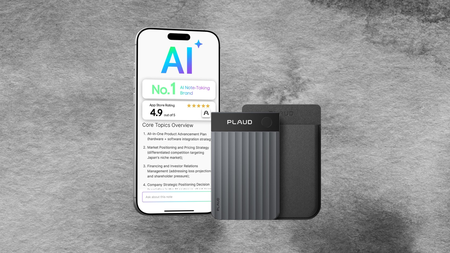
The Plaud Note Pro‘s core trick is turning any recorded conversation into a structured summary automatically, transcribing speech in 112 languages with individual speakers labelled, then generating mind maps, to-do lists and proposals without you lifting a finger afterwards.
Beyond just listening, the device lets you snap photos of documents or type quick notes mid-recording to add context, and its Ask Plaud feature means you can later interrogate the recording itself for key points, drafted emails or next steps.
Advertisement
Audio capture is handled by four high-performance MEMS microphones and a dedicated VPU that automatically switches between call and meeting modes, with directional audio keeping voices clear even in noisier rooms full of overlapping conversation.
Advertisement
Battery life stretches to 30 hours in Enhance Mode and up to 50 hours in Endurance Mode, more than enough to carry through a packed week of back-to-back meetings without needing to think about charging it.
All of that is packed into a body just 0.12 inches thin and barely over an ounce in weight, roughly the size of a credit card, so it slips into a jacket pocket or laptop sleeve without adding any real bulk.
Every Plaud Note Pro also comes with a free Starter Plan covering 300 minutes of AI transcription a month, alongside enterprise-grade privacy standards including SOC 2, HIPAA and GDPR compliance, so sensitive meeting content stays properly protected.
If accurate transcription, all-day battery and a design light enough to forget you’re wearing it sound like what your meetings are missing, the Plaud Note Pro at $159.99 is worth grabbing before this saving disappears.
Starting August 24, Walmart is expanding its payment options with tap-to-pay, after years of not allowing payment services like Apple Pay and Google Pay.
Walmart quietly announced the news in a press release on Friday, going out of its way not to name the services that the new tap-to-pay system will allow. We have confirmed that Apple Pay, Google Pay, and Samsung Wallet will all work with the new system.
In it, the company says that the initiative will be complete in Walmart and Sam’s Club stores by the end of 2026. Gas stations will get the service in 2027.
It’s been a long time coming
For years, Apple Pay and other competing services weren’t allowed at Walmart because the company had its own payment funnel it preferred. The company forced shoppers to scan Walmart Pay QR codes that it provided, so the company could better track consumer spending habits and schedules.
Advertisement
That system, which will still be functional after the tap-to-pay rollout, requires a customer to add a payment card to Walmart’s app. Then, a QR code is presented to the consumer to scan at checkout.
Walmart has accepted Apple Pay in Canada stores for six years.
Apple Pay launched on October 20, 2014. Walmart very briefly allowed it, before cutting off access and shifting to Walmart Pay exclusively.
Most major retailers now accept Apple Pay, as well as other forms of NFC-based payment. Even some notable holdouts like Midwest grocery retailer Kroger and home improvement chain The Home Depot have begun accepting Apple Pay in recent years, both after years of resistance.
“AI went from being very terrible to seemingly genuinely quite good at a professional level in a very short space of time…” says the Verge’s AI reporter.
But AI systems “are still truly, truly terrible at some areas of math… even the days of the week.”
If you look at academic math papers, a lot of the time you won’t see numbers… So they’re still terrible, but they’re now also very good at this other part. As to why, at some point you reach a critical mass of what these systems can do. We saw it with writing, we’ve seen it with programming. They’re very good at forging connections between different areas, applying old methods in new ways, those kinds of things. It appears that the newer models they’re training have apparently reached that level where it clicks, and now it can do math…
There are areas now where it seems to be producing work that is on par with good mathematicians, alongside other parts where yeah, it can’t count. All caught up in that is whether it’s going to rewrite employment structures or funding structures… One would hope [math researchers] would branch out into all of these new exciting areas or pose new questions. But AI won’t do that, and that’s the concern. And then that would leave the field quite sterile, and it will have all of these things that have been done, and maybe nothing left to pursue… [A] lot are scared that it’s closing off the field. So by definition, those breakthroughs that lead to something surprising and new that you can say, “Oh, this works here,” may not be happening anymore…
Advertisement
There were some bleak responses from graduate students I saw in essays posted online. Where’s their place in this as future researchers? Do they have a place in this? Is it as glorified AI proof checkers? That will be quite an unsatisfying career, I imagine. Or maybe not, I don’t know. We will see. I think anything used properly will be a net boon.
They also had an interesting response when asked if AI democratizes access to high-level mathematical proofs:
A lot of the mathematicians I spoke to were almost quite weary of this, actually. They love the idea, in theory, of democratizing access. They’re also quite fed up with AI-generated or -assisted papers that are flooding every publication imaginable, as well as the pre-print servers that they use in these fields. Some of those I spoke to said things like, “Oh, I got three emails this week alone with people being like, ‘Hey, is this legit?’” Because they thought they’d solved something with ChatGPT or with Claude, and they also don’t have the mathematical skills to check whether they’ve actually solved something.
On the flip side, there are parts where they said, “Well, we’ve got a talented undergrad who’s done something that a talented undergrad would probably have never managed, and here they are doing grad-level work and they’ve produced a paper that is legit.” And in the bigger scheme of things, a few I spoke to said, “Well yeah, a lot of these are in the ivory tower. Having access to this kind of thing globally could really boost access to the kind of things here.” On the flip side, the cost. These things cost a lot to run.
Apple’s Irish tax arrangements were scrutinized for more than a decade, and has now, finally, culminated in one of the largest corporate tax recoveries ever ordered by the European Union.
Apple has been fighting a decade-long battle over how much it owed Ireland in corporate taxes. The company was accused by the European Union of exploiting a loophole to avoid reduce its tax liability, despite employing more than 5,000 people in the country.
Now, new filings, seen byThe Financial Times, show that Apple paid $17 billion in taxes to Ireland in 2025. Globally, the company had paid $43 billion, which means Ireland accounted this one time for roughly 40% of Apple’s corporate tax bill for the year.
The payment was bolstered by the European Union’s back-tax ruling. The ruling found that Ireland had given Apple “unlawful aid,” resulting in a tax rate of less than 1%.
Advertisement
For years, Ireland opposed the EU’s conclusion.
Timeline of the Apple tax case
The case is the largest corporate tax recovery in EU history. It centers on the “Double Irish” strategy, which let Apple route profits through subsidiaries with no tax residency.
1991 and 2007: Ireland’s tax rulings allowed Apple’s Irish subsidiaries to attribute most profits to head offices that were not tax-resident anywhere.
August 2016: Against Ireland’s wishes and testimony, the European Commission ruled Apple received illegal state aid, ordering repayment of about $14.2 billion (13.1 billion euros) plus interest.
2018: Ireland collected the full amount into escrow while appeals proceeded.
July 2020: EU General Court annulled the Commission’s decision.
September 2024: European Court of Justice overturned that ruling, siding with the Commission.
2025: Ireland confirmed it received nearly $15.5 billion (14.25 billion euros) from the account’s final closure.
Apple has consistently argued it paid the taxes it owed and complied with Irish and international law. The company has also emphasized that most of its profits were taxed in the United States when repatriated.
Ireland opposed the European Union on this matter for years. The country still markets itself as a low-tax destination but must navigate growing pressure to follow global tax reform rules as part of the EU.
We spend hours testing every product or service we review, so you can be sure you’re buying the best. Find out more about how we test.
The xTool M2 is priced at the entry level of the company’s fully enclosed machines, but as ever there’s no mistaking it for anything other than an xTool laser engraver. As I got into using the machine, I could see just how finely tuned it is. Whilst it’s lighter weight than many of its more expensive siblings, the laser engraving power, even from the 10W laser in my review sample, was exceptionally good.
Having reviewed these laser engravers for a few years now, there are several essentials I look for in any laser engraver for TechRadar Pro, and one top priority is that it’s fully enclosed. While I might’ve looked at fully open designs earlier on, these days there’s really no excuse for an open-frame design other than cost. When it comes to running a business, safety is obviously paramount, so it makes sense to look for a fully enclosed rather than open-frame design.
Advertisement
Beyond the physical design, I’ve found a few extras that really help with the review process, simplifying the cutting, engraving, and placement of materials such as cameras. Then there are added features, such as air assist, that are essential for creating clean, crisp lines and reducing scorching.
Latest Videos FromTechRadar
What’s surprising for a machine of this price is that the M2 ticks all the boxes. It has dual cameras, one that gives you a good view of the entire workspace and a second that gives you a close-up view, air assistance built in, and, as ever, there’s a vent at the back that you can attach to your air filtration system.
But it goes even further by adding more head module options, so you can not only laser cut and engrave but also print and cut. Of course, coming from xTool, it also has a range of accessories that can further expand what you can do with this machine.
Advertisement
I’ve had the M2 for a couple of months and have really been able to give it a more extensive test than I usually would with these machines, partially because I’m interested in getting some of these for use within an educational establishment, and making sure that it’s easy, secure and robust enough is a major focus.
I’ve also been asked by several friends who have been looking at laser engraving machines and which option they should go for. At this price point and with the 610 × 569mm dimensions, it just, on paper at least, looks like a great option.
Sign up to the TechRadar Pro newsletter to get all the top news, opinion, features and guidance your business needs to succeed!
Sure enough, while I only have the 10W laser model to review in this test, I have looked at previous XTool machines with multiple module heads, and they’ve worked exceptionally well; I will take a look at the print and cutting heads later.
Advertisement
Initial setup was easy, and after I’d run through the unpacking, installing the module head and powering up, it was then just a case of connecting the USB cable directly to my MacBook Pro, installing xTool Studio, waiting for it to connect, allowing the firmware to update, and it was time to start.
The one slight oddity with the modular head is that it installs magnetically, although it requires a connecting cable for data from the head to the machine, which I found a little odd. Why this isn’t wireless or just uses contacts, I have no idea; possibly just to keep costs down, but once that cable is connected, getting into the utilisation of the machine is all pretty fast.
(Image credit: Alastair Jennings)
What I like is that xTool has now introduced a safety video at the beginning, with a longer version that you can view online, and a really good tutorial which essentially enables you to get started with cutting projects such as placemats. You can see the results of this project in the pictures.
Those initial tutorials are essentially a no-brainer setup guide to using the M2, and when you run through those initial projects, which will take you less than an hour, you’ll be pretty proficient with how the machine works.
Advertisement
As ever, in the software you’re able to assign different parts to different cutting, engraving and scoring methods with a simple click; you highlight a path, enabling you to then assign it to whichever type of cut you want. Again, with xTool’s knowledge in the sector, this is all incredibly well thought out.
Essentially, over my two months with the machine, it sat in the corner of the workshop, attached to one of the xTool air filters, and ran seamlessly for every project I’ve thrown at it.
The workflow, from the ability to recognise the materials through to being able to preview so that you can accurately place your designs, and through to the cutting and extraction, all just works incredibly easily.
At present, if you’re looking for a new, fast, relatively cheap professional-level laser engraver for a small business, then you really can’t go wrong with the superb M2.
Advertisement
xTool M2: Price & availability
At present, the xTool M2 is available for $599 / £599 direct from xTool with the 10W laser. I’ve also often seen promotional offers on this price, so just keep an eye out.
If you’re looking for the colour print-and-cut bundle, which lets you make stickers and other projects, it’s available for $749 / £749. There’s also the deluxe bundle, which includes everything, available for $989 / £989.
The laser cutter and engraver is also widely available from online retailers like Amazon.
Advertisement
xTool M2: Design
Specs
Connectivity: USB computer connection confirmed; xTool software required. Audio: Status buzzer Camera: 5MP close-view camera + 16MP distance-view camera. Size: 610 × 569 × 180mm Weight: 12.3kg Software: xTool software / xTool Studio ecosystem Accessories: Depending on the bundle: laser module, CMYK inkjet module, RA3 Lite rotary system and other accessories. Laser: 10W or 20W blue diode; optional 3W infrared module. Laser work area: 426 × 320mm for 10W/20W modules. Maximum XY speed: 600mm/s. Maximum cutting claim: Up to 8mm basswood with 10W; up to 10mm with 20W. Safety: Class 1 enclosed laser system.
The xTool M2 is instantly recognisable as xTool, with its sleek, simple white body and protective transparent yellow hinged lift-up lid. What’s impressive for a machine at this price is that it measures 610 × 569 × 180mm and weighs 12.3kg, which is handy, as I had to move it around quite a lot over the two months to install and remove other machines.
Advertisement
Part of the reason that this machine has been kept out in the workshop for so long is its manoeuvrability; when I needed it, I could just move it over to my computer desk. It was very easy to lift, carry and place, something that I don’t usually find with most of the laser engravers, other than the designs that I tend to avoid.
The full enclosure means this machine has a Class 1 laser safety classification, making it better suited to domestic small business and educational environments. If you work in a business, check whether your insurance covers this device classification.
The transparent upper cover helps keep everything safe; it’s yellow and prevents the laser beams from exiting the machine. It also lets you monitor the laser engraving, and the two internal cameras let you view what’s going on remotely.
What’s impressive is that the relatively low-profile design accommodates objects up to 100mm thick. This is essentially for direct cylindrical engraving and without the use of any type of riser base.
Advertisement
It’s also great to see that there is built-in air assist, essentially keeping the smoke away from the beam where the laser hits the material, something which is usually done by an external pump. However, you still ideally need an air filter to use with the machine, or you can vent it out a window.
On inspection, it does feel a little more plasticky than the more expensive xTool machines. However, it’s still a great-quality, solid machine; when I moved it around the workshop, it felt robust.
Another point here is that, with such a large transparent upper cover- something that I have had issues with on other manufacturers’ models in the past, especially splitting- the design of that lid is again good on my unit, although the hinges are free and not sprung or cushioned. After what must be hundreds of openings and closings, it’s still in excellent condition.
One of the slight oddities of the design, which seems to be the case with so many of these enclosed laser engravers, is that there’s no honeycomb grid included in the box. Instead, you get four magnetic clamps that clamp onto the corners of any material you place, plus four alignment markers on the base of the machine.
Advertisement
At first, I wasn’t overly impressed with the design of these clamps. I would’ve preferred the honeycomb grid. However, it doesn’t take long before you realise just how useful they are, and not only do they hold offcuts of work nicely and securely, but they’re also extremely easy to use. After a few days of using them, I warmed to them and now see them as a slightly preferred method, to the point where I’ve made a few additional ones on the Prusa Core One to add to the original four.
(Image credit: Alastair Jennings)
xTool M2: Features
What you get is a feature-packed machine from xTool, and in this review I’m focusing on the 10W laser, so that’s the entry-level version, but there is also a 20W blue laser available as well if you do need a little bit more power or, for that matter, speed.
Other modular heads are available, such as the 3W IR laser, which is designed for metal and plastic engraving. However, that’s not yet available on the market, and there’s an optional full-colour CMYK inkjet system with 1200dpi resolution and 40ml cartridge capacity. This is used alongside a cutter so you can create stickers and other printable objects.
Advertisement
One of the big features for me is the dual camera system. You have a 2-megapixel close-view camera and a 5-megapixel distance-view camera. These are both really useful, especially if you’re trying to refine the positioning of your designs.
From my experience with these machines, especially the F2 Ultra recently, I’d say this close-up camera is especially useful when using the 3W IR module and will probably also come in handy if you’re into printing stickers.
Like any product released today, AI plays a major role through the software. You have the automatic creation system, which is just a point-and-click system: give it a text description, and it will develop something for you.
But more than that, there’s also automatic material detection, which can essentially see what’s put into the workspace, evaluate it, and come up with a close match; through the test, I was really impressed with how well this worked. Essentially, once the material is detected, it adjusts all the settings to optimise for that material, rather than you having to look at a chart or work through trial and error.
Advertisement
Another major feature is the built-in adjustable air assist. You can adjust this in the software, but it essentially blows air across the laser, keeping the site where the laser meets the material clear of smoke. This means you get a much cleaner cut, and it also helps reduce scorching.
When it comes to file support, xTool, as ever, has an increasing library of assets that you can dip into to get straight into producing products. However, if you do want to import your own, then the new software supports SVG, DXF and PDF, and there’s plenty of flexibility, especially with the AI tool, to have a bit of fun with those files as well.
(Image credit: Alastair Jennings)
One feature I really like, especially when trying to cram as many designs onto one sheet of 3mm basswood as possible, is the new smart nesting and batch filters, which, again, are activated through the software.
These seemed to work really well, optimising the spacing on the sheet of basswood well beyond anything that I could do myself, and once again this helps to cut down on costs.
Advertisement
In the software, when I entered a few materials that weren’t recognised by the system, there is a huge material database. This can be a little daunting, but you can take control of the settings manually if you need to. Just do a quick test chart, and then you should have the settings that you need for engraving, scoring and cutting almost any material.
As ever, being from xTool, there’s a range of accessories, including a rotary engraving system for cylindrical and spherical objects. Still, there’s a full list, and it is extensive on the xTool website.
xTool M2: Performance
As ever with these laser engravers, they’re either quick to set up and calibrate or it takes most of the day; thankfully, because this machine is from the xTool stable, it’s extremely easy to unbox and get up and running. That said, the paper manual inside was a little on the sparse side, even for xTool.
Advertisement
However, two very large QR codes on the packaging link directly to the online setup instructions and manual, which include plenty of pictures and information. The point is that the setup is extremely straightforward: position the M2, remove all the packaging, plug in the power, install the laser module with the connecting cable to the machine, and switch on.
Then, in the software, wait for it to connect, run any updates and follow, firstly, the safety guidance, which is a very quick video of less than two minutes, and then follow the tutorials. After completing it, you should be up and running.
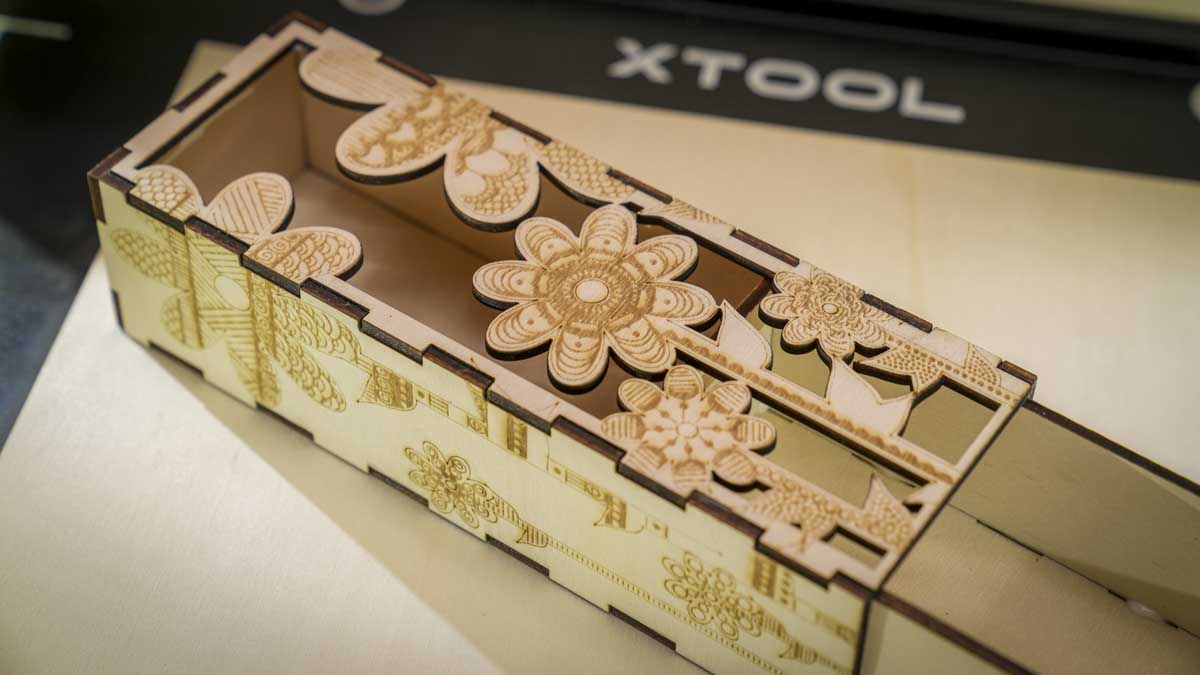
Once I’d created some of the tutorial projects, including the placemats, I moved on to my own projects, creating a few boxes, a small display shelving unit and a few other bits and pieces, including a bracket that I needed for my van, and throughout I was impressed with how quick and easy this machine is to use.
This is, of course, an entry-level machine in the pro market of laser engraving, so whilst the machine is extremely competent, through use you do start to notice a few small design points. These points highlight that this is an enthusiast-level machine rather than a pro-level one.
Advertisement
The first of these is the overall design. Whilst the design is solid and works exceptionally well, there’s no kill switch on the side. If you want to use this in education or most workplaces, you’ll need to add something to kill the power yourself.
But really, other than that, there is very little here that doesn’t impress, even when you’re used to using something like the xTool P2. For me, the workflow from the P2 down to the M2 is similar; it’s just a smaller machine.
While it is obviously slower and less powerful, that 10W laser module will happily cut through basswood up to 8mm thick, as quoted by the company. Although I didn’t have any 8mm basswood available, the 3, 4 and 6mm basswood that I generally use cut through with absolutely no issue whatsoever in a single pass.
The maximum speed for the cutter is 600 mm per minute, which is mid-range, and in the test you obviously reduce that depending on whether it is cutting or engraving. What really impressed me was the engraving resolution. If you want to do some really fine detail work, the M2 is an ideal solution, and converting images into halftone and then bringing those in got some stunning results.
Advertisement
(Image credit: Alastair Jennings)
As I went through the pack of test materials, including paper, wood and leather, I was just really struck by how easy the M2 is to use. The software is obviously great, but those two cameras do make a real difference to the precision of the laser, enabling you to get a preview of the material and really closely align the design to a fraction of a millimetre, which is far better than I have seen on even a lot of fibre lasers, where pure accuracy is definitely needed.
What strikes me about the xTool M2 is that it makes a lot of the more expensive xTool laser engravers a little bit obsolete. You get a relatively lightweight machine you can shift and move around, take off the work surface, and easily place on a lower shelf when not in use, freeing up loads of space.
You get a 10W laser for general work, and you can purchase the 20W when you need a little extra power or speed, plus a modular head system with the inkjet so you can push it for further projects.
What I liked was that the workspace area inside the machine is pretty decent, and whilst it’s not the largest out there, it’s surprisingly large for a machine of this size and far easier and safer to use than any open-frame laser engraver on the market.
Advertisement
While in this review I’ve looked at the M2 in isolation, it is worth pointing out that alongside the laser engraving machine, I have also added in the extractor filter, which is essential. I will update this review with the print head and cutter and possibly the 20W head at a later date.
xTool M2: Final verdict
The M2 is really easy to recommend. It’s a very well-priced, fully enclosed laser engraving machine.
A few things really make it stand out against much of the competition, including the built-in air assist, so no extra devices are sitting around on the work surface. But for me, what appealed was that I could quickly lift it and stow it away.
Advertisement
It’s a big machine, but at just over 12kg it’s not particularly heavy, and it’s quick and easy to disconnect and then plug back in.
Unlike some machines that require you to disconnect various pedal switches, air assist, and more, the M2 took a couple of minutes to disconnect and stash, then bring out and get up and running again.
(Image credit: Alastair Jennings)
In the workplace, one major downside is that it doesn’t have that kill switch on the side, which will be an issue. Still, everything else is simple, and if you’re a small business, it makes a lot of sense.
Here you have a high-quality, high-end enthusiast or pro-level machine with a 10W laser. This lets you engrave plenty of materials, and you can also add the inkjet module to create stickers if you want. Plus, with a rotary tool, you can flip the head from vertical to horizontal to engrave cups, mugs, and more.
Advertisement
I’ve looked at plenty of these laser engravers over the last few years, and the xTool machines have always stood out for quality and attention to workflow; the M2 is especially polished for its price point and the audience it’s aimed at.
Swipe to scroll horizontally
Value:
One of the most versatile machines that I’ve looked at for the price, making it exceptional value
Advertisement
5
Design:
Great design; I just wish there was no need for the cable between the head and the machine
4.5
Advertisement
Features
Excellent range of features, and with a modular head and accessories, the possibilities are enormous
4.5
Performance
Advertisement
SSpeed, cutting power, and workflow are well balanced at this price range
4.5
Total
A superb, fully enclosed laser engraver at this price and a perfect option for any small business
Inherent, a London AI lab founded by Google DeepMind alumni, says its AI agent just outperformed much larger models from Anthropic and OpenAI using a fraction of the size.
Of all the startups launched by Google DeepMind alumni, Inherent has gotten relatively little attention. But while better-funded rivals have yet to show the world anything concrete, the London-based team is starting to share what it’s been building.
Just weeks after emerging from stealth with a $50 million seed round, the British startup says its newly released AI agent, Faraday, has outperformed larger, better-known models at a specific task: independently reproducing the findings of published scientific papers without being told the answer in advance.
That may sound like a mere party trick given Inherent’s much loftier goal — building AI that can discover new scientific knowledge and not just verify old results. But paper replication is a standard training exercise for human scientists, too, cofounder and chief scientist Edward Hughes said. “Many PhD students actually start by doing this.”
Advertisement
Beating other AI systems at the task wasn’t the point, Hughes told TechCrunch; how they got there was. “What was most interesting to us about this was not so much the result of beating those frontier agents — which of course we liked — but was actually the way we went about building this.”
Here’s the part that should catch an investor’s eye: measured against Anthropic’s Claude Opus 4.8 and OpenAI’s GPT-5.5 — both much larger, frontier-scale systems — Faraday runs on a comparatively tiny model called Qwen 3.6 that has just 27 billion parameters. (Roughly speaking, “parameters” is a proxy for a model’s size and, typically, its training costs, as well.) Inherent’s bar for success was also higher than simply accuracy. Beyond replicating results, it wanted Faraday to demonstrate “research taste” — an instinct for what experiments are worth running and how to design them well.
Teaching something as intangible as taste is hard, which is where reinforcement learning comes in. It’s a training method that rewards an AI system for good outcomes rather than spelling out rules for it to follow. Rather than training its agents primarily on the study of how science itself is conducted, Inherent leans on this reward-based approach, betting it will generalize better to its longer-term goal of agents capable of contributing across many scientific fields.
“We’re always guided by that north star of building an AI scientist agent and imbuing our agents with taste,” Hughes said. That focus has also shaped what Inherent chooses not to build. Rather than developing its own coding tool, it had Faraday use OpenAI’s GPT-5.5 Codex instead, much the way human scientists lean on existing software rather than building everything themselves, according to the company.
Advertisement
Inherent is also trying to avoid building agents that simply tell users what they want to hear. Instead, Hughes said, the goal is modeled on his favorite kind of teammate — the kind who comes back and says: “I got curious about this, and I went off and I did these experiments. What do you think of these results?”
That collaborative instinct extends to how Inherent operates as a company. Its dozen employees all work in person out of an office in King’s Cross — the once-rundown London neighborhood that Google DeepMind’s presence helped turn into one of the world’s top AI hubs. “We believe that London is the place to be,” Hughes said.
Hughes is bullish on London’s density of AI talent, but he has also added his voice to calls to end “garden leave” — the practice, common in the U.K., of barring departing employees from joining or starting a rival company for months after they resign. It’s a restriction American researchers generally don’t face, giving U.S. startups a head start on hiring talent who’ve left a prior role. “This is a personal view rather than a company view, but I was affected by the garden leave problem,” he told TechCrunch.
Hughes eventually got around that constraint and started Inherent alongside two other DeepMind alumni and a fourth cofounder. The startup isn’t slowing down either. It plans to grow its headcount to “about 20 to 25” by the end of the year. Given its ambitions in world models as well, and with Demis Hassabis’s new role leaving some DeepMind staff unsettled, Inherent’s hiring push could make it an appealing landing spot for DeepMind employees weighing a move.
Advertisement
Pictured from left to right: Inherent co-founders Louis Kirsch, Kaloyan Aleksiev, Tantum Collins and Edward Hughes.
When you purchase through links in our articles, we may earn a small commission. This doesn’t affect our editorial independence.
There’s a new publicity stunt tapping into widespread opposition to AI data centers, and it’s using bathroom humor to make a statement.
Former NFL player Jason Kelce, who is also the co-owner of Garage Beer and the co-host of the New Heights podcast with his brother Travis (Taylor Swift’s husband), is the unlikely face of a marketing campaign, launched Tuesday, that puts artificial intelligence on notice. And, well, it’s all about the power of pee.
You read that right, and I apologize in advance for the amount of urine jokes in this article. Tread lightly, I guess.
The now-viral ad opens with Kelce using the bathroom. It cuts to him holding a jar of yellow liquid, issuing a call to action to a happy mob of folks frolicking through grassy terrain, singing, “Let’s pee on computers together and save humanity.” It immediately conjures up that iconic 1970s Coke commercial where hippies harmonize a message of peace, love and unity on a sunny hillside. Except instead of teaching the world to sing, Kelce is asking you to bottle up your pee in a collectible mug and send it to the AI data center of your choice.
Advertisement
If you’re not yet up to speed on the matter, AI data centers are large facilities that store the massive amount of hardware needed to train and run AI models. These warehouses are stocked with high-performance graphics processing units, which provide the power for you to use AI for researching, streamlining video production and, well, creating all the slop your heart desires.
Despite the unserious angle of the marketing stunt taking the piss out of AI (I’m sorry), Kelce’s ad carries a deeper message about the threat data centers pose to our neighborhoods, our resources and our future.
AI data centers guzzle resources
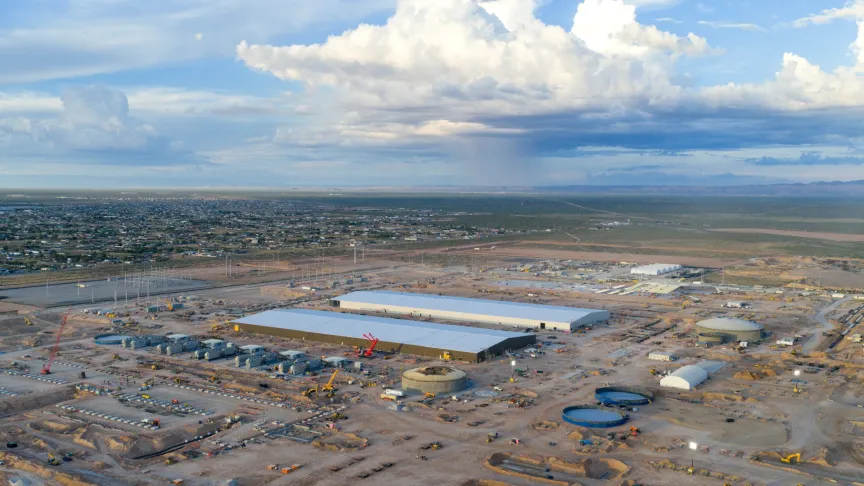
An aerial view of the construction of Meta’s AI data center in El Paso, Texas.Brandon Bell/Getty Images
To keep data centers running, an excessive amount of fresh water is required to cool servers so they don’t melt down or explode. Evaporative cooling towers use water to absorb heat generated by servers.
Advertisement
The Environmental and Energy Study Institute published a report in 2025 that says large data centers can consume up to 5 million gallons each day, which is equivalent to the amount of water used by a town populated by 10,000 to 50,000 people.
As massive amounts of potable water are being redirected, people who live near these data centers have growing concerns about how this water extraction will affect their daily lives, farming and basic household needs. Another fear: Who will be stuck paying these ginormous utility bills? Consumers are left holding the bag.
The other resource to discuss is electricity. New facilities, like the recently announced data center from OpenAI and Nvidia that would be built in Pike County, Ohio, are projected to use a lot of compute. The Ports-Pike Technology Campus is projected to consume roughly 8 gigawatts of power, equivalent to the annual energy use of 6 million average US households.
Then there’s Meta’s Hyperion, the 4-million-square-foot AI campus being constructed in Louisiana. It’s flattened an area known for its soybean crops and river cane, and when it’s all built and operational, the Institute on Taxation and Economic Policy says the gargantuan data center will consume three times the power New Orleans uses on any given day.
Advertisement
In other words, more than a piss load of energy.
AI backlash across party lines
People in the city of Imperial, California, took to the streets to join a nationwide protest against AI data center expansion.SANDY HUFFAKER/AFP/Getty Images
Resource consumption, uncertainty over costs and environmental concerns have helped fuel a growing AI backlash.
So, antics aside, Kelce’s trolling ad touches a hot-button issue. The collective sentiment against AI data centers is trending downward. A recent Gallup poll indicated 71% of Americans oppose the construction of new AI data centers in their community.
With the midterm elections a few months away, this negative sentiment has blossomed into a major talking point for both Republicans and Democrats in their campaigns. Another major issue with these data centers is a glaring lack of transparency.
As reported by Brockovich in a blog post, a trend of backdoor deals, elusiveness and secrecy has accompanied the facilities as they pop up all over the country, with the trust of community members tanking. “They’re watching their utility bills climb, finding sick animals they can’t explain, and worrying about the long-term impacts on their health and property values,” Brockovich wrote.
Advertisement
This brings me back to Ohio, an important state for the GOP during the midterms if the party wants to maintain a slim Senate majority. A memo circulated by the National Republican Senatorial Committee warned of a potential defeat for incumbent Sen. Jon Husted unless there’s a fix to the public relations strategy toward AI data centers.
“If voters’ perceptions of data centers are not fixed quickly, the campaign against them will expand far beyond Ohio,” the NRSC stated in the memo, as reported by Axios.
OpenAI CEO Sam Altman and President Donald Trump enjoy a lunch during the G7 summit in France.
Real-life action versus promotional gimmicks
I now return you to the matter of, ahem, the general public sending urine to an AI data center to cool the machinery of the future.
The marketing ploy here is to equate pee with water and, considering the massive water consumption that keeps AI data centers running, put the public disdain into the type of prank (which you’d normally see in a Jackass episode) to make its point loud and clear.
Advertisement
But you could also argue that it makes no point at all. Ordinary people (those without Super Bowl rings) who have protested data centers IRL have gotten arrested for it. There is real work to be done policy-wise. A trolling ad like this fits into the performative and parasocial attention economy, not into genuine activism.
Remember, this is a commercial for Liquid Death and Garage Beer — a product is being sold here. A collectible mason jar, which is currently sold out, is listed on the Liquid Death website for $18. The product is currently rated five stars, with a single review saying, “the perfect product for shipping your locally sourced urine to your friendly neighborhood data center.”
So, are people actually sending their excreta through the mail? A spokesperson from the United States Postal Service didn’t immediately respond to our request for comment.
That said, USPS rules say urine specimens can be sent by mail, but only for medical purposes such as drug and alcohol testing. To do this right, you’d need to carefully package the fluid in a leakproof container, then place it in appropriate packaging to prevent a messy spill.
Advertisement
Truth is it was never meant to be an action at all. Small print at the bottom of the ad says, “The suits want us to tell you to please don’t actually send your pee.” So yeah, Liquid Death and Garage Beer are really just pissing in the wind.
One thing is certain: Jason Kelce’s reach is strong, and his blue-collar persona can help give this campaign — and the message behind it — legs in rural America, the exact place battling against the spread of water-guzzling AI data centers.
Aaron is a writer for the streaming entertainment team. Previously, he wrote about TV and movies for places like Rotten Tomatoes, Inverse, TheWrap, Washington Post and The Hollywood Reporter. Aaron is also an actor and played a nerd on TV a lot in the ’90s. Seriously.
See full bio
Bluecore’s floating reactor could power about 15,000 homes near the port
California has banned new nuclear reactor construction since 1976
The reactor would sit on a barge leased at Berth 48
The Port of Long Beach is exploring small modular reactors that could eventually supply electricity for port operations and ships.
Bluecore Energy, a startup building compact nuclear reactors meant to operate from floating barges, is leading the proposal.
This marks a potential return of nuclear power development in California after nearly five decades under state restrictions.
Latest Videos FromTechRadar
Advertisement
A startup’s barge-based reactor plan
Bluecore has leased space at Berth 48 within the Port of Long Beach, where it intends to develop and test its floating reactor system.
The company’s initial system is rated at 10 MWe, a capacity the startup says can scale through pairing multiple units together, an approach which suits continuous port operations partly because individual reactors are designed to run for years on a single fueling cycle.
The port has also signed a cooperation agreement with the US Maritime Administration to help establish safety standards for maritime nuclear power use.
“The company has taken nuclear reactor technology used in power generation and developed a smaller system designed to operate from a barge,” said Kofi Asante, founder and CEO of Bluecore.
Sign up to the TechRadar Pro newsletter to get all the top news, opinion, features and guidance your business needs to succeed!
Asante told CBS News that a single reactor could generate enough electricity to power roughly 15,000 homes.
Advertisement
The proposed system is water-cooled and would generate heat through nuclear fission, similar to conventional nuclear plants on land.
Port officials say nuclear power could eventually supply around-the-clock electricity as cargo operations become increasingly electrified across Long Beach’s terminals.
The technology could also extend to ships, data centers, and other coastal facilities located near water access points.
Advertisement
Regulatory hurdles still unresolved
California has maintained a moratorium on new nuclear fission reactor construction since 1976, tied to unresolved questions about high-level radioactive waste disposal.
It remains unclear how this long-standing state restriction would apply to Bluecore’s proposed floating reactor design.
At the federal level, Bluecore has not yet filed a formal application with the Nuclear Regulatory Commission (NRC) for deployment approval.
Advertisement
The company was scheduled to meet with the NRC this week to present its reactor design and regulatory plans.
An NRC report reportedly raised questions about how maritime nuclear deployments would address hazards such as sinking, capsizing, and severe weather extremes.
The Port of Long Beach, the Maritime Administration, and federal agencies including the Coast Guard and Department of Energy are jointly developing operational and safety protocols.
The Maritime Administration also began seeking industry input earlier this year on scalable, US-built small modular reactors for the marine transportation sector.
Advertisement
For now, the Long Beach initiative remains firmly in the development and regulatory-planning stage, with no construction timeline confirmed.
If the project eventually advances past these early hurdles, Long Beach could become an early American test case for maritime small modular reactors serving port infrastructure.
Whether the state’s decades-old nuclear moratorium ultimately blocks or accommodates this barge-based approach remains an open and unresolved question — one that regulators, port officials, and Bluecore itself have yet to answer.





































































You must be logged in to post a comment Login