On a recent evening in suburban Chicago, a group of parents, teachers and administrators gathered to talk about something that, until recently, rarely drew this level of public scrutiny: the role of technology in their schools.
The meeting was part of a three-session tech and learning focus group organized by Mary Jane (MJ) Warden, chief technology officer of Community Consolidated School District 15, in conjunction with the Teaching, Learning and Assessments Department.
The district, which serves 11,000 preK-8 students, spent the past several years — like so many others — adding digital tools. Now, with budgets tightening and concerns about screen time rising, it was time to take stock.
A re-examination of digital tools was already happening with curriculum reviews and tightening budgets after the pandemic. And then the screen time concerns arose.
Advertisement
Participants discussed everything from screen time to what district technology use looks like at home. Out of those conversations came something new: a “Portrait of a Digital Learner,” derived from the district’s Portrait of a Graduate, meant to develop clear expectations around what skills students need and, by extension, which technologies are worth keeping and how technology would be used by students toward positive learning outcomes.
“We’re trying to get much [clearer] about what this is going to address,” says Warden. “What do we need students to learn, and which tools will help us understand where they are?”
Across the country, district leaders are asking similar questions. After years of rapid expansion, many are now engaged in a quieter but more consequential phase: reassessing what stays, what goes and how to decide.
From Buying Tools To Proving Value
For much of the past decade, edtech decisions often began with the product. A new platform promised to boost engagement or personalize learning; districts piloted it, added it to an already crowded ecosystem and moved on.
Advertisement
That approach is no longer sustainable, says Erin Mote, CEO of InnovateEDU, a nonprofit focused on systems change in special education, talent development and data modernization in schools.
“We’re seeing a shift from ‘Does this look cool?’ to ‘Does this work?’” she says. “Districts have less money now; they have to be smarter.”
The end of pandemic-era federal funding has intensified that pressure. Technology leaders are now expected not only to manage infrastructure and compliance, but also to demonstrate what Mote calls a return on instructional impact.
Advertisement
In practice, that is changing how districts approach procurement. Instead of starting with vendor demos, many are beginning with specific learning needs.
“If you need to improve third-grade reading comprehension, you start there,” Mote says. “Then you ask: Which tool can move that needle?”
New Playbook For Evaluation
As districts rethink their approach, a more structured and more skeptical evaluation process is emerging.
One major shift is toward tracking actual usage. Platforms like ClassLink and Clever now give districts detailed analytics on which tools students and teachers are accessing, how often they’re used and, in some cases, how much time is spent in each application. That data has helped uncover what some leaders call “zombie licenses,” products that continue to be renewed despite minimal use.
Advertisement
At Joliet Public Schools in Illinois, technology leaders review usage data each spring alongside feedback from a districtwide technology committee.
“If we’re not getting usage or we have another product that does it better, we start asking hard questions,” says John Armstrong, chief officer for technology and innovation.
But usage alone is not enough. Districts are also weighing cost, redundancy and alignment with instructional goals.
During the pandemic, many schools layered new tools on top of existing ones. Now, leaders are working to simplify.
Advertisement
“We had so many products that teachers were going to four different places to run a lesson,” says Kelly Ronnebeck, associate superintendent for student achievement in East Moline School District 37 in Illinois. “We’re trying to get back to a slower, more intentional process.”
That often means replacing several standalone tools with a single platform that can do multiple jobs — even if it means giving up some features teachers value. In some cases, a newer system can replace several standalone tools at a lower cost but may not match each one’s individual strengths.
“It’s not always a perfect swap,” admits Armstrong. “Someone gives up something.”
At the same time, districts are placing greater emphasis on interoperability and data privacy. Tools must integrate with existing systems like learning management platforms and single sign-on tools, and vendors have to be willing to sign increasingly stringent data privacy agreements.
Advertisement
“If a company can’t meet those requirements, that’s a red flag right away,” says Phil Hintz, CTO of Niles Township District 219 in Illinois.
The Challenge Of Proving What Works
Even as districts adopt more rigorous processes, it remains stubbornly difficult to determine whether edtech tools actually improve learning.
“It’s such a huge challenge,” says Naomi Hupert, director of the Center for Children & Technology at the Education Development Center. “We see so much that doesn’t seem to make a difference but costs a lot of money.”
Part of the difficulty lies in the sheer breadth of what “edtech” encompasses, everything from learning management systems to specialized math platforms to communication tools. Each category has different goals, users and measures of success.
Advertisement
“It’s like asking whether ‘books’ work,” says Hupert. “It depends on the book, the context and how it’s used.”
District leaders have to piece together evidence from multiple sources: vendor-provided analytics, small pilot studies, teacher feedback and, occasionally, external research. But those data points don’t always align.
Jason Schmidt, director of technology in Oshkosh Area School District in Wisconsin, describes his approach as “trust but verify.”
“I know vendors are collecting tons of data, and they have to, but I still need to talk to teachers and understand how the tool is actually being used,” he says.
Advertisement
Even then, results can be uneven. A platform might show strong engagement overall but fail to support certain groups of students — or vice versa.
In Alexandria City Public Schools in Virginia, leaders are developing a formal framework to evaluate both edtech and nontech programs. But defining “value” has proven complex.
“It’s not just usage and cost,” says CIO Emily Dillard. In a district with a high number of English learners, some tools play a critical role for students who need targeted or specialized support.
“You might have a tool that isn’t working for most students — or takes time to show results — but for a small group, it’s the best thing we have. We have to think about what’s best for them, too,” says Dillard.
Advertisement
Building Systems for Quality
Recognizing these challenges, a growing coalition of organizations is working to create clearer signals of quality in the edtech marketplace.
Through the Edtech Quality Collaborative, 1EdTech, CAST, CoSN, Digital Promise, InnovateEDU, ISTE, and SETDA are developing a shared framework built around five indicators: safety, evidence, inclusivity, interoperability and usability.
The goal, says Korah Wiley, senior director of edtech R&D at Digital Promise, is to reduce the noise.
“Right now, there are a lot of certifications and labels, and it’s hard for districts to know what to trust,” says Wiley. “We want to brighten the signal of what quality looks like.”
Advertisement
The initiative includes a planned directory of vetted validators, an implementation guide for districts and a central hub to connect educators with high-quality tools. Leaders hope it will help districts make decisions more confidently and push developers to meet clearer standards.
“This is the cost of doing business in education,” says Mote. “If you want to be in classrooms, you need to be building evidence and demonstrating impact.”
What Happens When Tools Are Cut
For all the talk of frameworks and data, the hardest part of reassessment often comes when districts decide to let a tool go.
Those decisions can affect classroom routines, teacher preferences and even student outcomes. And they are rarely straightforward.
Advertisement
In some cases, tools are phased out because of cost or low usage. In others, they are replaced by more comprehensive platforms. Sometimes, they no longer align with district priorities.
But even when the rationale is clear, the transition can be difficult.
“Teachers build practices around these tools,” says Warden. “We have to be thoughtful about how we support them through change.”
Districts are increasingly pairing those decisions with professional development, clearer communication and, in some cases, community engagement. In Warden’s district, the focus groups that helped define the “Portrait of a Digital Learner” are also shaping how the district explains its choices to families.
Advertisement
“We want to be transparent about what we’re using and why,” she says.
A More Intentional Future
As districts move into this new phase, many leaders describe it as a reset that is forcing them to be more deliberate about how technology fits into teaching and learning.
That includes pushing back on broader narratives that treat all screen time as equal.
“There’s a big difference between passive consumption and purposeful edtech and we need to be clear about this,” says Mote.
Advertisement
It also requires clearer alignment between technology decisions and instructional goals. Without that, even the best tools can fall short.
“If you don’t know what you want teaching and learning to look like, it’s very hard to decide what tools you need,” says Keith Krueger, CEO of CoSN.
Back in District 15, Warden and her colleagues are trying to build that alignment. The conversations sparked by their focus groups are informing not just which tools they keep, but how they define success.
“We’re still digging out from COVID, when we had to move fast and add a lot. Now we have an opportunity to be more strategic.”
Advertisement
For district leaders across the country, that shift may be the most important change of all. The future of edtech, they suggest, will not be defined by the number of tools schools use, but by how thoughtfully they choose them.
If you’re an American and you use the Internet at home, it seems probable that routers are going to be in short supply. The US government recently mandated all such devices be home grown for security reasons, which would be fine were it not that the US has next-to-no consumer-grade router manufacturing industry.
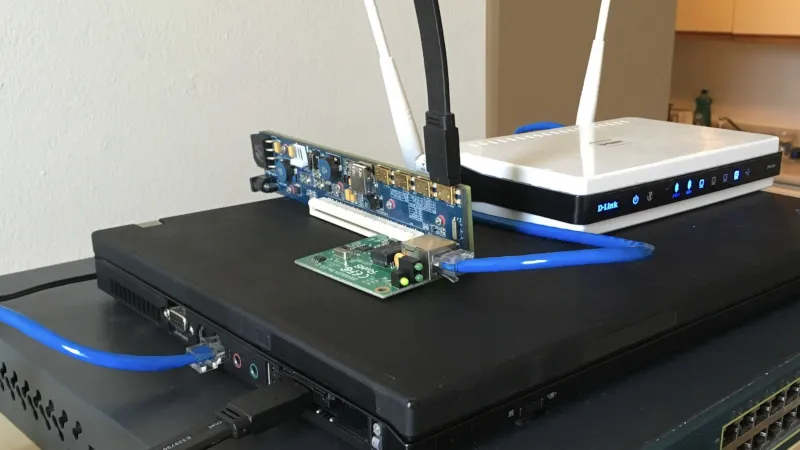
The piece is really a guide to setting up a Linux router, which he does on a small form factor PC and a hacked-together assembly of old laptop, PCI-express extender, and scrap network kit. In its most basic form a router doesn’t need the latest and greatest hardware, so there exists we’re guessing almost two decades of old PCs just waiting to be pressed into service. Perhaps it won’t help the non-technical Man In The Street much, but maybe it’ll inspire a few people to save themselves a hefty bill when they need to connect.
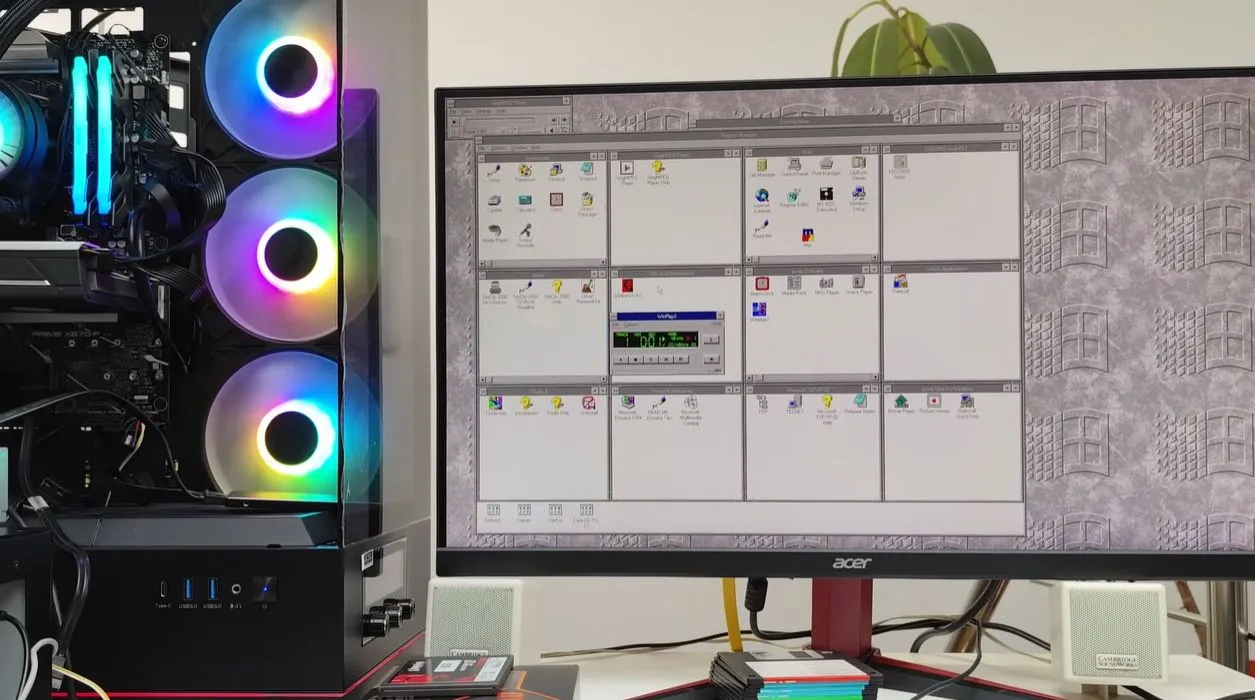
Although Windows 95 stole the show, Windows 3.0 was arguably the first version of Windows that more or less nailed the basic Windows UI concept, with the major 3.1 update being quite recognizable to a modern-day audience. Even better is that you can still install Win3.1 on a modern x86-compatible PC and get some massive improvements along the way, as [Omores] demonstrates in a recent video.
The only real gotcha here is that the AMD AM5 system with Asus Prime X670-P mainboard is one of those boards whose UEFI BIOS still has the ‘classic BIOS’ Compatibility Support Module (CSM) option. With that enabled, Win 3.1 installs without further fuss via a USB floppy drive from a stack of ‘backup’ floppies that someone made in the early 90s. [Omores] also tried it with CSMWrap, but with this USB to PS/2 emulation didn’t work.
Windows 3.1 supports ‘enhanced mode’ by default, which adds virtual memory and multi-tasking if you have an 80386 CPU or better. To fix crashing on boot and having to use ‘standard mode’ instead, the ahcifix.386 fix for the responsible SATA issue by [PluMGMK] should help, or a separate SATA expansion card.
Advertisement
For the video driver the vbesvga.drv by [PluMGMK] was used, to support all VESA BIOS Extensions modes. This driver has improved massively since we last covered it and works great with an RTX 5060 Ti GPU. There’s now even DCI support to enable direct GPU VRAM access for e.g. video playback, with audio also working great with only a few driver-related gotchas.
Back in October, Meta announced that its new Instagram Teen Accounts would feature content moderation “guided by the PG-13 rating.” On its face, this made a certain kind of sense as a communication strategy: parents know what PG-13 means (or at least think they do), and Meta was clearly trying to borrow that cultural familiarity to signal that it was taking teen safety seriously.
The Motion Picture Association, however, was not amused. Within hours of the announcement, MPA Chairman Charles Rivkin fired off a statement. Then came a cease-and-desist letter. Then a Washington Post op-ed whining about the threat to its precious brand. The MPA was very protective of its trademark, and very unhappy that Meta was freeloading off the supposed credibility of its widely mocked rating system.
And now, this week, the two sides have announced a formal resolution in which Meta has agreed to “substantially reduce” its references to PG-13 and include a rather remarkable disclaimer:
“There are lots of differences between social media and movies. We didn’t work with the MPA when updating our content settings, and they’re not rating any content on Instagram, and they’re not endorsing or approving our content settings in any way. Rather, we drew inspiration from the MPA’s public guidelines, which are already familiar to parents. Our content moderation systems are not the same as a movie ratings board, so the experience may not be exactly the same.”
In Meta’s official response, you can practically hear the PR team gritting their teeth:
Advertisement
“We’re pleased to have reached an agreement with the MPA. By taking inspiration from a framework families know, our goal was to help parents better understand our teen content policies. We rigorously reviewed those policies against 13+ movie ratings criteria and parent feedback, updated them, and applied them to Teen Accounts by default. While that’s not changing, we’ve taken the MPA’s feedback on how we talk about that work. We’ll keep working to support parents and provide age-appropriate experiences for teens,” said a Meta spokesperson.
Translation: we’re still doing the same thing, we’re just no longer allowed to call it what we were calling it.
There are several layers of nonsense worth unpacking here. First, there’s the MPA getting all high and mighty about its rating system. Let’s remember how the MPA’s film rating system came into existence in the first place: it was a voluntary self-regulation scheme created in the late 1960s specifically to head off government regulation after the government started making noises about the harm Hollywood was doing to children with the content it platformed. Sound familiar? The studios decided that if they rated their own content, maybe Congress would leave them alone. As the MPA explains in their own boilerplate:
For nearly 60 years, the MPA’s Classification and Rating Administration’s (CARA) voluntary film rating system has helped American parents make informed decisions about what movies their children can watch… CARA does not rate user-generated content. CARA-rated films are professionally produced and reviewed under a human-centered system, while user-generated posts on platforms like Instagram are not subject to the same rating process.
Sure, there’s a trademark issue here, but let’s be real: no one thought Instagram was letting a panel of Hollywood parents rate the latest influencer videos.
Next, the PG-13 analogy never actually made much sense for social media. As we discussed on Ctrl-Alt-Speech back when this whole thing started, the context and scale are just completely different. At the time, I pointed out that a system designed to rate a 90-minute professionally produced film — reviewed in its entirety by a panel of parents — is a wholly different beast than moderating hundreds of millions of short-form posts generated by individuals (and AI) every single day.
Advertisement
So, yes, calling the system “PG-13” was a marketing gimmick, meant to trade on a familiar brand while obscuring how differently social media actually works — but the idea that this somehow dilutes the MPA’s marks is still pretty silly.
Then there’s the rating system’s well-documented arbitrariness. The MPA’s ratings have been criticized for decades for their seemingly incoherent standards. On that same podcast, I noted that the rating system is famous for its selective prudishness — nudity gets you an R rating, but two hours of violence can skate by with a PG-13.
There was a whole documentary about this — This Film Is Not Yet Rated — that exposed just how subjective and inconsistent the whole process was. Meta was effectively borrowing credibility from a system that was itself created as a regulatory dodge, is famously inconsistent, and was designed for an entirely different medium. And the MPA’s response was essentially: “Hey, that’s our famously inconsistent regulatory dodge, and you can’t have it.”
The whole thing was silly. And now it’s been formally resolved with Meta agreeing to stop doing the thing it had already mostly stopped doing back in December. So even the resolution is anticlimactic.
Advertisement
But there’s a more substantive point buried under all this trademark squabbling: the whole approach reflects a flawed assumption that one company can set a universal standard for every teen on the planet.
As I argued on the podcast, the deeper issue is that the whole framework is wrong for the medium. The MPA’s rating system was built to evaluate a single 90-minute film, reviewed in its entirety by a panel of parents. Applying that logic to hundreds of millions of short-form posts generated by people across wildly different cultural contexts — a kid in rural Kansas, a teenager in Berlin, a twelve-year-old in Lagos — was never going to produce anything coherent. Different kids, different families, different communities have different standards, and no single company should be setting a universal threshold for all of them. The smarter approach is giving parents and users real controls with customizable defaults, rather than having Zuckerberg (or a Hollywood trade association) decide what counts as age-appropriate for every teenager on the planet.
This whole dispute was silly from start to finish.
The Drift Protocol lost at least $280 million after a threat actor took control of its Security Council administrative powers in a planned, sophisticated operation.
The attacker leveraged durable nonce accounts and pre-signed transactions to delay execution and strike with accuracy at a chosen time, the platform explained.
Drift underlines that the hacker did not exploit any flaws in its programs or smart contracts, and no seed phrases have been compromised.
Drift Protocol is a DeFi trading platform built on the Solana blockchain that serves as a non-custodial exchange, giving users full control of their funds as they interact with on-chain markets.
Advertisement
As of late 2024, the platform claimed to have 200,000 traders, supporting total trading volumes of more than $55 billion and a daily peak of $13 million.
According to Drift’s report, the heist was prepared between March 23 and 30, with the attacker setting up durable nonce accounts and obtaining 2/5 multisig approvals from Security Council members to meet the required threshold.
This enabled them to pre-sign malicious transactions that weren’t executed immediately.
On April 1st, the attacker performed a legitimate transaction and immediately executed the pre-signed malicious transactions, transferring admin control to themselves within minutes.
Advertisement
Having gained admin control, they introduced a malicious asset, removed withdrawal limits, and eventually drained funds.
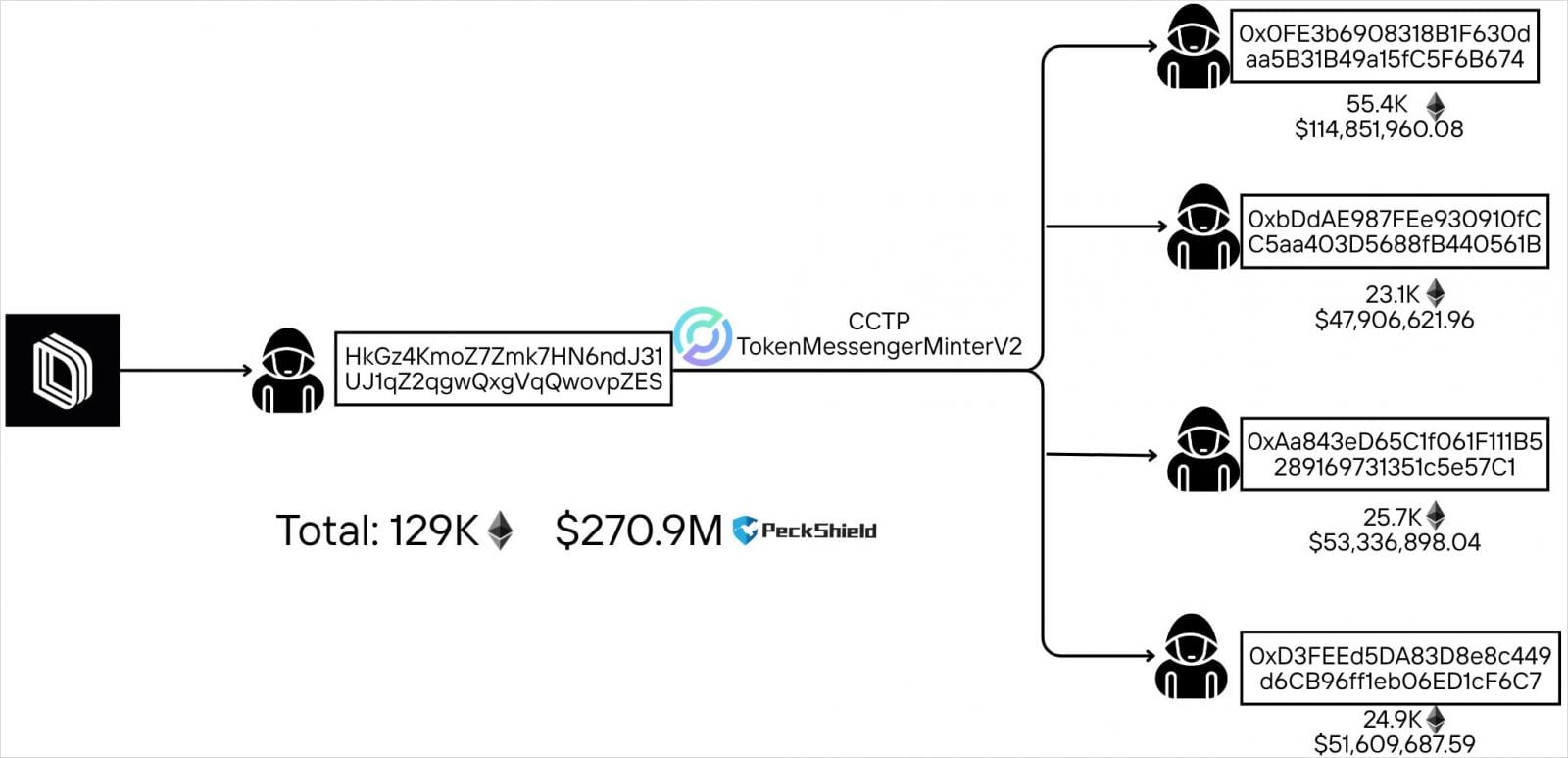
Source: PeckShield
Drift Protocol estimates the losses at about $280 million, while blockchain tracking account PeckShieldAlert has calculated them at $285 million.
When unusual activity on the protocol was detected, Drift issued a public warning to users, stating that started an investigation and urging them not to deposit any funds until further notice.
As a result of the attack, borrow/lend deposits, vault deposits, and trading funds have been affected, and all protocol functions are now essentially frozen. Drift said DSOL is unaffected, and insurance fund assets are secured.
The platform is now working with security firms, cryptocurrency exchanges, and law enforcement authorities to trace and freeze the stolen funds.
Advertisement
Drift promised to publish a detailed post-mortem report in the coming days.
Automated pentesting proves the path exists. BAS proves whether your controls stop it. Most teams run one without the other.
This whitepaper maps six validation surfaces, shows where coverage ends, and provides practitioners with three diagnostic questions for any tool evaluation.
Fortis Solutions, an enterprise technology partner with decades of experience across infrastructure, cybersecurity, and data systems, approaches artificial intelligence as a force that is redefining how work is performed while preserving the importance of human contribution. Its perspective reflects a future where human judgment and machine precision operate in tandem, introducing new ways to elevate performance, strengthen decision-making, and expand what teams can accomplish together.
This perspective emerges within a rapidly evolving landscape where AI continues to influence how organizations operate, decide, and govern. Leadership conversations have shifted from verifying processes to explaining how AI-driven decisions occur, how fairness is maintained, and how control is exercised. This signals a broader transition from traditional compliance models toward governance frameworks that prioritize accountability, transparency, and oversight.
Within this environment, Fortis Solutions emphasizes a foundational principle: AI benefits from human governance. Myron Duckens, President and CEO, says, “Technology becomes meaningful when it reflects human intention. Governance is where intention is translated into action, ensuring that innovation continues with clarity and purpose.” He adds that systems often require clearly defined rules, structured frameworks, and ethical guardrails established by people who understand both operational realities and broader societal expectations.
Fortis Solutions acknowledges that even with strong governance, human limitations remain part of the equation. Fatigue, cognitive overload, and the complexity of modern infrastructure introduce variables that may influence outcomes in subtle ways. In high-stakes environments such as healthcare systems or large-scale venues, even minor inconsistencies can carry significant implications. CTO Jeremy Roach says, “This reality has shaped how we approach the integration of AI. We view it as a complementary force that enhances human capability while maintaining oversight at every critical juncture.”
Advertisement
Credit: CTO, Jeremy Roach
At the same time, the current AI landscape presents challenges that require careful consideration. Generative AI systems can produce outputs that appear credible yet lack factual grounding, often referred to as hallucinations. These outcomes frequently stem from gaps in data quality, incomplete context, or overly generalized training models. Tony Gonzalez, CIO, offers a practical perspective on this dynamic. He says, “Data determines direction. When inputs are precise and validated, outcomes become more dependable. That relationship sits at the center of every AI system.”
Credit: CIO Tony Gonzalez
Concerns around data integrity extend further when considering the widespread use of open and crowdsourced AI models. Industry insights highlight how data provenance, security, and governance remain central concerns for organizations scaling AI initiatives, with a significant percentage of leaders prioritizing risk management and cybersecurity investments. These concerns reflect a broader awareness that while AI introduces new capabilities, it also introduces new considerations around accountability and control.
Another dimension of the current landscape is the pace at which AI innovation is advancing. Roach notes that technological capabilities continue to expand quickly, while governance frameworks, regulatory structures, and organizational policies evolve more gradually. “This creates a gap where systems may operate faster than the mechanisms designed to oversee them,” he explains. The result can include exposure to misinformation, vulnerabilities within infrastructure, and unintended data movement across systems.
Advertisement
Fortis Solutions aims to address this gap through a focus on controlled AI environments. Its approach centers on privatized large language models designed to operate within defined boundaries, using verified internal data rather than external, unfiltered sources. Roach states, “Control creates clarity. When systems learn within a defined environment, they become more aligned with the objectives they are designed to support.” This controlled model is designed to support consistency, help reduce the likelihood of unpredictable outputs, and reinforce confidence in the system’s performance.
Integral to this approach are platforms such as Source of Truth and NetRaven, which function together as interconnected layers within the infrastructure. Source of Truth operates as a centralized decision layer, maintaining a dynamic, real-time understanding of infrastructure components and their relationships. NetRaven complements this by translating system activity into accessible insights through continuous monitoring and visualization.
Together, they form what the team describes as a SMART operational foundation, an acronym which stands for Seeing everything across the infrastructure, Monitoring activity continuously, Assessing what is happening as conditions evolve, Remediating issues automatically to optimize and troubleshoot, and Translating vendor‑agnostic CLI data into a unified operational language. The goal is to create an environment where accuracy and responsiveness are closely aligned.
According to Roach, this alignment becomes particularly meaningful when considering the role of human error in complex systems. Extended work hours, high-pressure scenarios, and large-scale operations may introduce challenges that affect even the most experienced professionals.
Advertisement
“AI systems can help reduce operational inconsistencies, enhance monitoring capabilities, and provide additional layers of validation,” he says. “In healthcare environments, this may support more consistent system performance, while in business contexts, it may contribute to more reliable operational continuity.”
Despite these advancements, perceptions around AI continue to evolve. Fortis Solutions points to concerns related to job displacement and data security that often accompany discussions about adoption. The company notes that these sentiments mirror earlier reactions to cloud computing, where initial hesitation transitioned into widespread acceptance as trust and familiarity developed. “Every transformative technology begins with questions. Over time, understanding replaces uncertainty, and organizations begin to see how these tools can extend their capabilities,” Roach remarks.
A key theme within Fortis Solutions’ approach is the importance of collaboration. AI systems can benefit from diverse perspectives, continuous feedback, and the ability to adapt as organizational needs and societal expectations evolve. Input from both technical and non-technical stakeholders contributes to more well-rounded systems, helping ensure that technology reflects a broader range of insights and experiences.
Advertisement
This collaborative dynamic reinforces the idea that AI functions most effectively as a partner. Humans establish the direction, define the parameters, and interpret outcomes, while AI contributes speed, scalability, and analytical depth. Together, they create a model that aims to enhance efficiency while supporting thoughtful decision-making.
As technology and societal expectations continue to evolve, adaptability remains essential. Fortis Solutions argues that systems built with flexibility, strong governance, and secure infrastructure are best positioned to grow with these shifts, ensuring long-term relevance. In this view, AI becomes a broader opportunity to strengthen organizational decision-making and operational resilience. By emphasizing human oversight and collaborative design, Fortis Solutions frames AI as a means to enhance reliability, maintain continuity, and elevate the overall quality of outcomes.
An anonymous reader quotes a report from Ars Technica: Google’s Gemini AI models have improved by leaps and bounds over the past year, but you can only use Gemini on Google’s terms. The company’s Gemma open-weight models have provided more freedom, but Gemma 3, which launched over a year ago, is getting a bit long in the tooth. Starting today, developers can start working with Gemma 4, which comes in four sizes optimized for local usage. Google has also acknowledged developer frustrations with AI licensing, so it’s dumping the custom Gemma license.
Like past versions of its open-weight models, Google has designed Gemma 4 to be usable on local machines. That can mean plenty of things, of course. The two large Gemma variants, 26B Mixture of Experts and 31B Dense, are designed to run unquantized in bfloat16 format on a single 80GB Nvidia H100 GPU. Granted, that’s a $20,000 AI accelerator, but it’s still local hardware. If quantized to run at lower precision, these big models will fit on consumer GPUs. Google also claims it has focused on reducing latency to really take advantage of Gemma’s local processing. The 26B Mixture of Experts model activates only 3.8 billion of its 26 billion parameters in inference mode, giving it much higher tokens-per-second than similarly sized models. Meanwhile, 31B Dense is more about quality than speed, but Google expects developers to fine-tune it for specific uses.
The other two Gemma 4 models, Effective 2B (E2B) and Effective 4B (E4B), are aimed at mobile devices. These options were designed to maintain low memory usage during inference, running at an effective 2 billion or 4 billion parameters. Google says the Pixel team worked closely with Qualcomm and MediaTek to optimize these models for devices like smartphones, Raspberry Pi, and Jetson Nano. Not only do they use less memory and battery than Gemma 3, but Google also touts “near-zero latency” this time around.
The Apache 2.0 license is much more flexible with its terms of use for commercial restrictions, “granting you complete control over your data, infrastructure, and models,” says Google.
Clement Delangue, co-founder and CEO of Hugging Face, called it “a huge milestone” that will help developers use Gemma for more projects and expand what Google calls the “Gemmaverse.”
These days, it’s easy to digitally sign important documents from your computer or phone. But sometimes you’re handed physical versions on paper that you need to sign, scan and send over email. When you just have to put your signature on a real-life document but don’t have a standalone scanner handy, the easiest way is right in your pocket.
Yes, your iPhone doubles as a document scanner. It may not produce images as sharp as a dedicated scanner would, but it does a respectable job, even when the phone is positioned at odd angles, trying to capture text. iPhones have had this hidden feature since iOS 11 launched in 2017, but as the cameras built into Apple phones have improved, so has their ability to take decent scans of documents and turn them into PDFs you can email.
Advertisement
You won’t need to download additional software or pay for a third-party app — Apple’s Notes app, which comes preinstalled on iPhones, does the trick. The good news is that it’s quick and easy to scan a document, save it, and send it wherever it needs to go. If you’ve kept your phone up to date with iOS 26, it’s easy to use this feature. Keep in mind that the process will be different if you haven’t upgraded past iOS 17, but we’ll walk you through it.
Here’s how to scan a document with your iPhone.
James Martin/CNET
Scan a document with your iPhone or iPad
To scan a document with your iPhone or iPad, first place the document on a flat surface in a well-lit area.
Open up the Notes app and either open an existing note or start a new one by tapping the New Note button in the bottom right corner (pencil-in-square icon). On iOS 17 and earlier, tap the Camera button at the bottom of the screen (or, if you’re editing a note, the same Camera icon above the keyboard), then tap Scan Documents. If you’re on iOS 26, instead of a Camera icon, tap the Attachments button (the paperclip icon), then tap Scan Documents.
Advertisement
This will open a version of the Camera app that just looks for documents. Once you position your iPhone over the document you want to scan and place it in view of the camera, a yellow rectangular layer will automatically appear over the document, showing approximately what will be captured. Hover over the document for a few seconds, and the iPhone should automatically capture and scan the document, but you can also tap the Shutter button in the bottom center. You can scan multiple documents at once if you’d like. When you’re done, tap the yellow checkmark in the top-right corner.
James Martin/CNET
Sign, share or save your scanned document
Once you’ve captured a document, you can tap it and any others you’ve captured in the same session to edit them before saving. You can also tap Retake in the top right corner to start again.
When you edit the document, you can recrop it from the original photo (if you need to tweak its edges) and switch between color filters (color, black and white, grayscale or the unedited original photo). Then you can save the scanned document.
Once it’s saved as a note, you can tap the Markup button (circled pen icon) at the bottom to sketch or scribble with different colors. If you tap the Add button at the bottom right (the plus sign icon), you can add text, your signature, shapes or even stickers. Once you’ve added a signature, you can tap it to bring up a menu, then tap the diagonal line to edit its thickness and color. You can tap and hold the signature to move it around.
Advertisement
There are also AI tools for adding and rewriting text, though they aren’t helpful for signing documents. To use them, tap the center button that looks like a diagonal pencil stylus surrounded by a circle of loops.
To send or save the document locally, tap the Share button at the top (the square-and-arrow icon) to send it via Messages or other apps, copy it, save it locally in the Files app, or print it via a linked printer or other options.
Watch this: ProRaw vs. JPEG: The Hidden Setting Every iPhone Photographer Needs
How to export your scanned document as a PDF
Understandably, you may want to send your scanned document as a PDF. Tap the Share button at the top (the square-and-arrow icon) and scroll down below the contact and app roulettes to the additional list of options.
Advertisement
The easiest way to send your scanned document as a PDF is a bit convoluted: among the aforementioned list, tap Print, then tap the Share button at the top (square-and-arrow icon) again — this will share your PDF-converted document. Then pick your share method of choice, most easily via email, though you can also upload it to cloud storage or send it via text message if you want.
You can also use a third-party app to convert your document to PDF if you so choose. Scroll down past the Print button to find your app of choice. For instance, if you have the Adobe Acrobat app downloaded to your device, you can select Convert to PDF in Acrobat to do so — though you’ll need to wade past several screens attempting to upsell you on Adobe subscriptions first.
Why can’t I find the camera button to scan documents?
If you’re running iOS 26, the Camera button has been replaced by an Attachments button (a paperclip symbol). It should function just the same: Tap it and choose Scan Documents from the dropdown menu
If you can’t see the Camera or the Attachments button, check to see if you’ve opened the note in either the iCloud section or the On My iPhone section — you’ll only be able to scan documents and save them in either of these places. If you can’t tell, tap Folders in the top-left corner of the Notes screen, then select either iCloud or On My iPhone.
Advertisement
The document scanner is just one of many unnoticed iPhone features that come prepackaged in Apple’s handsets, often nested in the apps that come with your phone. Some hidden iOS 26 features add even more surprising capabilities already on your iPhone. But you can also find ways to do other tasks, like making a GIF on your iPhone, using third-party apps, or doing it in your browser.
Google has launched Gmail’s AI Inbox in beta for Google AI Ultra subscribers in the United States, replacing the traditional unread message count with an AI-driven system.
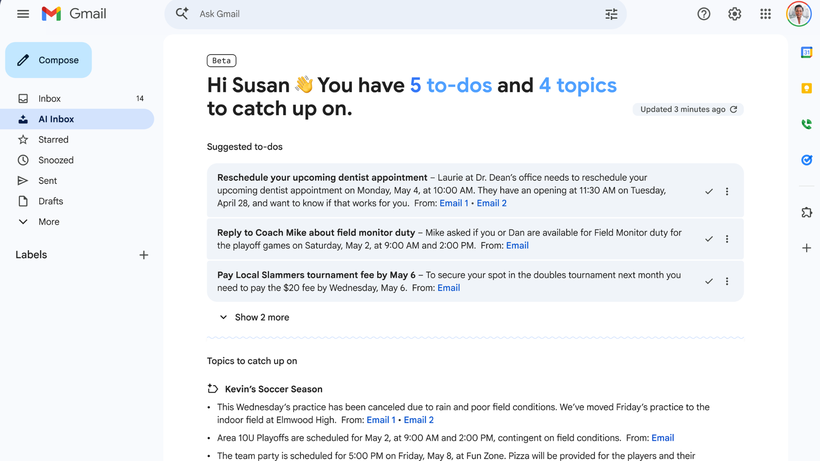
The feature sits as a separate label in Gmail’s sidebar and divides unread emails into two sections, To-dos and Topics, with To-dos surfacing time-sensitive items, including messages from designated VIPs, upcoming bills, appointments, and reminders for emails that have gone unanswered.
Topics groups related email threads together under a single heading, allowing users to scan conversations by subject area rather than sender, reducing the back-and-forth of hunting through an inbox for connected messages spread across different dates.
AI Inbox also tracks whether a user has already engaged with a suggested task through signals like reading, archiving, or deleting the relevant email, with Google planning to add a dedicated Mark as Done option to the feature in the near future.
Advertisement
Advertisement
All processing takes place within Gmail’s own infrastructure, with Google confirming that the AI Inbox handles email content securely without routing data outside the platform, a reassurance aimed at users cautious about AI tools accessing sensitive correspondence.
It’s only available as part of the top-end AI plan
Access is currently limited to Google AI Ultra subscribers, a plan priced at $250 per month that also includes the highest usage limits across Gemini, 30TB of Google Cloud storage, a Google Home Premium Advanced plan, YouTube Premium, and access to Google’s broader suite of AI tools.
AI Inbox was previously available only to a small group of testers, with Google having promised broader availability later in the year, though the expansion to Ultra subscribers stops well short of a general rollout given the plan’s steep monthly cost.
For existing Ultra subscribers, the addition represents meaningful value without any extra charge, while users on lower-tier Google plans will need to wait for confirmation of whether AI Inbox will eventually reach more affordable subscription options.
It’s easy to think of online console gaming as an invention of the 2000s. Microsoft made waves when Xbox Live dropped in 2002, with Nintendo and Sony scrambling to catch up with their own offerings that were neither as sleek or well-integrated.
However, if you were around a decade earlier, you might have experienced online console gaming much closer to the dawn of the Internet era. As far back as 1990, you could jump online with your Sega Mega Drive. But what did an online console feel like in the dial-up era?
Mega
The Sega Mega Drive was launched in Japan in October 1988. The company was in a tough battle with Nintendo for gaming dominance, and the new 16-bit console was intended to best its rival’s offerings across the board. With a forward-looking attitude, Sega quickly developed an online offering for the console, which went under a few different names. It was known as Mega Net, or alternatively, the Sega Net Work System.
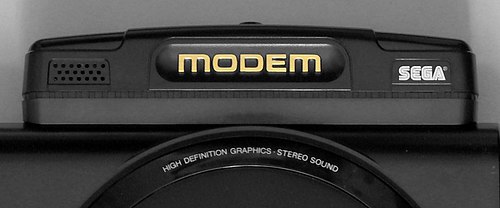
The Mega Modem plugged into the back of the Model 1 Mega Drive. With data rates maxing out at 1,200 bps, it was somewhat limited in what it could offer. Credit: boffy_b, CC BY-SA 3.0
The system hit the market on November 3 1990, exclusively for the Japanese market, with Sega talking up a future launch in the US under the “Tele-Genesis” name. The initial Mega Net kit cost ¥12,800, which included the Mega Modem accessory—a simple 1,200 bps dial-up modem which plugged into the “EXT” DE-9 port on the back of the Model 1 Mega Drive. Access to Mega Net service came at a cost of ¥800 a month. Users got a copy of Nikkan Sports Pro Baseball VAN, which provided live updates and statistics on baseball matches when connected to the service.
The Mega Net pack also included the “Game Library” cartridge. This allowed users to dial up to Mega Net and play a variety of downloadable games. These titles had to be incredibly compact, usually under 128 KB. This was both because of the glacially slow 1,200 bps modem, and because the Mega Drive had no real storage capability to speak of. 42 games were released on the system, and titles would take about 5 to 8 minutes to download. The vast majority were single player experiences. However, two games – Tel-Tel Stadium and Tel-Tel Mahjong – featured online play via Mega Net. Perhaps unsurprisingly, both games were turn-based—a practical necessity given the limited speeds and latency achievable with the slow Mega Modem. A handful of games from Mega Net would later see cartridge releases of their own.
Advertisement
Users could also engage in multiplayer gaming with certain cartridge-based titles. However, this was not using a server-based online system. Instead, this merely consisted of point-to-point dial-up play between two consoles equipped with the Mega Modem.
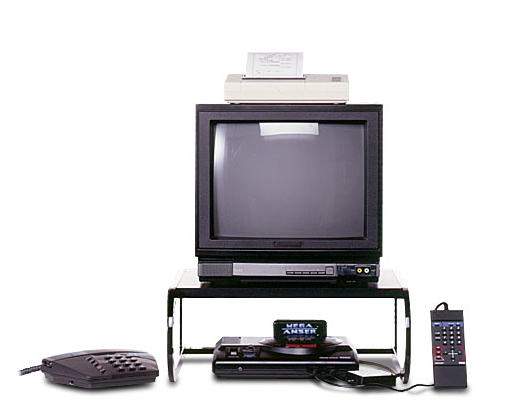
The Mega Anser kit allowed you to manage your banking or life insurance from the comfort of your living room. The optional thermal printer could be used to print statements or receipts. Credit: Sega
Mega Net wasn’t just limited to gaming, however. Sega explored more utilitarian uses for the Mega Drive with the release of Mega Anser. This came as a package that included the Mega Modem, the Mega Anser software, and a numeric keypad controller called the Ten Key Pad. There was also an optional printer that plugged into one of the controller ports. The most notable use of the Mega Anser was for online banking. Depending on your bank, you could manage your funds with the Naisu-kun Mini,Osaka Ginkou no Home Banking Service My Line, or Sumisei Home Tanmatsu.
Unfortunately, the technology wasn’t quite there in 1990 to support a fully-vibrant online gaming service. By 1992, Sega realised there wasn’t a large market for Mega Net and Mega Anser services, and the hardware started turning up in bargain bins for drastically reduced prices. By 1993, Sega had released a remodelled Mega Drive which eliminated the EXT port required for the Mega Modem, making it clear that there was no interest in taking the service any further.
You could use the Mega Net system to access live baseball scores and statistics, though one wonders if it might not have been easier to just watch a televised match instead. Credit: Sega
The end of Mega Net in Japan was swift, but the name would live once more. That time came in 1995, when a similar service saw a last gasp release in Brazil, of all places. Supported by local distributor Tectoy, it ran using a unique modem accessory that plugged into the cartridge slot. The range of services on offer was quite different—users could access emails, fax messages, and read an electronic magazine called Revista Eletrônica. The system was designed to be used with the Sega Mouse for a more computer-like interface experience, and prices started at R$5 a month for access to the service. The service was, in many ways, completely unrelated to the original Sega effort, but was inspired by it and wore similar branding.
Brazil’s Mega Net was more modern and had additional ways for users to interact with each other.
Advertisement
Sega’s early experiment with online console gaming was not a grand success. It failed to attract a huge user base or offer any ground-breaking features. However, it did give the company a base to work from when it came to getting later consoles online, like the Saturn and Dreamcast that arrived years later. Ultimately, Sega would largely be out of the console market by the time online gaming really took off in that world, but you can’t fault the former Japanese titan for trying to get in early.
Dell Pro Premium prioritizes mobility while supporting serious business workloads
Magnesium alloy chassis reduces weight without sacrificing durability or structural integrity
Modular motherboard design improves cooling and maintains CPU performance under load
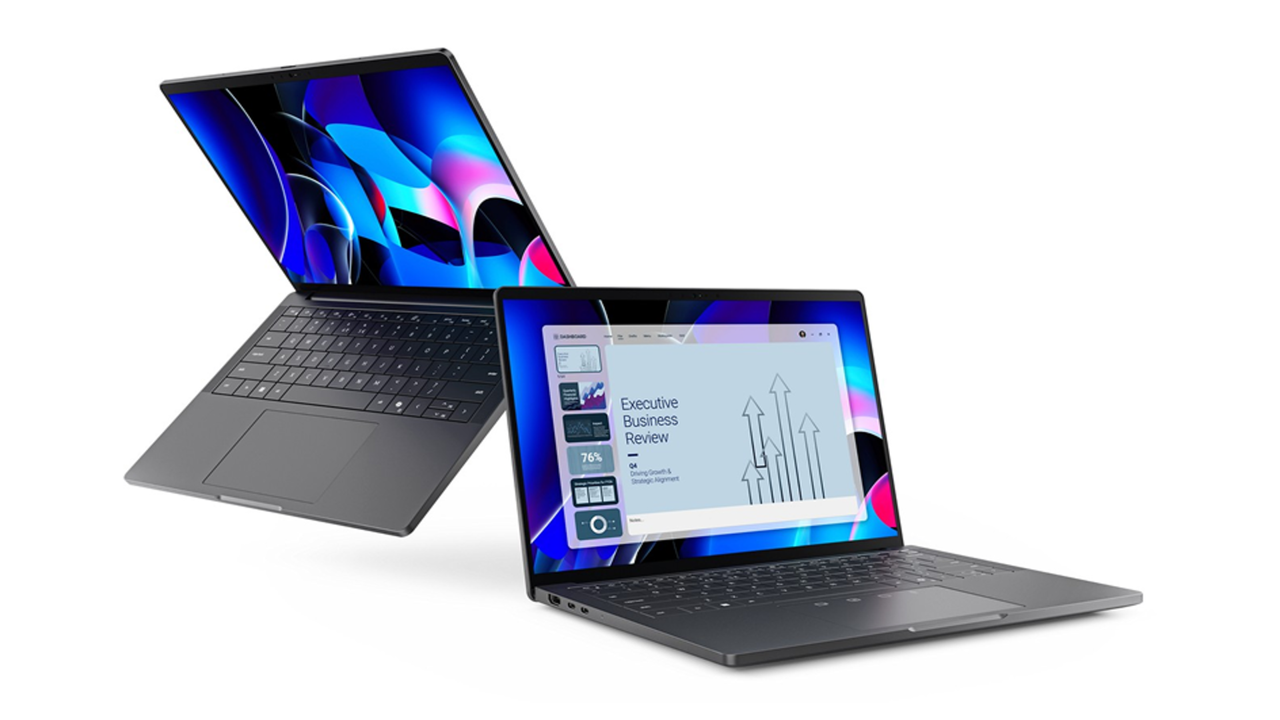
Dell is pushing its executive-oriented notebook business laptop line toward a genuinely workstation-grade experience without adding bulk or weight.
The new 14-inch Dell Pro Premium sits at the top of the refreshed Dell Pro lineup, built for senior executives and customer-facing managers who move between offices, airports, and conference rooms throughout the day.
Dell says it is the lightest notebook in the Dell Pro family, and calculations suggest its chassis could shrink to roughly 15mm — 7% thinner than its predecessor — while still housing a full-sized 14-inch display.
Article continues below
Advertisement
Dell Pro Premium
The chassis relies on a magnesium alloy body finished in magnetite, which keeps mass down while giving the device a more solid, premium feel than a typical all-plastic business offering.
That lighter frame makes it easier to carry alongside a power brick and briefcase over long periods.
Advertisement
Inside, Dell’s modular motherboard layout frees up space for larger cooling fans and more efficient thermal management, helping keep CPU and graphics performance stable during extended meetings or AI-assisted workloads rather than throttling under heat.
The performance of this device focuses on modern business workflows, handling multiple apps, video calls, whiteboards, and large datasets rather than gaming or heavy rendering.
Sign up to the TechRadar Pro newsletter to get all the top news, opinion, features and guidance your business needs to succeed!
Users can choose between Intel Core Ultra Series 3 and AMD Ryzen AI 400 processor options, both of which integrate on-device AI and support Copilot+ PC experiences.
Advertisement
The 14-inch screen offers a Tandem OLED panel with richer contrast and deeper blacks, although higher power use may limit all-day battery life.
An 8MP HDR camera provides high-resolution video calls, supporting executives who rely on a polished virtual presence.
However, for those who need a true workstation, Dell’s Pro Precision 5S and 9 Series hardware complement the Pro Premium by offering much heavier compute and graphics muscle.
Advertisement
The Precision 5S marks the thinnest and lightest mobile workstation Dell has ever shipped – and relies on integrated Intel Arc Pro or AMD Radeon Pro graphics instead of a discrete GPU to keep weight and thickness in check.
At the other end of the spectrum, the Dell Pro Precision 9 T2 / T4 / T6 desktops are built for extreme workloads.
They feature up to 15 PCIe slots and add support for five 300W Nvidia RTX PRO Blackwell-generation GPUs.
“IT leaders can deploy sleek and modern devices users are excited to use at every level of the organization, along with improved performance, without sacrificing the manageability, security, or value they demand,” said Rob Bruckner, president, CSG Commercial, Dell Technologies.







.png)














































You must be logged in to post a comment Login