Connect with us
DAPA Banner
DAPA Coin
DAPA
COIN PAYMENT ASSET
PRIVACY · BLOCKDAG · HOMOMORPHIC ENCRYPTION · RUST
ElGamal Encrypted MINE DAPA
🚫 GENESIS SOLD OUT
DAPAPAY COMING

Tech

Ultimate Edition is out for the iPhone and iPad

Published

on

Control is one of my favorite adventure games of the last decade or so, a mind-bending trip through an ever-changing building where you get to use telekinesis to battle some pretty freaky enemies. It was a graphically-demanding game when it was released in 2019, but a lot can change in less than six years: Control: Ultimate Edition is now available on the iPhone and iPad for a mere $5, following its announcement last October. It’s a universal purchase, which means if you buy it it’ll work on the iPad, iPhone and Mac as well.

Developer Remedy promises that it’s the full Control experience, with the DLC episodes included. Remedy rebuilt the UI and controls to make it work on touchscreen devices; the company says that it has tweaked aiming and the various puzzles to make them work better for the iPad and iPhone. But naturally, the game also works with controllers. If you’re serious about having the best experience with the game, finding a way to play with physical controls is probably a good idea.

The game will run on iPhones with at least an A17 Pro chip. That includes the iPhone 15 Pro and Pro Max, as well all of the iPhone 16 and iPhone 17 series. Plenty of iPad models can run the game, as well — any iPad with an M-series chip or the A17 Pro will work. That means the current basic iPad, with its A16 processor, is left out of the fun. But any iPad Air or Pro from the last four years or so should be good to go.

I tried a test version of Control when I reviewed the new iPad Air recently and, unsurprisingly, the tablet’s M4 chip was more than powerful enough to make for a smooth experience. My main gripe is that when sprinting, you have to hold down the L3 button the entire time you’re running rather than just click it once, which is how it works on other platforms. Otherwise it looks and plays smoothly, though I can’t vouch for how it’ll perform on hardware older than the M4 from 2024.

Advertisement

Control marks the latest “AAA” title to hit the iPad and iPhone. Apple has aggressively courted developers for its platforms in recent years, and while most games don’t hit the Mac or iOS when they launch, more and more are showing up eventually. There are multiple recent Resident Evil titles for the iPad, and other games like Death Stranding and Assassin’s Creed Mirage have been ported recently as well. There are others on the Mac as well, including demanding titles like Cyberpunk 2077 and Lies of P. Apple’s platforms aren’t going to be an avid gamer’s first stop still, but having high-profile games to supplement the many indie titles available helps round out the options for Apple users.

Source link

Continue Reading
Click to comment

You must be logged in to post a comment Login

Leave a Reply

Tech

Xbox Project Helix console could ditch the disc drive and go fully digital

Published

on

Xbox’s next-gen console might be going fully digital. And if the latest leaks are accurate, Microsoft could finally be preparing the move it almost made more than a decade ago… before the internet collectively lost its mind.

Could Xbox Project Helix completely ditch physical discs?

According to a new report from Windows Central, Xbox is reportedly working on something called “Project Saluki,” which appears to be a new Game Pass initiative designed specifically for the Chinese market. While details remain limited, the report suggests it could involve multiple regional Game Pass tiers and reward systems tailored around China’s unique gaming regulations, spending habits, and player preferences. Considering how important cloud gaming and subscription-based access have become in China, this could be part of a much bigger push for Xbox in the region.

That said, the more interesting part of the report revolves around references discovered inside the Xbox PC app pointing toward a mysterious “Positron” initiative tied to a possible Disc-to-Digital system. Naturally, this has sparked speculation that Microsoft’s upcoming next-gen console, currently known as Project Helix, could launch without a built-in disc drive altogether.

The leaked references suggest Microsoft may be exploring a way for physical game discs to be converted into digital licenses tied to a user’s Xbox account. If true, the idea seems aimed at easing players into an all-digital future without completely abandoning existing physical libraries overnight. Interestingly, Microsoft explored similar concepts during the Xbox One era, but backlash around digital ownership and always-online systems forced the company to back away at the time. The difference now is that the market has changed dramatically, with digital purchases and subscription gaming becoming the norm for a huge portion of console players.

And honestly, Microsoft has been building toward this for years anyway. The Xbox Series S launched as a fully digital console back in 2020, followed by the all-digital white Xbox Series X refresh in 2024. At this point, a disc-less Project Helix would feel less like a surprise and more like the next logical step in Xbox’s long-term Game Pass-focused strategy.

Project Helix may finally push Xbox into its all-digital era

Reports around Project Helix already suggest Microsoft is positioning the next Xbox more like a hybrid gaming platform, blending console simplicity with PC-style flexibility through support for Xbox libraries, Windows features, Steam, and cloud gaming. In that kind of ecosystem, physical discs start feeling increasingly outdated. Even PlayStation reportedly now sees most game sales happening digitally, while Xbox has spent years pushing Game Pass, Cloud Gaming, and Play Anywhere.

Ironically, Microsoft almost tried this exact shift back during the Xbox One era, when digital licenses and always-online requirements triggered massive backlash. But the market has changed dramatically since then. Today, most players already buy their games digitally, which makes a disc-less future feel far more realistic. It would not be surprising if both Xbox and Sony eventually ship fully digital next-gen consoles, potentially with optional external disc drives similar to the PS5 setup. The difference is that Sony benefits from Blu-ray ownership, while Xbox would still have to deal with licensing costs.

Of course, players are not exactly going to celebrate the death of physical games overnight. Going digital is easy for Microsoft. Convincing gamers that they are not losing ownership, flexibility, or preservation in the process is the harder part, especially at a time when Xbox is already trying to rebuild momentum against Sony. That said, these leaks are still very early, and even the original report suggests details are still being pieced together, so for now, this entire situation should be taken with a healthy amount of caution.

Advertisement

Source link

Continue Reading

Tech

European Union moves to crack down on addictive social media designs targeting children

Published

on


Von der Leyen stated that the EC – one of the European Union’s highest governing bodies – is taking action against TikTok and Meta’s social media platforms, including Facebook and Instagram. The video-sharing platform and Meta’s services are said to rely on engagement-driven features such as endless scrolling, auto-play, and…
Read Entire Article
Source link

Continue Reading

Tech

John Roberts Is The Driver Who Wants Credit For All The People He Didn’t Run Over

Published

on

from the unkicked-puppies dept

John Roberts has a point: the Supreme Court—even this Supreme Court—sometimes gets things right. Maybe one could even fairly say it often gets things right. After all, just recently it produced good decisions in Case v. Montana, Cox v. Sony, and First Women’s Choice Centers v. Davenport, and arguably even Chiles v. Salazar, along with plenty more that have quietly taken their place in the annals of American jurisprudence with little fanfare but the staying power we look to the Court’s opinions for, to continue to speak well into the future about the contours of our law. These were decisions where there was significant accord among all the justices because the legal questions before them were just not that hard to resolve. Either statutory language, constitutional text, or previous precedent required certain results, and Roberts is correct: this Court is fully capable of producing them.

The issue, however, is that it doesn’t always. And when it doesn’t it is not because it’s getting tripped up by close calls where either the precedent or guiding text isn’t clear, or the facts are so unfortunate that they obscure what the law requires. The issue is that the law is as equally clear in cases where the Court produces deviant results as in the cases where the Court gets things right; it just doesn’t care to follow it consistently. If it wants a different result than what the law directs then that is the result it will find the votes for.

Roberts is of course also right that non-lawyers often can’t tell what the law indeed requires; the general public is much more likely to judge a decision based on how it affects the interests they favor. Which is why Roberts has a fair point to think the Court may be unfairly criticized in decisions like Chiles, First Women’s Choice Centers, or even 303 Creative, cases where interests many understand to be harmful to others nevertheless apparently prevailed. It is difficult, for instance, for non-lawyers to see how a win for those who discriminate is nevertheless a win for those who are discriminated against, because while a win for the former may seem like a loss for the latter in the short term, it’s the rationale being upheld by the decision that will ultimately amount to a more important gain for the vulnerable in the long term.

But one reason people are struggling to see these controversial but correct decisions as fortifications of their own future freedom is because they don’t believe that when their interests are at stake the Supreme Court will still apply the same principles this time in their favor. They fear that the Court will instead find a way to advance the interests it prefers, and it’s a fear that is eminently reasonable. The hypocrisy the justices regularly display in their jurisprudence when one of their favored interests is at stake forecloses any rational person having any faith in them as neutral jurists ably applying the law, even if it’s true that sometimes they are.

Advertisement

Roberts only has himself and his Court to blame for so many having that view. They have made it impossible for anyone to believe the Court will uphold principle and precedent because of how often it has not. It is happy to change the rules that we must all play by whenever it suits it, redrawing the rights we depend on as well as the ability to use the courts to shape them. And it’s not just laypeople who’ve noticed the problem but legal professionals. It’s lawyers, including members of the Supreme Court Bar who practice before them. It’s law professors, including those who have been teaching new generations of law students what were supposed to be timeless principles of American jurisprudence, which the Court so regularly and casually upends. It’s legal commentators, including those who specialize in watching this court. It is people who are experienced, if not expert—and if not at least as expert as anyone on the Court—in the American legal tradition who are calling foul. They are noticing how the Court keeps inventing arbitrary and imaginary rules, if not also facts, in order to arrive not where the law points but where the conservative justices steering the Court’s majority instead prefer to go.

It might be one thing if it were the rare case here and there in its busy docket where the Court has simply been sloppy in its jurisprudence. But the cases where the conservative majority has refused to produce jurisprudentially conservative results, instead elevating preferred outcomes over precedential reasoning, are hardly the exception; at this point it has become the apparently deliberate rule that when certain issues are on the table—partisan politics, reproductive freedom, LGBTQ+ rights, race relations, to name just a few areas where the conservative justices have particularly strong views—the Roberts Court will eagerly jump in to advance them, regardless of whether either substance or procedure—or consistency—even invites such an intervention, let alone their favored result. In fact it is fairly shocking to encounter the rare occasion where the Court has instead restrained itself—although it is certainly glad to when other interests the conservative majority is less dogmatically interested in advancing are instead on the table.

Furthermore, that its docket is so busy is entirely because the Court has abdicated any pretense of restraint, greedily helping itself to matters that historically would have been regarded as unripe for its consideration. In fact, it is a bit rich for Roberts to complain how the Supreme Court is being unfairly disrespected given the extent to which its new practice of aggressively insinuating itself in substantive adjudication of matters before there even is a lower court ruling or record ready for review has itself undercut the respect due the lower courts. What the Court has been doing, particularly with its Shadow Docket, goes far beyond the appellate review it is normally entitled to do. Not only does the Supreme Court’s incessant snatching of matters away from the lower courts prematurely arbitrarily diminish the lower courts’ power to render considered opinions on the questions before them, but it has also been having the practical effect of undermining their ability to speak with any authority on the law at all, let alone enforce it. Would only Roberts shed the same tears for the insult the lower courts have actually suffered as he does for himself as the cause of it.

Instead, and apparently without any capacity for introspection or self-reflection, he protests that the criticism increasingly directed at the Court is not also increasingly deserved. We should, he insists, be judging his Court based on what it gets right. But we do not celebrate a reckless driver for all the people he didn’t run over, or careless chef for all the diners he didn’t poison, or distracted doctor for all the patients he didn’t kill. In the American legal tradition we judge harshly those who cause injury to the public well-being, especially with behavior beyond the bounds of what law allows.

Advertisement

And with the Roberts Court there is so much to judge.

Filed Under: consistency, john roberts, partisanship, supreme court

Source link

Advertisement
Continue Reading

Tech

Apple TV exec leaving to start his own production company

Published

on

Morgan Wandell, who has been with Apple TV since before its launch, is now departing the streaming service in favor of launching his own production company.

In 2017, Apple poached Wandell from Amazon Studios to join its team at Apple Worldwide Video. When Apple TV launched in 2019, his title became Head of International Content Development.

While at Apple, Wandell developed and oversaw production of “Monarch: Legacy of Monsters,” “Tehran,” “Disclaimer,” “Masters of the Air,” and “The New Look.”

Now, it seems as though he’s got other plans. Wandell plans on leaving Apple TV to found his own production company, Kismet.

Advertisement

Kismet will develop and produce premium scripted series for the global marketplace. Its offerings will focus on high-end culturally rooted storytelling.

While he is technically leaving his executive role behind, it seems that he may not be leaving Apple TV entirely. He’s currently in talks with Apple to stay on as a producer on some of his existing projects.

“Helping to build Apple TV’s international slate has been the privilege of my career,” Wandell told Deadline.

“I’m deeply grateful to Jamie [Erlicht], Zack [Van Amburg], and all my colleagues at Apple, and to the extraordinary creators we’ve partnered with around the world. It was a hard personal decision to make this leap from a company as terrific as Apple, but I have always wanted to build a company of my own.”

Advertisement

Matt Cherniss, Apple TV’s Head of Programming and Domestic Development, will take over the Monarch franchise and other series that were under Wandell’s purview. Cherniss currently oversees other hit series, such as “Ted Lasso,” “Severance,” “The Studio,” and “Pluribus.”

Jay Hunt, Apple TV’s creative director, Europe, will see her role expand to oversee international and local-language originals. She is in charge of British staples “Slow Horses” and “Hijack”, among others.

Before his tenure at Apple, Wandell worked as Head of International Series and Head of Drama Series at Amazon Studios for four years. Before that, he acted as Senior Vice President of Drama at ABC studios, overseeing series including “Lost,” “Grey’s Anatomy,” “Brothers and Sisters,” “Ugly Betty,” and “Criminal Minds.”

Advertisement

Source link

Continue Reading

Tech

Microsoft reveals another way it’s making Windows 11 faster, with more performance boosts promised for the likes of File Explorer

Published

on


  • Microsoft is working to make WinUI 3 speedier
  • This is the contemporary framework for the user interface of the OS
  • With WinUI 3 being employed more widely across Windows 11, and tweaked for better performance, it’s another key way in which the OS could be made faster

We’ve learned more about Microsoft‘s efforts to make Windows 11 faster, discovering another front that the company is working on to ensure the operating system becomes more performant in terms of core interface elements.

Windows Central reports that the big drive for better performance — which is part of the broader campaign to fix Windows 11 — doesn’t just involve transitioning elements of the Windows 11 interface to use WinUI 3, but actually speeding up WinUI itself.

Source link

Advertisement
Continue Reading

Tech

AI customer service bots get rolled back at 74% of firms

Published

on

AI + ML

AI rollback rates hit 81% at firms with mature guardrails, suggesting enterprises are struggling to manage the systems in production, says Sinch

If you’re thinking you can replace your human call center staff with a server farm of bots, think again. Nearly three-quarters of enterprises that deploy AI customer communications agents later roll them back or shut them down, according to new research suggesting the systems are far harder to manage reliably in production than the AI hype implied.

Swedish comms-as-a-service firm Sinch surveyed more than 2,500 AI decision makers from various countries and industries for its AI Production Paradox study. The starkest finding is undoubtedly the 74 percent rollback or shutdown rate for deployed AI customer communications agents tied to governance failures, but that’s not the only sign enterprise AI deployments are falling short of expectations. 

Advertisement

AI rollback rates, which Sinch told us specifically refer to AI projects that were deployed and pulled from live service rather than projects that failed before launch, actually rise to 81 percent among organizations that it describes as having “fully mature guardrails.” That, says Sinch Chief Product Officer Daniel Morris, suggests governance alone is not fixing the problem. 

“The most advanced organizations aren’t failing less; they’re seeing failures sooner. Higher rollback rates reflect better monitoring and control, not weaker performance,” Morris said in a press release. “If governance was the fix, the most mature teams would roll back less, not more. Our data points to a deeper issue.”

According to the findings, 84 percent of AI engineering teams are spending at least half their time on safety infrastructure, leaving little time to develop AI. This is exacerbated by the fact that most firms said spending on AI trust, security, and compliance ranks ahead of AI development itself.

“When 75% put trust, security, and compliance in that top three — ahead of AI development itself at 63% — that’s a finding about where the priority sits within their AI customer communications programs,” a Sinch spokesperson told us in an email. In other words, it seems like most organizations realize that their biggest issue with AI isn’t getting it working properly – it’s getting it to just work safely in the first place. 

Advertisement

“The operational cost of running AI safely at scale is much larger than most organizations expect,” the Sinch representative explained.

The numbers don’t change based on organizational size or budget, either, Sinch told us. 

“The rollback rate holds consistently across every region and every industry in the study, which suggests size isn’t a meaningful protective factor,” the company said. “Rollback isn’t a symptom of under-investment or being too small to afford proper guardrails.” 

Of course, as a business communications service provider, Sinch linked its results back to AI customer service agents not being properly deployed on comms infrastructure designed for AI agents, a problem it’s naturally positioned to offer a fix for. 

Advertisement

Regardless, that three-quarter rollback figure doesn’t seem too out of place when you consider recent customer service automation news. 

As we’ve reported on multiple occasions, replacing customer service staff with AI hasn’t gone to plan for many businesses. Gartner said in June 2025 that half of organizations expecting AI to significantly reduce customer service headcount would abandon those plans by 2027. Sinch’s numbers suggest the problem may extend beyond staffing cuts to the AI agents themselves. Not that far-fetched when Gartner was already warning last year that fully agentless contact centers were not practical in the real world.

“Our vendor evaluations reveal that a agentless contact center is not yet technically feasible, nor is it operationally desirable,” Brian Weber, VP analyst in the Gartner Customer Service & Support practice, told The Register, adding that unexpected costs and unintended results were contributing to abandonment plans – just like what Sinch is reporting now. ®

Source link

Advertisement
Continue Reading

Tech

OpenAI Brings Its Ass to Court

Published

on

Wednesday’s episode of the Musk v. Altman trial kicked off on Wednesday with a unique proposition: OpenAI wanted to bring its ass into the courtroom, and lay it bare before the jury. It’s a good thing lady justice wears that blindfold.

A lawyer for Sam Altman’s AI behemoth, Bradley Wilson, approached US district judge Yvonne Gonzalez Rogers and handed her a small gold statue with a white stone base. It depicted the rear end of a donkey—with two legs, a butt, and a tail—and was inscribed with the message, “Never stop being a jackass for safety.”

OpenAI lawyers claim a small group of employees presented the gift to chief futurist Joshua Achiam, who started at the company as an intern in 2017 and now leads its work studying how society is changing in response to AI. Wilson said that Achiam interrupted Elon Musk’s parting speech from OpenAI in 2018 to warn that the billionaire’s desire to develop AGI at Tesla could come at the expense of safety. Wilson added that the trophy commemorates some “strong language” that Musk used toward Achiam in response—allegedly, calling him a jackass.

OpenAI requested to present the physical object during Achiam’s testimony on Wednesday, arguing that it adds to their case. While Musk’s team said the statue was irrelevant, Judge Gonzalez Rogers said she will consider allowing it when it’s referenced to corroborate the story. However, she seemed less than thrilled about accepting it as official evidence, which would put it in the court’s possession. “I don’t want it,” she said.

Advertisement

Representatives for Musk and OpenAI did not immediately respond to a request for comment about the ass.

Musk’s lawsuit accuses OpenAI of effectively stealing a charity, misusing his $38 million in donations to build an $850 billion business. In response, OpenAI has argued that Musk has always cared more about controlling a top-tier AGI lab than funding a nonprofit.

Earlier in the trial, Musk lawyer Steven Molo asked him if he ever called an OpenAI employee a “jackass.” Musk said “it’s possible” he did at some point, but that he didn’t mean for it to be offensive. “Sometimes you have to use language that gets people out of their comfort zone, if we’re going in the wrong direction,” Musk said.

OpenAI has long been proud of its jackass. When The Wall Street Journal asked about the statue in 2023, Altman told them, “You’ve got to have a little fun … This is the stuff that culture gets made out of.”

Advertisement

Source link

Continue Reading

Tech

Harvard Votes On Limiting ‘A’ Grades

Published

on

Harvard faculty are voting on a proposal (PDF) to curb grade inflation by limiting solid A grades to 20% of students in a class, plus four additional A’s per course. Axios reports: Grade inflation is at a tipping point at Harvard. A move to make A grades harder to come by at one of the world’s leading universities could influence grading debates at peer institutions. Solid A’s account for nearly two-thirds of all undergraduate letter grades. That’s up from roughly a quarter 20 years ago. More than 50 members of last year’s class graduated with perfect GPAs.

[…] Faculty are voting on three separate provisions. Each requires a simple majority to pass. A cap to limit solid-A grades to 20% of enrolled students in a class, plus four additional A’s per course. Changes to how internal honors are calculated, moving from traditional grade point average scoring to an average percentile rank. Allowing courses to use new “satisfactory” or “unsatisfactory” marks with a “satisfactory-plus” distinction.

A pre-vote faculty poll showed around 60% of the 205 respondents favored the 20-plus-four formula over an alternative. Supporters of the cap argue it’s intentionally modest as it places no restrictions on A-minuses. The four-grade buffer is designed to protect small seminars where a higher proportion of students may succeed. […] If passed, changes would take effect in fall 2027, followed by a mandatory three-year review.

Source link

Advertisement
Continue Reading

Tech

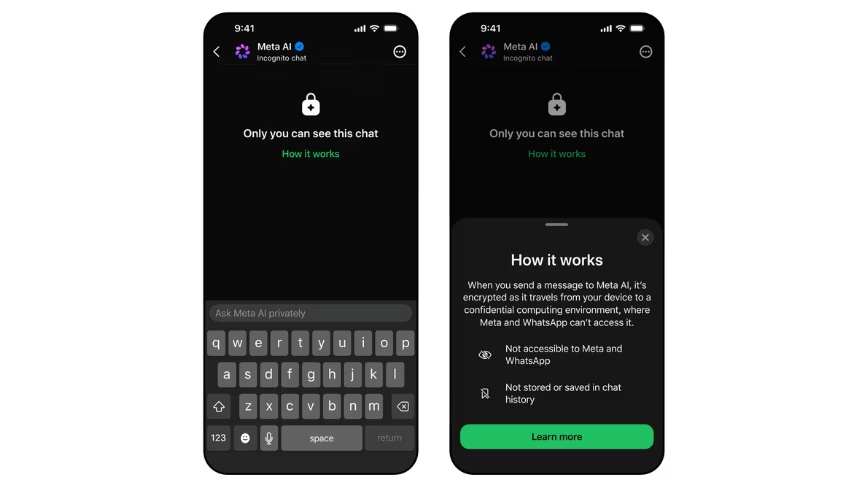
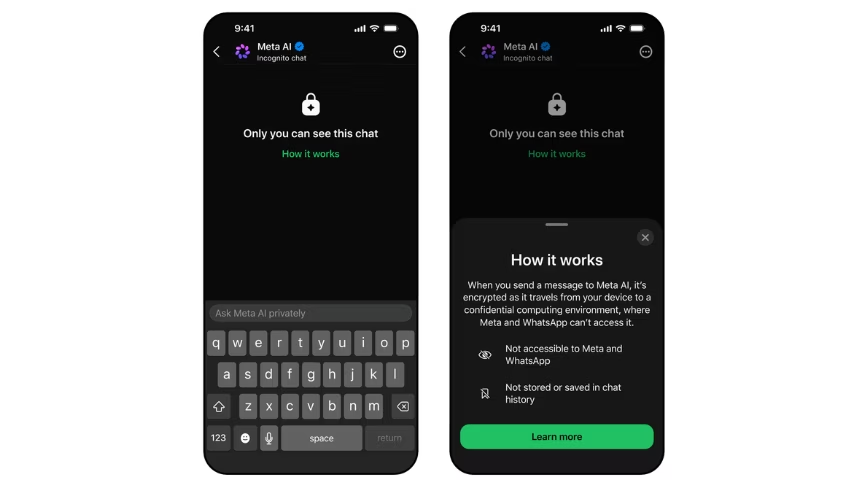
Meta launches Incognito Chat on WhatsApp, the first AI mode it says even Meta cannot read

Published

on

The new mode runs Meta AI on WhatsApp inside the company’s Private Processing enclave, with conversations deleted by default and no server-side record retained.

Meta has launched an Incognito Chat mode for Meta AI on WhatsApp and the Meta AI app, an effort to address the awkward fact that its assistant, like every other major AI chatbot, has until now been able to read the conversations users have with it.

The new mode, the company announced on Tuesday, processes user messages inside what Meta describes as a secure environment that even Meta cannot see, with conversations deleted by default once the session ends.

The technical foundation is WhatsApp’s Private Processing system, the architecture the company published in April 2025 to let AI features run on encrypted data inside Trusted Execution Environments on Meta’s servers.

Advertisement

Inside that enclave, the model can read and respond to a query, but the contents are not accessible to Meta’s engineers, its logging systems, or any of its commercial pipelines.

Other apps offer what they call incognito modes for AI conversations, but Meta’s framing in the announcement is pointed: “they can still see the questions coming in and the answers going out.”

The launch responds directly to a category-wide privacy concern. AI chatbots have become a default tool for the sort of question users would once have asked a doctor, a lawyer, or a partner, with all the data exposure that implies.

OpenAI, Google, and Anthropic each store conversation histories by default, with varying user controls. Apple Intelligence routes some queries through Apple’s Private Cloud Compute, an enclave architecture that is the clearest existing analogue to what Meta is now shipping inside WhatsApp.

Advertisement

Two product details follow from the design. First, the conversations are not saved server-side at all; users cannot pull up Incognito Chat history later because there is nothing to pull up.

Second, the disappearing-by-default behaviour means even a compromised device leaks less, since the chat residue clears between sessions.

Meta has published a technical whitepaper describing the cryptographic architecture for outside review.

A second feature is on the way. Sidechat with Meta AI, also protected by Private Processing, will let users get AI help inside an existing WhatsApp conversation, with the assistant aware of the chat’s context but its responses kept invisible to the other participants.

Advertisement

Meta said Sidechat will arrive on WhatsApp “in the coming months,” without a firmer date.

The launch’s commercial logic is straightforward. WhatsApp has been built for a decade around end-to-end encryption as a selling point, and Meta’s pitch for AI on the platform has had to find a way around the central tension that a conversational AI assistant needs to read your messages to be useful.

Private Processing is the company’s attempt at squaring that circle. The Incognito Chat product is the first time the architecture has been put behind a user-facing feature on this scale.

Whether the implementation holds under scrutiny is a separate question. Trusted Execution Environment-based AI systems have been audited and criticised across the industry, with researchers periodically demonstrating side-channel attacks against similar architectures from Apple, Google, and the hyperscalers.

Advertisement

Meta has invited external review of its Private Processing design, and the new whitepaper extends that posture, but the model’s resistance to subpoena, in particular, has not yet been tested in court.

Incognito Chat with Meta AI begins rolling out on WhatsApp and the Meta AI app this week, with broader availability over the coming months.

The launch lands at the end of a difficult fortnight for Meta on the privacy front, with US employees protesting the company’s new mouse-tracking software on Monday and the company a week out from layoffs of roughly 8,000 staff.

Inside Meta, the bet appears to be that consumer-facing privacy moves like this one will outweigh the internal-surveillance optics.

Advertisement

Source link

Continue Reading

Tech

How to Use Amazon Seller Central Reports to Scale Your Brand

Published

on

Amazon Seller Central offers a layered reporting suite — with access determined by selling plan, fulfillment method, and Brand Registry status. In most organizations, these reports serve a single purpose — confirming what has already occurred: sales reconciled, fees reviewed, inventory checked. That operational function is necessary, but it represents only a fraction of what these reports are built to deliver. The same reports hold intelligence that directly determines how a brand scales:

Conversion signals that reveal listing degradation before it erodes rank

Acquisition quality data that separates genuine brand growth from retargeting spend

Product feedback loops that surface quality and listing gaps before they compound in reviews

SKU-level margin intelligence that identifies which products can sustain paid investment and which cannot

Advertisement

The gap is not access — it is how the data is leveraged.

This blog provides a structured approach to leveraging five core Seller Central report categories — Business, Advertising, Fulfillment, Return, and Payments — for measurable brand growth. It covers best practices for leveraging reports effectively, the structural limitations every brand team needs to account for before acting on the data, and how Amazon account management helps.  

The Core Categories: How Amazon Seller Central Reports Are Structured

Report
Category

Advertisement

Key
Reports

Role
in Brand Growth

Business Reports

Sales Dashboard, Detail Page Sales and
Traffic by Child ASIN, Brand Performance Report

Advertisement

Conversion health, traffic trends,
listing-level performance

Advertising Reports

Search Term Report, Placement Report,
Sponsored Brands/Display Reports

Search demand, new-to-brand acquisition,
placement efficiency

Advertisement

Fulfillment Reports

Inventory Ledger, Stranded Inventory, Inbound
Performance, Inventory Performance Index (IPI)

Inventory health, stockout prevention,
inbound accuracy

Return Reports

Advertisement

FBA Customer Returns Report, Returns Trend
Analysis

Product quality feedback, brand equity
signals

Payments Reports

Transaction View, Fee Preview Report

Advertisement

SKU-level margin clarity for reinvestment
decisions


How to Use Amazon Seller Central Reports for Brand Growth

Step 1: Audit Business Reports for Brand Performance Signals

1. Detail Page Sales and Traffic by Child ASIN: Read session count, page views, Unit Session Percentage (conversion rate), and Featured Offer percentage at the variation level. Track these metrics weekly per ASIN — a sustained downward trend in Unit Session Percentage is your leading indicator of listing degradation before it erodes rank. 

2. Brand Performance Report: Review Average Customer Review, Number of Customer Reviews, Sales Rank, and Featured Offer percentage together for each ASIN. These four metrics form a direct snapshot of brand health at the listing level. Flag metric combinations that signal brand risk rather than reading each metric in isolation.

Advertisement

3. Sales Dashboard: Review weekly and monthly trend lines across weekly and monthly windows to gauge whether brand momentum is accelerating or declining. Use the Compare Sales feature to layer on year-over-year context — this helps separate genuine trajectory shifts from recurring seasonal patterns. 

Cross-reference sessions against Unit Session Percentage: falling sessions signal a visibility problem; falling conversion with stable sessions signals a listing or pricing issue. 

Note: Business Reports are available only to sellers on a Professional selling plan, and historical data is retained for up to two years.

Step 2: Extract Brand Acquisition Insights from Advertising Reports

Advertisement

Advertising Reports address two brand growth questions that Business Reports cannot answer. The first is which channels and keywords drive new demand into the brand. The second is what proportion of that demand represents genuinely new-to-brand customers versus returning buyers.

1. Search Term Reports: Review the actual queries customers typed before clicking an ad.

Negate: Any term that spends money with zero conversions over 30 days is added as a negative keyword. This is the single fastest way to improve ACoS without changing bids.

Harvest: Any search term that converts at or below your target ACoS is added as an exact match keyword.

Advertisement

For brands managing large campaign portfolios, use the Bulk Operations feature in Campaign Manager to download a custom spreadsheet with Sponsored Products and Sponsored Brands Search Term data. Edit keyword additions and negations directly in the file and upload to update campaigns in a single operation. 

2. Sponsored Brands and Sponsored Display Reports: Isolate the New-to-Brand (NTB) metric inside these campaign types to separate new customer acquisition from repeat buyers. Monitor NTB percentage, NTB order cost, and NTB sales separately from overall ROAS to measure true brand expansion, not branded retargeting.

3. Placement Reports: Compare conversion and spend distribution across top-of-search, product pages, and rest-of-search. Redirect budget toward placements with the strongest NTB and conversion performance. Top-of-search placements carry disproportionate brand visibility and deserve priority investment when NTB indicators support it.

Step 3: Protect Brand Momentum with Fulfillment Reports

1. Inventory Ledger Report: Consolidate inventory movement across Amazon warehouses — adjustments, receipts, and shipments — in a single view. Monitor inventory accuracy and act on discrepancies before stockouts hit high-velocity ASINs.

Advertisement

2. Stranded Inventory Report: Identify stock held in FBA warehouses but unsellable due to listing issues. Each stranded ASIN represents a direct revenue leak. Recover these listings weekly, before the associated search rank decays.

3. Inbound Performance Report: Track the efficiency of FBA shipments, including missing units, incorrect labeling, and receiving delays. Address recurring inbound issues at the source before they escalate into repeat offenses, as persistent issues extend reimbursement cycles and delay restock.

4. Inventory Performance Index (IPI): Monitor IPI as a brand growth prerequisite, not a warehouse KPI. Calculated from fulfillment data, the score directly affects FBA storage limits. A low IPI restricts scalability and caps paid acquisition ceilings.

Step 4: Read Return Reports as Product Quality Feedback

1. FBA Customer Returns Report: Mine return reasons, order IDs, and SKU-level detail for recurring patterns. Aggregate return reasons by ASIN to reveal product issues that would otherwise appear only in individual customer reviews.

Advertisement

2. Return Trend Monitoring: Flag ASINs with rising return rates as a signal of either a product quality issue, a listing accuracy issue, or both. Each failure mode damages brand equity and search rank. Address the root cause visible in return reasons, rather than treating the symptom through returns management.

For example, when the most frequent return reason on an ASIN is “not as described,” the listing content itself is driving the returns. An updated, accurate listing reduces future returns, improves conversion rate, and reinforces brand trust — three outcomes from a single fix.

3. Schedule Report Generation: Set up daily schedules for All Returns and Prime returns, instead of pulling them manually. Three operational constraints to note:

One active schedule per report type

Advertisement

Maximum of 30 reports in the Scheduled Reports section

Schedule changes require deletion and recreation

Reports can be scheduled by return date for both FBA and seller-fulfilled orders to track return reasons and item condition across fulfillment channels.

Step 5: Use Payments Reports to Inform Brand Reinvestment

1. Transaction View: Break down every order into referral fees, FBA fees, promotional rebates, and net proceeds. Surface ASIN-level margin visibility to identify which products can sustain paid acquisition pressure and which cannot.

Advertisement

2. Fee Preview Report: Project FBA fulfillment, storage, and referral fees across existing FBA inventory. Review the report to identify ASINs where upcoming fee changes or aged-inventory surcharges will compress margin. Adjust pricing or inventory planning before the fees hit the bottom line.

Limitations & Challenges of Amazon Seller Central Reports

#1 No Built-in Competitive Benchmarks

Seller Central Reports show only your own performance data. There is no native view of how your brand performs against category peers or direct competitors. External benchmarking requires third-party data or Brand Registry-gated reports.

#2 Data Latency Varies Across Reports

Advertisement

Business Reports refresh daily, while Fulfillment and Payments reports often run on weekly or delayed cycles. This inconsistency complicates cross-report analysis when precise attribution windows matter, particularly for reconciling paid performance against organic results within the same reporting period.

#3 Limited Brand-Level Insights Without Brand Registry

Deeper brand-growth tools sit outside the standard Reports tab. These include Brand Analytics dashboards (Search Query Performance, Market Basket Analysis, Customer Loyalty Analytics), the Brand Dashboard, and Voice of the Customer. Brand Registry enrollment unlocks these additional layers.

#4 Attribution Gaps Between Advertising and Organic

Advertisement

Advertising Reports attribute sales to campaigns, while Business Reports track total sales. Reconciliation between the two requires careful segmentation, especially when paid campaigns and organic traffic overlap on the same keywords.

#5 Report Siloing Across Tabs

Seller Central Reports live across multiple tabs — Reports, Advertising, Returns, Payments — with inconsistent naming and export formats. Cross-report analysis almost always requires careful manual reconciliation.

Best Practices for Using Seller Central Reports Effectively

1. Standardize Date Ranges Across Reports 

Advertisement

Different reports operate on different default time windows. Business Reports default commonly to 30 days, while granular Advertising Reports — including Search Term and Purchased Product Reports — are subject to a hard 90-day lookback limit, not a display default. Manually aligning date ranges across reports before cross-referencing ensures comparisons reflect the same performance window and eliminates attribution mismatches.

2. Benchmark Week-Over-Week, Not Day-Over-Day

Single-day metrics are statistically volatile, particularly on low-velocity SKUs where marginal order volume can produce significant conversion rate variance. Weekly benchmarking normalizes daily fluctuations while keeping the reporting window tight enough to surface trends before they compound.

3. Cross-Reference Reports for Root-Cause Analysis

Advertisement

A conversion decline in Business Reports frequently correlates with a Buy Box shift, a pricing change, or a stranded listing in Fulfillment Reports. Isolating a single metric without cross-report validation increases the risk of misdiagnosis and misdirected corrective action.

4. Export and Archive Reports Externally

Business Reports retain data for up to two years. Granular Advertising Reports, including those referenced above, are capped at a 90-day lookback window with no native recovery option beyond that threshold. Once the window closes, that data is permanently removed from Seller Central — brands that need historical context must export it on a defined schedule.  

5. Align Reporting Depth with Organizational Role

Advertisement

Operational teams require weekly tactical reviews covering stockouts, suppressed listings, and Buy Box performance. Brand leadership requires monthly and quarterly trend analysis focused on category share and customer retention. Calibrating reporting depth to the decision-making level of each function reduces analysis fatigue and maintains actionable review cycles across the organization.

The Business Imperative: Seller Central Reports provide the data. Translating that data into consistent brand decisions — across listings, advertising, inventory, returns, and margins — requires operational discipline that compounds over time.

For brands managing catalog depth, multi-channel fulfillment, and active advertising simultaneously, cross-report analysis, weekly metric reviews, search term management, inventory reconciliation, and fee audits each demand specialization and bandwidth that most in-house teams cannot sustain at the required cadence.

Amazon account management services bring the field-level expertise and technical infrastructure to close that gap — identifying signals early, connecting them across report categories, and converting them into decisions before they compound into performance issues.

Advertisement

As catalog scale increases, inconsistent report review compounds directly into rank loss, wasted ad spend, stranded inventory, and missed reinvestment signals — each one a measurable cost to brand performance. The question is not whether these gaps exist. The question is how long your brand can afford to leave them unaddressed. 

Source link

Advertisement
Continue Reading

Trending

Copyright © 2025