
Security teams log 54% of successful attacks and alert on just 14%. The rest move through your environment unseen.
The Picus whitepaper shows how breach and attack simulation tests your SIEM and EDR rules so threats stop slipping by detection.



If you owned an Android during the last nine years, you could soon see a little extra cash. For years, Google has been accused of harvesting data from Android phones without users’ consent. Following a California lawsuit that was settled for $314 million last year, a new settlement could mean payouts for another 100 million people.
A class action lawsuit alleging “Google caused Android mobile devices to transfer a variety of information to Google without users’ permission, consuming users’ cellular data,” is nearing its end. The two sides in Taylor v. Google LLC (PDF) have agreed to a settlement and have begun resolving it.
Without admitting fault, Google agreed to a preliminary settlement in January, committing to pay $135 million in damages. The settlement website is now live.
The final approval hearing won’t occur until June 23, when the court will hear objections and consider whether Google’s settlement is fair. After that, the court will decide whether to approve the $135 million settlement.
In the meantime, if you qualify and want to be paid as part of the settlement, you can select your preferred payment method on the official website. There, you can find information on speaking at the June 23 court hearing and on how to exclude yourself or write to the court to object by May 29.
As part of the settlement, Google will update its Google Play terms of service to clarify that certain data transfers do occur passively even when you’re not using your Android device, and that cellular data may be relied upon when not connected to Wi-Fi. This can’t always be disabled, but users will be asked to consent to it when setting up their device.
Google will also fully stop collecting data when its “allow background data usage” option is toggled off.
In order to join the Taylor v. Google LLC settlement, you must meet four qualifications:
To set your payment information on the official settlement website, you’ll need a Notice ID and Confirmation Code, which the settlement administrators mailed or emailed to eligible claimants.
The final approval hearing is on June 23, so you can add your payment method until then. The hearing’s date and time may change, and any updates will be posted on the settlement website.
To set your payment method, you’ll need a Notice ID and Confirmation Code from a settlement notification email or letter.
If you choose to do nothing and are eligible, you will still be issued a settlement payment, but not selecting a payment method might increase your risk of not getting paid.
Even if you didn’t receive a notification letter or email, you still might be eligible for a payout from Google. To find out, you can call the toll-free information number at 1-844-655-4255 or email info@FederalCellularClassAction.com. You can also mail a letter requesting more information to: Federal Cellular Class Action, 1650 Arch Street, Suite 2210, Philadelphia, PA 19103.
Watch this: Your Phone is Disgusting: Let’s Fix That
It’s not currently known exactly how much each settlement class member will receive, but the maximum is $100. Payments will be distributed after final court approval and after the resolution of any appeals.
After all administrative, tax and attorney costs are paid, the settlement administrator will attempt to pay each member an equal amount. If any funds remain after payments are sent, and it’s economically feasible, they will be redistributed to members who were previously and successfully paid. If it’s not economically feasible, the funds will go to an organization approved by the court.
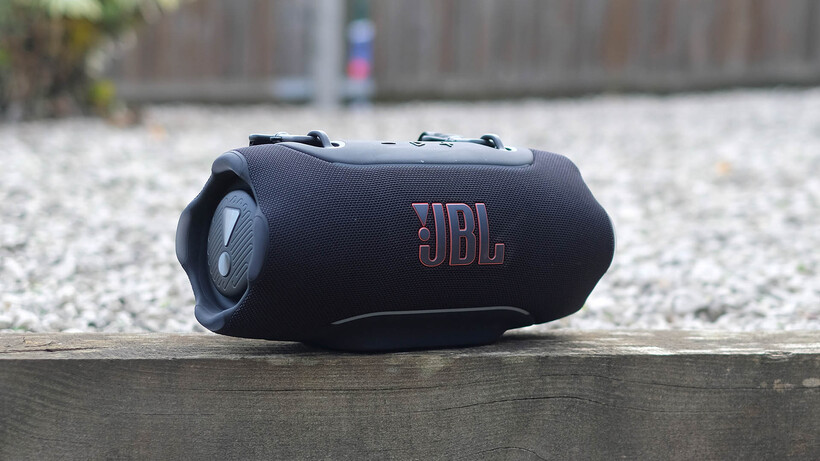
Proof you can have it all? The JBL Xtreme 5 combines power with surprisingly coherence and insight. It’s a party speaker everyone can enjoy. Most probably would not want to make this a key feature of their living room but it’s proof of how much attention to detail goes into speakers not necessarily made for the most audio quality obsessed crowd
Powerful but tasteful audio
Highly water resistant
Portable, despite its size
Not a stylistic fit for an upmarket home
Limited codec support
Battery
Up to 28 hours of battery life
IP68 rating
Water and dustproof
Lossless audio
High quality audio through its USB-C input
The JBL Xtreme 5 is the 2026 entry to a long-standing speaker series. It’s JBL’s second largest mainstream Bluetooth speaker behind the Boombox, and is arguably the biggest one that primarily works as a portable unit.
You can attach a shoulder strap, where the heavier Boombox 4’s handle may be a bit much for anything beyond carrying short distances.
This is an excellent speaker than basically enhances what previous generations offered. Yes, it’s good for parties, particularly this year thanks to improved bass depth, but the JBL Xtreme 5 is also as coherent and insightful as speakers that on the surface appear to have loftier aspirations.
The JBL Xtreme 5 costs £329.99, just like the Xtreme 4 from 2024. Despite this new version’s improvements, though, you may also want to have a quick scout for deals on the older models — they can at times be found for far less.
The Xtreme series is a JBL family I’ve always felt I shouldn’t like. Its design, that loud name and the whole concept of at outright party speaker don’t really chime with what I look for in a wireless speaker. And yet JBL has always done such a great job, I’ve loved all the JBL Xtreme generations I’ve tried.

JBL hasn’t changed too much of what I find superficially off-putting in the JBL Xtreme 5, though, and even leans into some other areas further.
The JBL Xtreme 5 design, and that of its predecessors, is based around two massive passive radiators — one on each end. These help max-out bass production in smaller speakers, and leave the Xtreme with a shape not unlike a conga drum laid on its side.

It’s a fairly large speaker, but is still designed to be carried around, using the tough metal shoulder strap mounts on the top. Water resistance is excellent too, rated at IP68. This makes it an ideal poolside companion.
Much of the JBL Xtreme 5’s outer is a tough nylon fabric weave covering a plastic sub-frame, while the top panel and bottom foot have a rubbery finish.

There’s not a huge arount of metal here, but the strap mounts are metallic, as is the lettering of the JBL logo and the mildly obnoxious exclamation mark signs of the passive radiators’ outer.
As I’ve already said, this sort of bold teenage-baiting style isn’t my thing, but JBL’s execution of the idea is good. Each end of the Xtreme 5 also has tough rubbery feet, should you not have the room to let it sit lengthwise.
This year’s big change is LED lighting. Two thin strips of LEDs live at the bottom of the rubbery control panel, and where the speaker’s foot meets the nylon weave. These can be as subtle or obnoxious as you like, and are controlled using the JBL Portable phone app.

They are multi-colour LED strips, so can be plain white if you like, or can switch through tones using one of a few animated presets. Most have some form of animation to the light if it’s turned on, but the Freeze setting lets you pick a single, solid colour, for some less attention-grabbing mood lighting.
One of the JBL Xtreme series characteristics I’ve admired is how JBL has kept this series a largely focused, simple speaker. It’s a Bluetooth unit, not one that tries to pack in all sorts of smart features or multi-room streaming extras. They have offered in the larger Boombox series in the past.
That’s true once more, but JBL has still managed to cram in some neat extras.
As in previous years, there’s stereo pairing, and you can use the battery as a power bank. JBL earns bonus points for covering the battery slot with a panel held in place with a couple of TX screws for easier replacement.

Newer parts include Bluetooth Auracast and USB audio. You can easily plug the Xtreme into a laptop or PC, for fuss-free lossless audio transmission. This could be great for, picking a scenario out of the air, using it as the audio source for a projector setup while on a camping holiday.
Auracast is a technoloy that lets multiple devices receive audio from the single transmitter. It’s probably of more use for a couple of people who want to listen to TV or music with their own pairs of headphones, but can also be used as a more robust party mode — where you fling the same track over to a bunch of speakers.

It basically means companies like JBL no longer have to use their own proprietary multi-speaker pairing system, which is a pro-consumer move.
Battery life is rated at 24 hours, and while that won’t stand if you’re using at maximum volume to annoy everyone at the local park, it’s a long-lasting speaker nevertheless.
Within about five seconds of playing music through the JBL Xtreme 5 I could tell this speaker is just as special and capable and its predecessors, if not more so.
It manages the unusual feat of delivering the kind of bass depth and punch needed to satisfy someone out for a party speaker, while doing a frankly unlikely job of maintaining more navel gazing standards in other areas. It’s mostly about the JBL Xtreme 5’s unusually good mid-range coherence and clarity, in a category where one of the standard tactics is just to rely on pronounced bass and treble to provide thrills.
The factor I noticed within the first few seconds was how the JBL Xtreme doesn’t have over-emphasised mid bass and upper bass. I find this common-used audio thickening agent hangs off vocal like a sack of sodden clothing, and makes podcast voice lines sound as if there’s a weird bass resonance running underneath them.

There’s very little of that effect in the JBL Xtreme 5, and it does wonders for the separation of vocals, and the coherence of the sound in general.
It is by no means a bass light speaker, though. The JBL Xtreme 5’s low bass is particularly fun and lively for a speaker of its size. Its bass floor is rated at 40Hz suggesting it’s capable of some sub-bass rendering, and that’s pretty much what I hear here.
In the last Xtreme I reviewed I moaned about how JBL’s increase of the bass over the Xtreme 3 was to its detriment overall — from an audio snob’s perspective at least. But in this generation I think JBL has come up with a formula that really works for this line. It’s a classier kind of bass-heavy and fun sound signature, and that’s just what the JBL Xtreme 5 should have.
I’m talking about the default JBL Signature mode here, and there are a few others. Chill calms down the low-bass so you won’t keep people awake. It means the sound pulls less focus too. It’s a good “background music” mode.

JBL’s Energetic setting amps up the sound a little, with a little more spark than JBL Signature, but is far more reserved and usable than it might have been. Vocal predictably focuses on the mids, which doesn’t initially sound great when directly comparing to other modes, but could be useful for non-music content. There’s also a 7-band custom EQ mode.
No major surprise here. The JBL Xtreme series has always sounded better than you’d expect given it looks largely like a dumb party speaker, and the Xtreme 5 is no different. Nice work, JBL.
My main complaint is that the volume ceiling on this one is so high, single clicks of your phone’s volume control can bump the output up or down more than you want. The Xtreme 5 even enters an “AC” mode when plugged in, allowing for handful of extra decibels of volume. I don’t think it’s necessarily for most occasions, though. Battery power alone is powerful enough.
It’s loud, it sounds great, and while it’s nowhere near JBL’s most portable speaker, the shoulder strap makes the Xtreme 5 comfortable to carry around.
While the sound quality stands up to its top peers, the Xtreme 5’s design is pretty loud, and in this generation LED-lit.
The JBL Xtreme 5 is one of the more unlikely-looking great-sounding wireless speakers. It can bring the good to the party when needed, but also has remarkably clean-sounding mids and great overall coherence.
It has been the calling card of this family for years now, but the JBL Xtreme 5 jazzes things up a little with a couple of customisable LED light strips and Bluetooth Auracast — which lets multiple speakers or headphones share the same stream.
Business as usual for the most part, then, but business is good.
We test every wireless speaker we review thoroughly over an extended period of time. We use industry standard tests to compare features properly. We’ll always tell you what we find.
We never, ever, accept money to review a product.
Find out more about how we test in our ethics policy.
It has IP68 water resistance, good for most weather conditions and submersion in water.
This is a Bluetooth only speaker, but it supports Auracast for multi-speaker streaming.
There’s no classic 3.5mm aux input but you can plug in over USB for a cabled connection.
| JBL Xtreme 5 Review | |
|---|---|
| UK RRP | £329.99 |
| Manufacturer | JBL |
| IP rating | IP57 |
| Battery Hours | 24 |
| Size (Dimensions) | 346 x 165 x 155 MM |
| Weight | 2.9 KG |
| Release Date | 2026 |
| First Reviewed Date | 28/05/2026 |
| Audio Resolution | SBC, AAC, LC3 |
| Driver (s) | Two 0.75-inch tweeters, 3.9 x 5.7-inch woofer, two 20mm tweeters, 98 x 145mm woofer |
| Ports | USB-C |
| Audio (Power output) | 90 W |
| Connectivity | Bluetooth 6.0 |
| Colours | Squad, Black, Blue |
| Frequency Range | 40 20000 – Hz |

The big picture: Microsoft is easing one of the strict lines it previously drew around Copilot+ PCs, allowing more Windows 11 machines to run local AI workloads with the right GPU. An update shows that systems equipped with Nvidia RTX 30-series GPUs or newer, with at least 6GB of VRAM, can now support Windows’ local language model APIs. On paper, it’s a small, developer-only tweak, but it suggests Microsoft may be rethinking how tightly it ties on-device AI to Copilot+ branding.
When Copilot+ PCs launched on June 18, 2024, the messaging was clear: dedicated AI hardware was essential. These machines were defined in part by their neural processing units, along with baseline specs such as 16GB of RAM and solid-state storage. The NPU requirement, in particular, was positioned as the key to unlocking local AI features in Windows.
But NPUs are not the only chips capable of handling AI workloads. GPUs, especially modern ones, are built for heavy parallel processing and have long been used to run machine learning models. In practical terms, they can offer more raw throughput for many AI workloads than today’s NPUs, though typically at a higher power cost.
Until now, Microsoft had kept most of its built-in AI features tied to NPU-equipped devices. That left many powerful GPU-based PCs unable to access local text and image generation, as well as features like Windows Recall and other AI tools.
Now that gap is starting to close. In updated documentation and a GitHub post, Microsoft confirmed that developers can now run language model APIs on non-Copilot+ PCs using supported GPUs.
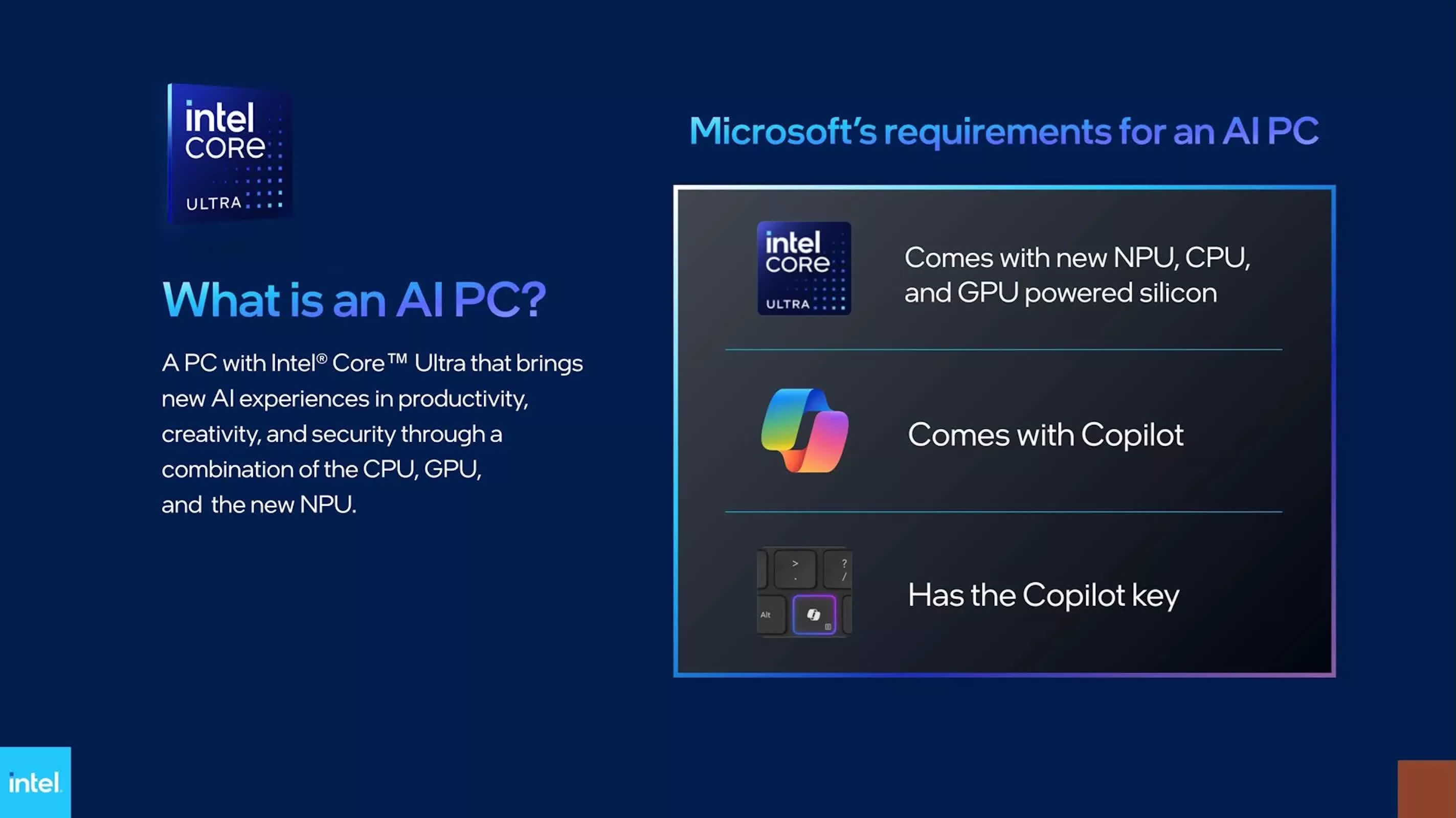
The company described the feature this way: “Language Model APIs on GPU [Experimental]. The Language Model APIs now run on non-Copilot+ PCs equipped with a supported GPU, bringing local language model capabilities to a broader range of Windows 11 devices.” It also specified that “supported hardware includes NVIDIA GeForce RTX 30 series and newer with 6+ GB VRAM.”
For now, this capability is still tucked inside the developer layer rather than exposed directly to everyday users. Running these APIs requires building or using applications that tap into the Windows AI framework. Still, it sets the stage for local AI to reach a much wider range of Windows machines.
At the center of this is a small on-device model called Phi Silica. Instead of being pre-installed on all systems, it can be downloaded through Windows Update when an app requires it. Once installed, the model runs locally on the machine’s hardware, using the GPU when available.
The current feature set is focused on text-based tasks. Through the Windows.AI.Text APIs, apps can summarize content, rewrite text, convert text into structured formats, and generate prompts. The functionality is similar to what users might expect from cloud-based AI tools, but it all runs locally on the device.
Running everything locally has practical benefits. It reduces reliance on cloud processing, which can improve responsiveness, and keeps data on the machine rather than sending it to external servers. For developers and enterprise users, that could make a meaningful difference in how AI features are adopted.
Still, the rollout is partial. Some of the more visible Copilot+ features, including Windows Recall and Click to Do, remain tied to systems with NPUs. GPU support, at least for now, is limited to the language model API layer rather than the broader suite of AI integrations.
Even with those limits, the trend is hard to miss. Microsoft is no longer treating NPUs as the only path to local AI on Windows. Letting GPUs take on these workloads broadens the pool of compatible hardware and makes Copilot+ PCs feel less exclusive than they did at launch.


Kyushu Electric Power Co., Inc. has disclosed a physical security incident that affects private data of more than 10 million customers.
In an official announcement, the company explains that the IT staff regularly performs backups to manage server storage. Due to capacity constraints, on April 27 an external storage device was used for the task.
The drive was then stored in a server room cabinet protected by multiple physical security layers. On May 26, when IT staff went to retrieve it, they found the cabinet had been left unlocked and the driver was missing.

Kyushu Electric Power Company is one of Japan’s major regional electric utilities, supplying electricity across the Kyushu region, which includes the prefectures of Fukuoka, Saga, Nagasaki, Kumamoto, Oita, Miyazaki, and Kagoshima.
The overall population of the Kyushu region is 12.6 million, and the company stated that the incident impacts up to 10.9 million accounts.
The data present on the now missing drive includes:
The firm has clarified that no bank account information or credit card data was stored in the drive. It also promised to notify impacted customers individually in the upcoming period.
Since the loss of the hard drive, the firm has interviewed all personnel who entered the server room and conducted investigations, but couldn’t locate it.
Media outlets report that 57 people had access to the said server room, and that Kyushu Electric filed a police report on June 4, suspecting someone had removed the drive.
NHK One reported that the Japanese Ministry of Economy, Trade, and Industry has given the firm until July 8 to report all the details about the incident and the preventative measures taken.
“The company is investigating all possibilities, including unauthorized removal of the device, but it has not yet been located,” reads the bulletin.
The incident has been reported to Japan’s Personal Information Protection Commission and the relevant government authorities.

Security teams log 54% of successful attacks and alert on just 14%. The rest move through your environment unseen.
The Picus whitepaper shows how breach and attack simulation tests your SIEM and EDR rules so threats stop slipping by detection.
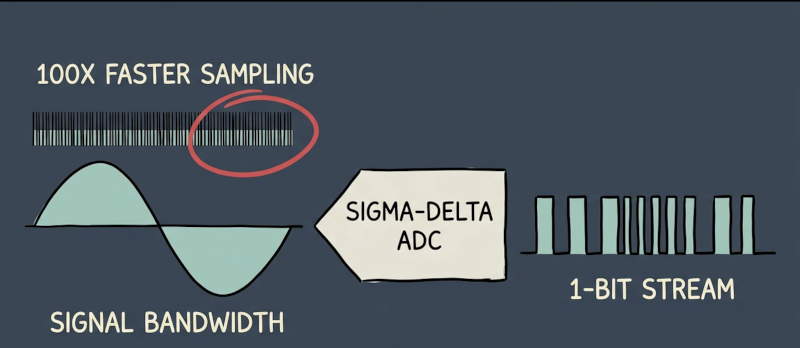
An old algebra teacher used to say, “You have to take what you know and use it to get what you don’t know.” You might say the same thing about converting analog signals into digital. Computers know how to count and keep time. [Eric Explains] has a video purporting to explain “every type of analog-to-digital converter.” We aren’t sure he got every possible method, but there’s still a lot of information in the video, which you can see below.
From the flash ADC, using a ton of comparators to the successive approximation converter, which essentially plays a game of hi/lo, guessing the answer and figuring out if the real answer is higher or lower.
Those are pretty common, but the video also covers things like the Wilkinson ADC and other more exotic techniques. Each method, of course, has its advantages and disadvantages. For example, the flash ADC is fast, but requires a lot of components and power.
Sometimes, the method you use depends on how you are building. For example, you probably wouldn’t use a charge system on a breadboard since precision capacitors are finicky. But on an integrated circuit, capacitors made with photolithography may not be very precise, but the ratio between capacitors is super precise, making that a common technique in that domain.
Even if you never need to design your own converter, understanding the different architectures will let you make a better selection among alternatives. Then again, you can design your own. We’ve seen most of these architectures in past projects.


‘AI Overviews can no longer just be helpful summaries. Now, they must be legally defendable outputs,’ said Forrester principal analyst Nikhil Lai.
A landmark German ruling has determined that Google’s AI Overview are its own words, holding the company liable over statements Overview generated about two German publishers.
The Regional Court of Munich found that the AI Overview search tool was generating false claims about the two plaintiffs, including that they committed fraud and lured customers into subscription traps.
The court hit Google with a temporary injunction, banning the company from spreading false claims about the plaintiffs. Google has been ordered to pay 80pc of the legal costs, while the plaintiffs will each pay 10pc of the costs.
The court pinned responsibility on the search giant, reasoning that the AI used by Google independently compiles and summarises information, creating search results that go beyond just links.
It ruled that only Google has influence over the AI used in Overviews, as well as the algorithms with which it operates – meaning it must be held accountable for its results. It also said that the Overview search results about the plaintiffs included statements not even made in the search results.
“We invest deeply in the quality of AI Overviews to ensure that the overwhelming majority of responses provide accurate information, and they are designed to reflect the information that exists on the web. We’re carefully reviewing this decision, which is not yet final,” Google told Android Authority in a statement.
The Munich regional court’s ruling went a step further, examining existing rulings from Germany’s Federal Court of Justice (BGH), which gave search engines and autocomplete limited liability.
According to the BGH, search engines are only liable as indirect infringers because they disseminate information already created by third-party content publishers.
However, the Munich court said that this doesn’t apply to AI Overviews, as it “makes independent, new and substantive statements based on an evaluation and linking of content from various third-party websites” – rather than a traditional search engine which points to external sites.
Google argued in proceedings that users should not blindly trust information generated in AI Overviews. While the court agreed that users can check links and ensure the validity of the information they receive, it said that that shouldn’t relieve the company of liability.
“AI Overviews can no longer just be helpful summaries,” said Nikhil Lai, a principal analyst at Forrester. “Now, they must be legally defendable outputs.
“I think we’ll see fewer assertive, highly confident claims and more hedging, including language like ‘according to…’ and ‘some sources suggest…’.”
Lai also expects that fewer queries searching for sensitive information such as financial, health or legal advice would result in AI Overviews.
“This is not a Google-specific problem. I think this will lead to the value of defensible AI, where information’s verifiability and traceability become more valuable than its polish.”
Last year, a group of independent publishers filed an antitrust complaint with the European Commission, arguing that Google’s AI Overview diverts traffic away from independent publishers, resulting in less readership and advertising revenue.
Last week, the UK’s competition regulator ordered Google to let publishers opt out of having their content used to power AI features in search, including AI Overviews.
Don’t miss out on the knowledge you need to succeed. Sign up for the Daily Brief, Silicon Republic’s digest of need-to-know sci-tech news.
It costs $200 and integrates with the $46 InkSense Plus.
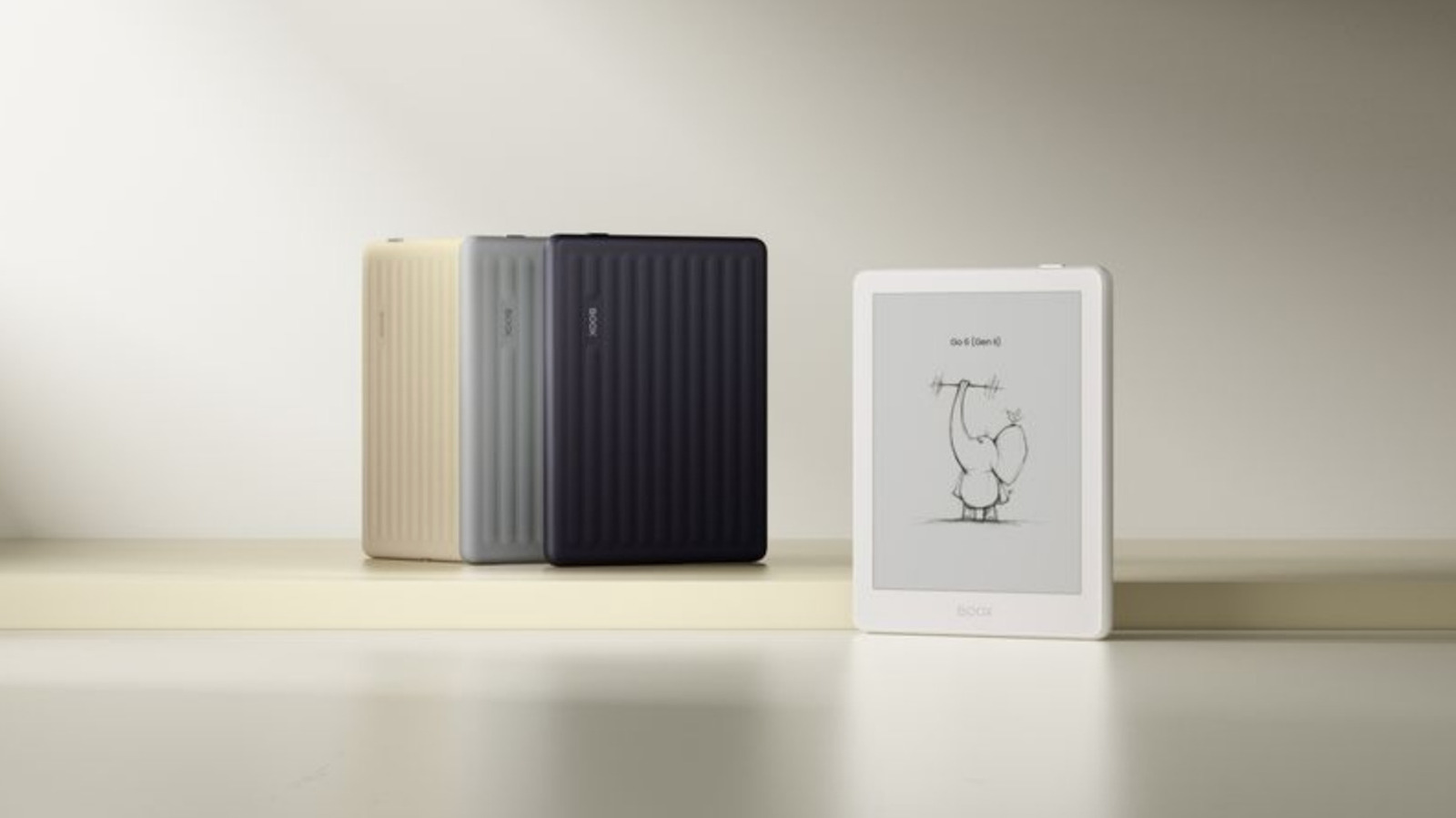
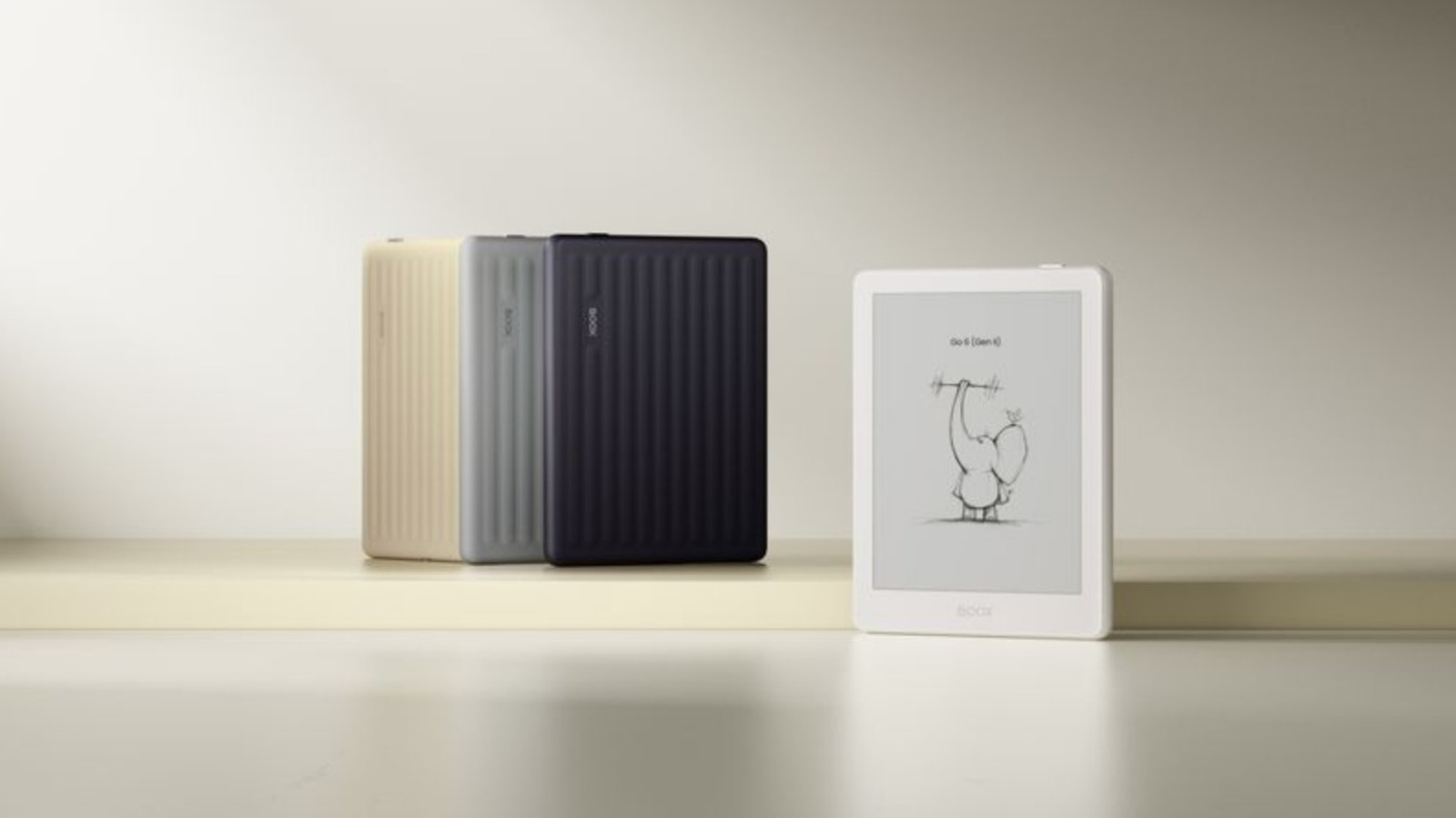
Boox just announced a refresh of its popular Go 6 ereader, and this one offers stylus support for note-taking. The 6-inch E Ink reader integrates with the company’s pre-existing InkSense Plus stylus. The tablet costs $200 and the stylus costs around $45, so that totals $245 for the whole package. Preorders are open now and shipments go out on June 17.
There’s more here beyond stylus support, though that’s pretty useful. The updated Go 6 is available in four new colors and ships with a native note-taking app, which can be used with the stylus to “mark up books, underline passages and capture handwritten notes and to-do lists.”
There’s also been an uptick in RAM, up to 3GB, which should make everything a bit more responsive. The ereader features adjustable front lights, a 300 PPI monochrome ePaper display, 32GB of storage and a microSD slot. It’s on the smaller side, with a thin form factor and a weight of just over five ounces.
It runs on Android, so users have access to the Play Store. However, running apps on an ereader can often be frustrating, due to the low frame rate. Results will vary depending on the app. Like most modern ereaders, the Go 6 should last days on a single charge with regular use.
This isn’t the first time Boox has introduced stylus support to one of its products. The Go 7 E Ink tablet got the feature last year.
What even is a photograph these days?
As tech giants pack generative AI capabilities into our phones and their camera software, the line between what is a real image and what isn’t continues to blur. Phones from Google and Samsung, for example, now come with features that let you drastically alter a photo by erasing people, moving people around in the shot, and even adding new objects to the scene.
Apple is getting in on the action by adding new generative features to its Photos app, though the company’s iPhone camera chief, Jon McCormack, stresses that Apple is taking a more measured approach than its competitors and isn’t “doing AI for the sake of AI.”
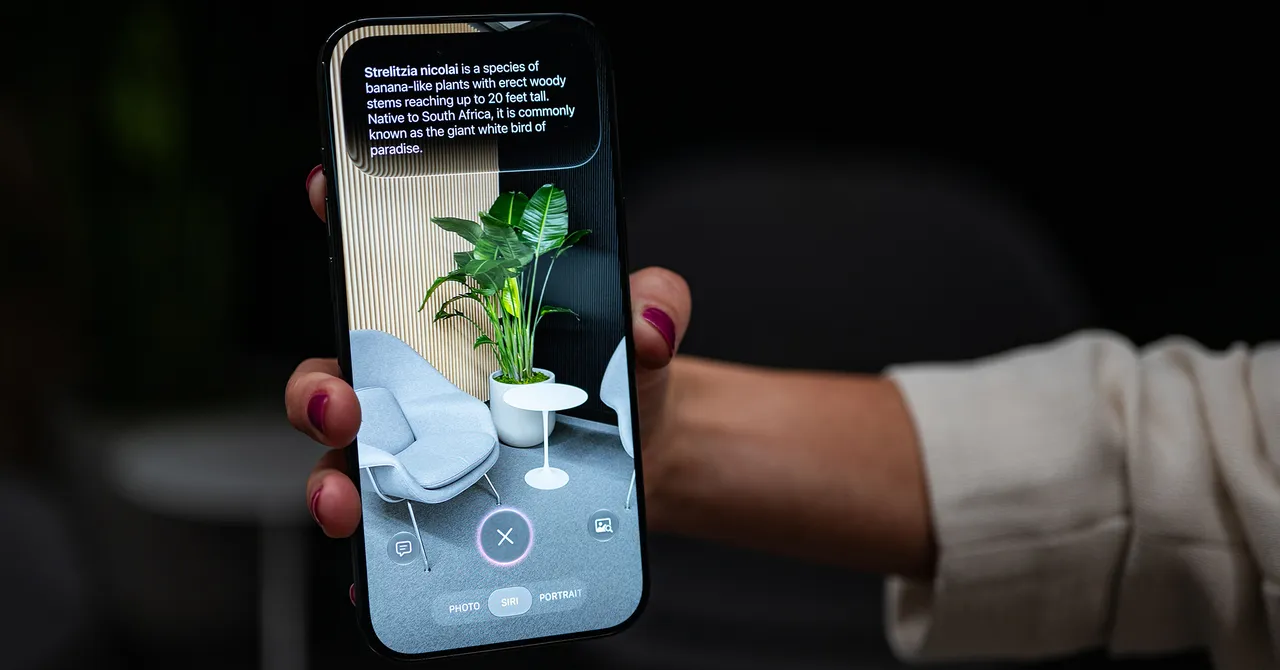
At its annual Worldwide Developer Conference on Monday, Apple showed off a handful of AI features invading the Photos app in iOS 27, which will arrive on iPhones later this year.
While the iPhone’s Photos app already has the Clean Up tool, which lets you erase unwanted objects in pictures, it’ll perform even better in iOS 27 thanks to its access to Apple’s improved AI models. However, there are two new features—called Extend and Spatial Reframe—that let you expand the space around your photo or change the perspective of an image, all while generating fake pixels. The camera “thinks” about what should be there, then draws it in.
McCormack says there’s a giant backlog of unsolvable issues that AI is now helping to address and that these new features are very deliberate. “You don’t have to know all the details of how to do something in Photoshop or something else—it gives normal people these absolute superpowers,” McCormack says.
Apple doesn’t want to let you run wild with your images and generate all kinds of fakery, though. (At least not in the Photos app; the App Store offers plenty of tools for making photorealistic slop.) The fake pixels the Photos app generates are restricted to what’s in the background. It won’t alter the pixels of the main subject’s face. With Clean Up, for example, you cannot remove the primary subject in the image. The Extend function only works once and expands the image by 25 percent—you can’t save, edit the image again, and infinitely extend it with AI.
McCormack also says Apple will integrate Google DeepMind’s SynthID technology later this year to add an invisible watermark indicating these images have been altered with generative AI. Any platforms where you share the photo may be able to flag it as AI-edited. (Just know that researchers have shown that digital watermarks aren’t foolproof.)
“A photograph is of something that actually happened,” McCormack says. “We really do believe in this idea of authentic journalism to your own life—when you’re capturing photographs, you’re making these memories, you’re putting moments of your life in a bottle that you can go back to. It’s really important to us that we create tools that keep the sanctity of that moment.”
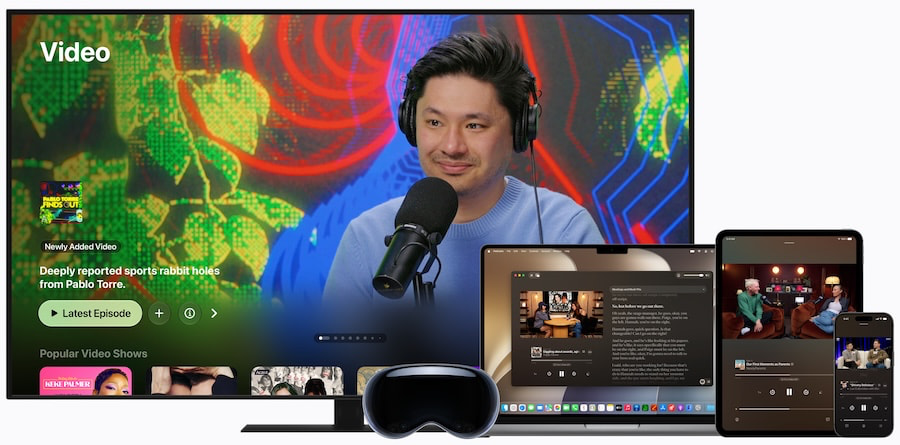
Apple used WWDC 2026 to roll out its next wave of software updates, and tvOS 27 received the kind of brief stage time Apple usually reserves for products that are important but not quite the main attraction. The update is expected this fall and will help shape the next Apple TV 4K experience, but the bigger story may be what Apple didn’t launch: new Apple TV hardware.
With Siri AI and Apple Intelligence still looking like complicated pieces of the puzzle, the next Apple TV 4K appears to be waiting for Apple’s living room strategy to catch up with its AI ambitions.
If Apple Intelligence with Siri is fully fleshed out for the next Apple TV 4K, tvOS 27 could bring some meaningful upgrades to the platform. Keep in mind that the following information remains tentative.
Expected improvements include faster app launches, possibly by up to 30%, faster AirPlay connections to Apple TV and HomePod, and support for smaller app downloads through localized language packages.
Control Center in tvOS 27 is also expected to become more responsive, with faster navigation, quicker app switching, and improved game controller settings included in the controls menu.
AirPlay connectivity to Apple TV and HomePod should also improve, along with faster Apple Music playback startup. Compatibility with Hi-Res Lossless audio playback up to 24-bit/192kHz is also expected.
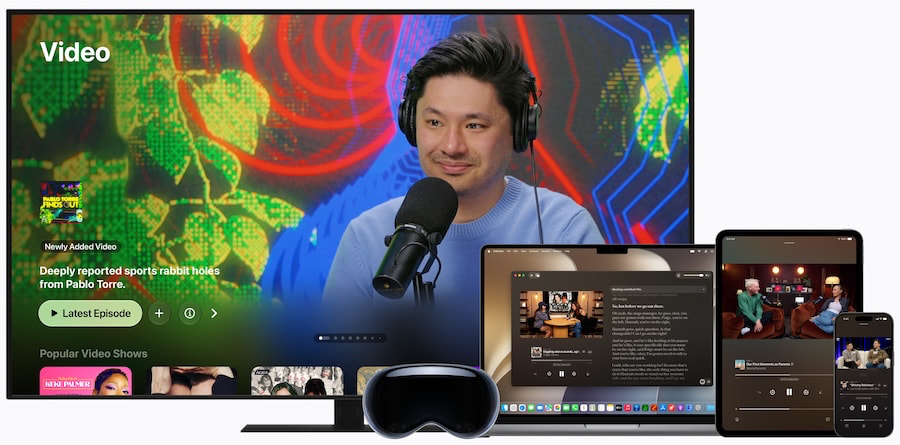
The Podcasts app for tvOS has reportedly been redesigned, with support for both audio and video podcasts.
Apple Home is expected to add support for 4K camera recordings, including HomeKit Secure Video recordings processed on-device, with Private Cloud Compute used for descriptions and search.
Users should also be able to view AppleCare coverage details directly in the Settings menu.
New accessibility upgrades are also expected in tvOS 27.
Users should gain the ability to adjust text size across tvOS and supported apps, making menus, labels, and on-screen information easier to read.
Auto-transcription support in English is also expected, allowing spoken dialogue to be converted into subtitles automatically. Apple is also expected to add automatic subtitle translation support for additional languages.
Expanded support for Made for iPhone hearing aids is also reportedly on tap, making it easier to pair them with Apple TV and switch between devices in a way that works more like AirPods.
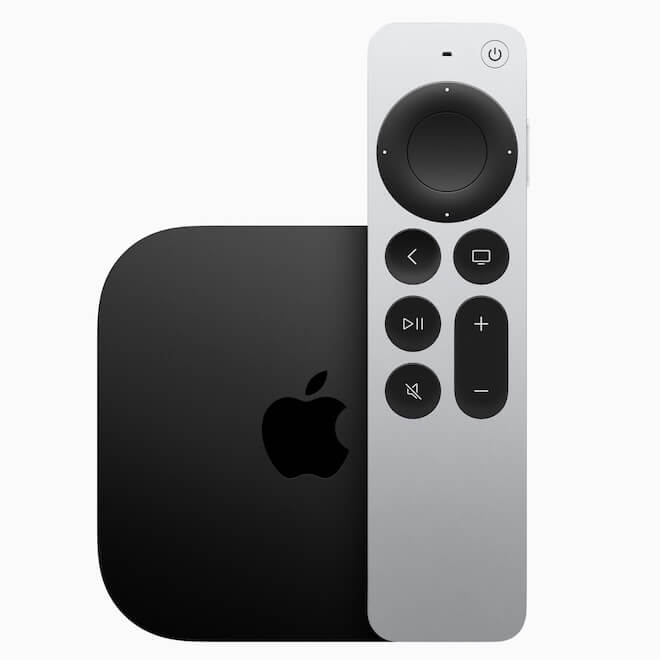
Once Apple tvOS 27 is ready to roll-out, the only previously released models that will be compatible with the new OS will the Apple TV 4K (2nd Gen, 2021 model) and Apple TV 4K (3rd Gen, 2022 model).
The previously released Apple TV HD (2015) and First Generation Apple TV 4K (2017) will not be compatible with tv0S 27 but will remain compatible with tvOS 26 for the time being.
In addition to tvOS 27 on the software side, Apple is expected to time the update around the release of its next-generation Apple TV 4K box. The rumored “Apple TV 4K Pro” name may not be final, but the idea is clear: Apple needs new hardware that can get more out of tvOS 27, Apple Intelligence, and a more capable version of Siri.
The next Apple TV 4K is expected to include either an A17 Pro or A18 Pro chip. Connectivity upgrades could include Wi-Fi 7 and Bluetooth 6, while a redesigned remote may add easier access to Siri AI, along with a U1 Ultra Wideband chip for improved Find My support. Because apparently losing the Apple TV remote remains one of civilization’s most reliable traditions.
Pricing is expected to start at $149 for the higher-end model, with a more budget-friendly version possibly landing at $99. At this point, it is not clear what Apple would remove or scale back from the lower-cost version.
tvOS 27 matters because Apple TV 4K has never really been about throwing the most apps on a screen. Its strength has been speed, polish, privacy, ecosystem integration, and not making the living room feel like a casino lobby with a remote. If tvOS 27 delivers faster app launches, quicker AirPlay, better accessibility tools, improved Apple Music and Podcasts support, and deeper Siri AI integration through Apple Intelligence, Apple TV could become a more useful hub for streaming, music, smart home, and accessibility.
What makes this unique is not any single feature. Roku, Amazon, Google, and Samsung all have streaming platforms. Apple’s advantage is how tightly Apple TV can connect with iPhone, AirPods, HomePod, Apple Music, Apple Fitness+, HomeKit, FaceTime, Apple Arcade, and potentially a smarter Siri. For households already invested in Apple gear, that kind of integration matters more than another cheap plastic puck with ads stapled to every menu.
That said, nothing is final until Apple releases tvOS 27 and confirms the next Apple TV 4K hardware. The rumored “Apple TV 4K Pro” could be the box that finally gives Apple’s living room strategy the AI upgrade it needs, but pricing, specs, naming, and feature support remain unconfirmed. For Apple users who want a faster, cleaner, more privacy-focused streaming device that can also serve as a music, smart home, and accessibility hub, tvOS 27 could be a meaningful step forward. Just don’t retire the current Apple TV 4K until Apple shows the actual box.

Looking for the most recent Mini Crossword answer? Click here for today’s Mini Crossword hints, as well as our daily answers and hints for The New York Times Wordle, Strands, Connections and Connections: Sports Edition puzzles.
Need some help with today’s Mini Crossword? I admit, 7-Across threw me for a bit, but I figured it out eventually. Read on for all the answers. And if you could use some hints and guidance for daily solving, check out our Mini Crossword tips.
If you’re looking for today’s Wordle, Connections, Connections: Sports Edition and Strands answers, you can visit CNET’s NYT puzzle hints page.
Read more: Tips and Tricks for Solving The New York Times Mini Crossword
Let’s get to those Mini Crossword clues and answers.
The completed NYT Mini Crossword puzzle for June 12, 2026.
1A clue: Vertical post in a doorframe
Answer: JAMB
5A clue: What “E” stands for in the musical mnemonic EGBDF
Answer: EVERY
7A clue: 6:7, e.g.
Answer: RATIO
8A clue: Rap or tap
Answer: KNOCK
9A clue: Quick puff on a joint
Answer: TOKE
1D clue: Kind of seasoning for Jamaican-style chicken
Answer: JERK
2D clue: ___-garde
Answer: AVANT
3D clue: “That makes two of us!”
Answer: METOO
4D clue: Badly missed jump shot, in hoops slang
Answer: BRICK
6D clue: Oxen’s harness
Answer: YOKE


Shion arrives when Season 3 starts on June 16.
After teasing the newest addition to the lineup of colorful characters in its team shooter earlier this week, Blizzard has released the gameplay trailer for another new damage hero. Shion will join Overwatch when its next season, the third since the Reign of Talon reboot, kicks off on June 16. This character won’t do anything to change the impression that Blizz is leaning hard on making hot heroes or that it’s starting to suffer same-face syndrome with its female lineup. But at the very least, Shion is one of the team’s most dramatic creations in a while, looking very stylish in an all-white suit paired with petite red horns and cybernetic red eyes.
Appearance-wise she might call to mind the moody Reaper character, but Shion’s kit actually feels more reminiscent of Tracer. She’s dual-wielding semi-automatic pistols as her base weapon, but can focus fire in a more powerful burst to finish off a low-health opponent. Mobility also seems core for this hero, since she has both a dash move and can ride actual motorcycle in-game. The bike seems especially satisfying, since it looks like there’s an ability for Shion to jump off and launch the vehicle forward into a rival. Her ultimate ability turns Shion into a damage-dealing vortex that can dash toward enemies.
Considering the big Overwatch reboot aims to emphasize a bigger narrative tying together the characters, it seems likely that the next lore drops will highlight story threads surrounding the Hashimoto clan where Shion is a boss. So expect more background on support heroes Kiriko and Mizuki as part of the larger drama about Vendetta’s efforts to take over the world as Talon’s new villain-in-charge.




Weekend Open Thread: Evereve – Corporette.com

Jensen Huang Approves Samsung, SK Hynix, and Micron for NVIDIA (NVDA) HBM4 Memory Supply

The Best Mystery Series of All Time Is Surging on Streaming 30 Years After It Ended


Alexander Zverev wins the French Open to finally earn a 1st Grand Slam title


Anatomy of the June crypto crash: Fed, Iran, Saylor


Suspicious Polyfill login prompts pop up on Toshiba, Muji websites

Senator Cynthia Lummis Calls CLARITY Act the Most Consequential Financial Legislation of This Generation


Microsoft launches MXC, an OS-level sandbox for AI agents, with OpenAI and Nvidia already on board
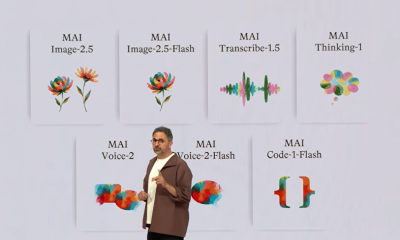

Microsoft unveils seven homegrown AI models in new bid for ‘long term self-sufficiency’


(VIDEO) Justin Bieber Delivers Surprise Happy Birthday Serenade to Diners at Los Angeles Mexican Restaurant

Alexander Zverev conquers demons and outlasts Flavio Cobolli to win French Open for first major title


High Stakes for Wembanyama as New York Pushes for 3-0 Lead


Von der Leyen’s AI envoy pick draws conflict-of-interest fire

The Pain Points Taking a Fragile Tech Rally Down a Notch

Eli Lilly (LLY) Stock Surges 4% Following Breakthrough Sleep Apnea Trial Results

Meta steals a tactic from Tesla and builds data centers in tents


Hackers now exploit SolarWinds Serv-U flaw to crash servers
LBank Surpasses 25 Million Users Worldwide as AFA Partnership Continues to Drive Global Growth


Trump’s AI Ownership Plan Could Benefit Anthropic at OpenAI’s Expense


Notion restores access to Anthropic after service disruption



You must be logged in to post a comment Login