An anonymous reader quotes a report from RathBiotaClan: Millions of people finish short video after short video every day; a new brain-scan study shows that the very act of finishing a clip they like temporarily quiets the brain regions that normally help them stay focused and weigh longer-term goals. When people watch a short video they enjoy enough to finish, two brain regions involved in cognitive control show significant deactivation. That is the central finding of a new study from Zhejiang University, published in NeuroImagein January 2026.
Using functional MRI alongside proton magnetic resonance spectroscopy (H-MRS), the research team examined 56 young adults while they freely watched short video clips inside an MRI scanner. Both the dorsal anterior cingulate cortex (dACC) and the dorsolateral prefrontal cortex (dlPFC) showed reduced activity specifically when participants watched clips they liked enough to view to completion. Cognitive control helps people balance immediate pleasures against longer-term goals, and impairments in this system are linked to conditions such as depression, anxiety, ADHD, and addiction. Short-video platforms present rapid, algorithmically curated streams that are built for continuous, low-effort consumption.
Prior behavioral research has tied both internet addiction and smartphone addiction to weaker self-control, and separate neuroimaging work has documented disruptions to reward and cognitive-control circuits in people with behavioral addictions. Despite this, few studies had directly tested whether the act of watching entertaining short videos itself suppresses the brain’s cognitive control regions. The Zhejiang University team set out to answer that question, along with a second one: what neurochemical factors might explain why this suppression varies from person to person?
Gaming monitors have been delivering insane refresh rates for years, but laptop screens have mostly stayed the same. Samsung Display just changed that equation at IMID 2026 in Busan, where it unveiled a 16-inch OLED panel built specifically for laptops that hits a 300Hz refresh rate.
Why does 300Hz on a laptop actually matter?
Samsung says this is the first time any self-emissive laptop display has reached 300Hz, and that’s a big deal if you use your laptop for anything beyond emails and spreadsheets. Higher refresh rates mean smoother motion, whether you’re scrolling through a webpage, editing video, or actually gaming on the go.
Samsung Display
Until now, you needed a hefty gaming laptop with a dedicated GPU pushing high frame rates to make a fast panel worthwhile. And while this panel is also aimed at gamers, Samsung packing this into a slim 2.5K OLED panel means that smoothness could trickle down to thinner, lighter laptops too.
What else did Samsung bring to the show?
The 16-inch panel wasn’t the only thing Samsung brought to the event. Samsung also showed off a 31.5-inch QD-OLED monitor that combines 4K resolution with a 360Hz refresh rate, something no monitor has managed to do simultaneously before.
Samsung Display
The company also brought a 34-inch QD-OLED gaming monitor with a 21:9 ultrawide aspect ratio and its own 360Hz refresh rate. All three panels were showcased in the Winning Game Arena, clearly aimed at showing gamers and creators what its OLED tech can do across different screen sizes.
Samsung didn’t share when this 16-inch panel will actually land in laptops you can buy, but the fact that it exists at all suggests laptop makers might finally start advertising refresh rates the same way gaming monitor brands do. If your laptop screen has ever felt sluggish compared to your monitor at home, this might be the fix you’ve been waiting for.
How can normal users increase their privacy, safety and security online?
Over the last two decades, the internet quietly rebuilt itself around a business model that depends on knowing everything about you. Every app you install or use, every account you create, every website you visit, and every form you fill out becomes another data point feeding a system designed to track, profile, and monetize you and your identity.
This process is often referred to as surveillance capitalism and creates an economy where attention and personal data are the product and you are the raw material.
The mechanics of this are almost invisible day to day. A single email address becomes the thread that ties together your shopping habits, your health searches, your location history, and your social connections.
Advertisement
Data brokers exist specifically to aggregate these threads, buying, selling, and cross-referencing fragments of your life until they can construct a profile more complete than most people would recognize about themselves.
None of this requires a breach or a hack – it’s simply how the default internet works. Data brokers are often the most consequential handlers of personal information that operate without consumers’ awareness or informed consent.
The result is that privacy is no longer something you can expect. It has become something you have to actively construct, piece by piece, against the grain of nearly every service you use. The harms of this model are diffused and delayed and you don’t feel the effects of a data broker profile the way you feel a stolen credit card.
The damage shows up later, as spam, as price discrimination, as identity theft, as a general erosion of control over your own digital identity.
Advertisement
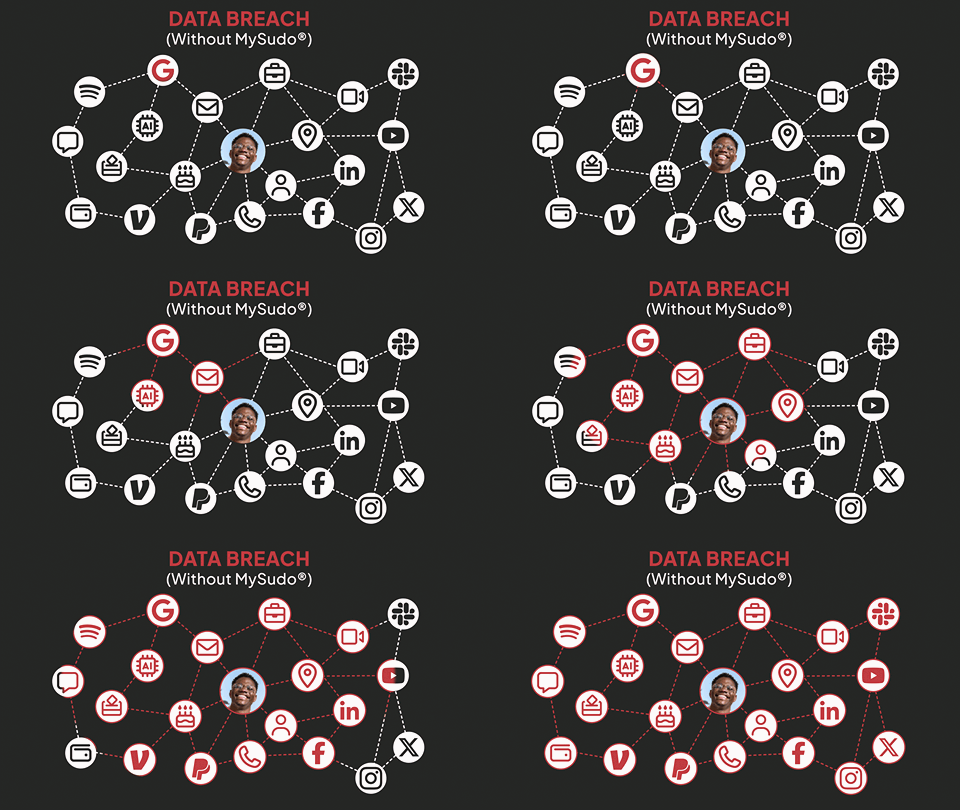
The graphic below shows the problem of using a single identity across your online actions. When a data breach occurs, everything connected can be exposed and tied back to you. Data brokers can use it to construct a complete picture of your life, and this valuable information is for sale.
Artificial Intelligence (AI) systems have made the problem significantly worse.
Data brokers can now use AI to link your different actions in a way that was previously thought impossible. AI’s expertise is data analysis, working through vast amounts of information to correlate your actions into a valuable profile.
In this world of surveillance capitalism, can we shift the privacy pendulum back in your favor? Is it even possible to be private, secure, and safe online?
Advertisement
Every account you sign up for and every form you fill out connects back to you.
MySudo breaks that trail by allowing you to create multiple digital identities, each with its own phone number, email, payment card, and more, as a new set of credentials you can use so you stop handing over your personal information by default.
If surveillance capitalism works by linking everything about you into one exploitable profile, the countermeasure is structural (not just legal or political): break the correlating identifiers.
This is the premise behind compartmentalization. Instead of using one set of identifiers such as one email, one phone number, one payment method, one communication handle across every context in your life, you deliberately compartmentalize activities into separate, purpose-built personas.
Advertisement
One persona for online shopping, a different one for dating apps, another for travel, another for marketplace listings, and even another for that newsletter you’re not sure you trust yet.
Each persona operates as a self-contained identity with its own email address, its own phone number, its own payment method, its own browser, and its own communication handle. Crucially, these personas aren’t connected to each other or back to your actual identity in any way a data broker or advertiser could observe.
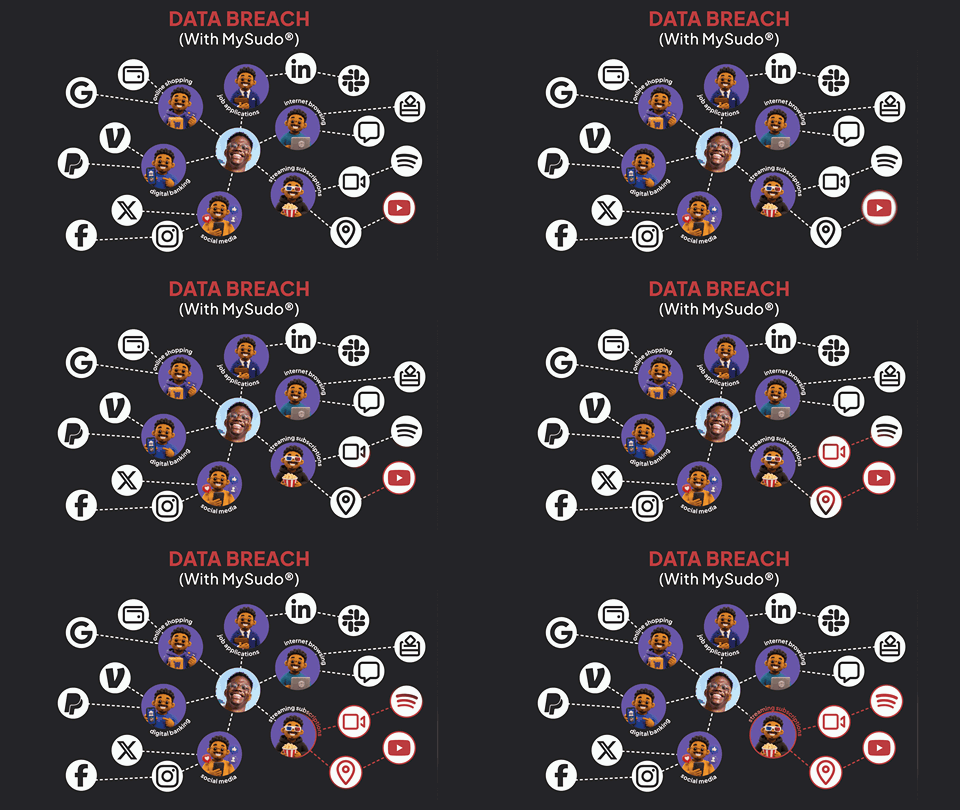
As shown in the graphic below, if a persona gets swept up in a breach, starts attracting spam, or gets sold to a marketing list, the damage is contained and is not tied back to you.
This is a fundamentally different privacy model than the one most security tools rely on. Most tools try to protect a single identity better with stronger passwords, better encryption, more careful permissions.
Advertisement
Compartmentalization instead assumes that any single identity is eventually going to become correlated and anticipates corrections by ensuring that no single identity is valuable due to its changeability. This process is less about building an impenetrable wall and more about not putting all your value behind one wall in the first place.
The elegance of this approach is that it doesn’t require the rest of the internet to change. You don’t need every company you interact with to suddenly adopt better data practices. You just need a layer that sits between you and them, generating and managing these personas on your behalf.
Anonyome Labs patented many of the ideas related to creation of online personas and compartmentalization, here are some examples:
How MySudo Puts This Into Practice
Compartmentalization and personas are an important advancement, but the harder problem (and the one that has occupied most of our product decisions) is making it usable by typical users and automatic enough that people can do it consistently, without a computer science degree, and without constant friction.
Advertisement
As shown in the graphic below MySudo was designed to implement this paradigm and enable each user to create up to 9 personas or Sudos. Each Sudo provides a different:
Phone number that can make and receive phone calls and SMSs;
Email inbox that can send and receive emails;
Virtual payment card for purchasing online;
Communication handle to enable end-to-end encrypted (E2EE) messaging, voice calling and video calling (similar to WhatsApp);
Browser for complete separation of browsing.
MySudo comes in two form factors:
A mobile app for iOS and Android that allows each persona to communicate externally with phone calls, SMSs, and emails. It allows creation of individual payment cards and to have end-to-end encrypted messaging, email, voice and video. It also has a separate browser for each persona.
A desktop companion app for Windows and Mac that allows management of persona emails in a form factor that provides support for longer and more complex emails. More features are coming to the MySudo desktop app soon.
MySudo is part of a growing family of privacy and security applications from Anonyome Labs that also includes a privacy focused VPN and Password Manager (coming soon).
Individual online privacy has been under surveillance and attack almost since the beginning of the web – and now users have identity-based tools to fight back. By creating multiple personas that allow you to compartmentalize your life, you too can reap the privacy benefits.
Your identity is already being pieced together. Stop handing over the pieces.
Advertisement
Download MySudo now to create separate digital identities that keep your personal information private and out of reach from data brokers, scammers, and the next data breach.
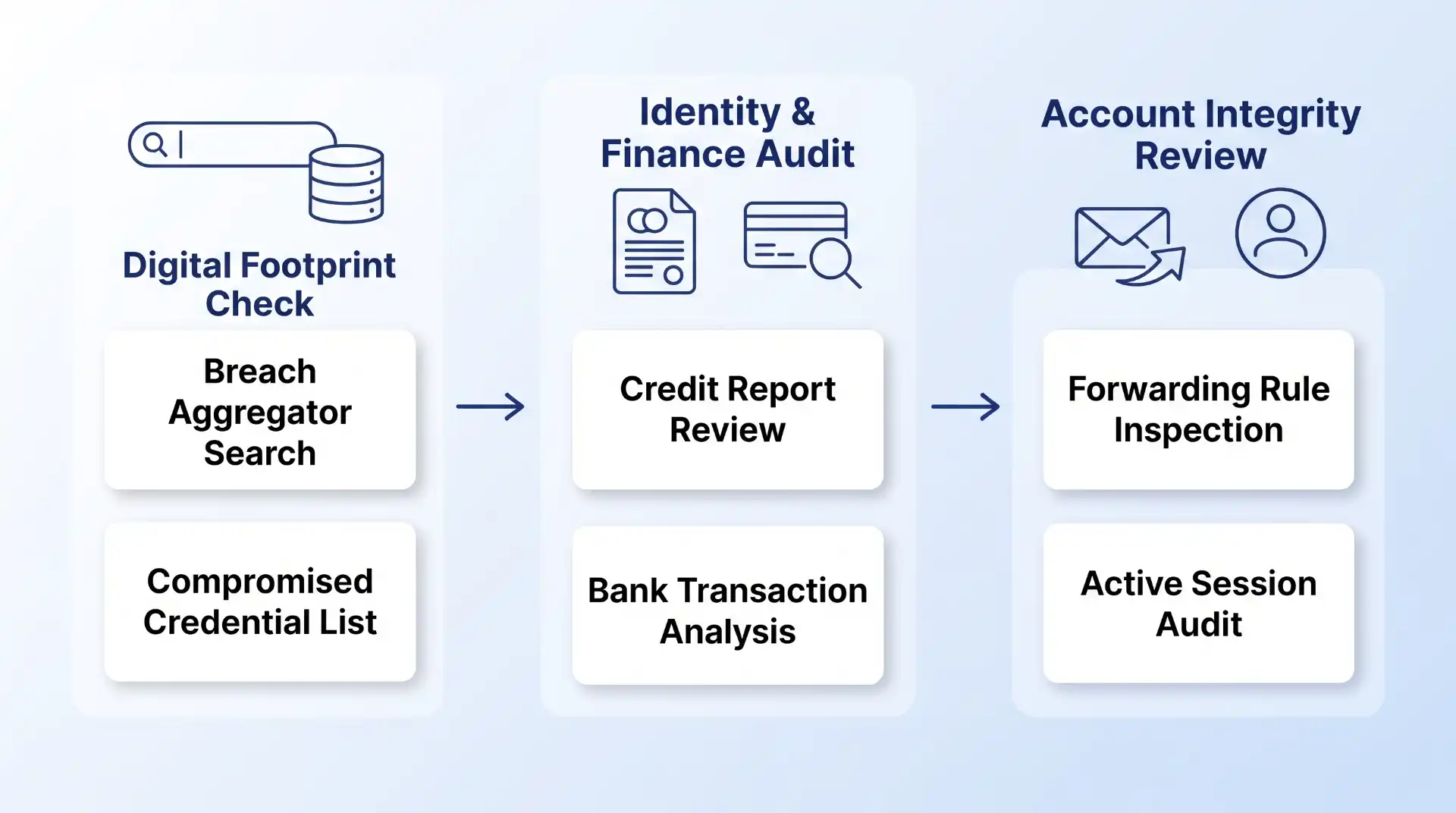
To tell if your data has been compromised, search your primary email addresses and phone numbers on breach lookup databases like Have I Been Pwned or CyberNews, check official state data breach registries, audit your credit reports at AnnualCreditReport.com for unauthorized accounts, and inspect your financial accounts and email settings for unrecognized logins or automated forwarding rules.
Quick Take: How to Audit Your Data Exposure
Determining whether your personal information has leaked requires a systematic audit across three distinct vectors: public breach aggregators, financial credit bureaus, and individual account security logs. If a database lookup flags an exposed password or your bank statement shows an unfamiliar micro-transaction, treat your credentials as actively compromised. Securing your identity immediately involves revoking active device sessions, updating passwords via a dedicated vault, enforcing hardware or app-based multi-factor authentication, and freezing your credit files across major credit reporting agencies.
Prerequisites for Performing a Personal Data Audit
Before initiating a manual security audit, gather the necessary assets to ensure you do not miss hidden attack vectors or orphan accounts. Having these items prepared reduces the risk of overlooking connected services:
A Master Account Inventory: A compiled list of every email address, phone number, username, and primary domain name you have used across personal, financial, and work accounts over the past five to ten years.
Access to a Password Manager: A centralized credential vault (or secure browser storage) to review where reusable passwords may have been deployed across multiple platforms.
Identification and Credit Documentation: Secure access to your credit monitoring portals or government-issued identification details needed to request official credit reports.
Secondary Verification Devices: An authenticated smartphone or hardware security key ready to receive time-based one-time password (TOTP) codes as you audit and re-anchor account security.
Step-by-Step: How to Determine If Your Data Has Been Leaked
Data breaches vary significantly depending on what information was stolen. To avoid wasting time on false alarms or misdiagnosing a breach, route your investigation based on the specific exposure vector below.
Step 1: Query Aggregated Data Breach Databases
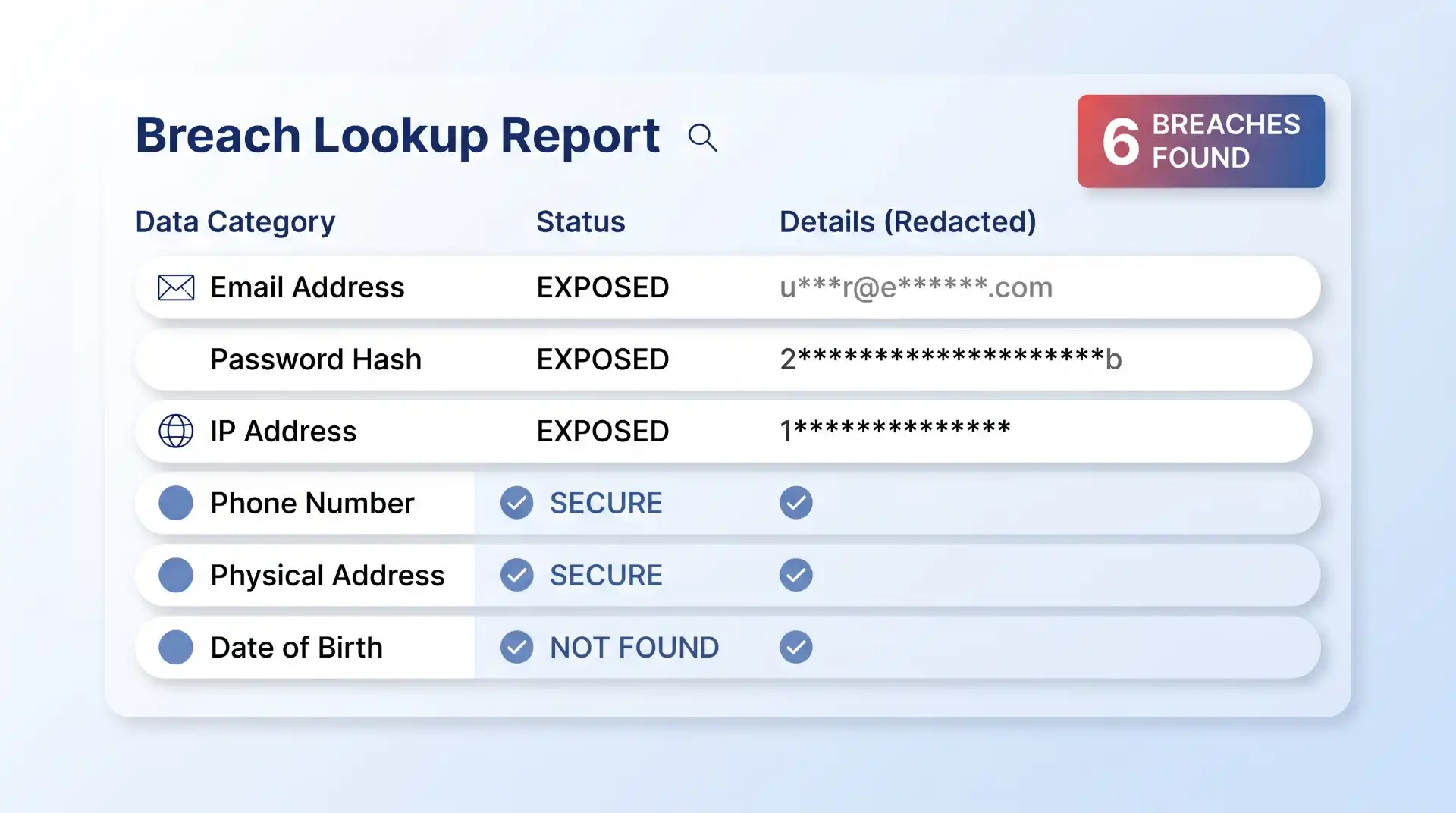
Threat actors frequently dump or trade stolen databases on illicit forums, paste sites, and dark web marketplaces. Breach aggregators collect these compromised datasets, index the hashed credentials, and allow users to search their exposure without exposing sensitive details.
Advertisement
Navigate to an established breach repository such as the CyberNews Personal Data Leak Checker or Have I Been Pwned. Input your primary and secondary email addresses along with phone numbers tied to key online accounts. Review the returned query report to identify which specific services suffered a breach, the exact date of exposure, and what data classes (e.g., plain-text passwords, salt hashes, credit card details, or physical addresses) were included in the leak.
Expected Outcome: You will receive a list of historic and recent database breaches linked to your contact details, highlighting precisely which credentials must be rotated immediately.
Step 2: Search Official State and Corporate Breach Notifications
Companies are legally bound by consumer protection statutes to notify affected customers when a security incident compromises personal identification or financial records. However, physical mail notices and corporate emails can easily be overlooked or filtered into spam folders.
Consult official public breach repositories, such as the California Department of Justice data breach guidelines and public disclosure log, which track corporate security incidents impacting consumers. Cross-reference these logs against major services you use—including medical portals, credit issuers, retail vendors, and educational institutions. Additionally, search your email inbox for keywords like “Notice of Data Breach,” “Security Incident,” or “Unlawful Access.”
Advertisement
Expected Outcome: You will verify whether a vendor holding your sensitive records has formally declared a breach, giving you specific legal timelines and instructions regarding offered credit monitoring services.
Step 3: Inspect Email Account Rules and Inbox Settings
When attackers gain stealthy access to an email account, they rarely change the password immediately. Instead, they create automated inbox rules to redirect incoming mail, hide password reset requests, or intercept financial confirmations without alerting the owner.
Log into your primary email account, open the general account settings, and locate the “Rules,” “Filters,” or “Forwarding and POP/IMAP” tab. Audit every rule to verify that no unknown external email address is secretly receiving a copy of your messages. Check the “Trash” and “Archive” folders for automated filters designed to mark incoming security alerts from banks or social media platforms as read and deleted.
Expected Outcome: You will ensure that your central recovery vector (your primary email account) is not silently routing security alerts and password reset codes directly to a malicious actor.
Advertisement
Step 4: Audit Financial Statements and Credit Bureau Files
Financial identity theft often begins with small, innocuous transactions. Fraudsters run micro-charges—frequently between $0.50 and $3.00—to confirm that a stolen payment card or bank routing number is active before executing larger fraudulent purchases or line-of-credit applications.
Log into your checking, savings, and credit card accounts to review line-item transactions over the past 30 to 60 days. If you find any unfamiliar charge, even for a minimal amount, contact your card issuer immediately to report account compromise. Next, access your free credit reports from Equifax, Experian, and TransUnion via AnnualCreditReport.com. Inspect the “Hard Inquiries” and “Open Accounts” sections for credit lines, personal loans, or store cards that you did not explicitly apply for.
Expected Outcome: You will detect early indicators of financial identity theft and spot unauthorized credit applications before they damage your overall credit standing. If you regularly use credit cards for online transactions, reviewing baseline features and security protocols by understanding different types of credit cards can help you spot anomalous account behavior faster.
Step 5: Review Active Sessions and Connected OAuth Applications
Modern account compromises increasingly rely on session hijacking—where attackers steal active session cookies or leverage third-party OAuth application tokens to bypass traditional password authentication entirely.
Advertisement
Open the security panel of your core accounts (e.g., Google, Apple, Microsoft, social networks, and password managers). Locate the “Active Sessions,” “Devices,” or “Where You’re Logged In” section. Terminate any session linked to an unrecognized device, outdated operating system, or unfamiliar geographic location. Next, navigate to “Connected Apps” or “Third-Party Permissions” and revoke access for any legacy application or service you no longer actively use.
Expected Outcome: Invalidating active session tokens immediately severs an attacker’s persistent backdoor access, forcing any unauthorized party to re-authenticate from scratch.
Verification: Confirming Whether Exposure Is Active or Historical
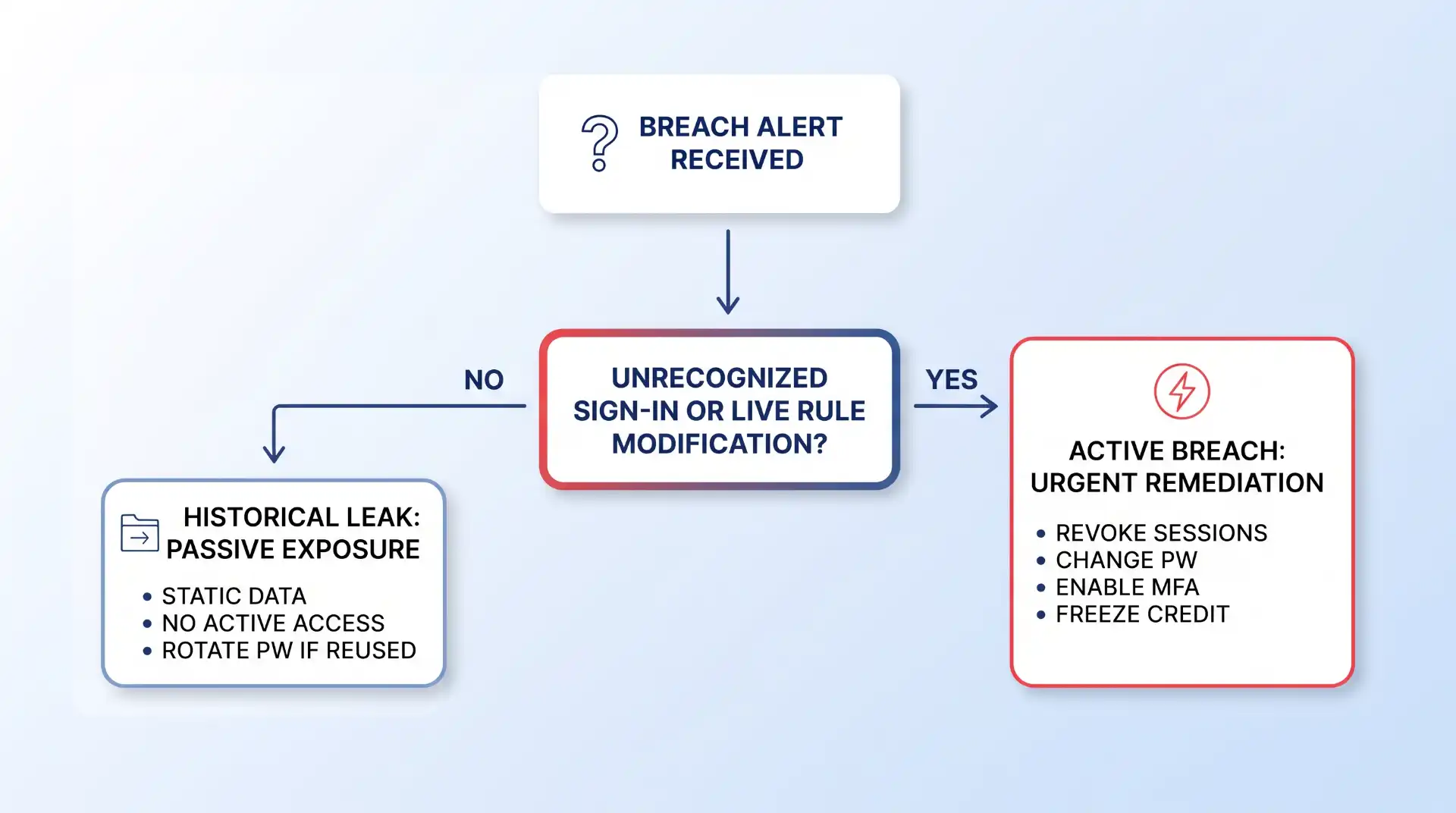
Not all data breach results require the same immediate panic. Distinguishing between a historical, static database leak and an active, ongoing account intrusion dictates your response speed and tactical priorities.
To verify if an exposure is active:
Advertisement
Check Real-Time Sign-In Logs: Review the timestamps and IP addresses in your account security logs. If an IP address from an unfamiliar region logged in within the past 24 hours, the compromise is live and active.
Test Existing Credentials: If your password no longer works and you have not recently changed it, an attacker may have already taken over the account and altered the recovery email or phone number.
Evaluate Password Reuse Scope: A entry in a breach database from five years ago may be harmless if you have changed that password since. However, if that old password is still used across active services today, treat every single one of those destination accounts as actively vulnerable. Implementing robust credential management habits and evaluating whether are password managers really safe will significantly reduce your attack surface during cross-platform exposures.
Troubleshooting: What to Do When Signs Point to Compromise
If your diagnostic audit reveals active unauthorized access, execute this recovery escalation path to re-establish control over your identity and accounts.
Failure Point 1: You Are Locked Out of Your Primary Account
Fix: Initiate the service provider’s account recovery workflow immediately. Use a trusted, known device and network connection previously associated with the account. If the recovery email or phone number was altered, select “Try another way” to supply account creation dates, previous passwords, or identity verification documents. If the account contains financial or billing information, contact customer support by phone to place an administrative hold on the profile while identity verification takes place.
Failure Point 2: Password Resets Fail to Stop Unauthorized Sign-Ins
Fix: Changing your password does not always terminate active browser sessions if an attacker holds a persistent session cookie or OAuth token. According to Lunar Cyber’s breach monitoring analysis, modern infostealer malware extracts session tokens and browser state data, enabling bad actors to bypass standard password resets. After changing your password, explicitly click “Log out of all other sessions” or “Revoke all active tokens” across all settings menus. Run an up-to-date malware scan on your local machine to eliminate active infostealer Trojans that may be capturing keypresses or browser session files in real time.
Failure Point 3: Your Social Security Number or Government ID Was Exposed
Fix: Password resets cannot safeguard physical identity attributes like Social Security numbers or driver’s license numbers. Take formal legal and credit protection measures immediately: submit an official report via IdentityTheft.gov, follow established legal identity theft response protocols, and contact each of the three nationwide credit bureaus (Equifax, Experian, TransUnion) to initiate a full credit freeze. You can also explore placing a credit freeze or fraud alert depending on the severity of the document exposure.
While public breach lookup services and account security audits are essential components of digital hygiene, they possess inherent structural limitations that every user should understand:
Advertisement
Reporting Lag Times: Breach aggregators rely on public dumps, security research contributions, or threat intelligence feeds. Months or even years can elapse between an actual security breach and its publication on public lookup platforms.
Private Threat Intelligence Gaps: Proprietary databases stolen by sophisticated threat actors are often sold privately or leveraged exclusively for targeted spear-phishing and extortion, meaning they will never appear in searchable public repositories.
Session Token Exploits: Modern credential theft extends far beyond static text passwords. If malware steals local browser session cookies, breach tools searching for leaked text credentials will show no alert, even while your active sessions are being accessed.
Enterprise and Business Scope: Individual consumer tools only check personal identifiers. Organization-level breaches often require specialized monitoring focused on protecting customer data, internal access logs, and API endpoint security.
Key Takeaways for Long-Term Data Security
Maintaining long-term digital privacy requires moving from reactive panic to proactive operational security. Apply these key practices to keep your exposure minimal:
Key Takeaways
Eliminate Password Reuse: Use a dedicated password manager to generate and store randomized 16+ character passphrases for every individual account.
Enforce Strong Multi-Factor Authentication: Transition away from vulnerable SMS-based verification codes and set up two-factor authentication using authenticator applications (such as Google Authenticator) or physical FIDO2 security keys.
Freeze Your Credit Files: Keep your credit files frozen at Equifax, Experian, and TransUnion by default, thawing them only temporarily when applying for new credit lines.
Prune Legacy Accounts and App Permissions: Delete unused online accounts and regularly revoke third-party OAuth access tokens connected to your primary email and social profiles.
Stay Vigilant Against Social Engineering: Treat unexpected communications with heightened skepticism by learning the warning signs for identifying targeted phishing scams that exploit leaked personal details.
Adopt Comprehensive Security Standards: For broader personal defense strategies, review overall best practices to maximize your data security across home networks, mobile devices, and cloud storage accounts.
Frequently Asked Questions
How long does it take for stolen data to show up on breach lookup tools?
According to Experian’s data breach assessment guide, it can take anywhere from a few days to several months—or even years—for breached data to appear on public lookups. The delay depends on how quickly the breach is discovered by the company, when disclosure laws require notification, and when threat actors upload or trade the stolen database publicly.
What should I do if my password was leaked but I use two-factor authentication?
While two-factor authentication (2FA) prevents an attacker from logging in with a stolen password alone, you should still change the compromised password immediately. An exposed password reduces your overall defense to a single security layer, leaving you vulnerable to 2FA fatigue attacks, SIM-swapping, or session hijacking.
Is it safe to enter my email address into breach lookup websites?
Yes, provided you use reputable, established breach lookups like Have I Been Pwned, F-Secure Identity Theft Checker, or CyberNews. These tools process your email address or phone number safely without requesting account passwords, recovery codes, or sensitive financial data.
Does changing my password automatically log out someone who stole my session cookie?
Not always. Some web platforms do not automatically invalidate active session tokens when a password is reset. To ensure an attacker is completely locked out, navigate to your account’s security settings and manually select “Log Out All Devices” or “Revoke Active Sessions.”
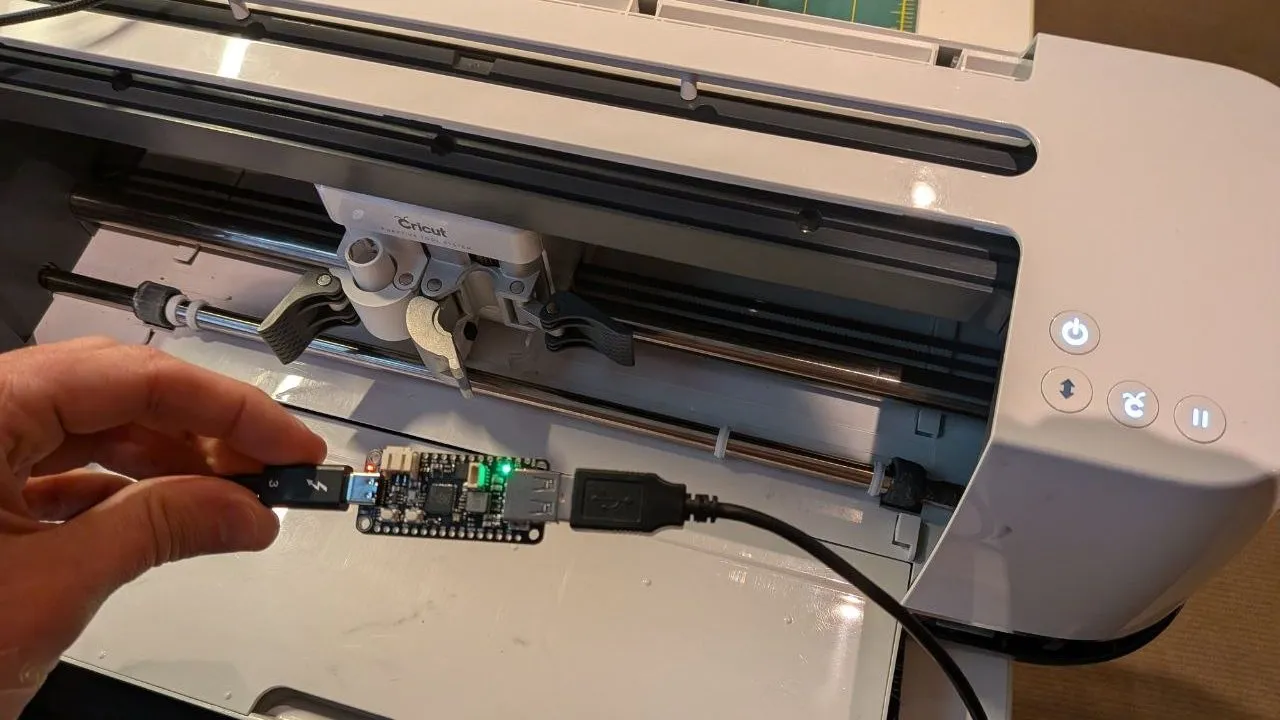
[xssfox] recently found a Cricut Maker in an e-waste disposal. A quick scan over the device indicated it was in moderately good condition, with merely some perished rollers to contend with. The device was salvaged, with the awareness that Cricut is plenty good at disabling and locking down machines when it wishes. However, those measures didn’t stop [xssfox] from bringing it back to life.
The suspicion was that the machine had been locked out after the original owner received a warranty replacement or similar. Whatever the reason, the rollers would have to be repaired and the machine unlocked if it were ever to cut (Cricut?) again. Hooking the machine up to Cricut software showed that it was “deactivated”, so there was work to do.
The rollers were not a difficult replacement, but the hacking would take a little work. Examining the motherboard didn’t reveal any obvious EEPROMs, and the microcontroller was not one [xssfox] had the debugger to work with. Thus, attention turned to intercepting communications between the machine and the host PC over USB. This revealed the machine sending its serial number to the Cricut PC software in plain text with no checksums or encryption at all. Unlocking the machine was as easy as installing an RP2040 in between the Cricut Maker and the host PC. It was programmed to relay packets between the two and spoof the serial number in the process.
Broadcom is in talks with lenders to raise more than $60bn in debt, Bloomberg reported on Thursday. The money would finance AI chips for Anthropic and other companies. Bloomberg cited people with knowledge of the matter.
The figures under discussion could take the total as high as $100bn. Talks are continuing and the terms may change.
Blackstone and Apollo Global Management are in talks to take part, the same people said. Spokespeople for Broadcom, Anthropic, Apollo and Blackstone declined to comment.
How the financing is structured
The package has two parts. A junior tranche of roughly $30bn sits alongside a senior-secured tranche of about $60bn to $70bn, according to Bloomberg.
Advertisement
Broadcom would guarantee a portion of the senior tranche. A special-purpose vehicle would issue the debt.
A special-purpose vehicle is a separate legal entity created to hold specific assets and the borrowing against them. The debt sits on the vehicle’s books rather than on the balance sheet of the company that set it up. Investors in the vehicle have a claim on the assets inside it.
Anthropic does not buy the chips under this arrangement. Investors finance the purchase, then lease the hardware to the company.
The first deal in the partnership
Broadcom, Apollo and Blackstone formed the AI XPV partnership in June. Its opening transaction raised $35bn to expand Anthropic’s computing capacity, using Broadcom custom chips and networking equipment. Reuters reported the terms. TNW covered it in May, when Apollo and Blackstone shopped it to investors.
Advertisement
In that transaction Broadcom backstopped most of the debt while Apollo and Blackstone financed the chip purchases. Bloomberg reports that the backstop allowed the senior tranches to obtain investment-grade ratings, which lowered the borrowing costs.
The new financing could follow the same shape, according to Bloomberg’s sources, and may arrive in stages rather than at once.
The 20 gigawatt target
The partnership intends to finance more than 20 gigawatts of computing power for leading AI labs by 2028. Bloomberg puts the cost at hundreds of billions of dollars. That capacity would roughly equal the output of 20 nuclear plants.
The first $35bn commitment would add one gigawatt, Reuters reported. On those figures the partnership has funded about a twentieth of its stated target.
Advertisement
Where Broadcom sits
Broadcom designs custom chips for Alphabet and Meta, and has supply agreements with Anthropic and OpenAI. Its chief executive said in March that the company expects AI chip sales to exceed $100bn next year.
Broadcom holds an Apple agreement worth more than $30bn. It signed a $200bn deal with Samsung in July covering memory, foundry and advanced packaging through 2030. Reuters notes that technology companies use Broadcom custom silicon to reduce their reliance on Nvidia.
Broadcom shares rose as much as 1.1% in late trading after Bloomberg published, having briefly declined first. The stock had gained 5.2% this year to Thursday’s close.
Broadcom, Apollo and Blackstone announced the AI XPV partnership in a joint release in June. The three said it would help finance computing infrastructure. Bloomberg reported in May that Apollo and Blackstone were weighing a $35bn financing for Broadcom, and reported the deal complete in June.
Advertisement
Anthropic’s other borrowing
Anthropic is raising money in several places at once. An investment firm is lending about $1.3bn towards a Texas data centre that will house its systems. The company is also finalising a revolving credit facility ahead of its listing, targeting more than $10bn.
Its own figures show the scale involved. Anthropic booked second-quarter revenue above $11.5bn against $787m a year earlier. Its annualised run rate reached $65bn by the end of July, Bloomberg has reported. The company recorded a net loss of almost $42bn in 2025, roughly five times the $8.3bn it lost the year before.
It raised $65bn in May at a $965bn valuation. It has separately agreed a compute deal with SpaceX that could be worth tens of billions over three years.
It expects its IPO to match or exceed SpaceX’s record $75bn raise, and could file publicly as soon as the end of this month. SpaceX’s final figure reached $86.2bn once the overallotment option was exercised.
Advertisement
Anthropic is working with Morgan Stanley, Goldman Sachs and JPMorgan on the listing. US initial public offerings had raised $160.6bn through 19 August, against the 2021 record of $195.2bn.
The wider financing market
Similar structures have appeared across the industry this month. Nvidia announced that a coalition including BlackRock and Goldman Sachs was lining up more than $500bn for the AI build-out.
Regulators have begun to place these vehicles. SEC staff agreed this month that data centre securitisation falls outside Dodd-Frank risk retention rules, in a response tied to Nvidia’s programme.
Reuters reports that Alphabet, Amazon and Microsoft have all turned to debt markets to fund AI expansion. All three expect spending to stay high through 2026.
Advertisement
Bloomberg reported on 15 August that bond traders were weighing about $70bn of what it described as shadow credit backstops from AI companies. Broadcom’s guarantee on the senior tranche is that kind of commitment.
What has not been confirmed
None of the four companies has commented, and Bloomberg’s sources spoke on condition of anonymity because the information is private.
Bloomberg’s sources did not settle the split between the $30bn junior tranche and the senior tranche. They gave no figure for the portion Broadcom would guarantee. They did not set a timetable for issuance, or name any lender beyond Apollo and Blackstone.
The 20 gigawatt figure is the partnership’s own target for 2028. The partnership has financed one gigawatt of it so far.
RAMageddon could soon push car prices higher as modern vehicles rely on ever more RAM and powerful centralized computers to run everything from infotainment to driver-assistance systems. Analysts cited by The Atlantic estimate the shortage could add a few percentage points to vehicle prices, which might not sound like much, but could potentially translate to around $2,000 on a $50,000 vehicle. The broader shift toward software-heavy vehicles could also make used cars even less affordable. An anonymous reader quotes an excerpt from the report: Just like laptops, cars depend on microprocessors and RAM, or random-access memory, to run all of their computations. “There’s just a baseline level of tech, and thus a baseline level of cost, required of every vehicle,” Karl Brauer, the executive analyst at iSeeCars, an automotive-research platform, told me. Technology is a major reason the average price of a new car in the U.S. has reached some $50,000, and that was before RAM became one of the most prized commodities in the world. AI companies are snatching up as much memory as possible for their data centers, causing a RAM shortage that has significantly raised the prices of phones, laptops, and just about any consumer-electronic device. Cars are next.
[…] Over the next year, the memory shortage — sometimes known as RAMageddon — will likely raise vehicle prices by a few percentage points, on average, [said Sam Abuelsamid, an analyst at Telemetry and a former automotive engineer]. The relative amount would be smaller than the shocking double-digit jumps for gaming consoles and MacBooks but in some ways more significant: A 4 percent price hike for cars amounts to some $2,000 on average. Cars with those centralized computers will be affected the most, but no vehicle will be spared. “Even if you don’t need the high-end chips, you’re going to pay more even for the low-end chips just because of the supply constraint,” Abuelsamid said. On a recent earnings call, Ford’s chief financial officer said that the company had paid $1 billion in higher materials costs due to the memory shortage and inflation. GM and Volkswagen, too, have noted rising chip costs to investors. (Ford and GM did not respond to a request for comment. A spokesperson for Volkswagen told me that the company has “recognized an increased demand for memory chips, primarily driven by growing requirements in other industries,” and that in recent years, Volkswagen has taken measures to “mitigate supply risks.”)
RAMageddon is poised to last for several years, but the consequences for car buyers may be permanent. Consider what happened during the pandemic, when supply-chain disruptions and rising demand for electronics produced a major chip shortage. Nearly every major car company had to slash production because they simply couldn’t procure enough chips, and shifted their focus to selling higher-end and higher-profit vehicles. Potential customers already willing to spend six figures on a car are much less likely to care about a 5 or 10 percent price hike, [said Ivan Drury, the director of insights at Edmunds]. Even now, car companies are continuing to focus on selling more profitable models. Since the pandemic, the average price of a new vehicle has jumped $11,000.
The AI-fueled chip crisis could play out more severely. The average price of a new car could, before long, jump to $60,000 and beyond. These rising costs are making cars even more similar to computers and all of the software they run: Perhaps in an effort to mitigate higher prices, some automakers are also introducing in-car advertisements and putting certain features, such as heated seats, behind a paywall. As cars have morphed into computers, the inevitable next step is for automakers to behave like modern tech companies.
Microsoft is expanding Windows Task Manager to show per-process NPU and GPU neural-engine usage, giving users more visibility into which apps are consuming hardware for AI workloads. The Register reports: The Processes tab can show NPU use alongside CPU and GPU activity, while the Performance tab displays overall utilization. […] Microsoft was keen to point out the metrics that can be monitored. “As AI workloads become more common on Windows devices, visibility into NPU and GPU neural engine utilization can help you make better-informed decisions,” the company said. “With the latest Task Manager improvements, you can monitor AI processing activity alongside CPU, memory, storage, and networking data from a familiar interface.”
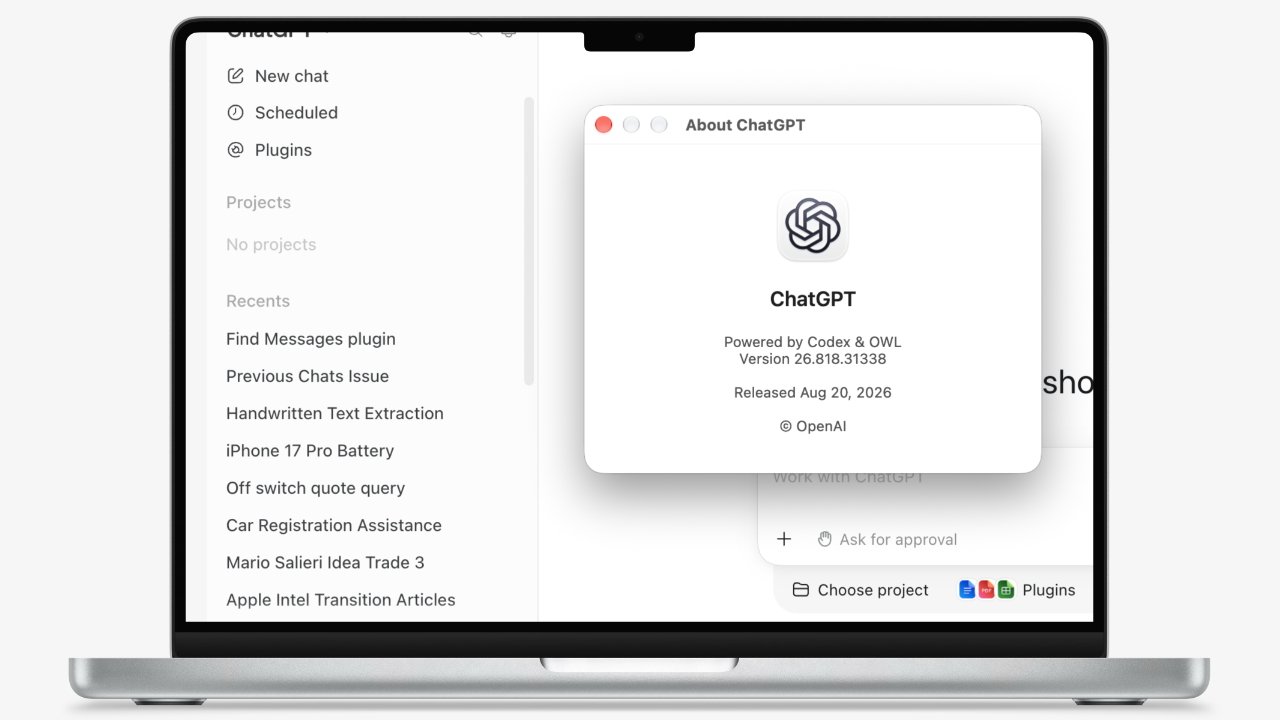
OpenAI has launched a plugin for the Apple Messages app, and as Bloomberg notes, it could raise privacy and security concerns. At the moment, it’s only available to ChatGPT Work and Codex users on Mac, allowing them to search messages and even draft and send replies through the chatbot on their desktop. In the example OpenAI posted, the user asked ChatGPT to look for conversations they’d missed the day before in their Messages app. They then used the chatbot to write and send their reply.
The feature is, at least, opt-in. Bloomberg says users will have to do several things to allow the plugin to work. First, they’ll have to allow ChatGPT to access their Mac’s on-device Messages history when the permissions screen pops up during the setup process. They’ll also be prompted to change their privacy preferences in Mac’s System Settings to give ChatGPT Full Disk Access. In addition, they’ll have to give ChatGPT access to the names of their contacts and to automation tools. In other words, nobody would be installing the plugin by accident.
It’s not quite clear if OpenAI worked with Apple to develop the plugin, but the latter has history of cutting off third parties’ access to its services if they didn’t get permission. In 2024, for instance, it kept disabling Beeper Mini chat app’s access to iMessage until Beeper gave up rolling out fixes that re-enabled the integration. It’s also worth noting that Apple and OpenAI aren’t quite on the best of terms recently. The iPhone-maker sued OpenAI in July, accusing it of trade secret theft. It claimed that OpenAI specifically hired its employees away with the purpose of obtaining confidential company information.
Like many people, I have a contentious relationship with the Memories feature on my iPhone, the AI-powered nostalgia machine that serves up photos and slideshows from deep in your camera roll, either reminding you of a beautiful day at the beach or surfacing an old photo of your ex. About once a month, for whatever reason, my iPhone reminds me of the time my phone got stolen.
The Memory is a glitchy, fragmented one — an auto-generated slideshow of my first few years living in New York. But because my phone was stolen, the photos in the slideshow are a random assortment of mislabeled JPEGs and grainy images I’d saved from Facebook, all somehow imported from my hard drive to my camera roll at some point and set to sentimental music.
I used to get mad that I didn’t back up my actual, treasured photos on a hard drive. But now, I just wish I’d printed out the best ones and put them in a box. That kind of thing can survive for generations.
We should all be printing our photos. I’m not just talking about converting your camera roll into a stack of 4×6-inch glossy pieces of paper, either. It’s actually easier than ever to turn the gigabytes of images we carry around in our pockets into physical objects, like albums and books and frames, the kind we can gather around to pore over and one day pass down to our children. Even individual prints that we touch and hold can tell a story in a way that pixel on a screen never could. Real photos are effectively embodied memories that we can casually encounter as we go about our daily lives. And it’s not just because an algorithm decided to send us a push notification to go look at them, either.
Advertisement
“Printing photos in any form, whether it’s to hang on a wall or to hold in our hands, is effortful,” Brianna Marshall, dean of the Steely Library at Northern Kentucky University, told me. “It requires us to take action to experience the memories in more meaningful ways than an occasional passive scroll of our photo roll.”
In a way, I owe a lot to that phone thief. It was only after losing so many photos that I started paying closer attention to how I managed the new ones I’m taking, which are thankfully backed up in multiple places in the cloud. I’ve made some photo books and some albums of big events, like my wedding. I have a box with some prints inside, although there should be more.
I now have a couple of kids who do many cute things every day, and my camera roll is getting more crowded. My walls are looking increasingly bare. I know I should be printing even more photos, and you probably should, too. When we commit to a process around curating and printing our photos, we’re also creating a ritual around preserving our memories and giving ourselves a chance to interact with them for years or even decades to come. This is so much more rewarding than taking thousands of pictures indiscriminately and then just uploading a few to Instagram periodically and hoping for some likes.
Why your camera roll isn’t a family history
Advertisement
There’s something magical about sitting down with a family photo album. My mom has made them obsessively for decades, and any time I’m home, I end up pulling one off the shelf. Each page is carefully curated to tell a story about a moment — a dance recital, a vacation, a holiday — and taken together, the album tells a story about our lives at that time. She’s made albums about her own childhood, and she’s started some for my own children. Collectively, they’re a family history that we can gather around.
As much as Apple, Google, and other tech companies have tried, you can’t replicate that feeling with an app. There are a ton of upsides when it comes to backing up your photos digitally, including the ability to access them from anywhere or quickly share images or entire albums. However, cloud storage platforms tend to compress your photos, harming image quality. They can also change their terms of service or their business model at any time, potentially leaving you to pay a monthly fee or face losing your photos forever.
On a more basic level, though, something is lost when you’re scrolling through pictures on a smartphone, where your inbox or your TikTok feed is just a swipe away. The images “seem a little bit more removed and a little less approachable,” said Debra Norris, professor of photograph conservation at the University of Delaware. “It becomes a point of conversation and enjoyment and accessibility that doesn’t exist when an image is on the phone.”
Your phone is full of distractions, yes, but it’s also probably just overflowing with photos. My camera roll has nearly 30,000 images, which means that finding one specific shot from a certain day on a vacation a few years ago is more of a chore than a point of conversation. Encountering old photos serendipitously would be utterly impossible if not for — I kind of hate to say it — the help of features like iPhone Memories. This software can help resurface some old photos, and that experience can be delightful.
Advertisement
Try taking things into your own hands, though. Rather than leaning back and letting AI decide which memories you’d like to remember, you can curate your photos as you take them, favoriting the good ones within a minute or two to help you separate the wheat from the chaff later. The end goal here might be printing the very best to put in a frame, an album, or even just a dedicated photo storage box. In doing so, you’re actually crafting the first draft of a visual family history. When you do ultimately print those photos (more on this in a moment), you’ll give that history a physical presence and create a sort of legacy.
“We can take so many photographs on these phones and yet a curated box of images that are especially meaningful, it’s magical really,” Norris said. “And it’s something that your children will save and treasure and share with their children, and that will continue.”
How to get the best photos off your phone
Once you get into the habit of curating your photos as you go, the actual printing part of the process is pretty easy. There are plenty of services that let you upload photos directly from your phone and will then print them in various sizes and ship them to your house or pick them up in a store (like CVS or Walgreens). Finding the right one will depend on your budget and your preferences. Nations Photo Lab and Printique are two that get rave reviews for quality prints and easy uploads. I’ve personally used Shutterfly (which offers discounts to Costco and Amazon Prime members) and Mpix, which are popular and affordable enough, but I do think the price is reflected in the quality.
Advertisement
You may also want to print your own photos, which can be limited and liberating at the same time. I have not tested out any dedicated photo printers, but I would trust the reviews of the good gadget bloggers at Wirecutter and Rtings, who have. You can expect to spend a few hundred bucks on the printer alone if you go this route.
Then there are the album makers. Many companies that will print your photos, including the four I just mentioned, will also print albums and photobooks. Because the layout process for making these objects is both essential and time-consuming, you might be better off going with a company that specializes in albums and books. I used Artifact Uprising to make a book of my wedding photos and loved the results, although the price tag was steep. Mixbook is the service I’d like to check out next.
You could also just get an old-fashioned photo album and put the prints directly in it, as my mom does. This is as easy as buying an empty photo album or scrapbook and filling it with your prints. You want something that is, at minimum, acid-free and lignin-free, and should opt for uncoated polyester, polyethylene, or polypropylene sleeves for the sake of longevity. (In the United States, Gaylord Archival and University Products are top suppliers of these kinds of products to museums and hobbyists alike.) You can add newspaper clippings or ticket stubs or any other physical objects to tell a more complete story, something you definitely can’t do with your phone’s camera roll.
If you don’t want to go the album route, or you already have prints waiting to be transferred over, you should keep them in an acid-free archival storage box. Your finished photo books and albums also benefit from this treatment. (If you’re dealing with old photos or want to take extra measures, check out the Library of Congress’s guide to photo preservation.) You may also want to frame them, an old custom that has also never been easier in the digital age. I have a few things hanging on my wall that I framed through Framebridge, which will let you upload an image and receive a framed print. I’ve also heard good things about Level Frames, and one of my colleagues swears by Frame It Easy. Your local frame shop works too, of course, or you could grab frames at flea markets, garage sales, and thrift stores.
Advertisement
Regardless of who actually prints or frames the prints, the most important thing when it comes to building a habit of curating and printing your photos is to find a process that works for you. If AI-powered tools like Apple Memories do a good enough job of finding the needles in the veritable haystack of pictures on your iPhone, that’s fantastic. Print those photos. Make a book with them. If you prefer favoriting good photos as soon as you take them or putting your best shots in a digital album at the end of every month, keep it up. Just set aside time to print some of those.
“My advice is always just to start somewhere, and not to let any guilt over what you did or didn’t do in the past stall you from moving forward,” Marshall said. “Save the photos that you treasure.”
Mac users can now give ChatGPT their entire Messages history and have it write texts. Hand OpenAI your house keys while you’re at it.
Since January 2026, users have been able to hand over all of their Apple Health data to OpenAI, in return for medical advice that can be dangerously wrong. Despite earning at least one more lawsuit because of that, OpenAI is pressing ahead, and has now chosen to take on Messages on the Mac.
A new Messages plugin for ChatGPT is intended to search your messages, which could be handy. It’s meant to summarize message threads, which could be a blessing.
Everyday conversations just got easier with the new Apple Messages plugin.
Search messages, catch up on conversations, draft and send replies— all with ChatGPT on your Mac.
But it’s also meant to write messages for you, because it’s arduous to type out six words and an emoji. OpenAI insists that it’s fine letting ChatGPT write your messages, ignoring the whole soulless aspect of that, because you have to approve a message before it’s sent.
Yet ChatGPT’s own video shows that there is an option to “Always allow sending to this chat.” So it appears that, no, you don’t have to approve each message.
Advertisement
Then according to Bloomberg, OpenAI noted that the plugin can only work if the user chooses to use it. The company further emphasized that this is all done on device, plus it does not create an index of users’ messages.
Yet reportedly during sign up to the plugin, ChatGPT notifies the user that it will access their on-device Messages history. So whether it builds an index or not, if you use the plugin, it has full access to everything you’ve sent on Messages.
And then under the right conditions, it can send Messages for you. So now you’re trusting all of that potentially private information to OpenAI and assuming it won’t do anything with it.
OpenAI would be one of the firms that ripped off all authors of all books in the world in order to train its AI, and then sell your information back to you.
Advertisement
Apple has not commented on OpenAI’s launch, but it may be significant that the plugin is for the Mac and not, as yet, the iPhone. OpenAI says that it uses AppleScript the Mac’s Accessibility features to perform these tasks, and there is no AppleScript for iPhone.
Whether or not Apple’s iOS privacy features would mean ChatGPT couldn’t take over Messages as it now can on the Mac, don’t use it. It is taking the privacy and security of Apple’s Messages, and potentially undoing all of that just to have the ability to quick search through messages.
That is genuinely a benefit, if you have enough Messages threads to make searching manually a chore. But if you do need this feature, you’re getting it anyway with the forthcoming Siri AI.























































You must be logged in to post a comment Login